
There has never been a better time to start selling online. You don’t need a developer, a warehouse, or a big upfront investment to get started. What you do need is a clear sequence of decisions and the right tools to act on them. This guide walks you through every step from product idea to first sale, written for people starting from zero.
Key takeaways
- Selling through your own store gives you full control over branding, pricing, and customer data.
- Your product type shapes your entire store setup, so knowing this before you build saves significant backtracking.
- Validating your product idea before you build anything is the single best way to avoid building a store nobody buys from.
- Most first-time sellers can have a working storefront live within a day or two using a hosted ecommerce builder, with no coding required.
- Getting your first sale is less about traffic volume and more about a direct, deliberate launch push to the people who already know and trust you.
- Your store’s reputation is built as much in the post-purchase experience as before it.
How to sell online: step by step
Before diving in, it helps to understand what ecommerce actually involves, because the term covers everything from a solo seller shipping handmade goods from home to a global retailer processing thousands of orders a day. The steps below are ordered so each one feeds naturally into the next.
1. Decide where to sell — own store, marketplace, or social
The first decision shapes everything that follows, so it’s worth spending ten minutes here to choose an intentional path before you do anything else.
Your three main options are:
| Channel | What it is | Best for | Watch out for |
| Your own store | A website you own and control | Brand building, long-term margins | More setup upfront |
| Marketplace (Amazon, Etsy, eBay) | Selling inside an existing platform | Quick access to existing traffic | Fees, competition, no customer data |
| Social commerce (Instagram, TikTok Shop) | Selling directly through social platforms | Audiences you’ve already built | Algorithm dependency, limited storefront control |
Most experienced sellers recommend starting with your own store and using marketplaces or social as supplementary channels, not the other way around. That’s because when you sell products online on a marketplace, the platform owns the customer relationship. But when someone buys from your store? You own the email address, the purchase history, and the ability to market to them again. That’s a big difference that compounds over time.
Your own store also lets you set your own prices without a race-to-the-bottom dynamic, display your brand the way you want, and avoid the listing fees and commission cuts that erode margins on third-party platforms.
2. Find your niche and validate your product idea
Most people come to this step with at least a rough idea of what they want to sell, and that’s a perfectly good starting point. But then the idea needs to be sharpened into something specific enough to market and test.
That sharpening process is what “finding your niche” actually means. A niche goes beyond just the product itself, but to a product plus a specific audience. Handmade candles” is a product category with thousands of sellers. “Soy candles with wood wicks and minimalist packaging for home décor buyers” is a niche. It’s still a real market, but with a clear point of difference that helps the right customer pick you over the other 500 random candle shops.
Three ways to validate before you build anything:
- Search volume check. Type your product idea into Google and look at the “People also ask” and autocomplete suggestions. If Google is filling in your sentences, there’s search demand. Meanwhile, free tools like Google Keyword Planner can also show you estimated monthly search volumes, which helps you size the opportunity before committing.

- Market research. Check online marketplaces for similar products. If dozens of sellers exist with reviews, demand is real. Also look at price ranges and review counts: a category where the top sellers have hundreds of reviews and consistent pricing is a healthy, competitive market. If nothing comes up, that might be a warning sign.
- Pre-sell or survey. Post about the product in a relevant Facebook group or Reddit community and gauge genuine interest. Or offer a “founding customer” discount and see if anyone actually claims it. A few real responses are worth more than any spreadsheet model, and a pre-sale tests real willingness to pay.
Define your target audience
Your target market is the specific group of people most likely to buy from you. Get concrete: their age range, their buying habits, where they spend time online, and what problem your product solves for them.
Write one “customer profile” sentence before you move to the next step: “My ideal customer is [describe them], who wants [outcome] and currently solves the problem by [current behavior].” This sentence will shape every product description, social post, and ad you craft later.
Define your unique selling proposition
Once you know your audience, you can define why they should buy from you specifically. Your unique selling proposition is the precise reason a customer picks you over a competitor — and it almost always comes down to something your audience told you they needed that nobody else is delivering clearly.
3. Know your product type before you build
This may sound obvious, but getting clear about your product type can change your entire store setup. Many first-time sellers skip it and end up configuring the wrong tools, then backtracking. Here’s how product types typically break down:
Physical products are tangible items you ship to customers. This includes handmade goods, resold wholesale products, print-on-demand merchandise, and vintage or secondhand items. Physical stores need shipping method setup, inventory management, and packaging. They’re the most common type of ecommerce store.
Digital products are files or access you deliver electronically: ebooks, templates, stock photos, music, software, courses, or printables. No shipping costs, no inventory, and you can sell the same product thousands of times without restocking. The tradeoff is more reliance on perceived value. That is, a digital file has no physical weight to justify its selling price, so positioning and presentation matter more.
Services can also be sold online: coaching, consulting, design work, writing, tutoring, or any skill-based offering. You’re not selling products online at a fixed price; you’re selling time or expertise, often in packages. Services online typically need a booking or inquiry flow rather than a shopping cart.
Each type has implications for your platform choice, your tax treatment, and your fulfillment process, so it’s important to start here. A service business needs a booking or inquiry flow more than a shopping cart. A digital product seller needs to be able to sell and deliver digital files. And a physical product seller needs the full stack (inventory, shipping, and payments). Depending on where your product falls, make sure your platform of choice (addressed in the next step) has the right functionality.
4. Build your online store
With your product validated and your audience defined, you’re ready to build. This is a step you could easily overthink, but thanks to modern ecommerce tools, it ends up being a lot easier than you might expect.
Choose an ecommerce platform
Your ecommerce platform choice affects your costs, your design flexibility, and how much technical work you’ll do long-term. The main platform categories are:
- Hosted ecommerce builders: all-in-one tools where hosting, store builder, and ecommerce features are bundled. Fastest to launch, least technical overhead.
- WordPress + WooCommerce: more flexible and customizable, but requires more setup, ongoing maintenance, and a much larger learning curve.
- Online marketplaces (Amazon, Etsy, eBay): list your products inside an existing ecommerce platform with built-in traffic, but you pay commission on every sale, compete on price with thousands of similar sellers, and never own the customer relationship.
For first-time sellers, a hosted website builder is usually the right starting point. You get a working store faster, without needing to manage servers, updates, or plugin compatibility. Plus, if you choose well, you’ll have around-the-clock expert support should you need it.
Set up your storefront
The setup decisions that matter most at this stage:
- Start with a built-in template and customize it — don’t build from scratch; a clean, minimal layout works well for most first stores
- Keep website navigation simple — organize by how your potential customers think, not by how your inventory is structured
- Create a homepage headline — it should state clearly what you sell and who it’s for, in one sentence
- Make your store look credible — a visible return policy, a real email address, a secure website, and genuine product photos do more work than any design choice
- Set up payments and shipping before you set your prices — processor transaction fees and shipping costs eat into your margin in ways that are painful to discover after the fact, so deciding how you accept payments online, and what shipping will look like are among the first practical steps once your store is built
- Sort out tax and legal basics before your first sale — registration requirements and sales tax rules vary significantly by location and product type
There’s a lot more involved in how to create an ecommerce website, but the above is what determines whether a first-time visitor becomes a buyer.
Why first-time sellers choose SiteGround Ecommerce
SiteGround Ecommerce bundles hosting, store builder, and ecommerce tools in one plan — no separate setup or third-party plugins required. Payment and shipping integrations are built in, and if you get stuck at any point, 24/7 expert support is there to help. For a first-time seller, fewer decisions means faster launch.
Start building your ecommerce store now
5. Add high-converting product pages
Product pages do a whole lot more work than one might realize at first blush. Think about it: two stores selling identical items can have dramatically different conversion rates if one has an onpoint product presentation while the other is sloppily pieced together.
To get your product pages right, here’s what matters most:
Descriptions:
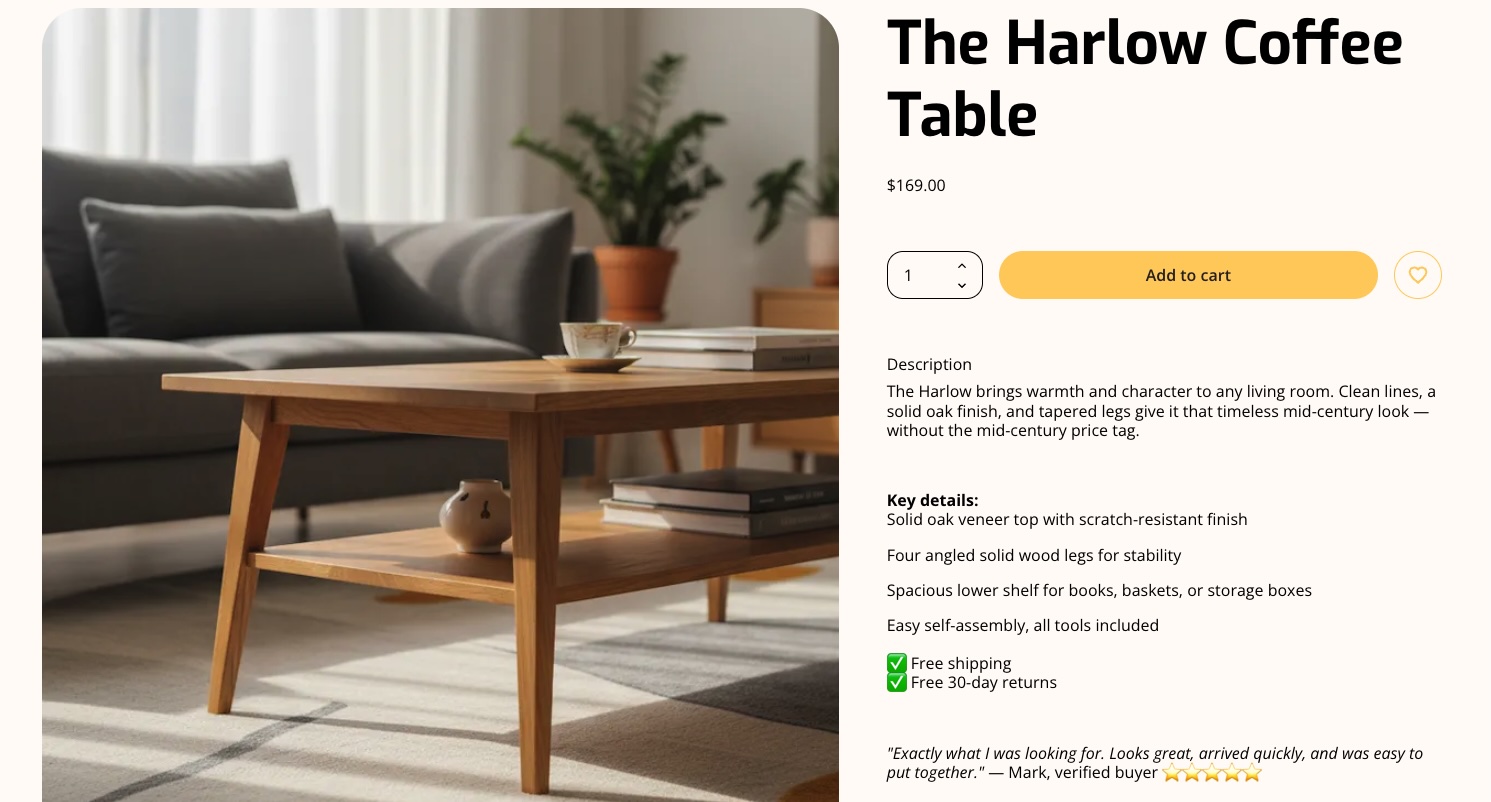
- Lead with the benefit, not the feature — what the customer gets, not what the product has
- Answer the obvious objections — size, fit, material, compatibility, whatever makes someone hesitate before buying your specific product
Photos:
- Natural light and a consistent background matter far more than equipment
- Show the product in context — at least one lifestyle shot alongside your standard product images. Don’t have professional product photos? SiteGround Ecommerce has built-in AI image generation that can help you turn those “meh” product shots into images that sell.
8. Launch and promote your store
A live store with no visitors is a pretty sad store. Getting those first, ever-important online sales requires a deliberate, if modest, push. Let’s examine how to make your online store promotion happen, even on a modest budget.
SEO basics
Ecommerce SEO (search engine optimization) is the long-term engine for free traffic. But it can start producing results faster than most people think if you do the fundamentals correctly from day one. Here are few tips to get your SEO right so that you show up in search and AI results:
- Use your target keywords naturally in product titles, descriptions, and page headings
- Write a unique meta title and description for every product
- Structure each page with clear headings that reflect how customers search — not just what you want to say about the product
Getting SEO for your product pages right from the start means every product you add builds on a solid foundation rather than needing to be retrofitted later.
Social media
It’s tempting to sign up for every platform in order to be everywhere, but really what matters most for social media marketing is showing up where your specific customers already spend time. Here are a few points to keep in mind:
- Choose your platform based on your product type — Instagram and Pinterest for visual products, Facebook groups and Reddit for niche communities, TikTok marketing for physical products with a story to tell. LinkedIn for professional services.
- Post consistently for 60–90 days before drawing conclusions about what’s working
- Lead with interest, not sales — behind-the-scenes, before/after, and customer stories consistently outperform “buy now” content
Email marketing
Email is the highest-ROI marketing channel available to a new seller — industry benchmarks put the average return at $36–$42 for every $1 spent. Even better: Unlike social followers, you own your list; and unlike paid ads, it compounds without ongoing cost.
To maximize the benefits of ecommerce email marketing:
- Start building your email list from day one — a signup form offering a small discount or early access is enough to get started
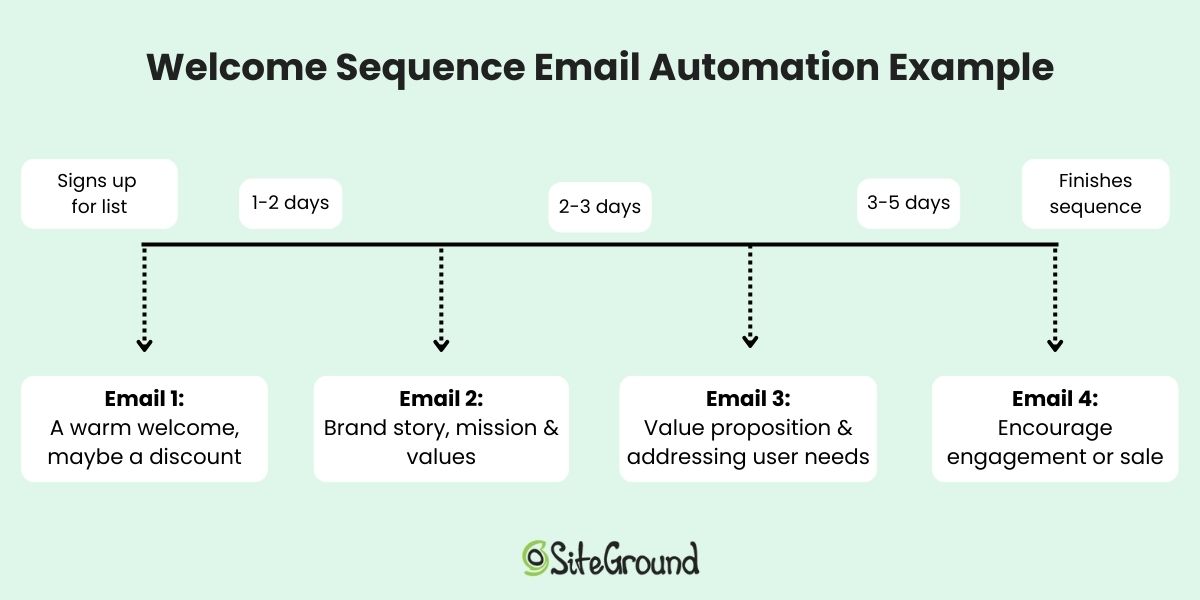
- Set up automated flows — welcome email, abandoned cart reminder, and lead nurturing sequences
- Add value — share useful content, early access to new products, or exclusive offers rather than leading every email with a hard sell
- Be consistent — choose a sending cadence and stick to it; irregular emails train your list to ignore you
Track performance and optimize
Set up Google Analytics or your platform’s built-in analytics from day one and check your digital marketing metrics weekly. The three numbers that matter most early on:
- Traffic sources — which channels are actually sending visitors to your store
- Conversion rate — total purchases divided by total visitors; below 1% usually signals a product presentation or trust problem
- Average order value — tells you whether free shipping thresholds or product bundles would meaningfully move your revenue
9. Manage orders and customer service with care
Your store’s reputation is built in the post-purchase customer experience as much as the pre-purchase one. The basics:
- Fulfill within your stated processing time — consistency matters more than speed
- Send tracking information as soon as it’s available
- Contact customers proactively if a delay occurs — most people are understanding if you communicate early
- Have a return policy published before your first sale — it’s a trust signal as much as a legal requirement
- Respond to support emails within 24 hours — providing excellent customer service means a fast, human response to problems or concerns
Extra tips for selling online successfully
Price for margin, not just competitiveness. Many first-time online sellers underprice because they’re focused on beating competitors rather than sustaining an online business. Your price needs to cover product cost, packaging, shipping, platform fees, your time, and then still leave a margin. Run the numbers before you launch, not after your first 50 orders when changing prices feels risky.
Launch with fewer products, not more. A focused catalog of three to five products is easier to market, easier to manage, and easier to optimize than a sprawling one. Once you see what’s working, you can add products based on demand.
Your network is your first audience. Before you spend a dollar on ads, tell every person you know about your store launch, and gather those emails for your list. Gather their initial customer feedback, then build outward from a base of real existing customers.
Collect reviews from the start. Social proof is the highest-converting element on most product pages, and the gap between zero reviews and ten is bigger than any gap after that. So don’t be shy about asking every buyer for a review. And don’t wait until you feel established; start asking from your very first sale.
Start selling online today
Thankfully, starting an online business no longer requires a technical background, a large budget, or months of preparation. You just need a clear product, a clear audience, and the right platform to bring it all together.
SiteGround Ecommerce is built for exactly this starting point: an all-in-one solution that handles hosting, store setup, and ecommerce features without requiring any code. You can go from blank slate to a fully functional store in a single day, and the tools to grow from there are built in from the start. Explore SiteGround Ecommerce and see how quickly you can get your first store live, and get that first sale.
[103]
FAQs about how to sell online
You can test the concept for free using platforms like Facebook Marketplace, Craigslist, or Etsy’s free listing tier, but running a serious online store involves some unavoidable costs. At minimum, you’ll pay for hosting and a domain (typically $50–$150/year combined) and payment processing fees on every sale (typically 2–3% per transaction). And while there’s no free way to own your own storefront, the most cost and time-effective approach is choosing a platform (like SiteGround Ecommerce) that bundles hosting, store builder, and ecommerce tools together, rather than sourcing and paying for each separately.
With the right platform, a fully functional, polished store can be live in a single day. The real variable is your platform choice. An intuitive, purpose-built ecommerce builder removes most of the technical friction, while a more complex setup can stretch what should be a straightforward process into weeks. Choose a platform that does the heavy lifting, and the only thing standing between you and launch is having your products, copy, and images ready to go.
goods, beauty and personal care products, and niche hobby items with passionate communities. Practically speaking, the better question is: what sells well for your specific niche and audience? A product with 1,000 passionate monthly searchers and low competition will outperform a high-volume product where you’re the 500th seller.
The most reliable path to kick start your ecommerce marketing, personal outreach to your existing network combined with a small social post. Tell people about your store, send a direct link, and make it easy to buy. Beyond your network, consider a small paid promotion ($20–$50) targeting your specific customer profile on the platform where they spend time. Most first-time sellers get their first sale within two weeks of a genuine, active launch push, not from passive traffic alone.