Your Go-To Guide for Lead Nurturing Emails (with Examples)

Picture a different kind of sales experience: one in which you walk into a store, and instead of a pushy salesperson trying to close a deal immediately, you’re greeted with helpful tips, personalized recommendations, and just the right amount of attention. You feel seen. And that’s exactly what lead nurturing emails do—minus the awkward small talk.

Lead nurturing emails help businesses build relationships with potential customers over time, offering the right kind of value at every step of their journey. Whether someone just discovered your brand or is on the verge of making a purchase, the right email at the right moment can make all the difference. 

This may sound easier said than done, so today we’ll walk you through everything you need to know to make it happen.

What Is a Lead Nurturing Email?

A lead nurturing email is a strategic message sent to potential customers to guide them through the buying process. Rather than pushing an immediate sale, these emails educate, engage, and build trust, ensuring leads stay interested and move closer to conversion.
Definition of a lead nurturing email

Think of it like dating: You wouldn’t propose on the first date (hopefully). Instead, you build a connection, earn trust, and show why you’re the right match. Lead nurturing emails work the same way by offering valuable content, addressing pain points, and keeping your brand top of mind.

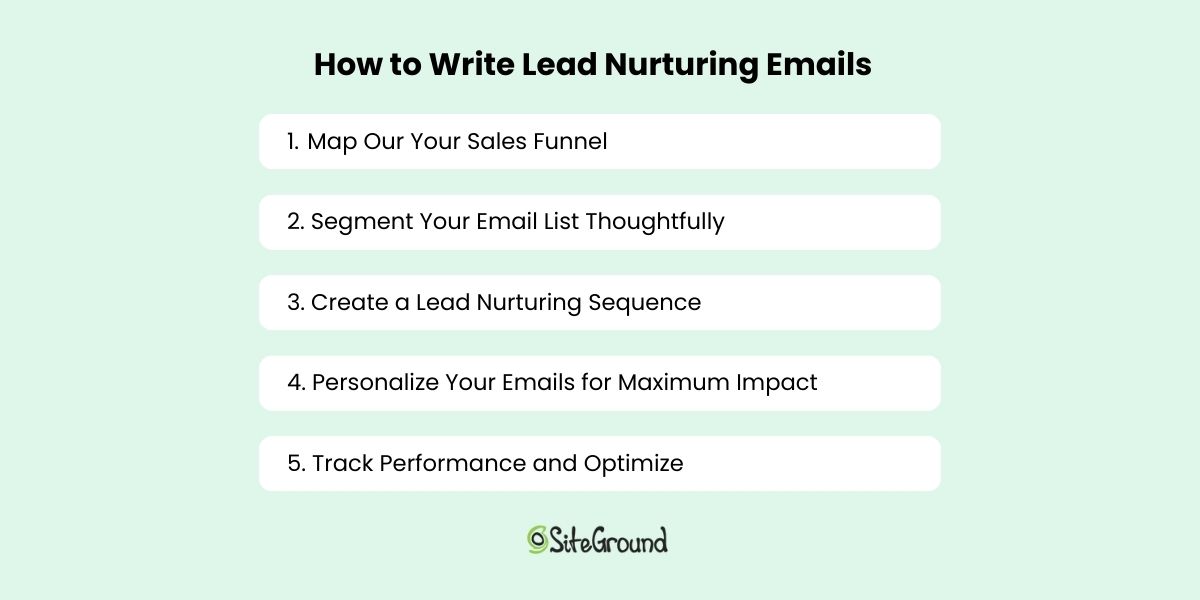
How to Write Lead Nurturing Emails

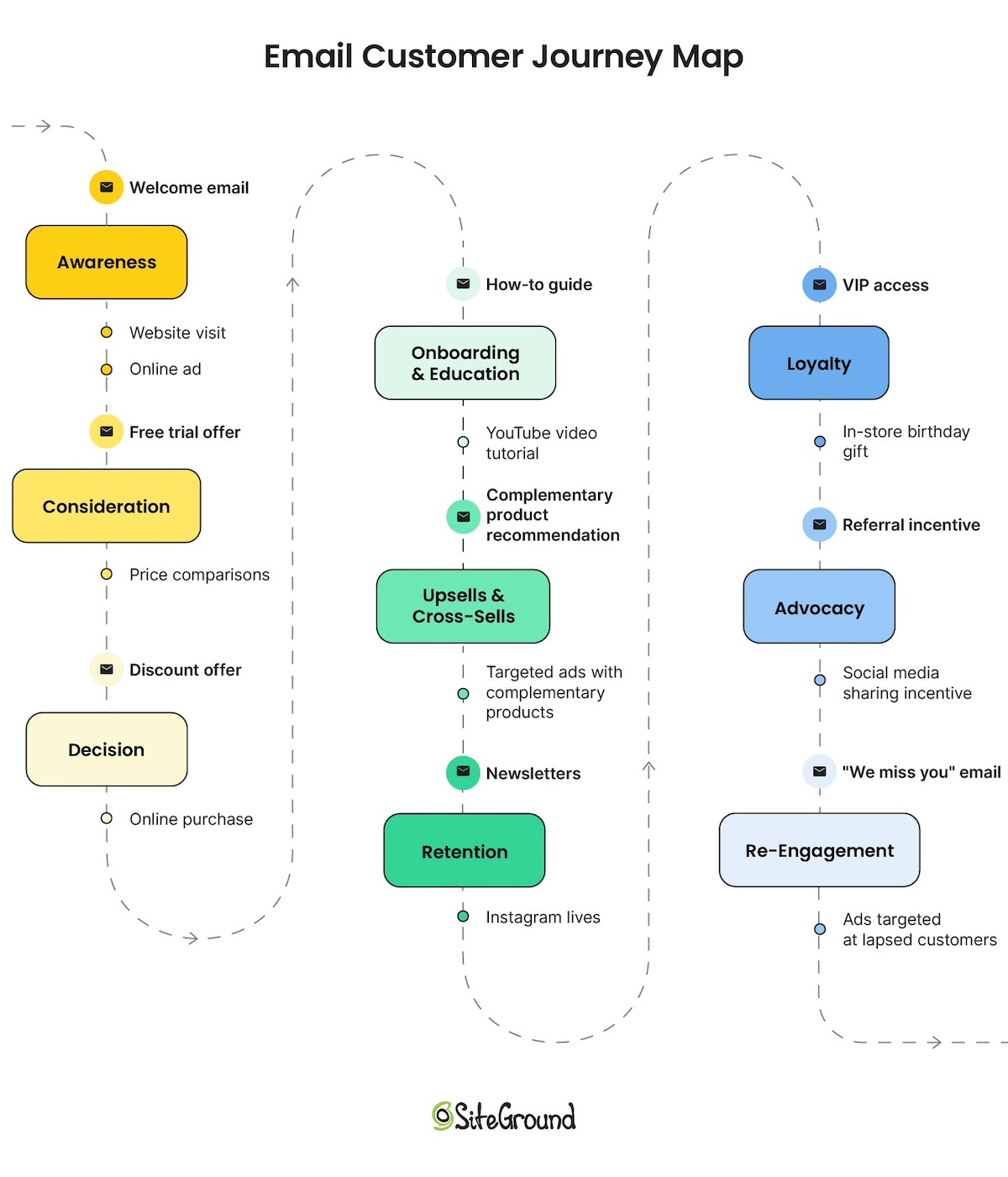
Lead nurturing emails form an important part of email marketing. They follow the email customer journey, ensuring that leads (that is, potential customers) receive the right information at the right time. So prior to creating high-impact lead nurturing emails, you need to understand how leads progress through your sales funnel and how each email fits into each stage. 

Let’s explore how to do email lead nurturing, step by step.

1. Map Out Your Sales Funnel

Before drafting a single word, map out your sales funnel and its email touch points—you’ll want to slot in one (or several!) emails at every stage. Indeed each stage requires a different approach—and a different message!

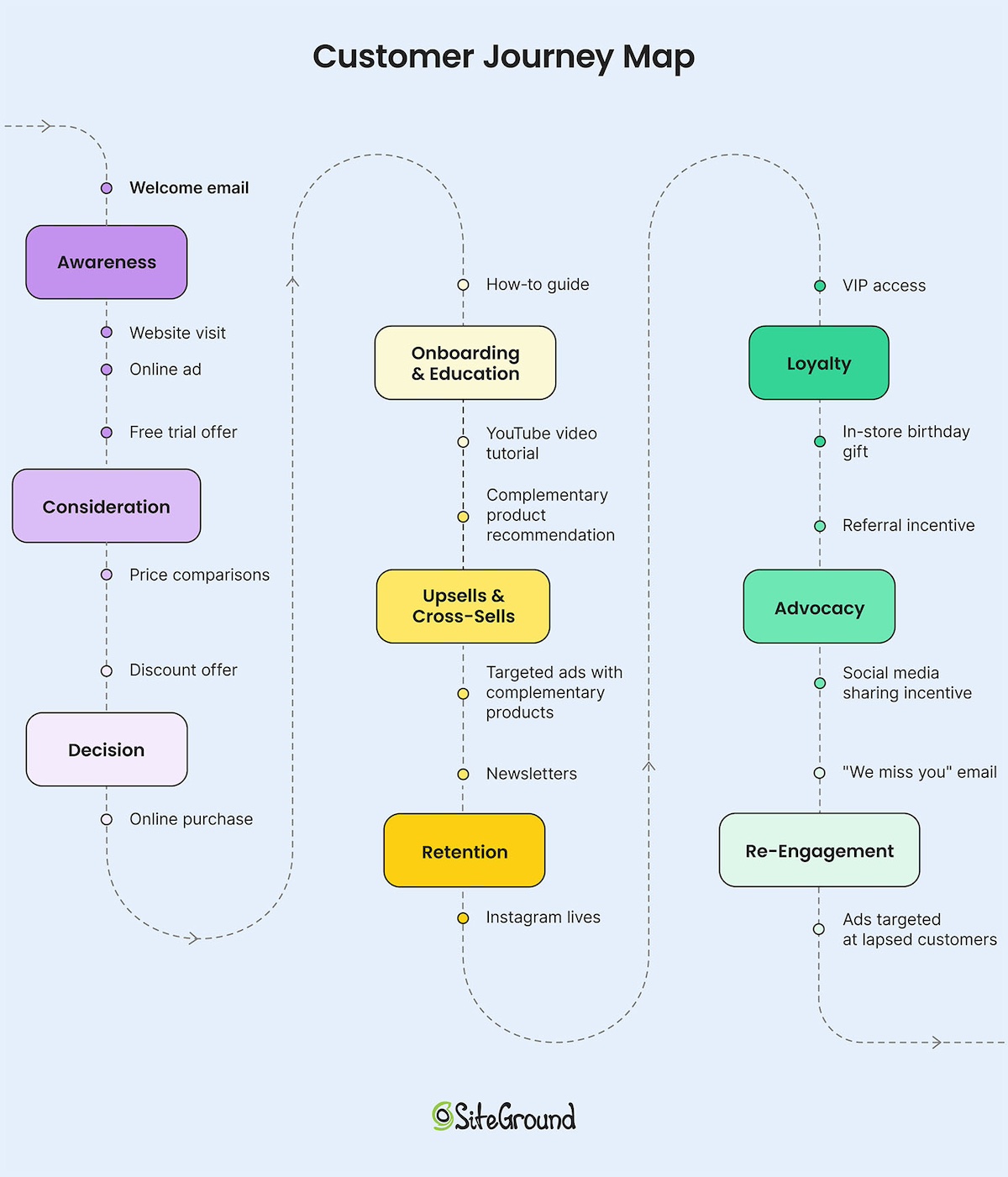
Consider these common email stages and examples based on the customer journey:

  • Awareness stage – Educate leads on their problem and introduce your brand. (Example: Welcome emails)
  • Consideration stage – Help them evaluate solutions and see why your product is the best fit. (Example: Product tutorials, case studies, comparison guides)
  • Decision stage – Nudge them toward a purchase with incentives or social proof. (Example: Discount offers, testimonials, abandoned cart reminders)
  • Retention and loyalty – Keep customers engaged and encourage repeat business. (Example: VIP offers, new product announcements, surveys)

Think about your customers and the journey they take from awareness to purchase and beyond, and then which lead nurturing emails you can send to them to nurture their interest and move them through each step. 

2. Segment Your Email List Thoughtfully

Assuming you’ve generated leads and built your email list, then the next important part of sending lead nurturing emails is to segment your list. This ensures each lead receives relevant content based on their interests, behavior, and position in the funnel—and it’s an essential part of keeping people moving through the funnel.

 Let’s examine how you might organize your leads, and how this might work in practice:

  • Acquisition source: Website sign-ups, webinar registrations, free resource downloads, landing pages, etc.
    • Example: If a lead downloaded an eBook on SEO, send a follow-up email with an SEO case study rather than a generic company introduction.
  • Behavioral data: Browsing history, email engagement, past purchases.
    • Example: If a lead frequently visits a product page but hasn’t purchased, send an email with customer testimonials or a limited-time discount.
  • Demographics: Industry, job title, company size.
    • Example: A small business owner might receive content about budget-friendly solutions, while an enterprise lead gets insights on scalability and integrations.

3. Create a Lead Nurturing Sequence

You’ve got a lead nurturing journey, and segments to target, and now you need to put it into action. One of the best ways to accomplish this is by implementing an email sequence. 

This basically entails sending a planned series of emails (discussed in step one) based on the recipient’s behavior, engagement, or stage in the customer journey (which we discussed in step 2). Each email is designed to provide value, build trust, and guide potential customers toward a decision, whether it’s making a purchase, signing up for a service, or taking another key action.

Manually managing a lead nurturing sequence is impractical, especially as your list grows. The good news is that many tools allow you to set up email automations. This ensures consistency, saves time, and allows you to scale your efforts effectively.
free email marketing course for beginners

4. Personalize Your Emails for Maximum Impact

Segmentation lays the groundwork, but personalization makes your emails truly engaging. It’s more than just adding a first name—it’s about making each message feel relevant to the individual.

Ways to personalize your emails:

  • Reference past interactions: Mention a resource they downloaded, a product they viewed, or an event they attended.
  • Use dynamic content: Customize email content based on location, preferences, or purchase history.
  • Tailor subject lines and CTAs: Adjust messaging based on where the lead is in their journey.

The more your emails feel like they were written for an individual rather than a mass audience, the more likely they are to resonate and drive action.

5. Track Performance and Optimize

Once your emails are live, monitor key email marketing metrics to see what’s working and what needs improvement. Important metrics include:

  • Open rates – Are your subject lines engaging? Consider implementing email subject line best practices to improve their performance.
  • Click-through rates (CTR) – Is your content relevant and compelling? Make your calls to action aren’t strong enough? Tweak for future emails and track the results.
  • Conversion rates – Are leads taking the desired action? Maybe people are clicking through from your email, but sales don’t reflect that. Make sure your emails, calls to action, and desired conversion all align, and that the process is smooth and intuitive.
  • Unsubscribe rates – Are you sending too many emails or missing the mark? If you notice more people drop off after a certain email, you might want to consider the cause behind that. Or if you notice a gradual decline, think about changing up your email frequency to see if that makes a difference. 

When in doubt, A/B test. That is, if you just can’t figure out the cause for a certain metric’s behavior (whether it’s increasing, decreasing or staying the same), then experiment with different subject lines, content formats, and CTAs to see how performance changes. Just remember this email marketing best practice: test one thing at a time so that you know exactly what is working and what isn’t. 
How to write lead nurturing emails

Types of Lead Nurturing Emails and Great Examples

Now that we’ve covered how lead nurturing emails work, let’s examine some of the different  types of emails you might send during this process. Some introduce your brand, others provide helpful resources, and a few give that final nudge to convert, among other objectives. Here’s a breakdown of the essential types of lead nurturing emails and how they keep potential customers engaged:

1. Welcome Emails – Make a Great First Impression

A welcome email is your chance to introduce your brand and set expectations. It should reinforce why the lead signed up, provide helpful information, and encourage engagement. This is a great opportunity to share your brand’s mission, direct them to key resources (such as blog posts or product pages), and invite them to follow you on social media. A well-crafted welcome email helps establish a positive relationship from the start.
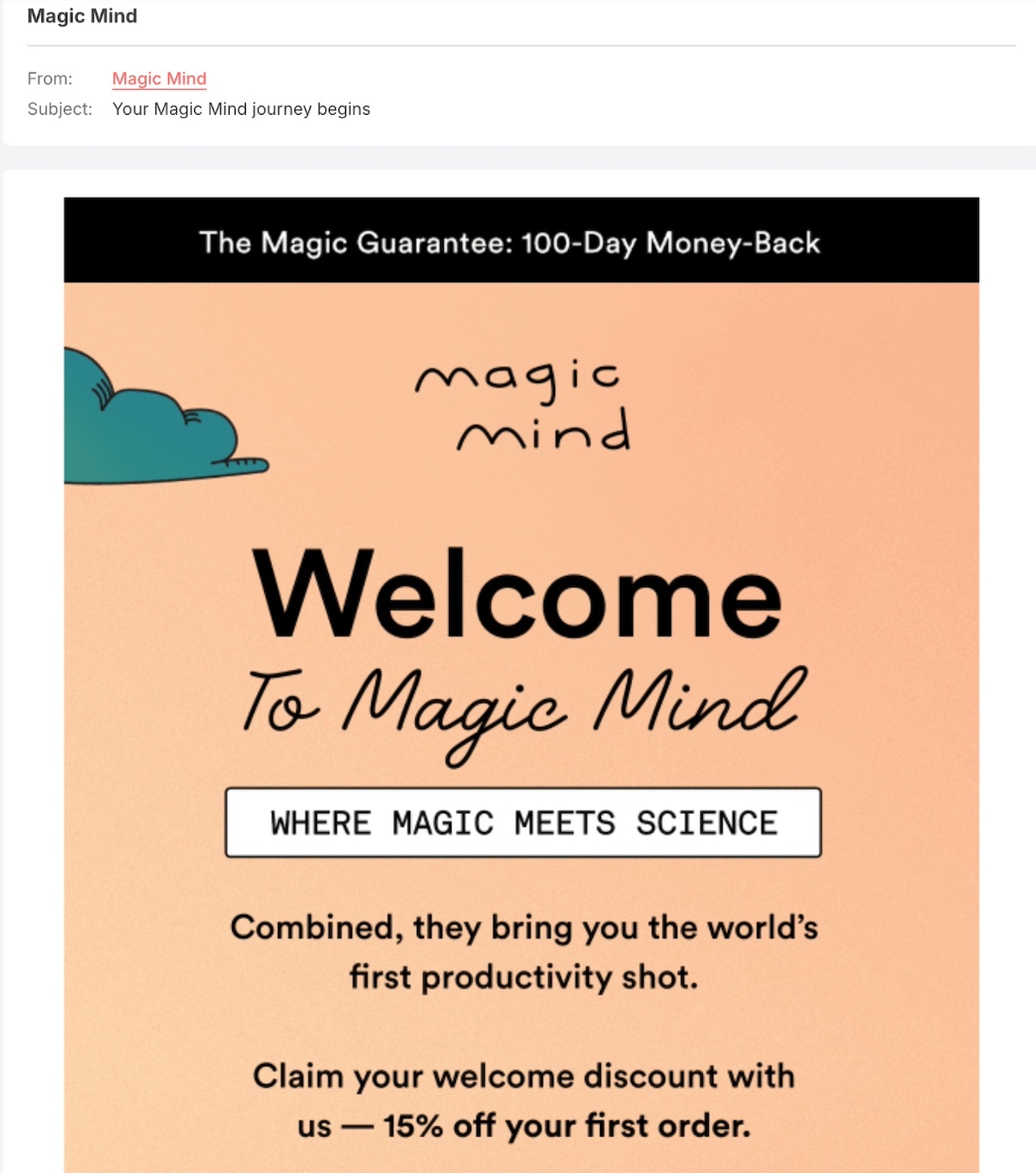
Lead nurturing welcome email example

The above lead nurturing email example warmly welcomes recipients as their “journey begins” and adds the bonus of 15% off, which is always a nice incentive for new subscribers to convert straight away.
SiteGround email marketing welcome emails

2. Discount Offer Emails – A Gentle Push Toward Conversion

Sometimes, a little incentive is all it takes to turn a hesitant lead into a paying customer. A discount offer email provides potential buyers with a time-sensitive promotion, making it more tempting to take action. These email campaigns work especially well for first-time buyers, seasonal promotions, or re-engaging inactive leads. To maximize effectiveness, highlight the savings clearly and create a sense of urgency. You may even wish to include this offer in your welcome email in order to encourage the purchase right away.

This lead nurturing email campaign example from Crate&Barrel incorporates a couple top email marketing tips: the conversion-driving discount, as well as the classic “sense of urgency.” Throw in the fact that the discount is for furniture faves, and there’s a good chance the recipient will be more likely to move along to the next step in the lead nurturing process.
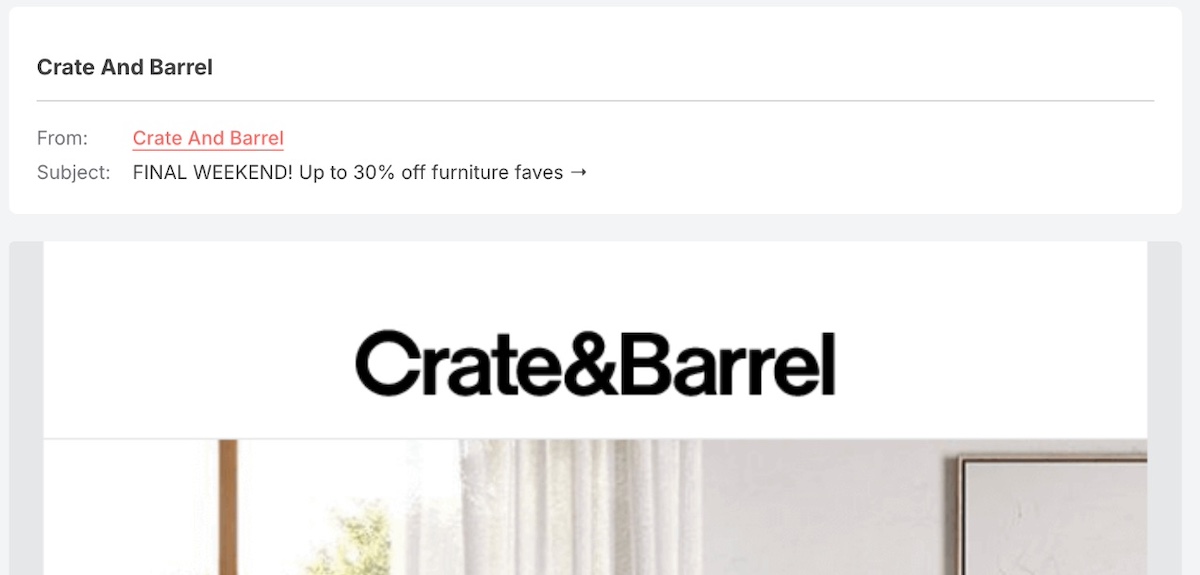
Lead nurturing discount email example

3. Product Tutorial Emails – Show, Don’t Just Tell

If a lead has shown interest in your product but hasn’t purchased it yet, a product tutorial email can help them see the value firsthand. These emails provide step-by-step guides, feature breakdowns, or video demonstrations to showcase how the product works and why it’s beneficial. For service-based businesses, these emails might include FAQs, onboarding instructions, or use case examples to help potential customers feel more confident in their decision. 

On the other hand, for those who have already made a purchase, a product tutorial email helps them maximize the value of their new item—increasing both satisfaction and the likelihood of repeat business. It also keeps them engaged with the brand, strengthening the relationship and driving long-term loyalty and conversions.

The below coffee-making tutorial email is a great lead nurturing email example of helping the customer better learn how to use and enjoy the product more, and hopefully continue to buy more as well.
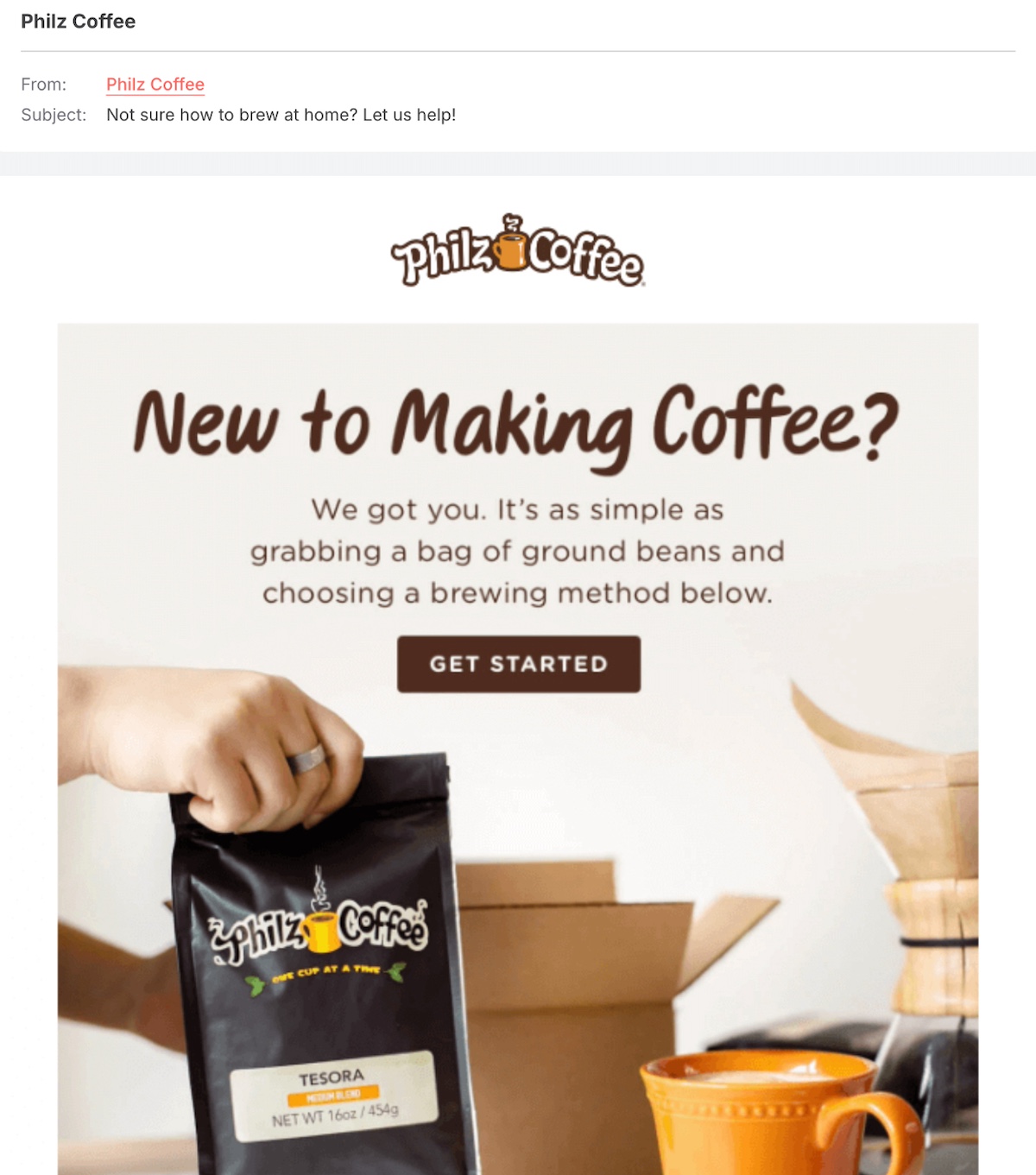
How to email emails for lead nurturing

4. Personalized Recommendation Emails – The Right Fit at the Right Time

Based on a lead’s behavior—such as past interactions, browsing history, or perhaps quiz results—personalized recommendation emails suggest relevant products, services, or content. These emails create a more custom experience, making the recipient feel understood while increasing the chances of conversion. The more relevant the recommendation, the more likely the lead is to engage. We’ll discuss how to make this happen shortly.

In the following lead nurturing email example, Audible tackles personalization from a few different angles: they address the lead by name, they add in the shiny new credit, and then follow with a personal book recommendation.
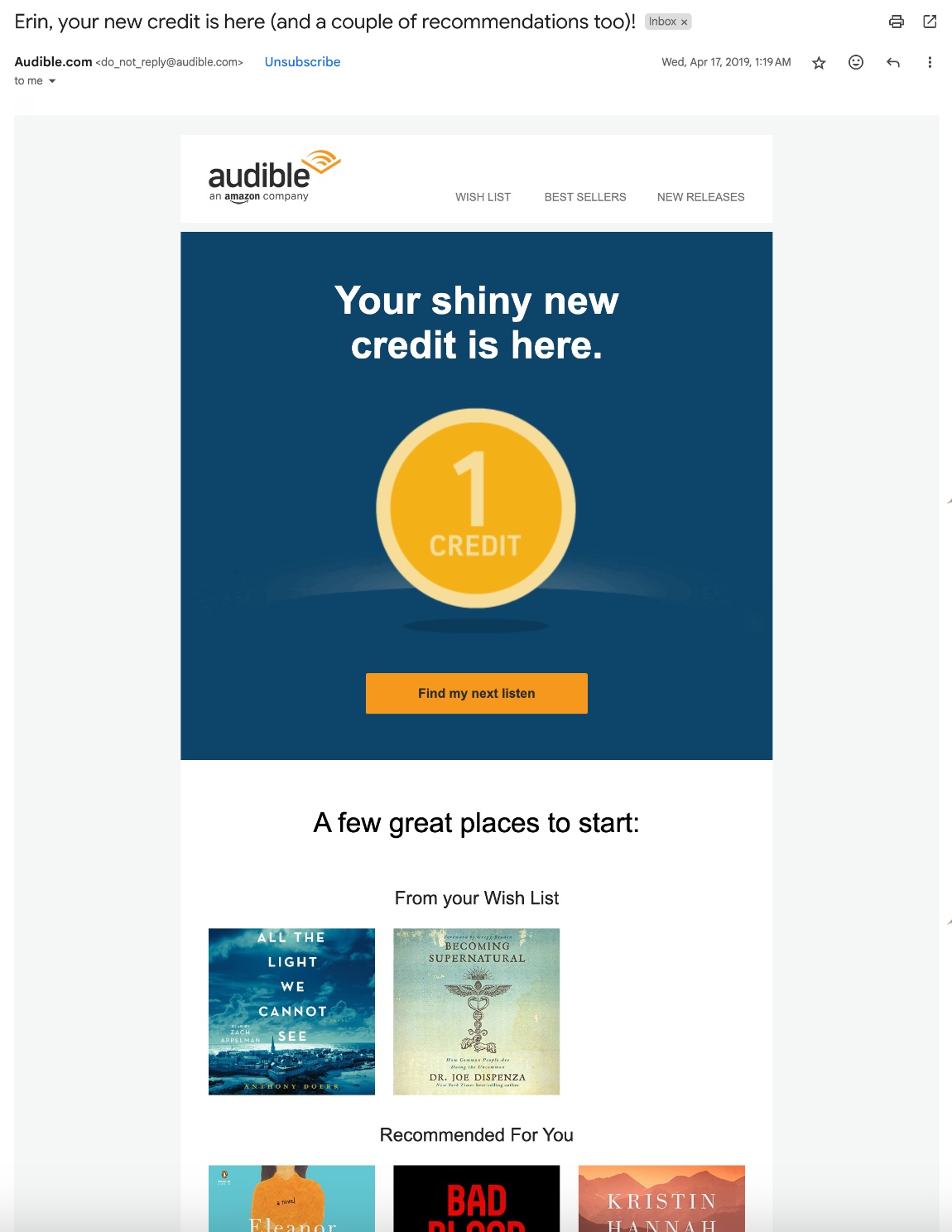
Personalized lead nurturing email example

5. New Product Announcement Emails – Keep Leads in the Loop

When you launch a new product or feature, announcing it through email is a great way to generate excitement and momentum. These email campaigns can highlight key benefits, share exclusive first looks, or invite leads to pre-order or join a waitlist. Even if a lead isn’t ready to buy, keeping them informed strengthens brand awareness and ensures they think of your company when the time is right.

The below email newsletter example teases the launch of a new Starbucks line of drinks. The colorful image evokes summer and delivers on the idea of something refreshing—and it hopefully inspires the recipient to stop by a shop for an icy drink.
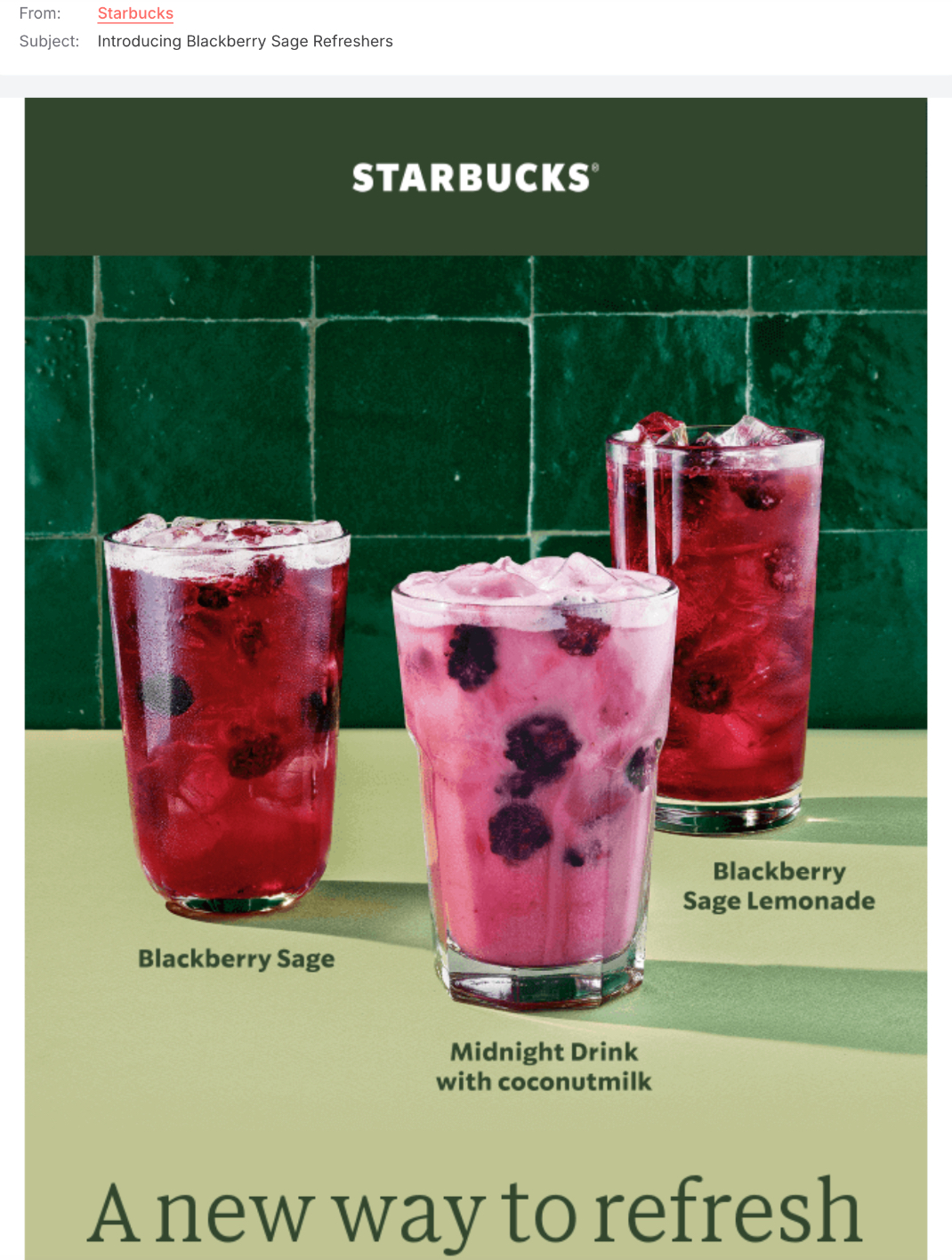
product launch email example for lead nurturing

6. B2B Lead Nurturing Emails – Build Trust and Drive Conversions

B2B lead nurturing emails share similarities with other marketing emails we’re discussing here but have a key difference: they involve a longer sales cycle due to the nature of selling to companies rather than individual buyers. With multiple decision-makers involved, these emails need to nurture relationships and provide valuable insights, case studies, and industry expertise to guide potential clients toward informed decisions.

Unlike consumer-focused emails that often highlight limited-time offers or impulse-driven purchases, B2B nurturing emails take a strategic, trust-building approach. This makes them especially effective for SaaS companies, professional services, and high-ticket B2B sales where buyers need ongoing engagement before committing.

The email below is a prime example of B2B lead nurturing best practices. It delivers valuable, industry-specific insights that establish Zendesk as a trusted authority in the customer experience (CX) space. By featuring interviews with CX leaders and sharing unique perspectives, Zendesk strengthens its credibility, builds trust with subscribers, and strategically guides leads further down the nurturing path.

B2B lead nurturing email example

7. Exclusive & VIP Access Emails – Make Them Feel Special

People love feeling like insiders, and exclusive access emails tap into that desire. These emails invite leads to be the first to try a product, join a beta test, or get early access to a sale. By offering something not available to the general public, you create a sense of exclusivity and urgency that encourages engagement. This strategy works particularly well for luxury brands, loyalty programs, and membership-based businesses.

This lead nurturing email campaign from Organics Ocean is a good example of offering early access with exclusive savings. Insider perks abound, making it hard to resist in the lead up to Black Friday.
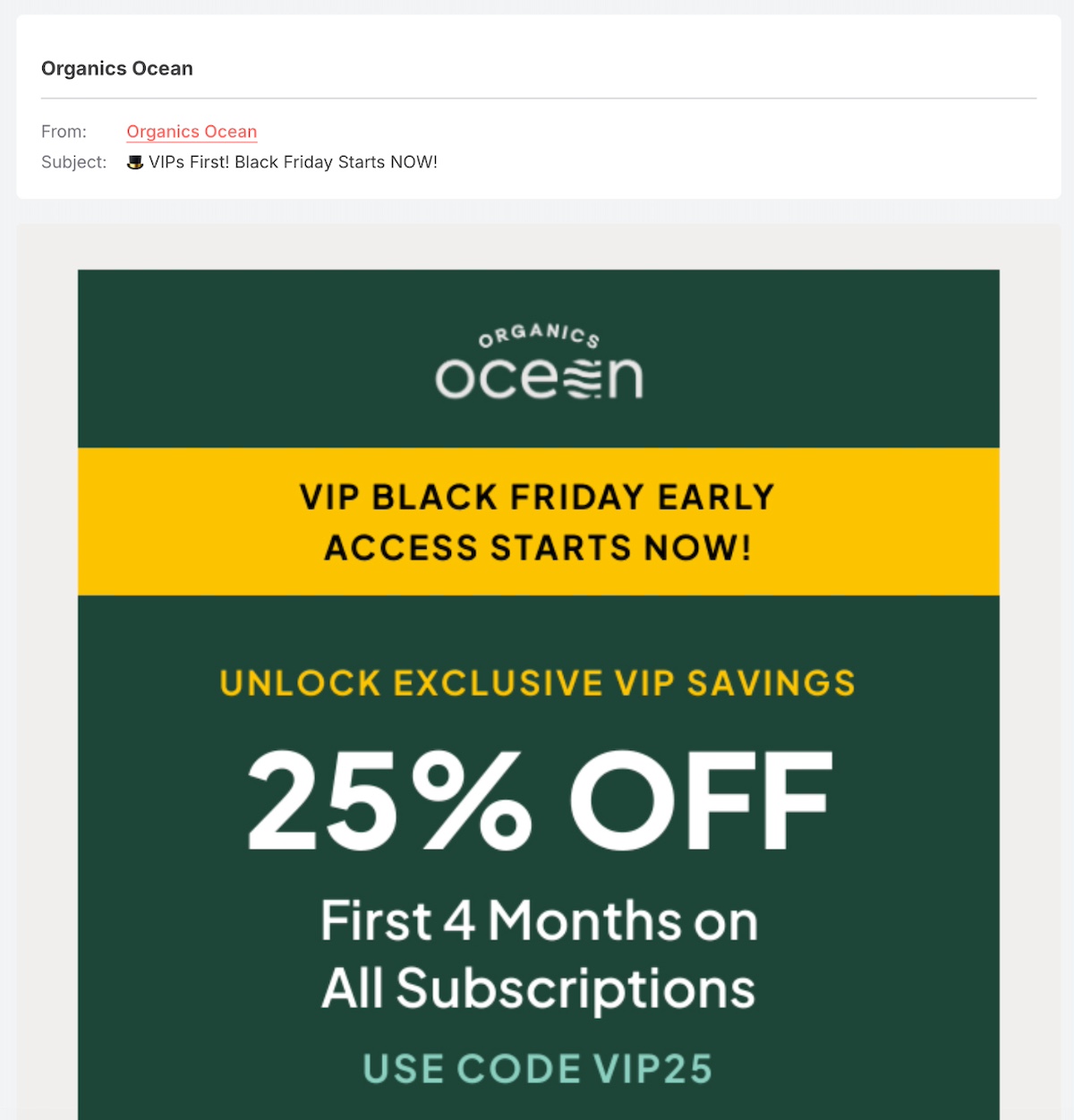
VIP access email example for lead nurturing

8. Survey Emails – Engage and Learn from Your Leads

Asking for feedback not only helps you improve your offerings but also shows leads that their opinions matter. A survey email encourages potential customers to share their thoughts, preferences, or experiences. Whether you’re seeking input on new product ideas, customer pain points, or overall brand experience, these emails create a two-way conversation that fosters engagement and brand loyalty.

We like how the below lead nurturing email example has a playful and friendly tone by saying “it’s your turn to do the talking,” but it also throws in an incentive: a free machine. Customers feel heard and rewarded, which are a couple of the best ways to nurture leads on their path to conversion.
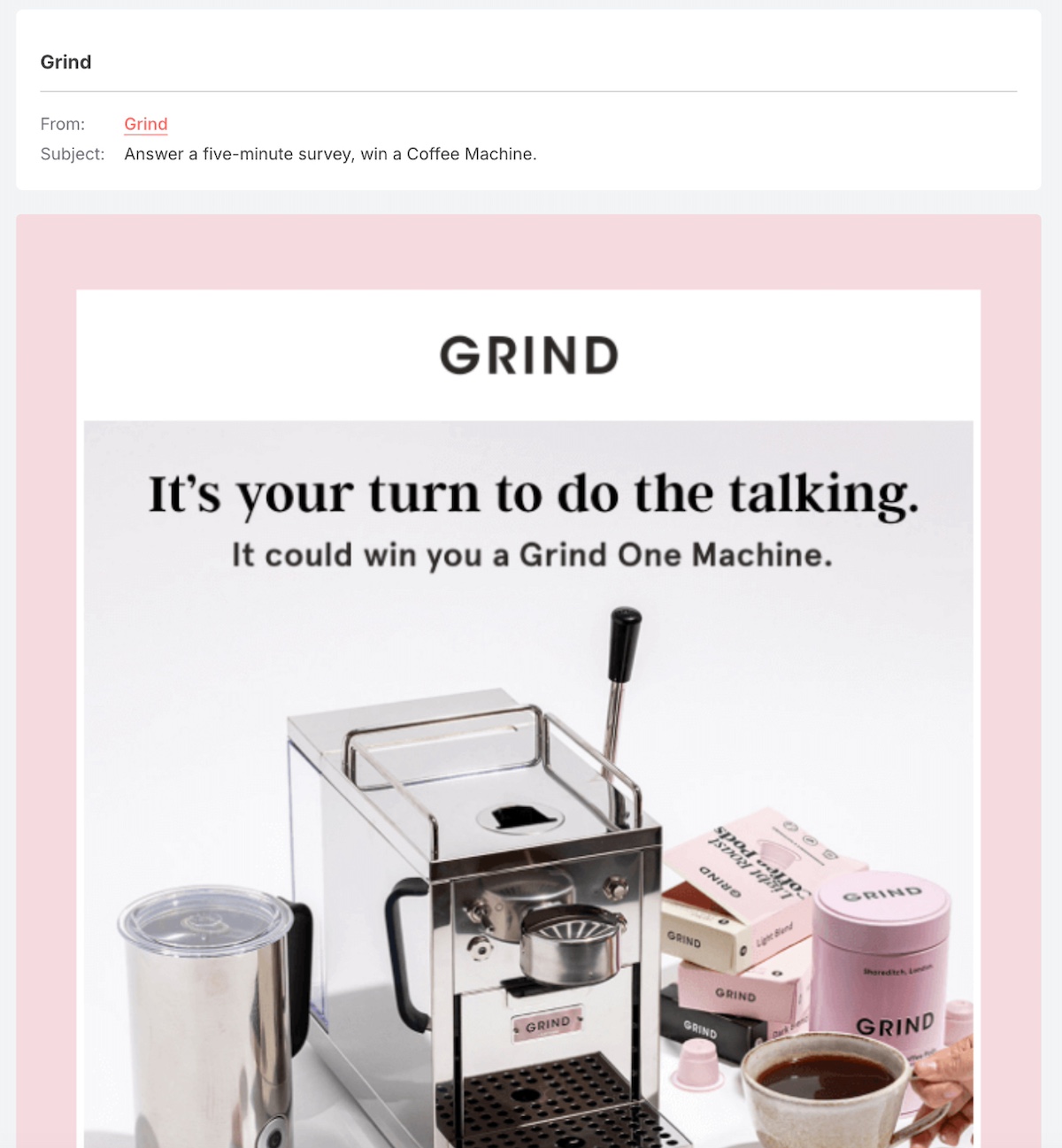
lead nurturing email example for a survey

9. Abandoned Cart Emails – The Gentle Reminder

Leads often get distracted or hesitate before making a purchase. Abandoned cart emails serve as a friendly reminder, encouraging them to complete their transaction. These emails can include a recap of the items left behind, highlight product benefits, and even offer an incentive (like free shipping or a small discount) to motivate action.

The below email example entices the potential buyer to come back and complete the purchase by offering 15% off. So if the recipient was on the fence, this extra discount might help seal the deal.
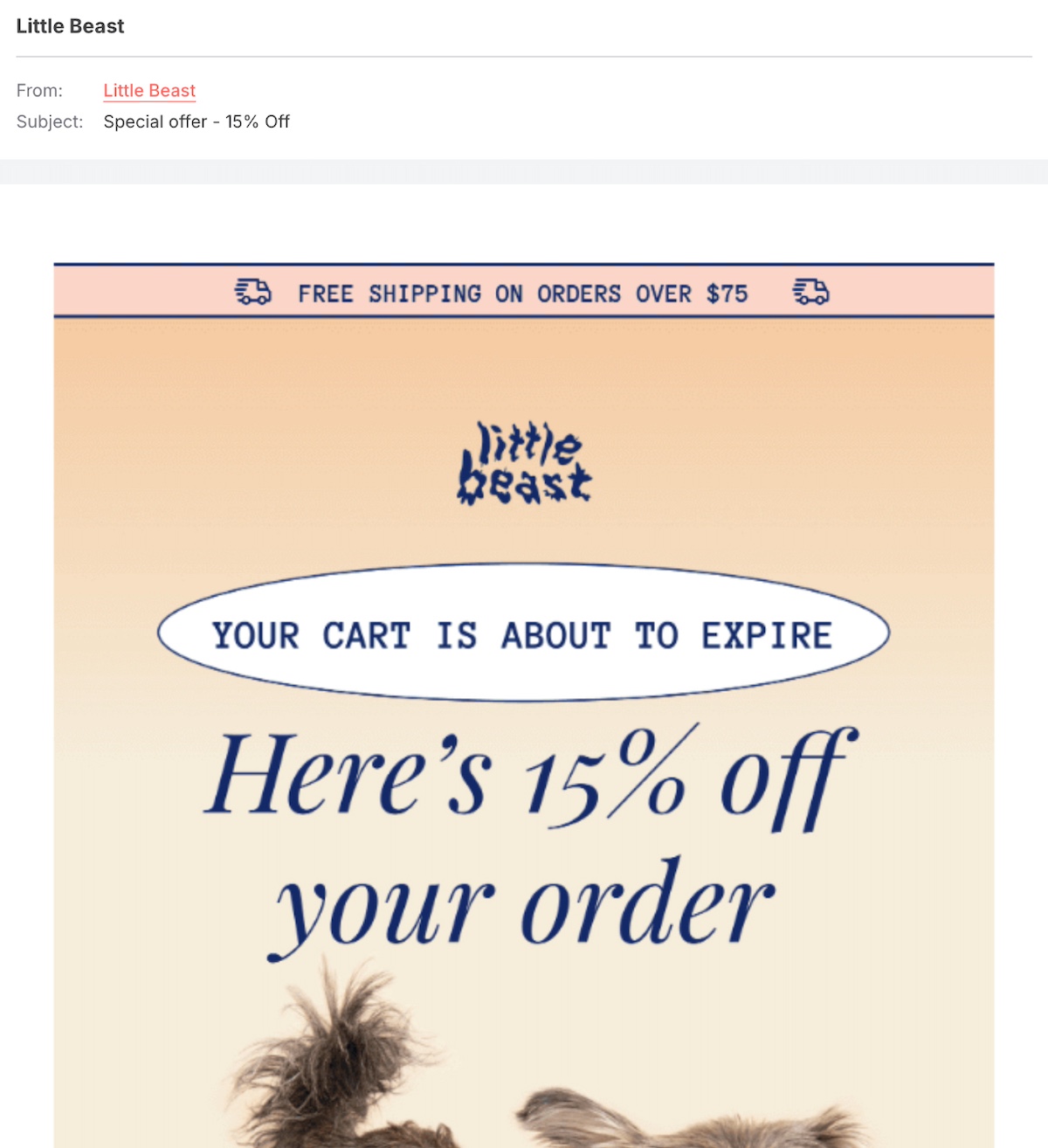
abandoned cart email example for lead nurturing

10. Win-Back Emails – Reignite Their Interest

Not every lead converts right away, and some may disengage over time. Win-back emails—or re-engagement emails, as they are often called—are designed to re-engage cold leads and remind them why they were interested in your brand in the first place. These emails can highlight recent updates, offer an exclusive deal, or simply check in with a friendly message. By making an effort to reconnect, you increase the chances of bringing inactive leads back into the sales funnel.

Below, Venmo’s lead nurturing email taps into user FOMO in hopes that they’ll want to update their app and see what’s new. With a scannable QR code, this is a great example of how to make moving to the next step extra easy.
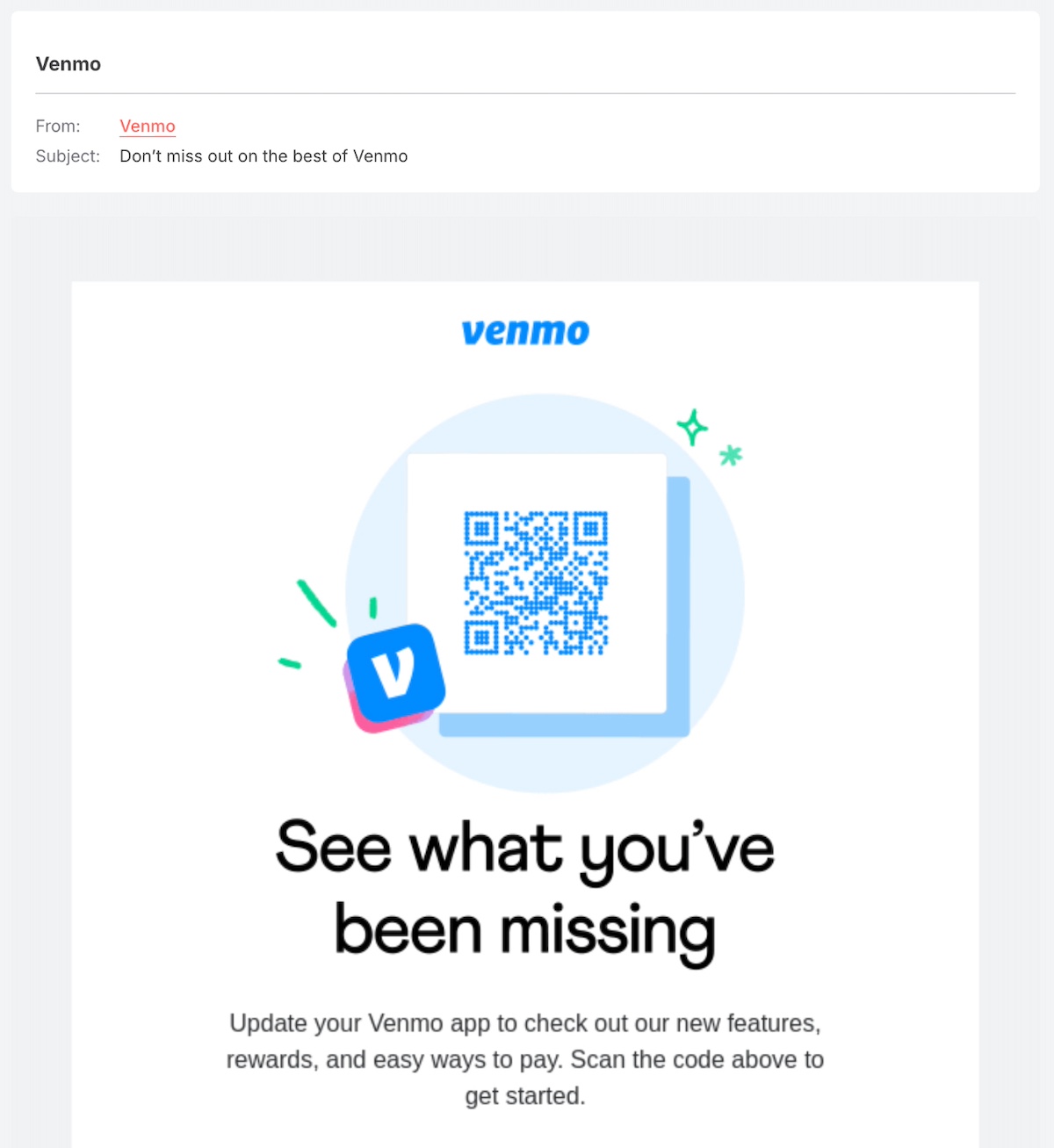
win back email example for lead nurturing

The Future of Your Email Marketing Lead Nurturing

Lead nurturing is an ongoing process, not a one-time strategy. As technology advances, automation and AI will make it easier to personalize emails and predict customer behavior. But no matter how sophisticated your tools become, the key remains the same: send relevant, timely, and valuable emails that guide leads toward a decision.

Refine your approach, track what works, and keep your audience at the center of your strategy. The more intentional you are, the more effective your email marketing will be.
create a successful email marketing campaign with SiteGround

The Ultimate Guide to ChatGPT Prompts for Marketing

Abstract image of ChatGPT prompts of marketing

Great marketing doesn’t have to come from a big-budget team or a decade of experience. With the power of ChatGPT, anyone—whether you run a small family business or are part of a growing brand—can create marketing that feels polished, engaging, and effective. The secret to success? Mastering ChatGPT prompts for marketing. By learning how to prompt the tool effectively, you can tap into its full potential and craft everything from attention-grabbing social media posts to strategic email campaigns. 

In this guide, we’ll reveal some of the most impactful and creative ways to use ChatGPT for marketing, and also show you how to craft the perfect prompts. Ready to elevate your marketing game? We’ve got you covered with ideas and tips to make ChatGPT prompts for marketing work for you.

[44]

What Is a ChatGPT Prompt for Marketing?

A ChatGPT prompt for marketing is a specific instruction you give to ChatGPT to generate marketing-related content, such as ad copy, social media posts, blog articles, email campaigns, or strategy ideas. When used effectively, ChatGPT marketing prompts can help you streamline your efforts, create more content in less time, and enhance the quality and effectiveness of your campaigns—helping you market smarter, faster, and at scale.

The Importance of a Good ChatGPT Marketing Prompt

The key here, though, is the quality of those prompts. The best ChatGPT prompts for marketing can make all the difference when it comes to getting results that truly benefit your efforts. By crafting a clear, detailed, and focused prompt, you set the AI up to provide high-quality content that speaks to your audience, reflects your brand voice, and aligns with your marketing strategy. Long story short: it saves you time and improves your results.

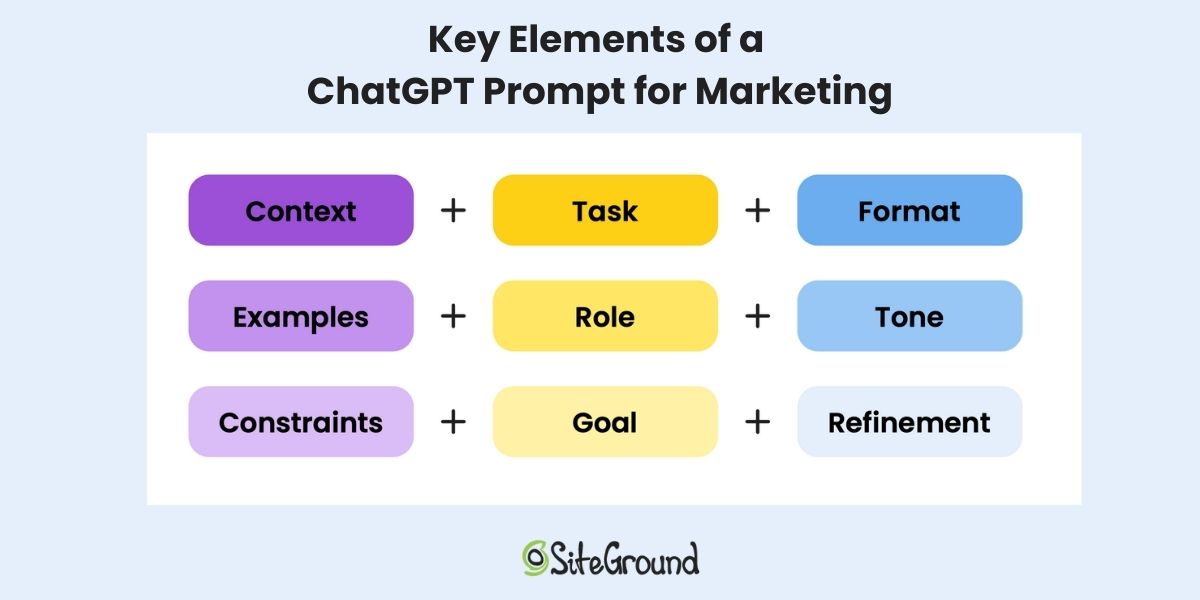
Key elements of a ChatGPT prompt for marketing

To get the most out of AI, structure your ChatGPT prompts for marketing by using a formula that includes certain key elements for clarity and precision. Here are the most important elements to consider as you develop your prompt formula:

  • Context – Provide background information about your brand, audience, or campaign to give ChatGPT a clear understanding.
  • Task – Clearly state what you need, whether it’s a blog post, ad copy, social media captions, or email subject line ideas.
  • Format – Specify how the output should be structured—bullet points, paragraphs, headlines, or even a script.
  • Examples – Share samples of the style, tone, or structure you want ChatGPT to follow for consistency.
  • Role – Assign a perspective, such as “act as a digital marketing strategist” or “write like a social media expert.”
  • Tone – Set the voice—professional, conversational, witty, persuasive—so the response aligns with your brand.
  • Constraints – Define word count, key phrases, or any specific requirements to keep the output focused.
  • Goal – Clarify the purpose of the content, whether it’s increasing engagement, driving sales, or educating your audience.
  • Refinement – Adjust and iterate based on ChatGPT’s responses to fine-tune the results.

If you follow this structure, you’ll generate more accurate and effective content for your marketing needs—and more quickly.

ChatGPT Prompts for Website Content

Now that we’ve got a handle on the basics, let’s take a journey through all the most important ways ChatGPT prompts can help you with your marketing—starting with the ever-important website. It’s your brand’s home base, and it’s where first impressions are made, customers are won over, and the sales hopefully come rolling in. 

Every page should work hard for you, but it can be hard to know how to make this happen. That’s where AI can really hook you up, helping you clarify your messaging, craft thoughtful copy, and fuel your blog with content that connects. 

Here are a few ways to really extract the most out of your ChatGPT prompts for website content:

1. Define Your Unique Value Proposition (UVP)

Before you start creating your website, you’ve got to get your UVP dialed, because it’s the core reason customers will choose you over competitors. And, if you’re struggling with how to define yours, AI can help.

Provide details about your business—who you serve, what problem you solve, and what makes you different—and get crystal-clear UVP suggestions that instantly communicate your value. You can use the UVP as a foundation for website messaging, as well as in marketing materials, and even in ad copy. 

Here’s a good example of what a UVP prompt might look like: 

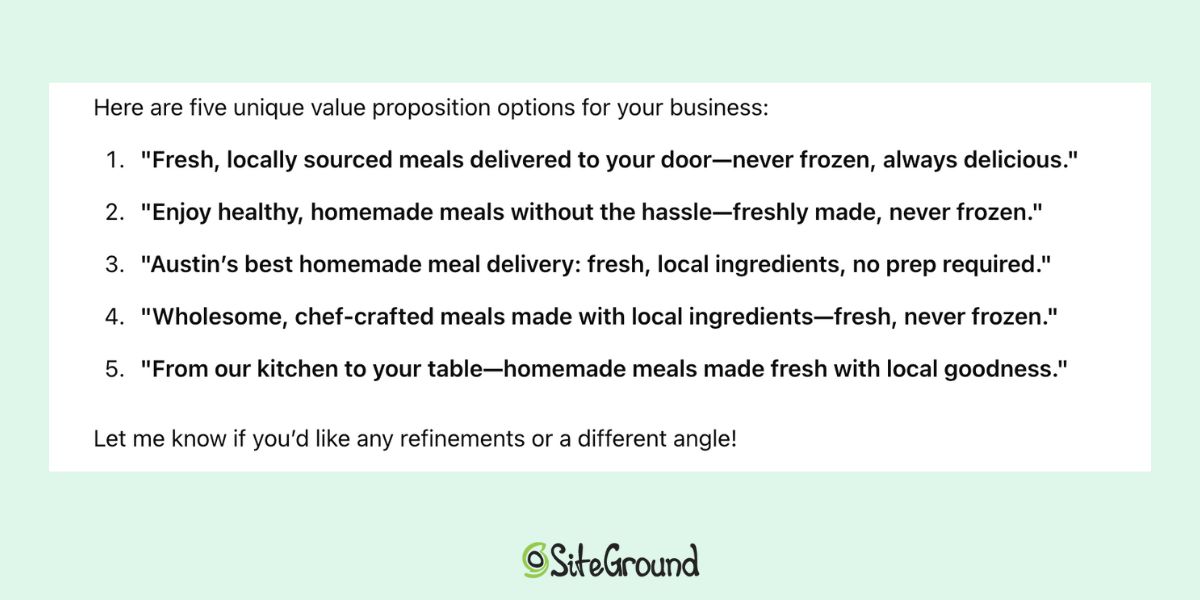
“I need help crafting a unique value proposition for my business. We are a small business in Austin, Texas, that offers homemade food delivery that helps busy professionals and families enjoy fresh, healthy, and comforting meals without the hassle of cooking. Our main differentiator is that our meals are made from locally sourced ingredients and delivered fresh, never frozen. Please generate five UVP options that are concise, clear, and compelling.”

ChatGPT marketing response for a unique value proposition

Pro tip: As is the case with all of these prompts, if you don’t like the options ChatGPT gives you, simply tell it why and ask it to go back to the drawing board. Just keep giving it feedback until you receive the perfect content.

2. Nail Your Web Page Copy

Every page on your website has a job to do—maybe it’s to inform potential customers about your mission, or perhaps it’s to provide contact information, or, of course, to close a big sale. So you’ve got to get the copy just right.

So, let’s say you want to create an About page that really conveys your story and message. Just share your brand story, key facts, and the tone of voice you want. AI can generate polished copy that captures your personality and resonates with your audience. 

“I need an engaging About page for my homemade food delivery service. Our story started with two sisters who had a passion for cooking and a desire to bring fresh, homemade meals to busy professionals and families. We use locally sourced ingredients, never freeze our meals, and focus on delivering both convenience and comfort. Key facts to include: we started in 2020, it’s a family-run business, and we offer customizable meal plans. The tone should be warm, inviting, and a little personal—like a friend sharing a home-cooked meal. Please craft a compelling About page—about 300 words—that connects with our audience.”

3. Keep Your Blog Fresh and Relevant

A well-maintained blog builds trust, increases SEO, and keeps your audience interested (in part because you always have content to share and repurpose!). But coming up with ideas and writing consistently can be a real pain. AI makes it easier.

Get help brainstorming topics, outlining posts, crafting introductions, and fine-tuning headlines. Have a specific style in mind? Share an example, and AI can match the tone and structure. Notice the precision of the below example, which includes the context, task, goal, format, tone, and even an example for style.”

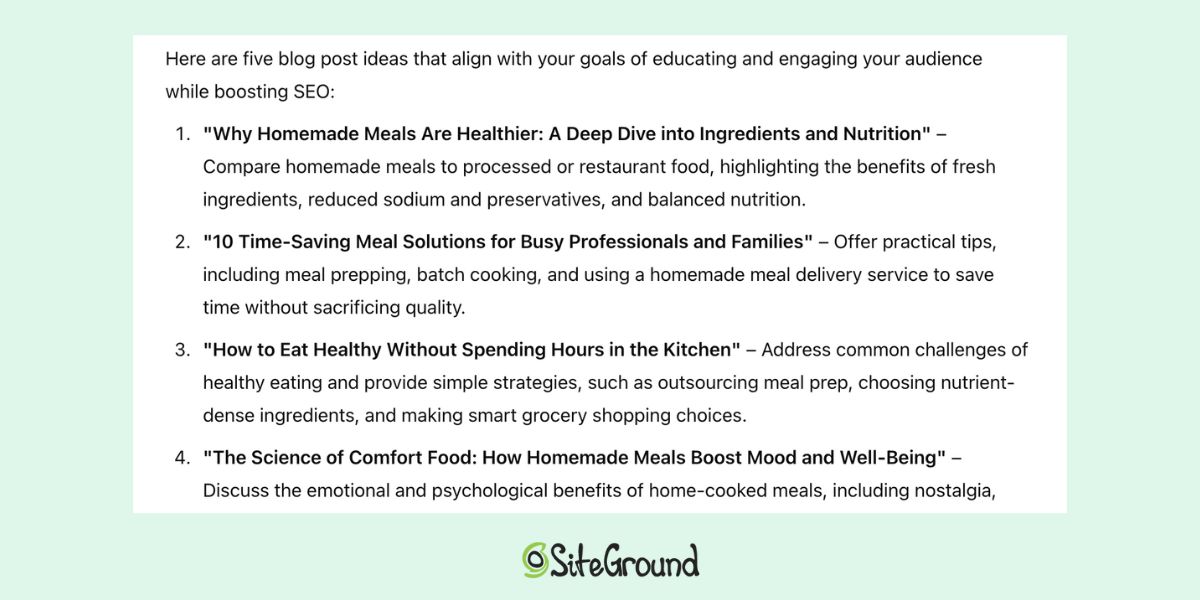
“I need help generating blog post ideas for my homemade food delivery service. The goal is to educate and engage my audience while boosting SEO. Topics should focus on healthy eating, the benefits of homemade meals, and time-saving meal solutions. Please suggest five blog post ideas.”

ChatGPT marketing response for blog post ideas

Of these five ideas, you can narrow in on one that you like, and then just ask ChatGPT to elaborate on the topic by giving you an outline.

Please help me create a blog post outline for the topic, “”How to Eat Healthy Without Spending Hours in the Kitchen.” I want the post to be around 1,000 words and for the tone to be friendly, informative, and approachable—similar to Bon Appétit’s blog style, which I’m linking below.”

From refining your brand message to building your content, AI is the secret weapon for a website that works harder for your business—and makes your life a whole heck of a lot easier.

ChatGPT Prompts for Marketing Campaigns

Running a marketing campaign, never mind a successful one, can easily feel out of reach. Where does one start? What if you only have a small budget? And—eh hem—no marketing skills? More good news here: ChatGPT prompts for marketing can simplify the entire process.

1. Develop a Marketing Plan

First thing’s first. When starting out, it helps to have a clear strategy in place—but maybe you’re not even sure about that! Whether you’re trying to increase website traffic, or promote a new product, ChatGPT can help guide you with actionable strategies that fit your precise needs and skillset.

To make that happen, we’ll need to return to the trusty ChatGPT prompt, complete with all the essentials: the context, task, goals, restraints (like your budget), etc. You can even specify the format you’d prefer—like a bulleted list or a table—to make the output more digestible and actionable.

Here’s an example of what this might look like: 

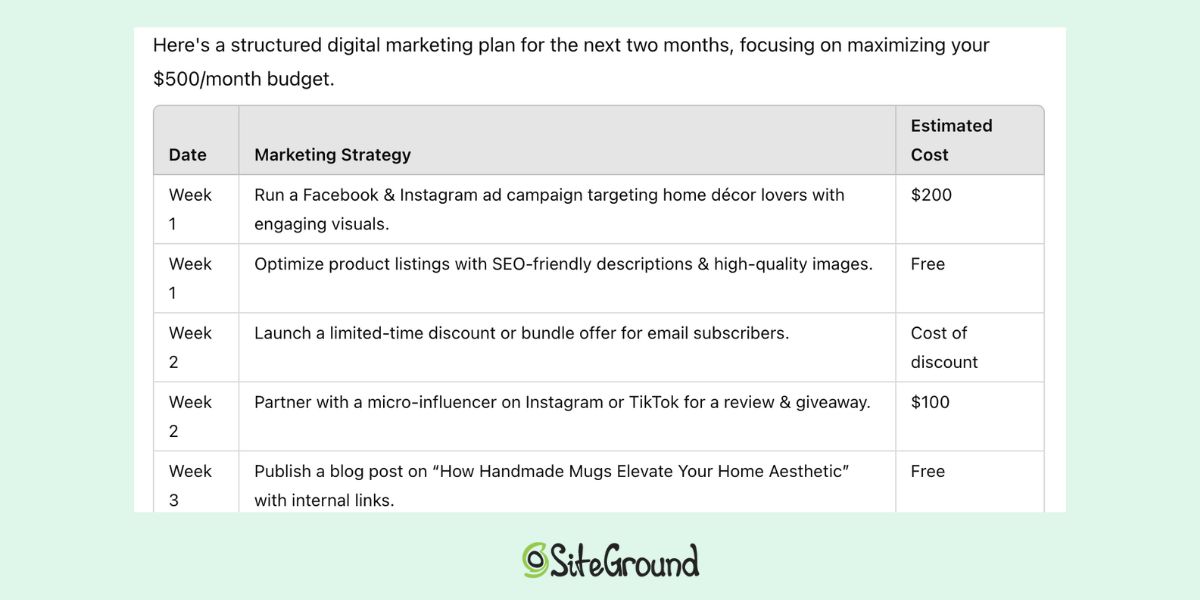
“I run an online store selling handmade ceramic mugs. My target audience is men and women in their late 20s to early 40s who love unique home décor. I want to increase traffic to my site and boost sales with a $500 per month marketing budget. Can you suggest 5-10 digital marketing strategies I could implement over the next two months and put it in a spreadsheet with dates?”

ChatGPT marketing response for a marketing plan

By providing ChatGPT with the most pertinent details, you’ll get back a list of marketing strategies designed to meet your goals.

2. Craft Engaging Ads

Alright, the plan is in place, and one of your to-dos is to create compelling ads. If you don’t have the time or budget to hire a copywriter, ChatGPT can take over too. Provide context about your product, audience, and tone, and—voila—it will generate creative ad copy for you.

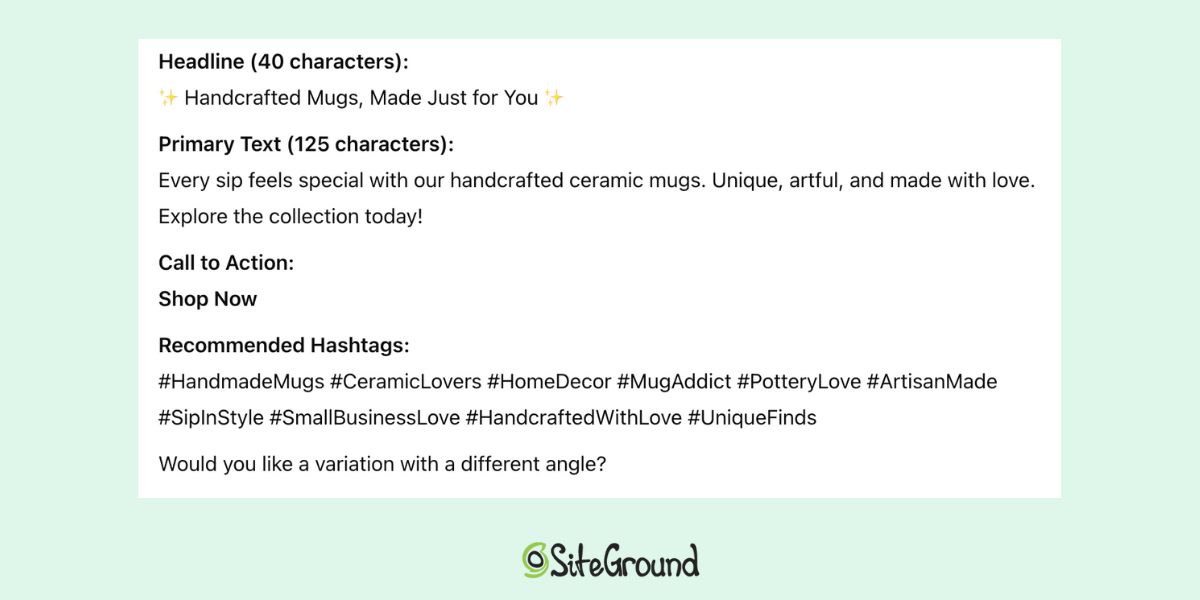
“Write an Instagram ad copy option for my handmade ceramics shop. The ad should emphasize the unique craftsmanship of my mugs and encourage customers to explore our collection with a friendly, inviting tone. Please include a headline (40 characters), primary text (125 characters), a call to action, and 10 recommended hashtags.”

ChatGPT marketing response for ad copy

Once you receive the options, you can choose the one that fits best or ask for further refinement based on your preferences. Maybe you’d like to see different headline options, or perhaps have the ideas repurposed for another social media platform—just keep iterating to meet your exact needs.

ChatGPT Prompts for Social Media Marketing

While we’re on the subject of social media, chances are you’ll want to do more than just advertise there; you’ll need to create posts, stories and so on. But creating and planning content can quickly become a full-time job. Thankfully, ChatGPT can pick up the slack, helping you generate ideas, craft posts, and even plan a schedule for your content.

1. Come Up with Content Ideas

Before jumping into scheduling, it’s important to first come up with different content ideas that you can post. That’s because a well-rounded social media strategy includes a mix of post types to keep your audience engaged—think product highlights, behind-the-scenes glimpses, educational tips, user-generated content, and promotional offers. Let’s turn it over to ChatGPT:

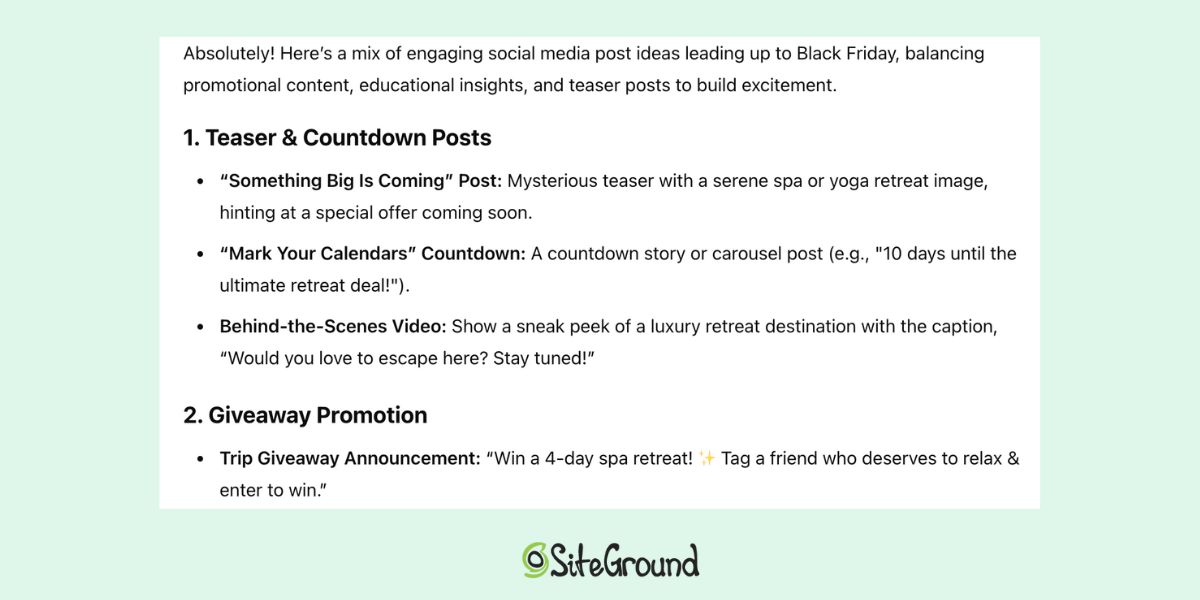
“I work for a travel agency and want to create Black Friday ideas for social media for the month leading up to the sale. Our travel focuses on spa and yoga retreats, and we’ll be offering a 15% discount on all travel during Black Friday week, as well as a chance to win a free, four-day trip. Our audience is women aged 30-50. Can you suggest a mix of ideas for engaging post types, including promotional, educational, and sale teasers?”

ChatGPT marketing response for social media posts

2. Plan and Schedule Your Social Media Content

Let’s move on to that schedule: it’s where effective social media marketing really takes shape. ChatGPT can help you design a content calendar to make sure that you’re consistently posting relevant and interesting content—not just the same old stuff, and sporadically.

Continuing with our previous example we can ask ChatGPT to help you devise a content calendar of posts in order to maintain a diverse feed and stay on track. It could look something like this: 

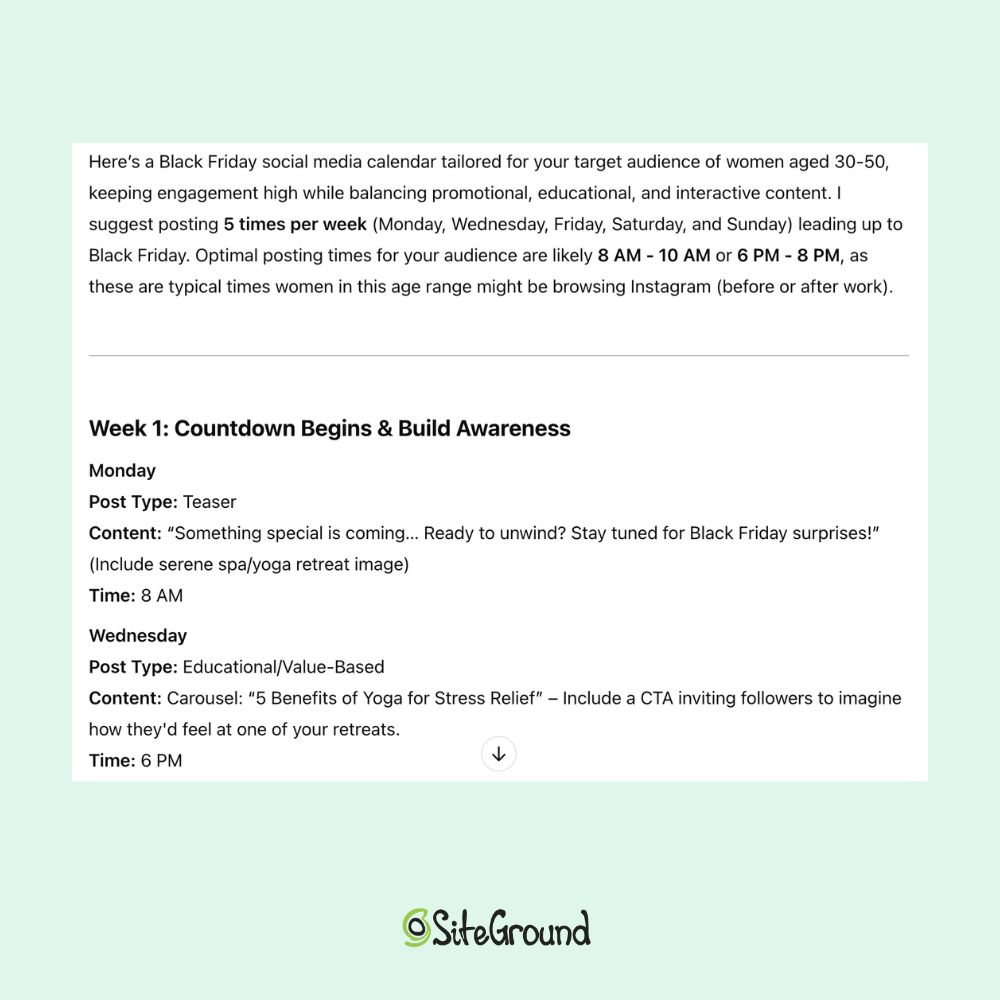
“Can you create a Black Friday-related social media calendar for Instagram? Include diverse post types using your ideas, as well as product features, behind-the-scenes, and customer testimonials. Suggest posting frequency and optimal posting times for my target audience.”

ChatGPT marketing response for a social media calendar

And just like that, you’ve taken so much of the guesswork out of social media planning. Now you know exactly what you need to do and when, making sure that your content is both consistent and stimulating.  

3. Create Social Media Content

You’ve got the calendar of diverse content ideas; now you’ll need that content. Once you’ve planned your posts and settled on a schedule, ChatGPT can help with the actual content creation process. You’ve already got the marching orders: set the stage with context and so on, and then tell it exactly what you need. Consider a prompt such as the following: 

“I need an Instagram post (100 characters) for our soon-to-launch yoga retreat in the Canary Islands. The post should highlight the beach destination, the duration (one week), the chef-made food, the small group (just 10 people), and an expert local instructor. The tone should be friendly yet sophisticated. Please include copy, a call to action to reserve the trip, and a few hashtags.”

With ChatGPT’s assistance, you can quickly generate multiple content options, saving time while maintaining consistency in your brand’s voice and coming up with heaps of ideas.

ChatGPT Prompts for Launching New Products & Services

We’ve come this far, and now it’s time to sell those products and services. And, as always, ChatGPT can be the best tool to help you get the job done too. Here are some of the top things it can help you tackle: 

1. Develop Product Descriptions

One of the first tasks you’ll face when launching a new product or service is writing product copy and descriptions that really speak to your customers. Maybe you need text for your website, or perhaps a brochure. Whatever the case, ChatGPT can help you create the right copy—just give it the usual context info, plus provide it with the details of your product, the task at hand, the tone you want, and the length you’re aiming for. Here’s an example:

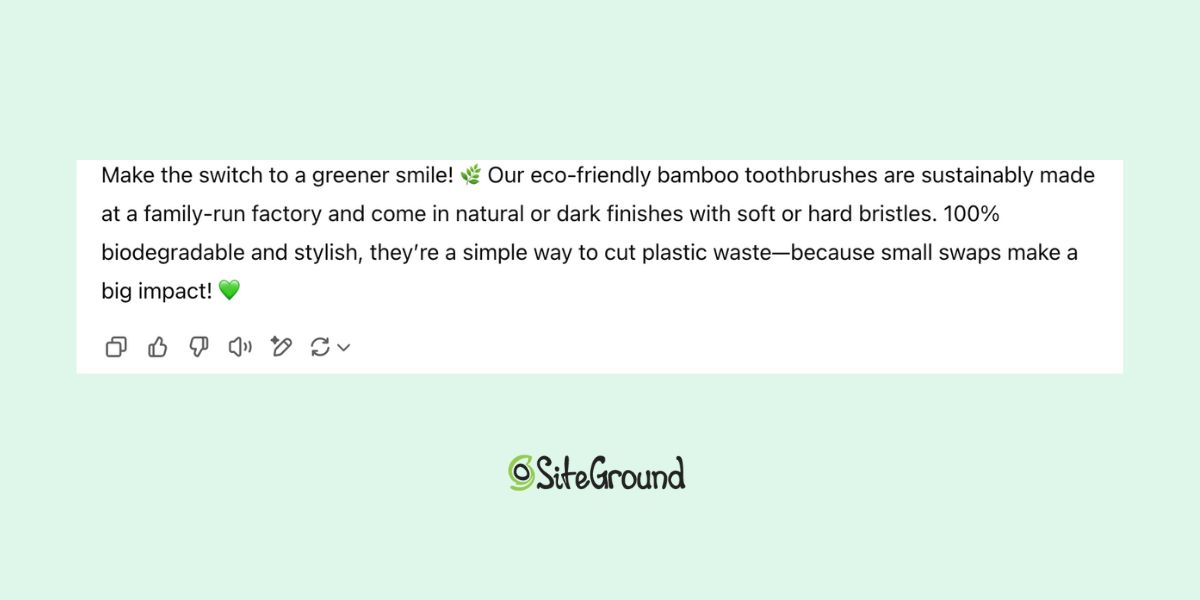
“My company is launching a new set of eco-friendly bamboo toothbrushes. They come in two finishes (natural and dark), and with soft or hard bristles. They are made locally at a family-run factory. Please write a product description that’s about 50 words, highlights the environmental benefits, and uses a friendly, conversational tone.”

ChatGPT marketing response for product copy

Or, if you have existing product descriptions that you like, you can just ask ChatGPT to create something similar.

“Here’s a description for one of our other products. Can you create a similar one for a new shampoo bar, emphasizing its natural ingredients of lavender and chamomile, and its eco-conscious, compostable packaging?”

ChatGPT will be able to match the style, tone, and length of your previous descriptions, saving you time and maintaining consistency across your product lineup.

2. Write a YouTube Script

Product copy is done, and it’s time to spread the word! Perhaps you want to launch your product with a YouTube video teaser but aren’t sure where to start with the script. ChatGPT is the perfect tool to help. Just provide the details about the product, the video length, and the tone you want to convey, and ChatGPT can draft and outline or script for you.

“For the launch of our eco-friendly bamboo toothbrush we need a short video teaser script (30-45 seconds) to generate excitement. The video should highlight the toothbrush’s sustainability, biodegradable materials, and sleek design. I want the tone to be fresh, modern, and inspiring—like an Apple product launch, but for an eco-conscious audience. Please include a compelling hook, key product benefits, and a strong call to action.”

ChatGPT can quickly draft an organized script, making it easier for you to create a polished and professional video.

3. Produce a Press Release

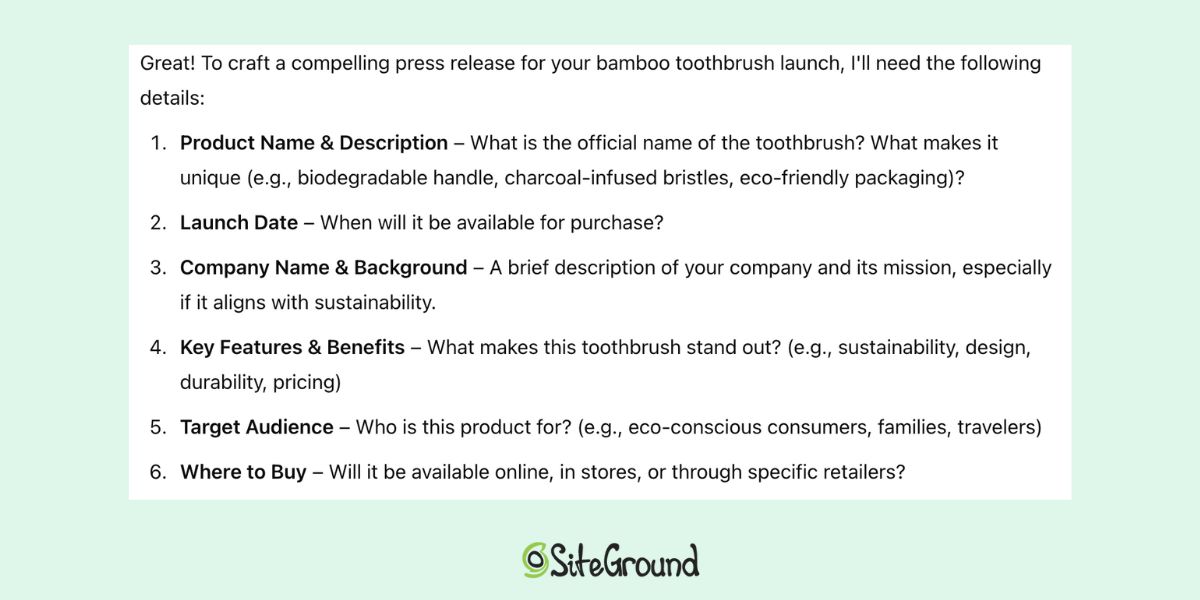
Writing a press release used to mean you had to reach out to (and pay) a PR expert or scour the web for templates, and all without really knowing exactly what you were doing. But with ChatGPT, you can now create a professional press release in no time. To get started, you can simply ask ChatGPT what information it needs to craft one.

“I want to create a press release for the launch of our new bamboo toothbrush. I’d like you to help me write a press release—can you start by telling me what details you need from me?”

ChatGPT marketing response for what is needed in a press release

Once you provide ChatGPT with the necessary details, it will guide you through the process, and you’ll end up with a clear, well-written press release ready to distribute.

4. Strategize Your Product Launch

ChatGPT can also help you plan and execute your product launch with a proper strategic plan. Whether it’s coming up with ideas for promotional tactics (such as distributing that fresh press release!), defining digital marketing strategies, or coming up with product launch email ideas, ChatGPT is ready to assist.

“I’m planning a launch event for the new toothbrush. Can you suggest a detailed promotional timeline for the next month, covering key activities like PR, social media, paid ads, influencer outreach, and any other relevant strategies? My budget is $5,000, so please recommend cost-effective ways to maximize reach and engagement.”

Leaning on ChatGPT for this planning helps you make sure you’ve got all your bases covered and that you stay organized and focused.

ChatGPT Prompts for Email Marketing

With all the previous elements in place, it’s time to connect the dots by tackling your email customer journey. This is the process that guides your subscribers from initial engagement to conversion. It’s with email marketing where the real magic happens—and ChatGPT can make this process a whole lot easier. 

1. Generate Email Content Ideas

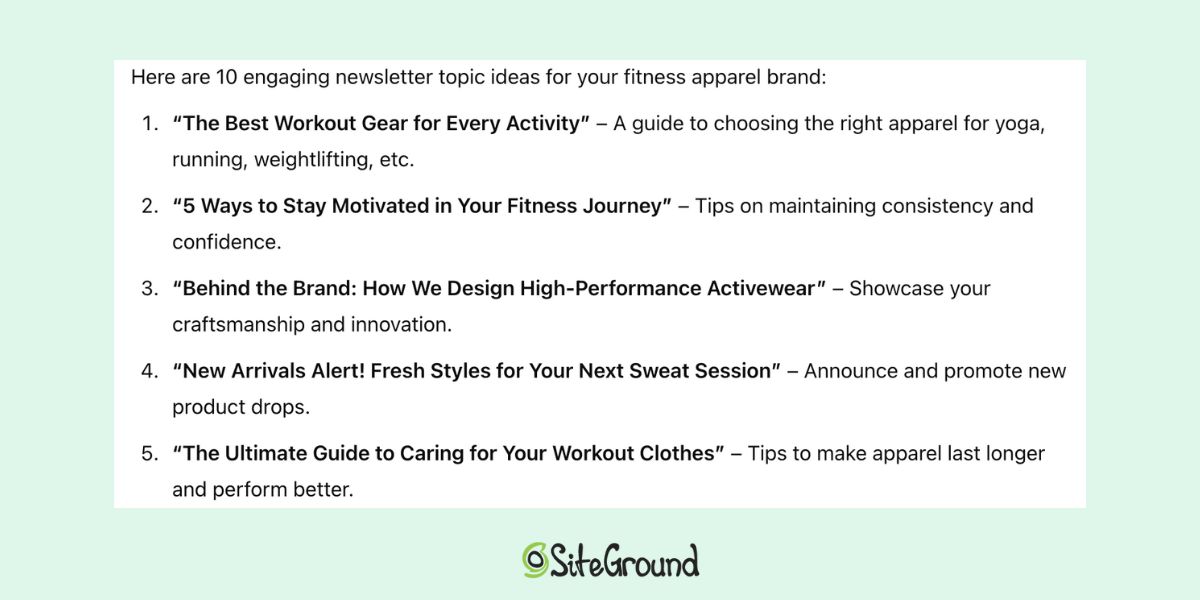
You know you should send email newsletters, but you’re short on ideas—it happens. If you’re feeling stuck and need content inspiration, ChatGPT can help brainstorm a list of the best topics that are tailored to your audience and objectives. Here’s an example:

“I work for a fitness apparel brand, and I need newsletter content ideas. My target audience is active women between the ages of 25 and 45. Please give me a list of 10 newsletter topics that would engage this audience.”

ChatGPT marketing response for newsletter topic ideas

We really don’t mean to be a broken record here, but don’t forget how important it is to provide all the necessary context about your business, ranging from audience information to product details, etc. We’ll say it again: the more precise you are, the better and more useful the ChatGPT responses will be.
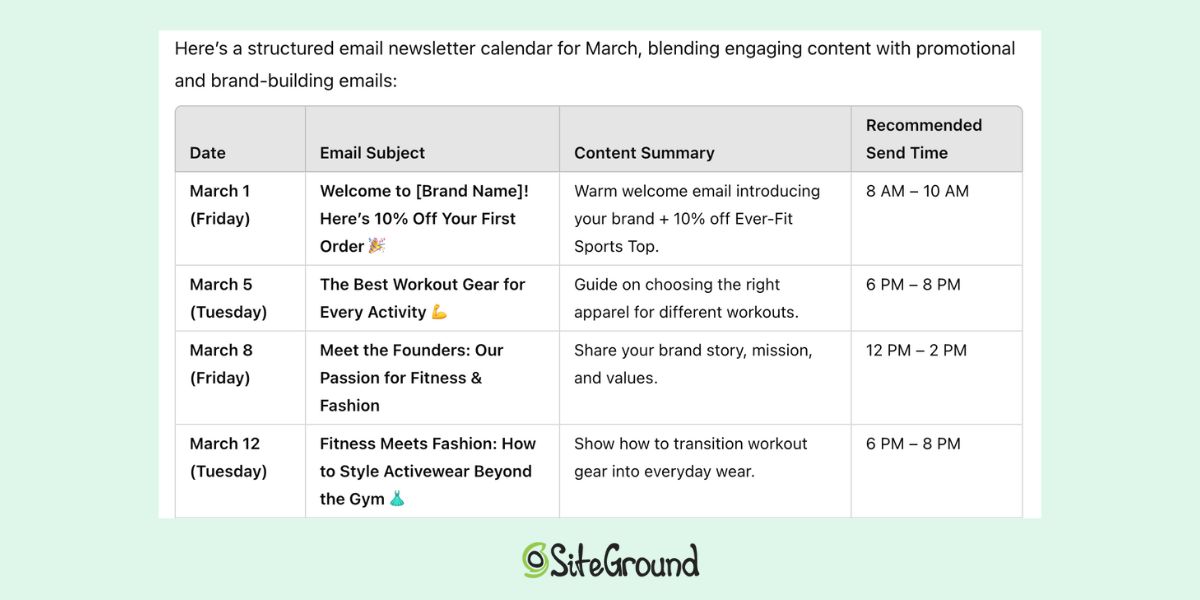
2. Put Together an Email Calendar

Once you have some ideas, your next step is to create an email content calendar. That’s right—for maximum effectiveness, you should plot out your email plan so that it’s scheduled in a way that keeps your audience engaged without overwhelming them. ChatGPT can help you draft an email calendar so that your emails are sent at the right times to maximize clicks, and so that you stay on track.

“I want to create an email newsletter calendar for new subscribers. Please include some of the ideas you’ve provided, but also mix them with other types of emails, including a welcome email, a 10% off promotion for our Ever-Fit Sports Top, and a meet-the-founders email. Please include recommended days and times for sending. Can you create an email calendar for me for the month of March?”

ChatGPT marketing response for an email newsletter calendar

With recommended dates, times, and topics in hand, you’re ready to swiftly move on to the next step.

3. Craft Your Newsletter Content

Now it’s time to create those emails—you could write them yourself, or, of course, there are ChatGPT prompts for this too. Let’s say you want to tackle that first welcome email. Consider the following prompt: 

“I want to create the newsletter welcome email you suggested. Can you please produce newsletter content that has a couple introductory sentences about my brand (women-owned, locally made products, environmentally conscious), and then offers 20% off our light-weight, breathable Ever-Fit Sports Top? The tone should be warm and friendly, and it should include a call to action to ‘shop now.’”

Or, you could also make this whole process even more simple: with SiteGround Email Marketing, take advantage of a built-in AI writer that can help you craft creative email copy on the fly right within the easy-to-use email builder.

Getting the Most Out of Your ChatGPT Marketing Prompts

ChatGPT continues to lead the way as one of the best AI tools for business, and it’s no different when it comes to marketing. No massive budget needed, nor decades of experience under your belt—just the right ChatGPT prompts for marketing. And by learning how to structure your prompts effectively, you can get the most out of this revolutionary tool. Now it’s time to put these strategies into action and take advantage of the full potential of AI-driven marketing.

Keen to have all the top ChatGPT Marketing prompts and ideas all in one place? Download our free Marketing for ChatGPT Cheat Sheet to make prompting like an expert a whole lot easier.

Write the Perfect Promotional Email + 17 Examples & Free Templates

Featured image of article about sales promotion email sample

Let’s be honest—everyone appreciates a good deal, but no one enjoys being overwhelmed with emails that simply push products.

In this article, we’re ditching the usual advice and diving into what actually makes an offer irresistible and how to communicate it effectively to minimize customer churn. After all, for a sales promotion email to catch the eye, you need to do more than just throw one together and expect to get results.

We’ll also look at some great promotional email examples, and share key insights into crafting emails that resonate with your recipients and keep them far from the spam button. 

And as a bonus, we’re throwing in a free downloadable guide packed with ready-to-use promotional email templates.

[40]

What Are Promotional Emails?

Sales promotion emails, also known as promotional or promo emails, are exactly what they sound like: marketing emails sent to your audience—whether they’re customers, leads, or subscribers—with the purpose of encouraging purchase by highlighting special offers, discounts, or products.

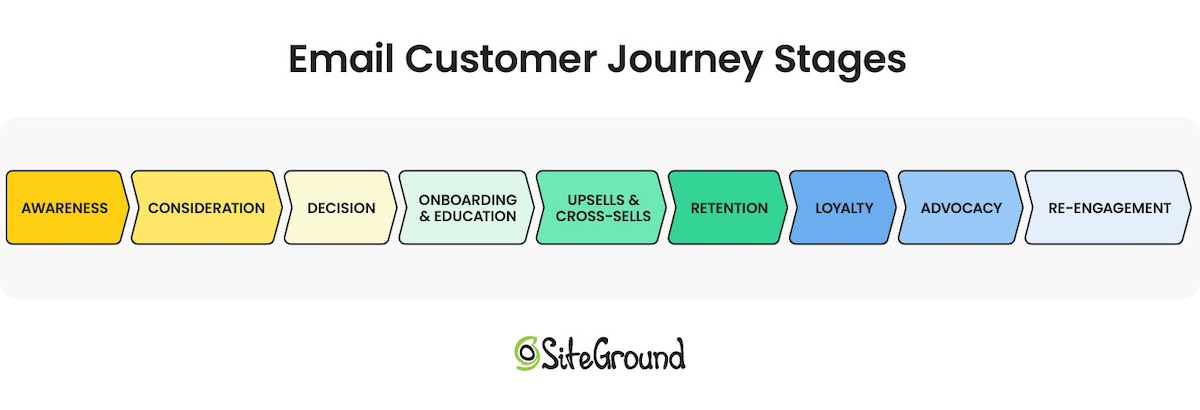
You can send email promos for a variety of occasions, but to maximize those conversion rates, consider aligning them with the stages of your customer’s journey. 

The 9 stages of the email customer journey: awareness, consideration, decision, onboarding and education, upsell and cross-sells, retention, loyalty, advocacy, re-engagement

Based on your customer’s current stage, you can send:

  • Welcome promo codes, one-month free trials, or limited-time offers (consideration)
  • Abandoned cart reminders, exclusive discounts, or flash sales (decision)
  • Back-in-stock alerts, product launch announcements, or personalized product recommendations (upsell and cross-sell)
  • Milestone celebration discounts, VIP offers, or seasonal and holiday promotions (loyalty)

How to Write the Perfect Promotional Email

You can’t skip essentials like using high-quality images, creating a sense of urgency, and including clear calls to action when crafting your sales email. However, there are additional tricks you can use to make your offer irresistible.

Call to action button regarding SiteGround Email Marketing

1. Write Catchy but Clear Subject Line

Did you know that 47% of emails are opened  solely based on the subject line? With this in mind, make sure yours stand out by clearly highlighting the offer or benefit for your subscriber. For instance, the subject line “Exclusive Offer: 20% Off Only for Our New Customers” grabs attention, sets clear expectations, and is more likely to prompt opens than a vague line like “Socks on Discount.”

Additionally, keep your subject lines short—no more than 50 characters long—and simple, as overly clever or complicated ones often get overlooked.

Finally, strive to be catchy, conversational, and compelling, but be cautious of spam-trigger words like “100% free,” “guaranteed,” or “urgent,” as they could send your email straight to the spam folder. 

2. Use Preheader Text to Back Up Your Subject Line

Before opening an email, your subscribers see three key pieces of information: the sender name, subject line, and preheader text (which is sometimes called preview text). So, if your subject line didn’t steal the show, you’ve still got a shot to make an impression with the preheader!

The preheader is a brief snippet of text that follows the subject line in the inbox. Though only 30-80 characters long, this small piece of text can be the deciding factor in whether someone opens your email. Therefore, avoid repeating the same message as your subject line, as it would be a waste of space and might create the perception that your brand is lazy or sloppy.

Some best practices when it comes to your preheader include: 

  • Incorporating a call to action (CTA)
Screenshot of an email preheader text "Buy 2 and save," accompanying the subject line, "25% off leggings"
  • Expanding on the offer
Screenshot of an email preheader "Here's a discount off cover art," accompanying the subject line, "We've got you covered"
  • Using FOMO (fear of missing out)
Screenshot of an email preheader "2 days left," accompanying the subject line, "Gear Up with 25% Off"

However, if you can’t decide what you’d like to add, lucky for you—most email providers will automatically pull the first 40-50 characters from your email. Just make sure those opening words are action-driven and give your readers a reason to dive in further!

3. Create a Sense of Urgency

Creating a sense of urgency in your sales promotion emails is a powerful tactic to compel readers to act fast. The psychological principle behind this is simple—consumers tend to place a higher value on opportunities that are available for a limited time. 

To effectively create this sense of urgency, use time-sensitive language in both your email copy and CTA buttons. Phrases such as “Sales ends in 24 hours“, “Grab yours before they’re gone,” or “Last chance to claim your exclusive discount” suggest that delaying could result in missing out on something desirable.

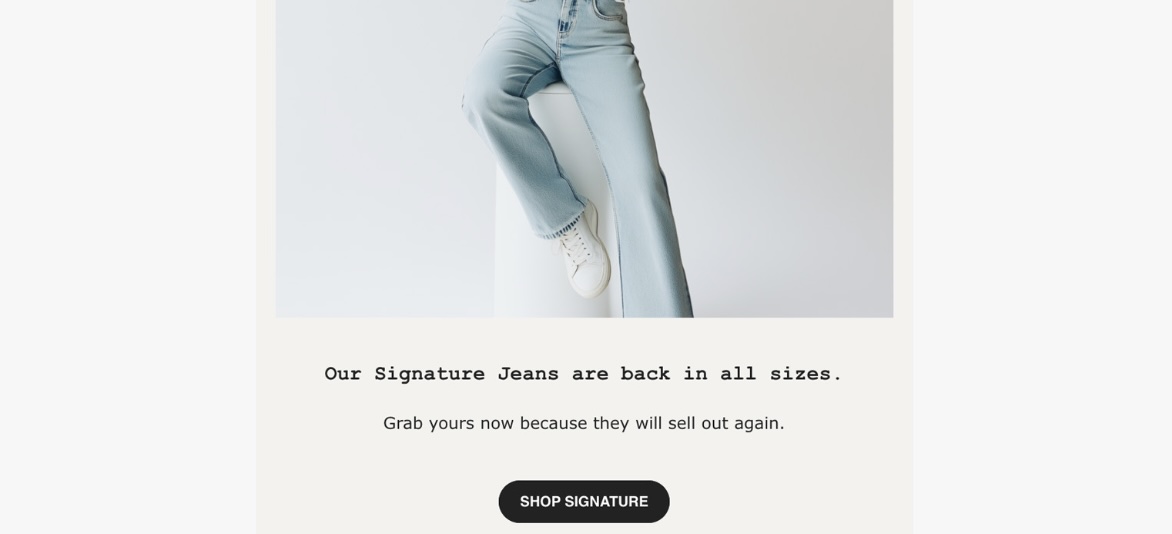
The email below is an excellent example of how to create a sense of urgency in your messaging:

An example of a back-in-stock email promo about a pair of jeans, where a sense of urgency is created by using the phrase "Grab yours now because they will sell out again."
Screenshot

4. Use Visible and Clear Call to Actions

Think of your CTA as the handshake between your email content and your reader’s next move. Make sure it stands out and is easy to find, while remaining clear and not overly pushy.

It’s important to recognize that different CTAs pack different punches. For example, “Shop Now” is your go-to for immediate action, while “Learn More” is perfect for those curious clicks.

Additionally, to enhance the visibility of your calls to action, aim to use contrasting colors, bold fonts, or quirky shapes. Try popping one in the header for easy access or save it for the end to smoothly guide readers to the next step. You can also sprinkle them throughout your email, as long as each one has a clear purpose and adds a little flair.

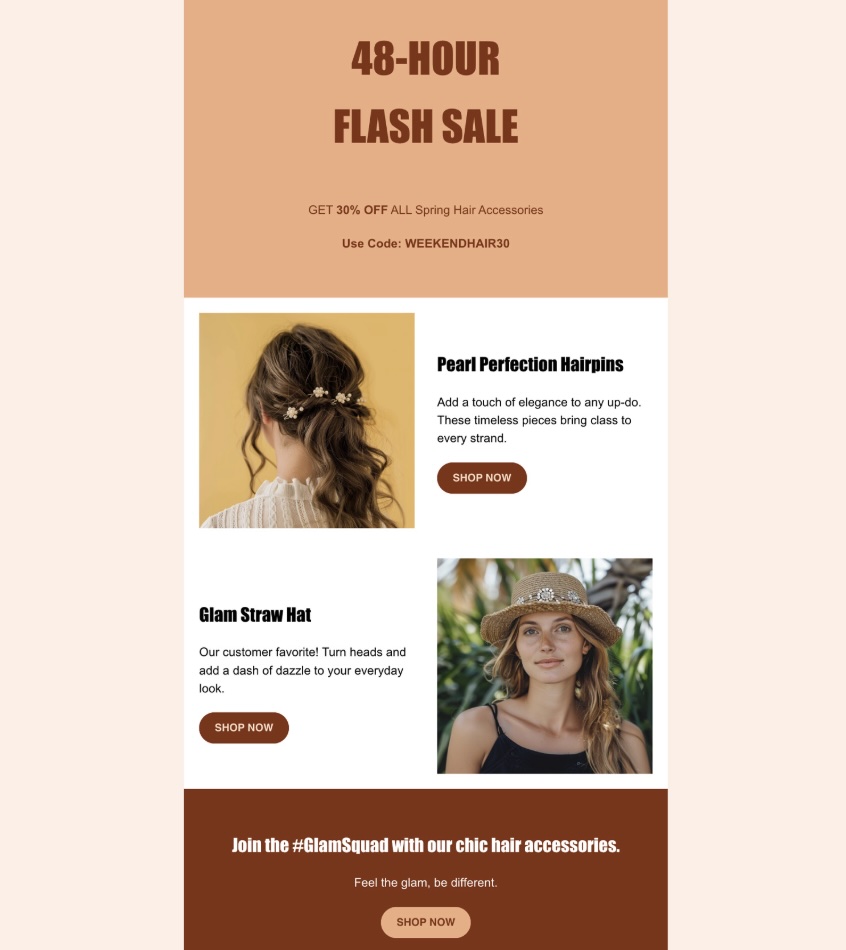
For instance, here we have a great example of strategically placed calls to action:

An example of a flash sale email with strategically placed CTA buttons throughout the email
Screenshot

5. Mind the Email Length

Depending on the promotion you’re running, your email’s body might be a quick read or a little more detailed. But remember, a wall of text is a fast track to the trash bin!

When crafting sales promotion emails, think of “less is more” as your mantra. Try to keep your text short and to the point, allowing the reader to focus on the offer and not get overwhelmed by details that might put them off.

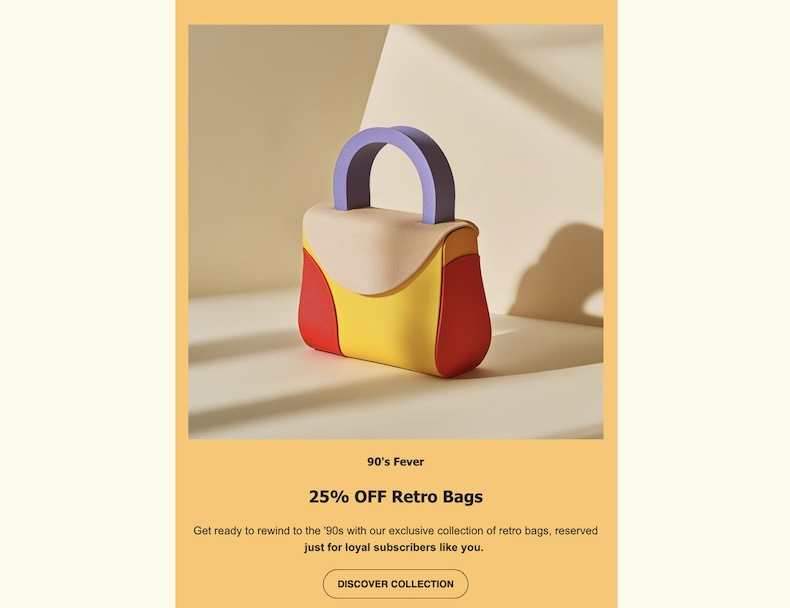
The example below shows exactly that—how concise and clear copy effectively highlights the offer:

An example of a promotional email featuring a bag as the hero image, with concise copy below to demonstrate the importance of email length
Screenshot

6. Balance All Elements (Text vs. Visuals)

It’s important to give your email elements some breathing room, as it helps prevent a cluttered or overwhelming appearance. Sometimes, the use of white space can improve readability and draw attention to the most important parts of your email, such as the headline, key benefits, and that all-important call to action, ultimately increasing your click-through rate.

Also, don’t forget about  the overall layout of your email—an aesthetically appealing email captures subscribers’ attention and also holds it, guiding them through your message and towards the desired action. 

Try  breaking up text into short paragraphs with headings or bullet points to make the content of your email more digestible.This way, the likelihood that your offer will be noticed and acted upon is higher. 

It’s also important to note that some email providers monitor the text-to-image ratio. Although there’s no strict rule, a commonly recommended ratio is 60% text to 40% images, or even higher text content, to help ensure your emails reach your intended customers.

Take a cue from the example below, where we have a well-balanced text-to-image ratio:

An example of a promotional email offering an AI-trained plush puppy, featuring a two-column layout with images, headings, and paragraph text
Screenshot

7. Sync The Email Color Scheme with Your Brand Identity

The color scheme of your email is a key player in your design game. Pick email colors that not only reflect your brand’s personality but also play nice together. A harmonious palette stirs up the right emotions and makes your content a treat to read.

For instance, incorporating a calming blue in a wellness center’s email promo can emphasize relaxation, while a vibrant orange in a fitness brand’s email can evoke energy and enthusiasm, highlighting an active lifestyle.

8. Use High-Quality Images

No email is complete without captivating imagery. Therefore, if you’re promoting a physical product, avoid using the same generic stock images that every company in your industry uses. Instead, show off your products from their best angles to highlight key features. When it comes to services, use photos that tell a story by featuring real people enjoying the service. This approach makes your offerings more tangible and relatable to your audience.

Remember, while images are important, they shouldn’t be the sole focus of your email. Aim for a sales promotion email that is exciting but not overwhelming, where images enhance rather than distract from your call to action. 

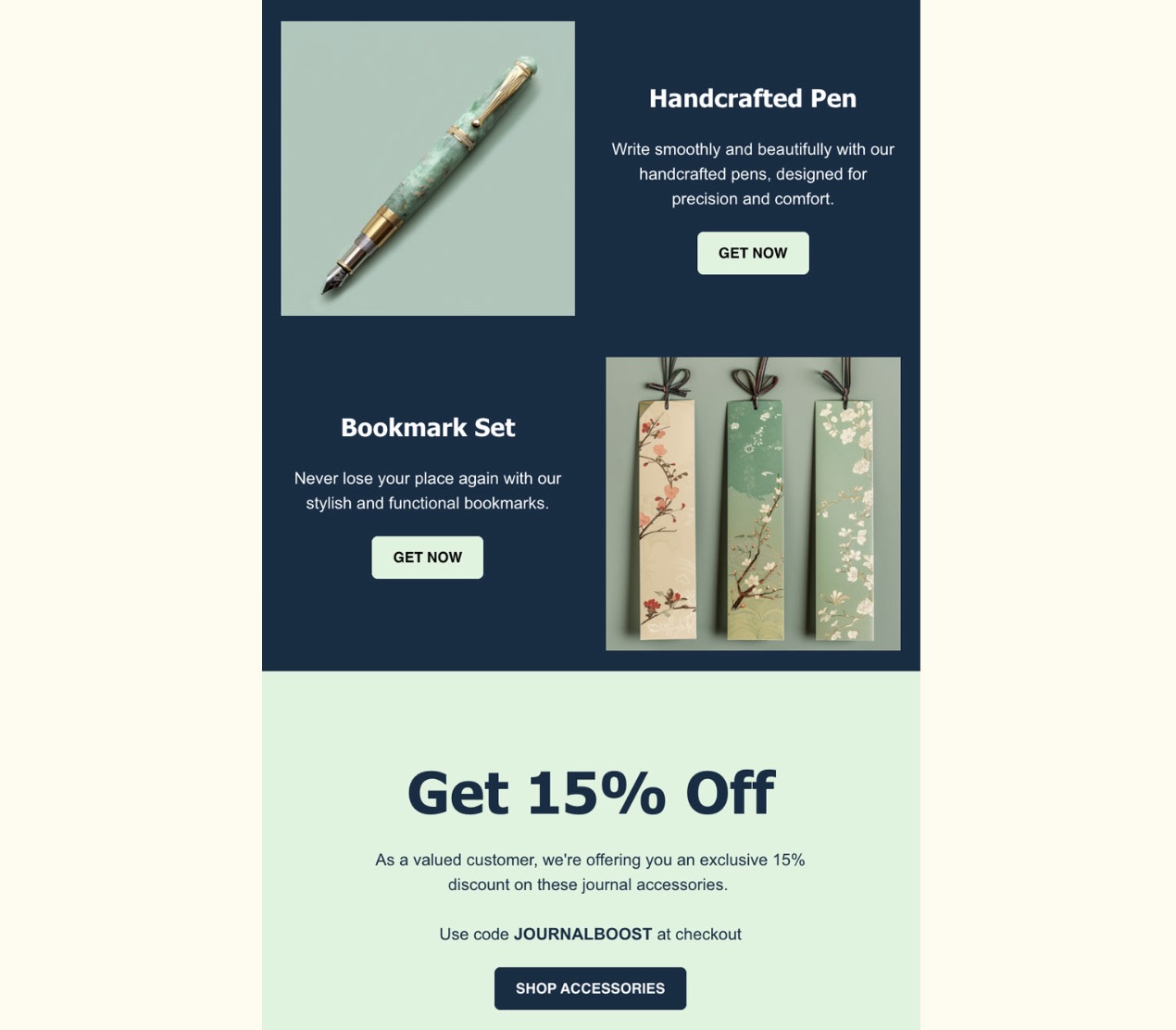
The example below shows exactly that—how images can be used effectively to complement the overall message:

An email promo offering journaling accessories with original photos, showcasing the unique design and quality of each item
Screenshot

9. Make It Personal

Personalized emails nowadays go beyond simply using the customer’s name; they involve crafting a message that feels uniquely tailored to the recipient.

By referencing past interactions with your brand, such as previous purchases or items they’ve shown interest in, you demonstrate an understanding of their individual needs and preferences. Additionally, you can celebrate milestones, like the anniversary of their first purchase, with a personalized offer or a simple congratulatory note to make them feel valued and appreciated.

To make sure your emails are really landing, it’s important to keep an eye on your email marketing metrics. These insights reveal how your audience engages with your content, allowing you to refine your approach and create more impactful messages. With this data in hand, you can turn a generic email promo into a memorable message that leaves a lasting impression on your recipient.

10. Build Trust 

Sometimes a friend’s recommendation or even a random review on the internet can sway your audience’s decisions. That said, try to showcase testimonials, awards, or endorsements your product or service has snagged to improve your credibility and demonstrate authenticity and reliability. 

To add even more value to your sales promotion email, think of including some handy tips on how your customers can make the most of your service or provide a fun guide on using it like a pro. By doing so, you not only educate them but also demonstrate your commitment to their satisfaction and success. It also helps them get more out of your product—now, and hopefully as they return as customers!

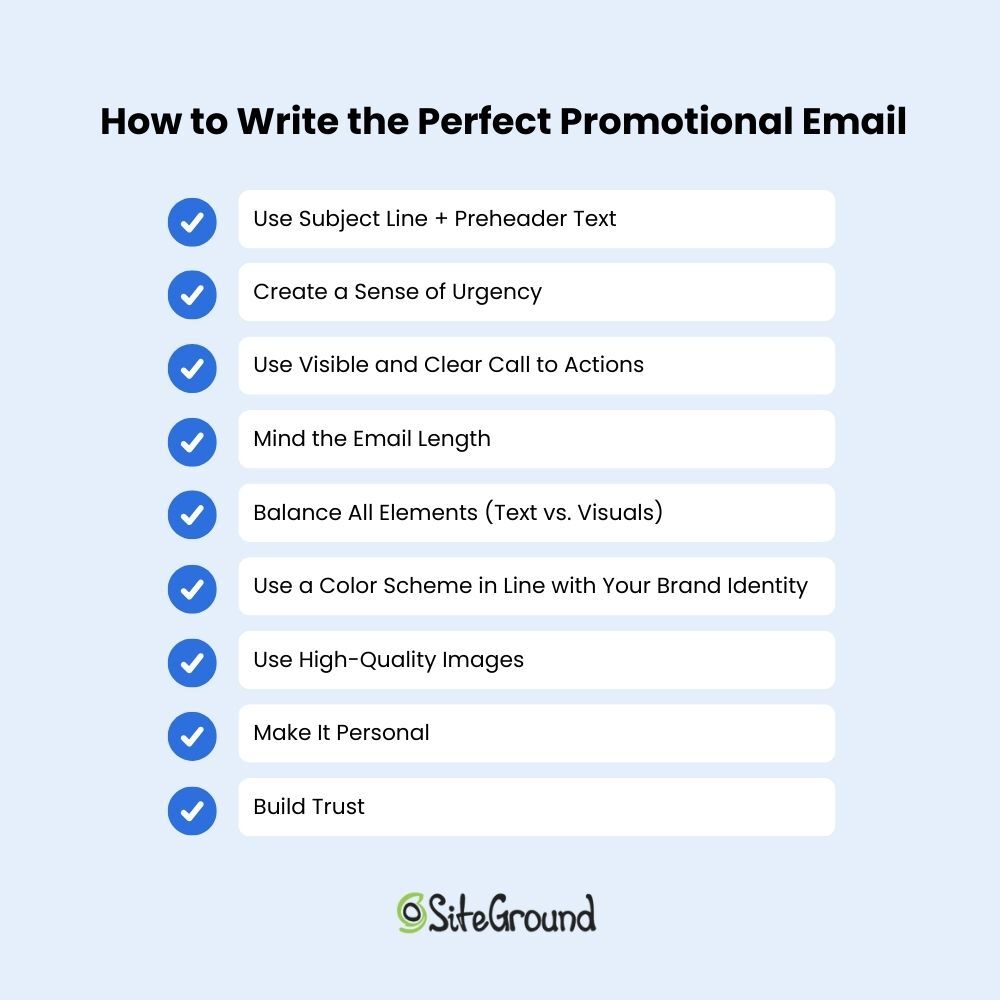
How to write the perfect promotional email with a summary of the steps mentioned above.

11. Harness Gmail’s Promotion Tab Features (Bonus Step)

When Gmail introduced tabs in 2013, many email marketers were concerned. The new promotions tab meant that sales promotion emails could land there instead of the coveted primary tab, potentially reducing their visibility to subscribers.

Screenshot

However, the promotions tab isn’t the junk folder, so don’t treat it as the enemy. Instead, think of it like your trusty sidekick, helping your promotional emails stand out among the many messages your subscribers receive. In fact, 45.1% of users with this feature enabled check the promotions tab daily, and those users are more likely to engage with and make purchases from the emails they find there.

And while landing in the primary tab is every email marketer’s dream, trying to sneak your sales messages in there could backfire, as recipients might mark them as spam, damaging your sender reputation and deliverability rates.

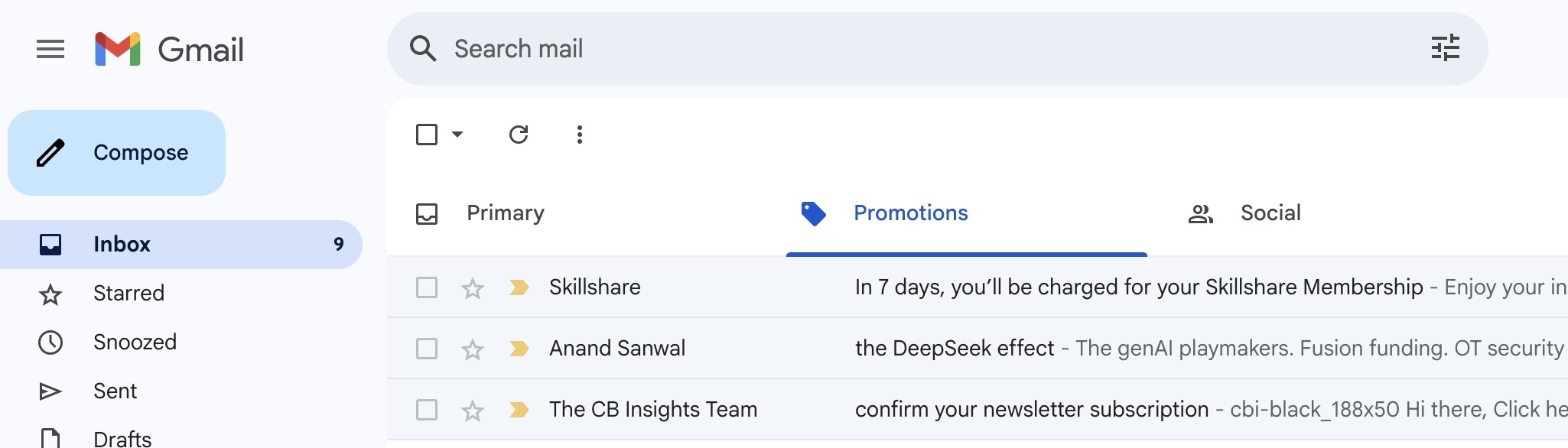
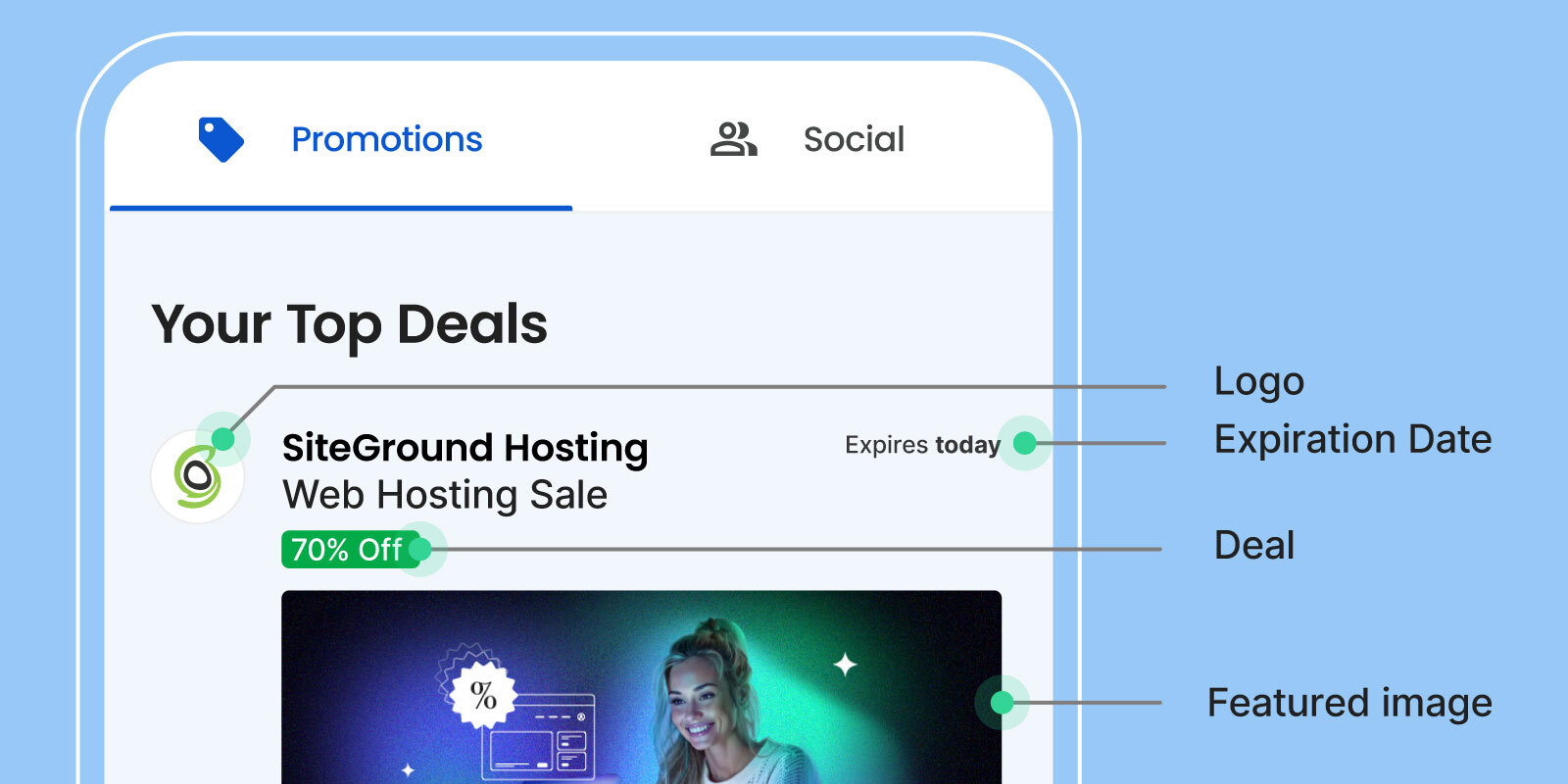
Fast forward to 2019, when Gmail introduced annotations in the promotions tab—a feature that lets you include extra details about your offer right in the inbox preview, making your email more noticeable. Essentially, annotations are snippets of HTML code added to your email header, which you can easily modify to display desired information, such as your logo, business name, featured image, deal badge and more.

An example of a sales promotion email with Gmail's promotional annotations incorporated, featuring different elements such as the logo, deal badge, expiration date, and featured image.

You can also opt for a simpler version with only text-based details like a promo code or expiration date, or spice things up by using product carousels that showcase multiple image previews for your promotion.

Overall, using Gmail annotations can only work to your advantage, allowing you to spotlight important information about your deal right in the promotions tab. Check out this guide for all the details on this feature.

Common Types of Sales Promotion Emails (With Examples)

While the perfect promotional email template doesn’t exist, by understanding different approaches, you can craft compelling messages that not only resonate with your target customers, but also effectively drive sales.


With that in mind, here are the most common types of email promos, paired with effective examples to help elevate your email marketing efforts.

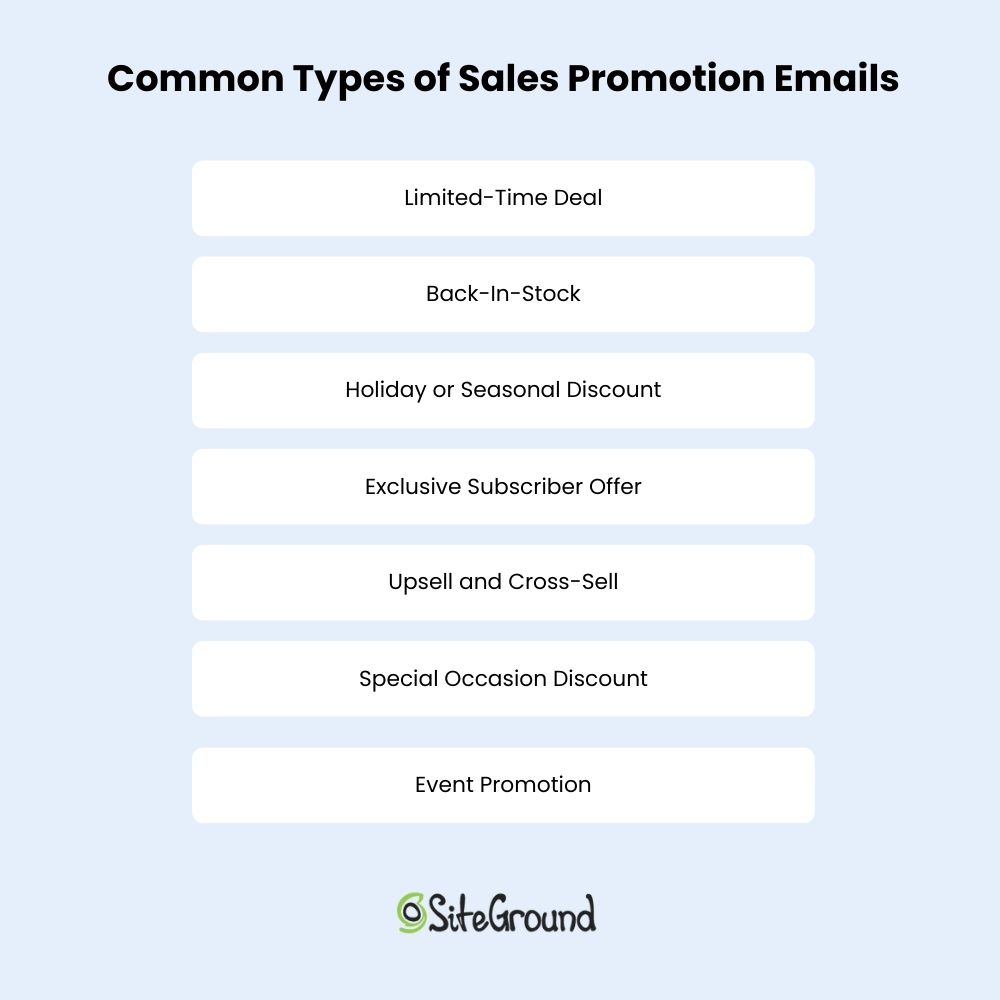
Common types of sales promotion emails

1. Not an Offer, Just a Teaser

A teaser email is like a friendly nudge in your reader’s inbox, saying, “Psst, something big is on the way—stay tuned!” Whether it’s a new product launch, a major announcement, or in this case, an upcoming sale, these emails are all about building excitement.

Teaser emails usually keep it short and sweet, but don’t let their simplicity fool you—they can add a real intrigue to your promotional email campaigns. 

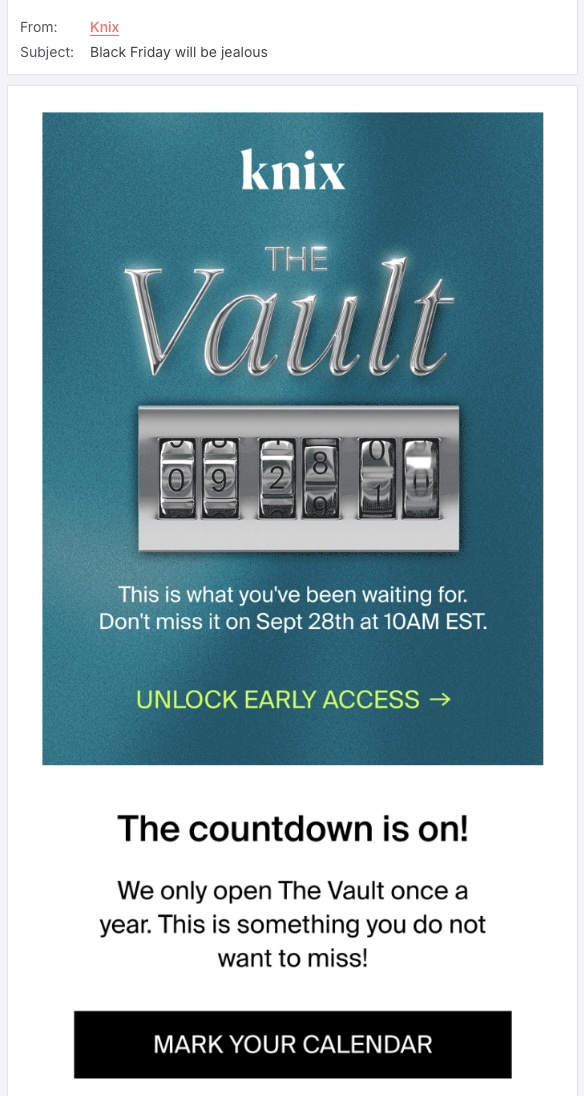
Screenshot of the Knix teaser email
Screenshot

This  teaser email from Knix skillfully entices the reader to open with its promise of a sale potentially surpassing Black Friday—one of the busiest shopping days. Inside, it builds urgency by nudging them to mark their calendars for “What you’ve been waiting for,” while the “Unlock early access” CTA adds a hint of exclusivity, making the opportunity hard to miss.

2. Limited-Time Deal Promotional Email 

A limited-time deal email is a promotional classic that effectively taps into the natural fear of missing out. Essentially, they showcase offers available only for a set time, whether it’s a matter of minutes, hours, or even a few days or weeks. 


Limited-time deals work wonders when timed with special occasions, especially during holiday seasons, when people eagerly anticipate discounts and are more likely to take advantage of them.

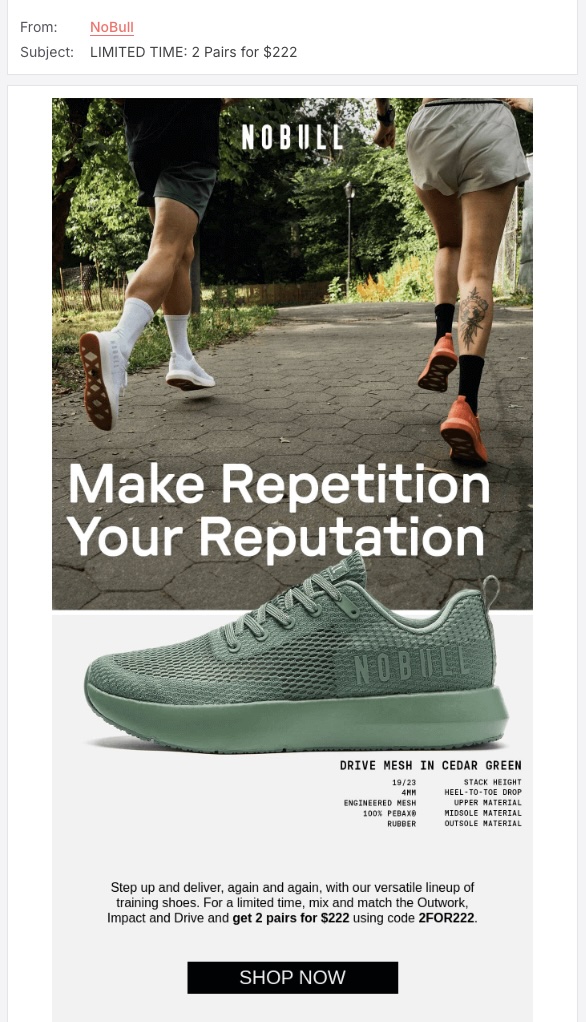
Screenshot of the NoBull limited-time deal sales promotion email
Screenshot

In the email above, the subject line immediately grabs attention with a time-sensitive deal, encouraging quick action. The playful header “Make repetition your reputation” resonates with fitness enthusiasts, while the concise copy highlights the featured sneakers as essential for those pursuing continuous improvement.

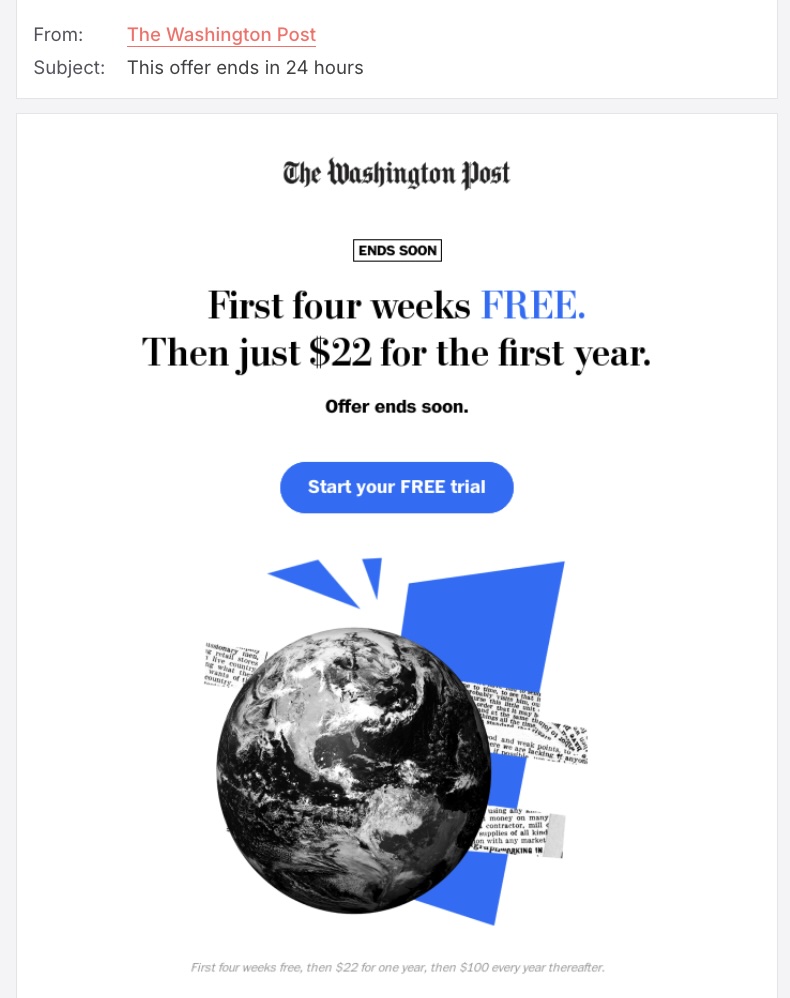
Screenshot of The Washington Post limited-time deal sales promotion email
Screenshot

Offering free trials is an effective lead generation strategy, as it lets potential customers experience your product or service firsthand, without the financial commitment. In this next example, a sleek, minimalist design keeps the spotlight on the offer, while a cleverly positioned CTA button guides them to a landing page detailing the promotion’s features and terms.

3. Back-In-Stock Promotional Email

Back-in-stock emails are perfect for prompting immediate action from customers who missed out on popular items. Letting them know that a product is available again provides a chance to re-engage them and encourage visits to your store.

These emails serve as reminders, creating a sense of urgency and excitement that can lead to quick conversions. Additionally, by personalizing them based on previous interactions, you can enhance their effectiveness even more.

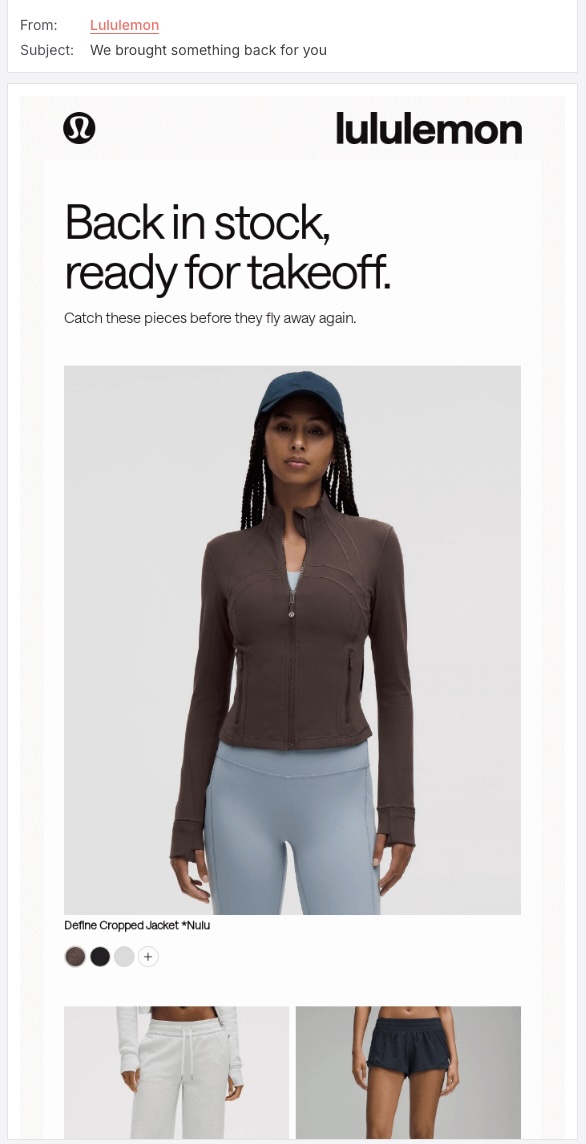
Screenshot of the Lululemon back-in-stock sales promotion email
Screenshot

We’ve already explored how the fear of missing out can drive consumer behavior, and Lululemon nails it perfectly. Their back-in-stock email starts with a subject line that picks the reader’s interest by hinting that a sought-after item has returned. It then uses a clever aviation-themed metaphor to create a sense of urgency, indicating that these popular products are ready to “take off” again.

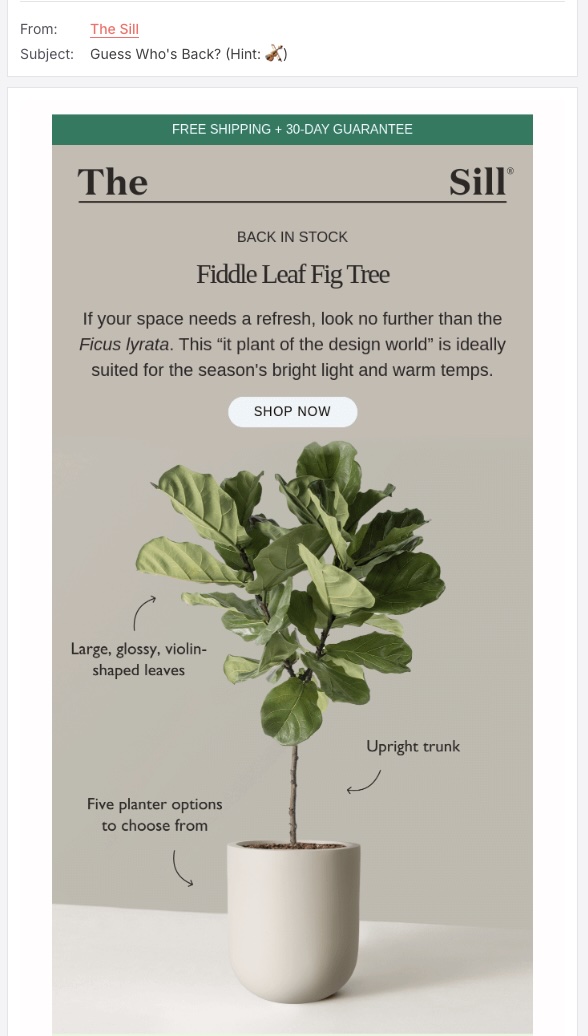
Screenshot of the Sill back-in-stock sales promotion email
Screenshot

For the plant lovers out there, this back-in-stock email from Sill kicks things off with a playful question that’s sure to catch their eye. With free shipping and a 30-day guarantee, it’s tough to resist. And if the visuals don’t convince the reader, they’ve cleverly highlighted key features to seal the deal.

4. Holiday and Seasonal Promotional Emails

A holiday without a sale just feels incomplete, doesn’t it? Holiday email promotions tap into the festive spirit when customers are more likely to shop. These emails can cover special occasions such as Christmas, Valentine’s Day, or any other holiday you can think of. The better your offer matches a particular celebration, the more successfully you can engage your email subscribers.

Similarly, seasonal shifts offer perfect opportunities for businesses to connect with subscribers through enticing deals. Each season brings a new backdrop for campaigns that resonate with consumer moods, while seasonal store clean-ups provide a chance to offer exclusive discounts to clear last season’s stock.

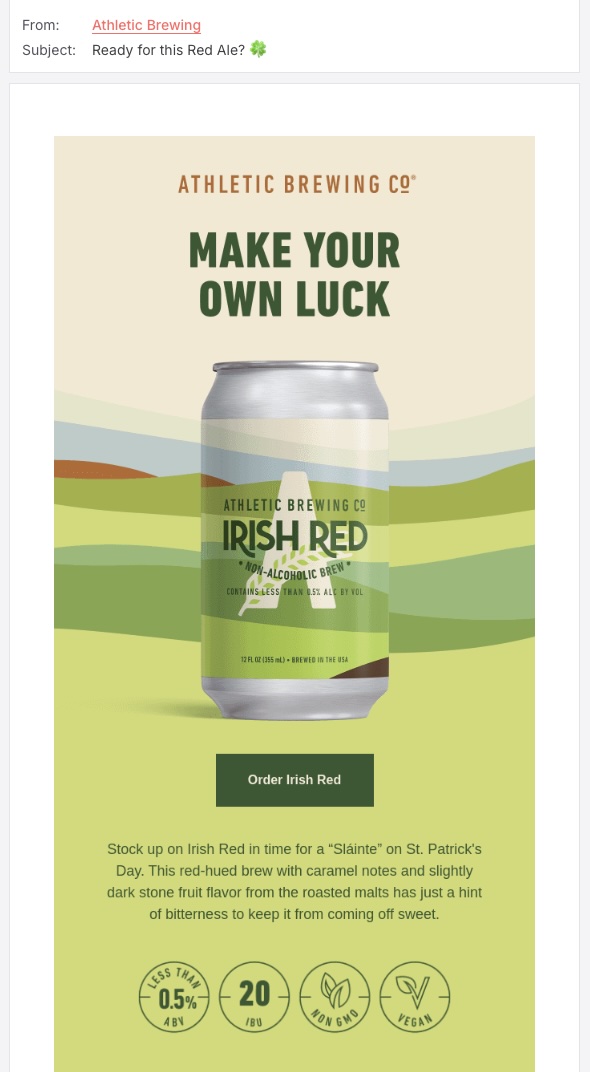
Screenshot of the Athletic Brewing holiday sales promotion email
Screenshot

If this holiday-themed email doesn’t make you raise a red ale and say “Sláinte,” we’re not sure what will. Designed to capture the festive spirit, the email features a sleek green monochrome palette that beautifully showcases the product. The prominent “Make Your Own Luck” slogan cleverly ties into the traditions of St. Patrick’s Day, subtly encouraging customers to seize the opportunity and make a purchase.

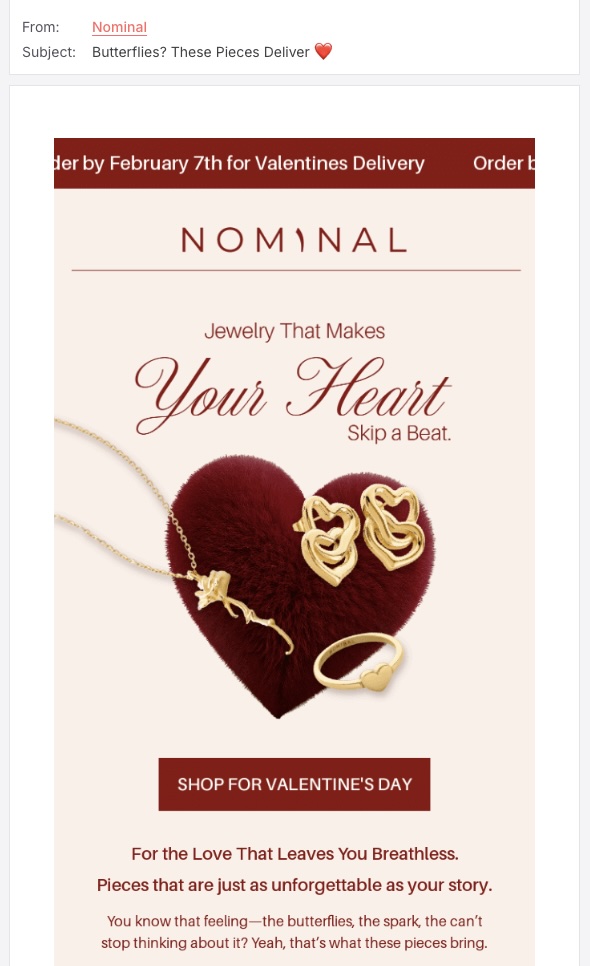
Screenshot of the Nominal holiday sales promotion email
Screenshot

There’s nothing like shopping for your favorite person to spark a little excitement. The Valentine’s Day email above not only encourages action but also adds a charming touch by linking the featured jewelry to a deep, unforgettable love story. By weaving a narrative that resonates emotionally, the email helps create a connection between the product and the sentiment of the occasion.

Screenshot of the Little Beast seasonal email promo
Screenshot

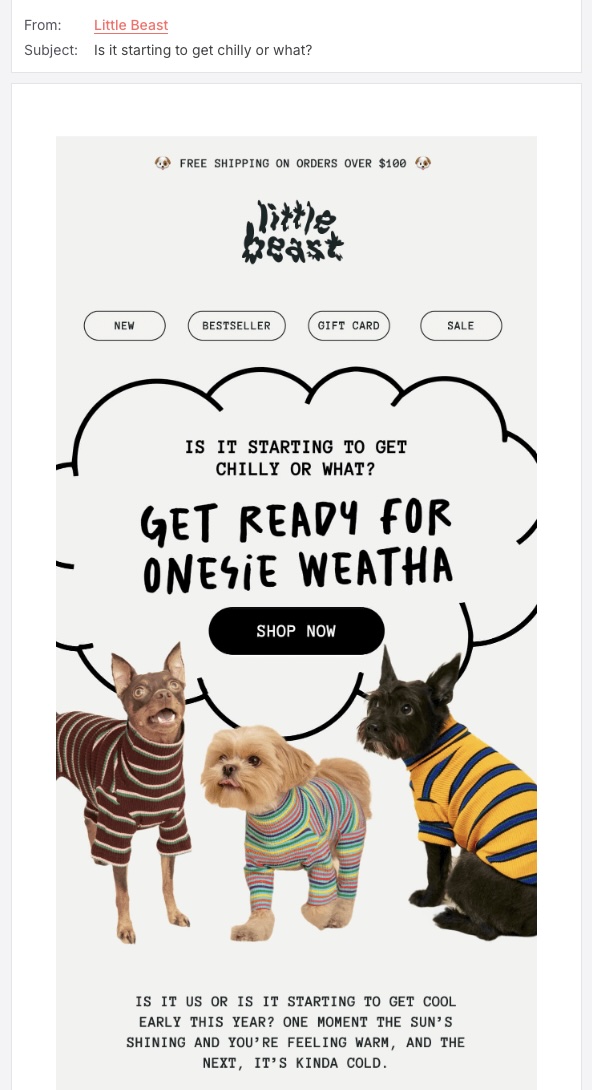
This next email promo cleverly plays on the idea of seasonal renewal, prompting readers to consider refreshing their pet’s wardrobe. Additionally, it features a diverse mix of popular items, thoughtful gifting options, and enticing discounts to appeal to a wide range of customers.
5. Exclusive Subscriber Offer Promotional Email

Expressing gratitude to your subscribers for taking a desired action is a great way to keep them engaged. Instead of just a simple thank you, consider offering special deals that aren’t available to the general public. Such email promos foster a sense of privilege and appreciation among your subscribers. Plus, you can easily add them to your email automation sequences.

You can offer newcomer promo code, repeated purchases discount, members-only access, and unique product bundles—these little perks make your customers feel like the VIPs that they are. 
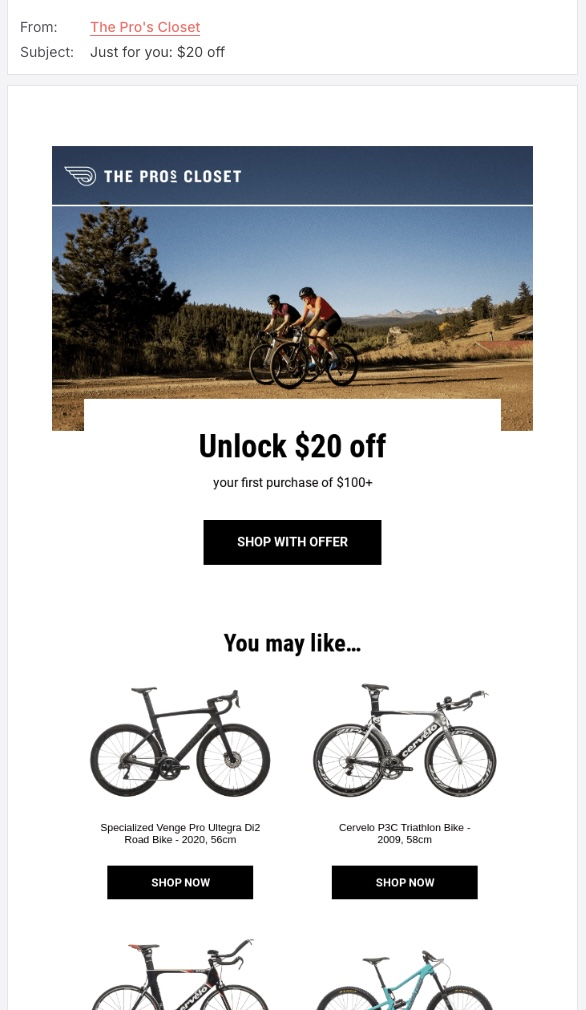
Screenshot of the Pro's Closet exclusive subscriber offer email promo
Screenshot

While there are certainly many exciting things out there, knowing something is reserved just for you can be quite appealing.  In this email offering an exclusive subscriber deal, The Pro’s Closet teases a special discount right in the subject line, inviting new customers to dive in and ultimately circle back to the website. Pretty straightforward, and effective. 

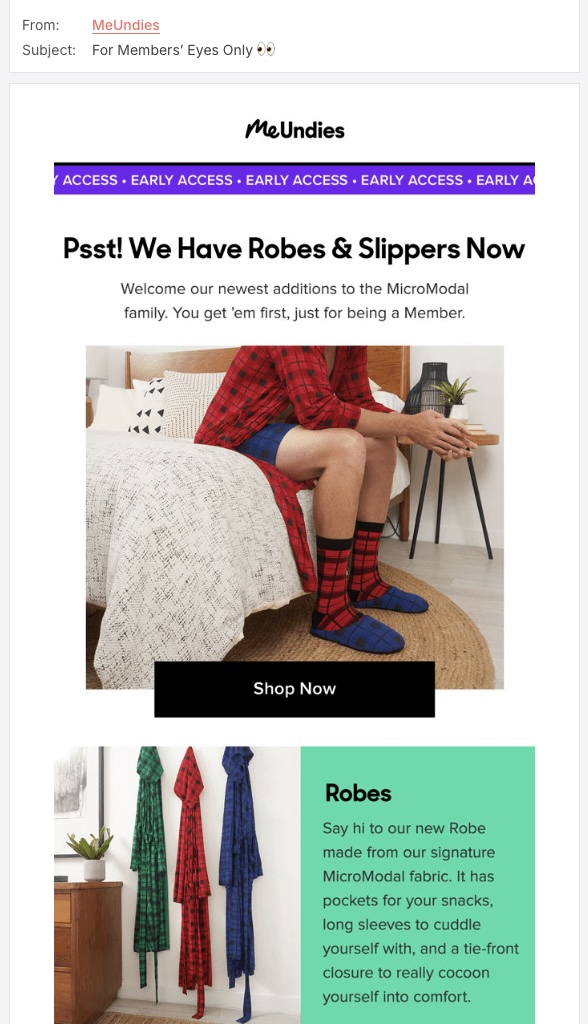
Screenshot of the MeUndies exclusive subscriber offer email promo
Screenshot

The next email masterfully blends a sense of exclusivity with a playful touch–a simple emoji. By incorporating a lighthearted tone, the email immediately sets a welcoming atmosphere. This tone is further enhanced with catchy images and vibrant colors that perfectly align with the brand’s personality, making the overall customer experience memorable and enjoyable.

6. Upsell and Cross-Sell Promotional Emails

With trust established, the upsell and cross-sell emails focus on encouraging customers to explore additional products or services. This is ever so important, as existing customers can be one of your greatest sources of business, and they ensure ongoing success. 

Since you’ve already convinced these customers to buy from you, now’s the time to leverage your emails to highlight complementary items or premium options that not only might address other customer pain points, but that can even enhance the initial purchase.

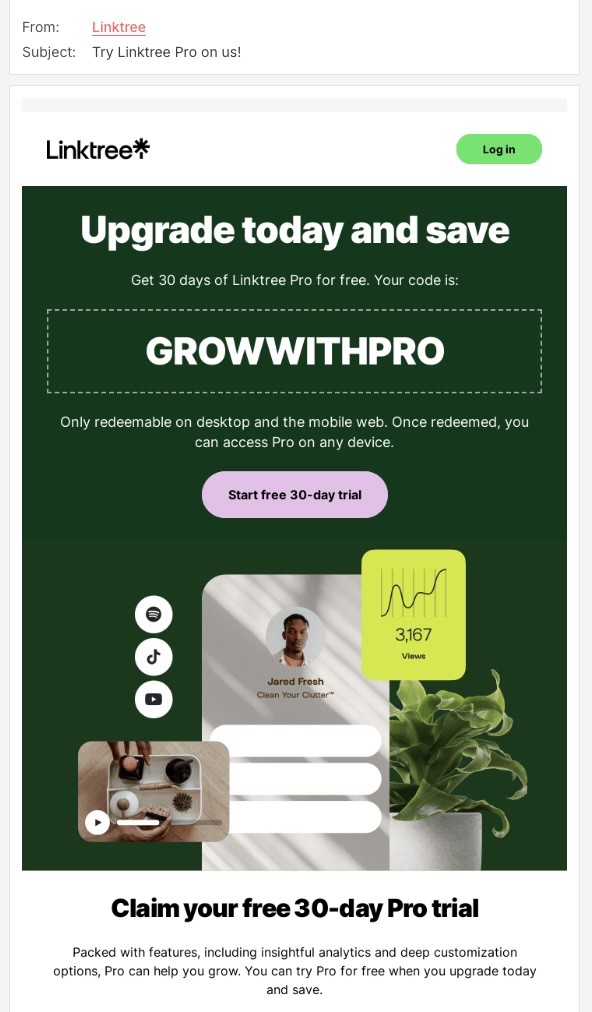
Screenshot of the Linktree upsell email promo
Screenshot

Simple and to the point is how we can describe this upsell email example. Linktree not only offers a free trial of their premium plan but also cleverly emphasizes that there are no strings attached—it’s entirely on them. And just in case the reader misses the bright pink CTA button, the big, bold promo code is right there, ready to remind them of what this email is all about.

Screenshot of the Crocs cross-sell email promo
Screenshot

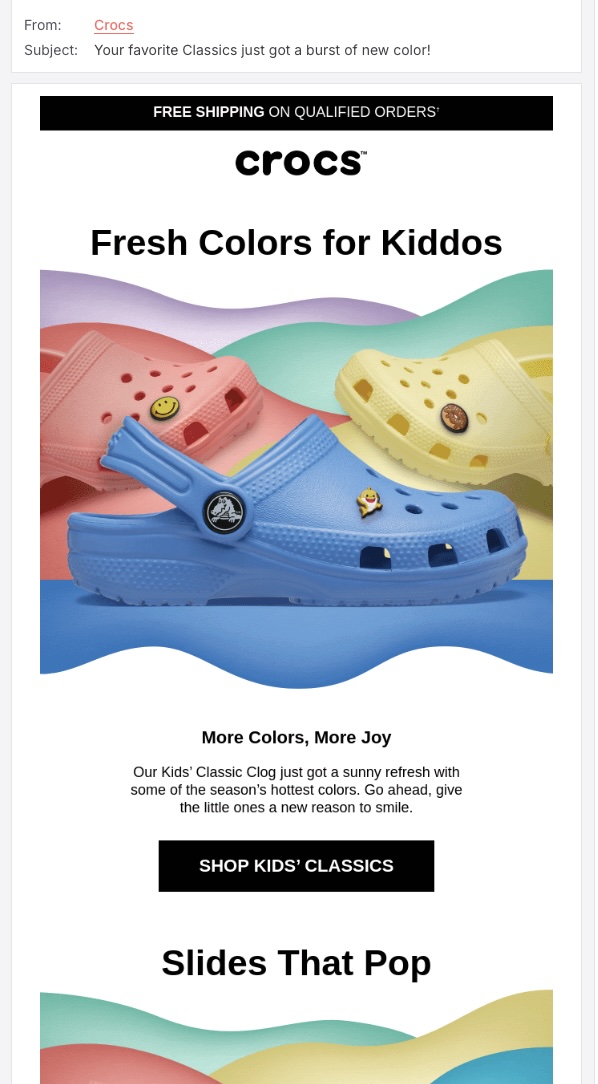
Back-in-stock or new arrival email promos often fall into the cross-sell category, as they encourage existing customers to enhance their previous orders with complementary items. For example, Crocs’ charming message to “give the little ones a new reason to smile” is a perfect illustration of this strategy. By highlighting the joy and excitement that new colors can bring to their kiddos, the email tugs at parents’ heartstrings, prompting them to explore additional options.

7. Special Occasion Promotional Email

Celebrating special moments like birthdays, personal milestones, or even your brand anniversary can make your customers feel special. Including a unique offer, such as a discount or complimentary product, can enhance their experience with your brand. Plus, it’s a great way to encourage them to engage with your brand and make additional purchases.

Screenshot of the REI special occasion sales promotion email
Screenshot

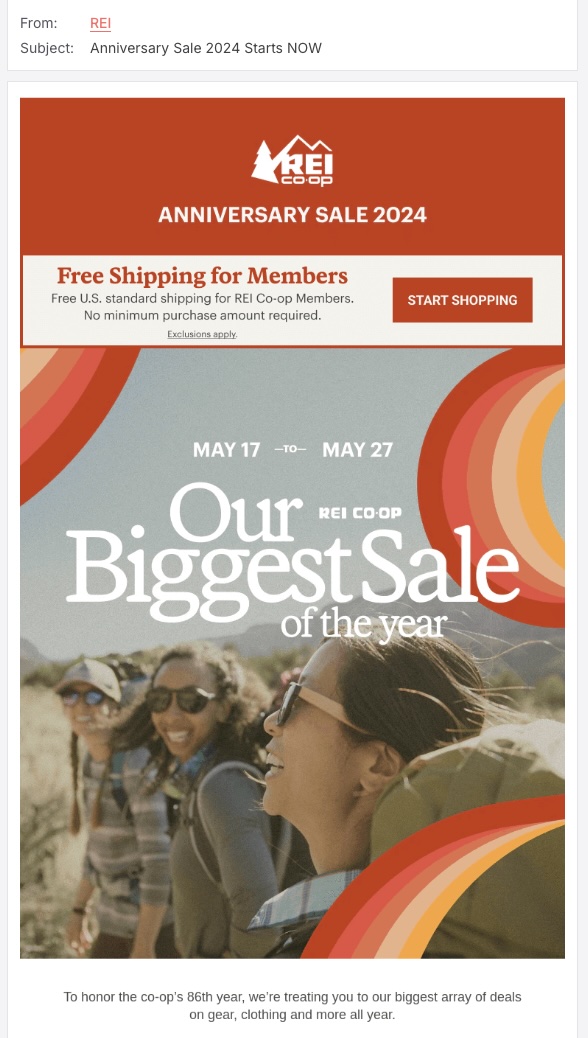
This anniversary email is a warm invitation to REI Co-op members, fostering a sense of community while making them feel extra special. By highlighting the “Biggest Sale,” it promises impressive discounts, stirring excitement and encouraging recipients to explore the deals. The splash of red is no accident—it’s strategically used to create a sense of urgency, motivating customers to take action quickly.

Screenshot of the Starbucks special occasion sales promotion email
Screenshot

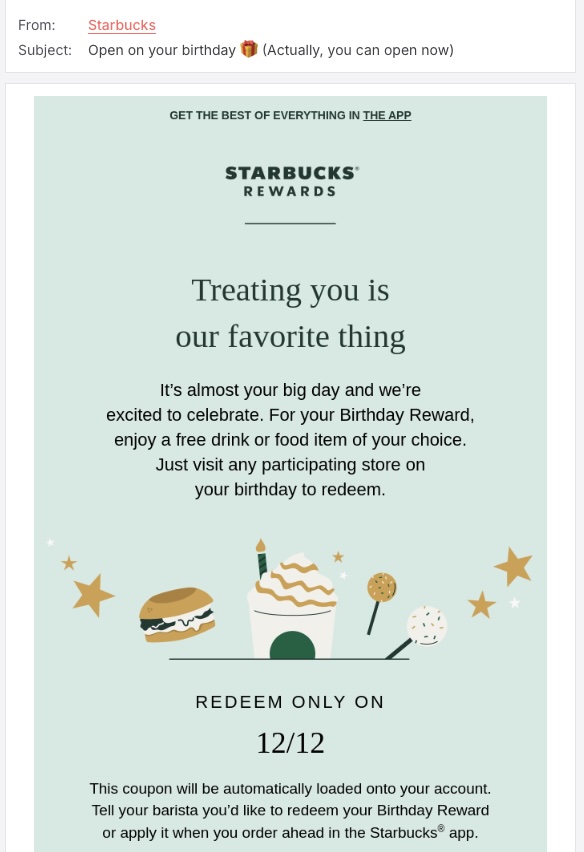
In this next example, Starbucks uses the customer’s birthday to offer a free drink. The email conveys excitement about giving the customer a special treat, making them feel valued by the brand. Redeeming the offer is easy—just visit any participating store on your birthday to enjoy your drink!

8. Event Promotion Email

Whether you’re hosting an in-person seminar, a workshop, or an online webinar, the goal of event promotion emails is to increase attendance and generate excitement among your email list. These emails should capture the essence of the event, spotlighting key speakers, topics, and activities that will pique the interest of potential attendees.

By providing a glimpse into the unique experiences and valuable insights that await them, you create buzz that encourages recipients to register. 

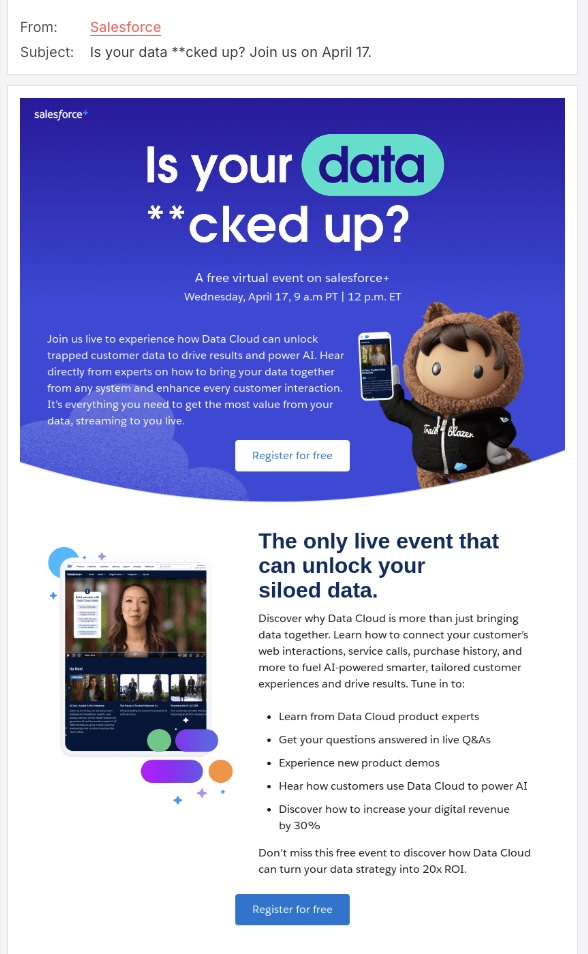
Screenshot of the Salesforce event promotion email
Screenshot

Engagement can kick off with a simple question, especially when you’re asking subscribers about their needs or spotlighting a problem they might encounter. This approach not only captures attention but also demonstrates that you understand their concerns and are eager to provide solutions. Take a cue from Salesforce’s event promotion email, which promises to tackle customer challenges with expert insights, all while promoting new features!

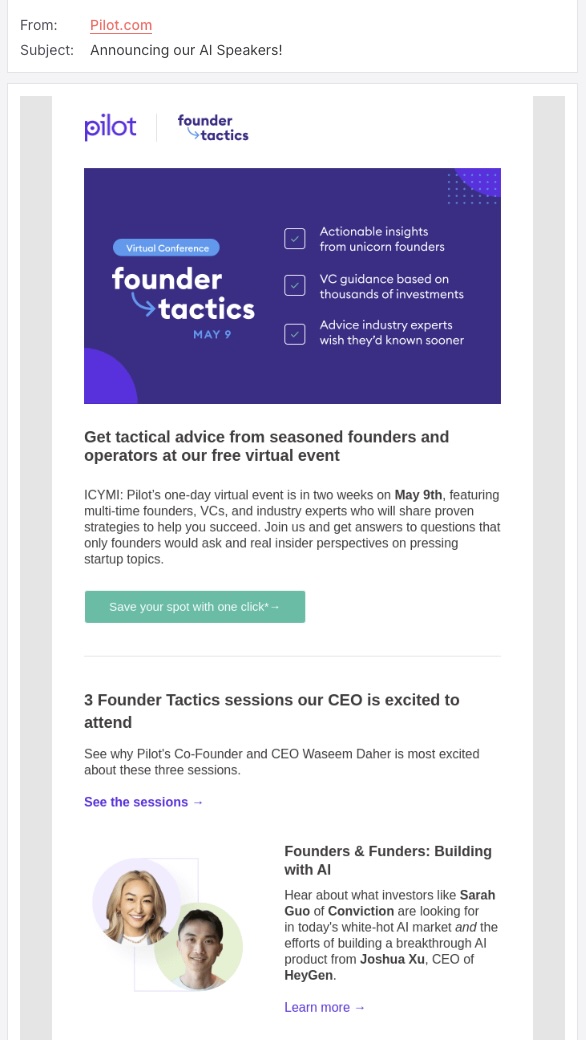
Screenshot of the Pilot event promotion email
Screenshot

After unveiling the event, you need to keep your readers hooked by playfully reminding them of the perks of attending and by revealing the star speakers—just like this email from Pilot does.

9. No Offer, Just a Reminder

While it would be great if your recipients acted upon your offer immediately after the first email, the reality is, unfortunately, different. Many factors can distract or delay a subscriber’s decision to engage with your offer—from a busy schedule to simply forgetting about the email. That’s where a gentle nudge comes in handy. A well-timed follow-up email, even without introducing a new offer, can serve as a friendly reminder of the value you initially presented.

However, while many of us are used to setting reminders for ourselves, sending them to others can be a bit tricky. You want to avoid coming across as pushy or naggy, yet ensure the reminder is memorable.

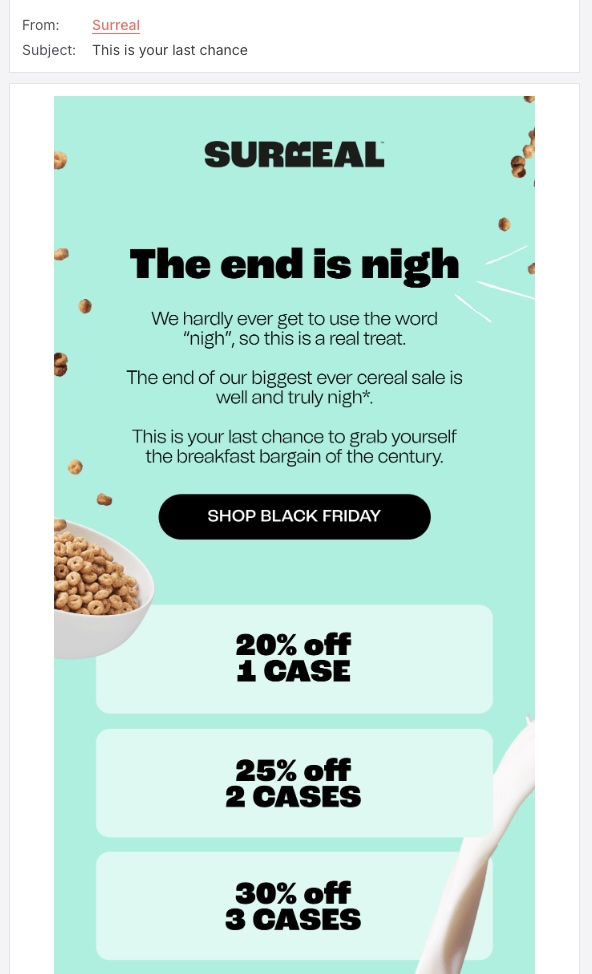
Screenshot of the Surreal reminder email promo
Screenshot

A cheeky joke can make your brand feel more relatable and increase engagement. For example, a self-aware quip about rarely using the word “nigh” adds a quirky personality that aligns perfectly with Surreal’s playful brand voice. This lighthearted approach helps break the ice, making the communication feel more like a conversation with a friend rather than a sales pitch.

Start Converting Readers into Clients

Sales promotion emails are your golden ticket to reaching out to your subscribers and saying, “We’ve got something special just for you!” Whether you’re unveiling a new product, marking a milestone, or offering a seasonal discount, the goal is to capture attention and inspire action.

By leveraging the strategies and examples shared in this article, you’ll be well-prepared to craft email promos that not only intrigue your audience but also convert that interest into sales.

And remember, as you embark on this journey, the use of personalization, catchy yet relevant CTAs, and a visually appealing design are your best allies. Tailor your messages to resonate with your recipients, and ensure your offer is communicated clearly, keeping the benefits it delivers in mind.


This article was originally published in August 2024 and updated in February 2025.

The Secrets to Effective Re-Engagement Emails + 20 Examples

Ever had a friend suddenly stop replying to your messages, and you’re left wondering if they’ve moved to a remote island with no WiFi? That’s kind of what happens with inactive subscribers. But don’t worry—just like you’d send a friendly “Hey, are we still cool?” text, customer re-engagement emails can work wonders in bringing those lost connections back to life. In this guide, we’ll break down the secrets behind effective re-engagement emails, plus plenty of examples to spark your creativity.

What Is a Re-Engagement Email?

A re-engagement email is a targeted newsletter email sent to inactive or disengaged subscribers with the goal of reactivating their interest in your brand, product, or service. These emails typically include compelling subject lines, special offers, personalized content, or reminders about the value of staying connected.

And the reality is that this is an important and often normal part of the email customer journey—that is, sadly, not all subscribers stay engaged forever. And that’s where this step comes in so that you can entice them to come back for more.

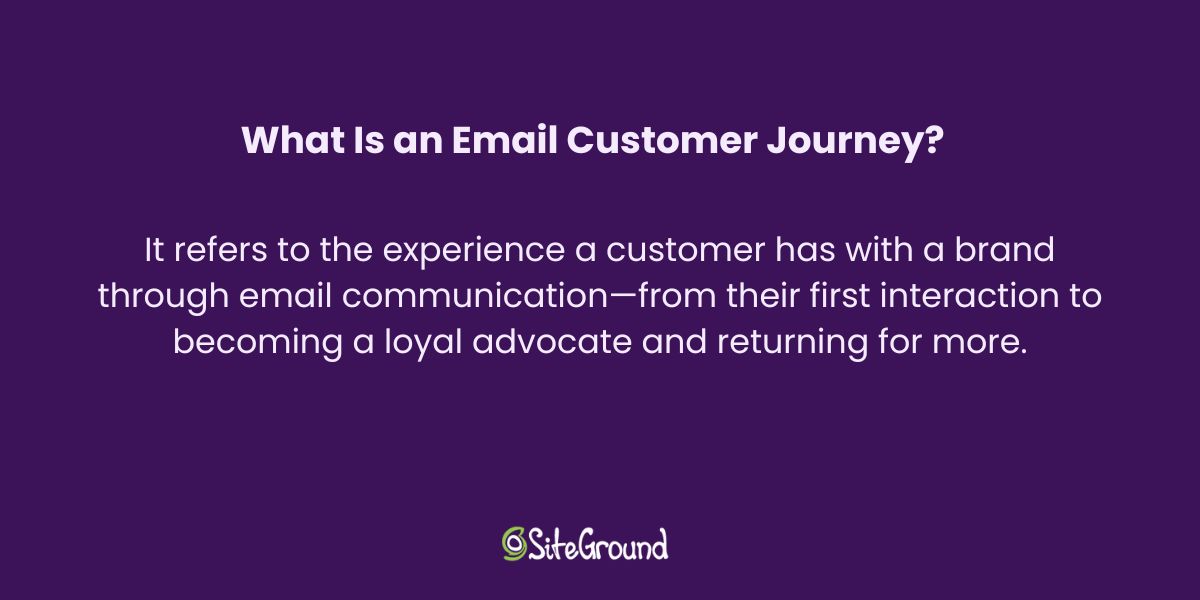
The definition of an email customer journey

Indeed, inactive subscribers don’t have to be lost customers. People get busy, inboxes get cluttered, and sometimes they just need a nudge to reconnect. More importantly, there are some really solid reasons for your business to get back in touch with these distancing subscribers through thoughtful email campaigns. 

Why Send Re-Engagement Emails?

There are many reasons why sending customer re-engagement emails is an important part of your email marketing:

  • Reduce Churn: Keeping customers engaged prevents them from leaving, which is more cost-effective than constantly acquiring new ones.
  • Boost ROI: Re-engaging inactive subscribers can improve your email marketing campaign performance and overall revenue.
  • Enhance Deliverability: Email providers prioritize active and engaged lists, improving your sender reputation.
  • Gain Insights: Use email marketing metrics to track responses from re-engagement campaigns can provide valuable data on customer behavior.
free email marketing course for beginners

7 Common Types of Re-Engagement Emails

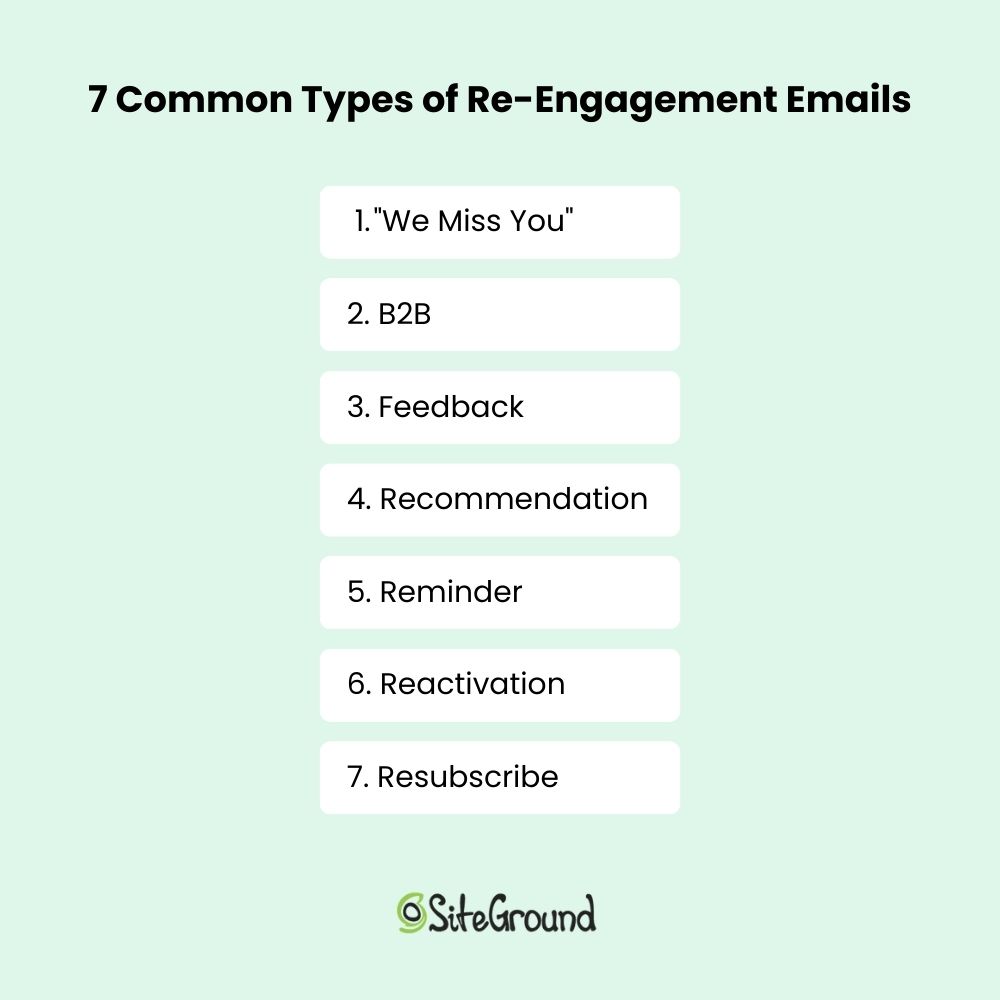
Now that we’re all on the same page about the importance of sending re-engagement emails, it’s time to talk about the more strategic and nuanced side of things. With that in mind, here are the most common types of customer re-engagement emails that you’ll want to add to your email automation sequences.

7 common types of re-engagement emails

1. “We Miss You” Emails

The “We miss you” email is a re-engagement campaign classic. It feels friendly, but not desperate; it appeals to emotions, but it isn’t sappy—and all wrapped in a subtle reminder to get back in touch. These emails often include just a friendly message, but they can also be paired with a special offer or an invitation to check out new features.

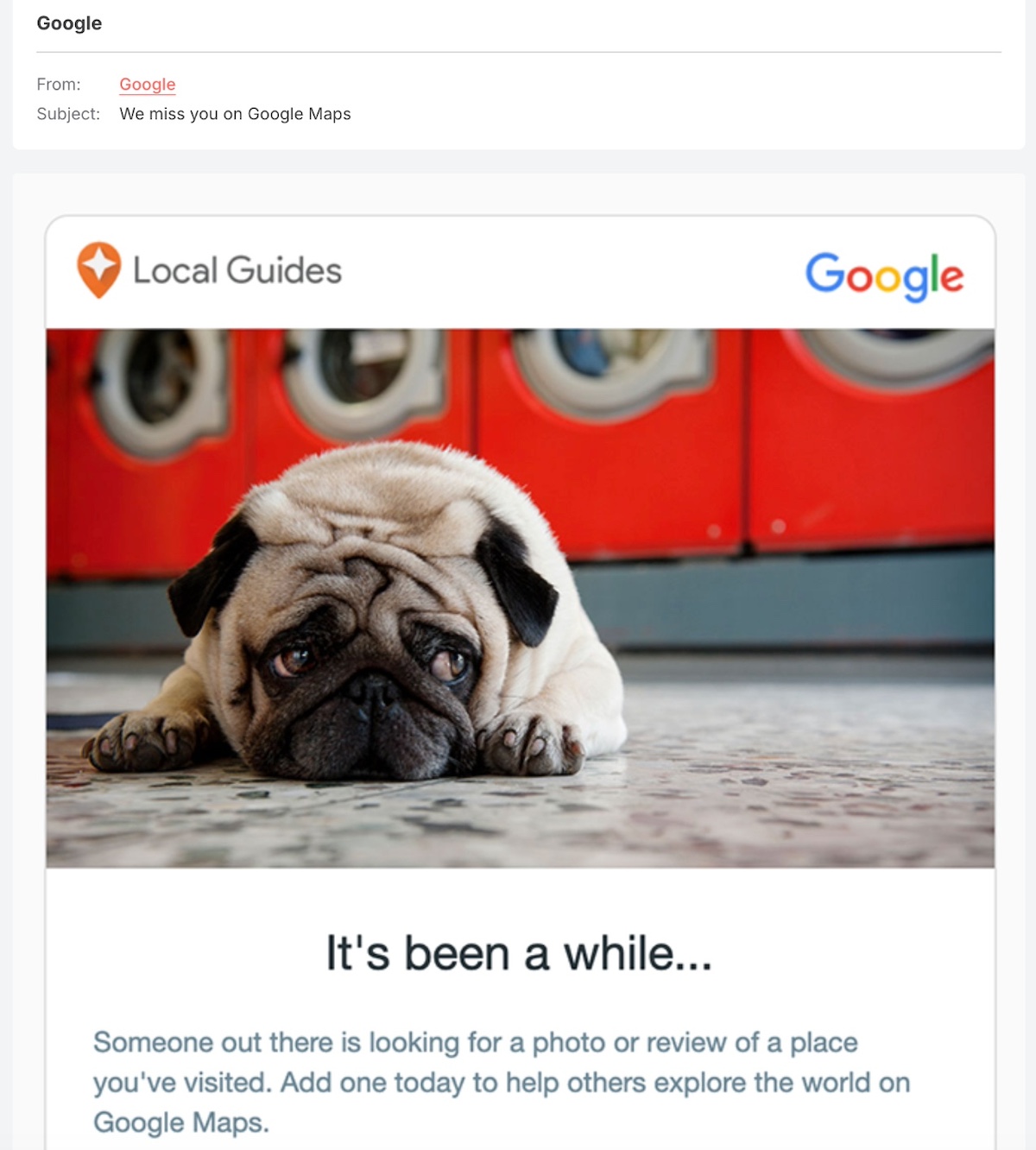
You can’t really go wrong with a cute dog photo, so this “we miss you” email already has our heart. But we also love how this email appeals to someone out there “looking for a review,” making the reader feel like their input is valuable—and hopefully inspiring them to take action.

A we miss you re-engagement email example

2. B2B Re-Engagement Emails

For B2B companies, re-engagement emails are a super important part of bringing back inactive leads, encouraging repeat purchases, or reminding customers of your value. This kind of email is going to be a bit (or a lot) less informal (so the “we miss you” text is probably not the right vibe), and instead often focuses on providing educational content, product updates, or exclusive offers.

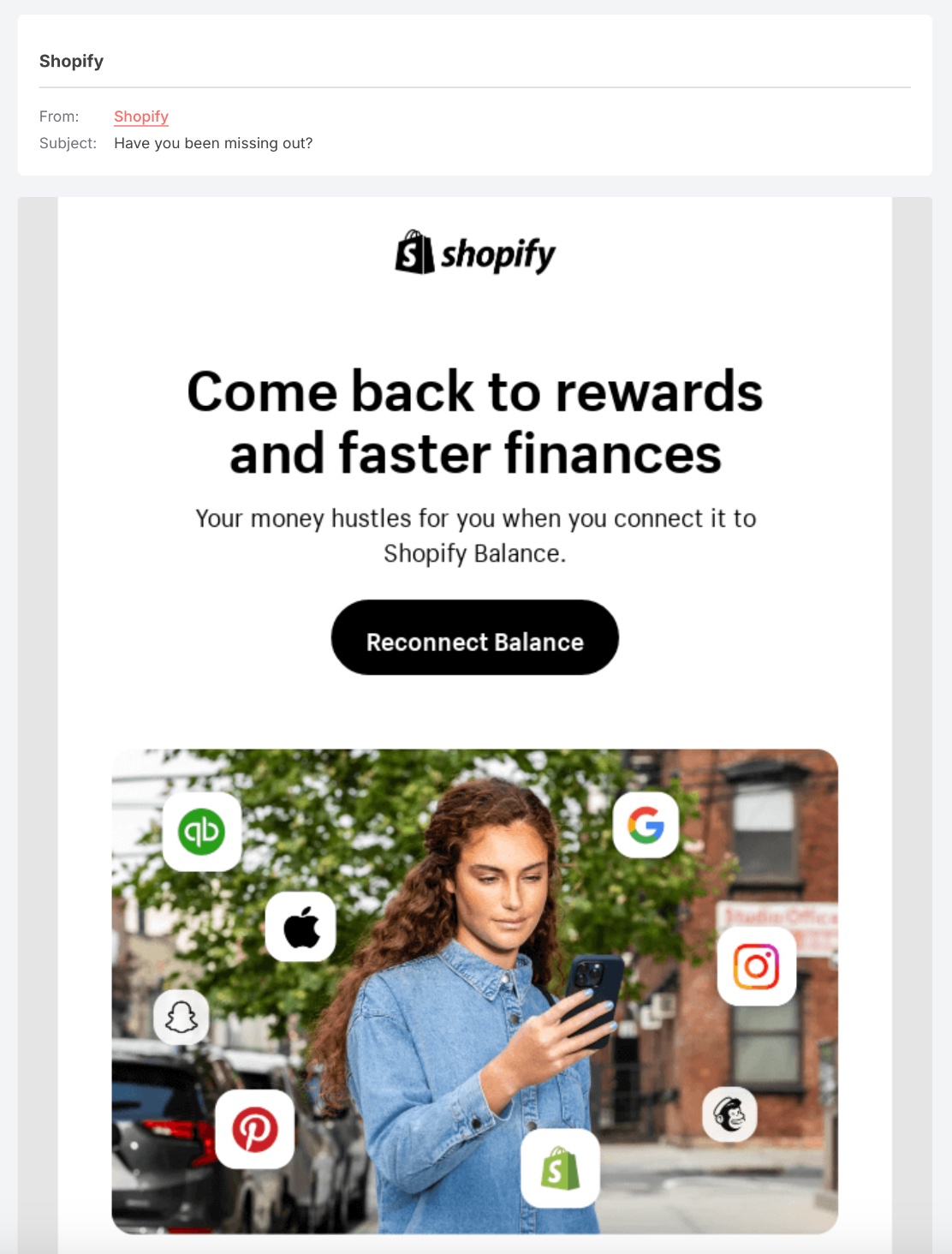
We like how in this B2B re-engagement email, the recipient is clearly reminded that they’ve been missing out on special perks and faster finances, and they’re gently nudged to reconnect. 

example of a b2b re-engagement email

3. Feedback Re-Engagement Emails

We all love to be asked our opinion, right? So, if a subscriber has stopped engaging, asking for their feedback might very well get them to open your email and reply. Not only do these emails make customers feel heard and offer an opportunity to re-engage, but they also give you a chance to gather important feedback to improve your business, service or product. Win, win and win.

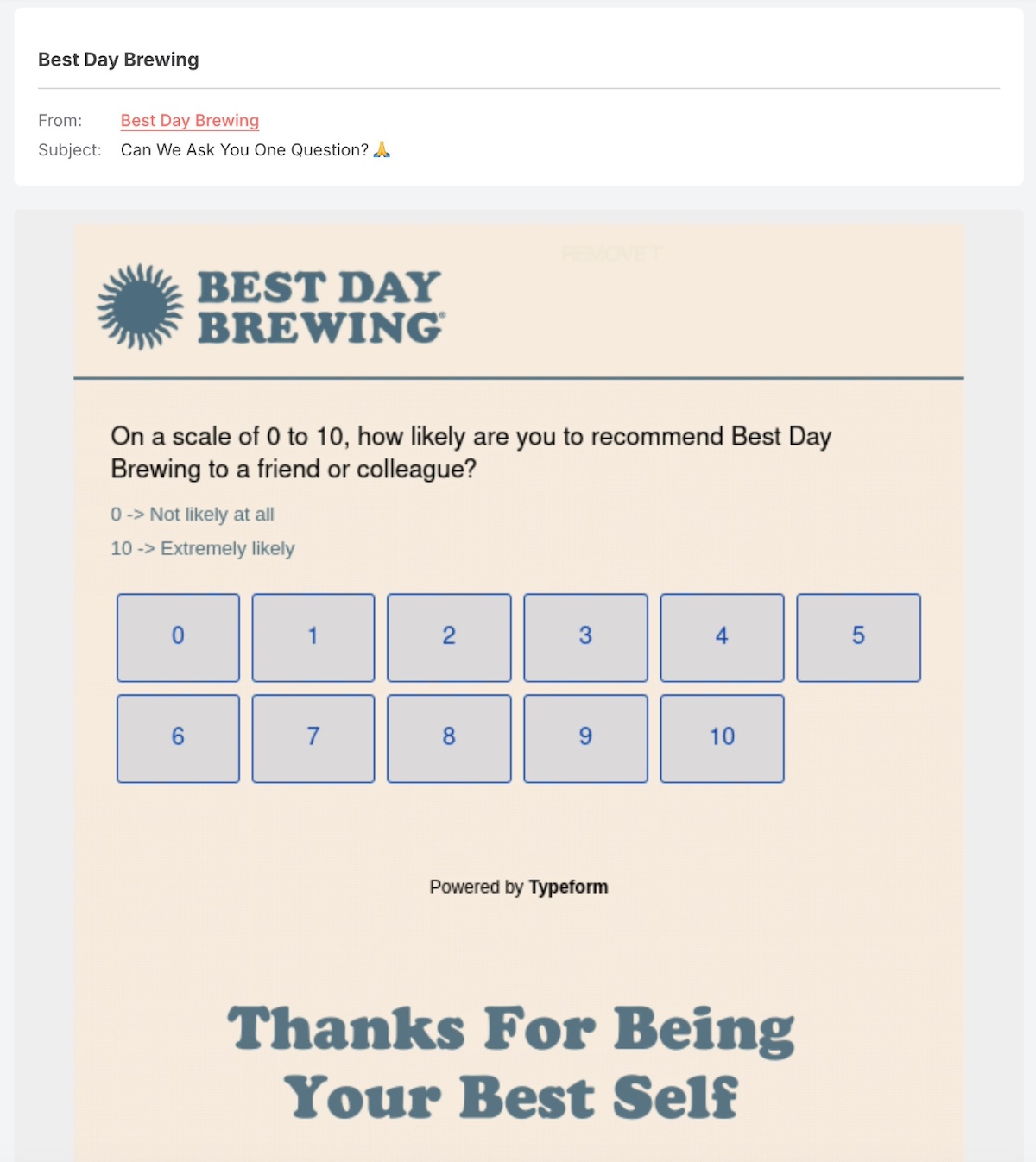
Simple and appreciative, the below email makes clear that there will be just one question—and the sender follows through in the email message with gratitude. If someone hasn’t engaged in a while, this message is a good example of giving subscribers the warm and fuzzies to bring them back to buying some beer.

Example of a feedback re-engagement email

4. Recommendation Re-Engagement Emails

Sometimes customers get distracted or lose interest—this is business as usual. So pique their interest by sending personalized recommendations based on previous activity. By leveraging customer data—whether that’s past purchase behavior, email engagement, or otherwise—you can suggest relevant products, content, or services that speak to their needs and interests.

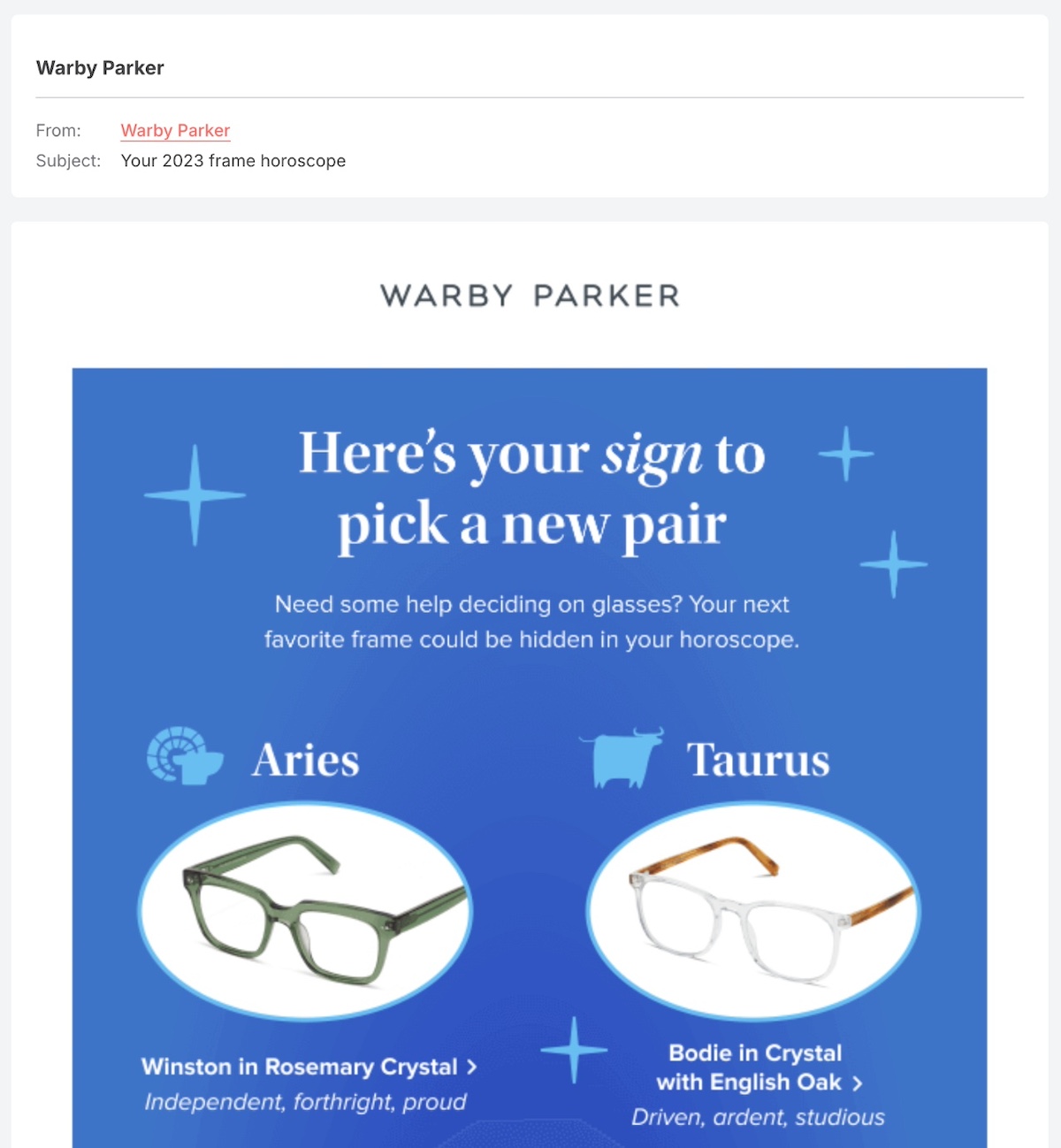
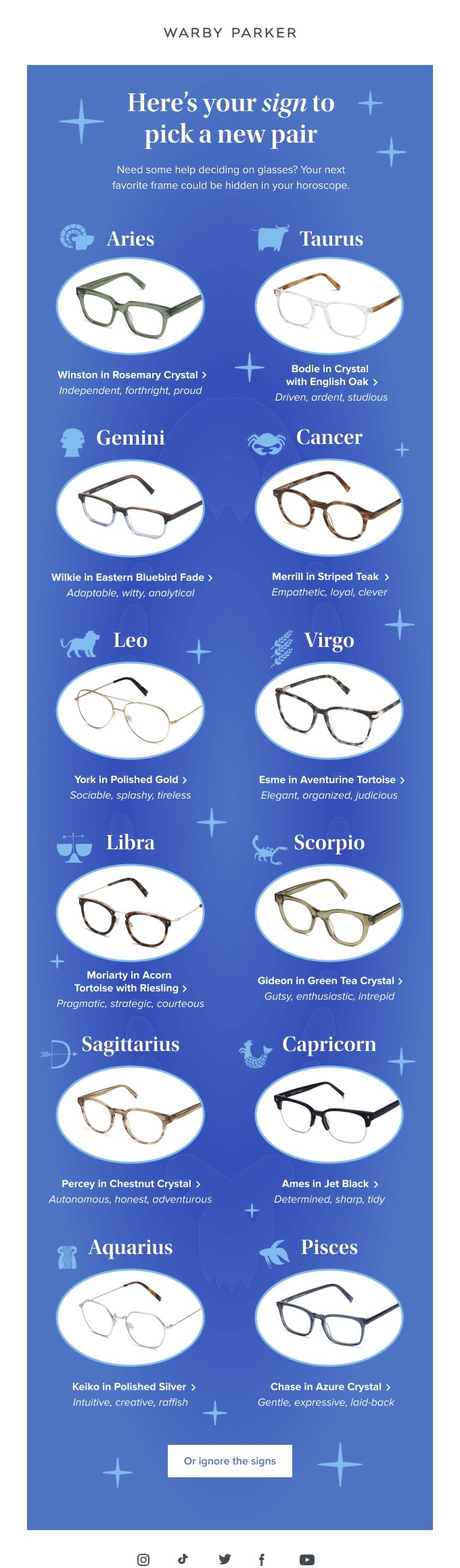
We love how Warby Parker’s re-engagement email is a blend of recommendation, special occasion, and intrigue. Aren’t you already wondering what your frame horoscope is?

Example of a recommendation re-engagement email

5. Reminder Re-Engagement Emails

Sometimes people simply forget—that’s life! So a gentle reminder email about an expiring discount, an abandoned cart, or an incomplete profile can nudge customers back into action. We all need reminding sometimes.

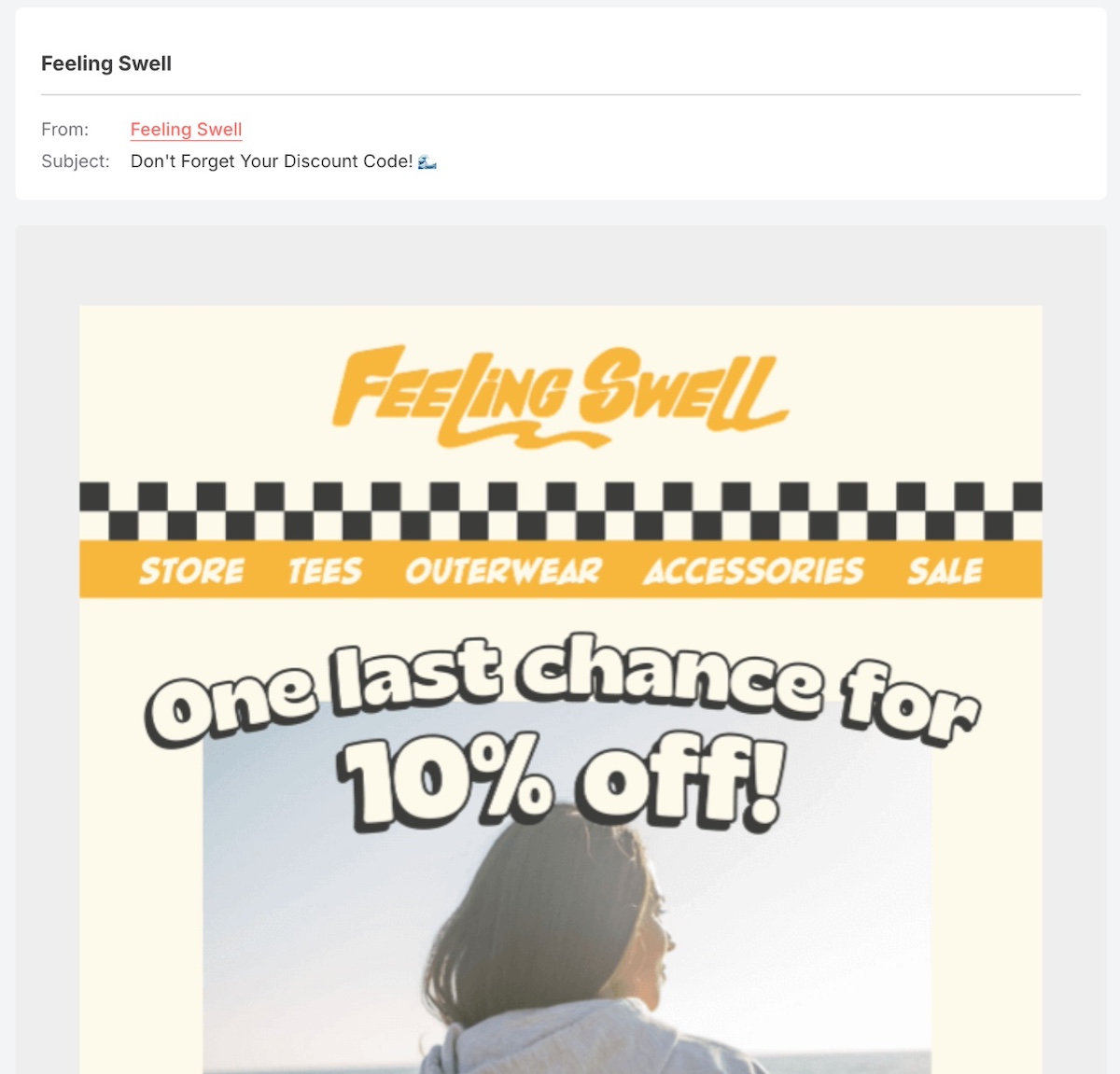
The below reminder email effectively invites the reader to open with its simple “don’t forget” message, and just a touch of intrigue since the discount is unknown. Once opened, the message leans on a last-chance sense of urgency in order to hopefully seal the deal.

Example of a reminder re-engagement email

6. Reactivation Re-Engagement Emails

Reactivation emails focus on those customers who got far enough along in their journey to sign up for a trial or subscription, but somehow got distracted. Emails like these highlight what those customers might be missing out on and often include an incentive to return.

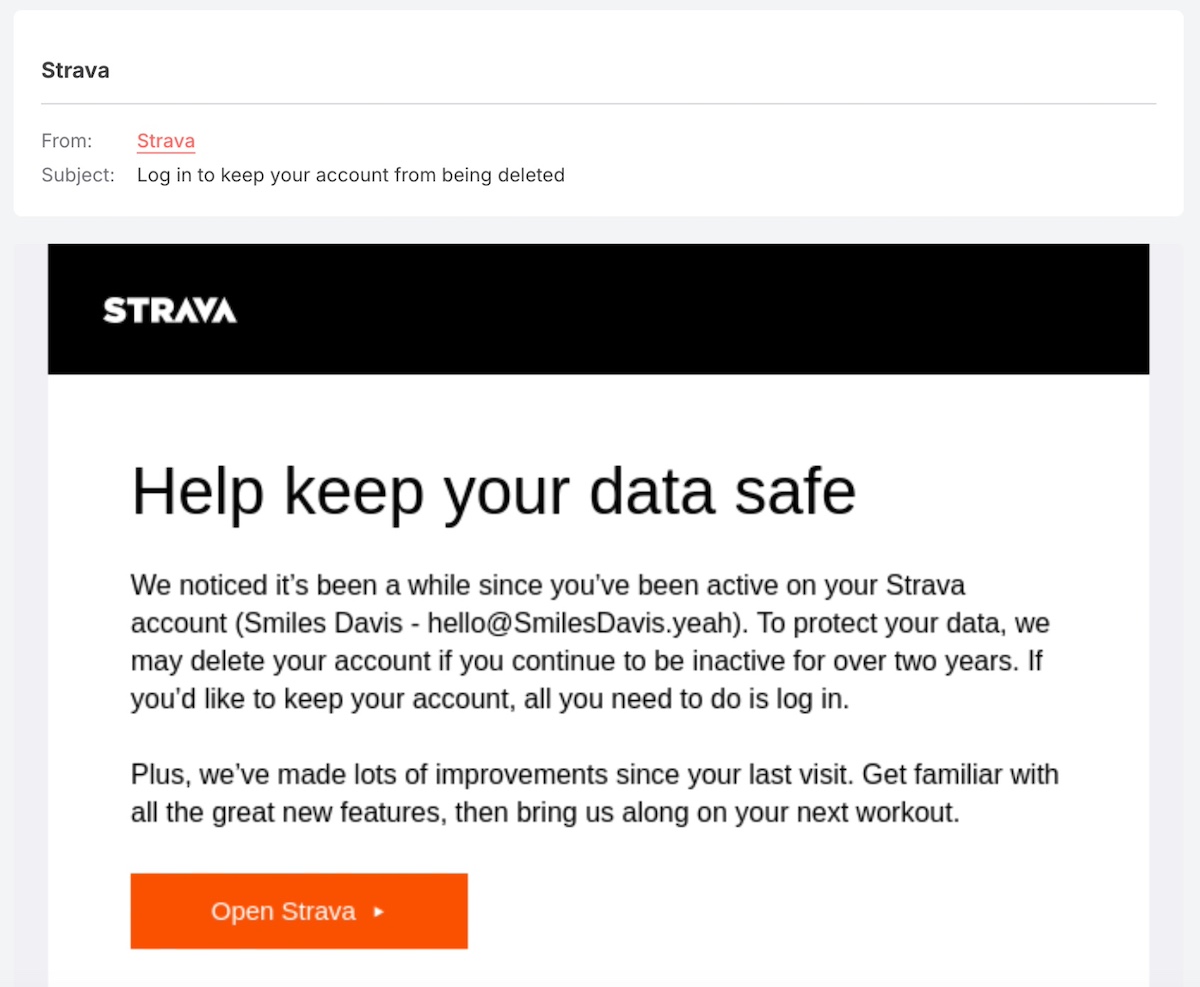
Nothing invites a little action like the threat of your data being hacked—gulp. Not only does the below reactivation email example motivate engagement, but it also does a good job of tapping into the element of fear in order to generate interaction from the recipient.

Example of a reactivation re-engagement email

7. Resubscribe Re-engagement Emails

You might be wondering if you can or should try to re-engage with customers who’ve chosen to unsubscribe from your list. While it may be tempting to send a resubscribe email, this is generally not recommended. Many email regulations, including GDPR and CASL, discourage sending emails to users who’ve explicitly opted out, and doing so can harm your sender reputation. 

So, instead of following up with another email, a more effective and compliant approach is to optimize your unsubscribe confirmation page. Use this page to:

  • Remind users of the value they’re leaving behind.
  • Highlight the benefits of staying subscribed, such as exclusive offers, helpful insights, or important updates they might miss.
  • Provide options like adjusting email preferences instead of fully unsubscribing.

By making it easy for past subscribers to reconsider their decision, you create a frictionless path for re-engagement without violating email marketing best practices.

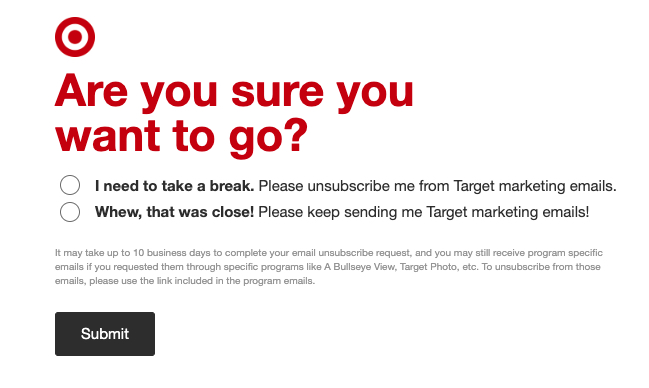
We love how the below resubscribe re-engagement example—which comes in the form of an unsubscribe confirmation page rather than an email—playfully and easily gives subscribers the option to stay subscribed.

Example of an unsubscribe page for re-engagement

How to Write Re-Engagement Emails

When it comes to how to write a marketing email to re-engage, there are a handful of secret tactics you can use to get the most out of your messages. Let’s dissect the ways you can get more strategic with your re-engagement email writing.

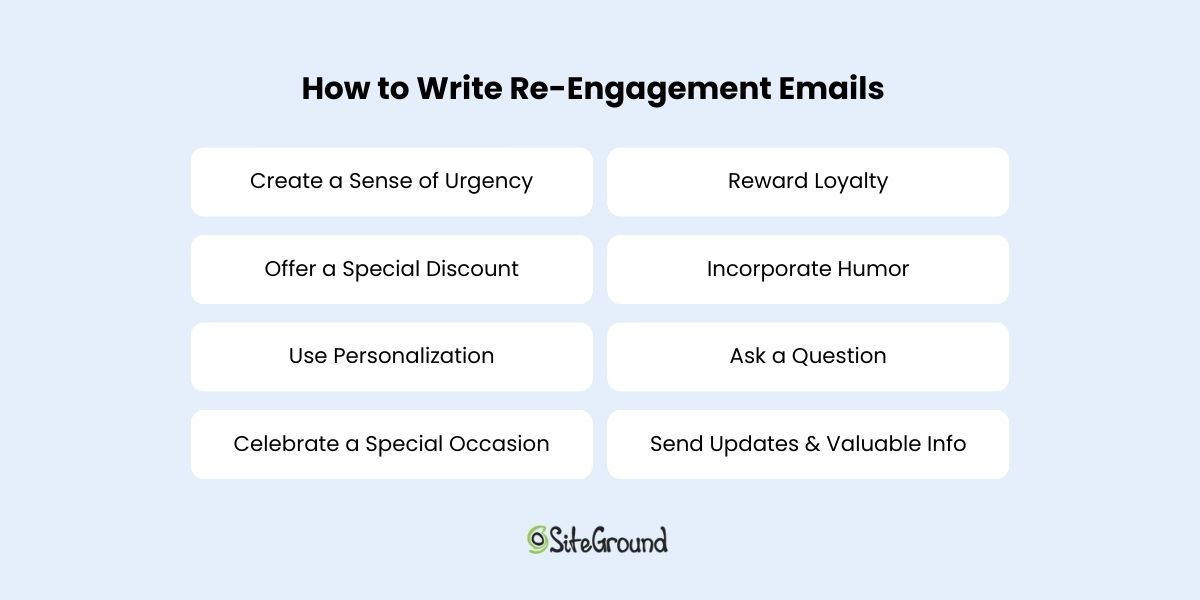
List of how to write re-engagement emails

1. Create a Sense of Urgency

Creating a sense of urgency is a rather fail-safe tactic for capturing attention, and quickly. Limited-time offers, expiring discounts, or exclusive deals can push recipients to re-engage before it’s too late.

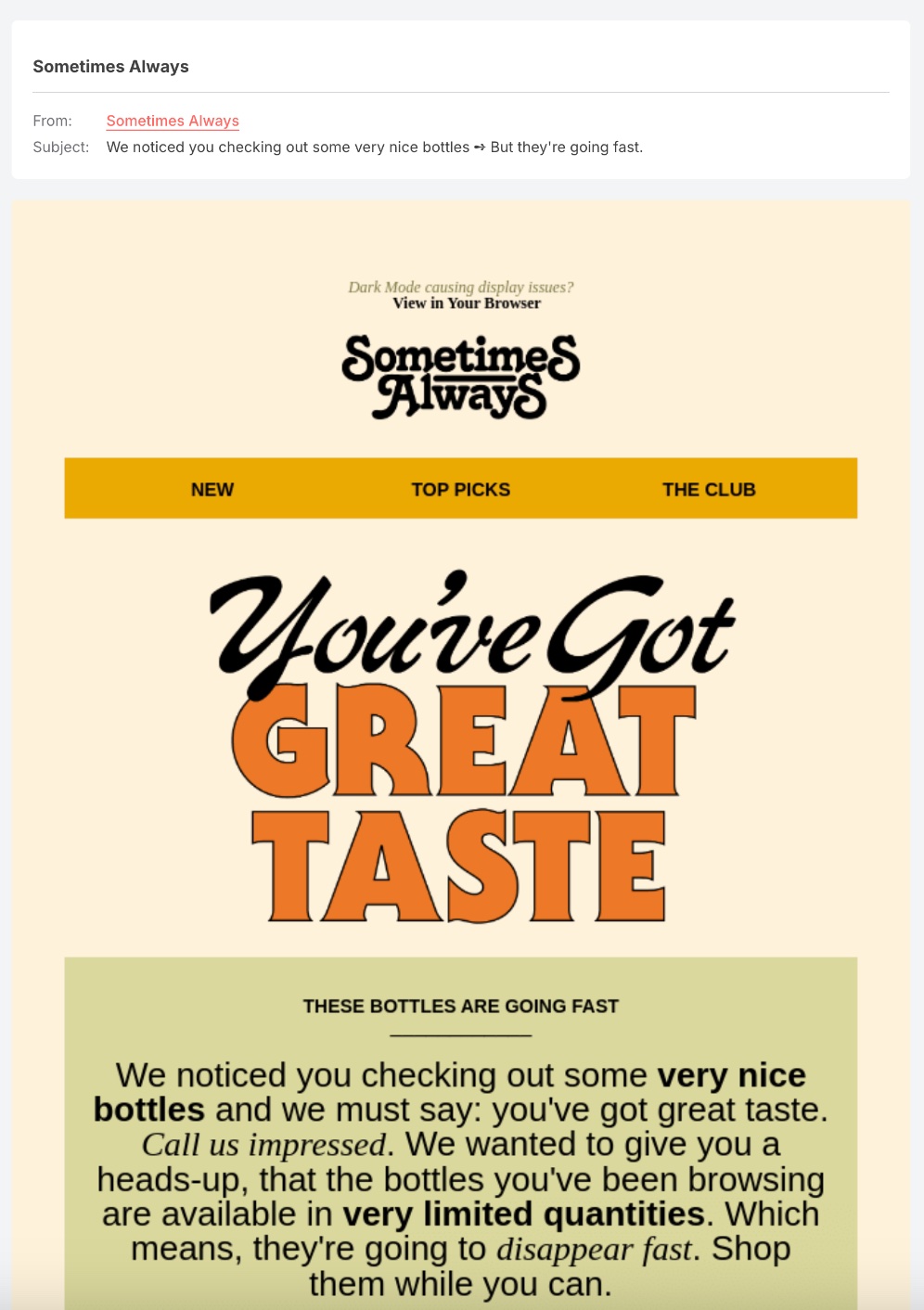
The below email from Sometimes Always playfully and successfully points out the product the customer was eyeing, while also injecting a sense of urgency given that the bottles are going fast. So if this customer was on the fence, they might well be enticed to re-engage given the prospect of missing out.

Example of re-engagement email with a sense of urgency

2. Offer a Special Discount

If you’re trying to re-engage subscribers, then it might be a good moment to shell out a steeper discount. If you usually offer 10%, then sweeten the deal with 15% off. Make sure it’s clear that the discount is an exclusive offer for coming back, making it all the more enticing to take action. 

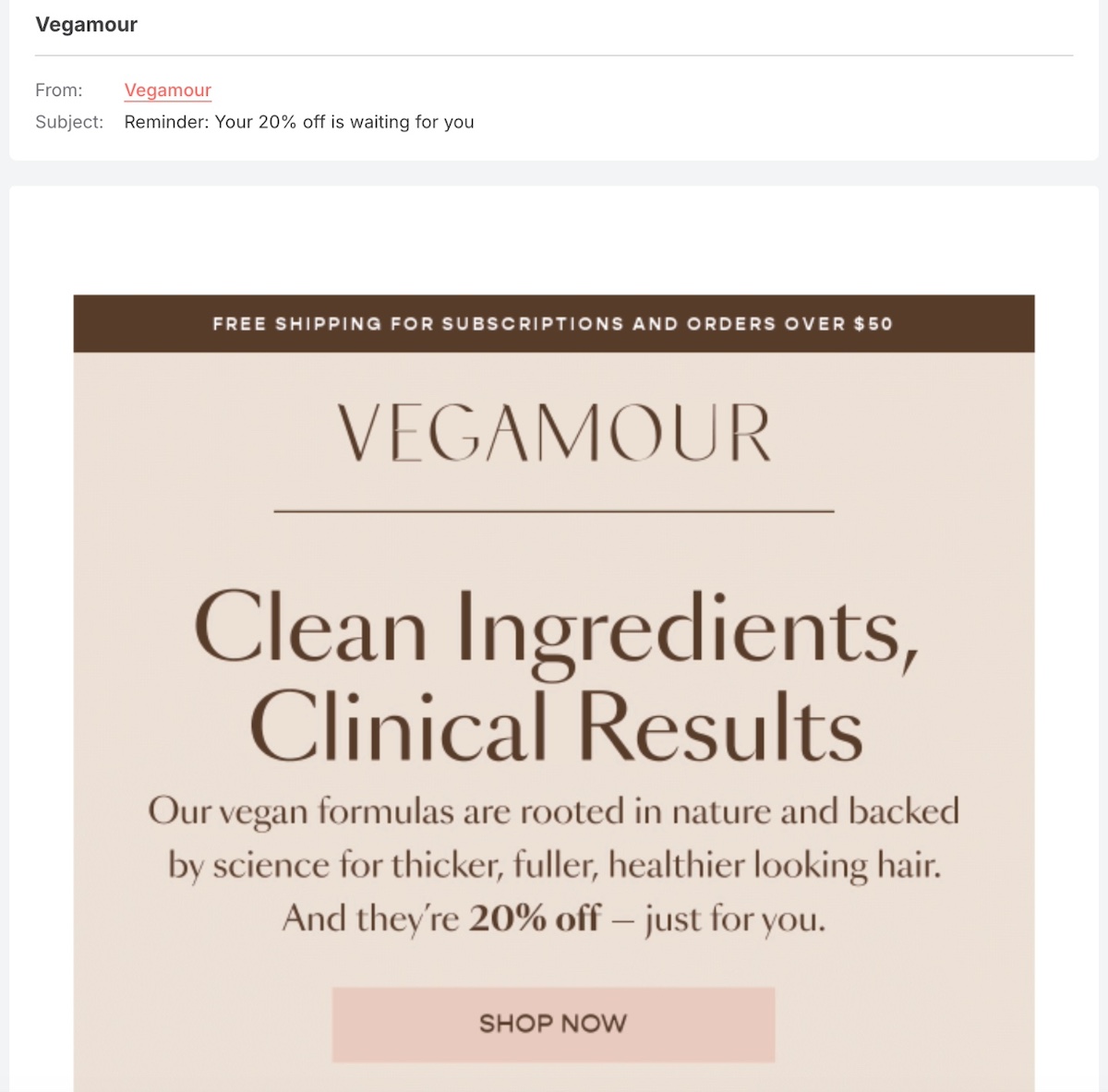
Passing up on a discount is always a challenge, and that’s what Vegamour is counting on. In this email, they make it extra clear in the subject line that the discount is waiting and it’s time to re-engage. To the point and effective. 

Example of a discount re-engagement email

3. Use Personalization

We’re all drowning in content overload—AI-generated everything, overflowing inboxes, and an endless stream of messages. With so much noise, it’s easy to become numb to it all. As such, we’re craving a bit more personalization (just one of many current digital marketing trends). So consider using a subscriber’s name, past purchases, or browsing history to make the email feel more relevant and engaging, and not just another anonymous message in their inbox.

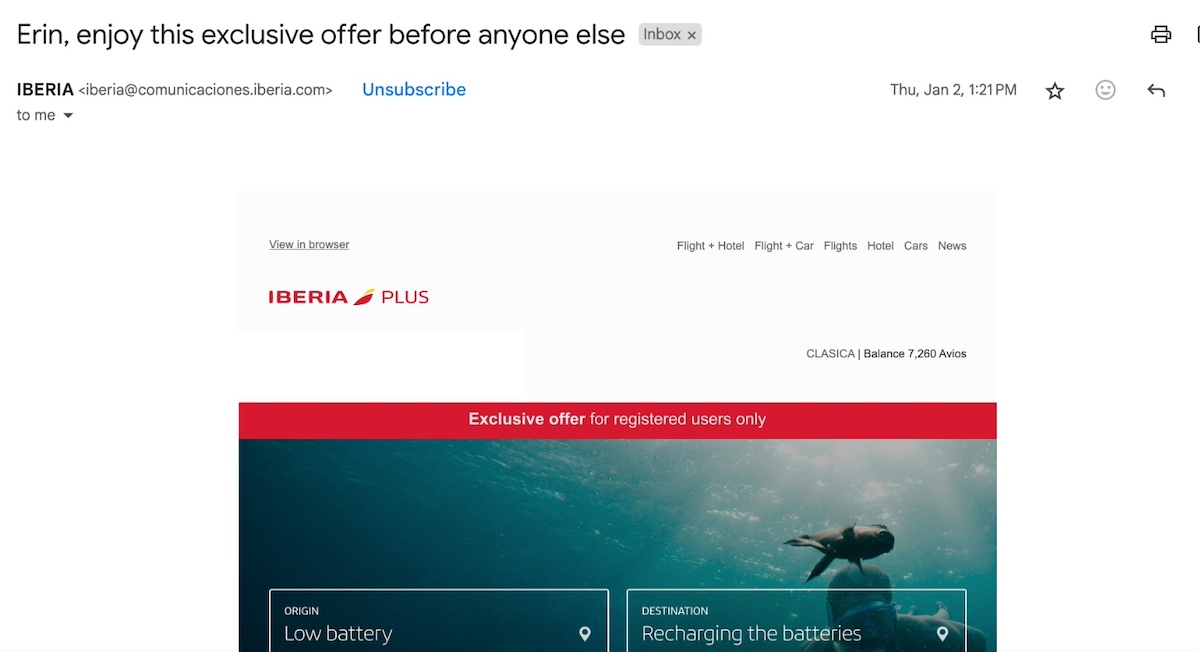
The following email from Iberia smartly appeals to the recipient directly by name in the subject line, and combines that with an exclusive offer and a touch of urgency. This mix of personalization and exclusivity has the power to re-engage the customer if previous messages haven’t done the trick.

Example of a re-engagement email with personalization

4. Celebrate a Special Occasion

Special occasions, like birthdays, holidays, anniversaries, etc, are a good excuse to send themed content that inspires email opens. And if you leverage the aforementioned personalization, you may wish to also offer a special discount to make re-engagement a bit more irresistible. 

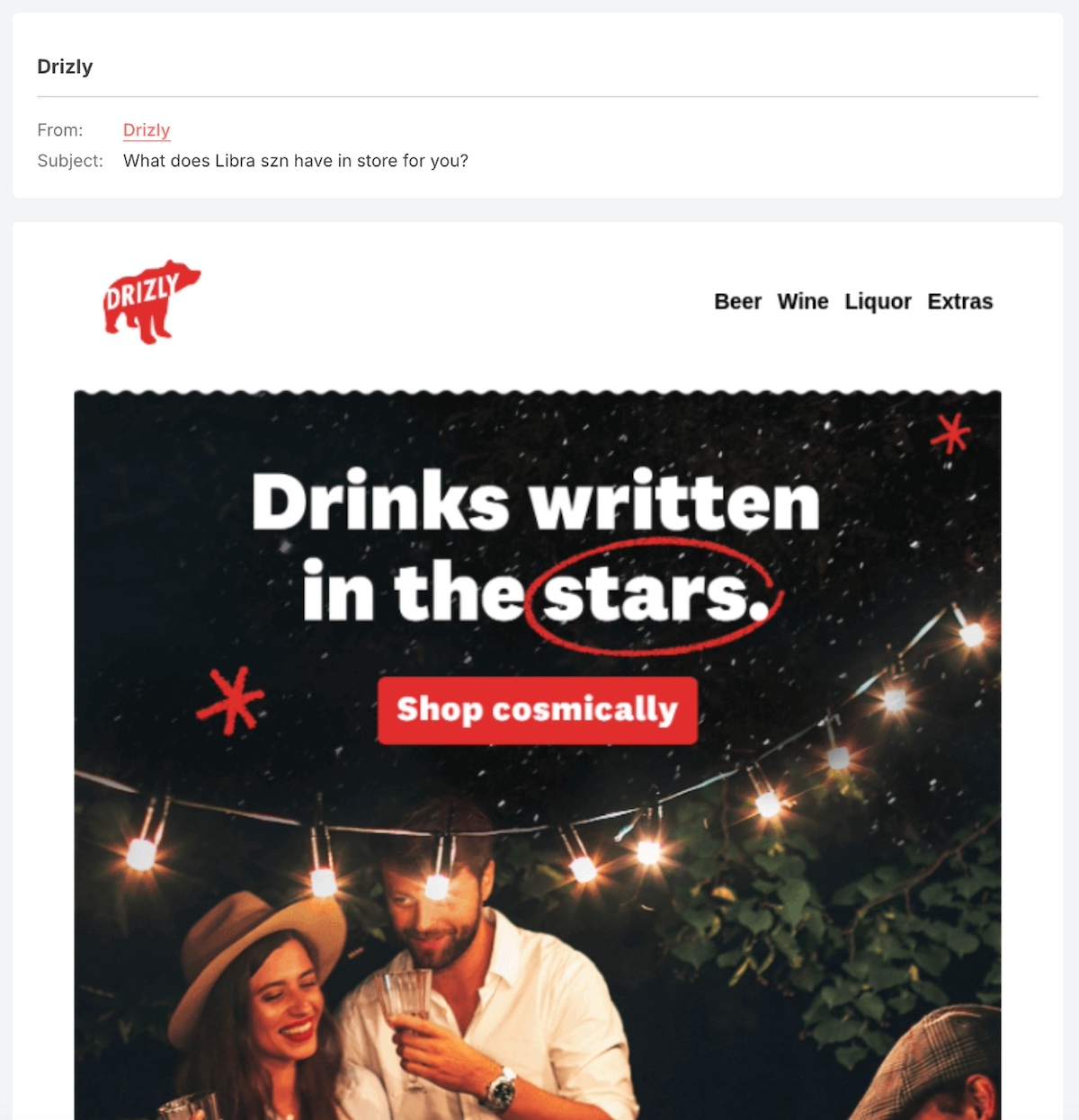
It’s kind of hard to resist an old-fashioned astrology prediction. The below email example has a creative subject line that generates curiosity, and builds on that with the “shop cosmically” call to action. 

An example of a seasonal re-engagement email

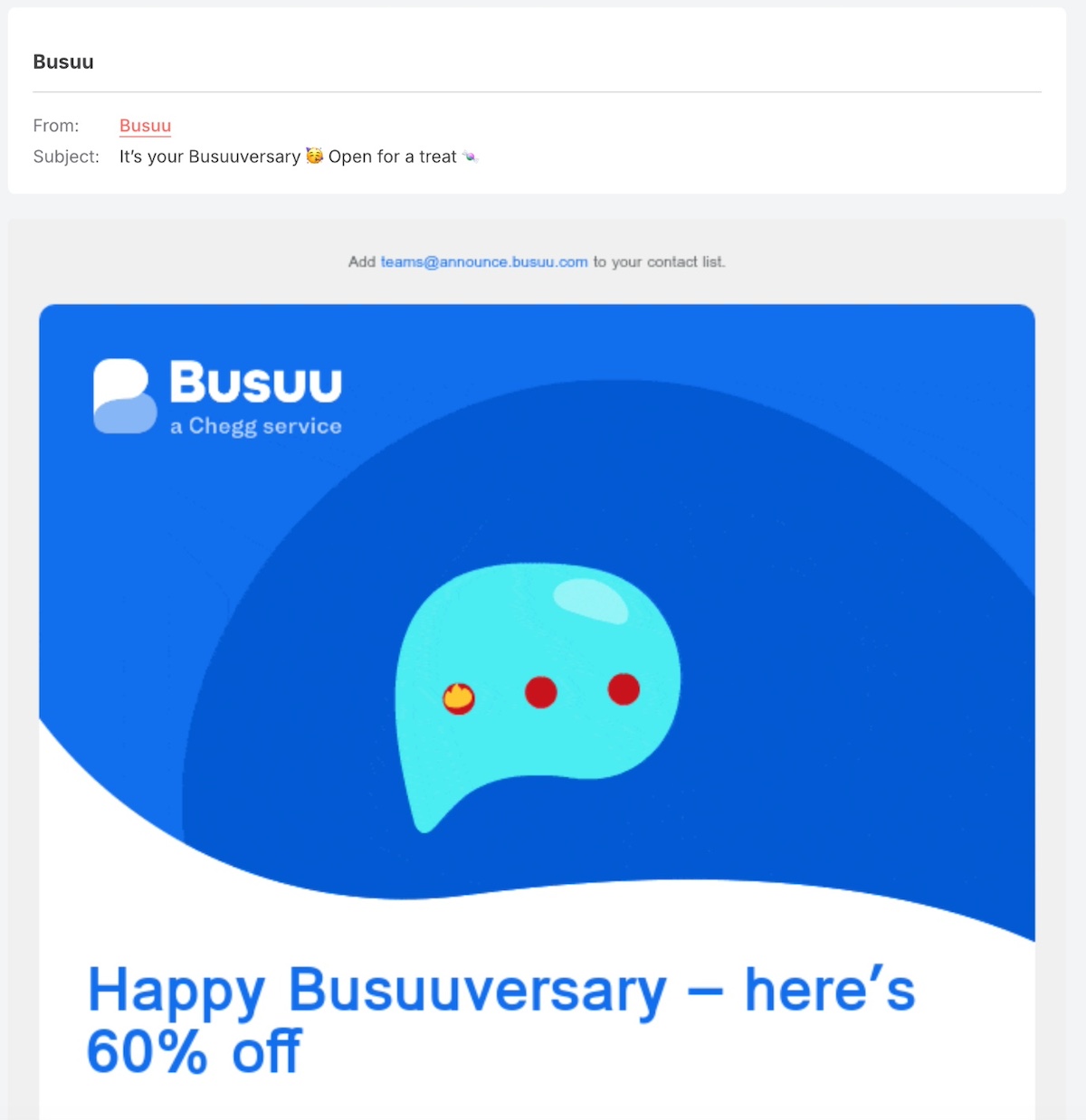
Below, Busuu uses the customer’s anniversary with the brand to offer a special discount. The nature of this not-every-day kind of discount can pique the recipient’s interest and get them to re-engage.

example of a special occasion re-engagement email

5. Reward Loyalty

These customers may have strayed, but perhaps once upon a time they were loyal customers. Remind them of your gratitude and offer exclusive perks or VIP access so that they come back for more. 

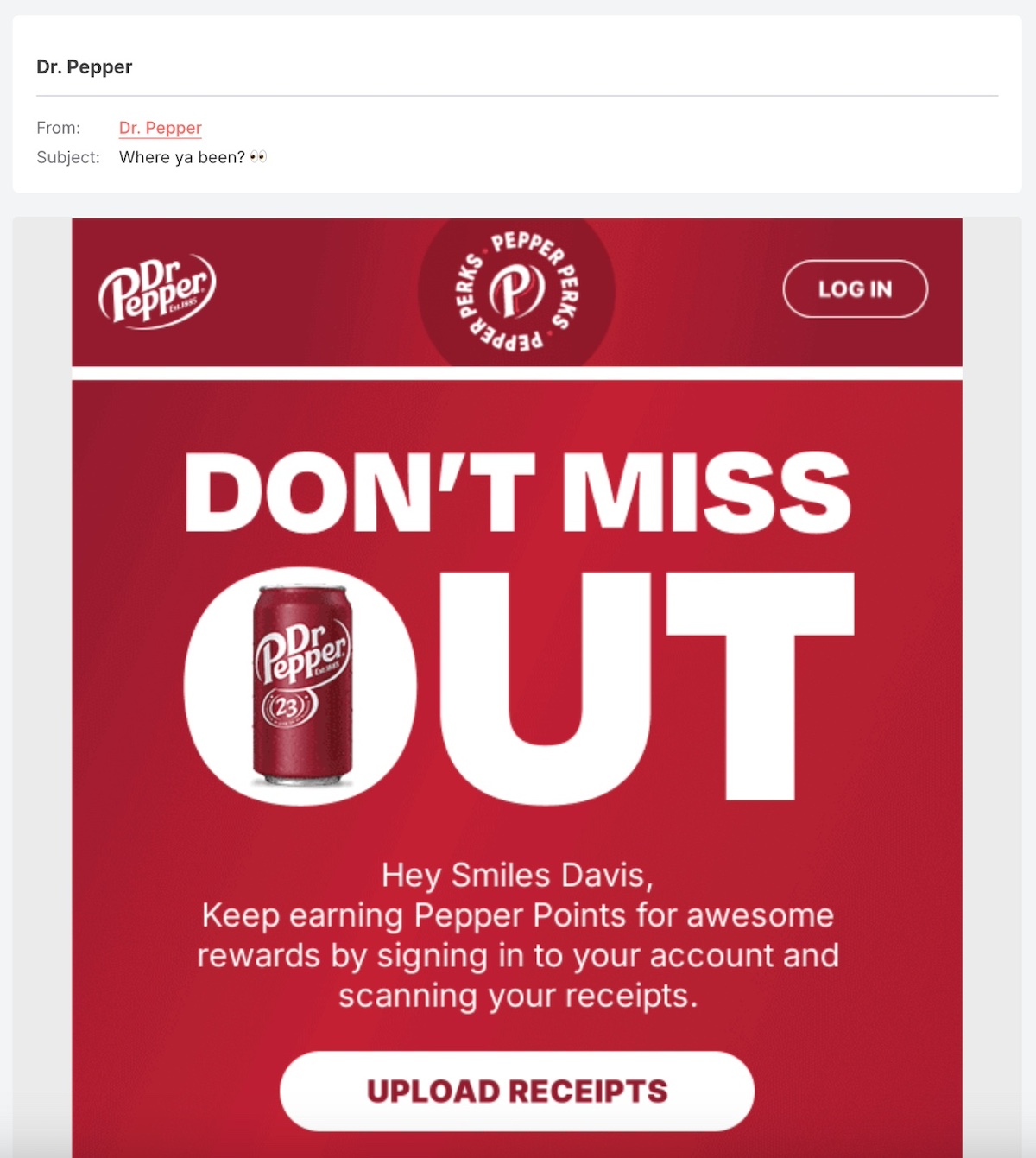
For the Dr. Pepper lovers out there, this loyalty email re-engages with a curious and clever question in the subject line, and then reminds the reader to sign in to keep earning “Pepper Points.”

Example of a loyalty re-engagement email

6. Incorporate Humor

Adding humor to your customer re-engagement emails can make your message more memorable and enjoyable. A lighthearted joke or playful tone can make your brand more relatable and increase the chances of a response.

The subject line and email below are laugh-out-loud silly. It employs email subject line best practices, with the injection of humor, a question, and intrigue. Then, from start to finish, it’s fresh and funny—and it’s hard to resist wanting more (emails or chocolate).

a humorous re-engagement email example

Lowercase and short, Bilt’s email subject line is so casual and silly that it would be hard not to open the email to find out more. And then the “hey, you good?” intro is ironic, laughable, and catchy—and hopefully just enough to get the reader to re-engage and complete their account.

Example of a re-engagement email with humor

7. Ask a Question

Engagement often starts with a simple question. Asking subscribers what they need, why they’ve been inactive, or what would bring them back makes them feel valued and encourages interaction.

Notice how TripAdvisor employs an ever so simple question in the subject line to grab the reader’s attention—after all, if they did go to Notteri, they’ll probably open the email to see what this is all about. From there, this email encourages more engagement by asking, “Would you go again?” and appealing to the reader’s desire to be helpful by providing their opinion for other travelers. Clever all around.

Example of an ask a question re-engagement email

8. Send Updates & Valuable Information

If an email recipient hasn’t engaged in a while, it’s because other messages and brands in their inbox have taken priority. Get them re-interested by sending updates about new features, product improvements, or exclusive content that adds value.

In the below example, Hootsuite demonstrates the power of valuable content in action. So perhaps there’s a group of Hootsuite email recipients who haven’t opened their emails in a while, but when they see this interesting new trend report, they open the email, download the report, and, you guessed it, re-engage with Hootsuite. Mission accomplished.

An example of a re-engagement email offering value

The below “coming soon” update is a great email newsletter example that demonstrates how to build intrigue and momentum. Disengaged readers and customers are more likely to be curious about what’s coming soon, and then continue to stay connected because they want to find out more—and in this case, they may even sign up for SMS message updates, which is really a true re-engagement win.

Example of re-engagement email with updates

When to Send Re-Engagement Emails

Timing matters when it comes to the ever-so-important re-engagement email. Sending them too soon can feel pushy, while waiting too long may result in losing the customer for good. But not all customer re-engagement emails follow the same rules, so here are some email marketing tips to keep in mind as you craft and schedule your messages:

  • 30 to 60 Days of Inactivity: If a customer hasn’t interacted with your brand for a month or two, a friendly check-in email can remind them of what they’re missing.
  • Before or After Subscription Expiry: If you offer a subscription-based service, sending a re-engagement email before a customer’s subscription expires, or a “we’re sorry to see you go, but here’s what you’re missing” message can prompt them to renew.
  • After Abandoned Carts: Sending a reminder within 24 to 48 hours of cart abandonment can recover lost sales.
  • During Seasonal or Special Promotions: Offering exclusive discounts during major sales events can be a great way to re-engage inactive customers.
  • Before Removing from Your List: If all previous attempts have failed, a final “last chance” email before unsubscribing them can prompt re-engagement.

Getting the Most Out of Your Re-Engagement Emails

Re-engagement emails are like that friendly tap on the shoulder that says, “Hey, remember us? We still think you’re awesome.” Whether you’re using humor, a tempting discount, or a heartfelt “We miss you,” the key is to remind subscribers why they signed up or did business with you in the first place.

So, put these strategies into action, and turn those cold leads into warm, engaged subscribers and customers again. Because sometimes, all it takes is the right email at the right time to bring them back.

Tap into Email Marketing Success With SiteGround

The Only 7 Things You Must Know to Improve WordPress Performance

A slow website is a sure way to lose visitors—and fast. When pages drag, users get frustrated and move on. But when your site loads in a flash, visitors stick around, engage more, and are more likely to take action. 

In this article, we’re sharing the 7 essential strategies you absolutely must know to optimize your WordPress site’s performance. These are the key steps to keeping your WordPress site fast, efficient, and user-friendly.

Why WordPress Speed Matters

WordPress performance matters more than you might first realize. A slow-loading site not only frustrates visitors, but it also increases bounce rates and reduces engagement. Conversely, a fast-loading site has far-reaching effects beyond just a trivial flicker of user frustration. Indeed, a high-performing WordPress website leads to:

  • Better User Engagement—User attention span these days is dreadfully short, so, not surprisingly, a fast-loading website keeps visitors from leaving before they even interact with your content. When pages load quickly, users are more likely to explore multiple pages, read articles, and, well, make a purchase, leading to lower bounce rates and higher retention.
  • Higher SEO Rankings—Did you know that Google considers page speed a ranking factor? That means the faster your WordPress speed, the more likely it is that your site appears in search results—and, of course, this enables increased website traffic. On the flip side, a slow site can lead to poor user experience, which translates to higher bounce rates, therefore negatively impacting rankings, and making it harder for potential visitors to find your site.
  • Improved Conversions—Website speed directly affects conversion rates, whether that means making a purchase, signing up for a newsletter, or submitting a contact form. Studies show that even a one-second delay in page load time can significantly reduce conversions. As such, making sure your WordPress speed is optimal means your site will run smoothly, enabling more sales, leads, and user interactions.

The 7 Best Ways to Improve WordPress Performance

Optimizing WordPress performance involves several key strategies. Below are the seven best ways to ensure your website runs efficiently and loads quickly.

1. Enable Caching

Let’s say you’ve just moved to a new city, and you need to find a good coffee shop. The first time, you check maps, read reviews, and navigate unfamiliar streets—it takes a while. But once you’ve found the best spot, you remember the fastest route and go straight there every morning. This is essentially how caching works. Instead of making the server “search for directions” (fetching data and building pages from scratch every time), it remembers the most efficient route and serves a pre-prepared version instantly, making your website load much faster. As you can imagine, this significantly reduces server load and speeds up page loading times.

Image of how caching reduces server load

Caching can work in different ways, though. There are different types of caching to consider:

  • File-Based Caching: Stores static HTML versions of pages to serve visitors more quickly. Enable file-based caching through a caching plugin or server-level configuration to generate and serve static HTML pages, reducing load times.
  • Dynamic Caching: Speeds up content-heavy, dynamic pages by reducing the need for repeated database queries. Use a web hosting provider that offers built-in dynamic caching or install a WordPress performance plugin to optimize database-heavy pages and reduce repeated queries.
  • Object Caching: Keeps database query results stored in memory, reducing the time needed to fetch data from the database. Activate object caching with a plugin or configure server-side caching solutions to store and retrieve database query results more efficiently.
Supercharge your website with powerful caching from SiteGround

2. Optimize Media

Have you ever gone to a website and had to wait patiently as fancy images and videos load ever so slowly? Surely, on at least several of these occasions, you closed the page and took your business elsewhere. You don’t want your site to be that site. 

Indeed, not surprisingly, large image files like these can drastically slow down your website—and, conversely, optimizing these images should be on your WordPress speed improvement to-do list, as it can mean faster-loading media and a faster-loading site. 

But how can you do this without compromising on quality? Here’s how:

  • Compress Images: Quite simply, make those image file sizes smaller by compressing them. You can do this by using a plugin or online tool to automatically reduce image file sizes while maintaining visual quality.
  • Enable Lazy Loading: Load images only when they appear on a visitor’s screen rather than all at once. This means that when the user, like in our example above, first lands on your page, they aren’t stuck waiting for every single image to load, but rather only those that they actually see. Enable lazy loading through your theme settings or use a WordPress performance plugin.
Media optimization with SiteGround Speed Optimizer plugin
  • Set Maximum Image Width: Resizing images every time you want to add one to your site can be a real pain, to the point that you might not resize at all (enter the slow-loading problem). The good news is that you can either configure your WordPress media settings to have a maximum width or use a plugin that allows you to specify that uploaded images do not exceed the necessary display size.  
  • Use WebP Format: WebP images offer superior compression and quality compared to traditional JPEG and PNG formats. Convert images to WebP using an optimization plugin or a manual conversion tool.

Bonus tip: With the image compression options available via the SiteGround Speed Optimizer plugin, you can reduce image size by as much as 85% without compromising quality. The plugin also allows you to set maximum image width, convert images to WebP, and enable lazy loading.

3. Streamline Frontend WordPress Performance

Images aren’t the only element slowing down your site; the visible part of your WordPress website—how it looks and functions—is built using code for design (CSS), interactive features (JavaScript), and fonts, all of which can contribute to site-load time. Optimizing these elements helps your site load more quickly and run more smoothly. Here are a few ways to do so:

  • Minify CSS and JavaScript: Reduce unnecessary whitespace, comments, and code optimizations to help files load faster.
  • Combine CSS & JavaScript Files: Reduce the number of separate file requests minimizes HTTP requests and improves loading speed; a plugin or manual file bundling can achieve this. 
  • Optimize Fonts: Limit the number of font styles and weights used, and host fonts locally if possible to decrease load times. Google Fonts, for example, can be self-hosted to prevent extra HTTP requests. Meanwhile, the SiteGround Speed Optimizer plugin, for example, lets you preload fonts that are required immediately so that you can speed up your WordPress performance.
  • Use a Theme Optimized for WordPress Performance: A well-coded, lightweight theme reduces unnecessary CSS, JavaScript, and bloat, leading to faster page speeds.
  • Updated WordPress and Plugins: Even if you have an optimized theme, it’s worth noting that regular updates of your theme and plugins can optimize WordPress performance. That’s because these updates can speed up WordPress and improve functionality, reducing the chances of slowdowns due to outdated code or plugins. To address this, enable automatic updates, manually update regularly, or opt for managed WordPress hosting with built-in caching so that your plugins and WordPress Core will always be up to date. 
  • Split Posts, Products, and Comments into Pages: Breaking up long articles and large comment or product sections prevents excessive content from loading all at once. You can enable pagination in your website settings to break up long posts, pages, and comment sections, preventing excessive content from loading all at once. Meanwhile, for products, many eCommerce platforms, including WooCommerce, allow you to enable pagination or infinite scrolling to manage large product catalogs efficiently.
Example of splitting products onto pages
Enhance your frontend speed with SiteGround

4. Manage Resource Usage

Think of your WordPress website like a closet—over time, it fills up with things you don’t need, like old files, spam comments, and outdated settings. If it gets too cluttered, it takes longer to find what you’re looking for. Cleaning up and organizing your website’s database regularly helps it run faster and more efficiently. 

There are many ways you can help optimize your resource usage—and here are some great ways to do some website spring cleaning:

  • Clean Up Your Database: Over time, your website stores unnecessary data, such as post revisions, spam comments, and expired plugin settings. Consider using a plugin to regularly clean up and optimize your database.
  • Enable GZIP Compression: GZIP shrinks website files before they’re sent to visitors’ browsers, reducing load times. Most caching plugins have an option to enable GZIP compression, or you can manually add a compression rule to your .htaccess file.
  • Avoid Uploading Media Directly to WordPress: Uploading large media files (like videos, PDFs, or backups) directly to WordPress can bloat your database and slow down your site. Instead, use external services like YouTube for videos or cloud storage for large files to keep your website lean and fast.
  • Limit Post Revisions: WordPress automatically saves multiple versions of your posts, which can be nice, but ultimately, it clutters your database over time. To prevent this, set a reasonable limit on stored revisions, such as five, using your wp-config.php file, or simply by using a speed-optimizer plugin.
Managing resource usage with SiteGround Speed Optimizer plugin

5. Monitor WordPress Performance

WordPress performance is not a static feature—it can fluctuate due to various factors such as changes in traffic, updates to content, or technical issues. That’s why regular monitoring is essential for staying ahead of potential WordPress performance problems and ensuring your site continues to load quickly and efficiently.

  • Test Web Speed Regularly: To keep your site running at its best, it’s important to test its speed periodically. Tools like Google PageSpeed Insights or Pingdom offer valuable insights into your website’s performance, highlighting any bottlenecks or areas for improvement. These tools measure overall load times and provide specific recommendations, making it easy to take actionable steps toward faster performance.
  • Monitor Core Web Vitals: While testing website speed is essential, Google’s Core Web Vitals focus more on user experience—how fast and smooth your website feels for visitors. Core Web Vitals measure metrics like loading speed (Largest Contentful Paint), interactivity (First Input Delay), and visual stability (Cumulative Layout Shift). Tools like Google PageSpeed Insights or Lighthouse help you track these metrics, ensuring that your site not only loads quickly but also provides a seamless experience for users, which is crucial for SEO rankings.
Website speed tests with SiteGround Speed Optimizer plugin

The SiteGround Speed Optimizer integrates Google PageSpeed Insights into its dashboard for easy performance monitoring. The Speed Test feature checks optimization across 20+ areas and provides actionable tips. Plus, it saves test results, so you can track progress and pinpoint recurring issues.

Install the Speed Optimizer Plugin now>>

6. Use a CDN

A content delivery network (CDN) speeds up WordPress website performance by distributing copies of your content across multiple servers worldwide. So when a visitor accesses your site, the content is delivered from the nearest server, reducing loading times and providing a smoother experience.

Many managed hosting providers, such as SiteGround, include built-in CDN options as part of their services. This offers several advantages, including easy setup, seamless management, optimized performance, enhanced security, and integrated support—all without needing a separate service. Alternatively, you can implement a CDN independently, allowing you to use any provider regardless of your hosting platform.

Graphic of how a CDN works

7. Pick Your Web Host Carefully

This list wouldn’t be complete without mentioning web hosting, as a good hosting provider directly impacts your website’s performance. You could enthusiastically tackle all the above steps, and then a slow or unreliable host could simply negate all your optimization efforts. When selecting a hosting provider for WordPress performance, consider the following:

  • Speed and Reliability: Choose a host with fast server response times and high uptime guarantees to enable consistent performance.
  • Optimized Hosting for WordPress: Managed WordPress hosting offers performance-focused optimizations, such as caching and server configurations, that speed up WordPress and improve security.
  • Scalability: Select a host that can seamlessly handle traffic spikes without causing slowdowns, ensuring smooth performance during peak times.
  • Latest PHP Version: The latest PHP version improves processing speed & security, and supports better performance for dynamic WordPress websites.
  • DNS-Level Website Firewall: A DNS-level firewall reduces server load and mitigates potential threats before they reach your site, leading to a faster, safer user experience.
  • Content Delivery Network: As we discussed above, a CDN improves load times by caching and distributing your content across multiple servers worldwide, ensuring that visitors receive it from the nearest server for faster delivery.
7 things you must know to improve wordpress performance

Take Action Today to Speed Up WordPress Performance

Improving WordPress performance isn’t just simply about speed—it’s about enhancing user experience, improving SEO, and increasing conversions. By implementing the seven must-knows above, you can rest easy knowing that your site is running at peak efficiency.

Here at SiteGround, we work hard to make sure that your WordPress site performs at its best, and with as little effort on your side as possible. Our high-performance hosting and free Speed Optimizer plugin make this possible, working together to ensure your site runs smoothly and efficiently.

[106]

Scaling a Business for Growth: 9 Effective Strategies

Abstract image of scaling a business

This article was originally published in February 2025, and then updated in September 2025.

The difference between a thriving small business and an industry leader often comes down to one word: scaling. True transformation happens when leaders dare to think bigger. But what does it mean to scale a business, and how can you do it effectively? This guide will provide actionable strategies to help you scale your business and achieve long-term growth.

What Is Scaling a Business and Why Is It Key for Growth?

Scaling a business refers to setting the stage for your company to grow without being hampered by resource limitations. Imagine software that can serve 10,000 users as easily as it serves 100, or an online course that educates thousands with the same effort it takes to teach dozens. Think of Netflix streaming to millions versus a traditional movie theater adding more screens and staff. 

Scaling a business seems deceptively similar to growing one, but there’s a big difference. Growth follows a predictable pattern: invest more, earn more. You add salespeople, expand your office space, or expand your products, and your revenue climbs accordingly. It’s straightforward but very resource-intensive. 

Note that not each and every business is scalable. Some entrepreneurs thrive running smaller ventures—like a quality local restaurant or a specialized consulting practice that can provide a comfortable income for their owners. There’s real value in staying small and focused. 

But for those with bigger ambitions, scaling offers a path to exponential growth. As your business scales, you’ll have the opportunity to expand your impact, opening up many new possibilities.

How to Scale Your Business: 9 Effective Strategies

Scaling a business requires a thoughtful approach. Let’s go through seven strategies that could help you scale your business effectively.

1. Develop a Scalable Growth Plan

Scaling starts with a roadmap. Without a clear plan, growth becomes reactive and messy. Your growth plan should align your long-term vision with concrete steps your team can act on.

Action steps:

  • Define specific growth goals (e.g., new revenue targets, markets to enter, or customer segments to reach).
  • Break those goals into milestones with timelines.
  • Map out which growth levers (products, services, or marketing channels) will get you there.
  • Anticipate possible obstacles and outline contingency plans.
  • Assign ownership so every task has a responsible lead.

Think of your growth plan as a living framework. As you work through the strategies in this guide—from refining your value proposition to expanding into new markets—add insights and adjustments to your plan. This way, it grows with your business and stays relevant at every stage of scaling.

2. Create a Clear Value Proposition

Your value proposition is the unique promise you make to customers about the benefits they’ll receive from your product or service. It is also the foundation of a scalable and growing business and to do it effectively, ensure your value proposition is clear, compelling, and replicable across larger audiences, different markets, and customer segments.

Note that it will possibly even have to shift and adapt to them to address new challenges. Scaling requires more than just understanding what you offer, it’s about refining how that promise is communicated as your business grows. Here are some ways how your value proposition can scale effectively as your business evolves:

  • Refine it for new audiences. As you expand into new customer segments, consider whether your value proposition still addresses each audience’s unique needs. For example, Loop Earplugs were initially marketed to consumers who were looking for deep sleep, but now the business also targets students who seek to improve productivity. This kind of shift may require repositioning in order to appeal to distinct audiences and address specific needs. In doing so, this might also call for an adjustment to a business’s value proposition.
Example of scaling business targeting a new market for those needing sleep
Example of scaling business targeting a new market for students
  • Adjust for different markets. When expanding into new regions, it’s important to understand the local context and cultural nuances that could impact how your value proposition is received. A product that solves one problem in one country might meet a different need in another. 
  • Be consistent. Whether you’re creating a landing page, expanding with franchises, or growing a team, your value proposition should remain clear and consistent. Your brand should be instantly recognizable and aligned with your promises, no matter how your business growth.

3. Optimize Your Sales Process

An efficient sales process is also a vital part of how to scale your business. It should keep running smoothly whether you’re handling 10 customers or 1,000. The idea is to create a process that multiplies your success without multiplying your effort.

Start by mapping out every step of your customer’s journey, from first contact to closed deal or purchase made. For ecommerce, this could mean tracking the journey from website visit to checkout. For service-based businesses, it might involve everything from initial inquiry to signed contract.

Customer Journey Map and Touch points

Identifying places where your internal process or potential customers get stuck or completely stopped. These are your opportunities for improvement. Maybe the checkout process is too long, or you have product descriptions that aren’t clear enough. Or perhaps long, personal consultations are taking away from your time to actually produce. Address these issues before they turn into bigger problems during your scaling process.

Automation is a powerful tool in this process. For online stores, this might involve automating emails for abandoned carts, order confirmations, or product recommendations. For service-based businesses, automating follow-ups or appointment reminders can save time and improve the customer experience. There are a variety of CRM (customer relationship management) marketing automation tools that can help you nurture leads, build stronger customer relationships with minimal effort, and, notably, scale!

Finally, standardize your internal processes. Document your workflows, from how leads enter your system to how they become paying customers. This is essential whether you have a sales team or not, because clear documentation ensures consistency and scalability through your growth plan.

4. Strengthen Your Financial Strategy

Even the best growth plan will fail without strong financial foundations. Scaling requires disciplined financial management that balances ambition with sustainable growth.

Here’s how to strengthen your financial planning:

  • Audit your cash flow. Review income and expenses monthly, and ensure you have at least 6–12 months of runway for planned investments.
  • Create financial forecasts. Model different growth scenarios (optimistic, realistic, conservative) so you know how scaling impacts cash flow, expenses, and profitability.
  • Set a budget for scaling. Allocate funds to marketing, tech, and hiring before growth accelerates—not after you’re already stretched.
  • Explore funding options early. Research whether you’ll bootstrap, take a business loan, or pursue investors. Preparing in advance avoids panic fundraising.
  • Monitor key financial metrics. Track gross margins, customer acquisition cost (CAC), and lifetime value (LTV) to ensure growth remains profitable.

With a solid financial strategy, you’ll be able to seize growth opportunities confidently, and without jeopardizing long-term stability.

5. Invest in Technology & Automation

We mentioned that you can benefit from a CRM tool to streamline your sales processes, but technology can do the heavy lifting in other aspects of your business too. This is especially important since an essential part of successfully scaling your business is implementing repeatable, standardized workflows that allow you to produce more with less effort. And technology will be your best friend in making this possible. Here’s how:

Streamline Workflows With Task Management & Collaboration Tools

Scaling requires structured processes that teams can follow seamlessly. Task management platforms like Trello and Asana help create repeatable workflows, track progress, and ensure accountability, reducing miscommunication and inefficiencies. By standardizing how projects are assigned and completed, businesses can scale operations without losing control.

Automate & Optimize With AI

Intelligent automation can help your scaling business eliminate manual bottlenecks, enabling you to do more with less. From AI-powered chatbots that provide instant customer support to predictive analytics that offer valuable insights into market trends, AI can help your business increase efficiency and ensure operations scale smoothly as demand grows.

Adopt Cloud-Based Solutions for Scalability

Scaling requires flexible, accessible-from-anywhere solutions. Cloud-based platforms like Google Workspace and Microsoft 365 allow teams to collaborate in real time, eliminating redundant manual processes and ensuring information is always up-to-date. Moving to the cloud standardizes document sharing, communication, and workflow management, making growth frictionless.

Analyze and Redesign for Scalability

As you scale and implement the above technology, you must continuously evaluate and refine their processes. Always look for opportunities to streamline workflows, eliminate redundancies, and automate repetitive tasks. Ask yourself: Can this task be simplified or automated? Are there avoidable steps slowing things down? Will this system hold up as demand increases? By proactively identifying inefficiencies and restructuring operations for scalability and efficiency, you create a foundation that can support long-term business growth while reducing workload.

Speaking of the cloud, with over 20 years of expertise, SiteGround offers fast, secure, and scalable hosting solutions powered by Google Cloud. Adopting cloud-based hosting ensures your business can scale seamlessly, with the flexibility and reliability needed to handle growth. Whether you’re launching a new site, managing a thriving e-store, or scaling a small business, SiteGround’s cloud hosting delivers high performance and exceptional support to optimize your online presence at every stage.

6. Expand or Outsource Your Team Strategically

As your business scales, you’ll need more talent to fuel sustainable growth, but rushing to hire full-time employees, or even bring in new business owners, isn’t always the smartest move. The key is being strategic about who you bring on board and how you structure your team.

Start by mapping out which functions are truly core to your business versus those that could be handled externally. By outsourcing some functions and even teams to specialized agencies or freelancers, you can access expertise while keeping your overhead manageable. Remote teams can also scale up or down in a more flexible way than traditional office setups, perfect for handling project-based work or seasonal campaigns.

However, building a distributed team comes with its own challenges. You’ll need solid systems for communication, project management, and otherwise. Invest time in creating detailed onboarding processes and documentation that will help you maintain consistency. 

Culture also remains important even with a distributed workforce. Regular video calls, clear company values, and structured check-ins help keep everyone aligned and engaged. The goal is to build a team that can grow with your business, whether they’re in-house, remote, or outsourced. Remember, the most scalable businesses aren’t necessarily the ones with the biggest teams, but those with the most efficient mix of talent deployed in the right ways.

And, again, don’t forget that AI business tools can often help you with tasks that you might have previously needed to outsource. Tasks like social media planning, data analysis, newsletter ideas, and so much more, can all be done quickly and effectively. 

7. Broaden Your Offerings and Diversify Revenue Streams

Another strategy to consider in order to scale your business effectively is expanding your offerings to reach new customers and reduce reliance on a single product only. Start by introducing complementary products or services that align with your core business. 

For instance, a fitness trainer might add virtual classes or meal plans, while a web designer could offer branding consultations. This approach strengthens your value proposition and keeps your offerings relevant to your audience.

You can also explore subscription models to create a predictable income. Whether it’s a membership program, maintenance package, or exclusive content, these models foster customer loyalty while improving cash flow. Digital products like eBooks or templates are highly scalable as well, allowing you to serve more customers without a proportional increase in resources.

Example of offering a subscription to scale a business

8. Enter New Markets

Expanding into new markets is an impactful way to scale your business, but it requires careful planning and execution. For small business owners, entering a new market could involve targeting a different geographic area, offering products through new channels, or marketing your product for a different purpose to a new segment altogether (as was the case in the Loop Earplugs example above).

Start with research. When it comes to small business marketing, it’s essential to understand the needs, preferences, and buying habits of your new target audience. Tools like Google Trends or surveys can help you gauge interest and identify potential challenges. If you’re moving into a new geographic market, familiarize yourself with local regulations, cultural nuances, and competition.

Google trends dashboard image

Consider starting small with a test launch. For instance, if you’re opening in a new city, begin with an online offering or a pop-up event to build awareness before committing fully. Similarly, if you’re targeting a new demographic, focus on tailored marketing campaigns to resonate with this audience.

Partnerships can also ease your entry into new markets and tap into fresh opportunities without overextending resources. Collaborating with local businesses or influencers can help establish credibility and make your transition smoother.

9. Stay Agile and Adapt to Change

In the journey to business scaling, flexibility is just as important as strategy. Markets evolve, customer needs shift, and unexpected challenges arise so it is important to be agile. 

Stay attuned to customer feedback, industry trends, and even competitor moves. Use this insight to make informed decisions quickly, whether it’s tweaking your product line, updating marketing strategies, or changing other processes.

Common Pitfalls in Business Scaling

Scaling a business is an exciting endeavor, but it’s not without its challenges. Without careful planning, the same growth that promises success can expose vulnerabilities in your operations, finances, or strategy. Understanding and avoiding common pitfalls can help you scale sustainably.

Common pitfalls of business scaling

⚠️ Scaling too quickly 

It’s tempting to chase rapid growth, but expanding without the necessary infrastructure can strain resources and lead to inefficiencies. Whether it’s hiring too many employees or launching in new markets without preparation, moving too fast can result in a loss of control and lowered customer satisfaction.

⚠️ Neglecting financial planning

Scaling often requires significant investment, whether it’s in technology, marketing, or personnel. Without a clear understanding of your cash flow and profitability, you risk overextending your resources.

⚠️ Underestimating the importance of maintaining customer experience

As you grow, it can become harder to deliver the personalized service or product quality that made your business successful. Prioritize systems and processes that ensure consistency, even as demand increases.

⚠️ Losing sight of your core values and mission 

In the rush to scale, some businesses shift focus too drastically, diluting their brand and alienating loyal customers. Stay true to what makes your business unique.

Start Planning Your Business Scalability Today

Scaling a business is both an exciting opportunity and a challenge. It requires clear vision, careful planning, and a commitment to adaptability. Evaluate your current operations, identify areas for improvement, and start implementing the changes needed to support growth. Remember, scaling isn’t about doing everything at once, it’s about smart, incremental progress toward your bigger goal! 

Make your online journey a success with SiteGround

The Complete WordPress Security Guide + the Best Fixes

WordPress powers over a whopping 40% of the web. That’s an awful lot of websites—and also a lot of prime targets for hackers. And it doesn’t matter whether you run a personal blog or a booming business website, your site is ripe for attack. That means strong WordPress security is absolutely nonnegotiable. 

A compromised website is no laughing matter. It can lead to stolen data, lost revenue, and damage to your brand’s reputation. Fortunately, with the right WordPress security measures—often super easy to implement, but with a big security impact—you can significantly reduce the risk of attacks and keep your site running smoothly. In this guide, we’ll explore all the best ways to keep your WordPress security in tip top shape.

Why Is WordPress Security Important?

WordPress website security isn’t just about preventing cyberattacks—it’s about having a plan to protect your visitors, business, and online credibility. A vulnerable WordPress site can suffer from malware infections, data breaches, and unauthorized access, leading to serious consequences. Let’s break down the key reasons why WordPress security should be front of mind.

Prevent Reputation Damage

Your website is a reflection of your brand. If it gets hacked, infected with malware, or defaced, visitors will lose trust in your business, and once your reputation is damaged, it’s challenging to regain customer confidence. Implementing strong WordPress security best practices protects your brand image and makes sure visitors feel safe when using your site.

Improve SEO Rankings

Search engines like Google prioritize secure websites in their SEO rankings. Conversely, if your site is hacked and flagged for malware, it can be removed from search results or display security warnings to visitors. For example, Google’s Safe Browsing feature alerts users when they try to access an unsafe website, drastically reducing traffic. By maintaining a secure WordPress site, you can protect your rankings so that your content reaches your audience.

Avoid Traffic & Sales Loss

A hacked website can lead to downtime, slow performance, and broken pages—all of which can be a major turn off for potential customers. Indeed, if they can’t access your site or feel unsafe making a purchase, you risk losing valuable sales both now and down the road. Cyberattacks can also lead to stolen payment information, further deterring users from doing business with you. Prioritizing WordPress security addresses this by helping maintain site uptime, fast loading speeds, and a seamless user experience—all so that you don’t lose traffic or revenue.

How to Secure a WordPress Site

Now that we’re all on the same page about the importance of WordPress security, it’s time to get serious and take action. Securing your WordPress site involves a combination of best practices, tools, and proactive measures to prevent cyber threats. From keeping your software updated to implementing strong authentication protocols, there are quite a few steps you can take to protect your website. So in the following sections, we’ll walk you through the best WordPress website security tips to safeguard your site and ensure its long-term security.

1. Keep Themes and Plugins Updated 

Outdated themes and plugins are one of the most common entry points for hackers, and that’s why developers regularly release updates that fix website security vulnerabilities and improve performance. As such, by keeping your themes and plugins up to date, you substantially reduce the risk of WordPress security breaches.

It’s not just your active plugins that can cause a problem though; inactive or unused themes and plugins can still pose a security risk, even if they’re not being used. Because hackers can exploit vulnerabilities in outdated code, it’s best to delete any unused themes and plugins to minimize these potential threats. 

One rather obvious (but tedious) way to do this is to regularly audit your site and remove anything that is no longer necessary to keep your WordPress installation lean and secure.

Or, you can simply automate these updates so that you don’t have to do it manually. These options can be enabled via your WordPress dashboard, or you can lean on your hosting provider to take care of it for you. 

Why bother with managed WordPress hosting when you can enable auto-updates yourself? Because, notably, managed WordPress hosting with tested updates ensures updates are tested and monitored, and that your site is backed up—all reducing the risk of site crashes or WordPress security vulnerabilities. Sprinkle in expert customer support for added peace of mind, and you have some very solid reasons for using a managed WordPress hosting option.

[106]

2. Make Sure You Have the Latest WordPress Version

Similar to themes and plugins, WordPress regularly releases updates to improve security, fix bugs, and enhance performance. And, also like themes and plugins, running an outdated version of WordPress leaves your site vulnerable to known exploits and cyber threats. That’s why it’s super important to make sure your WordPress Core is up to date by enabling automatic updates or checking for new releases manually.

Again, you can easily do this via your WordPress dashboard, or, if you have managed hosting, you can let your provider handle it for you. The benefits here are the same in that with managed hosting, you can count on testing, backups, and monitoring, all which address compatibility issues and minimize the risk of site downtime or conflicts.

3. Add Login Security

Not surprisingly, your WordPress login page is a primary target for hackers attempting brute-force attacks. So strengthening login security is one of the easiest ways to prevent unauthorized access and protect your site from malicious activity—here’s how:

  • Use Strong Passwords: A weak password makes it easier for hackers to gain access to your site. Use a long, complex password with a mix of letters, numbers, and symbols. 
  • Limit Login Access & Login Attempts: Restricting login attempts helps prevent brute-force attacks. You can set a limit on failed login attempts by using a security plugin.
  • Auto Logout Inactive Users: If users remain logged in but inactive for long periods, they could become an easy target for session hijacking. This can be addressed by implementing auto logout functionality using a security plugin.
  • Change Default Login Username: Avoid using “admin” or other common usernames, as they are easier for hackers to guess. Instead, create your own unique, unguessable administrator username.
  • Enable Two-Factor Authentication (2FA): 2FA adds an extra layer of WordPress security by requiring a second verification step, such as a mobile authentication code. Again, a security plugin is your best bet for accomplishing this.
Two-factor authentication QR code example
  • Create a Custom Login URL: Use a security plugin to change the default WordPress login URL (such as, yoursite.com/wp-admin), which can reduce automated attacks.
  • Disable Common Usernames: Hackers often target common usernames like “admin” or “editor.” Disable these and enforce strong, unique usernames for all users.
SiteGround free Security Optimizer Plugin

4. Manage User Permissions

So you can have everything controlled in terms of who can enter your WordPress backend, but if you don’t have user roles and permissions properly dialed, then your login efforts are a waste. 

Indeed, one of the most overlooked aspects of WordPress security is managing user permissions properly. Every user on your website should have only the access they need—and nothing more. This minimizes the risk of accidental changes, unauthorized access, or security breaches. Here are some WordPress security best practices when it comes to user permissions:

  • Use the Principle of Least Privilege: Assign roles based on necessity, following the principle of least privilege.
    • Administrator – Full control over the site. Limit this role to trusted users only.
    • Editor – Can publish and manage all content but cannot change site settings.
    • Author – Can publish and manage their own posts only.
    • Contributor – Can write and edit their own posts but cannot publish them.
    • Subscriber – Can only manage their own profile and leave comments.
  • Remove Unused or Inactive Users: Maybe once upon a time you granted editor access to a freelance developer, but they no longer work with you. This becomes a WordPress security vulnerability. As such, it’s important to regularly audit your user list and remove inactive accounts, especially former employees, contributors, or developers who no longer need access.

5. Monitor Activity

Now, let’s say, for some reason, your measures above just weren’t enough—something or someone managed to slip through the cracks. That’s why a super smart tip is to always monitor your WordPress site activity. This helps detect suspicious behavior early and prevent security breaches. By keeping an eye on user activity, login attempts, and changes to critical files, you can respond quickly to potential threats. Here’s what to keep an eye on: 

  • Activity Log: An activity log records all significant actions taken on your site, monitoring login attempts, changes to posts, plugin installations, and user role modifications. Tracking this information helps you identify unauthorized access, suspicious changes, or potential WordPress security risks. 
Image of a WordPress security activity log
  • Weekly Security Reports: Regular security reports provide an overview of your site’s security status, highlighting vulnerabilities, malware detection, and login attempts. Certain WordPress security plugins, such as the SiteGround Security Optimizer, offer automated reports to help you stay informed about potential threats. Reviewing these reports regularly allows you to take preventive action before issues escalate.

6. Back Up Your Site Regularly

If something happens to your site, you’ll thank yourself later for having ensured regular site backups. That’s because if your site is hacked, experiences a critical failure, or is affected by an update gone wrong, having a recent backup means you can restore your website quickly. Without backups, you risk losing valuable data and time trying to recover your site manually.

Use a reliable backup solution that allows you to schedule automatic backups and store them securely offsite. In fact, many hosting providers offer built-in and automated backup options, but the use of certain plugins is also an option.

Image of daily website backups

Make sure to back up your database, files, themes, and plugins, and periodically test your backups to ensure they work correctly. A well-planned backup strategy can save you from unexpected disasters and loads of stress by keeping your WordPress site protected.

At SiteGround, we provide daily automatic backups of your website, securely stored for 30 days in our data centers. For even greater protection, our Premium Backup Service includes automatic hourly backups, five extra on-demand backups, and seven additional daily backups beyond those already included in your plan.

7. Install SSL

Securing your WordPress site with SSL (Secure Sockets Layer) is simply not optional. That’s because it encrypts data transmitted between your site and its visitors, protecting sensitive information such as login credentials, payment details, and personal data from being intercepted by malicious actors.

The good news is that many hosting providers offer free SSL certificates. At SiteGround, for example, we provide free standard and wildcard SSL certificates with all of our hosting plans—and the standard SSL certificate even comes preinstalled for extra peace of mind. 

Once your SSL certificate is installed, you’ll also want to be sure your site is fully configured to use HTTPS by updating your WordPress settings and implementing a redirect from HTTP to HTTPS. 

HTTPS browser bar

It’s also worth noting that having SSL not only enhances WordPress security but also boosts SEO rankings, as search engines like Google prioritize secure websites. Additionally, visitors can see a padlock icon via their browser, reinforcing trust in your website and improving user confidence. 

8. Protect Against Malware

Malware can compromise your site’s security, steal sensitive data, and even redirect visitors to harmful websites. Regular security checks—whether automated or manual—help identify threats early, minimizing potential damage.

On one hand, certain WordPress security plugins provide malware protection. On the other hand, a reputable hosting provider should offer built-in security features like real-time threat monitoring and automatic malware removal. SiteGround, for example, offers Site Scanner, which runs daily essential security checks and malware scans, detecting and removing threats. This allows you to take action before such threats cause serious harm to your website. 

Protect your site from Malware with SiteGround Site Scanner

9. Disable File Editing

WordPress allows administrators to edit theme and plugin files directly from the dashboard, but this feature can actually end up being a security risk. That is, if a hacker gains access to your admin panel, they could inject malicious code into your site and cause all sorts of problems. 

Disabling file editing of themes and plugins addresses this by preventing unauthorized changes. This can be done by modifying your site’s configuration file or, more simply, by using a WordPress security plugin. For further security, consider restricting file access with proper permissions (as we’ve previously discussed) and implementing a Web Application Firewall (WAF).

10. Set Up a Firewall

“Wait, what is a firewall?” you ask. A Web Application Firewall is one of the most important tips when it comes to protecting your WordPress site from malicious attacks. That’s because it monitors incoming traffic and filters out harmful requests, such as those used in brute-force attacks, cross-site scripting (XSS), and SQL injection attempts.

You can implement a firewall at two levels: application-side and server-side. Application-side firewalls focus specifically on your WordPress application, filtering out malicious requests that target vulnerabilities in WordPress themes, plugins, and core files. A security plugin is a good solution for protecting your site at the application level. 

Server-side firewalls, on the other hand, are ideal, as they protect your entire server and can block traffic from known malicious IP addresses. Many WordPress hosting providers include firewall protection as part of their services, adding an additional layer of security. 

At SiteGround, our hosting services come with a built-in Web Application Firewall (WAF) for strong, proactive security. We continuously update it with the latest threat rules to protect your site from emerging cyberattacks. Best of all, since it’s managed at the server level, you don’t need to configure anything—it’s protection that works seamlessly in the background.

11. Take Post-Hack Actions

Let’s say the worst case happens. Your efforts above just weren’t enough and your WordPress site has been hacked. Now it’s time to take post-hack actions in order to minimize damage and restore security. Here are a few key tips to keep in mind after a WordPress security breach:

  • Reinstall All Plugins: Hackers often inject malicious code into plugins. To ensure your site is clean, reinstall all plugins from trusted sources. Delete any suspicious or outdated plugins and replace them with fresh installations from the WordPress repository or their official developers.
  • Force Password Reset: After a hack, assume that all passwords have been compromised. Require all users to reset their passwords immediately. Use a WordPress security plugin to enforce strong password policies and prevent weak credentials from being reused.
  • Log Out All Users: To prevent further unauthorized access, log out all users and force reauthentication. This step ensures that any malicious users or sessions are terminated. Again, many security plugins offer an option to force logouts site-wide.
Best WordPress Security Fixes

Putting your WordPress Security Plan in Place

Keeping your WordPress site secure might seem like something for a super smart tech team, but the reality is that many of the most effective best practices and security tips are actually quite easy to implement. And while you can tackle each issue individually—like keeping software updated, using strong login credentials, and installing an SSL certificate— the best approach is a comprehensive one.

By choosing a reliable web hosting provider, opting for managed WordPress hosting, and using a strong WordPress security plugin, you can cover most of the key security concerns in one go. That’s because a solid host will handle essential security measures like automatic updates, backups, and server protection, while a security plugin can help with everything from login protection to activity monitoring.

At the end of the day, WordPress security isn’t about a single fix—it’s about layering your defenses to protect your site from all angles. Start with the essentials, stay proactive, and your website will remain safe, fast, and resilient against potential threats.

Choose a reliable web hosting provide - SiteGround

This article was originally published in January 2022 and updated in February 2025.

12 Great Newsletter Examples to Learn From 

Featured image of blog post "12 Great Newsletter Examples to Learn From"

From sharing important updates to providing helpful tips—email newsletters can cover just about anything! However, to make good use of your newsletters, your content must be unique, insightful, and visually appealing. While combining all these elements might seem challenging, it’s entirely achievable.

In this article, we’ll explore some of the best email newsletter examples to help you find the perfect fit for your business and email marketing strategy. This will hopefully provide insights to sprinkle some magic into your own emails and increase click-through rates. But first, let’s make sure you’ve got the basics down. 

What Is an Email Newsletter?

In the beginning, email newsletters were just a humble way to share company news. But much like a fine wine, they’ve matured into powerful tools with versatile functionalities. From small businesses educating customers and freelancers sharing stories to agencies showcasing expertise, email newsletters have become the key to your subscribers’ hearts—forging connections that go beyond mere transactions.

With their regular frequency—be it weekly, monthly, quarterly or whenever you feel like you won’t overwhelm your audience—and themed content, newsletters strike the perfect balance. They keep you present in your audience’s inbox while skillfully dodging the dreaded unsubscribe button. 

12 Great Email Newsletter Examples

Here are 12 successful newsletter examples from various industries and target audiences to help you spark inspiration for your own email newsletter:

Call-to-action button for the SiteGround 6-Day Free Email Marketing Course

Curated Email Newsletter Examples

With the never-ending flow of information, your audience might find it tricky to pick out what’s truly worth their time. That’s where curated email newsletters come into play—with their thoughtful blend of news, articles, links and other relevant content from both in-house and third-party sources, they help sift out the gems from the noise.

For an entrepreneur or freelancer in the early stages of their business or project, they are especially valuable, as they allow you to keep your email list engaged even when you’re juggling many tasks and can’t produce content yourself.

1. Freelance Things 

The backstory: Freelance Things is a weekly personal newsletter packed with resources—articles, books, podcasts, tools, and more—to guide freelancers on their unpredictable journey. Crafted by Bryan Taylor, a seasoned freelance product and website designer with over 11 years of experience, this newsletter draws from his own career highs and lows.

Subject line: Thoughts on freelancing, first-year pricing, U.S. tax resources, get more referrals, and  “How to Win Friends and Influence People”

Screenshot of the Freelance Things curated email newsletter, showcasing its unique content and design.

Why this is a great newsletter example:

  • Straightforward subject line that effectively outlines the range of topics covered, piquing interest and setting clear expectations for the readers.
  • Authored by an experienced freelancer, the email newsletter offers valuable information, drawing on personal experience to resonate with the audience.
  • Content organized into sections allowing the subscribers to easily navigate and focus on the topics most relevant to them.
  • Vibrant CTA button that invites subscribers to explore the website, all while sneakily keeping the website’s name top-of-mind for readers.

Takeaways: Adding your own perspective or commentary to the curated pieces reinforces your brand’s voice and authority.

2. Morning Brew

The backstory: Morning Brew is a daily newsletter curated specifically for young professionals eager to stay on top of the latest business buzz. It serves up quick and insightful updates on everything from Wall Street to Silicon Valley, keeping its readers informed every day of the week. Since its 2015 debut, it’s attracted over 2 million active members, showcasing its impressive reach and popularity.

Subject line: ☕ Supersonic boom

Screenshot of the Morning Brew curated email newsletter, showcasing its unique content and design.

Why this is a great newsletter example:

  • Catchy subject line that keeps the readers guessing at first glance, but provoking curiosity to discover the buzz behind it all.
  • High-quality images help prolong interaction with the newsletter, preventing attention from “leaking” away.
  • Interactive sections designed to maintain a two-sided conversation with the readers to keep their attention for longer. 
  • Subtle promotion that nudges subscribers to spread the “brew” with friends, offering a chance to snag free merch and amplify the media outlet’s presence.

Takeaways: Organizing your curated information into sections, such as “Trending Articles,” “Tool of the Week,” or “Quick Tips,” improves readability and makes it easier for your audience to navigate within your newsletter content.

Analysis Email Newsletter Examples

Analysis newsletters bring the expertise of a savvy professional straight to your inbox, offering in-depth insights on niche topics. Filled with detailed tables, graphs, and perhaps some surprising facts, these comprehensive emails arrive weekly or monthly, highlighting the thorough research behind each edition.

By transforming your own research and data into eye-catching graphics that convey valuable insights on specific topics, you can dazzle your subscribers and establish yourself, your company or your non-profit organization as a trusted expert in the field.

3. Better Mortgage

The backstory: Better Mortgage is a tech-driven company focused on digitizing and automating home finance to make the process cheaper, easier, and faster for homebuyers. Their email newsletter includes mortgage trends, expert insights, financing tips, and current market analysis, empowering readers to make informed decisions in the ever-changing mortgage landscape.

Subject line: 🏠 Homebuyer news: The Fed is raising rates

Screenshot of the Better Mortgage analysis email newsletter, showcasing its unique content and design.

Why this is a great newsletter example:

  • Attention-grabbing subject line that highlights important information for subscribers, engaging them from the outset.
  • Large graphs spotlight main points, creating a delightful harmony between the newsletter’s design and content.
  • Strategically placed call to action invites readers to explore a service offered by the company, smoothly transitioning from details to action.
  • Contrasting colors distinguish the analysis section from other important information in the email, ensuring clarity and focus while maintaining a cohesive design.

Takeaways: When creating an analysis email newsletter, try to incorporate charts, graphs, or infographics to visually represent the information and make complex concepts easier to understand.

H4. Strava

The backstory: Strava, the exercise tracking app, adds a personal touch by engaging subscribers with their own data. They deliver a monthly newsletter, powered by email automation software, that highlights activity summaries from each user’s profile. This newsletter example effectively showcases how to enhance the user experience while encouraging more interaction with the app.

 Subject line: Your February Stats

Screenshot of the Strava analysis email newsletter, showcasing its unique content and design.

Why this is a great newsletter example:

  • Social media links placed right on top help increase brand visibility by nudging users to share their stats on their social accounts.
  • Clean and minimalistic email design allows users to easily focus on key statistics, complemented by bold text and vibrant graphics.
  • Interactive sections maintain audience engagement for longer and encourage them to interact with the app.
  • Personalized content tailored to user actions adds a special touch, making the newsletter feel more relevant and valuable to each reader.

Takeaways: When you craft a newsletter that focuses primarily on statistics, opt for prominent bright colors and larger font sizes to highlight key insights, ensuring your data captures attention and is easy for readers to interpret at a glance.

Practical Email Newsletter Examples

Up until now, we’ve covered some great newsletter examples that primarily highlight expertise and niche-specific topics or data. However, the next examples are more practical—they emphasize utility with a touch of indirect selling. Such newsletters are invaluable for users eager to deepen their understanding of your product or explore new ways of usage.

Whether you run an ecommerce store, create digital content, or manage a membership platform, offering practical tips and actionable insights is always a fantastic newsletter idea. 

5. Graza

The backstory: Graza is a company renowned for its high-quality, single-origin olive oil, celebrated for its fresh taste and convenient squeezable bottles. In their practical newsletter, Graza shares “grill hacks” that showcase inventive ways to use their olive oil as an enhancement for various dishes like fish, meat, and more, elevating the flavors of your culinary creations. 

Subject line: How to cook the perfect steak

Screenshot of the Graza practical email newsletter, showcasing its unique content and design.

Why this is a great newsletter example:

  • Catchy subject line that suggests new techniques, methods, or insider secrets to achieve the perfect result—or, in this case, the perfect steak.
  • Spotlight expertise by partnering with a professional who knows the ropes, reassuring readers they’re receiving expert guidance.
  • Scannable content organized into sections for easier navigation throughout the email, enhanced by eye-catching imagery to keep the readers attention for longer.
  • Clear CTA buttons in line with the brand voice that nudges the readers to discover more on the website.

Takeaways: Your subscribers can learn a lot about your brand from the email colors, structure, and language you use. Even emails designed to promote a specific product or service provide an excellent opportunity to reinforce your branding.

6. Lifesum

The backstory: Lifesum is a health and wellness app designed to help users improve their lifestyle through better nutrition, exercise, and overall well-being. Lifesum provides tools and resources to assist users in achieving their health goals. Their email newsletter, sent out once a week, serves up delicious app recipes, inviting current users to dive deeper into the app and tempting newcomers to discover all the benefits it has to offer.

Subject line: Chocolate and Coffee Mousse 🍫

Screenshot of the Lifesum practical email newsletter, showcasing its unique content and design.

Why this is a great newsletter example:

  • High-quality header image captures attention, encouraging readers to dive deeper into the email by sparking their curiosity.
  • Concise newsletter content that delivers prep time and calories, with graphics and short paragraphs—giving readers the opportunity to quickly grasp the key information.
  • Friendly suggestions to treat someone special if you’re not inclined to try the recipe for yourself.
  • Engaging call to action encourages readers to try the recipe and share their creations on social media, tagging the brand for a chance to be featured.

Takeaways: Linking your social media channels to your emails is yesterday’s news, but you can spice things up with interactive elements like using challenges or contests that require social media engagement to ramp up interaction on your platforms. 

Blog-Style Email Newsletter Examples

As the name suggests, blog-style newsletters feature a collection of your recent articles. If your brand or organization has an active blog page, or you’re a freelancer sharing your journey through writing, why not send out a newsletter? After all, you didn’t create all this content just for fun—make it work for you.

The beauty of a blog-style newsletter is that it keeps your subscribers—those who are most interested in your work—in the loop with your latest creations. Plus, you’re not limited to just blog posts; feel free to sprinkle in other helpful content too.

7. SiteGround

The backstory: When you subscribe to the SiteGround blog newsletter, you’re provided with insights into email marketing, hosting, business strategies, and website tips to help you navigate the marketplace. We understand the challenges of starting a business, having been a startup ourselves 20 years ago. The newsletter example we chose includes our latest blog posts and YouTube videos, crafted to deliver value for everyone aiming to make their business or personal brand a success story. 

Subject line: Stand Out in 2025: Must-Knows for a Thriving Online Business

Screenshot of the SiteGround blog email newsletter, showcasing its unique content and design.

Why this is a great newsletter example:

  • Action-driven subject line that clearly highlights what’s in it for the reader by specifying the value they will gain from opening the email.
  • Sleek minimalist design that helps subscribers focus on the featured content without any distractions.
  • Concise overviews with clear CTA buttons that guide traffic back to the original source of the content.
  • Clickable brand logo linking back to the company’s website—a clever touch to enhance navigation.

Takeaways: Don’t underestimate the power of images in your email newsletter! While text is important, too much of it can sometimes overwhelm readers and prompt them to hit “delete” in a flash. Keep your audience captivated by selecting images that complement and enhance your content, making your newsletter more inviting and effective.

8. GoodRx

The backstory: GoodRx provides a platform designed to help consumers find affordable prescription medications in the United States. By making medication pricing more transparent and accessible, the brand aims to help people make informed decisions and reduce their overall healthcare costs. In their blog newsletter, they cleverly pair the latest blog posts with partner offers, giving you a dose of valuable insights and savings all in one place.

Subject line: How Much Does a Dental Cleaning Cost Without Insurance?

Screenshot of the GoodRx blog email newsletter, showcasing its unique content and design.

Why this is a great newsletter example:

  • Straightforward subject line that can increase email open rates by addressing a specific and practical concern that many people might have.
  • High-quality images and a sleek layout to make your newsletter eye candy and easy to navigate.
  • Exclusive deals or partner offers to make subscribers feel like they’re getting the VIP treatment.

Takeaways: Choose an email layout that structures your content with flair! The zig-zag visual hierarchy pattern is a fantastic way to keep your audience intrigued and guide them smoothly through your email. It’s ideal for packing in lots of information while maintaining a visually appealing and easy-to-navigate design.

User-Generated Email Newsletter Examples

Marketing newsletters, specifically those driven by user-generated content, are the perfect opportunity to increase your conversions. This format can include reviews, customer testimonials, case studies, and even frequently asked questions from your users. Such newsletters typically achieve higher open rates, as subscribers value their trustworthiness and relatability, given that the  content directly involves them. 

Additionally, it provides a great opportunity to gather valuable feedback and improve your customers’ experience with your business.

9. AllTrails

The backstory: AllTrails is a platform and mobile app designed for outdoor enthusiasts, offering a comprehensive resource for discovering hiking, biking, and running trails around the world. We chose to showcase their email as one of the best product newsletter examples because the brand cleverly incorporated user-generated content by presenting customer reviews as hacks, subtly highlighting the benefits of their app.

Subject line: Check out these hacks for more time in nature

Screenshot of the AllTrails user-generated email newsletter, showcasing its unique content and design.

Why this is a great newsletter example:

  • Action-oriented subject line indicates that the email content includes shortcuts designed to help the target audience achieve their goals.
  • Visually centered newsletter design encourages readers to spend more time interacting with the email, thereby increasing click-through rates.
  • Customer reviews serve to enhance credibility by showcasing authentic user experiences and satisfaction.
  • App overview to entice subscribers who haven’t tried the app yet to give it a go.

Takeaways: Sharing testimonials, case studies, and success stories builds trust by showcasing tangible results and encouraging customers to envision similar outcomes for themselves.

10. Who Gives a Crap

The backstory: Who Gives A Crap is an eco-friendly company specializing in sustainable hygiene paper products. Known for its cheeky brand voice, they keep customers entertained while tackling environmental issues. In their user-generated newsletter, they humorously answer client questions, announce job openings, and encourage product purchases—all with a playful twist.

Subject line: Few people asked, we still answered

Screenshot of the Who Gives a Crap user-generated email newsletter, showcasing its unique content and design.

Why this is a great newsletter example:

  • Catchy subject line inviting subscribers to discover what unexpected or lesser-known topics are being addressed.
  • Q&A structure that presents the newsletter content in a relatable manner, making the brand feel more approachable to the audience.
  • Unconventional newsletter design that reflects the brand’s unique personality, capturing attention and making the content inside memorable.

Takeaways: Spice up your email subject lines with a dash of intrigue to capture attention and entice recipients to open your newsletter. By weaving in a hint of mystery or posing an intriguing question, you spark curiosity and invite your audience to discover what’s inside. 

Themed Email Newsletter Examples

Themed email newsletters stand out by aligning your content with specific occasions or events, providing a more entertaining experience for your email list. These newsletters can be crafted around various themes—from seasonal topics like summer travel guides or winter gift ideas to educational themes such as Financial Literacy Month, or even storytelling themes like behind-the-scenes looks and employee spotlights.

The good news is that you don’t need to completely overhaul your existing content. You can simply repurpose or adapt your current material to fit the chosen theme, making it relevant and timely.

11. Warby Parker

The backstory: Warby Parker is known for its direct-to-consumer model, offering high-quality prescription glasses, sunglasses, and contact lenses at affordable prices by cutting traditional retail markups. Their astrology-themed email is another excellent product newsletter example, as the company cleverly pairs glasses with zodiac signs, providing a fun and personalized shopping experience.

Subject line: Your 2023 frame horoscope

Screenshot of the Warby Parker themed email newsletter, showcasing its unique content and design.

Why this is a great newsletter example:

  • Intriguing subject line featuring clever wordplay captures the reader’s attention by combining the popular interest in astrology with the concept of eyewear.
  • Trendy topic that potentially would increase audience interaction and encourage subscribers to share the newsletter with friends.
  • Fun and quirky tone of voice, setting the brand apart from competitors and leaving a lasting impression on subscribers.
  • Subtly promoting products in a playful manner that engages customers without being overly sales-focused.

Takeaways: Understanding your email list preferences is your ride-or-die email marketing strategy. By crafting content that hits the sweet spot of your email subscribers’ needs and expectations will increase the chances they’ll dive right into your newsletter.

12. Methodical Coffee

The backstory: Methodical Coffee is known for sourcing high-quality beans from around the world and roasting them with precision to highlight their unique flavors. They collaborate with farms that prioritize sustainable and ethical practices, ensuring each cup is both delicious and responsibly produced. In their holiday newsletter, they feature team favorites, offering customers the opportunity to discover recommendations from those who know the products best.

Subject line: Holiday Gifting Made Simple 🎁

Screenshot of the Methodical Coffee themed email newsletter, showcasing its unique content and design.

Why this is a great newsletter example:

  • Team highlights showcasing the people behind the brand adds a personal touch, helping subscribers feel more connected to those who create their favorite coffee.
  • Friendly brand voice makes the company more approachable, increasing the likelihood that customers will choose to support it.
  • Relevant product images that resonate with the theme and content capture attention and improve the overall visual appeal of the newsletter.

Takeaways: Holiday newsletters should embody the spirit of the occasion. Use festive colors like red and green for Christmas, black and gold for New Year’s, and orange and purple for Halloween. Aligning your offer with the holiday enhances its impact on subscribers.

Send Your Next Newsletter with SiteGround Email Marketing

Creating a successful email newsletter is all about blending creativity with strategy. By drawing inspiration from these effective examples, you can create newsletters that not only inform and engage but also resonate with your subscribers. Whether sharing curated content, analysis, or tips, focus on delivering value in a visually appealing and digestible format.

As you embark on your newsletter journey, remember that the right tools can make all the difference. SiteGround Email Marketing is here to support you every step of the way, offering customizable templates, including ones for newsletters, AI assistant, multi-platform integrations, and a treasure trove of other great features. Plus, it ensures your emails are mobile-friendly, making them a breeze to read and interact with on different screen sizes.

Small Business Marketing Essentials on a Budget

Abstract image of small business marketing

Small business marketing isn’t what it used to be—gone are the days of needing a big budget, a marketing department, and a fancy agency. Now even the tiniest ventures can go head-to-head with industry giants thanks to the accessibility of social media, email marketing, AI, and more. But with so many small business marketing methods out there, it’s easy to feel overwhelmed. How do you figure out which tactics to pursue and which ones to leave behind?

In this blog post, we’re breaking it all down. We’ll walk you through the most effective marketing methods and ideas for small businesses, offering practical advice on how to amplify your brand, engage your audience, grow your business, and, importantly, do so without breaking the bank. Let’s get started!

11 Effective Ways to Market Your Small Business

Whether you’re working with a limited budget or looking to maximize your reach, the following marketing methods offer a blend of traditional and digital techniques to effectively promote your brand. Perhaps just as important, these tactics are affordable (if not free!) and accessible for businesses of all sizes.

1. Create a Website

For small businesses, making a website is no longer optional—it’s the foundation of your digital presence, and, these days, for your brand in general. A well-designed, user-friendly site acts as a virtual storefront, showcasing your products or services. More than that, it’s a platform for sharing your brand and story, and really creating a relationship with your customers. 

But perhaps the idea of creating a website seems intimidating—maybe you’ve thought you need to hire a designer, or be tech savvy. Fortunately, this is no longer the case. Start by selecting an easy-to-use site builder that makes designing and launching your site simple and straightforward. You may also wish to consider following a website checklist to make sure you’ve got all your bases covered before and after your site launch. 

Ultimately, creating an attractive, customer-friendly website is well within reach of all businesses. So if you don’t have a website for your small business yet, or you feel like yours needs some sprucing up, then now’s the time to put your energy toward making your site a success.

Get Online Easily

If you’re ready to take the first step, SiteGround offers an intuitive software for small businesses to build their online presence. With customizable templates, reliable hosting, and simple tools, you can create a professional-looking website quickly, even without technical skills.

Start today and see how a strong website can turn your small business into a thriving success.

GET STARTED →

2.  Make Landing Pages

Once you tackle a website, you’d be wise to consider implementing landing pages. What are those? Unlike general website pages, landing pages are designed with a single objective in mind. When it comes to small business marketing, you may want to leverage landing pages in a variety of ways, such as to: 

  • Capture leads by offering valuable resources (ebooks, discounts, etc.) in exchange for contact information.
  • Promote specific products or services, with a clear call to action for purchase.
  • Drive focused attention for special campaigns through dedicated landing pages.
  • Tailor landing pages for different customer segments to personalize the experience and increase conversions.
  • Use A/B testing to experiment with different copy, design, or offers to see what resonates best with your audience.

3. Optimize Your Local SEO Strategy

How often do you Google a local product or service, and quickly click on the location information of the first place that pops up? Most of us do it all the time. So when people search for a local business like yours online, you want to show up in these search results too—and focusing on small business SEO (search engine optimization) is what makes that possible.  

Here are a few ways you can improve your local SEO:

  1. Add Your Business to Google My Business (GMB)
    Complete your GMB profile with accurate details, post regular updates, and monitor insights to improve local SEO and customer engagement.
  2. Get Your Business on Google Maps
    Claim your GMB listing, optimize it with relevant information, and add photos to ensure visibility on Google Maps and attract potential customers.
  3. Enable Reviews from Clients
    Encourage customers to leave Google reviews, then be sure to respond to feedback, as well as highlight positive reviews.
Bird and Branch Coffee Google My Business Info

4. Produce Content

Websites, landing pages, local SEO—what do the last three points have in common? You’ve guessed it: content.

Content is the lifeblood of your online presence. It is the base for any of your marketing strategies, as it allows you to engage with your audience, showcase your expertise, build your brand, drive sales, and contribute to improved SEO. It’s one area where small businesses just can’t afford to fall behind. But where to start? 

  • Define Your Unique Value Proposition (UVP): Your UVP is the core of your brand’s identity, distinguishing you from competitors and clearly addressing customer needs. Use your UVP to guide your messaging as you produce every piece of content. 
  • Create a Blog: A blog is an affordable tool for building your brand, improving SEO, and driving sales. Focus on understanding your audience’s interests, producing consistent, high-quality content, and optimizing for search engines to increase visibility.
  • Take Advantage of Video and High-Quality Images: Video marketing allows you to engage your audience dynamically. Experiment with formats like tutorials, product demos, or behind-the-scenes content, and encourage interaction to foster community and increase brand loyalty. And keep in mind that digital marketing trends indicate that short-form content is the way to go, so aim to deliver your message quickly and effectively.
  • Use High-Quality Images: Professional, high-resolution images set the tone for your brand and communicate your offerings effectively. Invest in quality visuals, maintain a consistent style to reinforce your brand’s identity across platforms, and optimize for performance so that your site functions at its best (which you can easily do with a speed optimizer plugin).

The great news here about all manner of content—from creating a unique value proposition to video script writing, and coming up with blog post ideas—is that, with the help of AI, producing high-quality content is easier and more affordable than ever for small business marketing. In fact, with the right ChatGPT prompts, you can tackle many of the above items quickly and professionally. 

💡 PRO TIP: AI can help you with more than just content production—consider using AI tools for your business, as they can provide you with a competitive advantage.

5. Leverage Email Marketing

Speaking of all things content, email marketing is, hands down, one of the most effective ways for small businesses to nurture relationships and drive conversions. It’s a direct line to your audience’s inbox, is highly affordable, and, as a result, has a massive return on investment. By following a handful of simple email marketing tips, you can turn this form of marketing into one of your most prized strategies for your small business’s success. Here’s how to get started:

  1. Choose an Email Marketing Platform: Select a platform that is easy to use, offers customizable templates, automation features, and robust analytics. The right tool will streamline your email marketing efforts and help track success.
  2. Build a Your Email List: Grow your email list through social media, in-store interactions, and your website. Offer valuable incentives like discounts or exclusive content to attract engaged subscribers. And don’t forget to ensure compliance with regulations like GDPR or CAN-SPAM (for example, make it easy for your recipients to unsubscribe).
  3. Create Content that Delivers Value: Craft emails with valuable content, such as tips, special offers, or personalized recommendations. Also consider the overall email customer journey by using a mix of newsletters, product announcements, special offers, and event invitations. Each type of email serves a different purpose, from keeping customers informed to enticing them with promotions or updates. And don’t forget compelling email subject lines!
Content for the email customer journey map
  1. Personalize Your Messages: Segment your email list by factors like demographics or purchase history, and tailor content to specific groups. Personalization increases relevance and engagement, boosting your campaign’s effectiveness.
  2. Focus on Design: Use a clean, responsive email marketing design that looks great on both desktop and mobile. Enhance your emails with visuals like images, videos, or infographics to keep things engaging and easy to read.
  3. Test Your Send Times: Experiment with different send times and analyze past campaigns to identify when your audience is most likely to open and engage with your emails.
  4. Use Strategic CTAs: Each email should feature a clear call to action (CTA), guiding subscribers toward the desired action—whether it’s visiting your site, making a purchase, or signing up for an event.
  5. Monitor Performance: Track key email marketing metrics like open rates, click-through rates, and conversions to refine your strategy, optimize campaigns, and improve results over time.
Create successful email marketing campaigns

6. Develop Promotions and Special Offers

You’ve got a website and content, so now it’s time to get to the business of, well, driving business! One way to do that is, of course, by running promotions and special offers. So let’s examine how to go about narrowing your focus. 

How to Develop Promotions for your small business
  • Establish What You Aim to Achieve: Whether it’s clearing out old inventory, increasing brand awareness, or rewarding loyal customers, having clear objectives before launching a promotion will guide your strategy and help measure success.
  • Select Promotions That Align With Your Goals and Audience: Common options include discounts, buy-one-get-one-free (BOGO) offers, free shipping, limited-time sales, or bundled packages. Consider your audience’s preferences and purchasing behavior to determine the most effective approach.
  • Create a Sense of Urgency: Set a time limit on your promotions so that customers feel the urge to act quickly. Limited-time offers prompt customers to make a purchase decision sooner rather than later. Countdown timers on your website or in email campaigns can help you emphasize the deadline.
  • Personalize Promotions for Different Segments of Your Audience: Leverage your email marketing platform to easily and affordably customize offers based on past purchases, preferences, or geographic location, using customer data. These personalized promotions can increase engagement and conversion rates.
  • Offer Exclusive Perks: Promotional strategies for your small business wouldn’t be complete without offering exclusive perks to your loyal customers. Think: loyalty programs, member-only discounts, or early access to sales—all great ways to strengthen customer relationships and foster long-term business.

💡 PRO TIP: Leverage email marketing to strategically share promotions with your subscribers. It’s highly effective, and SiteGround’s Email Marketing makes it super easy to get started with a user-friendly builder, powerful features like automation and segmentation, and a built-in AI writer—and all at an accessible price.

Start promoting with email marketing now>>

7. Use Social Media

Many people turn to social media before they ever bother checking their email, so you would be remiss not to take advantage of this important marketing channel. Plus, as a small business, you can more easily and authentically connect with your audience—and it’s free to do!

As you dip your marketing toes into the world of social media, here are a few things to consider:

  • Choose the Right Platforms: Not all social media platforms are created equal, and each has its unique audience and strengths. Identify where your target audience spends their time and focus your efforts on those platforms. 
  • Develop a Content Strategy: Mix different types of content, such as images, videos, stories, and live streams, to keep your feed dynamic and engaging. Plan your content calendar in advance, incorporating a mix of promotional, educational, and entertaining posts.
  • Engage With Your Audience: Respond to comments, messages, and mentions promptly to show that you value input. At the same time, encourage interaction by asking questions, running polls, or hosting Q&A sessions
  • Stay Authentic: Be true to your brand—its voice and its values—in order to build trust and loyalty on social media. Share behind-the-scenes glimpses of your business, highlight your team, and communicate your mission in order to create a deeper connection with your audience.
  • Leverage User-Generated Content: User-generated content packs a big marketing punch: not only is it a free resource, but when users produce content, they are by default advocating for your brand. Encourage your customers to share their experiences with your products or services by providing them with a branded hashtag or by running contests. Share their content on your channels to showcase social proof and community involvement.
Example of user generated content

8. Place Paid Ads

If you’re looking to increase visibility, reach new audiences, or drive conversions (who isn’t?), then paid advertising might be the way to go. It’s an effective way to increase visibility, reach new audiences, and drive conversions, as it offers targeted exposure, measurable results, and complements organic marketing efforts.

With options like pay-per-click (PPC) and social media advertising, even a modest budget can yield impressive results by targeting the right audience with precision. To get started, keep the following in mind:

  • Define your objectives: Before launching a campaign, define your objectives—whether it’s driving website traffic, generating leads, or increasing brand awareness. 
  • Choose the right platform: Keep in mind that different online advertising platforms (think: Facebook, LinkedIn, Instagram, YouTube) offer unique advantages, so it’s important to choose the ones that align with your target audience and business objectives.
  • Start small: Determine how much you are willing to spend on your ad campaigns and allocate your budget accordingly. Consider starting with a smaller budget to test different ad types and targeting strategies.
  • Track your metrics: Regularly review the performance of your ad campaigns using analytics tools provided by the platforms. Track key metrics such as click-through rates (CTR), conversion rates, and cost-per-click (CPC). Then, use this data to identify what’s working and make necessary adjustments to content and budget to optimize your campaigns for better results.

9. Engage With Local Communities and Businesses

Connecting with your local community and neighboring businesses is a fantastic and affordable way to build relationships, as well as create brand awareness and sense of belonging in your area. By actively participating in local networks, you can create opportunities for collaboration, drive growth, and increase website traffic. With that in mind, here are a handful of ideas for embracing your local community:

  • Leverage Networking Opportunities: Connecting with other business owners and community members can open doors to collaborations and customer relationships. Attend local events like business meetups and trade shows, and join chambers of commerce or business associations to access valuable resources and networking events.
  • Harness the Power of Online Communities: Digital spaces are great for connecting with your local audience. Join and participate in social media groups, create local interest groups to establish your brand as a thought leader, and share insights in relevant forums in order to position your business as a reliable resource.
  • Strengthen Public Relations and Media Engagement: Local media can amplify your business’s reach and credibility. Build relationships with reporters and editors, submit press releases for newsworthy updates like product launches, and offer your expertise for stories related to your industry. This positions your business as a trusted local authority.

💡Pro tip: Apart from reaching out via official publication and media channels, follow your favorite journalists on Instagram and send them a direct message with your pitch.

At the end of the day, your local community is likely where you’ll find your biggest fans—people love supporting small and local businesses! Tapping into the above strategies can not only lead to an instant sales bump, but also meaningful collaborations with other regional brands, as well as a loyal customer following. 

10. Organize Webinars and Live Events

Webinars and live events are a phenomenal way to take advantage of face-to-face interaction (even if virtual) and the ability to showcase your expertise. These interactive platforms allow you to deliver valuable content, answer questions, and create a sense of community. Below are a few points to keep in mind as you plan your small business marketing event:

  • Plan and Promote Thoughtfully: Choose topics that resonate with your target audience, such as solving common pain points or addressing industry trends. Develop a detailed plan outlining the event format, agenda, and key takeaways. Promote the event through multiple channels using eye-catching visuals and compelling messaging to maximize interest and registrations.
  • Capture and Nurture Leads: Use registration forms, surveys, or downloadables during or before the event to generate leads, gathering important contact information, whether that’s just a name and email, or, if valuable, details such as the contact’s business needs, size, or otherwise. Use this information to create email marketing segments that can later be leveraged for personalized and targeted marketing. 
  • Engage After the Event: After the event, take advantage of the aforementioned segmentation to send targeted email campaigns. Also, consider sending a thank-you message, key takeaways, or additional resources. Use this opportunity to gather feedback and nurture leads by inviting participants to future events.

11. Build a Referral Program

A referral program is an affordable and effective way to leverage word-of-mouth marketing by turning satisfied customers into enthusiastic brand advocates. It also makes up an important part of the customer journey, taking customers from retention, to loyalty and eventually advocacy. Here are some of the best tips for making your program a success: 

  • Offer Compelling Incentives: Motivate customers to participate by offering valuable rewards, such as discounts, gift cards, free products or services, or exclusive access to new offerings. Ensure the incentives are enticing enough to drive referrals while remaining sustainable for your business.
Email example with offer for customer sharing
  • Streamline the Referral Process: Make it easy for customers to refer others by providing clear instructions and tools like referral links or codes. A seamless and user-friendly process increases the likelihood of participation.
  • Promote and Track Your Program: Maximize engagement by promoting your referral program through email newsletters, social media, your website, and even in-store signage. You might even wish to use a referral program software to automate tracking, analyze performance, and personalize the experience for participants.
  • Show Appreciation: Recognize and thank customers who participate in your program by sending personalized email messages or featuring top referrers on your website or social media. Acknowledging their contributions strengthens relationships and encourages ongoing participation.
A list of effective ways to market your small business

Small Business Marketing at Your Fingertips

Successful small business marketing requires understanding your audience, setting clear objectives, and regularly reviewing and adjusting your strategy. Whether you’re hosting webinars, running promotions, or connecting with your local community, each step you take brings you closer to your business goals. The best part? The ideas and methods we explored above are both affordable and accessible, making it possible for small businesses to compete in ways not previously possible.

The starting point for all of this is building and maintaining a successful website—and it doesn’t have to be complicated or costly. If you’re feeling unsure about where to begin, SiteGround’s Website Builder makes it easy to get your online presence up and running quickly and efficiently. 

Get online easily with SiteGround Site Builder

The Best Web Developer Portfolio Examples, Ideas & Tips

Abstract of web developer portfolio images

Are you a web developer looking to showcase your skills and stand out in a competitive job market? What you need is a well-crafted portfolio. Indeed, whether you’re a seasoned professional or just starting your career, a portfolio can reflect your expertise, creativity, and personal brand in a way that leaves a real impression. But with countless portfolios out there, how do you make yours stand out?

A good place to start is with some thorough web developer portfolio inspiration. So in this blog post, we’ll explore some of the best web developer portfolio examples that not only highlight technical prowess but also creativity and individuality. From innovative designs to seamless user experiences, these portfolios will provide you with the vision you need to create a compelling showcase of your work. Plus we’ll tackle some quick tips and ideas on how to go about building your web developer portfolio site. 

Build your portfolio website with SiteGround

Top 11 Web Developer Portfolio Examples

When it comes to crafting a standout web developer portfolio, seeing real-world examples can spark all sorts of inspiration. With that in mind, we’ve curated a list of the top 11 web developer portfolio examples* that exemplify creativity in design, functionality, and user engagement. Each portfolio has its own fresh and clever perspective, offering a glimpse into how successful developers present their skills and projects to the world.

* Please note that all portfolio examples in this blog post have been taken from the GitHub repository.

1. Bipin MV

Web developer portfolio page Bipin MV

The screenshot above might seem a little underwhelming, but when you see the site in action, it really wows. That’s because Bipin MV’s portfolio sample has an interactive background that playfully aligns him specializing “in developing pixel-perfect user experiences.” The overall design—from colors to graphics—really creates a unique user experience.

The content is stellar as well. The portfolio includes all the necessary elements, listing his skills, projects, and a contact page. And while a section on skills could be boring, this is not the case here. The Skills section not only thoroughly lists all programming languages he works with as well as his level of command of these languages, but does so with a fresh design element that features a slider with all his certificates and diplomas.

It’s worth noting that the projects are nicely compiled—where each one includes a visual, the used programming languages, a short summary of the project, plus a link to the source code for more information. And the About Me page has an interesting and modern touch, as his short biography is incorporated on the homepage in an interactive infographic format.

Noteworthy takeaways:
+ Interactive and engaging design
+ Clever and clear implementation of skills
+ Well-structured project showcase

2. John Clayton Blanc

Web developer portfolio page for John Clayton Blanc

John Clayton Blanc’s portfolio makes our list because it stands out as a good sample for its sleek, cohesive design and polished user experience. The dark background paired with lighter fonts gives it a modern, professional feel.

One unique touch is his blog, where he shares insights on the latest tech trends, demonstrating his expertise beyond just code. In the Projects section, he keeps things fresh by featuring only his most recent work, each project enhanced with interactive pop-ups for an engaging experience.

The About Me section is refreshingly concise, outlining his skills, preferred programming languages, and openness to new opportunities.

His Contact page gets prime real estate, with a standout CTA above the fold and a unique color in the navigation menu. The form is simple—just an email, subject, and message—making it easy for visitors to reach out while ensuring he gets all the details he needs at a glance.

Noteworthy takeaways:
+ Professional & consistent design
+ Engaging blog & project highlights
+ Clear & accessible contact page

3. Elliot Négrel-Jerzy

Web developer portfolio page for Elliot Négrel Jerzy

Elliot Négrel-Jerzy’s portfolio is a masterclass in creativity and interactivity. From the start, the dynamic background sets the tone, while the profile overview cleverly mimics a source code table—clickable, colorful where needed, and fully interactive.

His featured projects put the spotlight on the technologies used, with a strong CTA linking directly to each project. He takes it a step further by adding another CTA that encourages visitors to explore more of his work. These additional projects are housed in a repository-style page, complete with a search bar and filter options for a seamless browsing experience.

But the portfolio doesn’t stop at the usual Contact page. Instead, it extends into sections covering his workflow, software philosophy, and open-source contributions, offering deeper insight into his expertise.

A unifying theme ties everything together—space. From icons to graphics and illustrations, the cosmic aesthetic gives the entire site a cohesive, engaging, and easy-to-navigate experience.

Noteworthy takeaways:
+ Innovative & interactive design
+ Well-structured project showcase
+ Consistent and clever thematic experience

4. Mees Verberne

Web developer portfolio page for Mees Verberne

Mees Verberne’s portfolio is a perfect blend of creativity and technical skill. Right away, the animated banner beneath her name grabs attention, while an interactive bird illustration adds a fun, engaging touch—both showing her talent as a designer and developer.

Another playful element is the animated barcode that cleverly displays her phone number. Every element of the site feels intentional, presenting her experience in a way that’s visually striking, cohesive, and memorable.

By combining design best practices with playful, interactive details, this portfolio makes a strong impression on both potential clients and employers.

Noteworthy takeaways:
+ Engaging & interactive design
+ Creative contact feature
+ Well-executed & impactful portfolio

5. Constance Souville Portfolio

Web developer portfolio page for Constance Souville

Constance Souville’s portfolio is a great example of simplicity and efficiency. With just three sections—About, Projects, and Contact—it provides everything a client or employer needs to know, all neatly placed above the fold.

The About section is compact, outlining her experience and the technologies she works with in a straightforward way. The Projects section features select works from the past decade, presented in a creative and consistent design.

Her Contact page takes a minimalist approach, focusing entirely on the call to action. With no extra colors or details, the design keeps users focused on reaching out.

Noteworthy takeaways:
+ Minimalist & well-structured design
+ Creatively presented projects
+ Focused & effective contact page

6. Robin Mastromarino

Web developer portfolio page for Robin Mastromarino

Robin Mastromarino’s portfolio stands out with its interactive design. As you scroll down, the page moves left to right, revealing featured projects that are designed to encourage clicks. Each project includes a brief description followed by a visual, inviting users to explore more.

The About page also features a gradual reveal, drawing users in to learn more about the developer’s biography and experience. The background enhances the overall user experience, adding to the site’s appeal without overwhelming it.

Contact information is conveniently available in a sticky footer, making it easy for visitors to get in touch instantly.

Noteworthy takeaways:
+ Unique horizontal scrolling effect
+ Dynamic & gradual content reveal
+ Seamless user experience

7. Dina TAKLIT Portfolio

Web developer portfolio page for Dina TAKLIT

Dina’s portfolio may seem like a simple web developer website at first, but a closer look reveals a unique, interactive CV. Nearly every section includes dynamic elements, such as moving details featuring her technical skills, certificates, and projects.

An interesting addition is the Social Activities section, where Dina highlights her roles as an event organizer, speaker, and facilitator. This not only increases her credibility but also shows her commitment to social responsibility.

The Keep in Touch section is located in the footer, offering multiple communication channels with Dina, though it doesn’t steal focus from the main content.

Noteworthy takeaways:
+ Interactive & engaging design
+ Unique social activities section
+ Subtle yet accessible contact section

8. Tobias Meyhöfer

Web developer portfolio page for Tobias Meyhöfer

Tobias Meyhöfer’s portfolio is minimalistic yet highly structured and engaging. One standout feature is the Currently Cooking section, where he lays out his ongoing projects.

Then there’s his tech stack section, which is compact but expansive in content, displaying a variety of programming languages and technologies, demonstrating his versatility and technical expertise.

A unique addition is the “Buy me a coffee” button, which highlights his copywriting skills and offers a personal touch, underscoring the importance of how information is presented.

What’s more, his contact information is displayed in a sticky banner that stays visible as users scroll, allowing for easy communication at any moment.

Noteworthy takeaways: 
+ Minimalist yet well-structured design
+ Unique “currently cooking” section
+ Strategic & engaging contact features

9. Flavia Medici

Web developer portfolio page for Flavia Medici

Flavia Medici’s portfolio feels personal and inviting, transmitting her personal brand while also demonstrating her skills. It features a brief biography that highlights her expertise in software quality assurance, web development, and cloud architecture, emphasizing her versatility in computer science.

Her project section includes straightforward screenshots of her completed works, providing a clear view of her skills. Meanwhile, the Contact page is minimalist, with social media links for straightforward communication.

Additionally, her navigation menu includes a link to her blog, where she shares insights on cloud computing, security, and other relevant topics, adding credibility to her profile and demonstrating her knowledge in the field.

Noteworthy takeaways:
+ Clear & multi-skilled introduction
+ Straightforward contact approach
+ Credibility-boosting blog

10. Boris Edison

Web developer portfolio page for Boris Edison

Boris Edison’s portfolio exudes professionalism with a tech-savvy feel. The combination of sleek fonts, forms, and visual elements contributes to the modern vibe, while the gray background and clean layout add a smooth, organized user experience.

They use an interactive resume that highlights key details, allowing users to expand and explore more about his work and education.

In the Projects section, each project is paired with visuals and a breakdown of the programming languages used. Color-coded languages make them easy to spot, while users can also view live projects for added value.

Technical skills are smartly grouped by category—“backend,” “frontend,” “cloud,” and more—following industry best practices. Everything is carefully arranged above the fold for immediate access.

Noteworthy takeaways:
+ Professional & tech-savvy design
+ Interactive & detailed resume
+ Visually engaging projects & skills sections

11. Pierre Nel

Web developer portfolio page for Pierre Nel

Last but not least, Pierre’s portfolio is another clever example that combines creativity, user engagement, and technical skills.

The Work section is content-rich but organized in a clear, user-friendly manner. Subheadings help users quickly navigate through projects, collaborations, and testimonials.

What’s most interesting is the Start a Project section. It features a short survey about the suggested project and includes a final “receipt” with the option to either receive a quote or book a meeting with the web developer.

Noteworthy takeaways:
+ Creative & organized portfolio design
+ Engaging “start a project” section
+ Clear & accessible content

How to Build Your Web Developer Portfolio

All of these web developer portfolios have surely stirred up some ideas and inspiration. So now what? It’s time to get down to business and put your own web developer portfolio together. Here are the steps you’ll want to take to get your site off the ground.

5 steps on how to build your developer portfolio

1. Choose a Web Platform & Host 

At this point in the website planning phase, you’ll not only need to decide on what platform you’ll build your website on, but also where that website will live. Now, as an experienced web developer, you probably already know exactly what you prefer here—that is, whether you plan to use a CMS like WordPress, or a coding framework like Next.js, React, or others.  

Then, of course, you’ll need to decide where said platform lives. Again, you probably have your preference, such as Github Pages or Vercel. Meanwhile, if you’re using WordPress, you might consider traditional web hosting providers, such as SiteGround web hosting, which offers exceptional performance, security, and service—so that you can focus more on what you do best: developing.

2. Establish Your Personal Brand

If there’s one thing that really stands out in the above examples, it’s the implementation of a strong personal brand. Indeed, it’s your personal brand that makes you stand out from other web developers. It reflects your unique skills, style, and personality. So here are some tips for how to define it effectively:

  • Determine Your Unique Value Proposition (UVP): Identify what sets you apart from other developers, whether it’s your specialization in frontend, backend, full-stack development, or a particular technology. If you focus on a niche like ecommerce sites, SaaS platforms, or creative web experiences, make that clear so potential clients or employers immediately understand your expertise.
  • Define Your Tone and Personality: Decide on the overall tone of your website, whether it’s formal, friendly, or playful, and ensure it aligns with how you want to be perceived. Incorporate storytelling, humor, or unique design elements to make your personality shine through and create a more engaging experience.
  • Choose a Consistent Visual Identity: Select a color palette, typography, and design style that align with your brand and maintain consistency throughout your site. A professional headshot or logo can add a personal touch, while a uniform approach to project thumbnails, icons, and layouts will make your portfolio feel polished and cohesive.
  • Create a Memorable Tagline or Mission Statement: Craft a succinct and impactful one-liner that summarizes your skills and what you offer. A tagline like “Crafting sleek, high-performance web apps with modern technologies” or “Turning creative ideas into interactive digital experiences” helps visitors immediately understand your expertise.
  • Highlight Your Social Proof: Include testimonials, client feedback, or endorsements to reinforce your credibility and expertise. If you have certifications, awards, or other recognitions, display them prominently to further establish trust with potential clients or employers.
  • Be Authentic and Consistent: Ensure your personal brand reflects your actual skills, interests, and career goals so that your website presents an accurate and compelling version of yourself. Keep your messaging, visuals, and portfolio projects aligned with your brand identity to create a seamless and professional impression.

3. Define Your Site Structure and Content

Perhaps you are wondering what to include in your web developer portfolio. To start, it’s important to think about what a web developer portfolio should look like in order to demonstrate your skills and attract potential clients or employers. A well-rounded portfolio should have the following elements:

  • About Me or Introduction: Start with a brief introduction that highlights your background, skills, and career objectives. This section should convey your passion for web development and give a glimpse into your personality, keeping in mind the branding that you’ve identified above.
  • Projects and case studies: Highlight a selection of your best work, focusing on projects and ideas that demonstrate a range of skills and technologies. For each project, provide a detailed case study that outlines your role, the challenges faced, and the solutions implemented.
  • Technical skills: List the programming languages, frameworks, and tools you are proficient in. Consider grouping them by categories such as front-end, back-end, and other relevant technologies.
  • Testimonials or client feedback: If available, you may wish to include a whole section on testimonials from clients or colleagues (as opposed to, for example, just highlighting blurbs on your homepage or else). 
  • Contact information: Make it easy for visitors to get in touch with you by providing contact details, such as an email address or a contact form.
  • Resume or CV: Incorporate a downloadable version of your resume or CV for those who want a more comprehensive view of your professional history. And consider linking out to your LinkedIn profile for added credibility.

4. Build & Launch Your Web Developer Portfolio Site

Listen, you’re the expert here—that’s why you need a portfolio! So put all of these ideas and planning to work, and build a website that really shows your skills. You’ve got this. 

Get Started with Your Web Developer Portfolio

Alright, with all of these examples, inspiration, and tips at your disposal, it’s time to finally put your creative energy into building a portfolio that’s uniquely yours. From your personal brand to the projects you choose to share, every element of your site should work together to tell your story and highlight your strengths.

Don’t be afraid to experiment, iterate, and most importantly, have fun with it. Your portfolio is your opportunity to show the world what you can do and, just like your work as a developer, it’s never truly “done.” Keep refining, improving, and adding to it as you grow in your career. The best web developer portfolios are the ones that evolve over time – just like the skills they represent. 

Build your portfolio website with SiteGround