

If your product pages aren’t ranking, you’re leaving sales on the table. Not because your products aren’t good, but because Google, AI search tools, and the shoppers using them don’t know you exist.
The fix isn’t as complicated as it sounds. Product page SEO is really just a series of small, deliberate decisions — the right words in the right places, a few technical boxes ticked, and some genuine thought put into what your customers actually need to read before they hit “add to cart.” This guide walks you through all of it, in plain language, even if you’ve never thought about ecommerce SEO a day in your life.
Key takeaways:
- Product page SEO drives high-intent traffic — these pages convert best because shoppers are already ready to buy.
- Small optimizations add up — the right titles, product descriptions, and structure make your pages easier to find and rank.
- Clarity beats cleverness — use the exact words your customers search for, not branded or overly creative language.
- Original content wins — unique product descriptions and reviews outperform copied manufacturer text every time.
- Technical basics matter — fast load times, clean URLs, and structured data directly impact visibility and performance.
- Trust signals improve both search rankings and conversions — reviews, ratings, and UGC help search engines trust you and shoppers choose you.
Why product page SEO matters more than most small businesses realize
Product page SEO is the practice of optimizing individual product pages so they rank higher in search results, get cited by AI tools like ChatGPT and Perplexity, and convert more visitors into buyers. It’s one of those things that feels optional…until you realize your competitor is getting the sale you should have had.
Product pages are also some of the highest-intent pages on the internet. Someone doing a local search for “organic dog shampoo for sensitive skin” — in Google, an AI assistant, or anywhere else — isn’t browsing. They’re ready to buy! So if your page shows up, that’s a sale. And if it doesn’t? Someone else gets it.
Every element on a product page has two jobs: help search engines understand what you’re selling, and convince a real human to buy it. Most advice only covers one. This guide covers both. And unlike a paid ad that stops working the moment you stop paying, a well-optimized product page compounds over time, so the work you do today keeps paying off long after you’ve moved on to the next thing.
Anatomy of a high-ranking product page
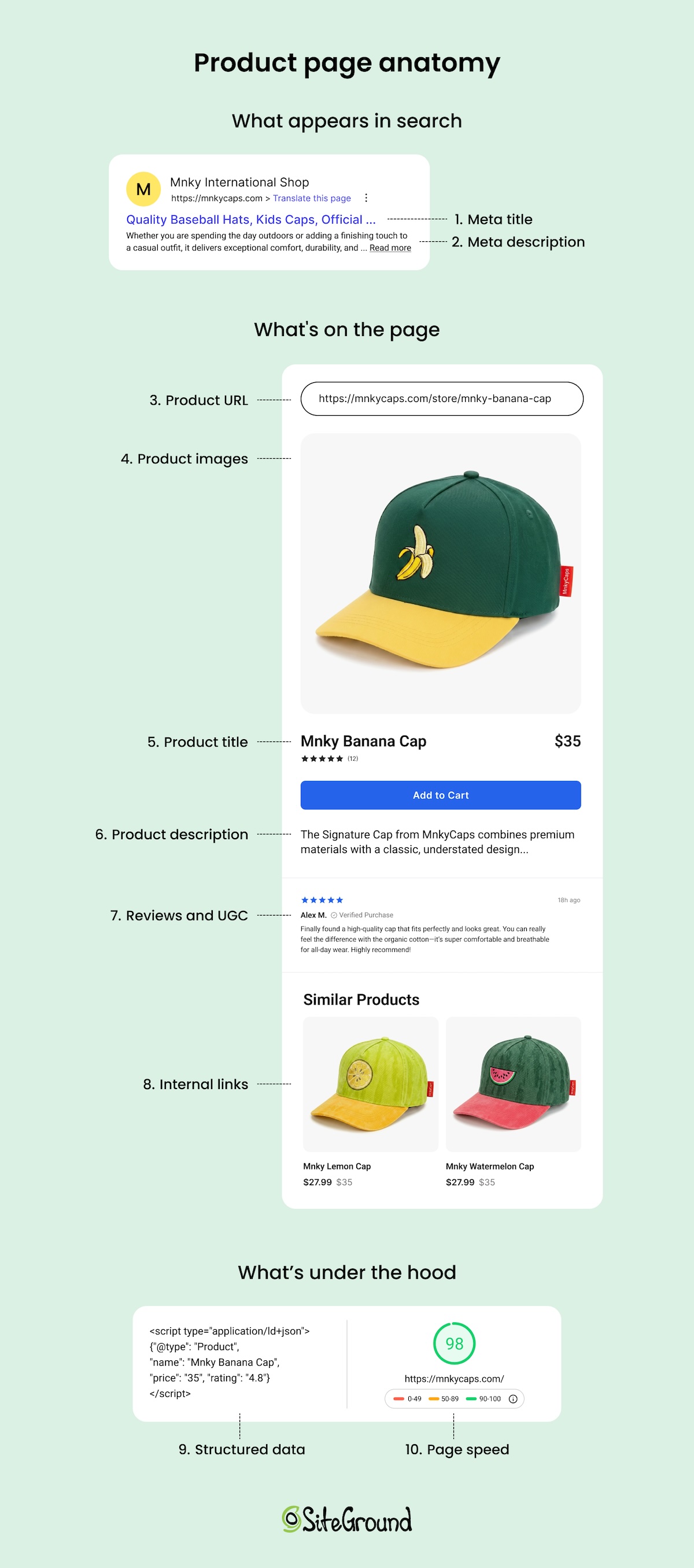
A product page is more than a photo and a price. It’s a collection of individual elements, each sending its own signal to search engines. Here’s a quick map of what lives on a typical product page and what each piece is doing behind the scenes (we’ll dive in deeper in a minute).
- Product title: This is the main heading on your page. In web terms, it’s called an H1, or title tag. It’s the first thing shoppers and search engines read, and it sets the context for everything else on the page.
- Meta title and meta description: These are what appear in search results. The meta title is a ranking factor; the meta description influences whether someone clicks.
- Product description: Your main copy. Where you use keywords naturally, highlight benefits, and give search engines and AI tools plenty of context about what you sell.
- Images: Search engines can read file names and alt text. Image quality and size also affect how fast your page loads, which affects search rankings.
- Reviews and user-generated content: Fresh content that adds keyword coverage you didn’t have to write yourself, and the kind of specific, natural language that AI search tools love to pull from.
- URL: A permanent address for your page. Should be clean, readable, and include your product name.
- Internal links: Connections between your product pages and the rest of your site, like blog posts, category pages, and related products.
- Structured data (schema markup): Invisible code that helps search engines display rich results like star ratings and prices directly in search.
- Page speed: How fast your page loads, whether it works well on mobile, and whether it’s indexed correctly.
How to optimize your product pages
Optimizing a product page is really just a series of smaller tasks stacked on top of each other. None of them are that hard, it’s just a matter of knowing where to start. So work through the steps below in order if you’re starting from scratch, or jump straight to wherever your pages need the most love.
Let’s start with the stuff your customers actually see.
1. Product page essentials
Product titles
Your product title is the H1 (the main header title, or title tag, that is) on your page, and it’s one of the most important steps on your SEO checklist. It tells search engines (and increasingly, AI tools surfacing product recommendations) exactly what the product is using the words shoppers actually type into search. A surprising number of small stores spend little time thinking about this, which means getting this right already puts you ahead of more competitors than you’d think.
Now, this doesn’t mean keyword stuffing your title. It means being specific. “Candle” is not a product title. “Hand-Poured Lavender Soy Candle” is.
A few conventions worth following:
- Lead with the most descriptive term. Put the thing first. “Running shoes for women” not “Women’s footwear: running shoes.”
- Match how your customers talk. If they say “tote bag,” don’t call it a “hand-carry carryall.” Write in the language your customers use, not the language that sounds the cutest.
- Keep it readable. You’re writing for humans first, then Google. If it sounds weird out loud, rewrite it.
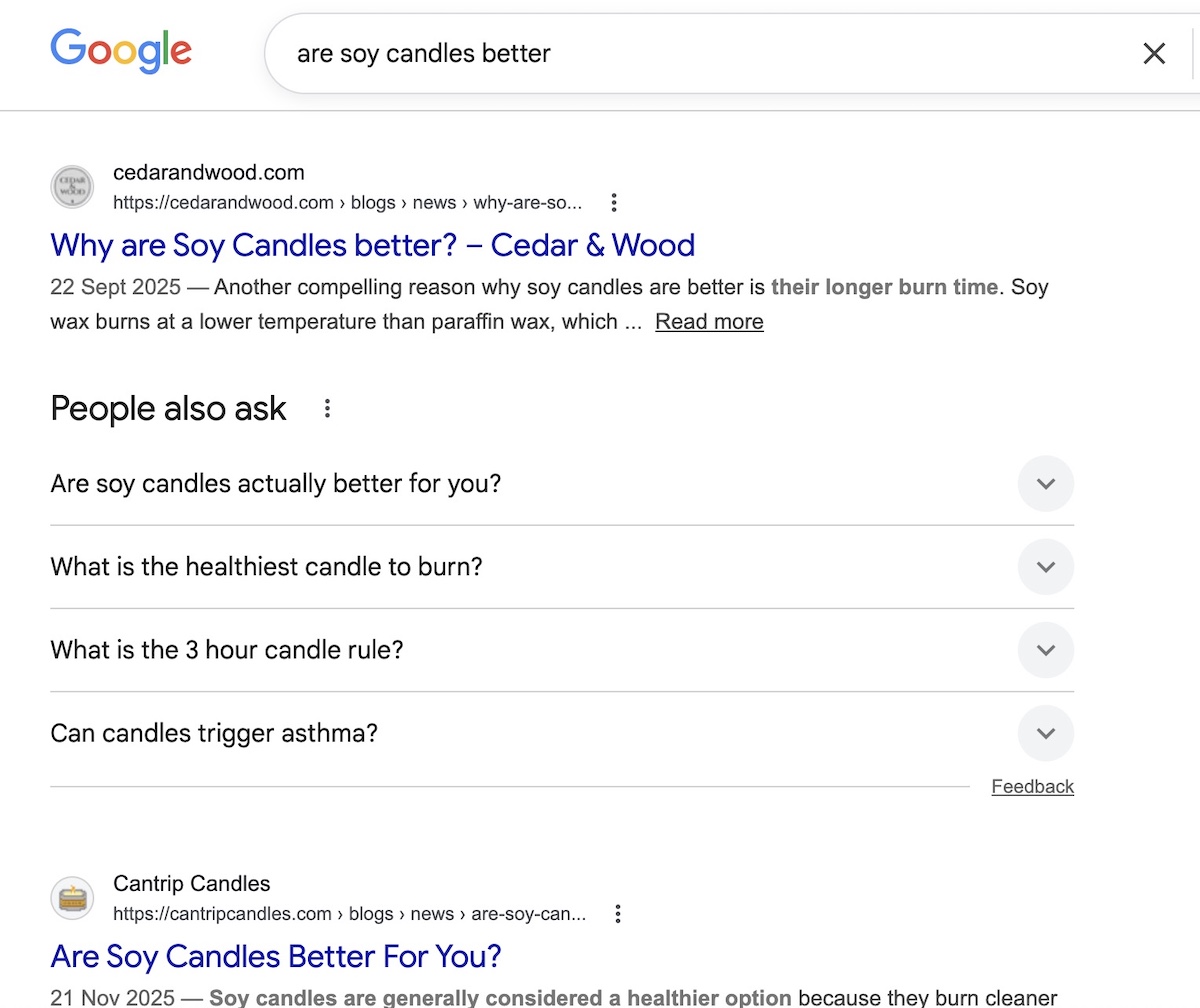
For keyword research, free tools like Google Search Console (once your site has some traffic), Ubersuggest, or even Google’s autocomplete and “People also ask” section can show you how people phrase searches in your category.
Meta descriptions
Here’s something worth knowing: a lot of small online stores never write a meta description at all, leaving whatever text the platform auto-generated — or nothing. That’s a missed opportunity, because your meta description is the two-line summary that appears under your page title in search results, and it’s often what decides whether someone clicks on your listing or scrolls past it.
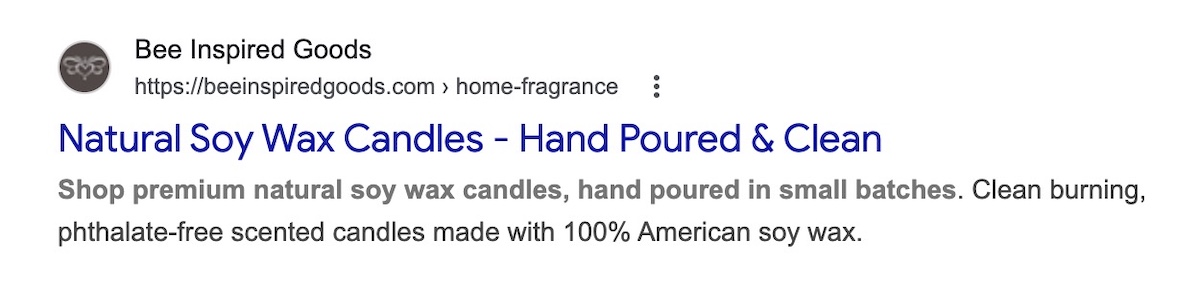
Think of it as a tiny ad for your product. It should include your main keyword, mention a key benefit or differentiator, and close with something concrete, like a detail that makes clicking feel worth it.
Example:
- Before: “Shop our selection of candles online.” Or worse, whatever text happened to get pulled from the top of the product page automatically.
- After: “Hand-poured lavender soy candles made in small batches. Burns clean for 50+ hours. Free shipping on orders over $40.”
Pro tip: Keep it under 155 characters so it doesn’t get cut off in search results.
URLs and product variants
Your URL is the full web address of your product page — the text you see in the browser bar — and the part you can usually edit is called the slug (it’s everything after the last slash). When it comes to product page SEO, the slug is the part that matters.
Now, it’s worth first emphasizing that you should aim to get it right from the start, as changing a URL later can wipe out any ranking value the page has already built up. That’s definitely a headache worth avoiding. So here’s what to know from the get-go:
- Keep it readable. yourstore.com/products/lavender-soy-candle tells both search engines and shoppers exactly what the page is. yourstore.com/products/item?id=00342 tells them nothing.
- Use one URL per product. Variants like size, color, or material should be selectable on the same page, not each living at their own separate URL. When every variant gets its own page, search engines can treat them as duplicate content, which splits your ranking power rather than stacking it.
Most modern ecommerce platforms handle URL structure automatically, so if you’re using something like the SiteGround Website Builder you likely don’t even need to think about this. If you’re on a heavily customized setup or have added plugins that affect URL structure, it’s worth clicking through your own product variants to check whether the URL changes.
2. Product descriptions
Benefits vs. features
Features describe what a product is. Benefits describe what it does for the person buying it. Both matter for your SEO strategy, but benefits are what actually sell, as they naturally produce richer, more varied copy that ranks for a wider range of searches.
| Feature | Benefit |
| Made from merino wool | Stays warm without overheating, even on long hikes |
| 10,000 mAh battery | Charges your phone three times before you need an outlet |
| BPA-free plastic | Safe for kids, no chemical aftertaste |
Write product descriptions that lead with benefits and back them up with features. Because your customers aren’t shopping for specs; they’re shopping for outcomes. Nobody buys a travel pillow because it’s “ergonomically contoured.” They buy it because they want to actually sleep on the red-eye.
Long-tail keywords
Long-tail keywords are longer, more specific search phrases, like “waterproof hiking boots for wide feet” instead of just “hiking boots.” They get less search volume individually, but they’re much easier to rank for and they attract buyers who know exactly what they want (and are very ready to buy).
Your product description is the best place to work these in. To find the right ones, ask yourself:
- What problem is my customer trying to solve?
- What do they call this type of product?
- What specific details matter to them? Size, material, use case, compatibility?
- What would they type into a search bar at 10pm when they really need to find it?
The answers are often your long-tail keywords. Work them in naturally and your description will read better for shoppers and rank better in search.
Pro tip: This kind of specific, natural language also matters beyond traditional search. AI Overviews, and tools like ChatGPT, Claude, and so on, are increasingly where people go for product recommendations, and they favor the same things good shoppers do: clear answers and concrete details. A product description that reads like a helpful human wrote it is exactly what gets cited. Adopting an AI-first mindset when writing your product content isn’t just good for AI search — it makes your copy better for everyone.
The duplicate content trap (and how beginners fall into it)
Duplicate content comes in two forms, and both will quietly undermine your rankings before you even realize what’s happening.
Copied product descriptions
If you copied the manufacturer’s product description, you’re not alone, but we’ve got some news: it’s costing you. When dozens of stores all use the same copy, Google sees duplicate content across the web and has no strong reason to rank any of them, especially not a smaller store over an established one.
This is fixable: simply write your own descriptions. They don’t have to be long. Even 100 to 150 words of original, specific copy will outperform copied content. Describe how the product feels, who it’s for, how you use it, or what makes your version worth buying from you specifically.
Duplicate product pages
The other kind of duplication is easier to create accidentally than you’d think, especially if you’ve been running your store for a while. Duplicate product pages (two or more pages for the same product, often created by importing products twice, copying listings, or platform migrations) confuse search engines and split your ranking power across multiple URLs instead of concentrating it on one.
Before optimizing anything, do a quick audit of your store and look for products that appear more than once. Tidy these up first. Every other optimization you make falls apart if search engines are trying to decide between two versions of the same page.
3. Images
File names and alt text
Before you upload any product image, rename it with a descriptive file name. A photo straight off your phone is named something like IMG_4823.jpg, which tells search engines exactly nothing. Something like lavender-soy-candle.jpg is far more useful.
Alt text is the written description attached to an image in your site’s code. It was originally designed as part of accessible web design for screen readers, but search engines also read it to understand what an image shows (and oftentimes they even serve up the product images in search results!).
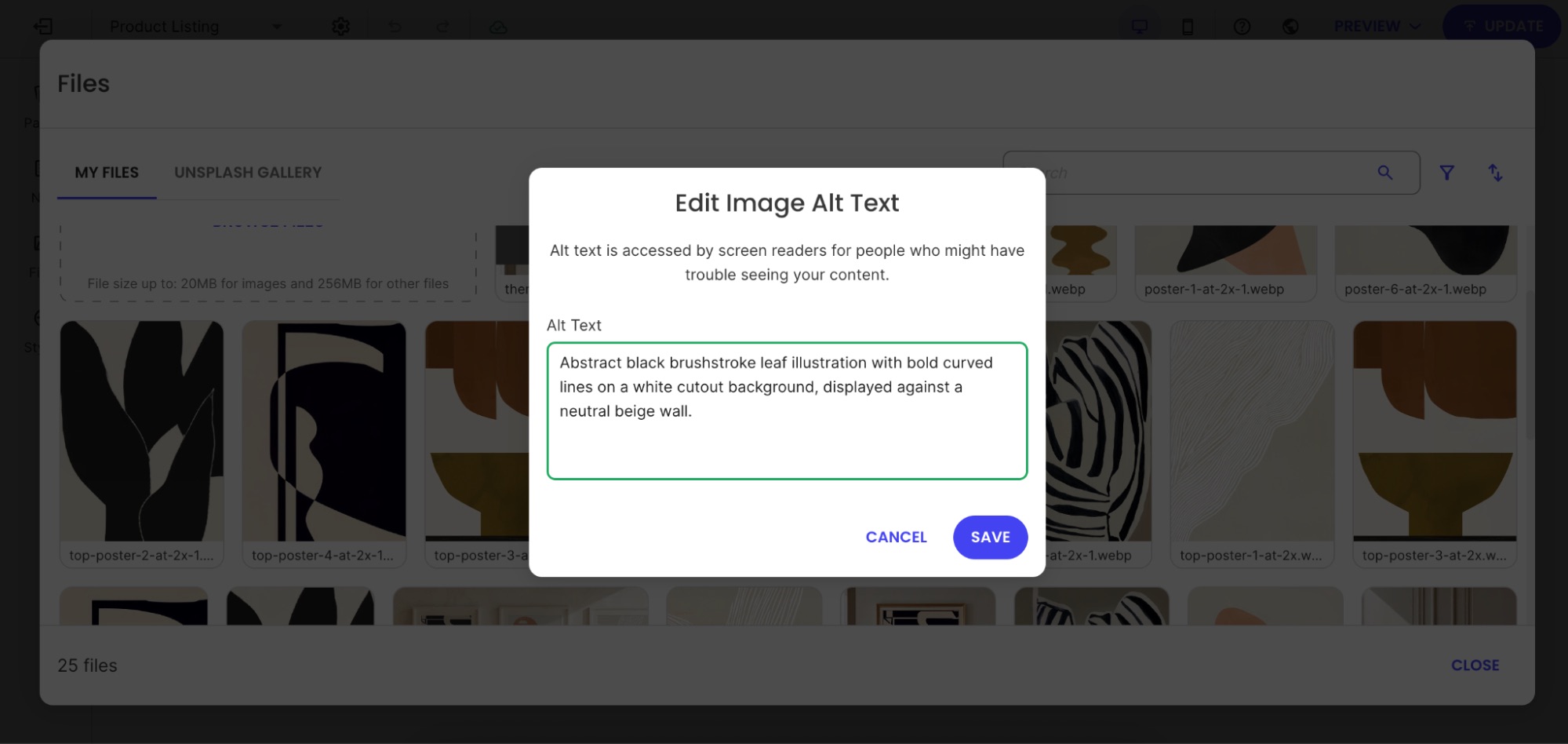
To get alt text right, imagine that you’re describing the image to someone who can’t see it. Be specific and include your product name and any relevant detail: “Hand-poured lavender soy candle in a clear glass jar with a wooden wick” beats “candle” or, worse, “product image 1.”
Compression and page speed
Fact: large image files slow your page down. More problematic fact: slow pages rank lower and convert worse — a double penalty you most certainly don’t want.
Before uploading, compress your images to reduce file size without visibly sacrificing quality. Free tools like Squoosh or TinyPNG make this straightforward. The goal is to find the smallest file size that still looks good — there’s no single number that works for every image, but if a product photo is several megabytes, it’s almost certainly larger than it needs to be.
That said, if you’re building on the SiteGround Website Builder, the magic starts the moment you upload an image. Rather than just serving the same file to every device, SiteGround automatically compresses your images and generates optimized versions for different screen sizes — so a visitor on a phone never has to download the same heavy file as someone on a desktop. It’s the level of image optimization you’d usually only get by installing a premium WordPress plugin — except here, it’s baked in from the start, with nothing to configure.
4. User-generated content and trust signals
Reviews and keyword coverage for small stores
Every review a customer leaves is content you didn’t have to write. And because customers describe products in their own words, reviews often contain long-tail keywords and phrases you wouldn’t have thought to include yourself. Wins all around.
Someone reviewing your hiking boots might mention “great for a wide toe box,” “held up in muddy trails,” or “fits true to size.” Those phrases become searchable content on your product page and match exactly how future buyers describe their problem when they search. This is the kind of content that generative engine optimization is built around — specific, human language that AI systems can confidently cite rather than generic marketing copy that could apply to any product.
UGC for small business
You don’t need thousands of customers to start building user-generated content (UGC). A few strategies that work even at small scale:
- Send a post-purchase survey email. A simple email three to seven days after delivery asking “How’s your [product name] treating you?” with a direct link to leave a review goes a long way. Keep it short, personal, and low-pressure.
- Respond to reviews publicly. When potential buyers see you engage with feedback (both good and bad), it builds confidence. It also signals to search engines that your page is active.
- Ask specific questions. “Would you recommend this to a friend?” gets fewer responses than “What problem did this solve for you?”
Trust signals and SEO impact
Trust signals are your social proof — reviews, star ratings, return policies, and “as seen in” mentions — and they have a bigger search engine optimization impact than most people realize:
- In traditional search, they up conversions, and higher conversions send positive behavioral signals to search engines: people are landing on your page and doing something, not bouncing straight back to the results page.
- In AI search, the stakes are higher. AI tools actively factor in brand credibility and reputation when deciding what to recommend. A product page with strong reviews, clear policies, and visible trust signals is more likely to be cited than one that looks unestablished, even if the underlying product is just as good. It’s part of a broader shift in how AI is changing marketing, and product discovery in particular.
Practically speaking, make sure star ratings are visible near the top of your product page, and that any press mentions or recognizable partnerships are noted where shoppers can see them. These are the kinds of credibility signals that influence both human buyers and AI tools surfacing product recommendations.
5. Structured data
Now let’s look at what’s under the hood: the elements search engines read that your customers don’t see directly.
Structured data basics
Structured data, also called schema markup, is a snippet of code you add to your page that labels its content for search engines. Product schema is the version built for ecommerce — instead of Google having to guess what your page is about, it tells it explicitly: this is a product, here’s the name, here’s the price, here’s whether it’s in stock.”
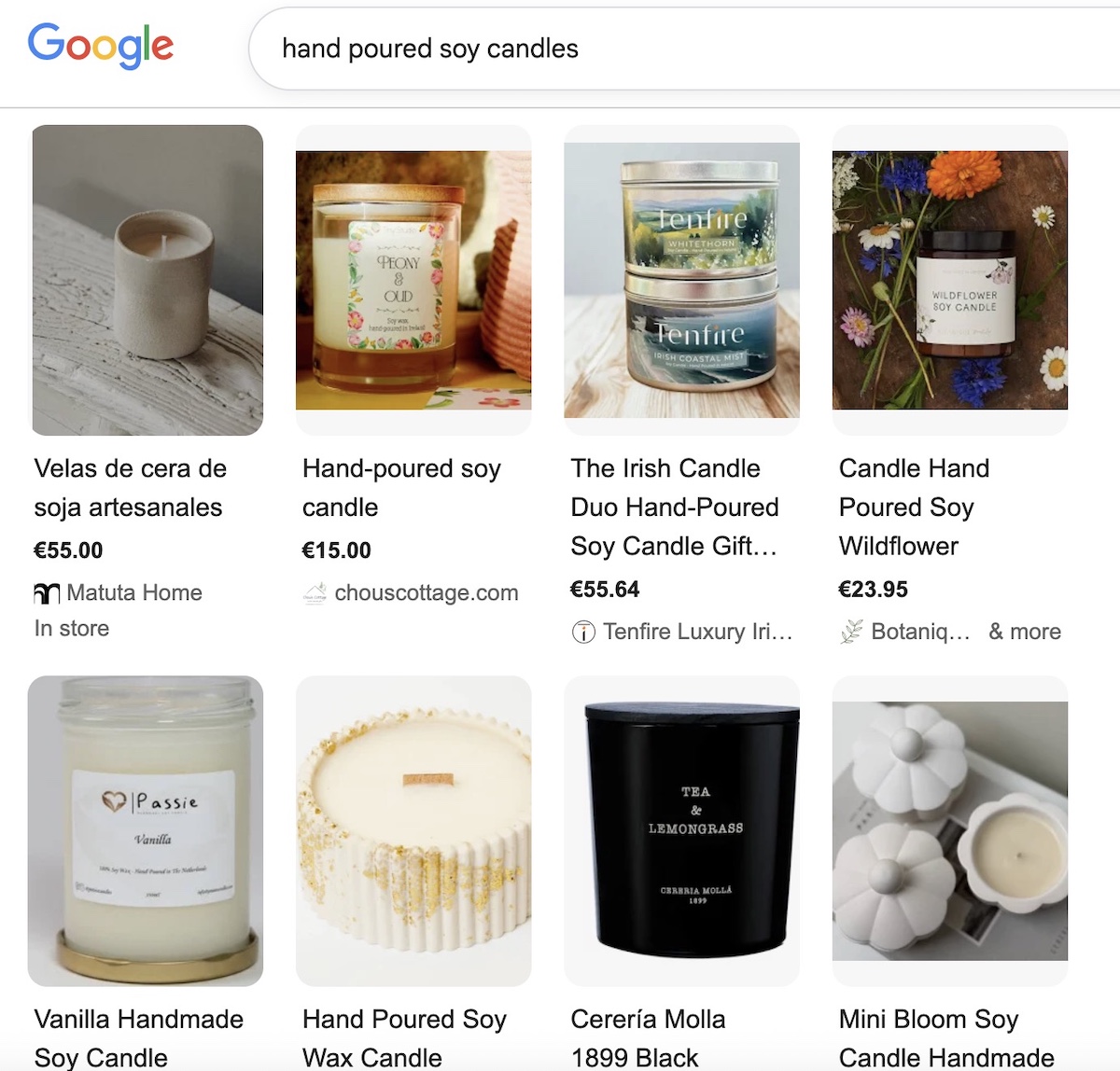
When search engines understand your page this way, they can display richer, more informative results (like those above) before someone even clicks. That kind of visibility makes your listing stand out and gives shoppers more reason to choose you over a plain text result.
The schema type that matters most
For ecommerce product pages, Product schema is the one to know. It marks up the core details search engines need to understand and display your product accurately: name, description, price, availability, images, and brand. Getting this right is one of the more impactful technical things you can do for a product page, and thankfully it’s also one of the easier ones.
Implementation as a non-technical user
If you’re using an ecommerce platform like SiteGround Ecommerce, Product schema is built in. Fill in your product details completely, and your schema is already taken care of. The steps you’re taking to optimize your product pages are the same steps that keep your schema accurate and up to date. If you’re using a CMS platform like WordPress, on the other hand, you will need to add a plugin to handle this for you.
6. Technical essentials
Page speed and mobile optimization
Page speed is a direct ranking factor, and a slow product page loses visitors before they’ve even seen what you’re selling. And with more than half of ecommerce browsing happening on phones, the bar is even higher on mobile devices.
Beyond images (which we covered above), here’s what to check to ensure optimal website performance:
- Watch your add-ons. Every plugin, widget, or third-party tool you install adds a little weight to your page. If you’re on WordPress with a stack of plugins, this adds up quickly. Audit what you actually use and remove what you don’t.
- Check your scores. Run your product pages through Google’s free PageSpeed Insights tool. It gives you a plain-language breakdown of what’s slowing things down and what to fix first.
- Test on your phone. Browse your own store as a customer would. If the mobile web design is slowing things down, your customers are experiencing the same thing.
- Choose your web hostingprovider thoughtfully. Where your site lives has a direct impact on how fast it loads. A slow host puts a ceiling on your performance no matter how well you’ve optimized everything else. If you’re using the SiteGround Website Builder, speed is the starting point, not something you work toward. The sites it produces are in a different league from what you’d get with standard themes from competing builders — and that gap shows up exactly where it matters: load times, mobile performance, and real user experience.
Out-of-stock product pages
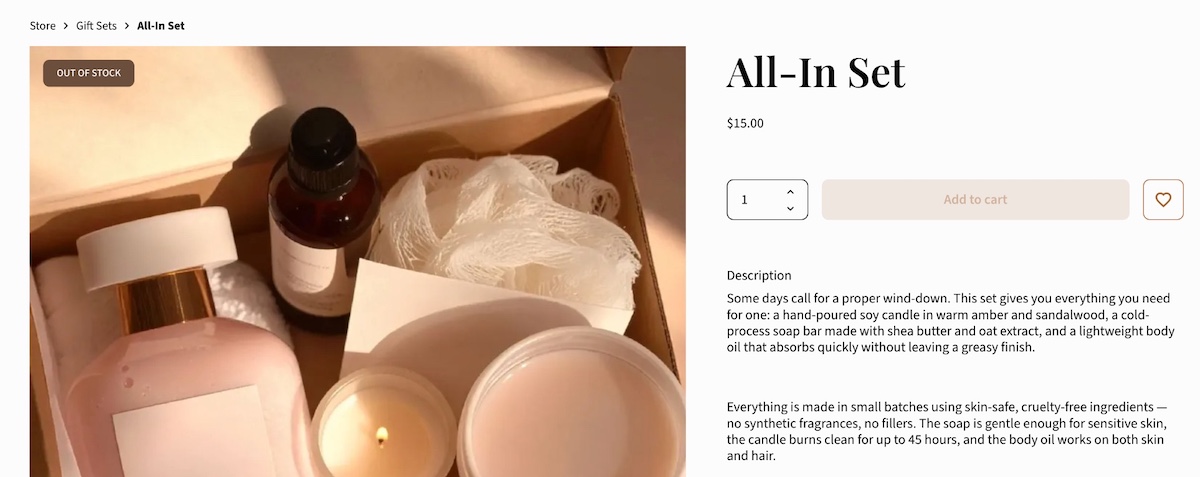
When a product goes out of stock, don’t delete the page. If it had any search visibility, deleting it throws that away. Here’s what to do instead:
- Temporarily out of stock: Keep the page live, mark it clearly as out of stock. Update your product availability in your store settings so the status is accurate for both shoppers and search engines.
- Permanently discontinued: Redirect the URL to the most relevant alternative product or category page. That way, any ranking value the page had gets passed along rather than disappearing into a 404 error.
XML sitemap
An XML sitemap is a file that lists all the important pages on your site and helps search engines find and index them. Think of it as a map you hand directly to Google and say “here’s everything worth looking at.”
Worth noting: the SiteGround Website Builder generates and updates your sitemap automatically. You’ll still need to submit it via Google Search Console, but make sure your product pages are included when you do. New products won’t rank if search engines don’t know they exist.
7. Internal linking
Now that your product page is in good shape, here’s how it connects to the rest of your store. This part matters more than one might think, so don’t sleep on these tips.
Blog and category page links to products
Internal links from other website pages on your site pass authority to your product pages and help search engines understand how everything relates. If you write a blog post about “how to choose the right hiking boot,” linking to your hiking boot product page from that post is a direct SEO boost for the product.
Category pages work the same way. Make sure every product is reachable from at least one category page, and that those pages are easy for both shoppers and search engines to find.
Cross-sells and related products
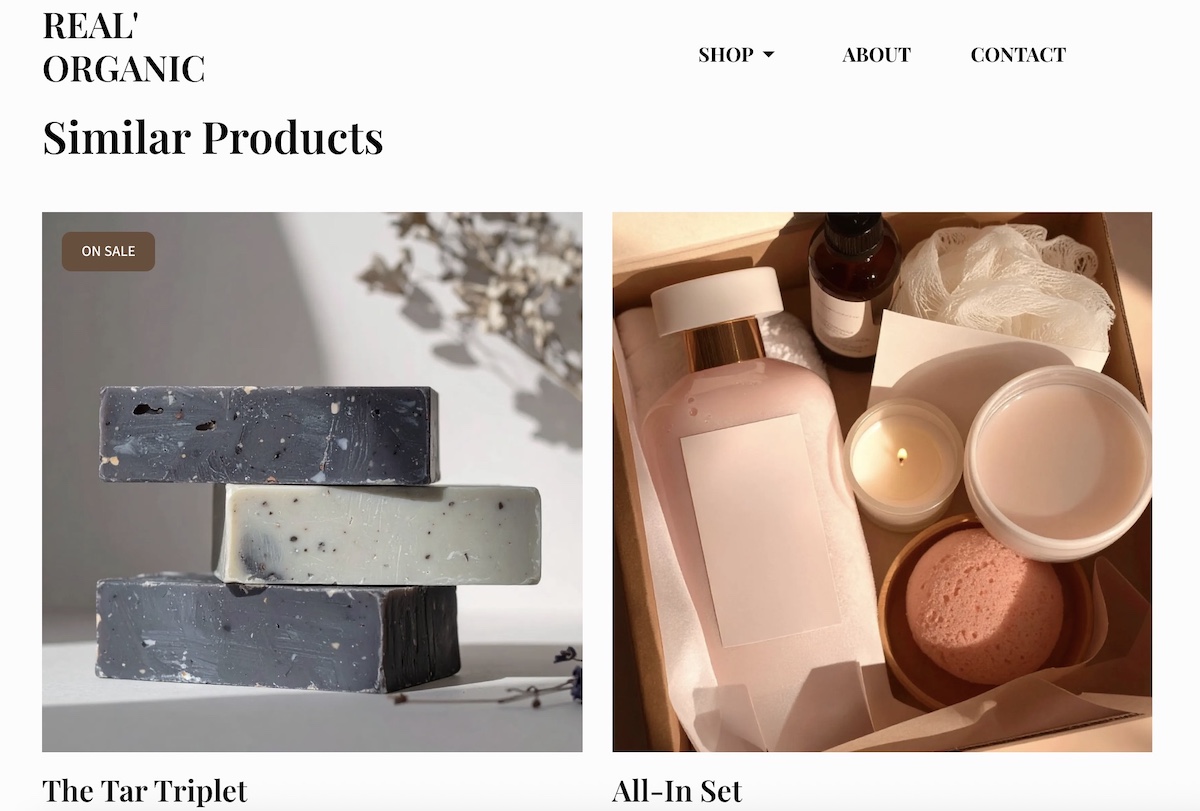
“You might also like” and “frequently bought together” sections do double duty: they help shoppers discover more products and they create internal links between product pages. Both are good for SEO and for average order value.
Orphan product pages
An orphan page is a page with no internal links pointing to it. Search engines may struggle to find it, and even if they do, the lack of internal links signals that it’s not very important. If you’ve ever added a product and forgotten to add it to a category or link to it from anywhere, there’s a solid chance you have orphan pages without knowing it.
To fix this, run a quick audit by checking your category pages and making sure every active product appears in at least one. Tools like Screaming Frog (free up to 500 pages) can help you find orphans if your catalog is larger.
Product page SEO checklist
We’ve covered a lot of ground, so use the below checklist as a quick reference every time you optimize a product page. Start with your best sellers and work through the catalog from there.
Product title
- Includes the primary keyword naturally
- Leads with the most descriptive term
- Written in language your customers actually use
Meta description
- Under 155 characters
- Includes the primary keyword
- Highlights a concrete benefit or differentiator
URL
- Clean and readable slug
- Includes the product name
- No unnecessary parameters or numbers
Product description
- Written in your own words (not manufacturer copy)
- No duplicate product pages
- Leads with benefits, backed up by features
- Includes long-tail keywords naturally
- Covers variant details where relevant
Images
- Descriptive file names
- Alt text written for every image
- Compressed before uploading
- Tested on mobile
Reviews and UGC
- Reviews enabled on the page
- Post-purchase survey email in place
- Respond to reviews publicly
Structured data
- Product schema is present and verified
- All product details are filled in completely (name, price, description, images, availability)
- Availability and pricing are kept up to date
Technical
- Page loads quickly
- Page is mobile-friendly
- XML sitemap created and submitted
- Out-of-stock pages handled correctly
Internal linking
- Product appears in at least one category page
- Linked from relevant blog content where possible
- Related products section populated
- No orphan pages
Start somewhere, not everywhere
If this guide has done its job, you now have a clear picture of what makes a product page work and why it matters. Your to-do list might feel a teeny bit longer, but once you get the hang of it, and reap the rewards, you’ll be glad you took a moment to really optimize.
So start now: pick your top three best-selling products and run them through the checklist above. From there, ecommerce marketing is the natural next frontier.
And if you’re building or moving your store to a platform that handles the technical side for you, that to-do list gets a whole lot shorter. SiteGround Ecommerce takes care of schema, sitemaps, image optimization, and mobile performance automatically, plus it makes the whole process easy and unintimidating — leaving you free to focus on the one thing no platform can do for you: making your products impossible to resist.
Frequently asked questions
Start with the basics: a clear, keyword-rich product title, an original product description that leads with benefits, descriptive image file names and alt text, and a clean URL. Then layer in structured data, internal links, and user-generated content like reviews. Use the checklist in this guide to work through each element systematically, and prioritize your best-selling products first.
The 80/20 rule applied to SEO suggests that roughly 80% of your organic traffic comes from 20% of your pages or keywords. For small businesses, this means a handful of well-optimized product pages will drive the majority of your search visibility. Focus your effort on those high-value pages first rather than trying to optimize everything at once.
The 3 C’s of SEO are content, code, and credibility. Content refers to the quality and relevance of what’s on your page. Code refers to the technical setup — page speed, structured data, mobile optimization. Credibility refers to the trust signals that tell search engines your site is authoritative, including backlinks and reviews.