2026 SEO checklist: Get found on Google and AI search engines

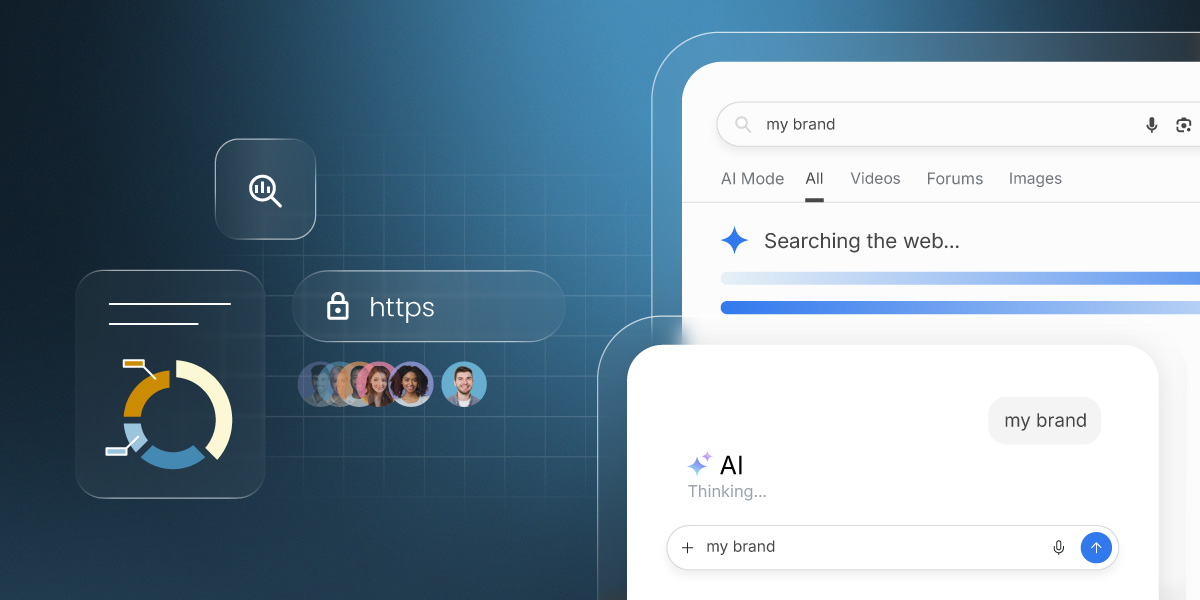
Abstract of SEO checklist activites

You open Google, search for your own business, and an AI chatbot is busy recommending your competitor. This SEO checklist fixes that. It’s a practical, jargon-free guide to getting found on Google and AI search engines in 2026, no marketing degree, agency retainer, or spare weekend required. Work through it and you’ll cover more ground than most of your competitors already have.

Key takeaways:

  • You don’t need two SEO strategies. One well-structured, authoritative content and technical SEO approach works for both Google and AI search engines.
  • Rankings alone aren’t enough anymore. Zero-click searches and AI summaries mean visibility and citations matter just as much as position.
  • Structure is as important as substance. Clear headers, Q&A formatting, structured data, and quotable statements increase both rankings and AI citations.
  • E-E-A-T is non-negotiable. Demonstrating real experience, expertise, authority, and trust is now a core ranking factor — not a bonus.
  • Consistency beats complexity. A focused 90-day plan, steady content publishing, and monthly tracking will outperform sporadic bursts of effort.

Understanding the 2026 search landscape

SEO today means optimizing for Google and AI engines like ChatGPT and Perplexity. One strong content and technical SEO strategy covers both. Here’s what’s changed and why it matters.

How do traditional search and AI search differ?

Most people still think of search engine optimization as “showing up on Google.” And that’s still true: Google processes billions of searches every day, and ranking well there matters enormously. But it’s no longer the only game in town.

AI-powered search engines have entered the chat, and your customers are using them. Here’s a quick breakdown:

  • Google AI Overviews are the AI-generated summaries that now appear at the very top of many Google search results pages. They pull information from multiple sources and present a synthesized answer, often before the user ever sees a traditional blue link.
  • ChatGPT is increasingly used as a search tool, especially for questions like “what’s the best accountant for a small business in [city]?” or “how do I create an ecommerce website?” Users ask conversational questions and expect direct, authoritative answers.
  • Perplexity is a dedicated AI search engine that cites its sources directly in the answer. It’s growing fast, particularly among tech-savvy users who want depth over speed.

And these AI-powered search engines aren’t alone — Microsoft Copilot, Claude, and Meta AI are all increasingly being used the same way. The good news is that optimizing for one largely means optimizing for all of them.

Also worth nothing: optimizing for SEO and AI search are more similar than different. Both reward well-structured, authoritative, clearly written content. You won’t need to build two separate strategies but rather just one smart integrated approach covers both. And that’s what we’re tackling today.

What’s changed in SEO in 2026?

Let’s talk about what’s actually different this year, because some of it is significant.

  • Rankings no longer equal traffic. Zero-click searches (where a user finds their answer directly on the results page without clicking through) now account for nearly 60% of all Google searches. That means even if you rank #1 (congrats by the way), a large portion of searchers may never visit your site. It also means that visibility in featured snippets, AI Overviews, and knowledge panels is now just as important as your ranking position.
  • Keywords are out; search intent is in. Google (and AI engines) have become very good at understanding what someone means, not just what they typed. These days, stuffing your content with exact-match keywords is not only ineffective; it can actually hurt you. What matters now is whether your content genuinely answers the question behind the search. 
  • E-E-A-T has gone from guideline to gatekeeper. Google’s framework of Experience, Expertise, Authoritativeness, and Trustworthiness used to be a nice-to-have. In 2026, it’s a core ranking signal. If your content doesn’t demonstrate real-world expertise and credibility, it will struggle to rank — full stop.
  • Your online reputation is now an SEO signal. Reviews on Google, mentions across the web, and how people talk about your brand all feed into how search engines perceive your authority. A strong reputation isn’t just good for business; it’s good for search.
  • Search happens everywhere, not just Google. Your customers are asking questions on TikTok, Reddit, YouTube, and AI chatbots. A truly effective SEO strategy accounts for how content travels across platforms and not just how it ranks in one place. And with the launch of ChatGPT ads, the stakes have gone up. Businesses that aren’t visible in AI search aren’t just missing organic citations, but they’re potentially losing ground to competitors who are paying to appear there too.

We’ll get to the bottom of how to tackle all of these in a moment — hang tight.

What does changing search mean for small businesses?

Ok, this might feel overwhelming. But the silver lining for small businesses is pretty shiny.

To start, you definitely don’t need separate strategies for Google and AI: one well-executed content and technical SEO approach covers both. And you don’t need an agency. Many of the most impactful SEO tasks are free or low-cost, and a consistent effort over 90 days can produce meaningful results and increase traffic to your website. The businesses winning in AI search right now are often not the biggest ones; they’re the ones with the clearest, most helpful, most credible content. 

That’s an advantage you can totally build. Let’s get into it.

Your 2026 SEO checklist

1. Get started: Essential setup

Essential setup means six things: a verified Google Business Profile, Search Console, GA4, HTTPS, a checked robots.txt, and the right plugins if you’re on WordPress. Let’s break this down:

  • Claim and verify your Google Business Profile. If you have a physical location or serve customers in a specific area, this is non-negotiable. Your Google Business Profile is often the first thing someone sees when they search for your business, and it directly influences your local search visibility. Go to google.com/business and follow the verification steps.
  • Install Google Search Console and submit your xml sitemap. Search Console is free, powerful, and essential. It shows you which search queries are bringing people to your site, which pages are indexed, and any technical errors Google has found. Once installed, submit your xml sitemap so Google can find and crawl your pages efficiently.
  • Install Google Analytics 4 (GA4). Where Search Console tells you about your search visibility, GA4 tells you what people do once they arrive on your site. Together, they give you the full picture. Set it up before you start any optimization work so you have a baseline to compare against.
  • Set up SSL (HTTPS). If your site still shows “http://” rather than “https://”, you have a problem. Google uses HTTPS as a ranking signal, and browsers actively warn users that non-secure sites are unsafe. Get this sorted before anything else.
  • Check your robots.txt file. This file tells search engine crawlers which parts of your site to index and which to ignore. If you’re on WordPress, use Google Search Console’s URL Inspection tool to verify it’s configured correctly. If you’re on SiteGround, this is handled for you.
  • Install plugins (if on WordPress). An SEO plugin can handle sitemap generation, meta tags, and technical flags without touching any code. Add a performance plugin like SiteGround Speed Optimizer to keep your site fast.

Already on SiteGround? Most of this section is handled for you.

SiteGround’s Website Builder and Ecommerce automatically generate and update your xml sitemap every 24 hours, handle SSL, manage your robots.txt, and integrate with Google Analytics without any code. Your ecommerce dashboard also includes built-in sales and product analytics, so you get the full picture alongside Search Console and GA4, all in one place. Skip the setup headaches and get straight to growing.

 Get started with the SiteGround Website Builder →

2. Do keyword research & content planning for SEO & AI

Keyword research in 2026 is a digital marketing exercise that means finding both what people type into Google and what they ask AI chatbots directly, then matching content to each search’s intent.

Finding relevant keywords that work everywhere

  • Lean into long-tail keywords. These are longer, more specific search phrases (think “best accounting software for freelance photographers” rather than “accounting software”). Long-tail keywords have lower search volume but higher search intent, meaning the people searching them are closer to making a decision. They’re also less competitive, which is a genuine advantage for growing small businesses going up against bigger brands.
  • Prioritize question-based keywords. Questions like “how do I,” “what is the best,” and “should I use” are gold for both traditional SEO and AI search. That’s because AI engines are specifically designed to answer questions, and when your content directly and clearly answers a question someone asked, you become a candidate for an AI citation. Tools like AnswerThePublic, Google’s “People Also Ask” boxes, and even your own customer support inbox are excellent sources of real question data.
  • Match content to search intent. For every keyword you target, ask yourself: what does someone actually want when they search this? Informational intent (they want to learn), navigational intent (they want to find a specific site), or transactional intent (they want to buy)? Your content needs to match the intent and where the searchers are in the customer journey. That is, a product page won’t rank for an informational query, and a blog post won’t rank for a transactional one.

Understanding what AI search engines want

AI search engines select sources based on a few consistent signals:

  • Authority and trust: Is your site credible? Do other reputable sites link to or mention you?
  • Clarity and directness: Does your content give a clear, complete answer without making the reader work for it?
  • Topical comprehensiveness: Do you cover a subject in enough depth to be considered a reliable source?
  • Freshness: Is your content up to date? Outdated information is a red flag for AI engines.

Content mapping & topic cluster strategy

The most effective content strategy for 2026 combines traditional SEO structure with an approach that signals deep topical authority to both Google and AI.

Here’s how it works. Instead of creating isolated blog posts targeting individual keywords, you build topic clusters. Each cluster has:

  • A pillar page — a long-form, comprehensive piece covering a broad topic (like this one).
  • Supporting content — shorter articles that go deep on specific subtopics within that broader theme. For example, in the case of this article, that means links to generative engine optimization or how AI is changing marketing for small business. (See what we did there? We just showed you this very strategy in action.)
  • Internal links connecting the supporting articles back to the pillar page, and to each other. 

This structure tells search engines that your site has genuine depth on a subject, not just a few surface-level posts. It also makes your content far more likely to be used as a source by AI engines, which are looking for comprehensive, trustworthy coverage of a topic. And, most importantly, it addresses thoroughly what your readers really want to know.

When building your content calendar, map each piece to a keyword cluster, assign it a content type (pillar or support), and make sure every piece connects back to your broader topic strategy.

3. Create content that ranks everywhere

Good content is still the heart of SEO. But “good” in 2026 means more than well-written; it means well-structured, deeply useful, credible, and formatted for both human readers and search engine algorithms. What does this look like? 

The complete on-page optimization framework

  • Title tags and meta descriptions. Your title tag is the clickable headline in search results; your meta description is the short summary beneath it. Both should include your target keyword naturally, accurately describe the page content, and be written to earn the click. Title tags should stay under 60 characters; meta descriptions under 160.
  • Header hierarchy (H1–H6). Your H1 is your page’s “welcome sign” — the first thing visitors see when they land. Use it once, and make it count. Use H2s for main sections, H3s for subsections, and so on. This structure builds visual hierarchy so readers can scan easily, and it helps search engines understand your page’s organization. Bonus: well-structured headers make your content easier for AI engines to parse.
  • URL structure. Keep URLs short, descriptive, and keyword-inclusive. Avoid dates, random strings of numbers, or anything that doesn’t communicate what the page is about. A URL like /academy/seo-checklist is infinitely better than /page?id=4827.
  • Image optimization and alt text. Every image on your site should have a descriptive file name (not “IMG_4821.jpg”) and alt text that describes what the image shows. Alt text helps visually impaired users, improves website accessibility, and gives search engines additional context about your page content.
  • Internal linking. Don’t forget to link relevant pages on your site to each other. Every piece of content should link to at least two or three related pages on your site.

SiteGround takes the guesswork out of on-page SEO. SiteGround’s Website Builder includes built-in SEO tools that make it easy to add title tags, meta descriptions, and image optimization as you build — no plugin hunting required. It’s designed for business owners, not developers. 

Get started now →

Content depth, quality & authority (E-E-A-T)

E-E-A-T — Experience, Expertise, Authoritativeness, and Trustworthiness — is Google’s framework for evaluating content quality. It’s also increasingly how AI engines decide whose content is worth citing. Here’s how to demonstrate it in practical terms:

  • Demonstrate Experience means showing that you’ve actually done the thing you’re writing about. Include real case studies, before-and-after results, specific examples from your own business, or outcomes from clients. First-hand experience is something AI-generated content can’t replicate, and it’s exactly what Google is looking for.
  • Showing Expertise means making it clear who wrote the content and why they’re qualified to write it. Add author bios to your blog posts (just like we’ve done for this post). List credentials, certifications, years of experience, or relevant qualifications. If you’re a plumber writing about plumbing, say so. If you’re a nutritionist writing about food, make that visible.
  • Building Authority happens when other credible sources reference, link to, or cite your content, and this is where link building comes in. Link building is the practice of earning backlinks from other reputable websites, and it remains one of the most powerful ranking signals in existence. You can accelerate link building by creating original research worth citing, publishing unique data, earning press coverage, pitching guest posts to industry publications, or getting mentioned on reputable industry sites. Worth emphasizing: Google is very good at identifying backlinks that were bought or manufactured, and those can actually hurt your rankings. Earned links only.
  • Establishing Trust means being transparent about who you are, how you operate, and what your customers think of you. Display customer reviews prominently, include a clear privacy policy and terms of service, use HTTPS, and make it easy for visitors to contact you. Trust signals like this are good for conversion, and also good for search. For example, SiteGround dedicates an entire section on the homepage to customer success stories.
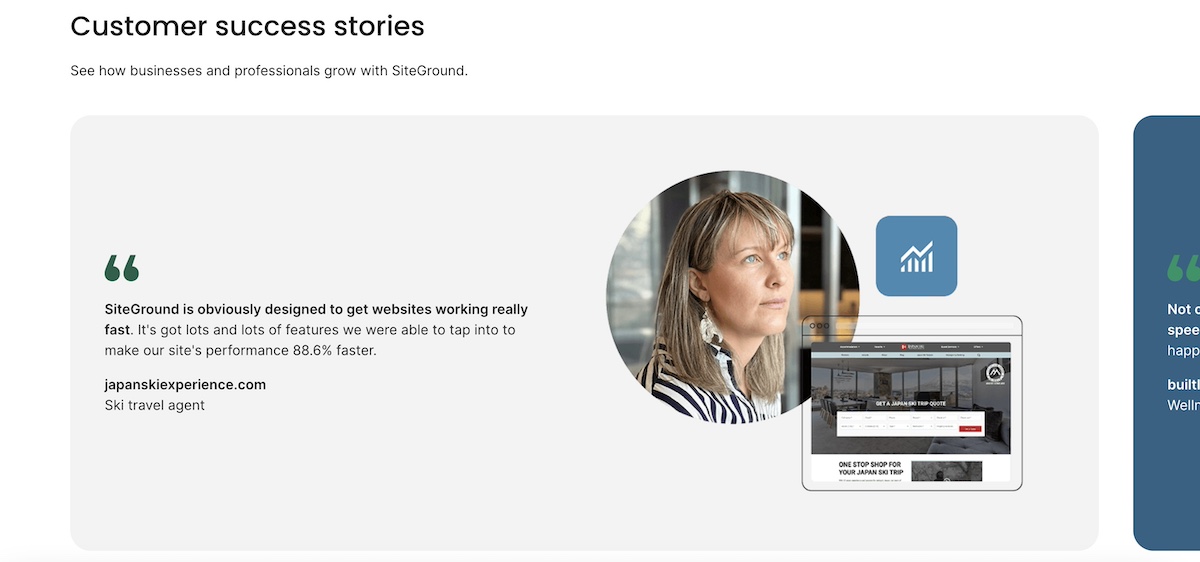
Example of establishing trust with customers by displaying customer success stories

Structuring content for maximum visibility

How you format your content is as important as what it says, so don’t sleep on this step.

  • Question-answer formatting is the most reliable way to appear in both featured snippets and AI-generated responses. Structure your content so that a clear question is followed immediately by a clear, complete answer within the same paragraph or section. This is exactly how AI engines extract content to cite.
  • Write definitive, quotable statements. Vague, hedging language is the enemy of AI citations.Instead of “email marketing is a pretty good way to stay in touch with customers,” write “email marketing generates an average of $36 for every $1 spent — a higher ROI than paid ads, social media, and SEO combined.” Clear, confident, specific.
  • Use structured formats strategically. Lists and tables aren’t just easier to read, they’re more likely to appear as featured snippets. Use bulleted lists when presenting multiple items of equal weight, numbered lists for sequential steps, and tables when comparing options or presenting data. But don’t overdo it: blocks of prose are also valuable, especially for nuanced explanations that benefit from context.
  • Answer questions completely. A half-answered question sends users back to the search results, and tells Google your content didn’t satisfy the intent. Aim to be the last stop: give enough depth that readers don’t need to go anywhere else.

4. Address technical SEO

Technical SEO covers the behind-the-scenes elements that help search engines crawl, understand, and index your site: mobile performance, site structure, and fixes like duplicate content and broken links. None of it requires a developer.

Mobile & performance

Mobile optimization showing desktop and phone version
  • Understand Core Web Vitals. These are Google’s user experience metrics, and they’re a direct ranking factor. There are three to know:
    • LCP (Largest Contentful Paint): How quickly does the main content of your page load? Aim for under 2.5 seconds.
    • INP (Interaction to Next Paint): How quickly does your page respond when a user interacts with it? Under 200ms is the target.
    • CLS (Cumulative Layout Shift): Does your page content jump around while it loads? A score below 0.1 is ideal.
  • Optimize page speed. Compress images before uploading, minimize unnecessary plugins, use a content delivery network (CDN), and choose a fast web hosting. Every extra second of load time increases your bounce rate, and hurts your rankings.

SiteGround is built for speed. SiteGround’s infrastructure includes a global CDN, built-in caching, and server-level optimizations designed to keep your Core Web Vitals in the green. It’s one of the fastest hosting environments available for small business websites, without requiring any technical configuration on your end. Plus, websites built with the SiteGround Website Builder are all built and optimized for mobile so that you can rest assured that your site performs at the very best no matter the screen. 

Start building a better website now>>

Site structure & crawlability

  • Apply the 3-click rule. Every page on your site should be reachable within three clicks from your homepage. If important content is buried deep in your website structure, search engines may not crawl it effectively, and users definitely won’t find it easily.
  • Fix crawl errors in Search Console. Google Search Console’s Coverage report shows any pages that couldn’t be indexed and why. Common issues include 404 errors (pages that no longer exist), pages blocked by robots.txt, and redirect chains. Address these regularly.
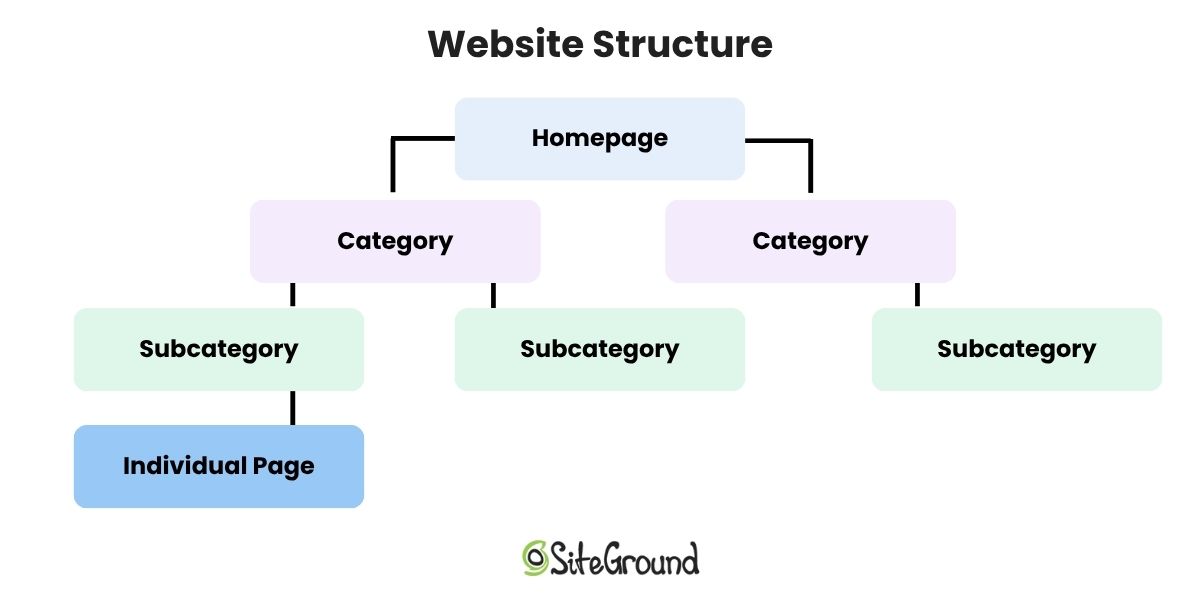
Diagram of website structure with homepage then categories subcategories and individual pages

Common technical issues to resolve

  • Duplicate content and canonical tags. If the same content appears at multiple URLs on your site, use canonical tags to tell search engines which version is the “official” one.
  • Broken link detection and repair. Broken links (both internal and external) hurt user experience and waste crawl budget, meaning Google spends its limited time crawling dead pages instead of your good ones.
  • 301 redirects. When you delete a page or change a URL, always set up a 301 redirect from the old URL to the most relevant new one. This preserves any SEO value the old page had and prevents users from landing on a 404.
  • Orphaned pages. Pages with no internal links pointing to them are essentially invisible to search engines (and users). Do a site audit for orphaned pages and either delete them, redirect them, or add internal links to them from relevant content.

5. Implement structured data: Your visibility multiplier

Structured data (also called schema markup) is a type of code added to your web pages to help search engines understand exactly what your content is about: your business, your products, your content, your location. Without it, Google and AI engines have to figure that out on their own.

With schema markup in place, you’re more likely to appear in rich search results (think star ratings, product details, and FAQ dropdowns), and more likely to be cited as a source in AI-generated answers. Not every small business bothers with it, which means doing it well is a genuine competitive advantage.
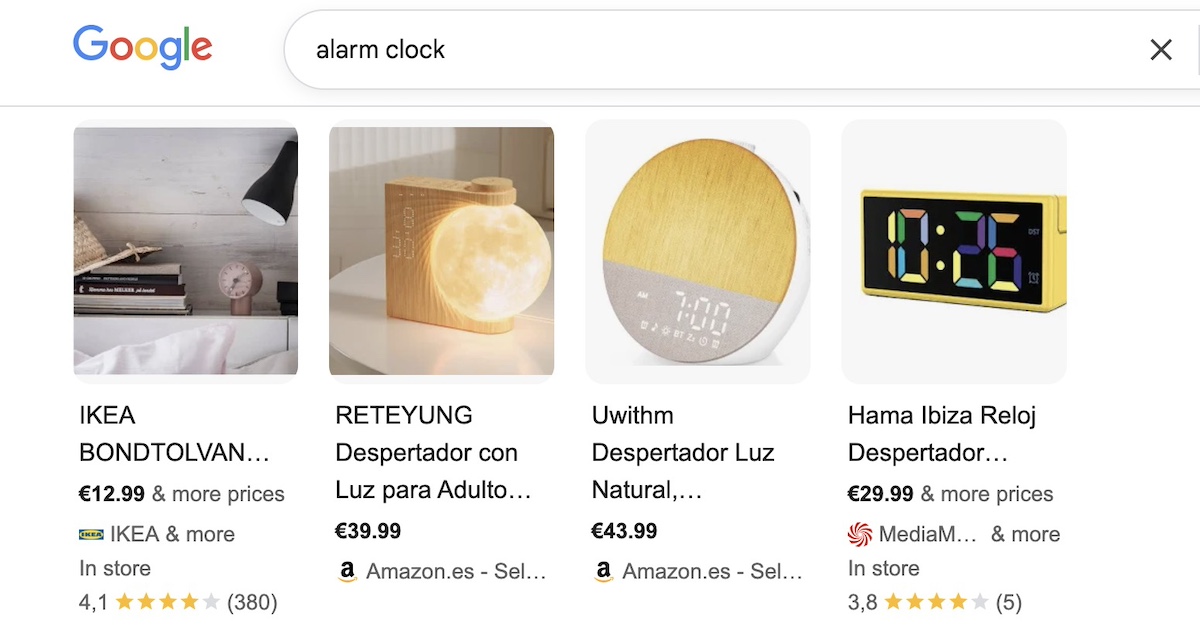
Example of how product schema markup helps your products show up in search

Using the SiteGround Website Builder?
Product schema markup is built in automatically for your store, so your product listings are already set up to display pricing, availability, and review information directly in search results.

6. Tackle AI visibility must-dos

You’ve covered a lot of ground. Before moving on to tracking, here’s a quick roundup of the AI-specific actions that matter most, pulled from everything above, plus a couple of extras worth calling out on their own.

  • Write in clear, quotable statements. AI engines cite short, direct excerpts, not long paragraphs. Aim for 2–3 sentence answers that can stand alone.
  • Use conversational language throughout. Write how your customers actually talk, not how a textbook reads.
  • Embed Q&A pairs in your content. A question followed immediately by a complete answer is the format AI engines are built to process.
  • Add FAQ sections and keep FAQ answers between 50–150 words. Complete enough to be useful, tight enough to be citable.
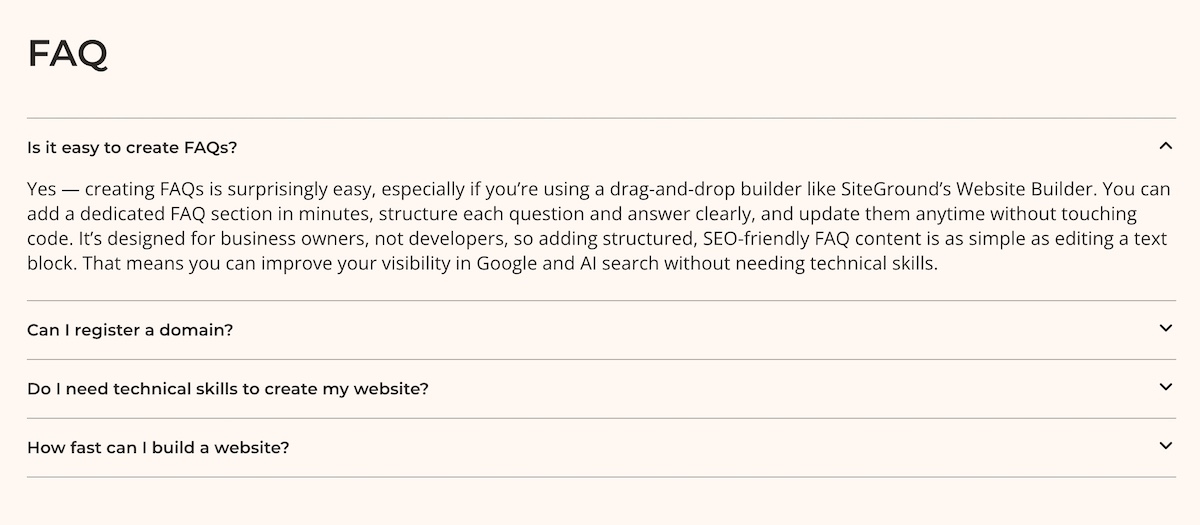
Example of an FAQ section on a website built by SiteGround Website Builder
  • Make author credentials visible on every content page.
  • Cite your sources. Linking out to credible external references signals that your content is part of a trustworthy information ecosystem, and not just opinion.
  • Keep content fresh. Outdated information is a red flag for AI engines. Build a regular update cadence into your content rhythm (more on this in the 90-day plan below).

If you’ve worked through Sections 1–5 with care, most of these should already be in motion. Consider this your final AI readiness check before you hit publish.

7. Tracking across all search platforms

You can’t improve what you don’t measure. Tracking SEO performance in 2026 means keeping an eye on both your traditional Google digital marketing metrics and your visibility in AI-generated responses.

Tracking traditional search performance

What to measure:

  • Keyword rankings (which positions are you holding, improving, or losing?)
  • Organic traffic (how many visitors are from search engine traffic?)
  • Click-through rates (are your titles and meta descriptions earning the click?)
  • Conversions and revenue (is your SEO actually driving business outcomes?)

How to track it:

  • Google Search Console shows your average ranking position, impressions, clicks, and CTR for every query driving traffic to your site.
  • Google Analytics 4 shows what organic traffic does once it arrives, which pages they visit, how long they stay, and whether they convert.
  • Your ecommerce platform dashboard shows how your store is actually performing — revenue, orders, and product trends that connect your SEO efforts directly to business outcomes. If you’re using the SiteGround Website Builder, this is built in.

Tracking AI search visibility

This is the newer, less automated side of tracking, but it’s increasingly important. There are no comprehensive tools yet (and certainly not free tools) that fully automate AI search monitoring, so the most reliable approach right now is a structured manual process.

What to measure:

  • Whether your brand is mentioned in AI responses
  • Whether your site is being cited as a source
  • Which topics you’re being referenced for
  • How the quality and frequency of citations changes over time

How to track it (30-minute weekly process):

Before you start optimizing, run the below process once as a baseline, even if you don’t expect to show up yet. Knowing where you’re starting from is what makes your Month 3 results meaningful.

  1. Make a list of your 10–15 most important topics and keywords from your Section 2 research. Then, for each one, craft 2–3 natural, conversational questions that a customer might actually ask — the kind of thing someone would type into ChatGPT rather than Google. For example, instead of searching “local bakery SEO,” you’d ask something like “what’s the best bakery in [city]?” or “where should I order a custom wedding cake in [city]?” 
  2. Search those questions in ChatGPT, Perplexity, Claude, Google AI Overviews, etc, and note whether your business or website shows up in the responses and keywords.
  3. Note whether your site is cited, your brand is mentioned, or a competitor is referenced instead.
  4. Record results in a simple spreadsheet like the one below.

AI visibility tracking template:

DateQueryPlatformYour site cited?Competitor cited?Notes
Day 0The question you askedChatGPT, Claude or othersyes/noyes/no/whoAny observations
Month 1
Month 2

Compare performance side-by-side

Once you have a few weeks of data, look for patterns using this comparison framework:

ScenarioWhat it meansWhat to do
Ranks well in Google + gets AI citationsThis is your best-performing contentLeave the existing content alone — it’s working. Instead, build more supporting content around this topic to strengthen your cluster and capture related searches.
Ranks well in Google + no AI citationsGood foundation, not AI-optimizedAdd clearer Q&A sections, FAQs, and definitive statements
Gets AI citations + weak Google rankingsStrong content, weak technical foundationImprove backlinks, fix technical issues and broken links, strengthen on-page SEO
Neither ranks nor gets citedLow-priority or low-quality contentUpdate, consolidate, or redirect

Monthly action triggers:

  • If you’re seeing strong Google rankings but zero AI citations, then improve content structure and website navigation, add clear questions and answers, and sharpen your authority signals.
  • If you’re getting AI citations but weak traditional rankings, focus on technical SEO, link building, and on-page optimization.

Your 90-Day SEO implementation plan

Knowing what to do is one thing. Knowing when to do it is what turns an SEO checklist into actual progress. Here’s a practical 90-day plan designed for small businesses working with limited time and budget.

Month 1: Setup, research & benchmarking

  • Install and configure Google Search Console, Google Analytics 4, and an SEO plugin if relevant
  • Conduct keyword research for both traditional and AI search — identify your topic clusters and priority web pages
  • Establish your baseline: current keyword rankings, organic traffic levels, and an initial AI citation check
  • Do an existing content site audit: what’s working, what needs updating (E-E-A-T optimization, technical fixes, and so on), and what should be retired
  • Create your content plan: pillar pages, supporting articles, and a realistic publishing schedule
  • Fix any critical technical issues: mobile responsiveness, HTTPS, Core Web Vitals

Month 2: Execute content strategy & technical foundation

  • Update existing content: add E-E-A-T signals (author bios, credentials, citations), improve on-page elements, restructure for AI readability.
  • Publish your first pillar page, supported by 2–3 related articles.
  • Continue working through your technical fixes: site structure, crawl errors, broken links.
  • End-of-month check-in: review Search Console data, run your AI citation spot-check.

Month 3: Expand & optimize

  • Expand your content ecosystem: add more cluster content, strengthen internal linking.
  • Compare Month 1 baseline to Month 3 results: keyword rankings, traffic, and AI citation frequency.
  • Identify your top 3 performing pages and add supporting content around each. Then pick your 3 weakest pages and run them through the on-page SEO checklist in Section 3.
  • Identify your next 90-day priorities based on what the data tells you.

After Month 3: Your ongoing SEO rhythm

  • Publish 1–2 new content pieces per month.
  • Update 2–3 existing posts per month based on performance data.
  • Monthly 30-minute review: Search Console + GA4 + AI citation check.
  • Quarterly deep dive: competitor analysis, content audit, strategy adjustments.
  • Stay on top of the future of SEO, as the environment is constantly changing.

A note on realistic expectations: SEO is not a tap you turn on; it’s more like a garden you tend. Most small businesses start seeing measurable improvements in organic traffic within 3–6 months of consistent effort. Ranking for competitive keywords can take longer, sometimes 6–12 months. AI citation visibility can happen faster for well-optimized content, sometimes within weeks of publishing. The key is consistency: small, regular improvements compound into significant results over time. Don’t let the slow start discourage you. The businesses that win at SEO are the ones that show up every month.

Start using this SEO checklist today

Remember that AI chatbot recommending your competitor? It’s about to have a new favorite. Because once you’re showing up with the right structure, the right content, and the right signals, you’re the one who gets cited.

Work through the below SEO checklist at your own pace and you’ll have covered more SEO ground than most small businesses ever do. If you want the technical foundations handled for you from day one, SiteGround’s Website Builder has speed, SSL, and SEO tools built right in.

Quick SEO checklist

Essential Setup

  • Google Business Profile claimed and verified
  • Google Search Console installed and sitemap submitted
  • Google Analytics 4 installed
  • SSL/HTTPS active
  • Robots.txt verified or handled by platform
  • Plugins installed for WordPress SEO (if using)

Keyword Research & Content Planning

  • Long-tail and question-based keywords identified
  • Search intent matched to content type
  • Topic clusters mapped (pillar + supporting content)
  • Content calendar built around cluster strategy

On-Page & Content

  • Title tags and meta descriptions optimized
  • Header hierarchy used correctly (H1–H6)
  • URLs short, descriptive, and keyword-inclusive
  • Images optimized with descriptive alt text
  • Internal linking throughout content
  • E-E-A-T signals included (author bios, credentials, sources, link building)
  • Question-answer formatting used throughout
  • Definitive, quotable statements included
  • Content answers questions completely

Technical SEO

  • Mobile responsiveness confirmed
  • Core Web Vitals passing (LCP, INP, CLS)
  • Page speed optimized
  • 3-click rule applied to site architecture
  • Crawl errors resolved in Search Console
  • Duplicate content addressed with canonical tags
  • Broken links fixed
  • 301 redirects in place for changed/deleted URLs
  • Orphaned pages addressed

Structured data

  • Structured data implemented for your platform
  • Product schema markup active if selling online

AI visibility double-check

  • Clear, citable 2–3 sentence statements throughout content
  • Conversational language used
  • Q&A pairs embedded in content
  • FAQ sections on priority pages
  • Author credentials visible on all content
  • External sources cited with links
  • Content update schedule in place

Tracking

  • Search and analytics monitoring 
  • AI visibility tracking spreadsheet created
  • Baseline AI citation check completed
  • Monthly comparison process in place

SEO checklist: Frequently asked questions

What is an SEO checklist and why do small businesses need one?

An SEO checklist is a structured list of tasks that helps ensure your website is optimized for search engines. For small businesses, it provides a prioritized, practical roadmap so you’re not trying to do everything at once, but steadily building the foundations that drive sustainable organic traffic and visibility.

How long does it take to see SEO results?

Most small businesses start seeing measurable improvements in organic traffic within 3–6 months of consistent effort. Competitive keywords can take 6–12 months to rank for. AI citation visibility can sometimes appear faster — within weeks of publishing well-optimized content. SEO is a long-term investment, but the results compound over time.

What’s the difference between optimizing for Google vs. AI search engines?

The good news is that it’s less different than you might think. Both reward authoritative, well-structured, clearly written content. The main differences are in formatting: AI engines particularly favor FAQ sections, question-answer pairs, and concise definitive statements that can be directly cited.

Can I do SEO myself or should I hire someone?

Most small businesses can handle the fundamentals themselves, especially with the right tools and a clear SEO checklist. Technical issues, content creation, and basic structured data are all manageable without an agency. Consider hiring an SEO specialist if you’re in a highly competitive market, need a faster turnaround, or want expert-level strategy work. Many businesses use a hybrid approach by doing the day-to-day work themselves and bringing in help for specific projects.

How much should a small business budget for SEO?

At the most basic level, getting your site set up with good hosting, Google Search Console, and GA4 costs very little — many of the most important tools are free. The SiteGround Website Builder, for example, comes with a 30-day free trial, after which the StartUp plan runs $2.99 a month for the first year. It bundles hosting, SSL, mobile optimization, and built-in SEO tools into one plan, so you’re not cobbling together separate tools to cover the basics.

If you want to go deeper on keyword research and competitor analysis, tools like Ahrefs or Semrush run $100–$130 per month. And if you want expert help (whether for content creation, technical fixes, or strategy) freelance SEO support typically runs $500–$2,000 per project. Start with the basics, and layer in more investment as your business grows.

What are the most important SEO tasks to start with?

In order of priority: set up Google Search Console and GA4, fix any critical technical issues (HTTPS, mobile, speed), claim your Google Business Profile, and start creating well-structured content targeting question-based keywords in your niche. These four steps alone will put you ahead of a significant portion of small business competitors.

Do I need different content for traditional search vs. AI search?

No, but you do need to format your content with both in mind. Content that answers questions clearly, uses structured formatting, and demonstrates E-E-A-T performs well in both environments. You’re not writing two versions of the same content; you’re writing one version that’s well-optimized for both.

How do I know if my SEO efforts are working?

Track keyword rankings and organic traffic in Google Search Console and GA4, and also run a monthly AI citation check across AI search platforms. Compare month-on-month and quarter-on-quarter data against the baseline you established at the start. Rising traffic, improving rankings, and growing AI citation frequency are all positive signals. Staying on top of SEO trends also helps you know whether your strategy needs adjusting as the landscape shifts.

What’s the difference between on-page and technical SEO?

On-page SEO refers to everything you do within the content and structure of individual pages, such as title tags, headers, body copy, internal links, and E-E-A-T signals. Technical SEO refers to the behind-the-scenes infrastructure of your site, including crawlability, page speed, mobile responsiveness, structured data, and site architecture. Both are necessary; neither works as well without the other.

This article was originally published in February 2026 and then updated in October 2026

Email goals that actually connect to revenue

An email inbox displaying a product and floral image, with five sequential icons below representing the key stages of goal-driven email marketing: growing your list, configuring campaigns, tracking performance, reviewing results, and generating revenue.

You’re sending marketing emails, watching your open rates, maybe even A/B testing subject lines. Good. That means you already have the building blocks in place.

The next step is giving those efforts a direction. When your open rates, list growth, and click-throughs are tied to a specific goal, they stop being just metrics and start telling the story of how email is growing your business.

That’s what this article is about: setting email marketing goals that connect to revenue, so every metric you already track has a clear job to do.

Key takeaways:

  • Every email goal should connect to a business outcome.
  • Start with what your business needs, not what your dashboard shows.
  • Pick one or two goals per quarter, not five.
  • Your own trends matter more than industry benchmarks.
  • A clean, engaged list beats a big, neglected one.

Why do email marketing goals matter?

Because without goals, you’re just sending emails and hoping for the best.

It’s a bit like throwing darts blindfolded: you might hit something, but you won’t know what or why. An email newsletter goes out on Tuesday because Tuesday is “email day.” A promo drops when sales are slow. A welcome email exists because someone said you need one. None of it is wrong, but none of it ties back to a specific outcome you’re trying to achieve.

And this isn’t just a marketing thing; it’s a human thing. 

Did you know?

Research from Dominican University found that people who write down specific goals are 42% more likely to achieve them.

Think about it: there’s a reason vision boards went viral, fitness apps make you set a target weight, and every productivity guru out there goes on and on about writing things down. 

When you know exactly what you’re aiming for, your brain starts working differently. You stop reacting to whatever feels urgent and start asking one simple question: is this getting me closer? Same with email. 

A 22% email open rate on its own? Just a number on a dashboard. But if your goal is 20 new bookings this month and that 22% only brought in 2 — now you know the problem isn’t visibility, it’s what happens after the open.

How to set email marketing goals that drive revenue

Setting email goals isn’t complicated, but it does require you to think about your business first and your email marketing metrics second. The SMART framework (specific, measurable, achievable, relevant, time-bound) is a solid structure for this and the four steps below put it into practice.

Image of SiteGround email marketing course for beginners

Identify what your business needs right now

A freelance designer notices they get plenty of website visitors but very few inquiries. What their business needs isn’t more traffic. It’s converting the audience they already have. So their email goal becomes about turning subscribers into booked clients, not growing the email list.

Before you touch your email dashboard, ask yourself: where am I losing potential customers right now? That’s the goal your emails should be working toward.

Connect each goal to a revenue outcome

A freelance photographer wants to improve their open rates. But when they ask themselves ‘what do more opens actually do for my business?’ they realize the real goal isn’t opens — it’s getting more people to click through to their booking page. The open rate matters, but only as a step toward filling their calendar. Every metric you track should be able to finish the sentence: “this matters because it leads to ___.”

Match your email strategy to your business stage

Not every goal makes sense at every stage. Before you set one, ask: does this match where my business actually is right now, or where I think it should be?

A new online shop with 300 subscribers shouldn’t be worrying about reactivation campaigns; there’s barely anyone to reactivate. Their priority is getting those 300 people to make a first purchase. Meanwhile, an established yoga studio with 3,000 contacts might focus on improving their click-to-purchase rate, since they already have the audience — they just need more of them to act.

Focus on 1–2 goals per quarter

A small agency decides to chase list growth, open rates, click-through rates, and conversions all at once. Three months later, every metric moved a little but nothing moved enough to matter. Next quarter, they pick one goal: get 15 new client inquiries from email by June. Everything they send serves that single target.

Fewer goals, more progress. Pick one or two that tie directly to what your business needs this quarter, give them a number and a deadline, and let everything else wait its turn.

Six email marketing goals worth setting 

Now that you have a framework for setting goals that tie back to your business, let’s get into the specific ones worth your attention. For each goal, we’ll cover why it matters for revenue, what realistic email marketing benchmarks look like, and what to try when things aren’t moving.

#1. Grow your email list

The more engaged subscribers you have, the more people see your offers: no ad budget required. But don’t let the number fool you. If you have 400 subscribers who open your emails and click through to your services page, you’ll generate more bookings than someone with 4,000 contacts who haven’t opened an email since last summer.

Why it pays offEvery engaged subscriber is a potential buyer you reach at zero ad cost
Realistic benchmark250–500 engaged subscribers is a strong starting base; once there, a 2–3% monthly growth rate is a healthy, sustainable pace
Where to startMove sign-up forms where people actually see them, offer something specific in return, promote beyond your website

If you’re looking for a platform that makes list building painless, SiteGround Email Marketing plugs straight into WordPress and the SiteGround Website Builder, so every sign-up on your site becomes a subscriber in your list automatically. No manual imports, no extra tools, no losing leads between steps.

#2. Improve open rates

That 22% open rate from earlier? It told you something was off. Now let’s talk about fixing it, because if people aren’t opening your emails, nothing you do inside them matters. Even a modest jump from 22% to 28% meaningfully changes how many people see your offer and reach your call to action.

Note: Apple’s Mail Privacy Protection marks emails as “opened” the moment they’re delivered to an Apple Mail inbox, regardless of whether the subscriber actually looked at them. That’s why the widely cited 40–43% industry average is misleading — a chunk of those opens never really happened. A more useful approach is to compare your own campaigns against each other rather than chasing a benchmark that includes phantom opens.

Why it pays offMore opens = more people seeing your offer = more clicks and sales
Realistic benchmark20–35% for small businesses; track the 3-month trend, not individual sends
Where to startWrite specific email subject lines (“3 spots left for our April workshop” > “March Newsletter”), test send times, check deliverability if rates drop suddenly

#3. Increase click-through rates

Clicks are the closest thing to buying intent that happens inside an email. Someone who clicks is actively moving toward spending money with you: landing on a product page, a booking form, or a sign-up page.

Why it pays offMore clicks = more people on pages where they can buy, book, or sign up
Realistic benchmarkCTR: 2–3%; CTOR (clicks from openers): 5–7%
Where to startOne email, one primary CTA; match content to subject line promise; ditch vague links like “Learn More”

#4. Convert subscribers into buyers

This is where every other goal on this list either pays off or doesn’t. You grow your list, improve opens, get more clicks; all so that eventually, someone buys. That moment when a subscriber becomes a customer is the most direct line to revenue in email marketing. And it adds up: email marketing consistently delivers one of the highest ROIs of any marketing channel. But that only happens when your emails are actually built to convert, not just to inform.

Why it pays offThe most direct connection to revenue: a subscriber spends money
Realistic benchmark1–5% conversion rate depending on industry. But if your list is under 1,000, percentages aren’t very useful, so track the actual number of sales or bookings each campaign brings in instead.
Where to startCheck what happens after someone clicks: slow-loading pages, confusing checkout, or pricing that wasn’t mentioned in the email will lose them. For new subscribers, send a few helpful emails before asking for the sale.

Automation helps here. With SiteGround Email Marketing , you can set up a welcome sequence that sends 2–3 helpful emails before any sales pitch. Once it’s built, it runs on its own.

#5. Re-engage inactive subscribers

Inactive subscribers don’t just sit there; they hurt you. Email providers track engagement, and if too many people ignore you, your emails start landing in spam for everyone, including the subscribers who actually buy from you.

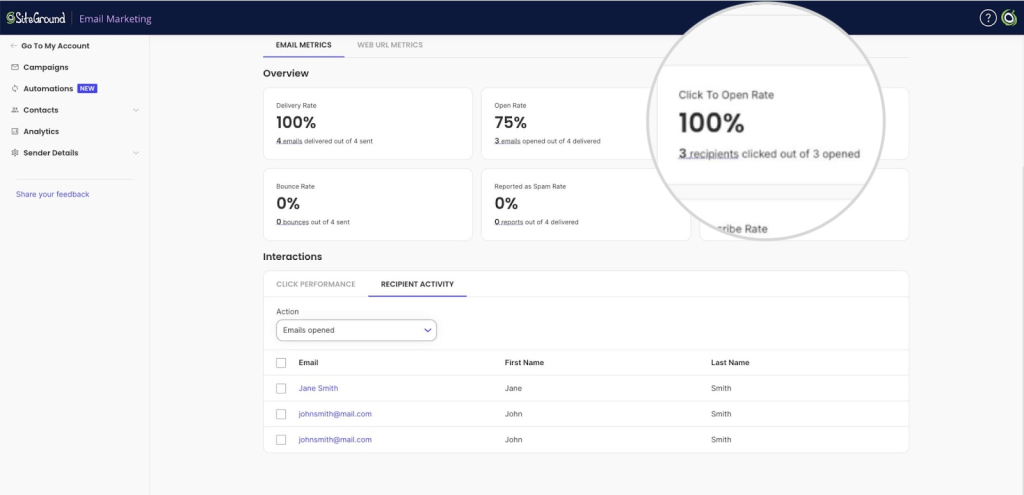
A quick gut check: open your email platform’s analytics and see how many contacts consistently don’t open or click. Most platforms (including SiteGround Email Marketing) show this data at campaign level.

Why it pays offRe-engaged subscribers = buyers recovered at zero cost; removed subscribers protect email deliverability for paying customers
Realistic benchmarkAt least 50% of your list should be active (opened/clicked) within the last 90 days
Where to startReview your analytics page metrics: if the same contacts never open or click, try a different approach: a discount, exclusive content, or a reminder of why they signed up. No response after 2–3 attempts? Remove them.

#6. Clean your list to protect deliverability

It’s not the most exciting goal on this list, but it might be the most important. Dead addresses, ghost subscribers, and inactive contacts who haven’t engaged in months all drag down your sender reputation, which means your campaigns start hitting spam for your best customers too. Cleaner list, better results.

Why it pays offClean list = better inbox placement = more people see your campaigns = more revenue from the same sends
Realistic benchmarkEmail bounce rate under 2%, unsubscribe rate under 0.5%, spam complaints under 0.1%, deliverability above 95%
Where to startQuarterly cleanups; remove hard bounces immediately, soft bounces after 2–3 campaigns, inactive contacts after re-engagement attempts

Quick note: SiteGround Email Marketing automatically removes hard bounces (emails sent to addresses that no longer exist or were never valid). For soft bounces (temporary failures, like a full inbox or a server that’s temporarily down), check your campaign analytics regularly. If the same addresses keep soft bouncing across several campaigns, remove them. Same goes for inactive contacts: if someone hasn’t opened or clicked anything in months, it’s worth cleaning them out manually to keep your list healthy.

Email marketing goals that sound smart but go nowhere

Not every goal that sounds productive actually is. Here are a few that small business owners set all the time and why they tend to lead nowhere.

  • “I want to grow my list to 10,000 subscribers.” 

We’ve already talked about why list size alone doesn’t mean much, but it’s worth repeating because it’s one of the most common goals small business owners set. Big round numbers feel motivating, but 10,000 subscribers who don’t open your emails won’t generate more revenue than 500 who do. The goal shouldn’t be a number on your list. It should be what that list is doing for your business.

  • “I want to hit the industry average open rate.” 

Industry benchmarks are based on data from millions of senders of all sizes, industries, and list qualities. A 42% average includes enterprise brands with dedicated email teams and seven-figure budgets. Comparing your 800-person list to that number will either make you feel like you’re failing when you’re not, or give you a false sense of success when there’s work to do.

  • “I want to improve open rates, click rates, conversions, list growth, and deliverability this quarter.” 

That’s not an email marketing strategy, that’s a wish list. When you track five things at once, you spread your attention so thin that nothing moves meaningfully. Three months later, every metric shifted a little and none of them shifted enough to matter.

  • “I saw [big brand] does this, so we should too.” 

We keep coming back to this for a reason. Context matters. A re-engagement email flow that works for a retailer with 200,000 subscribers and a full marketing team doesn’t translate to a freelancer with 600 contacts and two hours a week for email. Someone else’s winning strategy can easily become your time sink if it doesn’t match your resources, list size, and business stage.

Start your email marketing journey with a goal that pays

You didn’t start your business to babysit an email dashboard. So don’t. Pick one goal, give it a number, give it a deadline, and send emails that serve it. That’s the whole strategy. And if you need a platform that keeps things just as simple, SiteGround Email Marketing gives you the sign-up forms, automation, segmentation, and analytics to set a goal and actually track whether you’re hitting it. No complexity for the sake of complexity.

[58]

Frequently asked questions about email goals

What are the goals of email marketing?

The most common goals are growing your list, improving open and click-through rates, converting subscribers into buyers, re-engaging inactive contacts, and maintaining deliverability. The best goals tie to a specific business outcome like revenue, retention, or audience growth.

What is a good revenue per email?

A common benchmark for small businesses is $0.05–$0.10 per email sent. More useful than comparing to averages is tracking your own revenue per email over time and improving it each quarter.

What are the most important email marketing objectives for small businesses?

Building an engaged list, converting subscribers into customers, and keeping deliverability healthy. Small businesses get the best results by focusing on one or two goals at a time rather than trying to optimize everything at once.

How do you measure email marketing success?

It depends on your goal. Open rates show if people notice your emails. Click-through rates show if your content drives action. Conversion rates show if email is generating revenue. The right metric is the one tied to the goal you’ve set.

What is a realistic email marketing goal for a small list?

For lists under 1,000: aim for 25–30% open rate, 2–3% CTR, or 1–5% conversion rate. Track actual numbers (sales, bookings) rather than percentages — small samples make percentages unreliable.

How do you make an email marketing campaign?

Start with a clear goal, choose your target audience segment, write the email around one primary call to action, and send when your subscribers are most active. Review results against your goal and adjust for the next send. SiteGround Email Marketing lets you do all of this from one dashboard: from building the email to tracking how it performed.

ChatGPT ads are here: How AI tools help small businesses compete

Abstract of ChatGPT ads on a cell phone

OpenAI recently announced that ChatGPT ads are rolling out soon. Cue the panic at the thought of competitors with marketing budgets the size of your annual revenue suddenly appearing in AI answers.

If you’re worried that these paid placements will push your business out of view, you are not wrong. But here’s a small-but-impactful secret: there is one type of visibility money cannot buy and it is exactly where small businesses have the edge.

With the right AI tools and strategy, you can show up organically in the AI recommendations your customers actually see, often faster and more efficiently than larger competitors tied up in approvals and budgets.

This guide walks you through how to build that organic AI visibility before ChatGPT ads start dominating the conversation. No massive ad spend required, just smart moves and the right tools.

Key takeaways:

  • ChatGPT ads change the game. Paid placements may dominate AI answers, but organic visibility can’t be bought.
  • Audit before you act. Understand how AI currently sees and mentions your business to identify gaps.
  • Create content AI references. Build comprehensive, helpful content that directly answers customer questions.
  • Manage reputation strategically. Reviews and online signals affect whether AI confidently recommends your business.
  • Leverage AI tools. Specialized AI agents let small teams scale content, reputation, and cross-platform presence efficiently.

What ChatGPT ads are and how they work

ChatGPT ads appear as sponsored recommendations directly within AI conversations. For example, when a user asks “What’s the best CRM for small businesses?” they may see ChatGPT’s answer followed by a labeled “Sponsored” suggestion, matched to the topic for relevance.

The critical difference from Google Ads is how placement shapes perception. In traditional search, paid ads appear at the top, followed by organic results below. Users can scroll past ads to see organic rankings. 

In ChatGPT, users receive one conversational answer that feels complete and authoritative. While sponsored content appears separately below that answer rather than replacing it, the conversational format impacts perception and consideration. 

Why ChatGPT ads change everything for small business

The implications for small- and medium-sized businesses (SMBs) are significant. In a conversational interface, customers often rely on the first answer they receive. If your business isn’t included in that response, you may never enter the decision set at all. 

Worse, AI recommendations feel authoritative and objective, even when they’re paid placements. And pricing will likely mirror Google Ads, meaning enterprise budgets will dominate competitive keywords. AI is completely changing marketing as we know it.

But here’s your small business marketing advantage: Organic AI visibility can’t be bought. It’s built by creating helpful, conversational content that AI naturally wants to reference. And AI tools let you do this at enterprise scale, creating optimized content and maintaining cross-platform presence without an entire marketing department. While big competitors debate strategy in committee meetings, you can implement changes in hours, not months.

Skip ChatGPT ads: 4 steps to build organic AI visibility instead

Now we’re all on the same page: you don’t need a massive budget to show up in AI responses. But you do need a systematic approach to building that organic visibility. And, you do need a plan. So here are your steps to build that much-coveted organic AI visibility.

Step 1: Audit your AI visibility

The problem

Most SMB owners have no idea if ChatGPT is recommending their business, sending customers to competitors, or giving generic advice that mentions exactly no one. Indeed, you might be invisible in the precise conversations where your ideal customers are asking for help, all while losing deals to competitors who aren’t actually better, just more visible to AI. 

And once ads in ChatGPT are fully launched? Forget about it. Those same competitors will pay to appear first in conversations where you’re currently invisible. Without auditing your AI visibility, though, you won’t know what organic ground you’re losing or which questions to own before they become paid placements you can’t afford. Let’s fix that with AI tools that give you an edge.

The strategy: Do an AI visibility audit

To properly audit your AI visibility, you need to take a look at two perspectives:

  1. How AI can interpret your site
  2. How AI actually talks about your business in the wild

That requires two complementary tools:

1. Your technical foundation: SEO AI agent

An SEO AI agent, such as the SEO Expert from SiteGround, serves as your internal diagnostic system. By analyzing your key webpages one by one, it evaluates the critical on-page factors that influence how search engines and AI interpret your content, from content quality and website structure to technical best practices like improving page speed. It can also analyze your content against search intent and competitor performance, then provide a prioritized roadmap of improvements ranked by impact. This step tells you whether AI can understand and confidently surface your business.

SiteGround AI Studio is available to all SiteGround customers. You can start with the free AI Agent for WordPress (which supports SEO optimizations if you’re using WordPress) or upgrade to the Plus Plan to unlock a full suite of specialized agents, including the SEO Agent, along with tools for copywriting, reputation management, social posting, and more. It’s like expanding your team’s capacity and boosting productivity without hiring additional staff.

Explore AI Studio now>>

2. Your reality check: LLM testing

Large language models (LLMs) like ChatGPT, Claude, Perplexity, and Gemini are where your customers are already asking questions (and are more so every day). They’re also where you can test your actual AI visibility in real time. We can go straight into the belly of the beast, leveraging it to reverse engineer how and when you can get mentioned.

Action steps: Connect the dots

Let’s bring both these tools together.

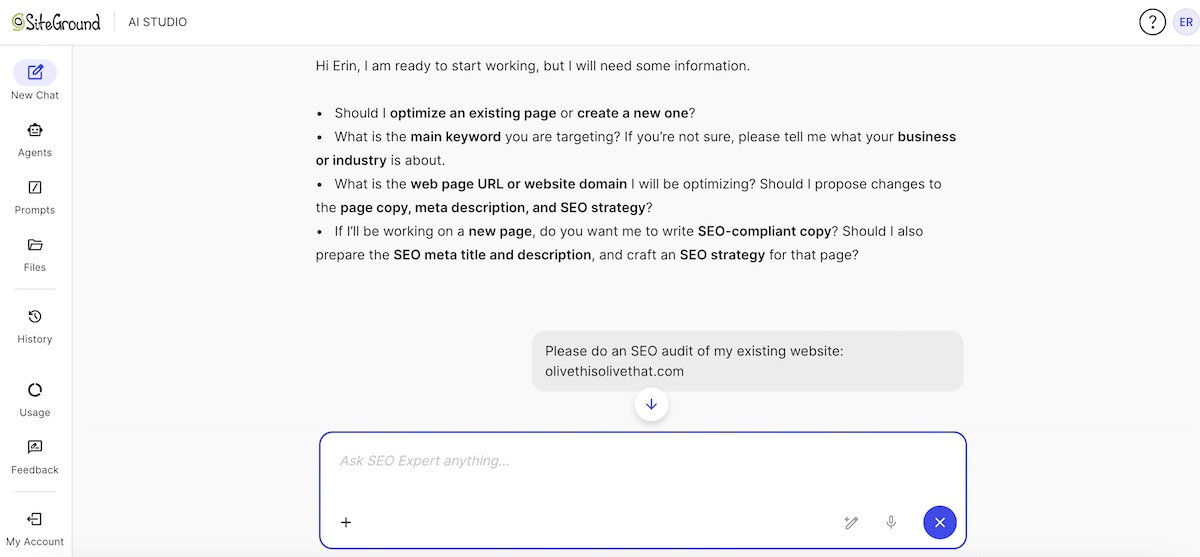
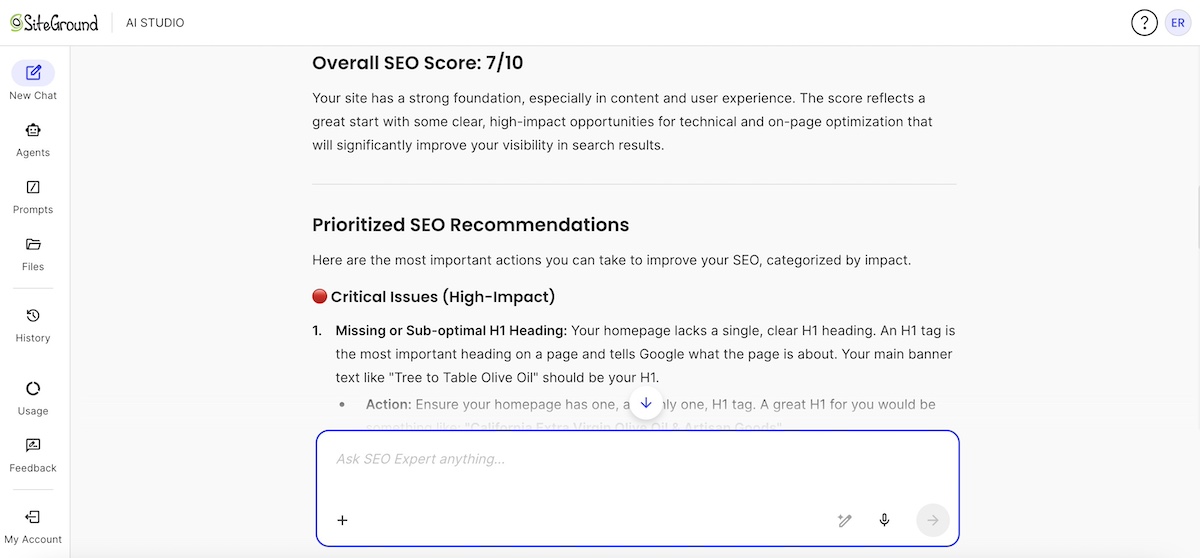
1. Review your technical foundation: Use the SEO AI agent to assess the core factors like page load speed, heading structure, internal linking, and metadata. These fundamentals matter for both Google and AI. If search engines struggle to understand your site, AI will too. You can simply start by asking it to do an SEO audit of your website, then drill down deeper as you see fit.

Prompt for SiteGround SEO Agent to do an SEO audit of a website
SiteGround SEO Agent response with an overall SEO audit of a website

2. Evaluate content comprehensiveness: Does your site thoroughly explain your services, address common customer questions, and clearly communicate your differentiators? The SEO AI agent can identify content gaps where crucial information is missing.

3. Test and document AI responses
Open ChatGPT, Claude, Perplexity, or Gemini and ask:

  • “What are the best [your solution] for [specific customer problem]?”
  • Use the exact language your customers use. Be specific — instead of “best marketing agencies,” try “best B2B SaaS marketing agencies for companies under $5M in revenue.”

Then evaluate:

  • Are you mentioned at all?
  • Are competitors recommended instead?
  • Is the AI giving generic advice without naming specific businesses?
  • If competitors are recommended, ask: “Why did you recommend them?”

Track your findings in a simple spreadsheet: queries tested, whether you appeared, which competitors showed up, and what differentiators AI highlighted.

4. Cross-reference findings: If ChatGPT doesn’t mention your key differentiator and the SEO AI agent flagged that content as weak or thin, you’ve identified a priority fix. This is where your audit will turn into action. Take note.

SMB advantage

Your small-business agility is your superpower here. Once you identify gaps, you can implement changes immediately with no 47-person, corporate approval chain required. Lean into your advantage.

Step 2: Create content AI will reference

The problem

SMB owners like you are stuck in a content creation catch-22: You need comprehensive, helpful content that answers every variation of customer questions in your space, but creating said content manually (or even with the help of the average LLM) can mean months of work and know-how. You need the content depth of an enterprise blog with a team of two. That math doesn’t work without help. 

And with ChatGPT ads as the latest digital marketing trend, the window for building organic content authority is getting smaller every day. Once those paid placements dominate AI responses, organic visibility and generative engine optimization — the practice of structuring content so AI systems naturally reference it — become even more critical, because it’s the only battlefield where budget doesn’t determine the winner.

The strategy: Leverage a specialized execution engine

Yes, any LLM can produce copy. But the quality depends entirely on your AI prompting acumen. A specialized copywriter AI agent, on the other hand, eliminates that burden. Instead of requiring you to specify every last SEO detail and structural element, a dedicated copywriting agent is already an expert. It bridges the gap between your raw audit takeaways (from Step 1) and dialed, performance-driven content. Now your optimized workflow becomes clear.

The SiteGround AI Studio Copywriter Agent has SEO built in. It automatically structures content with clear headings, integrates target keywords naturally, generates optimized titles and meta descriptions, and creates engaging, readable copy that keeps users on the page longer. It also guides readers with clear calls-to-action, helping turn traffic into conversions. All of this ensures your content is not just written, but designed to perform in both search engines and AI recommendations.

As a SiteGround customer, you can access AI Studio for free, or upgrade to the Plus plan to unlock the Copywriter Agent and the full suite of specialized AI agents. 

Explore AI Studio now >>

Action plan: From gaps to authority

1. Turn audit insights into a content roadmap

Start with the missing questions, weak differentiators, and competitor strengths you documented in Step 1. This becomes your content topic roadmap.

2. Identify content type for each gap

Based on your gaps, as well as the customer journey, decide the format that best addresses each gap:

  • FAQ-style pages – Answer specific customer questions.
  • How-to guides / problem-solving content – Help customers make decisions, troubleshoot issues, or understand options.
  • Comparison / alternative pages – “[Competitor] vs. [Your Solution]” or “Best [solution] for [use case]” to capture high-intent queries.
  • Expanded landing or service pages – Fill gaps where existing core offerings have thin coverage.
  • General page updates – You may wish to update existing pages if the missing content fits naturally and the page already ranks for related queries. But plan to create new pages for unique, high-intent questions or topics that need structured formats (FAQs, guides, or comparison pages).
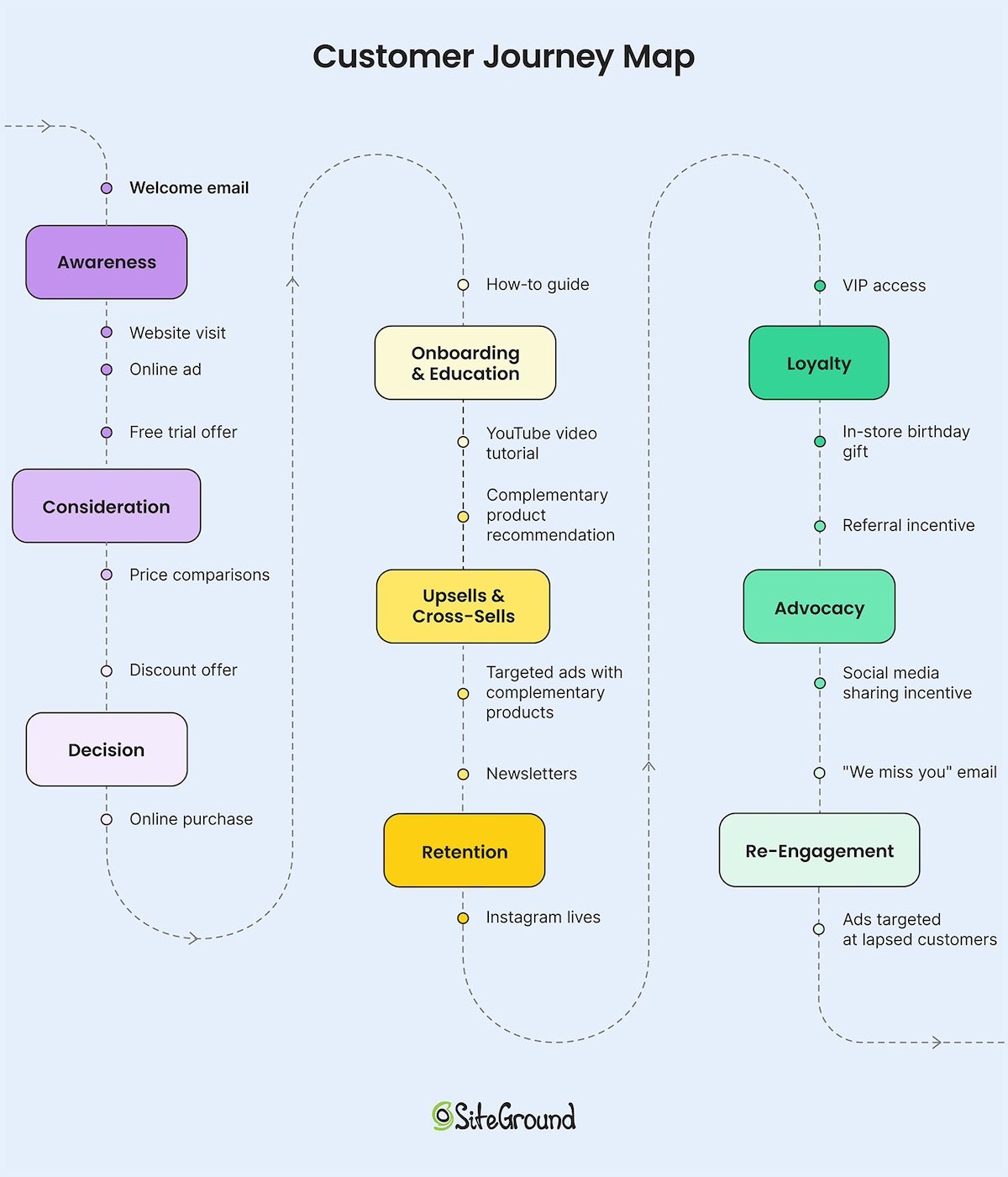
Customer journey map with touch points going through all the stages

3. Feed a focused brief to the copywriter AI agent

Now that you know the topic and content type, submit a structured brief that includes:

  • Customer question or missing topic
  • Content type (FAQ, guide, comparison, landing page) and length
  • Specific information AI failed to mention about your business
  • Competitor positioning to address
  • Key info about your brand

The AI agent transforms these briefs into SEO-optimized content.

4. Strengthen, optimize, and publish consistently

  • Add specific examples, expert quotes, customer insights, and unique knowledge to differentiate your content (AI loves this). 
  • Ensure each piece uses clear headings, answers questions directly in complete sentences, and reinforces your differentiators.
  • Maintain momentum. If you have a blog, publish two to four in-depth pieces per month to build authority. This kind of fresh, comprehensive content signals that you’re an active and reliable source, which is something AI systems increasingly reward.

SMB advantage

We already know AI can handle the heavy lifting of content creation. What matters now is using the right AI tools to create truly optimized content that helps your business surface in AI search. That visibility allows you to compete with enterprise advertiser content teams at a fraction of the cost. While large companies need layers of approval for every article, you can publish within days of identifying a content gap.

Step 3: Build and manage your reputation

The problem

There’s a key difference between traditional SEO search and AI-driven search. Google ranks based on technical factors and content quality, but AI tools act more like advisors than information organizers. That makes them far more cautious in their recommendations.

So if you have a few unresolved negative reviews? AI may skip mentioning you entirely, even if your content is excellent. Mixed sentiment across platforms? AI hedges or recommends safer alternatives. No reviews or mentions at all? You’re effectively invisible. Without clear trust signals, AI has nothing to base its recommendations on.

The challenge is compounded because reputation signals are scattered across platforms you barely have time to monitor, let alone manage strategically. Manual tracking is labor-intensive and most SMB owners simply don’t have hours to devote to it. Understandable.

The strategy: Systematic reputation management

To gain AI confidence, you need a reputation management system that:

  1. Reviews mentions and reviews across platforms.
  2. Analyzes sentiment patterns and identifies recurring issues.
  3. Prioritizes actions that will most impact perception and AI recommendations.

A reputation management AI agent serves as your operational backbone. It can scan review sites, social media, forums, and other customer feedback channels, then deliver a prioritized set of action items. This means you can focus on fixes that truly affect visibility, rather than chasing every minor mention in the hidden corners of the internet.

Action steps: Audit, prioritize, improve

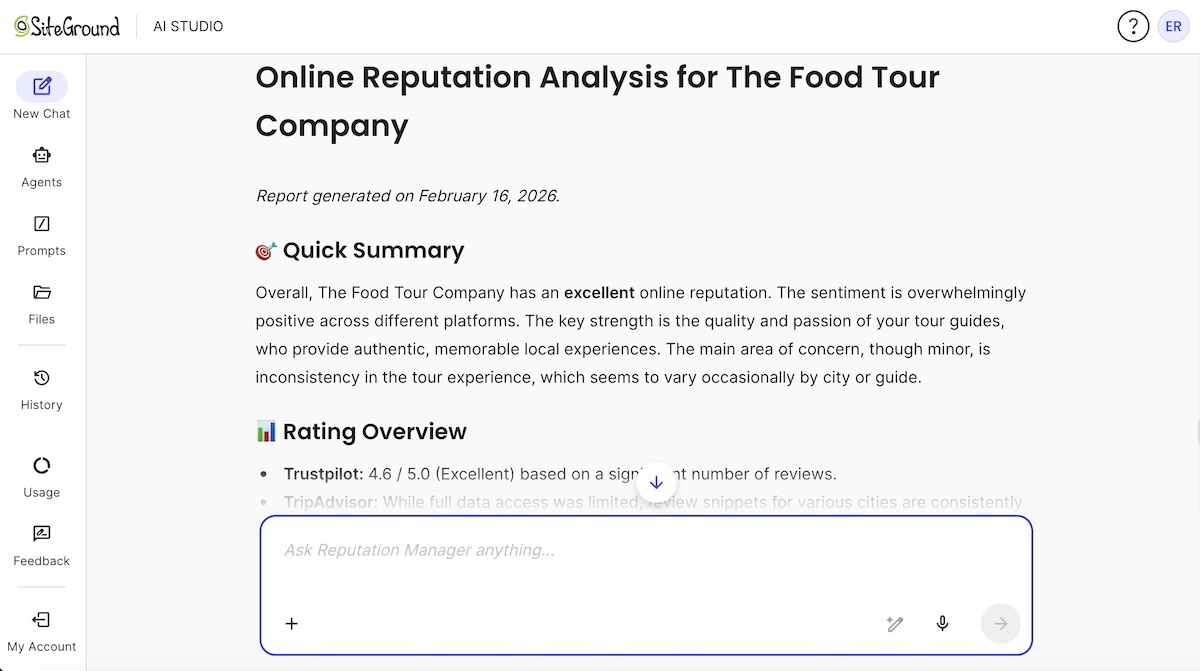
  • Run a comprehensive reputation analysis: Let the agent scan for your business mentions. Get the full picture of what customers are saying and where your strengths and weaknesses lie.
Online reputation analysis output by the SiteGround Reputation AI Agent
  • Review sentiment patterns: Identify overall trends: positive, negative, or neutral. Break it down by platform and topic to see where AI may view your brand as trustworthy — or not.
  • Prioritize and address critical issues: Not every negative review needs immediate action. Focus on those that impact customer perception and AI recommendation confidence. Respond to criticism professionally and constructively to show both humans and AI that you take feedback seriously.
  • Encourage positive reviews: Make it easy for satisfied customers to share experiences across key platforms like Google Business Profile, industry-specific sites, and social media. Integrate this into post-purchase workflows using email marketing or other engagement tools. You can also gather feedback directly through survey emails in order to boost overall customer satisfaction.
  • Implement and track improvements over time: Work through the agent’s action items methodically, fixing root causes rather than just managing symptoms. Run regular analyses monthly or quarterly to measure progress, monitor trends, and maintain momentum. AI rewards consistent improvement.

SMB advantage

As a small business, you have the benefit of authenticity, and that means it’s easier to generate positive reviews and build user trust, both with customers and AI. Enterprise companies often struggle to replicate this. So remember: your agility and personal touch are powerful advantages in building a reputation that AI confidently references.

Step 4: Maintain consistent cross-platform presence

The problem

ChatGPT doesn’t just pull from your website; it aggregates signals from the full web, such as social media, your Google Business Profile, reviews, and anywhere your brand appears. The challenge for you as a small business is twofold: you need both broad visibility and consistent messaging. Without both, AI can’t confidently recommend your business.

Even with a wide presence, inconsistency creates doubt. If your website says you specialize in sustainable packaging, your Instagram bio says eco-friendly solutions, and your LinkedIn highlights green business practices, AI struggles to describe you clearly. Mixed messaging signals uncertainty.

Maintenance gaps matter too. An inactive Facebook page or mismatched business hours between platforms signals neglect. AI notices these gaps and interprets them as lower credibility.

But alas, for small businesses, maintaining an active, consistent presence across five or more platforms while running day-to-day operations is difficult. Most focus on one or two channels and let the rest go stale. And AI notices.

The strategy: Cross-platform consistency

To be confidently recommended by AI, you need a unified approach to messaging and platform activity:

  • Centralized messaging framework: Every platform should communicate the same core value proposition, differentiators, and business details.
  • Platform-specific optimization: Content should be customized to each channel’s format and audience expectations without breaking your messaging consistency.
  • Ongoing engagement: Regular posting and interaction signal both human responsiveness and brand activity, which AI values highly.

Action steps: Implement and monitor

  • Define core messaging: Use a specialized copywriter AI agent to clarify who you serve, your differentiators, your unique selling proposition, and the problems you solve. Document this in a simple brand brief; this becomes your consistency anchor.
  • Standardize essential business information: Ensure your business name, services, hours, contact details, and key differentiators appear identically across all platforms. Update everything simultaneously whenever changes occur.
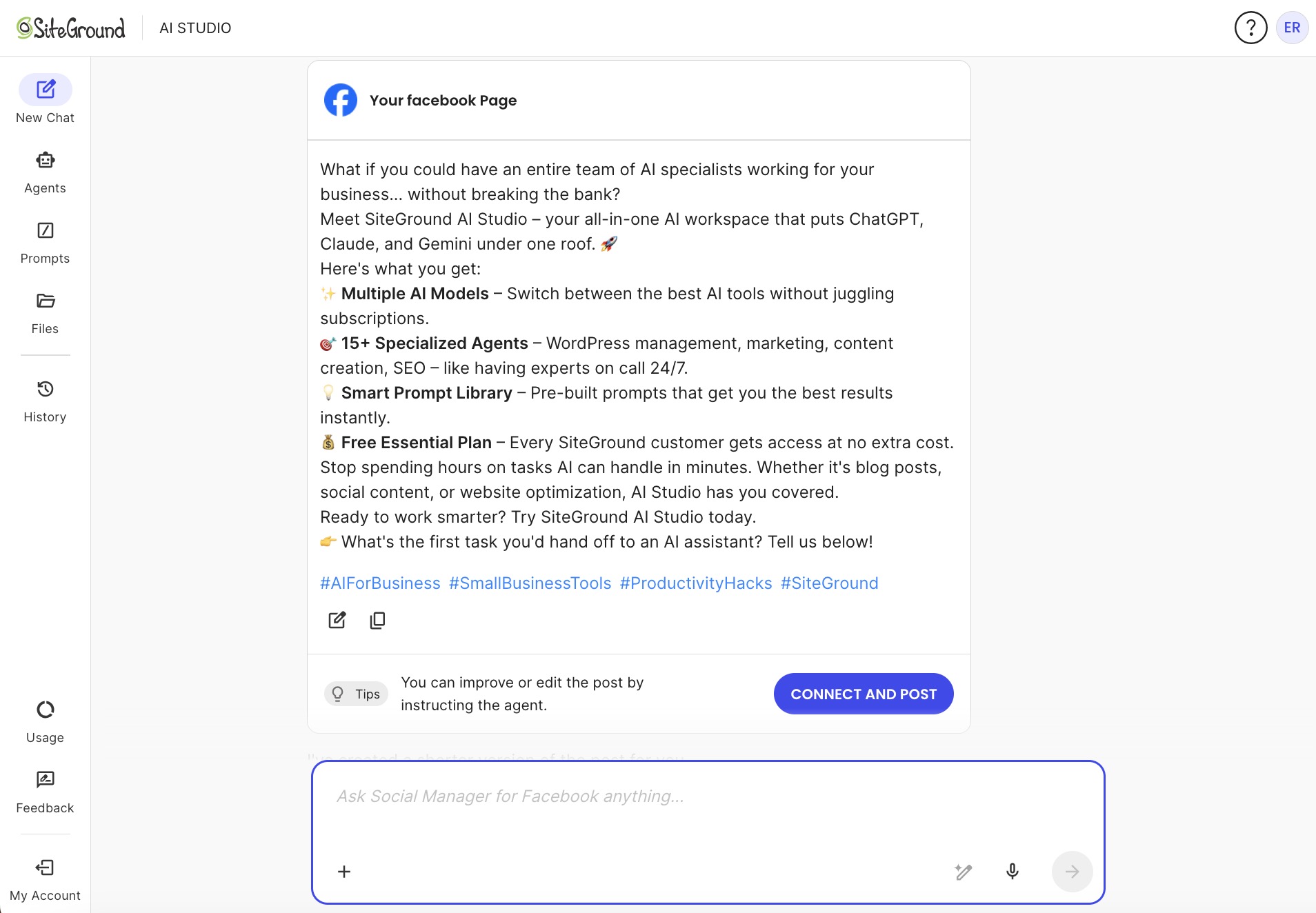
  • Deploy platform-specific content at scale: Use social media AI agents (like the SiteGround Social Managers for Instagram, LinkedIn, and Facebook) to easily create posts customized to each channel while reinforcing your core positioning.
  • Maintain steady activity and engagement: Post consistently, reply to comments, and monitor performance. Refine content based on what resonates. Consistency and responsiveness are signals AI actively notices.
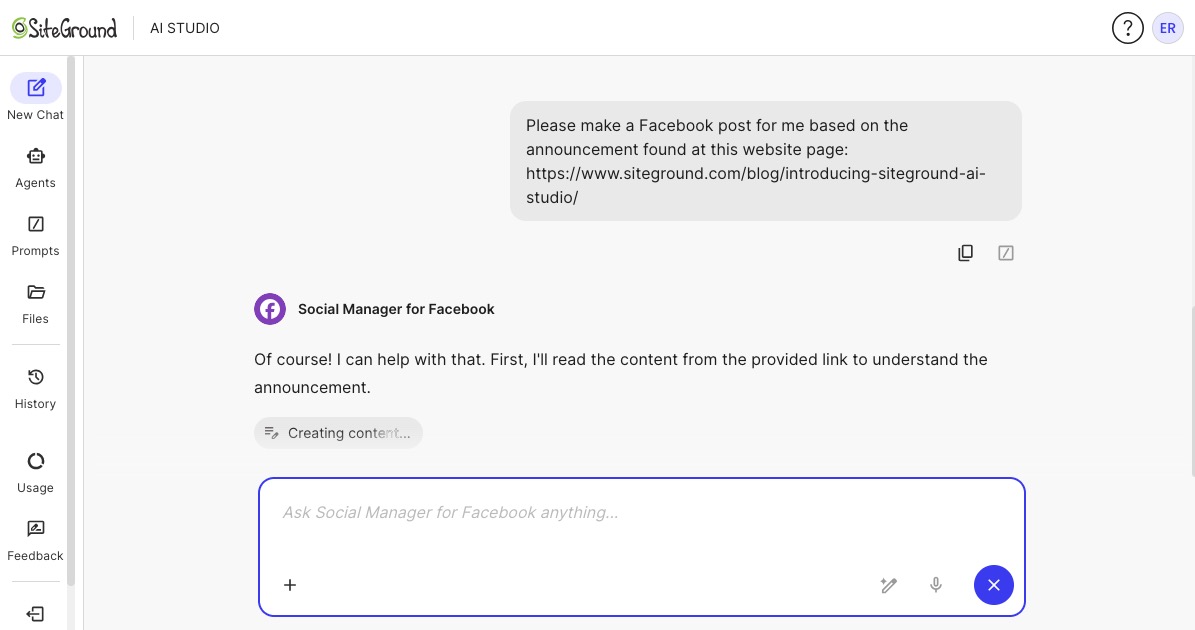
An AI prompt for the SiteGround AI Studio Social Media for Facebook in order to create a Facebook post
SiteGround Social Media Manager for Facebook AI Agent response with a full social media post

SMB advantage

You can update messaging across all platforms in one afternoon. No committees, no approval chains. AI agents handle the messaging and execution (creating posts, adapting formats, publishing) while you control the strategy. Enterprise-level presence without enterprise headcount. While big competitors schedule meetings to discuss their social media marketing strategy, you’ve already implemented and refined yours.

Don’t wait for ChatGPT ads: build your AI presence now

The real threat isn’t ChatGPT ads. It’s being invisible when AI tools answer customer questions.

Enterprise competitors will outspend you in ad auctions, and that’s just reality. But they can’t outmaneuver you when it comes to building organic AI visibility. You have speed, agility, and the ability to implement changes while they’re still debating in committee. This is a tremendous advantage. AI tools amplify that advantage, giving you the efficiency to compete at enterprise scale without enterprise resources. 

SiteGround AI Studio makes this even easier. With it, you gain access to a growing suite of specialized AI agents designed to amplify your team’s capabilities. Every SiteGround customer receives the Essential plan at no extra cost, which includes 20,000 monthly tokens, and the AI Agent for WordPress. Upgrading to the Plus plan unlocks 100,000 monthly tokens, 15+ specialized agents for SEO, content creation, reputation management, social presence, and more, plus a library of ready-to-use prompts, helping you build a comprehensive online footprint without expanding your headcount.

Getting started is simple. Access AI Studio from your dashboard and begin with the visibility audit. In just minutes, you’ll see where your business stands and get a clear roadmap for strengthening your organic AI presence.

ChatGPT ads: FAQs

What is AI visibility and why does it matter for small businesses?

AI visibility is how often and how favorably AI tools like ChatGPT mention your business when answering relevant customer questions. It matters because customer discovery is shifting to AI conversations. So if you’re invisible in AI responses, you’re invisible to potential customers regardless of your traditional SEO ranking.

How much do ChatGPT ads cost?

OpenAI hasn’t released official pricing yet. Based on the competitive nature of paid search and the value of AI recommendations, expect ads on ChatGPT to be comparable to or more expensive than Google Ads in competitive industries. Growing small businesses should prepare for costs that favor enterprise advertiser budgets.

How do you run ads on ChatGPT?

OpenAI is still rolling out ChatGPT advertising features. When available, ads will likely appear as sponsored recommendations within AI responses. The exact mechanics, bidding system, and targeting options haven’t been fully announced.

Are ChatGPT ads good for small businesses?

ChatGPT ads could work for SMBs with competitive ad budgets and specific, high-value keywords. However, organic AI visibility often delivers better ROI for small businesses because it doesn’t require ongoing ad spend and builds compound advantages over time. Focus on organic presence first, then consider supplementing with ads if budget allows.

Should I do ChatGPT advertising?

It depends on your budget and how quickly you need results. ChatGPT advertising will likely favor businesses with substantial ad budgets. For most small businesses, building organic AI visibility first makes more sense because it’s sustainable, cost-effective, and builds long-term presence rather than paying for temporary placement.

Do I need a big budget to show up in ChatGPT responses?

No. Organic AI visibility is built through content quality, reputation, and consistency (not ad spend). AI tools help level the playing field by letting you create optimized content and manage presence at scale without enterprise-sized marketing budgets. Focus on being genuinely helpful to customers, and AI will take notice.

Can small businesses get found on ChatGPT without paying for ads?

Definitely. Organic AI visibility is built through comprehensive, helpful content, strong online reputation, and consistent presence across multiple platforms. ChatGPT references authoritative sources when making recommendations, so if you’ve built that authority through content and reputation, you’ll get recommended without paying for ads.

How do I make ChatGPT recommend my business?

Create content that directly answers customer questions, maintain positive reputation signals across reviews and social media, ensure consistent information across all online platforms, and demonstrate expertise through helpful how-to guides and problem-solving content. AI tools favor sources that comprehensively address customer needs.

What should small businesses do before ChatGPT launches its ads?

Start with an AI visibility audit to understand your current position, create comprehensive content that answers customer questions, build and monitor your online reputation, and establish consistent presence across multiple platforms. These steps build organic visibility that benefits you whether there are ads in ChatGPT or not.

No website? Here’s how to build your email list

A signup form offering free workout routines as a lead magnet, with a subscriber list visible in the background

You want to build an email list but don’t have a website yet. Can you even do that?

Yes! And you can start today.

A lot of people put off email list building because they think the website has to come first. But building your list before your website actually makes sense. You’re validating that people care about what you’re doing. You’re getting feedback while you build. And when you launch, you’ve got people waiting to hear from you instead of starting from zero.

All you really need is a page with a sign-up form.

This guide shows you what to set up, how to do it quickly, and how to start growing your list right now: no multi-page website needed. Just one page.

Key takeaways:

  • You can build an email list with just a sign-up page; no full website required
  • Email lists are owned assets you control, unlike social media followers subject to algorithm changes and platform rules
  • Building your list first validates demand for your business idea before you invest time and money in a full website
  • The setup is straightforward: a sign-up page, an email platform, one opt-in offer, and one traffic source to start.
  • Focus on one traffic channel initially (social media, personal network, or paid ads) before expanding to multiple sources

Why build an email list without a website first

Starting with your email list isn’t necessarily a workaround for not having a website. It can actually be the smarter move for a small business in the early stages.

Why? Below are four good reasons:

You own your audience

Email gives you ownership. You have subscribers’ contact information, can export it anytime, and reach them directly without permission.

Social media doesn’t work that way. Instagram followers, Facebook group members, TikTok fans: those all live on someone else’s platform. Algorithm changes have caused sharp drops in organic reach. As reported in Hootsuite Blog, for instance, one retail brand saw Facebook reach fall from 8% to less than 3% between 2022 and 2024. Your posts reach fewer people through no fault of your own. 

Email solves this. When you send an email, it gets delivered to nearly everyone on your list. A good delivery rate is 98-99%. That means it reaches their email account, even if some land in promotions or spam folders. Compare that to social media where only 2-6% of your followers even see your post. With email, you’re at least in their account. With social media, the algorithm might not show your post at all.

Your list is also portable. Let’s say you’re using an email platform and it doubles its prices or shuts down tomorrow. You export your subscriber list and upload it to a different platform. Your 500 subscribers come with you. You still have their contact information, unlike with social media. If Instagram bans your account or TikTok shuts down? Your 10,000 followers are gone. You can’t export them, can’t contact them. They were never yours to begin with.

You validate demand as you grow

Every signup tells you someone’s interested, but email lets you validate what they’ll actually pay for.

Say you’re thinking about creating Instagram templates for coaches. You build a landing page offering “5 Free Instagram Post Templates” and collect 100 email addresses in two weeks.

You can send survey emails to your list: “I’m creating a template library. Would you rather have: (A) 50 ready-to-use posts, or (B) 20 customizable Canva templates?” You get 30 detailed responses explaining why they prefer one option.

Before launch, you email again: “Would you pay $29 for this?” 15 people say yes and ask for the link.

Classic direct marketing: trackable one-to-one communication with people who’ve already shown interest. Email responses are private, so you get honest feedback. You know exactly who responded and can follow up with specific questions. Everyone on your list took action to get there, unlike passive social followers who might just be scrolling.

You’re testing with people who’ve already raised their hand. That’s better validation than polls or comments from a general audience.

You get customers faster

With an email list, you can reach people now instead of waiting for traffic to find you. Email 50 people from your network about your landing page on Monday. By Friday, you have 15 subscribers. Send them your first email that week introducing what you’re building.

Compare that to launching a website and waiting for SEO to bring visitors. That takes 6-12 months. Or posting on social media and hoping the algorithm shows it to people. With email, you know exactly who’s interested and can message them directly whenever you’re ready to sell.

Lower stakes to test your idea

Building a full website before you know there’s demand means putting in real time and effort before you’ve heard a single “yes” from your audience. Starting with a simple sign-up page lets you test your idea first — and if it takes off, expanding to a full site is just the next natural step.

A sign-up page is quick to set up, and SiteGround Email Marketing starts free for the first 30 days. You can test your entire business idea at no cost and know within 30-60 days if people will actually pay for it.

Validate first, then invest in the website. Not the other way around.

What you need to build your email list

You don’t need much to get started. What you need:

  1. An email marketing platform

This is the tool that captures sign-ups, stores your contacts, and sends your emails. You can’t build a list without one.

What to look for: sign-up forms you can embed or share, basic automation (like welcome emails), list segmentation, and reliable deliverability.

SiteGround Email Marketing does all of this: 

  • Sign-up forms that integrate with WordPress and SiteGround’s Website Builder
  • Built-in automation for welcome emails and sequences
  • Groups and Custom Fields for segmentation based on subscriber data and sign-up source
  • Deliverability backed by 20+ years of email hosting infrastructure: we’ve been sending and receiving emails long before we built the marketing platform
  1. A simple landing page with a sign-up form

Your landing page needs three things:

  • A headline that says what you’re offering and who it’s for (“Get Instagram templates for coaches” or “Weekly marketing tips for freelancers”)
  • 2-3 sentences explaining what they’ll get and why it’s valuable
  • A signup form asking for their email (and optionally their name)

Landing pages come in many shapes, but they all share one goal: get the visitor to take one specific action. Here, that action is signing up. The SiteGround Website Builder is the quickest way to make that happen:

  1. Choose any website template from Website Builder (pick one you like the look of)
  2. Click “Add Section” and select the Subscribe block
  3. Edit the form: Add your headline, 2-3 benefit sentences, customize the button text
  4. Clean it up: Delete any other sections from that page you don’t need, and delete any extra pages from the template
A website builder interface showing subscribe and testimonials section templates for collecting email signups

Now you’ve got a professional-looking signup page without designing from scratch or hiring anyone.

  1. A clear reason for people to sign up (lead magnet)

“Join my newsletter” doesn’t work. Too vague. People need to know exactly what they’re getting in exchange for their email address.

Your options:

A lead magnet: The specific thing you trade for an email address.

  • “My 5-minute Instagram caption formula (because staring at a blank screen sucks)”
  • “The spreadsheet I used to quit my job in 8 months”
  • “How I pack a week in a carry-on without losing my mind: 23-item checklist”

Exclusive content: What they can’t get anywhere else.

  • “Weekly updates on building my coaching business from zero to $5K/month — the messy, honest version”
  • “New designs before anyone else sees them (and before I second-guess myself)”
  • “All the mistakes I made so you can skip them”

A special offer: Early access or founder pricing.

  • “Lock in $29/month forever: price goes to $49 next month”
  • “Founding member discount: 50% off because you believed in this early”
  • “Free 30-minute call, first 20 people only (then I’m closing it)”
  1. A specific call to action

Your sign-up button shouldn’t say “Subscribe” or “Submit.” Boring, and it doesn’t tell people what happens next.

Try instead:

  • “Send me the 5-minute formula”
  • “I need this spreadsheet”
  • “Yeah, get me on the list”
  • “I’m ready — count me in”
  • “Show me the checklist”

Be specific about what they’re signing up for. According to Wisernotify, clear, specific CTAs can boost conversion rates by up to 161% compared to generic ones.

  1. One traffic source to start with

Your landing page won’t attract visitors on its own. It’s a single page with no SEO power. Unlike a full website that can eventually rank in search results, your landing page is invisible until you drive people to it.

Each channel takes time to learn. Pick one, test it for 30 days. Once you’re getting 10-20 signups regularly, add another.

  • Your social media marketing: Post about it, add the link to your bio, share in stories
  • Your personal network: Email friends, colleagues, past clients about what you’re building
  • Guest blogging: Write for blogs your audience reads, mention your list in your bio
  • Online communities: Join relevant groups, contribute value, share your sign-up link when appropriate
  • Paid ads: If you have $100-200 to test, run a small Facebook or Instagram ad campaign

You can always add more traffic sources later. Right now, you just need one that works.

Step-by-step guide: How to build your email list without a website

StepWhat to do
1. Choose your email marketing platformSign up for an email service that captures sign-ups, stores contacts, and sends emails
2. Create your landing pageIn the SiteGround Website Builder , pick a template, add an email form section, and edit it to include:
A headline (what you’re offering + who it’s for)
2–3 sentences on what they get and whyA sign-up form (email required, name optional)
3. Decide what you’re offeringPick your opt-in incentive: lead magnet (checklist, template, guide), exclusive content (updates, early access), or special offer (founding member pricing, discount)
Keep it specific
4. Set up your welcome emailCreate an email automation that sends a welcome message when someone subscribesIn your email, deliver what you promised, set expectations (what they’ll get, how often), brief intro of who you are
5. Pick your starting traffic sourceChoose ONE marketing channel to focus on:
If you have social following → post about your landing page, add link to bio
If you have email contacts or past clients → send them a direct email about what you’re building
If you’re starting from zero → guest post on blogs, join online communities, or run small paid ads ($100-200)
6. Get subscribers and email themShare your landing page link in your chosen channel
Email your list regularly (weekly or biweekly)
Mix content: tips, updates, questions, storiesDon’t collect emails then disappear

Best practices for growing your list

Once you’ve got the basics running, here’s how to improve and grow.

Make your opt-in offer irresistible

Specific beats generic every time. “The 3-Sentence Email That Got Me 10 Clients” beats “How to Get More Clients.”

Solve one clear problem quickly. People want a quick win, not a 50-page ebook they’ll never read.

If fewer than 10% of visitors are signing up, your offer isn’t compelling enough. Test a different angle or make the benefit clearer.

Quick tip: Use a double opt-in to protect your list quality. 

When someone signs up, send a confirmation email asking them to verify their subscription before they’re added to your list. This extra step filters out fake emails, typos, and people who weren’t serious about subscribing. Your list grows slightly slower, but every subscriber is confirmed and engaged — which means better open rates and email deliverability long-term.

Keep your sign-up form simple

Ask for an email address at minimum. Adding a name is a nice touch, but every extra field you add means fewer completions. As a general rule, the shorter the form, the more people sign up.

That said, if you plan to segment your list by role, company size, or another factor, asking upfront can save you work later. Just make sure each extra field has a clear purpose — if you’re not going to use the data, don’t ask for it.If you do need specific information, use SiteGround’s Custom Fields feature — but only add fields you’ll actively use to segment or personalize your emails.

Email campaign sending details screen showing subscriber filters by occupation and interest to target selected contacts

Be clear about what subscribers get

Tell people what to expect upfront. On your landing page or in your welcome email, say something like: “One email every Tuesday morning. Real Instagram strategies I’ve tested.”

That’s clearer than “Join my newsletter” with no details about frequency or content.

Setting expectations upfront reduces unsubscribes later. Someone who knows they’re getting weekly emails won’t be surprised when weekly emails arrive.

Use multiple touchpoints

Remember when we said pick one channel to start? Once that’s bringing in 10-20 sign-ups regularly, it’s time to expand.

Don’t rely on one traffic source forever. Once you’ve got one working, add another.

Put your sign-up link everywhere it makes sense: social media bios, email signature, guest post author bios, podcast show notes, online community profiles, anywhere your target audience might see it.

Each touchpoint is another chance for the right person to find you.

Send valuable emails consistently

Don’t capture email addresses and go silent. Email at least every two weeks, preferably weekly when you’re building momentum.

Mix your content: share useful tips related to what they signed up for, give behind-the-scenes updates on what you’re building, ask questions to start conversations, tell personal stories that build connections.

People forget who you are if you disappear for months. Consistency builds trust.

Track what matters

Monitor these email marketing metrics:

  • Sign-up conversion rate (new subscribers ÷ landing page visitors): Check Sessions in your Website Builder analytics and compare to new subscribers in Email Marketing. 10%+ is good. If you’re below 5%, your offer isn’t clear or valuable enough.
  • Email open rates (subscribers who open ÷ emails delivered): Shows if your list is engaged and recognizes you. 20-30% is healthy; below 15% means your subject lines are weak or subscribers don’t remember signing up.
  • Unsubscribe rate (people who opt out ÷ emails delivered): Shows if you’re keeping the right people. Under 2% is normal; above 5% means your content doesn’t match what they expected.

If your numbers are low, compare them against email marketing benchmarks first. Then test different email opt-in offers, subject lines, or check if your content matches what people signed up for.

Quick email list building checklist:

✅ Sign up for email marketing platform

✅ Create landing page with clear headline and sign-up form

✅ Decide on opt-in offer (what people get for subscribing)

✅ Write and schedule welcome email

✅ Set up call-to-action button text

✅ Pick one traffic source to focus on first

✅ Share landing page link in chosen channel

✅ Send first email to subscribers within 3 days

✅ Implement consistent email cadence (weekly or biweekly)

✅ Track sign-ups and opens to see what’s working

How to build an email list without a website: Get started today

The tech part is quick: pick a template in SiteGround Website Builder, add an email form section, delete anything else, and publish. You’ll have a simple sign-up page ready in under an hour.

The thinking part takes longer: what are you offering, who’s it for, what do you actually say. But you don’t need perfect answers to start. Launch with your best guess, get your first 20 subscribers, and adjust based on what they tell you.

Start building your landing page this week. Share it with ten people. Send your first email within three days of getting a sign-up. You’ll figure out the rest as you go.Ready to build your email list? SiteGround Email Marketing integrates directly with the SiteGround Website Builder so you can start collecting subscribers today.

[58]

Frequently asked questions about building an email list with no website

Can you build an email list for free?

Yes, to start. Use SiteGround Email Marketing and the Website Builder to create your landing page and collect emails. As your list grows, you’ll pay based on subscriber count.

How many email subscribers do I need to validate my idea and build a website? 

500–1,000 engaged subscribers is a solid signal that there’s real demand. If people are opening your emails and you’re already making sales, you have enough to build on.

How do I know if my business idea is worth pursuing? 

You know your business idea is worth pursuing when people take action. Create a landing page explaining your idea and see if 10%+ of visitors sign up. Email your subscribers asking what they’d actually pay for. If people engage, reply to your questions, and some buy when you make a pre-sale offer, you’ve validated demand worth building on.

What’s the best lead magnet for building an email list?

The best lead magnets for building an email list are checklists, templates, email courses, or quizzes that give immediate value. Match the format to what you’re selling: launching a course? Offer a 5-day email mini-course. Selling templates? Give a free sample.

How often should I email my list before I have a website? 

Email frequency depends on what you promised at sign-up and what you’re sharing. Weekly works if you’re building something and sharing progress updates. Every two weeks is fine if you’re sending longer, more valuable content. The key is consistency — whatever you promise, stick to it so people know when to expect you.

What’s the difference between a landing page and a website? 

A landing page is a single page designed for one specific goal — capturing email sign-ups, promoting an event, selling a product. A website has multiple pages (home, about, blog, services) serving different purposes. For email list building, your landing page’s goal is getting people to subscribe.

Should I build an email list or social media following first? 

It depends on your business type and goals, but email gives you more control. You own your email list and can reach subscribers directly — social followers are subject to algorithm changes and platform rules. For most small businesses validating an idea, start with email because you control the relationship. Use social media channels to drive people to your landing page.

When should I switch from a landing page to a full website?

You switch from a landing page to a full website when you’ve proven demand with sales, your list is 500-1,000+ subscribers, you need SEO traffic, or you’re selling multiple products.

Vibe coding explained: How to build websites and apps with AI 

You no longer need to be a professional coder to build your own website or app. A new, AI-powered approach called “vibe coding” allows anyone to create software simply by describing what they want in plain English, turning their words directly into a working application.

In this guide, we’ll explain how vibe coding works, why it’s important, and how you can use it to bring your ideas to life without needing to be a programmer (or hiring one).

Key takeaways

  • Vibe coding definition: An AI-driven software development method where you use prompts in plain language to build an application.
  • Anyone can use it: It removes the traditional barriers of cost and technical skill, allowing anyone to build custom software quickly and affordably.
  • It’s a three-step loop: Define your task in plain language, review the AI’s output, and refine it until it’s perfect.
  • Just know what you want: Success requires nothing more than a clear vision to guide the AI and a secure platform.
  • You can start now: The best way to begin is to open a tool like Coderick AI and provide a prompt that outlines your desired features and goals.

What is vibe coding?

Vibe coding is an AI-driven software development method where you create websites and applications just by describing what you want in plain language. This approach is often called “intent-first” programming because the entire process begins with your vision, not with a line of code.

You simply state your goal in a prompt, and the AI does all the technical heavy lifting. Although it has coding in the name – and you can also hear it called “vibe programming” – no actual technical skill of the sort is required on your part. All you need is an idea of what you want to build.

Why is vibe coding important today?

The accelerated penetration of AI in our lives in the past few years has impacted software development as well and made vibe coding possible. AI has proven extremely good at writing code – just as good as at writing any other text you wish it to. Even modern developers now use it to speed up their work and make it do the heavy-lifting, while they focus more on ideation and code quality refinement. This shift highlights the growing importance of vibe code in today’s development workflows, where creativity and decision-making matter more than manual execution.

If in the past, bringing an idea to digital life meant you had to either invest months learning to code or spend a significant budget hiring developers, now vibe programming gives you a third option, breaking down these long-standing barriers in several key ways:

  • Vibe coding allows anyone to build software. The power to build software is no longer limited to people with special skills. Vibe coding puts that power directly into the hands of entrepreneurs, small business owners, marketing professionals, and, well, literally anyone.
  • It decreases the time to completion. By automating the coding process, you can turn what might have been a six-month project into something you can build and launch in a fraction of the time – sometimes in just a few minutes or hours.
  • It reduces costs significantly. By removing the need to hire expensive developers, vibe coding makes building custom software financially accessible for small businesses, startups, and solo projects.
  • Vibe programming cuts through complexity. You no longer need to worry about choosing the right frameworks, databases, or security protocols. The output is activation-ready thanks to AI handling the technical heavy lifting.
A promotional graphic showing the process of creating a portfolio website for a freelance photographer. The image displays a prompt card on the left requesting a portfolio site, alongside a preview of the resulting dark-themed photography website featuring a dramatic mountain landscape image.

How does vibe coding work in practice?

The core vibe coding technique is a straightforward, back-and-forth process between you and the AI. It can be broken down into three simple steps.

Step 1: Define your intent

You start by telling the AI what you want to build. This is done in simple, everyday language, just like you’re talking to a person. You don’t need to know how it should work technically; you just need to explain your idea. 

For example, you can say: “I need a modern and friendly website for my bakery with a gallery for my cakes and a contact form.”

From there, the AI will guide you. It may ask you questions to better understand your vision, such as “What information should the contact form collect?” or “Would you like to add a menu section showing your prices and cake flavors?” This initial conversation is the foundation for your entire project.

Step 2: Review, refine, test

Are you vibing with the look and feel of AI’s first version of your project? You most likely would like to change some things. That’s where you start to review and refine. For example, you can write prompts like: 

“Change the main color to a light pink,” or 

“Add a map to the contact page.” 

This initiates a back-and-forth process where you provide feedback and the AI makes adjustments.

Also, if you want your application to have some functionalities – like a contact form where your clients can enter their name, email address, and write you a message – you should test if it works properly. Just try it out and tell AI if it needs to fix anything. 

Step 3: Repeat until perfect

The back-and-forth refinement from Step 2 can be repeated as many times as you need. If you don’t like the new color, you can ask for another one. If you think of a new feature, you can ask the AI to add it. 

You continue this process of providing feedback and seeing the changes instantly until the application looks and works exactly the way you want it to.

What are the core principles behind vibe coding?

The process can be broken down into 3 core vibe code principles that take an idea and turn it into a finished product.

  1. Vibe coding always starts with a simple definition of the user’s intent in natural language. This means you state your goal and desired outcome just as you would in a conversation, without needing any technical jargon.
  2. All progress is achieved through a structured cycle of review, iteration, and verification. This means you review the AI’s output, request changes or new features (iteration), and verify that everything still works as expected after each update.
  3. The path to a finished application is built on the repetition of this refinement cycle. This creative loop continues as many times as necessary until the application perfectly matches your vision.
A three-step workflow diagram illustrating an AI website building process. The steps shown are "Task description" with a prompt input field, "Test" displaying a generated webpage layout with sparkle icons, and "Refine" showing a polished photo gallery website with a cursor making adjustments.

What are the main benefits of vibe coding?

Vibe coding is fundamentally changing who can build software and how it gets done. The growing adoption of this approach highlights the core vibe code benefits, which make software development more accessible, faster, and less dependent on deep technical expertise. Below are some of the key advantages you gain when using vibe programming:

  • Drastically reduced time to market. You can conceive, build, and launch a functional application in a fraction of the traditional time – often in days, not months. This allows you to test new ideas, respond quickly to market needs, and deploy solutions with unprecedented speed.
  • Lower barrier to entry. No programming knowledge is required. Vibe coding opens up software development to a much wider audience, allowing everyone to build the tools they need themselves, without having to hire a developer.
  • Significant cost reduction. By reducing or eliminating the need for large development teams or expensive freelance contracts, vibe coding makes building custom software financially accessible for small businesses, startups, and internal projects with limited budgets.
  • Focus on creativity and strategy. Because the AI handles the technical execution, you can concentrate entirely on the user experience, business logic, and overall strategy of your application. Your energy is spent designing the right solution, not wrestling with code.
  • Empowered experimentation. The ability to make changes instantly through simple conversation encourages experimentation. You can test new features, get feedback, and change direction without worrying about derailing the project or incurring significant technical debt.
  • Effortless evolution and upgrades. Your software’s evolution remains entirely in your hands. Adding new features, upgrading functionality, or doing a complete redesign is fast and affordable, allowing you to make significant improvements at any time through simple conversation.

What challenges should you expect with vibe coding?

While powerful, vibe coding comes with a few hurdles. Understanding the main vibe coding challenges helps you approach the process with the right expectations and a more effective mindset.

The “blank canvas problem”

Vibe coding works best when you have a clear vision of what you want to build. If your problem definition is vague or your goals are unclear, the AI will struggle to deliver a useful result. The quality of the output is directly proportional to the quality of your input and instructions.

Security and trust

When an AI generates code, ensuring that it is secure from vulnerabilities is paramount. You are placing trust in the platform to create robust, safe code and to handle your data responsibly. This is why it’s crucial to use a platform built on a secure, trusted infrastructure.

Context collapse

In a long and complex conversation, the AI can sometimes lose track of previous instructions or misinterpret a new request in the context of the overall project. This requires you to be clear and sometimes re-state constraints to keep the development process on track.

What can you build with vibe coding?

The applications for vibe coding are vast, covering everything from public-facing websites to complex internal software. Because it excels at creating data-driven applications with clear user interfaces, it’s suitable for a wide range of real-world projects. The following vibe coding examples illustrate this versatility:

  • Websites. You can build responsive websites for nearly any purpose, such as professional portfolios to showcase work, marketing sites for new products, or event pages with registration forms. 
  • Custom apps. Beyond websites, you can build focused, standalone applications that feel like native software. These can be designed for specific tasks, offering a rich user experience for things like data entry, calculations, or displaying information from an external source.
  • Internal business tools. Streamline your company’s operations by building custom tools tailored to your workflow. Examples include custom CRM systems to manage customer data, project management dashboards to track progress, inventory trackers, or automated expense approval workflows.
  • Client-facing portals. Develop secure portals where your clients can log in to view project updates, access shared files, check billing information, or manage their own accounts. This provides a professional and centralized experience that improves client communication and service.
  • Minimum Viable Products (MVPs). Vibe coding is ideal for building a Minimum Viable Product (MVP), which is a basic, functional version of an application designed to test a business idea with real users. Launching an MVP allows you to gather crucial feedback and validate your concept before committing to a full-scale development team.

A promotional graphic showcasing AI-powered web development capabilities with a code editor icon and sparkles on the left. On the right, floating buttons display various project types that can be built, including Event Page, Brand Website, Invoice Tracker, Financial App, and Wellness Planner.
Screenshot

How does vibe coding maintain code quality and work with existing codebases?

You might hear some hardcore programmers argue that AI-generated code is inferior to code written by hand. While that may have been a concern in the early days of this technology, things are evolving at an incredible pace, and that information is often outdated. 

Modern platforms are engineered to ensure high vibe coding quality, and aim to create clean, efficient, and secure code. As long as the platform is built on a trusted infrastructure, the quality is reliable for the vast majority of projects.

Another common concern is working with existing codebases. What happens if you already have something built for you or by you and want AI to iterate with it? 

The process works by simply providing the AI with your existing code as context. The AI “reads” and analyzes your entire codebase to understand its structure, purpose, and how the different parts connect. From there, you use simple, natural language to describe the changes you want, such as:

  • “Add a ‘Status’ field to the customer contact form.”
  • “Change the color scheme of the main dashboard.”
  • “Refactor this section to make it load faster.”

The AI then intelligently modifies the existing code to incorporate your request. The core loop still applies, making vibe coding code review a simple process of describing, reviewing, and refining the AI’s suggestions. This workflow is ideal for evolving an existing application, making it a powerful tool for ongoing vibe coding maintenance.

How does vibe coding work in Coderick AI?

There are many vibe coding tools you can use. You can even start with general models like ChatGPT, Perplexity, or any of the big AIs directly. However, it’s preferable to choose a specialized tool – they’re built specifically for development, using advanced prompt engineering behind the scenes to improve the quality and security of the code and to help it integrate into a proper workflow. 

SiteGround’s Coderick AI is a prime example of such a specialized tool and represents one of the most sophisticated vibe coding solutions available today.

What truly sets it apart is how it answers the critical question of “where and how will this code live?” Most AI coding assistants leave you with a block of code, forcing you to solve the complex puzzle of hosting, databases, and security on your own. Coderick AI was designed to eliminate this fragmentation. It’s a complete, all-in-one platform where your “vibe” is transformed into a live, secure, and fully hosted application within a single, seamless environment.

A feature overview graphic with a blue gradient background highlighting five key platform benefits. The cards display Integrated database with a database icon, Enterprise security with a shield, Premium Hosting with a browser window, Custom domains with a globe icon, and Ultrafast performance with a speedometer.

Coderick AI’s also:

  • Secure by default. From your initial conversation with the AI to your live application, every step is protected by SiteGround’s enterprise-grade security systems. You can build with confidence, knowing your project and your users are safe.
  • Running on world-class hosting. Your application goes live on the same battle-tested SiteGround infrastructure that powers millions of websites. This ensures ultrafast performance and reliability without any extra setup or configuration.
  • Activation-ready. Forget complex deployment pipelines and configuration files. When your project is ready, you simply hit ‘Publish,’ and Coderick AI handles the rest. Because it’s fully integrated with our hosting platform, your application goes from concept to live on the web in a single step.
  • Responsive by default. Every website and application you create with Coderick AI is automatically optimized to look sharp and work perfectly on any device, from desktops to smartphones.
  • Built for real work. Coderick AI is designed for production from day one, with critical features like built-in version control (so you can experiment freely) and ready-to-use user authentication included out of the box.

Learn more about Coderick AI 

How can you start with vibe coding today?

All you need to get started with vibe coding is access to an AI. That’s it. While any general model can work, you’ll get the best results with a tool specifically built for development, such as Coderick AI.

You don’t need special preparation or formal vibe coding tutorials; the process is designed to be intuitive. Start explaining your idea in your own words and watch it take shape. Your next great project is just a conversation away.

START VIBE CODING TODAY

Still, if you need ideas or want to get ready prompts, Coderick AI has a nice library of templates and prompts for this purpose.

These prompts are expertly crafted starting points designed to show you what’s possible. Think of them as creative warm-ups. You can launch one with a single click and then start the refinement process immediately. You’ll see examples like:

  • “Design an invoice tracker that keeps invoices, clients, and payments in one place. Make it easy to create invoices, track status (draft/sent/paid/overdue), and filter by client or date.”
  • “Create a task tracking app for a small team. It should have a Kanban board with To Do, In Progress, and Done columns. Let me add tasks and mark them complete.”

The most important thing to remember is that it’s a creative process, so have fun and don’t worry about getting it perfect on the first try.

Frequently Asked Questions (FAQ)

What is vibe coding?

Vibe coding is a method of creating applications by describing your requirements in natural language to an AI, which then generates the complete, functional software for you.

Do I need programming experience to start with vibe coding?

No, you do not need any programming experience. If you can describe your idea clearly in your own words, you have all the skills necessary to build an application with vibe coding.

How does vibe coding work in Coderick AI?

In Coderick AI, vibe coding works by translating your natural language descriptions of an idea into a complete, secure, database-powered, and fully-hosted web application without requiring you to manually write code or manage servers.

What can I build with vibe coding using Coderick AI?

Using vibe coding in Coderick AI, you can build full websites, prototypes, internal tools, client portals, and more.

Email CTR vs CTOR: Yes, they’re different

A product page displaying ceramic vases and decorative objects with a browser overlay and a growth chart showing +83% increase in email click-through rate

You send an email, check your stats, and see “CTR: 2.3%.” Then you Google “good email CTR” and find articles saying 10% is average. Cue the panic.

Turns out, that article is talking about CTOR, not CTR. They sound the same. They’re not. One divides clicks by emails opened, the other by emails delivered. Completely different numbers.

Your email platform probably shows both (maybe labeled clearly, maybe not). So you’re comparing your 2% to someone else’s 10%, wondering why your email campaigns are bombing, when really you’re just looking at different email marketing metrics.

This guide explains what each one measures and which to track. Whether you’re a small business owner, blogger, or solopreneur, you’ll learn what your numbers actually mean when you’re running a smaller list, not a 50,000-subscriber operation.

Key takeaways:

  • CTR and CTOR measure different things – CTR divides clicks by emails delivered, CTOR divides by emails opened. They’re not interchangeable.
  • Benchmarks depend on context – Industry averages come from various list sizes, business stages, and audiences. What matters is your own trend line, not matching someone else’s number.
  • Small lists have volatile numbers – Your 300-person list will fluctuate more than a 50,000-person list. Compare yourself to your own baseline, not industry averages.
  • Different metrics answer different questions – Use CTR for deliverability troubleshooting, CTOR for content testing, both together for campaign success.
  • Track trends, not snapshots – A sudden 50% drop signals a problem. Steady 2% over six months with consistent conversions means you’re fine.

Understanding email click through rate (CTR)

Email click-through rate, or CTR, is an email marketing metric that measures the percentage of recipients who clicked a link in your email out of the total number of delivered emails.

Say you sent 500 emails, 480 got delivered (the rest bounced), and 12 people clicked a link. Your CTR is 2.5%. That’s it.

CTR tells you how well your entire email: subject line, preview text, content, email call to actions (CTAs), worked together to get people to click. If your CTR tanks, something broke in the chain between “email lands in inbox” and “person clicks link.”

How to calculate click through rate

The CTR formula looks like this:

CTR = (Total clicks / Emails delivered) × 100

Notice it says “delivered,” not “sent.” If you sent 500 emails but 20 bounced, you calculate based on 480. Why? Because the 20 people who never got your email can’t click anything. Including them makes your CTR look artificially low.

Most email platforms show you delivered numbers automatically, so you don’t have to do the math yourself. With SiteGround Email Marketing, for example, you’ll see both sent and delivered right in your email campaign stats. 

Still, knowing the difference matters when you’re comparing your stats to benchmarks or trying to figure out why your numbers look off.

Unique clicks vs total clicks

Some platforms let you choose between unique clicks (one person clicked once) and total clicks (one person clicked three times = three clicks). For CTR, use unique clicks. You want to know how many people engaged, not how many times your most enthusiastic subscriber clicked around.

Here’s an example:

  • Emails delivered: 800
  • Unique clicks: 24
  • CTR: (24 / 800) × 100 = 3%

That 3% means 3% of people who received your email clicked something in it.

CTR vs click to open rate (CTOR): What’s the difference?

Different email platforms use these terms to mean different things. So let’s clarify them once and for all.

  • CTR (Click Through Rate) divides clicks by emails delivered. We just covered this one.
  • CTOR (Click to Open Rate) divides clicks by emails opened. So if 100 people opened your email and 10 clicked, your CTOR is 10%. This number measures how your content performed once people opened. It tells you if your subject line set the right expectation and if your content delivered on that promise.

With SiteGround Email Marketing, CTOR is the metric you’ll see on your dashboard right away.

SiteGround Email Marketing dashboard highlighting 100% click-to-open rate, alongside delivery rate, open rate, bounce rate, and recipient activity data @keyframes bannerSlideUp { from { opacity: 0; transform: translateY(8px); } to { opacity: 1; transform: translateY(0); } } Next time, try this in CoworkHand off complex tasks for Claude to handle independently. Come back to finished results.Get desktop appGet desktop app

Why all the confusion? Email service providers each built their dashboards independently, picked their own labels, and never got together to standardize anything. Some platforms show both CTR and CTOR  but don’t make it obvious which is which. Click rate as a standalone metric is confusing and inconsistently defined across platforms, so it’s easier to stick with these two clearer measurements.

So when someone says “our average click rate is 15%,” you can’t assume they’re talking about the same metric you’re tracking. Fun, right?

Which number should you actually care about?

Depends what you’re trying to figure out.

What you’re doingWhich metric to trackWhy
Troubleshooting email deliverabilityCTRA sudden drop might mean your emails are landing in spam or your list quality tanked. CTOR won’t show you this, as it only counts people who opened.
Testing email contentCTORYou want to know if your copy, layout, or call to action actually worked once people were reading. CTR mixes in too many other variables.
Measuring overall email campaign successBoth CTR and CTOR, plus conversionsCTR shows reach. CTOR shows email engagement. Conversions show whether any of it led to actual results.

What’s a good email CTR?

The internet will tell you the average click through rates are around 2-5%, depending on your industry. For CTOR, benchmarks hover around 10-15%.

Take those numbers with a huge grain of salt.

Those averages depend on a lot of factors: your industry, list size, business stage, how engaged your subscribers are, what you’re asking them to do. A SaaS company sending product updates to 50,000 active users will have different numbers than a freelance designer sending portfolio updates to 300 past clients. That doesn’t mean one is doing it wrong.

That said, you still want some baseline to work from.

  • What’s a good CTR? For most small businesses, anywhere from 1-3% is solid. If you’re hitting 4-5%, you’re doing great.
  • What’s a good CTOR? Aim for 8-12%. If you’re consistently above 15%, your content is really connecting with people who open.

What actually matters is your own trend line. Did your CTR drop from 3% to 1% in the last month? That’s worth investigating. Sitting steady at 2% for six months while your conversions stay consistent? You’re fine. Email marketing benchmarks can give you a starting point, but your own pattern over time tells you more than any industry average.

Keep in mind that small lists naturally have more volatile numbers. One campaign might hit 5% CTR because your most engaged ten people clicked. The next drops to 1.5% because those same people were busy that week. With a 50,000-person list, individual behavior gets smoothed out. With a 300-person list, every person counts.

The red flags when reviewing CTR and CTOR

More important than hitting a specific number: watching for these warning signs in your own data:

  • Sudden drops in either CTR or CTOR (more than 50% decline in a week or two)
  • High CTR but low CTOR (lots of people opening your emails, but few clicking once they read—means your content or call to action isn’t working)
  • Low CTR but high CTOR (this is actually fine: means fewer people opened, but the ones who did were engaged. Keep in mind that open rates can be unreliable anyway due to privacy features like Apple’s Mail Privacy Protection)
  • High clicks but no conversions (your email worked, but something’s broken on your landing page: check load speed, clarity, and whether the offer matches what you promised)
  • Steady decline over months (gradual drop over 3+ months means something shifted: list quality, content relevance, or frequency)

Track your own averages over time. If your normal CTR is 2.5% and you suddenly hit 0.8%, that’s your signal to investigate. If your normal is 1% and you’re at 0.9%, you’re probably fine.

And remember: CTR doesn’t exist in a vacuum. Look at it alongside other performance metrics like:

  • Email open rate: If nobody opens, CTR will tank no matter how good your content is
  • Conversions: Clicks mean nothing if they don’t lead to sales, signups, or whatever you’re after
  • Unsubscribe rate: Spiking unsubscribes + dropping CTR = your content stopped matching what people want
  • Bounce rate: High bounces kill your CTR because fewer emails get delivered

The goal isn’t hitting some magical industry number. It’s understanding what’s normal for your list and noticing when something changes.

How to improve your email click-through rate

Get more people to click by making it obvious what you want them to do and matching your content to what they actually signed up for. The tactics:

  • Write subject lines that set up the click. Your subject line shouldn’t just get the open: it should prime people for what’s inside. If your subject says ‘5 email tips’ but your email immediately pitches your course without the tips, they’ll bounce. Match the subject to the action you want.
  • One clear call to action per email. Multiple CTAs split attention. Pick one thing you want people to do and make that the focus. If you need to include secondary links, make them visually smaller or put them at the bottom.
  • Make links obvious and clickable. Underline them. Use button styling. Don’t hide links in walls of text. People should be able to scan your email and immediately see where to click.
  • Optimize for mobile. 55% of emails are opened on mobile devices, according to Growth-Onomics. If your links are too small to tap, your font is too tiny to read, or your email layout breaks on mobile, your CTR will suffer. Test on your own phone before sending.
  • Test timing and frequency. Sending too often burns people out. Sending too rarely makes them forget who you are. Test different days and times to see when your target audience actually engages. Track your CTR across sends to find your sweet spot.
  • Match content to what people signed up for. If someone joined your list for freelance writing tips and you start sending them AI tool promotions, they’ll stop clicking (or unsubscribe). Stay consistent with what you promised when they opted in.

Your click-through rate needs context, not comparison

Whether you’re a small business owner, blogger, or solopreneur, chances are you’re managing customer emails, social media, your website, and a dozen other things at once. The last thing you need is to stress about whether your 2.1% CTR means your email marketing is failing.

It doesn’t. Track your own trends. Watch for sudden changes. Adjust when something actually breaks — not just because your number doesn’t match some article’s benchmark.The good news? You don’t need fancy tools or a marketing degree to track this stuff. SiteGround Email Marketing shows you CTOR right in your dashboard, so you can see exactly how your content performs once people open. No guessing which metric you’re looking at, no cross-referencing three different reports. Just clean data that tells you what’s working.

[58]

Frequently asked questions about email CTR

What does 5% CTR mean?

5% CTR means that 5% of people who received your email clicked a link. For most small businesses, that’s solid performance.

How do bot clicks inflate CTR (and how to spot them)?

Bot clicks inflate CTR when email security tools automatically click links to check for malware before your subscriber even sees the email. You’ll spot them if clicks spike but conversions don’t, or if clicks happen seconds after sending.

Why does mobile vs desktop open location affect which metric matters more?

Mobile versus desktop open location affects which metric matters more because people are less likely to click on mobile (smaller screen, harder to tap). A 10% CTOR on mobile is more impressive than on desktop. Check where your audience opens before judging your numbers.

CTR in cold emails: What is the 30/30/50 rule for cold emails?

The 30/30/50 rule is a cold outreach formula: 30% of your email on the problem, 30% on the solution, 50% on the call to action. The idea is to focus most of your content on getting them to click. If you’re emailing people who opted into your list, you don’t need this — they already know you.

Valentine’s day email marketing: 6 campaign ideas that drive sales

Valentine's Day email marketing

Whether you sell products, services, or simply share your expertise online, Valentine’s Day is your opportunity to show your audience a little love and bring in more sales. 

February 14 is one of the few days in the calendar that comes pre‑loaded with positivity, emotion, and attention. People are in a good mood, more open to spending, and more willing to treat themselves or someone they care about. That makes it a natural moment to show up in their inbox and remind them why they love buying from you, booking you, or following your work.

In this guide, you’ll see why Valentine’s Day emails work for small businesses and personal brands, what types of emails you can send, and how to put together a simple campaign that fits your time and resources. By the end, you’ll know exactly what to send and how to turn this occasion into real results for your business.

Why Valentine’s Day is a sales opportunity you shouldn’t miss

When you run a small business, most of your time goes into serving clients, fulfilling orders, or keeping your website up and running. Anything extra you do for marketing has to be simple, quick to set up, and actually help you bring in more money or more loyal customers.

[87]

Valentine’s Day is one of the easiest moments in the year to do exactly that. It’s your opportunity to turn whatever you sell into something people feel good about buying.

A cleaning service becomes “give your home some love.” An online course becomes “invest in yourself this Valentine’s Day.” A skincare routine becomes “a little self-love for February 14.

Here’s what Valentine’s day gives you for free:

A reason to reach out

You don’t have to think hard about “why” you’re emailing. Valentine’s Day is already a known occasion, so an email from your business around that time feels normal, whether you’re sharing an offer, a reminder, or just saying thank you.

Built-in urgency

Because Valentine’s Day is on a fixed date, people know your offer or message won’t be around forever. You don’t need big countdowns or dramatic wording, the date itself pushes them to decide sooner.

People more open to buying

Around Valentine’s, many people are already looking for ideas: gifts, experiences, or little treats for themselves. Not everyone will be ready to buy, but enough of your subscribers are in “why not” mode that one well‑timed email can help turn that mode into a sale.

For small businesses, this combination makes Valentine’s Day one of the easiest moments to get extra orders from your list.

6 Valentine’s Day email ideas you can use

The ideas below are designed for busy businesses who are not full‑time marketers. Pick the one that feels closest to what you sell and what your subscribers need right now, then plug it into a ready‑made Valentine’s template in SiteGround Email Marketing. You’ll have a campaign ready to send in no time.

1. Create a limited-time Valentine’s offer

If you want to drive sales around Valentine’s Day, a short, clear offer built on what you already sell is often enough. You don’t need to redesign your whole website or create complicated bundles.

What you can do:

  • Choose 1–3 things you’d like to highlight: best-selling products, a popular service package, a course, a membership.
  • Add a simple Valentine’s perk for a limited time: a small discount, free shipping, an extra session, an extra lesson, or a bundle price when people buy two things together.

Source: Really Good Emails

If your website runs on WordPress or WooCommerce with SiteGround, setting your promotion up can be done quickly. Using SiteGround’s AI Agent for WordPress in AI Studio, you can describe the offer you want, such as a percentage discount, a fixed amount off, or a simple bundle, and the agent will apply it without you having to manually adjust multiple settings.

2. Use Valentine’s day to promote self-care

Many people use Valentine’s Day as a reason to slow down and do something kind for themselves. Your business can support that, whether you run a shop, offer services, teach online, or sell digital tools.

What you can do:

  • Think of one concrete way your service or product makes your customer’s life better: less stress, more clarity, feeling better in their body, business running smoother.
  • Write your email around that idea as a small act of self-care or self-investment.
  • Use simple, supportive language like “do something for yourself,” “make your day easier,” or “future-you will thank you for this.”

Source: Really Good Emails

3. Present your product or service as a gift to others

Many things small businesses sell can be bought for someone else: physical products, gift cards, sessions, courses, memberships, or digital resources. Often people just need you to show them that perspective.

What you can do:

  • Ask yourself: “Could someone buy this for a person they care about?” This often fits coaching, consultations, classes, wellness visits, memberships, and gift cards.
  • In your email, say clearly that this is something they can give and who it’s a good fit for: a friend starting a business, a parent who never has time for themselves, someone who loves learning, and so on.

Source: Really Good Emails

4. Make your product worth falling in love with

Valentine’s Day is the perfect time to remind your audience why your product is special. Whether you’re launching something new or simply sharing what you already offer, focus on the details that make people say, “this is exactly what I needed.”

What you can do:

  • Look at your product from your customer’s point of view. What’s the moment they realize they love using it? That’s your story.
  • Highlight what makes it unexpectedly delightful — maybe it saves time, simplifies a daily task, or just feels good to use.
  • Use warm, human language that captures genuine appreciation: “you might fall for this,” “we think you’ll love how it makes things easier,” or “this is one you’ll want to keep around.”

Source: Really Good Emails

5. Help your subscribers decide what to buy with a gift guide

The classic Valentine’s gift guide approach works for a reason, it removes the pressure of figuring out what to buy. When people feel unsure, they often postpone the decision or abandon it altogether. A simple, well-organized gift guide makes choosing faster and easier.

What you can do:

  • Group your products or services in a way that feels intuitive: by recipient (for partners, for friends, for yourself), by price range, or by interests.
  • Keep the selection focused. Too many options can overwhelm people.
  • Add a short note under each item explaining why it makes a great gift. People appreciate guidance.

Source: Really Good Emails

6. Celebrate all kinds of love

You can also use Valentine’s Day to talk about more than just romantic relationships and connect it directly to what you offer. Think about the relationships your product or service already supports and build your email around those.

For example, if you sell pet products, you talk about “showing some love to your pets.” If you sell home goods, you talk about “showing your home some love.” If you sell business tools or services, you talk about “showing your business some love.”

Source: Really Good Emails

Valentine’s Day email subject lines, preview text, and CTAs

Subject lines that get opened

Your subject line competes with a lot of heart emojis and “Last chance!” copy. Specificity helps you stand out.

Formulas that work:

  • Benefit + logistics: “Gifts they’ll love, delivered by Feb 14”
  • Curiosity: “The Valentine’s gift they won’t see coming”
  • Self-love: “Treat yourself this Valentine’s Day”
  • Helpful urgency: “Still time to get it there”
  • Personal: “A little something for you 💌”

Examples to steal:

  • “Valentine’s gifts under $50 (that don’t look like it)”
  • “For your person, your bestie, or just you”
  • “The ‘I waited too long’ gift guide”
  • “Something sweet for your inbox 🍫”
  • “Don’t panic – eGift cards deliver instantly”
  • “What we love this Valentine’s Day”

Preview text that supports the subject line

The preview text (preheader) shows next to or below your subject line. Use it to add context, clarify what’s inside, or reinforce urgency.

Subject: “Valentine’s gifts they’ll actually use”
Preview: “Curated picks by budget. Free shipping over $50.”

Subject: “A little love for you”
Preview: “Thanks for being here. This one’s just to say hi. ❤️”

CTAs that get people to take action

Make your call-to-action specific. “Shop now” works, but “Browse gifts by budget,” “Find their perfect gift,” or “Treat yourself” tells readers exactly what they’re clicking into.

If you have multiple sections – gifts for partners, gifts for friends, gifts for self – give each its own CTA so readers can self-select.

Give your email the Valentine’s Day look

Valentine’s Day emails are easy to recognize because they use familiar visual cues. Hearts, flowers, chocolate, and a palette of red, pink, and white signal the occasion immediately.

When a subscriber opens the email, the connection to Valentine’s Day should be clear at a glance. That immediate context helps the reader understand why the message is being sent and what it relates to, without needing extra explanation. It also reduces friction, because the email fits into an expected moment rather than interrupting it.

If you want to save time or avoid layout decisions, starting from a template can help.

SiteGround Email Marketing includes Valentine’s Day–ready templates that already follow these principles: clear structure, and valentine-ready colors and graphics. You can adapt the content to match your message without designing an email from scratch.

If you’d rather skip writing and designing altogether, SiteGround clients can use the free AI Studio and the Email Marketing Agent (available on Plus plans) to generate a complete Valentine’s email campaign. That includes the subject line, email copy, and visuals, which you can import directly into SiteGround Email Marketing and send right away.

[87]

Your turn to show up this Valentine’s Day

Valentine’s Day has been a communication moment for over 700 years.

People have been sending love notes on February 14 since Geoffrey Chaucer wrote about it in the 1300s. By the 1800s, Valentine’s cards were a booming business. And since the early 2000s? The love letter has moved to the inbox.

What hasn’t changed? People respond to businesses that feel warm, personal, and human. Valentine’s Day gives you the perfect opportunity to show that side of your business without overthinking it.

So pick one idea from this guide, adapt a template, and send something that reminds your customers why they like doing business with you.

Will you send Valentine’s emails this year? We’d love to see what you create.