Website Planning in 9 Steps + Checklist

Website Planning

This article was originally published in October 2024, and then updated in April 2026.

Planning a new website successfully comes down to 9 key steps: from defining your goals and audience, to choosing hosting, shaping your design, and finally launching your site. This guide walks you through each one—plus includes a free checklist so that you have a website planning template to follow in real time.

Key takeaways

  • Always define your goals and audience before touching design or code—it shapes every decision that follows.
  • Consistent branding (logo, colors, tone) builds trust and makes the build process smoother.
  • Your choice of website builder, CMS, or custom code has real trade-offs in cost, flexibility, and maintenance.
  • A clear sitemap improves both user experience and search engine optimization (SEO) from the start.
  • Website planning doesn’t end at launch—regular updates, SEO, and performance monitoring are part of the job.

[24]

What is Website Planning and Why Does it Matter?

The website planning process entails defining the purpose, goals, and structure of a website before any design or development work begins. It involves understanding the needs of your audience, deciding on the content, determining the website layout, and considering the technical aspects such as domains and hosting.

A proper website planning process is vital because it:

  • Ensures clarity of purpose: It helps you understand why you are planning a new website and what you hope to achieve.
  • Saves time and money: Avoids redoing work by eliminating confusion about site objectives, features, and functions.
  • Improves user experience: A successful website aligns with the needs of its audience and provides them with a seamless user experience.
  • Optimizes SEO and performance: Helps organize content and site structure in a way that is favorable to search engines and AI, making it easier to rank higher and get cited.

Planning a website becomes much more manageable when you break it down into clear steps. Here’s how to plan a website in 9 stages—from defining your goals and audience all the way through to building and launching—with everything you need to tackle each one.

What Does Planning a Website Actually Involve?

Now that we know why planning your website is critical, let’s dive into a step-by-step guide for how to plan a new website. Follow these 9 steps to ensure you have all the essential website planning tools.

1. Define Goals & Objectives

Your website goals should answer three things: what you want the site to achieve, what actions you want visitors to take, and how you’ll measure success. This will help you determine what messages to focus on, how to structure your pages, what calls to action to include, and more. So start with answering these simple questions:

  • What are the short- and long-term goals for your website? Your short-term goals might be to sell products and generate leads, while your long-term goals could be building brand awareness and customer satisfaction.
  • What actions do you want visitors to take? Such as making a purchase, signing up for an email newsletter, requesting a quote, etc.
  • How will you measure the success of the website? Options could include web traffic, conversions, email sign-ups and other email marketing metrics.

Having these important details clear and front of mind will help guide you as you continue with the following steps for how to plan a website. Note your answers down and refer to them regularly to make sure you’re staying on track.

2. Identify Your Audience

If you wish to reach the right people, you’ll need to define four things about your audience: who they are, what problems they’re trying to solve, what they want from your site, and how they consume content online. To define this, answer the following questions: 

Who are your target users?

Identify key demographic details, such as age range, location, and occupation. For example, your audience might be young professionals aged 25-40, living in urban areas across the United States, working in the tech industry. Understanding these factors helps you focus your website content planning around appealing directly to their preferences and needs.

What are their pain points or challenges, particularly as they relate to what you’re offering?

Consider the specific problems your target audience is trying to solve. Are they looking for efficient solutions to improve productivity, struggling to find reliable services, or seeking advice on complex topics? By pinpointing their challenges, you can position your products or content as the solution they’re seeking.

What are their goals when visiting your website?

Think about what actions they want to take or what problems they are trying to solve when they arrive on your site.  What will their user journey be? They may be searching for a product that addresses their specific needs, looking for expert advice on a topic, or gathering information before making a purchase decision. Knowing their goals will help you create relevant content and clear calls to action that guide them to the next step.

How do they consume information online?

Understanding how your audience interacts with content can influence both the design and layout of your site. For example, are they primarily accessing your site via mobile devices, or do they prefer a desktop experience? Are they active on social media, and if so, which platforms? Knowing this helps you determine the best way to present your content so that it’s accessible, engaging, and easy to navigate. Plus, understanding their online behavior can help you strategize how to drive traffic to your site, whether through social media, email marketing, or search engines.

Once you’ve clearly identified your audience, you can customize your website’s content, design, and user experience to meet their expectations. It will also help as you think about products, marketing copy, email newsletters, social media marketing, and so on. 

Just as when planning your website objectives, regularly refer back to your answers above to make sure you’re staying focused on your audience.

3. Establish Your Branding

There’s a good chance you’ve already developed at least some branding as part of your marketing strategy—even if that only includes a logo. Now’s the time, though, to really get your branding ducks in a row and define your brand clearly so that you can execute it on your website. Consistent branding helps build recognition and trust with your audience—and ultimately conversions.

Branding Elements to Consider:

  • Logo: When deciding on a logo design, focus on creating something that reflects your brand’s identity and values while being simple, memorable, and versatile. Consider your target audience, industry trends, and how the logo will work across various mediums and sizes.
  • Color scheme: Define the primary and secondary colors that should be used across your website. Primary colors are ones that you’ll use most of the time; secondary ones complement the primary, and are typically used as accent colors.

Brand color scheme for web planning
  • Typography: Decide on the font or fonts that you would like to use for your brand. These may all be the same font, but it is often a good idea to choose one font for your headings, and a complementary one for your body copy. Google Fonts, for example, can help you find ideal pairings for this kind of execution. It also offers a large selection of free fonts that you can download and use however you’d like. 
  • Tone of voice: Whether you adopt a casual, formal, or playful tone, it should be consistent across the website, and of course align with your brand and what you wish to transmit.
  • Visual style: Decide on the overall visual tone of the site, from minimalist and clean to bold and dynamic. This will help steer your vision as you explore and decide on layout, color usage, imagery and more.

Take note of these elements for your reference as you plan your website. Not only will it be handy for you to refer back to this information, but it will be helpful if and when you decide to work with outside designers.

4. Decide How to Build Your Website

After identifying your goals, audience, and branding, the next step is to decide how you will build your website. For most people, it comes down to three options: a website builder, a CMS like WordPress, or a custom-built site. Here’s how to know which is right for you.

Website Builder — Best for Most People

A website builder is the fastest and most accessible way to get online, and for the majority of small businesses and personal brands, it’s all you’ll ever need. With drag-and-drop functionality, built-in hosting, and no coding required, you can go from planning to live site in a fraction of the time. The SiteGround Website Builder takes this a step further—with professionally designed templates, built-in ecommerce, and hosting all included, much of the heavy lifting is already done for you.

The trade-off is customization. If your site needs highly specific functionality or a truly bespoke design, you may eventually hit a ceiling.

CMS—Best for More Complex Sites

A content management system (CMS) is a platform that lets you build and manage a website without writing code from scratch. WordPress is the most widely used CMS, and a popular choice for sites that need more flexibility—a content-heavy blog, an online store via WooCommerce, or greater control over design and functionality. It’s open-source and highly customizable, with a wide range of themes and plugins to suit most needs.

That said, it has a steeper learning curve than a website builder, and more complex customizations may require hiring a developer. It can be a cost-effective option, but that depends heavily on how much you need to customize.

CMS—Best for More Complex Sites

If your website needs functionality or design that no off-the-shelf platform can deliver, a custom build is the answer. Whether coded from scratch or built on top of an existing site or CMS, a custom site offers complete creative and technical freedom.

The downside is cost—both upfront and ongoing. Any changes typically require a developer, which makes keeping the site fresh more expensive and time-consuming than the other two options.

5. Choose Hosting and a Domain

Selecting a hosting provider and choosing a domain name are two of the most consequential decisions you’ll make—the first determines your site’s speed, security, and reliability; the second is how customers will find and remember you. Both choices can significantly impact how users experience and interact with your business online.

Choose Your Hosting

Every successful website needs hosting, and the same criteria apply regardless of how you build: speed, security, reliability, and customer support all matter. The difference is that with a website builder, hosting is built in—so those qualities are baked in too, which is why it’s worth looking beyond templates and ease of use when choosing a builder. With a CMS like WordPress or a custom-built site, you’ll need to select a hosting provider separately.

For WordPress in particular, it’s worth choosing a host that offers WordPress-specific support and services. SiteGround offers Managed Hosting for WordPress, which includes automated setup, migration, and updates, along with top-notch security and expert 24/7 support. If you’re running WooCommerce, SiteGround’s WordPress Hosting for WooCommerce is worth a look too.

Choose Your Domain

When it comes to selecting a good domain name, there are several factors to keep in mind such as keeping it simple and memorable, using relevant keywords, and avoiding numbers and hyphens. 

If you have a great idea for a website name, start by checking if your domain name is available. Then you’ll need to purchase your domain name—a cost typically paid annually, or for multiple years in a row. That said, keep in mind that sometimes your domain is actually free for the first year when you buy a new hosting plan, as is the case with SiteGround Web Hosting. So when it comes time to select a hosting service, this is something to keep in mind. 

6. Shape Your Web Design

You’ve established your brand, and how you’ll build your site—now it’s time to bring them together and determine your website needs, by either communicating that to a designer, or by choosing a template.

But first, start by exploring other sites for inspiration, focusing on businesses that align with your offerings and target audience. Competitor websites can be especially helpful in identifying effective layouts, features, and designs within your industry, as well as opportunities to stand out.

For example, if you’re a creative professional, a portfolio might be essential, while a wedding planning service might benefit from featuring client testimonials. Note common design trends—whether sites in your field are sleek and modern or colorful and content-rich – and consider how you’ll adapt these patterns for your own site.

If you’re using a designer, this research will also help you provide more specific guidance so that they create a website that matches your expectations. Even if you’re building the site yourself, analyzing websites you admire can help you identify website functionality and layouts that work best for your needs.

Meanwhile, if you’re using a website builder or CMS like WordPress, you likely have access to a wide range of predesigned templates to meet your website planning goals. These templates serve as a foundation for your site’s design, offering a quick and easy way to get started. The key is to choose a template that looks professional and includes the functionalities you need, so you can focus more on content and less on design tweaks. Just keep in mind: the less you edit the template, the better it will look! 

7. Create a Sitemap for Effective Website Architecture Planning

A sitemap is your website’s blueprint, and building one is more straightforward than it sounds once you break it into a few logical steps. Creating a clear and logical website architecture plan not only improves the user experience but also plays a key role in optimizing your site for search engines. Here’s how to approach it:

  1. Identify Core Pages: Start by listing the essential pages that your website needs. This might include a homepage, an about page, a contact page, and any specific pages related to your business such as services, products, or portfolio pages. Think about your site’s primary goals and what website content planning is necessary to fulfill those objectives.
  2. Group Related Pages into Categories: Next, organize your pages into categories or sections to make the site easy to navigate. For example, if you offer multiple services, group them under a “Services” section. Similarly, blog posts can be placed under a “Blog” or “Resources” section. Categorizing your content ensures that visitors can quickly find what they’re looking for and enhances the overall flow of your site.
  3. Determine the Hierarchy: Establish a clear page hierarchy for your sitemap. Your homepage should sit at the top, with main sections (like “About,” “Services,” or “Contact”) branching off from it. Subpages should be nested under the appropriate parent pages. This hierarchy will dictate how users and search engines interpret the importance of each page. The more organized and logical this site structure is, the easier it will be to navigate.
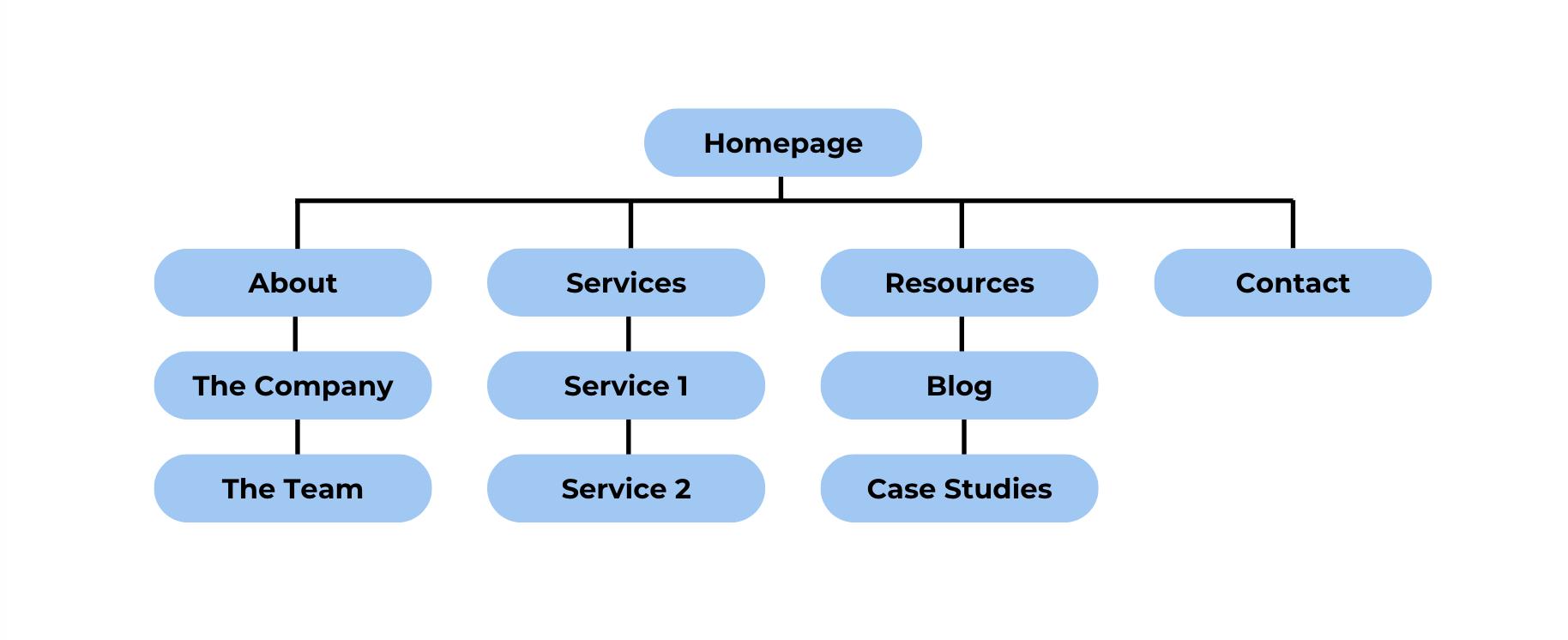
Website hierarchy example
  1. Prioritize Key Pages: Not all pages on your site will have the same level of importance. Determine which pages are critical for conversions or user engagement and make sure they are easily accessible. For instance, if your contact page is a key point of interaction, it should be prominently linked from the homepage or main menu.
  2. Plan for Future Growth: Consider how your sitemap might evolve as your site grows. You may want to add additional sections, subpages, or even integrate features like an ecommerce store or a member login area in the future. Building flexibility into your sitemap now can save you the trouble of major restructuring later.
  3. Optimize for User Experience: As you finalize your sitemap, think about your customer’s journey through your site. Make certain that important website pages are no more than a few clicks away from the homepage, and provide clear pathways for users to move between related content. Use intuitive navigation menus, calls to action, and internal links to guide visitors through your content seamlessly—and ultimately to conversion.

When it comes to how to plan website structure, a well-organized sitemap will set the foundation for a successful website that is both user-friendly and optimized for search engines. It acts as a roadmap for both you (and your designer, if you use one), ensuring your site’s content is logically structured and easily accessible to your audience.

8. Gather Your Website Content Planning Assets

Before building your web project, let’s take a minute to set aside all the content we’ve covered so far—plus a few extra tidbits. This will be an especially important step if you’re working with a designer, but it’ll also be helpful if you’re building your site yourself, allowing you to have all your content in one place. Website assets that you’ll want to round up include: 

Copy

Write and compile copy for all the pages you’ve identified in your sitemap. These will likely include the following pages and content:

  • Homepage: Summarize your brand’s unique selling proposition, services, benefits, and features.
  • About page: Provide background information, your company’s history, and your team.
  • Service or product pages: Detail your offerings, benefits, and how they address customer needs.
  • Blog posts or articles: Aim to have at least a few articles published so that your blog already adds value. You may also wish to leverage this content to help educate your users, so don’t be shy about using calls to action on your website in order to send users to your blog to learn more about different products, features, product uses, and more. Just be sure to include further calls to action in your blog post so that you keep users moving to the next step.

Branding Elements

Now it’s time to put together all those brand elements we discussed, and make them ready for use. Items you’ll want to have on hand for your web design include: 

  • Logo: Ensure it’s in a high-resolution format. Depending on your site color, you may want your logo to have a transparent background. Of course, always make sure you are following whatever branding guidelines you or your designer have established for your business.
  • Color scheme: Note the primary and secondary colors that should be used across the website. Have the pantone and/or hex codes accessible so that you can easily provide them to your designer, or access them as you customize your site.
  • Typography: List the fonts you’ll use for headings, subheadings, and body text. If you’ve purchased and/or downloaded your fonts, be sure to have those available as well.

Media

Finally, pull together all of the media for your website, such as: 

  • General site imagery: You’ll likely need visuals for your homepage hero section (the header image), as well as sprinkled throughout your site to add interest. Make sure these images—and all your media—consistently fit the visual style you’ve defined. (Good news here: if you’re using the SiteGround Website Builder, you can use the built-in AI image creator or the gallery of free stock images to fill any of your photography gaps.)
  • Product photos: If you’re running an ecommerce site, high-quality, cohesively styled product images are essential. 
  • Team photos: Personalize your website with professional photos of your team.
  • Icons and other brand elements: If you have other branding elements, such as icons, be sure to include these as well. They can be used to support text, or simply to infuse branding into your design.

File size is one last thing worth keeping in mind as you gather your assets. Large files can slow down your site speed, negatively impacting both user experience and Google search rankings. Ideally, your images should be compressed and served in optimized versions for different screen sizes—so a visitor on a phone isn’t downloading the same heavy file as someone on a desktop. If you’re building with SiteGround, this happens automatically: the Website Builder handles it the moment you upload an image, while WordPress users can rely on the SiteGround Speed Optimizer Plugin to do the same.

Bonus tip: To make all your assets extra handy, consider creating a shared drive, such as a DropBox folder, so that your files are easily accessible for all collaborators.

9. Bring Your Website Planning to Life 

How you build your site comes down to two paths: doing it yourself using a website builder or CMS, or handing it off to a designer—and what you do next depends entirely on which route you’ve chosen. Let’s explore next steps. 

If You’re Building Your Own Site

While building your site is a bit more hands on, you’ve already done a lot of the legwork, and you have mapped everything out on your checklist. So it’s just time to put it all in action.

Website Builder and/or CMS

If you’re using a website builder or a CMS such as WordPress, you’ll want to start off by adjusting the template to match your branding, colors and fonts. Usually this can be done easily by adjusting the template settings allowing color and font changes to take effect across your site.

From there, you’ll want to upload and start organizing all your content, including copy, images (including your logo), and any additional media. 

Lastly, you’ll want to set up any extra site functionality. In the case of a CMS like WordPress, this could include installing plugins for SEO or ecommerce, as well as adding any contact or email sign-up forms. (New to the world of email marketing? We’ve got you. Read our guide on email marketing and how to get started.)

Custom Coding 

Meanwhile, if you’re personally building your site from scratch, you’ll need to start designing and coding, and, in doing so, leveraging and implementing your gathered content as discussed above. Designing and coding a website from zero is obviously a much larger undertaking that requires more than a simple article. So enter into these waters only if you are well acquainted with how to custom-build a site. 

If You’re Working With a Designer

If building or customizing a website isn’t in your wheelhouse, but you want a custom site, then you will have chosen to hire a designer. In this case, plan to share all the information you’ve gathered thus far, including:

  • Goals and objectives of your site
  • The target audience
  • Content documents (copy, branding guidelines)
  • Branding elements (logo, font files)
  • Media files (images, videos, animations)
  • Detailed instructions for the sitemap, layout, design preferences, and functionality requirements. This should also include any sites you’ve found for inspiration. Many designers may even provide you with a design brief so that you can clearly address all their questions and needs up front.

Ultimately, whether you build your site on your own or with help, once it’s built, be sure to test all elements thoroughly before launch. Consider asking users in your target audience to interact with your test site so that you can gather valuable and relevant feedback. You’ll also want to test site responsiveness on mobile devices, any interactive elements, and page load times. Need to speed up your website? Check out these website speed optimization tips.

What Should You Do Once Your Site Goes Live?

The website planning process is ongoing. After your site goes live, you’ll need to monitor its performance, update content, and optimize it for better user engagement and SEO. Make sure to:

  • Track your metrics: Use tools like Google Analytics to measure traffic, conversions, and user behavior—and, if you’re using a website builder, check whether built-in analytics are available, as many include their own dashboard to get you started.
  • Optimize SEO: Continuously update your SEO strategy to improve rankings. If you’re using WordPress, for example, you can install plugins, such as Yoast, which will do the heavy lifting when it comes to SEO.
  • Update content regularly: Keep your website fresh by adding new blog posts, products, or case studies.
  • Maintain the site: Do regular backups, update plugins, perform security checks, and make sure your site speed is adequate, and stay on top of other web performance metrics. 

Beyond Website Planning

Successful website planning is the cornerstone of a successful online presence. Work through it step by step—define your goals, know your audience, build a strong brand, choose the right tools—and you’ll have a site that not only looks great but actually works for your business.

The work doesn’t stop once you go live, either. Regular updates, performance monitoring, and ongoing SEO are what keep a site relevant and effective as your business grows.If you’re still figuring out how to build, the SiteGround Website Builder is worth serious consideration for anyone who wants to get online quickly without sacrificing quality. Fast, secure hosting is built in, image optimization happens automatically, ecommerce functionality, professionally designed templates mean you’re not starting from scratch, and expert 24/7 support is there whenever you need it. It’s a solid foundation—and with this guide and our planning checklist in hand, you’re well set up to make the most of it.
Website Planning Checklist Download

Website Planning FAQs

What is website planning?

Website planning is the process of defining your website’s structure, purpose, and content before any design or development work begins. It covers everything from setting goals and identifying your audience to choosing hosting, mapping your sitemap, and gathering your assets—so that when you’re ready to build, every decision has already been thought through.

How long does website planning take?

It depends on the size and complexity of your site. A simple small business website can be planned in a few days; a larger site with multiple services or stakeholders can take several weeks. The steps most likely to slow you down are nailing your branding and writing your copy. If you’re using the SiteGround Website Builder, the build itself is much faster—a built-in AI writer, templates, and hosting are all handled in one place.

How much does it cost to plan and build a website?

Planning itself costs nothing beyond your time. Building is where costs vary widely—a website builder can run $10–$30 per month, a WordPress site can be launched for very little but costs more as you add plugins or hire help, and a custom-built site can run anywhere from a few thousand dollars to significantly more depending on complexity. Your biggest cost lever is how much of the work you do yourself.

This article was originally published in October 2024, and then updated in April 2026.
How Much Does It Cost to Have a Website in 2026?

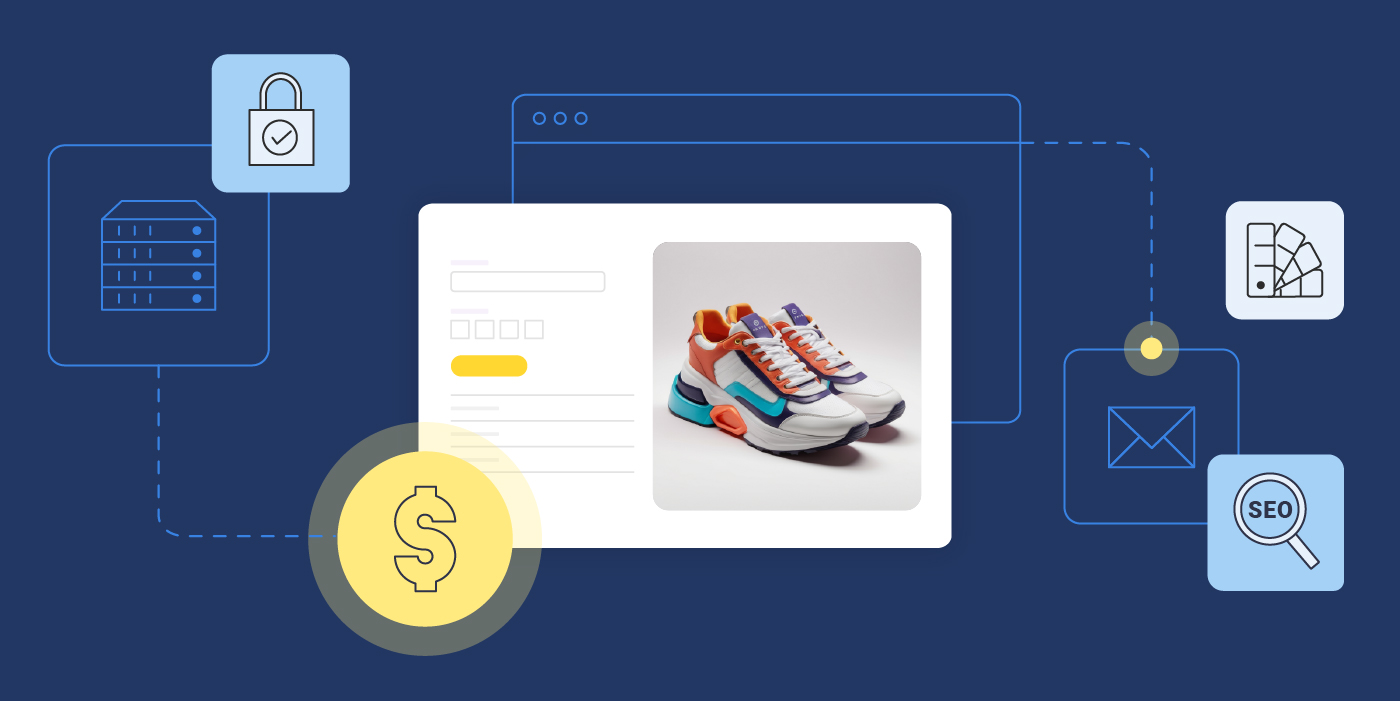
website and around it icons of a dollar sign, color palette, SEO, security to represent website cost

If you’re asking, “How much does a website cost?” you’ve come to the right place.

The cost of a website can vary widely depending on several factors, including the platform you choose, whether you need web hosting, your approach to website design, the additional features or extensions you require, and how you plan to maintain it.

In this guide, we’ll break down the main factors that influence website costs, helping you understand what works best for your needs and budget.

How Much Does a Website Cost on Average?

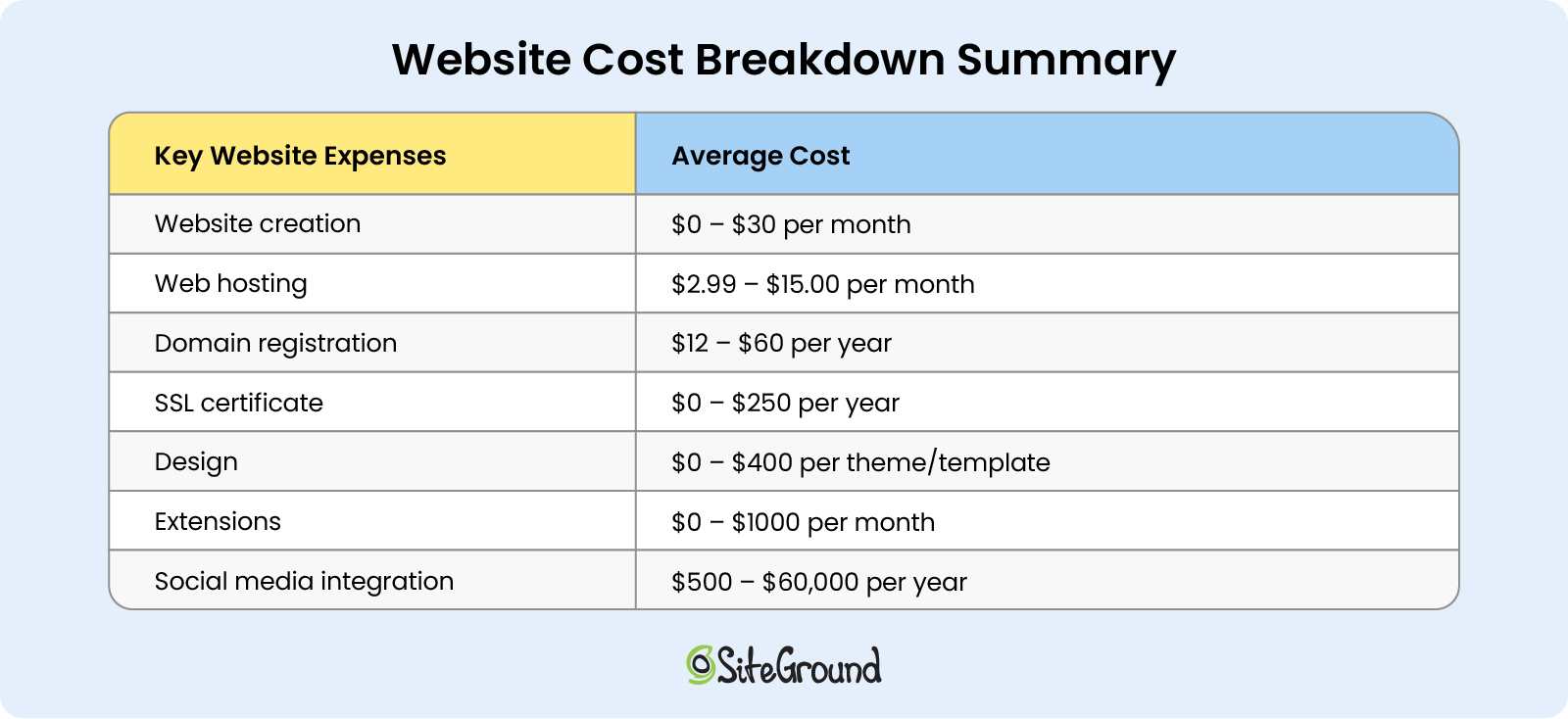
In 2024, the average cost of starting a website ranges from $0 to $30. You can expect to pay at least another $40 per month for maintenance and extra features. As a result, you should plan for a total minimum yearly budget of around $600.

Here’s a detailed breakdown table of average website costs, covering all the key factors to consider.

Take a look, and keep reading for an in-depth exploration of each website component.

an inline cost breakdown summary table with key website expenses such as website creation, web hosting, domain registration, SSL, design, website extensions and maintenance and their average costs

How Much Does It Cost to Build a Website?

Building a website typically costs between $0 and $100 per month on average.

But when it comes to website planning, the choices can seem endless. From ecommerce platforms and CMS to open-source software or even writing custom code, there’s a wide range of possibilities. And since many of these options can overlap, it’s easy to get them confused.

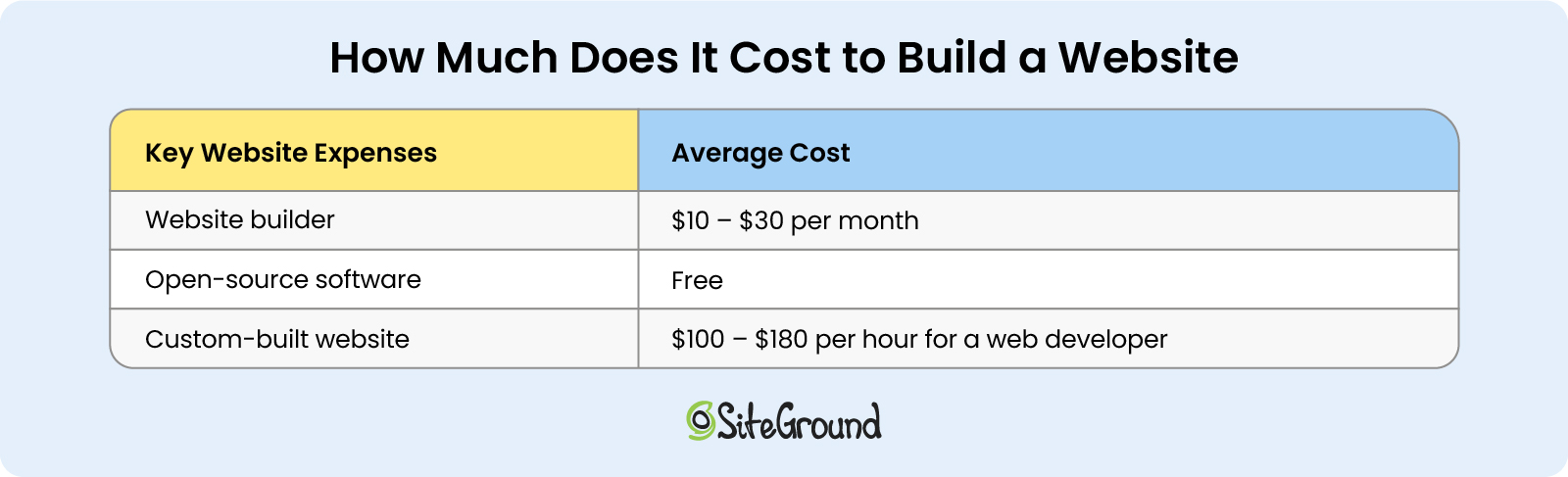
To simplify things, let’s say there are generally three methods to consider – whether you’re going to use a website builder, an open-source software (usually used for content management systems like WordPress), or custom website development.

Let’s explore each of these options in depth, along with their advantages or disadvantages, and their respective average costs.

Website Builder

If you’re just starting out and you’re not that tech-savvy, you might want to choose a website builder.

Some of the most popular website builders include the SiteGround Website Builder, WIX, Weebly, Shopify, and Squarespace. There are two main advantages to using a website builder:

  • Drag-and-drop editor

Website builders often provide drag-and-drop editors for website creation, which are super easy to use. They are also very intuitive when it comes to customizing and making changes to your website design.

  • Subscription-based charges

If you choose this option, you’ll likely need to subscribe to a plan, giving you more control over your costs. You’ll just need to factor in the cost of additional apps or tools to provide the extra functionalities your site may require.

The main disadvantage, though, is that website builders are not that scalable – if you need something more from them, such as more web traffic, or space, or ad-free website, or anything else, you’ll need to upgrade your plan and pay more. They are also limited in functionality, so if you need some extra features, you’ll have to pay for apps, or for custom coding.

Website builders are an excellent choice if you’re looking for a simple way to experiment with website creation and are willing to trade some level of personalization and flexibility for ease of use.

Total cost: With website builders, basic website creation will usually cost anywhere between $10 and $30 per month.

Open-Source Software

Open-source software is a software whose source code can be inspected, modified, and enhanced by anyone. This option is often the preferred choice for many, as it provides greater freedom and more options for personalization when building websites.

For instance, one of the most popular open-source software out there is WordPress. In fact, more than 43% of all websites are built with WordPress.

Here are the main advantages of using an open-source software:

  • Free to use

Open-source software is entirely free to use. For example, you can use WordPress at no cost to build your own website.

  • Community and control

Most open-source software has large communities of users and developers, offering valuable technical support and shared knowledge. Additionally, open-source software gives you greater control over its code, allowing for more customization and flexibility.

If you go for this option, keep in mind that you will still have to pay some additional costs, such as hosting, or extra fees for performance and security tools.

That said, an open-source software like WordPress is a great option for pretty much anyone – from beginners and small businesses to medium-sized businesses and larger companies. It gives you the flexibility to start for free and scale as your site grows.

Total cost for software: Free to start using, extra charges may apply as your brand grows.

Custom-Built Website

If you need a custom-built, unique, or more complex website, you may want to consider hiring a professional web developer.

But how much does it cost to develop a website from scratch? The answer will depend on the complexity and functionalities of the website you need, its backend requirements, and security or performance extensions. A webmaster will usually charge their hourly rate to develop all these for your website.

Total cost: You can expect an average web page development cost between $100 and $180 per hour for the web developer’s hourly rates.

an inline cost breakdown table with different types of website setups such as website builder, open-source software, custom-built website, and their average costs

How Much Does It Cost to Host a Website

Whether you choose an open-source software website or a custom-built one, be sure to factor in web hosting costs when calculating your total website expenses.

Here’s what you need to consider:

Web Hosting Provider

There are different types of web hosting, such as shared, cloud, VPS, or dedicated, from which you can choose the best option for your website needs.

Shared hosting is the most popular and appropriate option for starting a blog, portfolio, or small-business website. With shared hosting, your website uses a server’s resources, such as storage, bandwidth, and processing power, alongside many other websites. This makes it not only the most affordable option, but also powerful and robust enough to cover your website needs. 

Additionally, if you’re looking for a hassle-free hosting experience, opting for shared managed hosting is your best choice, as it allows you to focus on your website without worrying about the technical details. Unlike unmanaged solutions, managed hosting providers offer extra convenience for website owners, because the web host takes care of updates and offers additional perks, such as speed and security boosts.

If you decide to use WordPress, it’s especially important to select a managed hosting service that is specifically designed for WordPress. The price of this hosting is almost the same as other alternatives, yet some hosts may charge extra for the additional software support.

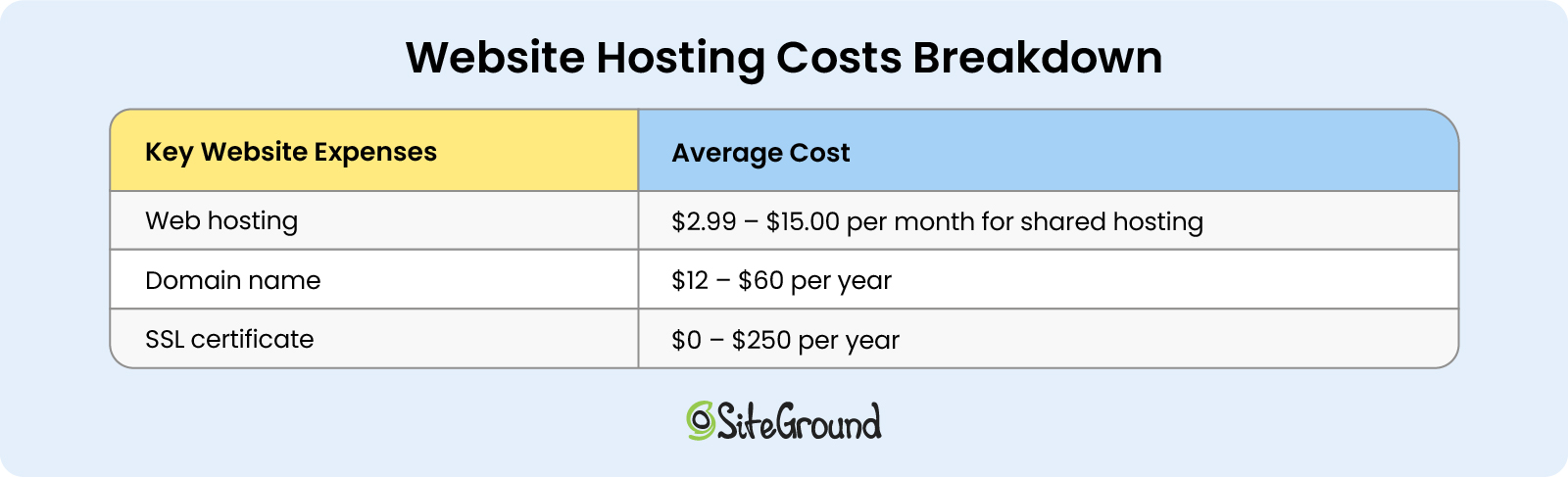
Total cost: The average cost of a shared web hosting plan ranges from $2.99 to $15.00 per month.

Domain Name Registration

A domain name is not only your website’s address on the internet, but it also establishes your brand identity. For example, a domain name looks something like: www.mybrand.com.

Choosing and registering your website’s domain name is another important step when starting a new website. You’ll want a name that’s easy to remember and type, aligns with your brand, and looks professional. Next, consider the domain extension (such as .com, .org, .info, etc.), which also plays a role in your site’s credibility and appeal.

Depending on what extension you choose, your domain name registration costs will vary. For example, top-level domains like .com or .org, including your brand name, could be more expensive.

With that said, how much does a website domain cost? 

Domain name registration can range anywhere between $12 and $60 per year, depending on the above-mentioned factors. Some web hosting providers and website builder services include this domain subscription as a free bonus for the first year.

Total cost: The average cost of registering a domain name is between $12 and $60, on a yearly subscription basis.

SSL Certificate

One more thing that’s a must-have nowadays is installing an SSL certificate. It’s a security technology that encrypts all traffic that goes through your website and ensures that sensitive information, such as login credentials and credit card details remain protected.

This certificate will appear in the user’s browser as an HTTPS prefix instead of HTTP, signaling that your site is secure and safe to visit.

Most often, web hosting providers offer SSL certificates for free with their hosting plans. If your hosting provider or website builder service does not provide a free SSL certificate, you need to purchase an SSL certificate from a third-party provider. It will cost anywhere between $6 and $250 per year.

Total cost: For an SSL certificate, you need to plan to spend between $0 and $250 per year.

an inline cost breakdown table with website hosting expenses such as web hosting, domain name, SSL certificate, and their average costs

How Much Does It Cost to Design a Website

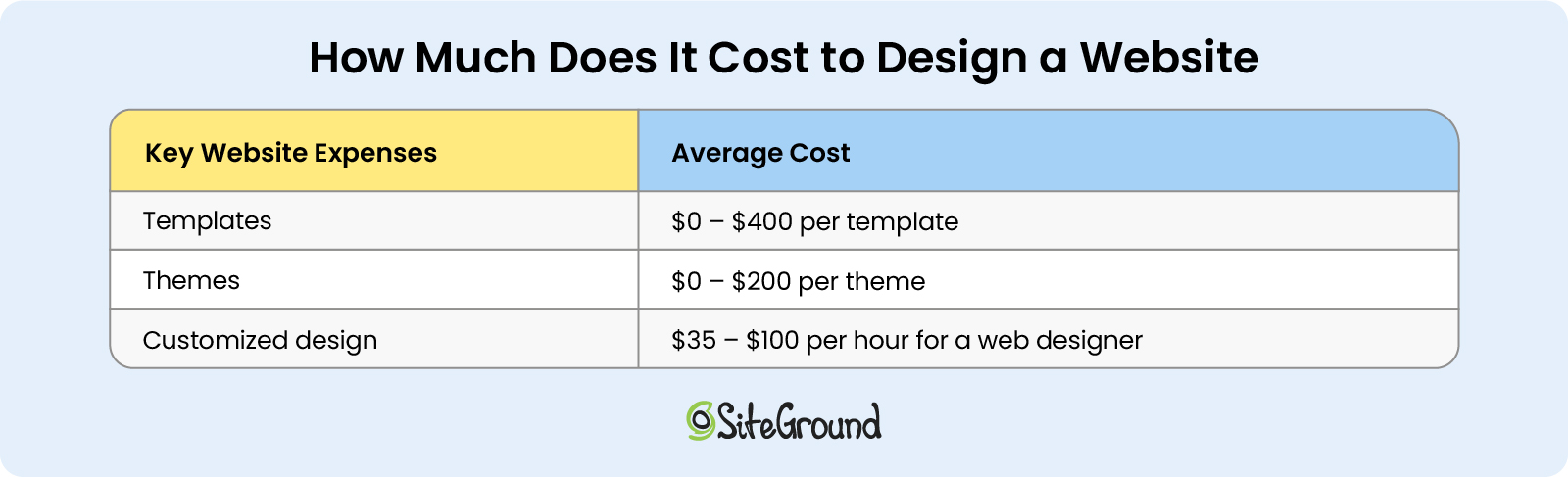
Next comes your website design cost. This cost can range from $0 to $350 per year, depending on different factors. Here are the factors to consider, depending on the type of website you initially built.

Templates and Themes

If you’re using a popular website builder, they typically offer ready-to-use templates as part of your subscription plan. These templates are included in the price you’re paying and can be customized with the builder’s drag-and-drop editor, allowing you to enhance the design and user experience of your website.

If you’re looking for a more unique look, you might need to purchase a premium template, which isn’t included in your subscription. For instance, Wix offers templates ranging from free to $70 or more, while Shopify templates can cost up to $400 or more.

On the other hand, WordPress websites use a similar feature called themes, which control your website’s appearance. Like website builders, WordPress themes come in a variety of designs and can be either free or paid. There are over 12,000 free themes available for WordPress, while paid themes offer additional customization options to improve your site’s design and user experience.

Total cost: Premium templates for website builders range from $0 to $400, while WordPress themes typically cost between $0 and $200.

Customized Design

If you want a completely unique and customized website, you’ll need to hire a professional designer to bring your vision to life. They’ll create a design that matches exactly what you imagine.

To estimate the cost of website design, start by determining the hourly rate of a designer and then calculate the number of hours required to complete your project. In some cases, designers may offer a flat rate for the entire project instead.

When choosing a freelance designer, it’s important to review their portfolio to ensure their style aligns with your vision. Be prepared with examples of websites you like, your preferred color palette, and your logo to provide a solid foundation for the designer to work from.

Total cost: A professional website designer can cost you anywhere from $35 to $100 or more per hour, depending on their experience and the project’s complexity.

an inline cost breakdown table with website design expenses such as templates, themes, customized design from a web designer, and their average costs

How Much Does It Cost to Manage a Website?

Regardless of which CMS, site builder, or ecommerce platform you use, you’ll likely need additional features that come with extra costs.

These features are typically referred to as apps, plugins, or add-ons, depending on the software. Essentially, they enhance the functionality of your site.

There are thousands of apps available, offering countless possibilities, but here, we’ll focus on the essential ones we believe every website needs:

Speed and Security Extensions

Whether you’re using a website builder service, WordPress, or a custom-built website, you’re most likely going to need speed and security extensions. These are critical to any website, no matter what purpose it serves.

WordPress offers more than 59,000 free plugins in its official directory. Many of these plugins function as speed boosters and security enhancements. For example, with the free Speed Optimizer and Security Optimizer plugins, WordPress users get all the speed and security features their website needs, no matter where it’s hosted.

Other popular CMS platforms like Joomla and Magento provide a few thousand extensions each, too, some of which are dedicated to website speed and security.

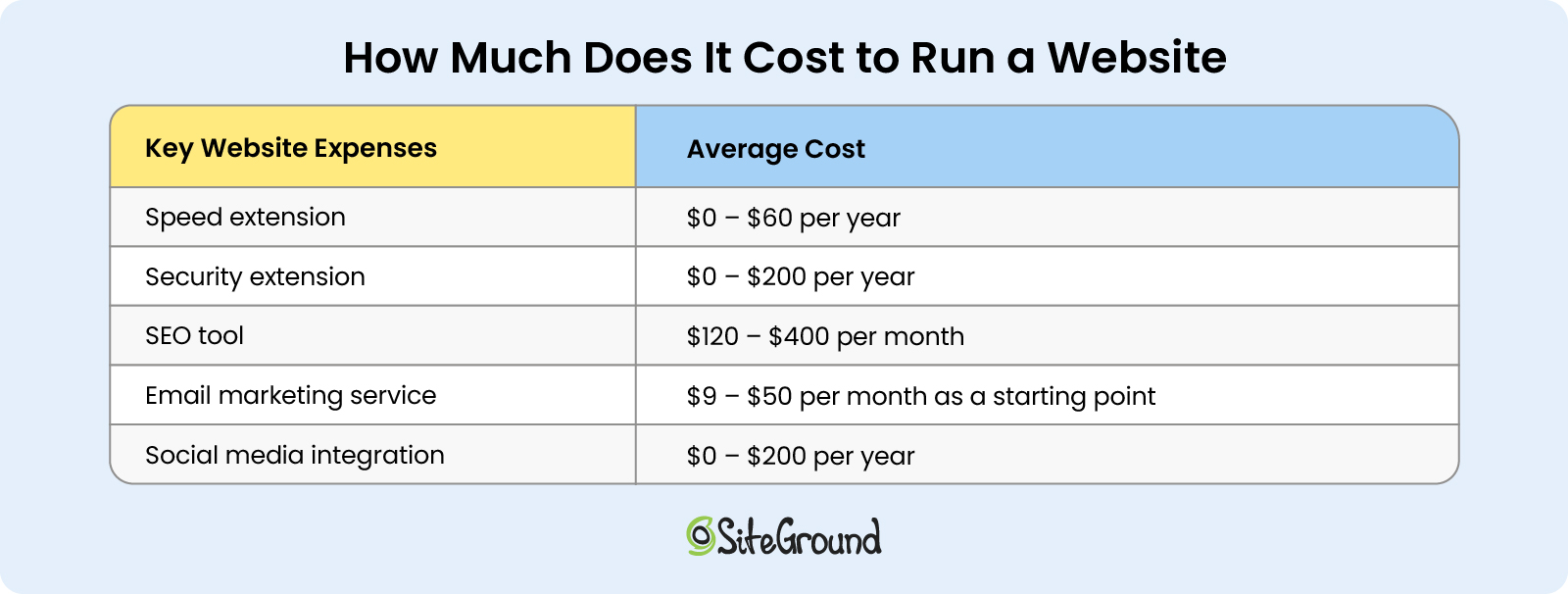
However, not all speed and security extensions are free. For instance, for a paid security plugin on WordPress you might need to pay anywhere between $20 per month and $200 per year. Similarly, for a paid WordPress speed plugin, the cost may vary between $25 and $60 per year.

Total cost: Speed and security enhancements can cost you anywhere between $0 up to $200 per year.

SEO and Analytics Tools

You will need to install an SEO tool to make sure your website is optimized for Google Search results. 

There are free tools like Google Analytics or Google Search Console that provide crucial information on website traffic and user behavior. 

For more advanced data, there are paid tools like Ahrefs, but prices start from $120 per month and go up to $400 per month. Such tools are a game changer, but also not for every budget.

Email Marketing Tool

Email marketing is a must if you want to engage with your target audience, drive more traffic to your website, and collect new leads. To optimize and automate your email marketing campaigns, you need an email marketing tool.

The monthly subscription cost for an email marketing tool will depend on several factors, including number of subscribers, amount of emails sent out, frequency of campaigns, and additional features like automation, or analytics. 

The starting monthly prices for email marketing services typically range from $9 to $50.

Social Media Integration

To drive even more engagement and sales, you might consider promoting your products or services on social media as well. You can do this yourself, or use the help of third-party tools to save time. Some popular tools include Hootsuite (from $100 per month) and Buffer (from $5 to $100 per month, or a free version is available, too), which help you schedule your posts and manage social media content.

For WordPress, you can also use a free or paid plugin that integrates with your website and allows your visitors to share your content on social media. Paid plugins can cost anywhere from $20 to $200 per year.

Total cost: The total cost will depend on the number of extensions that you install and whether they are free or paid – anywhere from $0 to $1000 or more per month.

an inline cost breakdown table with website operational expenses such as speed and security extensions, SEO tools, email marketing service, social media integrations, and their average costs

How Much Does It Cost to Maintain a Website?

Your website maintenance costs will largely depend on the renewal fees for some of the features mentioned earlier.

Start by considering your web hosting renewal or website builder service, whether you’re paying monthly or annually. Some providers offer discounts if you choose to pay annually.

For WordPress users, there are also ongoing costs related to keeping your site updated and maintained. You can reduce this burden by opting for a Managed WordPress hosting provider like SiteGround. Otherwise, you may need to hire someone to handle maintenance, which can become expensive.

Next, factor in the annual renewals for your domain name and SSL certificate. Finally, add up the costs for any additional extensions and calculate their monthly or annual renewal fees.

Total cost: Your website maintenance can cost anywhere between $500 and $60,000 per year.

The Bottom Line on Website Expenses

The cost of a small business website will vary based on the factors mentioned above. These represent the key monthly expenses every small business owner should consider when budgeting for their website.

To calculate your total costs, you need to choose a website building option first, then go for a web hosting provider (if needed), add up the fees for design and extensions, plus the maintenance costs.

The average cost to build a website will range from $0 to $30 per month, and when you add the extra costs after creating the website, you can expect to pay around $500 per year.

We’d love to hear about your experience – let us know in the comments below how much you ended up spending on your website.

10 Email Marketing Benefits for All Types of Businesses

laptop displaying email marketing benefits

Maybe you’ve heard some people question the email marketing benefits – whether they are still effective in the age of social networks. But let’s think about it for a second – don’t we all check our inboxes at least once a day? Whether it’s searching for a discount on your favorite jeans, reading the weekly techie newsletter you’ve subscribed to, or seeing a client’s feedback on a new product, email marketing remains a go-to communication channel.

So, what exactly is email marketing? It serves a wide range of purposes, from a small business sharing updates with a few customers to a team of marketers crafting customized email sequences, known as drip campaigns, tailored to specific customer needs. Email marketing keeps you connected with your audience by retaining their interest, providing updates, facilitating transactions, or promoting your offerings.

How Effective Is Email Marketing?

The statistics show that 60% of consumers prefer to hear from brands through email. Half of these consumers open their emails to find discounts and special offers, while the other half are drawn to the relevant, personalized information brands provide. Therefore, you can leverage the benefits of email marketing for a variety of purposes and still engage an audience that values your messages. 

Regardless of the specific purpose of your email campaign, the long-term goal of your business is to convert one-time buyers into loyal customers. Marketing by email plays a crucial role in achieving this, with a revenue projected to reach $17.9 billion by 2027, highlighting its growing importance and effectiveness in driving business success.

Who Benefits the Most from Email Marketing?

Whether you are a freelance designer showcasing your portfolio and developing your personal brand, a small bakery sharing recipes and promoting small cozy events, or a large software company launching products and providing educational webinars, email marketing enables direct and meaningful interaction with your audience. 

The advantages of email marketing extend to any type of business because it offers versatile strategies for reaching out to your target audience, engaging them with personalized content, and converting them into loyal customers.

🔥 If you own a small business and are uncertain about how to begin, or wish to refine your current approach, consider exploring our comprehensive guide to mastering email marketing for small businesses.

10 Email Marketing Benefits

The possibilities of email marketing are endless, especially with modern email service platforms. As you continue reading, you’ll discover how to leverage its many benefits. 

1. Cutting Costs and Time on Marketing Communication

One of the biggest advantages of email marketing is its cost-effectiveness, making it a perfect solution for businesses with tight budgets. Unlike paid ads or influencer marketing, email allows you to directly reach your audience at a fraction of the cost. Many email-focused platforms, such as SiteGround Email Marketing, even offer free trials or low-cost plans tailored for small businesses.

In the past, sending a newsletter could take days of continuous effort, requiring copywriters, designers, and developers to work together. Today, email marketing platforms have simplified the process, allowing you to create and send an email campaign in as little as 30 minutes.

Our easy-to-use interface, no-code email builder, and integrated AI writing assistant mean you don’t need to hire a professional copywriter or designer to create effective emails. You can also draw inspiration from other brands or use AI tools like ChatGPT to generate content, streamlining the entire process even further.

By cutting down both time and cost, you can create engaging emails and deliver effective marketing communication to your audience with minimal effort.

2. Achieving a High Return on Investment (ROI)

Another significant benefit of email marketing is its ability to deliver a high return on investment (ROI) – a key metric of your campaign’s success. 

On average, email marketing yields on $36 to $42 for every $1 spent, though this can vary based on several factors:

  • The industry you’re in: retail and ecommerce tend to see the highest returns, followed by marketing and PR agencies, and the tech industry. But don’t get discouraged if you’re in a different sector; you can still win over your readers with valuable content.
  • The frequency of sending emails: sending 9 to 16 emails per month can guarantee a higher ROI. If you think you can’t keep up with high frequency, sending two to four per month can still significantly boost it. Ultimately, consistency is key.
  • The timing of your emails: while Tuesday mornings between 9 and 12 AM are often recommended for higher open rates, conducting A/B tests can help identify the best timing for your audience.
  • The content of your email: successful email campaigns largely depend on segmentation, message personalization, and email automation. We’ll explore how to implement each of these in the upcoming sections.

By understanding these factors and tailoring your approach accordingly, you can enhance your email marketing efforts and achieve a higher ROI for your campaigns.

3. Gaining New Leads

Email marketing can be a powerful tool for generating new leads. One effective strategy is to offer lead magnets – such as downloadable ebooks or exclusive access to webinars – on your website in exchange for email sign-ups. These resources provide immediate value and demonstrate your expertise, enticing visitors to share their contact information to gain access. 

With their email addresses in hand, you can nurture these leads through targeted campaigns that build trust and encourage them to explore your products or services. To maximize your efforts, we’ve gathered proven email lead generation strategies designed to elevate your business and maximize conversions.

SiteGround enhances this process with a lead generation plugin that seamlessly integrates with your WordPress website. It enables you to create subscription forms and even add subscription options to existing contact forms, making it simpler than ever to capture and expand your email list.

4. Increasing Subscribers’ Engagement 

By now, you might be intrigued by the potential of email marketing, but how can you determine which of your email subscribers are genuinely interested in what you have to offer? After all, there’s nothing more frustrating than wasting your time on leads that aren’t likely to convert into customers.

Email segmentation is one of the benefits of email marketing that can help you overcome this challenge. Indeed, segmented email campaigns result in 30% more opens and 50% more clicks than unsegmented ones. By categorizing subscribers, you can tailor content to specific groups, ensuring your messages and offers are relevant and appealing. Segmentation can be based on factors like demographics, behavior, email activity, and sales funnel position.

SiteGround Lead Generation Plugin allows you to organize your subscribers into specific groups, enabling you to customize your messages to meet the needs of different audience segments. 

5. Building Stronger Relationships with Subscribers 

Who enjoys reading an email that feels impersonal and generic? Likely, none of us do. Email marketing provides you a unique space to address your audience on a first-name basis, fostering a sense of familiarity and engagement.

Start by crafting a compelling subject line – including the recipient’s first name in the subject line can boost the click-through rate by 10.64%. Along with the sender’s name, these are the first elements people notice when receiving an email. Next, personalize the opening line of your email by using the recipient’s name instead of a generic “Dear Customer.” These simple touches can significantly enhance your engagement and connection with your subscribers.

6. Maximizing Marketing Efficiency and ROI

Businesses need more than just time-saving tools – they require solutions that maximize efficiency and return on investment. Email automation achieves this by delivering personalized, timely content without the need for continuous manual input.

Imagine being able to set up a series of emails that are automatically sent to your audience based on their engagement with your brand. For instance, a well-timed welcome email can immediately introduce your brand, offer a freebie, or provide valuable information that builds trust from the start. Automated sequences like these ensure that you stay connected with your customers while spending less time on manual tasks.

Beyond just staying in touch, automation helps you drive more revenue by delivering targeted messages at critical moments. For example, after a customer makes a purchase, an automated upsell email can suggest complementary products or services. By sending the right message at the right time, you increase the likelihood of repeat purchases and higher transaction values – all without additional effort.

The real power of email automation lies in its ability to scale your marketing efforts while maintaining relevance and personalization. This boosts both engagement and conversion rates, directly contributing to better ROI. Instead of dedicating more time and resources to manual processes, you can focus on growing your business, knowing that your email campaigns are working effectively in the background.

7. Providing More Website Traffic 

A significant advantage of email marketing is its ability to generate more website traffic. By directly communicating with your audience through targeted email campaigns, you can effectively guide subscribers to your latest content or landing page. 

Imagine you’ve just launched a course on how to become a wedding photographer. Sending an email with a compelling call to action can entice readers to visit your website, significantly boosting the traffic to your website. It’s advisable to include a link to your website in every email you send, encouraging subscribers to click and learn more about your latest content and offers.

In addition to driving traffic, email marketing provides valuable insights into how your audience interacts with your content. This data allows you to see which content drives the most traffic from your emails, enabling you to replicate or use that type of content more often to drive sales. 

8. Strengthening Your Brand Credibility

In today’s competitive market, people are more inclined to support businesses they know and trust. So another benefit of email marketing is that it allows you to maintain regular communication, ensuring your brand remains familiar and reliable in the eyes of your customers. This consistent engagement not only reinforces your brand’s credibility but also shows your commitment to transparency and customer satisfaction.

Additionally, a well-executed email marketing strategy can boost word-of-mouth referrals. When customers trust your brand, they are more likely to recommend it to friends and family. This organic growth is invaluable, as personal recommendations often carry more weight than traditional advertising.

9. Tailoring Your Products and Services to Fit Customer Needs

Email marketing offers the valuable advantage of gathering customer feedback, which is especially beneficial for businesses looking to establish themselves in the market. By incorporating customer surveys into your email campaigns, you can obtain insights into how your audience perceives your brand. 

To maximize the benefits of these surveys, incorporate quantitative questions to assess customer loyalty, satisfaction, and their likelihood of recommending your product or service. Complement these with open-ended questions to delve into the reasoning behind their responses. This strategy not only enables you to better meet customer needs but also enhances their overall experience.

Moreover, by actively seeking feedback and acting upon it, you demonstrate to your customers that their opinions are heard and valued, fostering greater loyalty and trust in your brand.

10. Providing Valuable Performance Insights

As the saying goes, you can only improve what you measure. Email marketing tools provide valuable insights into customer behavior, offering clear campaign reports that reveal everything you need to know about your performance. By tracking key metrics such as bounce rate, click-to-open rate, and unsubscribe rate, you gain a deeper understanding of how your audience interacts with your content.

When launching an email campaign, the initial engagement typically peaks within the first 24 hours. A few days after sending, you should have a nearly complete picture of the campaign’s performance. However, if your campaign involves multiple emails and spans other channels – such as paid ads, social media, individual sales outreach, or earned media – it may be beneficial to wait longer for a more comprehensive view. 

As data from your campaigns accumulates, you can test and optimize elements like subject lines, content, and send times to enhance results over time. The effectiveness of email marketing also depends on factors such as the quality of your email list, the relevance of your content, and the frequency of your emails. Regular analysis and adjustments based on your findings can lead to improved outcomes.

Leverage the Email Marketing Benefits with the Right Service Provider

As you’ve seen, email marketing benefits are truly endless – from boosting reader engagement to turning one-time buyers into loyal customers. Whether you’re just starting out or managing a large corporation, harnessing the power of email marketing can transform your communication strategy and deliver meaningful results. Now’s the time to give it a try!

The 6 Absolute Worst Email Marketing Mistakes to Avoid

worst email marketing mistakes to avoid

Whether you work for a big corporation, or run a small, family business, email marketing is an unrivaled way to captivate your audience, create brand loyalty, and drive conversions. But mastering it isn’t just about sending messages – it also requires a strategy, and avoiding a select list of common email marketing mistakes that can make or break your success. 

So, what email marketing mistakes should be avoided? This article will tackle six of the very worst email marketing mistakes – and how to easily avoid them. With just a bit of extra care in each of these areas, you can ensure that your email marketing efforts are a success, delivering the best possible results for your business.

Why It’s Important to Avoid Email Marketing Mistakes

While the field of digital marketing is crowded and complex, email marketing stands out as a unique opportunity to connect personally and directly with your audience in a highly targeted, strategic way. Not only that, but it’s fairly easy to implement, and offers an astonishing return on investment. 

Indeed, the benefits of effective email marketing are vast, including higher email open rates, a growing list of quality subscribers, increased brand and loyalty, and, importantly, more conversions and business opportunities. 

Before we get started: if you want to get your email marketing up and running but don’t know where to begin, then join our free, six-day email marketing course. It will give you all the tools you need to create highly successful email campaigns with ease – and to start implementing the tips we’ll be sharing here.

What Email Marketing Mistakes to Avoid

1. Not Using High-Converting Sign-Up Forms

Your email list is the backbone of your email marketing efforts. So one of the top email marketing mistakes you can make is not taking the extra steps to optimize how you acquire subscribers. That’s right: if your sign-up forms aren’t designed to convert, you could be missing out on heaps of potential leads. So how to make this happen? Let’s dive in.

Gather Essential Info

Most sign-up forms typically ask for just an email address and, occasionally, a first name. While this simple approach can increase submission rates, it may not help you qualify leads effectively, especially if your goal is to focus on high-quality prospects. The key is to balance the number of questions with what’s essential for your business to determine whether a lead is a good fit.

For example, an interior designer might ask for project details or budget range, while an online store may only need an email. By gathering the right information from the start, you’ll save time and concentrate on leads that are more likely to convert. That said, don’t ask for extra information unless you really need it – unnecessary fields can reduce sign-ups.

Use a Double Opt-in

While a single opt-in might seem faster and more logical, implementing a double opt-in can actually help you build a higher-quality email list. What is a double opt-in? During this second step, users verify their subscription through a confirmation email. By doing so, you as a business can be extra certain that these subscribers legitimately want to hear from you. This is an especially good thing because it not only increases engagement (because subscribers look forward to your emails!) but also helps reduce spam complaints and bounce rates.

Leverage Lead Magnets

A lead magnet, such as a downloadable resource, eBook, or exclusive content, is among the top lead generation tactics to incentivize users to sign up for your list. People are far more likely to subscribe when they receive something of value in return. Just be sure that your lead magnet aligns with both what you offer and with your target audience’s needs and interests.

2. Not Focusing on a High-Quality List, and Segmentation

One of the most common mistakes in email marketing is focusing on list quantity rather than its quality. Indeed, a smaller, well-segmented list is often way more effective than a large, untargeted one. So when it comes time to improve your list quality, it’s essential to prioritize list hygiene and segmentation.

Clean Your List Regularly

An outdated or unengaged list can harm your deliverability rates and skew your campaign metrics due to unopened, undelivered emails, and spam complaints. By cleaning your list regularly, you can avoid these pitfalls, removing inactive subscribers, reducing bounce rates and improving engagement. 

Go through your list once every three to six months to identify users who haven’t opened or clicked on your emails for an extended period, and consider sending them a re-engagement campaign. If they still don’t respond, it’s time to remove them from your list. 

Segment Your List and Send Targeted Emails

Segmentation is one of the most powerful tools in email marketing. By dividing your list based on demographics, interests, or behaviors, you can send more relevant content to specific groups of people. For example, you might wish to send one message to loyal customers (with a discount thanking them for their business), and a different one to new customers (with a unique offer that entices them to buy). These personalized emails lead to higher open rates, better engagement, and ultimately, more conversions. 

Want to become an expert on growing a high-quality email list? Read our guide on how to build your email list.

3. Not Developing Strategic Subject Lines

Your subject line is the first thing your subscribers see, and it’s often the deciding factor in whether your email gets opened or sent straight to the trash bin. With a little extra work, though, you can increase open rates – and hopefully conversions.

Generate Intrigue

Subject lines that pique curiosity tend to attract more opens – it makes it hard(er) to resist the click! The idea is to avoid revealing too much in the subject line – leave a little to the imagination so that the subscriber feels compelled to click to learn more. That said, ensure that the content inside your email aligns with the intrigue you’re building; misleading subject lines can lead to unsubscribes or spam complaints.

Create a Sense of Urgency

Urgency is a powerful motivator in any type of marketing, and that goes for email marketing just the same. Subject lines that include phrases like “only a few left” or “last chance” can encourage users to take immediate action. Urgency taps into the fear of missing out, pushing subscribers to engage with your email quickly.

Align with Email Content

Your subject line should reflect the content of your email. Subscribers don’t like bait-and-switch tactics, so make sure you’re delivering what you promise in the subject line. So be cautious not to over promise, or to mislead. Clarity in your subject line builds trust and credibility with your audience.

Launch your email marketing in no time with ease. Sign up for SiteGround Email Marketing today and get 80% off! >>

4. Not Using Strong Calls to Action

A great email is virtually worthless without a clear, actionable next step – your email essentially becomes a dead end. So it’s not surprising that one of the most detrimental email marketing mistakes marketers make is neglecting to include effective calls to action (CTAs) in their emails.

Make It Action Oriented

Your CTA should clearly instruct the reader on what to do next. Use action-oriented language that prompts them to take immediate action, such as “Shop Now,” “Download Today,” or “Claim Your Offer.” Avoid vague CTAs like “Click Here” that don’t convey what the recipient is signing up for.

Make it Specific

A generic call to action may fail to capture attention. Be as specific as possible. Instead of “Get Started,” try “Start Your Free Trial” or “Download Your Free Guide.” Specificity makes the offer more compelling and gives the recipient a better understanding of what they will gain.

Noticeable and Strategically Placed

Your CTA should be easy to spot, whether you’re using a button or a hyperlink. It’s often a good idea to include your CTA multiple times in the email—once near the beginning, once in the middle, and once at the end. Strategic placement ensures that even if subscribers don’t read the entire email, they can still easily take action.

So much more goes into creating the perfect email. If you’d like to learn more, read our comprehensive article on how to write marketing emails that people will read.

5. Not Having a Content Calendar

Successful email marketing requires a well-thought-out plan, and one of the most common email marketing mistakes is failing to create a content calendar. Without a schedule, your emails may become inconsistent or irrelevant, leading to decreased engagement. On the flip side, a well-organized schedule will help you stay on top of email marketing, and to better be able to align your marketing with business objectives.

Plan Content Types Strategically

Your emails should include a variety of content types to not only keep your subscribers engaged, but to strategically build your relationship with the customer, and to build your credibility as a brand. Planning ahead allows you to have a bird’s-eye view of what you intend to send out, thus allowing you to balance promotional content with other types of content, such as resources or educational material. A content calendar also helps to make sure that your emails stay fresh and diverse, offering value to your subscribers without overwhelming them with constant sales pitches.

Schedule Content for Consistency and Ideal Frequency

Consistency is key in email marketing. Whether you send emails weekly, bi-weekly, or monthly, a content calendar helps you maintain a consistent cadence. It also ensures that your email frequency aligns with your audience’s preferences. Too few emails can lead to disengagement, while too many can overwhelm your subscribers, increasing your unsubscribe rates.

6. Not Optimizing with Goals and Metrics

Finally, one of the biggest mistakes is not setting clear goals or tracking metrics. Without data-driven insights, it’s impossible to gauge the effectiveness of your campaigns or optimize them for future success – and this is truly where the real email marketing magic happens.

Identify Goals and Metrics

Before launching a campaign, identify what success looks like. Whether your goal is to increase open rates, drive traffic to your website, or boost sales, having a clear objective will guide your strategy. Next, determine which metrics will help you measure progress toward that goal. Maybe you want to drive sign-ups for a certain course, or increase the sales of a new product, or perhaps simply to grow your list. Whatever your goal, identifying success metrics can help you get there. Common email marketing metrics include open rates, click-to-open rates, conversion rates, and unsubscribe rates – and you can learn more about all of them in our article on email marketing metrics.

Track and Optimize

You’ve defined your goals and metrics, now you must track them. Monitoring performance after each email send allows you to adjust your email strategy from campaign to campaign. If your open rates are low, consider tweaking your subject lines. If your click-through rates are underwhelming, review your CTA or content. If unsubscribe rates or going up, check your content and clean your list. Regular analysis and optimization are essential to long-term success.

Run A/B Tests

A/B testing is a fantastic way to optimize your emails and continually improve their success. It allows you to experiment with and improve different email elements, such as subject lines, copy, CTAs, and design. 

Do this by dividing one of your email segments and sending two different versions of the same email to the two different groups – one version to one group, the other to the other group. It’s important to only change one thing in that email: the element you’ve decided to test (a subject line, CTA, etc). After sending, compare the results from the two emails to determine which one performed better – from there, optimize your campaigns accordingly. The beauty here is that testing helps you make data-driven decisions and improve your results indefinitely.

Avoid Common Email Marketing Mistakes for Lasting Success

Email marketing remains one of the most powerful channels to engage and convert customers, but only if executed smartly. By avoiding these six common email marketing mistakes – poor sign-up forms, ignoring list quality and segmentation, weak subject lines, ineffective CTAs, a lack of content planning, and failing to optimize with metrics – you can elevate your email marketing strategy and drive better results for your business.

By refining your approach, focusing on the needs of your audience, and consistently optimizing your efforts, you can turn email marketing into a reliable and effective part of your overall digital marketing strategy.

Now that you know exactly what to do and not do when it comes to email marketing, it’s time to put everything in motion. Go from email marketing beginner to expert in just six days: join our FREE, six-day email marketing course. 

And if you’re keen to get your email marketing efforts started without all the hassle, sign up for SiteGround Email Marketing – it’s super easy to use, and 80% off!

Welcome Email Guide: Best Practices and Examples in 2026

welcome emails templates and examples 2024

Every time someone joins your email list, it’s a valuable opportunity. Welcome emails are your first chance to connect and they’re critical. Often underestimated, these emails are one of the most effective ways to engage and retain new subscribers right from the start. In this article, we’ll explore the importance of using welcome emails, share key best practices, and provide templates for different business scenarios in order to help you get started. 

What Are Welcome Emails?

A welcome email is simply the first message you send to new subscribers after they’ve joined your email list. However, a welcome email is more than just a confirmation of their successful subscription or purchase! It’s your chance to make a strong first impression. This pivotal moment sets the tone for how subscribers will perceive your brand and marks the beginning of their customer journey. 

Why Welcome Emails Are Important for Your Business

Welcome emails are quite effective and offer a variety of benefits. Here are some of the most notable ones.

📬 Customers expect them: On average, 74% of people are expecting to receive a welcome email shortly after they join an email list. So, make sure you use welcome emails in order to meet the expectations of your recipients.

🫶 They help build credibility and set the tone: 

A welcome email is a powerful tool for showcasing your brand’s values and voice, helping you build credibility with customers who are new to your brand and may not yet know much about it.

🔝 They are extremely effective and boost engagement: Research shows welcome emails deliver impressive results, such as four times more opens (an average 50% open rate) and five times more clicks (an average 14.4% click rate) compared to regular email campaigns. Plus, subscribers who receive welcome emails show 33% higher engagement with the brand.

welcome emails siteground email marketing platform

Best Practices for Welcome Emails in 2024

Now that we’ve covered what welcome emails are, why they’re important for your business, and why you should leverage them, let’s dive into the key elements every welcome email should include, and what best practices you need to follow. 

Send welcome emails right after the user joins your list

In email marketing, proper timing is very important. To maximize the impact of your welcome emails, make sure they’re sent immediately after someone joins your subscriber list, or within 24 hours at the latest. This helps keep your brand top of mind and significantly reduces the chances of them losing interest or even forgetting why they signed up for your email in the first place. It also shows that you are attentive and organized, which will help you build a positive impression of your brand. 

Personalize Your Emails

Typically, personalized emails perform much better than generic ones. That’s because people are more likely to perceive such content as more relevant to them, and therefore open it and engage with it. To personalize your welcome emails, use the recipient’s name in the subject line or in the greeting at the beginning of your email.

Also, create tailored content that resonates with your audience’s interests or the way they have subscribed. You can segment your audience into groups you find relevant and create different welcome emails for each of them. For example, if you’re a photographer, and you often have prospects interested in professional corporate photography, send them a welcome email including your top corporate photography pieces.

Use Compelling Subject Lines

Your subject line is one of the most important elements of your welcome email, as it is the first thing recipients see from you. To make it effective and attention-grabbing, keep it clear, short (especially for better display on mobile), and give a hint of what subscribers can expect from you. Also, whenever appropriate, consider using emojis, as they can make your emails more visually appealing and engaging. 😉   

Brand Identity and Consistency

One of the best practices for welcome emails is to craft them in a way that aligns with your brand’s identity and maintains consistency across all the different media you use. To do so, make sure to keep the same tone of voice as on your website, social media, and other channels. Use your logo, brand colors, style, fonts, and any other elements that your audience associate with your brand.

Set Clear Expectations and Give Next Steps

Now let’s talk about the content of your welcome email. It’s obvious that in your welcome email you would want to extend a warm welcome to your new subscriber. But you’re probably wondering “what else should I include?” 

As a general rule, don’t overwhelm your readers with too much information. Share only the essential details that they’ll need. People like to know what to expect, and whether spending time on your content will be worthwhile. Set clear expectations and guide your subscribers through their journey with your brand. 

You can outline the type of tips, news or offers they will receive in your email campaigns, and how frequently they can expect to hear from you. It’s also a good idea to include next steps, like exploring your website or directing them to a specific page or blog post.

🔥 PRO TIP: Create email content effortlessly with the power of AI and SiteGround Email Marketing

If you’re lacking writing inspiration, check out the SiteGround Email Marketing platform: it’s AI Email Writer can help you create the perfect text.

Add Value

If you encourage subscribers to join by using  a lead magnet  – such as an eBook, guide, exclusive podcast episode, design sample, or discount code –  now is the perfect time to deliver on that promise. Adding the lead magnet to your welcome email will build trust and reinforce the value of being on your list. For example, if you are a style consultant, a subject line like: “Welcome aboard! Your free autumn style guide inside!” would work great. 

Integrate Your Social Media Channels

Welcome emails can be part of a broader, integrated marketing strategy. Use them to invite subscribers to connect with you outside email by integrating your social media channels to your emails. Encourage recipients to follow you for more news, updates, or promotions.

The SiteGround Email Marketing platform lets you easily add clickable social media icons to your emails, expanding your reach and boosting engagement.

Effective and Clear CTA

Be sure your subscribers know what action you want them to take next by adding an obvious and straightforward call-to-action (CTA) button or hyperlinked text. Your CTA caption should be short and clear, like “Sign Up Today,” “Start Free Trial,” or “Get Your Free Sample.” 

It’s also a good practice to place it above the fold, so that readers can see it even if they don’t read your whole email. If your email is long, consider adding your CTA two or more times. 

Provide an Unsubscribe Option

Even though unsubscribing is probably the last thing you want recipients to do, it’s essential to add it to your welcome emails. It shows that you are transparent, and it’s also an effective way to ensure that your subscriber list contains only recipients who are truly interested in your content. Moreover, the unsubscribe option is important to comply with international laws like GDPR and CAN-SPAM.   

Use Modern, Mobile-responsive Design

It’s essential that your welcome emails are optimized for mobile devices. Choose an email marketing platform that provides mobile-friendly templates that automatically adjust to smaller screens. As a general rule, keep your email content as short as possible so it looks good on mobile devices, opt for a single-column design if possible, and avoid overloading your email with too many images.

Welcome Email Templates and Examples

Now let’s explore some welcome email templates that could serve as  inspiration for what you can create in different scenarios. If you like one of them, you can use it yourself via the SiteGround Email Marketing platform, and easily adjust it to fit your brand’s style.

Welcome Email for New Clients

A well-crafted welcome email can start off your relationship with new subscribers on the right foot. Make it more personal by incorporating a warm message from the business founder. You can tell more about the inspiration behind the brand and its values.

Continue by offering additional resources, product lines or anything else that you think will be suitable to entice subscribers to explore more. Add a clear call to action (CTA) to drive engagement, and include social proof to build trust.

welcome email template for new clients

Newsletter Signup Welcome Email

When a person joins your newsletter but hasn’t yet made a purchase, it’s a good idea to immediately engage and deliver a special offer or a discount code to encourage them to make their first purchase. This combination of a welcome message, personalized exclusive offer, and clear call to action is an effective way to make subscribers take the first step with your brand.

newsletter signup welcome email

Welcome Email for Onboarding Subscribers

Here’s another welcome email example that greets a new subscriber while also explaining onboarding steps. If your business or project has a mission, be sure to mention it in your welcome email. Along with this, you could add authenticity by including a note from the founder, and encourage action with a visible CTA. When crafting an onboarding email, make sure to encourage subscribers to interact with your brand – guide them to specific products, send them helpful articles, make them add a reminder for upcoming event, etc.

onboarding welcome email

Community or Loyalty Program Welcome Email

If you have a community, loyalty, or rewards program, your welcome email could include simple steps with what the members will get from it, its benefits, how it works, and a clear call to action.

community or loyalty program welcome email

Event Registration Welcome Email

For businesses hosting events, whether online or in-person, a good welcome email practice is to provide a highlighted section with visible information about the date and time of the event and a call to action to save the date to your calendar. After that, you could add any other relevant information – more details about the event, useful links to resources, social media links, etc.

event registration welcome email

Welcome Email Template for Delivering a Freebie

If you build your email list with a lead magnet like a free guide or course, the welcome email should deliver the promised free downloadable content right away. To make it straightforward, add a button or a visible link in the beginning of your welcome email, thank the subscriber for their interest, and give more details about how the free piece of content will benefit them. It’s a nice touch to also suggest more relevant resources. This might help you drive further engagement.

welcome email template for delivering a freebie

Content/Blog Subscription Welcome Email

When a person signs up for your blog, it’s a good practice to briefly explain what they can expect from it in the future. You could add information about the themes and topics you plan to write the most, how often they can expect new content from you, and a few popular posts to get them started. This email is also a great opportunity to invite them to follow your social media channels.

blog subscription welcome email

Get Started with Welcome Emails Today

We hope the best practices and tips we’ve shared above will help you easily create your welcome emails and set the foundation for a successful and lasting relationship with your subscribers. Ready to take the next step? Go ahead and give the SiteGround Email Marketing platform a try –  it’s free for the first 30 days!