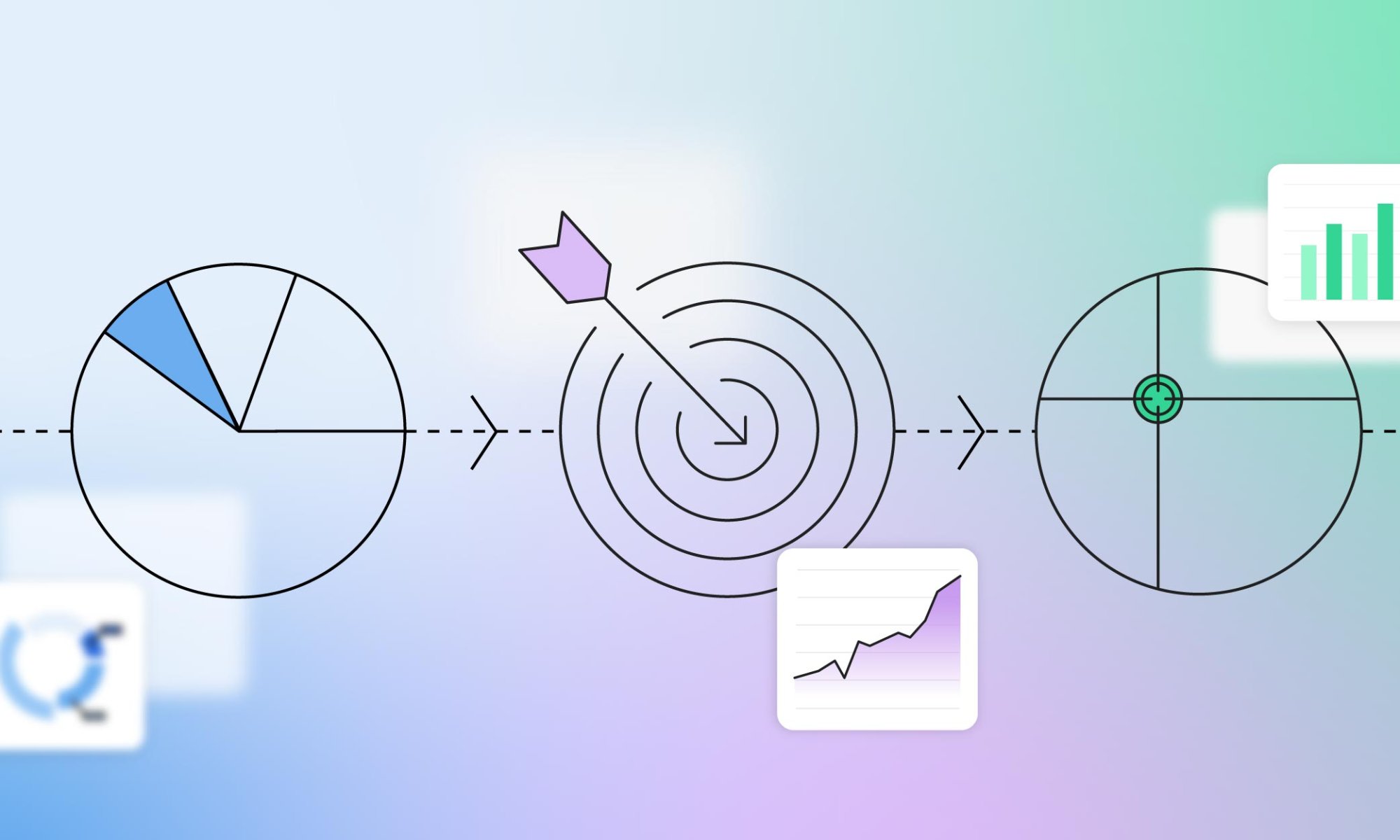
Master STP Marketing to Grow Your Business

STP marketing

Ever wonder how some brands just seem to “get” their customers? The secret is STP marketing—Segmentation, Targeting, and Positioning. Crafting campaigns that genuinely connect starts with recognizing the distinct characteristics and preferences of various audience segments.

As competition intensifies, mastering the art of reaching your audience is key to standing out and making a lasting impression. Ready to see your brand shine? Let’s dive into how the STP marketing model can make it happen!

What is STP Marketing?
what is STP marketing

Segmentation, Targeting, and Positioning (STP) is a strategic marketing model that involves segmenting the market, targeting specific customer groups, and positioning your product or service to effectively meet those groups’ needs.

This marketing process includes selecting market segments that best align with your brand’s objectives and positioning your brand to make those specific consumer groups feel understood and valued.

The concept of STP marketing has evolved as consumers become more complicated and tech-savvy. Understanding the STP meaning in marketing equips you with a strategic advantage, enabling your brand to cut through the noise and make your brand actually matter to the people who count. 

The Importance and Benefits of STP Marketing

One-size-fits-all solutions no longer cut it; STP marketing is a key strategy for businesses looking to meet the varied needs of their customers. A more personalized touch attracts new customers and strengthens brand loyalty, and ensures your business remains a trusted choice in a competitive market. 

Now, let’s explore the core components of STP marketing and discover how they can transform your small business marketing efforts.

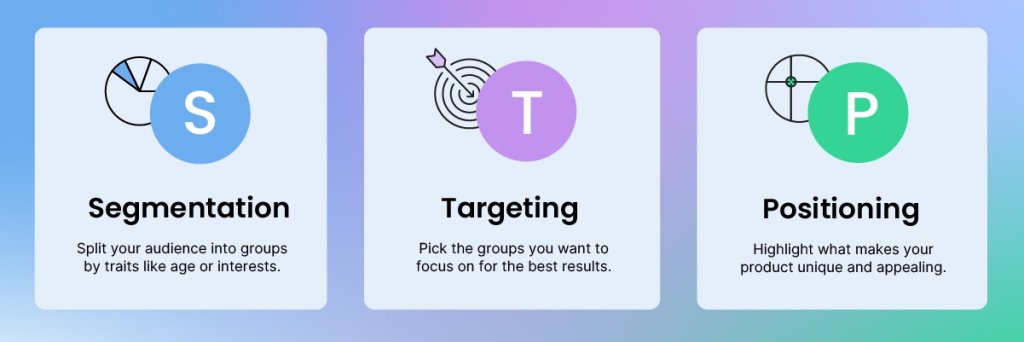
  • Segmentation, or dividing the broad market into smaller, more defined segments, allows companies to fit their marketing strategies to address the specific needs and preferences of different customer groups. This approach increases the relevance and impact of marketing activities, leading to better engagement and satisfaction.
  • Targeting the most attractive segments allows businesses to focus their resources on areas with the highest potential for profitability and growth. This strategy ensures that marketing messages resonate with the intended audience, improving the efficiency and effectiveness of campaigns.
  • Positioning is important for establishing a strong brand presence in the minds of consumers. With clear communication about what makes the brand unique and valuable, businesses can differentiate themselves from competitors. A well-executed positioning strategy ensures that the brand occupies a distinct and memorable place in the market, building customer loyalty and driving long-term success.

Use STP Marketing in Your Strategy in 5 Simple Steps

Implementing STP marketing involves a series of steps that enhance market understanding and optimize marketing efforts. These steps make certain that your strategies are precisely adjusted to meet the needs and preferences of your target audience. Here’s how to effectively incorporate STP into your approach:
STP marketing

1. Conduct a Thorough Market Analysis

To effectively implement STP in your strategy, gather data from various sources such as CRM systems, social media analytics, surveys, and market research reports. Collect detailed insights such as impressions, engagement, purchase history, customer preferences, and other behavioral patterns.

These insights can reveal which products customers are interested in, how often they make purchases, and the best times and channels to reach them. For example, you might discover that a significant portion of your audience engages more with email marketing on weekends, indicating a preference for receiving communications during this time. 

This insight lets you tweak your campaign schedules to match when your customers are most active.

2. Segment Your Market

To segment your market, begin by choosing criteria like demographics and behaviors. Then, create customer personas to understand their needs. 

For instance, SiteGround customer Samantha Remer targets fashion-conscious women, specifically over 40, seeking perfectly fitting jeans. She shares that focusing on these specific groups allows Samantha to tailor her marketing strategies to effectively meet their unique needs.

3. Select Target Segments

Selecting target segments requires an evaluation of each segment’s attractiveness. Consider factors such as segment size, growth potential, competitive intensity, and how well each segment aligns with your business objectives. 

For example, a company making plant-based protein snacks might target health-conscious millennials in cities. This segment is large and growing quickly as more people choose healthy foods. It also aligns with the company’s sustainability goals and has moderate competition.

Once you understand your audience, decide whether to target a broad group or a more specific niche. A broad targeting approach is useful when your product or service appeals to a wide range of people, like a popular streaming service that offers something for everyone. It’s best when you have the resources to reach a large audience and want to build widespread brand awareness.

Focus on a specific group with unique needs when you have limited resources or when your product is highly specialized. For example, if you produce artisanal dog treats made from organic ingredients, focus on pet owners who prioritize health and wellness for their pets. This allows you to connect deeply with a smaller, dedicated audience.

Choosing the right approach helps ensure your marketing efforts are effective and reach the people most likely to be interested in what you offer.

4. Develop Positioning Strategies

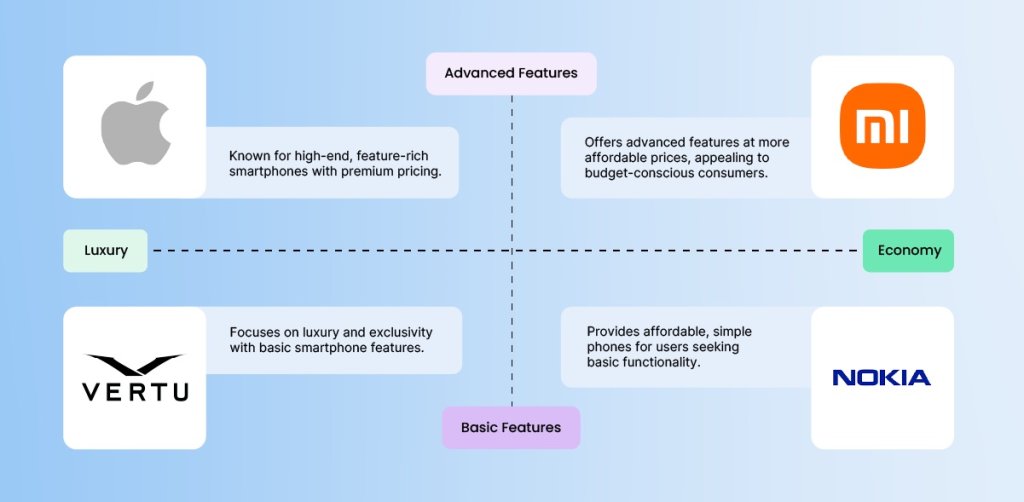
Create a clear message for each target group that highlights what makes your brand special. For example, if you’re targeting budget-conscious consumers, position your smartphone as an affordable yet feature-rich option.

Ensure your product features, pricing, availability, and advertising all support this message. For instance, offer competitive pricing and advanced features to reinforce your value proposition.

This consistency helps your brand stand out and connect with your audience, making it easier for them to see why they should choose you over competitors.
Stp marketing positioning

5. Execute, Adjust, and Improve

Kick things off by rolling out campaigns designed to match the preferences and behaviors of each segment. Create marketing campaigns that connect with these groups to maximize engagement. For example, a fitness brand could create a series of Instagram stories featuring quick workout tips and user-generated content from customers sharing their fitness journeys.

Set clear marketing performance metrics like conversion rates, average order value, and customer lifetime value to measure the success of your campaigns. Use A/B testing to continuously test different elements and optimize your campaigns for better performance and engagement. 

Gather customer feedback and stay updated on industry trends and market changes to refine your approach. For example, if analytics show a drop in mobile app usage, enhance the app’s features or user experience to re-engage users.

STP Marketing Examples

Here are some great examples of how companies cleverly use segmentation, targeting, and positioning to connect with their diverse customers and meet their needs.

Coca-Cola

Coca-Cola segments its market by demographics (age, gender, income), psychographics (lifestyle, values), and geographic regions. They also consider behavioral factors like consumption habits and brand loyalty.

The company targets specific segments with a variety of products and brands. For example, they offer Coca-Cola Classic for traditional cola lovers, Diet Coke for those seeking a sugar-free option, and Dasani for consumers looking for bottled water.

All Coca-Cola brands are positioned to meet the specific needs and preferences of their target segment. Coca-Cola Classic is positioned as a timeless and refreshing choice, while Diet Coke is marketed as a no-calorie alternative with a distinct taste. Dasani is positioned as a pure and clean hydration option.

Coca-Cola’s strategic use of segmentation, targeting, and positioning enables it to effectively address a wide range of consumer preferences and maintain a strong presence in the global beverage market.

STP MArketing Coca Cola example

Procter & Gamble

Similarly, P&G segments its market by demographics (age, income, family size), psychographics (lifestyle, values), and geographic regions.

The company focuses on specific segments with different brands and products. For example, they offer Pampers for parents with infants, Tide for households needing effective laundry solutions, and Gillette for men seeking quality grooming products.

Every P&G brand is positioned to meet the specific needs and preferences of its target segment. For instance, Pampers is positioned as a reliable and gentle choice for baby care, while Tide is positioned as a powerful and trusted laundry detergent.

STP marketing procter and gamble example

Unilever

Unilever segments its market and also consider behavioral factors like purchasing habits and brand loyalty.

The company reaches different consumer segments with a diverse portfolio of brands. For example, they target health-conscious consumers with brands like Knorr and Hellmann’s, while targeting beauty and personal care segments with brands like Dove and Axe.

Each Unilever brand is positioned to meet the specific needs and preferences of its target segment. Dove is positioned as a brand that promotes real beauty and self-esteem, appealing to consumers seeking gentle and nourishing personal care products. Axe, on the other hand, is positioned as a brand that appeals to young men, focusing on confidence and attraction.

Unilever’s approach to segmentation, targeting, and positioning allows it to successfully address a wide array of consumer needs in different markets.

STP marketing unilever example

The Future of STP Marketing

As we look to the future of STP marketing, it’s clear that technological integration will play a pivotal role. AI tools for businesses, along with machine learning and big data, are transforming how businesses segment, target, and position their products and services, making marketing efforts more precise and effective. 

At the same time, sustainability and ethics are becoming increasingly important, ensuring that segmentation and targeting are not only profitable but also responsible and in tune with what consumers value.

In wrapping up, remember the key takeaways from this article: STP marketing is essential for understanding and reaching your target audience effectively. Adopting the STP marketing model can significantly strengthen your business success. 

So, why wait? Elevate your business with STP marketing! Let SiteGround’s email marketing platform assist you in segmenting, targeting, and positioning your brand to connect with your ideal audience.
How to Protect Your Website from Hackers

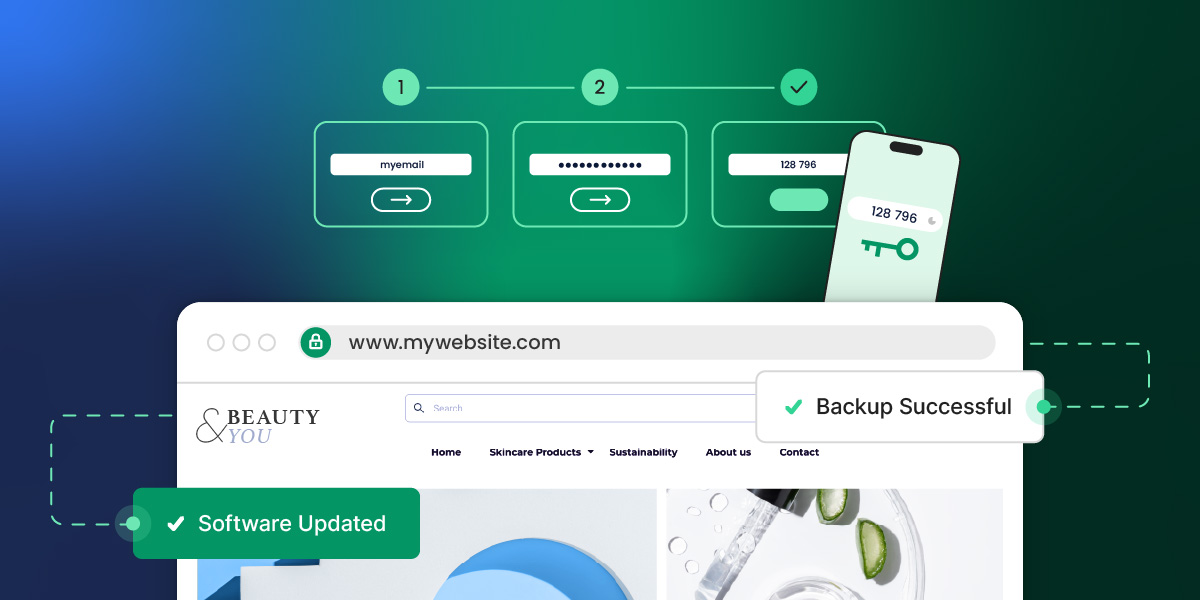
Illustration of a person in a hoodie entering a room, with a browser window overlay. Text reads "Threat Detected" and "Site Clean" with security icons

Your website can be hacked whether it gets 50 visitors a day or 50,000. That’s because hackers use automated tools that scan for vulnerabilities at scale, so size offers no protection. The good news is that most attacks exploit basic weaknesses you can fix without any technical background. Indeed, strong passwords, updated software, a security plugin, and a reliable host go a long way. This guide walks you through each step so that your site is as secure as can be.

Key Takeaways:

  • Every website is a target. Automated tools scan for vulnerabilities at scale — size offers no protection.
  • Most breaches exploit basic weaknesses. Outdated software and weak passwords are behind the majority of attacks.
  • Two-factor authentication is one of the highest-impact changes you can make. A stolen password alone won’t be enough to get in.
  • Your hosting provider is part of your security. Built-in firewalls, daily backups, and proactive monitoring do a lot of the heavy lifting.
  • A hacked site has a recovery checklist. Back up, scan for malware, and review user access before anything else.
  • Regular audits matter more than one-time fixes. Security is a moving target.

Understanding the Threat Landscape

As businesses become more reliant on the internet, their websites play an ever more important role—and so does the need to protect them from growing security threats.

Hackers are on the hunt to ruin your reputation or take your website down to hurt your business. This is why understanding the website security landscape is the first step in fortifying your website against potential attacks.

Advertisement for SiteGround Security Optimizer, featuring security icons and a "Secure Your Website Today!" message.

What Are Common Website Security Issues?

The most common threats range from automated attacks that scan for vulnerabilities to techniques that manipulate users directly. Understanding each of these is the first step to defending against them.

  • SQL injection — attackers exploit website security vulnerabilities in your site’s code to execute malicious database commands, gaining access to sensitive data like user credentials and financial information.
  • Cross-site scripting (XSS) — harmful scripts are injected into web pages viewed by other users, allowing attackers to steal cookies, session tokens, or other sensitive information without the user’s knowledge.
  • Automated tools — scanners probe thousands of sites at once looking for weaknesses in code, outdated software, or misconfigured servers. Any vulnerability they find becomes an entry point.
  • Brute force attacks — automated tools cycle through password combinations until they find the right one. Simple or reused passwords make this significantly easier.
  • Phishing — attackers trick users into handing over login credentials through deceptive emails or fake login pages designed to look legitimate.

DDoS attacks — a site is flooded with fraudulent traffic until it becomes inaccessible to real users, often used for extortion or deliberate disruption.

By staying informed and vigilant, you can proactively secure your website and protect your data. Implement strong security measures like a password manager and two-factor authentication to add an extra layer of protection against potential threats.

What Do You Do If Your Website Has Been Hacked?

Start by confirming your website has truly been hacked, then take your site offline or into maintenance mode before doing anything else. Acting quickly limits the damage, and here’s the action plan that matters.

1. Confirm the Hack: Start by verifying the hack. Look for telltale signs such as defaced pages, unexpected redirects, or notifications from your hosting provider. This confirmation is essential before taking further action.

2. Back Up Your Site: Before making any changes, back up your current site. This backup serves as a record of the incident and can be invaluable for forensic analysis. Make sure you don’t overwrite any existing backups, though.

3. Put Your Site in Maintenance Mode: Protect your visitors by putting your site in maintenance mode. This not only prevents further damage but also reassures your users that you are addressing the issue.

4. Scan for Malware: Use a reliable malware scanner, such as SiteGround’s Site Scanner, to identify any malicious code. This step is crucial in understanding the extent of the breach and what needs to be cleaned up.

5. Clean Up and Secure: Remove any malicious code and reinstall plugins to ensure they are free of vulnerabilities.

6. Review and Revise User Access: Take this opportunity to review who has access to your site. Make sure that only trusted individuals have administrative permissions, and enforce strong, unique passwords for all accounts.

7. Implement Regular Security Scans: Set up regular security scans to monitor your site for vulnerabilities and prevent future attacks. This proactive approach helps you stay one step ahead of potential threats.

8. Consult a Professional: If the hack is beyond your expertise or if issues persist, don’t hesitate to consult a cybersecurity professional. They can provide a thorough cleanup and help reinforce your site’s defenses.

By following these steps, you can effectively manage the aftermath of a hack and bolster your website’s security for the future. Remember, swift action and vigilance are your best allies in recovering from a cyberattack.

[74]

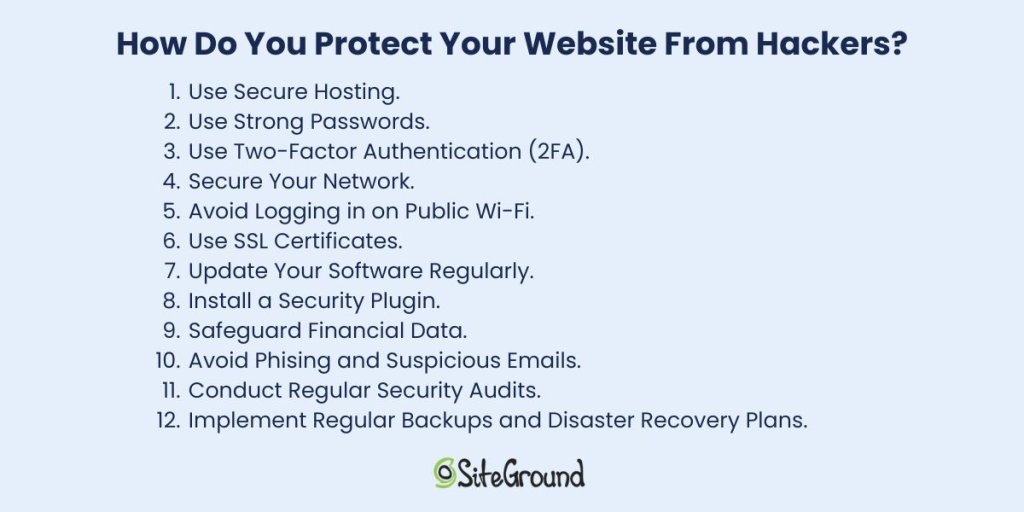
How Do You Protect Your Website from Hackers?

The most effective approach combines secure hosting, strong passwords, two-factor authentication, and up-to-date software. No single measure is enough but together, these steps close the vulnerabilities most attacks rely on.

List of 12 tips to protect websites from hackers, including secure hosting and strong passwords. SiteGround logo at the bottom.

1. Use Secure Hosting

Selecting a secure hosting provider is one of the most important choices you’ll make when it comes to defending your website against cyber threats. A reliable host not only keeps your site running smoothly but also offers strong security features to protect your data. Consider hosting services that include automatic updates, regular backups, advanced firewalls to enhance your site’s safety, and expert support.

SiteGround in practice: In spring 2026, security researchers disclosed five critical Linux kernel vulnerabilities in the space of three weeks—each one capable of giving an attacker with any foothold on a server full root access. SiteGround patched all five across its entire infrastructure within 48 hours of each disclosure, using live kernel patching so no customer site experienced downtime. Read the full story →

2. Use Strong Passwords

The foundation of any secure system is a strong password. Despite being one of the most basic security measures strong passwords are often overlooked. A robust password should be complex, unique, and difficult for hackers to guess.

With that in mind, avoid using easily guessable information like birthdays or common words. Opt for a mix of uppercase and lowercase letters, numbers, and special characters instead. Additionally, consider a password manager to generate and securely store your passwords, so you don’t have to remember each one.

3. Use Two-Factor Authentication (2FA)

Implementing two-factor authentication is one of the easiest and most effective ways to build strong website security. It requires users to verify their identity using two methods. Typically, this involves entering a password and then confirming a code sent to a mobile device or email.

What this means is that even if a password is compromised, 2FA significantly reduces the risk of unauthorized access.

4. Secure Your Network

Network security is another critical aspect of protecting your website. Start by ensuring that your network is secure and that all software is up to date. Regularly update your firewall and antivirus software to protect against malware and other threats. Furthermore, consider using a virtual private network (VPN) when accessing your website from remote locations.

What’s a VPN? It encrypts your internet connection, making it more difficult for hackers to intercept data. It also masks your IP address, adding an extra layer of privacy and security while you browse.

5. Avoid Logging in on Public Wi-Fi

Public Wi-Fi networks, such as those found in coffee shops or airports, are convenient but often lack the necessary security measures to protect your data. If you must access your website while on the go, use a secure network or a VPN to encrypt your connection and protect your website and sensitive data.

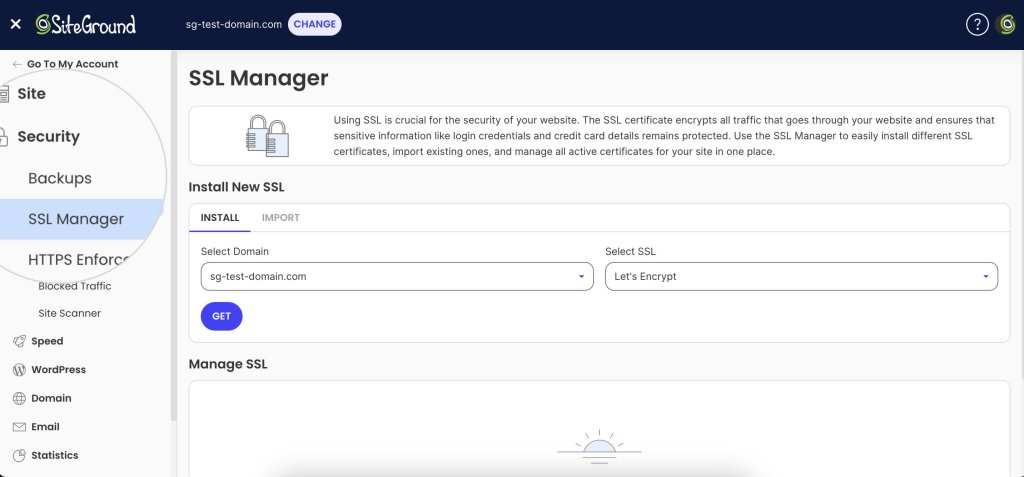
6. Use SSL Certificates

An SSL (Secure Sockets Layer) certificate is a must-have for any website that handles sensitive information. It encrypts the data transmitted between a user’s browser and your website, ensuring that sensitive data, such as login credentials and financial data, remains secure.

The encryption it offers is key to protecting your website from hackers looking to exploit vulnerabilities in data transmission. An SSL certificate not only enhances security but also boosts your website’s credibility. Plus, secure websites often rank better in search engine results, giving you an added advantage.

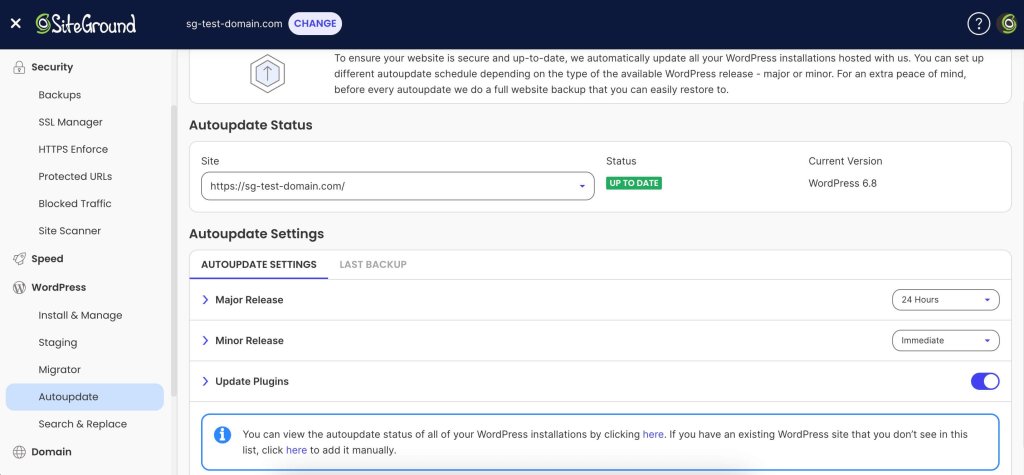
7. Update Your Software Regularly

Keeping your website’s software up to date is vital for security. Developers frequently release updates to fix vulnerabilities and improve performance—ignoring them can leave your site exposed to hackers who target outdated software. This is why it’s important to stay current to keep your defenses strong.

To stay protected, make sure that your content management system (CMS), plugins, and any other software components are always up to date. Also, consider enabling automatic updates where possible to minimize the risk of missing critical patches.

8. Install a Security Plugin

Security plugins and tools can not only help you get an extra layer of protection but also with performing regular security check-ups. Generally, they’re a good starting point for your website security, as they can make your website more secure automatically.

The SiteGround Security Optimizer, for example, provides a range of features, from scanning for malware to blocking malicious traffic. It also offers real-time monitoring, alerting you to potential threats and allowing you to act quickly. On top of that, you can rely on firewall protection and brute force attack prevention, further securing your website against unauthorized access.

Implementing these advanced security techniques can significantly enhance your website’s defenses and provide peace of mind. As we move forward, let’s explore how to protect sensitive information, and help your data remain secure and confidential.

9. Safeguard Financial Data

Financial data is a prime target for hackers, so it pays to be deliberate about how you handle it:

  • Use a reputable payment gateway — services like Stripe or PayPal handle card data on their own secured servers, meaning sensitive numbers never touch yours.
  • Never store card details unnecessarily — most breaches involving financial data happen because it was retained when it didn’t need to be.
  • Comply with PCI DSS — if you process payments directly, this standard sets the baseline for encrypted transmission, access controls, and regular audits. Your payment provider will usually guide you through what’s required.

Monitor transactions for anomalies — unusual purchase patterns or multiple failed payments can flag fraud early. Most payment platforms have this built in; make sure it’s enabled.

10. Avoid Phishing and Suspicious Emails

Phishing involves hackers tricking users into revealing sensitive information. To combat these threats you can:

  • Prioritize building a culture of vigilance among your users and employees.
  • Perform regular training sessions that can help them recognize unexpected requests for personal information and other red flags.
  • Encourage users to always question the legitimacy of emails and verify the sender’s identity through alternative means.
  • Foster an environment of caution and verification, so that you can protect sensitive information and maintain user trust.

As we continue, let’s delve into the importance of monitoring and maintenance to ensure your website remains resilient against evolving threats.

11. Conduct Regular Security Audits

Conducting regular security audits is essential for identifying potential weaknesses in your website’s security framework. These audits involve systematically reviewing your website’s code, configurations, and access controls to ensure they meet current security standards.

It might also help to engage with cybersecurity professionals or use automated security assessment tools to uncover vulnerabilities that may otherwise go unnoticed. By performing security audits regularly, you can stay ahead of potential threats and ensure your website remains secure.

12. Implement Regular Backups and Disaster Recovery Plans

Even with the best security measures in place, no system is entirely immune to attacks or unexpected failures. That’s why it’s a good idea to have a robust backup and disaster recovery plan. Regularly backing up your website’s data ensures a quick restore in the event of a breach or data loss.

Store backups in a secure, off-site location, and test your recovery process periodically to ensure it functions correctly. A well-executed disaster recovery plan minimizes downtime and helps maintain business continuity, even in the face of unforeseen challenges.

Protect Your Website from Hackers Today

Most attacks exploit basic weaknesses, and the steps in this guide are enough to stop the majority of them.

Strong passwords, two-factor authentication, SSL certificates, regular updates, and a security plugin all work together to close the gaps hackers rely on. And it starts with choosing a host that takes security as seriously as you do—one with built-in firewalls, proactive monitoring, and a team that patches vulnerabilities before most people have heard about them. That’s the foundation SiteGround Web Hosting is built on.

Do the basics well, stay consistent, and your site will be a much harder target than most.

SiteGround banner for reliable web hosting with server and shield icon. Includes "Get SiteGround Hosting" button.

FAQs: Protecting Your Website From Hackers

How do I know if my website has been hacked?

Look for defaced pages, unexpected redirects, unfamiliar admin accounts, or a sudden drop in search rankings. Your hosting provider may flag it before you do. When in doubt, run a malware scan. A tool like the SiteGround Security Optimizer can help here—its activity log monitors visits, login attempts, and suspicious behavior in real time, so you’re more likely to catch a breach early rather than after the damage is done.

Is it possible to get hacked through a website?

Yes, visiting a compromised website can expose you to malicious scripts that steal cookies, session data, or login credentials without you doing anything wrong. It works the other way too: if your own site is hacked, it can be used to attack your visitors.

What do hackers hate the most?

Layered security. When a site has two-factor authentication, a web application firewall, updated software, and strong passwords all in place, the effort required to break in usually isn’t worth it. Hackers rely on easy wins, thus removing the easy wins is the most effective deterrent.

This article was originally published in May 2025 and then updated in May 2026

Master B2B Email Marketing Tools + Examples

B2B email marketing tools

Picture this: you’re having your morning coffee, and with just a few clicks, you’re connecting with key decision-makers across industries. That’s the power of B2B email marketing.

But simply hitting “send” isn’t enough. The need for smart, effective tools to optimize and improve these email efforts is more important than ever. 

B2B email marketing tools assist you in creating personalized messages that connect, making sure your emails don’t just arrive in inboxes, but truly make an impact, prompting readers to take the desired action, such as responding to the email, clicking on a link, or considering a business proposal.

Understanding B2B Email Marketing

B2B email marketing is the strategic use of email to connect with other businesses, building relationships that lead to increased collaboration and sales. Unlike B2C email marketing, which targets individual consumers with often broad and emotional appeals, B2B email marketing requires a more professional and personalized approach. It focuses on addressing the specific needs and challenges businesses face, using detailed information and logical arguments to clearly demonstrate the value and benefits of a product or service.

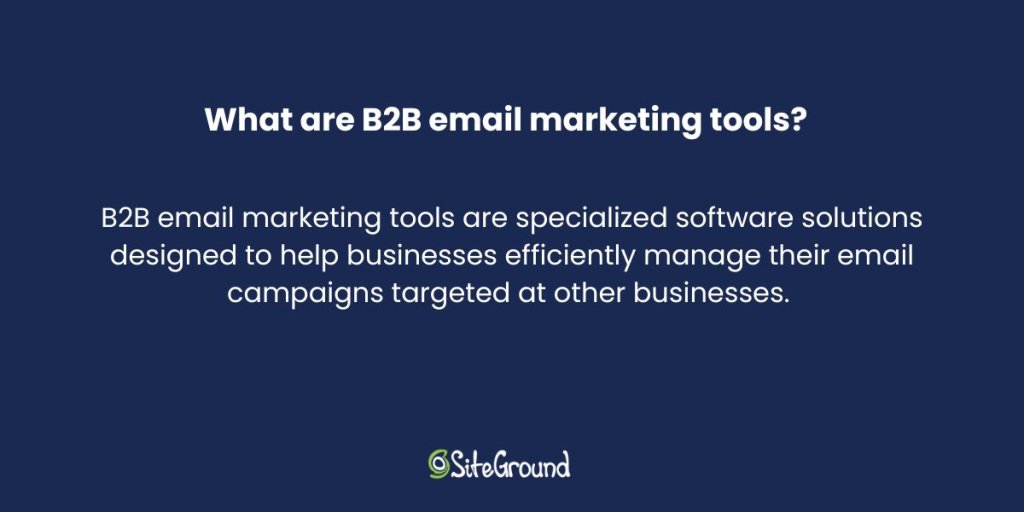
What Are B2B Email Marketing Tools and Why Are They Important?

what are b2b email marketing tools

B2B email marketing tools are specialized software solutions designed to help businesses efficiently manage their email campaigns targeted at other businesses. These tools are key players in helping businesses achieve their marketing goals. With features like automating routine tasks, personalizing content for different audience groups, and offering insightful analytics, they take care of a lot of the heavy lifting, making sure that each message speaks directly to the needs of its recipient.

Features to Look Out For in B2B Email Marketing Tools

When choosing B2B email marketing tools, several key features should be on your radar. 

1. A user-friendly interface is a great help. It ensures that your team can easily navigate the tool, making it more accessible and efficient to use. For example, SiteGround offers a simple, no-code builder that lets you quickly change layouts and colors with free templates for different needs, making it easy for everyone. Plus, built-in AI assistance makes content creation easier, allowing you to create engaging emails with minimal effort.

2. Personalization and segmentation features are also important, enabling you to deliver messages that connect with specific audience groups. Segmenting your audience based on their unique interests or interactions with your brand helps you target them better and send personalized emails to the right people. This approach keeps your content relevant and engaging, ultimately increasing conversions.

3. Automation capabilities, like setting up email sequences or scheduling emails, are vital as they handle repetitive tasks, allowing your team to focus on more strategic initiatives

SiteGround Email Marketing simplifies automations, enabling effortless setup of essential email sequences like welcome series and lead nurturing, increasing engagement and driving business growth.

4. Analytics and reporting functionalities offer valuable insights into how your campaigns are performing, allowing you to make data-driven decisions to improve future efforts. They track email marketing metrics like clicks and open rates, showing you exactly who opened and clicked on your emails. This detailed information helps you refine your strategies for better engagement.

5. Finally, strong support is equally important. Having reliable assistance available when needed helps address any issues quickly, ensuring that the tool remains effective in achieving your marketing goals. When it comes to support, SiteGround is king, offering responsive and knowledgeable in-house experts who are there to resolve any challenge.

Email Marketing course SiteGround

How Do You Pick the Right B2B Email Marketing Tool?

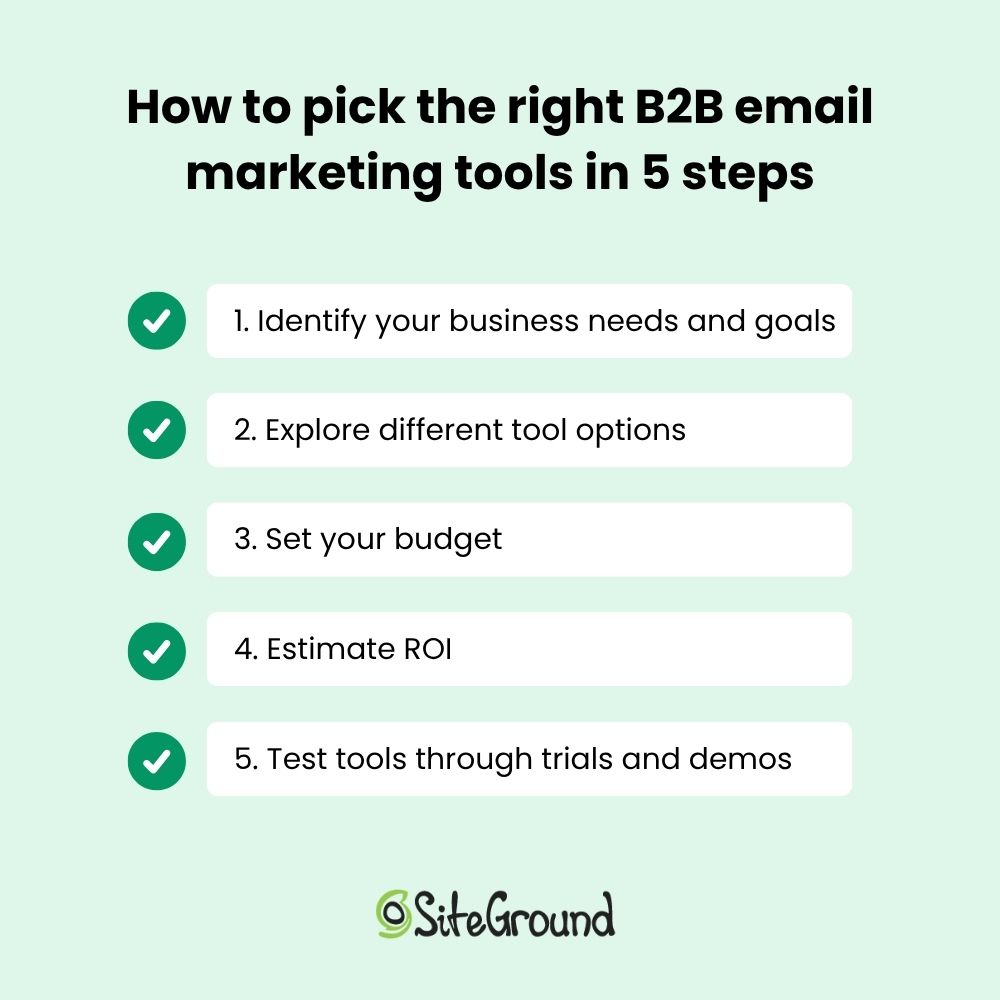
Choosing the right B2B email marketing tool can feel like a big decision. With the features mentioned above in mind, your next step is to select the right tool for you. Start with a clear understanding of your business needs and goals, and know what you want to achieve—this will steer you in the right direction. Determining your priorities will help you clarify what to look for in a B2B email marketing tool, such as automation features, analytics, or integration capabilities.

Next, explore the different tools out there. Compare their unique features to find the ones that best match your specific needs and offer the functionalities that matter most to you. Take note of their pricing and terms to better assess the financial commitment required.

And speaking of finances, budget is always a consideration, so take a moment to evaluate your financial constraints and the potential return on investment (ROI). Begin by comparing the pricing models and features of various tools to see which ones fit within your financial plan at the same time they meet your needs. 

To assess ROI, consider how the tool’s features can contribute to achieving your marketing goals, such as increasing lead conversions or improving campaign efficiency. Calculate the potential revenue or savings these improvements could bring to your business. Estimating both cost and potential benefits helps verify the tool you choose is worth the investment and aligns with your financial goals.

Lastly, trial periods and demos are your best friends. They give you a chance to test the waters and see if the tool feels right for your business before making a commitment. It’s like taking a car for a test drive before buying—always a smart move!

How to pick the right b2b email marketing tools

Getting the Most from B2B Email Software: Tips and Real-Life Examples

Discover practical tips and real-life examples below to help you maximize your B2B email software and achieve great results.

Build a Targeted Email List

Segmentation and personalization are musts in email marketing. They allow businesses to customize messages for specific audience groups. For example, Oasis Real Estate, a client of SiteGround, used SiteGround’s Lead Generation plugin to grow their contact list easily. By placing sign-up forms on all their pages, they automated lead synchronization. This saved them time and improved the personalization of their communications.

Create Catchy Subject Lines and Engaging Content

Coming up with catchy subject lines and writing engaging content is crucial for grabbing your audience’s attention. Using the right tools can make this process easier and more effective. These tools help you craft messages that connect with your audience, which increases engagement and makes your content stand out.

In the case of Oasis Real Estate, they utilized SiteGround’s template feature to simplify the creation of consistent and high-quality campaigns. This approach not only saved time but also ensured that their emails were engaging and professional, connecting effectively with their audience.

Time and Optimize

Optimizing the timing and frequency of emails can significantly improve engagement rates. Using the right scheduling capabilities ensures your emails reach recipients at the most opportune moments.

Apply A/B Testing and Optimization Techniques

A/B testing allows businesses to experiment with different elements of their emails to determine what appeals most to their audience. 

To conduct A/B testing with SiteGround, create different email versions to test various elements like subject lines or images, and send them to segmented audience groups by dividing your email lists. Be sure to test one variable at a time to accurately determine which changes impact performance. Use SiteGround’s analytics to track performance metrics, compare results, and apply insights to optimize future campaigns.

Make the Most of B2B Email Marketing Automation

Automation can improve your email marketing by making workflows easier and more efficient. Streamlining tasks like lead synchronization and campaign scheduling lets companies focus on other important areas, increasing overall efficiency.

Get started with email automations today! Try email automation via SiteGround Email Marketing!

SiteGround Email Marketing Platform

Learn from B2B Email Marketing Success Stories

Learning from B2B email marketing success stories can provide valuable insights for improving your own campaigns. In the case of Oasis Real Estate, they effectively used email marketing tools to achieve remarkable results. They simplified their processes by using automation features for lead synchronization and campaign scheduling, which allowed them to focus on creating engaging content.

Additionally, they conducted A/B testing to refine their strategies, using analytics to drive smarter, data-backed decisions.. This approach led to a 30% increase in open and click-through rates, demonstrating the power of well-executed email marketing. 

This case study shows how using the right tools and methods can make all the difference in succeeding with B2B email marketing.

Key Takeaways for Choosing B2B Email Marketing Tools

In wrapping up our exploration of B2B email marketing, let’s highlight some key takeaways to keep your campaigns buzzing with success. 

First, making informed decisions about the tools you use is key—think of it as picking the perfect partner for a dance. This means choosing tools that align with your business goals, strengthen efficiency, and offer features that cater to your specific needs.

Top features to consider include automation, analytics, and customization options that can help you waltz through your email marketing tasks. Remember, the world of email marketing is ever-evolving, so keep those strategies fresh by continuously evaluating and adapting for the best results. 

Selecting the right tools and tactics lets your email marketing shine and truly connect with your audience. So, don’t hesitate to explore and experiment with different tools until you find the perfect fit for your business needs. Happy emailing!

The Ins and Outs of Managed Hosting

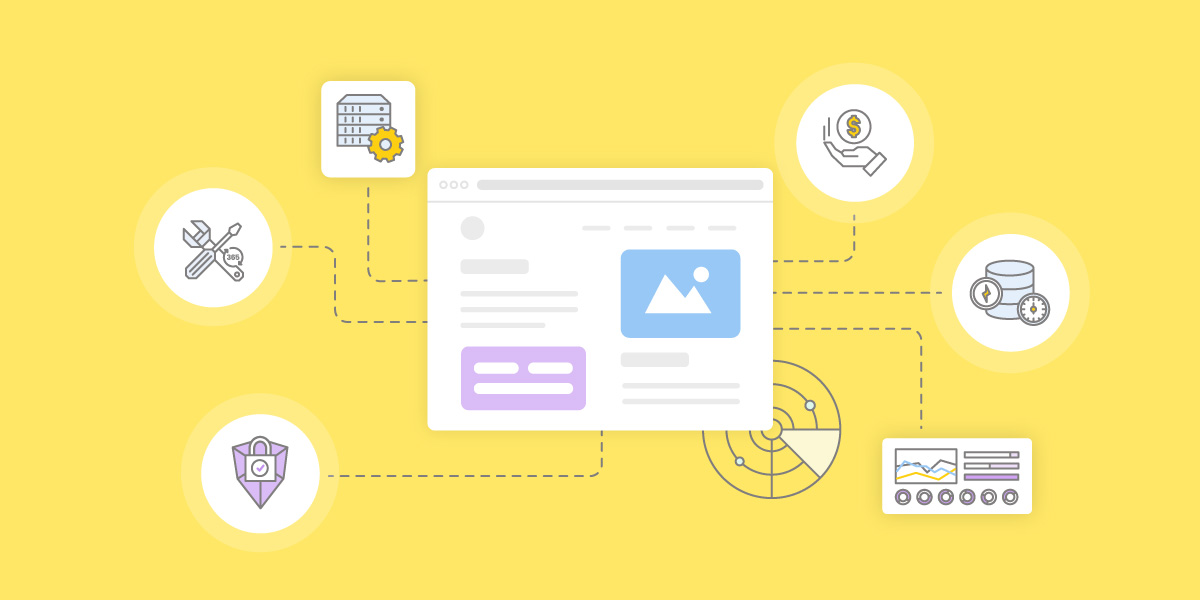
website-surrounded-by-the-benefits-of-managed-hosting

Choosing a hosting plan can be overwhelming. Every server type comes with its own pros and cons—and on top of that, there’s the choice between managed and unmanaged hosting.

This guide breaks down what managed hosting is, how it works, and how to decide if it’s right for you.

What Is Managed Hosting?

Managed hosting is a type of web hosting service where the provider handles the technical management of your website’s server. Unlike unmanaged hosting, where you take on most of the responsibilities, managed hosting allows you to focus on your business while experts handle the backend.

Reputable managed providers offer support, make sure backups are taken regularly, and optimize your server for better performance. This means the hosting company takes care of your server’s security, speed, and hardware.

Managed hosting services can be perfect for businesses that want to save time and resources without having to hire an in-house IT team. 

[80]

Types of Managed Hosting

When it comes to managed hosting, there isn’t a one-size-fits-all solution. Depending on your needs, different types of managed hosting can offer specialized services to support your project. Here’s a breakdown of the main types: 

1. Fully Managed Hosting

In a fully managed hosting plan, the hosting provider handles all aspects of your server, from updates to security, backups, and performance monitoring. You won’t need to worry about server management—the provider takes care of the entire infrastructure. 

This is a great option for businesses that want a hassle-free experience and don’t have the resources to manage technical details. 

2. Partially or Semi-Managed Hosting 

Partially managed hosting is a hybrid approach. While the hosting provider manages critical server functions like security updates, you still have more control over other aspects. 

This can include installing software or managing certain server configurations. It’s ideal for businesses that need some support but still want a level of customization. 

.post-page__colored-blocks.post-page__colored-blocks–update p { margin: 15px 0px; }

❗ IMPORTANT

Managed hosting refers to the level of support your hosting provider offers to simplify server management and ease your workload. 

On the other hand, cloud, VPS, shared, and dedicated hosting determine the server type and how server resources are allocated. Each of these four types of hosting can be either fully managed, semi-managed or unmanaged, depending on the provider and your needs.

3. Specialized Managed Hosting Solutions

Specialized managed hosting solutions are designed for specific use cases. For example, if you run a WordPress site, you might opt for a managed WordPress hosting plan where the provider handles everything and also offers built-in tools for WordPress. 

Similarly, if you’re hosting ecommerce sites or resource-intensive applications, you might need a solution tailored to those needs. 

  • Managed WordPress hosting

When using WordPress, no matter whether it’s on managed or unmanaged hosting, you benefit from its abundance of resources. This includes templates, plugins, tools, and its supportive community. 

What managed WordPress hosting does is enhance these advantages by handling different technical tasks such as core updates, server-level caching, and automated daily backups. 

Additionally, your hosting provider may develop exclusive in-house tools to improve your WordPress site’s performance. 

At SiteGround, we offer ultrafast, full-featured managed WordPress hosting, designed for seamless WordPress management.

  • Managed WooCommerce hosting

We also offer a robust and user-friendly managed WooCommerce hosting, where you can enjoy the same features as with our managed WordPress hosting while focusing on what matters most—increasing sales.

Benefits of Managed Hosting

Understanding the benefits of managed hosting is important, especially if you are just starting a new project.

1. Cost-Effective in the Long Run

While managed hosting services may have higher upfront costs compared to unmanaged hosting, they can be more cost-effective in the long run. With managed hosting, you save on hiring in-house IT teams and avoid unexpected repair or downtime costs. 

Plus, providers typically include services like backups and security updates, which can further reduce overall expenses.

  • No hidden costs – with unmanaged hosting, managing hardware, updates, and security on your own requires additional resources that aren’t always budget-friendly. Moreover, without expert oversight, this can lead to mistakes, increasing unexpected expenses.
  • Reduced need for additional expertise – managed hosting services include technical support, security updates, and performance optimization, reducing the need to hire IT staff or outsource server management, thus saving on significant labor costs.
  • Time savings – with managed hosting, you’re not responsible for any technical aspect of your hosting, freeing up time to focus on what will really drive you profit: growing your business or planning your website.
  • Scalability – managed hosting providers often offer scalable solutions that adapt to your needs without requiring costly hardware upgrades or additional IT resources.   

2. Enhanced Security and Monitoring

One of the primary benefits of managed web hosting is its enhanced security. Hosting providers take on the responsibility of protecting your website from cyber threats. This includes implementing regular updates, monitoring for vulnerabilities, and managing firewalls. 

They also provide proactive measures, such as malware and spam protection, which are essential for maintaining a secure online presence. 

Here are some of the most important security measures a managed provider maintains: 

  • Firewalls that aim to block unauthorized access by monitoring and regulating data traffic.
  • Brute-force prevention that implements CAPTCHAs, or uses two-factor authentication.
  • Denial-of-service attack (DDoS) protection ensures that legitimate users can still access your services during a cyber attack.
  • Data encryption is used to protect sensitive information.
  • Patch management ensures that all server components are up-to-date and secure via regularly software updates 
  • Security audits assess the effectiveness of security measures.

Keep in mind that the level of security varies between providers. At SiteGround we’re constantly updating our security arsenal with out-of-the-box technology and additional features to keep your website safe.

3. Consistent and Optimal Performance

Running servers optimally demands ongoing attention and technical know-how. Managed hosting assumes this responsibility—it includes continuous monitoring and maintenance to make sure your systems perform efficiently around the clock.

Here are some typical server maintenance tasks that your managed hosting provider handles for you:

  • Hardware and software updates. The latest software versions, such as the default PHP 8.2 and the latest MySQL 8 that are used on all SiteGround servers.
  • Server backups. SiteGround provides automatic daily backups for all hosting plans, storing each for up to 30 days in a separate data center location different from the one hosting the live account, for added security. Additional features are available through our Premium Backup service.
  • Proactive issue resolution. SiteGround’s 24/7 monitoring checks servers every 0.5 seconds, detecting, fixing, and preventing issues automatically.
  • Load balancing. SiteGround’s in-house CDN 2.0, included for free in all plans, features cross-region load balancing and automatic multi-region failover.

4. Streamlined Website Management

Managing a website doesn’t have to be complicated. In the past, building and maintaining a site meant dealing with code like HTML, CSS, or PHP—a challenge for anyone without technical skills. Today, content management systems (CMS) like WordPress make it easy to create and update your site through visual editors and simple interfaces.

Managed hosting makes it even easier. Features like one-click CMS installations, staging, and search and replace tools eliminate a lot of headaches. Already have a site elsewhere? Managed hosting often includes hassle-free migration services.

🔥 With SiteGround, you can launch your site with WordPress or another CMS in just a few clicks—or migrate your existing site at no extra cost. 

5. Access to Expert Support

As a website owner, encountering a worst-case scenario without knowing what to do can be incredibly stressful and damaging to your reputation. Issues like data breaches, extended downtime, or being locked out of your systems can lead to losing customer trust and, ultimately, revenue.

This is where managed hosting providers can be invaluable. A good managed hosting plan includes dedicated, around-the-clock support through various channels such as live chat, support tickets, and phone. 

In contrast, unmanaged hosting typically provides minimal support, focusing primarily on hardware or network-related issues, with little to no help for application-level concerns.

Potential Drawbacks of Managed Hosting

Using a managed hosting provider means no backend work, however, it also comes with some limitations. 

1. Limited Control and Customization

Unlike unmanaged hosting, where you can customize freely and have access to the server, managed hosting limits users to the functionalities, apps, and tools provided by the host. This may not suit those seeking extensive customization. 

However, keep in mind that such flexibility is necessary only for highly technical users with very specific needs, such as developing custom server configurations or running niche applications. 

For most users, managed hosting not only simplifies the process but also offers optimal performance, security, and support without the hassle of managing everything yourself. 

2. Dependency on the Hosting Provider

With managed hosting, users typically do not have control over when scheduled server maintenance and system updates occur, as these are handled by the hosting provider. 

Additionally, if an issue arises with the hosting environment, the managed provider’s dedicated support team is responsible for resolving it, with minimal impact on your website’s availability and performance.

This is why it is crucial to opt for a provider offering 24/7 monitoring and a rapid response.

How to Choose a Managed Hosting Provider

No two companies offer the same managed hosting services. The level of security, support and speed can vary significantly across providers, so we’ll explore the most important factors to consider when choosing one.

1. Security Practices and Backups

Security should be a top priority when choosing a managed hosting provider. A reliable provider will include up-to-date security protocols, virus and spam protection, and regular malware scans as part of their core hosting services.

Additionally, look for automated daily backups and easy restoration options. These are vital against data loss caused by cyberattacks, accidental file deletion or data breach due to phishing. If a provider doesn’t include backups, it’s a red flag. 

Finally, strong firewalls, SSL support, and basic security measures like two-factor authentication should come standard with any robust hosting plan.

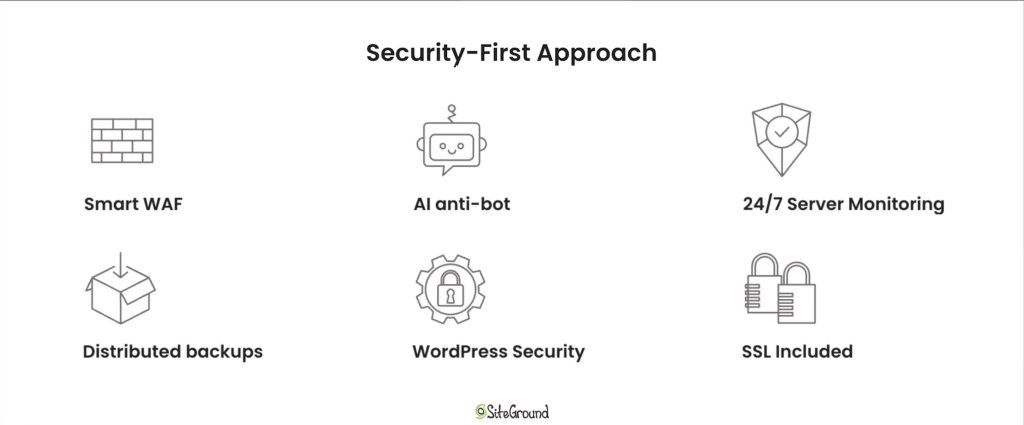
A visual highlighting SiteGround's security-first approach for hosting. It shows Smart WAF, AI anti bot, 24/7 Server Monitoring, distributed backups, WordPress security and free SSLs as pillars of a secure hosting platform.

2. Support Availability and Expertise

When something goes wrong, having access to an experienced managed hosting team can make all the difference. Choose a managed hosting company that offers 24/7 support with fast response times and multiple contact channels—live chat, tickets, and phone.

More importantly, make sure that the support staff has deep technical expertise. Whether it’s troubleshooting a server issue, optimizing performance, or helping with website and application administration, knowledgeable support can save you time, money, and stress.

Great customer service benefits aren’t just about responsiveness—they’re about resolution. Look for companies with a proven hosting provider’s success rate and positive customer feedback.

3. Performance Technologies

A reliable managed hosting provider should use cutting-edge technology for optimal website performance. This includes modern server hosting infrastructure like SSD or NVMe storage, built-in caching, HTTP/3 support, and a powerful CDN.

Some managed hosting services also offer custom in-house software that help with server performance tuning, traffic scaling, and uptime monitoring. These features are crucial for maintaining reliable site performance, especially for high-traffic or resource-intensive sites like a growing WordPress site or online store.

A banner highlighting the premium technology used in SiteGround's infrastructure.

In short, advanced performance tech isn’t just a nice-to-have—it’s a critical part of a robust hosting plan that supports your business as it grows.

4. Scalability and Upgrade Options

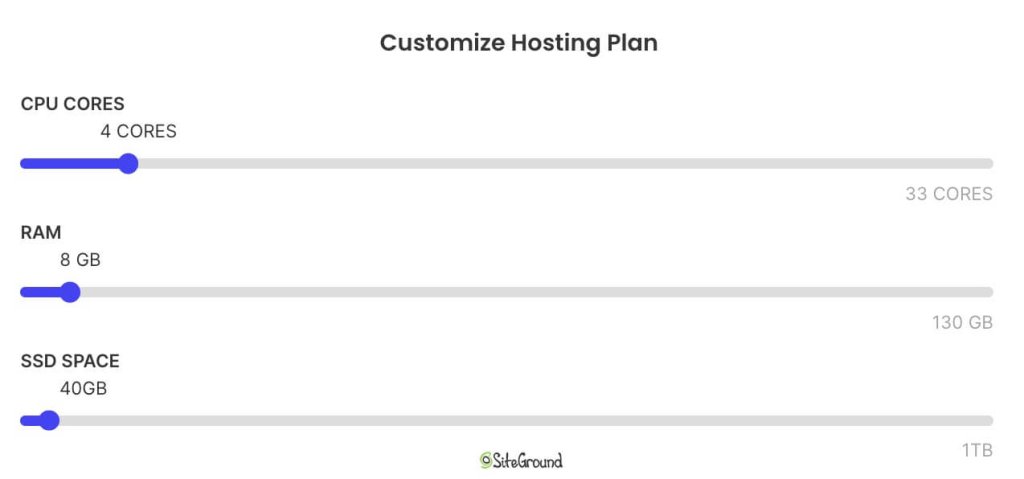
As your business grows, so do your hosting needs. A good managed hosting provider makes it easy to scale. Whether you’re adding more hosting resources, launching new projects, or handling traffic spikes, your hosting company should offer seamless upgrade paths.

Look for hosting solutions that support vertical and horizontal scaling—such as moving up to a higher plan or expanding into multiple environments. This flexibility means your site won’t suffer from bottlenecks or affect server performance during peak times.

Also, check if your provider allows you to increase storage, bandwidth, or memory without downtime. This kind of adaptability helps you stay focused on your business operations without worrying about the backend.

Screenshot of SiteGround's options to adjust Cloud Hosting CPU, RAM and SSD resources.

5. User-Friendly Tools and Dashboard

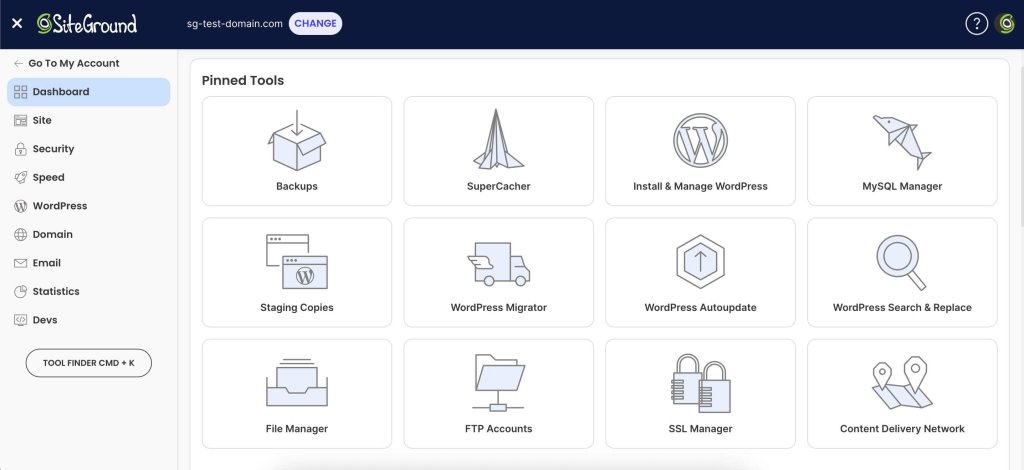
A smooth control panel experience can make a big difference, especially for users who don’t have deep technical expertise. The best managed hosting providers offer intuitive dashboards where you can monitor server performance, manage domains, access backups, and install apps—all in a few clicks.

Screenshot of SiteGround's hosting dashboard and pinned tools.

Whether you’re managing a WordPress site, updating DNS settings, or reviewing hosting plan details, a clean interface saves time and reduces the chance of errors. Features like one-click staging, automatic updates, and integrated analytics empower both developers and beginners.

Ultimately, your hosting company should simplify administration, not add to your to-do list. A well-designed dashboard helps you get more out of your managed hosting services—without needing to rely on support for every task.

Make Your Business Thrive with SiteGround

Choosing the right hosting provider will take a load off your shoulders. From handling hardware management and server hosting to keeping websites safe with up-to-date security, a reliable partner does the heavy lifting so managed hosting customers can focus on growing their business.

Whether you’re running a WordPress site, an online store, or a custom app, managed hosting lets you tap into expert support, robust hosting technology, and a fully maintained network. You don’t need your own infrastructure or an experienced hosting IT team—your provider takes care of it all.

In the end, the right managed hosting services aren’t just about convenience—they’re about enabling business success. So when you’re ready to move beyond the limitations of unmanaged hosting, choose a hosting company that offers not only the right tools, but also a proven hosting provider’s success rate and commitment to excellence.

SiteGround is managing over 3,000,000 domains globally, with 98% satisfied customers, and is renowned for its 5-star support services. So, why not give us a try?

A promotional banner inviting users to try SiteGround's plans, with a button to get hosting.

Cold Emails: A Guide to Get You Started

Illustration of envelopes and paper planes symbolizing email communication, with a web browser window in the background.

Ever felt like your emails are disappearing into a digital black hole, never to be seen or heard from again? If you’re nodding along, you’re not alone. Cold emailing might sound intimidating, but when done right, it can be your secret weapon for reaching new clients, forging business relationships, and opening doors you never knew existed. Imagine crafting a message so compelling that it cuts through the noise and lands directly in the inbox of your dream contact. Intrigued?

In this guide, we’ll unravel the mystery behind cold emails, showing you how to maximize response rates and turn those cold leads into warm connections. Whether you’re a seasoned pro or just starting out, there’s something here for everyone ready to master the art of cold emailing.

What Is a Cold Email?

Purple background image explaining a cold email as unsolicited communication to new contacts. SiteGround logo included.

A cold email is a type of communication sent to someone with whom the sender has not previously interacted. It’s different from regular email campaigns due to its unsolicited nature, meaning the recipient did not request or expect the email. Cold emails are typically crafted with a specific purpose in mind, such as introducing you and your organization, presenting an idea, or offering your product or service. Whether you’re a business owner seeking to get your product noticed or a freelancer expanding your network, cold emails can be beneficial.

While cold emails can offer significant value, they may feel daunting because you are contacting someone you don’t know. It’s your personal pitch, so crafting an email that’s personable and clear is crucial. You want to sound professional yet approachable, informative yet meaningful.

In essence, a cold email is your first handshake with someone—a way to introduce yourself and start a conversation that could lead to exciting opportunities. If you’ve ever hesitated to send one, consider it a chance to make a new connection. You never know where it might lead!

Is Cold Email Outreach Spam?

Let’s clear the air: cold emails and spam are not the same thing. Sure, both might land in your inbox uninvited, but that’s where the similarities end. Think of spam as the junk mail of the internet—those annoying, irrelevant messages that clutter your inbox and make you roll your eyes. Cold emails, on the other hand, are more like a thoughtful introduction from someone who genuinely wants to connect. 

Generally spam emails are sent in bulk with little regard for recipients’ interests, a tactic known as “email blasting.” They’re the equivalent of throwing spaghetti at the wall to see what sticks. 

However, this is not what cold emails are. They are carefully crafted and targeted, and sent with a specific purpose and a genuine interest in engaging with the recipient.

To ensure your cold email stands out as professional:

  • Respect the recipient’s time and attention by personalizing your message.
  • Make sure it’s relevant to the recipient’s business and offers value, such as information, a solution, or a collaboration opportunity.
  • Research and understand the recipient’s needs to demonstrate genuine interest.

The line between cold emails and spam is defined by personalization and value. If you send  generic messages to a large audience without personalization, you risk crossing into spam territory. However, by investing time in tailoring your message and offering genuine value, your cold email can stand out, fostering positive engagement and building meaningful connections.

What Is the Difference Between Cold Emails and Marketing Emails?

At first glance, cold emails and marketing emails might seem like two peas in a pod—they’re both emails, they’re both used for business purposes, and they both aim to capture the recipient’s attention. However, dig a little deeper, and you’ll find some key differences that set them apart. However cold emails and marketing emails serve distinct purposes and audiences. 

Here’s a comparison of these two types of emails:

Cold Emails:

  • Serve as the initial point of contact with individuals you have no prior relationship with.
  • Are highly targeted and personalized, aiming to initiate a conversation or build a connection.
  • Focus on introducing yourself or your business while offering something valuable to the recipient.
  • Aim to establish a genuine connection and open the door to future interactions.
  • Generate leads by identifying and engaging potential customers who may be interested in your products or services.
  • Build partnerships by reaching out to potential collaborators or allies who can mutually benefit from a strategic relationship.
  • Promote a new product by informing targeted recipients about your latest offerings and encouraging them to learn more or make a purchase.
  • Build links by connecting with industry influencers or websites to enhance your online presence and improve search engine rankings.

Marketing Emails:

  • Warm emails are crafted to feel like a friendly conversation with someone familiar with your business, incorporating newsletters or product updates.
  • These emails are sent to individuals who have previously interacted with your business to maintain engagement.
  • They are integrated into a broader campaign, allowing for more promotional content that aligns with your goals.
  • The focus is on nurturing existing relationships, maintaining interest, and encouraging further actions such as making a purchase or signing up for a webinar.

Key Differences

  • Cold emails require a higher degree of customization to resonate with individual recipients, as they are tailored to their specific needs and interests.
  • Marketing emails, while still personalized to some extent, often rely on segmentation and automation to deliver a consistent message to a larger audience.

How Do You Start and Launch a Cold Email Campaign?

Starting a cold email campaign can be tricky if you’ve never done it before. Cold outreach generally requires a clear pain point, a good subject line and anything that will help you build a personal connection, and eventually bring new customers.

There are a few things we recommend doing when you’re getting started.

1. Set Clear Goals

The first step to any successful marketing campaign is to set clear goals. How else would you know if it’s successful or not?

To increase your chances of running a successful cold email campaign, start by deciding whether you want to:

Keep in mind that the more boxes you want to tick, the less likely your cold emails are to bring results. You will want to pick only one out of the four options above for the best results.

2. Identify Your Ideal Customer Profile (ICP) 

This will help you understand what tone of voice would work best with them, what they might expect from your product or service, and how interested they will be in it. 

Begin by pinpointing the traits of your perfect customer, such as their industry, company size, and job roles. This helps you tailor your message to their specific needs. Consider the challenges they face and how your product or service can provide solutions. Knowing what drives their decision-making process is key, as it allows you to craft messages that resonate. 

3. Build a Target Audience

With a clear understanding of your ideal customer profile, you can start building a well-defined target audience. Begin by identifying potential leads that match your ICP criteria. 

This approach ensures that your efforts are directed towards individuals or businesses that are most likely to benefit from your offerings. Consider segmenting your audience into smaller groups based on specific characteristics or needs. This will allow for more personalized messaging, increasing the likelihood of engagement. 

Remember, focusing on a well-defined audience not only optimizes your outreach but also maximizes the value each connection can bring to your business.

4. Get Their Contact Information

In most cases you can find it through LinkedIn. If it isn’t available there, you can use outreach platforms to find most emails you might need. Here it’s important to make sure that you reach out to the right people. That is, if you’re sending a link-building email, you’ll want to reach someone in SEO or PR, not someone in support.

5. Build a Quality Email List

After finding your target audience’s emails, it’s important to organize them into a quality email list. Avoid sending a bunch of generic cold emails to everyone you found. Consider organizing them by position, experience, type of company, or company size. Remember, quality is the main focus here, so it’s important to avoid emails like marketing@company.com or hr@company.com.

Choose a Reliable Email Marketing Platform 

Before you start writing cold emails, you’ll need to choose a reliable cold email tool to support your outreach. The right platform can make the process much easier — helping you organize leads, set up workflows, schedule emails, and track performance. All of this contributes to more successful cold email campaigns.

A good email marketing tool also improves deliverability by helping your emails avoid spam filters and land in your prospects’ inboxes. This not only boosts your results but also helps protect your sender reputation.

Use a Cold Email Template 

Most email marketing platforms provide a variety of pre-designed templates, making it easier to get started and giving you a general framework for writing cold emails. A well-designed template should be clean, visually appealing, and easy to navigate.

Later in this article, we’ve included several templates you can explore and use.

Once you’ve selected your template, focus on crafting the body of your email. Keep your paragraphs short, use bullet points to highlight key information, and, when relevant, include subheadings to break up the text. Above all, ensure your email feels personalized and doesn’t come across as generic.

Use a Good Subject Line and Preview Text 

The email subject line is your first impression, so you’ve got to make it count. Craft a subject line that is intriguing to the recipient, and pair it with compelling preview text that offers a glimpse of what’s inside. Together, they should entice the recipient to open your email and learn more.

 Here are five types of subject lines to consider for your next outreach campaign:

  • Question-Based: Pose a question to engage curiosity (for example: “Are You Maximizing Your Fleet’s Potential?”).
  • Benefit-Driven: Highlight a clear benefit or advantage (for example: “Boost Your Sales with Our Proven Strategy”).
  • Curiosity-Inducing: Create intrigue to encourage opens (for example: “The Secret to Doubling Your Efficiency”).
  • Personalized: Include the recipient’s name or specific details (for example: “John, Here’s How We Can Help Your Business”).
  • Problem-Solving: Address a common pain point (for example: “Struggling with False Reviews? We Can Help”).

Craft a Compelling Message

Your email should be clear, specific, and engaging. Start with an attention-grabbing subject line that piques curiosity. Then, in the body of the email, introduce yourself, explain why you’re reaching out, and highlight the value you can provide. 

After that, mention the pain point your product or service addresses. It’s a good idea to include some key details on why your business is the best solution to that specific problem.


Including a clear call to action is crucial, as it can motivate the reader to visit your website, sign up for a newsletter, or simply explore further. Crafting an engaging email call to action can also significantly enhance your email’s effectiveness.

Finally, make sure to personalize each message for the recipient. We’ll get into more detail on what makes a compelling message in the next section.

Personalize 

Personalization is key to making your email stand out. Start with a personalized opening line which mentions the recipient’s name, a common connection or a shared experience. This will highlight the relevance of your cold email and proves that you’ve done your homework.

Schedule Smartly

Timing can significantly impact open rates. Experiment with different days and times to find out when your audience is most likely to check their emails. Generally, mid-morning or early afternoon on weekdays are considered optimal times, but it’s always best to test and see what works for your specific audience. 

Some email platforms help you understand the best time to send an email by analyzing the open and click-through rates of your previous campaigns.

By focusing on these strategies, you can improve the chances of your cold emails being delivered and opened. Remember, the goal is to create a positive experience for the recipient—one that encourages them to connect with your message and take the next step. With careful planning and attention to detail, you can enhance your email campaign’s effectiveness and achieve your outreach goals.

Plan Your Follow-Ups 

Not everyone will respond to your first email, and that’s okay. Plan a series of automated emails to gently remind recipients of your initial message. Keep them short and friendly, and offer additional value or insights to encourage a response.

Make Sure You Comply With Regulations

Before launching or contacting potential customers, ensure that emails comply with regulations, such as GDPR or the CAN-SPAM Act. This includes providing a clear way for recipients to opt out of future communications, as well as including your contact information.

Track and Optimize Your Campaign

Once your campaign is underway, monitor its performance closely. Track metrics such as open rates, response rates, and conversions to see what’s working and what’s not. Use this data to refine your approach and advance future campaigns.

Examples for a Good Cold Email

After all this information you might want to see a few examples of cold emails at play. We’ve put together a few examples to help you understand what makes a strong cold email—and to generate ideas for your own campaign.

The Short and Sweet

Nielsen Norman Group conducted a research on emails that demonstrated that around 80% of adults only scan their emails. What this means for your cold emails is that they should be short, easily scannable, and be direct in what they are saying. 

Here’s an example:

Subject line: Helping Your Business Save with Sustainable Energy [highlight the email’s focus and a key business trait]

Hi John, [recipient’s name]

I’m Michael from GreenTech Solutions. [present yourself] We specialize in sustainable energy systems designed to help small businesses reduce energy costs and improve efficiency.

I’d love to schedule a quick 5-minute call to explore how we can support your energy goals and tailor a solution that fits your operations.

Schedule Your Free Consultation [CTA button]

Thanks for your time—I look forward to connecting.

Best,

Michael

The Hook and Proof

You only have a few words to grab your recipient’s attention. A good approach is to start with a bold statement and ask a question. This will spark the reader’s interest and make them want to learn more. 

If you choose to open with a bold statement, you need to prove your credibility. One of the best ways to do that is by backing it up with a compelling statistic—just make sure it comes from a reliable source.

Here’s an example:

Subject line: Effective Fleet Solutions for Your Car Hire Business [highlight the email’s focus and a key business trait]

Hey Stefanie [recipient’s name],

Optimized fleet management can drive your sales. How can you attract the right clients?

Simply managing your fleet without a strategy will rarely work. At FleetTech Solutions, we have a proven 25% improvement in fleet efficiency and a 10% reduction in maintenance costs [position yourself as an authority and link to proof]

I believe that your car hire business [recipient’s business] could benefit from our expertise.

Book your 15-minute meeting to know more. [button with call to action]

Regards,

The Tailored Touch 

In the realm of outreach, personalization reigns supreme. Crafting an email that resonates with the recipient on a personal level can significantly enhance engagement and open doors to fruitful collaborations. 

The example below demonstrates how to effectively tailor a message to the recipient’s unique role and industry, ensuring that the communication feels relevant and valuable.

Subject: Promising SEO Opportunity for Your Business

Hi Mark [recipient’s name],

Jessica [sender’s name] from TechSolutions Innovations here.

Congratulations on your exciting new role at FutureTech Enterprises! It must be an inspiring journey to lead the Product Development Team as it explores new frontiers! [show you know who you’re talking to]

FutureTech’s initiatives demonstrate a strong focus on cutting-edge technology and innovative solutions. [present your company]

Additionally, there’s significant potential in exploring emerging trends like “AI-driven automation tools” (2600 searches) or “next-gen cybersecurity solutions,” which, although having a lower search volume of 400, are gaining traction rapidly. [show you’ve done your research]

The TechSolutions Innovations Team would be thrilled to collaborate on this topic with you, conduct thorough research, and share it with our network to ensure it reaches its full potential.

Would you be open to this idea? I’d love to hear your thoughts. [call-to-action]

Best regards,

The Pain Point

Every business makes money by solving problems. This is exactly what you should present in your cold email. A good approach may be to present the problem your business solves, position yourself as someone trustworthy who can solve it, and then present the solution. 

Here’s an example:

Subject line: Take Control of Your Online Reputation Today  [engaging hook but not spammy]

Hi Michelle [recipient’s name],

I noticed a few negative comments from people who claim to have used your company’s services.

You may be suffering from hostile competition [the problem you’re solving]. It’s very common that an ill-intended competitor will hire a company to harm your reputation which may lose you customers.

At Reviews 101 [your company’s name] we can help you tackle the problem by responding to negative reviews, pushing your actual customers to leave positive ones, and negotiating with review websites to remove false comments [your solution].

Would you like to hear more about how Reviews 101 [your company’s name] can help you win your good reputation back?

I look forward to discussing how we can support your online reputation. Please let me know if you’d like to schedule a call.

Best regards,

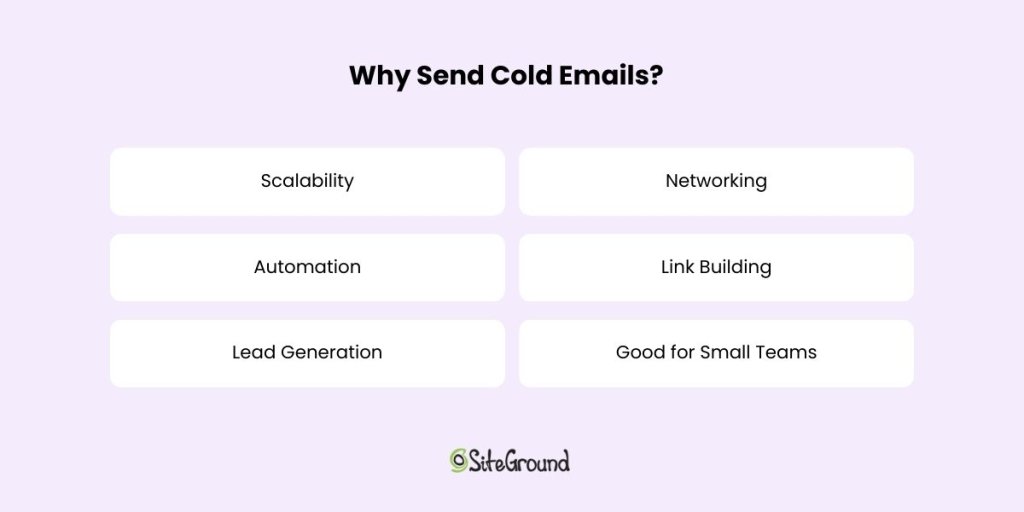
Why Send Cold Emails?

Image listing reasons to send cold emails: Scalability, Networking, Automation, Link Building, Lead Generation. SiteGround logo.

If you’re wondering why cold emails are worth your time, think of them as seeds that, with the right nurturing, can grow into valuable relationships. They’re versatile, efficient, and can open up a world of opportunities. Here’s why you might want to consider adding them to your marketing strategy. 

Scalability

One of the biggest advantages of cold emails is their scalability. Unlike face-to-face meetings or phone calls, you can reach a large number of potential contacts without sacrificing the personal touch. Whether you’re targeting ten people or a thousand, cold emails allow you to expand your reach quickly and efficiently. It’s like casting a wide net, but with the precision of a skilled angler.

Automation

Email automation tools allow you to streamline the process, saving you time and effort. You can schedule emails, track responses, and even set follow-up reminders—all with a few clicks. This means you can focus more on crafting the perfect message and less on the logistics of sending it.

Lead Generation

By reaching out to potential clients or partners, you can introduce your product or service to a whole new audience. It’s your chance to get them interested and start a conversation that could lead to a fruitful business relationship. Plus, with the right approach, you can turn cold leads into warm prospects who are eager to know more about what you offer.

Networking

A thoughtful cold email can open the door to valuable relationships. No matter if you’re looking to connect with industry leaders, potential mentors, or like-minded professionals. It’s an opportunity to introduce yourself, share your interests, and explore ways to collaborate.

For those in the marketing space, cold emails are an effective way to build backlinks and strengthen your website’s SEO. By reaching out to bloggers, journalists, and influencers, you can pitch guest posts, collaborations, or content sharing opportunities. This not only amplifies your online presence but also helps establish your authority in your niche.

Good for Small Teams

Cold emails allow you to compete with bigger players by leveraging the power of personalized outreach on a budget. With a little creativity and effort, you can make a big impact, reach a wide audience and achieve your business goals.

With so many benefits, cold emails are a powerful tool in your communication arsenal. They offer a unique blend of efficiency and personalization that can help you stand out in a crowded marketplace. Success lies in the details—crafting a resonant message, targeting the right audience, and nurturing the connections you create.

Final Thoughts on Cold Emails

Mastering the art of cold emailing can open up a world of opportunities, from generating leads to building valuable connections. By focusing on personalization, crafting compelling messages, and utilizing smart scheduling, you can have significantly better email deliverability and open rates.

Now that you’re equipped with these insights, why not take your email outreach to the next level? Try SiteGround’s email marketing to streamline your campaigns and achieve remarkable results. Start connecting today!

13 Great Email Header Design Ideas + Best Practices

Email Header Design Ideas and Best practices

Your email header is prime real estate—it’s the first thing people see, and it sets the tone for everything that follows. When the design looks sharp and on-brand, with your colors, logo, and fonts, it instantly tells people you mean business. You don’t have much space, so make it count: be clear, be bold, and make sure your message lands at a glance.

This article will explore exactly how to create an email header design and provide 13 great email header design examples to inspire you.

SiteGround email marketing

The Role of Email Headers in Marketing

Email headers are often the first thing readers notice when they open an email, and that’s what makes them such an important marketing asset. It’s the place to position your company logo and other key elements that encourage readers to dive into the email content. 

Additionally, keeping a consistent brand look across email headers helps build familiarity and trust with your audience, which can lead to more conversions and sales.

What Is a Good Email Header?

A good email header captures attention by using the right visuals and effectively communicates your brand’s identity through elements like logos and colors. 

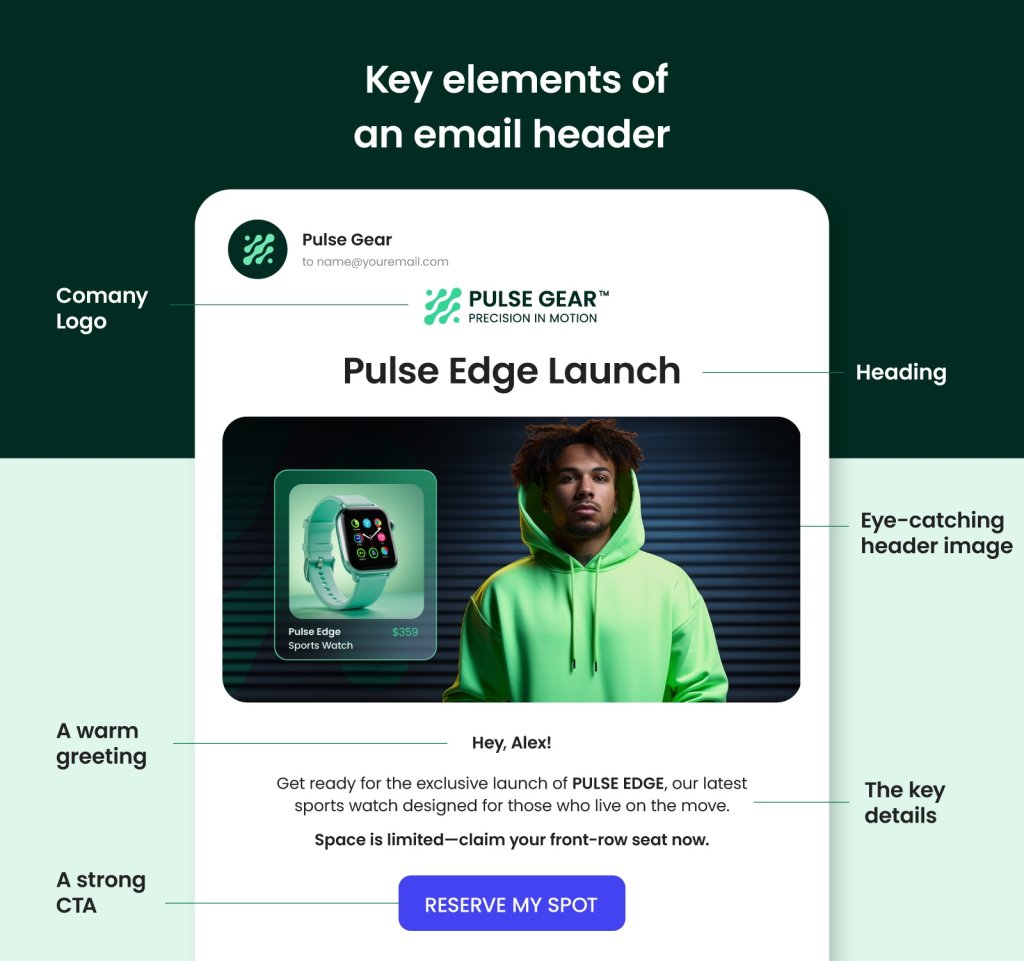
Essential Elements of Email Headers

Creating a professional email involves several key components that work together to strengthen brand recognition and engagement. Let’s review the essential elements of an email header to help you get a better understanding and knowledge of what to look for in your designs.

key elements of email header

An email header usually starts with the company name and logo, which helps you instantly recognize who the message is from. A clear heading follows, letting you know what the email is about right away. Adding a personal touch, like a tagline saying “Hey, Alex,” makes you feel appreciated and part of the conversation. Sometimes, there’s even a CTA inviting you to click a link or explore an offer.

Altogether, these elements create a welcoming start that grabs your attention and makes you want to read more.

The Importance of Email Header Design

Email headers can really make a difference in how well your emails perform. Headers help your emails stand out and become familiar to your subscribers. This can significantly impact email marketing metrics like open rates and engagement.

13 Tips for Great Email Header Designs + Examples

Capturing your audience’s attention from the start begins with designing an effective email header. It not only sets the tone for your email but also reinforces your brand’s identity. Using creative layouts and personalized elements can make your emails more engaging and memorable. Consistency in design helps maintain brand recognition, while incorporating links and calls to action can improve user experience. Here are 13 tips with examples to guide you in creating standout email headers:

email header design tips

1. Include a Logo and Company Name

Featuring your logo and company name in the email header is an excellent way to emphasize your brand identity.

⭐Yelp provides a good illustration prominently featuring their logo and company name.

email header design yelp
Source: Really Good Emails

✅ Why It’s Effective: Placing Yelp’s logo and company name at the beginning of the email immediately strengthens brand recognition and trust. The straightforward design keeps the focus on Yelp, making it easy for customers to identify and remember their trusted source for local business reviews.

2. Relate to Your Audience

Connecting with your audience on a personal level can make all the difference in how they perceive your brand.

⭐A noteworthy example of this approach comes from Netflix. The brand uses personalized messages like “Here’s what you’ve watched” with user-specific recommendations.

email header design netflix
Source: Really Good Emails

✅ Why It’s Effective: Talking directly to the user about their interests makes them feel special and understood, which strengthens engagement.

3. Make Sure Your Design Stands Out

To make your email headers stand out in busy inboxes, use images, animations, and colors to catch attention and establish your visual identity. A simple design with the right font ensures readability and focuses on key information, guiding readers toward desired actions while conveying your brand’s message effectively.

⭐YouTube stands out as a great example of including striking visuals in their “Year of YOU” campaign.

email header design youtube
Source: Really Good Emails

✅ Why It’s Effective: Eye-catching images draw people in and match YouTube’s creative vibe, making the email visually appealing and consistent with the brand’s identity.

4. Optimize Your Email Header Size for Different Devices

The email header size is key for design and reader engagement. With most emails opened on mobile, a responsive design is a must. Use HTML header templates and test headers on various devices to ensure they display correctly. For desktops, aim for 600 pixels wide and 150-200 pixels high; for mobiles, 320-480 pixels wide and 100-150 pixels high.

Make sure logos and CTAs are clear and readable. A well-sized header maintains a professional look, enhancing readability and interest. Focus on a balanced design to highlight key elements without overwhelming the viewer.

⭐ Grammarly uses a clean, responsive header design that looks good on all devices.

email header design grammarly
Source: Really Good Emails

✅ Why It’s Effective: Grammarly’s design keeps the text and images centered, regardless of the device the reader is using. Both the text and images are fully readable and strategically positioned, ensuring nothing distracts the eye while reading on either mobile or desktop.

5. Add a Navigation Bar

Some brands incorporate a navigation bar at the top of their email headers to make it easier for readers to explore the content.
⭐ Drizzly serves as a great example for including a navigation bar for seamless browsing.

email header design drizzly
Source: Really Good Emails

✅ Why It’s Effective: This approach allows users to easily click through your content, making the experience more visually appealing and intuitive for navigation.

6. Keep the Industry in Mind

Your design reflects the industry in which your company operates, so customize email headers for the respective industry. Creative businesses might use bold colors, while financial firms may opt for classic styles. Understanding your audience and adding elements like logos and social media links can make your emails more engaging and true to your brand.


⭐ Koala Eco utilizes simple visuals with eco-friendly colors and a bee image to emphasize their commitment to natural products.

email header design koala eco
Source: Really Good Emails

✅ Why It’s Effective: Koala Eco is a great example of keeping the industry in mind because their simple visuals and eco-friendly colors, paired with a bee image, perfectly convey their commitment to natural and sustainable products.

7. Keep It Clear and Simple

Keeping your header clear and simple ensures that your message is immediately recognizable and easy to understand.

⭐ When it comes to minimalism and simplicity, IKEA is king. The brand features minimalist header designs with just the logo and a sleek image.

email header design ikea
Source: Really Good Emails

✅ Why It’s Effective: The clean design lets the brand stand out, appealing to IKEA fans who love simple and functional style.

8. Use Your Mascot

Incorporating a mascot, such as an animal or other character that represents your brand, into your email header can create a memorable and personable connection with your readers, making your brand more relatable and recognizable.

⭐ Tradegecko uses the Gecko in their email headers, which is a great example of how incorporating a mascot can make the brand more relatable and memorable, helping to establish a friendly connection with readers.

email header design tradegcko
Source: Really Good Emails

✅ Why It’s Effective: The mascot is instantly recognizable and adds a friendly touch, which helps build a loyal audience.

9. Use Animations

Using animations in your email header can capture attention and add a dynamic element to your message, making your brand more engaging and lively.

⭐ Known for their playful approach, Duolingo exemplifies how subtle animations, like their owl mascot flapping its wings, can capture attention and add a dynamic element to your message.

email header design duolingo
Source: Really Good Emails

✅ Why It’s Effective: Fun animations are engaging without being too much, reflecting Duolingo’s playful approach to language learning.

10. Customize Your Header for Every Campaign

Your email header isn’t just a static space for your logo or navigation—it’s valuable space for driving home your message. Adapting it for each campaign can make a big difference. From seasonal visuals to campaign-specific taglines, customizing your header keeps your emails cohesive, timely, and more engaging.

⭐ Disney updates their headers to match each campaign—not just with branding elements, but with visuals and messaging that reflect the theme.

email header design disney
Source: Really Good Emails

✅ Why It’s Effective: By customizing headers to fit different themes, you keep your content fresh and engaging. It shows off your brand’s creativity and adaptability, ensuring each email feels relevant and exciting—just like how Disney keeps its audience captivated with imaginative storytelling.

Assigning different purposes to your header and footer can strategically guide your audience’s actions, maximizing engagement and enhancing user experience by offering clear calls to action in distinct areas of your email.

⭐ GoPro uses a “Shop Now” CTA in the header and a “Subscribe” CTA in the footer, effectively guiding users towards immediate action while also encouraging ongoing engagement, making it a strong example of strategic CTA placement.

email header design gopro
Source: Really Good Emails

✅ Why It’s Effective: Clearly distinguishing between the header and footer with specific CTAs helps guide the reader’s journey, encouraging immediate action while also nurturing ongoing engagement with GoPro’s community.

Featuring a specific product or service in your email header can draw immediate attention and attract your audience. This technique effectively promotes key offers or highlights that align with your marketing goals.

⭐ Nike features free shipping offers in their email headers, effectively drawing attention to a key incentive. This encourages customers to complete their purchases, demonstrating a smart use of promotional messaging.

email header design nike
Source: Really Good Emails

✅ Why It’s Effective: Putting a product or offer front and center catches the eye and gives readers a reason to click and explore more.

13. Include an Incentive

An incentive placed in your email header can quickly engage your audience, providing a persuasive reason for them to interact with your content.

⭐ Casper places incentives in the header, grabbing attention and encouraging customers to act, which is a smart way to increase engagement.

email header design
Source: Really Good Emails

✅ Why It’s Effective: An enticing offer immediately grabs attention and encourages readers to dive deeper into the email, increasing sales and engagement.

SiteGround Email Marketing

An email header is key to shaping a brand’s identity and building trust with readers. The right visuals and tone encourage readers to explore the content further. Crafting engaging email headers with visually appealing elements, like graphics and concise text, can effectively draw the reader in and increase interaction with the audience.

But don’t forget: it’s important to optimize headers for different screen sizes to ensure they connect with various audience segments and work well across devices. Encourage readers to follow best practices and look for inspiration from examples. Highlight how versatile email header makers can be in creating graphics not just for emails but also for social media. 

A simple, well-designed header can improve user experience and guide readers toward desired actions, making it a powerful tool for capturing attention and communicating the brand’s message. To take your email marketing to the next level, explore SiteGround Email Marketing, which can help you create and manage effective email campaigns effortlessly.

Email Engagement: Data-Driven Strategies for Success

Email Engagement

Email engagement is the foundation of a successful email marketing strategy. It’s all about how your audience interacts with the emails you send. 

In this article, we’ll explore why email engagement matters so much and share practical tips to make your emails more appealing. From adding a personal touch to figuring out the best time to hit send, we’ll explore ways to keep your subscribers hooked. We’ll also address common challenges and offer simple solutions to strengthen your email campaigns. 

Let’s dive in and discover how to make your emails an awesome part of your marketing toolkit!

What Is Email Engagement?

what is email engagement

Email engagement is the way readers react to a message received via email. It consists of KPIs and engagement metrics that help email marketers understand user behavior and optimize performance. It measures actions such as opening the email, clicking links inside the email, replying to the email, forwarding or sharing it, and marking it as important (or, negatively, marking it as spam). With these foundational strategies in place, you can now delve into the specific email metrics that will help you measure and optimize your email engagement!

Elevate your email engagement with SiteGround’s Advanced Email Marketing! Use unlimited sign-up forms, automated journeys, a no-code email builder, and an AI email writer to craft engaging emails, monitor metrics, and refine your strategy for impressive results. Try it today!

Email Engagement Metrics to Keep Track of

Engagement levels reflect how well your emails communicate with your audience, which is why measuring them is important. Email analytics go beyond just the basic numbers; they give you a deeper look into how people are interacting with your emails and what they do afterward on your website. This helps in improving deliverability and allows you to fine-tune your overall email marketing strategy and its components.

To get a good understanding of how well your emails are doing, focus on specific key performance indicators (KPIs) that show how your audience is interacting with them. These metrics are important for gaining insights into how your subscribers behave, improving your email campaigns, and increasing your marketing return on investment (ROI).

Open Rate

Open rate measures the percentage of recipients who open your email. It’s a key indicator of how effectively your subject line and preview text capture attention.

High open rates suggest that your emails are engaging at first glance, indicating that your subject lines and preview text are compelling enough to prompt recipients to open the email. This is essential for getting your subscribers to interact and engage with you. 

However, with various industries, email types, and email lists, how do you know if your open rate is good? Based on data reported by SiteGround, an average open rate for small businesses using email marketing is around 36%.

To improve open rates, craft eye-catching and personalized subject lines that your audience can relate to, reflecting their interests and preferences. Personalization and segmentation can further improve relevance, while A/B testing helps identify the most effective approaches.

Click-to-Open Rate (CTOR)

The Click-to-Open Rate (CTOR) measures the percentage of recipients who click on a link within your email after opening it. This metric provides a deeper understanding of how compelling and relevant your content is to those who have shown initial interest by opening the email. A high CTOR suggests that your email content and calls to action (CTAs) are successfully engaging recipients and prompting further interaction. 

To improve CTOR, focus on delivering high-quality, relevant content and crafting clear, compelling CTAs. Personalization and segmentation can also improve the relevance of your email content, while A/B testing can help identify the most effective strategies.

Click-Through Rate (CTR)

The Click-Through Rate (CTR) measures the percentage of recipients who click on one or more links within an email, whether they opened the email or not. This metric provides insights into subscriber interest and engagement. The main difference between CTOR and CTR is that CTOR is calculated based on the number of opens, while CTR is calculated based on the total number of emails delivered.

CTR is a vital metric in email marketing, serving as a key indicator of how well your content connects with subscribers. It helps assess the effectiveness of your messaging and content, and email marketing strategy. 

Again, to improve CTR, create engaging content with clear and persuasive calls to action. Just like with CTOR, personalizing and segmenting your emails can make a big difference, and trying out different CTA placements with A/B testing can help you get better results.

Bounce Rate

Bounce rate refers to the percentage of sent emails that cannot be delivered to the recipient’s inbox due to reasons like invalid addresses or server issues.

High bounce rates can negatively impact your reputation as a sender and email deliverability, affecting overall metrics such as unsubscribe rates and click-to-open rates (CTOR).
To minimize bounce rates, regularly clean your email list by removing invalid addresses and use email verification tools to ensure higher delivery success. Monitoring engagement metrics helps identify and address factors contributing to high bounce rates.

Try SiteGround Email Marketing

Reply Rate

The reply rate measures the percentage of recipients who respond to your email, providing insight into the level of engagement and interest in your content. A high reply rate indicates that your emails are sparking meaningful conversations and fostering a sense of connection with your audience. 

To improve reply rates, encourage interaction by asking open-ended questions and inviting feedback. Personalizing your emails and making them relevant to the recipient’s interests can further increase the likelihood of receiving replies.

Forwarding Rate

The forwarding rate tracks the percentage of recipients who share your email with others, either by forwarding it directly or using social sharing buttons. This metric provides insight into how shareable and valuable your recipients find your content. A high forwarding rate suggests that your emails contain content worth sharing with others. 

To increase forwarding rates, create compelling and shareable content, and include easy-to-use sharing options. Encourage subscribers to pass along your emails to friends or colleagues who might find them useful.

Marking as Important Rate

This metric measures the percentage of recipients who mark your email as important. When emails are marked as important, they become more visible in recipients’ inboxes. 

To encourage this, make sure your content is relevant, valuable, and personalized for your audience. Additionally, you might ask subscribers to add your email to their contacts or whitelist to increase importance.

Spam Rate

The spam rate measures the percentage of recipients who mark your email as spam. Being marked as spam can damage your sender reputation and affect email deliverability. 

To avoid this, stay clear of spammy language and follow best practices in email marketing. Regularly clean your email list to remove inactive subscribers and reduce the chance of being marked as spam.

Unsubscribe Rate

The unsubscribe rate measures the percentage of recipients who opt out of receiving future emails from you. This metric provides insight into how well your content aligns with subscriber expectations and interests. A low unsubscribe rate indicates that your emails are meeting the needs of your audience, while a high rate may suggest dissatisfaction. 

To reduce unsubscribe rates, offer subscribers control over their email preferences and ensure your content remains relevant and valuable. Regularly seek feedback to understand and address any concerns.

Improve Your Email Engagement: A Step-by-Step Guide

The following steps will help you personalize your content, choose the best timing, and create compelling calls to action, all aimed at improving your email marketing efforts and building lasting relationships with your audience. Let’s dive in!

1. Personalize Your Email Content and Offers

Personalizing subject lines and email content can make them more relevant and engaging for the recipient and build stronger customer relationships. Including the recipient’s name in the subject line is a good start, but going beyond that can improve open rates. Use subscriber data to customize content and create a personal connection. Offering exclusive discounts is another effective way to attract attention and keep subscribers interested in your brand. This approach makes subscribers feel valued and appreciated.

2. Time It Right and Keep It Consistent

Finding the right timing and frequency for sending re-engagement emails is important. According to The Marketing Eye’s research, mornings (9 AM to 12 PM) are effective on weekdays, especially Mondays and Fridays. Midday (12 PM to 3 PM) is ideal for midweek emails, while afternoons (6 AM to 3 PM) are best for Sundays.

Consistent sending helps keep your audience engaged and avoids fluctuations that can hurt email engagement. Analyze when your audience is most active and likely to open emails. By segmenting your audience, you can send emails at times that work best for different groups, making it more likely that they’ll open and engage with your messages.

3. Make Clear Calls to Action

Defining the desired action is key to measuring conversion rates and enhancing email engagement. A well-designed landing page is also vital in analyzing email marketing effectiveness, as it can significantly impact conversion rates by ensuring recipients complete the desired actions.

Having a clear email message helps motivate people to take action and makes sure your message really connects with them.

4. Encourage Sharing and Forwarding

Sharing with friends is a big deal these days! To increase engagement, include social sharing buttons and encourage subscribers to forward the email to friends who might find it useful. Create content that’s interesting and shareable, and make it easy for people to share with just a click.

5. Put Re-Engagement Strategies into Action

Over time, some subscribers might become inactive, but you can spark their interest again with thoughtful re-engagement strategies. Try sending targeted campaigns that include personalized messages, special offers, or surveys to get a better sense of their preferences and focus on lead-nurturing relationships. Share one-of-a-kind content and host fun giveaways to remind them of the special value you bring and encourage them to reconnect. Adding dynamic elements like animations and interactive features can also make your emails more exciting and encourage them to dive back in.

Follow Through on Your Email Engagement

Regular check-ins help keep your emails relevant and impactful. By understanding your engagement rates, you can see what your subscribers love. Using dynamic and personalized content helps tailor your messages to what really matters to them, making your emails more appealing. Simple touches like exclusive discounts and interactive elements can make a big difference in keeping your audience engaged and happy. 

We hope these insights spark new ideas to improve your email marketing. Give them a try today and see how your engagement takes off!

How to Secure a Website in 2026: 15 Critical Tactics

how to secure a website

The question “how to secure a website” might seem daunting at first. With terms like HTTPS, SSL, and firewalls flying around, it’s easy to feel overwhelmed. But the truth is that securing your website doesn’t have to be complicated if you know the right steps to take. 

In this article, we’ll walk you through the 15 most critical tactics to protect your site, your visitors, and your peace of mind.

Why Is Securing Your Website More Important Than Ever in 2025?

Securing a website isn’t just a technical best practice—it’s a necessity. As a website owner, staying ahead of evolving cyber threats is crucial.

Hacking attempts have become more advanced, and attackers now use AI-driven tools to target websites of all sizes. 

Whether you run a personal blog or manage an online store, failing to secure your site can lead to data breaches, downtime, search engine penalties, and a loss of customer trust.

Here’s why web security matters more than ever:

  • AI-powered attacks are on the rise – Hackers can now automate complex cyber attacks at scale, probing for weak spots 24/7.
  • Regulations are tightening – Laws like the GDPR, CCPA, and new regional frameworks demand stronger protections for user data.
  • Trust is everything – Visitors quickly leave insecure sites. HTTPS, a clean UX, and visible security features all boost credibility.
  • Business continuity depends on it – Downtime due to hacks or malware can cost you leads, customers, and revenue.

Securing your website today means safeguarding your brand’s reputation, your users, and your future.

Essential Tactics to Secure Your Website

Let’s dive into the most effective, up-to-date strategies for protecting your website in 2025. These tactics are actionable, proven, and scalable—no matter your website size or platform.

1. Use HTTPS with a Valid SSL/TLS Certificate

Let’s start here because the “Connection Is Not Private” error is still common in 2025—but thankfully, it’s also easy to fix.

This warning shows up when a site doesn’t use encryption to protect data. Modern browsers flag these sites to alert users that their information could be at risk. If you’re running a website—especially one that handles logins, forms, or payments—encrypting that data is essential.

The most reliable way to do this is by using an SSL (Secure Sockets Layer) certificate, which enables HTTPS. It encrypts the communication between your site and its visitors, preventing data like passwords and credit card details from being intercepted by attackers.

Good news: installing an SSL certificate is simple.

  • SiteGround includes free standard and wildcard SSL certificates in all hosting plans. To install one, go to Websites > Site Tools > Security > SSL Manager.
A screenshot of SiteGround's Site Tools dashboard, showing the SSL manager page where a user can install an SSL certificate.
  • If your host doesn’t provide one, services like Let’s Encrypt offer free SSL certificates that are widely trusted.
  • After installation, make sure your site redirects all traffic to HTTPS to enforce secure connections through all URLs.

A valid SSL certificate not only keeps your users safe—it also helps your SEO and builds trust with your audience.
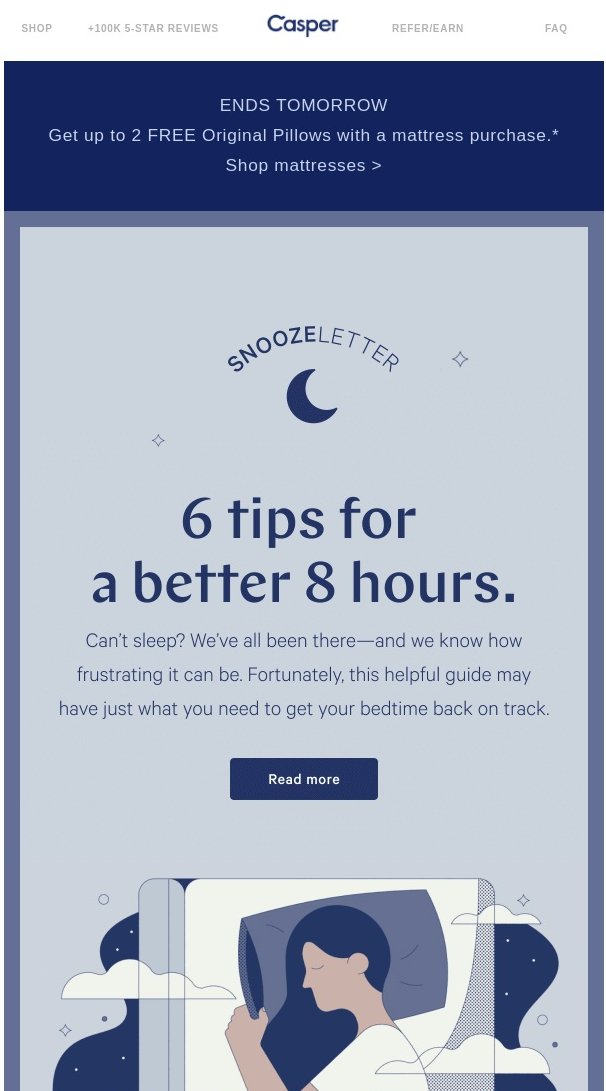
2. Set Up Regular, Automated Website Backups (With a Clear Schedule)

Even with top-tier security, no site is completely immune to threats. That’s why automated backups are your best safety net—they let you restore your site quickly after hacks, server failures, or human error.

Backups should be:

  • Automatic – Manual backups are easy to forget. Automating the process means your data is protected 24/7.
  • Frequent – How often your site is updated should guide your backup frequency. Daily backups are a must, but hourly backups are ideal for high-traffic or ecommerce sites.
  • Securely stored – Your backups should be kept off-site or in a secure cloud environment, separate from your live site.

📅 Scheduling matters. Choose a backup schedule based on how often your content or data changes. For example:

  • Blogs or portfolio sites: Daily
  • Online stores or client portals: Hourly + on-demand

Many hosting providers include automated backup tools. At SiteGround, we back up sites daily and store them securely for 30 days. For advanced needs, our Premium Backup adds:

  • Hourly automatic backups
  • Up to five on-demand backups
  • Extra daily copies for added redundancy
A promotional banner for the SiteGround Premium Backups service.

Having a reliable, up-to-date backup means you’re always just a few clicks away from recovery—no panic, no downtime.

3. Create Strong Passwords and Use Two-Factor Authentication (2FA)

Weak or reused passwords are one of the easiest ways for hackers to gain access to your website. Brute-force attacks can crack simple passwords in seconds—so using a strong, unique username and a secure password is a must.

Here’s how to tighten your login security:

  • Use complex passwords that mix uppercase and lowercase letters, numbers, and special characters.
  • Avoid using the same password across multiple accounts.
  • Change passwords regularly, especially for administrative access users.

Even better? Add two-factor authentication (2FA).

2FA requires both your password and a secondary code (usually from your phone) to log in. That way, even if your password is stolen, your account stays protected.

If you’re using WordPress, you can enable 2FA in seconds with the SiteGround Security Optimizer plugin. If you have a different CMS (content management system) or a custom-built site, services like Google Authenticator or Authy can help you enable it easily.

This one-two combo of strong passwords plus 2FA can block most unauthorized login attempts.

4. Keep All Software, Plugins, and Themes Up-to-Date

Outdated software is a hacker’s playground. When security patches or bug fixes are released, it’s crucial to update as soon as possible. Each unpatched vulnerability is a potential entry point for attackers, which can compromise your entire site.

Here’s how to stay protected:

  • Update your core software regularly. For WordPress sites, make sure that both the core application and plugins are up to date. Ignoring updates can leave your site vulnerable to known exploits.
  • Remove unused plugins and themes. These can create unnecessary security risks, even if they aren’t active on your site.
  • Enable automatic updates wherever possible, especially for security patches.

At SiteGround, automatic updates are on by default for the WordPress core and can be enabled for plugins as well.

A screenshot of SiteGround's Site Tools dashboard, showing the Autoupdate page where users can manage the autoupdate settings of their WordPress core and plugins.

By keeping software up to date, you close off known security vulnerabilities and maintain the integrity of your website. 

5. Choose a Secure, Reputable Hosting Provider

Your hosting provider plays a crucial role in your website’s security. A reliable, secure hosting environment is the foundation of a safe website, and choosing the wrong host can leave you exposed to threats.

When selecting a hosting provider, consider these factors:

  • Security measures in place: Look for features like firewalls, DDoS protection, and malware scanning. A strong server security stack can prevent a range of attacks from even reaching your site.
  • Regular backups: Does your hosting provider back up your site regularly? Automated backups are essential to recover quickly in case of a hack.
  • SSL certificates: Check if they offer free SSL certificates (like SiteGround does). HTTPS is crucial for security and SEO.
  • Support availability: A good host offers 24/7 support with knowledgeable security experts who can assist if something goes wrong.
  • Reputation: Research reviews and testimonials to check if the provider has a history of secure service and good customer support.

Your hosting provider’s security should be your first line of defense—so choose wisely!

A promotional banner for SiteGround's web hosting plans, highlighting the reliability and security of SiteGround's platform.

6. Use a Secure DNS

Your Domain Name System (DNS) is responsible for translating human-friendly domain names (like yourwebsite.com) into IP addresses that computers use to identify each other on the network. 

If your DNS is compromised, attackers can redirect visitors to malicious sites, steal sensitive data, or perform phishing attacks.

To protect your site and visitors, consider the following:

  • Opt for a secure DNS provider: Good DNS providers offer advanced security features, such as DDoS protection and DNS filtering, to block malicious traffic before it reaches your site.
  • Use an anycast DNS network: A global DNS network, like SiteGround’s, increases redundancy and reduces the chances of DNS attacks or downtime.

By securing your DNS, you can protect your site from a variety of DNS-related attacks and improve its overall availability.

7. Use a Web Application Firewall (WAF)

A Web Application Firewall (WAF) acts as a shield between your website and potential threats from the internet. It filters and monitors incoming traffic, blocking malicious requests that could exploit vulnerabilities in your site’s software or code.

Here’s why you need one:

  • Protection from common attacks: WAFs block attacks like database SQL injection, cross-site scripting (XSS), and cross-site request forgery (CSRF)—all of which are commonly used by hackers to exploit site weaknesses.
  • Real-time traffic analysis: A WAF can detect and respond to suspicious activity in real-time, preventing damage before it occurs.
  • Customizable rules: Many WAFs allow you to set up custom rules tailored to your website’s needs, giving you more control over the security strategy.
  • Layered defense: A WAF complements other security measures, like SSL/TLS encryption and firewalls, adding an extra layer of defense.

At SiteGround, we offer a managed WAF as part of our hosting service, designed to protect your site against the latest threats with minimal configuration.

8. Firewall Layering

A strong website security setup doesn’t rely on a single firewall. Instead, it uses multiple layers that work together to stop threats at different points—before they can do harm.

Here are the three main layers you should look into:

  • Hosting-Level Firewall – This server-side firewall blocks common web attacks like SQL injections, XSS, and known malicious IPs before requests reach your website.
  • Application-Level Firewall – Running inside your site (e.g., via the SiteGround Security Optimizer plugin), this firewall protects against things like brute-force login attempts, suspicious behavior, or region-based access.
  • CDN-Level Firewall – Located at the network edge, this layer filters traffic even earlier — helping block bots, reduce DDoS impact, and enforce rules before requests hit your server.

When used together, these layers provide broad, overlapping protection. 

At SiteGround, this approach is built into our platform—from our AI Web Application Firewall and security plugin, to CDN-level filtering and DDoS protection. 

You don’t need to set up complex configurations—we handle it for you.

9. Do Regular Malware Scanning

Malware can silently infect your website, compromise sensitive data, damage your reputation, and ultimately—lead to downtime. That’s why regular malware scanning is essential for detecting and removing harmful files before they cause damage.

There are two primary types of scanning you should implement:

Server-Side Scanning

Server-side scans analyze the website files stored on your server to detect malicious code, hidden backdoors, or suspicious scripts. These scans can identify threats that could potentially take over your site or steal sensitive data.

  • Automate the scanning process to ensure it’s done regularly without relying on manual checks.
  • Use a reputable security tool to scan your entire website server for malware. 
A promotional banner for the SiteGround Site Scanner.

Client-Side Scanning

Client-side scanning targets vulnerabilities in the code and scripts running in your visitors’ browsers. For example, some malware attempts to exploit weaknesses in third-party JavaScript or plugins loaded on your site. Scanning for client-side issues can help detect harmful activity on the visitor’s end and block it before it spreads.

  • Monitor for suspicious requests or abnormal traffic patterns that may indicate an attack.
  • Use a WAF and security tools to keep client-side scripts safe from exploits.

Regular scanning is a critical step in identifying threats, and keeping your website clean and operational.

10. Implement CAPTCHA and Bot Mitigation

Bots are one of the biggest threats to websites, often used for activities like brute-force attacks, data scraping, and spamming. 

CAPTCHA (Completely Automated Public Turing test to tell Computers and Humans Apart) and bot mitigation strategies are effective tools to keep these malicious bots at bay.

Screenshot of the "I am not a robot" captcha by Google reCAPTCHA.

Why Use CAPTCHA?

CAPTCHA challenges users to prove they are human by completing tasks that are easy for people but difficult for automated bots, such as identifying images or solving puzzles. This helps prevent bots from:

  • Brute-forcing login credentials (especially if you’ve enabled rate-limiting).
  • Submitting fake comments or spam through forms.
  • Stealing data by scraping your content or product listings.

Bot Mitigation Techniques

While CAPTCHA is a powerful tool, it’s just one part of a broader bot defense strategy. Here are additional ways to mitigate bot traffic:

  • Rate Limiting: Limit the number of requests a user or bot can make in a set time frame, preventing abuse.
  • IP Blocking: Identify and block suspicious IP addresses or those with a history of malicious behavior.
  • Behavioral Analytics: Use advanced analytics to identify unusual patterns of behavior, such as rapid form submissions or login attempts, that suggest bot activity.
  • Browser Fingerprinting: This technique tracks characteristics of browsers to differentiate between real users and bots, blocking the latter.

Modern WAFs (including SiteGround’s managed solution) have built-in bot mitigation features.

By combining CAPTCHA with additional bot mitigation measures, you can greatly reduce the impact of automated attacks on your website.

11. Enforce Content Security Policies (CSP)

A Content Security Policy (CSP) is becoming an essential security measure that helps prevent a variety of attacks, such as Cross-Site Scripting (XSS) and data injection attacks. 

It acts as a whitelist for your site’s resources, so that only trusted content is executed.

How to Set Up a CSP

Setting up a CSP is relatively straightforward. Here’s how you can implement it:

  1. Define your trusted content sources. Specify domains that can load content on your site (e.g., https://trusted-cdn.com for external JavaScript files).
  2. Configure your policy header. You’ll need to modify your .htaccess file (or use a plugin if you’re on a platform like WordPress) to add a Content-Security-Policy header to your HTTP responses.
  3. Test your policy. Before enforcing the policy, test it in staging mode to make sure legitimate content isn’t blocked.
  4. Monitor and update your policy. As your website evolves, update your CSP to reflect new trusted resources and adjust for any changes.

Here’s an example of a basic CSP header:

Content-Security-Policy: default-src 'self'; script-src 'self' https://trusted-cdn.com; object-src 'none';

This policy allows only resources from the same domain (‘self’) and from https://trusted-cdn.com, while blocking the use of plugins or embedded objects.

Key Benefits of CSP

  • Prevents XSS attacks by blocking unauthorized script execution.
  • Minimizes data injection risks by controlling where resources can be loaded from.
  • Increases user trust by enhancing the overall security of your site.

Enforcing a CSP is a step that strengthens your site’s defenses against a range of web-based attacks.

12. Adopt Zero Trust Principles: Limit Access Intelligently

The Zero Trust model assumes that no user or system should be trusted by default—even if they’re inside your network. It’s a proactive approach to security that limits the potential damage from compromised accounts or insider threats.

A visual list of the 6 core principles of zero trust - continuous verification, least privilege access, micro-segmentation, strict access controls, real-time risk assessment and dynamic policy enforcement.

The key idea is “least privilege access.” A practical way to apply this is with role-based access control (RBAC). This means not everyone has full control—you assign specific roles like Editor, Contributor, or Developer, each with the appropriate permissions.

For example, a content writer doesn’t need access to your site’s plugin settings, and a developer doesn’t need to edit blog posts. Keeping access tightly scoped reduces your risk surface and limits what an attacker can do if an account is compromised.

Many platforms, including WordPress, support RBAC out of the box. Hosting dashboards and FTP tools often let you create separate users with limited access as well. If you implement multi-factor authentication on top of that, you will prevent most security issues. 

13. Apply Rate Limiting and Throttling to Prevent Abuse

Rate limiting and throttling are essential techniques to control the amount of traffic or requests made to your website. These methods help protect your site from various types of attacks, including brute-force attacks, DDoS attacks, and scraping.

How Rate Limiting Works

Rate limiting involves setting a limit on the number of requests a user or IP address can make to your site within a certain time period. Once the limit is exceeded, the system will either block further requests or return an error message.

For example:

  • A user can only attempt to log in 5 times within 10 minutes.
  • An API can only be called 100 times per hour from a single IP address.

How Throttling Works

Throttling is a more flexible approach that slows down the rate of requests after a user exceeds a certain threshold. Rather than blocking further requests entirely, throttling will delay or slow down subsequent requests to prevent overload.

For example:

  • A user might be allowed to continue making requests, but their actions are slowed down to prevent abuse.
  • Slowing down the rate of requests can mitigate attacks like DDoS while allowing genuine users to continue interacting with the site.

Rate limiting and throttling are effective ways to prevent bots and attackers from overwhelming your website, ensuring that resources are available for genuine users.

14. Use a CDN for High Availability and DDoS Protection

A Content Delivery Network (CDN) is a network of geographically distributed servers that work together to deliver content to users more efficiently. By caching copies of your website’s static content (like images, videos, and stylesheets) at various locations around the world, a CDN can improve both the speed and security of your site.

Why Use a CDN for High Availability?

A CDN improves your website’s availability by distributing traffic across multiple servers.

If one server becomes unavailable or experiences high traffic, the CDN can automatically redirect visitors to another nearby server. This way your site remains accessible without downtime.

DDoS Protection with a CDN

Distributed Denial of Service (DDoS) attacks involve overwhelming your website with an excessive amount of traffic, and may cause downtime. 

A CDN can help protect your site from DDoS attacks by absorbing and distributing the malicious traffic, so it does not reach your origin web server.

  • Traffic filtering: A CDN can offer built-in DDoS protection features that analyze incoming traffic in real-time, and filter out suspicious requests before they reach your site.
  • Traffic load balancing: CDNs can evenly distribute the load from both legitimate and malicious traffic, reducing the impact of a DDoS attack.

SiteGround’s CDN takes this a step further with an “Always Online” feature. It keeps your website available even if the origin server experiences an issue. 

If your site goes offline, the CDN continues to serve cached versions of your pages to visitors.

By using a CDN, you’ll not only speed up your website’s load times but also enhance its resilience against traffic spikes and malicious attacks.

15. Secure Your Email Against Phishing and Spoofing Attacks

Email is one of the most common ways that cybercriminals target individuals and organizations. Phishing and spoofing attacks are designed to deceive users into revealing sensitive information such as login credentials, financial data, or personal details. 

Securing your email system against these common threats is critical for both protecting your website and maintaining your users’ trust.

What Are Phishing and Spoofing?

  • Phishing involves sending fraudulent emails that appear to come from legitimate sources (such as banks, online stores, or even your own company) in an attempt to trick website users into clicking malicious links or downloading harmful attachments.
  • Spoofing occurs when an attacker impersonates a trusted sender by forging the sender’s email address, often making it appear like the email is coming from someone within your organization or from a well-known service.

How to Protect Your Email

  1. Enable SPF (Sender Policy Framework) – SPF is an email authentication technique that helps to verify whether an email message comes from an authorized mail server.
  2. Implement DKIM (DomainKeys Identified Mail) – DKIM adds a digital signature to your email headers, allowing recipients to verify that the email was sent by the owner of the domain.
  3. Use DMARC (Domain-based Message Authentication, Reporting, and Conformance) – DMARC builds on SPF and DKIM, providing a mechanism for email senders to specify how email providers should handle messages that fail authentication checks.
  4. Educate Users on Phishing and Security Best Practices – The best technical protections are still not enough if your users aren’t aware of the risks. Regularly educate your team or users about phishing tactics, how to recognize suspicious emails, and the importance of verifying unfamiliar requests for sensitive information.
  5. Use Email Filtering and Spam Protection – Reputable email providers offer advanced email filtering services that help to identify and block spam and potential phishing attempts.

Securing your email system is a vital step in your overall strategy, safeguarding not only your communications but also your customers’ sensitive data.

Summary – Make Your Website Secure in 2025 and Beyond

This easy-to-follow recap summarizes all the critical tactics we’ve discussed in this article. It will give you a clear roadmap for improving your site’s security.

  • SSL/TLS Certificate: Make sure your website uses HTTPS and has a valid SSL certificate.
  • Automated Backups: Set up regular automated backups with a clear schedule.
  • Strong Passwords & 2FA: Use strong, unique passwords and enable two-factor authentication (2FA) for all users.
  • Software, Plugins, & Themes Updates: Keep your website’s software and extensions up-to-date.
  • Reputable Hosting Provider: Choose a hosting provider that prioritizes security.
  • Secure DNS: Implement a secure DNS service to prevent DNS hijacking.
  • WAF: Use a web application firewall (WAF).
  • Malware Scanning: Set up regular malware scanning.
  • CAPTCHA & Bot Mitigation: Implement CAPTCHA and bot protection to block malicious bots.
  • CSP: Enforce a content security policy (CSP) to prevent cross-site scripting (XSS) attacks.
  • Zero Trust & Role-Based Access Control: Apply Zero Trust principles and limit access by user roles.
  • Rate Limiting & Throttling: Implement rate limiting and throttling to prevent abuse.
  • CDN & DDoS Protection: Use a CDN for high availability and DDoS protection.
  • Email Security: Protect your email system with SPF, DKIM, and DMARC to prevent phishing and spoofing.

We’ll keep this list updated as security technologies evolve!

By following these best practices and staying vigilant, you can have the peace of mind that your website remains secure in 2025 and beyond.

Note: This article was originally published on January 7, 2025. It was updated on May 8, 2025, to improve clarity, include up-to-date security best practices, and reflect changes in the tools and technologies mentioned.

The Secrets to a High-Impact Coming Soon Page + Examples

abstract of a coming soon page

You’ve got something big in the works—a brand-new website, product, or business that’s almost ready for its grand debut. But just because you’re not all set to go live doesn’t mean you can’t start drumming up some excitement. That’s where a coming soon page comes in. It’s a way to roll out the welcome mat, build a bit of curiosity, and start connecting with your future fans before the big launch day arrives.

In this guide, we’ll cover what makes a coming soon page effective, what to include, and how to create one that’s buzzworthy (and all without looking like a construction zone). Plus, we’ll share the best examples as well as actionable tips to help you get inspired.

Key takeaways:

  • A coming soon page helps you build momentum and make a strong first impression before your site goes live.
  • Clear messaging, visuals, and calls to action matter just as much pre-launch as they do after launch.
  • Excitement comes from teasing value and progress, not just design or timing.
  • Email sign-ups and social links turn early interest into ongoing engagement.
  • A polished coming soon page signals credibility and gives visitors a reason to return.

What Is a Coming Soon Page?

A coming soon page is a placeholder web page that appears before your website or page is officially launched. It typically includes a short message announcing that something exciting is on the way—whether that’s a new brand, product, service, or full website. 

Coming soon page example

But if you scratch the surface, it’s more than just a basic message. Instead of showing a blank screen or a “site under construction” message, a coming soon page gives people a sneak peek and a reason to stick around. Beyond just a basic message, it could include a countdown timer, or a form for visitors to sign up to receive updates. So it’s already working hard for you, even if the big event is yet to come. 

Why Do You Need a Coming Soon Page?

A coming soon landing page helps you show up with confidence, even before your full site is live. It’s a pre-launch landing page that turns awkward in-between time into a chance to connect with your audience and start generating momentum.

Here are a handful of the best reasons why it’s worth your time to give your coming soon page some extra thought:

  • Create buzz. Tease your launch and get people curious about what’s coming. Doing so will create excitement, and prime people for your actual launch. 
  • Start building your brand. Even simple branding basics like your logo, color scheme, or tagline can make a lasting impression.
  • Get found online. While you won’t rank overnight, having a live page helps search engines begin indexing your site, which can give you a slight head start with your SEO. It’s also a chance to include a short meta description or page title that reflects your niche or keywords, giving Google something to work with from the beginning.
  • Keep things polished. A coming soon page looks a lot better than a blank screen, broken layout, or default “404 error.” Even if you’re still working behind the scenes, you can show the world that you’re professional, thoughtful, and intentional about the experience you’re creating. That extra bit of polish can make a lasting first impression—and encourage visitors to come back when the full site goes live.
  • Grow your email list early. Building an email list is an absolutely critical part of email marketing. And the beauty of a coming soon landing page is that you can include a signup form and start adding to your email list now. Just be sure to create a segment for these sign-ups so that you can send them targeted messages and email automations in the future. 

With SiteGround Email Marketing, it’s easy to start growing your list from day one. You can segment your audience, and schedule automated welcome emails. Whether you’re launching a blog, store, or portfolio, SiteGround helps you turn early interest into lasting connections.

START NOW>>

Key Elements of a Coming Soon Page + Examples

Your coming soon page doesn’t need to be complicated—but that doesn’t mean you shouldn’t give it much thought. A little strategy goes a long way when it comes to grabbing attention, collecting leads, and building excitement. So here are the best elements to include (plus a few bonus tips to help your page really hit the mark).

1. Use a Clear Headline and CTA

Let visitors know what’s coming with a headline that’s short, bold, and to the point. It could be as simple as “Something Awesome is Coming” or more specific like “Our New Online Store Launches Soon.”

Follow it up with a clear call to action (CTA)—something like “Sign up for updates,” “Get early access,” or “Be the first to know.” Whatever you choose, make it obvious what you want visitors to do next.

Coming soon page example with a strong headline

The above coming soon page example makes the message very clear with an unmissable headline, supporting headlines, and a call to action that precisely articulates how to get updates. It’s simple, captivating, and gives visitors an opportunity to follow along.

2. Include an Email Capture Form

A coming soon page is the perfect pre-launch opportunity to start building your email list. Include a simple form where visitors can leave their email address to get updates or early access. (If you’re using WordPress, you can easily add an email sign-up form.)

Pro tip: Sweeten the deal with a small incentive—early bird perks, exclusive content, or a pre-launch discount. And, as mentioned before, don’t forget to create an email segment for these sign-ups!

3. Make It Visually Impactful

Design matters, even for a one-page preview. Use strong visuals—whether it’s a bold background image, your brand colors, or an illustration that reflects your vibe. Don’t miss this first impression opportunity to really set the vibe. Make your page feel like a glimpse of what’s coming, not just a placeholder.

Coming soon page example with an impactful image

The above coming soon page exemplifies the use of an evocative image that really sets the stage. It gets the key points across, but it’s really the image that does most of the talking. 

The SiteGround Website Builder makes creating a coming soon page extra easy: just add a photo, a headline, and toggle on your coming soon page mode—and you’re all set. Website creation has never been easier. 

Start building your website now>>

4. Add Social Media Links

Give people a way to follow along while they wait. Link to your social media accounts so visitors can connect with you, see behind-the-scenes updates, and stay in the loop. It’s also another great way to grow your following before launch so that you can hit the ground running with your social media marketing.

5. Create Excitement with Anticipation

A great coming soon page makes people feel like they’re early to something worth paying attention to. That excitement can come from a smart tease, a promise, or a hint at what’s about to change—without giving everything away.

A line like “We’re building something better for small teams” or “A faster way to launch your next project is on the way” tells visitors why they should care. You can amplify that with a light sense of timing—“Launching this spring” or “Opening early access soon”—but the real hook is the value, not the date.

When done right, anticipation feels intentional, not vague. Visitors understand what’s coming, why it matters, and why it’s worth checking back for.

6. Consider Adding Social Proof

If you already have customers, press mentions, or a growing community, let people know! Just as on a landing page, you have only a brief amount of time and space to transmit value. As such, a short quote, testimonial, or mention of media coverage can build trust and show that others are already excited about what you’re doing. Something as simple as “Join 1,500+ early subscribers” can add credibility by showing there’s already interest.

Final Thoughts on Your Coming Soon Page

A coming soon page might seem unimportant, but it can make a big first impression. It’s your chance to start creating momentum, collect leads, and let your future fans know something noteworthy is on the way. You might be hyping up a product launch, introducing a new brand, or simply looking for a polished placeholder while you finish your site—no matter your goal, a coming soon page can set the tone for everything that follows.

And if you’re looking for a fast, easy way to create your own coming soon page (without wrestling with code or complicated tools), the SiteGround Website Builder has you covered. It makes it extra easy for you to get online and get your coming soon page up and running in no time.

FAQs

How Long Should a Coming Soon Page Be?

Short and sweet is the way to go. A coming soon page is meant to tease, not explain everything. Aim for a punchy headline, a one-liner about what’s coming, and a call to action (like an email sign-up). Keep it all above the fold—no scrolling required. If you’re feeling fancy, you can add a countdown timer, social proof, or visuals—but even then, keep things streamlined.

What is a Good Call to Action for a Coming Soon Page?

A strong CTA is clear, specific, and action-oriented—just like the most effective email marketing calls to action and others across your marketing channels. Here are a few examples:

  • “Notify Me When It Launches”
  • “Get Early Access”
  • “Join the Waitlist”
  • “Sign Up for Launch Updates”

Even better if you can get creative and make your CTA match your tone of voice. So if your brand is fun and cheeky, a CTA like “Don’t miss the magic” might be a perfect fit.

How Should I Track Results for a Coming Soon Page?

Good question—because what gets measured gets improved. Here are a few ways to track performance:

  • Google Analytics – Track digital marketing metrics to see how many people visit your page and where they’re coming from.
  • Email Signups – Track how many visitors convert into subscribers. Then, once you start sending emails, track your email marketing metrics to make sure you’re sending messages that land.
  • Click-through Rates – If your page includes links to social media or a preview video, monitor which ones get clicked most.
  • Heatmaps (like Hotjar or Crazy Egg) – Get insight into what people are clicking and how they interact with the page.

How Do I Create a Coming Soon Page in WordPress?

There are a few easy ways:

  • Use a plugin – This is the quickest method. Many have drag-and-drop functionality making it extra easy.  
  • Use a page builder theme – If your theme comes with a page builder, create a standalone “coming soon” page and set it as your homepage.
  • Enable maintenance mode – WordPress settings or plugins can show a coming soon page while your real site is hidden from the public.

How Do I Remove a Coming Soon Page in WordPress?

Ready to go live? Here’s how to make the switch:

  • If you’re using a plugin, go to the plugin’s settings and disable the coming soon mode.
  • If you set it manually through your homepage settings, just change your homepage back to your main site or publish your homepage content.

How to Sell a Domain Name (4 Easy Steps)

abstract of how to sell a domain name

This article was originally published in May 2025, and then updated in October 2025

So you’ve got a domain name you aren’t using, and it’s doing nothing but gathering digital dust. Maybe you bought it for a project that never took off, or perhaps you’ve got a few too many domains to manage. 

Whatever the reason, it’s very possible that your domain has some value and could be worth selling rather than just abandoning. Not only can you clear up some space, but you might also make a nice little profit while you’re at it. 

But how to sell that domain name? Indeed the idea of actually selling a no longer-needed domain might seem like a hassle. It doesn’t need to be though. 

Today, we’re breaking it down in four simple steps for the best ways to assess your domain’s value, including tools that can estimate its worth. And then how to easily sell it, and hopefully make a pretty penny while you’re at it.

Why Sell a Domain Name?

Cold, hard cash is a pretty solid reason to sell a domain. Afterall, some domains can certainly command a higher price than whatever you may have initially purchased them for. But there are also some perhaps less obvious reasons to get that dusty domain off your plate. 

Beyond profit, selling also:

  • Reduces renewal costs for domains you no longer use
  • Simplifies your portfolio if you own multiple domains
  • Frees up creativity and focus by letting go of abandoned projects
  • Provides value to others who are actively seeking the right domain for their business

Maybe you’re a casual domain collector or an experienced investor—either way, selling a domain can turn dormant potential into actual value. So let’s explore the best tips for making it happen.

Rethinking Your Website? Start Fresh with SiteGround.

Whether you’re revamping an old project, launching a new idea, or finally building that site you’ve been thinking about, SiteGround makes it simple. Get your ideal domain and power your website with high-performance hosting, unmatched speed, and top-tier security. Plus, every hosting plan includes SiteGround’s easy-to-use website builder, so you can bring your vision to life without extra cost.

Pick your domain, power up your site, and get going—fast>>

How to Sell a Domain Name—4 Simple Steps

Alright, your mind’s made up and you’re going to sell your domain. Let’s dive into the easy steps you can take to make it happen.

1. Assess the Domain’s Value 

Before you put your domain up for sale, it’s important to know what it’s worth. Just like a tangible piece of real estate, your virtual property could have a lot of value, or not be worth much at all.

To make this process easier, there are several online domain appraisal tools available, such as EstiBot and Sedo.com. These tools give you a rough estimate based on recent sales data, keyword trends, and similar domains. Of course, just like any other sales transaction, the true value of a domain is ultimately determined by what a buyer is willing to pay. So knowing what makes it appealing helps you price it right and negotiate more confidently.

Online domain appraisal example

Here are the main reasons someone might want to buy your domain—and the factors that influence its perceived value:

1. Branding Opportunities

Buyers often look for domains that have the potential to become strong, memorable brand names. That means they’re easy to spell, pronounce, and remember. If your domain sounds like a real brand or includes popular industry keywords, that increases its value. Here are the key branding-related factors that can affect the value:

  • Exact Match Domain (EMD): Domains that directly match a product, service, or keyword—like BestCoffeeMugs.com—can rank more easily in search engines and instantly communicate what the site is about.
  • Short and Catchy: The shorter and simpler, the better. One- and two-word domains are like prime internet real estate.

2. Traffic and SEO Value

If your domain already has an existing website with traffic or backlinks, that adds significant value. Many buyers are looking to tap into that SEO history rather than start from scratch, so they might consider the following:

  • Established Traffic: Domains that already attract visitors can be monetized immediately.
  • Strong Backlink Profile: If other reputable websites link to your domain, that’s valuable SEO juice a buyer can inherit—especially if they plan to redirect or rebuild.
  • Keyword Quality: Domains that include highly sought-after keywords or phrases (especially ones with high search volume) tend to be more valuable. For example, a domain related to a popular industry like “fitness” or “tech” could command a higher price than something more obscure, like a domain focused on niche accounting software or specialized warehouse supplies.

Use tools like Ahrefs or SEMrush to check your domain’s SEO strength.

3. Investment and Resale Potential

Domains are digital assets—some buyers want to use them now, while others see them as long-term investments. Here are some factors that influence a domain’s investment potential:

  • Domain Flipping: Investors may buy your domain with the goal of reselling it for a profit.
  • Scarcity: Good .com domains are becoming harder to find, and rarity can drive up value.

4. Domain Extension

Speaking of domain extensions (also known as the TLD—top-level domain)—they can significantly impact a domain’s value, and not just because they are rare. Buyers often consider extensions based on:

  • Recognition and Trust: “.com” domains are the most familiar and widely trusted, which makes them the most valuable in most cases.
  • Niche Relevance: Other extensions like “.net,” “.org,” “.io,” or “.co” can still hold value—especially if they align with the domain’s industry or audience.
5. Local, Niche, or Trending

A domain tied to a city, region, or specific industry or trend can appeal to local businesses or specialists. So buyers could be interested in a purchase related to: 

  • Location-Based Domains: Something like DentistChicago.com is super appealing to a local dentist looking to dominate local search.
  • Niche or Trending Industries: Domain names (and not just TLDs), in growing areas like AI, eco-products, or remote work tools can be especially valuable today. 

6. Brand Protection

Larger companies may buy domains not to build new sites, but to protect their brand with the goal to:

  • Avoid Cybersquatting: Businesses may want to prevent competitors or impersonators from owning similar domains.
  • Control Variations: Owning different extensions or common misspellings helps brands control their online identity.

2. Prepare the Domain 

If you were to sell a house, you’d have to clean it up and give the realtor a set of keys. That’s what this step represents: prepping your property for sale! You want your domain to be as ready for the new owner as possible, without any loose ends or complications. Here’s what you need to do:

Update WHOIS Information 

WHOIS information is essentially the contact information for the domain. It’s how the buyer can reach you if there are any issues with the transfer, or to finalize the sale. So before listing the domain for sale, update your WHOIS info to make sure it’s accurate and reflects your current email address. You can make this update via your domain provider.

This step helps the buyer feel confident that they can communicate with you directly, and it also ensures the transfer process goes off without a hitch. If you’re selling the domain through a marketplace, they may handle this for you as part of the process.

Evaluate Existing Website Content 

If your domain currently hosts a website, think carefully before removing any content. In many cases, the site’s existing traffic, content, and backlinks can add significant value for potential buyers—especially if they’re interested in maintaining SEO performance or repurposing the site.

Instead of wiping the site clean, consider leaving the content up and letting the buyer decide what to do with it. In fact, some buyers may be willing to pay more if you include a license to the original content as part of the deal.

That said, if you want to signal that the domain is for sale, you can add a discreet banner or a dedicated “For Sale” page with contact information, which won’t impact the site’s visibility or performance.
Domain for sale landing page example

This step is all about making sure the domain is “move-in ready.” A clean, clear, and empty domain makes it easier for the buyer to envision their own brand or website on it, and it’s a professional way to show that you’re serious about the sale and that the process will be easy. The smoother you make this transition, the more likely you are to close the deal successfully.

3. Sell the Domain

Time to find those prospective buyers! Once your domain is prepped and primed, you’ve got to put it out into the world. Here’s what you’ll need to do:

  • List it on a marketplace like Afternic or Sedo to get it in front of interested buyers. Think of these as the real estate agents of the internet. Some platforms even allow you to auction the domain, creating urgency and competitive bidding—ideal if you have a premium name.
Domain for sale marketplace example
  • Write an enticing listing that highlights the domain’s strengths—is it short, keyword-rich, or brandable? Let people know why it’s valuable.
  • Promote your listing on social media, in your email signature, or even on relevant forums and communities.
  • Reach out to potential buyers directly—businesses, entrepreneurs, or anyone relevant who might be trying to choose a domain name for their site.
  • Negotiate the price with interested buyers, but stay realistic and flexible.
  • Use an escrow service—a legal and trusted third party that holds the payment until both parties have fulfilled their part of the agreement—to ensure a secure transaction and smooth domain transfer. Legal requirements may vary by country, so be sure to check local regulations.

4. Transfer and Finalize the Sale

You’ve made it to the final step and now you just need to seal the deal. Here’s how to wrap things up properly:

Confirm payment through escrow

Before doing anything else, make sure the funds have cleared via your escrow service. Once the money’s locked in, you’re good to go.

Initiate the domain transfer

Follow the platform’s or registrar’s process to transfer the domain to the buyer’s account. This usually involves unlocking the domain, providing an authorization code (also called an EPP code), and accepting the transfer on both ends.

Communicate with the buyer

Keep the buyer in the loop during the transfer process. A quick message to let them know what’s happening (and when) goes a long way.

Confirm completion

Once the buyer has successfully received the domain and the transaction is marked complete, you’re officially done! Most escrow services will release the payment at this point.

And now, just celebrate a job well done!

How to sell a domain name

Challenges When Selling a Domain Name

Selling a domain can be smooth sailing, but sometimes you can run into challenges. Here are some common hurdles to watch out for:

  • Overvaluing your domain: Automated appraisals or personal bias can inflate expectations. Check comparable sales to price realistically.
  • Low buyer demand: Niche or long domains may take longer to sell. Optimize your listing title and keywords to increase visibility.
  • Scams and fraud: Fake escrow services and phishing attempts are common. Always use reputable marketplaces and verified payment platforms.
  • Transfer delays: Locked domains, outdated WHOIS data, or registrar policies can slow the process. Prepare your domain before listing.
  • Tough negotiations: Expect low offers and long discussions. Set your minimum price in advance and stay professional.
  • Market shifts: Trends and keyword popularity can change domain values quickly. Revisit your pricing if interest drops.
  • Legal and tax issues: Trademarked terms or unreported profits can lead to problems. Do a quick legal check and understand tax obligations.

Sell Your Domain Name with Confidence

Selling a domain name requires a smidge of effort, but really doesn’t need to be complicated with the right preparation and expectations. Just follow these easy steps, and savor having lightened your digital load while making a profit in the process. 

And if you’re planning to purchase your next domain and build something amazing with it, SiteGround has you covered. Get top-rated, high-performance hosting with industry-leading speed, advanced security, and 24/7 support. Every hosting plan includes free access to SiteGround’s easy-to-use website builder—so you can bring your ideas to life without hiring a developer.

FAQs

How do Domain Name Marketplaces Work?

Domain name marketplaces are platforms where you can list your domain for sale, browse available domains, and connect with potential buyers or sellers. You create a listing (often with a price or an option to negotiate), and the marketplace helps handle the process, oftentimes even assisting with payment and domain transfer. Some charge a commission, but in return, you get exposure to a large audience and a more secure, straightforward transaction.

How Do I Sell a Domain Name Instantly?

If you’re looking to sell a domain name fast, your best bet is to set a competitive “Buy It Now” price and list it on popular domain marketplaces. These platforms have large audiences and offer instant purchase options. Then just be sure to follow all the mentioned steps above. 

How Do I Make Money with my Domain Name?

You can sell it, of course, but it’s not the only way to make money from a domain name. You can also lease it to a business for ongoing monthly income, or park it using a domain parking service that displays ads — you earn money every time someone clicks. If your domain gets decent traffic or includes valuable keywords, it can become a surprisingly profitable asset!

How Do I Sell a Domain Name Privately?

To sell a domain name privately, you’ll skip the public marketplaces and handle the deal directly with a buyer. Start by reaching out to potential buyers—businesses, entrepreneurs, or investors who might find your domain valuable. You might also want to implement a custom landing page on the domain or a simple “This domain is for sale” message to attract interest. 

Once you find a buyer, agree on a price and use a trusted escrow service, as mentioned above, to handle payment and transfer safely. 

I’ve Decided Not to Sell My Domain Name—Now What?

Maybe you’ve read all this and decided you’d rather keep that valuable domain for yourself. But you have this domain, now what? The next steps are to build your online presence by choosing a hosting provider, building your website, and creating content. You should also secure matching social media handles, set up a professional email address, and take basic security measures like adding an SSL certificate. 

This article was originally published in May 2025, and then updated in October 2025