How to Leverage Browser Caching in WordPress to Optimize Page Load Time

How to Leverage Browser Caching in WordPress

Optimizing a website for speed is a never ending quest. There is always something you can tweak to shame milliseconds off each load. While that might not sound like a lot, each tweak ads up.

I’ve talked about caching before, but that was all server-side caching. That’s the low-hanging fruit because you can control it a lot more and it will make a bigger overall difference. 

Once you’ve plucked the low-hanging fruit though, there are still things you can do to speed things up. One of those things is taking advantage of browser caching. 

Differences Between Browser Caching And Server Caching

Previously we discussed server-side caching. That is, saving off the results of expensive operations so that we don’t execute them on every page load. API calls and complex database queries are good examples of things that should be cached server side. Our video on object caching can help you figure out this better:

On the contrary, browser caching has nothing to do with “expensive operations” and is all about reducing the actual number of bytes that are pulled across the wire each time someone loads a page from your website. 

What Is Browser Caching?

All modern browsers set aside a portion of your file system to temporarily store things. This is called its cache. Modern websites are made of a lot of different pieces of content:

  • HTML
  • Images
  • CSS
  • JavaScript
  • Other media

Some of these pieces of content are static, in that they never or rarely change. For example, your company’s logo probably won’t change often. Storing the graphic of your company’s logo in the browser’s cache means that’s one less thing that has to actually be fetched from your server for your image to paint.

How Browser Caching Works In WordPress

When a user types a URL into a browser, it starts a conversation between the browser and the server.

Browser: Hey, do you host this page?

Server: Yes, here’s the HTML

Browser: [Reads HTML and builds a list of the things it needs to request to display the page]

Browser: Ok, here’s the list of other things I need to display the page

Server: Here ya go…

Server: Here ya go…

Server: Here ya go…

The server keeps going until it has given the browser all the things it has requested. Sometimes these are small graphics, other times these are large JavaScript files or CSS files. Regardless of what they are, without browser caching, the browser has to ask for each and every one of these items, every time.

What if a user is visiting your shop and browsing? They may click 5,10,15 pages. Most of the pieces of these pages are the same thing over and over again. Your base CSS, your JavaScript, your company’s logo… never change between pages. But the browser has to ask for it each time and the server has to send it.

Browser caching lets the browser decide to temporarily store some of these pieces and reuse them. This shortens the conversation between the browser and the server. After the server hands the browser the HTML of the page, the browser builds its list of things it needs to display the page. With browser caching, it then looks at the list of things it already has and strikes them from the list before continuing the discussion with the server.
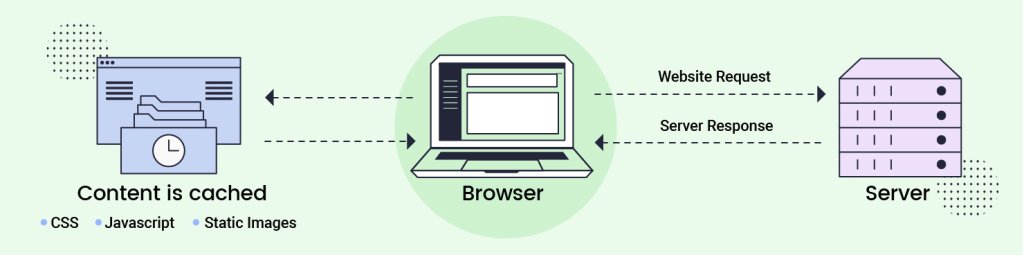
How browser caching works

Controlling The Browser Cache

The problem is that browsers aren’t that bright. Left to their own devices, they would simply cache everything and never request anything. While this would make the user experience very fast, eventually the browser would be showing the user old data. 

Can you imagine your browser storing the current score of your favorite sports-ball match? No matter how much time passed or how many times you hit refresh, the score would never change because the browser has cached the score already. 

So obviously we need some way to tell the browser what can and cannot be cached. Even for the things that can be cached, we want to tell the browser when it’s no longer any good so it knows to ask for a new copy. For that, we use “Headers”.

In the conversation between the browser and the server, there is data that is passed both ways on each request, these are called “headers”. Users never see headers but they can affect the content that the user sees.

Servers send different headers to the browser to help it figure out what it can cache and where. There are several different headers and values that the server and browser can exchange to control caching- For the most part, it boils down to these 2:

1. Cache-Control

The Cache-Control header is the first one looked at by the browser. It tells the browser what it can do with the entity it just received. The most important possible values are:

  • no-cache
    This tells the browser it’s ok to cache this resource but it has to check with the server to make sure it has the most recent version.
  • public
    This tells the browser – or an intermediary like a CDN – that it’s ok to cache this resource.
  • private
    This means that this is a cacheable resource but only by the browser. CDNs canc’e cache this resource. 
  • no-store
    This tells the browser that this resource should never be cached.

2. Expires

This header tells the browser when this resource should be considered “stale”. This means that after this date and time, the browser needs to request a new copy of the resource.

With these 2 headers, a browser can now make an intelligent decision about caching any given resource.

So really, the only thing we need to know now is how to set the headers that our server sends to a browser.

How To Leverage Browser Caching In WordPress?

As with everything in WordPress, there’s the hard way and the easy way to do it. The hard way is usually the way we used to do it before someone figured out the easy way. The hard way almost always involves editing a file manually and usually involves hiring a developer to help you. The easy way almost always involves installing and configuring a plugin. 

The Hard Way: Leveraging Browser Caching By Setting Caching Headers Manually

If you are dead-set on doing things the hard way, this involves modifying a file in the root of your website named “.htaccess”.  (The leading dot is important)

If you open this file in an editor, you can add “ExpiresByType” lines to define how long a specific type of resource should be cached.

For instance:

ExpiresByType text/css “access 1 month”

This tells the server to tell the browser that any given CSS resource can be cached in the browser’s cache for 1 month before requesting a new copy.

You need to make this decision for every type of resource that you serve and add a record into the file for it. This is a time-consuming process and you have to remember you did it this way in case you want to manually adjust the times.

Here is a common set of headings you can use in your .htaccess file.

<IfModule mod_expires.c>

  ExpiresActive On

  ExpiresByType image/jpg “access 1 year”

  ExpiresByType image/jpg “access 1 year”

  ExpiresByType image/gif “access 1 year”

  ExpiresByType image/png “access 1 year”

  ExpiresByType text/css “access 1 month”

  ExpiresByType application/pdf “access 1 month”

  ExpiresByType application/javascript “access 1 month”

  ExpiresByType application/x-javascript “access 1 month”

  ExpiresByType application/x-shockwave-flash “access 1 month”

  ExpiresByType image/x-icon “access 1 year”

  ExpiresDefault “access 2 days”

</IfModule>

That covers most types of resources that your server will serve. 

The upside to the hard way is that it gives you absolute control over the caching on the browser. 

Personally, this is my preferred way to set caching headers. That having been said, I am a programmer and enjoy doing things the hard way. You may want to look at a plugin to leverage browser caching easily.

The Easy Way: Leveraging Browser Caching Using A WordPress Plugin

As with everything in WordPress, “there’s a plugin for that”. Leveraging the browser cache is no exception. Many of the most popular caching plugins have options that you can use to fine-tune the browser cache headers. By default, WordPress will add “Cache-Control” headers to all static resources (CSS, JS, etc) The plugins will add them to more than just that as well as give you more granular control.

If SiteGround is your hosting partner, you don’t need to worry about this. These headers are already configured for you. Nevertheless, If you are not yet hosting your WordPress site with SiteGround, you can use the SiteGround Optimizer plugin to insert the caching headers into your .htaccess file for you.

If you already have the SiteGround Optimizer plugin installed – and you should – Select the “Environment” menu option from the main menu or click on “Go To Environment” on the dashboard page.
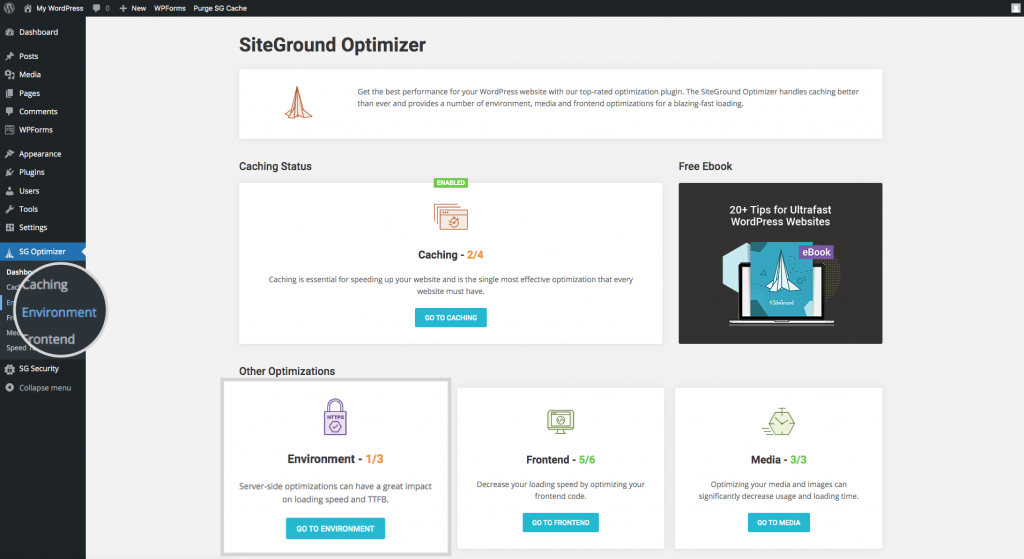
Leverage Browser Caching with SiteGround Optimizer Plugin

There, you will find “Browser Caching” in the middle of the page. Click the slider to green and you are good to go. This option won’t be visible in the SiteGround Optimizer plugin installed on websites, hosted with us, because we manage this for our clients.

Leverage browser caching functionality in SiteGround Optimizer plugin

Cache Busting

Regardless of how you set your cache headers, sometimes you want to tell the browser “Hey, I know I said hold on to this resource for a month, but I’ve got a new copy and you need to ask for it.” This is called “Cache Busting”.

In WordPress, the way we bust caches is to append a version number to the name of the file.

For example:

<script src=”/js/jquery.js” />

Regardless of how many times we update jquery.js, the browser isn’t going to request a new copy until this one expires based on the rules we set. That is why most resources that are loaded in WordPress include a version number as part of the query string.

<script src=”/js/jquery.min.js?ver=3.6.0” />

The browser stores the complete file name jquery.min.js?ver=3.6.0 as the key for this resource. So if we change the ver= part, it thinks it’s a new resource and requests it regardless of the status of the caching headers.

<script src=”/js/jquery.min.js?ver=3.6.1” />

That’s how we bust caches and request fresh resources even if the ones we have haven’t expired.

Speed Results After Leveraging Browser Caching

So does all of this make any difference? A lot of that depends on your other optimizations already implemented. For one of my production sites, I had implemented all the SG Optimizer plugin recommendations. This took me to a Google Page Score of 87.
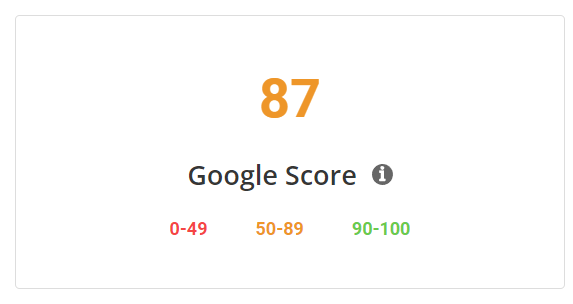
Google score of 87 without using SiteGround Optimizer

Then, I added the caching headers described above to my .htaccess file. This was the only change I made to the site. Now when I run SG Optimizer Speed Test, I get a score of 92!
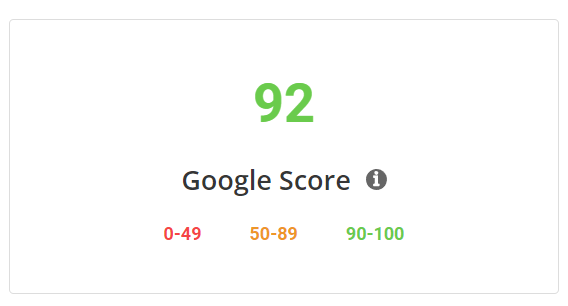
Google Score of 92 after using SiteGround Optimizer to leverage browser caching in WordPress

So yes, five points on Google Page Speed score was worth the 2 minutes it took me to leverage browser caching. 

I hope your results are even better!

🚀 Get SiteGround Optimizer for FREE

–> Click here to learn more and download the plugin

[subscribe_cta]

How And When To Use Coupons On Your Site For An Effective Marketing Strategy

online coupon marketing strategy

Building an e-commerce site doesn’t mean that it will be successful. The site is only 1/2 of the equation, the other 1/2 is buyers. To be successful you need to attract buyers. There are a lot of different ways that you can attract new customers to your site and encourage previous buyers to return. Books have been written, courses developed just to show you how to drive a steady stream of buyers to your site.

One method that has worked in retail almost since there has been retail is couponing. Everybody loves coupons, and that means that EVERYBODY loves to use coupons. Building a coupon marketing strategy is one of the absolute best ways to drive traffic. They work because coupons, as a concept, serve one single purpose, changing the user’s buying habits.

What Are Coupons?

Coupons are a pull marketing strategy that merchants use to change buying habits. The hope is that, if you change your habits once and like it, the new habit will stick without the need for more coupons. 

If you normally buy brand X wine but you get a coupon for brand Y wine, the hope is to break your existing buying habits and convince you to try brand Y.

Additionally, some coupons are designed not to make you change brands but to buy more. Some coupons for brand Y wine are not for people who have never tried brand Y but for those that regularly buy a bottle. The hope is to change their buying behavior by convincing them to buy more than they usually do. 

Both of these types of coupons are trying to change buying behavior, but each targets a different behavior and thus a different group of consumers. 

Physical Coupons

Physical coupons are usually printed pieces of paper with a discount code on it that retailers will honor. Many times physical coupons are distributed by the postal service, however, in some cases, they are handed out at a store. Physical coupons are more costly for retailers because there is a physical cost to creating and distributing them. Even if they are printed on a copier and handed out by employees at the store, they cost. This means that retailers are more cautious about what they offer with physical coupons. Experiments are more expensive so most retailers stick with what they know will work to change behavior.

coupon marketing strategy - Physical coupons

Digital Coupons

On the other hand, digital coupons have almost no costs associated with creation and distribution. If you are using WordPress and WooCommerce and want to run an online coupon marketing strategy, you can create a 10% off coupon for your T-Shirts and send it to everyone on your mailing list. Your total cost for this was the time it took to enter the coupon into the system and write the email.

coupons marketing strategy - Digital coupons

Because they are so cheap to create, many retailers set their online coupon marketing strategy incorrectly. They will literally create a 10% off coupon for one of their products and send it to everyone they can, hoping that if they send it to enough people that they will generate some sales. The problem with this “shotgun” approach to coupons is that if you do it enough, the only behavior you are changing is that you are teaching your customers to wait to purchase until you send out a coupon. This is not the behavior you want from your customers.

3 Key Ecommerce Coupon Marketing Tips

In order to create an effective coupon marketing strategy, before you create your first coupon, ask yourself, “What behavior am I trying to change?” Then, figure out which customers have that behavior, and craft not only a coupon but a message specifically for those customers.

1. Set the behavior you want to change

Let’s say you want to increase your average cart value, the amount of goods that a customer buys in any given transaction. One way to do that is with a digital coupon.

For every customer that regularly purchases from you, but purchases less than $50 per transaction, send them a coupon to give them a 10% discount on their next transaction if it is over $75.

Don’t send them more than 1 of these coupons and don’t send this coupon to every customer on your mailing list. Only send it to customers that have already purchased from you once and you expect to purchase from you again.

For each customer that uses this coupon, you have changed their behavior, at least once, and increased your average cart value for that customer.  Whatever you do next, do not send this customer another “10% discount when they purchase $75 or more” coupon. Sending them the same thing over and over just encourages the bad behavior of waiting for the coupon to arrive before purchasing. 

2. Personalized coupons

Digital coupons are easy to personalize. Up to this point we’ve talked about sending out coupons to groups of customers, but you can easily create a coupon that is good only for a specific person. The most common version of this is a birthday salutation. 

If you have collected your customer’s birthday (or any other special life event date) then you can easily send that person a happy birthday email and a special discount coupon good only on their birthday.

If you are going to do this, make it personal.

Bad Example:

Happy birthday! Here’s a 10% off our latest book.

Better Example:

Today is your birthday since you like ”X”, here is a 30% off coupon that is valid only for today.

Best Example:

Cal, to celebrate your birthday, we want to give you a 30% off of ”X” because we know you like ”X”. it’s only good for today.

The best scenario above takes more time because you have to do a little research. You have to figure out who is having a birthday tomorrow. If they are a regular customer, you also want to figure out what they buy the most of and offer them a coupon for that.

This type of coupon builds brand loyalty. By offering a sizable discount on something they already purchase from you, you are letting them know that you appreciate their business. This will stick in people’s mind and they will remember it the next time they go to buy anything that you sell.

You can do this for customers that haven’t bought from you yet but you need to remember two things:

  • It needs to be sincere
  • It needs to be a steep enough discount to cause someone to buy something from you.

A generic Happy Birthday email with a 10% discount on something the person would never purchase, to begin with, will likely be deleted without even a click.

On the other hand, a sincere happy birthday that greets the person by name and offers them a 50% discount this one time as your way of celebrating their birthday will most likely move the needle. 

[subscribe_cta]

3. Create a sense of urgency

In each of the Happy Birthday examples above, the discounts were limited to the birthday. This serves two purposes. First, it keeps you from being surprised in 6 months when things may have changed and all of a sudden you’ve got to sell something at a 50% discount. Second – and most importantly, it tells the person receiving the coupon that the matter is urgent. It may only be urgent for a moment or two as they make the buy/no buy decision but it will be urgent when you want it to be, when the offer is fresh in the mind of the customer.

Limiting your coupons to a given timeframe is a good way to limit them. Another way is to limit the number of times a coupon can be used. This is the digital version of “The next 100 callers get…” that you see on TV ads running late a night. 

An example of this would be the following:

Send out an email to your existing customer base about a new T-Shirt design that you’ve released. In the email tell customers that the first 100 buyers that purchase the new t-shirt and use this coupon also get a coffee mug with the same design.

That creates urgency above and beyond a date. With a date they know they have until the end of that date to claim their discount. With a limited-use coupon, they don’t know how many people have purchased before them so they need to purchase quickly if they want to take advantage of the offer.

Urgency is used to change the behavior of fence-sitting. Those people get an offer and leave it in their inbox because they aren’t sure if they want to purchase it yet. Losing the discount will cause them to make the decision, even if the decision is no.

How To Create Coupon Codes For An Online Store

Now that you know the key 3 tips to create a successful coupon code for your online store, it is time to implement it on your site! Sounds difficult? Not at all! Check the video below to find the steps to easily set it up in WooCommerce, plus further examples on how to use them correctly: 

5 Innovative And Effective Ways to Use Digital Coupons For Your E-commerce

There are as many different ways to use coupons as there are coupons themselves. We’ve delved deep into a couple of ideas in this article but let’s close out with a few more ideas that I’ll leave for you to explore on your own.

1. Add coupons to your mailing list landing page

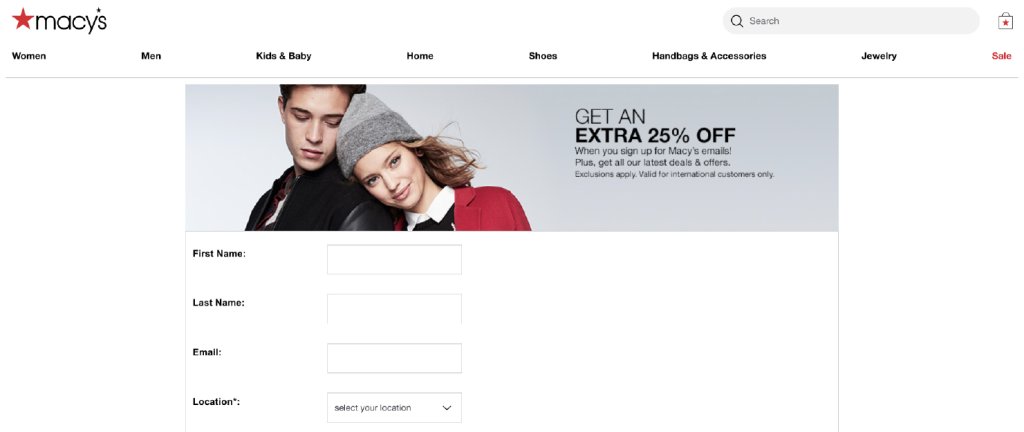
Everybody knows you need a lead magnet to get people to sign up for your mailing list. Coupons are a great lead magnet. Not only do they encourage the behavior of signing up for your mailing list but they also encourage a new customer to make a purchase. Macy’s online shop is a good example:

digital coupon code in a mail list subscribe form

2. Create single-use coupons

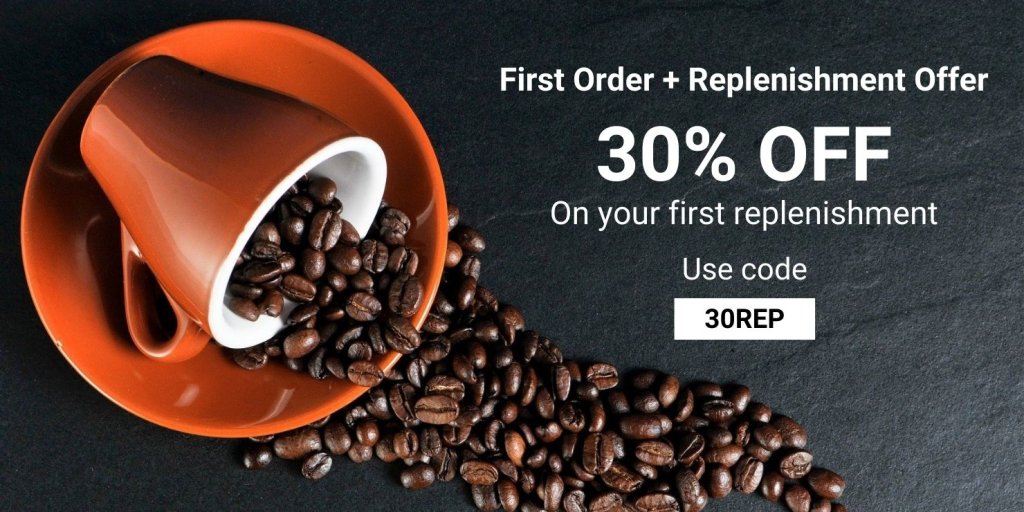
In addition to celebrating life events with a single-use coupon, you can find many other uses. For example, if your product requires regular replenishment, such as coffee, offer a one-time discount of 30% off if the customer purchases the first replenishment when they purchase the product.

digital coupon code marketing strategy

3. Run social ads offering coupons to audiences that frequent or follow your competitors

Whatever your favorite social platform is, run an ad on it offering new customers an incentive to try your product. Instead of targeting everyone, target people who are currently following your competition. Most social platforms have “Look-alike” audience features. Take advantage of that. Try changing their behavior of buying your competitor’s product into buying yours. 

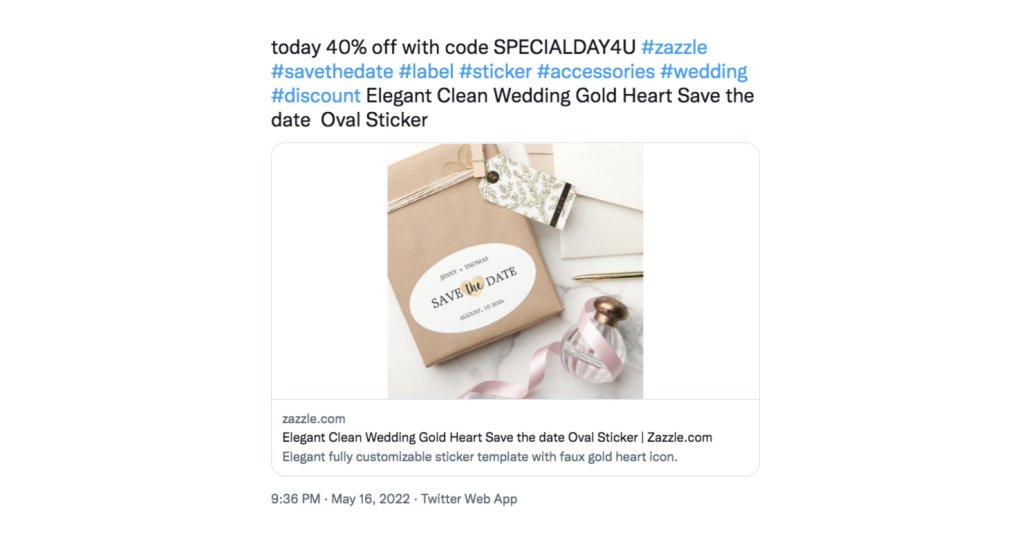
For example, if you run an online store of items for weddings, you can target people following other wedding online store accounts to show them interesting discounts such as the following one:

digital coupon code marketing strategy in social media

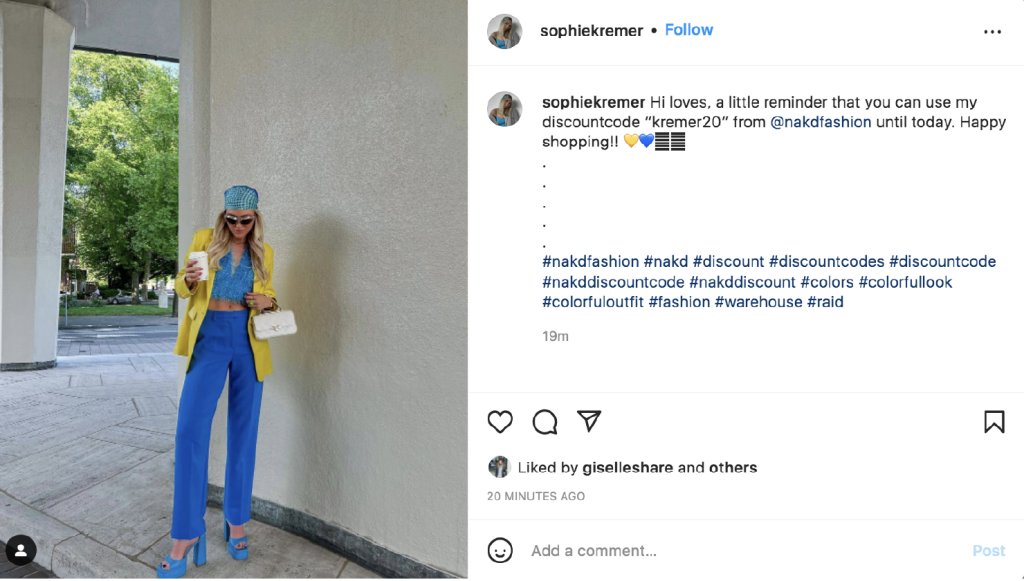
4. Create coupons for influencers to hand out

Influencers get to be influencers by building big and/or niche audiences. They build these audiences by posting things that people want. One of the things you can do to help create an influencer is to give them a special coupon just for them to hand out. The bonuses to this tactic are:

  • You now have an influencer that owes you a favor
  • You can specifically track how many sales they sent to you to help determine how big of an influencer they are.
online coupon marketing strategy with influencers

5. Create different coupon codes for different distribution channels

There is no rule that says you have to use the same coupon code for every channel. If you want to see which ones pull best for you, distribute different codes to different channels.

For instance, distribute the coupon code I_LOVE_BRAND_X_WINE to your Facebook followers and BRAND_X_WINE_IS_THE_BEST to your Twitter followers. Each of them gets the customer 10% off but you get a better understanding of which channels work best for you.

online coupon marketing strategy in social media

Wrap Up

Coupons excite customers and potential customers. Everyone loves a bargain. However, their true purpose is to influence behavior. Before you issue a digital coupon make sure you understand what behavior you are trying to influence. Once you do, craft your offer and your message around changing that behavior.

Indiscriminate use of coupons as a way of boosting sales numbers is a quick way to train your customers to simply wait for the coupon. That’s not a behavior you want to encourage in your customers.

Use coupons often, use them creatively, and use them effectively. They will help you move the needle both in the short term and the long term.

Now, coupons are just part of your whole eCommerce marketing strategy. If you want to dive deeper into how to start or enhance your online store, download ourfree guide on How to Start Selling Online, where you will get a comprehensive PDF and educational videos that will help you through the whole process of creating your online store using WooCommerce and tips to successfully run your online business. Download it to get expert guidance and make sure you don’t miss a thing to achieve success!

How To Start Selling Online Free Guide

[subscribe_cta]