How to Start an Online Business on a Budget? Learn from the experts.

Starting and maintaining a business online has always been a hot topic, but recently it’s become crucial, rather than a side income. In this business-critical moment, we reached out to five established online entrepreneurs for their advice on how to get started even if you don’t necessarily have a large capital to kick things off. Whether you’re still exploring the possibility of launching your online project or looking to grow your existing online business, you will be sure to find lots of relative advice in their stories.

Start Your Online Business With Something You’re Good At

Since you are reading this article you may already be playing with the idea to start your own business one way or another. You may even have a few ideas wondering which way to go. So the first phase about doing it is deciding on what service or product you’re going to launch. According to our experts, it’s best if you get started with something you know well and feel confident about, or something that you are passionate about and you want to learn to do well. Confidence and passion are the two strongest drivers to success so just ride on their wave.

Ferdy Korpershoek is an online entrepreneur dedicated to helping people grow their online business. He spent years building his amazing resource center on www.ferdykorpershoek.com and in his Youtube channel, where he has over 150 000 dedicated followers. When starting his business he went through the very same thought process as all of us do. 

“If I take a look at the time we live in, it has become so easy to start to share things with the world through the internet. So let’s become practical: Is there something you are already good at or something you would like to learn? Well, there you have it! Start practicing it and start sharing it with others, for instance, through a video, blog post, or a course.

Maybe you think: ‘I could never do that.’ And that is why you have not done it yet. I had the same thought a few years ago. Let me tell you a story:

Through the years, I made a lot of websites with WordPress. Sometimes I had to struggle to find a solution to a problem, or I could not create the thing my client wanted me to make. It was so hard. When I learned how to solve WordPress problems and make beautiful websites, I started to think about sharing my knowledge through video tutorials. In that way, others could easily learn what I had learned the hard way.

But I saw that others were already better at doing that. They were better at English and presenting. So I hesitated. Until I was so fed up with how things were in my life that I did it anyway. And guess what. I became better at it and gained more followers. Now I can do it full time and earn nice money with it while I am helping people.

You can do the same by just starting! So, how can you start today by helping other people?”

Don’t hold back From Establishing Your Online Business!

As Ferdy mentioned in his story, the biggest challenge when starting a new business is fear. There are too many unknowns, the budget is never enough, the self-doubt and perceived risk seem higher. It gets even worse when you start looking for advice from others who would often make you feel even more unprepared. So when you are getting ready to go along that path, your number one task is to mute that inner voice telling you you’re gonna fail. 

We asked Darrell Wilson, an online entrepreneur and owner of www.darrelwilson.com and a YouTube channel with over 200 000 followers who teaches people how to build successful and effective websites, what would be his advice for overcoming that fear and uncertainty.

“I find that comparing yourself to others is a crutch and will only hinder your own work and set you back.

So you can start right now. Create a website for your blog or business and just write whatever comes to mind,  and you’ll be amazed how far you get with the small ideas.  Remember, be consistent, don’t worry about others, and start small. You are a new entrepreneur stretching your legs.  Well, that’s my story and how I got started.  And like Stan Lee said, “If you’ve got an idea that you generally think it’s good don’t let some idiot talk you out of it.”

Research shows that contrary to what you may think, the main reason why many people fail isn’t a bad launch or a bad product: it’s the lack of launching altogether. Jumping in at the deep end is the only practical way to overcome your fear of failure. 

Free Ideas For Small Business

Since starting a new business can be approached from too many angles and diffusing efforts only adds expenses to the budget needed, it becomes really important to stay focused and try to simplify this complex task.  “Starting an online business can be a broad topic, but there still are only two main paths one can take: you can sell products, or you can sell services,” says Ionut Neagu, the founder of CodeinWP, one of the most successful hubs for online WordPress entrepreneurs, and CEO of Themeisle, a company producing premium WordPress themes and plugins. “Both can be done on a budget, but you need to be careful when it comes to picking your market and angle. Here are two strategies that I think will work best if your funds are limited:

1. If you want to sell products.

Dropship. Start a store on a platform like Shopify or WooCommerce. Get product listings directly from suppliers and make them available in your store. Then, whenever you make a sale, it’s the supplier who is responsible for fulfilling the order.

Promote this business via Facebook ads. Facebook ads will still give you the most bang for your buck compared to any other advertising platform. As long as you “niche down” enough, the ads shouldn’t be too expensive.

We have a detailed article on how to start a dropshipping business, or alternatively, you can check our webinar: How to Start a Dropshipping store. 

2. If you want to sell services.

Start on Fiverr. Fiverr is a huge marketplace where people can offer all types of services as long as they can be carried out remotely.

Fiverr is also easy to get started with: find a niche → see what sells already → offer a similar service. Granted, earning big bucks on Fiverr can be tough, but it’s a great place to start nonetheless. We have a post on CodeinWP on how our friend went from $0 to $3k a month doing Fiverr gigs.

Build a site on a budget with WordPress

All good, but we obviously need a website to sell our products or services. If the COVID-19 pandemic taught us anything, it was that any business needs a virtual presence. But building a site might actually be one of the most costly items on your business agenda. We asked Syed Balkhi, the founder of the incredibly popular platform www.wpbeginner.com where tens of thousands of WordPress users from all over the world go every day to find everything WordPress-related, how to overcome the challenge of creating a website on a budget: 

“One of the biggest things that hold people back is “not having enough resources”, but I believe that entrepreneurs can easily solve that by being “resourceful”. WordPress is an amazing platform because there are 55,000+ free plugins that can help you make your website on a budget, so you can start earning money online.

For example, you can add WPForms lite to create a “Request a quote” form or even an advertising inquiry form. You can use WP Advanced Ads plugin to easily sell ads on your site. There are tons of other plugins that help you do more like MonsterInsights for analytics, AIOSEO for SEO optimization, SiteGround Optimizer for speeding up your site, and more.

Once you have your website live, you can start promoting it on social media using low-cost methods such as answering questions in Facebook groups, LinkedIn groups, and on Quora which helps boost your credibility/brand recognition. This also helps you get more targeted traffic that will convert into customers/clients.

Outside of WordPress, there are also tons of other tools that can help you improve your site without any money. Such as Canva for creating beautiful images, Grammarly for writing better, and a whole suite of free tools that Google offers to help you grow your business.

The key to online success is being resourceful and consistently improving each day.“

Good SEO is still the cheapest form of marketing

Now that you have the idea, you have overcome the fear, you’ve got the website to feature your service, you’ve defined your audience, it’s time to find out that it all ties around marketing. As of now, your most important question will be how to get new clients? 

Years ago when SiteGround was a small hosting company and we were running on a tight budget, we discovered the power of good SEO that brought us the greater part of our business. Back then it wasn’t that hard to crack. It was about content and meta data. Adding useful content and optimizing the meta data of the pages got us the first positions of most of the keywords we were targeting and a Google Page Rank 9, which was unbelievable at the time. The only cost we had was having to learn how to do it, cause back then, information was scarce and we had to learn by trying stuff out. Over time, our efforts shifted to other channels and our marketing budget significantly increased, but we still believe in the power of SEO for a solid business start. 

That is why we turned to Marieke van de Rakt, the CEO of the most well-known WordPress SEO plugin – Yoast SEO. Before taking her role as a CEO she helped grow the company as their Chief Strategy Officer and she knows the ins-and-outs of good SEO. Here is what she thinks is important nowadays:

“Write amazing and SEO-friendly content. If you start a website for your online business, you’ll need to attract an audience. The quickest and cheapest way to attract that audience is by getting visitors from Google. But how do you make sure that you rank high in the search engines?

An SEO plugin like Yoast SEO will take care of most of the technical aspects of optimizing your website for the search engines. In addition to that, you should make sure that the content on your website is of the highest quality! But how do you write awesome and SEO-friendly content?

Before you can start writing you have to do keyword research. If you want to dominate the search results, you’ll just have to figure out which words your audience actually searches for. These are the topics you should write about and the words you should use in your text.

The second thing you should do is to make sure that your text is nice and easy to read. Write short paragraphs and use headings, which will help the reader to understand your text. 

In order to make sure that your text ranks in the search engines, make sure that Google understands what it is about too. Use the words you want to be found for and make sure to use them in heading and subheadings as well. Also write texts that are at least 300 words long, that’ll help with the ranking as well. 

Don’t forget to link to previous content. It will make your post stronger because you show some authority on the subject. As well as that, your link structure is also important for your Google rank. “

If you want to know more about how to optimize the text on your website for the search engines, you can check out the Ultimate Guide to content SEO by Marieke van de Rakt on Yoast.com.  Alternatively, make sure to read our SEO Blog series with our guest-writer and SEO expert Rebecca Gill. 

So that’s it from us and our experts. We hope we managed to simplify the complex task of starting a new business online and mitigate some of the fears you may have at this early stage. Now it’s your turn – good luck!

[subscribe_cta]

Keyword Research Tips – How to Build a Keyword Universe Through Data

In my last SEO article, we talked about SEO basics and how SEO works, including the initial steps of SEO strategy and planning. Now that we’ve thought through our website personas and their unique challenges, it’s time to begin working on our keyword universe.

I’m a strong believer in data-driven SEO. I believe the combination of data, psychology, and empathy is the key to strong SEO performance and website conversions.

In the world of digital marketing, data is abundant. Free and paid tools are plentiful and there are many sources of data to help guide our SEO journey. Today we’ll explore my favorite software tools and data sources for building up a robust keyword universe.

Before we dig into my favorite data sources, let’s first discuss the concept of keyword research, keyword universe, and why we need it.

What is Keyword Research?

In simple terms, we might say that keyword research is a primary SEO task that involves identifying words and phrases people use to search online.

What is a Keyword Universe?

A keyword universe is the total number of keywords or phrases that are used to drive organic search traffic to your website or blog. These keywords can contain phrases you hope to rank for, as well as, phrases you already rank for in search.

A keyword universe could be as small as fifty keywords or as large as a million keywords. It really depends on the size of the website and the industry it serves.

Keyword Research & Universe examples

Let’s look at a real-world example.

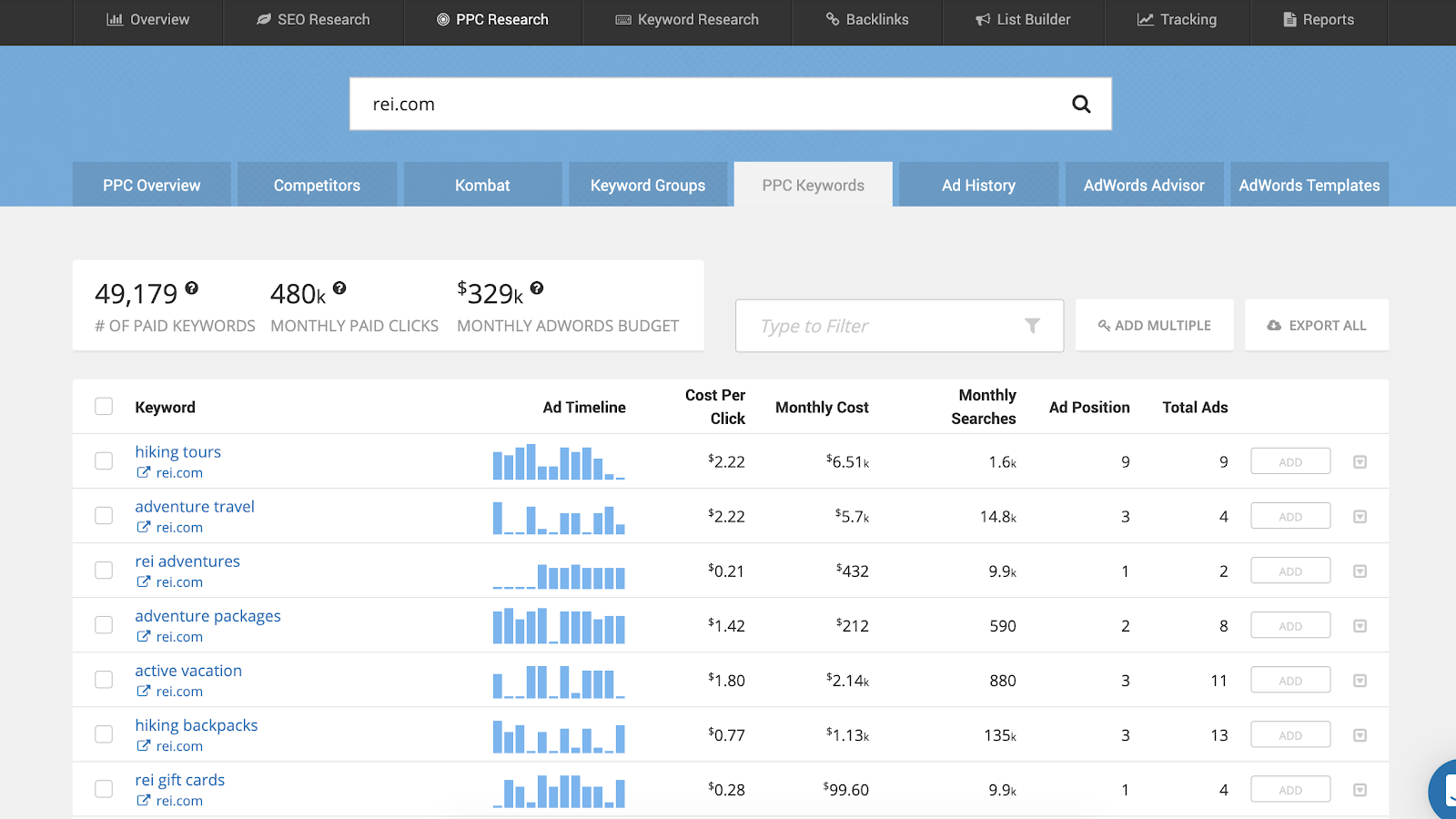
According to SEMrush, Siteground.com has a keyword universe of 98,700 keyword phrases. While that may seem like a lot of phrases, SEMrush also estimates only about 10,500 keyword phrases are bringing in website traffic. That variation of total keywords and those that bring in actual website traffic is fairly common.

And while there is a large number of keywords not driving traffic, that doesn’t mean that the other 88,200 keyword phrases aren’t important. These inactivate keywords may be very important and they may be a critical part of our keyword universe and overall SEO strategy.

As we do keyword research, we want to review all phrases to start, then narrow down our list to those phrases that matter most to our target market and our offering. We’ll look at keywords we rank for already and we’ll consider keywords we want to rank for in the future.

Interesting Statistics About Search and Keywords

I could ramble on about my views on the importance of keywords, but it will make a much larger impact by providing tangible data for you to truly see the impact of search and keywords.

Here are some of my favorite data points on keywords:

  • Google processes over 40,000 search queries every second on average, which translates to over 3.5 billion searches per day and 1.2 trillion searches per year worldwide.
  • Google sees about 15% of brand-new searches each day. This tells us keywords are always changing and keyword research should be done often.
  • Google’s introduction of BERT (Bidirectional Encoder Representations from Transformers) allows it to process searches in a much more complex manner. This allows humans to input long, conversational searches and still receive high-quality results. Stated another way, you can search like you are talking to a friend, and Google will reply with a great answer. This changes the nature of our keywords.
  • Ahrefs analyzed 1.9 billion keywords and found that 92.42% of those only receive 10 or fewer searches per month. This tells us to consider keywords of all volumes and not just the ones with massive search volumes.
  • Ahrefs also discovered that 29.13% of keywords with 10,001+ monthly searches are made up of three or more words. This points us to long-tail (aka longer phrases) keyword phrases.
  • 8% of all the search queries made on Google are phrased as questions. This tells us we should not just look at simple phrases. We also need to think in terms of questions that use who, what, where, when, and how.
  • One-third of the search queries made through Google are at least 4 words long. This again reinforces the need for long-tail search terms.

Those last two data points are important because they illustrate a shift in search. 

Ten years ago, people still searched with one or two-word phrases. They did so because Google wasn’t sophisticated enough to produce quality results for longer phrases. But that has changed and this change has driven lots of shifts in search and keyword research.

Artificial intelligence and voice search have quietly taught humans that they can search complex queries and Google will provide them with correct answers. This is a game-changer for SEO and keyword research. It means we need to think about short searches, long searches, and searches that involve questions. 

An important part of building a quality keyword universe is to do research, keep your mind open and think about your website personas and how your target market uses searches in Google or Bing. 

You might be thinking you have no idea how your target market searches. Guess what? You’re not alone! 

We are all in the same situation because it is hard to think outside of our own limited view. This is why software tools and third-party data sources are an important part of building up a strong keyword universe.

20 of the Best Keyword Research Tools and Resources

When I started with SEO fifteen years ago there were very limited options for researching keywords. SEO software was non-existent, and it made the process of keyword discovery painful. I’m so thankful this is no longer the case! 

As an SEO consultant, I have a huge selection of tools and resources available to help me brainstorm keyword options and to guide me down the path of keyword selection. I’d like to share my list of tools and resources with you, so you can have some excellent sources to find high-quality keyword phrases.

My list of favorite SEO tools has stayed pretty uniform over the last few years. I’ve found some great software that has helped provide excellent data, reduces my time spent on research, and helped me make better SEO decisions. If you’re asking yourself how do you find the right keywords, in the next paragraphs I have some great suggestions for you.

Here are my go-to keyword research tools for SEO:

Google Search Console

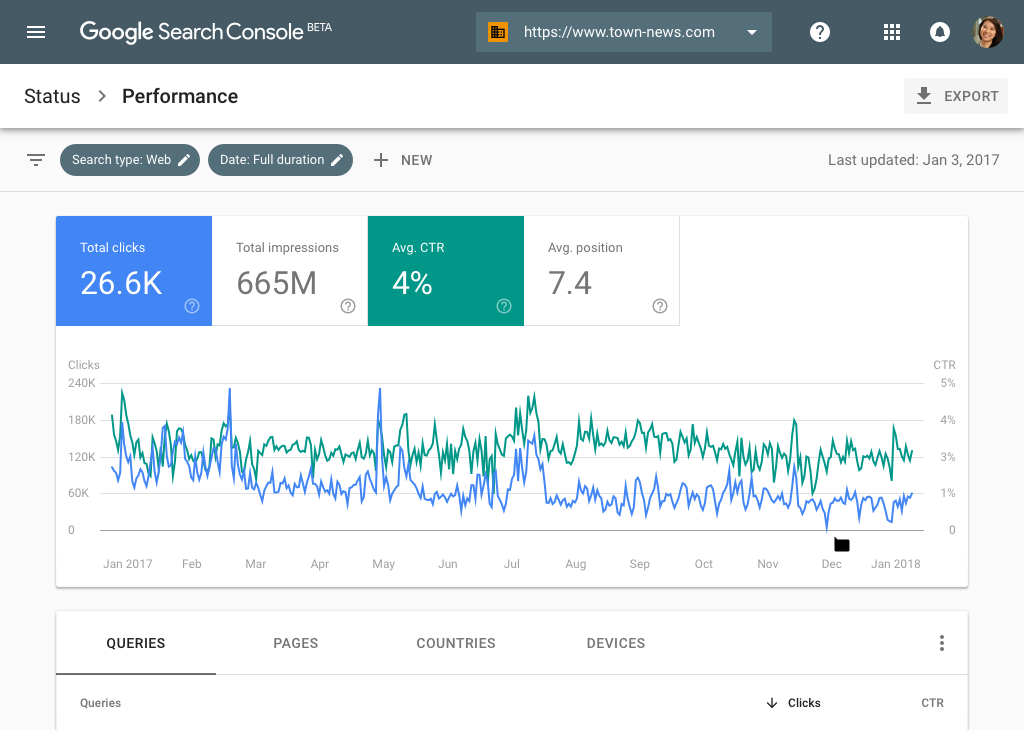
Provides a list of keyword phrases I currently rank for in Google search. You view keyword impressions, clicks to your website, click-through rates (CTR), and your average position in Google search. 

How to do a keyword research

Google Analytics

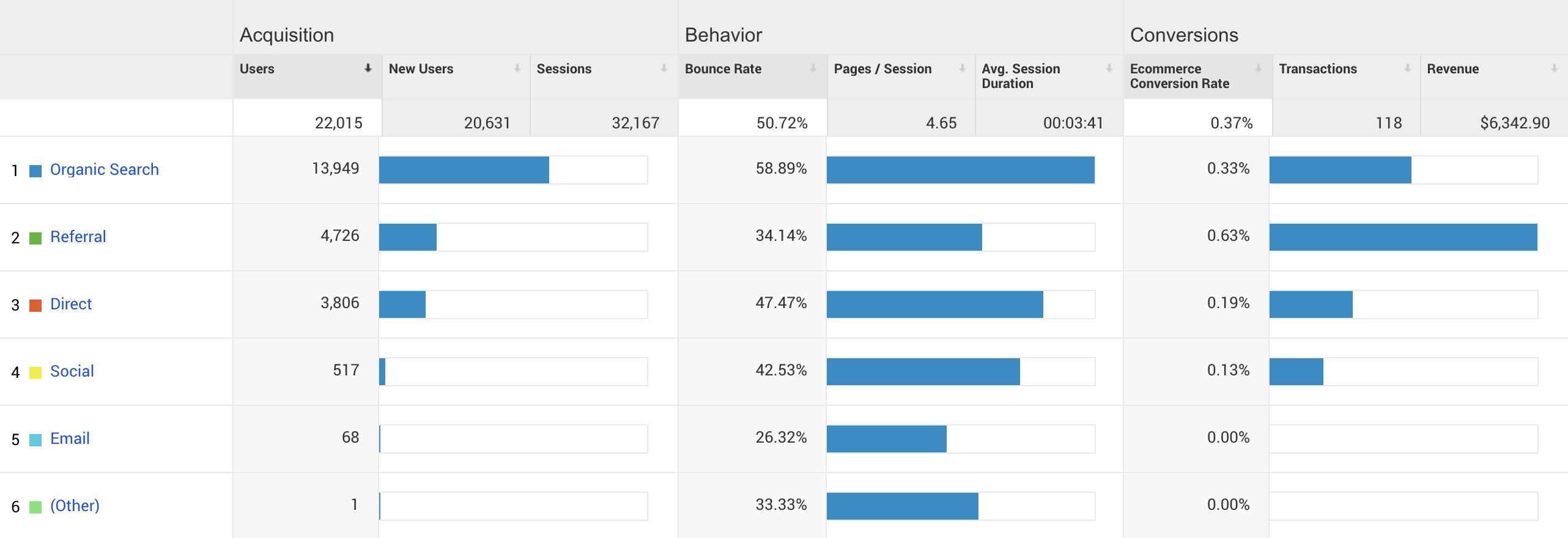
Provides a list of keyword phrases that are used by Google search to drive actual traffic to my website. These reports are great because I can also view important data related to pages per visit, bounce rates, and conversion rates. This helps me see what keywords are having the largest impact on bottom-line revenue. Analytics and Search Console are some of the most helpful free keyword research tools you can use for your SEO strategy.

how to find keywords

Bing Webmaster Tools

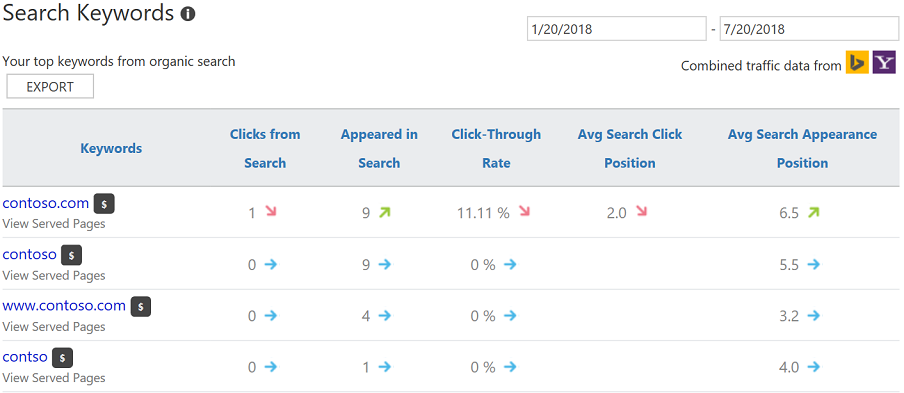
Provides a list of keyword phrases I currently rank for in Bing search. You can see very similar data as Google Search Console. Because the two search engines have different formulas for ranking keywords, the lists of keywords in Google and Bing will be different.

Keyword research

SEMrush

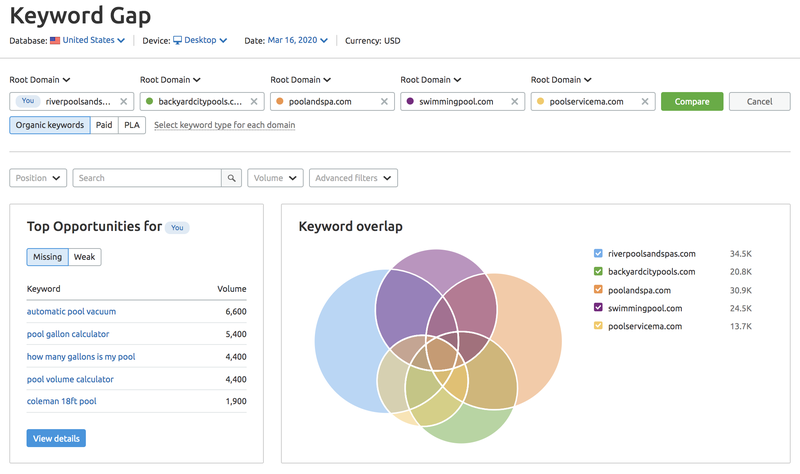
Provides a list of keyword phrases that I rank for in search, as well as, a list of phrases my competitors rank for in search. It can also help you see variations of phrases, types of search results, and PPC activity for phrases. It is a powerhouse of SEO data.

Keyword research tools

SpyFu

Provides a list of keyword phrases that I rank for in search, as well as, a list of phrases my competitors rank for in search. Like SEMrush, it offers data on PPC too, which makes it a great source for creating a strong keyword universe.

keyword research tips and tricks

KW Finder

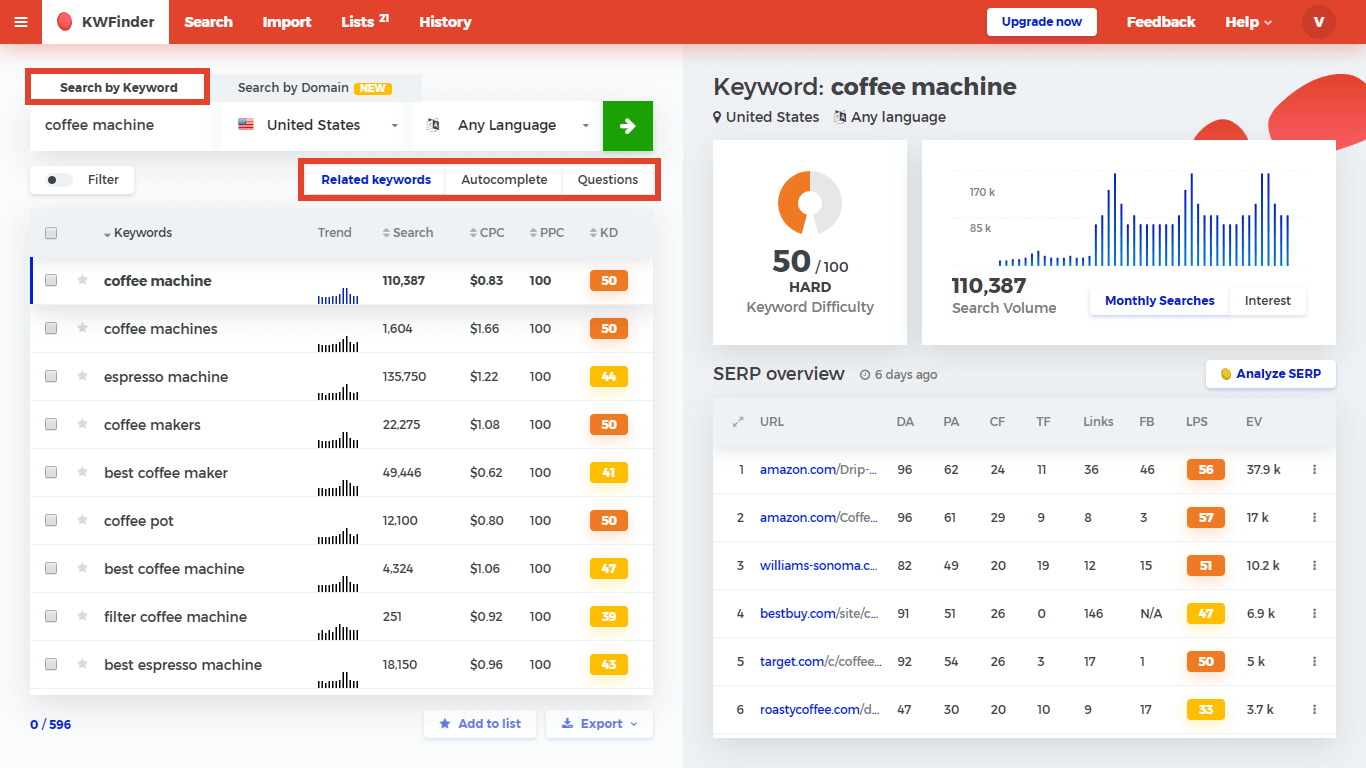
Provides alternate variations of keyword phrases based on my initial keywords entered. It allows users to filter keywords based on a variety of inputs, build lists, and even see who ranks for individual phrases. It pulls data from Google’s API, so you can view search volumes per month and applicable PPC bid amounts.

Answer the Public

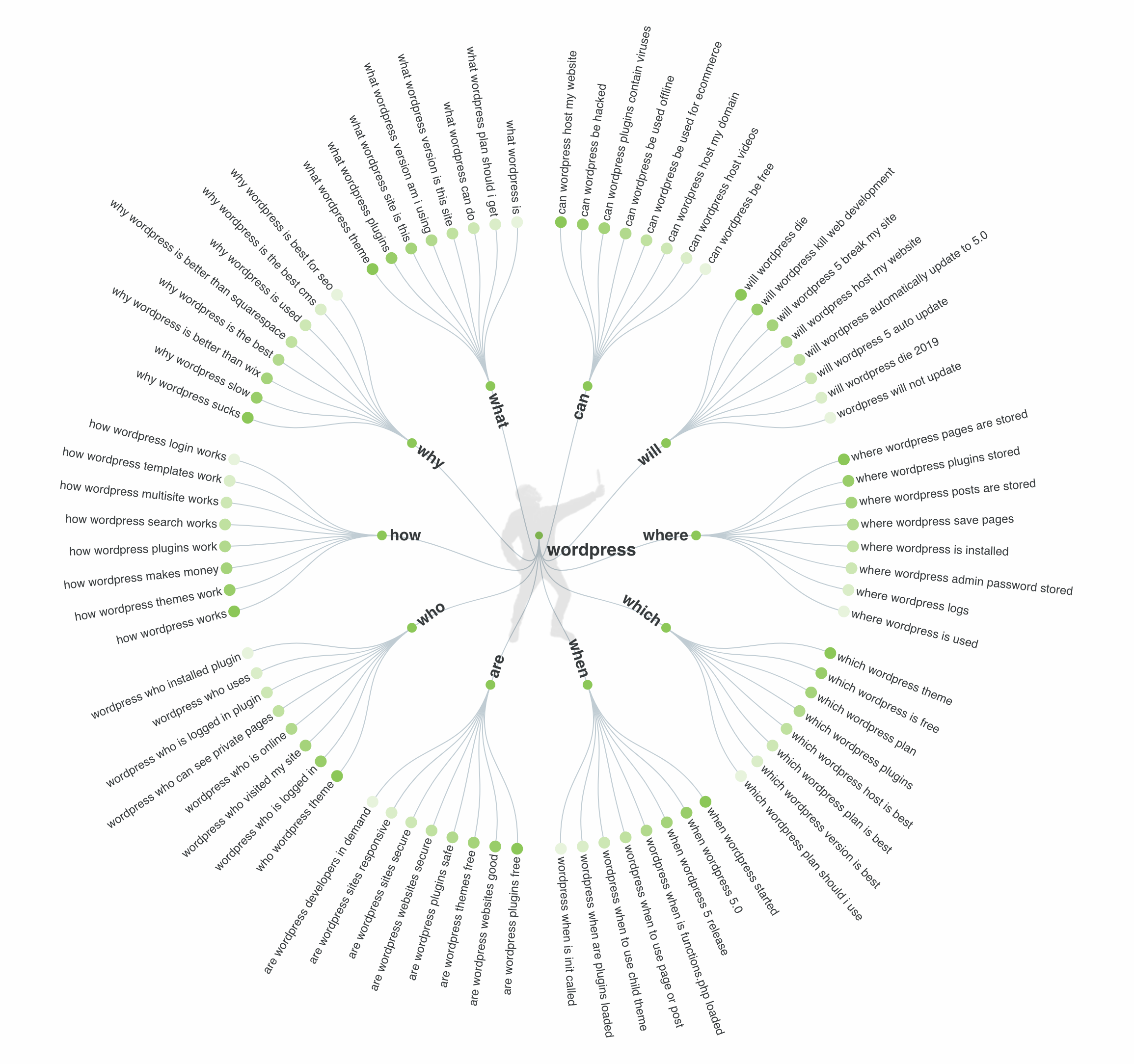
Provides alternate variations of keyword phrases based on my initial keywords entered. This is a great tool for thinking through keyword phrases that include questions.

If I could only use one tool, it would be SEMrush hands down. SEMrush is a paid tool, but in my opinion, it is worth the cost. From keyword rank tracking and competitor research to website audits, SEMrush is a great all-inclusive tool for digital marketers and consultants.

I don’t just stop at software tools. I also use everyday activities to help me brainstorm and build my keyword universe. It’s the mixture of data and real human activity that provides the highest-quality keyword universe.

Here’s my go-to list for alternate sources of SEO research:

  • Personal Interviews – These one-on-one discussions provide an opportunity to talk to real people and learn what words and phrases they would use to search for your offering. You will be very surprised to learn what the average person uses for search terms.
  • Email or Website Inquiries – Going through old email or website contact form inquiries is another great way to discover keyword phrases that real people use online. I’ve been a long-term fan of Gravity Forms for WordPress and this form plugin stores inquiries online in the WordPress MySQL database. This plugin supports database exports, so you can export all inquiries into Excel and browse through them quickly to see what words your website visitors use in inquiries. 
  • Proposal Requests (RFPs) – Scanning through RFPs will help you see what selection criteria an organization has for purchasing a product or service. Their list of features and/or requirements all translate into keyword phrases.
  • Sales Presentations – I learned long ago that in most organizations, websites get ignored, but sales presentations are living and breathing documents. Because of this I always ask my SEO clients if I can view their latest sales presentation. These sales pitches allow me to scan through files and extract the phrases their sales team uses in pitches to the C suite or procurement teams.
  • Reddit – I am not a fan of Reddit for personal usage, but I do love browsing through it for SEO keywords. You’ll see great questions and answers from regular people that will quickly morph themselves into your keyword universe.
  • Quora – Similar to Reddit, Quora offers a glimpse into the general public’s questions and need for information. You can browse through topics, individual questions, and the associated answers to locate great options for search terms.
  • Facebook Groups – Facebook is placing a lot of emphasis on its group functionality and these communities are growing. You’ll find groups for everything from knitting and baking to gemstones and astronomy. You can use the group search option to locate posts that include your primary keywords, and this will lead you to long-tail phrases you might be missing. Facebook groups also provide an option for interviewing many people in a remote manner. 
  • Support Forums – While not every industry has support forums, those that do offer a large list of keywords within topic questions and follow-up answers. You can manually browse through the forums or you could use tools like SEMrush to data-mine it.
  • Competitor Websites – Always take time to review your competitors’ websites. Browse through their navigation, HTML sitemap, and core content to find phrases you’d like to target.
  • Google’s Autocomplete – As you type in a keyword into Google search, Google will automatically make suggestions for you on longer phrases. These longer phrases are important because they are semantically related to your terms and they are being actively promoted by Google.
  • Google’s People Also Searched For – Similar to the autocomplete feature in Google, the People Also Searched For box is a goldmine of semantically related search terms. These phrases will have lower search volumes, but they are powerful since Google consistently places them in the search engine results page.
  • Google’s Related Searches – At the bottom of most Google search engine results pages is a list of phrases Google feels align with the current search term. These phases are often between 3 – 10 words, so they represent some great long-tail keyword opportunities.
  • Google’s Actual Search Results – Browsing through the actual search results for a phrase is an easy way to see alternatives from competitor websites. You’ll see what they are already targeting, and you’ll have an opportunity to improve upon their activity.

You might be thinking that this is a massive list and I’m a little overboard on my research. But in reality, it’s just the opposite. You have to build up a large keyword universe to get a good set of data to utilize in your SEO planning and execution.

The Next Steps for Your SEO Journey

You now have an excellent resource list to help you dive into keyword research and build up your keyword universe. This means you are empowered to create a quality list of what you’d like to rank for in search.

In my next article, I’ll walk through evaluating these keywords for usage within your website or blog. We’ll learn to pull search volumes, we’ll learn about search intent, and I’ll provide some additional insights into narrowing this list for the best keyword opportunities to win in search and convert these searches into revenue.

To stay ahead in the world of SEO, check out our video: SEO in 2025: 6 Trends Truly Changing The Landscape.

[subscribe_cta]

Tools for Running a Successful Service Business Online

useful business tools for growth

There are a lot of things that go into running a service business online beyond finding clients and building things for them. You’ve got to manage contracts, invoices, estimates, proposals, and more. You need to keep clients informed on progress, collect payments, and follow up on those payments that are invariably missed. On top of all of that, you need to have some sort of repeatable process to make projects run smoothly and keep getting in new work.

In the following article, I’m going to share a few of the tools that I use for managing my client services business online. I handle ongoing maintenance and support for WordPress at FixUpFox, and I’ve tried out dozens of tools to make it easier to keep the business running smoothly. Whether you use WordPress or not, my goal is to help you to manage your business with ease online and focus on the most important part: keeping your clients happy and successful!

Handling Leads

As I use Trello for all of my project planning, it makes sense for me to track leads there as well. I use the Custom Fields power-up for Trello to add details from my form to individual cards. I display the name, email, and phone number of the lead on the front of the card. Links and files attached to the form go into the card as well for me to review. I also put when the form was filled out as first-contact, and then set a due date of the first non-weekend day after it was received to remind myself to contact the lead. I can use the comment section here to keep notes, making this a simple and flexible CRM. Trello lets you use one power-up per board on their free plan, so you can set up this whole workflow for free with your current WordPress site.

If you’ve never heard of Zapier, it’s the tool that will supercharge automation between your other tools. Zapier is a tool that lets you take two online services and connect them together. For instance, you can tell it to watch your company Twitter account and send you a message when someone responds. Or perhaps you want to update a spreadsheet when a sale is made on your site. Zapier has a free plan available for up to 100 “zaps” per month, which is a good starting point to determine if it can fit your needs. 

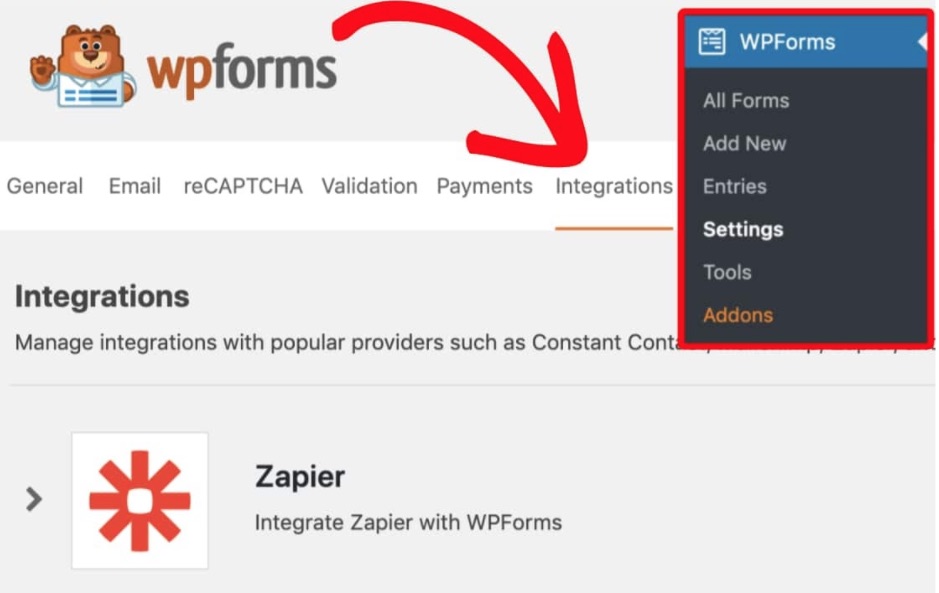
You can also set up an integration in Zapier to send the output of one of our contact forms to another service to track leads. Zapier already supports Gravity Forms, WP Forms, and Ninja Forms. I use Gravity Forms, and I send leads from my website to a Trello project planning board to keep organized with all of the leads that come in. If you decide to use WP Forms, which can also be integrated with Zapier, and you’re a SiteGround client, you can get a 50% discount for their Pro version by visiting the Perks section in your SiteGround Customer Area. You can also set up other form plugins that you have manually, though they will take a bit more work.

Invoicing and Estimates

I’ve been using Sprout Invoices for years to handle invoicing and estimates for my business. The paid business plan of the plugin allows you to handle recurring invoices and payments for clients, with payment data stored at the payment processor of your choice. This allows you to set up a recurring billing system that you don’t need to constantly bother clients about getting paid while keeping their payment information secure. I also like that clients can have users created on my site, allowing them to view and print past invoices, as well as change contact and payment information themselves.

If you already have an invoicing system that you like, I’m not suggesting that you should switch. I am suggesting that if you don’t already have a system to handle invoices, you should find one.  Most of the differences between major providers are surface level, and pricing on basic plans is usually low enough to warrant for a business that wants to ensure that they have a repeatable process for collecting payments from clients.

Maintenance Agreements

I use WP E-Sign, also known as ApproveMe to handle maintenance agreements for my clients. As with the other tools that I suggest, it offers a repeatable process to handle an important task in any business: having contracts and agreements signed digitally by clients and vendors in a UETA/ESIGN compliant way. I have a maintenance agreement that was created and vetted by an attorney which I use for all of my clients.

WP E-Sign allows me to make a template, which I can then customize as needed for each client. This lets me enter their contact information for them, or lets them fill it in when signing the contract. Each document is at a custom URL and can only be accessed by the people who should be seeing them. I can get notified of when the document is viewed, as well as when it is signed.

If you choose to use Sprout Invoices, it also integrates with WP E-Sign to let you have clients sign off on invoices and estimates as well. This lets me create a workflow for onboarding new clients that have them signing a contract, receiving an invoice, and paying, all without me having to do anything beyond initial setup. When this is complete I get notified so that I can start working.

Support Management

My support workflow starts out similarly to my lead tracking system. I have a Gravity Form setup on my site that feeds information to a Trello board which clients can use to ask support questions. I don’t expect all clients to use this though, and I allow them to send support requests via email or directly on the Trello boards. This grants some flexibility for them while limiting places to check when it is time for me to work.

Since I’m working with WordPress, I have a wide selection of tools that I can use to help manage the maintenance of these sites. I use InfiniteWP, which I use to help with regular backups and updates of sites. It also lets me send reports directly to clients with some of the changes that have been done on their sites.

Mindset

Whatever tools that you use to power your business online, there are a few tips that I have that apply to all of them:

  • Don’t overcomplicate. Find a tool that fits your needs and use it. There are so many options out there that it is easy to feel like you are doing real work by endlessly comparing them, but that doesn’t move the needle on your business.
  • Make repeatable processes. The less that you have to think while doing routine tasks, the more time and energy that you can save for real work.
  • Take notes. You will forget things. You shouldn’t be juggling all of your due dates, tasks, or client requests in your head. Making some time to plan will save you countless hours and headaches in the future.

I hope that you find at least one new actionable item from this article to improve your business. You should always be striving to make your business work for you as opposed to the other way around. These tips are intended to help you get there and to make it more enjoyable to start your day.

[subscribe_cta]

How to Create a Podcast with WordPress: Definitive Guide

If you’ve ever considered launching a podcast, this is an excellent moment. The world is in lockdown, which means not only that you probably have more time on your hands, but other people do as well, therefore, are willing to spend more time listening or finding a window to the outside world by listening to podcasts.

Podcasts and Website Hosting

There are a number of ways to go about hosting podcasts. Essentially, podcasts are little episodes of audio files that you record, which need to be stored somewhere for your audience to listen to. You can host your audio files locally on your own server and stream them on a website, you can host them straight on your website’s hosting, or you can use a specialized podcast hosting solution for the audio files. The majority of the podcasting community seems to use a combination of these methods, meaning they choose a podcast hosting platform, and additionally, they build a website for their podcast. 

Specialized podcast hosting solutions usually offer large storage space for your audio/video files, which could be somewhat expensive to store on your website hosting platform. But storing audio is just the start. A podcast’s website is the place to engage and communicate directly with your listeners. 

A standalone website for your podcast guarantees three things: Ownership, Findability, and Simplicity. Ownership means you have full control over your content and promote it any way you see fit. Findability, because you can optimize your website for Search Engines and that way help more people find your podcast, and simplicity because your website serves as a hub for all your content to engage your audience with, in addition to your audio. An added benefit is having website analytics, which helps measure and understand your visitor and listener activity better.

Building Your Podcast Website with WordPress on SiteGround 

Given that 35% of all websites on the web are built with WordPress, it’s naturally a popular website-building software among podcasters, mainly due to its flexibility and ease of use. Combined with the powerful WordPress management optimizations at SiteGround, this guarantees a smooth and easy website experience for busy podcasters. 

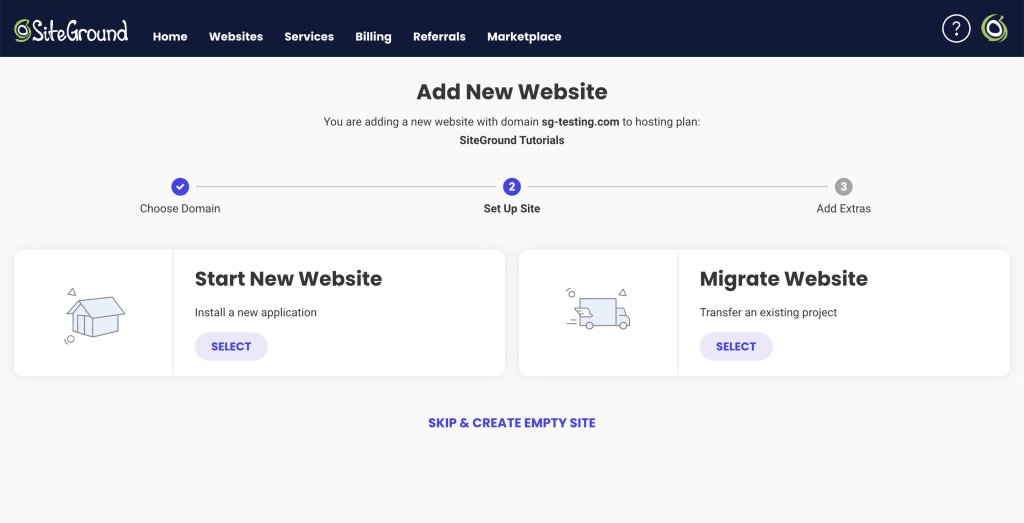
We offer a built-in WordPress installer if you’re starting your website from scratch that will help you launch your website in 3 clicks. If you already have a WordPress website, migrating it to SiteGround in order to enjoy all of our amazing benefits is as easy as pie! We offer two very simple methods of transferring your site; you can use our custom WordPress plugin or let our technicians migrate it for you for an entirely er hassle-free experience!

SiteGround WordPress Installer

How to Create a Podcast Website in 3 Simple Steps

1. Set your WordPress site and choose your theme

Setting up a WordPress site at SiteGround takes less than 3 minutes (and exactly three clicks!). Once you’re ready, the next step is going for a nice WordPress theme for podcasting.

Podcasts essentially operate like audio/video blogs (i.e. episodes), so you could say that all blog themes could potentially work. There are, however, specifically designed WordPress podcast themes that offer all the necessary functionalities rounded up in a podcast-ready bundle.

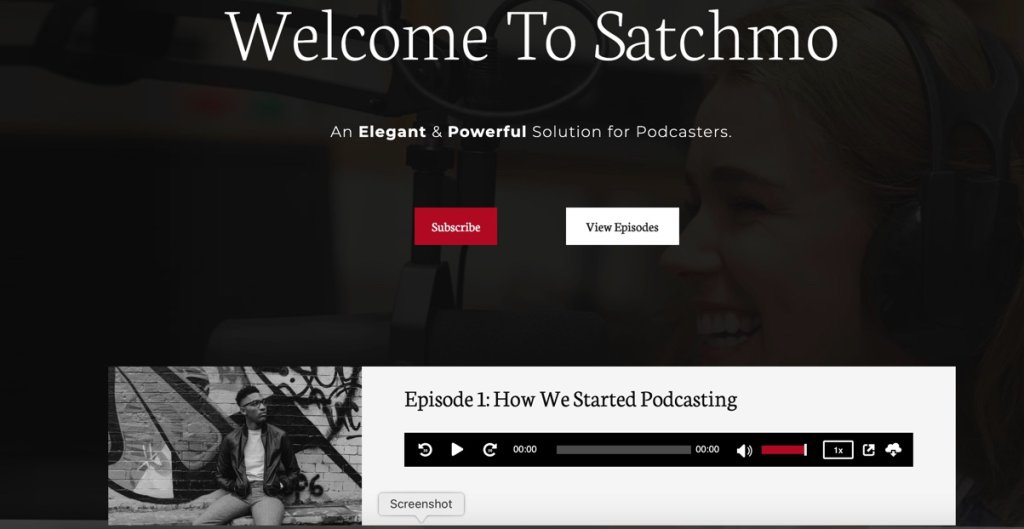
As an example of such a theme we recommend Satchmo, a clean, contemporary theme:

Not only does the theme use the powerful page builder Elementor, but it supports multiple podcasting plugins too. It also supports both locally hosted and external audio files, as well as embedding of the big podcasting platforms such as SoundCloud, Spreaker, Spotify, MixCloud, YouTube, and more.

We’re happy to let you know that SiteGround users can get a discount on the powerful theme Satchmo – simply visit the Perks section in yourSiteGround account and get the promo code.

Another beautiful theme is Tusant, a sleek WordPress theme whose design is clearly emitting a strong Spotify vibe (you can get a discount for this one as well, again promo code is in the SiteGround Perks section).

Tusant is featuring a wide range of podcasting options, including integration with popular video services such as YouTube and Vimeo.

Of course, you can always use a multipurpose WordPress theme – like the ultrafast OceanWP – and just adapt it to your needs through the necessary plugins.

Both themes are developed by the talented team of SecondLineThemes, therefore they share some important characteristics. First of all, the developers offer two podcast-related plugins –  Podcast Subscribe Buttons, Podcast Importer SecondLine – and of course, they are both supported. Also, both themes are fully compatible with major WordPress plugins such as Elementor, WooCommerce, MemberPress, Contact Form 7, WPForms, etc.,

The main difference between Satchmo and Tusant is that the Tusant theme supports a custom functionality they created for supporting multiple podcasts on the same website. 

2. Choose your podcasting plugin for additional features

Getting a podcast-oriented theme might already provide you with the functionalities you want, but you may want additional ones (such as wider distribution, integration with specific platforms, and so on). You may have also used a generic theme and not one designed specifically for podcasting. 

Your next step, in this case, is to equip your site with a podcasting plugin.

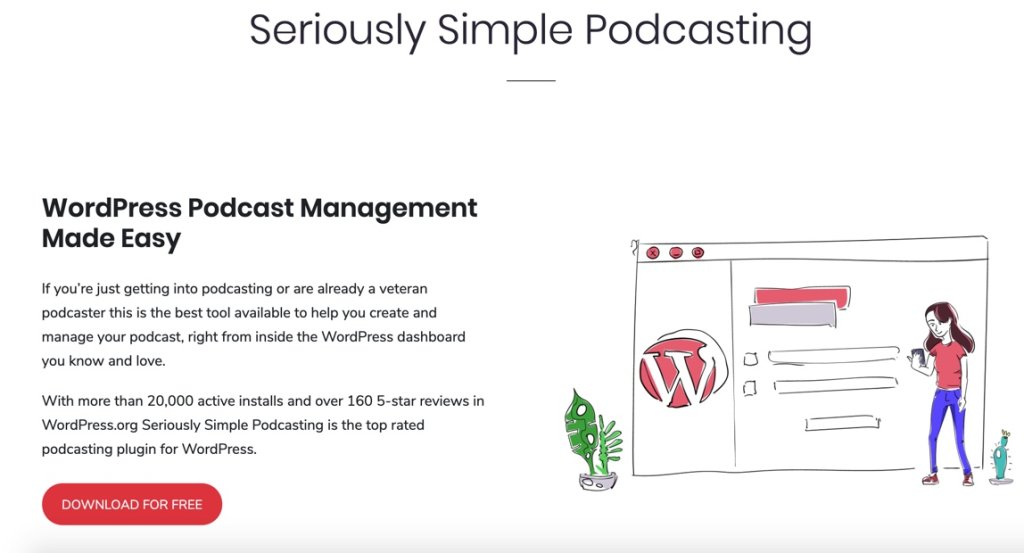
Seriously Simple Podcasting:

Seriously Simple Podcasting is a favorite among members of the podcasting community for two reasons: one, its very comprehensive in terms of options, settings and possible integrations, and two, it has several extensions, such as:

  • Seriously Simple Podcasting Stats
  • Seriously Simple Podcasting Transcripts
  • Seriously Simple Podcasting Speakers

It also comes with incredibly useful features such as YouTube republishing and automatic podcast transcriptions. The plugin is also known for its very detailed analytics, which allows a decent breakdown of what happens with your podcast (including customizable reports!)

If you’re eager to test out Castos platfrom, take advantage of SiteGround’s promo code (available in the Perk section in your account) which will give you a discount for the first three months!

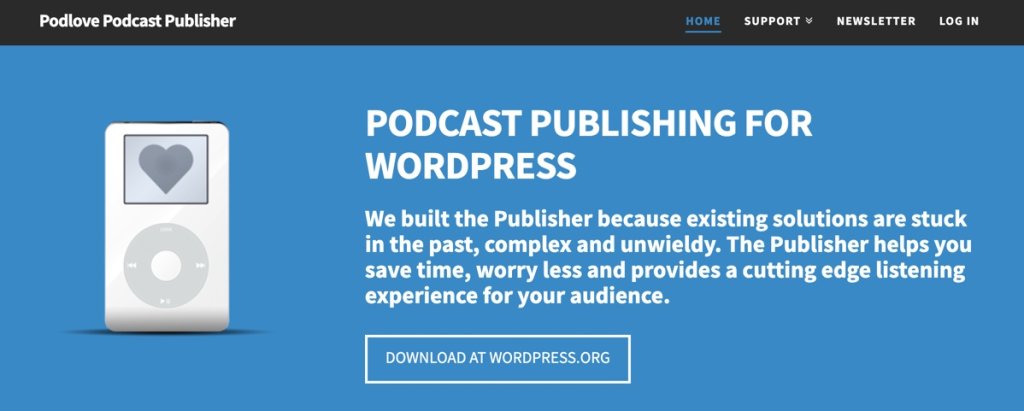
If you need a free alternative, not linked to a specific podcasting service, then a good option for you might be Podlove Podcast Publisher:

The powerful, yet simple interface of Podlove is widely known among podcasters that use WordPress. The main difference is that this plugin is oriented toward people who want to use their own hosting (and site) to host their podcast episodes. If you’re planning to post 1-5 episodes per month, and your hosting plan allows it, this might be a great solution for you. Also, the project is open-source and you can customize it at your will.

3. Add relevant podcast website content

Once you’ve set up the foundation for your podcast website, it’s time to consider its layout. 

Since your podcast website serves as your hub for listeners engagement and retention, you should consider adding some of the suggested main sections and information below to ensure your audience will have plenty of content to keep them entertained even between episodes:

📝 Homepage – Typically, must-have sections on your homepage are information about your podcast, an embed player with your latest episodes, a featured, recommended, or your most popular episode that listers should start with, and а call-to-action button, usually inviting the user to subscribe to the podcast. A How-to-listen is also essential info, cause not everyone is an experienced podcast listener and they might be wondering how to subscribe and keep listening to the show. Use any visual aspects of your podcast branding – such as logo, main colors or imply the subject matter of your podcast in the header image, together with any additional brand graphic elements, if you have any.

📝 About (the host) page –  the about page often gets a lot of action, but this is especially true when it comes to podcasts, as oftentimes the concept of the show might not be clear right away. Use this page to present yourself, but also to indicate the focal point of your podcast and what your listeners/viewers are going to discover with you. This is a great space to link some personal social media or other web platforms you can be found on. Some creators also insert a contact form (aside from their official contact page) to facilitate communication with them.

📝 Episodes page – this is where all of your episodes are listed so that visitors can go there and browse them by title (and therefore topic) instead of cruising the navigation of your podcast player. In case your podcast episodes get pretty diverse in the future, you can also categorize them at the beginning of the said page.

📝 Donate / Support Me page – some creators choose to accept donations as a way to monetize their podcast, so if this is a path you’re planning to take, it’s a good idea to feature prominently such a page. You can accept direct donations via PayPal or use donation/fundraising platforms such as Patreon, Fundly, Qgiv, Indiegogo, Gofundme, etc.

📝 Annotated transcripts section – as part of your content strategy it’s a nice touch to include annotated transcripts with every episode. Not only this will help your SEO rankings, but it’s also pretty useful for your viewers, as many podcast listeners report to absorb knowledge better when reading the content as well.

📝 A Newsletter subscription box – as part of your marketing efforts you can consider launching a newsletter subscription in order to retain visitors and promote new content. You can either set this as a popup (which is more prominent, but some users find it annoying) or insert it as a section on your homepage and episodes page.

If you’ve had your podcast for a while, you already know that podcast listener stats are not that detailed, so don’t forget to install Google Analytics to understand your website visitors and listener’s activity better.

Ready, Set, Go!

Give yourself a pat on the back, because you are all set and ready to start podcasting! Let us know in the comments if you’re already hosting a podcast on SiteGround or when you create one, and we promise we’ll visit.

[7]

[subscribe_cta]