

Ecommerce email marketing is how online stores turn one-time buyers into repeat customers by using targeted, automated emails that land at exactly the right moment in someone’s shopping journey. It’s also one of the few marketing channels where the numbers truly justify the effort: for every $1 spent, email marketing returns between $36 and $45, outperforming paid ads by a widely impressive margin.
If you’re just starting out or suspect your current setup is leaving money on the table, this guide covers everything you need: how to build and segment your list, which emails to send at each stage, and how to measure what’s working. Everything you need to get started, nothing you don’t.
Key takeaways
- Ecommerce email marketing is one of the highest-ROI channels, helping online stores turn one-time buyers into repeat customers with targeted, timely emails.
- Segmentation and personalization matter most—sending a relevant message to the right customer improves open rates, clicks, and conversions.
- A strong email marketing strategy starts with a healthy email list: collect subscribers ethically, use clear opt-ins, and avoid purchased lists that hurt deliverability.
- Different email types serve different goals—promotional, transactional, and lifecycle emails work together to support the full customer journey.
- Automation saves time and increases sales by triggering emails like welcome sequences, abandoned cart reminders, and win-back campaigns at exactly the right moment.
- Tracking key metrics like open rate, click-through rate, and conversion rate helps you improve performance and make smarter email marketing decisions.
What Is Ecommerce Email Marketing?
Ecommerce email marketing is a direct marketing channel that lets online stores reach customers with targeted emails, from promotional campaigns and abandoned cart reminders to post-purchase follow-ups and loyalty offers.
Ecommerce businesses use this type of email marketing for a range of purposes. These messages can include promotional emails with special offers and product discounts, transactional emails, such as order status updates and abandoned cart details, and regular informative and educational newsletters.
Segmentation and personalization are what make ecommerce email marketing outperform other channels. That is, when you group your audience by interests and customize the content they receive, you get better open rates, more clicks, and higher conversions. All because the right message is reaching the right person at the right time.
What Are the Benefits of Ecommerce Email Marketing?
The main benefits of ecommerce email marketing include full ownership of your audience, high ROI, precise targeting, stronger customer retention, and insights that sharpen your future campaigns. Here’s a closer look:
1. Gives You Control Over Your Audience
Email is a marketing channel you fully control. You own your email list and decide the content you share, unlike social media marketing and display ads where you rely on third-party algorithms that affect visibility of your message.
That said, ownership comes with responsibility. Getting your emails to the inbox (not the spam folder) depends on maintaining a clean email list, sending to engaged subscribers, and using a platform with solid deliverability. SiteGround Email Marketing, for example, is built with all of this in mind, so your campaigns land where they should.
2. Has the Highest ROI
In general email marketing is more effective than other marketing channels with a higher return on investment. Research shows it can turn every $1 spent into somewhere between $36 to $45. In contrast, Google ads generate $2 for every $1 spent. That’s a very noteworthy difference.
In ecommerce, that targeting potential goes even further—you’re not just sending newsletters to a general list, but reaching the right people at exactly the right moment in their shopping journey. But, this requires a strategy—more on that in a moment.
3. Offers Targeted and Personalized Communication
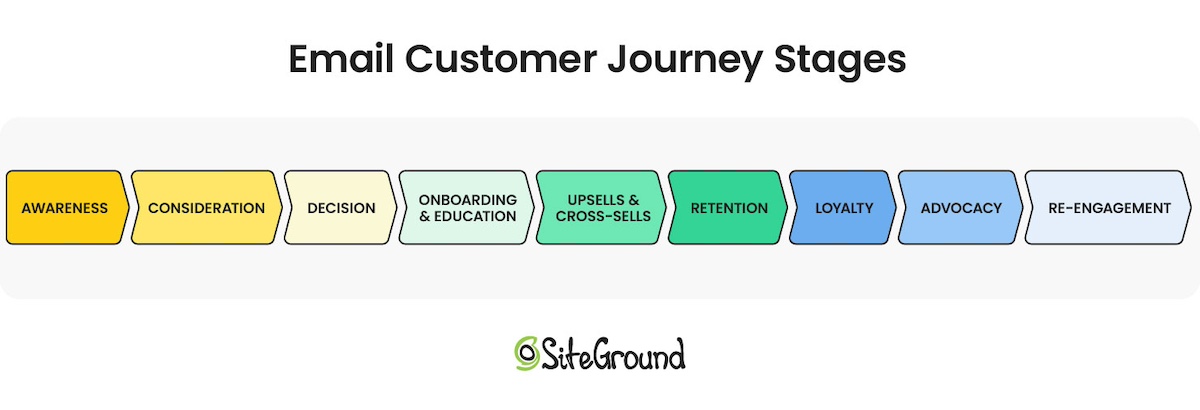
Ecommerce businesses gather email addresses through various methods—from paid campaigns and newsletter sign-ups to checkout processes and referrals. The advantage is being able to organize those subscribers into well-defined segments based on the email customer journey: where and when they subscribed, their interests and intent, and the types of emails they prefer to receive. The more closely your emails match what a subscriber actually cares about, the better your open rates, clicks, and conversions.
4. Improves Customer Retention and Loyalty
Email does more than drive one-off sales. It’s how you build a relationship that outlasts any single purchase. Regular touchpoints keep your brand top of mind, nudge potential customers toward repeat buys, and when engagement starts to slip, re-engagement emails give you a second shot at winning them back. Over time, that consistent presence is what turns a one-time buyer into a loyal customer.
5. Drives Growth Across Your Entire Business
There are three key ways to grow your ecommerce business: increase the total number of customers, boost the number of purchases each customer makes (repeat purchases), or raise the average order value.
Ecommerce email marketing is a powerful tool that simultaneously impacts these three growth strategies. A simple email can win-back inactive subscribers, promote repeat purchases, stimulate upsells, or recover abandoned orders and bounced sales. Having customers return is important for your business because it keeps your average cost of acquiring a customer down.
6. Provides Unique Insights
Last but not least, ecommerce marketing emails serve as a valuable learning tool for businesses. By analyzing how customers interact with your emails, you can gain deep insights into their interests and behaviors. This knowledge removes the guesswork and enables more effective segmentation and targeting in future campaigns.
How to Create an Ecommerce Email Marketing Strategy
Building a successful ecommerce email marketing strategy comes down to a handful of core steps. Here’s how to set it up from the ground up.
1. Build (and Grow) Your Email List
Collect the Emails of New Clients
Your buyers are your warmest audience. They already know your brand and like what you sell. Whether you’re selling online or in person, start collecting their emails at checkout. They’ve already shown they’re interested, which makes them far more likely to engage with your emails down the line.
Collect Emails of Visitors With Opt-in Forms and/or in Person
Beyond buyers, your website visitors are another strong source of leads. They’re already interested enough to show up. Add sign-up forms in high-visibility spots like your homepage, sales pages, or footer, and give people a compelling reason to subscribe: a discount, early access, or a useful resource (this is what’s known as a lead magnet). For a deeper dive, see our guide on how to build an email list.
If you use SiteGround Ecommerce, your sign-up forms, subscriber management, and email campaigns are already in the same place—no extra plugins or third-party connections needed.
Get Explicit Consent & Use Double Opt-in forms
A bigger list isn’t always a better list. You want subscribers who actually want to hear from you, which means getting explicit consent and skipping the temptation to buy lists. Purchased lists violate GDPR (the EU’s data privacy regulation) damage your email deliverability and sender reputation, and rarely convert anyway.
The best way to keep your list clean from the start is a double opt-in — a confirmation email that asks new subscribers to verify their sign-up. It adds one extra step but filters out bad addresses and ensures everyone on your list genuinely wants your marketing emails, which helps you reduce bounce rates and stay out of spam folders.
2. Segment Your Audience
List segmentation means grouping your subscribers by shared characteristics (where they signed up, what they’re interested in) so you can send each group content that’s actually relevant to them. The more targeted the message, the better your chances of getting the open, the click, and the sale.
The most natural place to start is where and how someone signed up. But if your sign-up form includes a simple preference question—”Which sports are you interested in?” for a sports brand, for example—you immediately have a basis for more meaningful segmentation. A 10% Black Friday discount hits differently when the soccer fan sees soccer gear and the golf enthusiast sees clubs. Every answer becomes a tag in your subscriber database that you can build campaigns around.
SiteGround Email Marketing makes this straightforward: you can filter subscribers by custom fields like interests or signup source, and have a tightly targeted segment ready before you hit send.
3. Set up Different Types of Ecommerce Email Marketing Campaigns
With your list built and your audience segmented, it’s time to think about what to actually send. Ecommerce email marketing campaigns generally fall into three categories, and most stores need all three working together to cover the full customer journey:
- Transactional Emails: These are automated messages triggered by customer actions. Examples include order confirmations, purchase receipts, and shipping updates. Because they’re expected and relevant, they’re among the most-opened emails you’ll ever send, making them a key trust-building tool.
- Promotional Emails: These emails aim to increase product visibility and sales through announcements of discounts, special deals, or product launches. For instance, promoting a new collection or a Black Friday-Cyber Monday sale. They are designed to attract and engage customers, driving both immediate purchases and long-term brand loyalty.
- Lifecycle Emails: Often called “triggered” emails, these are sent in response to specific customer interactions with your site. Examples include a welcome email upon subscription or a loyalty program email to encourage ongoing sales. Lifecycle emails are effective for nurturing customer relationships and guiding potential buyers along the marketing funnel, from initial interest to final purchase and beyond.
4. Organize Your Emails with a Calendar
To effectively reach different customer groups who have varying needs, plan your email campaigns using an email marketing calendar. This helps you schedule your emails and follow-ups, ensuring you stay organized and on track with your campaigns.
You can create your own email calendar using tools like Google Sheets or Microsoft Excel. When setting up your calendar, include entries such as:
- Campaign name
- Email type (newsletters, win-back, welcome emails)
- Subject line
- Product or service features/offers
- Target audience
- Calls to action (CTAs)
- Send date and time
- Status (in progress, scheduled)
- Owner (the person in charge of the email)
- Goals (generate leads, welcome new subscribers, re-engage inactive customers)
This structured approach helps you deliver targeted content at the right time to the right audience.
5. Automate as Much as Possible
Automation is what turns a good email strategy into one that runs while you sleep. Most platforms handle the basics out of the box—welcome emails, order confirmations, shipping updates. But email automation goes further: you can set up trigger-based sequences that respond to what a subscriber actually does. A customer shows interest in a product—they get a follow-up email with more information, a related recommendation, or a timely discount to nudge them toward a purchase.
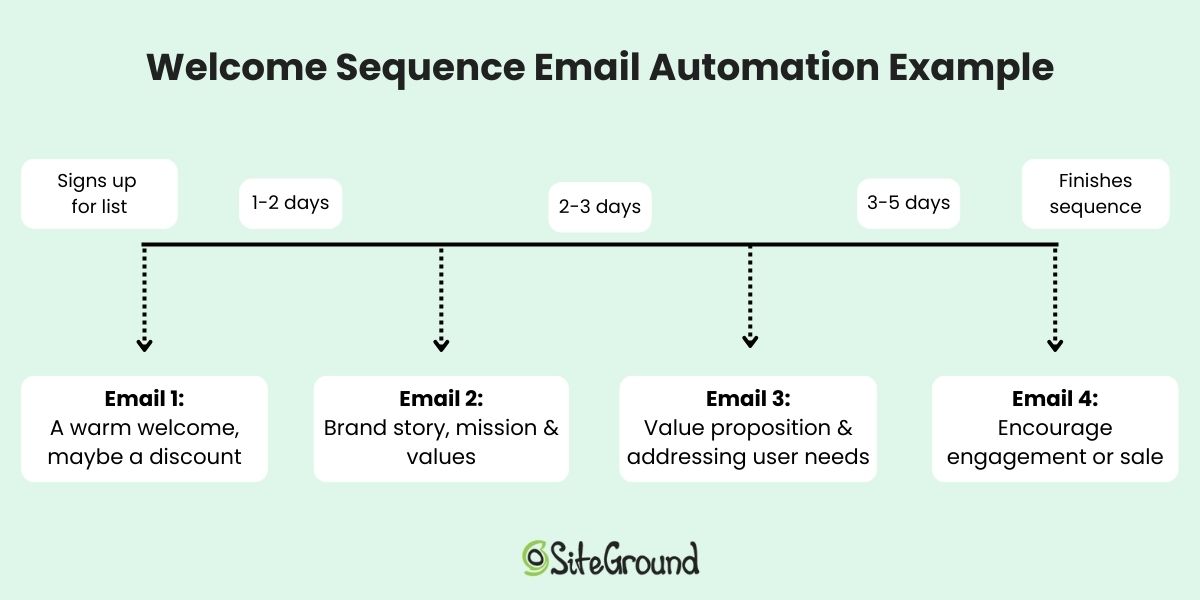
The more of this you set up upfront, the less manual work your campaigns require over time.
Must-Send Ecommerce Marketing Emails (+ Examples)
1. Sales and Promotional Emails
These emails aim to drive sales and usually communicate discounts and special offers. They need to be straight to the point—what’s the value of the product or service you offer and include a strong CTA. These messages should be designed to drive instant traffic to your website and increase your sales.
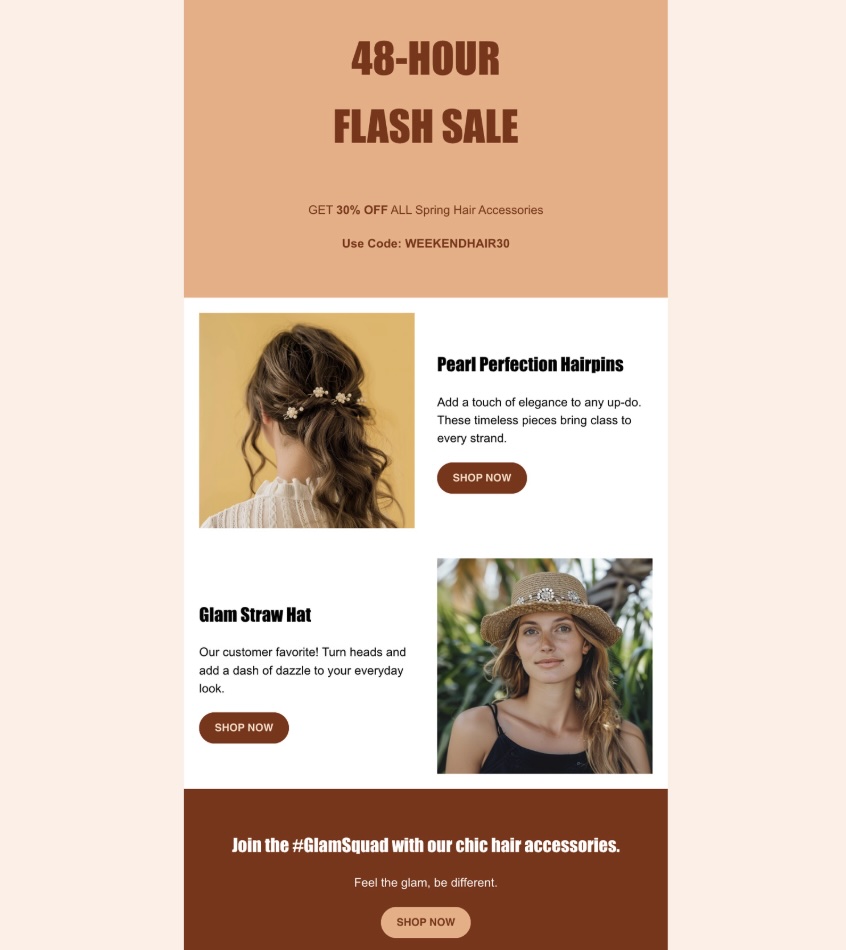
Here are a few subtypes to consider:
- New product or service launch: Whenever you introduce a new product or service, make sure your customers and subscribers are the first to know. This keeps your audience engaged and excited about your ecommerce brand’s developments.
- Special or seasonal discounts: Make the best out of special or seasonal discounts to generate urgency. These are time-sensitive offers built around seasonal marketing, from holidays like Christmas and Valentine’s Day to major shopping events like Black Friday email campaigns. These promotions encourage quick decision-making and increase sales during peak shopping times.
- Cross-sell emails: Send emails that suggest complementary items based on what a customer has already purchased. If they’ve ordered a book from a collection, let them know there are other books in this series, to spark their interest and drive sales.
- Upsell emails: Upsell emails are a chance to increase your earnings per customer by promoting premium versions of the products or services they already use, or by offering related products. Encourage your customers to pay extra for more features and convince them that they need these features. Let them know that the upgrade will enhance their experience even further.
2. Abandoned Cart Emails
Abandoned cart emails target shoppers who got close but didn’t quite convert. Keep them simple: address the customer by name, show them what they left behind, and include a clear CTA back to their cart. The less friction between the email and the checkout, the better.
3. Relationship Marketing Emails
These emails let you build and maintain a long-term relationship with your customers. Customize and personalize them as much as possible to strengthen your connection with each subscriber. Examples include:
- Newsletters: Sending regular newsletters helps keep your subscribers informed and engaged with your brand. Aim to maintain a balance—regular updates are good, but too many can overwhelm their inboxes. Always prioritize quality content that adds value.
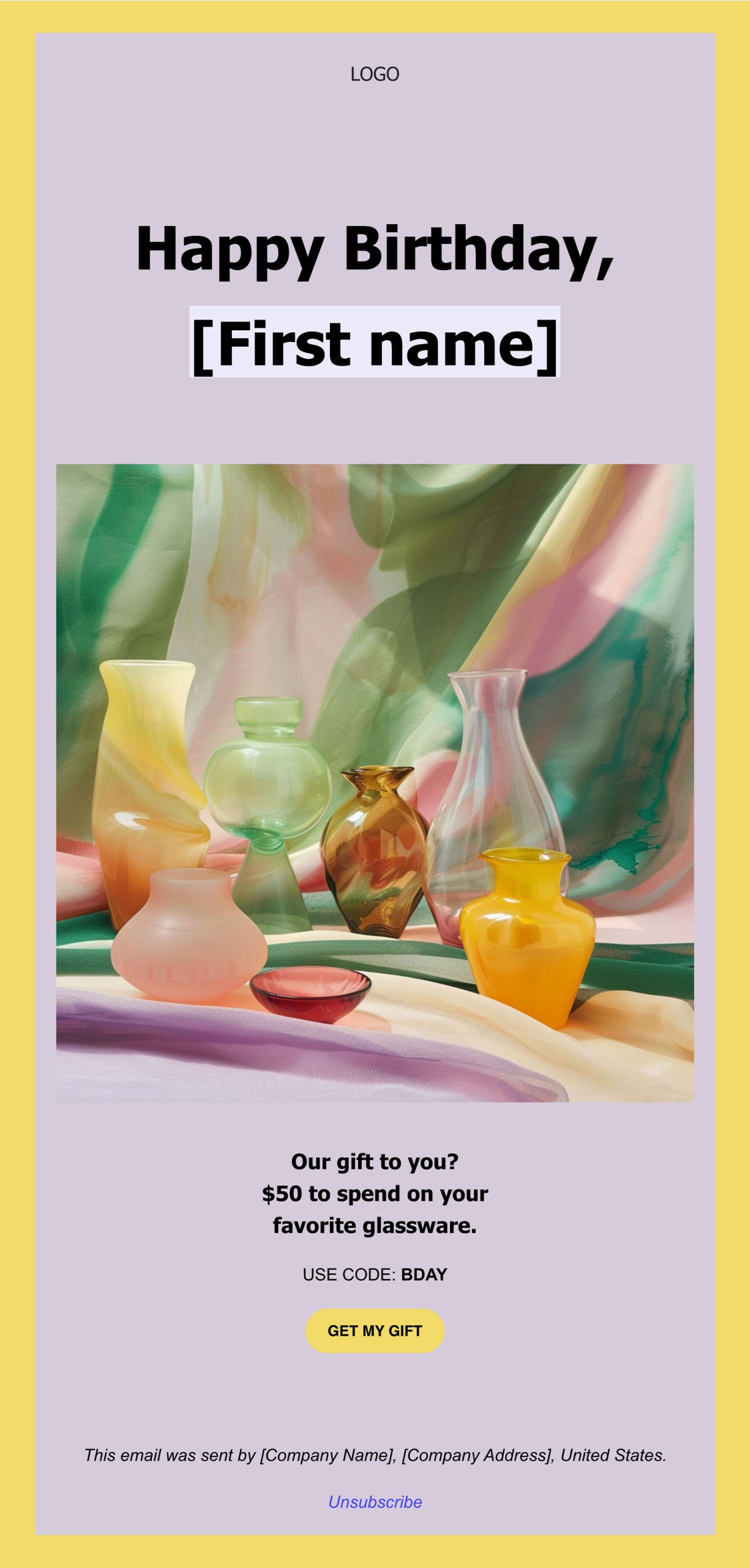
- Birthday emails: Sending birthday emails not only makes your customers feel special and appreciated, but it also provides an opportunity to offer them a limited-time discount or promotion. This gesture celebrates their special day while simultaneously boosting your sales.
- Referral emails: Referral emails allow your customers to recommend your products or services in return for a discount, free shipping, or another win. These emails also make them feel special, because their loyalty to the brand brings them benefits.
- Feedback survey emails: Once a customer makes a purchase, you can send them a survey email to rate your product or service. This approach shows your customers that you value their opinions and will use their feedback to improve your services in the future. It’s another effective way to create a connection and make your customers feel respected and involved.
4. Personalized Product Recommendations
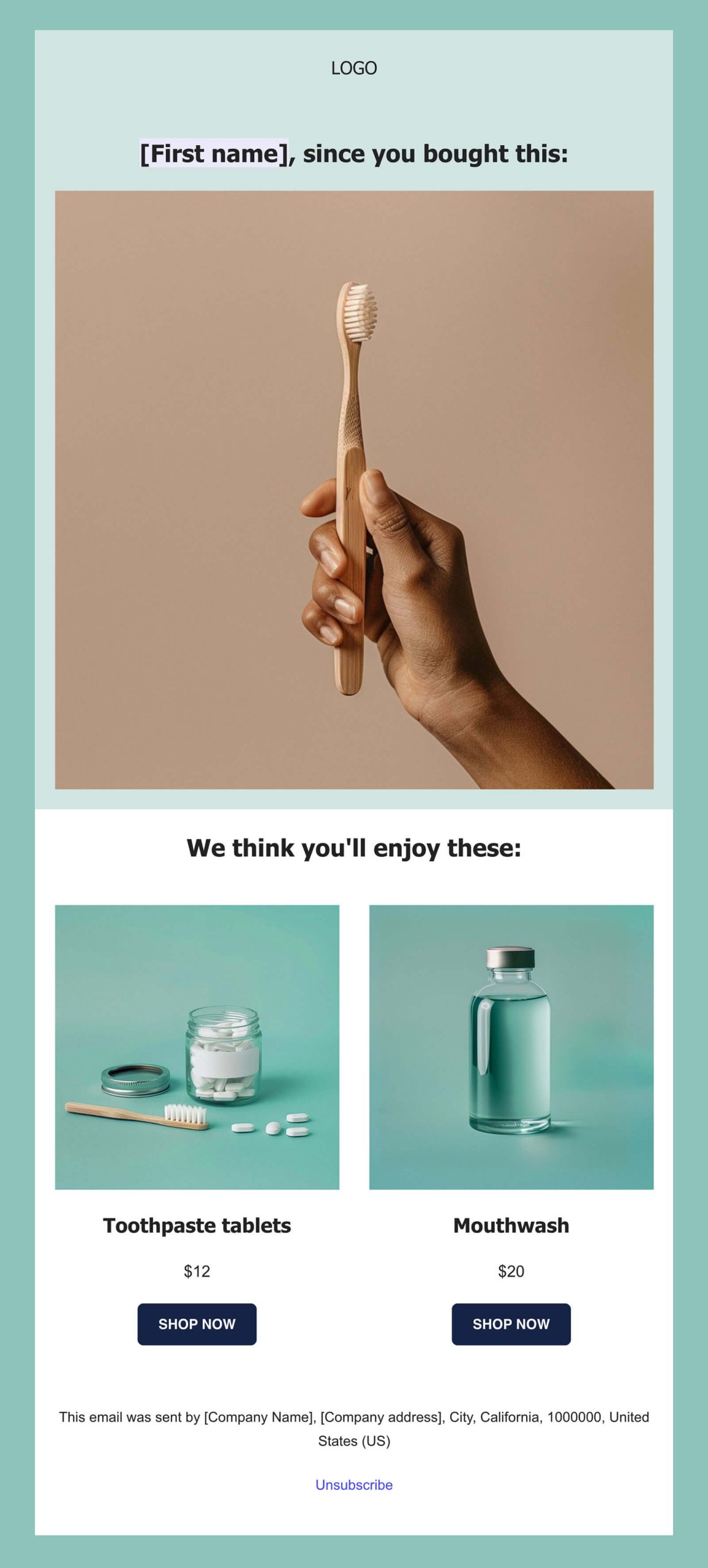
Your secret weapon in ecommerce email marketing are recommendation emails. In these emails, you can include product suggestions that match your customers’ interests, making it easy for them to discover products they actually want to buy.
5. Win-Back Campaigns to Reactivate Subscribers
If part of your subscribers has become inactive, it’s time to get their attention. Create a win-back email series designed to give these audience members a reason to reconnect with your brand. A friendly “we miss you” email can go a long way.

6. Transactional Emails
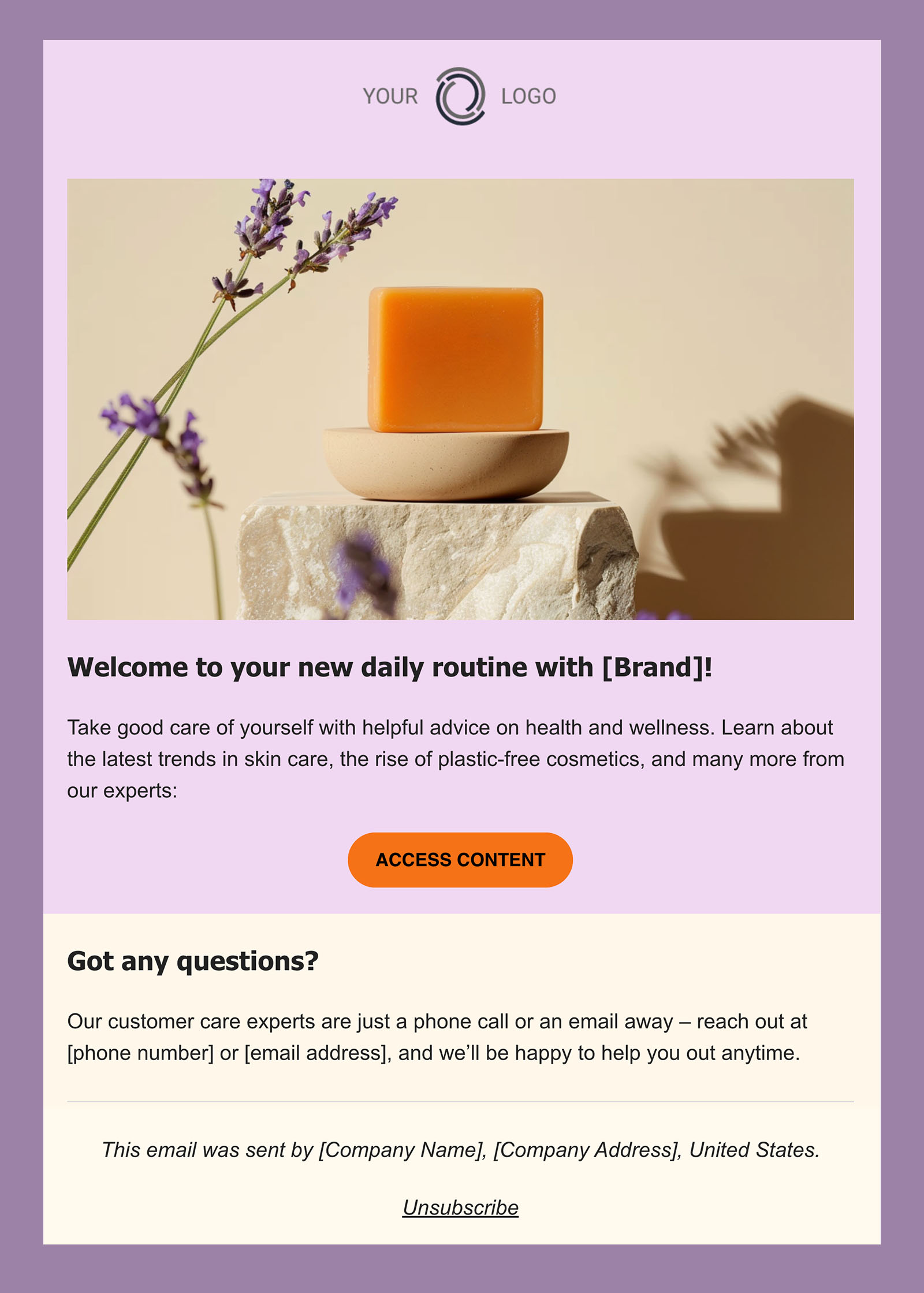
Transactional emails are important in ecommerce because they confirm a user’s actions on your website. For example, you send confirmation emails when customers make a purchase, providing them with an order receipt and reassuring them about their product’s upcoming delivery.
Since these emails are expected by your customers, they have one of the highest open rates among all types of marketing emails. Their main goal is to streamline the ecommerce process, not to sell or call to a specific action.
The core transactional emails every ecommerce store should have set up:
- Order confirmation: sent automatically after a purchase, with a receipt, order summary, and key details. It doesn’t need to be creative, just clear and professional.
- Shipping confirmation: lets the customer know their order is on its way, with an estimated delivery date and tracking link if available.
- Thank you email: a simple acknowledgement that goes a long way toward making customers feel valued and keeping your brand top of mind after a purchase.
Ecommerce Email Marketing Best Practices
Once your strategy is running, these best practices will help you sharpen it and get better results with every campaign.
1. Choose the Right Email Marketing Platform
Before you can send a single email, you need a platform to send it from. When evaluating your options, look for a tool that covers the basics well: an intuitive email builder, list management and segmentation, automation capabilities, and built-in analytics to track performance. Easy integration with your store is also worth prioritizing, as the fewer manual connections you have to manage, the better.
2. Collect the Right Customer Data in Your Sign-up Forms
Your sign-up form is your first opportunity to collect customer data that makes segmentation possible. Keep it simple—one or two questions max—but make them count. A question like “What products are you interested in?” with a handful of predefined category options gives you an immediate basis for grouping subscribers and tailoring what you send them. Every answer becomes a tag in your subscriber database that you can build campaigns around.
3. Consider How You Use Segmentation for Each Campaign
Segmentation is only as good as the customer data behind it, which is why what you collect at sign-up matters. Once you have that data, the key is knowing when to use it and when not to. Not every campaign needs a finely sliced audience: a storewide discount is relevant to everyone, so sending to your full list is perfectly valid. Think about who actually needs to hear this message, and segment from there.
4. Schedule Your Emails Effectively
Timing matters more than most beginners expect. Mid-week mornings tend to work best, but here are a few rules of thumb to keep in mind:
- Nights and weekends: avoid these; your email will get buried by the time people check their inbox.
- Mondays: inboxes are already swamped from the weekend, so your email is competing for attention from the start.
- Fridays: generally not great for promotions, unless your offer is something people would enjoy over the weekend.
- Holidays: a well-timed holiday promotion can work brilliantly or fall completely flat depending on what you sell. High-stakes seasonal events like Black Friday have their own timing rules worth knowing before you hit send.
5. Craft Emails Worth Opening
With so many ecommerce stores flooding inboxes, quality is what sets you apart. A few things that make a real difference:
- Subject line: it’s the first thing people see, and often the only thing that determines whether your email gets opened. Keep it short, specific, and honest. If it sounds like a promotional cliché, it’ll get ignored or flagged as spam.
- Content: prioritize usefulness over volume. A well-timed, relevant email wins over five generic ones.
- Visuals: use images that support your message, not just fill space. Decorative visuals that don’t add context are a distraction.
- Mobile responsiveness: most people will read your email on their phone. If it doesn’t render well on mobile, it doesn’t matter how good the content is.
6. Explore AI for Email Marketing
Content creation is where most beginners hit a wall. And it’s also where AI can take a lot of the weight off. A few ways to put it to work:
- Writing your emails: a built-in AI writer like the one in SiteGround Email Marketing lets you generate and refine email copy without staring at a blank page.
- Crafting better email subject lines: AI can generate and help you test multiple subject line variations quickly, improving your chances of getting that open.
- Using the right prompts: the quality of your AI output depends heavily on how you ask. Our guide on email prompts for AI models is a good place to start.
- Planning and scheduling: AI can help you map out a campaign calendar, suggest send timing, and identify gaps in your strategy. If you want to go further, SiteGround AI Studio can help you plan and execute across your broader marketing effort.
- Personalizing at scale: instead of writing separate versions for every segment manually, AI can help you adapt the same core message for different audiences without the heavy lifting.
7. A/B Test Your Emails
A/B testing is how you stop guessing and start knowing what works. The idea is simple: send two versions of an email to a subset of your list, see which performs better, then send the winner to the rest. And you can test almost anything—subject lines, CTA placement, visuals, offer size, even whether you need a particular email at all. Those small optimizations add up to meaningfully better open rates, clicks, and conversions over time.
The metrics you’ll learn about in the next section are what tell you which version won—and whether your strategy is improving over time.
How to Measure Your Ecommerce Email Marketing Performance
Sending emails is only half the job. Understanding how they perform is what lets you improve over time. Keep a regular eye on these three core email marketing metrics:
- Open rate: the percentage of delivered emails that were opened. A strong open rate signals that your subject lines are working and your sender reputation is healthy.
- Click-through rate (CTR): the percentage of recipients who clicked a link in your email. This tells you how relevant and engaging your content actually is.
- Conversion rate: the percentage of recipients who completed a desired action after clicking, whether that’s making a purchase, signing up, or filling out a form. This is the metric that ties directly to revenue.
SiteGround Email Marketing tracks all of these automatically—open rates, click rates, unsubscribe rates, and more—so you always know what’s working and what needs adjusting.
Make Your Ecommerce Email Marketing a Success
Ecommerce email marketing is one of the few channels where consistent effort compounds over time: more repeat purchases, stronger customer relationships, and a list that grows in value the longer you work it. The strategy, the segmentation, the timing—all of it gets easier once you have the right tools underneath it.
SiteGround Email Marketing gives you everything you need to build, send, and track campaigns from day one—an intuitive builder, audience segmentation, automation, a built-in AI writer, and analytics that show you exactly what’s working.
[58]
Ecommerce Email Marketing FAQs
Ecommerce email marketing is the practice of using email to communicate with potential and existing customers of an online store. It covers everything from automated transactional emails like order confirmations, to promotional campaigns, product recommendations, and win-back sequences—all aimed at driving sales, building loyalty, and keeping existing customers engaged throughout their journey.
There’s no universal answer, but a good starting point for most stores is one to two emails per week. The right frequency depends on your audience, your content, and the stage of the customer journey. New subscribers may need more touchpoints, while long-term customers may disengage if emailed too frequently. Monitor your unsubscribe and open rates closely; they’re the clearest signal that you’re sending too much or too little.
Industry data puts ecommerce open rates around 30% according to email marketing benchmarks, but open rates are increasingly unreliable as a standalone metric—Apple’s Mail Privacy Protection and email bots can inflate the numbers significantly. A more meaningful signal is your click-through rate, which shows actual email engagement, and your own historical trends. If your open rates are suddenly dropping, that’s worth investigating, but chasing an industry average is less useful than building your own baseline over time.
Transactional emails are triggered by a specific customer action, such as an order confirmation, a shipping update, a password reset. Their job is to inform, not to sell. Marketing emails, on the other hand, are sent proactively to promote products, nurture relationships, or re-engage subscribers.
This article was originally published in May 2024 and then updated in May 2026