Core Web Vitals Guide: What They Are & How to Improve Them

Understanding Core Web Vitals

Slow loading times, unresponsive elements, or unexpected page shifts can frustrate users. This is why Core Web Vitals have become essential for optimizing your site and your chances of ranking higher in searches.

By improving your website performance on these metrics, you can provide a smoother experience for your audience. This results in better search engine rankings, increased engagement, and more conversions.

What are Core Web Vitals?

Core Web Vitals is a set of metrics from Google that measure real-world user experience for loading performance, interactivity, and visual stability of a webpage. Achieving good Core Web Vitals is recommended for success in Google Search, as it helps ensure a fast, responsive, and visually stable user experience.

The three Core Web Vitals are: 

  • Largest Contentful Paint (LCP) – Measures how long it takes for the largest visible element (like an image, video, or block of text) to load and become visible to the user.
  • Interaction to Next Paint (INP) – Measures the time it takes for a website to respond visually after a user interaction, such as clicking a button or typing.
  • Cumulative Layout Shift (CLS) – Measures how much visible content shifts unexpectedly during loading. 

Google uses these quality signals as part of its ranking algorithm, and improving them can boost your search rankings.

Largest Contentful Paint (LCP)
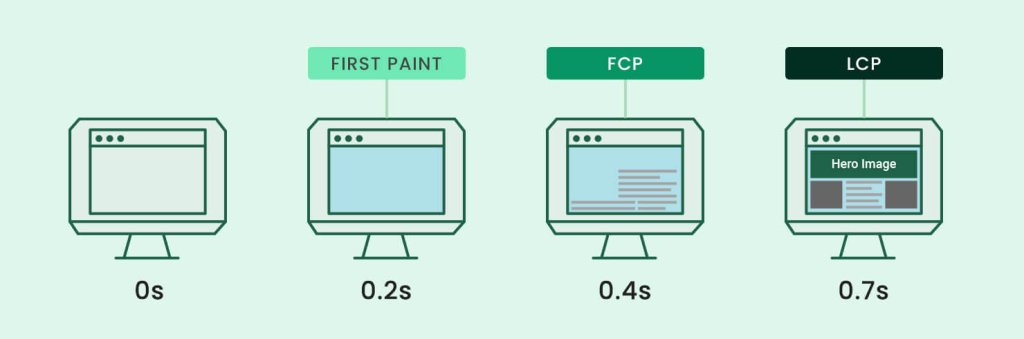
Illustration of the differences between First Paint, First contentful paint and Largest Contentful Paint.

Largest Contentful Paint (LCP) measures how long it takes for the largest visible content element on a page to fully render. This could be an image, video, or a block of text that occupies the most space on the screen. This metric is important because it gives an accurate view of how fast a web page loads from the user’s perspective.

Here’s how Google defines LCP scores:

Illustration of how Google defines Largest Contentful Paint and its scores - "Good" (0 to 2.5 seconds), "Needs improvement" (between 2.5s and 4s) and "Poor" (more than 4s).
  • Good: 2.5 seconds or less
  • Needs improvement: Between 2.5 and 4 seconds. 
  • Poor: More than 4.0 seconds

For your website to pass the Core Web Vitals, you need an LCP score of 2.5 seconds or less for 75% of all your page views.

A high LCP means your users are waiting too much time to load the largest piece of content on your page. For website owners, this means long render times, leading to big bounce rates and low conversion rates.

The three most common factors that negatively affect LCP are:

  • Large, unoptimized media
  • Render-blocking JavaScript
  • Slow resource load time

Interaction to Next Paint (INP) 

Google announced that INP (Interaction to Next Paint) is officially replacing the FID (First Input Delay) as the new Core Web Vitals metric for responsiveness. The replacement will be effective as of March 2024.
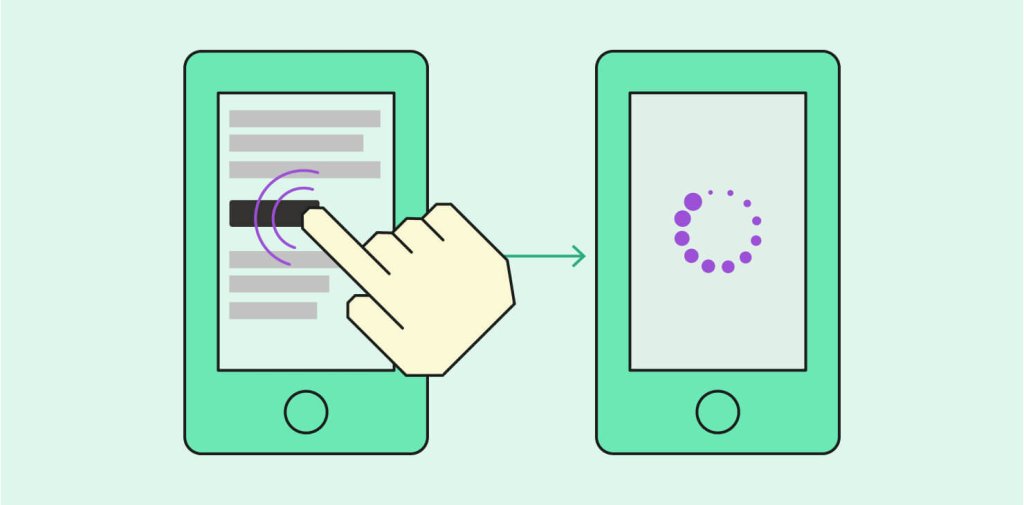
Illustration of First Input Delay - a person clicking on a link in a page on a mobile device and waiting for the response of the page

Interaction to Next Paint (INP) is a real-user web performance metric that measures the responsiveness of a web page. It evaluates the time it takes for the browser to respond to user interactions, such as clicks or taps after the page has finished loading.

INP is designed to capture the user’s experience of how quickly and smoothly a site reacts to their inputs. It is a key indicator of the page’s interactivity and responsiveness. 

Unlike FID, which only measures the delay for the first input, INP considers the responsiveness of the entire page throughout the user’s session.

Here’s how Google defines INP scores:

Illustration of how Google defines Interaction to Next Paint (INP) and its scores - "Good" (0 to 200ms), "Needs improvement" (between 200ms and 500ms) and "Poor" (more than 500ms).
  • Good: Less than or equal to 200 milliseconds
  • Needs Improvement: Between 200 milliseconds and 500 milliseconds
  • Poor: More than 500 milliseconds

A common reason for a bad INP score is unoptimized JavaScript and CSS files. We’ll show you how to measure and improve INP later on.

Cumulative Layout Shift (CLS)
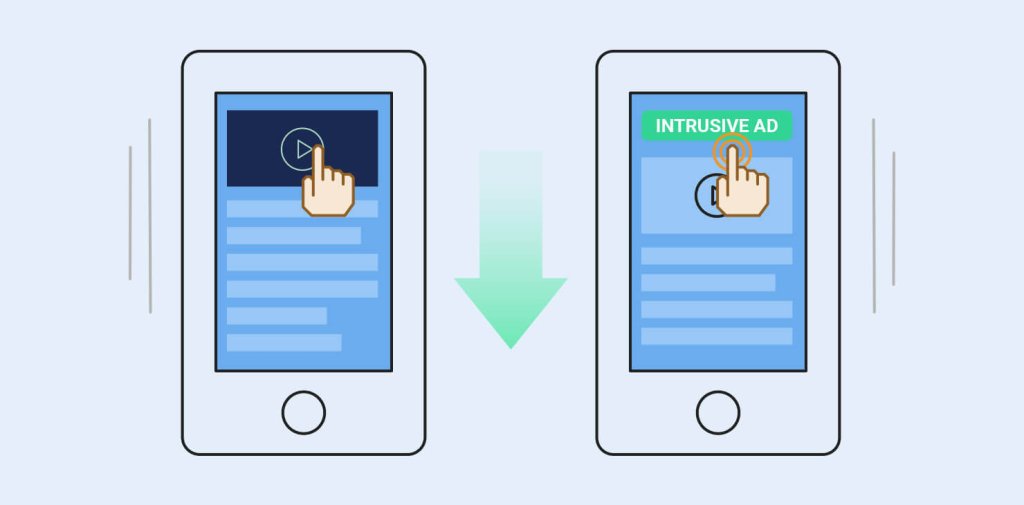
Illustration of what Cumulative Layout Shift means - the whole web page shifting down, before the user clicks, because an ad has appeared.

Cumulative Layout Shift (CLS) measures the visual stability of a page by tracking unexpected layout shifts. These shifts often occur when new content loads, like images without specified dimensions or dynamically inserted ads. A high CLS score indicates a page is unstable, leading to a frustrating experience for users.

Here’s how Google defines CLS scores:

Illustration of Cumulative Layout Shift's score and score definitions - "Good" (0.1s or less), "Need improvement" (between 0.1s and 0.25s) or "Poor" (more than 0.25s).
  • Good – Less than or equal to 0.1 seconds
  • Needs Improvement – Less than or equal to 0.25 seconds
  • Poor – More than 0.25 seconds

A score less or equal to 0.1 seconds means the page’s contents are fully static during their lifecycle. A higher score means the contents are moving.

Usually, layout shifts are commonly caused by:

  • images, 
  • ads, 
  • embeds, 
  • iframes without dimensions, 
  • dynamically injected content,
  • web fonts, causing a flash of invisible text and a flash of unstyled text.

How to measure Core Web Vitals? 

There are several tools available to measure Core Web Vitals, both using real-world data from users and lab metrics (simulated tests). These tools help site owners track their Core Web Vitals performance and identify areas for improvement.

Field tools

Field data, also known as real user monitoring (RUM), reflects real users’ browsing experience. It takes into account real users, various devices, different network connections, and historical data. The result is aggregated for the entire domain or per URL.

Keep in mind that Google is using field data to rank your site. Therefore, if you want to inspect your real user experience, you should use field tools.

Google Search Console (GSC)

Google Search Console offers a Core Web Vitals report that shows how your site performs on desktop and mobile devices. It highlights affected pages and groups them by performance – Good, Needs Improvement, or Poor.
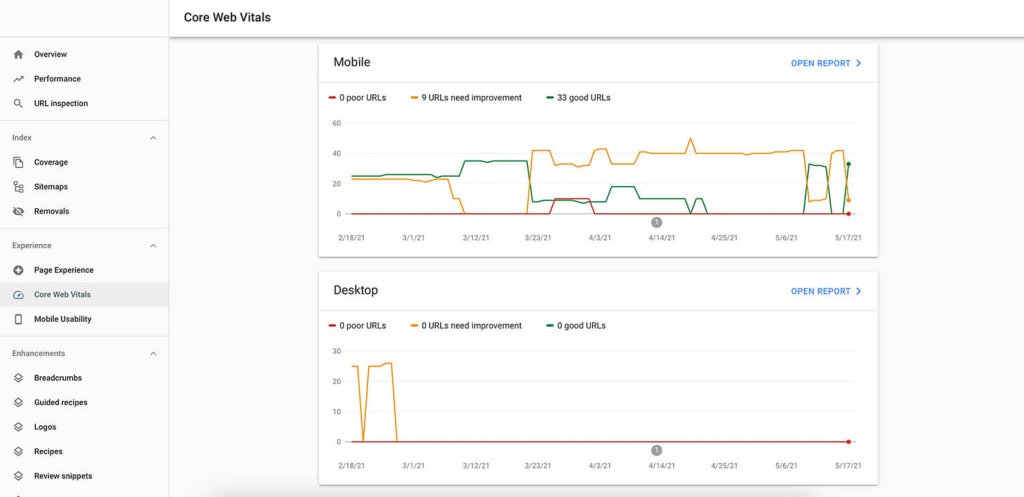
Screenshot from Google Search Console's Core Web Vitals report showing the mobile & desktop versions of a website and how they are performing in terms of Core web vitals.

PageSpeed Insights

PageSpeed Insights analyzes individual web pages and provides detailed insights into their Core Web Vitals performance. It offers suggestions for improving page speed and site performance. 
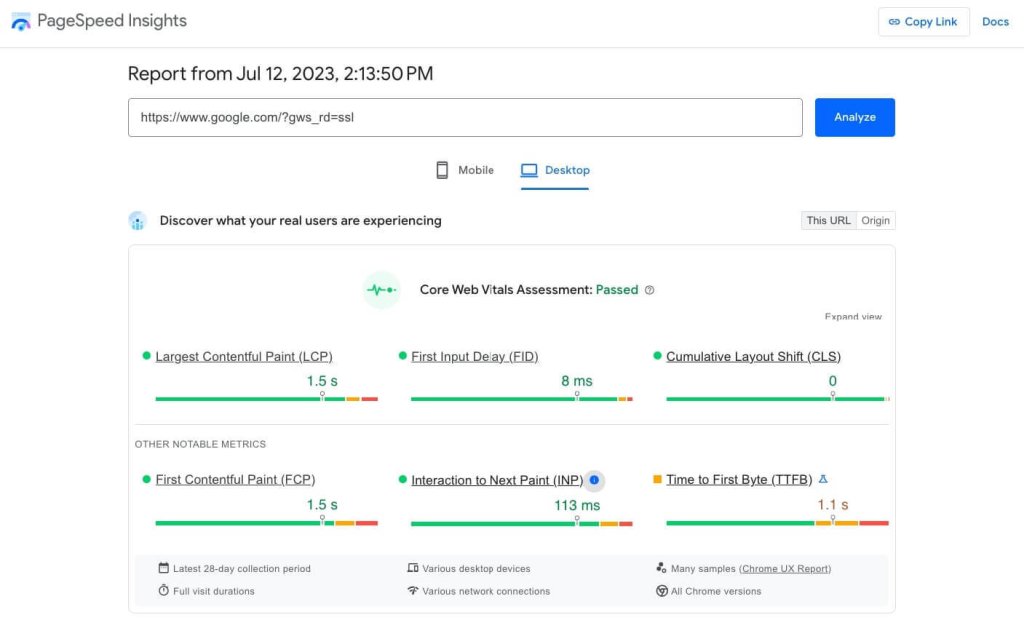
Screenshot of PageSpeed Insights and its Core Web Vitals results & assessment of a web page.

You should look into both desktop and mobile scores, as they might differ. At the top of the report, PageSpeed Insights clearly indicates whether your page meets the thresholds for a good experience based on the site’s Core Web Vitals. 

Chrome UX Report (CrUX) 

The Chrome User Experience Report (CrUX) provides real-world performance data from Chrome users. It shows how users experience your site on both mobile and desktop devices. The Chrome UX Report focuses on website loading performance. It measures Core Web Vitals, metrics like Time to First Byte (TTFB), and more.

Web Vitals Chrome Еxtension 

The Web Vitals extension allows you to track Core Web Vitals directly in your Chrome browser as you browse your site. It’s a free tool that provides instant feedback on Core Web Vitals metrics. 
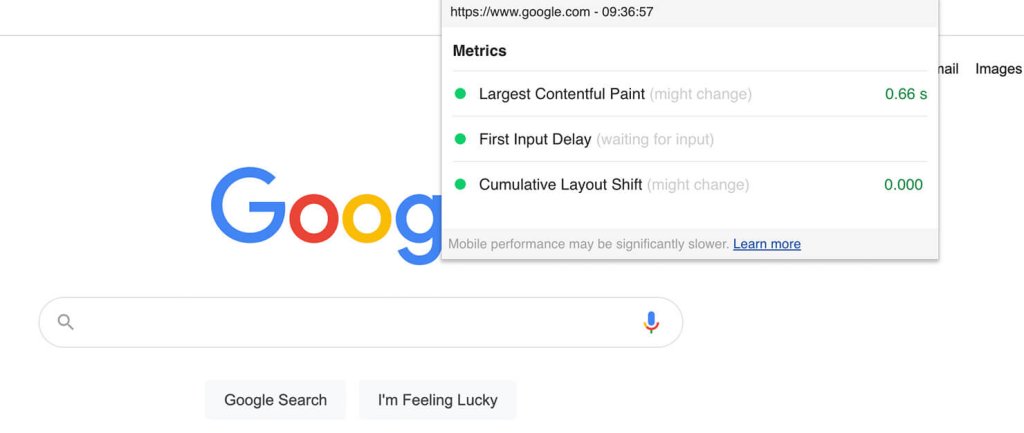
Screenshot from Google Chrome browser, while having opened the Web Vitals Chrome extension, showing the Core Web Vitals metrics of a tested web page

Web.dev 

Web.dev offers a free measurement tool to run a performance audit on your site. Moreover, you can check your site’s performance across different areas and get tips on improving metrics like the site’s performance, progressive web app status, accessibility, use of best practices, and SEO. It also supports the Core Web Vitals metrics.
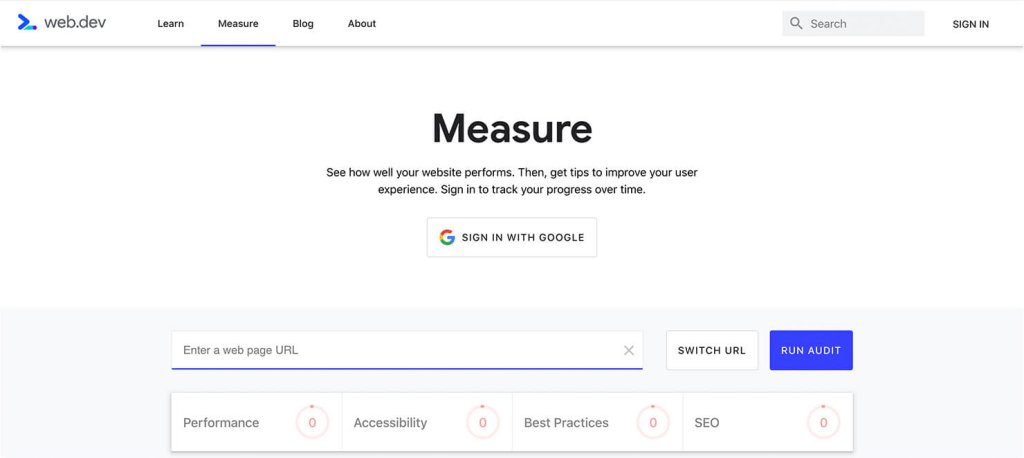
Overview of web.dev's "Measure page" for website performance audits

Lab Tools

This refers to conducting tests in a controlled environment and seeing how a potential user will experience your website. Unlike field tools, lab tools work with simulated data, with predefined device and network specifications. They are useful in reproducing and debugging possible website performance issues, but don’t give you real user experience information.

Lighthouse

Lighthouse is an open-source, automated website auditing tool that helps developers diagnose issues and improve the quality of web pages. 
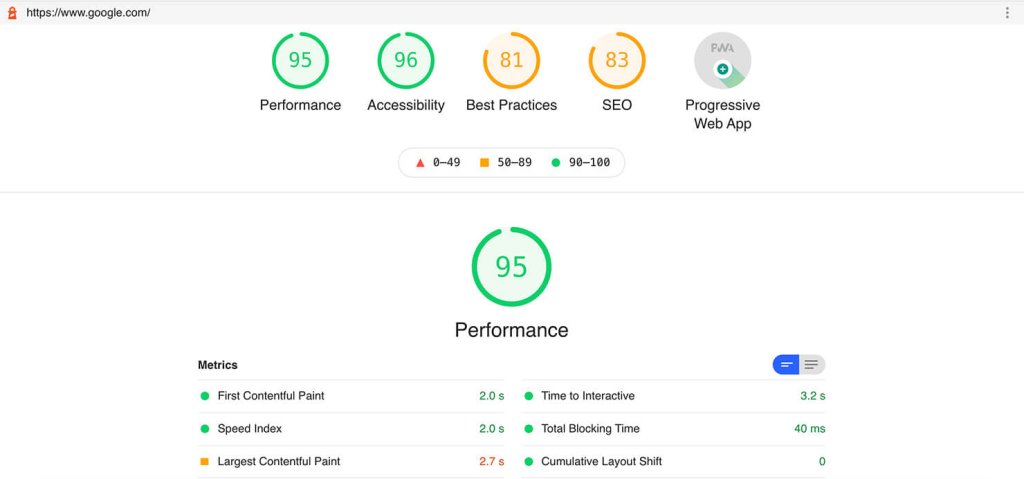
Overview of Lighthouse and the performance score and results of Core Web Vitals metrics of a tested page

A lab tool like Lighthouse can’t measure Interaction to Next Paint (INP), because it requires real user interaction. However, you can monitor Total Blocking Time (TBT), which measures the total amount of time between First Contentful Paint and Time To Interactive. By improving your TBT, you’ll most likely improve your INP as well.

WebPageTest.org 

This is a free, open-source tool that measures your site speed performance. It loads your page in a real browser, helping you identify specific site sections that need more time to load.

Overview of webpagetest.org and its comprehensive performance results regarding Core Web Vitals metrics

Chrome DevTools Performance Panel

With the Chrome DevTools, you have the Performance option, which includes Core Web Vitals. The Performance panel also has an Experience section where you can detect unexpected layout shifts. Therefore, you can identify and fix any visual instability and improve your Cumulative Layout Shift metric.

In order to access the Chrome DevTools Performance Panel, Open Google Chrome (use incognito mode so there’s no browser cache) and press Command+Option+I (Mac) or Control+Shift+I (Windows, Linux) to open DevTools. 
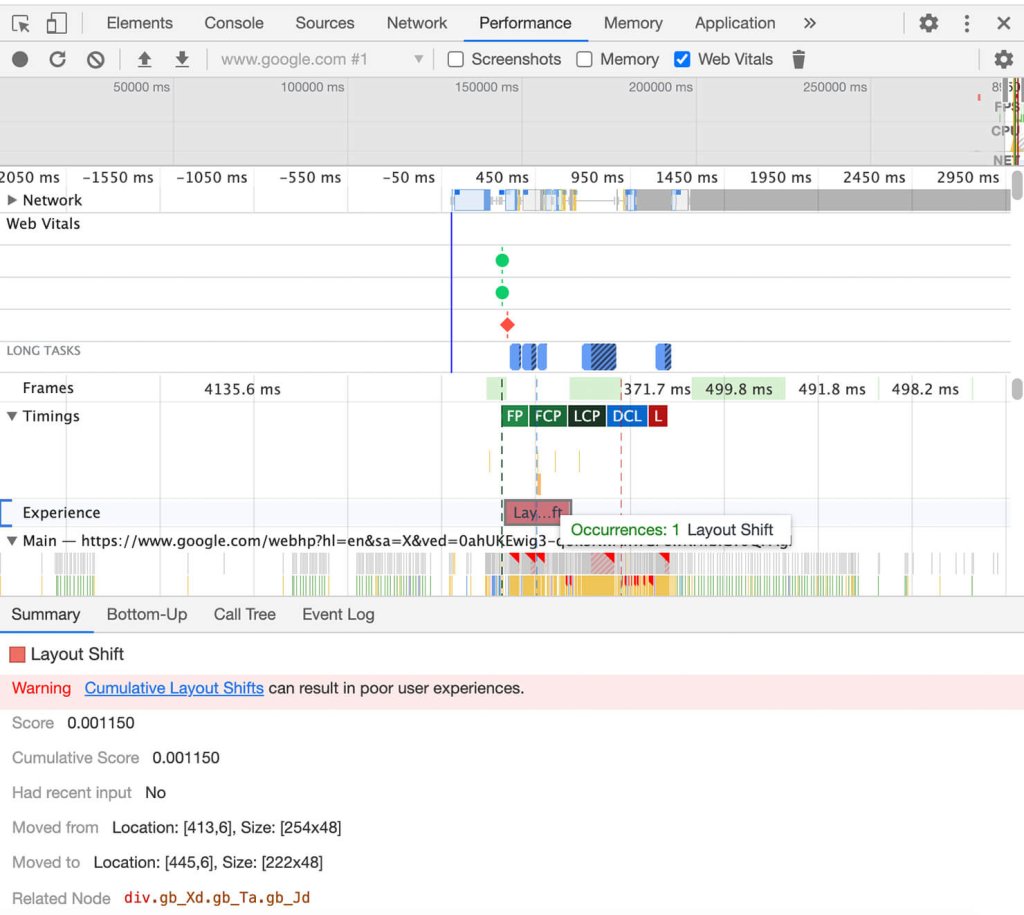
Overview of Chrome's DevTools Performance tab on measuring the Core Web Vitals metrics

Select the Layout Shift to view its details in the Summary tab.

Keep in mind that depending on which tool you use (based on field or lab data), the Core Web Vitals metrics might show different results.

How to Improve Core Web Vitals

The good news is that most of the tips for improving your Core Web Vitals are already part of the good practices for optimizing website performance. 

How to Improve Largest Contentful Paint (LCP)

Enable full-page caching

When you enable full-page caching, your site’s pages will be stored on the server after the first time they are loaded. Only the first visitor will load the entire page content from the database. All the rest will get the page output directly from the server’s memory, making your site much faster, and ultimately improving your LCP metric.

SiteGround users take advantage of our unique full-page caching solution, called Dynamic caching, enabled for all sites by default. Depending on the type of site, we see up to 5 times faster page loading.

Choose Fast and Reliable Web Hosting 

One of the most common reasons for a bad LCP is a slow server response time. First, check your Time to First Byte (TTFB) – how long it takes for the browser to receive the first byte of content from the server. The faster your server responds, the better your website will perform. 

SiteGround offers a highly optimized hosting environment, powered by Google Cloud. We implement a unique UltraFast PHP, a custom MySQL database setup, and a strong defense system against potential threats. 

Use a CDN

Besides the server that hosts your site, you can use a content delivery network (CDN) to speed up all your visitors’ loading time. The CDN will cache your content across a global network of servers and load your website from the one closest to the visitor, thus enhancing their experience with your page.

SiteGround has developed its own CDN infrastructure to increase website performance and security for all of its users. 

Optimize images

Optimizing images will improve your Largest Contentful Paint score since they are often the largest page element.

Always compress your images and scale them correctly. It is recommended to serve images in next-gen formats such as WebP, to improve performance.

An effective way to optimize your media is to take advantage of our Speed Optimizer plugin. It has features for media optimization such as image compression, conversion to WebP format and lazy loading media. 

Optimize JavaScript and CSS

Reducing CSS and JavaScript that slow down the page load can improve your overall Core Web Vital score and user interaction.

  • Defer JavaScript

While the browser is loading JavaScript, users cannot interact with the web page. That’s why sometimes you can see the term “Render-blocking JavaScript.” Deferring your JavaScrips means the browser will process and load JS files only after parsing the HTML document. 

In other words, rendering your website will be much faster because there won’t be anything to block the process. 

  • Minify CSS and JS files

For easier readability, developers often leave characters such as spacing, indentation, or comments in CSS and JS files. However, all these characters in the code are not essential for the browser. 

Minification optimizes your code by removing any unnecessary characters, resulting in improved render time and faster websites. 

How to Improve Interaction to Next Paint (INP)

Remove large page elements and long tasks

Reducing long tasks prevents delays in responding to user interactions. A long task refers to any piece of JavaScript code that takes more than 50 milliseconds to execute. Large page elements like videos or background images can slow down code execution and impact INP.

Instead of using a high-resolution image for the background (e.g., a 4MB JPEG), consider using an optimized WebP image that reduces the file size significantly (e.g., 400KB). Similarly, videos can be lazy-loaded or replaced with static images for initial load, deferring the heavy media until after user interaction. 

Use Web Workers

Using Web Workers allows heavy tasks to run in the background, preventing them from blocking the main thread. This reduces delays in user input and page load, optimizing the INP score and overall performance.

Instead of having large tasks run directly in the browser’s main thread (causing the page to freeze), the processing can be offloaded to a Web Worker. This lets the user continue interacting with the site without any noticeable lag, while the background task completes.

Optimize Event Handlers 

Optimized event handlers reduce input delay and improve site speed, contributing to better Core Web Vitals metrics.

For example, when a user clicks a button, the event handler first logs the button click and defers the calculation to a less critical time when the browser’s main thread is idle. This ensures the interaction is smooth and the user doesn’t experience delays. 

Reduce third-party scripts 

It is strongly recommended to remove any third-party scripts which don’t bring any clear value. If your site includes multiple third-party scripts for analytics, ads, or social media widgets, evaluate whether they are necessary. Removing non-essential scripts, such as a redundant chat widget or ad tracker that isn’t used for your core audience, can significantly improve both your Largest Contentful Paint (LCP) and Interaction to Next Paint (INP) score.

How to Improve Cumulative Layout Shift (CLS) 

Set size attributes

Setting size attribute dimensions will tell the user’s browser exactly how much space that element needs. Let’s use an image element as an example.

If you don’t set the width and height attributes for an image, the browser won’t know the exact size this image will occupy until it fully loads, which can cause a layout shift. 

<img src="image.jpg" width="600" height="400" alt="A scenic view of mountains">

By specifying the width and height, you allow the browser to calculate the aspect ratio of the image and reserve appropriate space for it. This will minimize Cumulative Layout Shifts. 

Preload fonts

Fonts improve the readability of your page, and convey your brand image.  However, each font you use is an additional resource that may slow down your website. Preloading fonts is recommended to prevent layout shifts and flashes of invisible text.

To preload fonts, you use the <link rel=”preload”> tag in the <head> of your HTML document. You need to specify the as=”font” attribute and include crossorigin if the font is being loaded from an external source (like a CDN). 

By doing this, you’ll improve your CLS metric score.

Our Speed Optimizer is also developed to help you in that area. Our dedicated Web Fonts Optimization functionality improves your render time resulting in better site performance.

Reserve Space for Ads

Ads have a dynamic nature which can lead to unexpected layout shifts. This can have a negative effect on your CLS score. If you don’t reserve sufficient space for the ads on your site, they can pop up unexpectedly and ruin user experience.

Use CSS transform for Animations

Layout shifts during animations often disrupt the user’s experience and can significantly impact your Cumulative Layout Shift (CLS) score. By using the CSS transform property for animations, you can avoid causing elements on the page to move unpredictably. 

Transform animations, such as scale or translate, help maintain the position of other content on the page. This leads to a more stable experience on your site.

Minimize Dynamically Injected Content: 

Dynamically injected content, such as ads, images, or videos that load after the initial webpage, often causes layout shifts. These shifts can negatively affect the Cumulative Layout Shift (CLS) score. 

To improve visual stability, it’s important to pre-allocate space for dynamically loaded content. There are multiple techniques for that, like setting size dimensions in your CSS, JavaScript, or using Aspect Ratio boxes or Placeholders. You can see an example of setting size dimensions before injecting content dynamically with JavaScript below:

<div id="dynamic-content" class="ad-container"></div>

<script>
    const adContainer = document.getElementById('dynamic-content');
    adContainer.style.width = '300px';  // Fixed width
    adContainer.style.height = '250px'; // Fixed height

    // Dynamically inject content
    adContainer.innerHTML = '<p>Ad will appear here</p>';
</script>

This minimizes the impact on the user experience while also improving performance metrics related to your layout shift score.   

Why are Core Web Vitals important?

The tips above are both recommended best practices for website optimization and also positively affect the page experience signals measured by Google’s Core Web Vitals.

As a website owner, it is important to understand these metrics. This can help you offer a positive user experience, and improve your search engine rankings and overall web page performance. 

It’s important to note that Google’s ranking algorithm is continuously updated. Regularly monitoring your Core Web Vitals with tools like PageSpeed Insights or Search Console can help you make necessary adjustments, even as user expectations and Google’s ranking algorithms evolve. This way, you’re setting your site up for long-term success. 

For more expert tips on website optimization, you can download our WordPress Speed Optimization ebook or watch our video guide and learn how to build a high-performance website. 

Updated: October 2024

[subscribe_cta]

How to Create an Email Marketing Strategy

email marketing strategy

Are you seeking a direct way to engage with your audience? Well, email marketing might just be the solution you need. It remains one of the most effective marketing channels for businesses, and it is no surprise its usage is increasing every single day. In fact, researchers project that the number of emails sent daily is expected to reach a staggering 392.5 billion by 2026! 

With inboxes overflowing, standing out amidst the sea of messages requires more than just sporadic blasts. It requires a solid email marketing strategy. 

In this blog post, we’ll guide you through the fundamental components of crafting an effective email marketing strategy that works – one that aligns with your goals, resonates with your audience, and drives good results. Let’s get started, shall we?

Step 1. Define Your Goals

From global giants like Amazon to your neighborhood grocery store, every company in the world tries to reach out to the perfect customer. Having an email marketing strategy can help you achieve surprisingly good results in this endeavor. But before anything else, it’s essential to clearly determine your goal. 

Think carefully about your business objectives and goals. Are you aiming to increase your brand awareness and visibility, boost your sales, generate leads, retain customers, or improve client satisfaction?

Perhaps there are several objectives that you want to pursue at the same time and that’s perfectly okay. What’s important is to be specific with your goals and define them beforehand. Why? 

By clarifying your goals, you can optimize your email marketing strategy for maximum impact and to meet your business needs. Setting your objectives will help you identify:

  • WHO are the people you should be reaching out to and what their journey with your business will look like;
  • WHAT type of content will be suitable, useful, and appealing to them;
  • HOW and WHEN you should send out your email campaigns;
  • WHICH metrics you should track and measure for success, and more!

All these things are fundamental to crafting a successful email strategy. To illustrate, we’ll break them down using a real-life handmade jewelry business as an example, making each step easy to understand and apply!

Step 2. Identify and Research Who Is Your Target Audience

Еmail marketing allows a very high level of personalization and customization of the content, which exceeds in terms of benefits the one-size-fits-all approach. People have varying interests and needs. To maximize the effectiveness of your email strategy and speak to the needs of your audience accordingly, it’s important to define who you’re trying to reach and what are the different interests and characteristics along which you can group them into meaningful segments. 

Who is your target audience, and what are their demographics, preferences, and behaviors? If you’ve recently launched your business or simply haven’t conducted thorough audience research, here are some quick tips on how to explore this more in-depth. In general, there are two methods for collecting target audience data.

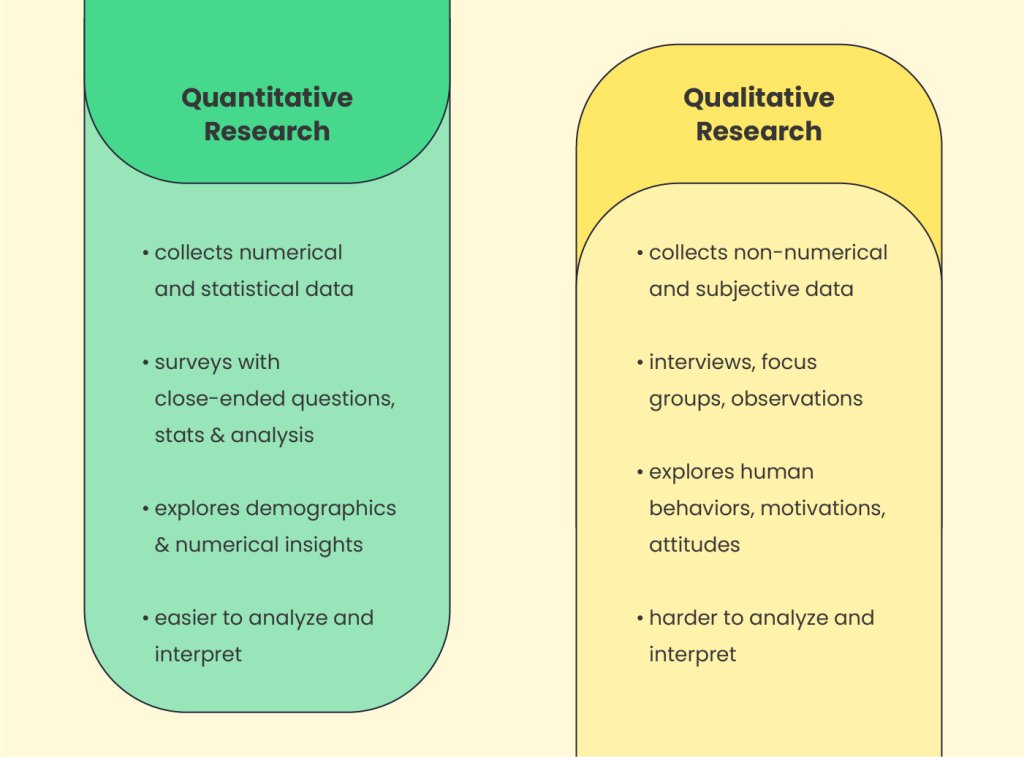
The first is quantitative research which focuses on measurable data, such as numerical statistics about your audience and their behaviors. The second method is qualitative research, which focuses more on the reasons behind people’s behaviors and how they perceive a product or business.

audience research

Researching your audience with these methods might sound complex at first, but it’s actually quite manageable. Let’s explore this using our handmade jewelry business as an example.

Quantitative Research

Leverage existing market data and sources

Search for existing materials such as customer survey results, research papers, and social media stats about your target audience and overall market, and analyze them.

In the case of our jewelry business, such quantitative data could be found in customer behavior reports related to jewelry, handmade crafts, and fashion. Typically, craft businesses like our example have a strong social media presence and maintain business pages or accounts on platforms such as Facebook, Instagram, and X. Therefore, built-in analytics tools like Facebook Insights, Instagram Insights, and X (Twitter) Analytics can also be used to gather valuable data on audience demographics and engagement rates.

Website analytics tools

If your business has a website, browse and explore your Google Analytics as well to uncover key insights about your audience’s demographics such as age, gender, and location. You can also learn more about their behavior with your website – where they come from, and what they visit and read the most. 

Another handy way to explore how your visitors interact with your website is via heatmaps which visually illustrate this information. Popular tools, which you may set up on your website to collect that kind of information are, for example, Crazy Egg and Hotjar. Heatmaps could reveal where your website audience clicks the most, which links, buttons, and CTAs are most engaging, and which sections of your website interest your visitors. They might even offer recordings of user sessions. This can provide valuable insights into what they like and dislike.

Qualitative Research

Surveys and feedback

You can get personal insights about your audience’s preferences and behavior also by conducting surveys or asking your customers for feedback on specific products. To create a survey, and collect and analyze the data, you can use handy online tools like Google Forms, Typeform, and SurveyMonkey, for example. To distribute it, you could send the survey via email, provide links to it on your social media, or add them to your website. 

Use clear and specific questions and consider offering some kind of incentive (like a freebie or a discount code) to encourage more people to participate. For example, here are some exemplary questions a jewelry store owner could include in a survey:

  • demographic:
    – what is your age;
    – where are you located;
    – what is your gender;
  • buying preferences:
    – how often do you buy jewelry and accessories;
    – what is your typical budget;
    – do you prefer online or offline purchases;
  • personal preferences:
    – what style of jewelry do you prefer;
    – what materials do you prefer to wear;
  • customer experience:
    – how satisfied are you with your jewelry purchase from {your brand};
    – is there something you wish us to improve;
    – how would you rate your purchase experience;

Reviews, comments, recommendations

Another way to get to know your audience better is by exploring the reviews, comments, and recommendations they leave online. You can find such not only on your website and social media, but also on the platforms of your direct competitors, as well as on Google’s reviews, Amazon, Yelp, Quora, Reddit, and similar platforms where your audience is active. 

For example, a jewelry store owner could browse for such information on Etsy and Pinterest, while a coffee shop owner could explore TripAdvisor or Yelp, local forums, and even relevant Facebook groups.

Step 3. Map Out Your Subscribers’ Journey

Once you have researched your audience, your next important task is to understand the journey they will go through after signing into your email list. Let’s quickly go through the classic buyer’s journey. 

Understanding it will help you clarify the path your audience will follow, enabling you to tailor content that will be valuable to them at each stage of their lifecycle as customers. 

In general, every lead goes through several stages before becoming a client, and a few more to become a loyal one. 

  1. Awareness stage (becoming a lead): 
    Once someone signs up for your email, they become a lead. In the beginning, the journey usually starts with the prospect showing interest in your products, signing up to receive updates from your company, signing up for a newsletter, or downloading a free resource. At this stage, your lead is aware of your brand and products but doesn’t know much about them. It is the perfect time for you to introduce them to your service or products and start educating them.
  2. Consideration stage (still a lead):
    In the consideration stage, your prospects are aware of the fact that they need a solution to the problem. They start exploring options and your goal is to reveal the benefits of your products and what differentiates you from competitors. 

    For example, leads of a jewelry business in the consideration stage would start browsing the website more frequently, comparing different items, asking questions, or looking for customization options. They might also browse similar websites, comparing your brand to the competition, before becoming ready to make a purchase. 
  1. Decision stage (converting to a client):
    The decision stage, also known as the purchase stage, is critical as it’s the moment when leads are ready to make a buying decision. For the business we’re considering, this means the person has already decided on the type of jewelry they want (e.g., a bracelet, ring, or necklace), its appearance, and the price they’re willing to pay. Your goal here is to provide value, emphasize the quality of your products, convince leads that your offerings are superior, and convert as many as possible into clients.
  1. Retention stage (renewing client):
    At the retention stage, your clients have already made a purchase and are in the process of evaluating your service. Your aim should be to retain their loyalty, to encourage ongoing renewals and engagement with your brand by providing excellent client service, regular helpful content, and exclusive offers. 

    For our jewelry business, in the retention stage, clients may come for assistance in case they have a problem with the jewelry (a broken hook for example), which is when you need to find a way to accommodate their request and make them happy. That way they are more likely to come again next time they wish to purchase a piece of jewelry.
  2. Advocacy stage (loyal client):
    At the advocacy stage, satisfied customers become advocates for your brand. For example, a happy client of a handcraft jewelry shop would recommend those products to a friend. Similarly, a satisfied customer of a real estate agency might share their contacts with their family and friends, post about it on social media, or leave positive comments on relevant platforms and groups. Overall, this is the phase where you can ask happy clients to refer your business or products to their social circle.

❗ IMPORTANT REMINDER

Note that journeys aren’t always linear. Depending on whether your business is service or product-based, as well as your industry, your audience might skip some stages. Knowing your business specifics, map out the journey your audience will follow and identify key moments where you need to get their attention or remind them about your brand.

Step 4. Decide What Content to Offer in Every Stage

Deciding what types of content to create and send out in your emails is a substantial aspect of your strategy. Generally, in email marketing, the most widely used types of emails are newsletters and drip campaigns. A good email marketing strategy usually includes both types of emails because they offer distinct advantages.

Newsletters or Drip Campaigns?

Newsletters are standalone emails sent regularly, featuring content relevant for this certain period. They often include special promotions, news, or company announcements, typically sent to the entire list of subscribers or a large portion of it. 

Other types of stand-alone emails are promotional emails or other event-based emails – you send them when you are running a special offer or when you are calling your subscribers or clients to take specific action.

Drip emails, on the other hand, consist of a series of emails sent based on schedule, segments, or triggered by specific user actions. They help you send more tailored content to the right group of people in the current stage of their journey. Here are some content suggestions for the different stages, as well as some ideas based on different triggers.

Content ideas for the Awareness Stage

  • Welcome and introduction emails: You can use this type of welcoming content to introduce new subscribers to your brand and what your business offers. 
  • Informative and educational content: Provide valuable information that addresses your audience’s pain points or interests to demonstrate how your business can assist them further. For our jewelry business, such content could include information on how to care for their handmade jewelry, how to choose the material (silver or gold, stones, and minerals, etc.)  that will suit them best, and similar.
  • Free resources like ebooks, guides, cheat sheets, and similar: Share free resources (such as style or gift guides, and seasonal trends reports) with your subscribers to establish your expertise, show that you understand their needs, and make them anticipate upcoming helpful materials.

Content ideas for the Consideration Stage

  • Continue sharing educational content: Keep your audience engaged with informative content coming from your brand so that they consider your product or service while assessing other options too. 
  • Comparison guides: Help your audience understand what are the advantages of your products or services. For example, a small jewelry business might create a comparison article showcasing the advantages of handcrafted accessories versus fast fashion ones.
  • Product and tools highlights: Showcase the benefits and best features of your products to emphasize their value (e.g. articles on why handmade jewelry has greater quality, how the materials used are more durable, and how they are more environmentally friendly, etc.).
  • Case studies and testimonials: Share success stories and testimonials from satisfied clients to build trust and aid subscribers’ decision-making process.

Content ideas for the Decision (Purchase) Stage

  • Discounted limited-time offers: Provide content around discounts and promotions to encourage purchases.
  • Seasonal offers: Offer special deals or promotions tied to holidays or seasons to stimulate buying (e.g. Black Friday, New Year, Earth Day, Mother’s Day, Christmas, Easter, Hanukkah, Diwali, Thanksgiving, Halloween, Chinese New Year, Valentine’s Day, St. Patrick’s Day, Labor Day, and similar)
  • Free demos or trials for a specific period: Email campaigns, inviting potential customers to try out your products or services risk-free before making a purchase.

Content ideas for the Retention Stage

  • Thank-you emails for purchasing: Show appreciation to customers for their purchase and reinforce their decision to buy from you.
  • Special offers exclusive for existing clients: Reward loyal customers with exclusive discounts and offers. Or, provide a discount code for their next purchase limited to a time frame.
  • Handy tips and tricks on product usage: Provide helpful tips and tutorials to help customers make the most out of their purchase and to enhance their overall experience with your products. For example, a jewelry store owner can send helpful content on how clients can properly store their jewelry, what to keep it away from, how to layer it with different pieces, and similar tips.

Content ideas for the Advocacy Stage

  • Referral campaign content: Ask satisfied customers to refer their friends and family to your business and let them earn awards.
  • Share company news and updates: Encourage loyal customers to share interesting news about your company, products, or upcoming events.
  • Encourage leaving reviews, testimonials, or recommendations: Prompt satisfied customers to share their positive experiences with others to help build your brand reputation and attract new customers.

Content ideas based on triggers

There are myriad email triggers out there. Use the ones we list below as inspiration to map out those relevant to your business.

  • Trigger: Abandoned Cart
    Trigger-based reminder email: “Did you forget something?”
  • Trigger: Order Confirmation
    Trigger-based confirmation email: “We’re packaging your product” 
  • Trigger: Subscriber’s Birthday
    Trigger-based personalized email: “Happy Birthday! We have a gift for you!”
  • Trigger: Inactivity
    Trigger-based re-engagement email: “Check out this limited-time offer”
  • Trigger: Subscription Renewal
    Trigger-based reminder email: “Your subscription is expiring soon” 

Step 5. Execute Your Email Marketing Strategy

After you have nailed down the fundamental questions of Why, Who, and What of your email marketing strategy, now it’s time to answer How and When to send your email campaigns. 

When it comes to execution, a good email marketing strategy is a balanced mix of automated (preset/drip) emails triggered by certain client actions, and one-off email campaigns or newsletters (company news, seasonal promos, etc.). To start the actual work on your emails, though, you need to have a handy email marketing tool. 

Choose an email marketing tool

Choosing the right solution will streamline many of your tasks, such as crafting your emails, growing your subscribers’ list, creating templates, testing, sending, tracking metrics, and a lot more.

Select a platform that meets your needs in terms of features, scalability, budget, and simplicity of use. In our SiteGround Email Marketing platform, we focus on simplicity and efficiency. You’ll get all the essential email marketing features that business owners and marketers need. It is user-friendly and developed by SiteGround specialists with 20 years of experience in hosting email guaranteeing high platform deliverability. 

It provides a convenient way to grow and manage your subscriber list, an easy way to create impressive emails without any technical know-how, and even a built-in AI assistant that can whip up a compelling email copy for you, saving you tremendous time! Along with 24/7 support, it has various premium features like:

  • customizable pre-built layouts & templates
  • unlimited audiences
  • subscriber management
  • campaign scheduling
  • no daily send limits
  • detailed reporting
  • responsive (mobile-optimized) design, and many more!
powerful email marketing platform

Once you choose the right email marketing tool for your business, it’s time to roll up your sleeves and start working on your emails. 

First, automate your trigger-based campaigns

To structure and execute your email strategy well, it’s best to first automate as much as you can. Preset your welcome, onboarding, purchase-related, and other trigger-based emails. That kind of automations is best done via your shopping cart software if you use such. For our handmade jewelry business, these automated emails could include:

  • Welcome emails: greeting new subscribers, introducing the brand, and telling its story;
  • Onboarding emails: sharing tips on how to take care of their jewelry, providing styling tips, and sending other products to combine them with;
  • Purchase emails: sending order confirmations, shipping, etc.;
  • Birthday emails: sending special discounts for clients’ birthdays;
  • Abandoned cart emails: reminding customers of products they’ve left in their shopping cart;

Automating such repetitive emails frees up your time for other even more important business tasks. Plus, email automation brings many other benefits beyond time savings. It ensures timely, consistent, and relevant communication which in the long run leads to better customer experience.

Next, plan your one-off emails with a calendar 

Knowing what you’ve already preset, your next step is to plan your one-off email campaigns and newsletters. For this purpose, it is useful to create an email content calendar. It will help you organize your work better, keep your team in the loop, and ensure you don’t miss any important dates. Let’s see what such newsletters could include for our sample handmade business:

  • Event announcement: inviting subscribers to visit your pop-up shop or online event;
  • Launch of a new collection: announcing newest jewelry products;
  • Holiday promos: enticing customers with holiday discounts and limited offers;
  • Behind the scenes: sharing the creation process of the jewelry pieces to create buzz and expectation for the launch.

You can create a calendar for the month ahead or several months onwards if you can plan your newsletters for a longer time. The structure of your calendar can vary depending on your goals, segments, and sending frequency. But, as a start, we suggest you include the following common fields:

  • Email subject line
  • Email type (newsletter, one-off promotion, etc.)
  • Email target group
  • Email campaign goal 
  • Email status 
  • Email sending date
  • Email sending time
    For this, select a time when your target audience most likely checks their inboxes. If you’re not sure, try to split test – send one email campaign on different days of the week to see which day works best. Then try different hours to see when the open rate will be highest. Also, consider time-zone differences if any, and keep in mind that midweek days are often considered the best days to send emails.

To create your email marketing calendar, you could use spreadsheets in Google Sheets and Microsoft Excel, or a to-do app (such as Trello or Asana).

❗ IMPORTANT
It’s crucial to closely monitor and avoid duplicating information or promotions in the different emails that are sent out simultaneously.

Plan and decide how to build your email list

In case you haven’t started building your email list yet, now is the time to decide how to actually do it. The easiest way to start collecting subscribers (in case you already have a website) is via sign-up forms on your website. You can either code it yourself, integrate it with a third party, or use the options your Email Marketing platform provides. 

At SiteGround, for example, we’ve made that process easy for our users by developing a Lead Generation Plugin for WordPress, designed specifically for our Email Marketing tool. It allows you to effortlessly create a sign-up form and add it to your website in a few minutes. Additionally, the plugin can integrate a sign-up checkbox into your WooCommerce checkout, as well as into comment sections or the WordPress registration page. 

Another way to grow your email list is via social media. A handmade craft business, for example, could encourage followers to sign up by highlighting the benefits, like first access to new collections and exclusive discounts. 


Small businesses could also collect emails at craft events; ask customers to subscribe to their list during the checkout process during a purchase; or partner with influencers for giveaways that require participants to subscribe to their email list for entry. If you’re interested in exploring additional methods for gathering leads, check our article on how to build your email list.

❗IMPORTANT REMINDER: Don’t buy email lists
It might seem like a tempting quick fix, but buying an email list may have severe consequences for your business and brand. It could affect not only your reputation but your email deliverability rates as well. Bought email lists quite often have old and inaccurate information which brings the risk of higher bounce rates. Moreover, the bought recipients don’t expect your email messages, they haven’t given their permission to receive your emails which could lead to your emails being marked as spam and even damage your sender reputation.

Segment your email subscribers into groups of interest

Once you have subscribers on your list (or a plan for how to collect them), you can think about how to divide them into groups of interest so that you can send different messages to each group. This is an essential aspect of your email marketing strategy which will help you deliver a more targeted message to the right group of people. 

It can greatly improve your email’s relevance and lead to higher engagement. HubSpot’s State of Marketing report reveals that segmented emails drive 30% more opens and 50% more click-throughs than unsegmented ones.

The criteria you use to segment your audience will vary depending on your goals and the type of your business. Here are some of the most common segmentation strategies you can draw inspiration from:

  • Customer journey segmentation

As we already discussed, from becoming a lead, then a new client, and a renewing customer, every subscriber goes through their journey. Segmenting your audience based on where they currently are in their client lifecycle is a smart way to divide your recipients list. This will enable you to customize your emails with the useful information they need at the moment.    

  • Demographic segmentation 

This includes dividing your audience into groups based on their demographics such as age, gender, location, education, job, and similar. If you have that kind of information about your subscribers, you can tailor your messages and offers to increase their relevancy. For example, if you offer seasonal products like beachwear or ski accessories, it’s meaningful to segment recipients based on their location and climate. 

  • Behavioral segmentation

Another approach you could use is segmenting subscribers based on their interactions with your products (like purchase history, use of coupons and discounts, etc.), email engagement (whether they open your emails, click on links inside, etc.), or your website or platform activity. For example, you can segment clients who have purchased high-end jewelry pieces versus those who have bought only discounted (or more affordable) products, and tailor your email campaigns with relevant products for each group. 

  • Psychographic segmentation 

This is one of the more complex types of segmentation as it requires you to have deeper insights into your audience’s personal information such as their values, beliefs, hobbies, interests, lifestyle, or even personality traits. If you have that kind of detail, though, make sure to use it in your segmentation strategy and tailor your messages accordingly. They will surely resonate much more with them on a psychological level.

For example, if you know that sustainability is important to your type of audience, you could highlight the eco-friendly production process of your business or the materials used. Or, if they value craftsmanship, you can emphasize the handmade aspect of your business.

🔥 HANDY TIP: Easy Segmentation with the SiteGround Email Marketing Tool
In SiteGround Email Marketing, you can easily segment your audience using the “Groups” functionality which lets you divide and organize your contacts based on various demographics or interests. Along with using it for tailored messaging, you can use groups to search more efficiently through your subscribers and explore statistics for each audience segment.

Create email templates for convenience and to ensure brand consistency

Another important aspect of your email marketing strategy is ensuring your emails have coherence so that you can guarantee brand consistency. You can easily achieve it by using email layouts and customizing them to match your company branding. 

Ready-to-use email layouts provide a structured framework for your emails. They determine how the sections within your email will be positioned and save you time from arranging them yourself. If you are more tech and design-savvy, you could craft email layouts yourself. Or you could use pre-built templates if your email marketing tool provides such options. 

In SiteGround’s Email Marketing tool, we’ve made sure to provide clients with the flexibility to do both – build their own templates from the ground up without any tech skill (they can do it with a few clicks), or choose a ready-made one from our selection of layouts which can be further customized with the brand’s unique colors, fonts, etc.

Test your emails and define your email success metrics

At the beginning of your email marketing endeavors, it would be useful to incorporate A/B testing when sending out email campaigns to find what works best for your audience. To do that, send variations of an email to different groups of recipients to determine which performs better. You can systematically experiment with different sections of your emails – subject lines, body content, CTA, images, and even the sending time. 

Together with A/B testing, it’s crucial to make it a mandatory step to send tests to yourself and your colleagues. This allows you to gather feedback regarding the content, design, and how the email looks on different email apps before sending it out.

For your testing and overall email strategy to be meaningful, you also need to define your key metrics. That way you can objectively measure the success of your emails and make an informed decision whether your email strategy needs to be reviewed, possibly changed, and in the future, increase its likelihood of success.

If you’re using an email marketing tool for sending out your emails, many of these metrics might be readily available in its built-in analytics. Here is a quick overview of the essential metrics it’s good to keep an eye on and the insights hidden behind them.

  1. Open Rate – indicates the percentage of recipients who opened your email campaign. Generally, a high open rate prompts that your subject line is relevant and interesting to your audience. It also hints that you have sent out your email at a convenient time for your recipients.
  2. Delivery Rate – this metric shows the percentage of emails that were delivered to your subscribers successfully. If this rate is low, it could indicate a problem with some factors influencing it, such as the email infrastructure, domain and sender reputation, and more. 
  3. Click Rate (CTR) – a quite important metric that can reveal if your content is meaningful, relevant, and useful to your audience. It’s the percentage of recipients who click on links in your email.
  4. Bounce Rate – measures the percentage of emails that were not delivered. The reasons could be various – your email list quality, an issue with your content, a typo in the email address, and many others. In our article about email bounce rate, you can learn more details about this metric, how it affects your business, and how to reduce it.
  5. Reported as Spam – the percentage of emails that recipients flagged as spam. This metric indicates the relevance and usefulness of your email. Read our other article to discover effective strategies to prevent your emails from going to spam.
  6. Unsubscribed – a metric that calculates the percentage of recipients who opted out to receive further emails. The rate can provide insights into the usefulness of your content, whether it is relevant and engaging, as well as too frequent and spammy. 

🔥 EXTRA TIP: Don’t miss to optimize for mobile

It’s a fact that mobile provides a level of convenience that is unbeatable. That’s why people open and read emails more on their smartphone or other mobile device (to be precise, 41.6%) than on desktops. If you want to reach a massive percentage of your audience, making your email campaigns mobile-friendly is a must. Here are some quick tips to ensure your layouts and overall emails will be well-optimized for mobile devices:

Single-column design – fit your content and images in one column for easier navigation and to avoid horizontal scrolling.

Responsive design – choose an email builder that provides you with responsive email templates. This will ensure your email message will look equally good on different platforms and screens.

Big call-to-action – ensure your buttons or call-to-action links are visible and big enough to tap conveniently.

Optimized images – compress your images to reduce their size and improve the loading time of your emails. 

Short subject line and preheader – go for a shorter subject line and preheader text (the preview that appears alongside the subject) so they are easier to read on the smaller screen. 

Key Takeaways on Email Marketing Strategy

To conclude, remember that an effective email marketing strategy is a mix of clearly defined goals, a well-researched and segmented audience, smart content planning, and analyzing your results. With a willingness to adapt and constantly improve, you will be on the right track to create a strategy that brings results. Don’t forget to take advantage of the possibility of streamlining your work with the power of an email marketing tool. Now tell us, what is your business and what you want to achieve with email marketing in the comment section below!

Email Marketing Strategy FAQs

How often should I send emails to my subscribers?

Unfortunately, there isn’t a set rule to abide by. That really depends on the goals you have and your business and industry specifics. For example, e-commerce businesses, or those that relate to sales, can send email campaigns almost every day. On the other hand, service-related companies generally send emails once per week or biweekly. It’s important to send a campaign as often as you can WITHOUT causing frustration to your subscribers. In the beginning, start with a weekly or bi-weekly email campaign, and slowly test how your audience will act if you send emails more often. The open and unsubscribe rates can help you analyze that. 

How long should my emails be?

The length that will work best for your business varies depending on your goals, audience, email frequency, and the type of content you plan to create. Having in mind the importance of keeping your email mobile-friendly and optimized, it’s best to make your emails as short as possible. Don’t forget to use a single-column structure and place the most crucial information at the beginning of your email to guarantee your readers will see it. 

How do I know if an email was successful? What is the key metric I should track?

To evaluate the effectiveness of your email campaign, it’s critical to first identify your goal, and then track and analyze the metrics relevant to it. The open rate we explained above will guide you if your subject line was overall effective. Click-throughs though will help you gain insights about the percentage of your subscribers who’ve found your body content interesting and clicked on links or calls-to-action (CTAs). On the contrary, the unsubscribed metric will reveal what portion of your audience was not satisfied with your content. It’s also important to analyze the results of a series of emails rather than focusing solely on the metrics of individual emails. This approach allows for meaningful comparisons between them. If you are interested in diving deeper into email metrics, we recommend you check out this article on analytics metrics where we list and explain more of them. 

When should I send emails?

This also varies depending on your goals, content type, and the demographics of your subscribers. As mentioned in the ‘Create your email marketing calendar’ section, a general best practice is to send your email campaigns during midweek days (Tuesday, Wednesday, and Thursday) because people are more likely to be checking their emails. Morning hours are usually more effective as people are more focused at the start of their day. Of course, these general guidelines might not be the perfect time for your specific campaign. So experiment with A/B testing to find out what works for your audience.