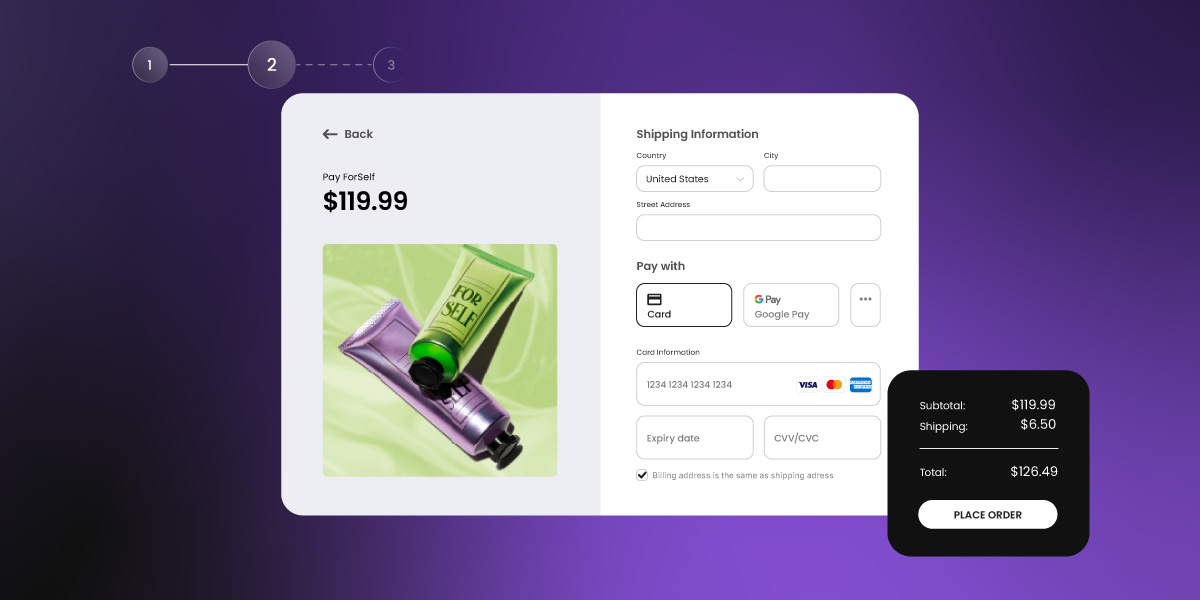
There are several ways to accept payments online — from payment links and invoicing tools to full checkout integrations — and most take less than ten minutes to set up. This guide breaks down all your options: what they cost, how they work, and which one fits your business, whether you’re selling a product, offering a service, or sending your first invoice.
Key takeaways
- Every online payment comes down to one of two things: a card payment or a bank transfer. Everything else is just the channel you use for collecting payments.
- You don’t need a website to start getting paid — a payment link or invoice can have you up and running in minutes.
- The technical side — gateways, processors, merchant accounts — is handled automatically by most modern platforms. You won’t need to touch any of it.
- Fees vary more than most people expect. Always check the full pricing page, not just the headline rate.
- A website is more accessible and affordable to set up than most first-time sellers expect — and it’s the only payment method that gives you full control over the customer relationship and your marketing channels.
How do online payments work?
At its core, getting paid online means money moving from your customer’s account to yours. There are two fundamental ways that happens — and understanding the difference makes everything else in this guide click.
Debit and credit card payments
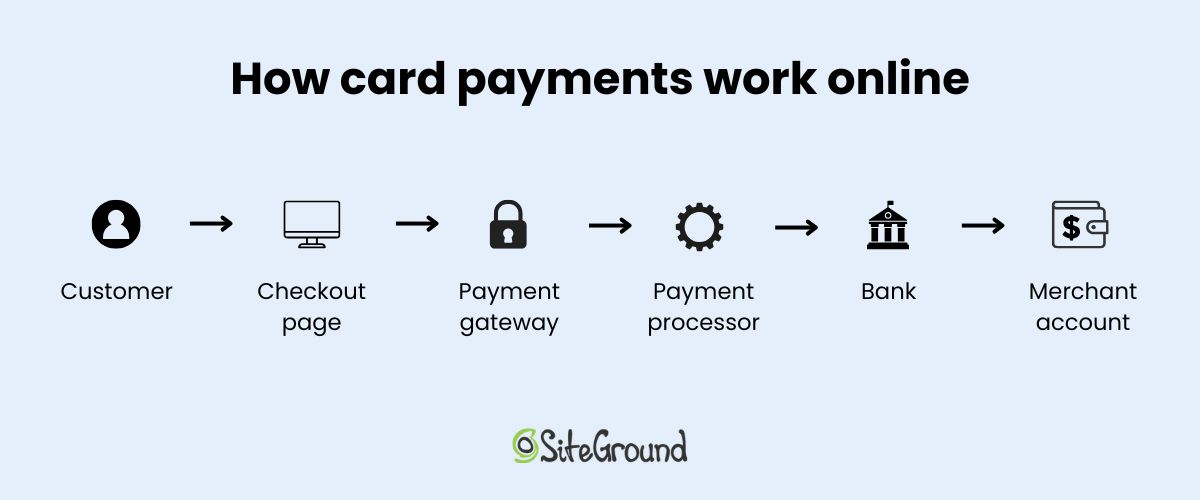
When a customer pays by credit or debit card, the process moves through several steps behind the scenes: the customer enters their card details, a payment gateway captures and encrypts the data securely, a payment processor moves the money through the card network, and the funds land in your merchant account — minus a small fee. For most growing businesses, credit card payments are the fastest, most familiar option for customers, and they settle within one to two business days.
Direct bank transfers
With a bank transfer (sometimes called ACH in the US), the customer’s bank sends funds from the customer’s bank account directly to yours — no card network involved, fewer intermediaries, and usually lower fees as a result.
The trade-off is speed and convenience: transfers typically take one to three business days to settle, and the customer has to initiate the online payment manually rather than entering card details at checkout. Bank transfers work well for large invoices and B2B transactions, but they add friction for one-off or impulse purchases.
Three terms worth knowing:
- Payment gateway: the technology that captures and encrypts your customer’s payment details the moment they hit pay, then passes them securely to the payment processor. Most website builders and online payment platforms include one, and you won’t need to set it up separately.
- Payment processor: the service that takes those encrypted details from the gateway and does the actual work of moving money, communicating with the customer’s bank, getting authorization, and transferring the funds to your account. Stripe is an example of an online payment processor.
- Merchant account: a holding account where your funds land after an online transaction is approved, before they’re transferred to your regular bank account. Platforms like Stripe include one automatically, so you won’t need to open one yourself.
The good news is that wrangling these terms — and the technology behind them — isn’t something you necessarily need to do manually. When you use a modern ecommerce platform or website builder (like SiteGround Ecommerce), the gateway is built in, the processor connects with one click, and the merchant account is included automatically. It just works.
Everything else in this guide — the platforms, the setup steps, the costs — is really just about which channel you use to collect one of those two payment types.
Ways to sell online
There are four main channels to accept online payments. Which one makes sense depends on what you’re selling and where your business is right now.
Payment links
A payment link is a URL that takes the customer straight to a checkout page. You generate it through a payment platform, then share it however makes sense (by email, in a social media DM, on an invoice, or even in a text message). No website required. Payment links are the fastest way to get started: you can be set up and ready to accept payments online in under ten minutes.
The downside is that they’re fairly bare-bones: there’s no storefront, no product listings, and no real presence for customers to browse. They’re ideal for service providers, creators, and anyone testing a new offering, but they’re not a long-term substitute for something more permanent.
Online invoicing
Invoicing tools let you send a professional bill to a client that includes a link for online payment. They’re especially well suited to freelancers, consultants, and service businesses that bill clients on completion or by project. Tools like Wave (free) and FreshBooks make the process straightforward, and some support direct bank transfers alongside cards.
That said, bank transfers come with more friction and slower settlement. Worth checking what payment methods a platform supports before committing to one.
Marketplaces
Platforms like Etsy or Gumroad handle the entire selling experience (think: listings, checkout, and payments) without you needing to build anything. What you give up: fees are typically higher than processing your own online payments, customization is limited, and building a direct relationship with your customers — including building an email list — is much harder when the platform sits between you and the buyer. A reasonable place to start for physical or digital products, but not a long-term substitute for your own setup.
A website with a checkout page
A website with an integrated checkout brings everything together: your storefront, payment gateway, and processor all in one place. It’s the most scalable and professional option — and for sellers thinking about website marketing and long-term growth, it’s the only setup that gives you full control. This is the right choice for product sellers from the start, and the natural next step for service providers who want a permanent presence and a direct marketing channel to their audience.
One thing worth considering as you set up: a checkout page needs to feel trustworthy and load quickly — both have a direct impact on whether customers follow through on a purchase. That means an SSL certificate, a clean design, and fast, reliable web hosting.
Why your website platform choice matters at checkout
If you’re going the website route, the platform you choose has a direct impact on how well your checkout performs. A checkout page lives or dies on two things: speed and trust. A slow page loses customers before they pay; an unpolished or unsecured one loses them the moment they arrive. The stakes are higher than you might think — research shows that conversion rates drop by an average of 4.42% for each additional second of load time in the first five seconds.
SiteGround Ecommerce is built with speed and trust in mind — fast loading times out of the box, SSL security included as standard, and a website builder designed to get you from setup to selling without a technical background. The result is a checkout experience that’s built to convert, not just function.
Start selling now>>
A note on other payment tools
Tools like Venmo, Cash App, and Zelle (known as peer-to-peer (P2P) payment apps) are a common starting point for informal selling, and they work fine for the occasional online transaction between people who know each other. But they come with real limitations for business use: most offer no seller protection, accounts can be flagged or frozen when used regularly for business purposes, and none of them are designed with commerce in mind. If you’re just starting out, they might get the job done in a pinch, but they’re not a reliable foundation to build on.
Apple Pay and Google Pay are a different story. They’re not selling channels — they’re a checkout convenience that sits on top of a regular card payment. Most payment processors support them natively, which means if your processor does, they’ll show up as a checkout payment method for your customers automatically. Worth knowing they’re covered, but not something you need to actively set up.
A note on AI-built websites
If your site was vibe coded with an AI app or website builder, adding payments doesn’t require a rebuild. A portfolio site, a restaurant site, or an event site built this way started as a chat prompt, and connecting a payment processor works the same way. Stripe is the easiest option here: Coderick AI now integrates with Stripe directly in the chat, so you describe what you want to charge for, connect your Stripe account, and Coderick builds the checkout, payment links, and confirmation page for you. No separate gateway to configure and no code to touch. The same logic applies to any AI-built site: Stripe (or a similar processor) plugs into the existing structure instead of asking you to rebuild around a payment feature.
How do online payments get set up — with or without a website?
The setup process is way simpler than most people expect. Before you begin, you’ll need three things:
- a bank account to receive funds
- a payment processor (or platform that includes one) to handle the transaction
- a way to send customers to the payment (so a link, an invoice, or a checkout page)
Chances are, you already have the first one covered.
Accepting online payments without a website
- Sign up for an online payment platform and connect your bank account
- Run a test transaction before going live
- Generate a payment link or create an invoice
- Share it with your customer (by email, message, or social media)
Accepting payments on a website
- Choose a website builder with built-in ecommerce and payment support (such as SiteGround’s)
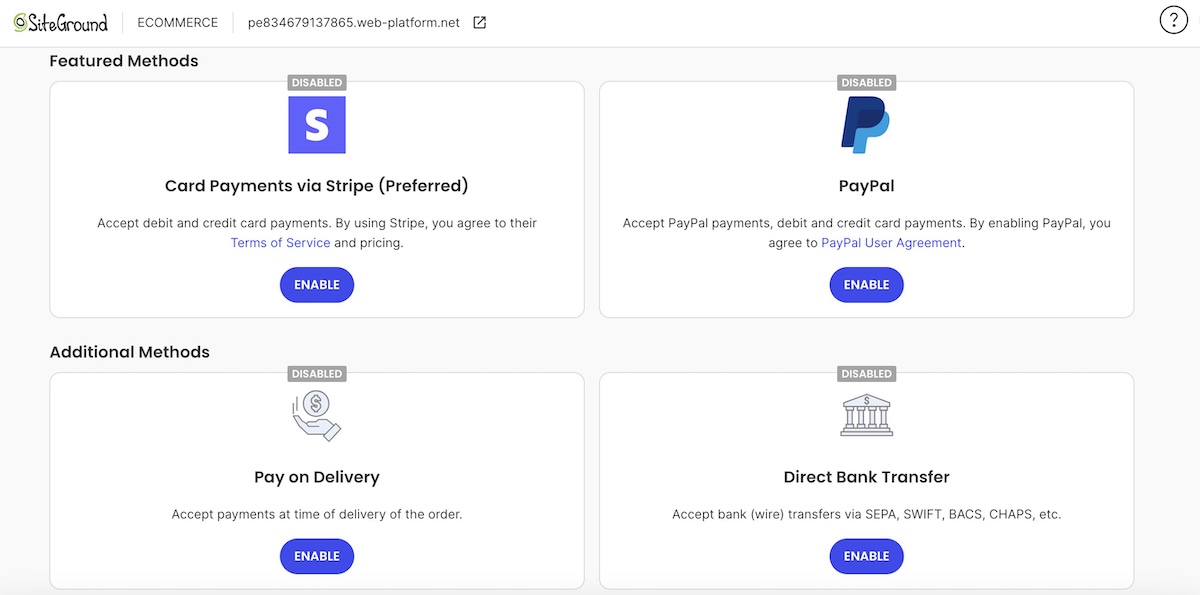
- Sign up for a compatible payment processor — Stripe and PayPal are two of the most widely used — and add your bank details. Stripe is typically the better fit for websites and scalable setups, while PayPal is faster to get started with and widely trusted by consumers.
- Connect the processor to your website builder (usually one click — the gateway is already built in)
- Enable direct bank transfer as an additional online payment option if your platform supports it
- Add your product, service, or booking listing
- Run a test transaction
- Go live
How much does it cost to accept online payments?
The cost depends on how money moves and which platform you use. Here’s a basic breakdown.
Card payments
A commonly cited industry rate is 2.9% + $0.30 per transaction — meaning on a $100 sale, you’d typically keep around $96–$97. If you’re selling internationally or accepting multiple currencies, additional fees can push that total meaningfully higher, so it’s worth checking the full pricing breakdown.
Payment platforms generally offer two pricing models:
- Pay-as-you-go: no monthly fee, but a slightly higher per-transaction rate. Better for lower-volume sellers.
- Monthly subscription: lower per-transaction processing fees in exchange for a fixed monthly cost. More cost-effective once you’re processing a consistent volume.
One thing to check: some ecommerce platforms charge their own transaction fee on top of the processor’s, unless you use their preferred processor. This can add up, so it’s worth reading the pricing details before committing.
Direct bank transfers
Bank transfers are usually charged as a flat fee rather than a percentage, which makes them meaningfully cheaper on larger transactions. On a $1,000 invoice, the savings over card processing can be significant. Whether those savings are worth the added friction for your customers depends on your setup — for high-value or repeat clients, usually yes. Not all platforms support bank transfers either, so it’s worth confirming before building your setup around it.
What to watch for: processors that bury fees in fine print, charge monthly minimums on low-volume months, or advertise low rates that only apply to specific card types. Always check the full pricing page, not just the headline number.
Which payment setup is right for a small business?
It depends on what you’re selling and where you are in your business. Here’s a quick-reference guide:
| Business type | Best starting point | Why it works | When to level up to an ecommerce website |
| Freelancer / consultant | Payment link or invoicing tool | Fast, low overhead, no website needed | When you want a professional online presence |
| Service business | Invoicing + payment link | Easy for repeat clients; supports bank transfers | When bookings or quotes go digital |
| Product seller | Website with checkout | Handles inventory, shipping, and multiple buyers | Already the right choice from day one |
| Testing an idea | Payment link | Get paid before investing in infrastructure — though setting up a basic website is simpler than it might seem | Once demand is proven |
What are the most common mistakes when accepting online payments?
The most common mistakes are easy to avoid once you know what to look for.
- Not understanding payout timelines. Card payments and bank transfers settle at very different speeds. If your cash flow depends on quick access to funds, card payments are the safer choice.
- Ignoring chargeback policies before they’re needed. A chargeback is when a customer disputes a charge and the card network reverses it. Understand your processor’s policy before your first sale, not after.
- Choosing a processor with hidden fees. Monthly minimums, annual fees, and fine-print per-transaction charges can quietly erode your margins. Read the full pricing page.
- Missing the platform’s own transaction fee. As we mentioned above, some ecommerce platforms add their own fee on top of the processor’s. Easy to miss, easy to avoid by checking in advance.
- Skipping the test transaction. Always run a test purchase before going live. It takes two minutes and prevents embarrassing failures on day one.
- Not having a refund policy visible at checkout. Customers are more likely to complete a purchase when they know returns are handled clearly. It also reduces disputes.
- Offering only bank transfer when customers expect to pay by card. Bank transfers add friction. If most of your customers are individuals rather than businesses, card payments should be the default.
Start accepting payments online today
No technical skills or big budget are needed to get started. Payment links and invoicing tools make it possible to accept payments in minutes, and these days most setups are far simpler to configure than they appear.
When you’re ready for something more permanent and professional, a website brings everything together: your storefront, payment gateway, processor, and direct transfer support all in one place. SiteGround Ecommerce is an easy way to take that next step — quick to set up, secure out of the box, and with no platform transaction fees on top of your processor’s. Plus built-in online payment processing, a website builder designed for non-developers, and around-the-clock expert support from people who know small business.
FAQs about accepting payments online
Using a reputable payment processor with built-in fraud protection and encryption is the safest approach. Established processors handle PCI compliance on your behalf, meaning your customers’ card data is never stored on your own systems. Avoid informal payment methods like bank transfers to strangers or P2P apps, which offer little to no seller protection.
When a customer pays online, their card details are captured by a payment gateway, encrypted, and passed to a payment processor. The processor contacts the customer’s bank, confirms the funds are available, and moves the money to your merchant account. The whole process takes seconds from the customer’s perspective, with funds typically landing in your account within one to two business days.
Use a payment platform that includes seller protection (and avoid P2P apps). Card payments through a reputable processor give you the strongest protection: disputes can be handled formally, and most processors have fraud detection built in. For high-value transactions, consider requiring payment before delivering goods or services.
The easiest way is to use a payment link — a URL that takes the customer directly to a checkout page. You generate the link through a payment platform (most take five minutes to set up), then share it by email, text, or social media. Invoicing tools work the same way for clients who expect a formal bill. No website, no technical setup required. That said, if you’re considering something more permanent, setting up a basic ecommerce website is simpler and more affordable than most people expect.
This article was originally published in May 2022, and then updated in April 2026