PHP 8.4 Highlights: What is New, Features and Improvements Explained

A featured image with a laptop, displaying the official PHP.net logo of PHP 8.4, and the signature PHP elephant icon.

Packed with powerful features and enhancements, the latest PHP 8.4 version promises to make coding more efficient and flexible.

Released officially in late November 2024, at SiteGround, PHP 8.4 has been around in beta since August 2024, when we were among the first companies to make it available for testing on all our servers.

Since then, we’ve seen that it is becoming more and more popular. Over 6000 website owners hosting with SiteGround have already tried it on their website.

If you’re wondering whether you should make the switch and what’s the fuss about, keep reading as we’re covering all you need to know about PHP 8.4, from its standout features to practical tips who will benefit from it the most. Let’s dive in!

PHP 8.4 Key Takeaways

PHP 8.4 marks a significant update in PHP’s lifecycle, introducing bug fixes, features and enhancements that optimize performance and development.

Features like enhanced property handling, new helper functions, and advanced database tools simplify coding and improve efficiency.

Using the latest versions also helps protect against vulnerabilities in the long-run.

However, as a website owner, you have to be careful – the most recent versions may not be compatible with your website. We recommend testing it on a website staging copy first.

Release Timeline and SiteGround

PHP 8.4 (Beta 3) was released on August 15th, 2024. SiteGround introduced early access to it on August 20th, 2024, so our clients could use it for testing as early as possible.

PHP 8.4’s general availability release (GA) was on November 21, 2024. SiteGround added the official version to our servers on November 26th, 2024, just five days after it was announced.

What is New in PHP 8.4?

PHP 8.4 introduces multiple new features that can be categorized into syntax enhancement, library and API improvements, and better array manipulation.

1. Syntax and Language Enhancements

1.1. Property Hooks

In PHP versions prior to 8.4, managing property access and modification typically involved defining explicit getter and setter methods within a class.

This approach, while functional, often led to more verbose code and separated the property’s behavior from its declaration.

class User {
    private string $firstName;
    private string $lastName;

    public function __construct(string $firstName, string $lastName) {
        $this->firstName = $firstName;
        $this->lastName = $lastName;
    }

    public function getFullName(): string {
        return $this->firstName . ' ' . $this->lastName;
    }

    public function setFullName(string $fullName): void {
        [$this->firstName, $this->lastName] = explode(' ', $fullName, 2);
    }
}

$user = new User('John', 'Doe');
echo $user->getFullName(); // Outputs: John Doe
$user->setFullName('Jane Smith');
echo $user->getFullName(); // Outputs: Jane Smith

In this example, the getFullName and setFullName methods are used to access and modify the user’s full name.

With the introduction of property hooks in PHP 8.4, developers can now define custom behavior for property access (get) and modification (set) directly within the property declaration.

This feature streamlines the code by embedding the logic within the property itself.

Using Property Hooks in PHP 8.4:

class User {
    private string $firstName;
    private string $lastName;

    public function __construct(string $firstName, string $lastName) {
        $this->firstName = $firstName;
        $this->lastName = $lastName;
    }

    public string $fullName {
        get => $this->firstName . ' ' . $this->lastName;
        set {[$this->firstName, $this->lastName] = explode(' ', $value, 2);}
    }
}

$user = new User('John', 'Doe');
echo $user->fullName; // Outputs: John Doe
$user->fullName = 'Jane Smith';
echo $user->fullName; // Outputs: Jane Smith 

In this updated example, the fullName property utilizes property hooks to define the get and set behaviors directly within its declaration.

This approach reduces the need for separate methods and keeps the property’s logic encapsulated within its definition.

For a comprehensive understanding and additional examples, refer to the official PHP manual on property hooks.

1.2. Asymmetric Visibility

In PHP 8.4, asymmetric visibility allows developers to define separate access levels for reading and writing class properties.
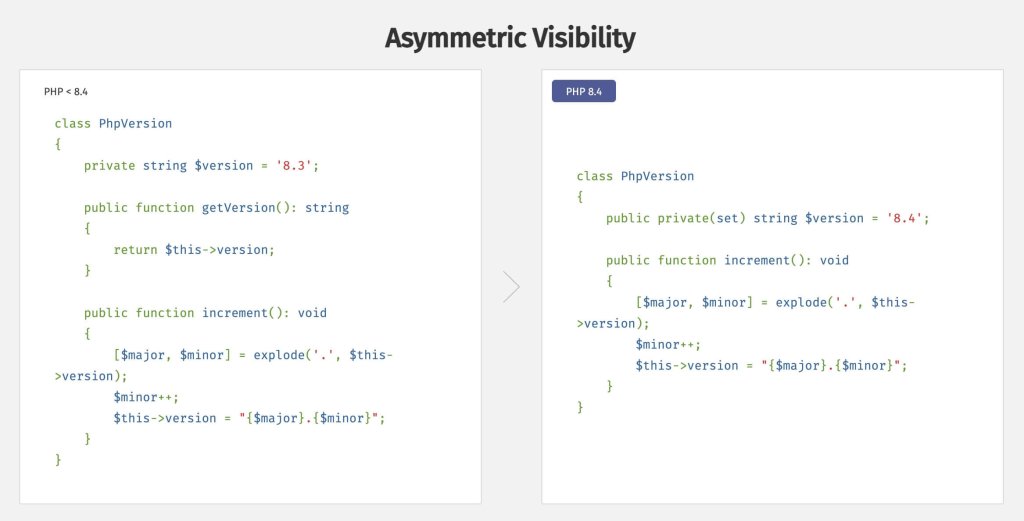
A screenshot of a code snippet from the official PHP.net documentation, highlighting how new asymmetric visibility enhancements change coding practices.

The visibility declaration public private(set) is used to allow public access for reading but restrict private access for setting the value. This allows the property to be readable from outside the class but only modifiable within the class.

1.3. #[\Deprecated] Attribute

In PHP 8.4, the #[\Deprecated] attribute was introduced to mark classes, methods, functions, or properties as deprecated.

This serves as a formal indication that the marked element is discouraged for use and may be removed in future versions.

Utilizing this attribute enhances code clarity and assists developers in identifying and transitioning away from deprecated features.

1.4. New MyClass()->method() without Parentheses

In PHP 8.4, the syntax for invoking a method directly after creating a new instance of a class has been enhanced. Previously, you would instantiate a class and then call a method on that instance in two separate steps:

$instance = new MyClass();

$instance->method();

With PHP 8.4, you can now chain the method call directly to the instantiation, eliminating the need for parentheses:

new MyClass->method();

This streamlined syntax improves code readability and reduces verbosity.

2. Library and API Improvements

2.1. Object API for BCMath

In PHP 8.4, the BCMath extension introduces the BcMath\Number class, providing an object-oriented approach to arbitrary precision arithmetic.
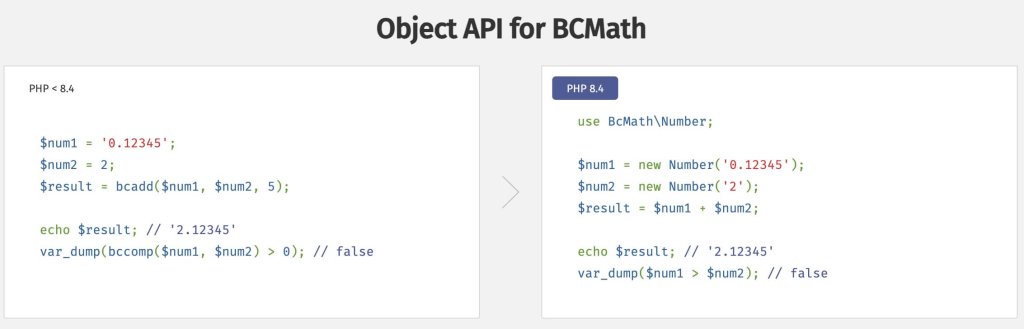
A screenshot of a code snippet from the official PHP.net documentation, highlighting how to implement an object-oriented approach to arbitrary precision arithmetic using the new BcMath\Number class.

This enhancement allows for more intuitive and readable code when performing decimal calculations.

2.2. New ext-dom Features with Enhanced HTML5 Support

The ext-dom extension has been enhanced to provide robust, standards-compliant support for parsing and manipulating HTML5 documents.

This improvement addresses long-standing issues and introduces new features that streamline working with HTML5 content.

Key Enhancements:

  1. Introduction of Dom\HTMLDocument Class:
    • A new class, Dom\HTMLDocument, has been added to the Dom namespace. This class offers a modern, object-oriented interface for handling HTML5 documents, ensuring better integration and usability.
  2. Improved Parsing and Serialization:
    • The new API provides accurate parsing and serialization of HTML5 documents, resolving previous compliance issues. This ensures that HTML5 content is handled correctly, facilitating more reliable document manipulation.
  3. Enhanced Functionality:
    • Several new functions have been introduced to simplify common tasks, such as querying elements using CSS selectors and traversing the DOM. These additions make it more convenient to work with HTML5 documents.

2.3. PDO Driver-Specific Subclasses

In PHP 8.4, the introduction of PDO driver-specific subclasses enhances the flexibility and functionality of the PDO (PHP Data Objects) extension. This enhancement allows developers to access database features such as driver specific sql parsers, that were previously inaccessible through the generic PDO class.

Key Features:

  • Access to Driver-Specific Methods: Each PDO driver now has its own subclass, enabling access to methods unique to that database system. For example, the Pdo\Sqlite subclass provides methods like createFunction(), which are specific to SQLite.
  • Improved Code Clarity: By utilizing these subclasses, code becomes more readable and maintainable, as database-specific functionalities are encapsulated within their respective classes.
// Using PDO::connect() to instantiate the driver-specific subclass

$pdo = PDO::connect('sqlite:/path/to/database.db');

// Using the driver-specific method

$pdo->createFunction('my_function', function($value) {

return strtoupper($value);

});

In this example, PDO::connect() returns an instance of Pdo\Sqlite, allowing access to SQLite-specific methods like createFunction().

Backward Compatibility:

This enhancement maintains backward compatibility. Existing code using the generic PDO class continues to function as before. Developers can choose to utilize the driver-specific subclasses when they need access to database-specific features.

2.4. Standard Library Updates

Beyond major library and API changes, PHP 8.4 refines its standard library with helpful new utility functions and subtle enhancements.

For example, developers now have access to fpow() for floating-point exponentiation, new lazy objects and new methods for managing HTTP response headers.

Additionally, the DateTime library receives precision-focused updates, which improves how PHP handles time-related tasks. These updates, though smaller in scope, contribute to a smoother and more efficient development experience.

3. New Helper Functions

PHP 8.4 introduces new array functions, providing more versatile and efficient ways to manipulate arrays.

  • array_find – Searches an array for the first element that satisfies a given condition.
  • array_find_key – Finds the key of the first element in an array that meets a specified condition.
  • array_any – Checks if any element in an array satisfies a given condition.
  • array_all – Determines if all elements in an array meet a specified condition.
$numbers = [1, 2, 3, 4, 5];

// Find the first even number
$firstEven = array_find($numbers, fn($n) => $n % 2 === 0);
echo $firstEven; // Outputs: 2

// Find the key of the first number greater than 3
$key = array_find_key($numbers, fn($n) => $n > 3);
echo $key; // Outputs: 3

// Check if any number is greater than 4
$anyGreaterThanFour = array_any($numbers, fn($n) => $n > 4);
var_dump($anyGreaterThanFour); // Outputs: bool(true)

// Check if all numbers are positive
$allPositive = array_all($numbers, fn($n) => $n > 0);
var_dump($allPositive); // Outputs: bool(true)

These additions streamline array operations, enhance code clarity, and reduce the need for verbose loops.

PHP 8.4 Deprecations

With each new PHP release, some features are marked as deprecated to pave the way for better alternatives. Deprecations help PHP to evolve while giving developers time to adjust their code.

One notable deprecation in PHP 8.4 is the removal of dynamic properties on standard objects, a feature long used for quick, ad-hoc property assignments. Another example is the deprecation of implicit nullable types.

Developers are now encouraged to use typed properties or magic methods like __get and __set for better performance and clarity.

For a complete list of deprecated features, you can check out the official documentation released by the php team.

1. Backward incompatible changes

There is a difference between deprecations and backward incompatible changes. With each release, there are also changes that fully break how certain syntax and code functions work.

For a full list of backward incompatible updates, refer to the official PHP documentation.

This means you have to be extra careful about switching to a more recent version. Often, if you are using 3rd party software, you may run into issues since it takes time for developers to update their products so they are compatible with the most recent PHP version.

This is why you should use a staging environment to test if the newest release breaks parts of your website. This is especially important if you are currently running a version older than 8.0.

We’ll show you how you can safely do this using SiteGround’s tools later in the article.

If you manage a website, it’s a good time to audit your code for deprecated features. Addressing these changes now can save you headaches when future PHP versions remove them entirely.

You can request a PHP compatibility check as part of our Expert Care services, so the review and upgrade can be handled professionally by our technicians.

2. Version Support

PHP 8.4 will receive active support for two years, followed by two years of critical security updates. You can review the official PHP documentation for the exact cutoff dates.

If you are using a deprecated version of PHP, we strongly recommend updating to the most recent stable version for improved security and performance.

How to Upgrade to PHP 8.4?

For most users, we recommend staying on Managed PHP to avoid any complications and breaking your production website. If you are technically savvy, and wish to test how your site runs on 8.4, keep reading so you can learn how to do it safely.

1. SiteGround’s Managed PHP

By default, all SiteGround clients are set to our Managed PHP service, which means that we will automatically update your PHP version once a newer stable version is available.

This is recommended for most users that are not tech-savvy, because the newest versions may introduce a conflict in your application due to a plugin or theme incompatibility.

We carefully evaluate each new PHP release and perform tests for compatibility with the most widely used applications on our platform.

As of February 2025, SiteGround’s default Managed PHP version on our servers is 8.2.

We recommend this version as the most widely-compatibale latest release. Before upgrading our default PHP version, we always make sure we have enough usage data to ensure the security, stability, and performance for the majority of websites on our platform.

That’s why we allow some time before switching our default version to each new release, even though the latter are available for testing on our servers almost immediately after going out.

Advanced users can manually switch to PHP 8.4 at any time via Site Tools.

2. Compatibility

As we mentioned, all newest PHP releases can cause errors on your website, so it’s always recommended to test the most recent versions in a staging environment first.

We offer a hassle-free, one-click tool that allows you to easily create a clone of your WordPress site, which you can use to check for any plugin or theme conflicts before upgrading your main website.
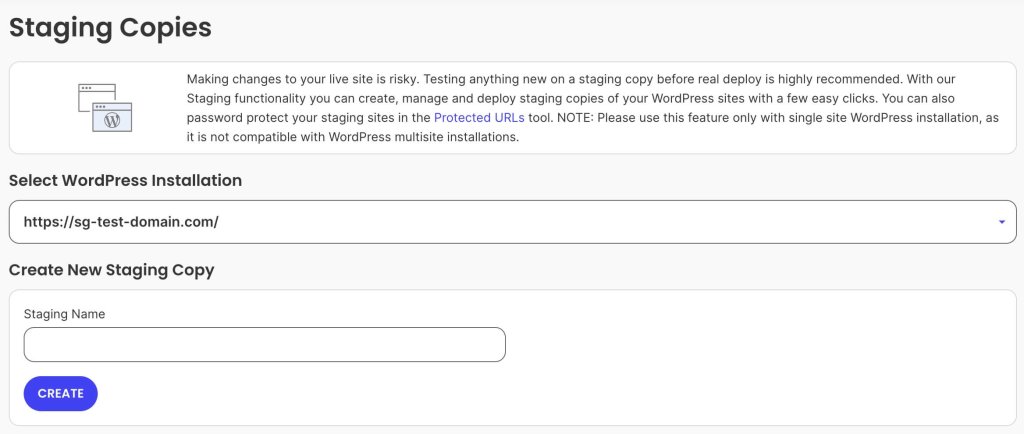
A screenshot of SiteGround's Site Tools dashboard page, where you can create a Staging copy of your WordPress site.

Once you’ve created a staging copy, follow the steps below if you wish to to switch it to PHP 8.4 and test how it works on your site.

3. Test PHP 8.4.

Most providers offer a PHP management tool to switch between different versions for your website. To upgrade to 8.4 manually on SiteGround, go to your Site Tools dashboard > Devs > PHP manager:
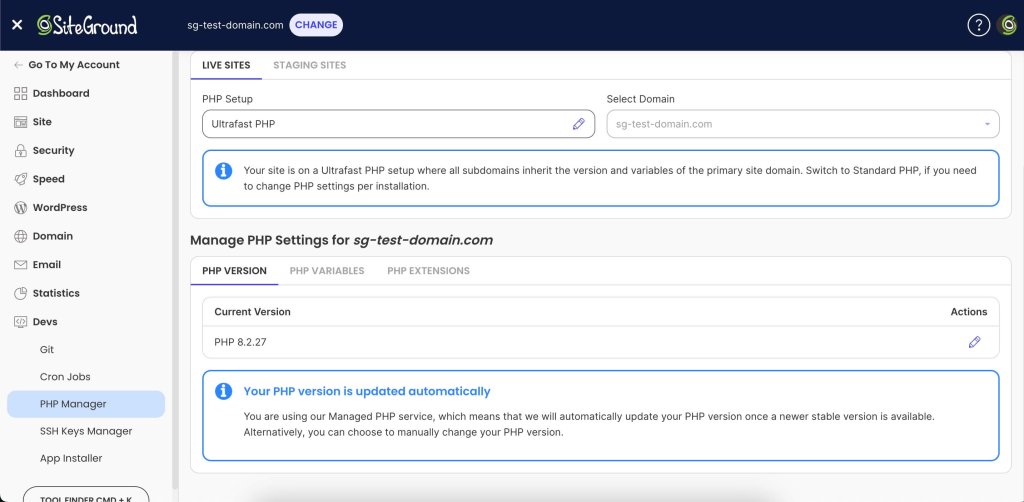
A screenshot of SiteGround's Site Tools dashboard PHP manager, where you can change the PHP settings of your sites.

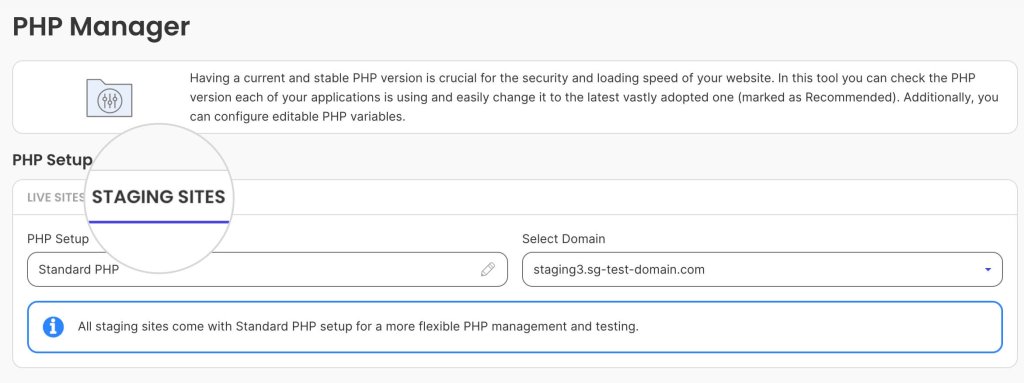
Switch to the Staging Sites tab:

A screenshot of SiteGround's Site Tools dashboard PHP manager, where you can change the PHP settings of a staging site.

Click the Edit button under Actions, switch from Managed PHP to Change PHP version manually, and select 8.4.3.
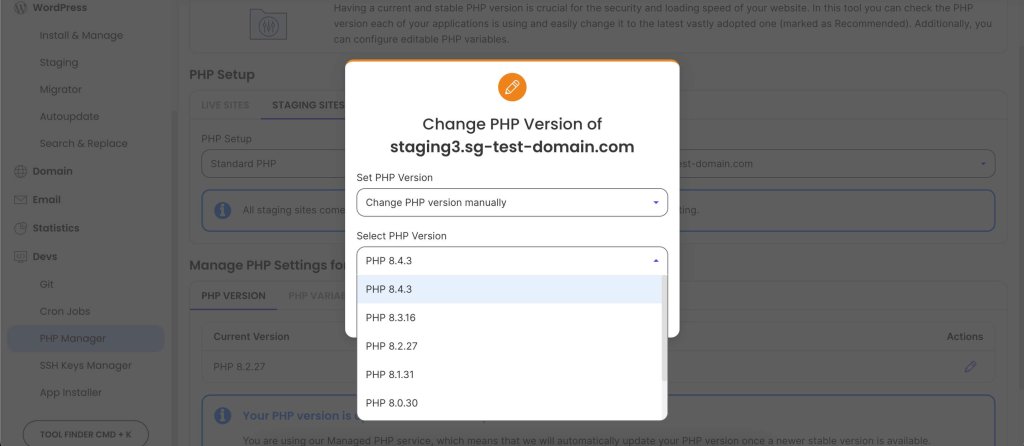
A screenshot of SiteGround's Site Tools dashboard menu, where you change the PHP version of a website, with a dropdown showing available versions ranging from 8.0 to 8.4.

It’s that simple! The next step is to check if the website works as expected. If some functionality breaks, you would need to investigate further.

Maybe a plugin or the theme that you are using is not fully compatible with the newest version yet. Or, there could be some custom PHP code in your site that needs to be revamped.

In such cases, it’s best to remain on our Managed PHP version and wait until these issues are addressed, before upgrading your main website to the latest PHP release.

4. Ultrafast PHP

SiteGround has a well-established reputation for focusing on performance optimization. This is why our team has developed a custom rendition of PHP that increases website performance by up to 30%.

It is exclusively available to our users on GrowBig plans (and above) and is fully compatible with PHP 8.4. If you wish to take advantage of it, check out our Managed Hosting solutions and sign up today to boost your website speed!
A promotional banner listing SiteGround's unique speed hosting features.

PHP 8.4: Recap and Next Steps

PHP 8.4 is a useful improvement for developers and website owners alike. With its streamlined syntax, improved APIs, and new features, it simplifies coding while boosting website performance and reliability.

Staying up to date with PHP versions is essential for maintaining a fast and reliable online presence. Upgrades should be handled carefully, to ensure a smooth transition and a seamless experience for your visitors.

This is why it is important to use a hosting provider that is up to speed with the latest technologies and offers the necessary tools to safely manage your website.

At SiteGround, we make upgrading hassle-free. With our Managed PHP and Ultrafast PHP services, you can enjoy peak performance and seamless updates.

Ready to experience the best PHP 8.4 has to offer? Sign-up for our Managed Hosting plans today and future-proof your website!

How to Write ChatGPT Prompts: Dos and Don’ts

Chat_GTP_Prompts

This article was original published in January 2025, and updated in December 2025

At first blush, using ChatGPT might seem like you’re unlocking a treasure chest of possibilities. But the reality is that without the right key, you’re likely to end up with a lot of “fluff” (as ChatGPT loves to say) instead of gold. That’s where mastering the art of writing effective ChatGPT prompts comes in — because even the most advanced AI models need clear guidance to deliver useful results.

Whether you’re brainstorming ideas, drafting emails, or solving complex problems, writing effective prompts can transform your interaction with AI from frustrating to fabulous. In this ChatGPT prompt guide, we’ll dive into the dos and don’ts of writing the best prompts for ChatGPT so that your results are precise, creative, and actionable.

Key Takeaways:

  • Clear prompts = better results: Specific instructions help ChatGPT produce accurate and useful outputs.
  • Provide context: Background information ensures responses are relevant and tailored.
  • Specify task, format, and examples: Tell the AI exactly what to do and how to present it.
  • Define role and tone: Guiding perspective and style improves alignment with your goals.
  • Use constraints and iterate: Limit scope, fact-check, and refine prompts for optimal results.

[108]

What is a ChatGPT Prompt?

A ChatGPT prompt is the input or instruction you provide to ChatGPT to generate a response. Think of a ChatGPT prompt as a question, statement, or directive that guides the AI’s output. And while ChatGPT is one of the best AI tools for business, the reality is that the quality and structure of your prompt directly influence how much you can really get out of it. 

At its core, a good prompt establishes clarity, sets expectations, and provides enough detail for the AI to understand the task. Whether you’re creating content, solving problems, or brainstorming ideas, mastering ChatGPT prompting can revolutionize your AI interactions and experience.

What is a Large Language Model (LLM) and Generative AI?

ChatGPT is powered by a large language model (LLM), a type of AI trained on vast amounts of text to understand language patterns, context, and meaning. As a generative AI, a large language model like this doesn’t just pull information—it creates new text based on the instructions you give it. That’s why the way you write your prompts matters so much: it helps guide the AI to generate desired outputs that are accurate, relevant, and tailored to your needs.

What is Prompt Engineering?

Prompt engineering is the practice of designing and refining ChatGPT prompts to get the most useful, accurate, and creative responses possible. It’s more than just asking questions; it’s about strategically crafting prompts so the generative AI understands exactly what you need. By applying prompt engineering techniques, you can guide ChatGPT to generate outputs that meet your goals.

How to Write ChatGPT Prompts: Dos

The question is then, how to put this prompt engineering in practice? The following dos tackle just that, giving you tools you need to write effective prompts that get the most out of ChatGPT. 

Do: Give Context

Let’s start with our first, very-important “do”: context. It’s the background information we give in a prompt—think of it like setting the stage for a conversation. Providing context is one of the key techniques in prompt engineering, as it helps generative AI understand your requirements more accurately. The more context you provide, the better ChatGPT can understand your request and give you a response that actually helps. 

For example: Imagine you want it to draft a welcome email for new subscribers. Before you get to the request, give ChatGPT more background info. You could provide the following context: “I run a small, family-owned business selling eco-friendly pet supplies. We offer new email subscribers 20% off with the code WELCOME when they sign up for your newsletter. Please craft a friendly welcome email.” 

Or, “I work at an interior design shop and have a team of ten people working for me. The business has done particularly well this last year and we are giving out bonuses to thank employees for their hard work and loyalty. Please craft an email sharing this announcement.”

The first part of each request is the context. We could easily create more detailed prompts in order to produce emails that are even more customized and accurate. Indeed, the more specific your context, the better the AI can align with your expectations rather than giving you generic or unrelated outputs that really don’t get the job done.

Go beyond ChatGPT and get the most of AI right as you create your marketing emails. With SiteGround Email Marketing, you can take advantage of our built-in, email creation-trained AI to help you produce the best emails possible.

Get started with SiteGround Email Marketing today>>

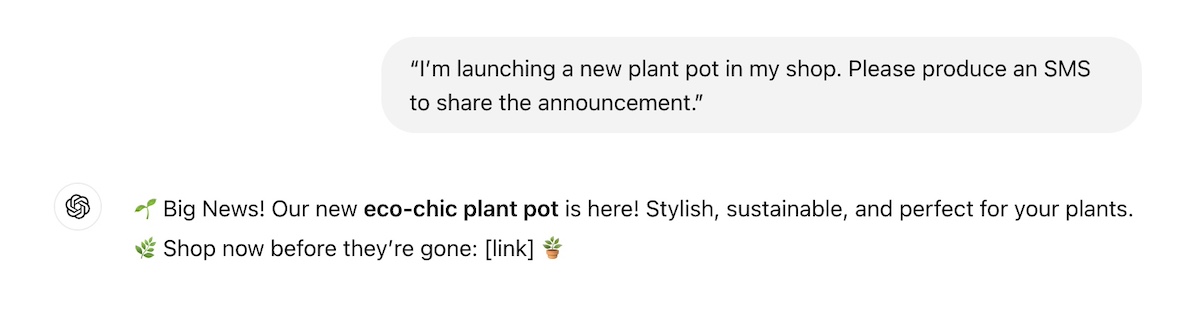
Let’s look at another “context” example. Check out the responses for these two prompts. The first one is quite vague with little context, and the second one much more detailed. 

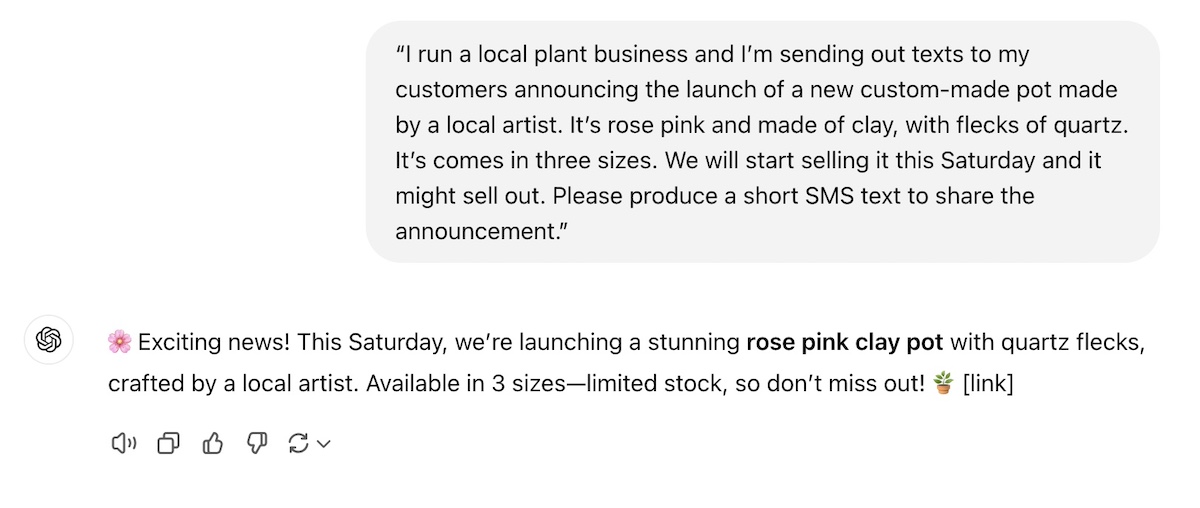
ChatGPT Prompt 1—with little context:

chatgpt-prompt-without-detailed-description

ChatGPT Prompt 2—with detailed context:

best-prompts-for-chatgpt-with-detailed-context

Notice that the initial prompt didn’t even mention anything about eco-friendly or sustainability. So without specifics, ChatGPT just filled in the blanks, as it is wont to do. Meanwhile, in the second prompt, the response is detailed, informative, and motivating. A little relevant context goes a long way when it comes to getting a quality result.

Do: Identify a Task

Next is the task—this is where you define exactly what you want ChatGPT to do. Do you need advice? A list of ideas? A detailed plan? Or, as was the case in our previous example, an SMS text? Imagine exactly what kind of information you need, and don’t be afraid to tell ChatGPT precisely that by giving it clear instructions and being extra specific.

  • “Create a to-do list for throwing a toddler’s birthday party.”
  • “Draft an Instagram caption for a summer travel photo for my tourism business.”
  • “Brainstorm three unique business ideas related to sustainable fashion.”
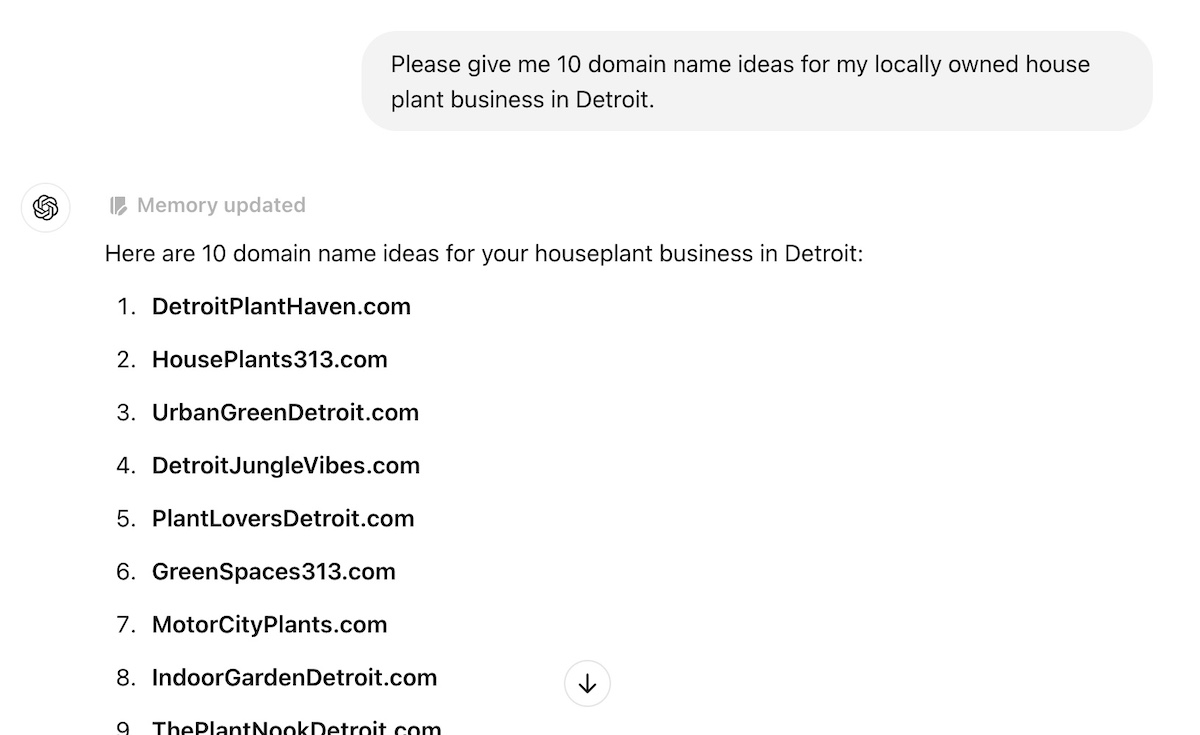
  • “Please give me 10 domain name ideas for my locally owned house plant business in Detroit.”
Best-chatgpt-prompt-identify-a-task

By defining the task, you help ChatGPT produce output that is actionable and relevant, and not something that you need to rework and reorganize. Add the aforementioned context, and you’re on your way to much more valuable and relevant responses.

Do: Define a Format

Format involves using clear and specific prompts to clarify how you want the answer to be presented. This could be a bullet-point list, a 100-word paragraph, or even a table. Stating the desired format helps ChatGPT structure its response accordingly, and makes life easier for you. A few examples include:

  • “List three benefits of using renewable energy in bullet points.”
  • “Create a checklist of ways I can improve my website speed.”
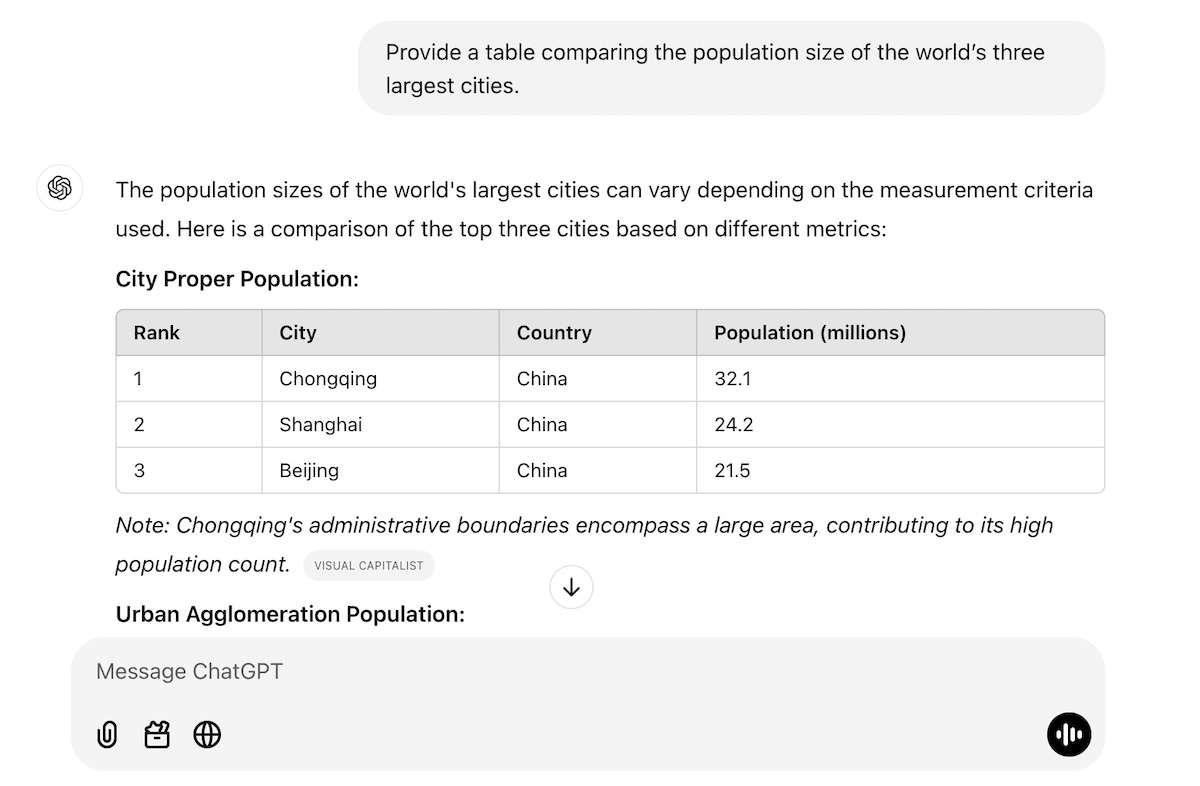
  • “Provide a table comparing the population size of the world’s three largest cities.”
  • “Write a 500-word dialogue between two teenaged characters discussing their favorite movies.”
chatgpt-prompting-identify-format

And don’t be shy here! You can get as detailed and specific with the format as you like. You could provide a precise article outline. Or maybe you need your table organized in just the right way—columns that say this, rows that say that. Perhaps you want an example for each bullet point. Really envision the final output, define it, and then tell ChatGPT exactly what you want.
Do: Provide Examples

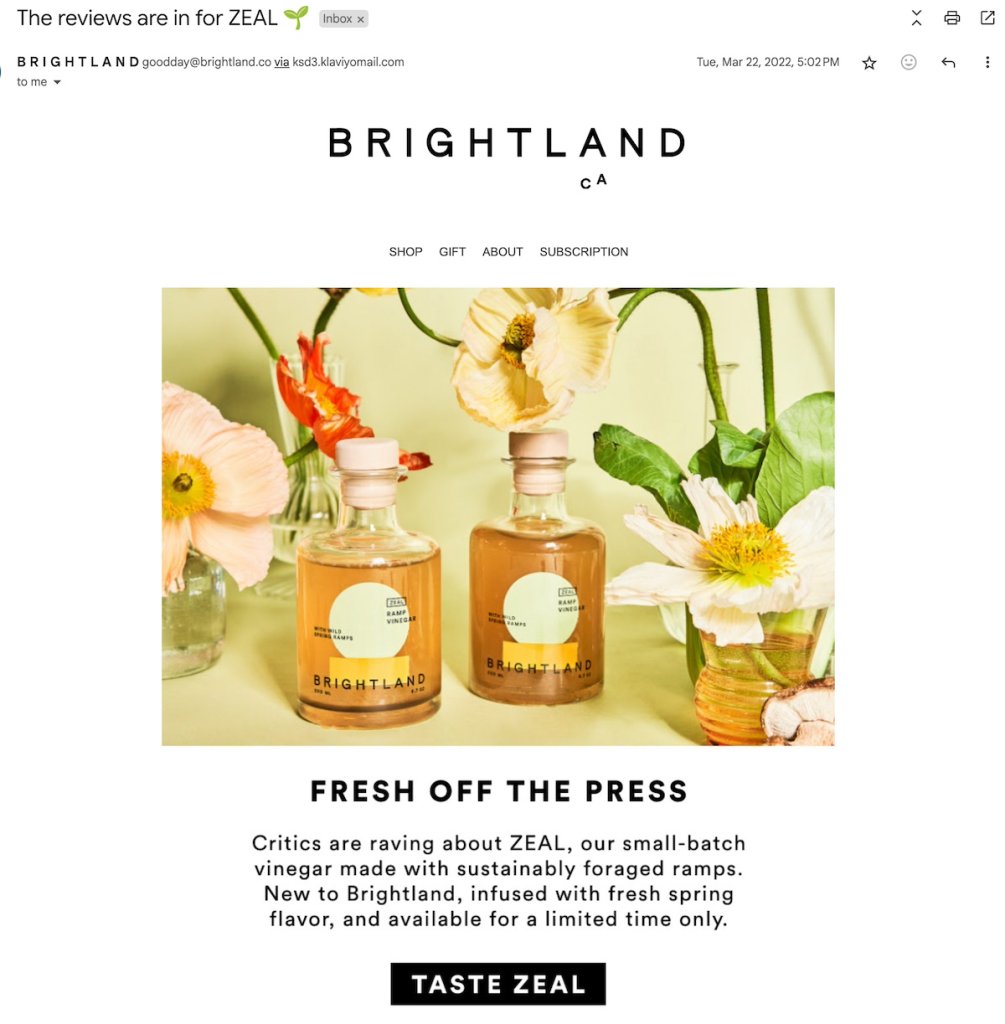
One of the most effective ways to guide ChatGPT is to provide examples of the kind of content you want it to produce for you. This could mean sharing an existing blog post, a sample press release, or types of emails you’ve previously sent. By doing this, you’re prompting ChatGPT in a way that demonstrates exactly what you’re looking for in terms of style, format, or whatever it is you fancy—even if you’re unsure how to write prompts. 

Using examples can be particularly helpful when you’re producing AI-generated content that you want to be similar to what you’ve already produced. So let’s say you sell a bunch of products, each with a product description in a similar format (same length, type of details, format). If you have a new product, you can just tell ChatGPT the new product’s features, provide another product description as an example, and ask it to produce a similar description for your new product.

best-chatgpt-prompts-with-an-example

Do: Specify a Role

By assigning a role in your prompts, you provide additional context that shapes how generative AI creates its reply. This is another prompt engineering tactic that helps align ChatGPT’s output with the perspective or expertise you need. Because when you give the AI a role, it can adopt the necessary tone, terminology, and perspective for the task. Examples include:

  • “Act as a personal trainer and create a seven-day beginner workout plan.”
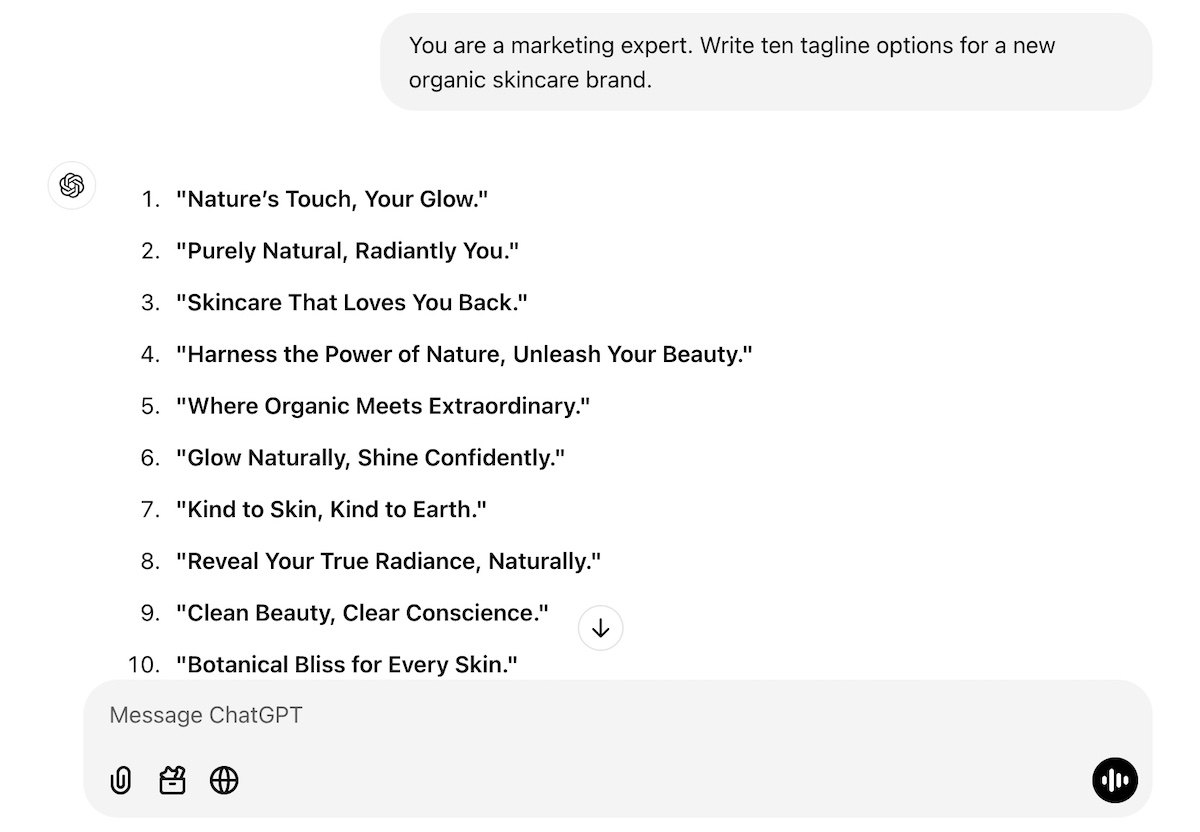
  • “You are a marketing expert. Write ten tagline options for a new organic skincare brand.”
  • “Pretend you’re a teacher explaining the basics of algebra to middle school students.”
chatgpt-prompt-specify-a-role

You can get even more creative with role assignment, though. Give ChatGPT a role—such as, let’s say, ask it to pretend to be a job recruiter for a software engineering job that you’re interested in. Provide it with context around the job position and ask it to carry out a mock interview with you. 

Or maybe you need to have a tough conversation with a friend about how they are always canceling on you last minute. Again, just tell ChatGPT a bit about the situation (the context), and ask it to act as your friend (the role) and carry out a practice conversation with you (the task). 

Do: Clarify Tone of Voice

Tone of voice can completely change the way a copy response feels. Maybe you want a formal, professional tone for an investor proposal, or a casual, friendly tone for your event’s promotional materials and blog post. Specifying this will help you get the vibe you’re looking for.

Whether you’re aiming for professionalism, friendliness, humor, or formality, clarifying the tone helps set the mood for the content. For example:

  • “Write a friendly and casual thank-you email for attending a webinar.”
  • “Draft a formal letter to request sponsorship for an event.”
  • “Create a humorous caption for a dog wearing sunglasses.”
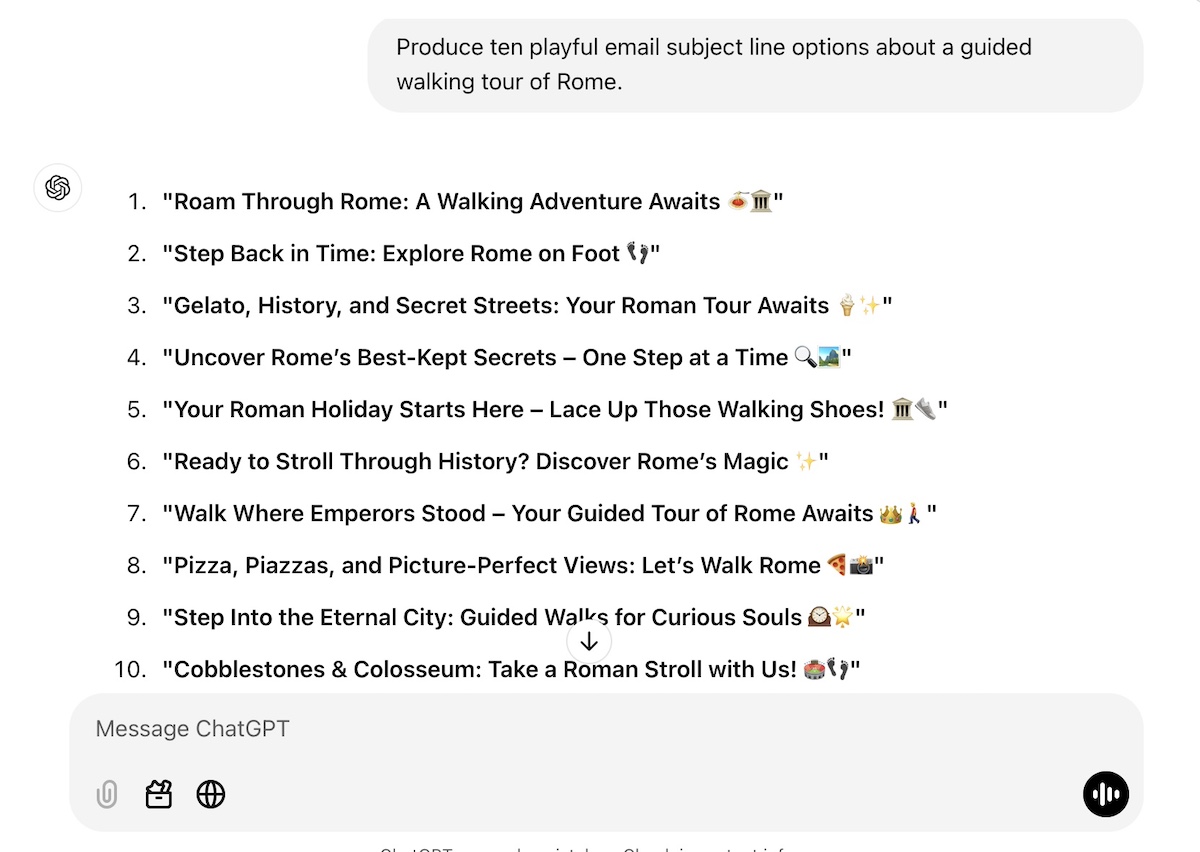
  • “Produce ten playful email subject line options about a guided walking tour of Rome.”
best-chatgpt-prompts-tone-of-voice

Let’s look at this a little more closely with another example. Check out the difference in response when we specify tone. The response differences are subtle, but the vibe definitely changes when we give ChatGPT guidance on tone.

No tone specification

chatgpt-prompting-without-specifying-tone

With tone specification

best-chatgpt-prompts-specify-tone

Do: Leverage Constraints

The most effective prompts include constraints in order to guide the AI to focus on specific aspects of the task, making the output more targeted and efficient. Basically, you’re telling ChatGPT what you want it to do and specifically what you don’t want it to do. This helps to keep ChatGPT from wandering off into unwanted territories or providing you something completely different than what you were looking for.

Examples include:

  • “Write a summary of this article. It should be no longer than 50 words.”
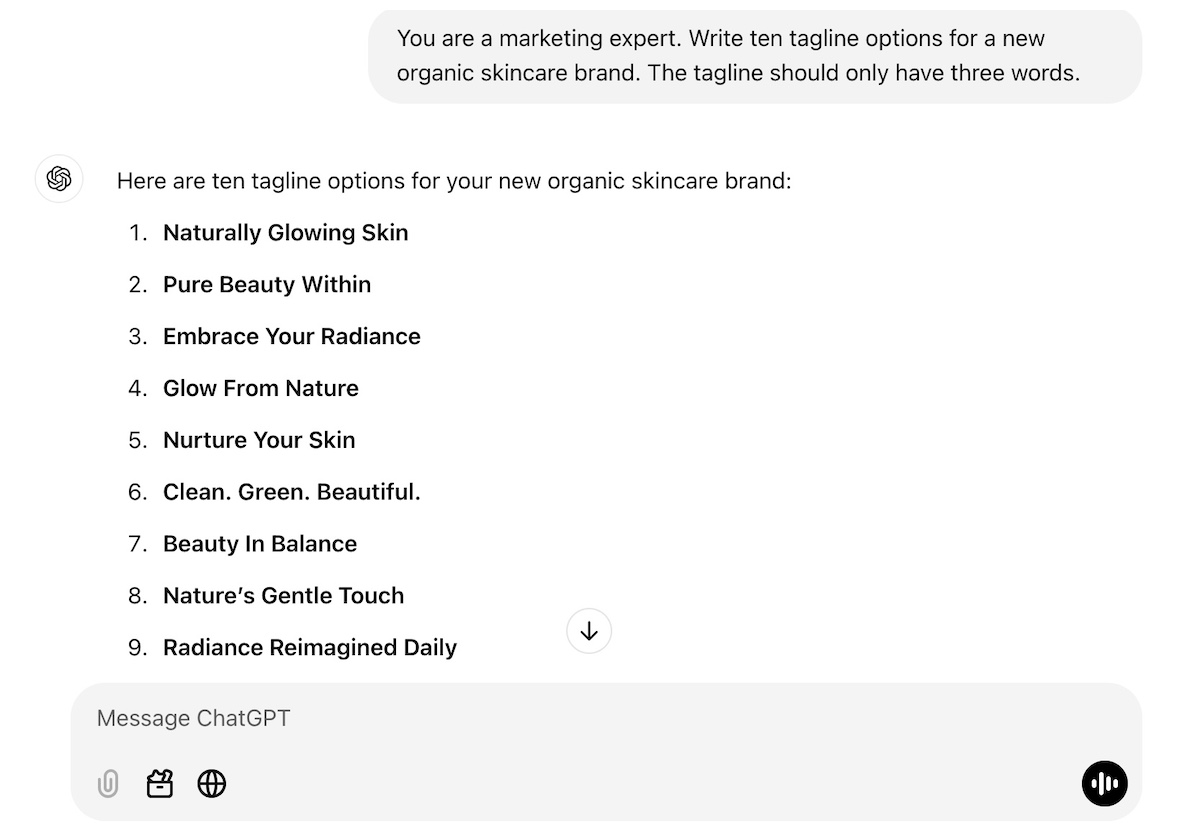
  • “You are a marketing expert. Write ten tagline options for a new organic skincare brand, but the taglines should only have three words.”
  • “Create a Black Friday email to go out to my subscribers, but don’t use the words “Christmas” or “Thanksgiving.”
  • “Generate a social media post that includes the words ‘adventure awaits,’ and is no longer that 60 characters. ”
chatgpt-prompt-with-a-constraint

In the above example, we’ve given information about the brand, as well as a constraint In the above example, we’ve given information about the brand, as well as a constraint around the length of the tagline, thus refining the results. As you can see, constraints help narrow the scope of the response, ensuring it aligns closely with your requirements.

How to Write ChatGPT Prompts: Don’ts

ChatGPT benefits from constraints and, well, so do we! That’s where the “don’ts” come in. Indeed, as you produce your prompts, there are several “don’ts” to keep in mind. 
Don’t: Use Vague ChatGPT Prompts

Vague questions lead to vague answers, and nobody wants that. As we’ve discussed above, ChatGPT thrives on specificity, so the more detail you provide, the more useful the response will be. 

For example:

  • Instead of asking, “Please give me some good outdoor activity ideas?” try: “What are some fun outdoor activities for kids and families in the Austin area during spring?”
  • Instead of saying, “Give me some marketing ideas for my new business,” specify: “Please give me five digital marketing ideas for my new online store that can easily be implemented by someone without a lot of tech knowledge or a big budget. Also provide me with email marketing metrics that I can use to measure success, and tell me how to analyze them.”

In the marketing example, ChatGPT might give you ideas that apply to a brick-and-mortar shop, or perhaps to a business with a big budget. It might tell you to build an elaborate advertising campaign, even though you don’t have the money or know-how. Whereas in the more-detailed ChatGPT prompt, you’ll be getting measurable ideas that are relevant to your online business, within your budget, and likely within your skillset.

Bonus tip: Don’t forget to leverage our previous “dos!” You could identify the format and ask ChatGPT to put all of these ideas into a table, or organize them in any way that would help you to make the results more actionable.

Don’t: Assume Accuracy

While ChatGPT is powerful, it’s not infallible. It may produce outdated or incorrect information, especially when dealing with niche topics or rapidly evolving industries. It’s also, shall we say, kind of a people pleaser. That is, if you ask it a question, it feels compelled to give you an answer, and sometimes this just means it fills in the blanks with random and not-so-accurate info. 

As such, always fact-check critical details, such as statistics, dates, or specific claims, to ensure accuracy. For example:

  • If ChatGPT provides data about market trends, verify the source before including it in a presentation.
  • When using the AI for research, cross-reference the information with reliable, up-to-date sources.

Another way to ensure accuracy is by providing ChatGPT with the source information. So instead of asking it “what is Nike’s value proposition?”, you could provide it with Nike’s website URL, and say, “based on this website, what is Nike’s value proposition?” That way, you know ChatGPT is pulling the answer directly from the source, rather than from unknown and possibly unreliable corners of the internet.

Long story short, this prompt guide highlights how to think of ChatGPT as a helpful assistant, not an authoritative expert. That means you’re the quality control and, when it comes to accuracy, the buck stops with you.

Don’t: Settle for the First Answer

The first response isn’t always the best; this is why iterative prompt engineering is important—you can tweak and refine your prompts until the AI gives you the most useful result. For instance:

  • If the response feels too formal, you can say: “Rewrite this with a friendlier tone.” Still not what you’re looking for? Tell it what you do or don’t like, and ask it to try again. And then again…and again, until you’re satisfied.
  • If the output lacks depth, try: “Can you expand on this idea with examples?”
  • If the answer doesn’t feel actionable enough, ask: “please provide a list of next steps.”

Also, you can totally build on ChatGPT’s answers! So if it gives you a bulleted list, you might decide that you’d like it to turn that list into a table, and maybe even add some extra detail, like costs or action items. The main takeaway here: use ChatGPT’s initial responses as a starting point for crafting the most optimal answer. 

Don’t: Assume It Knows Your Goal

ChatGPT can do a lot of things, but it can’t read your mind (yet! Gulp). So don’t assume it knows your intentions unless you make them clear. If you’re looking for specific outcomes or seek to address a particular audience, then you need to spell it out. For example:

  • Instead of saying, “Tell me how to grow my email list,” specify: “I want to build leads for my new, seven-day, online public speaking program. Please give me email lead generation tips that I can easily implement in the next couple of months.” 
  • In place of, “Write a blog post about fitness,” clarify with: “I’m a personal trainer and want to get more clients and want to write a blog to help me do this. Give me ideas about how busy professionals in the Seattle area can fit exercise into their daily routines. Be sure to make mention of personal training.”
  • Rather than just saying, “I’m looking for marketing strategies for my online store,” elaborate on what your goals are and what you’re hoping to accomplish, whether that’s more online traffic with a budget of $1,000, or increasing social media followers in the next 60 days.  

Paint the full picture, start to finish, so that ChatGPT gives answers that meet your exact needs and goals.

Start Writing the Best Prompts for ChatGPT

Crafting effective prompts for ChatGPT is part science, part art. By following the dos and avoiding the don’ts, you can unlock ChatGPT’s full potential to generate responses that are accurate, creative, and actionable. Treat AI as your creative collaborator, and you’ll get more out of ChatGPT than you could have ever imagined possible.

This article was original published in January 2025, and updated in December 2025

AI and SEO: What’s Next for the Future of Search

The way we approach SEO is changing rapidly, thanks to the growing impact of AI. This shift is challenging many of the strategies we’ve relied on for years, forcing us to think differently about how we create and optimize content. It’s no longer just about ranking high—it’s about staying relevant and getting clicked. 

In this guide, I’ll walk you through how AI is reshaping SEO and share practical tips to help you adapt. Together, we’ll explore ways to align with these changes and ensure your content continues to stand out, connect with your audience, and meet the demands of tomorrow’s search engines.

[41]

AI Impact on SEO

Let’s begin by addressing the question on everyone’s mind: how will AI impact SEO?

AI is reshaping everything we thought we knew about SEO. 

From transforming content creation to changing the way we approach marketing, artificial intelligence is redefining the landscape of organic search and optimization. 

Let’s be honest. SEO was never easy. In the past, users would have a big amount of URLs to choose from, making it difficult for any website to stand out. 

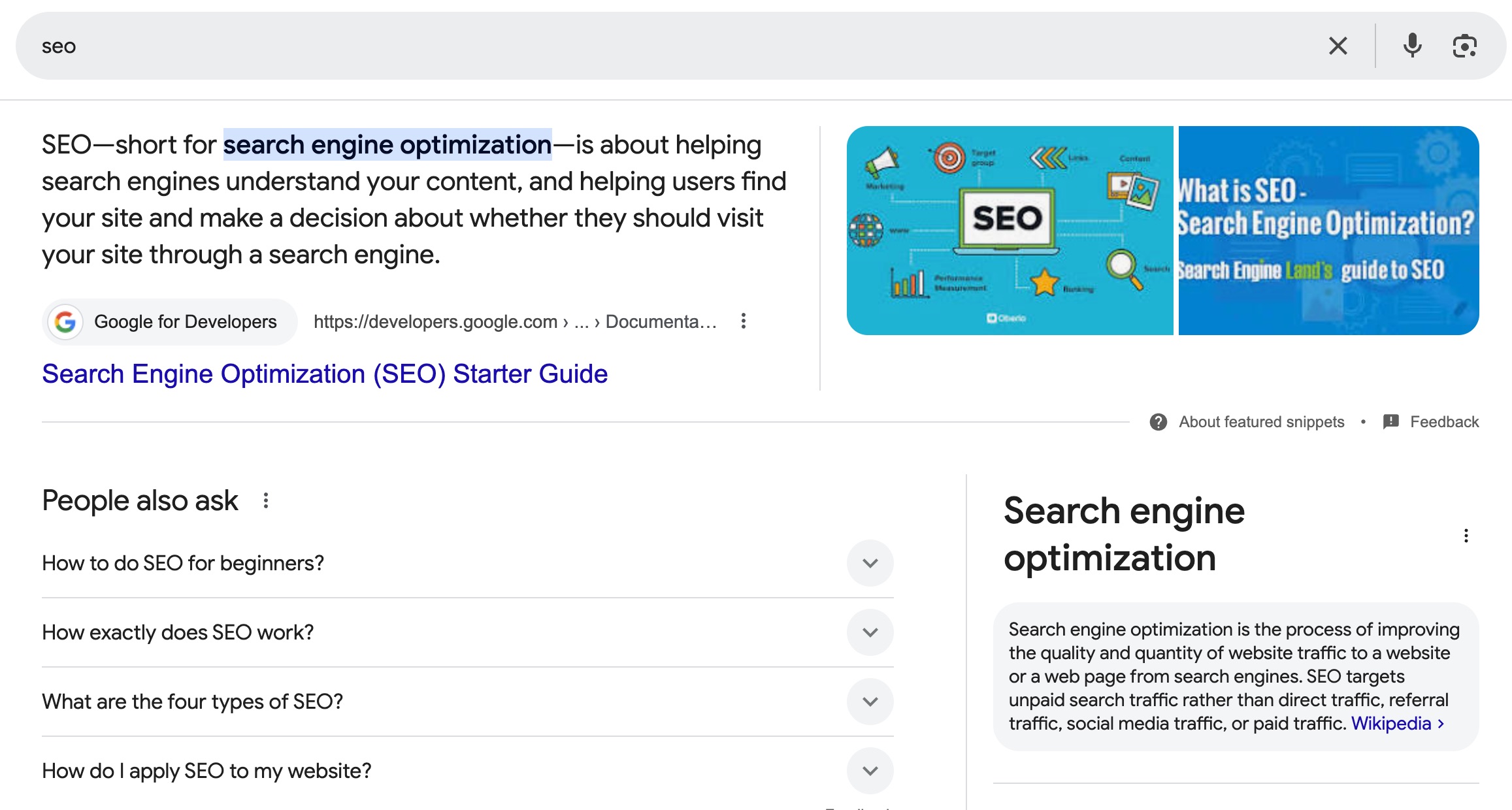
As if this wasn’t enough, SEO professionals had to start competing not just with other websites, but also with Google’s features like snippets, knowledge graphs, and image packs, which dominate more space on the search engine results page (SERP).

Google search results page displaying a featured image snippet and a paragraph snippet for an SEO search query.
Screenshot

But AI gave us hope—well, at least for a minute. It enabled brands to produce content at a faster pace with less resources and need for investment. 

So we are all somewhat guilty. Without realizing, we have been contributing to an oversaturation of results on the SERP. And Google is determined to fight back. 

On one hand, latest SEO trends suggest that Google is increasingly prioritizing user-generated content, as users seek more authentic and genuine insights. Platforms like Reddit, Quora, and niche communities are now dominating the search results because they offer room for genuine discussions, trusted recommendations, and practical advice.

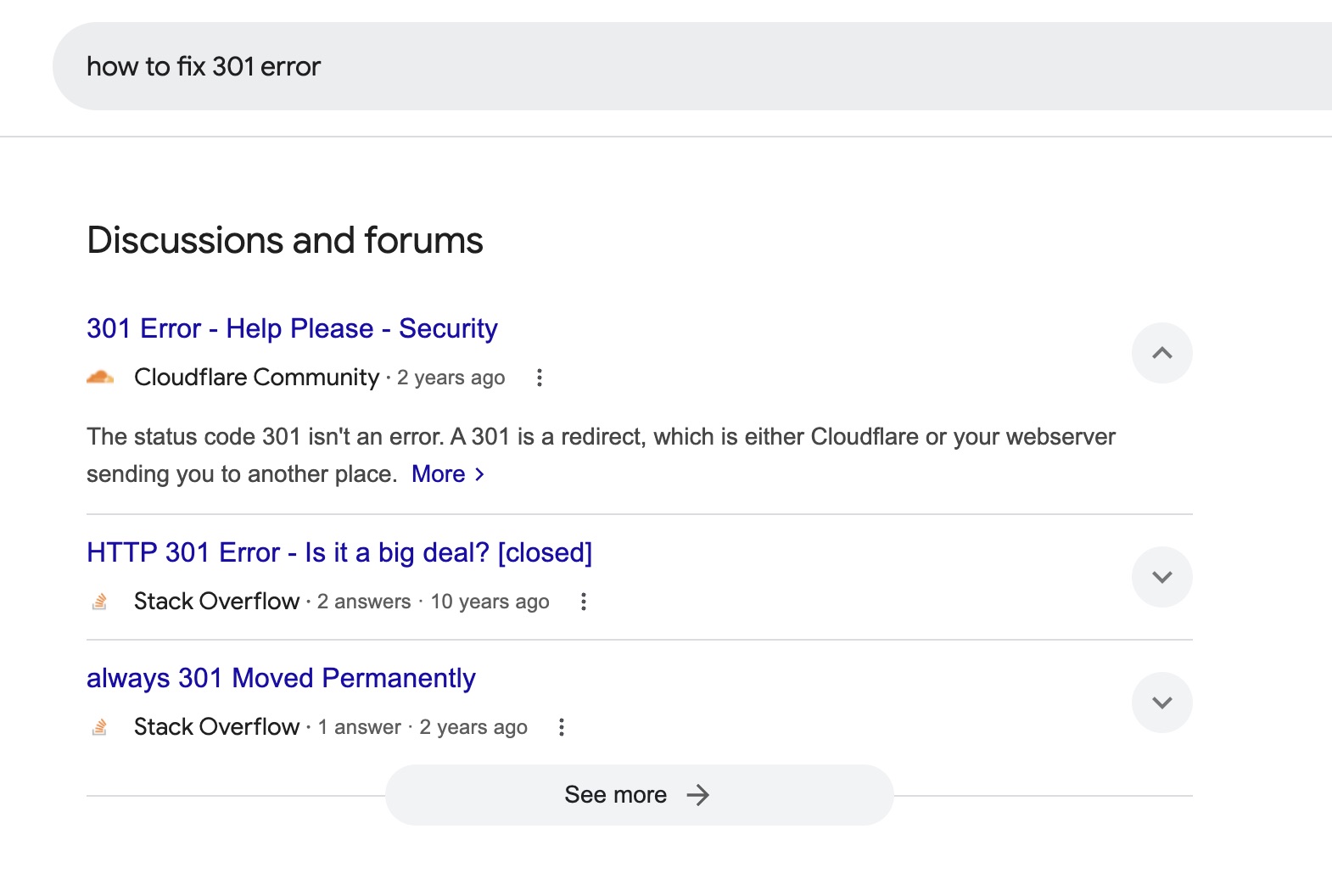
"How to fix 301 error" query results showing user-generated content from Reddit, Quora, and niche communities.

But also, Google is taking even more space on the SERP with the so called AI Overviews. And this shift isn’t random—it’s part of Google’s larger strategy to keep users engaged within its ecosystem. The longer users stay on Google, the more ad revenue it generates and the more opportunities it has to drive traffic to services like YouTube, Maps, and Shopping. 

So with these AI-powered overviews, Google powers instant, conversational answers, reducing the need for users to click away from the search page altogether. As a result, organic listings are being pushed further down the page, making it harder to capture attention and visibility unless we start to adjust our approach.

For marketers, it’s clear that sticking to traditional SEO strategies just isn’t enough anymore.

So what do we do now?

What’s Next for the Future of SEO: 5 Facts You Need to Know

First of all, no need to panic. 

After doing plenty of research, here’s a breakdown of what’s changing in the world of AI and SEO. 

In this section, I’ll walk you through everything we know about AI’s impact on SEO and what’s coming next: key developments, trends, and insights shaping the future of SEO. 

We’ll explore how these shifts are reshaping search engine strategies and what you need to know to stay ahead. Let’s get started! 

1. Expertise and Authority Will Be Valued for Users and Engines Alike

As a consequence of this content overload, search engines prioritize pages that reflect genuine credibility and firsthand knowledge. This shift emphasizes the need for content creators to highlight real-world experience through personal stories, case studies, and original insights that demonstrate subject-matter expertise.

As you can see, transparency is essential. The more you demonstrate that your content is created by true experts with verifiable credentials, the better your chances of earning Google’s trust—and climbing the rankings.

What’s more, Google’s algorithms are increasingly designed to reward brands that clearly display their creators’ expertise and achievements. So a key part of this strategy is crafting detailed author bios that showcase an author’s authority, background, and accomplishments. Not only does this build trust with your audience, but it also sends a signal to AI-driven optimization systems. 

2. No Fluff—Just Genuine Informative Content

It’s not just about who delivers the message—but also about the value of the message itself. As AI continues to shape the future of SEO, the demand for content that provides truly insightful answers is growing. 

Generative AI models, trained on massive datasets, are designed to prioritize high-quality, original content. This means your content needs to go beyond surface-level information and offer something unique. In-depth, well-researched pieces that bring fresh insights or a distinctive perspective are far more likely to catch the attention of AI engines.

Quality and originality are no longer optional—they’re critical. AI-powered systems favor content that genuinely serves users’ needs, making it essential to focus on delivering real value. 

3. SERP Becomes More Dynamic

Google is always refining its results to better align with search intent, and now these updates are happening even more often, especially in AI-generated overviews. This presents both a challenge and an opportunity: staying visible means consistently updating your content to keep it fresh and relevant. The upside? Doing so boosts your chances of being featured.

Frequent monitoring is just as important. Keep an eye on whether your content is holding its position in AI summaries and rankings. If you notice a drop in visibility due to newer or more relevant updates, take it as a sign to revisit and optimize your content.

4. Informative Queries Result in AI Overviews More Frequently 

AI-generated overviews are not triggered by every query, meaning not all keywords require AI SEO optimization.

For now, informative queries—those beginning with “what,” “how,” “when,” or “why”—are the sweet spot for AI Overviews. Generative engines excel at delivering concise, direct answers, making these types of questions a prime target when it comes to SEO for AI.

Long-tail keywords, conversational phrases, and natural language queries are also increasingly shaping AI responses, as users seek personalized, straightforward content. 

However, AI-generated results are less prominent for local searches, where map results dominate, or for transactional queries, which typically lead to Google Shopping listings.

If your project is losing traffic to AI overviews, start by identifying which keywords are generating these summaries and focus your optimization efforts there. 

5. GEO Is Here to Stay

Already ranking on the traditional SERP? That’s a solid foundation, but it doesn’t guarantee inclusion in AI-generated answers.

AI engines prioritize clarity, structure, and relevance, qualities that may differ from traditional SEO factors. To ensure visibility in generative responses, you’ll need to refine your content with these specific requirements in mind, even if you’re performing well in standard search results. 

Here’s where Generative Engine Optimization (GEO) comes in. 

Generative engine optimization focuses on crafting content that aligns with how AI engines evaluate, understand, and present information. 

These engines don’t just rank content—they synthesize it, creating concise answers that draw from multiple sources. They prioritize content that’s clear, well-structured, and directly relevant to user queries. 

That means you’ll need to go beyond traditional SEO tactics. As GEO reshapes the way content is discovered and consumed, adapting your strategy is no longer optional—it’s a must to maintain visibility and relevance in an AI-driven search ecosystem.

SEO and AI: How to Adapt

Alright. We’ve explored the facts and the shifts AI is bringing to SEO, but understanding the changes is only half the battle. The real challenge lies in adapting your strategy.

It’s time to move beyond theory and focus on actionable steps. Here’s how to align your SEO efforts with the demands of an AI.

1. Draft Your Content Plan Around Topic Clusters

To position your brand as a trusted authority in your niche, a well-structured content plan is essential. Instead of treating keywords and topics as standalone elements, focus on creating interconnected topic clusters. This approach allows for comprehensive coverage of your niche while signaling to Google that your site offers in-depth, credible insights.

Start by mapping out your content based on your niche’s main themes, branching into subtopics, keywords, and common queries from every angle. Each piece of content should connect seamlessly to others, creating a web of information that demonstrates expertise.

When drafting your plan, organize your content according to the customer journey. From top-of-funnel awareness to bottom-of-funnel decision-making, ensure your pieces address the needs of users at every stage. 

Covering all possible queries related to your niche allows for your content to become the go-to resource, increasing both user trust and AI recognition.

Don’t forget to highlight your expertise by incorporating case studies, expert quotes, and unique perspectives that add depth and value. Remember, it’s not just about quantity but quality. 

2. Determine Keywords for SEO vs. GEO

Now that your content funnel is mapped out, it’s time to categorize your keywords. Not all keywords require the same optimization strategy—some will align better with traditional SEO, while others are prime candidates for AI SEO or GEO.

The key is to align each piece of content with the user intent behind the keyword. Informational queries should be optimized for AI by focusing on clarity, structure, and actionable insights that AI can synthesize. Transactional or navigational keywords, on the other hand, should probably follow SEO traditional best practices, as we want these results to be placed on the regular SERP. 

3. Choose an Easy-to-Scan Structure: It’s the Key to AI and SEO Optimization

If you want your content to stand out in AI-generated responses, creating a user-friendly structure is non-negotiable. AI prioritizes content that’s not only keyword rich but also incredibly easy to scan and process. Here’s how to make your content AI-ready:

  1. Prioritize Intent
    Start by aligning your content with user intent, ensuring each section answers specific queries clearly and concisely. But don’t stop there—how you present the information matters just as much.
  2. Optimize for Readability
    Use headings, subheadings, bullet points, and short paragraphs to make your content digestible. Think of your structure as a roadmap that guides both users and AI through the key points effortlessly.
  3. Add Structured Data
    Incorporate Schema markup to define your page elements—such as product details, reviews, FAQs, or articles. Structured data acts like a blueprint for search engines, helping them categorize and feature your content more effectively in AI overviews.
  4. Improve Website Performance
    A fast-loading site isn’t just good for user experience; it’s essential for AI prioritization. Compress images, streamline your code, and ensure your website is responsive across devices. Slow-loading pages risk being bypassed entirely.

 4. Make Your Content Relevant: 

Relevance is the new cornerstone of AI-driven SEO. Unlike traditional SEO strategies that favored lengthy, all-encompassing articles, AI engines prioritize content that is concise, targeted, and directly aligned with specific user queries.

So instead of trying to address every possible angle in one article, create multiple pieces of focused content that answer particular questions or solve specific problems. This approach not only increases your chances of being featured in AI-generated overviews but also better serves users searching for direct answers.

5. Always Keep Your Content Fresh and Up to Date

Staying relevant also means keeping your content fresh and up-to-date. AI prioritizes content that reflects the latest information, trends, and insights. 

As we said, AI overviews update in real-time, often favoring newer, more valuable content. If your articles are outdated, they risk being overshadowed by fresher content from competitors. 

That’s why you should review your content periodically: Refresh outdated statistics, replace old examples with newer ones, and expand sections with new developments in your industry.

Especially if you notice a decline in traffic or rankings, revisit that piece and optimize it!

SEO in the Future: What Can We Expect?

The evolution of SEO caused by AI is undeniable. 

In the future, we can expect SEO to become increasingly dynamic, demanding a balance between technical precision and authentic, user-focused storytelling. Expertise, relevance, and adaptability will be the pillars of success. 

Businesses that embrace these principles—while staying agile in response to AI innovations—will not only survive but thrive in the ever-changing world of search.

SEO’s future isn’t about gaming the system; it’s about building trust, meeting user needs, and crafting content that stands out for both humans and AI. The question isn’t just how to rank but how to remain relevant. 

The opportunities are vast, and the potential is limitless for those ready to adapt.

17-Step Website Checklist: Launch Your Site with Confidence

Website checklist illustrating all the necessary steps to launch your site with confidence.

This article was originally published in June 2025 and then updated in May 2026.

A website checklist is a structured list of everything you need to review, test, and confirm before—and just after—launching your site. It covers the areas that are easiest to overlook when you’re close to the work: SEO, security, speed, design, legal compliance, and more.

If you’re about to hit publish and that nagging feeling has set in that something isn’t quite right, this guide walks you through a comprehensive rundown of 17 steps. We’ve also put together a free downloadable checklist to keep you on track every step of the way.

Key Takeaways:

  • Cover the essentials before you publish. Design, content, SEO, forms, and accessibility all need a final review before your site goes live.
  • Security and backups are non-negotiable. An SSL certificate, regular backups, and basic security measures protect both you and your visitors from day one.
  • Speed affects more than user experience. A slow site costs you visitors, conversions, and search rankings, so performance optimization belongs on every pre-launch list.
  • Legal compliance is not optional. Cookie consent, a privacy policy, and terms of service are legal requirements in many jurisdictions, not just good practice.
  • Launching is the beginning, not the end. Crawling your site, integrating analytics, and setting up a maintenance plan are what keep your site performing well after launch.
  • The right hosting provider makes most of this easier. Backups, speed, security, and uptime all depend heavily on who hosts your site.

[18]

Website Pre-Launch Checklist

Perfecting everything from cybersecurity to design can feel overwhelming, especially when learning how to launch a new website. But don’t worry—by following these steps, you’ll be able to handle it all:

1. Review Your Site Look, Feel and Architecture

Before anything else, make sure the foundations are solid. This step covers the core decisions that everything else builds on: your goals, your target audience, your branding, your hosting, and your site structure.

  • Have You Defined Your Goals and Objectives?
  • Have You Identified Your Audience?
  • Have You Established Your Branding Basics?
  • Have You Chosen a Website Building Method?
  • Have You Selected Hosting and a Domain Name?
  • Have You Shaped Your Web Design?
  • Have You Created a Sitemap? 
  • Have You Gathered Your Content Planning Assets?

Not confident in your responses? Our website planning checklist will guide you through each step, helping you build a professional and effective website with ease.

2. Back Up Your Site

Now, let’s check off-site backups—a crucial part of maintenance and something to consider before launch. Think of it as your site’s safety net! Whether it’s a cyber attack, server crash, or just an oops moment, a reliable backup system means you can restore your site to its former glory without losing all your hard work.

It’s wise to think ahead and opt for a web host or website builder that offers daily and on-demand backups, giving you the flexibility to dance through your day with peace of mind. Some hosts and builders even take care of plugin updates automatically, freeing up your time and keeping your site secure. 

For instance, SiteGround hosting provides daily backups stored securely for 30 days. And if you’re looking for that extra dash of assurance, our Premium Backup Service offers even more advanced features so that you’ll always have a recent, secure copy of your website to rely on.

3. Fine-Tune Your Pages

Go through every page, section, and heading with fresh eyes before launch. Typos, broken links, placeholder text, and unlicensed images are all easy to miss when you’re close to the work, and all easy to fix before anyone else sees them.

It’s a good idea to copy and paste all your text into a proofreading tool like Grammarlyto make sure nothing’s been missed. Better yet, consider sharing it with a friend, as another pair of eyes is always a bonus.

Additionally, if you’ve leaned on stock videos or photos for your site’s creative flair, double-check that you have the rights to use all images and assets. You can verify this by using tools like Google Reverse Image Search or by reviewing the licensing terms on your stock image website.

4. Optimize On-Page SEO

On-page search engine optimization (SEO) is how you tell search engines what your site is about and help the right people find it. Before launch, make sure the basics are in place across every page: titles, descriptions, keywords, headings, and site structure.

  • Start With the Basics

While your logo is important, also ensure you have a site title under 60 characters, as it’s the first thing browsers will see. Similarly, include a site description between 50-300 characters to give a preview of what your site is about. Additionally, adding SEO descriptions to each page, within the same character range as the site description, can improve your site’s SEO ranking in comparison to your competitors.

  • Master Keyword Use

Keyword research is crucial, especially for bloggers, but it’s a game-changer for any new website aiming for a first-page search engine spot. Sprinkle keywords into title tags, headings, and URLs for maximum impact. Consider using free tools like Google Keyword Planner or paid ones like SEMrush and Ahrefs. For WordPress sites, you can leverage an SEO plugin like Yoast SEO to help select and position keywords effectively,

  • Enhance User Experience

Make your pages easy to navigate by using headings and bullet points to create scannable, reader-friendly content. Incorporating high-quality images is essential, as they not only make your site visually appealing but also help convey your message more effectively. Additionally, don’t fear adding clear calls to action (CTAs) whenever needed—whether it’s signing up for a newsletter, exploring more of your website’s content, or making a purchase.

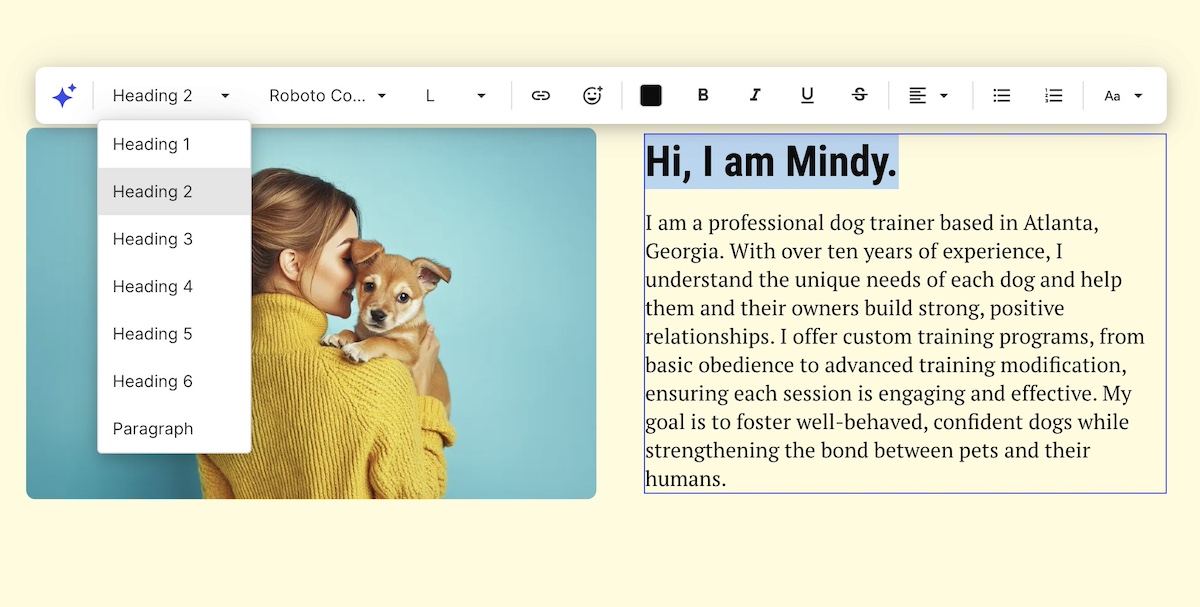
Optimizing page layout and structure using headers in a website builder
  • Optimize Structure and Navigation

If you skipped the sitemap in the first step of this checklist, now’s the time to prioritize website navigation. Think of it as your website’s treasure map, guiding users and search engines through your pages. Begin by pinpointing core pages like the homepage, about, contact, and any business-specific sections, such as services or products. Organize related pages into intuitive categories like “Services” or “Blog.” We’ll cover sitemap submission in a later step!

  • Perform Ongoing Maintenance

Keep your keywords in tune with what users are searching for—be it information, products, or solutions. Dive into content gap analyses to uncover topics your competitors cover that you might be missing. This detective work can help you craft content that not only fills those gaps but also attracts new clients like a magnet.

This is your first time hearing of SEO? Make sure to go through a SEO checklist so that you’re on top of all the essentials.

5. Test All Forms 

Your new website is your digital handshake, and email sign-up forms are a great way to connect with visitors and gather valuable data. Whether it’s an email signup, contact form, or payment form, the type will depend on your business needs—but having at least one is essential.

Now is the perfect time to make sure all your forms function properly and that the data is stored correctly. Here’s what to look for when doing so:

  • Optimized number of fields: As a rule of thumb, the more fields you have, the less likely people are to complete them—so keep it simple and essential.
  • Field validation: Make sure that the data entered meets specific criteria before submission. This process might involve checking for the correct data type (like numbers only in a phone number field) or verifying the proper format (such as a valid email address structure).
  • Notifications: Check that any emails or notifications triggered by form submissions are being sent and received as expected.

If you’re using WordPress, plugins like WPForms give you the ability to test the functionality of your form before going live. That said, if you’ve used another site building method, check what other apps or plugins are available. 

💡 Consider creating separate forms for each page or section, even if they’re identical. This allows you to easily track where users are converting without any guesswork.

6. Polish Your Design 

Consistency is what separates a professional site from one that feels unfinished. But that doesn’t mean you need a website designer. Check that your typography, colors, and layout hold up across every page and every screen size, and that everything aligns with your brand.

With that in mind, aim for a homepage design with captivating content and easy-to-follow navigation. Try to extend this approach to all your pages, making sure that:

  • Headers use the same font
  • Subheadings are consistently presented
  • Paragraph text is legible and easy to read
  • Fonts and background colors offer high contrast
  • Web pages look good on all screen sizes and web browsers
  • Mobile web design is optimal—that is, test your design and functionality on mobile devices to make sure it flows from start to finish.


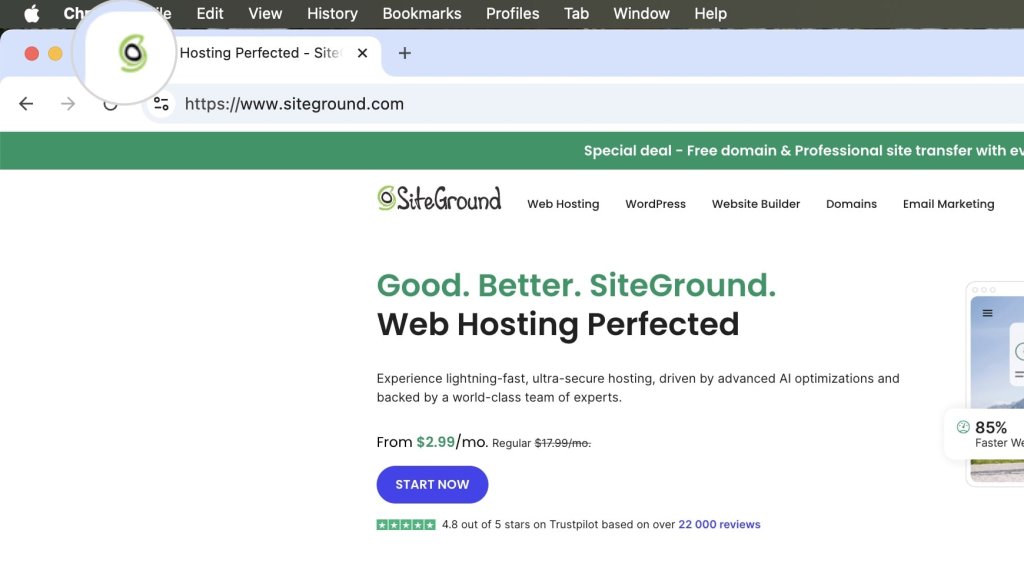
💡 Give your new website a navigation boost by popping your logo at the top and linking it to the homepage. Including a favicon—the small icon that appears next to page titles in browser tabs and bookmarks—can also be beneficial, as it helps visitors easily identify and return to your site when they have multiple tabs open

Example of a favicon in a web browser tab

7. Scan for Accessibility

And while talking about design and responsiveness, next up on the checklist for launching a site with accessible web design. This allows everyone, including people with disabilities, to use your site effectively. It isn’t just good practice; it’s often a legal requirement and a vital component of creating an inclusive online experience.

So, what does accessibility mean in practice? It involves designing your site so that all users can navigate and interact with it easily. This includes:

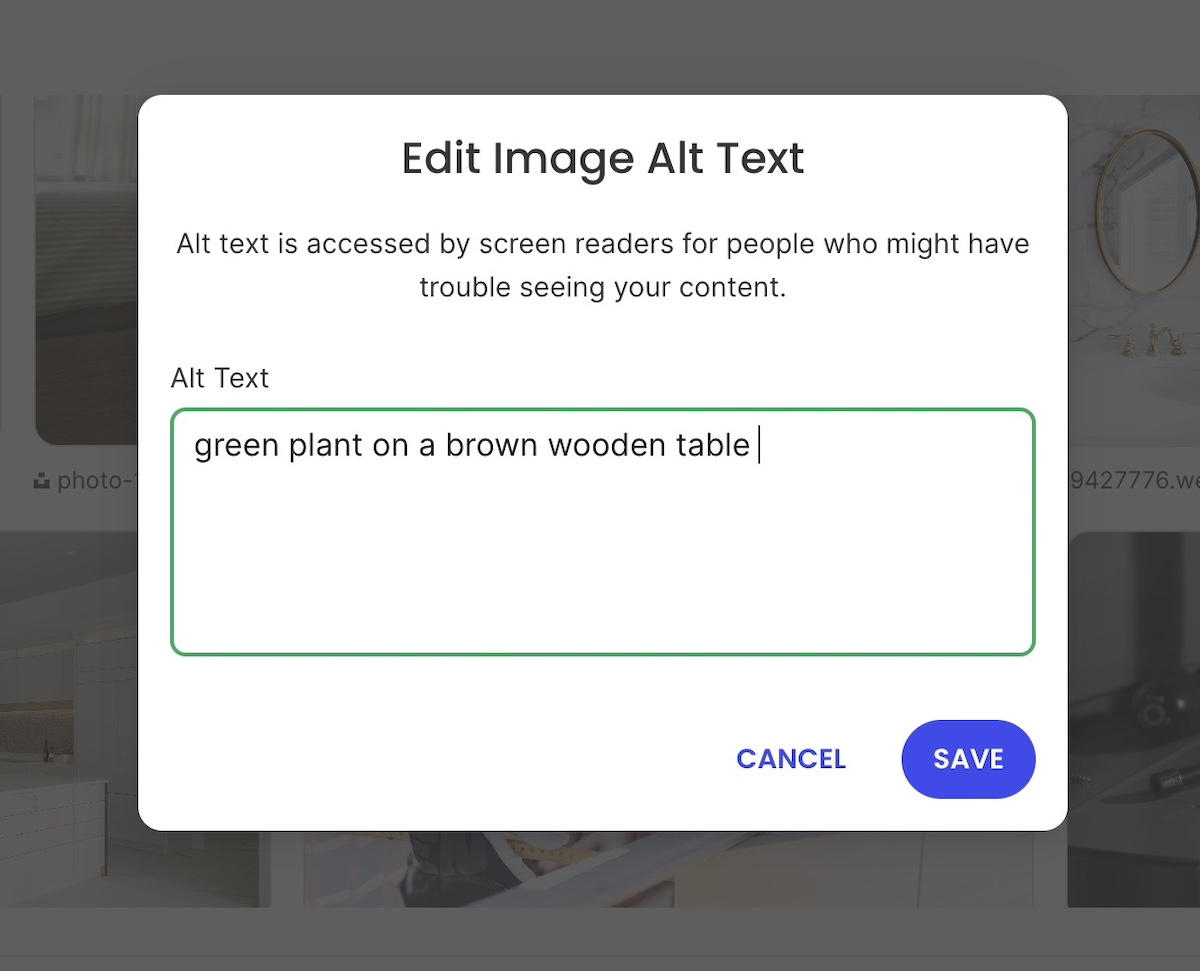
  • Providing text alternatives for images
  • Making your site keyboard accessible
  • Choosing a high-contrast color scheme
  • Providing transcripts or closed captions for files with audio
  • Opting for on-page content rather than PDFs

To ensure your site meets all of the standards, we recommend consulting the Web Content Accessibility Guidelines and making any necessary changes accordingly.

Example of adding alt test to an image in a website builder

Though it may not be the most exciting task, legal compliance is essential for protecting both you and your visitors, especially if you are running any kind of retail activity. Fortunately, many tools and AI solutions can assist you in creating these documents.

To check this off your website launch checklist, consider the following:

  • Implement a cookie consent banner: This informs visitors about your data collection practices and obtains their consent, as required by many privacy laws like GDPR.
  • Have a privacy policy in place: This text informs your users about what data you collect, how it’s used, and how you protect it. It’s not just good practice, it’s a legal requirement in many jurisdictions.
  • Include legal notices and terms of service: These outline the rules and guidelines for using your website and help limit your liability. They should clearly explain what users can and cannot do on your site.

While the cookie consent typically appears as a pop-up window on a visitor’s first visit, other legal documents should also be easily accessible. These are usually found in your website’s footer and often linked at the bottom of email newsletters. 

9. Fortify Against Cyber Threats

Security is non-negotiable before launch. Your site needs to be safe for visitors from day one, and a few foundational steps make a significant difference.

Start with an SSL certificate to encrypt data between your site and its visitors. Most hosting providers include these for free, and the SiteGround Website Builder has SSL built in along with security handled out of the box, so the basics are already covered.

If you’re running a WordPress site, there are a few extra steps worth taking on top of that:

  • Change your default login URL from “wp-admin” to something unique.
  • Install a security plugin like SiteGround’s Security Optimizer, which offers two-factor authentication and limits login attempts, and is completely free.
  • Keep everything up to date, from your WordPress version to themes and plugins, as outdated software can be an open invitation for trouble.

Keep those pesky cyber attacks at bay by following our website security checklist, and keep your digital space as safe as a vault!

10. Optimize For Speed and Performance

A slow site loses visitors before they even see your content. Speed optimization reduces load times, improves user experience, and directly affects your search rankings, so it belongs on every pre-launch checklist.

Fine tune key elements of your website by:

  • Compressing images: Reduce file sizes while maintaining quality and improving loading time.
  • Leveraging browser caching: Decrease data transfer by storing files locally on users’ browsers.
  • Minifying CSS, JavaScript, and HTML: Strip unnecessary characters and spaces to improve loading times.
  • Using a content delivery network (CDN): Distribute content across global servers to enhance load times and help mitigate DDoS attacks.

These optimizations might sound small, but they add up to a big difference when it comes to your site performance. Luckily, SiteGround’s Speed Optimizer allows you to optimize your website in a few clicks, and it’s free for all WordPress users!  

11. Ensure Your Domain Directs to Your Actual Site

Now let’s talk about your domain name, which you may have already purchased by now. 

Whether you’ve chosen to use a web-hosted sitebuilder, or to buy your own hosting and create a site with a content management system (CMS), you’ll need to make sure that your domain directs to your actual website. This step is a crucial part of your website requirements checklist.

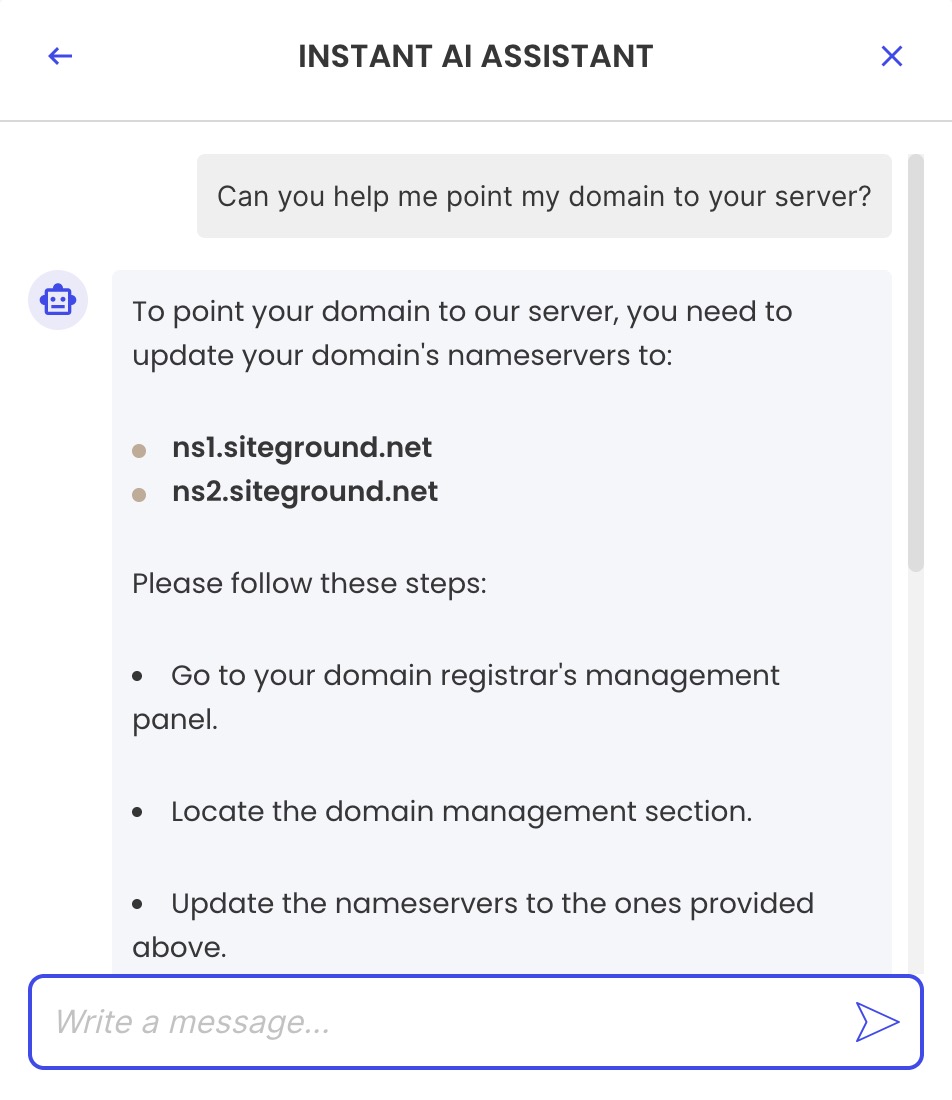
If you’ve purchased your domain and hosting from the same provider, this might already be set up for you. However, if you’ve bought your domain from one provider and your hosting from another, you’ll need to point your domain to your hosting provider. To do this, you will need to consult your domain and hosting providers for exact instructions, but the process is generally straightforward. 

Working with SiteGround? Here’s how you can point your domain to SiteGround servers.

12. Conduct Usability Testing

Usability testing means watching real people use your site before it goes live. It surfaces friction points and confusion that are impossible to spot when you already know how everything works.

You can do it in two ways:

  • By sharing your website with friends, family, and potential users, and asking for their candid overall experience—frustrations they’ve experienced, ideas you might not have considered. 
  • By using paid platforms like UserTesting or Trymata to observe users as they navigate your site and complete tasks. 

In any case, testing your user experience can reveal usability hiccups or bottlenecks, allowing you to address them before the big day.

13. Use Social Media to Build Anticipation

Building anticipation through social media is an ongoing process to weave into your website launch preparations. It’s an effective way to engage potential visitors and drive traffic to your site once it goes live, especially if you already have engaged followers.

Here’s how to make it happen:

  • Share sneak peeks, countdowns, and behind-the-scenes content to spark interest and excitement.
  • Use hashtags relevant to your niche to broaden your reach.
  • Encourage followers to share your content and join the conversation.

And there you have it! It’s time to hit that much-anticipated “Publish” button and watch the magic unfold as the results start rolling in.

14. Crawl Your Website

Once your site is live, you need to make sure search engines can find and index your pages. Submitting a sitemap and setting up a robots.txt file are the two steps that make that happen. Let’s break it down.

❗Crawling involves exploring pages and links that branch out to additional pages, while indexing entails storing, analyzing, and organizing the content and relationships between those pages.

Here’s how to make your site visible to search engines:

  • Submit an XML sitemap: This is a document of all the links on your website and how they relate to one another. Once it’s ready, you can submit it via Google Search Console and Bing Webmaster Tools.
  • Create a robots.txt file: Consider this as your site’s bouncer, guiding Google’s search engine crawlers on which pages to bypass. While smaller sites may not necessarily need it, larger sites can benefit significantly from this to manage server resources effectively. You can use Google Search Console’s tester to ensure it’s properly configured and not blocking essential pages.

15. Integrate Analytics Tools 

To better serve your users and grow your business, analytics tools are critical. They act as your website’s secret agents, offering insights into visitor interactions and helping optimize your site for search engines. Based on these insights, you can adjust your content, expand or refine your offerings, and make other strategic improvements.

The three most important tools that you’ll need are:

  • Google Search Console: Helps you understand your site’s performance on Google Search and get insights to improve visibility with the right keywords.
  • Google Analytics: Helps you track website traffic and measure the effectiveness of marketing campaigns by identifying website visitor sources such as organic search, social media, and paid ads.
  • Bing Analytics: Offers similar functionalities, optimized for the Bing search engine.

16. Check Site Speed 

Now, let’s tick off the speed box on our website checklist. Tools like PageSpeed Insights and GTmetrix are fantastic for getting a snapshot of your site’s performance. They’ll show you website metrics like load time, time to first byte, and even give you a performance score. It’s like having a performance dashboard for your website.

Once you have the data, what’s next? One of the biggest factors is your hosting provider. A reliable host with fast server response times can make a world of difference. Look for one that offers solid uptime guarantees and good customer support – because when things go wrong, you’ll want help, and you’ll want it fast.

Do you have doubts about your hosting provider? No worries—it’s never too late to make a switch! Check out SiteGround’s hosting plans and find your perfect match. 

SEE SITEGROUND HOSTING PLANS →

17. Map Out a Maintenance Plan

Launching your site is not the finish line. A maintenance plan keeps your site secure, fast, and up to date over time, and prevents small issues from becoming costly ones. Be sure to schedule regular reviews for tasks such as:

  • Updating plugins 
  • Checking security 
  • Renewing content 
  • Refreshing design

These should be part of your routine and addressed whenever issues pop up.

Final Thoughts on Your Website Checklist

Launching a website is exciting, but ensuring its success requires careful preparation and ongoing maintenance. By following a comprehensive website checklist that details the steps to launching a website, you can confidently address key areas such as SEO, security, speed, design, and usability. This proactive approach not only helps you avoid common pitfalls but also ensures that your site performs optimally from day one. 

Remember, the launch is just the beginning—post-launch efforts like monitoring site performance, integrating analytics, and maintaining regular backups are crucial for long-term success. With the right tools and strategies in place, your website will not only meet expectations but exceed them, providing a seamless experience for your visitors and supporting your business goals.

Website Checklist FAQs

What should be on a website checklist before launching?

A complete pre-launch website checklist covers design and branding consistency, page content and proofreading, on-page SEO, form functionality, accessibility, legal compliance, security, speed optimization, and domain setup. Beyond the technical side, it should also include usability testing and a plan for how you’ll maintain the site after launch. The goal is to make sure nothing critical is overlooked in the rush to publish.

How do I know when my website is ready to launch?

Your site is ready to launch when it works correctly on all devices and browsers, every page has been proofread and tested, your SEO basics are in place, your legal documents are live, and your security and backups are set up. If you’ve worked through a structured checklist and can confidently tick off each area, that’s your signal. Waiting for perfection is a trap—a well-prepared site is ready even if it isn’t finished.

Do I need a privacy policy on my website?

Yes, in most cases. If your site collects any personal data—through contact forms, newsletter signups, analytics tools, or cookies—a privacy policy is a legal requirement in many jurisdictions including the EU, UK, and California. It tells visitors what data you collect, how you use it, and how you protect it. Many AI tools and legal document generators can help you create one quickly.

This article was originally published in June 2025 and then updated in May 2026.

2026 Digital Marketing Trends: What Marketers Need to Know

Digital_marketing_trends

This article was originally published in January 2025, and then updated in January 2026.

Somewhere between “let’s boost this post” and “wait, does Gen Z even use Google?” digital marketing became unrecognizable. Your customers are discovering products in 15-second videos and researching purchases through actual conversations instead of clicking through ten blue links.

So what does marketing actually look like in 2026? Well, it’s changing by the day, but what’s important to know is that you don’t need to chase every shiny new platform. That’s why we’re focusing on the six foundational shifts that are redefining how people discover, evaluate, and buy. Here’s what’s actually changing and what you need to do about it.

Key takeaways:

  • AI now controls visibility. GEO determines whether your content appears in AI-generated answers, summaries, and recommendations.
  • Shopping is AI-driven. AI assistants influence how products are discovered, compared, and purchased.
  • Search is no longer linear. People search through conversations, videos, and social platforms rather than just keywords.
  • Short-form video fuels discovery. Fast, engaging video is now a primary way users explore products.
  • AI powers real conversations. AI-led communication enables personalized, scalable interactions across channels.
  • Paid media favors creativity. AI handles optimization, but strong creative drives performance.

As we transition into 2026, the following trends are underway and only accelerating. So the marketers who get on board and start adapting now will be better positioned to stay ahead.

1. Generative Engine Optimization & AI Visibility

Before diving into our list of digital marketing trends, let’s unpack a trend that underpins almost everything else: AI, and specifically generative engine optimization (GEO). 

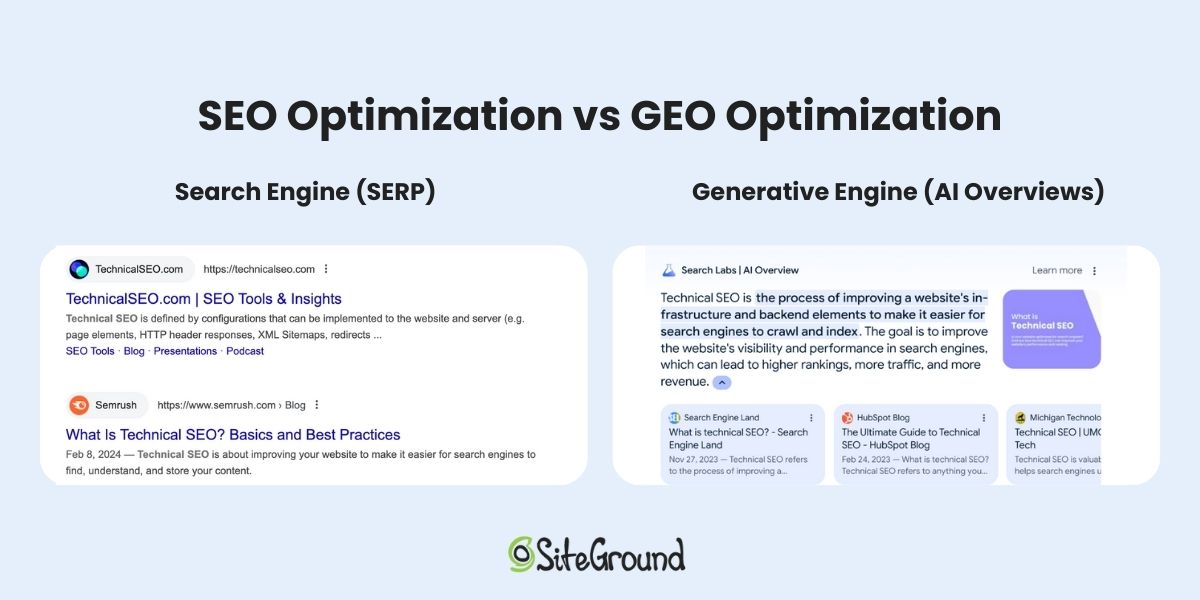
GEO is the process of optimizing content so it can be accurately interpreted, prioritized, and surfaced by AI-driven search engines. Unlike traditional SEO, which focuses on ranking on search results pages, GEO is about getting your brand and message to appear in AI-generated summaries, answers, and recommendations across multiple AI platforms.

search-engine-vs-generative-engine-optimization

This much-desired visibility is a whole new frontier that we’re only just starting to really understand. But what we do know now is that your success (or lack thereof) depends on how well AI can understand your content, evaluate its trustworthiness, and determine whether it answers customer questions. 

What’s changed:

  • AI increasingly delivers direct answers and summaries, oftentimes without users visiting the original website page.
  • Traditional SEO signals (think keywords and backlinks) remain relevant, but now don’t cut it on their own.
  • AI relies on structured data, schema markup, and content clarity to evaluate context, authority, and relevance. 
  • Content visibility now hinges on authority and alignment with user intent, not just ranking position.

What marketers need to optimize for:

  • Structured, machine-readable content (schema, metadata, FAQs) that AI can accurately interpret. Basically, make your content organized so that AI can understand it.
  • People-first, authoritative content that genuinely answers questions and demonstrates expertise. That means expert points of view, original content, and authenticity. 
  • Signals of credibility and trust like author bios (as seen below), citations, reviews, and social proof that AI can evaluate (and which also contribute to said authority).
Example of an author bio acting as a signal of credibility for AI
  • Content optimized so AI systems can accurately extract facts, context, and intent for downstream use.
  • Clear internal linking and website structure so AI understands relationships between topics (like your products, services, and so on).
  • Continuous monitoring and iteration using AI tools to assess which content is being surfaced and how it’s performing. While this kind of monitoring is evolving day by day, it’s important to stay on top of it.
  • Don’t focus on keywords alone and start addressing your users’ questions and search intent through content (such as blog articles) and dedicated pages.

The takeaway:

In 2026, digital visibility depends as much on how AI understands and interprets your content as on traditional ranking (and increasingly more so!). The brands that lean into this trend are likely to reap the greatest rewards.


Building a GEO-Ready Website
Getting this right starts with your site’s foundation. You need clean code, proper schema markup, and a structure that makes sense to both humans and AI.

SiteGround’s Website Builder makes building your site simple and fast, with clean code and easy tools for adding meta titles and descriptions. The website creation is handled so that you can focus your energy on optimizing content for AI.

Get started now>>

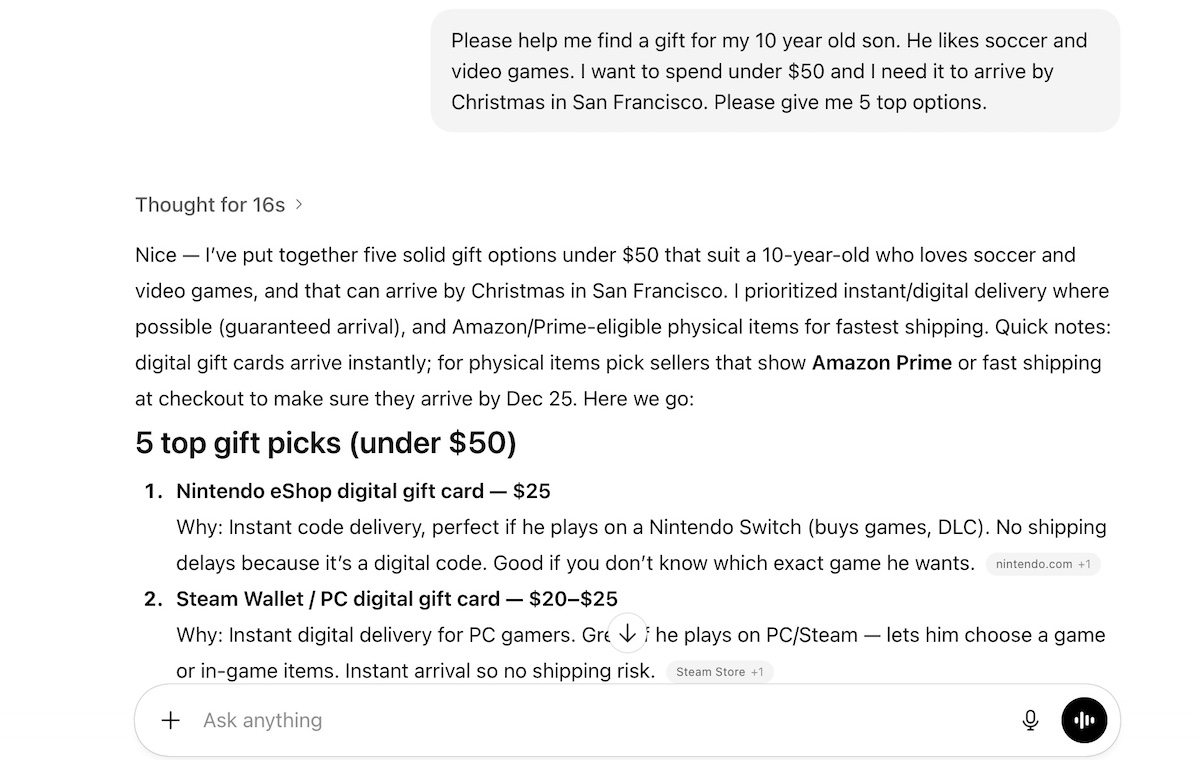
2. AI-Powered Shopping & Agentic Commerce

With GEO as the foundation for AI to understand and surface content, the next trend relates to how AI shapes the shopping experience itself. What matters here is not only what we discussed above, but also high-quality product information. This matters because it helps your offerings get accurately evaluated and recommended by AI-powered shopping assistants. 

Example of AI powered shopping via ChatGPT

What’s especially noteworthy about this shift is that it’s given rise to the trend of agentic commerce, where AI not only guides discovery but can actively influence or even complete purchases on behalf of consumers. 

This isn’t theoretical. In early 2025, OpenAI announced new shopping research capabilities in ChatGPT, signaling a move toward AI systems that actively help users research, compare, and evaluate products inside the interface itself.

What’s changed:

  • Shopping is now guided and mediated by AI, rather than purely manual browsing via search engines.
  • Discovery, comparison, and decision-making increasingly happen inside AI-powered interfaces, rather than on traditional ecommerce pages.
  • AI can evaluate multiple contextual signals (such as price, product attributes, delivery options, and other preferences) to recommend the “best fit” without users manually comparing every option.

What marketers need to optimize for:

  • Visibility within AI-driven shopping flows depends on having accurate, well-structured product data and clear differentiation (building on the previously discussed GEO principles).
  • Trust signals, such as reviews, ratings, and social proof, that AI can reliably review and surface.
  • Product clarity and content completeness so AI can interpret features, benefits, and use cases accurately.
  • Seamless website navigation and discovery, making it easy for AI to interpret your content and also guide users through exploration and selection.

The takeaway:

This trend means success depends on how easily AI can understand and surface your product. When product content is GEO-optimized, it doesn’t just increase visibility, it improves the quality of AI recommendations, directly supporting higher conversions.

Watch this space: it’s changing fast.

3. Search Becomes Conversational, Visual & Exploratory

Once AI can reliably interpret and surface content (we’re looking at you, GEO), the way people actually discover and research products is evolving rapidly. Search is no longer a linear process of typing keywords and clicking results. Now it’s a fluid, exploratory experience. 

Users now ask follow-up questions, refine intent mid-search, and move between text, video, and social platforms to make decisions. Meanwhile, platforms like TikTok, Instagram, and YouTube have become core discovery engines, especially for product research, local recommendations, and “how-to” content.

Example of TikTok as an information discovery engine

What’s changed:

  • Search is increasingly conversational; users ask full questions instead of short keywords.
  • Discovery is non-linear; queries now span multiple formats and platforms.
  • Social platforms function as search engines, especially for younger, discovery-first audiences.
  • Visual and video results are becoming influential, not just text-based content.

What marketers need to optimize for:

  • Content that answers questions the way people actually ask them, not just keyword-stuffed pages.
  • Specific, detailed search phrases instead of only chasing the obvious high-traffic terms.
  • Social media marketing across platforms, including TikTok, Instagram, YouTube, and other discovery channels.
  • Search-friendly video and visual content optimized for both traditional search and in-platform discovery.
  • Consistent visibility across platforms by matching content to real user intent.

The takeaway:

Success in 2026 depends less on ranking for a single keyword and more on consistently showing up across the entire customer journey of discovery. So that’s really wherever and however users explore before making purchase decisions. If we can start to really understand these evolving search behaviors, then we can better guide customers toward conversions.

4. Short-Form, Fast-Turnaround Video More Powerful than Ever

Building on this shift toward conversational, exploratory search, short-form videos have, as a result, become a super important channel for discovery and engagement. TikTok, Instagram Reels, YouTube Shorts: they all involve allowing users to quickly explore, compare, and evaluate products. And often before they even reach your website.

AI takes this even further by helping brands create, edit, and repurpose videos at scale, all while keeping messaging and branding consistent. With accurate metadata and transcripts backing your videos, AI can understand your content and deliver it to the right people at exactly the right time.

What’s changed:

  • Short-form video is now a primary discovery channel, and more than just entertainment.
  • AI enables rapid production, editing, and repurposing of video assets.
  • Video content is increasingly integrated into search, social, and commerce, influencing both awareness and conversions.
  • Attention spans are shorter, so content must communicate value immediately.

What marketers need to optimize for:

  • Producing videos quickly to stay relevant and post consistently.
  • Reusing content across different platforms to get more value from each video.
  • Creating stories that grab attention in the first few seconds.
  • Making videos easy to find through AI recommendations and discovery features.
  • Adding clear descriptions and tags so AI can understand and show your content to the right people.

The takeaway:

Short-form video has become a primary channel for how people discover products. AI tools let you produce and optimize videos at the speed and scale needed to stay visible where your customers are actively searching and scrolling. When your content shows up at the right moment across search, social, and ads, you’re there during those critical seconds when people are exploring options and deciding what to buy.

5. AI-Led Communication: Conversational Everything

AI isn’t just answering questions anymore. It’s running the whole conversation. Whether someone lands on your website, slides into your DMs, or asks a question in search, AI is there having real-time chats that actually feel human. (A little scary, a little impressive.) It’s not just spitting out canned responses. It understands your brand, reads the room, and responds like it actually gets what people need. Welcome to the era where your customers might not even realize they’re talking to a bot.

Example of an AI assistant via SiteGround chat in order to address customer queries

What’s changed:

  • AI chatbots and conversational interfaces now handle multi-turn, complex interactions, not just FAQs.
  • Messaging is personalized in real time, drawing on behavior, preferences, and context.
  • Conversational interfaces are integrated across channels, from web and apps to search and social platforms.

What marketers need to optimize for:

  • Defined conversational goals: Be clear about what each AI interaction should help users do, whether that’s exploring, deciding, resolving, or converting.
  • A consistent conversational voice: Document tone, language style, and boundaries so AI responses sound recognizably “you,” everywhere.
  • Context-aware responses: Ensure AI can reference relevant pages, products, policies, and past interactions instead of giving generic answers.
  • Clear escalation paths: Decide when AI should continue the conversation and when it should hand off to a human.
  • Ongoing review and refinement: Regularly audit real conversations to catch inaccuracies, gaps, or off-brand responses and adjust accordingly.

The takeaway:

AI-led communication isn’t about replacing human interaction; it’s about scaling it smartly. Brands that actually design their conversational experiences (instead of just automating for the sake of it) create smoother journeys from discovery to purchase. Skip this step and you risk sounding robotic, off-brand, or just plain unhelpful as you scale your business.

6. AI-Driven Paid Media & Creative-Led Performance

Once you’ve nailed discovery and engagement, paid media takes things to the next level. AI has transformed this space, too. By 2026, real-time ad optimization runs almost entirely on autopilot. AI handles the bidding, figures out who to target, and places your creative where it’ll perform best. Nearly half of advertisers have already anticipated letting AI handle bidding and optimization, according to Emarketer. This approach frees you up to focus on making ads people actually want to see.

With AI handling technical optimization (like Meta targeting peak-converting audiences or Google Performance Max shifting budgets to top-performing creative), your real opportunity to stand out is in your messaging, hooks, and emotional resonance. AI can optimize all day long, but it’s your creative that gives it something worth optimizing. The better your ads connect with people, the better signals AI has to work with.

What’s changed:

  • AI now handles bidding, targeting, and where your ads show up, so you spend less time in the weeds.
  • Real-time adjustments keep your campaigns performing without blowing your budget.
  • Your creative quality matters more than your technical setup.
  • The stories you tell shape the signals AI uses to optimize.

What marketers need to optimize for:

  • Creative that actually stops the scroll and makes people care.
  • Clear, punchy messaging that gets to the point fast.
  • Authentic storytelling that feels human, not corporate.
  • Testing new creatives constantly while AI handles the optimization grunt work.
  • Keeping your paid and organic content aligned so AI can accurately read what’s working.

The takeaway:

Paid media in 2026 is less about babysitting campaigns and more about creating ads worth amplifying. Let AI handle the technical heavy lifting while you focus on content that connects. Good creative plus smart automation equals better results. Simple as that.

Looking Ahead: Where Digital Marketing Trends Are Taking Us

These six trends share one thing: AI is reshaping how people discover, evaluate, and buy. The brands winning in 2026 use AI to scale what works while focusing their energy on creativity, authenticity, and storytelling.

You don’t need a huge team or budget to keep up. You need a solid foundation: a fast, flexible website built to work with AI. That means clean code, structured data, mobile optimization, and the ability to move quickly.

The SiteGround Website Builder is built for exactly this. It helps you create sites optimized for speed, SEO, and the structured content AI systems need. Whether you’re starting fresh or improving what you have, the right infrastructure makes everything else work better.

The future of marketing isn’t chasing every new platform. It’s showing up consistently and intelligently wherever your customers are looking. Nail that, and you’re set.

Ad to build your site in minutes with the SiteGround Website builder

This article was originally published in January 2025, and then updated in January 2026.

Product Launch Email Must-Knows + Examples & Free Templates

Product-Launch-Email

You’ve gone to all the work to launch that much-desired new product, and now it’s time to build some excitement and make the big announcement to all your email subscribers. The secret to nailing it? A killer product launch email campaign that gets people buzzing, clicking, and buying.

In this guide, we’ll take you through everything you need to know to craft product launch emails that captivate and convert. From structuring your email sequence like a pro to tips for writing copy that packs a punch, we’ve got you covered. Plus, we’re throwing in examples and product launch email templates to inspire your creativity. Let’s make your launch a success!

[17]

What is a Product Launch Email?

A product launch email is a targeted marketing message sent to your audience to introduce a new product or service. While the basics of a product launch email might seem like they need little explanation, their success—or lack thereof—is more nuanced: these emails aim to inform, excite, and persuade your recipients, whether they’re loyal customers, prospects, or potential partners. 

The goal is to generate buzz and drive action, such as visiting your website, signing up for updates, or making a pre-order or purchase. And it’s not as simple as just sending one single email; it’s about having a thoughtful plan to build anticipation, announce your launch, and follow through. 

SiteGround-Email-Marketing

What is a Product Launch Email Sequence?

That’s right: the best product launch email is one that forms part of a proper sequence. A product launch email sequence is a series of emails designed to guide your audience through an email customer journey, from pre-launch emails that build anticipation, to day-of launch emails with the official new product announcement, and post-launch follow-ups that keep the momentum going. This approach helps you maintain consistent communication and it keeps your audience engaged at every stage of the process. 

Let’s examine the types of emails for each step of the way.

Product-Launch-Email-Sequence

Pre-Launch Emails & Examples

Pre-launch emails are sent before the official launch in order to build anticipation and curiosity. These emails might include teasers, sneak peeks, or countdowns to the big day. Given that a product launch is an event of sorts, leverage the build up to create buzz in all the ways possible.

There are heaps of ways you can get this done via your email marketing, whether it’s simply announcing the launch ahead of time, or getting more creative and coming up with contests or collaborations around the occasion. With that in mind, here are some best practices when it comes to your pre-launch emails. 

Best Practices for Pre-Launch Emails

  • Announce the new product or service
  • Share exclusive details or behind-the-scenes content
  • Highlight the benefits your product will offer
  • Use countdown timers or event reminders to create urgency
  • Offer pre-launch and/or pre-order sign-ups
  • Implement a pre-launch discount
  • Run contests, giveaways or promotions around build up to the launch
  • Collaborate with other brands or influencers

When to Send Pre-Launch Emails

While this may depend on the scope of your product launch (launching a new car model is quite different from launching a new bath soap), most products probably only require a few weeks heads up. That is, if you’re running a contest or pre-order promotion, you might want to send a few emails over the course of several weeks. Whereas if you’re just simply teasing the launch, with no extra bells and whistles, one email a week in advance may do the trick. Stay on top of your email marketing metrics so that you can see what’s working and not working, and then optimize for your following sends.

Pre-Launch Email Examples

What better way to come up with pre-launch email ideas than to examine those that have done the job well. So let’s dive into some real-world new product launch email examples that have worked.

product-launch-email- example-skims-pre-launch

The above email builds excitement around the launch of a new-product collaboration. It not only gives all the necessary details—when the launch will happen, and where—but also product features (colorways and fit), and gives followers the opportunity to join the waitlist. So while sales can’t actually happen until the launch, Skims is able to move customers along in their journey.

product-launch-email-example-karst-pre-launch

Karst leverages new-year energy to promote its soon-to-launch planner. More than just a new product announcement, it allows recipients to pre-order the planner, thus capitalizing on the pre-launch hype in order to start making sales.

product-launch-email-example-pre-launch-jamie beck

In the above new product launch email example, recipients are given a sneak peak of the cover of the soon-to-launch book. The message employs personal and sincere language to start generating pre-orders before the book is even out. 

Day-Of Product Launch Emails & Examples

The day of the launch is when your emails shift to showcasing the product in its full glory. These emails should deliver a clear and enthusiastic message, emphasizing the value and unique features of the product while driving immediate action. Let’s examine what you might consider including.

Best Practices for Day-Of Product Launch Emails

  • Include bold visuals and product highlights
  • Provide a link to purchase, sign up, or learn more
  • Offer special launch-day discounts or bonuses
  • Create a sense of urgency with limited-time offers or stock warnings
  • Build and deliver on pre-launch efforts (did you run a contest? How about a giveaway or collaboration? Continue to leverage the hype, but also deliver on any promises)

When to Send Day-Of Product Launch Emails

This probably sounds like a silly question because the answer should seem obvious: the day of, right!? Well, yes, this is true. But like any other email blast, you’ll want to maximize sending time. That means sending out your email first thing in the morning, during your earliest customer time zone. You might also wish to align your product launch with a day of the week that is best for email sending. That is, send on a Tuesday, and avoid sending on a Friday or weekend when folks aren’t focused on their email inboxes. 

Day-Of Product Launch Email Examples

Need some day-of inspiration? Here are some product launch email examples to give you ideas.

product-launch-email-example-day-of-launch-stuffed cookies

Tasty and festive visuals do a solid job of capturing recipient attention, and then a promotion for a free cookie for a limited time leverages that sense of urgency coupled with a discount. Colorful cookies are hard to resist, but a free colorful cookie is even harder to say no to.

product-launch-email example-day-of-launch-Thomas-Vine

In the above email, Thomas & Vine launches its new footwear, and makes the offer more enticing with a discount. They’re also using this opportunity to encourage people to sign up so that they can receive more similar updates about new releases, thus closing this deal, and planting seeds for future ones.

product-launch-example-day-of-launch-colorverse

When it comes to bold and catchy visuals, Colorverse surely wins. The above effectively captures attention with a colorful email that seals the deal by clearly and attractively communicating product features and benefits. 

Post-Launch Emails & Examples

Post-launch emails focus on maintaining momentum after the initial new product announcement. They’re an opportunity to engage customers who haven’t yet acted, provide social proof, and encourage feedback or reviews. These emails are a great way to finally get that sale, and close the loop on the product launch process, setting the stage for future sales.

Best Practices for Post-Launch Emails

  • Share testimonials or early reviews
  • Highlight additional features or use cases
  • Thank your audience for their support
  • Encourage referrals or social sharing
  • Close the loop on any launch events, collaborations, etc. 

When to Send Post-Launch Emails

Post-launch emails can be sent during the weeks following your launch. For example, you might send one a week after launch, then another a couple weeks later. Perhaps one could highlight testimonials, and then another could offer an additional limited-time discount.

Post-Launch Email Examples

Post-launch emails require a little extra touch—a delicate balance between keeping the excitement alive, but not overdoing the new product announcement. So this is when you’ll need to get creative about how you keep the conversation going. Check out these examples for some ideas. 

product-launch-email-example-post-launch-canva

Canva’s announcement above is essentially a re-announcement of the launch. It retells all the product features and benefits, but adds a cheeky “have you tried it?” since this product was previously launched. This is a creative and smart way to extend the launch announcement, capturing the attention of those who might not have purchased yet, or who perhaps missed the announcement altogether.

product-launch-email-example-post-launch-carla-llanos

This artist is using her launch as an opportunity to generate continued buzz. In this new product launch email example, she’s offering an extra discount, and highlights that it’s for valued customers.

product-launch-email-example-post-launch-brightland

The above new product announcement revisits the launch by mentioning that the “reviews are in.” As such, the seller not only provides social proof (in the way of reviews) but can freshly talk about the launch, and therefore generate more sales.

The above new product announcement revisits the launch by mentioning that the “reviews are in.” As such, the seller not only provides social proof (in the way of reviews) but can freshly talk about the launch, and therefore generate more sales.

How to Write a Product Launch Email

Alright, now you’ve got some fresh inspiration for what you’d like to send. Maybe you’ve even started plotting out your email automation sequence. So it’s time to get down to the business of actually writing marketing emails for your product launch. Here’s how to nail each element for maximum impact:

1. Start with a Strong Subject Line

Your product launch emails aren’t just about the content within them; you need to get them opened in the first place. Indeed, your email subject line is the first impression your email makes, and it determines whether recipients will open it. A strong subject line should grab attention and immediately communicate the value of your product. Here’s what to keep in mind:

  • Use action words or power phrases to create urgency, such as “Don’t Miss This!” or “Just Launched!”
  • Include personalization if possible, like the recipient’s name or location.
  • Spark curiosity with phrases like “Your Next Must-Have is Here” or “We’ve Been Working on Something Big…”
  • Keep it short and punchy—best to aim for using 50 characters or less

2. Hook Your Audience Immediately

Once recipients open your email, the first line needs to hold their attention. This hook sets the tone for the rest of the email and should align with your subject line. Consider the following:

  • Use an attention-grabbing announcement, such as “The wait is finally over!”
  • Pose a question that resonates with your audience, like “Ready to revolutionize your workflow?”
  • Share a compelling stat or story related to your product.
  • Speak directly to your audience’s desires or challenges: “Looking for the perfect travel companion?”

3. Focus on Benefits

While it’s important to share details about your product, your audience cares most about how it will improve their lives. Shift the focus from features to benefits, explaining what makes your product valuable and unique. Here are some ways you can do this:

  • Translate technical features into real-world advantages. For example, instead of saying “10-hour battery life,” say “Stay connected all day without worrying about recharging.”
  • Address pain points your audience experiences and explain how your product solves them.
  • Use customer-focused language like “you” and “your” to make the benefits feel personal.

4. Include a Clear Call to Action (CTA)

Your email should always have a clear and compelling next step for the recipient to take. A strong CTA ensures they know exactly what to do after reading your email. Here a handful of tips when it comes to creating an effective CTA:

  • Use action-oriented phrases like “Shop Now,” “Learn More,” or “Sign Up Today.”
  • Make the CTA button stand out with bold colors and clear text.
  • Limit the email to one or two CTAs to avoid overwhelming the reader.
  • Include a sense of urgency if you’re offering a promotion: “Order now—offer ends soon!”

5. Keep It Visually Appealing

Email marketing design is just as important as the content. An attractive, well-structured email makes your message more engaging and easier to read. Design best practices you’ll want to keep in mind include:

  • Use high-quality images or videos that showcase your product. For example, a sleek photo of your new product in use can speak volumes.
  • Stick to a clean layout with plenty of white space to improve readability.
  • Ensure consistent branding throughout when it comes to logo, colors, and fonts
  • Make your email mobile-friendly since many users will view it on their phones.

By following these steps, you’ll create a new product launch email that not only informs but also piques your audience’s interest and motivates them to take action.

Maybe you’re not in the mood to write your email from scratch, though. Because we’re here to make your email sending as easy as possible, we’re providing you with a bonus list of free product launch email templates for each stage of your launch. Simply download the templates, copy and paste the product launch message examples, and make them your own by adding your details, or by modifying them to meet your unique needs.

Closing Thoughts on Product Launch Emails 

Launching a product is like throwing a big party (in this case, virtually!)—you want everyone buzzing with enthusiasm and eager to join in. With the right email strategy, you can build anticipation, steal the show on launch day, and keep the energy going long after the confetti has settled. Think of each product launch email as an invitation to the celebration: entice them, wow them, and leave them wanting more. 

Not sure where or how to get started? SiteGround Email Marketing makes getting going ultra easy thanks to attractive email marketing templates, audience segmentation, email automation, robust analytics, and a user interface that’s a breeze to use. Start your email marketing journey with SiteGround today.

email-marketing-course-for-beginners

Drip Marketing: What Is It and How It Works

A laptop displaying an email that marks the beginning of a drip sequence.

Turning curious browsers into loyal customers can feel like a Herculean task. Leads often play hard to get, and even when they’re ready to take action, holding their attention is no small feat. 

But what if you could captivate them with well-timed messages that gently nudge them toward conversion? 

Fortunately, this isn’t just wishful thinking—it’s a practical strategy you can easily implement. Follow along to learn about drip marketing and how to leverage its power to deliver the right message at the right time.

What Is Drip Marketing?

Drip marketing is a strategy that involves automatically sending out personalized messages based on a schedule or segments, or that is triggered by specific user actions. These messages can be delivered through email, SMS, or push notifications, with email being the most commonly used channel. 

💡An email drip campaign may also be referred to “an automated email campaign,” “lifecycle emails,” or “autoresponders.”

Oftentimes, a drip marketing campaign is used to influence its target market over time by delivering a series of messages that follow a predetermined course. One common example is the welcome email sequence, used to greet newcomers. 


For instance, a welcome email can be sent automatically when someone registers on your website. Depending on whether the first email was opened, you can follow up with a different message tailored to guide them further down their email customer journey. If they don’t engage, you can remove them from this specific campaign. However, if they do engage, you can encourage further interaction by subtly prompting them to make a purchase.

Illustration of how a welcome drip campaign works

Although transactional emails can be sent individually, they can also play an effective role in drip marketing. These types of emails include account alerts, such as password resets or subscription renewals, as well as commercial transactions like order confirmations and shipping notifications.

Why Run a Drip Marketing Campaign?

Email automation isn’t just about logistics, though: it can help grow your business. Indeed, here are several reasons why you should consider implementing it in your email marketing strategy:

Time-Saving and Scalable

Drip marketing allows your business to communicate in real-time and in ways that manual outreach simply can’t replicate. That is, as a small business owner focused on growth, manually greeting every new subscriber or tracking each website visitor’s actions in order to send individual emails would be overwhelming, if not impossible. 

With drip marketing, you set up your automation workflows once, and they run automatically in the background, working their magic. This way, you not only save time to focus on other important tasks, but you can also handle a larger number of subscribers without extra effort. As a result, you spend less time on tedious activities while achieving greater results.

Increased ROI 

Speaking of greater results, did you know that three out of four marketers who implement marketing automation achieve a positive return on investment (ROI) within a year, and almost half see a positive return within just six months? 

This success is largely due to drip campaigns’ ability to effectively highlight calls to action at the most opportune moments. For example, if someone is exploring your premium plans, they receive a message showcasing the benefits of upgrading. After making a purchase, they receive an upsell or cross-sell message to encourage further interest. In each scenario, they receive tailored messages during critical-decision moments, which increase the likelihood of success and therefore your ROI. 

Gradual Relationship Building

Retaining existing customers is both easier and more cost-effective than constantly pursuing new ones. Automated flows can help you achieve this efficiently.

For instance, you can have one drip campaign for when someone signs up to download a resource, showing interest in your content. An automated sequence can follow up with related articles, helpful tips, or exclusive offers, gradually nurturing their interest and naturally guiding them from lead to customer. Once they make a purchase, transition them to a loyalty series. This might start with a thank-you email, followed by usage tips for their new product and exclusive discounts on future orders.

This approach ensures that customers receive messages relevant to their current situation, keeping them engaged with your brand and increasing the chances of repeat purchases and loyalty.

Personalization Made Easy

When subscribers receive emails that feel personal, they are more likely to engage—whether by opening, clicking, or even making a purchase. Drip campaigns simplify personalization by allowing you to set up the flow once and customize it for each recipient’s unique attributes, such as user data, behavior, and preferences.

Nordstrom, for instance, customized their promotional emails to reflect each visitor’s local weather conditions, providing content that was directly relevant to their environment. This level of personalization makes the communication feel more relevant and engaging, increasing the likelihood of interaction and conversion.

How to Set Up an Email Drip Campaign?

Now that you’re versed on what drip marketing is and its many perks, let’s pull back the curtain and explore the behind-the-scenes processes. From choosing your email triggers to crafting a compelling message, let’s examine all you need to know in order to create seamless customer experiences.

1. Choose an Automation Software

First and foremost, you can’t set up a drip campaign without automation software.  That’s because manually managing dynamic content and conditional statements would likely be mind-bogglingly time-consuming and error-prone. Fortunately, most email marketing or CRM platforms include automation features that simplify the process.

Here’s a quick list of key features to look out for when selecting an email automation tool: 

  • Ease of Use: Look for intuitive navigation and a no-code builder so you can manage workflows without needing lengthy tutorials. 
  • Deliverability: Ensure your platform allows you to authenticate your sending domain via DNS records (DKIM, DMARC, SPF) to prevent emails from landing in spam folders or getting blacklisted.
  • Recipient Segmentation: Look for a platform that allows for straightforward recipient segmentation into cohorts that align with your marketing efforts.
  • Analytics and Reporting: To identify the most effective email elements and increase conversions, your platform should provide access to key email marketing metrics like open rates, click rates, bounce rates, and interactions.

SiteGround Email Marketing happens to have them all! With its intuitive interface, AI writing assistant, and pre-built templates, you can effortlessly schedule welcome sequences, deliver freebies, and keep your audience engaged with simple, targeted email flows. Discover how easy it is to nurture, engage, and grow your audience.

2. Determine Your Email Triggers

In the world of drip campaigns, triggers, also known as rules, act as the signals that determine when and why a user receives a particular email. It’s important to choose triggers that resonate with your audience to avoid overwhelming them with irrelevant information. Here are the four main types of email triggers you might consider:

Action-Based Triggers

As you can guess, action-based triggers are initiated by a specific action a user takes, either on your website or within your app, like:

  • Sign-Up Confirmation
  • Product Purchase
  • Webinar Registration
  • Abandoned Cart

Date-Based Triggers

Engage with your audience on the days that are important to them—or to you. These automations can be utilized for a range of occasions, including:

  • Subscription Renewal Reminder
  • Milestone Achievement
  • Brand Anniversary
  • Birthdays

Demographic-Based Triggers

Demographics provide valuable insights into your users, allowing for more personalized interactions. Consider factors such as:

  • Gender
  • Age
  • Location

However, it’s crucial to use this information responsibly and respect your audience’s privacy consent.


User Characteristic-Based Triggers

You might also try targeting audience segments based on user characteristics such as:

  • Visit Frequency: How often do they visit your site, or how long do they linger on your premium services page?
  • Account Inactivity: How long ago did they sign up, or make their last purchase?
  • Content Preferences: Which types of content do they engage with most?

💡 TIP: We suggest starting with these automation sequences that every business should implement:
– welcome sequence
– lead magnet delivery sequence
– nurture sequence
– client loyalty sequence
Once you’ve mastered these, you can try setting up drip campaigns based on more advanced triggers.

3. Determine Your Calls to Action

The primary goal of a drip campaign is to guide your prospects through the customer journey by encouraging them to take specific actions. 

To achieve this, each email in your series should include a call to action (CTA) that prompts subscribers to engage in activities that advance them further down your sales funnel, such as:

  • “Download Guide” 
  • “Redeem Your Discount”
  • “Watch Video”
  • “Purchase Now”

To motivate subscribers, it’s important to associate a clear benefit with the action you want them to take. Additionally, the actions subscribers take—or choose not to take—serve as triggers for the subsequent email in the campaign.

4. Plan Out Your Drip Campaign

How many emails should your drip campaign include? How should you space them out? These are crucial questions, and the answers depend on several factors:

  • The type of drip campaign 
  • The complexity of the information you need to convey
  • The length of your customer journey

Research indicates that increasing the number of emails in an autoresponder sequence can lead to reduced engagement. Surprised? After all, nobody enjoys being blasted with emails. 

However, there are a few guidelines to help you hit the sweet spot regarding the number of emails in your sequence and the intervals. Here are a few to consider:

  • Identify the amount and type of content needed to effectively guide a subscriber through your sales funnel.
  • Break your content into small, easy-to-digest chunks
  • Assign the content to each stage of your customer journey
  • Experiment with different drip sequences

5. Don’t Forget to Set Exit Conditions

We’ve talked about setting email triggers; now let’s focus on how your audience exits these triggers—that is, how they finish the email drip campaign. To stop subscribers from receiving your sequence after they’ve already taken the desired action, it’s important to establish exit conditions. These conditions define the specific actions or criteria that, when met, automatically remove subscribers from the campaign, ensuring they only receive relevant content.

Consider a situation where a prospect is enrolled in a drip campaign aimed at gathering feedback. They receive an email requesting feedback about their experience with your brand’s support team. After submitting the form, they expect a thank you email but receive another feedback request instead, leading to confusion. This is not the reaction you want from your prospects, right?

To ensure a smooth process, remember to set exit conditions for your email triggers, which will automatically disenroll a prospect once they complete the desired action.

6. Craft Action-Inspiring Content

Now that you know who you’re targeting, you need to generate a message that’s helpful and grabs their attention. What do you want the customer to do or learn? Based on your answer, write copy that’s clear, actionable, and on brand. 

🔥 Learn how to write marketing emails that people actually read. 

In an email drip marketing campaign, each message should be able to stand alone, even though it’s part of a series. For instance, if a prospect skips the first two emails but engages with the third, they should still be able to follow along and understand the call to action.

Don’t assume subscribers read every email, just as you likely don’t either. Instead, ensure each message provides context and relevance.


[ai_prompts_download]

7. A/B Test Your Drip Campaign

Once you’ve crafted your emails, you might think it’s time to send them out. But wait! To make the most out of your email drips and to continuously improve, it’s important to conduct A/B testing. For an email drip campaign, this means sending slightly different versions of an email to various groups of subscribers to determine which performs best.

You can test each component of your emails to find the optimal combination that drives results. However, remember to change only one element at a time. For instance, try different subject lines or images while keeping everything else constant. This approach will help you identify the specific change that made the campaign more successful, allowing you to fine-tune your drip campaigns.

Examples of Email Drips

Now that you have the know-how to start your drip campaign, here are some real-life examples to ignite your creativity.

1. Welcome Email 

Imagine how bewildered a newcomer might feel during their first encounter with your business. That’s why a welcome email series is an essential first step in engaging a new or potential customer.

This type of drip marketing triggers immediate next steps based on actions users take on your website or app, such as subscribing to your newsletter or creating an account in your application.

Welcome drips allow you to share everything a newcomer needs to know about your business—from your brand’s values and story to your product selection or even a quick guide on how your platform works. This email from Pinterest is a good example.

2. Cart Abandonment

Abandoning a fully loaded shopping cart is unfortunately quite common, but a well-crafted abandoned cart email can encourage customers to reconsider their purchase. Be cautious not to come across as overly intrusive or “big brother”-like. Instead, find a subtle way to say, “We understand, life happens,” without any judgment or pressure.

For example, Meow Meow Tweet sends a light-hearted reminder to customers that something is waiting for them, gently encouraging them to return and complete their purchase.

3. Post-Purchase 

When someone makes their first purchase from you, it’s a great opportunity to thank them, showcase the product’s features, provide tips on getting the most out of it, and reassure them that they made a smart decision.

Expressing gratitude at this early stage of your business relationship can make customers feel like they’re part of a special community, much like this email from Ilia.

4. Order Confirmation

When a customer completes a purchase, an order confirmation email is the initial communication they anticipate from any brand or business. It reassures them that their transaction was successful and provides important details such as shipping information and an order summary.

However, these emails can be more than just a receipt, and Ipsy is a perfect example of that. They even provide a how-to guide in order to educate the customer on how to get the most out of the product.

5. Birthday Celebration 

Sending an email on a customer’s birthday, the anniversary of their first purchase, or another significant event can be an excellent way to reinforce your brand’s value—and might even prompt a purchase.

Take a cue from Little Beast, which remembers to delight its customers, even if those customers aren’t exactly human.

6. Unsubscribe 

While unsubscribing emails might not be the most exciting aspect of a marketing plan, they are essential, particularly when building a high-quality email list.

These emails can be used to try to win back customers by understanding their reasons for unsubscribing, and thus offer valuable insights to enhance your marketing strategy. Alternatively, you can suggest they customize their preferences to receive more relevant information, if this was the problem.

7. Subscription Renew

If your subscriptions don’t auto-renew, design a compelling drip campaign with a clear call to action, urging users to renew their service. Use this opportunity to showcase the advantages of maintaining their subscription, such as access to exclusive content and exciting new features introduced since their last renewal.

For instance, YouTube Premium successfully encourages users to keep enjoying the enhanced experience of their premium service by highlighting what they would miss out on if they don’t renew.

Final Words on Drip Marketing

Drip marketing is like having a friendly digital concierge for your audience, ready to deliver just the right message at just the right time. 

With drip marketing, you can send personalized, timely messages, effortlessly guide prospects through their customer journey, enhance their experience, and build lasting relationships. Whether you’re rolling out the welcome mat for new subscribers, giving a gentle nudge to those who left items in their cart, or assisting someone who has forgotten their password, drip campaigns offer a strategic and efficient way to communicate that saves time and drives results.

What Is a Transactional Email and Why Send One? (+ Examples)

transactional email in the middle and icons around it

Email is the cornerstone of communication between businesses and their customers. Among the millions of emails sent daily, transactional emails stand out as essential tools for delivering timely and pertinent information. But what exactly constitutes a transactional email, and why are they so important for your business?

In this blog post, we will unravel the concept of transactional emails, exploring their definition and significance in the business landscape. We’ll guide you through the nuances of crafting impactful messaging and design, having your emails not only reach your audience but resonate with them. 

We’ll also delve into various types of transactional emails, from confirmation and welcome emails to cart abandonment and feedback requests, providing you with practical examples and best practices.

Transactional Email Definition

Transactional emails are automated messages sent to individuals based on specific actions or interactions they have with your business or platform. They are triggered by user behavior and are intended to provide essential information that the recipient needs or expects.

These emails are often initiated by a transaction or event, such as a purchase, subscription, or account update. Their primary purpose is to facilitate an ongoing process or transaction, ensuring that the user is informed and alert at every step. This makes them a vital component of customer communication, as they deliver content directly to the user’s inbox.

Some common characteristics of transactional emails include:

  • Timeliness – they are sent immediately or shortly after a triggering event, and deliver information promptly.
  • Personalization – they often contain personalized details, such as the recipient’s name, order details, or account information, enriching the user’s experience.
  • High open rates – due to their relevance and necessity, transactional emails typically have higher open rates compared to promotional emails.
  • Regulatory compliance – they are generally exempt from anti-spam regulations like CAN-SPAM in the U.S., and GDPR in Europe, as they are not considered marketing emails.

The Importance of Transactional Emails

Regular and reliable communication through transactional emails helps build trust with your customers. When users receive timely updates on their transactions, they are more likely to view your business as dependable and customer-focused.

Even though the primary focus of transactional emails is to convey essential information, they also present subtle opportunities for cross-selling or upselling. Including related product recommendations or special offers can add value without overshadowing the main message.

Transactional emails are not just a means of communication but a strategic asset that can improve customer satisfaction and loyalty. With that in mind, businesses can leverage  transactional email tools to optimize their email strategy, making sure that every interaction is meaningful and impactful.

Crafting Transactional Email Messaging

With the perfect transactional messaging you can not only deliver information, but also engage your audience and reinforce your brand. 

Here’s a guide on how to write a transactional email that resonates with your recipients:

Subject line writing techniques

The email subject line is the first impression your message makes, and it determines whether your email gets opened or not. To make it impressive enough to get the job done, here are a few rules to follow:

  • Be clear and concise when conveying the purpose of your email. For example: “Hooray, your Blue Bottle order is confirmed!” leaves no room for ambiguity.
  • Include personalization by using the recipient’s name or referencing their specific transaction to increase open rates. For instance: “Jane Davis, verify your email address with Eventbrite” adds a personal touch.
  • Highlight urgency (if necessary) when the email contains time-sensitive information, such as a password reset: “Reset your password before it expires.”

Body content writing techniques

Once the email is opened, the body content must communicate the necessary information while maintaining clarity and engagement:

  • Start with a friendly greeting by personalizing the opening with the recipient’s name to establish a connection.
  • Be direct and informative by stating the purpose of the email right at the beginning. For example: “Thank you for your purchase! Here are your order details.”
  • Use a conversational tone that’s friendly, not robotic, to make the message more exciting.
  • Incorporate a brand voice that aligns with your brand’s style and identity.
  • Include a CTA in case there’s an action the recipient needs to take, such as tracking a shipment, or confirming an email address—and make the CTA easy to follow.

Pro Tips for Transactional Messaging:

💡 Optimize for mobile because many users will open your emails on their phone devices.

💡 Test and analyze different elements of your emails to determine what works best.

Creating a Transactional Email Design

The design of your transactional emails is just as important as the content. Email marketing design is key because it enhances readability, reinforces your brand identity, and makes critical information easily accessible. Here are some design best practices to keep in mind:

  • Transactional emails should prioritize clarity and functionality over elaborate design elements. A clean and simple layout helps recipients quickly find the information they need.
  • Use a straightforward design with plenty of white space to avoid overwhelming the reader. This makes the email easy to navigate and highlights the essential information.
  • Maintain a consistent structure across all transactional emails. This familiarity helps users quickly locate important details, such as order numbers or action buttons.
  • Make sure to highlight important information – the most crucial elements of your email should stand out visually.
  • Employ headings, subheadings, and bullet points to create a visual hierarchy that guides the reader through the content.
  • Use contrasting colors and actionable text for call-to-action buttons to make them stand out. For example, “Track Your Order” or “Reset Password” should be prominent and easy to click.
  • Emphasize your brand identity even in routine communications.
  • Include your logo, brand colors, and fonts so that the email aligns with your overall brand aesthetic. This consistency helps build brand recognition and trust.
  • Maintain professionalism appropriate for transaction communications. That is, it’s important to reflect your brand’s identity, but not at the expense of compromising credibility.
  • Make it easy for recipients to reach out if they have questions or need assistance.
  • Include customer service contact information, such as an email address or phone number, in a visible location within the email.
  • Consider adding links to your social media profiles, providing additional channels for customer interaction.

Types of Transactional Emails

There are different types of emails––and indeed, one of the most commonly used ones is transactional emails. They come in various forms, each serving a distinct purpose in the customer journey.

Let’s explore some of the most common types of transactional emails, including confirmation emails, welcome emails, password resets, cart abandonment emails, and feedback requests. Along the way, we’ll share a transactional email example for each of these types and explain its best practices to help you optimize your emails for maximum impact.

Confirmation Emails

Confirmation emails provide customers with reassurance and clarity regarding their interactions with your business. They come in different forms, including subscription confirmations, order confirmations, and shipping confirmations. Here are some best practices for crafting each type:

Subscription confirmation

Subscription confirmation emails are sent when a user subscribes to a service, newsletter, or account. These emails are crucial for verifying the user’s intent and ensuring they have successfully subscribed.

  • Clear subject line – Use a straightforward subject line like “Welcome! Confirm Your Subscription” to convey the email’s purpose.
  • Concise message – State that the user has subscribed and outline any next steps. For example, “Thank you for subscribing! Click the link below to confirm your subscription.”
  • Include a CTA – Provide a prominent call-to-action button for confirmation. It should be easy to find and click, especially on mobile devices.
  • Reinforce value – Highlight the benefits of subscribing, such as exclusive content or special offers.

Here’s an example of a best practice subscription confirmation transactional email:

Order confirmation

Order confirmation emails are sent immediately after purchases are made, providing customers with details about their order. These emails are essential for building trust and making customers feel secure about their transaction.

  • Detailed order summary – Include a comprehensive breakdown of the order, such as product names, quantities, prices, and total cost.
  • Personalization – Address the recipient by name and include any specific details related to their purchase, including order number and estimated delivery date.
  • Contact information – Provide customer service contact details in case the customer has questions or needs assistance with their order.
  • Cross-selling opportunities – Consider offering recommendations for related products, but don’t overshadow the primary purpose of the email.

Here’s a good example of the above-mentioned practices:

Shipping confirmation

Shipping confirmation emails inform customers when their order has been dispatched, providing tracking details and delivery expectations.

  • Tracking information – Include a tracking number and a direct link to the carrier’s tracking page, making it easy for customers to monitor their shipment.
  • Estimated delivery date – State the expected delivery date to manage customer expectations and reduce inquiries.
  • Reassuring tone – Use a friendly and reassuring tone to convey excitement about the order being on its way, such as “Your order is on its way! Track it here.”

Here’s a nice example of the above-mentioned practices:

Welcome Emails

Welcome emails are the first impression your business makes on a new subscriber or customer, setting the tone for your future relationship. These emails bridge the gap between transactional and marketing communications, especially when an email contains both commercial and transactional content. Understanding the balance between transactional email versus marketing email is key to crafting a successful welcome message.

When a user signs up or makes their first purchase, a welcome email provides an opportunity to introduce your brand, highlight key offerings, and guide them through their initial experience. Let’s explore some best practices for welcome emails:

  • Prompt delivery – send the welcome email immediately after the user signs up or completes a transaction. An email platform can help you with the email automation process and deliver the message in a timely manner.
  • Personalization – address the recipient by name and tailor the content to their specific interaction with your brand.
  • Inviting subject line – use a subject line that encourages the recipient to open the email, such as “Welcome to [Your Brand]! Here’s What to Expect.”
  • Introduce your brand – provide a brief overview of your brand and what sets you apart. Highlight your values, mission, and any unique selling points.
  • Guide them to next steps – outline what the recipient can do next, whether it’s exploring products, setting up their account, or accessing exclusive content. Include clear calls to action (CTAs) to guide them.
  • Mix of content – when an email contains both commercial and transactional content, the primary focus should remain on the transactional aspect. However, you can subtly introduce related products or services.

Leverage a Reliable Email Marketing Tool

Using a transactional email platform like the SiteGround Email Marketing Tool can streamline the process of sending personalized and automated welcome emails. SiteGround Email Marketing offers features that allow you to craft engaging welcome messages, track their performance, and integrate them seamlessly with your overall email strategy.

TRY SITEGROUND EMAIL MARKETING

Here’s an example of a best practice welcome email:

Password Resets

Password reset emails provide users with a secure and straightforward way to regain access to their accounts with minimal disruption. Creating password reset emails requires a focus on security, clarity, and ease of use. Here are some best practices to consider, along with an example:

  • Prompt delivery – password reset emails should be sent immediately after the user requests a reset. Delays can lead to frustration and potential security concerns.
  • Clear subject line – use a subject line that indicates the purpose of the email, such as “Password Reset Request for Your [Brand] Account.” This helps users quickly identify the email in their inbox.
  • Simple content – start with a direct statement acknowledging the password reset request: “We received a request to reset your password for your [Brand] account.”
  • Include a secure link – provide a prominent, single-use link for resetting the password. Ensure the link is secure (HTTPS) and expires after a certain period to enhance security. Indicate the expiration time, such as “This link will expire in 24 hours.”
  • Highlight security – reassure users by emphasizing the security measures in place: “If you did not request a password reset, please contact our support team immediately.”
  • Minimal design – keep the design simple to avoid distractions. Focus on the essential information and the call-to-action button for resetting the password.
  • Contact information – include customer support contact details in case users encounter issues during the password reset process. This builds trust and provides a safety net for users needing assistance.

Cart Abandonment

Cart abandonment emails help recover lost sales and re-engage potential customers who have shown interest in your products but left without completing their purchase. These emails serve as gentle reminders for users to return to their carts and finalize their transactions. 

Here are some best practices for crafting impressive cart abandonment emails:

  • Timely follow-up – Send the first cart abandonment email shortly after the user leaves the site, typically within a few hours. This keeps your brand fresh in their minds and increases the likelihood of conversion.
  • Compelling subject line – Use a subject line that captures attention and prompts the recipient to open the email. Phrases like “You Left Something Behind!” or “Your Cart is Waiting for You!” can entice users to revisit their carts.
  • Personalization – Address the recipient by name and include specific details about the items left in the cart.
  • Persuasive content – Remind users of the items they left behind, including product images, descriptions, and prices. Highlight the benefits of the products to reignite interest.
  • Strong CTA – Include a prominent CTA button that directs users back to their cart. Use action-oriented language such as “Complete Your Purchase” or “Return to Your Cart.”
  • Incentives and offers – Consider offering incentives to encourage completion of the purchase, such as a discount code, free shipping, or a limited-time offer. Communicate any conditions or expiration dates.
  • Multiple touchpoints – If the first email doesn’t result in a conversion, consider sending a series of emails. A second or third reminder, spaced a few days apart, can increase the chances of recovery.
  • Mobile optimization – The email should be mobile-friendly, as many users will check their emails on smartphones.
  • Include contact information – Provide customer service contact details in case users have questions or require assistance. This can help alleviate any concerns that may have led to cart abandonment.
  • Analyze and optimize – Regularly review the performance of your cart abandonment emails. Use analytics to track email metrics, such as open rates, click-through rates, and conversion rates, and adjust your strategy accordingly.

Here’s an excellent example for a cart abandonment email, following the best practices described in the section above:

Feedback Requests

Feedback request emails are tools for gathering insights and improving your products, services, and customer experience. Unlike an email blast, which targets a large audience with a general message, feedback request emails are typically more personalized and targeted, aiming to elicit specific responses from individual customers.

Here are some best practices for writing effective feedback request emails:

  • Engaging subject line – Use a subject line that piques interest and makes the recipient want to open the email. For example, “We Value Your Opinion!” or “Help Us Improve Your Experience.”
  • Personalized approach – Address the recipient by name and reference their recent interaction or purchase. Personalization makes the request feel more genuine and increases the likelihood of a response.
  • Easy-to-understand purpose – State the purpose of the email at the beginning. Let the recipient know why their feedback is important and how it will be used to improve your offerings.
  • Focused content – Keep the email brief and to the point. Avoid overwhelming the recipient with too many questions. Instead, focus on a few key areas where you seek feedback.
  • Easy-to-complete format – Use a simple and user-friendly format for collecting feedback. Consider including a direct link to a short survey or incorporating a feedback form within the email itself.
  • Incentives for participation – Offer a small incentive to encourage participation, such as a discount code, entry into a giveaway, or loyalty points. Communicate the incentive and any terms associated with it.
  • Timely request – Send the feedback request shortly after the customer’s interaction or purchase, while the experience is still fresh in their mind. To increase the accuracy and relevance of the feedback, make sure to send the request when you know they have had enough time to try your product or service and see that it works well.
  • Express gratitude – Thank the recipient for their time and input. Acknowledge that their feedback is valuable and appreciated, reinforcing a positive relationship with your brand.
  • Follow up – If applicable, follow up with respondents to let them know how their feedback has been used. This demonstrates that you value their opinions and are committed to making adjustments.
  • Analyze and act – Review the feedback you receive and use it to identify trends and areas for development. Implement changes where necessary and communicate these enhancements to your audience.

Here’s an example of a feedback request email that follows best practices:

Start Sending Transactional Emails

Transactional emails offer a direct and impactful way to communicate with your customers at crucial moments. From order confirmations to feedback requests, these emails provide timely and relevant information that elevates the customer experience and builds trust. By integrating transactional email marketing into your overall strategy, you can improve customer satisfaction and drive business growth.

To effectively send transactional emails, it’s important to use a platform that gives you reliability and scalability. The SiteGround Email Marketing Tool offers an intuitive interface and powerful features to help you automate and personalize your transactional emails with ease.

Start leveraging the power of transactional emails today and watch your customer relationships flourish.