

Your website structure is the foundation that shapes how visitors navigate your site, how search engines understand your content, and how effectively you turn browsers into customers. Getting it right matters more than ever in an era of AI-driven search, content overload, and evolving user expectations. This guide breaks down the essential dos and don’ts for building a structure that works for your visitors, modern search, and your business as it grows.
Key takeaways:
- Website structure is the foundation that determines how easily users, search engines, and AI systems understand and navigate your site.
- A clear hierarchy, logical page grouping, and smart internal linking guide visitors from discovery to conversion.
- Well-structured URLs, categories, and tags improve usability, SEO, and long-term scalability.
- Mobile-friendly structure and UX are essential for accessibility, performance, and retention across devices.
- Planning a flexible structure upfront makes it easier to grow your content, products, and site without costly rework later.
When people think about building a website, they often focus on colors, fonts, and flashy design — and that’s the fun part. But the real magic happens behind the scenes, in how your pages are organized, linked, and presented. A well-structured site makes your content easier to find and interpret — not just for humans, but for search engines and AI systems too — while guiding visitors naturally toward key actions.
[24]
What is Website Structure?
Your website structure is the way your pages are organized and connected. Think of it like the blueprint of your site: how your homepage, categories, product pages, and blog posts fit together.
A good website structure creates a clear hierarchy—from broad, top-level pages (like your homepage or main product categories) down to more specific subpages (like individual products or articles).
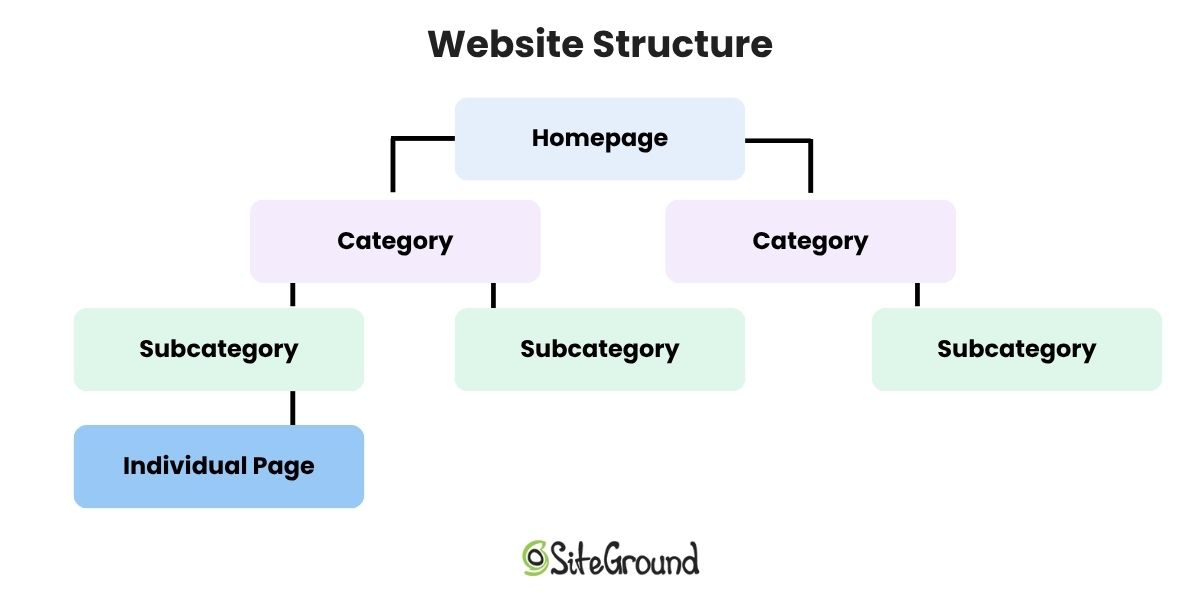
While structure defines the underlying hierarchy, website navigation is how that structure becomes usable. Think of structure as the architectural plan—the way pages are grouped and connected behind the scenes—and navigation is the pathway users see and click through. A site can have a solid structure but still feel confusing if the navigation doesn’t clearly reflect it; likewise, great navigation can only go so far if the structure beneath it is disorganized. Both work together to help users (and search engines) understand what your site is about and how to move through it.
In practical terms, website structure includes:
- How pages are grouped (categories, subcategories, tags)
- How users move between them (navigation and internal links)
- How URLs are built
- How easily search engines can crawl and understand your site
Why is Website Structure Important?
Website structure is kind of a big deal—bigger than it might seem anyway. Indeed, it does more than organize pages—with the right website planning, it shapes how visitors and search engines understand your business while creating clear pathways that turn browsing into conversions. Here’s a clear breakdown of what a strong website structure does:
- Signals your expertise to Google: Your site structure improves SEO by showing Google the areas you cover in depth, and by building authority as a trustworthy and organized resource in your niche.
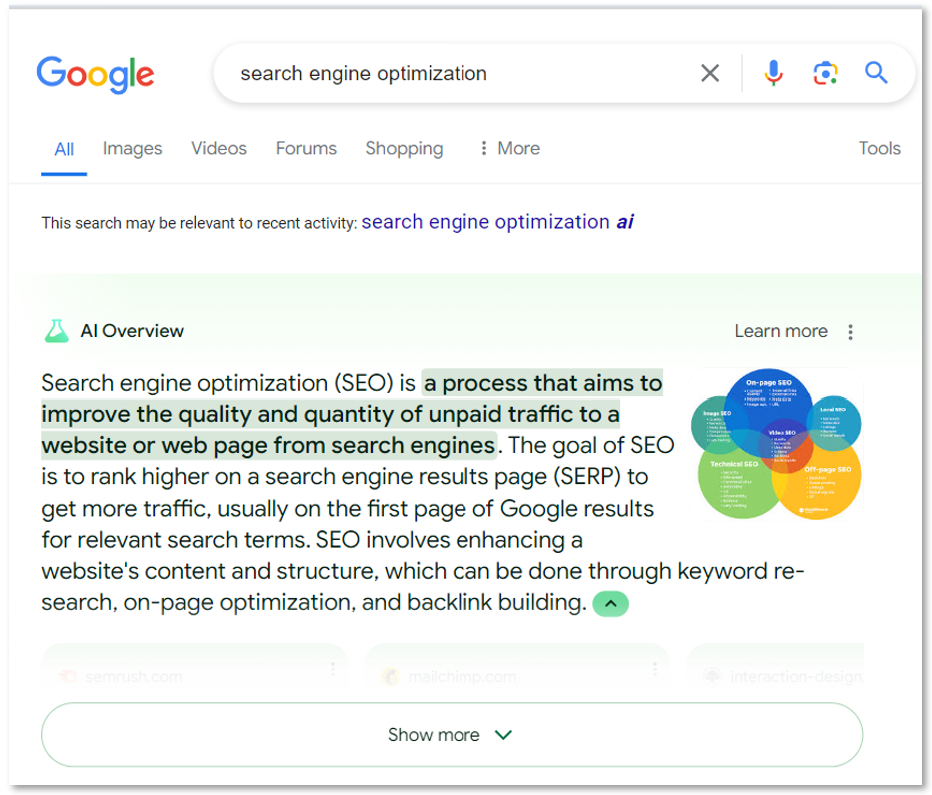
- Supports AI interpretation and recommendations: A well-structured website helps AI systems understand the relationships between your pages and topics—sometimes called generative engine optimization. This can improve content recommendations, AI overviews, and other AI-driven features, while also guiding users naturally through your site.
- Improves crawlability: Search engines don’t read every single link equally—according to Google Search Central, roughly the first 200 internal links are prioritized.
- Guides visitors: A clear hierarchy helps visitors find what they need quickly, using categories, subcategories, and descriptive labels—like “Hiking Clothing for Women” instead of just “Women.”
- Drives conversion paths: At the same time, a well-structured site guides users naturally toward key actions—subscribing, booking, or making a purchase. Your structure determines not just where users land, but what they discover next, creating an intuitive path from browsing to converting.
- Supports growth and business scalability: A flexible, well-thought-out site structure makes it easier to add new products, services, or content without breaking your site’s organization. Think in clusters or “knowledge graph” style: related concepts and pages are grouped logically, so visitors and search engines always understand how your content connects.
A knowledge graph is basically a visual or data-based map of relationships between concepts, entities, or content. In the context of websites and search engine optimization, it’s about showing how different pages, topics, and keywords are connected so that both people and tech can understand the structure and meaning of your site.
What Are the Different Types of Website Structures?
Before we jump into those dos and don’ts, let’s define what different website structures look like. Each serves a different purpose depending on the size of your site, the nature of your content, and your business goals:
1. Hierarchical Structure
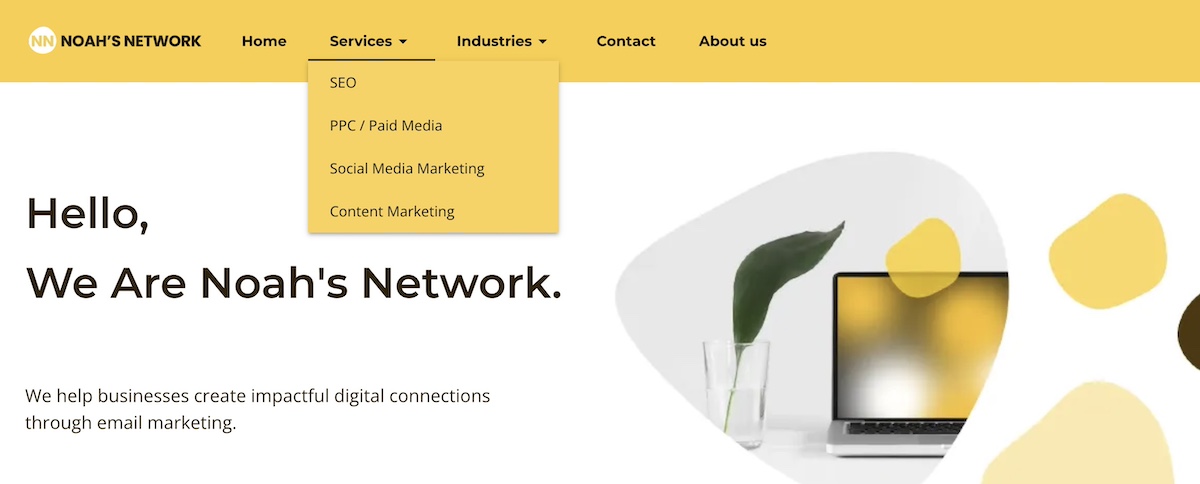
A hierarchical structure organizes content in a top-down format, with broad categories at the top and more specific subcategories underneath. Sometimes it’s also called a tree structure, since it branches out from a single homepage to broader categories and then to more specific subpages, much like the branches and leaves of a tree. This type of structure is intuitive for users and search engines, making it easier to navigate and understand.
Example: A digital marketing agency might organize its site hierarchically as Homepage → Services → SEO / PPC / Social Media, making it easy for users and search engines to explore and understand the agency’s offerings.
2. Sequential Structure
A sequential structure guides users through content in a specific, predetermined order. This is useful when the information is best consumed step by step.
Example: Online courses, tutorials, onboarding flows, or single landing pages that lead users through a series of sections toward a single goal.
3. Matrix Structure
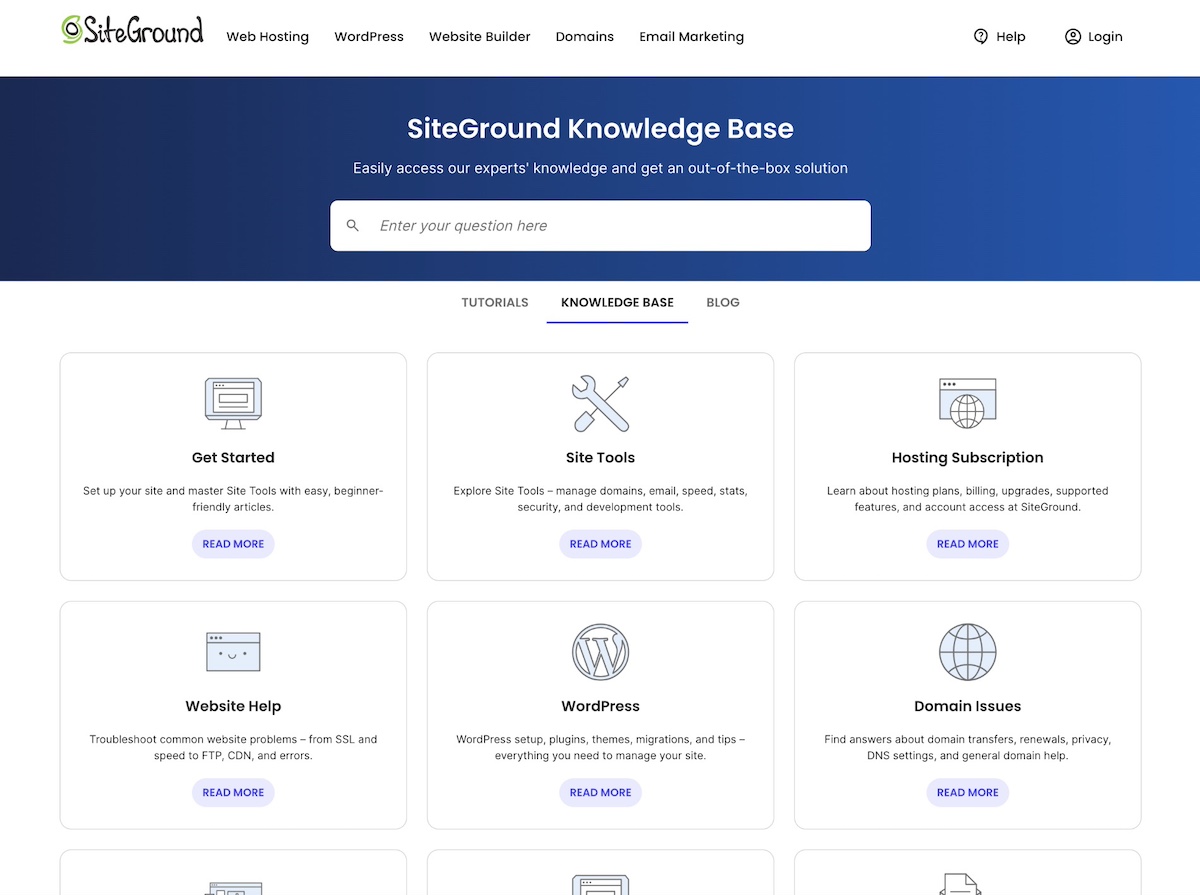
Pages interlink freely, allowing multiple paths through content. This approach is more complex but can work well for large informational sites with interconnected topics.
Example: A knowledge base (like the SiteGround Knowledge Base, seen below) or help center where articles link to related topics, FAQs, and troubleshooting guides across categories.
4. Database Structure
Database structures are dynamic, generating pages based on user queries or filters. These sites often rely on search and sorting features to help users find relevant content quickly.
Example: Real estate or job listing sites where users filter results by location, price, or category, with pages generated automatically from the underlying database.
Which Website Structure Type is Most Common?
While many websites combine elements from different structures, the hierarchical structure remains the most common, especially for ecommerce, blogs, and corporate sites. Its clear, top-down organization makes it easier for visitors and search engines to understand your content.
We’ve covered the essentials—now it’s time to put them to work. As you tackle your website checklist, here are dos and don’ts to help you create a site structure that’s intuitive for users, performs well in search, drives conversions, and stays adaptable as AI continues to evolve how content is discovered.
The good news is that whether you’re building a site from scratch or reorganizing an existing one, we’ll outline how you can apply the same principles to make your structure clear, logical, and easy to navigate.
How to Structure User Pathways and Hierarchy
Your site hierarchy determines how visitors and search engines move through your website. Think of it like a city map: highways, exits, and signposts guide people where to go. Menus, headers, and links surface the most important pages and shape the paths users take—whether toward information, products, or conversion.
Here are the dos and don’ts of a solid website hierarchy:
Do: Use a Clear, Logical Menu
- Define your site’s purpose and key goals. What problem should your site solve, and what do visitors need to accomplish?
- Identify your pillar areas (main products, services, or content themes) based on those goals.
- Prioritize the most important pages so they are easy to reach (ideally within 1–2 clicks).
- Map the sections and their order to support logical user pathways and conversion journeys. For example: product discovery → product detail → checkout.
- Draw a simple site map or page flow diagram showing your pillars, subpages, and key pathways. This helps you visualize the structure and ensure users can reach important pages efficiently.
- Use clear, descriptive menu labels so users always know where they are.
- Limit top-level items to 5–7 to reduce cognitive load.
Pro Tip: Use a Sitemap
A sitemap is a master list of all your website’s pages. Submitting an XML sitemap to Google Search Console helps crawlers understand your structure, and large sites can include an HTML sitemap in the footer to support user navigation.
Don’t: Overcrowd Menus or Bury Important Pages
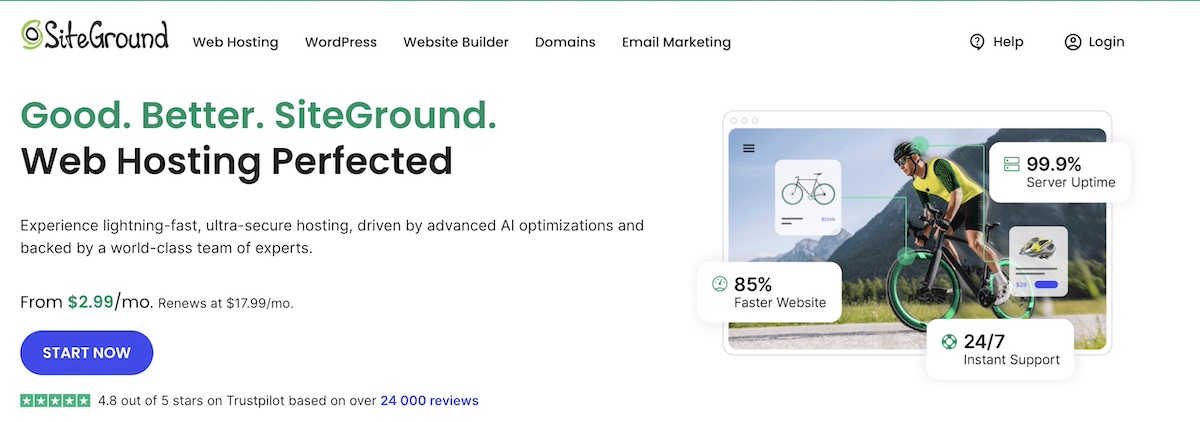
- Resist cramming too many items into the main menu—it confuses users and dilutes SEO value. For example, you can see in the below image that SiteGround keeps its main menu super clean and focused on the main offerings. No extra noise. Just a clear display of the pillar products.
- Don’t hide important content several clicks deep; pages buried too far from the homepage may get ignored.
- Avoid inconsistent labeling or mixing unrelated topics in one menu.
- Don’t rely on footer menus to carry essential navigation—they should supplement, not replace, the main menu.
- Avoid having too many sub-levels; ideally, no page should be more than 3 clicks from the homepage.
If your site is already live:
Start with an audit. Map your existing pages, menus, and user flows to see what’s working and what needs improvement. Focus first on high-traffic or high-conversion pages, and make edits gradually.
Important note: When you reorganize pages or change URLs, don’t leave old links broken—use redirects to guide visitors and search engines to the correct new page. A redirect is a way to automatically send visitors and search engines from one URL to another, and thus maintain usability and SEO when pages are moved or URLs change.
How to Organize Your Pages
Page organization focuses on how your content is structured behind the scenes—that is, how pages are grouped, connected, and linked internally. It’s like zoning inside a city: neighborhoods and blocks determine what belongs together and how areas relate.
Thoughtful organization not only improves usability and SEO but also shapes conversion paths, guiding users toward key actions, whether they land on the homepage, a blog post, or a product page.
Here’s how and how not to implement your page organization:
Do: Group Content Logically
- Organize products, services, or articles under clear categories and subcategories.
- Connect related pages through internal links (not just menus) so users can explore without starting over.
- Use descriptive page titles that accurately reflect the content, making it easier for both users and search engines to understand the purpose of each page.
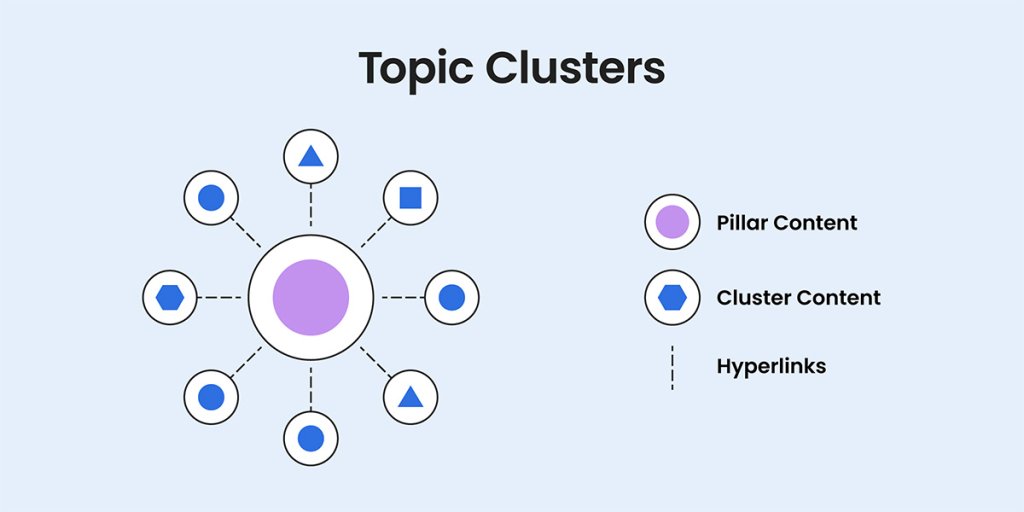
- Consider grouping similar content into “topic clusters” so users, search engines, and AI-crawlers can easily explore related pages. For example, a sports gear site could have a cluster for running gear, which includes product pages for running shoes, apparel, and accessories.
Don’t: Scatter Important Content
- Don’t create pages that don’t fit clearly into your existing categories.
- Avoid duplicating content across multiple pages, which can dilute SEO value and confuse visitors—this is especially important for ecommerce sites with similar products or product variants.
- Don’t use inconsistent or vague labels that make it difficult to move through the site. For example, labeling a category “Gear” or “Equipment” is too broad—users won’t know if it includes shoes, apparel, or accessories.
- Avoid orphan pages, which are pages that have no internal links pointing to them, making them hard for users to find and for search engines to index.
If your site is already live:
Consider reassigning orphan pages into logical categories, merging duplicate or thin content pages into main clusters, and adding internal links to connect related content.
How to Use Categories and Tags
Categories and tags both help organize your content, but they are implemented differently in a website’s structure:
Categories are part of the site’s core navigation and URL structure—they create the main sections of your site and typically have their own pages (such as /blog/travel/ or /resources/tutorials/).
Tags are labels attached to individual pieces of content—they help group related topics across categories and can be used by search engines (and increasingly by AI systems) to understand relationships between posts, even if users don’t see them in the main navigation.
Here are the dos and don’ts for implementing both categories and tags effectively in your website structure:
Do: Use Categories and Tags to Group Related Content
- Use categories for the primary themes of your site—these are visible to users and shape navigation.
- Use tags to group closely related content across categories (for internal organization and SEO, even if not always publicly shown).
- Keep your naming consistent and meaningful so both search engines and users can understand your topical focus.
- Plan category growth in advance to avoid restructuring later.
Don’t: Overcomplicate or Mislabel Your Content
- Avoid treating categories and tags as interchangeable; they serve different purposes in the content structure.
- Don’t wait until after publishing large amounts of content to define your taxonomy, as reorganizing later becomes more complex.
- Don’t rely on vague or overly clever labels that make users guess what the content is about.
- Resist creating categories or tags that don’t map to real user intent or browsing behavior.
- Don’t allow unlimited category growth without clear criteria for when something warrants its own category versus remaining a tag.
If your site is already live:
You can implement many of these dos and don’ts by consolidating overlapping categories, fixing inconsistent tag naming, and removing categories/tags that no longer match site goals.
How to Structure Your URLs
If you’ve created website pages or blog posts, you might not have given too much thought to the URL—after all, it gets generated on its own, so why stress? Well, because—as you just learned with categories—your URLs aren’t just web addresses, but rather signals for both users and search engines about what each page contains. In fact, clear, consistent URLs improve usability, SEO, and overall site clarity. So here’s how to structure your URLs effectively.
Do: Use Descriptive, Consistent URLs
- Include keywords that reflect the page content, such as /ski-clothing-women.
- Keep URLs short and readable—users should understand the page topic at a glance.
- Use hyphens to separate words (instead of underscores or running words together), as they are easier for both people and search engines to read.
- Structure URLs to reflect hierarchy: for example, /women/shirts/cotton-shirt shows the page’s place in your site clearly.
Important note: Folders are the sections of a URL that come before the final page slug. For example, in /women/shirts/cotton-shirt, the folders are /women/ and /shirts/. They often align with categories and subcategories, but the key is that they reflect logical groupings that help both users and search engines understand your site structure. A clear, consistent folder structure signals topic clusters to Google, and helps visitors orient themselves as they browse.
Don’t: Use Messy or Inconsistent URLs
- Skip generic IDs or numbers that give no context, like /page?id=2345.
- Don’t change URLs frequently; redirected or broken links can confuse users and hurt SEO.
- Avoid overly long URLs with unnecessary parameters or repeated keywords.
- Be cautious about using unnecessary stop words (like a, the…) or characters that add length without context.
- Don’t mix different conventions (that is, some lowercase, some uppercase, inconsistent hyphens or underscores).
If your site is already live:
Review existing URLs and apply the dos and don’ts above, but be cautious about changing too many at once. Always implement redirects for any URLs you update so users and search engines are sent to the correct new page. Prioritize top-traffic or high-conversion pages first, and avoid unnecessary URL changes to prevent SEO disruption.
How to Use Internal Linking
Internal links connect your pages, helping visitors explore related content and guiding search engines through your site. Thoughtful linking improves usability, distributes authority, and reinforces your site’s topic structure.
Depending on your business, though, users can often land on random pages rather than the homepage. This is especially common for content-heavy sites or ecommerce stores with multiple marketing touchpoints. So that’s why having a clear, logical website structure is even more critical: it ensures visitors can move through your site naturally, understand where they are, and discover relevant content, regardless of how they enter your site.
Do: Link Important Pages Logically
- Link related content together so visitors can easily find more information on the same topic.
- Prioritize links to your key pages or pillar content—these are the pages you want users and search engines to see first.
- Create internal link paths that lead users toward high-value pages such as product pages, pricing, sign-up forms, or key resources. These paths help turn discovery into action and form the backbone of your site’s conversion journey.
- Use descriptive anchor text that clearly explains what the linked page is about, such as “guide to planning a product launch,” or “how to choose the right car.”
- Consider linking from high-traffic pages, likely landing pages, or campaign entry points to newer or less-visited content to help users orient themselves.
- Keep the number of links per page reasonable—focus on quality over quantity.
Don’t: Misuse Internal Links
- Avoid generic anchor text like “click here” that doesn’t describe the linked content.
- Don’t link to unrelated content just to increase links—it can frustrate users and harm SEO.
- Avoid broken links or links to outdated pages, which frustrate users and reduce search engine trust.
- Refrain from using the same anchor text repeatedly across multiple links to different pages—it can confuse search engines.
- Don’t rely solely on top-level pages or the homepage—ensure deeper content is connected through relevant internal links, since many users will land on pages deep within your site.
If your site is already live:
Audit your existing pages for broken or outdated links, add internal links to orphan or low-traffic pages, and adjust anchor text for clarity.
How to Structure for Mobile and UX
With more users browsing on mobile devices, your website needs to be easy to use and read on any screen. A mobile-friendly website design improves usability, reduces frustration, and helps search engines understand your site.
Do: Ensure Website Structure and Layout Work on All Devices
- Use responsive design so that your website layout automatically adjusts to different screen sizes.
- Make menus and buttons easy to tap on smaller screens.
- Prioritize important content near the top, so users don’t have to scroll excessively.
- Test your site on multiple devices and browsers to catch usability issues.
- Simplify forms and interactive elements for mobile users.
- Use mobile-friendly media (optimized images, scalable fonts, and touch-friendly carousels).
- Employ accessible web design, including proper contrast, readable fonts, alt text for images, and keyboard-friendly navigation—all principles grounded in established UX and information architecture research—so all users can engage with your content effectively.
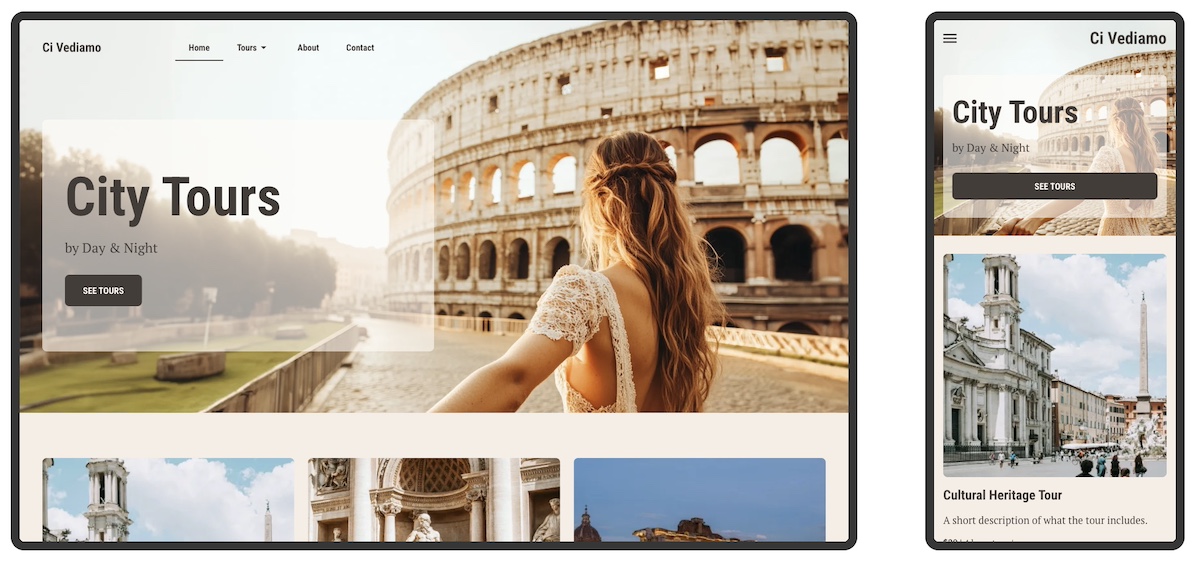
Don’t: Assume Desktop Design Works for Mobile
- Avoid tiny buttons, cramped text, or horizontal scrolling.
- Don’t hide key pages or functionality on mobile versions of your site.
- Skip layouts that break or load slowly, which frustrate users and can harm SEO.
If your site is already live:
Audit your site on multiple devices and screen sizes to identify any usability issues, and fix any navigation, buttons, forms, and media that don’t display or function well. Prioritize critical content near the top of pages, and test interactive elements for touch-friendliness. Even small adjustments—like resizing images, improving contrast, or making menus easier to tap—can dramatically improve the mobile experience and reduce frustration.
Build a Mobile-Optimized, High-Performance Site Effortlessly
With the SiteGround Website Builder, many of these mobile and UX considerations are taken care of automatically. Responsive layouts, touch-friendly menus, optimized images, scalable fonts, and built-in accessibility ensure your site looks great and works seamlessly on any device—no extra setup required. And because it’s powered by SiteGround’s fast, secure, and reliable hosting platform, your site is optimized not only for design, but also for speed, protection, and long-term performance.
Start building your website now>>
How to Build a Flexible Website Structure
Flexible website structure allows your site to grow over time without becoming cluttered or confusing. Planning for scalability ensures new content or products fit naturally and maintain a clear hierarchy. Here’s what a flexible website structure looks like—and what it doesn’t.
Do: Plan for Growth and Adaptability
- Design your site structure so new pages, products, or sections can be added without breaking navigation.
- Focus on logical groupings of related content to maintain a consistent hierarchy as your site grows.
- Make sure top-level categories can accommodate subcategories as your site expands.
- Use flexible URL and menu structures that are easy to update as your content grows.
- Regularly review and adjust your hierarchy to prevent bottlenecks or overcrowding.
- Consider future content types or product lines when planning categories and links.
Don’t: Create a Rigid Website Structure That Limits Future Growth
- Avoid locking in too many categories or subpages, which makes it hard to add new content.
- Don’t scatter new website pages randomly; each addition should fit logically into your existing hierarchy.
- Steer clear of overly complex menus that can’t scale with your site.
- Don’t ignore future SEO considerations—SEO trends and your business are always changing, so plan your website structure so that new pages can be easily updated, discovered, indexed, and ranked as your site grows and search evolves.
- Refrain making major structural changes without a clear plan, which can confuse users and search engines.
If your site is already live:
You can easily apply these same dos and don’ts going forward, and—as we mentioned with regard to your site hierarchy—make changes little by little, starting with your most important pages, and being mindful of adding redirects.
Your Next Steps for a Smarter Website Structure
By now it’s surely evident that building a great website is so much more than just a random collection of your content, products, and so on; its true strength and power comes from how everything fits together underneath. That’s because a clear, logical website structure helps users find what they need, signals your expertise to search engines, and naturally guides visitors along conversion paths—all while staying ready for AI-driven content discovery and recommendations.
If you’re ready to put all these site structure dos into action, the SiteGround Website Builder is the ideal place to start. Built-in responsive design, intuitive tools, and SEO-friendly foundations help you create a clear, well-structured site—while SiteGround Ecommerce lets you extend that structure into an online store when needed.

Website Structure FAQs
Website structure is the way your pages are organized and connected—essentially the blueprint of your site. It defines the hierarchy from broad, top-level pages (like your homepage or main categories) down to more specific subpages (like individual products or articles). In practical terms, it includes how pages are grouped, how users move between them, how URLs are built, and how easily search engines can crawl and understand your content.
A good website structure is clear, logical, and easy to navigate for both users and search engines. It typically follows a hierarchical format—homepage at the top, main categories beneath it, and more specific subpages below those. Important pages should be reachable within 1–2 clicks, URLs should be descriptive and consistent, and internal links should connect related content naturally. A good structure also plans for growth, so new pages and sections can be added without disrupting the existing hierarchy.
Website structure directly affects how search engines crawl, understand, and rank your content. A logical hierarchy signals your areas of expertise to Google, while consistent internal linking helps distribute authority across your pages and ensures your most valuable content gets indexed. A well-structured site also supports AI-driven search features, since it makes the relationships between your pages and topics easier to interpret. This improves your visibility in both traditional and AI-generated search results.
Website structure is the underlying architecture—how your pages are grouped and connected behind the scenes. Navigation is how that structure becomes visible and usable to visitors, through menus, links, and labels. Think of structure as the architectural plan and navigation as the signage that guides people through the building. A site can have a solid structure but still feel confusing if the navigation doesn’t clearly reflect it, and vice versa. Great navigation can only go so far if the underlying structure is disorganized.
This article was originally published in October 2025, and then updated in April 2026.