
This article was originally published in October 2024, and then updated in April 2026.
Planning a new website successfully comes down to 9 key steps: from defining your goals and audience, to choosing hosting, shaping your design, and finally launching your site. This guide walks you through each one—plus includes a free checklist so that you have a website planning template to follow in real time.
Key takeaways
- Always define your goals and audience before touching design or code—it shapes every decision that follows.
- Consistent branding (logo, colors, tone) builds trust and makes the build process smoother.
- Your choice of website builder, CMS, or custom code has real trade-offs in cost, flexibility, and maintenance.
- A clear sitemap improves both user experience and search engine optimization (SEO) from the start.
- Website planning doesn’t end at launch—regular updates, SEO, and performance monitoring are part of the job.
[24]
What is Website Planning and Why Does it Matter?
The website planning process entails defining the purpose, goals, and structure of a website before any design or development work begins. It involves understanding the needs of your audience, deciding on the content, determining the website layout, and considering the technical aspects such as domains and hosting.
A proper website planning process is vital because it:
- Ensures clarity of purpose: It helps you understand why you are planning a new website and what you hope to achieve.
- Saves time and money: Avoids redoing work by eliminating confusion about site objectives, features, and functions.
- Improves user experience: A successful website aligns with the needs of its audience and provides them with a seamless user experience.
- Optimizes SEO and performance: Helps organize content and site structure in a way that is favorable to search engines and AI, making it easier to rank higher and get cited.
Planning a website becomes much more manageable when you break it down into clear steps. Here’s how to plan a website in 9 stages—from defining your goals and audience all the way through to building and launching—with everything you need to tackle each one.
What Does Planning a Website Actually Involve?
Now that we know why planning your website is critical, let’s dive into a step-by-step guide for how to plan a new website. Follow these 9 steps to ensure you have all the essential website planning tools.
1. Define Goals & Objectives
Your website goals should answer three things: what you want the site to achieve, what actions you want visitors to take, and how you’ll measure success. This will help you determine what messages to focus on, how to structure your pages, what calls to action to include, and more. So start with answering these simple questions:
- What are the short- and long-term goals for your website? Your short-term goals might be to sell products and generate leads, while your long-term goals could be building brand awareness and customer satisfaction.
- What actions do you want visitors to take? Such as making a purchase, signing up for an email newsletter, requesting a quote, etc.
- How will you measure the success of the website? Options could include web traffic, conversions, email sign-ups and other email marketing metrics.
Having these important details clear and front of mind will help guide you as you continue with the following steps for how to plan a website. Note your answers down and refer to them regularly to make sure you’re staying on track.
2. Identify Your Audience
If you wish to reach the right people, you’ll need to define four things about your audience: who they are, what problems they’re trying to solve, what they want from your site, and how they consume content online. To define this, answer the following questions:
Who are your target users?
Identify key demographic details, such as age range, location, and occupation. For example, your audience might be young professionals aged 25-40, living in urban areas across the United States, working in the tech industry. Understanding these factors helps you focus your website content planning around appealing directly to their preferences and needs.
What are their pain points or challenges, particularly as they relate to what you’re offering?
Consider the specific problems your target audience is trying to solve. Are they looking for efficient solutions to improve productivity, struggling to find reliable services, or seeking advice on complex topics? By pinpointing their challenges, you can position your products or content as the solution they’re seeking.
What are their goals when visiting your website?
Think about what actions they want to take or what problems they are trying to solve when they arrive on your site. What will their user journey be? They may be searching for a product that addresses their specific needs, looking for expert advice on a topic, or gathering information before making a purchase decision. Knowing their goals will help you create relevant content and clear calls to action that guide them to the next step.
How do they consume information online?
Understanding how your audience interacts with content can influence both the design and layout of your site. For example, are they primarily accessing your site via mobile devices, or do they prefer a desktop experience? Are they active on social media, and if so, which platforms? Knowing this helps you determine the best way to present your content so that it’s accessible, engaging, and easy to navigate. Plus, understanding their online behavior can help you strategize how to drive traffic to your site, whether through social media, email marketing, or search engines.
Once you’ve clearly identified your audience, you can customize your website’s content, design, and user experience to meet their expectations. It will also help as you think about products, marketing copy, email newsletters, social media marketing, and so on.
Just as when planning your website objectives, regularly refer back to your answers above to make sure you’re staying focused on your audience.
3. Establish Your Branding
There’s a good chance you’ve already developed at least some branding as part of your marketing strategy—even if that only includes a logo. Now’s the time, though, to really get your branding ducks in a row and define your brand clearly so that you can execute it on your website. Consistent branding helps build recognition and trust with your audience—and ultimately conversions.
Branding Elements to Consider:
- Logo: When deciding on a logo design, focus on creating something that reflects your brand’s identity and values while being simple, memorable, and versatile. Consider your target audience, industry trends, and how the logo will work across various mediums and sizes.
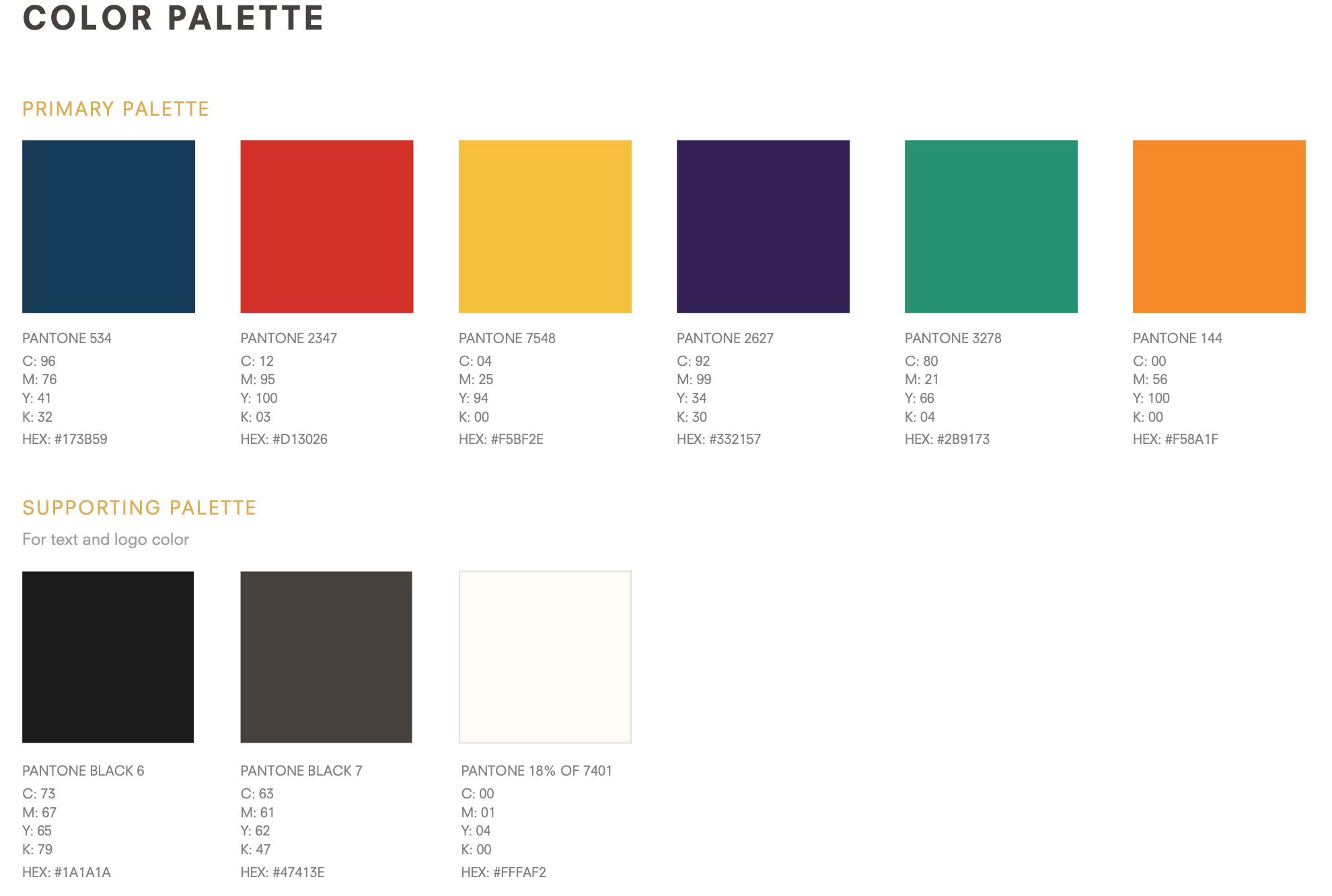
- Color scheme: Define the primary and secondary colors that should be used across your website. Primary colors are ones that you’ll use most of the time; secondary ones complement the primary, and are typically used as accent colors.
- Typography: Decide on the font or fonts that you would like to use for your brand. These may all be the same font, but it is often a good idea to choose one font for your headings, and a complementary one for your body copy. Google Fonts, for example, can help you find ideal pairings for this kind of execution. It also offers a large selection of free fonts that you can download and use however you’d like.
- Tone of voice: Whether you adopt a casual, formal, or playful tone, it should be consistent across the website, and of course align with your brand and what you wish to transmit.
- Visual style: Decide on the overall visual tone of the site, from minimalist and clean to bold and dynamic. This will help steer your vision as you explore and decide on layout, color usage, imagery and more.
Take note of these elements for your reference as you plan your website. Not only will it be handy for you to refer back to this information, but it will be helpful if and when you decide to work with outside designers.
4. Decide How to Build Your Website
After identifying your goals, audience, and branding, the next step is to decide how you will build your website. For most people, it comes down to three options: a website builder, a CMS like WordPress, or a custom-built site. Here’s how to know which is right for you.
Website Builder — Best for Most People
A website builder is the fastest and most accessible way to get online, and for the majority of small businesses and personal brands, it’s all you’ll ever need. With drag-and-drop functionality, built-in hosting, and no coding required, you can go from planning to live site in a fraction of the time. The SiteGround Website Builder takes this a step further—with professionally designed templates, built-in ecommerce, and hosting all included, much of the heavy lifting is already done for you.
The trade-off is customization. If your site needs highly specific functionality or a truly bespoke design, you may eventually hit a ceiling.
CMS—Best for More Complex Sites
A content management system (CMS) is a platform that lets you build and manage a website without writing code from scratch. WordPress is the most widely used CMS, and a popular choice for sites that need more flexibility—a content-heavy blog, an online store via WooCommerce, or greater control over design and functionality. It’s open-source and highly customizable, with a wide range of themes and plugins to suit most needs.
That said, it has a steeper learning curve than a website builder, and more complex customizations may require hiring a developer. It can be a cost-effective option, but that depends heavily on how much you need to customize.
CMS—Best for More Complex Sites
If your website needs functionality or design that no off-the-shelf platform can deliver, a custom build is the answer. Whether coded from scratch or built on top of an existing site or CMS, a custom site offers complete creative and technical freedom.
The downside is cost—both upfront and ongoing. Any changes typically require a developer, which makes keeping the site fresh more expensive and time-consuming than the other two options.
5. Choose Hosting and a Domain
Selecting a hosting provider and choosing a domain name are two of the most consequential decisions you’ll make—the first determines your site’s speed, security, and reliability; the second is how customers will find and remember you. Both choices can significantly impact how users experience and interact with your business online.
Choose Your Hosting
Every successful website needs hosting, and the same criteria apply regardless of how you build: speed, security, reliability, and customer support all matter. The difference is that with a website builder, hosting is built in—so those qualities are baked in too, which is why it’s worth looking beyond templates and ease of use when choosing a builder. With a CMS like WordPress or a custom-built site, you’ll need to select a hosting provider separately.
For WordPress in particular, it’s worth choosing a host that offers WordPress-specific support and services. SiteGround offers Managed Hosting for WordPress, which includes automated setup, migration, and updates, along with top-notch security and expert 24/7 support. If you’re running WooCommerce, SiteGround’s WordPress Hosting for WooCommerce is worth a look too.
Choose Your Domain
When it comes to selecting a good domain name, there are several factors to keep in mind such as keeping it simple and memorable, using relevant keywords, and avoiding numbers and hyphens.
If you have a great idea for a website name, start by checking if your domain name is available. Then you’ll need to purchase your domain name—a cost typically paid annually, or for multiple years in a row. That said, keep in mind that sometimes your domain is actually free for the first year when you buy a new hosting plan, as is the case with SiteGround Web Hosting. So when it comes time to select a hosting service, this is something to keep in mind.
6. Shape Your Web Design
You’ve established your brand, and how you’ll build your site—now it’s time to bring them together and determine your website needs, by either communicating that to a designer, or by choosing a template.
But first, start by exploring other sites for inspiration, focusing on businesses that align with your offerings and target audience. Competitor websites can be especially helpful in identifying effective layouts, features, and designs within your industry, as well as opportunities to stand out.
For example, if you’re a creative professional, a portfolio might be essential, while a wedding planning service might benefit from featuring client testimonials. Note common design trends—whether sites in your field are sleek and modern or colorful and content-rich – and consider how you’ll adapt these patterns for your own site.
If you’re using a designer, this research will also help you provide more specific guidance so that they create a website that matches your expectations. Even if you’re building the site yourself, analyzing websites you admire can help you identify website functionality and layouts that work best for your needs.
Meanwhile, if you’re using a website builder or CMS like WordPress, you likely have access to a wide range of predesigned templates to meet your website planning goals. These templates serve as a foundation for your site’s design, offering a quick and easy way to get started. The key is to choose a template that looks professional and includes the functionalities you need, so you can focus more on content and less on design tweaks. Just keep in mind: the less you edit the template, the better it will look!
7. Create a Sitemap for Effective Website Architecture Planning
A sitemap is your website’s blueprint, and building one is more straightforward than it sounds once you break it into a few logical steps. Creating a clear and logical website architecture plan not only improves the user experience but also plays a key role in optimizing your site for search engines. Here’s how to approach it:
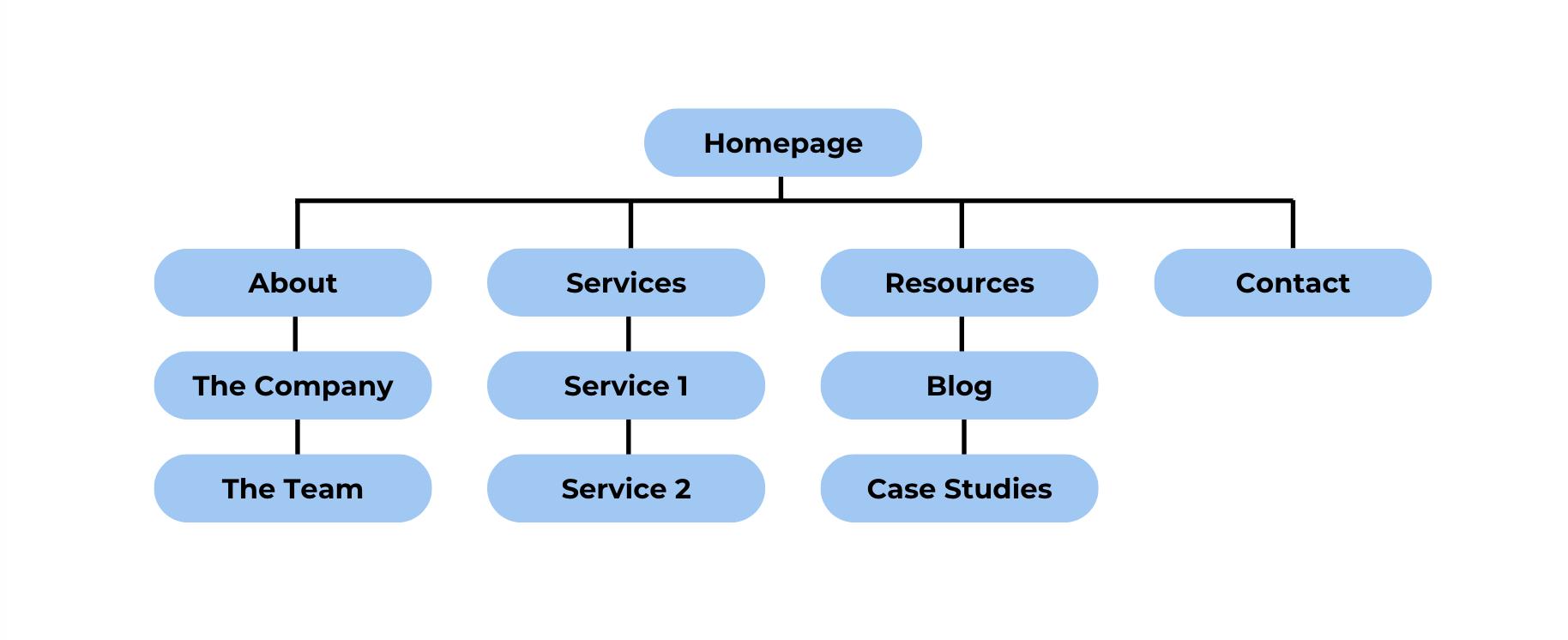
- Identify Core Pages: Start by listing the essential pages that your website needs. This might include a homepage, an about page, a contact page, and any specific pages related to your business such as services, products, or portfolio pages. Think about your site’s primary goals and what website content planning is necessary to fulfill those objectives.
- Group Related Pages into Categories: Next, organize your pages into categories or sections to make the site easy to navigate. For example, if you offer multiple services, group them under a “Services” section. Similarly, blog posts can be placed under a “Blog” or “Resources” section. Categorizing your content ensures that visitors can quickly find what they’re looking for and enhances the overall flow of your site.
- Determine the Hierarchy: Establish a clear page hierarchy for your sitemap. Your homepage should sit at the top, with main sections (like “About,” “Services,” or “Contact”) branching off from it. Subpages should be nested under the appropriate parent pages. This hierarchy will dictate how users and search engines interpret the importance of each page. The more organized and logical this site structure is, the easier it will be to navigate.
- Prioritize Key Pages: Not all pages on your site will have the same level of importance. Determine which pages are critical for conversions or user engagement and make sure they are easily accessible. For instance, if your contact page is a key point of interaction, it should be prominently linked from the homepage or main menu.
- Plan for Future Growth: Consider how your sitemap might evolve as your site grows. You may want to add additional sections, subpages, or even integrate features like an ecommerce store or a member login area in the future. Building flexibility into your sitemap now can save you the trouble of major restructuring later.
- Optimize for User Experience: As you finalize your sitemap, think about your customer’s journey through your site. Make certain that important website pages are no more than a few clicks away from the homepage, and provide clear pathways for users to move between related content. Use intuitive navigation menus, calls to action, and internal links to guide visitors through your content seamlessly—and ultimately to conversion.
When it comes to how to plan website structure, a well-organized sitemap will set the foundation for a successful website that is both user-friendly and optimized for search engines. It acts as a roadmap for both you (and your designer, if you use one), ensuring your site’s content is logically structured and easily accessible to your audience.
8. Gather Your Website Content Planning Assets
Before building your web project, let’s take a minute to set aside all the content we’ve covered so far—plus a few extra tidbits. This will be an especially important step if you’re working with a designer, but it’ll also be helpful if you’re building your site yourself, allowing you to have all your content in one place. Website assets that you’ll want to round up include:
Copy
Write and compile copy for all the pages you’ve identified in your sitemap. These will likely include the following pages and content:
- Homepage: Summarize your brand’s unique selling proposition, services, benefits, and features.
- About page: Provide background information, your company’s history, and your team.
- Service or product pages: Detail your offerings, benefits, and how they address customer needs.
- Blog posts or articles: Aim to have at least a few articles published so that your blog already adds value. You may also wish to leverage this content to help educate your users, so don’t be shy about using calls to action on your website in order to send users to your blog to learn more about different products, features, product uses, and more. Just be sure to include further calls to action in your blog post so that you keep users moving to the next step.
Branding Elements
Now it’s time to put together all those brand elements we discussed, and make them ready for use. Items you’ll want to have on hand for your web design include:
- Logo: Ensure it’s in a high-resolution format. Depending on your site color, you may want your logo to have a transparent background. Of course, always make sure you are following whatever branding guidelines you or your designer have established for your business.
- Color scheme: Note the primary and secondary colors that should be used across the website. Have the pantone and/or hex codes accessible so that you can easily provide them to your designer, or access them as you customize your site.
- Typography: List the fonts you’ll use for headings, subheadings, and body text. If you’ve purchased and/or downloaded your fonts, be sure to have those available as well.
Media
Finally, pull together all of the media for your website, such as:
- General site imagery: You’ll likely need visuals for your homepage hero section (the header image), as well as sprinkled throughout your site to add interest. Make sure these images—and all your media—consistently fit the visual style you’ve defined. (Good news here: if you’re using the SiteGround Website Builder, you can use the built-in AI image creator or the gallery of free stock images to fill any of your photography gaps.)
- Product photos: If you’re running an ecommerce site, high-quality, cohesively styled product images are essential.
- Team photos: Personalize your website with professional photos of your team.
- Icons and other brand elements: If you have other branding elements, such as icons, be sure to include these as well. They can be used to support text, or simply to infuse branding into your design.
File size is one last thing worth keeping in mind as you gather your assets. Large files can slow down your site speed, negatively impacting both user experience and Google search rankings. Ideally, your images should be compressed and served in optimized versions for different screen sizes—so a visitor on a phone isn’t downloading the same heavy file as someone on a desktop. If you’re building with SiteGround, this happens automatically: the Website Builder handles it the moment you upload an image, while WordPress users can rely on the SiteGround Speed Optimizer Plugin to do the same.
Bonus tip: To make all your assets extra handy, consider creating a shared drive, such as a DropBox folder, so that your files are easily accessible for all collaborators.
9. Bring Your Website Planning to Life
How you build your site comes down to two paths: doing it yourself using a website builder or CMS, or handing it off to a designer—and what you do next depends entirely on which route you’ve chosen. Let’s explore next steps.
If You’re Building Your Own Site
While building your site is a bit more hands on, you’ve already done a lot of the legwork, and you have mapped everything out on your checklist. So it’s just time to put it all in action.
Website Builder and/or CMS
If you’re using a website builder or a CMS such as WordPress, you’ll want to start off by adjusting the template to match your branding, colors and fonts. Usually this can be done easily by adjusting the template settings allowing color and font changes to take effect across your site.
From there, you’ll want to upload and start organizing all your content, including copy, images (including your logo), and any additional media.
Lastly, you’ll want to set up any extra site functionality. In the case of a CMS like WordPress, this could include installing plugins for SEO or ecommerce, as well as adding any contact or email sign-up forms. (New to the world of email marketing? We’ve got you. Read our guide on email marketing and how to get started.)
Custom Coding
Meanwhile, if you’re personally building your site from scratch, you’ll need to start designing and coding, and, in doing so, leveraging and implementing your gathered content as discussed above. Designing and coding a website from zero is obviously a much larger undertaking that requires more than a simple article. So enter into these waters only if you are well acquainted with how to custom-build a site.
If You’re Working With a Designer
If building or customizing a website isn’t in your wheelhouse, but you want a custom site, then you will have chosen to hire a designer. In this case, plan to share all the information you’ve gathered thus far, including:
- Goals and objectives of your site
- The target audience
- Content documents (copy, branding guidelines)
- Branding elements (logo, font files)
- Media files (images, videos, animations)
- Detailed instructions for the sitemap, layout, design preferences, and functionality requirements. This should also include any sites you’ve found for inspiration. Many designers may even provide you with a design brief so that you can clearly address all their questions and needs up front.
Ultimately, whether you build your site on your own or with help, once it’s built, be sure to test all elements thoroughly before launch. Consider asking users in your target audience to interact with your test site so that you can gather valuable and relevant feedback. You’ll also want to test site responsiveness on mobile devices, any interactive elements, and page load times. Need to speed up your website? Check out these website speed optimization tips.
What Should You Do Once Your Site Goes Live?
The website planning process is ongoing. After your site goes live, you’ll need to monitor its performance, update content, and optimize it for better user engagement and SEO. Make sure to:
- Track your metrics: Use tools like Google Analytics to measure traffic, conversions, and user behavior—and, if you’re using a website builder, check whether built-in analytics are available, as many include their own dashboard to get you started.
- Optimize SEO: Continuously update your SEO strategy to improve rankings. If you’re using WordPress, for example, you can install plugins, such as Yoast, which will do the heavy lifting when it comes to SEO.
- Update content regularly: Keep your website fresh by adding new blog posts, products, or case studies.
- Maintain the site: Do regular backups, update plugins, perform security checks, and make sure your site speed is adequate, and stay on top of other web performance metrics.
Beyond Website Planning
Successful website planning is the cornerstone of a successful online presence. Work through it step by step—define your goals, know your audience, build a strong brand, choose the right tools—and you’ll have a site that not only looks great but actually works for your business.
The work doesn’t stop once you go live, either. Regular updates, performance monitoring, and ongoing SEO are what keep a site relevant and effective as your business grows.If you’re still figuring out how to build, the SiteGround Website Builder is worth serious consideration for anyone who wants to get online quickly without sacrificing quality. Fast, secure hosting is built in, image optimization happens automatically, ecommerce functionality, professionally designed templates mean you’re not starting from scratch, and expert 24/7 support is there whenever you need it. It’s a solid foundation—and with this guide and our planning checklist in hand, you’re well set up to make the most of it.
Website Planning FAQs
Website planning is the process of defining your website’s structure, purpose, and content before any design or development work begins. It covers everything from setting goals and identifying your audience to choosing hosting, mapping your sitemap, and gathering your assets—so that when you’re ready to build, every decision has already been thought through.
It depends on the size and complexity of your site. A simple small business website can be planned in a few days; a larger site with multiple services or stakeholders can take several weeks. The steps most likely to slow you down are nailing your branding and writing your copy. If you’re using the SiteGround Website Builder, the build itself is much faster—a built-in AI writer, templates, and hosting are all handled in one place.
Planning itself costs nothing beyond your time. Building is where costs vary widely—a website builder can run $10–$30 per month, a WordPress site can be launched for very little but costs more as you add plugins or hire help, and a custom-built site can run anywhere from a few thousand dollars to significantly more depending on complexity. Your biggest cost lever is how much of the work you do yourself.
This article was originally published in October 2024, and then updated in April 2026.