
This article was originally published in June 2025 and then updated in May 2026.
A website checklist is a structured list of everything you need to review, test, and confirm before—and just after—launching your site. It covers the areas that are easiest to overlook when you’re close to the work: SEO, security, speed, design, legal compliance, and more.
If you’re about to hit publish and that nagging feeling has set in that something isn’t quite right, this guide walks you through a comprehensive rundown of 17 steps. We’ve also put together a free downloadable checklist to keep you on track every step of the way.
Key Takeaways:
- Cover the essentials before you publish. Design, content, SEO, forms, and accessibility all need a final review before your site goes live.
- Security and backups are non-negotiable. An SSL certificate, regular backups, and basic security measures protect both you and your visitors from day one.
- Speed affects more than user experience. A slow site costs you visitors, conversions, and search rankings, so performance optimization belongs on every pre-launch list.
- Legal compliance is not optional. Cookie consent, a privacy policy, and terms of service are legal requirements in many jurisdictions, not just good practice.
- Launching is the beginning, not the end. Crawling your site, integrating analytics, and setting up a maintenance plan are what keep your site performing well after launch.
- The right hosting provider makes most of this easier. Backups, speed, security, and uptime all depend heavily on who hosts your site.
[18]
Website Pre-Launch Checklist
Perfecting everything from cybersecurity to design can feel overwhelming, especially when learning how to launch a new website. But don’t worry—by following these steps, you’ll be able to handle it all:
1. Review Your Site Look, Feel and Architecture
Before anything else, make sure the foundations are solid. This step covers the core decisions that everything else builds on: your goals, your target audience, your branding, your hosting, and your site structure.
- Have You Defined Your Goals and Objectives?
- Have You Identified Your Audience?
- Have You Established Your Branding Basics?
- Have You Chosen a Website Building Method?
- Have You Selected Hosting and a Domain Name?
- Have You Shaped Your Web Design?
- Have You Created a Sitemap?
- Have You Gathered Your Content Planning Assets?
Not confident in your responses? Our website planning checklist will guide you through each step, helping you build a professional and effective website with ease.
2. Back Up Your Site
Now, let’s check off-site backups—a crucial part of maintenance and something to consider before launch. Think of it as your site’s safety net! Whether it’s a cyber attack, server crash, or just an oops moment, a reliable backup system means you can restore your site to its former glory without losing all your hard work.
It’s wise to think ahead and opt for a web host or website builder that offers daily and on-demand backups, giving you the flexibility to dance through your day with peace of mind. Some hosts and builders even take care of plugin updates automatically, freeing up your time and keeping your site secure.
For instance, SiteGround hosting provides daily backups stored securely for 30 days. And if you’re looking for that extra dash of assurance, our Premium Backup Service offers even more advanced features so that you’ll always have a recent, secure copy of your website to rely on.
3. Fine-Tune Your Pages
Go through every page, section, and heading with fresh eyes before launch. Typos, broken links, placeholder text, and unlicensed images are all easy to miss when you’re close to the work, and all easy to fix before anyone else sees them.
It’s a good idea to copy and paste all your text into a proofreading tool like Grammarlyto make sure nothing’s been missed. Better yet, consider sharing it with a friend, as another pair of eyes is always a bonus.
Additionally, if you’ve leaned on stock videos or photos for your site’s creative flair, double-check that you have the rights to use all images and assets. You can verify this by using tools like Google Reverse Image Search or by reviewing the licensing terms on your stock image website.
4. Optimize On-Page SEO
On-page search engine optimization (SEO) is how you tell search engines what your site is about and help the right people find it. Before launch, make sure the basics are in place across every page: titles, descriptions, keywords, headings, and site structure.
- Start With the Basics
While your logo is important, also ensure you have a site title under 60 characters, as it’s the first thing browsers will see. Similarly, include a site description between 50-300 characters to give a preview of what your site is about. Additionally, adding SEO descriptions to each page, within the same character range as the site description, can improve your site’s SEO ranking in comparison to your competitors.
- Master Keyword Use
Keyword research is crucial, especially for bloggers, but it’s a game-changer for any new website aiming for a first-page search engine spot. Sprinkle keywords into title tags, headings, and URLs for maximum impact. Consider using free tools like Google Keyword Planner or paid ones like SEMrush and Ahrefs. For WordPress sites, you can leverage an SEO plugin like Yoast SEO to help select and position keywords effectively,
- Enhance User Experience
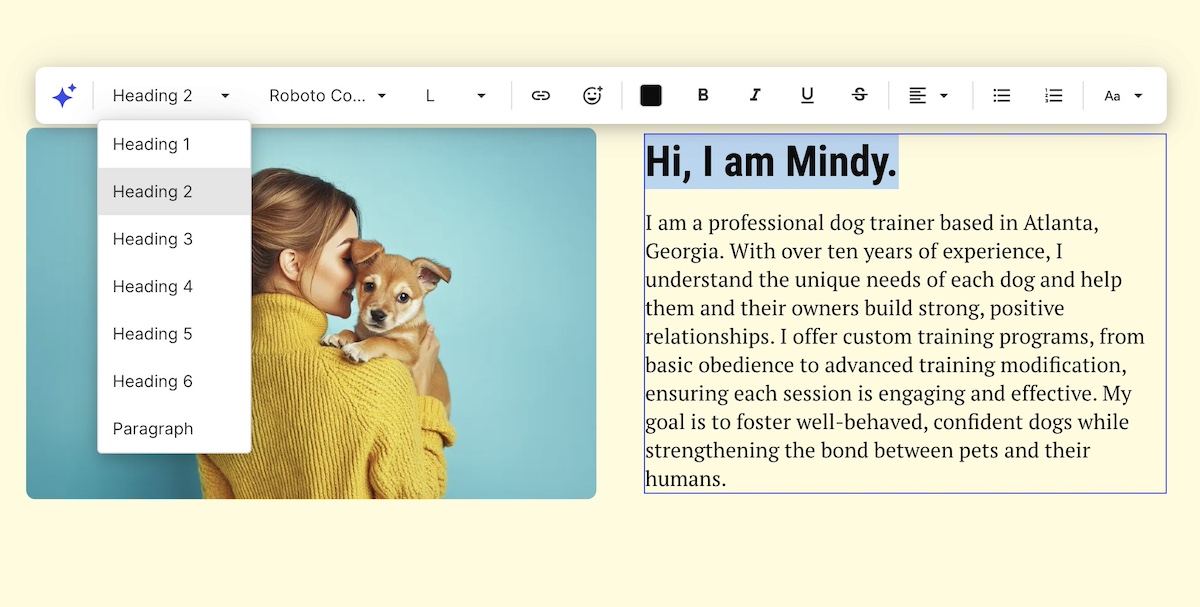
Make your pages easy to navigate by using headings and bullet points to create scannable, reader-friendly content. Incorporating high-quality images is essential, as they not only make your site visually appealing but also help convey your message more effectively. Additionally, don’t fear adding clear calls to action (CTAs) whenever needed—whether it’s signing up for a newsletter, exploring more of your website’s content, or making a purchase.
- Optimize Structure and Navigation
If you skipped the sitemap in the first step of this checklist, now’s the time to prioritize website navigation. Think of it as your website’s treasure map, guiding users and search engines through your pages. Begin by pinpointing core pages like the homepage, about, contact, and any business-specific sections, such as services or products. Organize related pages into intuitive categories like “Services” or “Blog.” We’ll cover sitemap submission in a later step!
- Perform Ongoing Maintenance
Keep your keywords in tune with what users are searching for—be it information, products, or solutions. Dive into content gap analyses to uncover topics your competitors cover that you might be missing. This detective work can help you craft content that not only fills those gaps but also attracts new clients like a magnet.
This is your first time hearing of SEO? Make sure to go through a SEO checklist so that you’re on top of all the essentials.
5. Test All Forms
Your new website is your digital handshake, and email sign-up forms are a great way to connect with visitors and gather valuable data. Whether it’s an email signup, contact form, or payment form, the type will depend on your business needs—but having at least one is essential.
Now is the perfect time to make sure all your forms function properly and that the data is stored correctly. Here’s what to look for when doing so:
- Optimized number of fields: As a rule of thumb, the more fields you have, the less likely people are to complete them—so keep it simple and essential.
- Field validation: Make sure that the data entered meets specific criteria before submission. This process might involve checking for the correct data type (like numbers only in a phone number field) or verifying the proper format (such as a valid email address structure).
- Notifications: Check that any emails or notifications triggered by form submissions are being sent and received as expected.
If you’re using WordPress, plugins like WPForms give you the ability to test the functionality of your form before going live. That said, if you’ve used another site building method, check what other apps or plugins are available.
💡 Consider creating separate forms for each page or section, even if they’re identical. This allows you to easily track where users are converting without any guesswork.
6. Polish Your Design
Consistency is what separates a professional site from one that feels unfinished. But that doesn’t mean you need a website designer. Check that your typography, colors, and layout hold up across every page and every screen size, and that everything aligns with your brand.
With that in mind, aim for a homepage design with captivating content and easy-to-follow navigation. Try to extend this approach to all your pages, making sure that:
- Headers use the same font
- Subheadings are consistently presented
- Paragraph text is legible and easy to read
- Fonts and background colors offer high contrast
- Web pages look good on all screen sizes and web browsers
- Mobile web design is optimal—that is, test your design and functionality on mobile devices to make sure it flows from start to finish.
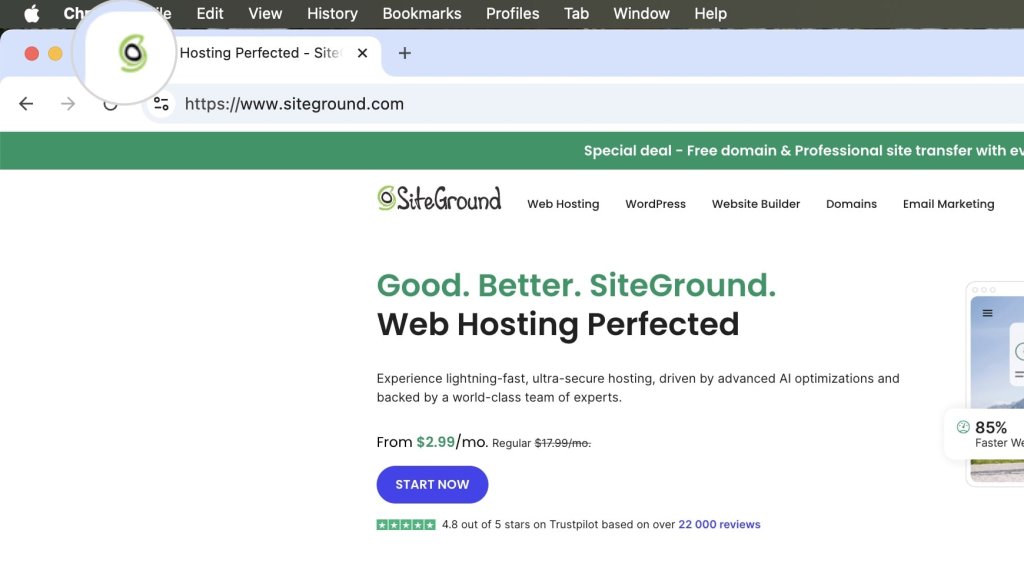
💡 Give your new website a navigation boost by popping your logo at the top and linking it to the homepage. Including a favicon—the small icon that appears next to page titles in browser tabs and bookmarks—can also be beneficial, as it helps visitors easily identify and return to your site when they have multiple tabs open
7. Scan for Accessibility
And while talking about design and responsiveness, next up on the checklist for launching a site with accessible web design. This allows everyone, including people with disabilities, to use your site effectively. It isn’t just good practice; it’s often a legal requirement and a vital component of creating an inclusive online experience.
So, what does accessibility mean in practice? It involves designing your site so that all users can navigate and interact with it easily. This includes:
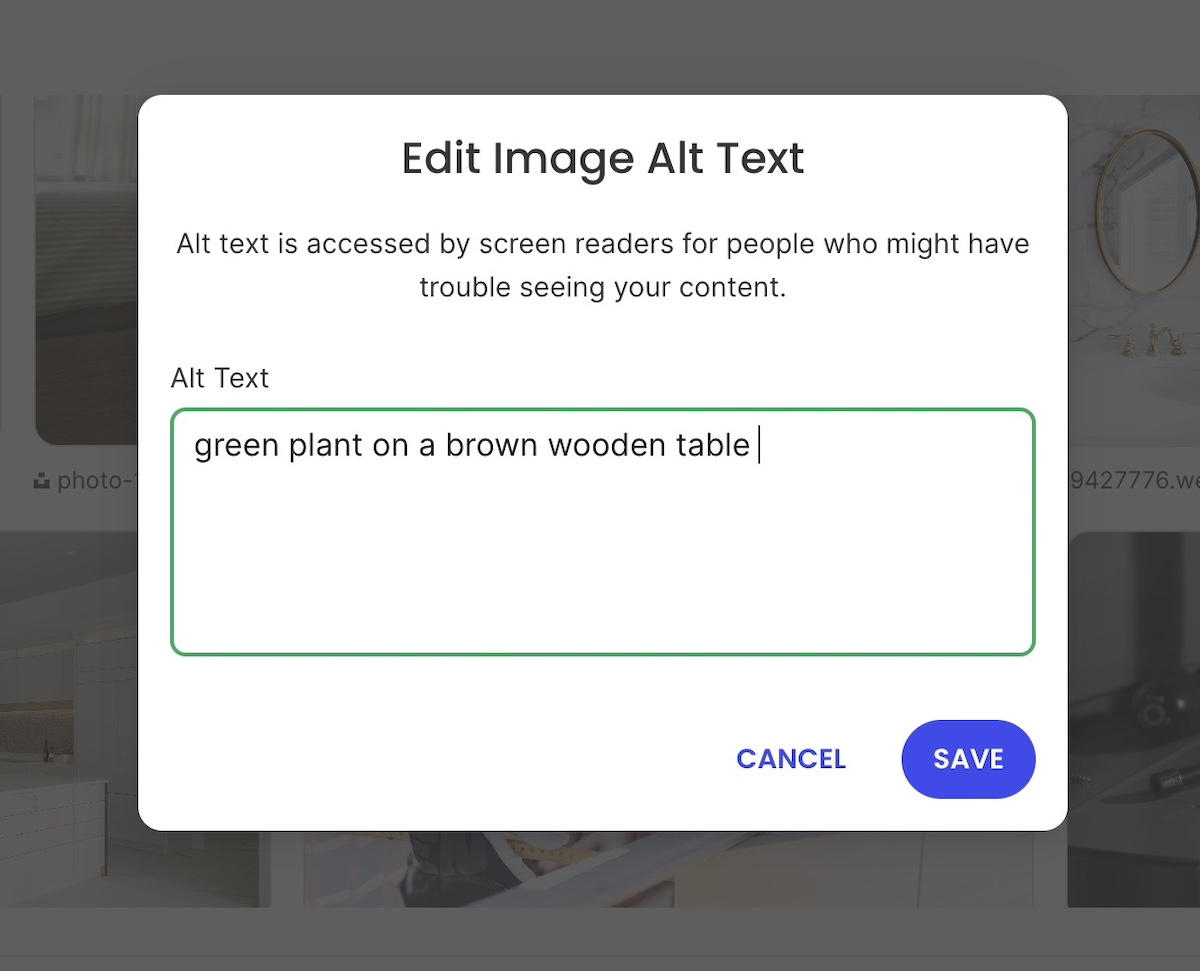
- Providing text alternatives for images
- Making your site keyboard accessible
- Choosing a high-contrast color scheme
- Providing transcripts or closed captions for files with audio
- Opting for on-page content rather than PDFs
To ensure your site meets all of the standards, we recommend consulting the Web Content Accessibility Guidelines and making any necessary changes accordingly.
8. Ensure Legal Compliance
Though it may not be the most exciting task, legal compliance is essential for protecting both you and your visitors, especially if you are running any kind of retail activity. Fortunately, many tools and AI solutions can assist you in creating these documents.
To check this off your website launch checklist, consider the following:
- Implement a cookie consent banner: This informs visitors about your data collection practices and obtains their consent, as required by many privacy laws like GDPR.
- Have a privacy policy in place: This text informs your users about what data you collect, how it’s used, and how you protect it. It’s not just good practice, it’s a legal requirement in many jurisdictions.
- Include legal notices and terms of service: These outline the rules and guidelines for using your website and help limit your liability. They should clearly explain what users can and cannot do on your site.
While the cookie consent typically appears as a pop-up window on a visitor’s first visit, other legal documents should also be easily accessible. These are usually found in your website’s footer and often linked at the bottom of email newsletters.
9. Fortify Against Cyber Threats
Security is non-negotiable before launch. Your site needs to be safe for visitors from day one, and a few foundational steps make a significant difference.
Start with an SSL certificate to encrypt data between your site and its visitors. Most hosting providers include these for free, and the SiteGround Website Builder has SSL built in along with security handled out of the box, so the basics are already covered.
If you’re running a WordPress site, there are a few extra steps worth taking on top of that:
- Change your default login URL from “wp-admin” to something unique.
- Install a security plugin like SiteGround’s Security Optimizer, which offers two-factor authentication and limits login attempts, and is completely free.
- Keep everything up to date, from your WordPress version to themes and plugins, as outdated software can be an open invitation for trouble.
Keep those pesky cyber attacks at bay by following our website security checklist, and keep your digital space as safe as a vault!
10. Optimize For Speed and Performance
A slow site loses visitors before they even see your content. Speed optimization reduces load times, improves user experience, and directly affects your search rankings, so it belongs on every pre-launch checklist.
Fine tune key elements of your website by:
- Compressing images: Reduce file sizes while maintaining quality and improving loading time.
- Leveraging browser caching: Decrease data transfer by storing files locally on users’ browsers.
- Minifying CSS, JavaScript, and HTML: Strip unnecessary characters and spaces to improve loading times.
- Using a content delivery network (CDN): Distribute content across global servers to enhance load times and help mitigate DDoS attacks.
These optimizations might sound small, but they add up to a big difference when it comes to your site performance. Luckily, SiteGround’s Speed Optimizer allows you to optimize your website in a few clicks, and it’s free for all WordPress users!
11. Ensure Your Domain Directs to Your Actual Site
Now let’s talk about your domain name, which you may have already purchased by now.
Whether you’ve chosen to use a web-hosted sitebuilder, or to buy your own hosting and create a site with a content management system (CMS), you’ll need to make sure that your domain directs to your actual website. This step is a crucial part of your website requirements checklist.
If you’ve purchased your domain and hosting from the same provider, this might already be set up for you. However, if you’ve bought your domain from one provider and your hosting from another, you’ll need to point your domain to your hosting provider. To do this, you will need to consult your domain and hosting providers for exact instructions, but the process is generally straightforward.
Working with SiteGround? Here’s how you can point your domain to SiteGround servers.
12. Conduct Usability Testing
Usability testing means watching real people use your site before it goes live. It surfaces friction points and confusion that are impossible to spot when you already know how everything works.
You can do it in two ways:
- By sharing your website with friends, family, and potential users, and asking for their candid overall experience—frustrations they’ve experienced, ideas you might not have considered.
- By using paid platforms like UserTesting or Trymata to observe users as they navigate your site and complete tasks.
In any case, testing your user experience can reveal usability hiccups or bottlenecks, allowing you to address them before the big day.
13. Use Social Media to Build Anticipation
Building anticipation through social media is an ongoing process to weave into your website launch preparations. It’s an effective way to engage potential visitors and drive traffic to your site once it goes live, especially if you already have engaged followers.
Here’s how to make it happen:
- Share sneak peeks, countdowns, and behind-the-scenes content to spark interest and excitement.
- Use hashtags relevant to your niche to broaden your reach.
- Encourage followers to share your content and join the conversation.
And there you have it! It’s time to hit that much-anticipated “Publish” button and watch the magic unfold as the results start rolling in.
14. Crawl Your Website
Once your site is live, you need to make sure search engines can find and index your pages. Submitting a sitemap and setting up a robots.txt file are the two steps that make that happen. Let’s break it down.
❗Crawling involves exploring pages and links that branch out to additional pages, while indexing entails storing, analyzing, and organizing the content and relationships between those pages.
Here’s how to make your site visible to search engines:
- Submit an XML sitemap: This is a document of all the links on your website and how they relate to one another. Once it’s ready, you can submit it via Google Search Console and Bing Webmaster Tools.
- Create a robots.txt file: Consider this as your site’s bouncer, guiding Google’s search engine crawlers on which pages to bypass. While smaller sites may not necessarily need it, larger sites can benefit significantly from this to manage server resources effectively. You can use Google Search Console’s tester to ensure it’s properly configured and not blocking essential pages.
15. Integrate Analytics Tools
To better serve your users and grow your business, analytics tools are critical. They act as your website’s secret agents, offering insights into visitor interactions and helping optimize your site for search engines. Based on these insights, you can adjust your content, expand or refine your offerings, and make other strategic improvements.
The three most important tools that you’ll need are:
- Google Search Console: Helps you understand your site’s performance on Google Search and get insights to improve visibility with the right keywords.
- Google Analytics: Helps you track website traffic and measure the effectiveness of marketing campaigns by identifying website visitor sources such as organic search, social media, and paid ads.
- Bing Analytics: Offers similar functionalities, optimized for the Bing search engine.
16. Check Site Speed
Now, let’s tick off the speed box on our website checklist. Tools like PageSpeed Insights and GTmetrix are fantastic for getting a snapshot of your site’s performance. They’ll show you website metrics like load time, time to first byte, and even give you a performance score. It’s like having a performance dashboard for your website.
Once you have the data, what’s next? One of the biggest factors is your hosting provider. A reliable host with fast server response times can make a world of difference. Look for one that offers solid uptime guarantees and good customer support – because when things go wrong, you’ll want help, and you’ll want it fast.
Do you have doubts about your hosting provider? No worries—it’s never too late to make a switch! Check out SiteGround’s hosting plans and find your perfect match.
SEE SITEGROUND HOSTING PLANS →
17. Map Out a Maintenance Plan
Launching your site is not the finish line. A maintenance plan keeps your site secure, fast, and up to date over time, and prevents small issues from becoming costly ones. Be sure to schedule regular reviews for tasks such as:
- Updating plugins
- Checking security
- Renewing content
- Refreshing design
These should be part of your routine and addressed whenever issues pop up.
Final Thoughts on Your Website Checklist
Launching a website is exciting, but ensuring its success requires careful preparation and ongoing maintenance. By following a comprehensive website checklist that details the steps to launching a website, you can confidently address key areas such as SEO, security, speed, design, and usability. This proactive approach not only helps you avoid common pitfalls but also ensures that your site performs optimally from day one.
Remember, the launch is just the beginning—post-launch efforts like monitoring site performance, integrating analytics, and maintaining regular backups are crucial for long-term success. With the right tools and strategies in place, your website will not only meet expectations but exceed them, providing a seamless experience for your visitors and supporting your business goals.

Website Checklist FAQs
A complete pre-launch website checklist covers design and branding consistency, page content and proofreading, on-page SEO, form functionality, accessibility, legal compliance, security, speed optimization, and domain setup. Beyond the technical side, it should also include usability testing and a plan for how you’ll maintain the site after launch. The goal is to make sure nothing critical is overlooked in the rush to publish.
Your site is ready to launch when it works correctly on all devices and browsers, every page has been proofread and tested, your SEO basics are in place, your legal documents are live, and your security and backups are set up. If you’ve worked through a structured checklist and can confidently tick off each area, that’s your signal. Waiting for perfection is a trap—a well-prepared site is ready even if it isn’t finished.
Yes, in most cases. If your site collects any personal data—through contact forms, newsletter signups, analytics tools, or cookies—a privacy policy is a legal requirement in many jurisdictions including the EU, UK, and California. It tells visitors what data you collect, how you use it, and how you protect it. Many AI tools and legal document generators can help you create one quickly.
This article was originally published in June 2025 and then updated in May 2026.