

You’ve tweaked your headlines, done your keyword research, published post after post… And Google still isn’t impressed.
But most SEO mistakes aren’t content problems: they’re often infrastructure problems. Slow load times, unreliable uptime, missing SSL, and poor crawlability all start at with your hosting setup. Fixing them at the infrastructure level removes entire categories of SEO problems before they appear in your rankings data.
Key takeaways:
- Your server’s response time, caching setup, and physical location all affect how fast your site loads — and slow sites rank lower, full stop.
- One wrong line in your robots.txt file can accidentally tell Google to stop crawling your site entirely.
- In 2026, being fast and accessible isn’t just good for rankings; it’s what gets you cited by AI tools like ChatGPT and Google’s AI Overviews.
The SEO problems built into most website setups
The five mistakes below cover the full range: from technical slip-ups to content missteps. What they have in common is that a reliable hosting provider either prevents them outright or gives you the tools to catch them early.
#1. Your site speed is too slow to compete
If your pages take more than a few seconds to load, visitors leave. And that tells Google your site isn’t worth ranking. Page speed is a confirmed ranking factor, and Google measures it through Core Web Vitals: a set of metrics that track how fast your page loads, how quickly it responds to a click, and whether the website layout jumps around while loading. Score poorly on these, and your rankings will reflect it.
Most speed problems come down to three things on the content side:
- Uncompressed images adding unnecessary weight to every page
- Too many plugins running in the background
- Website themes loaded with features and animations that slow everything down
But content-side fixes only go so far.
These four factors live at the server level — and they affect your speed before a single visitor lands on your page:
- TTFB (Time to First Byte): the time it takes for your server to send the first piece of data back to a visitor’s browser. A high TTFB means your site feels slow even before anything has loaded, and it’s almost always a hosting problem, not a content one.
- No caching: when someone visits your site, the server normally builds the page from scratch each time, pulling data from the database, assembling everything, then sending it over. Caching skips that process by saving a ready-made version of the page and serving it directly. Faster for visitors, less work for your server.
- No CDN: without one, every visitor loads your site from the same single server — no matter where in the world they are. A visitor in Australia hitting a server in the US waits significantly longer than someone local.
- Server location: if your audience is in one country and your server is in another, every page load carries extra travel time.
How do you avoid it?
Compress your images before uploading and keep your plugins to what you actually need. If you’re on WordPress, SiteGround’s free Speed Optimizer plugin handles image compression, lazy loading, and minification and connects directly to the server-level caching, so both sides of the speed problem are covered in one place.
At the hosting level, look for a provider that includes server-level caching, a built-in CDN, and data centers in multiple locations. SiteGround handles all three out of the box: SuperCacher speeds up performance by up to 5x by caching everything from static files to dynamic content. SiteGround’s CDN 2.0 runs on Google Cloud’s global network, using 200+ edge locations (PoPs) for faster routing, with an average TTFB improvement of around 20% based on SiteGround’s internal testing. You also choose your data center at signup, so your site is physically close to your audience from day one.
#2. You’re not on HTTPS or your SSL lapsed
If your site still runs on HTTP, Google flags it as not secure, and so does every major browser. That warning is enough to make a visitor click straight back to the search results. Google has treated HTTPS as a ranking signal since 2014, which means a missing or expired SSL certificate isn’t just a trust problem, but an SEO problem too.
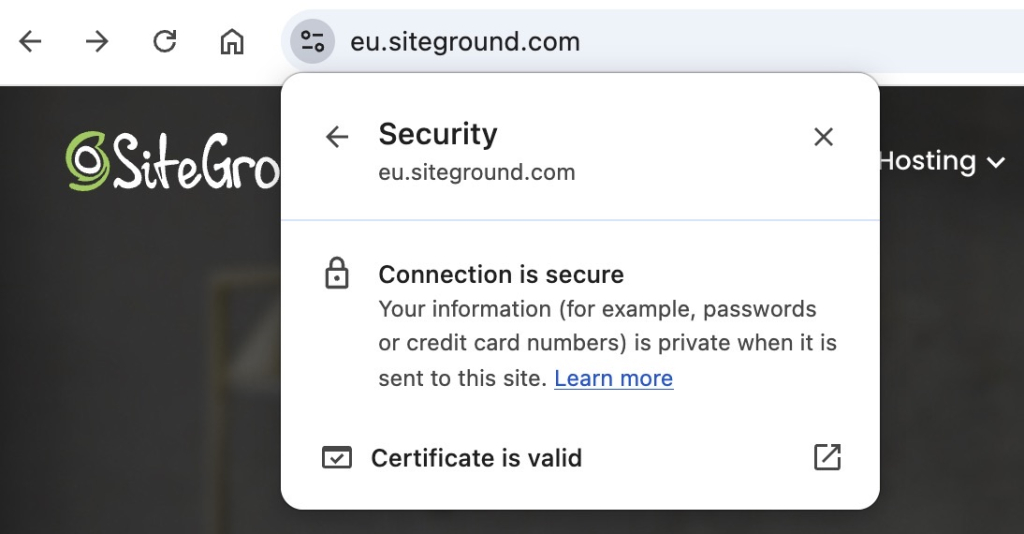
An SSL certificate is what puts the “S” in HTTPS and turns an unencrypted HTTP connection into a secure one. It encrypts the connection between your site and your visitors, and it’s what triggers the padlock icon in the browser bar. Without it, browsers label your site as “Not Secure” — not a great first impression for anyone landing on your page for the first time.
The certificate itself isn’t a one-time fix either. SSL certificates expire, and if yours lapses without auto-renewal, your site drops back to HTTP until you manually sort it out. Most site owners don’t notice until a visitor tells them, or until they see a dip in traffic.Any reputable hosting provider should handle SSL provisioning and auto-renewal automatically. If yours doesn’t, that’s a problem.
Where things still go wrong in 2026 is post-migration: moving a site to a new host can break your cert configuration, leave mixed content warnings, or drop the HTTP to HTTPS redirect. Check your address bar after any migration and run your site through a mixed content checker before assuming everything carried over cleanly.
How do you avoid it?
Check that your site is running on HTTPS by looking at the address bar. You should see HTTPS at the start of your URL. In most browsers, clicking the icon to the left of the address bar will also show you the connection status and whether your certificate is valid. If you don’t, your SSL certificate either isn’t installed or has lapsed. SiteGround provides SSL automatically on all plans and handles renewal, so the baseline is covered — focus your attention on those post-migration checks.
#3. Google can’t reliably access your content
You published your site, submitted it to Google, and assumed that was that. But Google regularly sends a crawler called Googlebot to revisit your site and check for new and updated content. And a few common things can get in the way of that without you ever noticing.
Where your content gets in the way
- No sitemap: without one, Google has to discover your pages on its own. A sitemap tells Google exactly what exists on your site and when it was last updated — it’s one of the first things to set up before you start publishing.
- Blocked crawlers via robots.txt: your robots.txt file tells search engines which pages to crawl and which to skip. A misconfigured file — often left over from a staging setup — can accidentally block Google from crawling your entire site. It’s a small file that’s easy to overlook and expensive to get wrong.
- Keyword cannibalization: when multiple pages on your site target the same keyword, Google isn’t sure which one to rank. Instead of one strong page rising to the top, you end up with several weak ones competing against each other — and none of them winning. For ecommerce sites, this is especially common with product and category pages that end up targeting near-identical terms and it’s one of the main reasons duplicate content becomes a rankings problem at scale.
Where your hosting gets in the way
Content mistakes aside, your site also needs to be physically accessible when Google comes to visit — and that’s where your hosting setup plays a direct role. A few things worth knowing:
- Downtime blocks Googlebot: Googlebot crawls on a schedule. If your site is down when it visits, those pages don’t get indexed, or get dropped from results they were already ranking in.
- Unreliable servers eat into your crawl budget: crawl budget is the number of pages Google will crawl on your site in a given timeframe. A slow or unstable server means fewer pages get crawled per visit.
- Security threats can take your site offline: bot attacks and traffic spikes can bring a site down just as effectively as a server outage.
No backups means longer downtime: if something does go wrong and you have no recent backup, getting your site back up can take days, or you lose data entirely. Automatic daily backups stored in a separate location are the difference between a quick recovery and a serious outage.
How do you avoid it?
Check your robots.txt file to make sure you’re not accidentally blocking pages that should be crawled. Submit your sitemap through Google Search Console and audit your content for keyword cannibalization: if two pages are targeting the same term, consider merging them or clearly differentiating their focus.
On the hosting side, look for a provider with a strong uptime guarantee, DDoS protection, and automatic daily backups. SiteGround covers all of these: the Web Application Firewall and AI anti-bot system filter malicious traffic before it reaches your server, daily backups are stored separately so recovery takes minutes rather than days, and the premium CDN keeps your site fast and available globally, reducing the chance of timeouts that interrupt Googlebot’s crawl.
#4. You’re targeting the wrong keywords and can’t tell
Keyword mistakes don’t always feel like mistakes at the time. You pick terms that seem relevant, write content around them, and wait. But if your site is slow, your SSL has lapsed, or Googlebot is hitting crawl errors, your pages may not be ranking for reasons that have nothing to do with the keywords themselves. By the time you figure that out, you’ve already published several pieces pointed in the wrong direction. This is the one mistake on this list that starts with your strategy, but your hosting setup is what determines how quickly you catch it.
Those infrastructure issues aside, some keyword mistakes are purely strategic:
- Chasing high-competition terms: going after keywords that established sites with years of authority have locked up. A small business site going head-to-head with Wikipedia or a major brand for a broad term isn’t a fair fight.
- Ignoring search intent: ranking for a keyword means nothing if the content doesn’t match what the searcher actually wants. Someone searching “email marketing” might want a definition, a tool comparison, or a beginner guide — and Google knows the difference even if you don’t.
- Duplicate or missing meta tags: if multiple pages share the same title tag and meta description, Google has to guess which one to surface. It usually guesses wrong.
- Over-optimized anchor text: using the exact same keyword phrase in every internal link pointing to a page looks unnatural and can work against you.
None of this is visible without data. If you haven’t connected Google Search Console from day one, you’ve been making these decisions blind — with no keyword data, no indexing errors, no crawl issues, and no way to tell which pages Google has even found. But GSC only shows you part of the picture. Your server keeps its own logs: a record of every time Googlebot visited, which pages it crawled, and which ones threw errors. That’s the data that tells you whether your site is actually being crawled the way you think it is. SiteGround gives you raw access to these logs directly from Site Tools, under Statistics → Access Log. So you’re not flying blind between GSC reports.
How do you avoid targeting the wrong keywords?
Start with search intent before you pick a keyword — ask what someone searching that term actually wants to find, and make sure your page delivers it. Keep title tags and meta descriptions unique across every page. For internal links, vary your anchor text naturally rather than repeating the exact keyword every time. And connect Google Search Console before you publish your first page — the data it gives you from day one is something you can never go back and recover.
On the hosting side, check your server access logs in SiteGround’s Site Tools to confirm Googlebot is actually reaching the pages you’re optimizing.
#5. Your site is invisible to AI search results
Everything in this list feeds into this one. Site speed, SSL, uptime, crawlability: AI Overviews and tools like ChatGPT factor all of it in when deciding which sites to cite. In 2026, your hosting setup doesn’t just affect your Google rankings. It determines whether AI search can find you at all.
Getting picked up by AI search comes down to a few things:
- Structured content: AI systems pull from pages that directly answer specific questions. Vague, meandering content gets skipped. Clear headings, direct answers, and a logical page structure for your website all help.
- Schema markup: this is code you add to your pages that tells search engines and AI systems exactly what your content is about. An FAQ schema, for example, makes it easier for Google’s AI Overview to surface your answer for a relevant query. It’s one of the most underused on-page tools available.
- Thin pages: a page that exists mainly to target a keyword but doesn’t genuinely answer anything won’t get cited. AI systems are good at recognizing when content is substantial and when it isn’t.
But content structure alone isn’t enough. AI crawlers behave like Googlebot: they need your site to be fast, stable, and consistently accessible. A slow server, frequent downtime, or a poor Core Web Vitals score can all make your site harder to crawl and less likely to be cited, even if your content is well structured.
How do you avoid it?
Structure your content around specific questions your audience is actually asking. Add FAQ schema to pages where it makes sense: most SEO plugins handle this without any coding. Keep your pages substantive and direct. And make sure the hosting fundamentals are in place: fast load times, reliable uptime, and a CDN that keeps your site accessible globally.
And if you want a full rundown of what to check, our SEO checklist covers it step by step.
Good SEO starts with where your site lives
Five mistakes, and most of them trace back to one decision: where your site is hosted. Get that right, and slow speeds, SSL lapses, downtime, and crawlability issues largely take care of themselves. With SiteGround Web Hosting, the infrastructure side of SEO is handled from day one — so the only mistakes left to make are the ones actually within your control.
[86]
Frequently asked questions about SEO mistakes
The most common SEO mistakes include slow page speed, missing or expired SSL certificates, poor site structure, targeting keywords without considering search intent, and not connecting Google Search Console before launch. Many of these stem from hosting and setup decisions rather than content ones.
Yes. Your hosting provider directly affects page speed, uptime, server response time, and SSL management — all of which are ranking factors. A slow or unreliable host can undermine well-optimized content by making your site harder for Google to crawl and slower for visitors to load.
Look for server-level caching, a built-in CDN, data centers close to your audience, automatic SSL with renewal, strong uptime guarantees, and daily backups. These features handle the infrastructure side of SEO before it becomes a problem.
Yes. AI systems like Google’s AI Overviews crawl and evaluate sites similarly to Googlebot. A slow or frequently inaccessible site is less likely to be cited, regardless of content quality. Fast load times, reliable uptime, and a global CDN all improve your chances of being picked up by AI search results.
SEO is evolving. The fundamentals still apply: fast sites, trustworthy domains, relevant content. But AI Overviews, ChatGPT, and Perplexity are now part of how people find information. Optimizing for AI citation is as important as optimizing for traditional rankings.
A few things to check:
1. Run your site through Google’s PageSpeed Insights and look at your Core Web Vitals scores: a high TTFB is often a server problem, not a content one.
2. In Google Search Console, look for crawl errors and check how frequently Googlebot is visiting.
3. If pages aren’t being indexed or keep dropping from results, uptime and server reliability are worth investigating. Your server’s raw access logs are the most direct way to see what Googlebot is actually doing on your site — SiteGround gives you access to these under Site Tools → Statistics → Access Log.
The 3 C’s of SEO are content, code, and credibility. Content covers what you publish and how well it matches search intent. Code refers to the technical setup of your site — speed, structure, and crawlability. Credibility is built through backlinks, consistent information across the web, and a trustworthy domain.