Legal requirements for email marketing: 7 rules that keep you out of trouble

Man reviewing an email marketing campaign on his laptop, with an inbox preview showing a promotional email

A single non-compliant email can cost you up to $53,088 under the CAN-SPAM Act alone, and that’s before GDPR, CASL, or your state’s privacy law get involved. Here’s what each one actually requires, and how to meet every legal requirement for email marketing without a law degree.

Key takeaways:

  • The legal requirements for email marketing come from at least four sets of email marketing laws depending on your subscriber list: CAN-SPAM (US), GDPR (EU/UK), CASL (Canada), and a growing list of state privacy laws.
  • CAN-SPAM’s maximum civil penalty is $53,088 per non-compliant email, set by the FTC’s inflation adjustment effective January 2025.
  • The FTC’s largest CAN-SPAM settlement to date is $2.95 million, against a company that sent over 30 million commercial emails without a working opt-out.
  • You have 10 business days to honor an unsubscribe request under CAN-SPAM, and your opt-out link has to stay functional for at least 30 days after each send.
  • CAN-SPAM is an opt-out law; GDPR and CASL are opt-in laws. Sending the same campaign to a US list and a Canadian list can mean two different consent requirements.
  • Legal compliance and deliverability aren’t the same thing. You can meet every legal requirement and still land in spam if your content mix, image ratio, or send frequency work against you.

The legal requirements for email marketing are: an honest, non-misleading subject line, a valid physical mailing address, accurate sender information, and a working unsubscribe link you honor within 10 business days. 

Depending on where your subscribers live, you may also need documented opt-in consent before you send anything, which is the case under GDPR and CASL. Most guides treat the US baseline and the international consent rules as two separate topics. In practice, they’re one checklist to run through before every send, and which parts apply to you depends entirely on your subscribers’ location.

Email marketing laws by region: which ones apply to your list

Which of these email marketing laws applies to you depends entirely on where your subscribers live, not where your business is registered.

LawWho it coversConsent modelPenalty ceilingDistinguishing requirement
CAN-SPAMUS recipientsOpt-out$53,088 per emailNo prior consent needed to send a first email
GDPREU/UK recipientsOpt-inUp to 4% of global annual revenue or €20 millionRequires a documented lawful basis before sending
CASLCanadian recipientsOpt-inUp to $10 million CAD per violationConsent must be express or implied under narrow conditions
State privacy lawsVaries by state (e.g., California, Colorado, Virginia)VariesVaries by stateGrants recipients the right to know what data you hold and to request deletion

CAN-SPAM Act (email marketing law in the United States)

The CAN-SPAM Act doesn’t require permission before you send a first commercial email to a US address. What it requires instead is honesty and an easy way out: accurate header information, a non-deceptive subject line, a valid physical postal address, and a clear unsubscribe mechanism you have to honor within 10 business days. It applies to B2B email just as much as B2C. The FTC has said plainly that the law makes no exception for business-to-business messages.

GDPR (EU and UK subscribers)

If your list includes anyone in the EU or UK, GDPR shifts the entire model from opt-out to opt-in. You need a lawful basis, usually explicit consent, before you send anything, and you have to be able to show when and how that consent was collected. 

There are two narrower exceptions worth knowing. B2B email to a named contact at a company can sometimes rely on “legitimate interest” instead of consent. And in the UK specifically, PECR‘s “soft opt-in” lets you email existing customers about similar products without fresh consent, as long as you gave them a clear opt-out when you first collected their details.

GDPR also gives subscribers the right to request a copy of their data or ask you to delete it, which means your email platform needs a way to actually locate and remove someone’s records, not just unsubscribe them from future sends.

CASL (Canada’s anti-spam law)

Canada’s Anti-Spam Legislation is one of the stricter regimes in the world. It requires express or implied consent before you send, identification information in every message, and an unsubscribe mechanism that works immediately, not within a grace period. Penalties can reach $10 million CAD per violation, which makes CASL worth taking seriously even if Canadian subscribers are a small slice of your list.

State privacy laws (CCPA/CPRA and newer state laws)

State-level privacy laws don’t regulate email sending directly the way CAN-SPAM does, but they regulate the data behind your list. As of 2026, around 20 US states, including California (CCPA/CPRA), Colorado, Connecticut, and Virginia, have their own comprehensive privacy laws, with Indiana, Kentucky, and Rhode Island the newest additions, effective January 2026. These laws give recipients the right to know what personal data you’ve collected, opt out of its sale, and request deletion. If a subscriber invokes that right, you need a process for finding and removing their information across your entire email platform, not just your active list.

The 7 email marketing requirements every campaign must meet

Regardless of which laws apply to your list, these seven requirements cover the ground CAN-SPAM, GDPR, and CASL all care about in some form. Meet all seven and you’ve handled the overwhelming majority of what gets a business in trouble, whether the fine comes from the FTC, an EU regulator, or Canada’s CRTC.

1. Accurate header and sender information

The “From,” “To,” and routing information in your email has to accurately identify the person or business that sent it. Using a domain name or email address you don’t have the right to use, even to make a promotional email look more personal, is itself a CAN-SPAM violation.

2. Honest, non-deceptive subject lines

Your subject line has to reflect the actual content of the message. A subject line like “Re: your account” on a promotional email you’re sending cold is the kind of deception the FTC treats as a violation on its own, independent of anything else in the email.

3. A physical postal address

Every commercial email needs a valid physical postal address. This can be your current street address, a post office box registered with the USPS, or a private mailbox registered with a commercial mail-receiving agency. A missing address is one of the most common reasons the FTC cites in enforcement actions. 

If you’re using SiteGround Email Marketing, you’ll need to add your business address to your template yourself.

Recipients need an obvious, functioning way to opt out, and that mechanism has to keep working for at least 30 days after you send (60 for CASL). 

SiteGround Email Marketing includes a working unsubscribe link in every email automatically, so this one’s handled without any setup on your end.
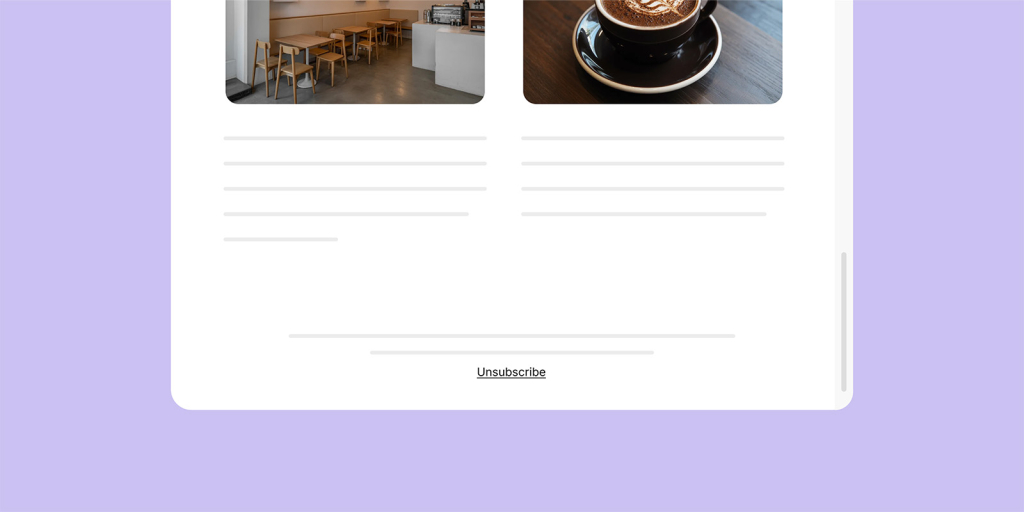
Email newsletter template with a cafe and coffee photo, ending with an Unsubscribe link in the footer

5. Processing opt-outs within 10 business days

Once someone unsubscribes, you have 10 business days to stop emailing them under both CAN-SPAM and CASL. Under CAN-SPAM specifically, you also can’t sell or transfer their address to anyone else once they’ve opted out. GDPR doesn’t set a fixed deadline, but requires you to honor the withdrawal “without undue delay,” so treat 10 business days as the outside limit, not the standard, if any EU or UK subscribers are on your list. 

SiteGround Email Marketing processes opt-outs immediately, so there’s no delay to track manually.

For any subscriber under GDPR or CASL, you need to be able to show when and how they consented, not just that they’re currently on your list. That means storing timestamps, the specific opt-in method used, and the exact language they agreed to, since “we’ve always had them on the list” isn’t a defense under either law.

7. Distinguishing ads from other messages, where required

Some jurisdictions require commercial messages to be clearly identifiable as advertising, separate from transactional or relationship emails like receipts and password resets. Mixing promotional content into a transactional email can pull that message under commercial-email rules it wouldn’t otherwise be subject to. Getting your double opt-in process right from the start makes this distinction easier to maintain, since you’re not retrofitting consent records after the fact.

TL;DR: What this means for you

RequirementAutomationYour responsibility
Unsubscribe mechanismAutomated by some ESPs (email service providers), including SiteGround Email MarketingVerify it works and stays live 30 days (60 for CASL) if your platform doesn’t confirm this, or test regularly regardless
Opt-out processingAutomatic and immediate with SiteGround Email MarketingConfirm your platform processes opt-outs within 10 business days, or build a manual process if not
Physical postal addressNoneAdd your business address to your template yourself, regardless of platform
Consent management (GDPR)A named feature on some platforms, confirmed for SiteGround Email Marketing via its own documentationConfirm whether your platform logs timestamp, opt-in method, and consent language, since GDPR requires being able to prove this
Consent logging (CASL)Not confirmed as automated on any specific platform in this researchKeep your own log of timestamp, method, and language for Canadian subscribers
Sender info, subject lines, physical addressNot automatable, this is content you writeAccurate and honest on every send, regardless of platform
Documented consent (EU, UK, Canada)Not automatable, this is a record you keepProof of when and how each subscriber opted in

What happens if you break these email marketing laws (real penalty figures)

The FTC’s maximum CAN-SPAM penalty is $53,088 per non-compliant email, not per campaign. Send one broken unsubscribe link to 10,000 addresses, and that’s 10,000 separate violations, not one mistake.

In practice, the FTC rarely goes for the theoretical maximum. Two real cases show what actually happens:

  • $2.95 million: a company sent over 30 million commercial emails without honoring opt-outs or including a physical address.
  • $650,000: a company disguised marketing emails as account notifications, again over a missing working opt-out.

Neither case involved proof of bad intent. A broken link and an outdated template were enough.

This is also why cleaning your list regularly matters beyond deliverability: bad data is what turns one small mistake into thousands of separate violations.

Opt-in vs. opt-out: which laws require which consent model

Not every law treats permission the same way. Some let you email first and ask forgiveness later; others require a yes before you send anything at all.

LawConsent modelWhat it means in practice
CAN-SPAM (US)Opt-outYou can send a first commercial email without permission, as long as you honor opt-outs promptly and meet every other requirement.
GDPR (EU/UK)Opt-inYou need documented consent before you send anything.
CASL (Canada)Opt-inSame as GDPR: consent has to come first, and you need to be able to prove it.

If your list spans multiple regions, apply the stricter opt-in standard to everyone rather than segmenting by region. It’s simpler to manage than running separate consent processes per country, and since GDPR and CASL are both stricter than CAN-SPAM, meeting their bar automatically covers you under CAN-SPAM too.

Understanding why people unsubscribe also helps you spot when a consent problem, not a content problem, is driving your opt-out rate.

Four sending rules that keep subscribers engaged (and out of spam)

None of these sending rules are legal requirements, but ignore them and you can be fully compliant on paper and still watch your open rates drop and your emails land in spam anyway.

The 80/20 rule: balancing value and promotion

The 80/20 rule says roughly 80% of your email content should be genuinely useful to the reader, education, updates, or resources, with only about 20% direct promotion. This is a content-mix guideline, not a spam-filter rule: lists that get promotional email after promotional email tend to disengage and unsubscribe at a higher rate, which is what damages your sender reputation over time, not the ratio itself.

The 60/40 rule: why your text-to-image ratio affects deliverability

The 60/40 rule refers to keeping your email body at roughly 60% text and no more than 40% images. This one is a genuine deliverability lever: spam filters flag image-heavy emails with little text more aggressively, since that pattern historically correlates with spam. An email that’s almost entirely one large image is a common trigger for inbox providers to route a message to the promotions tab or spam folder.

Safe send frequency: how often is too often

There’s no single legal limit on how often you can email someone, but sending too frequently is the fastest way to trigger complaint rates that hurt your deliverability across your entire list, not just with one annoyed subscriber. A reasonable starting cadence for most small business lists is one to two emails per week, adjusted based on your unsubscribe and complaint rates rather than a fixed schedule. If you’re running cold email outreach alongside your list, the frequency math works differently since you’re not yet working with a warmed, consenting audience.

Gmail and Yahoo’s bulk sender rules

If you send 5,000 or more emails a day to Gmail or Yahoo addresses, there’s a fourth rule that isn’t a law but hits faster than one: authenticate your domain (SPF, DKIM, DMARC), add one-click unsubscribe headers to every marketing email, and keep your spam complaint rate under 0.3%, ideally under 0.1%. CAN-SPAM might fine you eventually. Gmail will just stop delivering your email next week.

A pre-send legal compliance checklist for legal email marketing

Before you hit send on any campaign, confirm:

  1. Your sender name and reply-to address are accurate and belong to your business.
  2. Your subject line matches the actual content of the email.
  3. A valid physical postal address appears somewhere in the email.
  4. Your unsubscribe link is visible, one-click, and tested.
  5. You have a process to honor opt-outs within 10 business days.
  6. Any EU, UK, or Canadian subscribers have documented, timestamped consent.
  7. Your list has been cleaned recently, since sending to invalid or complained-about addresses raises both legal and deliverability risk. Your email unsubscribe rate is a useful early signal that something on this list is off before it becomes an enforcement problem.

Stay compliant without hiring a lawyer

You don’t need a law degree to get this right. You need a platform that treats compliance as the default, not a plugin you have to remember to install.

Four laws, one small business, and about zero interest in reading legal text. That’s the actual math most people are working with. The good news: none of it requires memorizing statutes. It requires picking a process where the boring, easy-to-forget parts happen automatically instead of living on a sticky note.

Ready to send your next campaign without wondering if you missed something? Try SiteGround Email Marketing and get your first compliant send out the door in minutes.

[58]

What is the 80/20 rule in email marketing?

The 80/20 rule in email marketing means about 80% of your email content should provide value to the reader, like tips, updates, or resources, and no more than 20% should be direct promotion. It’s a content-mix guideline aimed at keeping subscribers engaged, not a legal requirement.

What is the 60/40 rule for email?

The 60/40 rule for emails recommends keeping your email body at roughly 60% text and 40% or less images. Image-heavy emails with little text are more likely to get flagged by spam filters, so this ratio helps protect deliverability.

Is it illegal to send emails without an unsubscribe option?

Yes, it is illegal for commercial emails sent to US recipients. CAN-SPAM requires a clear, working unsubscribe mechanism in every commercial email, and failing to include one is one of the most common reasons the FTC pursues enforcement action.

What is the 30/30/50 rule for cold emails?

The 30/30/50 rule is a cold email outreach guideline suggesting roughly 30% of your effort go toward list building and targeting, 30% toward subject lines and personalization, and 50% toward the email body and offer itself. It’s a resource-allocation framework, not a legal standard.

What email marketing laws apply in the United States?

The main federal law is CAN-SPAM, which requires accurate sender information, an honest subject line, a physical postal address, and a working unsubscribe option honored within 10 business days. On top of that, depending on where your subscribers live, state privacy laws like California’s CCPA/CPRA may also apply, giving recipients the right to know what data you’ve collected and request its deletion. CAN-SPAM applies nationwide regardless of state; state privacy laws are additional, not a replacement.
AI email subject lines: How to prompt better than everyone else

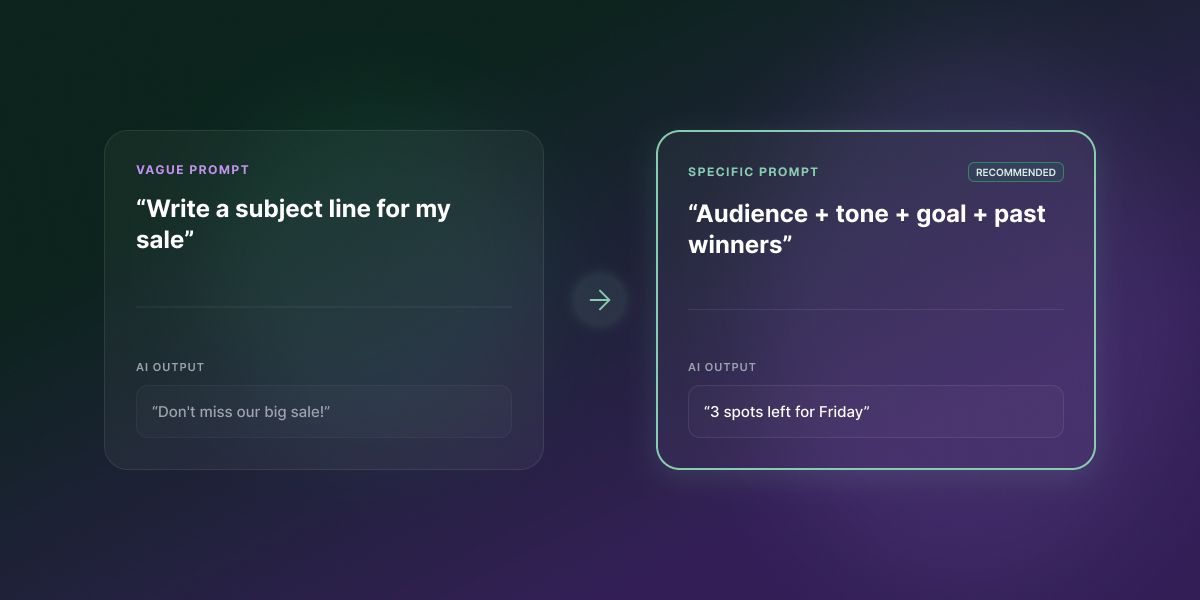
Comparison of a vague AI prompt producing a generic subject line versus a specific prompt with audience, tone, goal, and past winners producing "3 spots left for Friday"

Give AI the right inputs, and it’ll write a subject line good enough to make your best draft nervous. Skip them, and it defaults to the safest, most forgettable pattern it knows. The fix isn’t a different tool. It’s a better prompt, and that holds whether you’re using ChatGPT, Claude, Gemini, or the generator built into your email platform.

Key takeaways:

  • AI email subject lines only sound generic when the prompt behind them is generic; the tool isn’t the bottleneck.
  • A structured prompt (audience, tone, goal, and a few real examples) consistently outperforms a one-line request, in any AI tool.
  • ChatGPT, Claude, and Gemini can produce noticeably different subject lines from the identical prompt, so it’s worth testing more than one.
  • Treat every AI-generated subject line as a first draft to test, not a finished answer.
  • SiteGround Email Marketing’s built-in AI generator uses the same inputs this framework covers: tone, email type, and a short description.

Why your AI email subject lines all sound the same

AI-generated subject lines sound interchangeable because most prompts only give the model one piece of information: the topic. Ask any tool to “write a subject line for my sale” and it has to invent the audience, the tone, and the goal on its own, so it defaults to the safest, most generic pattern it knows.

What generic prompts leave out

A one-line prompt skips four things a human copywriter would be less likely to skip: who’s reading it, what tone fits the brand, what the reader should do next, and what similar lines have worked before. Without those, the AI fills the gaps with whatever’s statistically common: urgency words, vague benefit claims, and a tone that could belong to any brand. That’s why five different tools, given the same bare-bones prompt, tend to hand back five versions of the same line.

What AI tools for email subject lines actually do

An AI email subject line generator is only as good as what you feed it. The tool isn’t the problem; the input is, and that’s true whether you’re using a dedicated generator or typing straight into ChatGPT.

Most tools take one input (a topic or a pasted email) and return five to ten options in seconds. That’s genuinely useful for speed, but it comes at a cost.

What they don’t know unless you tell them

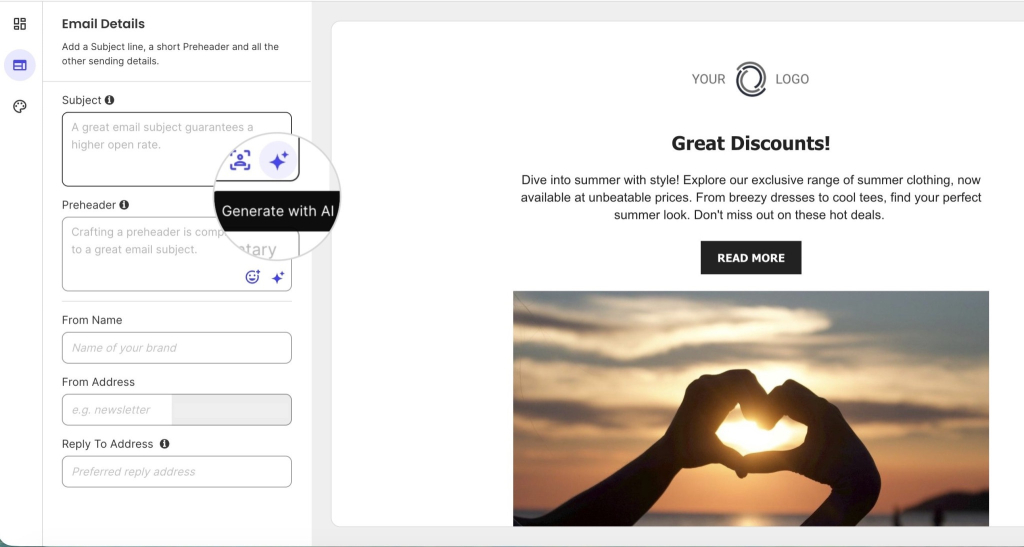
Speed doesn’t buy you relevance. A generic prompt means the tool doesn’t know your audience, your brand voice, or what’s worked before, unless you tell it. Here’s what telling it looks like in practice: SiteGround Email Marketing’s AI subject and preheader generator has a sparkle icon on the Subject field. Click it, choose “Describe your email” instead of just scanning your draft, and add a tone and email type before you generate.

SiteGround Email Marketing editor showing the Generate with AI button next to the subject line and preheader fields

Using an AI tool to optimize subject lines you’re not sold on

If you’ve drafted a subject line and it feels flat, vague, or too long, don’t ask an AI tool to write a new one from scratch. Paste in the line you have and ask it to fix a specific weakness: “This subject line is too vague. Rewrite it to name the specific offer, still under 50 characters.” Targeted edits like this outperform a fresh generation, because you’re pointing the model at exactly what’s wrong instead of hoping it guesses right.

This also works after the fact, but for your next similar campaign rather than the one that already went out. That is, if last month’s newsletter subject line got a weak open rate, paste that line in and ask the AI to fix the specific issue (too generic, too long, buried the offer) before you draft this month’s version.

The AI email subject line prompt framework: what actually changes the output

Four inputs consistently separate a sharp AI-generated subject line from a flat one: audience, tone, goal, and a few real examples to anchor the pattern. These aren’t specific to subject lines — they’re the same dos and don’ts that make any ChatGPT prompt sharper; this section applies them to one specific, high-stakes line of copy.

Audience and segment context

Name a real segment, not a generic description. “Write for our customers” tells the AI nothing useful. “Write for subscribers in the VIP group” or “for people who clicked but didn’t buy in our last campaign” gives it a specific reader to write for, and both are segments you can actually build: the first from a group you’ve already set up, the second by filtering that campaign’s Recipient Activity by action and assigning those contacts to a group.

Brand voice and tone

State the tone explicitly, and say what to avoid as clearly as what to include. “Warm, a little playful, no corporate language” works better than “professional,” which every brand claims and none of them mean the same way. Naming what you don’t want (no fake urgency, no exclamation marks, no clickbait) closes off the model’s default fallback patterns.

Campaign goal and desired emotion

Tell the AI what you want the reader to feel and do, not just what the email is about. “Get them to open out of curiosity” produces different output than “get them to open because they’re worried they’ll miss the deadline.” The goal shapes word choice more than the topic does.

Why AI puns in email subject lines fall flat

AI-generated puns read as generic more often than they read as clever, because the model reaches for the most statistically common wordplay for a given topic, and so does every other brand asking for the same thing.

A few you’ll see constantly, because every AI tool reaches for the same ones:

  • Coffee sale: “Brew-tiful savings,” “Perk up your day”
  • Summer sale: “Hot deals, cool prices,” “Sun’s out, savings out”

If a prompt calls for humor, ask for specificity instead. It lands better and reads less like a template:

  • Generic pun: “Don’t let your cart get cold”
  • Specific detail: “That candle’s been in your cart since Tuesday. We’re not judging, but we did notice.”

Show, don’t just tell, examples of what you want

Once the other three inputs are set, give the AI three to five proven subject-line patterns as examples of the shape you want, not just descriptions of a shape. Here’s what that looks like for three reliable patterns:

  • Curiosity gap: “Why your neighbor’s WiFi is faster than yours” — names a gap, doesn’t close it, and it’s specific enough to feel like it’s about you.
  • Specific number: “7 people just grabbed the last size in navy” — a real number reads as true; “almost sold out” reads as filler.
  • Direct benefit: “Your package skipped the line, arrives Thursday” — states the outcome and makes it feel a little lucky, no framing needed.

Paste three to five lines like these into the prompt (your own past lines if you have strong ones, or examples like these if you don’t) and ask the AI to write new subject lines “in this style.” This is a few-shot prompting: showing the model real examples of the pattern, rather than describing the pattern in the abstract, gets it to copy the structure instead of guessing at it.

Before and after: a staged prompt, from vague to fully structured

Watching a prompt evolve makes the mechanism visible. Start with the vague version, then add one variable at a time:

  1. Vague: “Write a subject line for our summer sale.”
  2. Add audience: “Write a subject line for our summer sale. The audience is returning customers who bought last summer.”
  3. Add tone: “…Keep the tone confident and a little playful, not salesy.”
  4. Add goal and constraint: “…The goal is to get them to shop the new collection before it sells out. No exclamation marks, no ‘don’t miss out.'”

Each stage narrows what the AI can guess at, so the output gets sharper. By stage four, the model has almost nothing left to invent.

Here’s how the results look in practice with different models:

StagePromptChatGPT (direct, benefit-led)Claude (conversational, natural)Gemini (concise, structured)
1. Vague“Write a subject line for our summer sale.”☀️ Summer sale: Hot deals, cool prices!Summer sale: up to 40% off, ends Sunday☀️ Summer Sale is LIVE: Grab your favorites before they’re gone!
2. + Audience“…The audience is returning customers who bought last summer.”☀️ Summer’s back—and so are your favorite dealsYou’re back for round two? Summer sale starts nowJust like last year, but better: Your exclusive summer deals are here!
3. + Tone“…Keep the tone confident and a little playful, not salesy.”☀️ You’re back. Summer is too.You again? Good. We saved you the good stuff.😎 Ready for round two? Let’s make this summer even better than the last.
4. + Goal and constraint“…Get them to shop the new collection before it sells out. No exclamation marks, no ‘don’t miss out.'”☀️ Your summer favorites just got a refreshYou again? Good. The new collection won’t wait.Your favorite pieces from last year are back, along with what is next.

Why ChatGPT, Claude, and Gemini don’t give you the same email subject line

As you just saw, giving ChatGPT, Claude, and Gemini the exact same structured prompt still produced three different subject lines, not because one of them failed to follow the prompt, but because each model weighs instructions and word choice differently. A thin prompt makes any tool sound generic, but even a strong prompt won’t make every tool sound identical.

What changes between models, and why

Every large language model is trained on different data and tuned with different priorities, so identical instructions land differently, as the table above shows. ChatGPT kept its emoji through every stage and leaned toward tighter, benefit-forward phrasing. Claude never used an emoji or an exclamation point, even at stage 1, and wrote the most conversational lines of the three. Gemini ran the longest, most descriptive lines and was the only one to add urgency language before the constraint told it not to.

None of these are wrong. They’re different defaults, and the only way to know which fits your brand is to test more than one.

ModelTends towardBest for
ChatGPTDirect, benefit-led phrasingFast iteration, high volume of options
ClaudeConversational, natural toneBrand voice that leans personal
GeminiLonger, descriptive phrasingDetailed context, though watch for added urgency language

Testing one prompt across models without juggling logins

Running the same prompt through multiple models used to mean separate logins and separate subscriptions. SiteGround AI Studio gives access to Gemini, Claude, and ChatGPT from one workspace, so you can run the identical prompt across all three and compare results side by side instead of settling for whichever tool you happened to open first.

How to test which AI subject line gets the most opens

There’s no subject line that wins for every list. The fastest way to find out which one wins for yours is a same-audience A/B test, not a best guess.

  1. Start with the options you already have. Most AI tools return three to five subject lines from a single prompt anyway, so you don’t need a separate step to generate variety; it’s already sitting there.
  2. Pick your two strongest. Look for the ones that feel most specific to your brand, not the most generic-sounding “safe” choice.
  3. Split a small percentage of your list (5 to 10%, if your platform allows it) and send each version to one half.
  4. Wait for a real read on opens, not just the first hour. Most lists show a meaningful open-rate gap within 2 to 4 hours.
  5. Send the winner to the rest of the list. Whichever line pulled a higher open rate on the test group is the one to trust, not the one that sounded best in the moment.

Better AI email subject lines start with a better prompt

Name the audience, state the tone, give it a goal, show it what’s worked before. Do that consistently, and the subject lines stop sounding like everyone else’s inbox and start sounding like something worth actually testing.

SiteGround Email Marketing’s built-in AI generator already runs on this logic, whether you knew it or not. Add a tone and an email type before you hit generate, then lean on “Improve Writing” instead of starting from scratch. You’ve been prompting like a pro since before you finished this article. 

And if you want the framework to go further than just the subject line, SiteGround Email Marketing’s AI email generator now builds the whole email around it. Pick a campaign type, describe your business and goal the same way you’d write a good prompt, and it hands back a subject line, preheader, and body ready to edit in the builder you already use.

[58]

Frequently asked questions about AI email subject lines

What is a catchy email subject line?

A catchy subject line gives the reader a specific reason to open the email right now, through curiosity, a clear benefit, or urgency, rather than a generic description of what’s inside. The best ones read like a message from a person, not an announcement from a brand.

What subject line gets the most opens?

There’s no single subject line that wins across every list; open rates depend on the audience, the sender’s relationship with them, and past engagement. What consistently performs is specificity: naming the actual benefit, offer, or update instead of a vague teaser.

Can AI help write better email subject lines?

Yes, AI can help write better email subject lines, but only if the prompt gives it something to work with: audience, tone, and goal. A one-line prompt like “write a subject line for my sale” produces the same generic output every generator tool already gives you.

How do I prompt AI to write an email subject line?

Give the AI four things: who the email is for, what it’s about, the tone you want, and what you don’t want (no fake urgency, no clickbait, no exclamation marks, whatever applies). The more specific the input, the less generic the output.

Which is an example of a strong subject line?

A strong subject line names a specific, real detail instead of a general claim: “Your order ships Thursday” instead of “Update on your order,” or “3 spots left for Friday’s webinar” instead of “Don’t miss out.” Specificity is what separates a strong line from a forgettable one.

Why do ChatGPT, Claude, and Gemini give different subject lines for the same prompt?

Each model was trained differently and weighs instructions differently, so identical prompts can produce noticeably different tone, length, and structure. Testing the same prompt across models, which SiteGround’s AI Studio makes possible without separate logins, is the fastest way to see which one fits your brand voice.

Teaser еmail еxamples: How to build anticipation without giving away the reveal

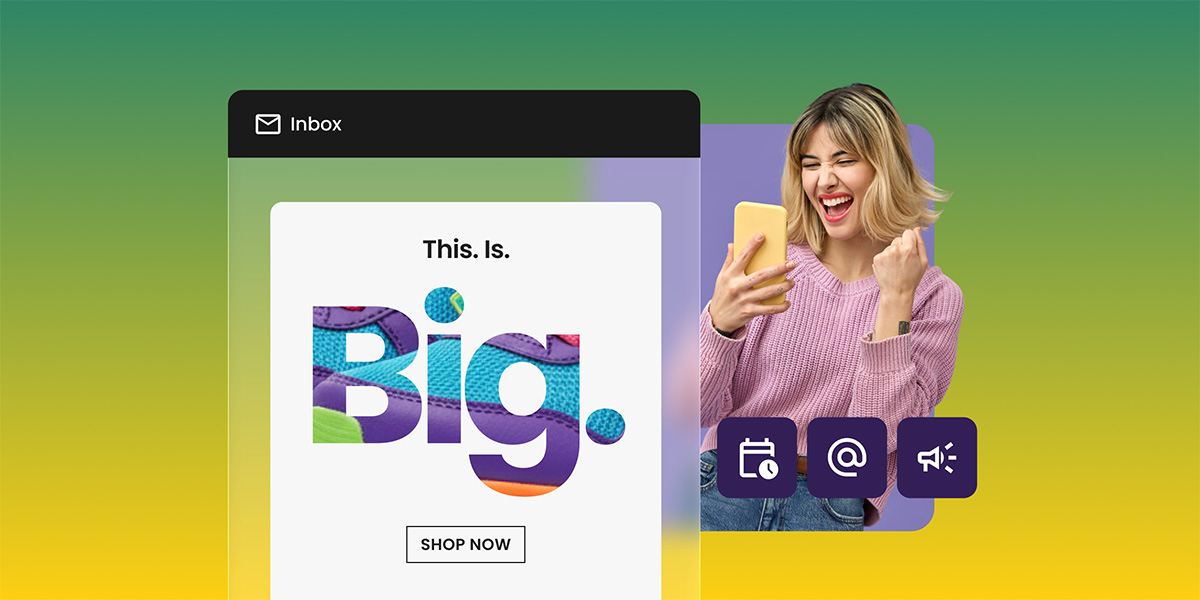
Teaser email on a phone screen with bold "This. Is. Big." text over a colorful sneaker graphic and a "Shop Now" button, next to a woman reacting with excitement while holding her phone.

A teaser email withholds one thing on purpose: the specific offer, product, or date. It names the category (a launch, a sale, an event) and stops there. The teaser email examples below show that same gap at work, and it’s what gets the next email in the sequence opened. Cliffhanger time.

Key takeaways:

  • A teaser email never reveals the product, date, or price. If any of those three appear, it has become the reveal, not the teaser.
  • Question-format subject lines average a 20% open rate compared to 12% for non-questions, based on a Klenty analysis of over 200,000 emails.
  • The reveal email’s open rate, not the teaser’s, is the real measure of whether a sequence worked.
  • Most teaser sequences run two emails before the reveal: an initial teaser and, optionally, a second one that narrows the gap slightly.
  • A teaser email creates a kind of debt with the reader. The reveal is where that debt gets paid off, and a reveal that underdelivers on the buildup costs more trust than a teaser that was never sent.

How the information gap makes a teaser email work

A teaser email works because it creates a small, specific gap between what a reader knows and what they want to know, and people act to close that gap. This is the same mechanic behind a film trailer or a locked door: enough is shown to signal what’s coming, but nothing that lets the audience guess the ending.

The gap has to be specific to work. “Something’s coming” alone is vague and easy to ignore. “Something’s coming for the ones who’ve been asking about faster shipping” names a category without naming the fix, and that specificity is what pulls the click. This is also why email copywriting for a teaser reads differently from copy for a standard promotional send. A promo email answers questions. A teaser email is built to raise exactly one.

Teaser email vs. pitch email vs. coming-soon email

These three get confused because they often arrive back to back in the same sequence. The distinction is what each one reveals and what it asks the reader to do.

Teaser emailPitch emailComing-soon email
GoalBuild curiosity about something unnamedConvert on a named offerAnnounce a fixed date or launch
What’s revealedCategory only: a launch, a sale, an eventFull offer: product, price, call to actionWhat’s coming and when
Typical CTANone, or a soft one like “Check back Thursday”Buy now, sign upGet notified, join the waitlist
Where it sits in the sequenceEarlyMid to late (the reveal itself)Can replace or precede the teaser stage

A coming-soon page often works alongside the coming-soon email, since both name the date without opening sales yet, while a teaser deliberately withholds the date too.

The three stages of a teaser email sequence

Most teaser sequences follow the same three-part shape, whether the brand is announcing a product, a sale, or an event. Understanding the job each stage does makes it easier to know when to add a second teaser and when one is enough.

  1. The setup email

The first email in the sequence. It names the category and nothing else. No product name, no date, no discount. Its only job is to plant a question in the reader’s head.

  1. The build (optional second teaser)

A second teaser, sent a few days after the first, narrows the gap slightly without closing it. This step is optional. Smaller launches and single-product announcements often skip straight from setup to reveal, while bigger campaigns use the build to sustain interest over a longer run-up.

  1. The reveal

The email where the product, date, or offer finally appears. This is where the earlier restraint pays off, or doesn’t. If the reveal underdelivers against what the teaser implied, the gap the sequence built up becomes a debt that goes unpaid, and the reader remembers that the next time a teaser lands in their inbox.

A teaser sequence is one form this can take, sitting alongside other structures covered in what email marketing is and how to get started.

Teaser email examples by use case

What differs between a product launch, a seasonal sale, and an event isn’t the mechanic, it’s what the audience already expects and how much urgency belongs in the mix.

Product launch teaser emails

Product launch teasers work by naming the category (a new release) without showing the product itself. Here’s what that looks like for a small brand adding a new item to its lineup:

Subject line: Get ready: we’re working on something big
Preheader: You’ll want to be the first to know
Body: Something new is on the way. We’re not ready to show you what it is, but we didn’t want you to hear about it anywhere else first.
Closing: Keep an eye on your inbox.

Why it works: a plain layout and a few lines of copy do the job, no product name, no image of the item itself. Readers are told a category (something new is coming from a brand they already know) and given nothing else to go on.

A brand with a more visual product can lean on imagery instead of copy to hold the same restraint:

Subject line: Shhh… coming soon
Preheader: We can’t say much, but we can show you a little
Body: [Short animated preview showing motion and color, no product visible]
Closing: More to come.

Why it works: a short animated preview shows motion and color without revealing the actual product. Both examples name the category (a new release) while keeping the specifics of what, and when, out of the email entirely. The information-gap mechanic in both cases is identical: signal scale or excitement, withhold identity. A coming-soon page is a natural next step once the teaser has done its job of gathering attention.

Seasonal campaign teaser emails

Seasonal teasers carry the extra challenge of naming an occasion without naming a price. Here’s how that plays out for Black Friday:

Subject line: Coming soon: our Black Friday sale
Preheader: Something’s about to get very good
Body: [Short animated graphic repeating “coming soon,” no discount or product shown]
Closing: Stay tuned.

Why it works: the email names the occasion (Black Friday) without naming a single price or product, which is the harder version of restraint for a seasonal sale, since sale emails almost always lead with the number.

The same restraint works just as well outside the Black Friday window, for any seasonal sale:

Subject line: Coming soon: our biggest sale of the season
Preheader: A preview, just for our subscribers
Body: [Preview of the sale catalog, no discounts listed yet]
Closing: Full details coming soon.

Why it works: a preview of the sale catalog without revealing specific discounts lets shoppers get a sense of what’s coming without giving them enough to decide whether to buy before the sale actually opens.

Seasonal teasers carry one extra pressure that product launches don’t: the calendar. A generic teaser works for a product launch whenever it’s ready. A Black Friday teaser has one shot, sent roughly a week ahead of the sale itself, since sending it too early lets the anticipation fade and sending it too late doesn’t leave enough runway to build it. This is also where seasonal campaigns benefit from a companion piece like a Black Friday ecommerce plan that maps the teaser against the rest of the sale calendar.

Event announcement teaser emails

Event teasers work a little differently, since the audience already expects a fixed date rather than a surprise. Here’s how a small business announcing a workshop or webinar could approach it:

Subject line: We’re planning something for the people who’ve been asking about [topic]
Preheader: Mark the date, details coming soon
Body: You’ve been asking about [topic] for a while, so we’re putting something together. No agenda or sign-up yet, just save the date: [date].
Closing: The full details land in your inbox next week.

Why it works: it holds a date without naming the speaker, agenda, or registration link. The reveal email that follows is where the agenda and signup link actually appear.

The gap here is narrower by design, since an event teaser can’t withhold the date the way a product teaser withholds the product, but it can withhold everything else: who’s speaking, what’s covered, and what the reader walks away with. That’s enough to justify a second email before the full event reminder email goes out closer to the date.

How to write a teaser email subject line that doesn’t give everything away

The subject line carries almost the entire weight of a teaser email, since the body rarely has more than a line or two of copy to work with. A few patterns show up across the examples above:

  • Name the category, not the contents. “Something big” or “get ready” signal scale without specifying what.
  • Ask a question instead of making a statement. Questions create the same gap in the subject line that the email body creates as a whole. Question-format subject lines average a 20% open rate against 12% for non-questions, according to a Klenty study of over 200,000 emails. The study looked at cold outreach rather than teaser campaigns specifically, but the same curiosity mechanism applies: a question creates a gap the reader wants closed.
  • Use lowercase, conversational phrasing over ALL CAPS urgency. “SHHH… COMING SOON” works because it’s an exception, not the norm. Overusing all-caps urgency in every teaser trains readers to skim past it. Urgency language does lift open rates by roughly 22% on average, according to Zippia’s subject-line research, but that effect is strongest on the reveal email, not the teaser, since urgency and curiosity pull a reader in different directions. 

Preview text (the line that shows next to the subject line in most inboxes) should extend the gap, not close it. A one-line continuation like “you’ll want to see this before Friday” adds a soft deadline without naming anything. 

Teaser email subject line templates you can copy

These fill-in-the-blank templates apply the patterns above:

  • Product launch: “Get ready: we’re working on [category]”
  • Product launch, question format: “Guess what’s coming to [brand or shop name]?”
  • Seasonal sale: “Coming soon: our [occasion] sale”
  • Seasonal sale, second teaser: “Not [current category], but you’ll still want it”
  • Event announcement: “We’re planning something for the people who’ve been asking about [topic]”

Each template names a category (a launch, a sale, an event, a topic) and stops there, which is the one rule every subject line above shares.

How many teaser emails to send (and how to space them)

How many teaser emails a sequence needs, and how far apart to send them, depends on the size of the campaign:

Campaign typeTeasers before the revealSpacing
Single-product launch1 (just the setup email)Reveal follows a few days to a week later
Bigger campaign (multi-category sale, multi-day event)2 (setup, then a second teaser)Second teaser 2–3 days after the first; reveal a few days to a week after that
Black Friday1 teaser, plus the sale’s own 3-email cadenceTeaser about a week before the sale; main promotion on sale day; last-chance reminder before it closes

SiteGround Email Marketing lets you schedule each campaign in the sequence for its specific send date in advance, so the setup email, the optional second teaser, and the reveal all go out on the days you plan for without needing to trigger each one manually on the day.

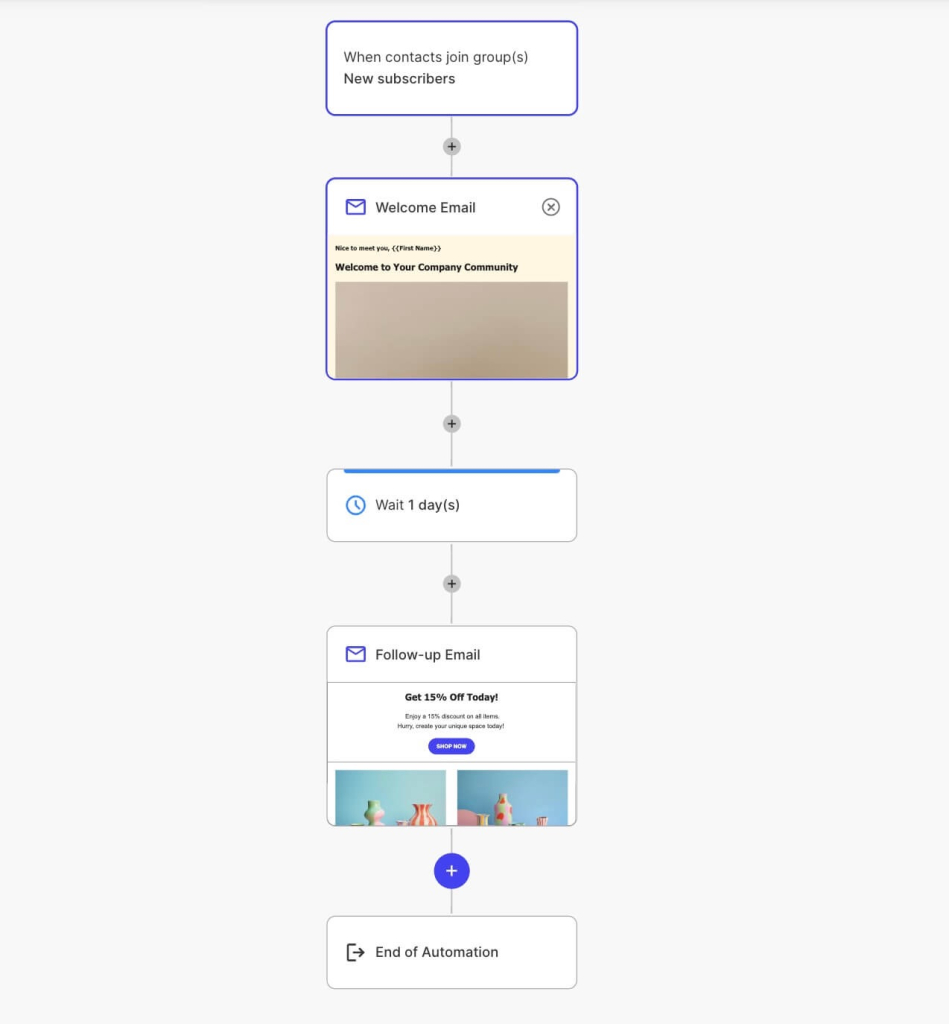
Diagram of an automated email flow, showing a trigger event followed by a sequence of timed emails sent automatically to new subscribers.

Mapping the right cadence in advance also matters for seasonal marketing campaigns, where the send dates are fixed by the calendar rather than flexible.

Common teaser email mistakes that break the payoff

Most teaser emails fail in one of three ways, all variations on the same problem: the gap and the payoff stop matching.

  • Revealing too much, too soon. If a reader can screenshot the teaser and correctly guess the product, the date, or the price, the email has already done the reveal’s job for free, and the actual reveal email has nothing left to deliver.
  • Sending too many teasers. A third or fourth teaser before the reveal usually reads as stalling rather than building anticipation, and open rates on later teasers in an overlong sequence tend to drop as readers lose patience.
  • The reveal underdelivers on the buildup. This is the costliest mistake, since it isn’t just one weak email, it changes how the reader treats every future teaser from the same sender. A teaser creates a kind of debt with the reader: it promises something worth the wait, and the reveal is where that debt gets paid. A modest reveal after a big buildup reads as a letdown even if the offer itself is reasonable on its own terms.

These same principles show up across other campaign types too, not just teasers; see 15 successful email marketing campaign examples for how buildup and payoff play out in welcome sequences, cross-sells, and other campaign formats.

A full teaser sequence, step by step

Here’s how a small ecommerce shop expanding into a new product category, say, a candle brand adding a home fragrance line, could map the same information-gap mechanic into a complete sequence, from first email to reveal:

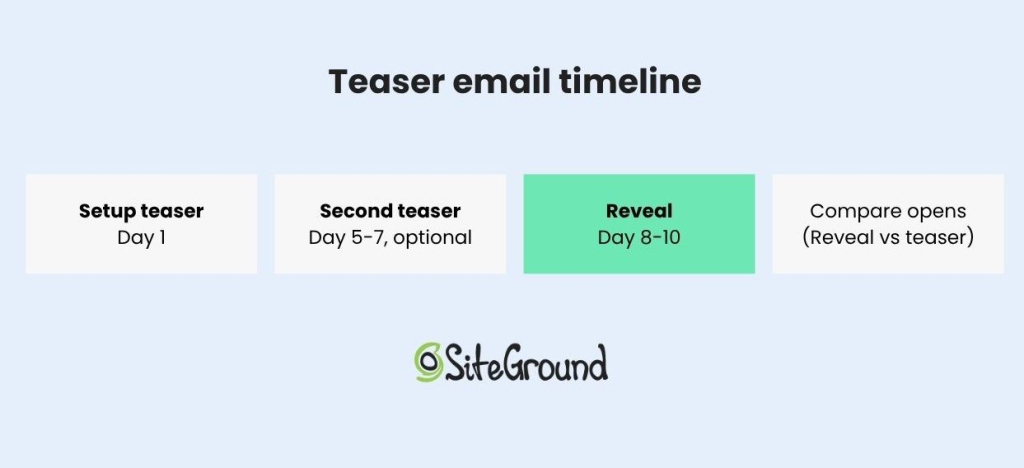
  1. Send the first teaser 5 to 7 days out. Name the category only, a new product line, nothing about what it is or does. This is the “get ready” stage.
  2. Send a second teaser 2 to 3 days later (optional). Narrow the gap slightly, perhaps a hint at the category the new product belongs in (for the shop, something like “not candles, but you’ll still want to light it”), still nothing specific enough for a reader to guess it.
  3. Send the reveal 2 to 3 days after the last teaser. This is where the product, price, and purchase link appear for the first time. Waiting much longer than this risks losing the momentum the teasers built.
  4. Compare the reveal’s open rate against the teaser’s. If the teaser opened well but the reveal didn’t lift above a normal send to the same list, the gap was either too vague to build real curiosity or held open for too long.
SiteGround graphic showing a four-step teaser email timeline: setup teaser on day 1, optional second teaser on days 5-7, reveal on days 8-10, and a comparison of open rates between reveal and teaser emails.

The same four-step shape applies just as well to a seasonal sale or an event announcement, since the only thing that changes between categories is what gets revealed at the end, not the structure that gets you there. A holiday email marketing guide can help map this same sequence onto a specific date on the calendar, like Black Friday or a year-end sale.

Build your teaser email sequence with SiteGround Email Marketing

Every example above depends on timing: the teaser has to go out early enough to build curiosity and the reveal has to land while that curiosity is still fresh. Getting that right by hand, across a launch, a sale, or an event, means remembering exact send dates and manually triggering each email in the right order.

SiteGround Email Marketing lets you build the full sequence, from the first teaser through the reveal, and schedule every email in advance, so the cadence you plan is the cadence that actually goes out. The Generate with AI feature can draft each stage for you: describe the setup teaser in your own words to get a subject line, preheader, and body with the specifics deliberately left out, then use the Announcement or Promotional preset for the reveal once you’re ready to name the actual offer.

[58]

Frequently asked questions about teaser email campaigns

What is the purpose of a teaser?

The purpose of a teaser is to create curiosity by revealing just enough to signal that something is coming without naming what it is. A teaser’s job is to earn an open on the email that follows it, not to sell anything on its own.

What is a teaser email vs pitch email?

A teaser email withholds the offer to build curiosity, while a pitch email states the offer directly and asks for a purchase or signup. See the comparison table above for how the two differ in goal, reveal timing, and typical call to action.

What’s the difference between a teaser email and a coming-soon email?

A teaser email withholds the date along with the product or offer, while a coming-soon email typically states the date but not the specifics of what’s launching. The comparison table above breaks down where each fits in a sequence.

When should you send a teaser email before a launch?

A teaser email typically goes out five to seven days before the reveal for a single product launch, with longer campaigns sometimes adding a second teaser two to three days after the first. Waiting much longer than a week risks losing the momentum the teaser built.

How short should a teaser email be?

A teaser email should be as short as the subject line and one or two lines of body copy, since the goal is to raise a question, not answer one. Adding more copy than that risks revealing details the sequence is designed to withhold.

What are some teaser marketing campaign examples?

A product launch teaser might read “Get ready: we’re working on something big,” naming the category without the product. A seasonal teaser might say “Coming soon: our Black Friday sale,” naming the occasion without a price. An event teaser might say “We’re planning something for the people who’ve been asking about [topic],” holding back the agenda and speaker until a follow-up email. Each one names a category and stops there.

How to build a 12-month email marketing calendar (with free template)

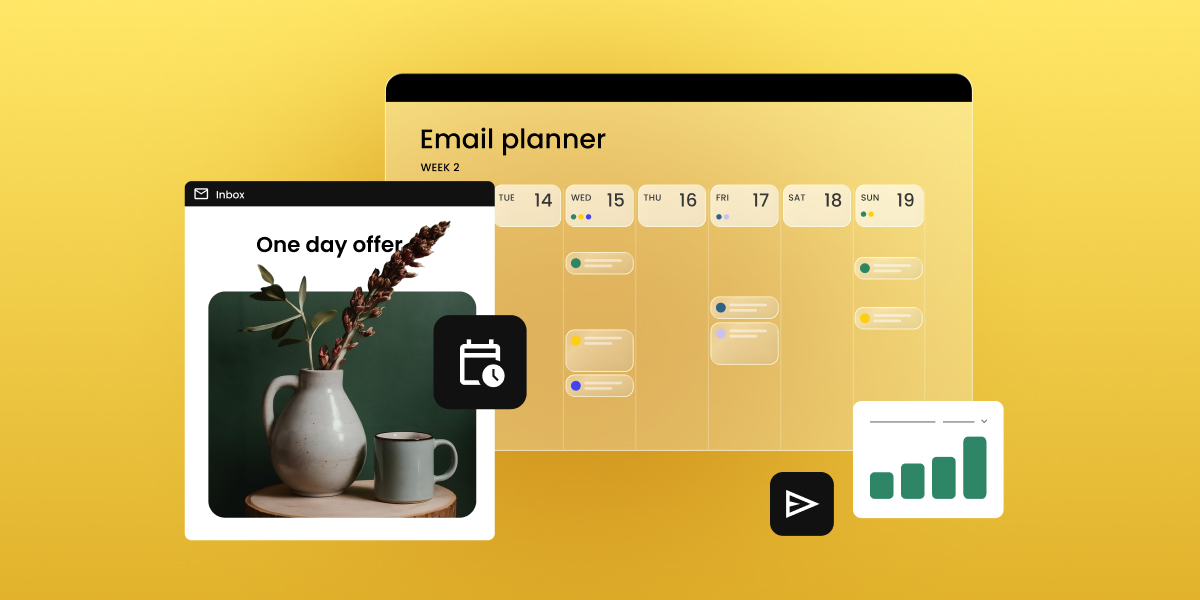
An email planner calendar showing scheduled campaigns next to a "one day offer" email preview and a bar chart tracking results

Your email marketing calendar is tied to real send dates, your list, and your own cadence, and not just vibes. By the end of this guide, you’ll have one built for your business, plus a free template to run it from.

Key takeaways:

  • An email marketing calendar tracks send dates, campaign type, ownership, and subject lines, not just topics.
  • Most small businesses send 2 to 4 marketing emails a month; ecommerce brands often go weekly or more.
  • Cadence should follow your list’s tolerance and your content supply, not a fixed rule applied to every month equally.
  • Mapping seasonal moments before regular content prevents your busiest sales periods from being an afterthought.
  • A free email marketing calendar template, ready for you to copy and paste, is included further down this page.

What is an email marketing calendar?

An email marketing calendar is a schedule of your planned sends: the date, campaign type, owner, and status, all in one place. Unlike a general content calendar, it exists for one job: keeping each send tied to a clear email marketing goal.

The tool doesn’t matter, a spreadsheet, a project board, or your email platform’s own scheduling view all work. What matters is whether the four fields covered below (send date, campaign type, owner, subject line) are filled in before the month starts, not backfilled the day of the send.

Why you need an email marketing calendar (even with a small list)

An email marketing calendar matters at any list size. Without one, most small lists run into the same handful of problems, all preventable once you can see the whole month at once.

  • Going quiet, then bursting. Weeks with no send, then three emails in five days because someone remembered a launch was coming up.
  • Clustered, unrelated sends. A promotion, a newsletter, and a product update all land in the same week, competing for the same inbox slot.
  • Slipping deliverability. Clustered, low-engagement sends read as unwanted to mailbox providers, chipping away at your sender reputation. A rising unsubscribe rate is the visible symptom; shrinking deliverability is the real cost.
  • Uneven segment coverage. One group gets three campaigns in a week, another hears nothing, simply because there’s no full-month view to catch the imbalance.

Each of these is a sequencing problem, not a volume one, and a calendar is what puts the whole month in view so you catch them before they ship.

What to include in your calendar

Four fields turn a list of dates into a working calendar. Skip any one of them and the calendar stops doing its job.

Send dates and cadence

Cadence means how often you send, logged as a specific field, not a vague plan. Weekly, biweekly, and event-triggered are the three practical options: weekly and biweekly are fixed slots on the calendar, while event-triggered sends (cart abandonment, post-purchase follow-up) run on their own schedule, driven by email automation rather than a calendar date.

Match cadence to what your list will tolerate and what you actually have to say. Not confident you have enough to say every week? Biweekly with more substance beats weekly with filler.

WeekTypeCadenceSend time
Week 2, MarchNewsletterBiweeklyTuesday, 10 a.m.
Week 3, MarchPromotionalMonthlyThursday, 9 a.m.
N/ACart abandonmentEvent-triggered2 hours after cart is left

If your platform supports scheduling, like SiteGround Email Marketing does, this field doubles as your real send schedule. Set the date once, and the send is queued.

Email campaign type and goal

Four core types cover most calendars: newsletter, promotional, transactional, and seasonal, each mapped to a specific goal.

TypeGoal
NewsletterRetention, keep the list warm
PromotionalConversion, drive a specific sale or offer
TransactionalOrder confirmation, delivery updates
SeasonalTimely relevance around a key date

The right mix isn’t universal. It shifts by industry: 

  • Ecommerce: promotional and transactional-heavy.
  • Service businesses: newsletter and seasonal-heavy.
  • Restaurants and fitness studios: seasonal-heavy with occasional promotional pushes.
  • Real estate and education: newsletter and nurture-heavy.

Weight your calendar toward whichever two or three types actually match how your business makes money.

Owner and status

Two fields, both simple: who’s responsible for drafting and reviewing each send, and a status marker.

SendOwnerStatus
Week 2, March newsletterAnaDrafted
Week 3, March promotionMarcoReviewed
Spring sale seasonal sendAnaNot started

Without an owner attached, “send a spring newsletter” is an idea. With one, it’s a task with a deadline.

Subject line/preheader notes

A field to draft subject lines ahead of time, so send day isn’t also writing day.

SendSubject linePreheader
Week 2, March newsletter“What’s new this March”A quick roundup before the month gets busy
Week 3, March promotion“Spring sale starts today”20% off through Sunday

You’ve seen the individual pieces, cadence, campaign type, ownership, subject lines. Now it’s time to put them together into an actual calendar.

How to build your yearly email marketing campaign calendar

Four steps, done once and then repeated each quarter.

Step 1: Audit your current sends

Look back at your last 3 to 6 months of sends: what went out, what got skipped, and what actually performed.

  • Pull three numbers for each send: open rate, click rate, and unsubscribe rate.
  • Look for a pattern, not a single winning email, like a day of the week that consistently underperforms, or a campaign type that quietly drives more unsubscribes than the rest.
  • If you skipped sends, note why. No content is a supply issue Step 3 should account for. No owner is a gap Step 4 exists to close.

Step 2: Map key dates and seasonal moments

Plot major seasonal moments before you fill in regular content: Black Friday, back-to-school, and whatever else is relevant to your business.

  • Not every date is worth a campaign. A seasonal marketing framework helps you filter which moments earn a full send versus a single line in your regular newsletter.
  • Once you know which moments matter, this step is about scheduling around them: lead time needed, and how many emails to build around each one.

Step 3: Set your cadence by month

Decide send frequency per month based on your audit and seasonal load, not a flat rule for the whole year.

Heavier months (seasonal peaks, launches) earn more sends. Quieter months pull back.

How SiteGround Email Marketing’s scheduling makes this easier

Sends can be scheduled in advance, so the monthly cadence you just planned becomes a real, locked-in schedule instead of a to-do list someone has to remember to act on each week.

Step 4: Assign ownership and review steps

Lock in who drafts, who reviews, and when.

A calendar with dates but no named owner tends to slip the first time someone gets busy.

Free email marketing calendar template

The template below covers all four fields: date and cadence, campaign type and goal, owner and status, and subject line notes, as a month-by-month grid you can duplicate each month. Copy it straight into Google Sheets or an email marketing calendar template for Excel, whichever you already have open ten times a day.

DateCampaign typeGoalOwnerStatusSubject line
[DateNewsletter/ Promotional/ Seasonal[Goal][Name]Not started/ Drafted. Reviewed[Subject line]

Fill in seasonal moments from Step 2 first, then work backward with your regular cadence. Once you’re sending consistently, tracking your email open rate tells you whether the plan is working.

What can vary in each field

  • Campaign type: Newsletter, promotional, transactional, seasonal, or event-triggered (cart abandonment, post-purchase).
  • Goal: Retention, conversion, order confirmation, timely relevance, whatever matches the campaign type in that row.
  • Owner: Whoever is drafting that specific send, can rotate by month or stay fixed depending on your team size.
  • Status: Not started, drafted, reviewed, or sent, a simple four-stage progression rather than a custom workflow.
  • Subject line: Draft version is fine here. It just needs to exist before send day, not be final.

Keep your calendar sustainable long-term

Review it monthly, quarterly at a deeper level. Adjust cadence and campaign mix based on what performed, not what you guessed would.

That review is where the calendar earns its keep. Line performance up against your email marketing ROI to see whether the planning time is actually paying off, or just making your spreadsheets look tidier.

A calendar is only as good as whatever’s executing it. SiteGround Email Marketing handles the scheduling and contact management, so your carefully planned Tuesday send doesn’t depend on someone’s memory. Set it up alongside the calendar from day one, and the plan and the actual sends live in the same place instead of you syncing two systems by hand like it’s 2010.

[58]

Frequently asked questions about email marketing calendar

How far in advance should I plan my email marketing calendar?

Plan a full quarter at a time, with seasonal moments locked in about a month ahead of when they need lead time. Trying to plan too many subject lines up front usually means the details go stale before you get there.

What’s the difference between an email marketing calendar and a content calendar?

An email marketing calendar tracks scheduled sends specifically: dates, cadence, and ownership tied to your email platform. A content calendar is broader and often includes blog posts or social captions that don’t carry the same fixed-date pressure an email send does.

How many emails is too many in one month?

There’s no fixed number, but clustering multiple unrelated campaigns into the same week is the more common problem than raw volume. If a promotion, a newsletter, and a product update all land within days of each other, that’s a clustering problem worth fixing before it shows up as a rising unsubscribe rate.

Should seasonal campaigns replace my regular newsletter, or run alongside it?

Run them alongside it for most businesses. A seasonal campaign is a spike on top of your baseline cadence, not a replacement for it. Pausing your regular newsletter to make room for a seasonal push usually costs you more consistency than it gains you in relevance.

Can I schedule a full month of emails in advance?

Yes, if your platform supports advance scheduling. Set each send’s date and time once, and they go out automatically, which is what turns a calendar from a planning document into an actual production schedule.

What’s a realistic cadence for a service business vs. an ecommerce store?

A service business (an agency or consultancy, for example) can often sustain a solid calendar on 2 to 4 sends a month. An ecommerce store, with more to promote and a shorter buying cycle, often sends weekly or more without overwhelming subscribers, provided each send has a distinct purpose.

Announcement emails: How to write news your subscribers open and read

Woman working on a laptop next to an inbox preview showing a "New collaboration" email with subject line and preheader text highlighted

Announcement emails deliver one piece of news. A launch, a price change, a store opening, a rebrand. You send them on their own, either as a single email or a short sequence, separate from your regular newsletter. They get opened and read when you do three things: name the news in the subject line instead of teasing it, match the number of emails to whether there’s a deadline, judge each one by the metric that fits its goal, not just the open rate.

Key takeaways:

  • Announcement emails cover seven situations: launches, store openings, seasonal sales, rebrands, pricing or hours changes, events, and milestones.
  • Name the news in the subject line, don’t tease it. “New hours starting March 1” beats “Big changes are coming.”
  • Match sequence length to the deadline. A sale needs two to four emails with reminders; a rebrand needs one.
  • Match the metric to the type. Judge a sale on click-to-open rate; judge a rebrand on unsubscribes, not clicks.
  • If there’s no CTA, don’t grade the email on clicks.

What is an announcement email? (and when to send one)

An announcement email delivers one specific piece of news, either as a single send or a short sequence, rather than nurturing a relationship the way a recurring newsletter does. It earns a dedicated send when the news changes how, when, or why someone buys from you or deals with your business:

  • A product or feature launch
  • A store opening or new location
  • A seasonal sale or promotion
  • A rebrand or name change
  • A pricing, hours, or business policy change
  • An event or webinar
  • A company milestone or business update

If the news is small enough to mention in your next scheduled newsletter without anyone needing to act on it right away, it probably doesn’t need its own send. Announcement emails are one of the core types of marketing emails worth keeping a template ready for, precisely because the situations above show up on a schedule you don’t control.

Announcement emails by type, with templates

Each type below gets its own subject-line logic in the next section. Here’s the template and the one thing to get right for each. Treat these as structural skeletons, not scripts: the bracketed placeholders carry the logic (what changed, why, what it means for the reader), and your own brand voice, formal, playful, terse, warm, is what goes into the sentences you write to fill them in.

If your brand leans playful, each type below also gets a few optional lines to steal, more personality, same structure, drop them in wherever the brackets say so.

Product or feature launch

Use this when you’re introducing something genuinely new, not running a sale on something you already sell.

  • Open with the product name and what it does, in one sentence.
  • Add one sentence on who it’s for.
  • Include a single link or button to see it, sized as the one action you want.
  • Note availability: today, this week, or waitlist.

Your ready-to-copy template (just adapt it to your needs):

Subject: [Product name] is here 

Hi [First Name], [Product name] is live today. 
[What it does, one sentence]. 
We built it because [the actual reason: a problem customers raised, or a gap you saw]. 

[See it now] → [link]

Want more personality? Try:

  • P.S. with an early-access wink: “P.S. First 50 people to try it get [perk]. Yes, we’re bribing you. It’s working, isn’t it?”
  • An origin story with attitude: “Built this after the 47th person asked why we didn’t already have it.”
  • A confidence flex: “We’ve been sitting on this for weeks and it was physically hard not to tell you.”

What metric to watch: click-to-open rate. Healthy is around 6.4%. Below that, the subject line oversold the news, so fix that before the body.

A single launch email rarely carries the whole job. For a full sequence spanning the teaser, launch day, and follow-up, see SiteGround’s product launch email guide.

Store opening or new location

Use this for a physical opening, a new service area, or a reopening after closure.

  • Lead with the location and date, not company excitement.
  • Add one line on what’s different about this location.
  • Include a directions or map link, since that’s the real action you want.
  • Mention an opening-week detail if you have one, such as extended hours or a launch offer.
  • Update your Google Business Profile the same week you send this. If your email says “open Mon–Sat, 9–6” but Google still shows the old address or hours, that’s the first thing a curious reader checks, and now you look like you don’t know your own hours.

Subject: We’re open in [Location]

Hi [First Name],

Our [Location] location opens [Date]. [One sentence on what’s different about this spot].

Find us here: [Address]
[Get directions] → [map link]

[Opening-week detail, if there is one]

Want more personality? Try:

  • Overly specific and proud of it: “The corner unit. The one with the good light. We’ve wanted it since 2022.”
  • Opening-week bribery, said out loud: “Free coffee opening week, no strings, we just want you to see the place.”
  • A cheeky nudge: “Bring a friend. Bring the dog. Bring nothing, we don’t check.”

What to watch: click-to-open rate again. If it’s below the healthy benchmark (6.4%), the location or date wasn’t clear, put both higher in the email.

Seasonal sale or promotion

Use this for time-bound discounts or campaigns tied to a calendar date rather than company news.

  • Lead with the offer and the deadline in the first line.
  • Add one sentence on what qualifies.
  • Include a single call to action to shop or redeem.
  • Send a reminder 24 to 48 hours before the deadline, since urgency is the entire mechanism here.

Subject: [Discount]% off through [Date]

Hi [First Name],

[Discount]% off [category or product] through [Date]. [What qualifies, one sentence].

[Shop now] → [link]

And if you want to take it a step further, you can also send a reminder a day or two before the deadline, along the lines of:

Subject: [Discount]% off ends [Date] at [Time]

Hi [First Name],

Your [Discount]% off on [category or product] ends [Date] at [Time]. After that, prices go back to normal.

[Shop now] → [link]

Want more personality? Try:

  • Say the quiet part: “[Discount]% off. No riddles, no ‘mystery deal.’ Just the number.”
  • Deadline with teeth: “Ends tonight. Not ‘soon.’ Not ‘this week-ish.’ Tonight, at [time].”
  • A wink at the reader’s inbox habits: “We know you’ll open this at 11:58pm. We respect the hustle.”

A seasonal marketing calendar helps you plan these dates months ahead instead of scrambling the week before.

What to watch: click-to-open rate. Healthy is around 6.4%. Below that, the offer or deadline isn’t clear in the body, so lead with the discount and cutoff time instead of burying them.

Rebrand or name change

Use this for a new company name, logo, or positioning that changes how customers should refer to or find you.

  • State the change and the effective date in the first sentence.
  • Add one sentence explaining what doesn’t change, such as the product, the support team, or the pricing.
  • Note what the reader needs to update on their end, if anything, such as bookmarks, saved logins, or invoices.
  • Skip the CTA. Informing calmly is the goal here, not driving a click.

Subject: We’re now [New name]

Hi [First Name],

Starting [Date], [Old name] is now [New name]. [Why, one honest sentence].

What doesn’t change: [product/support/pricing — name what’s actually true].
What to update on your end: [bookmarks, saved logins, invoices — if anything].

Questions? Reply to this email.

Want more personality? Try:

  • Own the awkwardness: “Yes, we know, everyone’s going to call us the old name for six months. We’ll survive.”
  • A light self-aware close: “New name, same chaos behind the scenes, don’t worry, that part’s staying consistent.”
  • Reply bait: “Reply if it’s weird. We’ll agree with you.”

What to watch: unsubscribe rate. Healthy is under 0.5%. Above that, the change felt sudden, give more lead time next time.

Pricing, hours, or business policy change

Use this for anything that changes the terms someone signed up under, a price, your hours, a cancellation or return window.

Updating a privacy policy or terms of service instead? Those often carry specific legal notice requirements. This template isn’t a substitute for legal review, see our guide on legal requirements for email marketing for what applies to your situation.

  • State exactly what’s changing and the effective date in the first sentence.
  • Add one sentence on why, if you can share it honestly.
  • Note what the reader needs to do, if anything, before the effective date.
  • Include a support contact. This type generates more replies than any other announcement email.

Subject: Your [service] pricing changes on [Date]

Hi [First Name],

Starting [Date], [the exact change — e.g., your plan moves from $X to $Y per month]. [Why, one sentence, stated directly].

What this means for you: [the specific impact — nothing to do, or a specific action needed].

Questions? [Support email or link].

What to watch: unsubscribe rate. If it’s above 0.5%., it might be that too little notice was given, so try moving the effective date higher in the email.

Event or webinar

Use this for a scheduled, attendance-based event with a registration step.

  • Lead with the date, format (in person or online), and the single benefit of attending.
  • Include a registration link as the one CTA.
  • Add a short agenda or speaker line if it strengthens the case to attend.
  • Send a follow-up reminder 48 hours before, matching the timing table below.

Subject: [Event name]: [Date]

Hi [First Name],

Join us for [Event name] on [Date] ([format]). [The one thing you’ll walk away able to do].

[Register now] → [link]

And again, you can send a reminder:

Subject: [Event name] is in 2 days

Hi [First Name],

[Event name] starts [Date] at [Time] ([format]). [One-line reminder of the benefit, restated briefly].

[Register now] → [link], if you haven’t already.

What to watch: click-to-open rate. Below 6.4%, it’s a weak case for attending, sharpen the one-sentence benefit.

Company milestone or business update

Use this company announcement email template for a growth number, an anniversary, or a general update with no specific action attached.

  • Lead with the number or fact itself, not the buildup to it.
  • Add one sentence of context on what it means for the customer, not just the company.
  • Thank the list if that’s genuine to the news.
  • Skip the CTA. This type exists to build trust, not drive a click.

Subject: [The number or fact]

Hi [First Name],

[Lead with the fact itself — e.g., “We shipped our 10,000th order this week.”] [What this means for you specifically, not just for us].

Thanks for being part of it.

What to watch: open rate, directionally only. Healthy is around 36%. This type usually has no CTA, so there’s no click to measure, treat it as a trust signal, not a conversion metric.

How to write an announcement email subject line that people will open

The biggest subject line mistake in announcement emails is treating them like a promotional email that needs a hook. A promotional subject line teases because there’s often nothing to say until the reader opens it. An announcement usually has the actual news right there, so hiding it defeats the point.

  • Name the news, don’t tease it. “New hours starting March 1” beats “Big changes are coming.” “We’re now Meridian Studio” beats “Exciting news!”
  • Let it filter. A specific subject line lets someone who doesn’t care skip it without missing anything urgent.
  • Set accurate expectations. The reader should know what’s inside before opening, not just that something happened.
  • Exception: events can lean on urgency. “Save your seat” still names the exact action, so it doesn’t lose specificity the way a vague teaser does.

Getting this right doesn’t have to start from a blank page, either. SiteGround Email Marketing now offers AI-generated emails right inside the New Campaign flow: pick “Announcement” as your starting point, answer a few quick questions about your business and this specific update, and you land in the Campaign Builder with a subject line, preheader, and body already drafted.

Build with AI" screen showing selectable email types (Promotional, Newsletter, Announcement, Welcome, Event invitation) and a text field to describe a campaign

When and how often to send it

Two questions decide the send plan for any announcement: 

  1. How much of a deadline is attached
  2. How personally the news affects each subscriber. 

The first drives sequence length. The second drives who hears about it first.

For single-send announcements, there’s no deadline to build toward, so one email says everything that needs saying: a rebrand, a policy change, a milestone. For multi-email sequences, there’s a date the reader could miss, so the send builds toward it with a heads-up and a reminder: a launch, an opening, a sale, an event.

Single-send announcements

TypeWho hears it firstTiming
Rebrand or name changeFull list at once (partners get an early heads-up)Day the change goes live
Policy, pricing, or hours changeOnly the customers affected~30 days before it takes effect
Company milestone or updateFull listStandalone, low frequency

Multi-email sequences

TypeSequence lengthFirst sendLast reminder
Product or feature launch2–3 emailsActive users or beta listNon-openers, 3–5 days later
Store opening or new location2–3 emailsLocal or geo segment3–5 days before opening
Seasonal sale or promotion2–4 emailsVIP or loyalty segment (early access)Urgency reminder as deadline nears
Event or webinar3–4 emailsFull list or interest segment48 hours before

Once you’ve mapped out a sequence like the ones above, most of it comes down to scheduling, not automating. SiteGround Email Marketing’s segments let you group your VIP or loyalty list, your local or geo audience, or your active users, then schedule one campaign to that group now and a second campaign to the full list a few days later, covering the staggered releases in the table above. 

True automation in the product is trigger-based: it fires when someone joins a group, so it’s the better fit for an ongoing case, like a rebrand explainer that should reach every new subscriber from now on, rather than a one-time push to a list you already have. 

For a targeted reminder to people who didn’t open the first send, check the campaign’s Recipient Activity report, manually group the openers, and send the follow-up to everyone else.

What metrics to watch for each type of announcement emails

Which metric to check depends on what the email was for. A sale and a rebrand don’t succeed the same way, so grading both by open rate or click-through rate misses what actually happened in each case.

TypeWatch this metricWhyRed flag
Product or feature launchClick-through rate to the launch pageThe goal is driving traffic to a specific actionHigh opens, low clicks: the subject line oversold the news
Store opening or new locationClick-through rate to the directions or map linkThe goal is getting people to show upHigh opens, low clicks: unclear location or date
Seasonal sale or promotionClick-to-open rateYou already earned the open through urgency; the question is whether the offer converts once readBelow-average click-to-open rate: the offer or deadline isn’t clear in the body
Rebrand or name changeUnsubscribe and reply volume, not clicksThere’s often no CTA. Success means the change landed calmlyA spike in unsubscribes or replies: a timing or framing issue
Policy, pricing, or hours changeUnsubscribe rate and support inquiriesSame logic. The goal is informing without alarmingA spike in either: not enough lead time given
Event or webinarClick-through rate to the registration linkOne clear action, easy to isolateHigh opens, low registration clicks: a weak case for attending
Company milestone or business updateOpen rate or click-to-open rate, directionally onlyThere’s nothing to click. This is a trust signal, not a conversion metricNot applicable

If there’s no CTA, don’t grade the email on clicks.

Match the format, the deadline, and the metric: that’s your announcement email

Seven types, seven templates, one rule underneath all of them: match the format to the news, the sequence to the deadline, and the metric to the goal. Skip that last part and you’ll spend a week refreshing your open rate for an email that was never supposed to get clicks in the first place.

None of that requires a second tool bolted onto your inbox. SiteGround Email Marketing helps you draft the first version with or without AI, lets you group your list into segments, and lets you schedule each send in advance, so the only thing left to decide is what your news actually is.

[58]

Frequently asked questions about announcement emails

What’s the difference between an announcement email and a newsletter?

An announcement email covers one specific piece of news and often stands alone or in a short sequence, while a newsletter is a recurring update covering several smaller items at once. If the news needs its own subject line and its own send timing, it’s an announcement, not something to fold into your next scheduled newsletter.

Should you combine a product launch and a sale in the same email?

Combining them usually weakens both messages, since a launch email needs to build credibility for something new while a sale email needs to create urgency around price. If you want to launch with a discount, say so directly in the launch subject line, such as “[Product] launches today, 20% off through Friday,” rather than sending two competing calls to action in one email.

Does a store opening email need a special offer attached?

No, though it helps. If you’re building excitement without discounting, lead with the location, date, and what makes this opening different, and let the map link drive the first visit instead of a coupon.

How long should an announcement email be?

Short enough to read on one screen without scrolling, typically 50 to 150 words in the body. Announcement emails work because they deliver one piece of news clearly, not because they explain it exhaustively.

AI for email marketing campaigns: 6 steps from idea to launch

Marketer holding a laptop next to icons for content, ads, automation, and A/B testing, with a growth chart and progress ring representing AI-driven marketing results.

Using AI for email marketing comes down to six moves: pick a goal, research the message, generate the content, send it, test it, and read the results back into the next one. Follow them, and AI does real work at each stage instead of just window dressing the send.

Key takeaways:

  • Run AI for email marketing as six steps, in order: goal, research, content, execution, testing, measurement.
  • Set one measurable goal before you generate any content, not after.
  • Generate 10 to 15 subject line variants, then pick and edit rather than send the first draft.
  • Never send an AI copy without a human edit pass first.
  • Test two or three variants on a small segment before a full send.
  • Feed each campaign’s results into the next one’s goal and research step.

What is AI for email marketing?

AI for email marketing means AI tools handle specific tasks inside a campaign: research, drafts, send times, or performance data. 

A person still sets the goal, picks the audience, and checks that the copy sounds like the brand. AI handles what sits around those decisions: faster research, more draft variants than one person could write alone, and patterns in the past send data that would otherwise take hours to spot.

That distinction matters because AI works best as an assistant at each stage of a campaign, not a replacement for it. 

The 6 steps to run AI for email marketing

Here’s the order that actually works, start to finish.

Step 1. Set your goal and audience

Every campaign starts with one measurable email marketing goal, not “increase awareness,” but something like “get 50 newsletter sign-ups from a landing page by month’s end.” Vague goals produce vague AI output, since the model has nothing specific to write toward.

Use a structured prompt to lock in the goal and audience before you generate a single line of copy:

PromptWhat it’s for
“List the top 3 pain points for [audience description], specific to [product or offer].”Surfaces the pain point your content should lead with
“Write a one to two sentence positioning statement for [offer], aimed at [audience].”Gives every later prompt a consistent angle
“Based on [audience] and [pain point], what funnel stage is this campaign for: awareness, consideration, or decision?”Sets the tone and CTA strength for content generation

Run all three prompts before moving to Step 2. Skipping this step is the single most common reason later drafts read generically: the AI never learned who it was writing for.

Step 2. Research your audience and message with AI

With a goal in hand, use AI to widen the research, not start it. Ask for objections a skeptical reader would raise, competing messages they’ve already seen, and language patterns from your own past campaigns that worked. This produces raw material, not final copy.

Don’t skip the old-fashioned part either: picture an actual person on your list, how they talk, what they’d roll their eyes at, what would actually get them to click. AI can widen your research, but it still doesn’t know your audience the way you do.

Match the research to the funnel stage from Step 1. Awareness-stage needs objection handling and category education; decision-stage needs pricing objections and comparisons. 

For instance, a welcome email to a brand-new subscriber needs research on “why should I care about this brand at all,” while a follow-up email to someone who already asked about pricing needs research on “why buy now instead of waiting.” One generic prompt for every campaign is how AI output ends up sounding the same across all of them.

Step 3. Create content and creative assets with AI

This is where AI drafts the actual assets: subject lines, body copy, and first-pass visuals. Ask for more options than you need so you actually have a range to pick from, say 10 to 15 subject lines, rather than accepting the first one AI hands you. 

Not every part of an email needs AI, or editing, the same way. Working through a campaign in the order you’d actually build it:

Email partAI’s roleHuman’s role
Subject lineGenerate 10 to 15 variantsPick the best one, tighten the wording
PreheaderDraft a version that matches the chosen subject lineConfirm it doesn’t just repeat the subject
Body copyWrite the first full draftPass for brand voice and factual accuracy
VisualsGenerate or suggest a first optionCheck it fits the brand and the message
CTASkipWrite directly; this is where conversion nuance lives

Treating this table as a fixed rule, not a suggestion, is what keeps an AI-assisted campaign from reading like it wasn’t edited at all.

SiteGround Email Marketing’s new “Generate with AI” option makes working through this table even easier. An interviewer agent asks for a business name, industry, audience, a summary of the email, look and feel, and tone. It reflects those answers back to you in a short summary, and once you hit Generate, it hands you a draft with the subject line, preheader, and body already filled in, ready for the edit pass each row above calls for.

AI assistant email generator form filled out for a lemonade stand promotion, showing fields for business name, business type, email summary, language, style, and audience, with a Generate My Email button.

Step 4. Send the campaign

By this point you have your edited copy ready to send. Whether it came from the AI generation flow in Step 3 or a template you built by hand, the send itself works the same way: review the final draft, confirm it against your goal and audience, and send once a person has signed off. 

Most email platforms let you schedule that release for a specific date and time instead of sending immediately (including SiteGround Email Marketing with the Send later option in Campaign Builder), separate from anything an AI generation flow does. 

Send Campaign modal in SiteGround Email Marketing showing recipient selection, sender name and address fields, and a highlighted Send Later scheduling option with date and time pickers.

That review moment in Campaign Builder is the right point to catch what’s easy to miss under a deadline:

  • Every link in the email has been clicked and tested, not just visually checked
  • Sender name and reply-to address are set correctly
  • A test send to yourself looks right on both desktop and mobile
  • Unsubscribe link and compliance basics are in place

SiteGround Email Marketing handles unsubscribe links and email authentication automatically, so this checklist is about what’s still on you.

Step 5. Test before you launch

If you want to be even more data-driven about it, ask AI to generate two or three variants of your subject line or opening line, then send each to a small segment of your list before you commit to a full send. 

Take a summer sale email, for example. 

  • Variant A, “20% off everything this weekend,” leads with the discount. 
  • Variant B, “Only 6 hours left,” leads with urgency. 
  • Variant C, “Our summer picks are here,” leads with no framing at all. 

A small segment split, say 500 people out of a 10,000-person list, shows which one actually gets opened before the rest of the list gets whichever one wins.

AI’s job here stops at generating the options; which one wins gets decided by actual opens and clicks, not a prediction.

Step 6. Measure and optimize

Match the metric to the goal you set in Step 1:

  • Sign-up or download goal → track conversions on the landing page itself, not just clicks to it
  • Sales goal → track click-through to the product or checkout page, then check your store’s own sales data for that window, since email tools don’t always tie revenue directly to a specific send
  • Engagement or re-activation goal → track open rate and click rate, since that’s what re-activation actually looks like

Open rate and click rate are useful as diagnostics either way: a low open rate points back to the subject line from Step 3, a low click rate with a decent open rate points back to the body copy or the offer itself. But neither should be the goal unless the goal in Step 1 actually was engagement.

Feed the results back into the next campaign’s Step 1 and Step 2 prompts: which subject line pattern won, which pain point got the most clicks. This is what makes six steps a repeatable process instead of a one-off and it’s exactly what turns individual campaigns into an actual email marketing strategy rather than a series of unconnected sends.

Types of AI email marketing tools to know before you pick one

Most “best AI email marketing tools” lists are vendor roundups. The categories underneath them matter more than any single name, since tools inside each category are largely interchangeable for the job:

CategoryWhat it doesWhen you’d use it
Generative content toolsDrafts subject lines, body copy, and visualsStep 3, content creation
Predictive and analytics toolsScores likely engagement or churn, flags send-time patternsStep 2 research and Step 6 measurement
List segmentation toolsGroups subscribers by behavior or attributes for targeted sendsStep 1 audience definition and Step 5 testing
Email-specific automation toolsSubject-line testing, scheduling, send-time logic built into the sending platformStep 4 and Step 5, email specifically

What to consider before you start

AI output is only as good as the data behind it. If your past campaign data is incomplete or your audience research is stale, AI will confidently generate content based on the wrong assumptions rather than flag the gap itself.

Keep a person in the loop at these points specifically:

  • Does the draft actually reflect your brand voice, or just a generic version of it? (Step 3)
  • Would you send this exact subject line to your own inbox? (Step 5)
  • Does the pattern you’re feeding back into the next campaign hold up, or is it one good result being read as a rule? (Step 6)

AI ethics in marketing covers where automated decision-making needs a person in the loop in more depth, particularly around targeting and personalization choices.

Common mistakes to avoid

Three mistakes account for most underperforming AI email campaigns:

  • Publishing AI drafts unedited. The table in Step 3 exists specifically to prevent this: some tasks need a human finishing pass every time.
  • Skipping goal-setting and jumping straight to content generation. Without Step 1’s specific goal, AI has nothing concrete to write toward, and the output reads generically as a result.
  • Ignoring data quality. Feeding AI incomplete or outdated audience data produces confident, wrong output rather than a flagged gap.

Put these 6 AI marketing campaign steps to work

Whether you’re creating a single email or a full campaign, the process is the same: start with your goal, let AI do the heavy lifting, and keep a human reviewing the parts that matter. SiteGround Email Marketing hands you the segments and scheduling for Steps 4 and 5, so you’re not duct-taping three different tools together to send one campaign.

Now go write down that one measurable goal, before you let any AI near a subject line.

[58]

Frequently asked questions about AI for email marketing 

How do you use generative AI for email marketing campaigns?

Generative AI for email marketing campaigns works best for drafting, not deciding: subject line options, first-pass body copy, and creative variants that a person then edits and approves before anything goes out.

What are the best AI email marketing tools?

The best AI email marketing tools fall into four categories: generative content tools, predictive and analytics tools, list segmentation tools, and email-specific automation tools, with the right choice depending on which stage of the campaign you’re working on.

Will AI-generated emails hurt my deliverability?

AI-generated emails don’t hurt deliverability on their own; spammy patterns do, generic subject lines, no personalization, and unedited copy that reads like a template. The human edit pass in Step 3 and the checklist in Step 4 exist to catch exactly that before you send.

Is AI email marketing worth it for a small business?

AI email marketing is worth it for a small business specifically because it removes the time cost of research and first drafts, not because it replaces strategy or judgment, both of which still need a person setting the goal and reviewing the output.

Email marketing and SEO: How to turn two channels into one growth loop

Woman using a laptop next to an email inbox showing a summer product promotion with sneakers

Email marketing and SEO reinforce each other in one direction the top-ranking guides on this exact topic skip entirely: email doesn’t touch your rankings directly, but it drives the traffic, return visits, and links that do. The two channels usually sit with different owners and different dashboards, which is an organizational habit, not a technical limit. Treat them as one system instead of two calendars, and each channel starts pulling weight for the other.

Key takeaways:

  • Google’s crawler never sees your inbox, so email’s effect on SEO is always indirect: it runs through what happens on your site after someone clicks.
  • The email-SEO loop is a feedback cycle: content earns organic traffic, traffic builds your list, email re-engages that list, and engagement feeds signals back into rankings.
  • A high-traffic page converts into a mailing list at a measurably different rate depending on where the signup sits and what it offers, not just how much traffic it gets.
  • Repurposing a newsletter into a blog post without changes can trigger duplicate content problems if the email is also archived publicly.
  • AI Overviews and other answer engines pull from sources with consistent engagement, which gives an integrated email and SEO strategy a bigger payoff in 2026 than it had a few years ago.

Converting organic traffic into email subscribers

Organic traffic is the cheapest source of qualified email signups you already have. As a BDOW! report shows, a single page getting 3,000 monthly visits, at the roughly 2% average opt-in rate for on-page signup forms, could add around 60 new subscribers a month, since someone who found you through a search already converted once, they decided your content was worth clicking on.

Turning high-traffic content into subscribers

Not every page should carry the same signup offer:

  • Comparison articles convert better with a checklist or template tied to the decision the reader is making.
  • How-to guides convert better with a next-step resource, the follow-up piece they’ll need once they finish.

Match the offer to the reader’s stage, and conversion rates on that page typically move more than adding a second or third pop-up ever would.

Start with your top five organic-traffic pages by sessions in Google Search Console, not your top five by publish date or internal opinion. Traffic tells you where the attention already is; that’s where a signup form earns its placement. A page getting 10,000 monthly visits with no capture mechanism is leaving list growth on the table every single day it stays that way.

Matching signup offers to search intent

Someone searching “email marketing and seo” is comparing strategies, not ready to buy software. A generic “subscribe to our newsletter” box undersells that moment. A resource that matches the search intent (a checklist, a template, a short framework) converts at a meaningfully higher rate because it answers the same question the reader typed into Google.

This is also where building an email list from organic content differs from list-building through ads or social: the reader already trusts the source enough to have clicked through search results. That trust converts into signups faster when the offer matches why they came.

How email engagement sends signals that support rankings

Engaged subscribers behave differently on your site than cold traffic: a subscriber who clicks in from an email and returns three times in a month generates three sessions’ worth of engagement data tied to your domain, not one, and that difference shows up in exactly the metrics search engines already track.

Return visits, dwell time, and engagement as indirect ranking signals

Email-driven visitors stick around longer. When someone clicks from an email into your site, they tend to stay longer and view more pages than a first-time visitor from an unfamiliar search result, because they already recognize the brand and trust the content. Google can’t read your open rate, but it can see the resulting session: longer time on page, lower bounce rates, more internal clicks. Those are the kind of user-behavior signals that factor into how search engines evaluate a page’s usefulness over time.

Repeat visits compound over time, not just within a single month. A subscriber who opens and clicks through five consecutive sends builds a longer engagement history with your domain than someone who found one page once and never came back. That’s a pattern search engines associate with sites people actually use, as opposed to sites people land on once and leave.

Branded search and direct traffic as trust signals

A send does more than drive clicks on its own link. It also prompts people to open a new tab and search your brand name directly, or type your URL from memory, instead of clicking through the email. That behavior shows up as branded search volume and direct traffic, both of which search engines read as evidence that people recognize and trust your site independent of any single ranking.

Your email list is also a distribution channel for the content you want ranked. Sending a well-performing piece to an audience of writers, bloggers, or industry contacts through a targeted outreach send is one of the more reliable ways to earn the kind of off-page SEO signals link builders spend hours trying to manufacture cold.

Warm audiences convert at a noticeably higher rate. A cold outreach email to a stranger converts to a link a small fraction of the time. The same pitch sent to someone already on your list, who already opened three of your last five emails, performs much better. Warm audiences give better replies, and better replies turn into more backlinks and shares.

Why owning both channels matters more as AI changes discovery

Search results aren’t the only place people find content anymore, and that shift changes what SEO work is actually protecting.

Ranking position matters less than it used to

Being first in a normal Google search result used to be most of the game. That’s no longer as true for AI-generated answers. The share of AI Overview citations coming from top-10 ranking pages fell from 76% to 38% between mid-2025 and early 2026, according to Ahrefs data, meaning a growing share of citations now comes from pages ranking well outside the top 10, or even the top 100. A page with a smaller, engaged audience behind it has a real shot at getting cited even without a top-3 ranking, which wasn’t true a couple of years ago.

AI systems reward the credibility signals email already builds

Google draws AI Overview citations from the same index used for traditional search. It evaluates pages against Search Essentials, helpful-content standards, and E-E-A-T signals, while running hidden sub-queries across related subtopics to build a fuller answer. E-E-A-T stands for experience, expertise, authority, and trust, and an actively engaged email list is one of the more direct ways to demonstrate the trust part.

This is part of what falls under generative engine optimization: people who open, click, and return to your content repeatedly are a human signal that the content holds up, which is exactly what these credibility checks are trying to detect indirectly.

You can already see this happening in your own data

Check Search Console’s Performance report. Google Search Console now reports AI Overview impressions and clicks inside the standard Performance report, under the “Web” search type. You don’t need a separate AI-visibility tool to start noticing this: check whether pages you’ve been actively promoting by email are picking up AI Overview impressions, and compare that against pages with similar rankings but no email support behind them

Your step-by-step guide: turn email marketing and SEO into one system

The loop runs in both directions: search data feeds email, and email sends feed search pages back. Here’s the full workflow for combining SEO and email marketing, not just half of it.

1. Feed keyword research into your email topics

Pull the long-tail questions your keyword research already surfaced, and shape your next send around one instead of brainstorming from scratch.

  • Before sending: create a group in SiteGround Email Marketing named after the topic (e.g., “email deliverability”), and add anyone you already know cares about it from past replies or on-site behavior.
  • After sending: check the campaign’s analytics filtered to that group, to see how it performed with the exact audience it was built for.
  • Ongoing: keep adding engaged contacts to the group as you learn who responds to the topic.

That group is what you’ll pull from in Step 4, so nobody in the workflow gets rebuilt from scratch, and you’ll already have a list of subscribers who care about this exact topic when the finished post is ready to promote.

2. Convert your best-performing send into a ranking page

  • Filter by click rate within a single topic segment, not your whole list. A high click rate from a broad send just means it was popular; a high click rate within a specific topic segment means that exact idea has proven demand.
  • Convert the subject line into a working H1. “3 things killing your open rates” becomes “3 things that are killing your email open rates.”
  • Turn the preview text into your meta description. Both are written to earn a click in a crowded space, an inbox or a results page.
  • Expand each point past what the email format allowed, adding the example or number that didn’t fit.
  • Add a canonical tag (a small HTML tag that tells search engines which version of a page is the original) if the email was archived publicly, so search engines don’t flag the two versions as duplicate content.

3. Send email traffic to the specific page you want to rank

Pick the exact page you’re trying to strengthen in search, a guide, a case study, a landing page, instead of defaulting to your homepage or “check out our latest post.” A homepage link doesn’t tell Google much; it’s already your most-visited page and doesn’t need the help. A link to one specific page drives a return visit to that exact page and adds engagement data to the page you actually want ranking higher. As part of an email marketing strategy built around this, close the loop. Resend to the same topic segment the original idea came from, plus anyone who’s joined since — that’s the audience most likely to click through and add the return-visit signal this page needs. 

4. Close the loop with your own data.

Test high-performing subject lines as title tags, and treat unusual reply or click patterns as content ideas rather than just numbers to log. 

This step runs best on a platform that lets you segment subscribers by topic and quickly send a new post to the right group the moment it’s live, a setup SiteGround Email Marketing supports through its group-based automations. Keep your content and email calendars in one shared planner so none of this depends on someone remembering to do it.

A worked example: one page through the entire loop

Say your top organic page is a guide called Email deliverability: why your emails land in spam. It ranks on page one for a few long-tail terms, but the newsletter and the blog have never talked to each other about it.

  • Search interest picks the topic. Keyword research already surfaced “why do my emails go to spam” and “how to fix email deliverability” as real questions, so a send gets built around one of them directly: “3 reasons your emails are landing in spam (and the 10-minute fix),” segmented to subscribers who’ve opened deliverability content before.
  • The send performs, and becomes a post. A high click rate on the “10-minute fix” section marks it as source material. The subject line becomes the H1, the preview text becomes the meta description, and each point gets expanded with an example. No canonical tag is needed since the send was never publicly archived.
  • The new post gets promoted, not the homepage. The next broadcast links directly to “the 10-minute deliverability fix” by name, sent to the same segment plus anyone newly subscribed.
  • The data feeds the next round. The subject line phrasing that got the high open rate tests well as a title tag on the post itself, and unusual reply volume around “how do I check my sender reputation” flags the next topic, feeding straight back into step one.

That’s one page moving through the full system: search interest picked the email topic, the email’s performance shaped the post, the post’s promotion sent traffic back to a specific ranking page, and the resulting data picked the next topic. Email marketing and SEO working as one system, not two separate calendars.

How to tell the loop is actually working

The proof isn’t in your open rate or your keyword rankings alone. It’s in the overlap between the two, and each check below has a specific way to run it.

Branded search lift after a send

In Search Console’s Performance report, filter queries containing your brand name and compare the three to five days after a send against the three to five days before it. A spike that lines up with your send calendar, even from people who never clicked the email itself, is a direct sign the send moved people to search for you rather than click through.

Referral traffic quality

In GA4, segment sessions by source and medium for email specifically, then compare average engagement time and pages per session against your site-wide average for the same period. Engaged referral traffic should consistently beat cold organic traffic on both metrics; if it doesn’t, the list isn’t as engaged as the open rate suggests.

Ranking movement on promoted pages

In Search Console or a rank tracker, track email marketing metrics like send-level clicks alongside position for the exact URL you promoted, for the four to six weeks after the send. Compare it against a similar page you didn’t promote during that window, so you’re isolating the effect of the push instead of normal ranking noise.

Backlinks traced to outreach

In your CRM, tag outreach sends with a note or a unique campaign identifier, then check new referring domains against the list of contacts who received that specific send. Without that tagging step, a new backlink showing up two weeks later is just a coincidence you can’t actually credit to the campaign.

If none of these move after a few months of coordinated sends, the issue usually isn’t the channel. It’s that the content being promoted wasn’t strong enough to earn the return visit or the link in the first place.

Put the loop to work with SiteGround Email Marketing

None of this requires a separate tech stack. SiteGround Email Marketing includes list segmentation by engagement and topic, the layer that makes steps 1 and 4 above possible without a second tool bolted on. If you’re already hosting your site with SiteGround, connecting your content calendar to your email sends is a configuration decision, not a new subscription.

Start by segmenting your existing list around the topics your top organic pages already cover, so the next send you build already has an audience matched to it.

[58]

Frequently asked questions about email marketing and SEO

Does email marketing affect SEO rankings directly?

No. Search engines don’t crawl inboxes or count opens and clicks as a ranking factor. The effect is always indirect: email drives the traffic, return visits, branded searches, and links that search engines do measure and reward.

Should you align your email and content calendars?

Yes. Planning both in one calendar means every piece of content already has an email promotion built in before it publishes, and every send already has a matching topic segment to draw from, instead of the two running on separate schedules that only connect by accident.

Do you need a big list before email marketing and SEO start working together?

No. It’s the quality of engagement, not the size of the list, that search engines and AI systems pick up on, a small, active list can send meaningful return-visit and engagement signals that a much larger, disengaged one never will. A list you can’t yet call “big” by any definition can still generate real traction if the people on it consistently open, click, and return.

How often should you email your list to support your SEO efforts?

Match your sending cadence to how often you publish new content worth promoting, typically once a week to twice a month for most small businesses. Sending more often than you have genuinely new content to share increases unsubscribes, which shrinks the audience driving your engagement signals in the first place.

Should a small business prioritize SEO or email marketing first?

Start with whichever one already has some traction. If you have organic traffic but no list, prioritize building an email list from that traffic. If you have an engaged list but no content ranking anywhere, prioritize content and SEO first, then use the list to promote it once it exists.

Can email marketing replace traditional link building?

No, but it can make link building easier. Emailing your best content to an already warm audience of writers and industry contacts converts to backlinks and shares at a higher rate than cold outreach, though it works alongside traditional link building rather than instead of it.

Does making your emails too promotional hurt the SEO benefit?

Yes. Heavily promotional emails drive up unsubscribes and drop click rates, which shrinks the engaged audience that generates the return visits and shares this loop depends on. Emails that lead with useful content and include a promotion secondarily tend to protect both the list and the SEO benefit.

Thank-you emails: Examples and templates that actually get opened

Woman relaxing in an armchair with a laptop, viewing a thank-you email with a photo of candles after an online purchase If you want a shorter version for file naming or CMS fields, "customer-reading-thank-you-email.jpg" works well as the filename, with the alt text staying descriptive for accessibility and search context.

Somewhere between the welcome email and the win-back campaign, most businesses forget to send a thank-you email. These eight templates fix that, one for every moment worth acknowledging: a purchase, a referral, a review, a milestone, a holiday, or a new signup.

Key takeaways:

  • Thank-you emails cover six triggers: purchases, referrals, reviews, milestones, holidays, and new signups.
  • A thank-you email needs three things: a reference to what triggered it, one line of genuine acknowledgment, and a sign-off. Everything else is optional.
  • The subject line decides whether thank-you emails get opened.
  • If you’re asking for something (a review, a referral), say thanks first and keep the ask optional.

What is a thank-you email (and why it outperforms most of your other sends)

A thank-you email is a triggered, single-purpose message. It acknowledges one action, a purchase, a referral, a review, a milestone, a new signup, and stays anchored to that one thing even when it carries a small ask alongside it. The ask, if there is one, comes second.

That’s also why it performs well. Triggered sends like welcome and cart-abandonment emails get around 42% open rates, versus 25% for standard bulk campaigns. A thank-you email is triggered the same way: it responds to something the reader just did, so it isn’t competing with a broadcast for attention.

It’s one of several distinct types of emails worth keeping separate in your sending calendar. The confusion shows up mainly around purchases: a transactional email, an order confirmation, a shipping update, a receipt, can blur into a post-purchase thank-you if you’re not deliberate about the difference.

Mixing a thank-you into a promotional blast has the same problem in reverse: the moment it carries an offer, it stops being the single-purpose, triggered message that earns the performance above.

What should a customer thank-you email include?

At minimum, three things:

  • A direct reference to the specific action that triggered it (the referrer’s name, the review itself, the milestone reached, whatever applies)
  • One line of genuine acknowledgment
  • A clear sign-off

Anything beyond that, a reward, a related offer, a request, is optional and belongs after the thank-you, not instead of it.

Manual or automated thank-you emails

It’s not always obvious what should send itself and what needs a real person behind it. Here’s the question worth asking: does the trigger only need someone joining a list, or does it depend on something happening outside your email tool entirely, a purchase, a referral, a review?

If it’s the first kind, most email platforms can fire it automatically the moment it happens. If it’s the second kind, someone has to notice the event and get that contact into your email tool’s system before anything can send, that’s true almost everywhere, not just here.

TriggerWhat has to happen before it can send
Lead magnet or webinar signupNothing, the signup itself is the trigger
Post-purchaseAdd the buyer to your list after the sale
ReferralTrack the referral, then add the contact
Review or feedbackNotice the review, then add the contact
Loyalty or milestoneCheck tenure or order count, then add the contact
HolidayNothing, it’s a scheduled send, no trigger needed

Post-purchase thank-you email template: transactional vs. marketing

Two different emails, two different jobs. The transactional one, order confirmation, shipping notice, receipt, exists to deliver information the customer expects. No promotional content allowed, no unsubscribe link needed, it’s fulfillment, not marketing.

The thank-you version is the marketing one: pure gratitude for the decision to buy from you. That’s what makes it relationship-building rather than logistics, and it strengthens the case for a related product suggestion or a review invitation, both of which belong here rather than in the transactional email. Because it’s a marketing send, it needs an unsubscribe link and proper consent like any other campaign.

Subject line: Thanks for choosing us, [Customer name]
Hi [Customer name],
We wanted to reach out separately from the order confirmation, because a receipt isn’t really a thank-you, it’s paperwork.
[Optional: one related product suggestion or a review invitation]
[Business name]

Quick tip: Don’t default to a discount as the “something extra.” A genuine ask, “how’s it working out?”, or a light nudge toward a review, reads as more sincere than a coupon, and it doesn’t put you in the position of training customers to wait for a discount every time they buy.

Name the product, not just the person. Personalized subject lines are something customers actually notice, Mailjet found over 80% of people value emails tailored to their interests. Naming the specific product is a simple way to do that; worth testing against your own open rates.

When to send it

A few days after delivery, once the transactional confirmation has already handled the logistics, works best. This one’s manual rather than automatic: since the trigger is a purchase happening outside your email tool, there’s no built-in way to fire it the moment someone buys, someone has to add the contact to your list first, then send.

Thank-you email for completing a service

Once a project or service wraps up, the service-completion thank-you email should go out within a day, before the details fade from memory.

Subject line: Thanks for trusting us with [project or service name]
Hi [Client name],
[Specific deliverable] wrapped up on [date]. [One real detail: a call you had, a decision they made that paid off, a constraint you worked around]. That kind of project is the reason we do this.
If anything needs adjusting, or you think of a question later, just reply.
[Business name]

Another tip: Show them you were paying attention, not just billing hours. Name one decision the client made during the project and tell them it worked out. It signals you were actually paying attention to their choices, not just executing a checklist.

This one’s worth building into your workflow even if you don’t run an online store. If email marketing is still new to your business, the email marketing guide for small business covers where this fits alongside everything else.

This applies whether the ‘service’ was a haircut, a repair, or a six-month contract, the trigger is the same: work finished, gratitude follows.

Referral thank-you email template

A referral thank-you email is worth sending by hand for your biggest referrers; the template below covers everyone else.

Subject line: [Referrer name], you just made our week
Hi [Customer name],
[Referred contact name] told us you sent them our way. We don’t take that lightly, people don’t usually put their own name behind a recommendation unless they mean it.
[Optional: a specific thank-you, a code, a gift, or an offer to return the favor]
[Business name]

Tip: If you’re going to offer something in return, make it proportional to what the referral actually turned into. A small discount for a lead that didn’t convert reads as generous; the same discount for a referral that became your biggest account reads as an insult. Match the gesture to the outcome.

Give the referrer the main character treatment. Put their name in the subject line, not just the body. Referral thank-yous get treated as generic when the subject line could apply to any customer; naming them upfront breaks that pattern immediately.

Group your referral sources so you can track who’s doing this repeatedly. A referral is effectively a lead generation channel, worth tracking with the same attention you’d give any other lead source.

If a referral converts into a paying customer, that’s worth a second, separate note beyond the initial thank-you, most businesses only send one and stop there.

Review or feedback thank-you email template

Standout reviews deserve a warmer, personal reply; the review or feedback thank-you email below works fine for the routine ones.

Subject line: About what you wrote, thank you
Hi [Customer name],
[Quote or paraphrase one specific line from their review]. That’s exactly the kind of detail that helps someone else decide, and it tells us what we’re actually doing right, not just that something worked.
[Business name]

Quote them like they’re worth quoting. Pull one specific phrase or detail from their actual review. A templated “thanks for the review!” reads as automated even when it’s sent by hand; quoting their own words back proves someone read it.

A public review deserves a warmer, less templated reply than a private survey response. If the review is glowing, this is also a natural point in the email customer journey to ask, gently, if they’d consider a referral too.

If the review is negative rather than glowing, skip this template entirely, that’s a service recovery conversation, not a thank-you.

Loyalty and milestone thank-you email template

Segment by tenure or order count, then send once the milestone is confirmed.


Subject line: You’ve been with us since [specific date]. Thank you.
Hi [Customer name],
[Specific date] to today, that’s [X years / X orders] with us. We don’t send this to everyone, most customers don’t stick around long enough to earn it.
[Optional: loyalty reward or early access]
[Business name]

Tip: Pull the receipts. Literally. Use the actual first-order or signup date from your contact records. “You’ve been with us since [specific date]” feels more personal than “you’ve been with us a while”, it’s a fact only your own records could know, and that specificity is the whole point of a milestone email.

Small milestones count too, a first anniversary or a tenth order deserves the same treatment as a hundredth. Consistency matters more than the size of the number.

Holiday thank-you email template

Holiday thank-you emails are the easiest of the eight to actually ship, since they need no trigger at all.

Subject line: Thank you for a great year
Hi [Customer name],
[Something specific to the year: a launch, a change, a milestone your business hit] happened because customers like you kept showing up. That’s worth saying out loud once a year, without an offer attached.
[Business name]

And the tip: Matching the specific holiday gives you more to work with: a pun for Halloween, a nod to the season for Thanksgiving, a wink at resolutions for New Year’s. The subject line is the easiest place to do this, “Thank you for a boo-tiful year” reads as effort. Just match it to your brand voice, a pun that doesn’t fit reads worse than no pun at all. This is really just seasonal marketing applied to a thank-you note.

Schedule it like any other campaign, no automation trigger required. Your holiday email marketing guide covers the rest of your seasonal calendar.

Thank-you email for a lead magnet or webinar signup

The lead magnet or webinar signup thank-you email is easy to automate: set it up once, and it runs itself from day one.

Subject line: Here’s [resource name], thanks for grabbing it
Hi [Contact name],
[Resource name or webinar] is attached / linked below. One thing worth knowing before you dig in: [a one-line context note, who it’s really for, what to skip, what to expect].
[One related resource or next step, matched to what they actually downloaded]
[Business name]

Tip: Match the follow-up to what they actually wanted. Send a next step specific to the resource they grabbed, not a catch-all link. Someone who downloaded a pricing guide and someone who downloaded a style guide are in different places, give them different second steps.

This one sits closest to a welcome email, just narrower in scope, it’s triggered by one specific action rather than a general subscribe.

Thank-you email subject lines: quick reference

The subject line decides whether any of the templates above get opened at all. Group your options by trigger rather than reusing one line everywhere.

  • Post-purchase: “Thanks for choosing us, [Name]” (safe default) or “We’re glad you’re here, [Name]” (stronger, use when leaning on the relationship rather than the transaction)
  • Referral: “Thank you for the referral” (safe default, works sent through automation or in bulk) or “You’re basically our marketing team now, [Referrer name]” (stronger, hand-sent only, skip for B2B or formal relationships)
  • Review: “Thank you for taking the time to write that” (safe default) or “About that line you wrote, thank you” (stronger, use when you can reference something specific)
  • Milestone: “[X] years with us. Thank you.” (safe default) or “You’ve been with us since [specific date]. Thank you.” (stronger, use when you have the exact date)
  • Holiday: “Thank you for a great year” (safe, works across tones and audiences) or “No offer, just thanks” (only if your brand voice is casual, skip for B2B or formal client relationships)

How to know if your thank-you emails are working

Click rate and reply rate are good signals, they show whether the gratitude actually landed. Track both against your other email marketing metrics to see if thank-you emails are pulling their weight.

Open rate isn’t the most useful metric here. A newsletter that reached 42% opens once generated only three sales, while a promotional email capped at 28% opens produced fifteen times more. High opens don’t guarantee results, and thank-you emails are no exception.

What SiteGround Email Marketing automates for you

The short version: get a contact onto the right list, and the automation takes it from there.

Fully hands-off today: lead magnets and webinar signups. Connect your signup form, assign it to a dedicated list, build an automation with that list as the trigger, and it runs itself from day one, no further input needed.

One quick step, then hands-off: post-purchase, referral, review, and milestone thank-yous. Add the contact to a list, whichever way fits your workflow, and the automation and AI writer take over the actual sending from there.

Setting it up:

  • Client Area > Services > Email Marketing > Automations > New Automation
  • Choose the list (or lists) that trigger it
  • Multiple lists can share one automation, a contact in several still only gets the email once, so it’s easy to combine triggers instead of building duplicates

One thing worth knowing: pausing an automation doesn’t pause the clock for contacts mid-sequence. Say there’s a 15-day wait between two emails. Pause on day 10, come back 7 days later, and the contact gets the next email right away, the 15 days already passed while you were away. Pause on day 5 and come back 5 days later, though, and they’ve still got 5 days left. Time keeps moving, only new sends stop.

The easiest email you’ll ever write is a thank-you

Thank-you emails are the easiest email you’ll ever write: one clear moment, one clear message. Pick the trigger that matches what just happened, copy the template, swap the brackets, and send.

If you’re ready to stop doing this by hand for the templates that can run themselves, SiteGround Email Marketing handles the group-based automation, the no-code builder, and the AI writer that make the rest of these quick, all in one place.

[58]

Frequently asked questions about thank-you emails

Should a thank-you email include a discount or offer, or just say thanks?

Keep any offer optional and secondary. A thank-you email that leads with gratitude and only mentions a discount as an aside reads as sincere; one that leads with the discount reads as a promotion wearing a thank-you subject line.

Can you automate thank-you emails without them sounding robotic?

Yes, as long as the template includes at least one specific detail, an order number, a referred contact’s name, a milestone count, rather than generic filler. The automation handles timing; the specificity handles the tone.

How often should you send thank-you emails to the same customer?

As often as they trigger a genuine moment, a purchase, a referral, a milestone, and no more. Sending a thank-you for every minor interaction dilutes the ones that matter.

Do B2B thank-you emails need a different tone than B2C?

Slightly. B2B thank-you emails tend to run a notch more formal and reference the relationship or contract rather than a single transaction, but the core rule, lead with gratitude, stay specific, holds for both.

Is it okay to ask for a review or referral in a thank-you email?

Yes, as long as the ask comes after the thanks and stays optional. A thank-you email that opens with an ask isn’t a thank-you email, it’s a request wearing a polite subject line.

What’s the difference between a thank you email and a welcome email?

A welcome email greets a new subscriber and introduces your brand; a thank-you email responds to a specific action someone already took. They can overlap, a lead-magnet thank-you often doubles as a welcome, but the trigger is different.

What causes email fatigue and how to fix it

Marketer sending a segmented email campaign to reduce email fatigue and improve open rates

Email fatigue is the mental exhaustion and disengagement subscribers feel when a brand’s email marketing stops earning their attention, caused by sending too often, sending repetitive content, or both. It shows up as declining opens long before anyone unsubscribes. 

The fix isn’t fewer emails. It’s knowing what’s actually happening, then closing the gap with the right combination of frequency, content, and a way for tired subscribers to step back before they leave.

Key takeaways:

  • Email fatigue shows up as declining opens and rising unsubscribes while your other channels stay flat, which is the fastest way to rule out general disengagement.
  • The average email unsubscribe rate sits at 0.46% and a healthy rate stays under 0.5%.
  • Comparing send frequency against list engagement level, not a fixed number, usually finds the mismatch faster than guessing at “too many emails.”
  • A quick content audit (tagging your last 10 sends by type) usually finds the real problem before a frequency change ever gets tested.
  • Fatigue and deliverability problems look identical in your open rate but require completely different fixes.

Email fatigue vs. general inbox overload

Some marketers call email fatigue “email list fatigue” instead, same thing, same fix. It also gets confused with a few related terms, worth sorting out before you try to diagnose anything.

TermWhat it means for youWhat causes itWhat you do about it
Email fatigueYour subscribers are tuning out your emails specificallyYour brand sending too often or too repetitivelyAdjust your frequency and content mix
General email overloadYour subscribers are overwhelmed by everyone’s emails, so your numbers can dip even when you’re doing everything rightTotal email volume across every company they’re subscribed to, not just yoursNot something you can fix directly; focus on the sends you control
Message fatigueThe broader pattern your situation falls under, not specific to emailAny repeated communication losing its value over timeSame diagnostic approach, applied to whichever channel is fatiguing

If your subscribers stop opening your newsletter specifically, that’s email fatigue, and it’s fixable with data you already have in your email engagement reports. You can’t see the rest of their inbox, so you can’t know for certain whether they’re tired of just you or everyone, but there’s a practical tell: check whether the drop lines up with a change on your end, a jump in frequency, a run of promotional sends. 

If it does, that’s a good sign it’s about you specifically. If your sending has been steady and engagement still slipped, general overload or something else entirely is more likely, and either way, your own sends are the only lever you actually have.

How to tell email fatigue apart from other engagement problems

Run the cross-channel check first: compare your email engagement against another channel where the same audience shows up, like website visits, app logins, or purchase activity. If those numbers hold steady while only your email metrics decline, you’re looking at fatigue. If everything drops together, the problem is broader than your send calendar.

Once you’ve confirmed it’s fatigue, pull your numbers from your email marketing metrics dashboard and check them against a real baseline. It depends on your business and audience, but a good rule of thumb is aiming for an open rate of at least 20% and an unsubscribe rate under 0.5%.

If your email marketing frequency has crept up over the last quarter and your unsubscribe rate has crossed that 0.5% line at the same time, that’s your confirmation. A slow, steady decline in open rate over months points to fatigue. A sudden drop points somewhere else, usually deliverability, which gets its own section below.

What causes email fatigue

Three factors drive most of it, and they usually compound rather than act alone.

  1. Sending too often. This is the most common cause, and the one most guides jump to first. Your email marketing frequency and general email frequency best practices matter here, but the number itself matters less than whether it matches what subscribers actually signed up for.
  2. Sending content that doesn’t earn its place in the inbox. Three promotional emails in a row with nothing else in between trains subscribers to stop opening, even at a low frequency.
  3. Never letting subscribers set their own pace. Most platforms send every subscriber the same schedule regardless of engagement level, which guarantees your most active readers get the same treatment as people who haven’t opened anything in six months.

Most subscribers don’t complain when they hit this point. Watch your open rate instead of your inbox for complaints. A gradual, sustained decline across a segment is the real warning sign, and it shows up in that number long before anyone bothers to unsubscribe.

How often to send marketing emails without triggering fatigue

The honest answer is that the number matters less than whether it matches what your list actually agreed to. Fixing it takes three steps.

  1. Count your current send frequency. Tally sends per week over the last month, across every list segment, not just your main newsletter. Most businesses underestimate this until they actually count it.
  2. Compare your send count against your list’s engagement level, not a fixed number. A highly engaged segment can handle more frequent sends than a cold one without any sign of fatigue. If your top-engagement segment and your bottom-engagement segment are getting the exact same schedule, that mismatch is usually the real driver, not the total count.
  3. Test a lower frequency on one segment before rolling it out everywhere. Pick one segment, cut sends by a third for two to three cycles, and compare its open and click rates against an untouched segment. If a segment hasn’t opened anything in months, that’s an email list cleaning problem to solve before a frequency problem, since a dead segment will skew your test either way.

How to fix your content mix and combat email fatigue

Tag your last 10 sends by type. Sort each one into promotional, educational, product update, or pure value content. This is the raw data the rest of the audit runs on, and most people skip it in favor of guessing.

Check your ratio against the 80/20 rule. The standard reference point in content marketing is 80% value or educational content to 20% promotional. If you count 10 sends and more than two were pure asks, that ratio is your problem, not your send frequency.

Adjust next month’s calendar to close the gap. Name exactly what gets cut or replaced. If your click-to-open rate drops while your open rate holds steady, that’s a content problem, not an inbox-placement one, and it confirms the fix belongs here, not in your frequency settings.

It’s not always fatigue: rule out deliverability and list quality first

Declining engagement can look like fatigue without being fatigue. A few other problems produce the same symptoms.

  • Deliverability. The email may never have reached the inbox at all, so no content or frequency change will fix it. Gmail’s bulk sender requirements, in place since February 2024, cap spam complaint rates at 0.3%. Cross that threshold and Gmail can start routing your email marketing campaigns to spam folder regardless of how engaged your list actually is. Rule this out with a quick email deliverability check before you touch your content calendar.
  • List contamination. A bought list, a scraped list, or a broken signup integration can add contacts who were never interested, dragging every metric down regardless of your sending habits. If a decline coincides with a list import or a new signup source, check the source first.
  • Seasonal or offer mismatch. Some drops are just the calendar, plenty of lists tank in December. Others are real, the target audience or the offer changed and the content no longer speaks to who’s on the list. Neither gets fixed by sending less or sending differently, since the sending isn’t the problem.

Lower your unsubscribe rate before subscribers leave for good

A rising unsubscribe rate is the signal that this step is overdue. Instead of losing a subscriber outright, give them a way to stay on lighter terms:

  • A frequency preference center where subscribers pick weekly, biweekly, or monthly instead of leaving entirely
  • A short re-engagement sequence for anyone who hasn’t opened in 90 days, asking directly whether they want to stay
  • A sunset flow that removes genuinely inactive contacts after the re-engagement campaign gets no response

Group-based sending makes it easier to run this without manually managing lists by hand.

Reducing how often you email a struggling segment, or cutting them from your list entirely, only helps if the rest of your subscribers get emails that are worth opening. That’s where the send frequency and content mix fixes above do the actual work.

Run one audit before your next send

Email fatigue isn’t fixed by sending less. It’s fixed by sending on a schedule your list agrees to, with content that earns its place, and a way for tired subscribers to step back instead of leaving.

If building that into your setup sounds like another tool to manage, it doesn’t have to be. SiteGround Email Marketing runs groups based on a common trait, automated sequences, and campaign analytics from your dashboard, so the fix takes an afternoon, not a migration project.

[58]

Frequently asked questions about email fatigue

How often should I email my list without causing fatigue?

There’s no universal number. What matters is whether your frequency matches your list’s actual engagement level. A highly engaged segment can handle weekly sends without any sign of fatigue, while a cold segment on the same schedule will show declining opens within a month. Count your current frequency per segment, then compare it against engagement, not against a fixed rule.

How do I know if my subscribers have fatigue and not just disengagement?

Run the cross-channel check. Compare your email engagement against another channel where the same audience shows up, like website visits or purchase activity. If those numbers hold steady while only your email metrics decline, that’s fatigue. If everything drops together, the problem is broader than your send calendar, and a frequency or content change won’t fix it.

Can email fatigue hurt my email deliverability?

Not directly, but they compound. Fatigued subscribers who stop opening or start marking emails as spam can push your complaint rate toward Gmail’s 0.3% bulk sender threshold, which then hurts deliverability for your entire list, not just the disengaged segment. Fixing fatigue early keeps it from becoming a deliverability problem later.

What is the 30-30-50 rule for cold emails?

The 30-30-50 rule is a cold outreach guideline, not a newsletter frequency rule: roughly 30% of your email marketing efforts goes to list building, 30% to message writing, and 50% to deliverability and infrastructure. It doesn’t apply to the send frequency of an existing subscriber list, so don’t borrow it for that decision.

Email marketing audit: A step-by-step checklist to find what’s hurting your results

Woman reviewing email marketing performance charts on a laptop, with an "Email opened" automation trigger and analytics icons overlaid.

Campaigns go out, metrics look okay-ish, nothing improves. Sound familiar? Whether you’ve been sending for two months or two years, the cause is usually a handful of small issues across your list, deliverability, content, and automation, not one big problem. An email marketing audit finds them in one sitting. Pull your last few months of campaign data first, so you’re not hunting for numbers mid-audit.

Key takeaways:

  • An email marketing audit covers five areas: list health, deliverability, performance metrics, content and design, and automation flows.
  • Most email campaign audits take 30–60 minutes when your data is pulled together in advance.
  • Deliverability and authentication issues need to be fixed before anything else — they affect every email you send.
  • Benchmarks give you context. Open rates between 20–30%, CTR of 2–5%, bounce rate under 2%, and spam complaint rate under 0.1% are reasonable targets for most senders.
  • Run the audit quarterly, or after any major list event.

What is an email marketing audit, and why bother?

An email marketing audit is a check-up for your entire email marketing setup. You go through your list, your numbers, and your automations to see what’s working and what’s dragging your results down.

Done right, it tells you exactly which fix will move your numbers the most, instead of you guessing where to spend your time next.

The email marketing audit checklist

This checklist covers the five areas that affect email performance most: list health, deliverability, performance metrics, content and design, and automation flows. Work through each area in order. Every section ends with a pass signal, a flag signal, and a clear next action if something is off.

1. List health

Your list quality affects every metric downstream. A list full of inactive or invalid addresses drags down your open and click rates, increases bounces, and signals to inbox providers that your emails aren’t worth delivering. So before you look at your metrics, check that the right people are on your list in the first place.

  • How did your subscribers join? Opt-in form, imported contacts, or something else? Any purchased or scraped contacts need to be removed now; sending to people who didn’t ask to hear from you is the fastest way to damage your sender reputation.
  • Is your list growing net-positive? Compare new subscribers against unsubscribes each month. A shrinking list isn’t automatically a crisis, but a consistent downward trend is worth investigating.
  • What percentage hasn’t opened in 90+ days? Above 30% inactive is a deliverability risk, not just a content problem. Inbox providers use engagement signals to judge whether your emails belong in the inbox — a large pool of non-openers pulls those signals down for everyone on your list.
  • Any hard bounce spikes recently? A sudden increase in hard bounces signals a bad signup source or stale data that’s been sitting on your list.
  • Are all subscribers confirmed via double opt-in? Double opt-in filters out mistyped addresses and disengaged signups before they become list quality problems.
  • Do you have consent records, and does your unsubscribe link actually work? Open one of your own recent email campaigns and click the unsubscribe link in the footer. Confirm it loads, processes the request without asking for a login or extra information, and actually removes you from future sends. Under GDPR, you also need a documented record of how each subscriber consented to join your list. Under CAN-SPAM, every commercial email needs a working opt-out, your sender identity has to be accurate, and opt-out requests need to be honored within 10 business days. 

SiteGround Email Marketing includes double opt-in and easy opt-out by default, covering the GDPR side, but CAN-SPAM compliance (accurate sender info, honoring opt-outs on time) is still on you to maintain. The audit is a good moment to confirm both are in place.

✅ Pass: list growing, under 20% inactive, hard bounces under 2%, all contacts opted in.
⚠️ Flag: list shrinking, over 30% inactive, recent bounce spike, non-opt-in contacts present.
→ If flagged: run a re-engagement campaign before your next send to give inactive subscribers one last chance to confirm interest. Remove hard bounces immediately. Never send to purchased or scraped lists.

2. Email deliverability

Email deliverability is the layer everything else sits on. If your emails don’t land in the inbox, nothing else in this audit matters. This section checks the technical signals inbox providers use to decide whether to trust your sends.

  • Bounce rate per campaign. A hard bounce means the email address doesn’t exist or is permanently invalid. A soft bounce is a temporary issue: the mailbox is full, the server is down. Hard bounces need to be removed; soft bounces can be retried, but a pattern of soft bounces from the same address is worth investigating.
  • Spam complaint rate. Above 0.1% is a live risk. Gmail’s bulk sender guidelines (updated in 2024) set 0.10% as the threshold at which deliverability starts to degrade, and 0.30% as the point where sending can be blocked outright.
  • SPF, DKIM, and DMARC — are all three configured? SPF tells inbox providers your domain is authorized to send. DKIM adds a digital signature that proves the email really came from you and wasn’t altered along the way. DMARC tells inbox providers what to do if SPF or DKIM fail. If your DNS is managed through SiteGround, all three are set up automatically. If it’s hosted elsewhere, you might need to add SPF and DKIM manually and check that DMARC is in place too. Worth confirming either way if it’s been a while since setup.
  • Any blocklist hits? A blocklist is a list of domains and IP addresses flagged as spam sources. If yours ends up on one, your emails may get rejected or sent to spam no matter how clean your list is. Check via MXToolbox or Google Postmaster Tools, both free. A hit doesn’t always mean something serious; it can happen after a single high-complaint send. To resolve it, pause sending for a few days, remove the contacts who triggered the complaints, and request delisting from the blocklist’s site once the issue is fixed.
  • Suppression lists synced across all sending tools? If you use more than one platform to send email, unsubscribes and complaints need to be reflected everywhere. A subscriber who opted out via one tool and then receives a message through another is a complaint waiting to happen.

✅ Pass: bounce rate under 2%, spam complaints under 0.1%, SPF/DKIM/DMARC confirmed, no blocklist hits.
⚠️ Flag: bounce rate climbing, spam complaints above 0.1%, authentication gaps, blocklist hit.
→ If flagged: fix authentication first. See the full email deliverability guide for step-by-step setup instructions. Everything else in this audit depends on your emails actually reaching the inbox.

3. Performance metrics

Once you know your emails are being delivered, the next question is whether they’re working. Compare your last 10 campaigns against the email marketing benchmarks below. Look for trends across your sends, not one-off results. A single bad campaign doesn’t tell you much on its own.

MetricHealthy rangeNeeds attention
Open rate20–30%Below 15%
Click-through rate2–5%Below 1%
Unsubscribe rateBelow 2% (1–2% is typical)Above 2%
Bounce rateBelow 2%Above 2%
Spam complaint rateBelow 0.1%Above 0.1%

Benchmarks shift depending on your industry and list size. For example, B2B accounts usually see higher open rates, while ecommerce and high-volume senders tend to run lower. Worth knowing too: open rates are getting less reliable these days, since Apple’s Mail Privacy Protection and email security bots can inflate the numbers without anyone actually opening your email. Treat these benchmarks as a general guide, not a number you need to hit exactly.

Now, back to those patterns we mentioned: which subject lines pulled your highest open rates? Which CTAs or content types got the most clicks? Is there a send day or time that consistently does better than the rest? This is more useful than any benchmark, since it tells you what your specific audience actually responds to.

✅ Pass: most campaigns within benchmark ranges, stable or improving trend.
⚠️ Flag: open rate below 15%, CTR stuck below 1%, unsubscribe rate climbing.
→ If flagged: open rate issues usually point to subject lines or list quality. CTR issues usually point to content relevance or CTA clarity. Audit those areas next.

4. Content and design

Deliverability gets your email to the inbox, but content and design decide whether anyone actually opens it, reads it, or clicks anything once they do.

  • Read your last five subject lines out loud. Would you open them? Subject lines that over-promise, underdeliver, or say nothing specific are the most common reason open rates stay flat. 
  • Is your email preheader doing any work? Preview text is the line of copy that appears next to your subject line in most inboxes. If it’s auto-populated from the first line of your email body (“View this email in your browser”), you’re wasting the second line of inbox attention you have.
  • Open one of your emails on a mobile screen. Is the call-to-action button tappable without zooming? Does the layout hold, or does it collapse into a wall of text? The majority of messages are now opened on mobile, so a broken email marketing design is a reliable way to lose clicks regardless of how good the content is.
  • One clear call to action per email. Multiple competing CTAs dilute clicks. If you’re asking subscribers to visit your blog, reply to a question, and check out a product offer in the same email, they’ll often do none of them.
  • Consistent brand voice across campaigns? If each email sounds like it was written by a different person, subscribers lose the sense of who they’re hearing from, which makes them less likely to open the next one.
  • Are image alt texts filled in? This matters for accessibility and, in some inbox configurations, for whether your email renders legibly when images are blocked.
  • Are you segmenting, or does everyone get the same email? A single welcome offer sent to brand-new leads and three-year customers alike is a missed opportunity, not a strategy. Even basic segmentation like new vs. existing customers usually lifts both open and click rates because the content is more relevant to whoever’s reading it. In SiteGround Email Marketing, you can segment contacts based on their campaign interactions directly from the platform.

✅ Pass: clean mobile render, single clear CTA, subject lines that accurately reflect content, consistent voice.
⚠️ Flag: broken mobile layout, multiple competing CTAs, subject lines that over-promise.
→ If flagged: start with mobile rendering and CTA consolidation: both have a direct impact on CTR.

5. Automation flows

Automated flows often get set up once and then forgotten. That’s fine for the first few months, but a welcome sequence with stale copy, a broken trigger, or an outdated offer is quietly working against you every time a new subscriber joins.

  • List every active flow. In SiteGround Email Marketing, your flows live under Automations > Manage Automations — open it and write down every one that’s active. Welcome series, lead nurture, re-engagement, freebie delivery. Flows you can’t name are flows you haven’t checked.
  • Test each one with a fresh email address. Does the flow actually trigger and send? Join the group that triggers it and confirm the emails arrive. A broken automation doesn’t send you an error notification — it just stops working.
  • Check open and click rates per flow vs. your campaign average. In the Automations section of your dashboard, find the Completed column and click through to see per-flow stats. Below-average performance usually means broken logic, stale content, or a mismatch between the trigger group and the audience in it.
  • When did you last review the copy inside each flow? If the answer is “when I set it up,” that’s the flag. Copy that made sense six months ago may no longer reflect your current offer, pricing, or tone.
  • Are trigger conditions still accurate? Automations in SiteGround Email Marketing trigger when a contact joins a specific group. Check that the right subscribers are being added to the right groups — a contact landing in the wrong group gets the wrong sequence.
  • Are flows suppressed correctly? A subscriber shouldn’t be in a welcome group and a re-engagement group at the same time. Overlapping flows send mixed signals and push complaint rates up.

✅ Pass: all flows tested and triggering, performing at or above campaign average, content reviewed in the last six months.
⚠️ Flag: untested flows, below-average performance, any flow not reviewed in six or more months, suppression gaps.
→ If flagged: test before anything else. A broken flow damages your sender reputation with every non-delivery. The welcome email guide is worth a read if your welcome sequence hasn’t been touched since launch.

What to fix first

Working through the checklist is one thing. Here’s what to actually do with what you found, and in what order.

Fix now: deliverability and authentication.

These sit underneath every other metric. A clean list with well-written emails still fails if your messages aren’t reaching the inbox. If you flagged anything in the deliverability section, start here today, before your next send.

Fix this week: list hygiene.
Remove hard bounces, suppress non-opt-in contacts, and launch a re-engagement campaign for inactive subscribers. 

A smaller, cleaner list consistently outperforms a large, stale one. Fewer engaged subscribers will generate better results than a bloated list full of people who stopped paying attention months ago.

Fix this month: content and flows.
Subject line testing, CTA consolidation, a fresh review of your welcome sequence copy. A/B test one variable at a time so you know what actually moved the needle.

Ongoing: set a 90-day reminder.
One audit won’t fix everything. The value compounds when you run it quarterly and compare results over time. If you’re fixing the same things every quarter without improvement, that’s usually a sign the issue is structural: an outdated platform, a list that’s never been properly segmented, or an email strategy that needs rebuilding rather than patching.

SiteGround Email Marketing gives you the campaign data, automation builder, and sending infrastructure to run this entire process from one place, no separate analytics tools, no patchwork of platforms.

Make your audit process a habit

An email marketing audit isn’t about chasing perfect numbers. It’s about knowing where your time pays off most, whether that’s a deliverability fix, a cleaner list, or a flow that’s underperformed for months. Work through the five areas, fix what’s flagged in order, and set a reminder to do it again in 90 days.

Ready to see your email campaign data in one place? SiteGround Email Marketing gives you the metrics, the tools, and the automation builder to put your findings to work.

[58]

Frequently asked questions about email marketing audit

How often should you run an email marketing audit?

Run an email marketing audit at least once per quarter. Also run one after any major list event — a new signup source, an ESP migration, a campaign that significantly underperforms your average, or a gap of more than 60 days without sending. Regular audits catch small issues before they compound into bigger ones.

What metrics should I check in an email audit?

The five key metrics that matter most are open rate, click-through rate, unsubscribe rate, bounce rate, and spam complaint rate. Healthy ranges for most senders: open rate 20–30%, CTR 2–5%, unsubscribe rate below 2%, bounce rate below 2%, spam complaint rate below 0.1%. Track trends across your last 10 campaigns rather than judging individual sends in isolation.

What is a good open rate for email marketing?

A good open rate for email marketing is generally between 20% and 30%, though it varies significantly by industry, list size, and send frequency. B2B senders tend to see higher open rates; high-volume ecommerce senders tend to run lower. Worth noting: open rates have become less reliable as a standalone metric since Apple’s Mail Privacy Protection and inbox security bots can inflate them — use CTR and conversion rate as your primary engagement signals.

Why are my emails going to spam?

The most common causes are missing or misconfigured email authentication (SPF, DKIM, or DMARC), a high spam complaint rate, a large volume of hard bounces, or sending to unengaged subscribers who haven’t opened your emails in months. Start by checking your authentication setup and running a blocklist check via MXToolbox. If authentication is confirmed and complaints are low, the issue is most likely list quality — a re-engagement campaign or list cleanup is the next step.

What is the difference between a hard bounce and a soft bounce?

A hard bounce means an email permanently couldn’t be delivered, typically because the address doesn’t exist, has been closed, or the domain is invalid. A soft bounce is a temporary delivery failure. The recipient’s mailbox is full, the receiving server is temporarily down, or the message was too large. Hard bounces should be removed from your list immediately. Soft bounces from the same address that persist across multiple sends should also be removed, as they can start to affect your sender reputation.