
Announcement emails deliver one piece of news. A launch, a price change, a store opening, a rebrand. You send them on their own, either as a single email or a short sequence, separate from your regular newsletter. They get opened and read when you do three things: name the news in the subject line instead of teasing it, match the number of emails to whether there’s a deadline, judge each one by the metric that fits its goal, not just the open rate.
Key takeaways:
- Announcement emails cover seven situations: launches, store openings, seasonal sales, rebrands, pricing or hours changes, events, and milestones.
- Name the news in the subject line, don’t tease it. “New hours starting March 1” beats “Big changes are coming.”
- Match sequence length to the deadline. A sale needs two to four emails with reminders; a rebrand needs one.
- Match the metric to the type. Judge a sale on click-to-open rate; judge a rebrand on unsubscribes, not clicks.
- If there’s no CTA, don’t grade the email on clicks.
What is an announcement email? (and when to send one)
An announcement email delivers one specific piece of news, either as a single send or a short sequence, rather than nurturing a relationship the way a recurring newsletter does. It earns a dedicated send when the news changes how, when, or why someone buys from you or deals with your business:
- A product or feature launch
- A store opening or new location
- A seasonal sale or promotion
- A rebrand or name change
- A pricing, hours, or business policy change
- An event or webinar
- A company milestone or business update
If the news is small enough to mention in your next scheduled newsletter without anyone needing to act on it right away, it probably doesn’t need its own send. Announcement emails are one of the core types of marketing emails worth keeping a template ready for, precisely because the situations above show up on a schedule you don’t control.
Announcement emails by type, with templates
Each type below gets its own subject-line logic in the next section. Here’s the template and the one thing to get right for each. Treat these as structural skeletons, not scripts: the bracketed placeholders carry the logic (what changed, why, what it means for the reader), and your own brand voice, formal, playful, terse, warm, is what goes into the sentences you write to fill them in.
If your brand leans playful, each type below also gets a few optional lines to steal, more personality, same structure, drop them in wherever the brackets say so.
Product or feature launch
Use this when you’re introducing something genuinely new, not running a sale on something you already sell.
- Open with the product name and what it does, in one sentence.
- Add one sentence on who it’s for.
- Include a single link or button to see it, sized as the one action you want.
- Note availability: today, this week, or waitlist.
Your ready-to-copy template (just adapt it to your needs):
Subject: [Product name] is here
Hi [First Name], [Product name] is live today.
[What it does, one sentence].
We built it because [the actual reason: a problem customers raised, or a gap you saw].
[See it now] → [link]
Want more personality? Try:
- P.S. with an early-access wink: “P.S. First 50 people to try it get [perk]. Yes, we’re bribing you. It’s working, isn’t it?”
- An origin story with attitude: “Built this after the 47th person asked why we didn’t already have it.”
- A confidence flex: “We’ve been sitting on this for weeks and it was physically hard not to tell you.”
What metric to watch: click-to-open rate. Healthy is around 6.4%. Below that, the subject line oversold the news, so fix that before the body.
A single launch email rarely carries the whole job. For a full sequence spanning the teaser, launch day, and follow-up, see SiteGround’s product launch email guide.
Store opening or new location
Use this for a physical opening, a new service area, or a reopening after closure.
- Lead with the location and date, not company excitement.
- Add one line on what’s different about this location.
- Include a directions or map link, since that’s the real action you want.
- Mention an opening-week detail if you have one, such as extended hours or a launch offer.
- Update your Google Business Profile the same week you send this. If your email says “open Mon–Sat, 9–6” but Google still shows the old address or hours, that’s the first thing a curious reader checks, and now you look like you don’t know your own hours.
Subject: We’re open in [Location]
Hi [First Name],
Our [Location] location opens [Date]. [One sentence on what’s different about this spot].
Find us here: [Address]
[Get directions] → [map link]
[Opening-week detail, if there is one]
Want more personality? Try:
- Overly specific and proud of it: “The corner unit. The one with the good light. We’ve wanted it since 2022.”
- Opening-week bribery, said out loud: “Free coffee opening week, no strings, we just want you to see the place.”
- A cheeky nudge: “Bring a friend. Bring the dog. Bring nothing, we don’t check.”
What to watch: click-to-open rate again. If it’s below the healthy benchmark (6.4%), the location or date wasn’t clear, put both higher in the email.
Seasonal sale or promotion
Use this for time-bound discounts or campaigns tied to a calendar date rather than company news.
- Lead with the offer and the deadline in the first line.
- Add one sentence on what qualifies.
- Include a single call to action to shop or redeem.
- Send a reminder 24 to 48 hours before the deadline, since urgency is the entire mechanism here.
Subject: [Discount]% off through [Date]
Hi [First Name],
[Discount]% off [category or product] through [Date]. [What qualifies, one sentence].
[Shop now] → [link]
And if you want to take it a step further, you can also send a reminder a day or two before the deadline, along the lines of:
Subject: [Discount]% off ends [Date] at [Time]
Hi [First Name],
Your [Discount]% off on [category or product] ends [Date] at [Time]. After that, prices go back to normal.
[Shop now] → [link]
Want more personality? Try:
- Say the quiet part: “[Discount]% off. No riddles, no ‘mystery deal.’ Just the number.”
- Deadline with teeth: “Ends tonight. Not ‘soon.’ Not ‘this week-ish.’ Tonight, at [time].”
- A wink at the reader’s inbox habits: “We know you’ll open this at 11:58pm. We respect the hustle.”
A seasonal marketing calendar helps you plan these dates months ahead instead of scrambling the week before.
What to watch: click-to-open rate. Healthy is around 6.4%. Below that, the offer or deadline isn’t clear in the body, so lead with the discount and cutoff time instead of burying them.
Rebrand or name change
Use this for a new company name, logo, or positioning that changes how customers should refer to or find you.
- State the change and the effective date in the first sentence.
- Add one sentence explaining what doesn’t change, such as the product, the support team, or the pricing.
- Note what the reader needs to update on their end, if anything, such as bookmarks, saved logins, or invoices.
- Skip the CTA. Informing calmly is the goal here, not driving a click.
Subject: We’re now [New name]
Hi [First Name],
Starting [Date], [Old name] is now [New name]. [Why, one honest sentence].
What doesn’t change: [product/support/pricing — name what’s actually true].
What to update on your end: [bookmarks, saved logins, invoices — if anything].
Questions? Reply to this email.
Want more personality? Try:
- Own the awkwardness: “Yes, we know, everyone’s going to call us the old name for six months. We’ll survive.”
- A light self-aware close: “New name, same chaos behind the scenes, don’t worry, that part’s staying consistent.”
- Reply bait: “Reply if it’s weird. We’ll agree with you.”
What to watch: unsubscribe rate. Healthy is under 0.5%. Above that, the change felt sudden, give more lead time next time.
Pricing, hours, or business policy change
Use this for anything that changes the terms someone signed up under, a price, your hours, a cancellation or return window.
Updating a privacy policy or terms of service instead? Those often carry specific legal notice requirements. This template isn’t a substitute for legal review, see our guide on legal requirements for email marketing for what applies to your situation.
- State exactly what’s changing and the effective date in the first sentence.
- Add one sentence on why, if you can share it honestly.
- Note what the reader needs to do, if anything, before the effective date.
- Include a support contact. This type generates more replies than any other announcement email.
Subject: Your [service] pricing changes on [Date]
Hi [First Name],
Starting [Date], [the exact change — e.g., your plan moves from $X to $Y per month]. [Why, one sentence, stated directly].
What this means for you: [the specific impact — nothing to do, or a specific action needed].
Questions? [Support email or link].
What to watch: unsubscribe rate. If it’s above 0.5%., it might be that too little notice was given, so try moving the effective date higher in the email.
Event or webinar
Use this for a scheduled, attendance-based event with a registration step.
- Lead with the date, format (in person or online), and the single benefit of attending.
- Include a registration link as the one CTA.
- Add a short agenda or speaker line if it strengthens the case to attend.
- Send a follow-up reminder 48 hours before, matching the timing table below.
Subject: [Event name]: [Date]
Hi [First Name],
Join us for [Event name] on [Date] ([format]). [The one thing you’ll walk away able to do].
[Register now] → [link]
And again, you can send a reminder:
Subject: [Event name] is in 2 days
Hi [First Name],
[Event name] starts [Date] at [Time] ([format]). [One-line reminder of the benefit, restated briefly].
[Register now] → [link], if you haven’t already.
What to watch: click-to-open rate. Below 6.4%, it’s a weak case for attending, sharpen the one-sentence benefit.
Company milestone or business update
Use this company announcement email template for a growth number, an anniversary, or a general update with no specific action attached.
- Lead with the number or fact itself, not the buildup to it.
- Add one sentence of context on what it means for the customer, not just the company.
- Thank the list if that’s genuine to the news.
- Skip the CTA. This type exists to build trust, not drive a click.
Subject: [The number or fact]
Hi [First Name],
[Lead with the fact itself — e.g., “We shipped our 10,000th order this week.”] [What this means for you specifically, not just for us].
Thanks for being part of it.
What to watch: open rate, directionally only. Healthy is around 36%. This type usually has no CTA, so there’s no click to measure, treat it as a trust signal, not a conversion metric.
How to write an announcement email subject line that people will open
The biggest subject line mistake in announcement emails is treating them like a promotional email that needs a hook. A promotional subject line teases because there’s often nothing to say until the reader opens it. An announcement usually has the actual news right there, so hiding it defeats the point.
- Name the news, don’t tease it. “New hours starting March 1” beats “Big changes are coming.” “We’re now Meridian Studio” beats “Exciting news!”
- Let it filter. A specific subject line lets someone who doesn’t care skip it without missing anything urgent.
- Set accurate expectations. The reader should know what’s inside before opening, not just that something happened.
- Exception: events can lean on urgency. “Save your seat” still names the exact action, so it doesn’t lose specificity the way a vague teaser does.
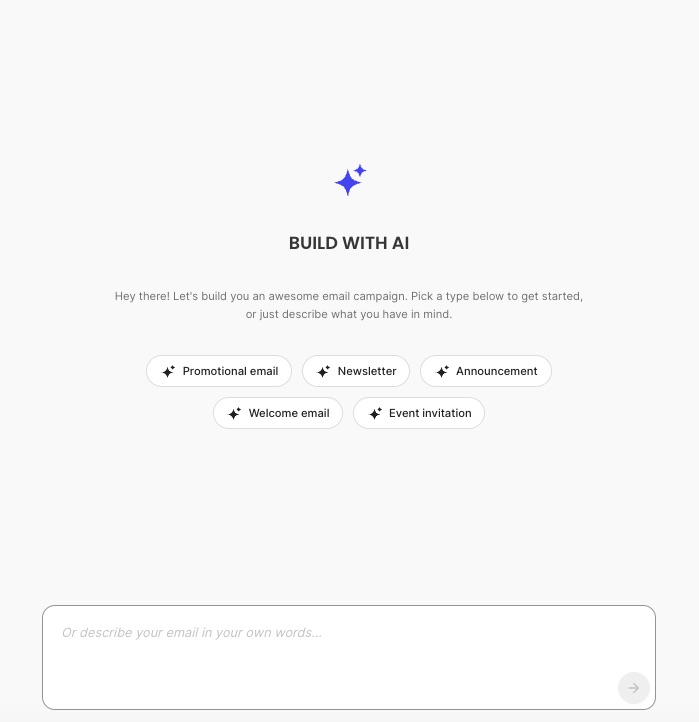
Getting this right doesn’t have to start from a blank page, either. SiteGround Email Marketing now offers AI-generated emails right inside the New Campaign flow: pick “Announcement” as your starting point, answer a few quick questions about your business and this specific update, and you land in the Campaign Builder with a subject line, preheader, and body already drafted.
When and how often to send it
Two questions decide the send plan for any announcement:
- How much of a deadline is attached
- How personally the news affects each subscriber.
The first drives sequence length. The second drives who hears about it first.
For single-send announcements, there’s no deadline to build toward, so one email says everything that needs saying: a rebrand, a policy change, a milestone. For multi-email sequences, there’s a date the reader could miss, so the send builds toward it with a heads-up and a reminder: a launch, an opening, a sale, an event.
Single-send announcements
| Type | Who hears it first | Timing |
| Rebrand or name change | Full list at once (partners get an early heads-up) | Day the change goes live |
| Policy, pricing, or hours change | Only the customers affected | ~30 days before it takes effect |
| Company milestone or update | Full list | Standalone, low frequency |
Multi-email sequences
| Type | Sequence length | First send | Last reminder |
| Product or feature launch | 2–3 emails | Active users or beta list | Non-openers, 3–5 days later |
| Store opening or new location | 2–3 emails | Local or geo segment | 3–5 days before opening |
| Seasonal sale or promotion | 2–4 emails | VIP or loyalty segment (early access) | Urgency reminder as deadline nears |
| Event or webinar | 3–4 emails | Full list or interest segment | 48 hours before |
Once you’ve mapped out a sequence like the ones above, most of it comes down to scheduling, not automating. SiteGround Email Marketing’s segments let you group your VIP or loyalty list, your local or geo audience, or your active users, then schedule one campaign to that group now and a second campaign to the full list a few days later, covering the staggered releases in the table above.
True automation in the product is trigger-based: it fires when someone joins a group, so it’s the better fit for an ongoing case, like a rebrand explainer that should reach every new subscriber from now on, rather than a one-time push to a list you already have.
For a targeted reminder to people who didn’t open the first send, check the campaign’s Recipient Activity report, manually group the openers, and send the follow-up to everyone else.
What metrics to watch for each type of announcement emails
Which metric to check depends on what the email was for. A sale and a rebrand don’t succeed the same way, so grading both by open rate or click-through rate misses what actually happened in each case.
| Type | Watch this metric | Why | Red flag |
| Product or feature launch | Click-through rate to the launch page | The goal is driving traffic to a specific action | High opens, low clicks: the subject line oversold the news |
| Store opening or new location | Click-through rate to the directions or map link | The goal is getting people to show up | High opens, low clicks: unclear location or date |
| Seasonal sale or promotion | Click-to-open rate | You already earned the open through urgency; the question is whether the offer converts once read | Below-average click-to-open rate: the offer or deadline isn’t clear in the body |
| Rebrand or name change | Unsubscribe and reply volume, not clicks | There’s often no CTA. Success means the change landed calmly | A spike in unsubscribes or replies: a timing or framing issue |
| Policy, pricing, or hours change | Unsubscribe rate and support inquiries | Same logic. The goal is informing without alarming | A spike in either: not enough lead time given |
| Event or webinar | Click-through rate to the registration link | One clear action, easy to isolate | High opens, low registration clicks: a weak case for attending |
| Company milestone or business update | Open rate or click-to-open rate, directionally only | There’s nothing to click. This is a trust signal, not a conversion metric | Not applicable |
If there’s no CTA, don’t grade the email on clicks.
Match the format, the deadline, and the metric: that’s your announcement email
Seven types, seven templates, one rule underneath all of them: match the format to the news, the sequence to the deadline, and the metric to the goal. Skip that last part and you’ll spend a week refreshing your open rate for an email that was never supposed to get clicks in the first place.
None of that requires a second tool bolted onto your inbox. SiteGround Email Marketing helps you draft the first version with or without AI, lets you group your list into segments, and lets you schedule each send in advance, so the only thing left to decide is what your news actually is.
[58]
Frequently asked questions about announcement emails
An announcement email covers one specific piece of news and often stands alone or in a short sequence, while a newsletter is a recurring update covering several smaller items at once. If the news needs its own subject line and its own send timing, it’s an announcement, not something to fold into your next scheduled newsletter.
Combining them usually weakens both messages, since a launch email needs to build credibility for something new while a sale email needs to create urgency around price. If you want to launch with a discount, say so directly in the launch subject line, such as “[Product] launches today, 20% off through Friday,” rather than sending two competing calls to action in one email.
No, though it helps. If you’re building excitement without discounting, lead with the location, date, and what makes this opening different, and let the map link drive the first visit instead of a coupon.
Short enough to read on one screen without scrolling, typically 50 to 150 words in the body. Announcement emails work because they deliver one piece of news clearly, not because they explain it exhaustively.