
A teaser email withholds one thing on purpose: the specific offer, product, or date. It names the category (a launch, a sale, an event) and stops there. The teaser email examples below show that same gap at work, and it’s what gets the next email in the sequence opened. Cliffhanger time.
Key takeaways:
- A teaser email never reveals the product, date, or price. If any of those three appear, it has become the reveal, not the teaser.
- Question-format subject lines average a 20% open rate compared to 12% for non-questions, based on a Klenty analysis of over 200,000 emails.
- The reveal email’s open rate, not the teaser’s, is the real measure of whether a sequence worked.
- Most teaser sequences run two emails before the reveal: an initial teaser and, optionally, a second one that narrows the gap slightly.
- A teaser email creates a kind of debt with the reader. The reveal is where that debt gets paid off, and a reveal that underdelivers on the buildup costs more trust than a teaser that was never sent.
How the information gap makes a teaser email work
A teaser email works because it creates a small, specific gap between what a reader knows and what they want to know, and people act to close that gap. This is the same mechanic behind a film trailer or a locked door: enough is shown to signal what’s coming, but nothing that lets the audience guess the ending.
The gap has to be specific to work. “Something’s coming” alone is vague and easy to ignore. “Something’s coming for the ones who’ve been asking about faster shipping” names a category without naming the fix, and that specificity is what pulls the click. This is also why email copywriting for a teaser reads differently from copy for a standard promotional send. A promo email answers questions. A teaser email is built to raise exactly one.
Teaser email vs. pitch email vs. coming-soon email
These three get confused because they often arrive back to back in the same sequence. The distinction is what each one reveals and what it asks the reader to do.
| Teaser email | Pitch email | Coming-soon email | |
| Goal | Build curiosity about something unnamed | Convert on a named offer | Announce a fixed date or launch |
| What’s revealed | Category only: a launch, a sale, an event | Full offer: product, price, call to action | What’s coming and when |
| Typical CTA | None, or a soft one like “Check back Thursday” | Buy now, sign up | Get notified, join the waitlist |
| Where it sits in the sequence | Early | Mid to late (the reveal itself) | Can replace or precede the teaser stage |
A coming-soon page often works alongside the coming-soon email, since both name the date without opening sales yet, while a teaser deliberately withholds the date too.
The three stages of a teaser email sequence
Most teaser sequences follow the same three-part shape, whether the brand is announcing a product, a sale, or an event. Understanding the job each stage does makes it easier to know when to add a second teaser and when one is enough.
- The setup email
The first email in the sequence. It names the category and nothing else. No product name, no date, no discount. Its only job is to plant a question in the reader’s head.
- The build (optional second teaser)
A second teaser, sent a few days after the first, narrows the gap slightly without closing it. This step is optional. Smaller launches and single-product announcements often skip straight from setup to reveal, while bigger campaigns use the build to sustain interest over a longer run-up.
- The reveal
The email where the product, date, or offer finally appears. This is where the earlier restraint pays off, or doesn’t. If the reveal underdelivers against what the teaser implied, the gap the sequence built up becomes a debt that goes unpaid, and the reader remembers that the next time a teaser lands in their inbox.
A teaser sequence is one form this can take, sitting alongside other structures covered in what email marketing is and how to get started.
Teaser email examples by use case
What differs between a product launch, a seasonal sale, and an event isn’t the mechanic, it’s what the audience already expects and how much urgency belongs in the mix.
Product launch teaser emails
Product launch teasers work by naming the category (a new release) without showing the product itself. Here’s what that looks like for a small brand adding a new item to its lineup:
Subject line: Get ready: we’re working on something big
Preheader: You’ll want to be the first to know
Body: Something new is on the way. We’re not ready to show you what it is, but we didn’t want you to hear about it anywhere else first.
Closing: Keep an eye on your inbox.
Why it works: a plain layout and a few lines of copy do the job, no product name, no image of the item itself. Readers are told a category (something new is coming from a brand they already know) and given nothing else to go on.
A brand with a more visual product can lean on imagery instead of copy to hold the same restraint:
Subject line: Shhh… coming soon
Preheader: We can’t say much, but we can show you a little
Body: [Short animated preview showing motion and color, no product visible]
Closing: More to come.
Why it works: a short animated preview shows motion and color without revealing the actual product. Both examples name the category (a new release) while keeping the specifics of what, and when, out of the email entirely. The information-gap mechanic in both cases is identical: signal scale or excitement, withhold identity. A coming-soon page is a natural next step once the teaser has done its job of gathering attention.
Seasonal campaign teaser emails
Seasonal teasers carry the extra challenge of naming an occasion without naming a price. Here’s how that plays out for Black Friday:
Subject line: Coming soon: our Black Friday sale
Preheader: Something’s about to get very good
Body: [Short animated graphic repeating “coming soon,” no discount or product shown]
Closing: Stay tuned.
Why it works: the email names the occasion (Black Friday) without naming a single price or product, which is the harder version of restraint for a seasonal sale, since sale emails almost always lead with the number.
The same restraint works just as well outside the Black Friday window, for any seasonal sale:
Subject line: Coming soon: our biggest sale of the season
Preheader: A preview, just for our subscribers
Body: [Preview of the sale catalog, no discounts listed yet]
Closing: Full details coming soon.
Why it works: a preview of the sale catalog without revealing specific discounts lets shoppers get a sense of what’s coming without giving them enough to decide whether to buy before the sale actually opens.
Seasonal teasers carry one extra pressure that product launches don’t: the calendar. A generic teaser works for a product launch whenever it’s ready. A Black Friday teaser has one shot, sent roughly a week ahead of the sale itself, since sending it too early lets the anticipation fade and sending it too late doesn’t leave enough runway to build it. This is also where seasonal campaigns benefit from a companion piece like a Black Friday ecommerce plan that maps the teaser against the rest of the sale calendar.
Event announcement teaser emails
Event teasers work a little differently, since the audience already expects a fixed date rather than a surprise. Here’s how a small business announcing a workshop or webinar could approach it:
Subject line: We’re planning something for the people who’ve been asking about [topic]
Preheader: Mark the date, details coming soon
Body: You’ve been asking about [topic] for a while, so we’re putting something together. No agenda or sign-up yet, just save the date: [date].
Closing: The full details land in your inbox next week.
Why it works: it holds a date without naming the speaker, agenda, or registration link. The reveal email that follows is where the agenda and signup link actually appear.
The gap here is narrower by design, since an event teaser can’t withhold the date the way a product teaser withholds the product, but it can withhold everything else: who’s speaking, what’s covered, and what the reader walks away with. That’s enough to justify a second email before the full event reminder email goes out closer to the date.
How to write a teaser email subject line that doesn’t give everything away
The subject line carries almost the entire weight of a teaser email, since the body rarely has more than a line or two of copy to work with. A few patterns show up across the examples above:
- Name the category, not the contents. “Something big” or “get ready” signal scale without specifying what.
- Ask a question instead of making a statement. Questions create the same gap in the subject line that the email body creates as a whole. Question-format subject lines average a 20% open rate against 12% for non-questions, according to a Klenty study of over 200,000 emails. The study looked at cold outreach rather than teaser campaigns specifically, but the same curiosity mechanism applies: a question creates a gap the reader wants closed.
- Use lowercase, conversational phrasing over ALL CAPS urgency. “SHHH… COMING SOON” works because it’s an exception, not the norm. Overusing all-caps urgency in every teaser trains readers to skim past it. Urgency language does lift open rates by roughly 22% on average, according to Zippia’s subject-line research, but that effect is strongest on the reveal email, not the teaser, since urgency and curiosity pull a reader in different directions.
Preview text (the line that shows next to the subject line in most inboxes) should extend the gap, not close it. A one-line continuation like “you’ll want to see this before Friday” adds a soft deadline without naming anything.
Teaser email subject line templates you can copy
These fill-in-the-blank templates apply the patterns above:
- Product launch: “Get ready: we’re working on [category]”
- Product launch, question format: “Guess what’s coming to [brand or shop name]?”
- Seasonal sale: “Coming soon: our [occasion] sale”
- Seasonal sale, second teaser: “Not [current category], but you’ll still want it”
- Event announcement: “We’re planning something for the people who’ve been asking about [topic]”
Each template names a category (a launch, a sale, an event, a topic) and stops there, which is the one rule every subject line above shares.
How many teaser emails to send (and how to space them)
How many teaser emails a sequence needs, and how far apart to send them, depends on the size of the campaign:
| Campaign type | Teasers before the reveal | Spacing |
| Single-product launch | 1 (just the setup email) | Reveal follows a few days to a week later |
| Bigger campaign (multi-category sale, multi-day event) | 2 (setup, then a second teaser) | Second teaser 2–3 days after the first; reveal a few days to a week after that |
| Black Friday | 1 teaser, plus the sale’s own 3-email cadence | Teaser about a week before the sale; main promotion on sale day; last-chance reminder before it closes |
SiteGround Email Marketing lets you schedule each campaign in the sequence for its specific send date in advance, so the setup email, the optional second teaser, and the reveal all go out on the days you plan for without needing to trigger each one manually on the day.
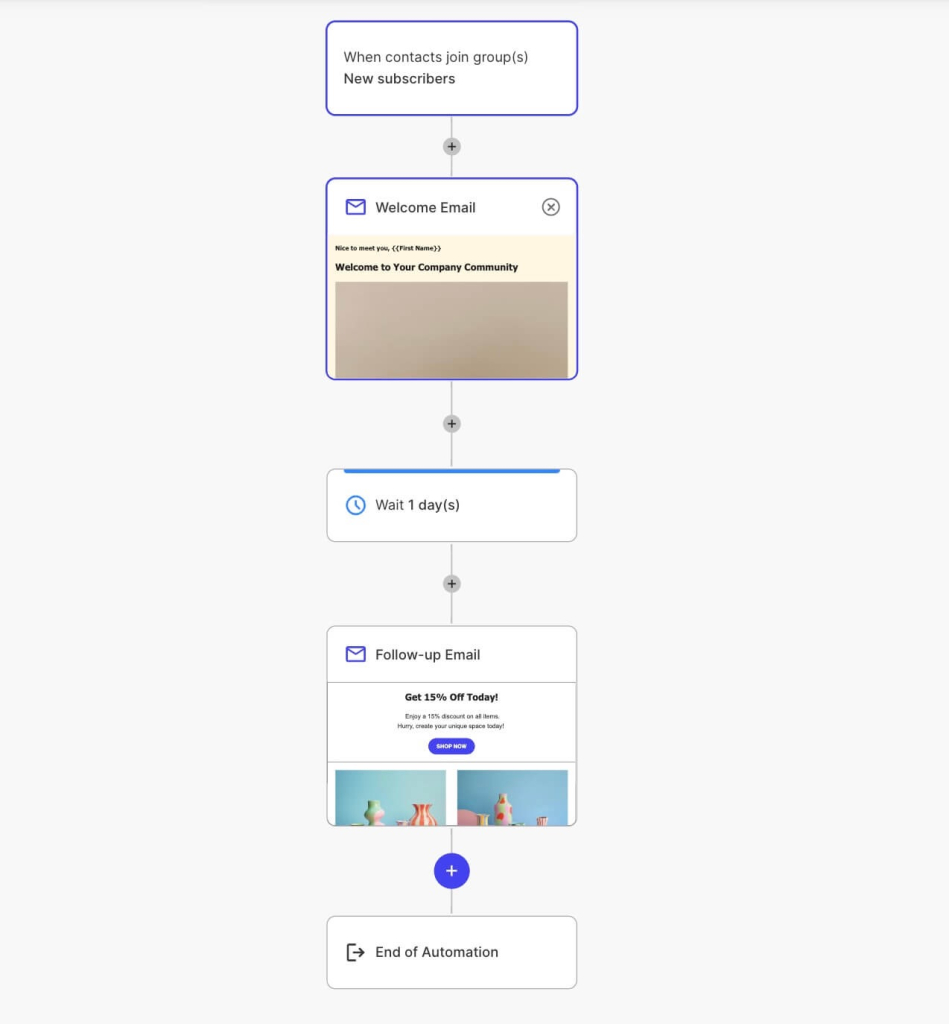
Mapping the right cadence in advance also matters for seasonal marketing campaigns, where the send dates are fixed by the calendar rather than flexible.
Common teaser email mistakes that break the payoff
Most teaser emails fail in one of three ways, all variations on the same problem: the gap and the payoff stop matching.
- Revealing too much, too soon. If a reader can screenshot the teaser and correctly guess the product, the date, or the price, the email has already done the reveal’s job for free, and the actual reveal email has nothing left to deliver.
- Sending too many teasers. A third or fourth teaser before the reveal usually reads as stalling rather than building anticipation, and open rates on later teasers in an overlong sequence tend to drop as readers lose patience.
- The reveal underdelivers on the buildup. This is the costliest mistake, since it isn’t just one weak email, it changes how the reader treats every future teaser from the same sender. A teaser creates a kind of debt with the reader: it promises something worth the wait, and the reveal is where that debt gets paid. A modest reveal after a big buildup reads as a letdown even if the offer itself is reasonable on its own terms.
These same principles show up across other campaign types too, not just teasers; see 15 successful email marketing campaign examples for how buildup and payoff play out in welcome sequences, cross-sells, and other campaign formats.
A full teaser sequence, step by step
Here’s how a small ecommerce shop expanding into a new product category, say, a candle brand adding a home fragrance line, could map the same information-gap mechanic into a complete sequence, from first email to reveal:
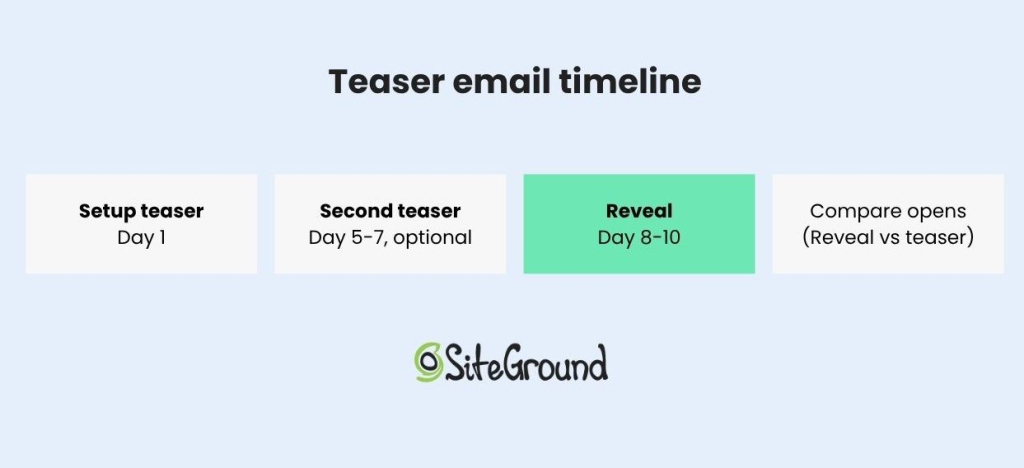
- Send the first teaser 5 to 7 days out. Name the category only, a new product line, nothing about what it is or does. This is the “get ready” stage.
- Send a second teaser 2 to 3 days later (optional). Narrow the gap slightly, perhaps a hint at the category the new product belongs in (for the shop, something like “not candles, but you’ll still want to light it”), still nothing specific enough for a reader to guess it.
- Send the reveal 2 to 3 days after the last teaser. This is where the product, price, and purchase link appear for the first time. Waiting much longer than this risks losing the momentum the teasers built.
- Compare the reveal’s open rate against the teaser’s. If the teaser opened well but the reveal didn’t lift above a normal send to the same list, the gap was either too vague to build real curiosity or held open for too long.
The same four-step shape applies just as well to a seasonal sale or an event announcement, since the only thing that changes between categories is what gets revealed at the end, not the structure that gets you there. A holiday email marketing guide can help map this same sequence onto a specific date on the calendar, like Black Friday or a year-end sale.
Build your teaser email sequence with SiteGround Email Marketing
Every example above depends on timing: the teaser has to go out early enough to build curiosity and the reveal has to land while that curiosity is still fresh. Getting that right by hand, across a launch, a sale, or an event, means remembering exact send dates and manually triggering each email in the right order.
SiteGround Email Marketing lets you build the full sequence, from the first teaser through the reveal, and schedule every email in advance, so the cadence you plan is the cadence that actually goes out. The Generate with AI feature can draft each stage for you: describe the setup teaser in your own words to get a subject line, preheader, and body with the specifics deliberately left out, then use the Announcement or Promotional preset for the reveal once you’re ready to name the actual offer.
[58]
Frequently asked questions about teaser email campaigns
The purpose of a teaser is to create curiosity by revealing just enough to signal that something is coming without naming what it is. A teaser’s job is to earn an open on the email that follows it, not to sell anything on its own.
A teaser email withholds the offer to build curiosity, while a pitch email states the offer directly and asks for a purchase or signup. See the comparison table above for how the two differ in goal, reveal timing, and typical call to action.
A teaser email withholds the date along with the product or offer, while a coming-soon email typically states the date but not the specifics of what’s launching. The comparison table above breaks down where each fits in a sequence.
A teaser email typically goes out five to seven days before the reveal for a single product launch, with longer campaigns sometimes adding a second teaser two to three days after the first. Waiting much longer than a week risks losing the momentum the teaser built.
A teaser email should be as short as the subject line and one or two lines of body copy, since the goal is to raise a question, not answer one. Adding more copy than that risks revealing details the sequence is designed to withhold.
A product launch teaser might read “Get ready: we’re working on something big,” naming the category without the product. A seasonal teaser might say “Coming soon: our Black Friday sale,” naming the occasion without a price. An event teaser might say “We’re planning something for the people who’ve been asking about [topic],” holding back the agenda and speaker until a follow-up email. Each one names a category and stops there.