

Six tabs open, six platforms, and every one of them looks like the right answer for about thirty seconds. Here’s a shortcut: there’s no single best platform to create an online store. There’s only the best platform for your budget, your technical comfort, and how many products you’re selling this year versus next year. This guide walks through how your needs point you to a platform, and which one is truly best for you.
Key takeaways
- There’s no single best platform. The right one depends on a variety of factors, from your budget to your tech know-how, and functionality needs.
- Total cost of ownership matters more than the number on the pricing page. Hosting, transaction fees, apps, and themes rarely show up next to the subscription price, so they need to get added up separately.
- All-in-one platforms like SiteGround Ecommerce bundle hosting, design, and a full online store so that everything lives under one roof.
- Speed and uptime come from infrastructure built for hosting, not features bolted onto a page builder after the fact.
- 24/7 support, on every plan, is rare. Many platforms limit phone support to premium tiers or skip it for lower ones, so it’s worth checking before you need it, not after.
What is an ecommerce platform?
An ecommerce platform is software that lets you build a website, list products, and accept payments in one system, instead of stitching together separate tools for hosting, design, and checkout. That’s different from a marketplace like Amazon or Etsy, where you list on someone else’s site instead of running your own store.
How to choose the right platform for your store
Work through six questions about your own store before you compare a single brand name. They decide which category of platform even makes sense, long before any brand name enters the conversation. Most “best of” lists skip straight to ranking platforms one through ten without asking any of this, which is how a solo candle-maker and a nine-figure retailer end up reading the exact same advice.
1. Do you already have a website, or are you starting from scratch?
Already running an ecommerce website? Adding a store to an existing website is a different job than building one from zero. If that site runs on WordPress, WooCommerce usually makes sense, since it plugs straight into a structure you’ve already built. We’ll get into this more in a moment.
Starting from scratch is simpler in a different way. An all-in-one platform handles your whole site and your ecommerce store in one plan: no separate CMS, theme, and ecommerce plugin to keep updated and speaking to each other. Building an ecommerce website from the ground up follows a straighter path than retrofitting one, since you’re choosing a platform, a design, and a payment setup in sequence, rather than working around page templates that were never built with a store in mind.
Action: If you’re building on an existing WordPress site, that’s a strong signal toward WooCommerce. Starting fresh points you toward an all-in-one platform instead.
2. How many products will you sell, and how fast do you expect to grow?
- Catalog size can matter a lot when it comes to choosing an ecommerce platform. Five candles and a jar of wax melts don’t need bulk inventory tools, multi-warehouse shipping rules, or a dedicated staff account system. Five hundred SKUs usually do, and a platform that doesn’t support those tools can turn that catalog into a spreadsheet-and-duct-tape operation fast.
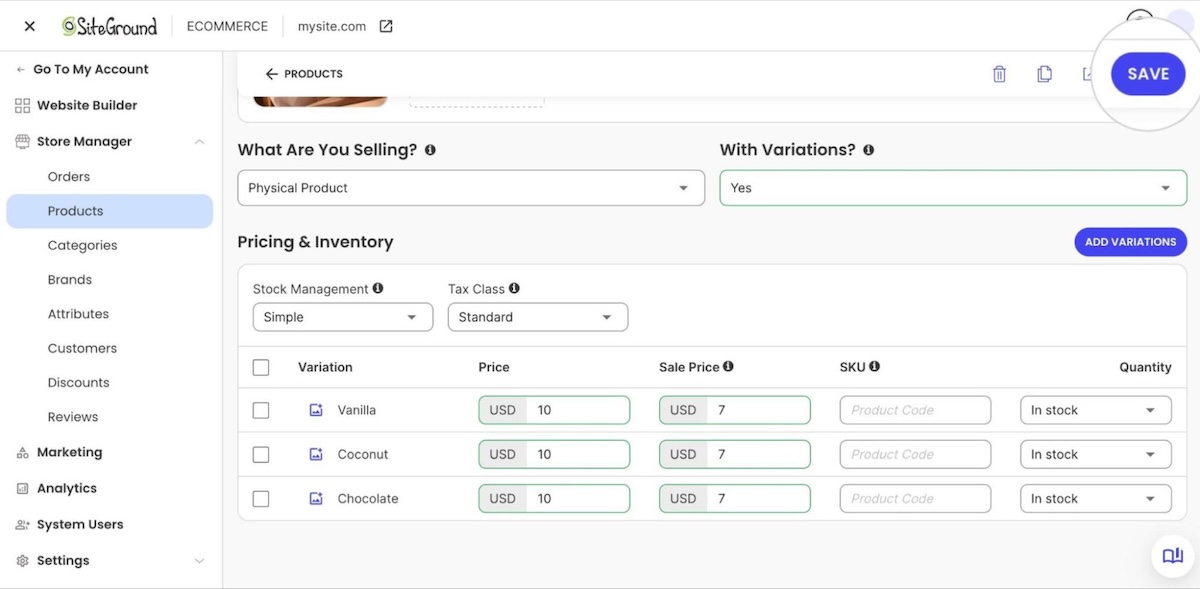
- Growth speed matters as much as current size. A platform that’s comfortable at 20 products can get expensive or clunky at 200. If you’re expecting to double or triple your catalog within a year, weight your decision toward a platform with room to grow, even if that means starting one tier above the bare minimum.
- Scalability is one of the few factors here that’s genuinely hard to retrofit. As you grow your business, a scalable platform lets you add new sales channels, like a marketplace or a social storefront, without rebuilding the store from scratch, while a platform that’s outgrown its architecture usually means a costly migration instead of a simple upgrade.
Action: A small, stable catalog gives you more platforms to choose from. A large or fast-growing one means checking that your platform can grow with you, whether that’s through deeper app ecosystems, higher-tier plans, or built-in headroom, something worth confirming before price or design enters the picture.
3. What’s your budget for platform fees, transaction fees, and design?
Most first-time sellers budget for the monthly subscription and call it done. That’s usually the smallest number in the equation. Transaction fees, payment processing, apps for anything the platform doesn’t do natively, and premium themes all pile on faster than the plan price lets on.
A platform advertised at $29 a month can easily become $90 or $120 once real online sales start flowing, a couple of paid apps get added, and transaction fees start applying to actual revenue instead of a hypothetical one.
Action: Once you know your real number, not just the subscription price, you’ll know whether you’re picking from platforms with fees baked in or platforms where the fees show up later.
4. How comfortable are you with code, plugins, and maintenance?
Some people want to open a file and change something. Others want to never see the words “PHP version” in their life. Neither is wrong, but the honest answer to which one you are should decide this section, not the other way around.
Some platforms hand you full control and expect you to maintain it yourself. Others handle updates and security in the background so you never have to think about them. Which one fits you shapes a lot of what comes next, and we’ll break that down platform by platform further down.
Action: Which one fits you shapes a lot of what comes next, and we’ll break that down platform by platform further down.
5. What are you actually selling: physical goods, digital downloads, or services?
Physical products, digital downloads, and services each want something different from a platform:
- Physical products need different shipping method options, tax rules, and inventory counts working in sync, since a gap between any two of those turns into a fulfillment error that costs real money.
- Digital products (such as downloads) care about secure file delivery, licensing, and instant access right after checkout.
- Services care about booking calendars, deposits, and appointment reminders.

Choosing a website builder without the overwhelm starts with being honest about which of these categories describes most of what you sell online.
Action: Physical goods point you toward platforms with strong shipping and inventory tools. Digital downloads and services point toward platforms built around delivery and booking instead. Which one you land on shapes the shortlist you’ll see below.
6. What features do you need?
Some things that feel like obvious inclusions are actually paid add-ons, and this is where advertised prices and real costs drift apart the most:
- Payment gateways: some platforms ship with ready integrations and zero extra setup; others hand you a separate provider to configure, rates and payout schedule included. Accepting payments online is mandatory no matter the platform, but the friction and per-transaction cost vary more than most comparison articles mention.
- Tax calculation: ecommerce sales tax comes standard on some mid-tier plans, a paid extension on others.
- Abandoned cart recovery: often free, sometimes a $15-a-month app.
- Customer accounts: included by default on some platforms, gated behind a higher tier on others.
- Inventory management: online store platforms should enable easy inventory and order management.
- Analytics and reporting dashboards: essential for tracking e-commerce performance.
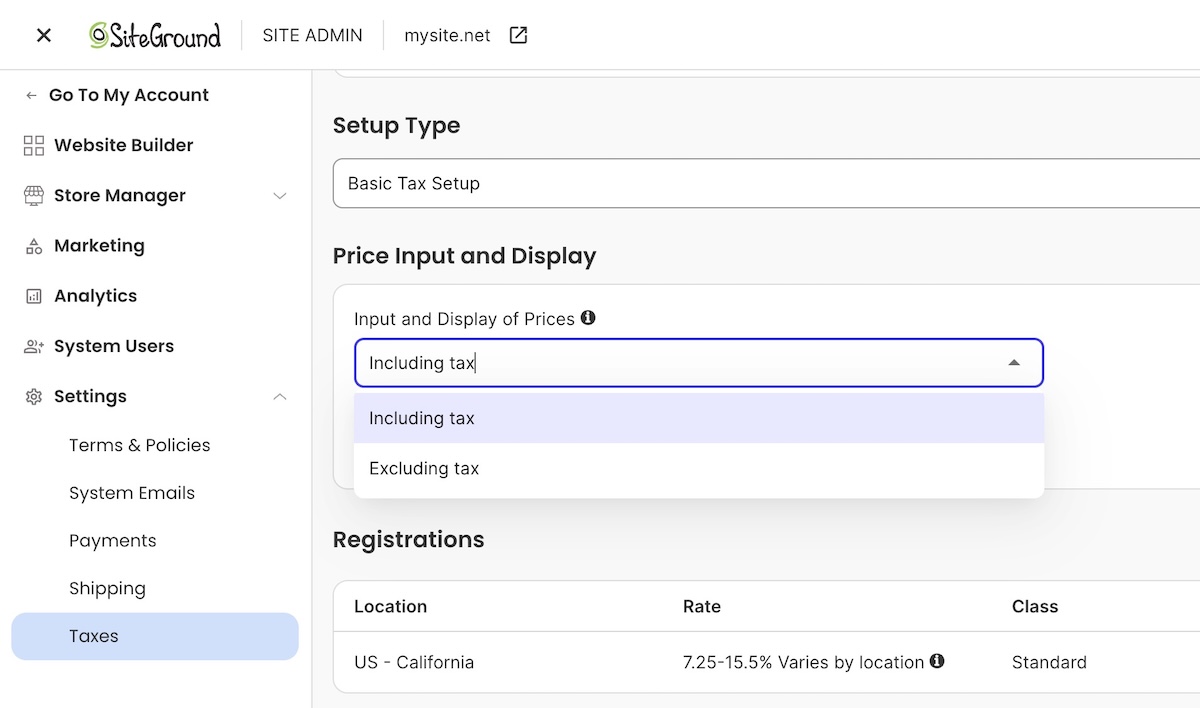
Action: Before signing up for any platform, check its feature comparison page. More rows marked “included” than “available as an app” means fewer surprise costs later.
What is the best ecommerce platform?
There’s no single winner among the best ecommerce website builders to create an online store. Your answers to the six questions above point toward one of the five situations below, sorted by use case rather than by brand, including one we sell (SiteGround Ecommerce). Enterprise platforms aren’t part of this comparison: BigCommerce is designed for large-volume sellers running complex, multi-channel catalogs, and Adobe Commerce is built for technical teams managing custom enterprise storefronts, both well beyond what a first-time seller needs.
Quick answer, if you’re skimming:
| If you’re mainly… | Best fit |
|---|---|
| A total beginner with no interest in code | Wix, SiteGround Ecommerce, or Squarespace |
| Selling hundreds of SKUs at real volume | Shopify |
| Working with the tightest possible budget | WooCommerce, real costs added up |
| Set on full design and code control | Self-hosted WordPress Site + WooCommerce |
| Wanting a full store with speed and support | SiteGround Ecommerce |
Best for beginners with no technical experience
Pick: Wix, SiteGround Ecommerce, or Squarespace
Why: All-in-one ecommerce website builders are the easiest way for first-time sellers. A website builder handles hosting, design, and store setup as one system, so there’s no database to configure and no shopping cart plugin to bolt onto a CMS you’re also learning for the first time. Pick a template, add products, connect a payment processor, and you’re selling, often within a few hours. What that typically includes:
- Templates built around product grids and checkout flows, not blank canvases you have to design from scratch
- A connected payment processor, usually Stripe or PayPal, set up in a few clicks
- Website builders should offer mobile-responsive themes and drag-and-drop editors.

Why not: You’ll trade some deep customization for that speed. Most first-time sellers don’t miss it. Between choosing what to sell online and figuring out how to photograph it well, custom CSS access rarely makes anyone’s top-five list of problems.
Best for growing product catalogs and high sales volume
Pick: Shopify
Why: Shopify is built for ecommerce stores expecting real volume: hundreds of SKUs, multiple staff accounts, and integrations with fulfillment services and third-party logistics. Its app ecosystem is the largest in ecommerce, so almost any feature you can dream up already exists as a plug-in rather than a custom build.
Why not: That same ecosystem is also the bill. Apps for reviews, upselling, or advanced shipping rules each carry their own monthly fee, and a store running eight or ten of them can add $100 to $300 a month before the base subscription even shows up on the invoice. A high-volume seller gets real value from that. A five-product store is paying for a gym membership it’s not using.
Best for lowest starting cost
Pick: WooCommerce
Why: WooCommerce has the lowest true floor: the plugin is free, and if you already have WordPress hosting, adding an ecommerce store costs nothing but your time.
Why not: The catch is that “cheapest to start” and “cheapest to run” are two different numbers, once hosting, an SSL certificate, a checkout-ready theme, and tax/shipping extensions get added up (roughly $50–$100/mo before a single transaction fee).
Best for full design and code control
Pick: WooCommerce
WooCommerce shows up twice on this list, once for cost and once for control, because both come from the same source: a free, open-source plugin with no built-in ceiling.
Why: If you want pixel-level control over layout, a custom checkout flow, or a design a developer builds from scratch, self-hosted WordPress with WooCommerce is the option here built for that. Every other platform on this list trades some code access for simplicity, a trade that suits most first-time sellers fine.
Why not: That gap is closing, though. All-in-one builders now offer more code injection, layout flexibility, and template-level customization than they used to, so full design control now sits on a spectrum instead of a hard line. A website builder versus a custom site deserves an actual decision, rather than a default one: WooCommerce still wins for a genuinely custom checkout flow or an unusual integration, but a builder now gets close enough for most brand-specific styling, without hiring a developer.
Best for a complete online store, with the speed and support to back it up
Pick: SiteGround Ecommerce
Why: SiteGround is a hosting company first, with an ecommerce website builder layered on top, not a design tool with hosting attached as an afterthought. That heritage is built into the infrastructure itself, speed and uptime that come from two decades specializing in hosting, not features bolted onto a page builder. It also shows up directly in the numbers: SiteGround Ecommerce is one of only two platforms compared in this guide with 24/7 phone support on every plan, and it’s the less expensive of the two.
Why not: The trade-off here is breadth, not speed. The third-party app ecosystem is smaller than Shopify’s, so sellers who already know they’ll need a lot of specialized integrations, or a very large, multi-warehouse catalog, will find fewer plug-and-play options.
| Platform | Phone support | Live chat | Notes |
| SiteGround Ecommerce | 24/7, all plans | 24/7, all plans | Help desk tickets are answered in about 15 minutes on average |
| Wix | 24/7 callback, all plans | 24/7, all plans | No charge beyond standard phone rates |
| Shopify | Plus and Retail plans only | 24/7, all plans | Basic, Grow, and Advanced plans don’t include phone support |
| Squarespace | Not offered, on any plan | Human chat on weekdays only; 24/7 email | Squarespace states directly that it doesn’t offer phone support |
| WooCommerce | None | None | Support comes from your hosting provider or a developer, not the plugin itself |
Common mistakes when choosing an ecommerce platform
First-time sellers tend to trip on the same handful of things, usually because they’re comparing platforms on price and reputation instead of fit.
- Picking based on brand recognition alone. Shopify is the platform everyone’s heard of, which makes it the default pick even for a 5-product store with zero plans to scale past 20. Recognition earns trust, but it doesn’t guarantee fit, and a platform built for high-volume sellers usually charges for features a beginner will never touch.
- Ignoring transaction fees until the first invoice. A platform with a low monthly price and a 3% or 4% transaction fee on top can end up costing more than a pricier plan with no fee at all, once online sales pass a few hundred dollars a month. This is the single most common surprise sellers report after their first real month of sales.
- Underestimating total cost of ownership. Hosting, apps, themes, and payment processing rarely appear on the same page as the subscription price, which makes side-by-side comparisons misleading unless the numbers get added up independently before committing to a plan.
- Choosing a platform built for a catalog size you don’t have. Enterprise-grade inventory systems are wasted on a 10-product store, and they usually charge for the privilege while adding a learning curve nobody asked for.
- Assuming the platform locks you in forever. This fear talks some first-time sellers out of launching at all, which is a worse outcome than picking a platform that turns out to be an imperfect long-term fit. Product data, customer records, and order history can all be exported and migrated later if a store outgrows its platform.
- Skipping the “what happens if I outgrow this” question. Every platform has a ceiling, whether that’s a storage limit, a product count where management turns clumsy, or a feature locked behind a much pricier tier. Better to know where that ceiling is before launch than to find it after the catalog has already tripled.
Your next steps: narrowing down your shortlist
Go back to what you truly need, and what each platform actually offers you: chances are you’ve now been able to narrow down your list substantially from those six tabs to just one or two.
If what you actually want is an easy-to-build online store without stitching separate tools into one, SiteGround Ecommerce is built for that. Hosting, design, and a store live in one plan, with no plugin stack to babysit. Speed and uptime come from infrastructure built for hosting, not features bolted onto a page builder, and 24/7 phone and chat support are there on every plan, not locked behind the priciest tier. For a first-time seller who wants a complete store without all the coding and confusion, it clears a lot of setup decisions before they ever come up.
[103]
Frequently asked questions
There’s no single best platform. The right one depends on a variety of factors. All-in-one platforms like SiteGround Ecommerce and Wix suit beginners who want hosting, design, and a store in one plan. Shopify suits high-volume sellers who need a large app ecosystem, and WooCommerce suits sellers who want full code control and already have WordPress hosting.
For most small businesses selling under 100 products, an all-in-one platform that bundles hosting, design, and ecommerce, such as SiteGround Ecommerce, keeps setup and maintenance simple. Online businesses running a service page and a blog alongside their store get the most value from a platform that treats all three as one system.
Built-in SEO tools and marketing features are important for driving traffic to online stores. Most major ecommerce platforms cover the core ecommerce SEO fundamentals: custom URLs, meta titles and descriptions, and mobile-friendly templates. WooCommerce offers the most flexibility for advanced SEO plugins since it runs on WordPress, though ecommerce site speed, content quality, and internal linking move the needle more than platform choice does.
Shopify is a strong option for high-volume sellers who need a large app ecosystem and multi-channel selling tools. A 5-product store with no plans to scale quickly often ends up paying for app subscriptions it never uses, while a seller who wants an integrated marketing website alongside checkout may find an alternative all-in-one platform a better fit for less money.
Total cost depends heavily on platform and catalog size. On platforms that charge extra for apps and add-ons, a small store typically runs $50 to $100 a month once hosting, plan fees, payment processing, and a couple of necessary apps get added together. On all-in-one platforms like SiteGround Ecommerce, more of that comes bundled into the plan itself, so the same store can cost less without needing separate apps to fill the gaps. Larger stores with more products and higher sales volume can run several hundred to over a thousand dollars a month on app-dependent platforms, driven mostly by transaction fees and app subscriptions that tend to outgrow the base plan price fast.
Yes. Switching ecommerce platforms later takes more work than switching within one system, since it usually means migrating product data, customer records, and order history, but plenty of sellers have done it and lived to tell about it.