
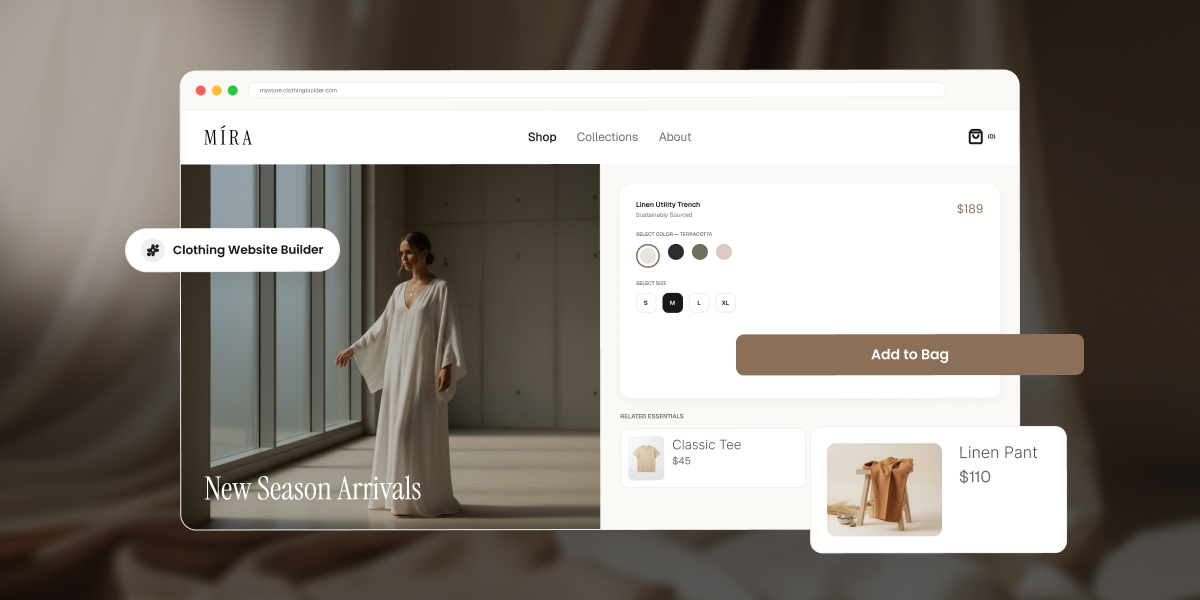
You’ve got a rack of samples shot and ready, a size chart scribbled on a notepad, and no patience left for tutorials. The builder you pick from here decides whether that turns into a store people can actually buy from, or a pretty homepage that quietly blocks your first sale until you upgrade. Here’s what actually matters before you commit to one.
Key takeaways:
- A clothing website builder needs native size and color variant support, or a single design in three sizes and four colors turns into 12 separate products to manage by hand.
- Checkout is where most sales are actually won or lost, so a clunky payment flow undoes good product photography and merchandising in seconds.
- Nearly every well-known builder lets you build a store for free but requires a paid plan before you can process a single sale. Truly free-and-selling platforms exist, but they cap your product count in exchange.
- The clearest way to choose between a simple builder and a full ecommerce platform is your actual SKU count today and a year from now.
- A missing size guide and an unclear returns policy are two of the most common, and most avoidable, mistakes first-time apparel sellers make before launch.
What to look for in a website builder for a clothing brand
Apparel has needs that most website builders weren’t originally designed around, mostly because they were built with someone selling one kind of thing in one size in mind. Before comparing platforms by price or template count, check that each one covers the four things that actually determine whether you can run a clothing store on it day to day, not just launch a pretty homepage and call it done.
1. Product variants (size, color, material)
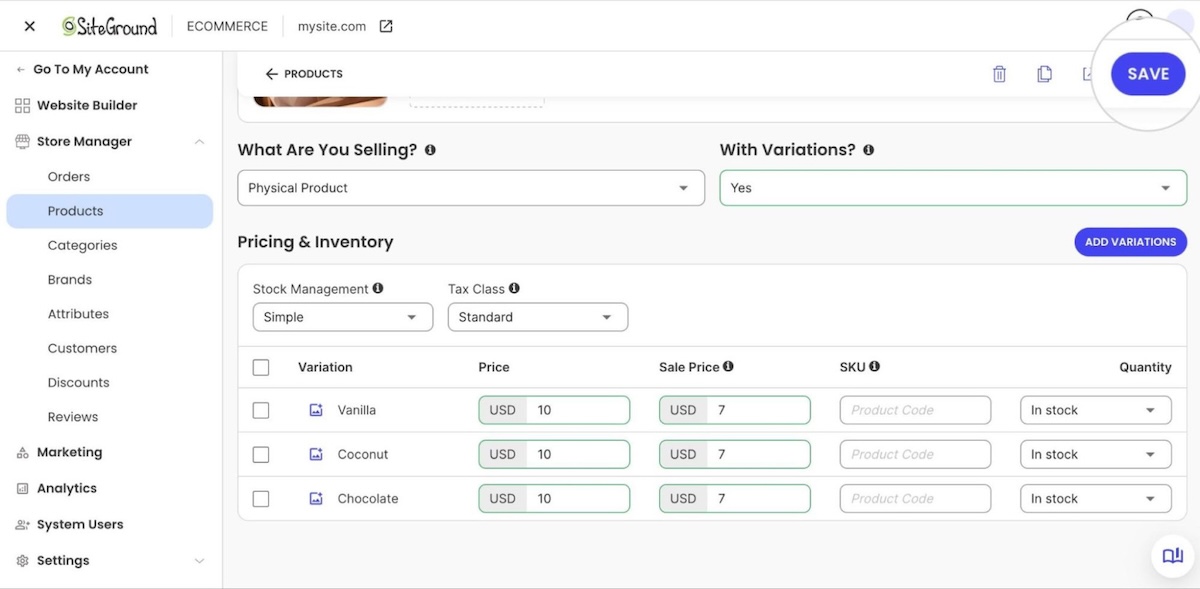
A single T-shirt design in three sizes and four colors is 12 separate combinations, called SKUs. A builder without native variant support forces you to create 12 separate product listings, then manually track stock for each one, which is less “running an online store” and more “running a spreadsheet with a storefront attached.”
Look for a platform where you set a product once, add size, color, and material color as variant attributes, and get one product page with a size or color selector for shoppers. This single feature separates real fashion ecommerce builders from generic site builders with a “shop” add-on bolted on.
2. Collections, drops, and seasonal merchandising
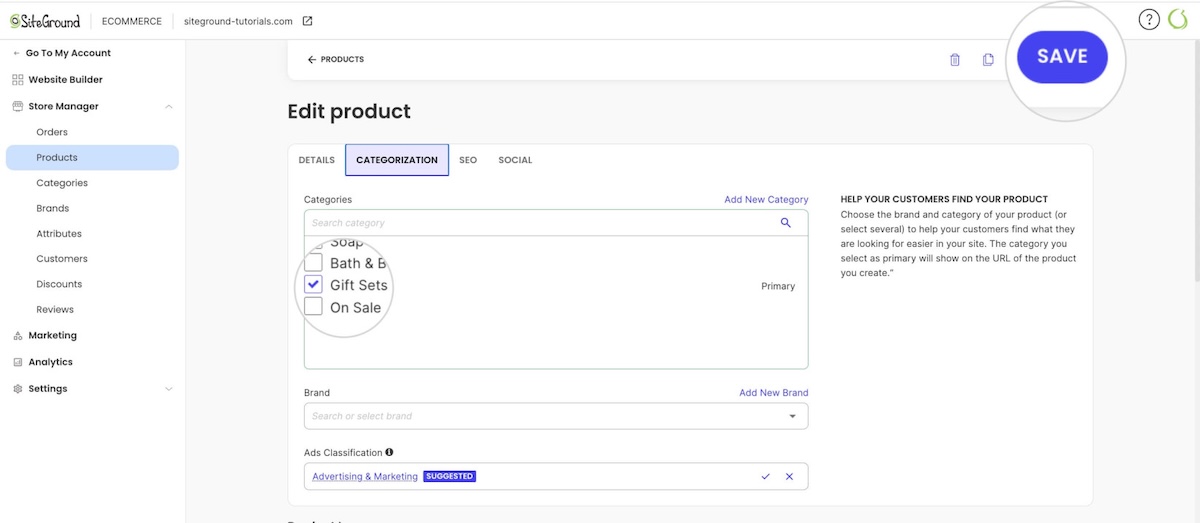
Clothing brands sell in cycles: a spring lineup, a limited drop, a holiday capsule. Your builder should let you group products into categories, so a new drop can go live as its own dedicated section without rebuilding your site structure each season. If adding a new drop means recreating your navigation from scratch, the platform is working against your merchandising calendar, not with it.
3. Product photography and lookbook-style visuals
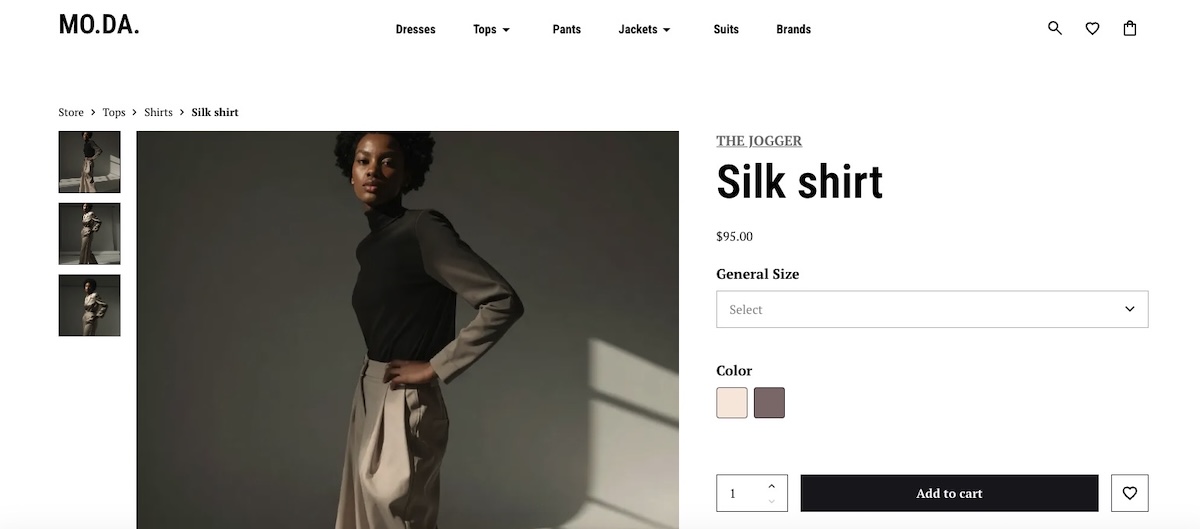
Clothing sells on how it looks worn, styled, and photographed, not just specs. Look for:
- Storytelling layouts. Big photos that stretch edge to edge instead of sitting in a small boxed-in frame, and galleries with more than one or two shots per product.
- At least four to six images per variant. Shoppers buying clothing online rely on multiple angles to judge fit in place of trying it on.
4. Payment processing and checkout experience
Checkout is where most of the sale is actually won or lost. The global average cart abandonment rate sits at 70.22%, and apparel is widely cited across industry benchmarks as one of the highest-abandoning retail categories
Look for a builder with built-in support for major processors such as Stripe and PayPal, a mobile-friendly checkout with few form fields, and clear shipping costs shown before the final step.
Don’t forget the technical essentials: speed, mobile, and SEO
None of the above matters if the site is slow, breaks for mobile shoppers, or never shows up in search. Look for a builder that loads product pages in a couple of seconds, adapts automatically to phone screens, and easily handles the SEO basics, meta titles, clean URLs, alt text, without a separate plugin.
Free vs. paid clothing website builders: what you actually get
“Free clothing website builder” is one of the most searched phrases in this category, and it hides a real gap between what free means on different platforms. In practice, there are really only two tiers, no matter how many different names builders give them.
| Tier | What you actually get | The tradeoff |
| Free to build, not to sell | A live storefront with your branding and products, sometimes with the full feature set unlocked for preview | Checkout stays off until you pay, whether that’s a standing free plan with no time limit or a trial that expires in a matter of days |
| Free to sell, but capped | Real checkout and payment processing at no cost | Usually a hard cap on product count, like 5 products |
Most well-known builders fall into the first tier. Some offer a permanent free plan, others a time-boxed trial, but the result is the same either way: you build for free, and you pay to actually sell. Free-and-selling platforms exist, but they’re the exception, usually in return for a hard product cap, not something you can expect to find by default. If your goal is to launch and start selling in the next few weeks, it’s worth reading through the specific tradeoffs of starting an online store on a budget before you commit to any single plan.
SiteGround Ecommerce lets you build the real thing, not a demo. Set up your storefront, add every variant, and see exactly what your first collection will look like, all in 14 days, no credit card required. It’s a no-code builder from the first click, runs on the same fast, secure infrastructure SiteGround’s known for, and email marketing tools are ready to plug in whenever you want to start building a list.
Start building your online store now>>
How to choose the right builder for your apparel business
Once you know what to look for, the real question is which platform fits your specific business, not apparel sellers in general. A hobbyist launching eight T-shirt designs has different needs than a brand moving 150 SKUs online for the first time, and treating them the same leads to the wrong builder for one of them. If you’d rather answer a few quick questions than work through a framework, a short builder-matching quiz can point you toward a shortlist in a couple of minutes.
Consider your catalog size and product complexity
Ten T-shirt designs in three sizes each is a manageable catalog for almost any builder. Two hundred SKUs across multiple product types, each with size, color, and material variants, needs a platform built to handle bulk product management, inventory tracking, and variant combinations without manual workarounds. Count your current SKUs and your planned SKUs a year out. If that number is already in the hundreds, rule out any builder with a hard product cap on its paid plans, not just its free tier. Discovering the cap the hard way, mid-upload, is a real momentum killer.
Consider your budget and growth stage
A pre-launch seller testing demand with a small collection has different math than a brand already doing five figures a month in sales. Weigh the monthly platform fee against any per-transaction fee, since transaction fees scale with your revenue in a way a flat monthly cost doesn’t. A 14-day free trial period is long enough to build your full catalog and see exactly what your online store will look like before you decide whether the ongoing cost fits your margins.
Consider your design and branding needs
Some builders offer flexible layout control; others lock you into a fixed template structure. If your brand depends on a distinct visual identity, custom fonts, and a specific homepage layout matter more than they would for a generic product catalog. Check whether the builder lets you edit layouts directly or only swap between preset themes. A brand built on strong visual identity deserves more than “here’s our template, please enjoy the stock photo of a laptop.”
Step-by-step: what building your clothing website actually involves
Regardless of which platform you pick, launching a clothing store follows roughly the same sequence, and skipping ahead tends to cost you time later, not save it:
- Choose your platform and plan. Confirm it supports variants, your preferred ways to accept payments, and your expected catalog size before you build anything.
- Set up your domain and branding. Connect your domain, upload your logo, and set your brand colors and fonts.
- Create your first product with variants. Build one product completely, including size, color, and material options, before duplicating the structure for the rest of your catalog.
- Add product photography. Upload consistent, well-lit images for every variant. Inconsistent photo quality across products is one of the fastest ways to look unfinished.
- Configure payment processing and shipping. Connect Stripe or PayPal, set your shipping rates or flat rates, and confirm tax settings for your region.
- Set up tax settings for your region. Confirm whether you need to collect ecommerce sales tax based on where you and your customers are located, and configure your platform’s tax rules before your first sale.
- Test the full checkout flow yourself. Place a real test order and walk through every step a customer would, on both desktop and mobile.
- Publish and launch. Go live once the test order confirms your checkout, shipping, and confirmation emails all work correctly.
This sequence covers the apparel-specific setup. For the broader mechanics of setting up product pages, tax settings, and store policies, the eight-step ecommerce website process walks through each stage in more depth.
Common mistakes first-time clothing sellers make
A few mistakes show up repeatedly among first-time apparel sellers, and every single one of them is more fun to read about now than to discover after launch.
- Skipping the size guide. Apparel has one of the highest return rates in ecommerce, and a missing or vague size chart is a common cause. Add a size guide to every product page before launch, not after the first round of “runs small” emails.
- Uploading inconsistent product photos. Mixing phone photos with professional shots, or shooting products against different backgrounds, makes a product gallery and catalog look unfinished even when the products themselves are solid.
- Choosing a custom-built site before validating demand. Committing to a fully custom, developer-built site before your first sale adds cost and delay you don’t need yet. Comparing a builder against a custom-built site is worth doing, but most first-time sellers are better served by a builder until sales volume justifies custom development, not personal ambition.
- Not testing checkout on mobile. Mobile cart abandonment consistently runs higher than desktop across most industry benchmarks. If you only tested checkout on a laptop, you’ve only tested half your traffic and hoped for the best on the rest.
- Underpricing shipping. Absorbing shipping costs without checking your margins first is one of the fastest ways to sell at a loss without noticing, right up until the numbers catch up with you.
- Launching without a returns policy. Apparel has one of the highest return rates of any retail category, driven mostly by sizing and fit. A clear, visible returns policy on your product pages and checkout reduces pre-purchase hesitation and gives you a documented process to point customers to when a return request comes in, instead of writing the policy on the spot in a support chat.
Getting your clothing website ready to launch
In the final stretch before launch, a short checklist separates an online store that looks intentional from one that looks unfinished.
- Size guide on every page. Confirm it’s visible on every product page, not just a handful of them.
- Consistent and high quality product images. Check that lighting, backgrounds, and angles match across your full catalog, not just your bestsellers.
- A homepage that earns the click. Review it against a few ecommerce design ideas to spot obvious gaps, such as a missing call-to-action above the fold or a navigation menu that buries your best-selling collection.
- Product page SEO. Give every product a unique title and description instead of the manufacturer’s boilerplate copy, and add descriptive alt text to your images so search engines (and screen readers) know what’s actually in the photo. A quick pass through SEO basics for ecommerce product pages before launch beats rewriting 40 product descriptions after the fact.
- An audience to actually launch to. A finished store with nobody to tell about it just sits there. Set up accounts on social platforms accounts and start building an email list before launch day, even a small one, so your first collection has somewhere to go the moment it’s live instead of a quiet opening with zero visitors.
- A real test order. Place one yourself, start to finish, on both desktop and mobile. Confirm the payment goes through, the confirmation email arrives, and the order shows up correctly in your dashboard. A five-minute test now is faster, and considerably less awkward, than fielding a support email from your first real customer.
Once your storefront, variants, and checkout all pass that test, you’re not pre-launch anymore. You’re open for business.
Ready to build your store
Most of the decision comes down to matching your catalog size, budget, and design needs to a platform that treats variants, drops, and checkout as essential features rather than afterthoughts. Once you’ve settled on that, the setup itself takes a weekend, not a quarter, no matter how many browser tabs it currently feels like.
SiteGround Ecommerce covers the essentials this guide walks through: product variants for size and color, Stripe and PayPal support, and store design tools that don’t require code. Start your free 14-day trial with no credit card required, and see whether your first collection is ready to go live sooner than you expected.
[103]
Frequently asked questions
The best clothing store website builder is the one that natively handles size and color variants, supports your expected catalog size, and includes a mobile-friendly checkout with your preferred payment processors. There’s no single universal answer. A brand with 15 products has different needs than one with 300, so match the platform to your catalog first, then compare pricing and design flexibility second.
Creating an online clothing store starts with choosing a builder that supports product variants, then setting up your domain, branding, and first product listing with size, color, and material options before adding the rest of your catalog. From there, connect a payment processor, set shipping methods, and test the full checkout flow before you publish.
You don’t need an LLC to start selling clothing online in most places, since many first-time sellers begin as a sole proprietor. An LLC can offer liability protection and tax advantages as your sales grow, so it’s worth a conversation with an accountant or attorney once you’re past initial testing, rather than a requirement to launch.
Building a fashion website is often free, but selling on it usually isn’t. Many builders let you design a full storefront at no cost, then require a paid plan the moment you actually try to accept an order. Check whether a platform’s free tier includes real checkout, or only site design, before assuming “free” covers your launch.
Building a clothing website typically takes a few days to two weeks for a first-time seller with a small catalog, most of which goes toward product photography and writing descriptions rather than the technical setup. Platforms with built-in variant support and templates cut the setup time itself down to a few hours.