The Complete Guide to Website Hosting Costs in 2026

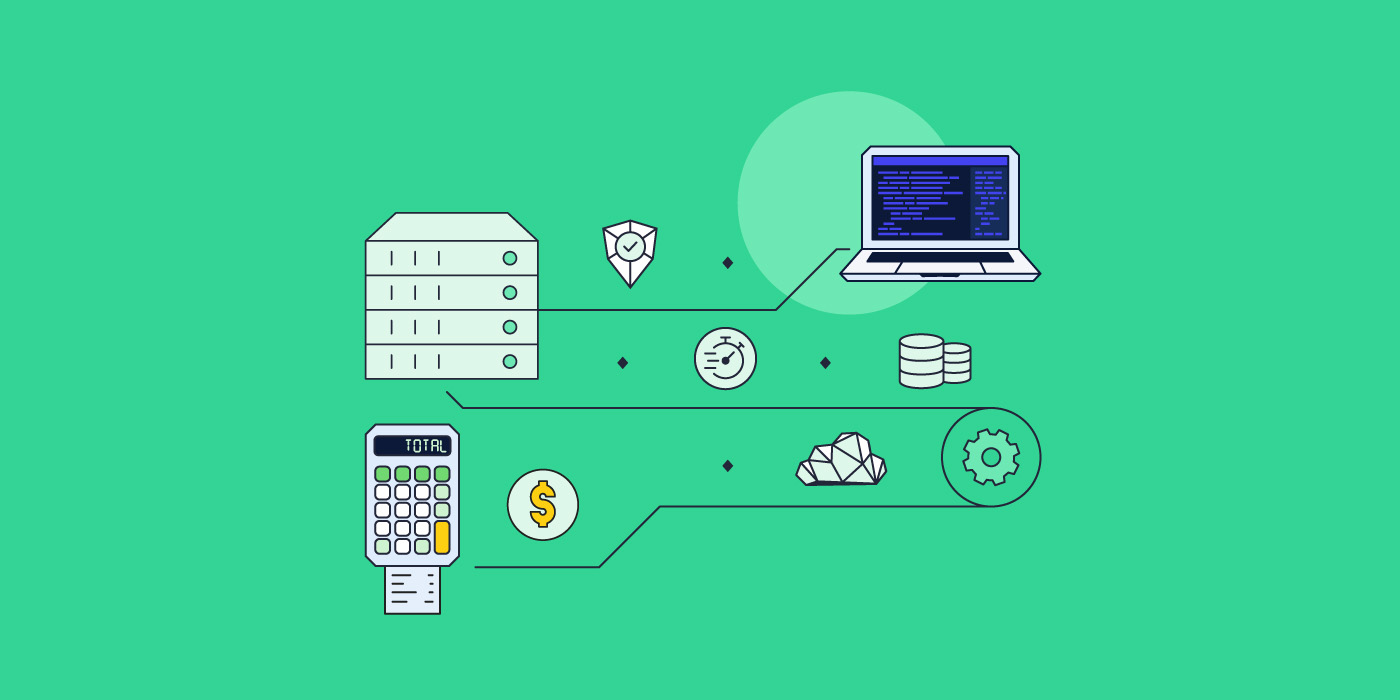
website hosting cost total calculator and server around a laptop

Your online business success relies heavily on your website. That’s why it’s important to choose the right web hosting plan for your site. But where do you begin research for your website hosting costs if you’ve never hosted a website before or need up-to-date information?

In this guide, we will go over the most popular types of hosting, their average prices, and what type of website they are most suitable for. We’ll also cover some additional hidden expenses that you need to consider before hosting your website. At the end of this guide, you will be able to make an informed decision about your website hosting.

What is the average website hosting cost?

Average website hosting costs range from $2 to $500 per month. They will depend on the type of web hosting necessary for your website. Each type of hosting comes with different server configurations and resources, such as CPU, RAM, and disk space. Depending on these, the website hosting price varies, and each web hosting type is suitable for different types of websites.

Let’s explore the various types of hosting to determine which one best fits your needs.

Shared hosting

With shared web hosting, you get to share a server’s resources, such as storage, bandwidth, and processing power, with hundreds or thousands of other websites. 

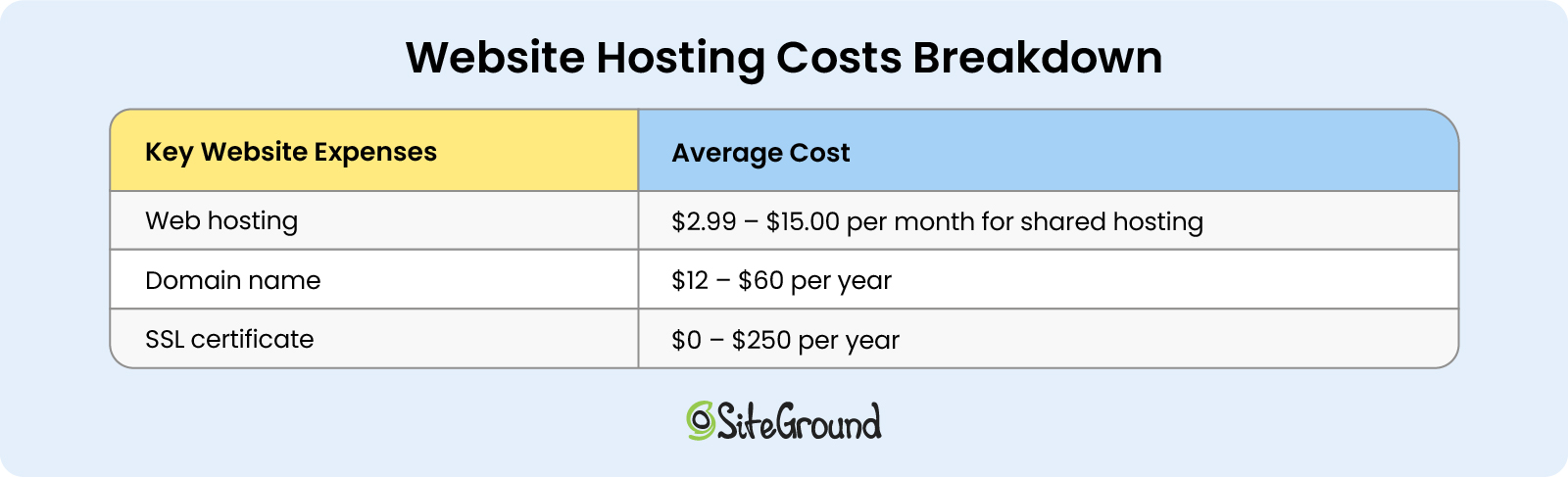
The average cost on a shared web hosting plan starts between $2 and $15 per month, and increases to around $10–$40 per month upon renewal. 

A shared web hosting plan is designed to suit the needs of a blog or portfolio website, as well as a small business website. Shared web hosting is a great fit for beginners, all the way up to more advanced business owners, too. It’s one of your best options, not only because it’s the cheapest type of web hosting, but it provides you with many benefits – e.g. no advanced technical knowledge and skills required, plus additional, essential features.

With SiteGround shared hosting plans, you get to choose from three different plans, depending on your website’s needs and requirements. On top of that, each of these shared web hosting plans comes with key features, such as an SSL certificate, email business account, daily backups, and other benefits included at no additional cost.

Here are some specific subtypes of shared hosting:

Managed WordPress hosting

Managed WordPress hosting is shared hosting that’s specifically optimized for WordPress website owners. This type of hosting provides an extra layer of convenience, as the web host takes care of WordPress updates and offers additional perks, such as speed and security boosts.

The cost of WordPress website hosting is roughly the same as the shared hosting price – but managed hosting costs vary, as some hosts may charge extra for the additional software support. With SiteGround, Managed WordPress hosting plans provide all the extra perks for WordPress users, yet the price remains the same as for the shared web hosting, ranging between $2.99 to $7.99 per month.

Managed WordPress hosting is suitable for a blog, hobby website, small business website, or any site built on WordPress content management system.

WooCommerce hosting

WooCommerce hosting is a popular plugin for WordPress. To build an online store, you need both WordPress and WooCommerce installed. WooCommerce hosting includes both of them preinstalled, while also providing additional features to help you sell different products or use various payment gateways. What’s more, WooCommerce hosting may require more server resources for proper website functioning.
That’s why WooCommerce hosting may be more expensive than Managed WordPress hosting, which starts at around $4–$9 per month to $19–$30 per month, but in some cases it can go higher. With SiteGround, WooCommerce hosting comes at the same price as Managed WordPress hosting.
VPS hosting

VPS hosting stands for virtual private server, where a single physical server is divided into several virtual servers. With VPS hosting, users still share server space with other websites, but these websites are fewer. This allows for stronger security and the ability to manage higher traffic volumes, while also having more control over the hosting environment.

VPS hosting is best suited for growing websites that have higher traffic and large amounts of data. For example, most shared web hosting plans can handle up to ~500,000 monthly visits. If you regularly exceed that monthly capacity, or you simply need unlimited bandwidth, you might want to consider upgrading to VPS hosting. Bear in mind, though, that with VPS hosting, having control over your hosting requires you to be technically proficient in order to be able to maintain your server configuration.

The average monthly VPS website hosting fees range from $20 to $100, where the price varies due to the provided RAM, CPU, and SSD storage on the server.

Cloud hosting

Cloud web hosting is the superior and more expensive alternative to VPS hosting. It consists of multiple servers connected in a network that host your website. Its main advantages include better scalability and reliability, greater uptime, and faster loading times.

Thus, cloud web hosting fees start at a higher price than shared hosting. For instance, cloud hosting plans begin at $30 per month and can reach up to $400 per month on the high end. SiteGround cloud hosting offers flexible plans, allowing you to grow your business to the next level anytime.

Cloud hosting is best for medium and large business websites, as well as small business websites that expect to grow at a fast pace.

Dedicated hosting

Dedicated hosting provides the user with an entire physical server solely for their website. This allows for complete control over your website, as well as higher performance and stronger security. With complete control comes complete responsibility, though. A dedicated server will require you to have extensive knowledge about server maintenance, while technical support from your hosting provider will be limited.

Dedicated hosting is the most expensive hosting option available. Its price generally starts at around $100 per month, reaching up to around $500 per month.

If you have a large-scale website that generates high amounts of traffic and consumes many resources, you may think about purchasing dedicated hosting. For example, a large online store, a multimedia-based website, or a website with large amounts of data.

Reseller hosting

Have you ever considered making money off of hosting yourself? With reseller hosting, you get to rent server space and hosting services in order to resell them to others. A good hosting provider should offer you tools and services that make reselling easy for you, e.g. white labeling, easy setup, affordable prices, and others.

Reseller hosting may cost between $4–$35 per month for shared plans, while the prices will go up if you need cloud reseller hosting. With SiteGround, reseller hosting plans allow you to easily manage your sites and resources, giving you all the necessary tools to do that.

To help you get an overview idea of the above mentioned hosting types and their respective price ranges, here’s a website-hosting comparison table:

Additional expenses for hosting a website

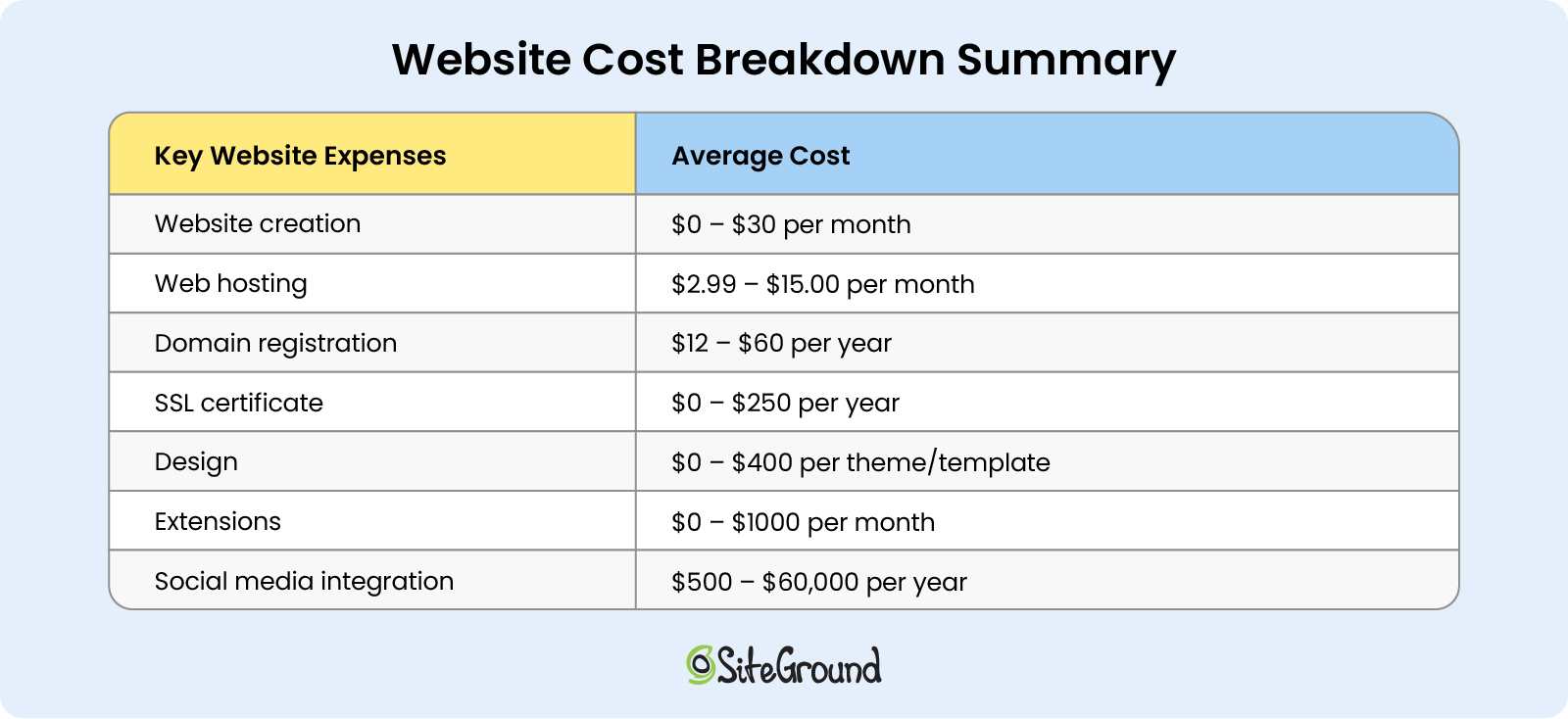
Keep in mind that the cost to host a website does not end with paying for a web hosting plan. There are several extra, yet must-have add-ons that you need to calculate in advance in order to have the full picture of your business website hosting costs.

You can read about some of these additional expenses below:

Domain name

A domain name is the web address of your website, which is easier to remember and enter in the browser than its IP address. For example, your domain name can be something like mycatshop.com, while its IP address will be a difficult-to-remember combination of numbers. 

Having a domain name for your website is a basic paid necessity. There are different ways to buy a domain name. You can buy one from a domain name registrar (for around $10–$30 for common extensions like .com or .net) or your hosting provider. 

Some web hosting plans even come with a free domain name registration for the first year, like the current SiteGround limited-time offer. Just pick a domain name and go ahead and register it. Keep in mind that since domain names are paid for on a yearly subscription basis, you will have to pay your domain hosting price for subsequent years.

SSL certificate

An SSL certificate is a security feature that encrypts all the traffic going through your website and ensures that sensitive data and information (e.g. login credentials, credit card details) remain protected.

Having an SSL certificate is important even if your website doesn’t handle sensitive data. For example, Google prioritizes the ranking of sites with SSL certificates, while some browsers won’t allow users to visit websites without an SSL certificate.

Many hosting providers, like SiteGround, for example, provide SSL certificates for free with their hosting plans. However, some may charge you separately for an SSL certificate. In such cases, it may cost around $10–$1000 per year, depending on the type of SSL certificate and the number of domains it will cover.

Themes and Plugins

If you want to customize the appearance of your website and make it more appealing to users, you will need a theme. To further enhance your website’s functionalities, you may wish to use additional extensions (also called plugins for WordPress, or apps for other platforms).

Let’s explore your options for the above-mentioned extras:

Free vs. paid themes

Themes, or templates, can make a real difference for your website users’ engagement and influence them in their decision to convert. That’s why you’d want to be able to customize your website in a way that corresponds to your user’s expectations and enhance their experience.

You can use a free, pre-selected theme, or you can go for paid, premium themes that allow you to further customize your site.

For instance, there are over 12,000 free WordPress themes that are great for a beginner’s website. The average cost of a paid theme for WordPress can be around $60.

Free vs. paid plugins

As mentioned above, some plugins, or extensions, enhance your site’s functionalities. For example, they allow you to add things like social media integrations, booking appointments, and more. Other plugins are used to increase your website’s security or boost your conversion rates.

For example, WordPress offers over 59,000 free plugins, and premium paid WordPress plugins can start from $5, reaching up to $400.

Marketing tools

Similarly, marketing tools can help you further customize and optimize your website to attract more visitors and turn them into conversions. Let’s explore the most important categories of marketing tools, such as email marketing, search engine optimization, social media marketing, and website traffic analytics.

SEO tools

One of the things that will help you attract more visitors is to have your website rank in top positions in search engine results. For this purpose, you will need an SEO tool that helps you optimize content for search engines by backlinking, analyzing keywords, and allowing you to customize descriptions in search engine results – in addition to other features. 

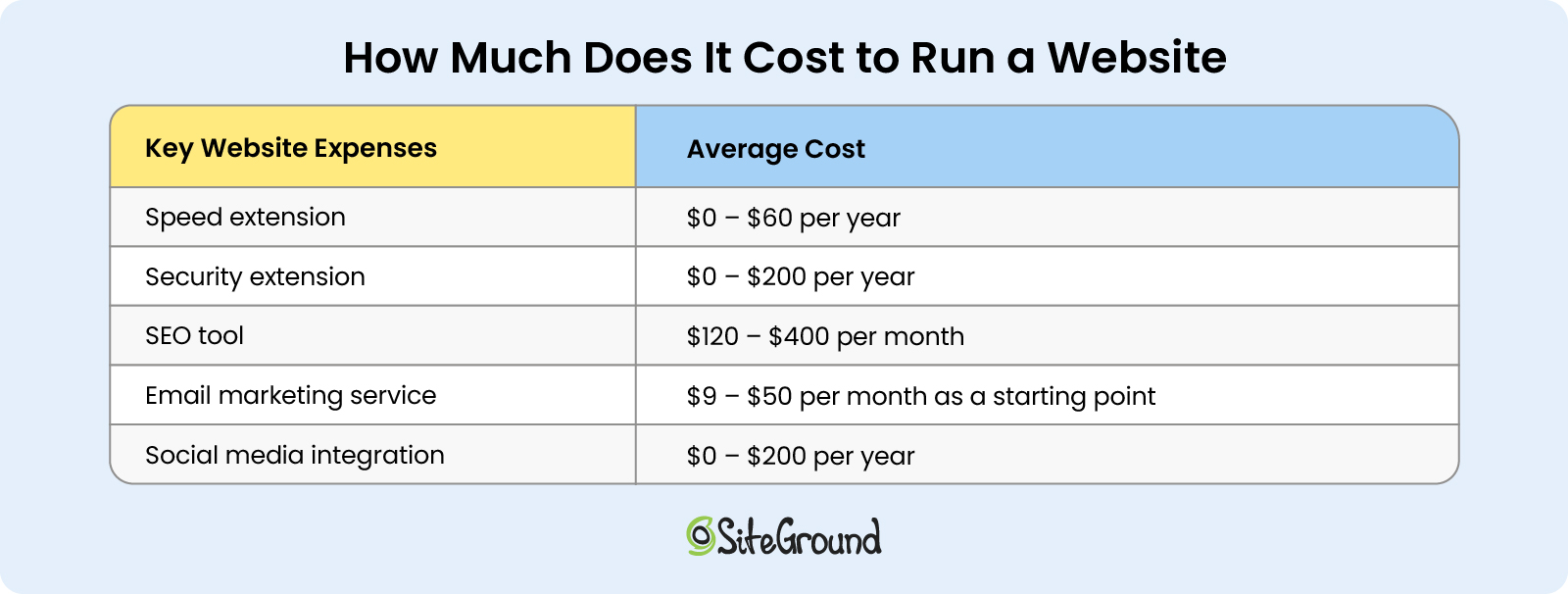
With WordPress, for example, you will need an SEO plugin – a free or a paid one (prices ranging around $100 or more per year). Other SEO tools’ may cost between $100 and $1000 for a monthly subscription.

Email marketing tools

Having successful email marketing campaigns that actually convert leads into customers depends heavily on the email marketing tool you use. Whether you plan to send regular newsletters with educational or informational content, or send special offers and promotions, you need an email marketing tool by your side.

An email marketing tool is usually a third-party service or an extension, paid on a monthly subscription basis or based on your number of subscribers. The costs generally start at around $10 per month.

With SiteGround, you can also take advantage of an easy-to-use email marketing platform that helps you drive growth for your business without the hassles of other hard-to-get-started platforms.

Social media integrations

To increase your website visibility even further, you have to be present on different social media platforms. That doesn’t mean that all of them are relevant to your website’s business or content, but it’s important to have a social media presence.

As such, you need to make it easy for your website visitors to share your content on social media or follow your social media profiles. This may already be built-in via your website builder, but sometimes it might only be available only on premium plans. For example, WordPress users can take advantage of a free plugin, or a paid one that would cost between $20 and $200 per year. 

Site traffic analytics tools

Last but not least, it’s important to monitor and analyze your website traffic. Where do most of your visitors come from? How much time do your visitors spend on your site? On which pages? The list of questions you can ask yourself goes on and on.

All you need to answer these questions is a tool that tracks these statistics. For example, some popular ones include Google Analytics, MonsterInsights, and Hotjar. 

Some web analytics tools have free versions, while they can also reach up to a few hundred dollars per month.

Website hosting cost FAQs

What is the cheapest website hosting option?

The cheapest website hosting option is to host your website for free with a free hosting platform (for example, GitHub Pages, WordPress.com, and many others). However, such platforms often come with strict limitations in regard to storage space, bandwidth and customization options. You may want to consider paid website hosting for a more advanced website with enhanced features and functionalities.

What features should be included in my web hosting charges?

Your web hosting charges should include essential features to get you started with your website, such as enough storage space; bandwidth and processing power on the server level; free domain name registration or website transfer to streamline your online journey; as well as an email account, SSL certificate, and site backups. 

Bear in mind that web hosting plans, and the features included in them, may vary depending on the hosting provider you choose. Look for the above-mentioned features before making your decision, as these can make a difference when it comes to the right web hosting plan for your website.

Is it better to pay for an annual or monthly web hosting subscription?

It’s better to go for an annual web hosting subscription because hosting providers usually provide discounts and savings. At the end of the day, when you calculate your website hosting charges per year, you get to pay a lower price every month in comparison to paying monthly. That said, you may find paying monthly web hosting fees more appealing if you are just starting and unsure about your project in the long run, and/or prefer flexible monthly pay without a long-term commitment.

How do I choose the best website hosting service?

To choose the best hosting service for your website, you need to consider different factors, such as your website’s size, its expected traffic, and general goals, e.g. selling online products. Having said that, the decision does not always come down to choosing the best web hosting prices or simply searching for low-cost website hosting. It’s much more than that. 

Once you identify the above-mentioned factors, you also need to consider what type of hosting would be best for your website, what additional features you need, and if they are included in your hosting plan or not. 

For example, you may need a business email address, or 24/7 technical support, or a free SSL certificate, free domain name registration to get you started, and other features. All of the above need to be considered before you make an informed decision.

Bottom Line for Your Website Hosting Cost

If you are asking yourself: “How much do I need to host a website?”, you need to be prepared to pay anything within the range of $2 (for a shared hosting plan) up to $500 (for a dedicated hosting plan), plus additional expenses, depending on the add-ons you’d need for your website.

The bottom line is that the total sum you are going to pay for hosting a website will depend on different factors – for example, type of web hosting, subscription period, as well as additional features and tools.

Now that you understand the main types of hosting and their respective average costs, along with the hidden expenses you may expect, you can go ahead and host your website with SiteGround, where there are no hidden costs – everything you might need is included in our hosting plans.

I Have a Domain Name, Now What? 8 Simple Next Steps

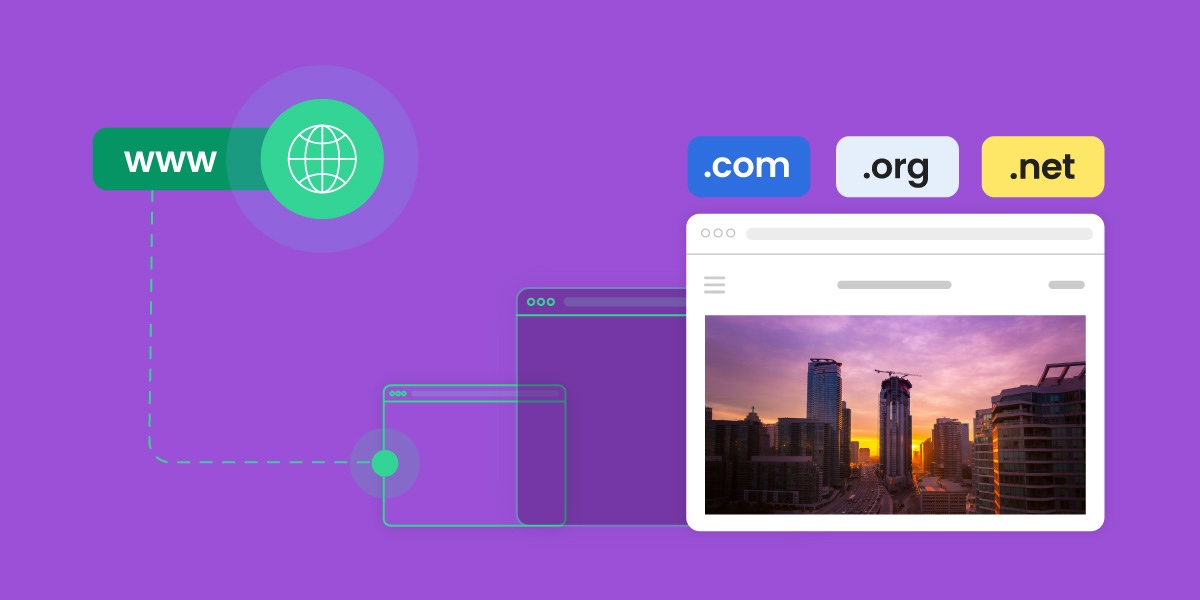
I-have-a-domain-name-now-what

Congrats – you’ve purchased a domain! But now you’re thinking, “ok, I have a domain name, now what?” Indeed, owning a domain is a great first step in establishing an online presence for your business, project, or personal brand. But now that you have one, the question is how to use a domain name? What comes next? This guide will walk you through eight essential steps to help you get your domain up and running, ensuring that you’re set up for success online.

What to Do With Your Purchased Domain

Choosing a domain name is exciting, but turning that purchased domain into a fully functional and professional online presence requires several key steps. Below, we’ll explore what you need to do after purchasing a domain, starting with simple-but-essential steps – like securing social media handles – and then getting into the nitty gritty of creating a website, and more. Let’s get started!

1. Secure Social Media Handles

You’ve got a domain, and social media may not be on your radar just yet – but it should be. Even if you don’t plan on actively using social media right away, securing social media handles that match your domain name is a smart move. Consistent branding across platforms helps maintain a cohesive identity, making it easier for customers to find, recognize, and remember you. 

Check availability for your domain name on popular social media sites like Facebook, Instagram, Twitter, and LinkedIn. You can use tools like Namechk or KnowEm to quickly see which handles are available across multiple platforms. Once reserved, these social media accounts will be ready for use whenever you decide to start promoting your brand.

If, however, you find that your name isn’t available, consider getting creative by adding an extra word to the handle name. For example, you could add words like “hello,” “get” or “shop” to the beginning of your brand name. Or, if your business is regionally based, you might consider adding your city or region to the social media handle. By adding an extra word, you’ll have more name options at your disposal. This, by the way, is also a great strategy for choosing a domain name if you find that your first choices aren’t available.

What-to-do-after-buying-a-domain-name-secure-social-media

2. Register and Trademark Your Business

If you haven’t already, registering and/or trademarking your business name is a good step to protect your brand legally and reduce the risk of litigation. This process helps prevent others from using your name in ways that could create confusion or harm your reputation, and it also safeguards you from potential legal issues with other businesses that might later claim rights to your brand name. Trademarking and registration requirements vary by country, so it’s best to consult local government resources or legal guidance for accurate information.

3. Plan Your Website

Now it’s time to start thinking about how exactly you want to build your site. You can choose various methods, ranging from website builders to content management systems (like WordPress), and custom coding. Which route you go with will depend on various factors, including your budget, customization needs, and level of tech savviness.  

Website builders, for example, typically offer a user-friendly, drag-and-drop approach that simplifies website creation without needing much technical knowledge. Also, many site builders often host your site for you, which means you don’t have to think about web hosting (which we’ll get to in a moment). 

All this said, you typically have to pay a monthly fee to publish and use your site, and there are often ongoing costs for extra features. Plus, they typically don’t offer extensive customization unless you pay for added plugins or custom coding.

Alternatively, a content management system (CMS) like WordPress enables users to easily create and customize sites of all kinds – from blogs to online stores – given its vast array of themes, plugins, and tools. While it may require a bit more technical skill, WordPress offers flexibility and scalability, making it a cost-effective choice for a customizable website.

Meanwhile, a custom-built site offers the most unique functionality and design options but comes with higher upfront and ongoing costs, especially if external developers are involved. In both these latter two cases – a CMS and a custom-built site – you would likely need to make a decision around web hosting, which brings us to step 4!

4. Get a Web Hosting Plan

If you don’t use a web-hosted sitebuilder, then you’ll need a web hosting plan in order to bring your website and domain name to life. Hosting provides the servers, storage, and infrastructure required to keep your website files online and accessible to users. Essentially, hosting acts as the foundation for your website, allowing your domain to connect with the servers where your site data is stored so that visitors can view it on the web.

There are several types and combinations of hosting available, including shared hosting, cloud hosting, managed WordPress hosting, and more – each suited to different levels of website traffic, control, and technical needs. 

For example, SiteGround offers managed WordPress hosting, which is particularly beneficial for WordPress users seeking ease of use with optimized security, performance, and automatic updates.

Ready to launch your online presence effortlessly? Get started easily with SiteGround web hosting. Enjoy famously fast web speed and performance, backed by multi-level security, and top-rated support. Explore plans now>>

5. Ensure Your Purchased Domain Points to the Right Hosting Servers

Whether you’ve chosen to use a web-hosted sitebuilder, or to buy your own hosting and create a site with a CMS, you’ll need to make sure that your domain directs to your actual site. If you’ve purchased your domain and hosting from the same provider, the setup may already be done for you.

However, if you’ve bought your domain from one provider and your hosting from another, you’ll need to point your domain to your hosting provider. This process, known as “domain pointing,” involves updating your domain’s DNS (Domain Name System) settings to connect it to your website’s files on your hosting server.

To do this, you will need to consult your domain and hosting providers for exact instructions, but the process is generally pretty simple. 

→ Working with SiteGround? Here’s how you can point your domain to SiteGround servers. 

Moving a domain is really quite easy – nevermind that the benefits of having a truly top-notch hosting provider make the few minutes it takes to correctly point your domain absolutely worth it. 

6. Build a Website

Now to finally put that domain name to work: by building your website! Start by defining your goals – both short-term (like lead generation) and long-term (like brand awareness) – and determine the actions you want visitors to take, as well as how you’ll measure success. 

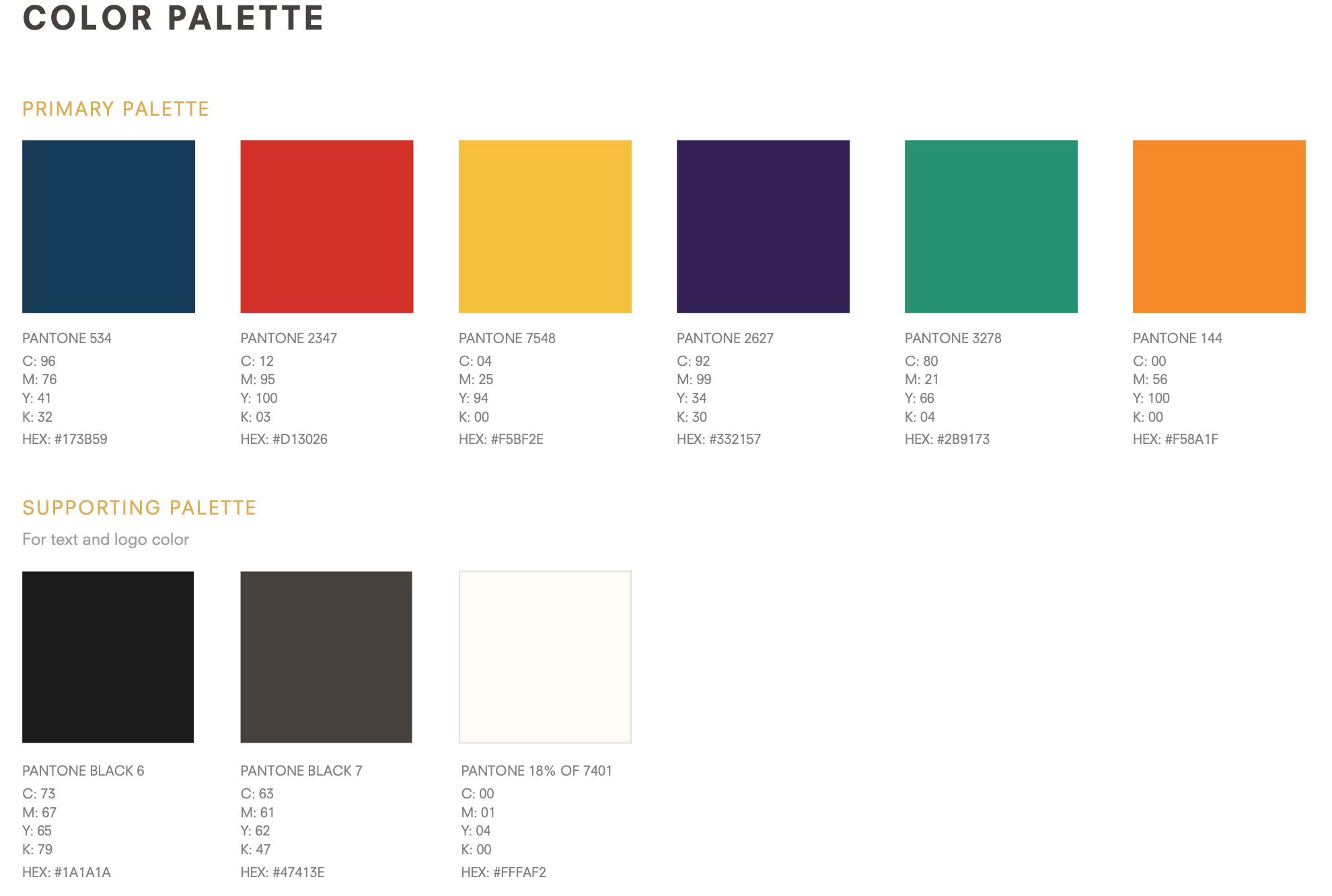
Another important step to take during this process is to spend time identifying your target audience so that you can build your website content to speak directly to them. You’ll also want to establish and round up branding elements, such as your logo, color scheme, typography, etc.  

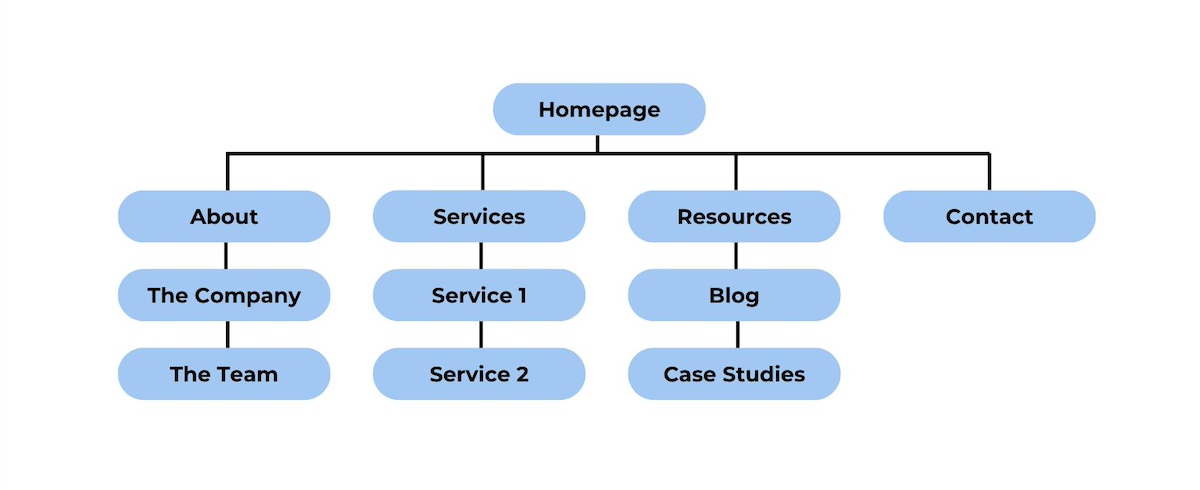
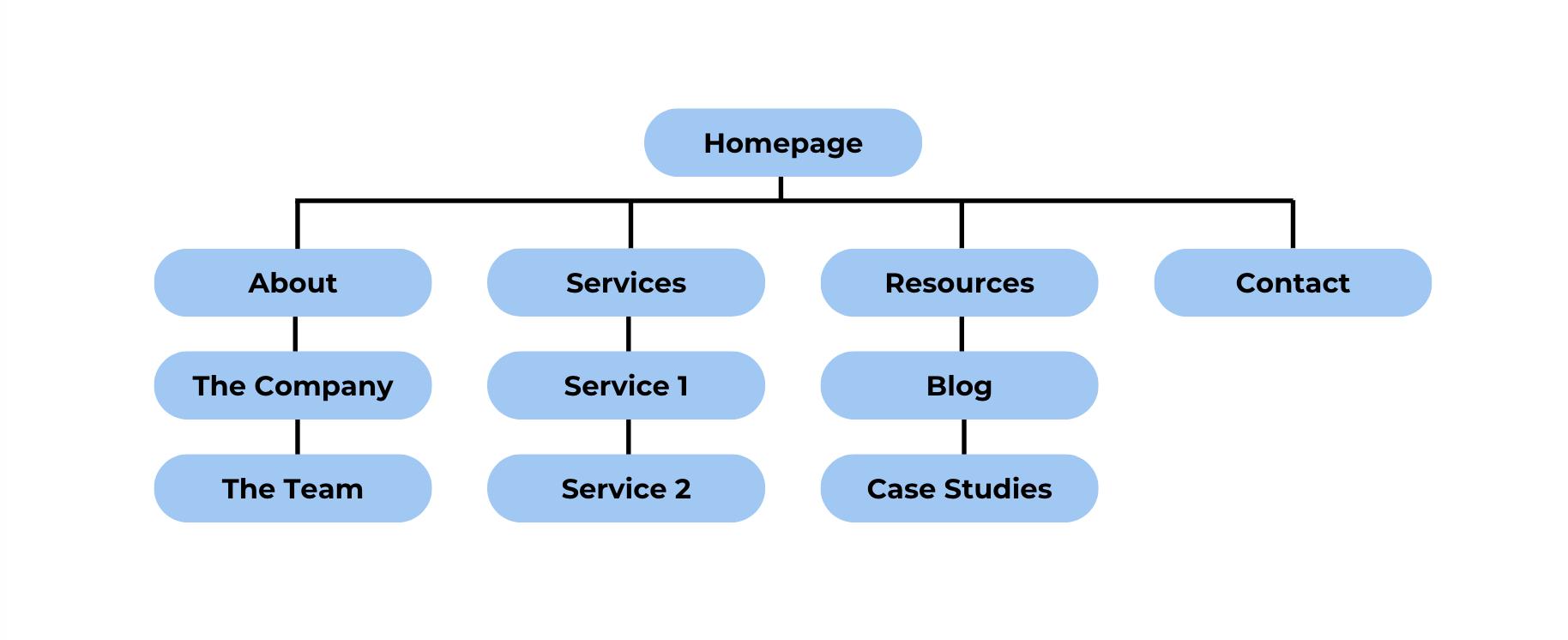
It will also be helpful to map out your website architecture so that you know exactly what content you need to round up – from copy to imagery and other design elements. From there, you can start putting everything together and bringing your website to life! 

I-bought-a-domain-now-what-create-a-sitemap

The process is of course a bit more elaborate than what we can cover here. For a detailed breakdown of the process of creating a website, check out our comprehensive guide on website planning. It covers everything you need to get started and get a website up and running.

7. Submit Your New Website to Search Engines

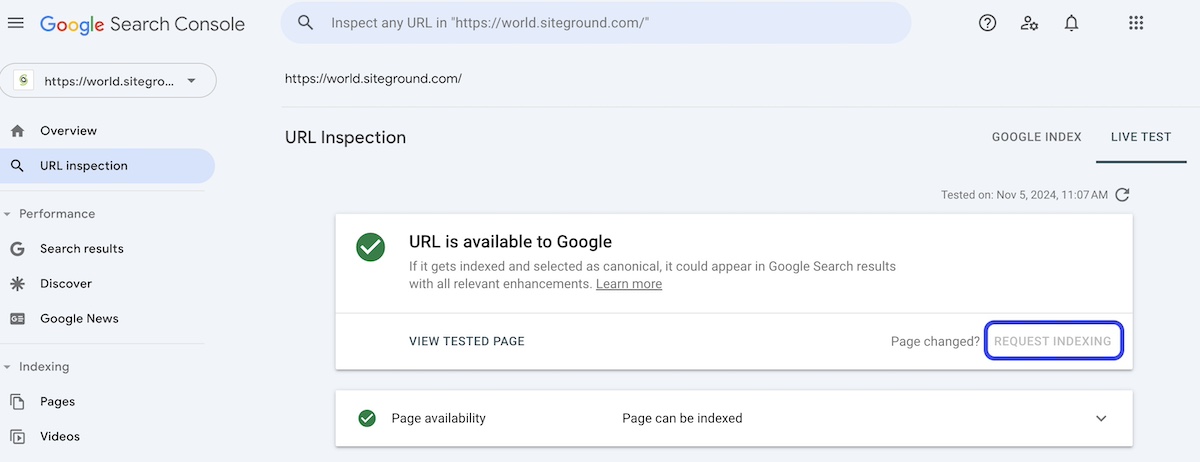
Once your website is live, you’ll want search engines to start indexing it so that people can find it. Google Search Console, for example, allows you to submit your website and sitemap, which helps search engines crawl your site more efficiently.

Request-indexing-for-your-website-and-purchased-domain

Submitting your site to search engines gives it the best chance to appear in search results and drive organic traffic. While search engines may eventually find your site on their own, submitting it directly can speed up the process so that people can start seeing the fruits of your labor sooner rather than later.

8. Create a Personalized Email Address Using Your Domain Name

A professional email address using your domain (such as yourname@yourdomain.com) adds credibility and strengthens your brand’s identity – and it’s also more memorable. Most hosting providers include email services, allowing you to create domain-based email addresses directly from their control panel. 

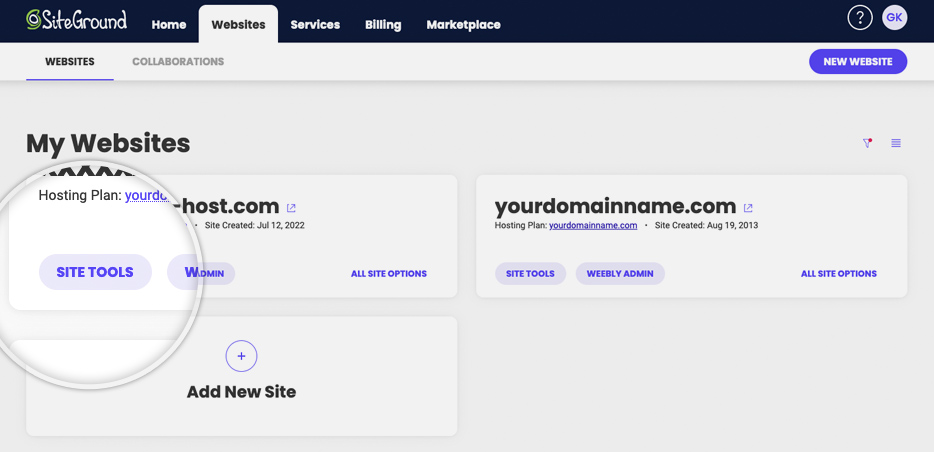
For example, it’s super easy to create an email account with Site Tools at SiteGround. You just go to your account in your Site Tools control panel, choose your domain, type the desired email address, create a secure password, and click “Create.” And there you have it: an email account is set up and ready to use! 

how-to-use-a-domain-name-to-create-an-email

After this step, you can set up your email on a computer by configuring it to work with popular email clients like Outlook, Gmail, or Apple Mail. A personalized email address is a small but impactful way to present a professional image to your audience and potential customers.

Takeaways on What to Do After Buying a Domain Name

Purchasing a domain name is just the first step in building a strong online presence. Following these eight steps will help you transform your domain into a fully functioning, professional website (and email!) that’s ready to serve your audience and grow your brand. From securing social media handles, to selecting hosting, and building a website, each step ensures your online setup is optimized for success. 

Get the most out of your domain name by choosing SiteGround. Benefit from a faster, better-performing, and lower-maintenance website, all which translate to more conversions for your business. Plus, SiteGround hosting is bolstered by unparalleled security, and live 24/7 customer support that’s there to help you every step of the way. 

Get started with SiteGround hosting today >>

FAQ

I Purchased a Domain, Do I Own It?

When you buy a domain, you don’t technically “own” it outright. Instead, you’re registering the rights to use it for a specific period (typically one year, which is renewable). As long as you continue renewing it, you retain control of the domain and can use it as your online address. If you haven’t yet registered a domain name, note that usually there is an annual cost – that said, some domain sellers, like SiteGround, offer the domain for free for the first year when you sign up for web hosting.

Can I Move My Domain to a Different Hosting Provider?

Yes, you can transfer your domain from one hosting provider to another if you choose. The basic steps for this process include unlocking the domain and requesting an authorization (EPP) code from your current registrar (likely a current or previous hosting provider). Then, initiate the transfer with your new provider by entering the domain name and EPP code. Note that you may need to update your DNS settings as well. If you choose to transfer an existing domain to SiteGround, 24/7 live support is available to assist you with any questions or doubts that you might have during the process.

What is Domain Privacy Protection and Do I Need It? 

Domain privacy protection, also known as WHOIS privacy, is a service that keeps your personal information – such as your name, address, phone number, and email – confidential when you register a domain name. Without this protection, your details become publicly accessible through the WHOIS database, which can lead to unwanted solicitations, spam, and even identity theft. 

How do you hide your personal information in the domain name WHOIS details? You can usually select domain privacy protection during the registration process with your hosting provider or domain registrar. Many web hosts and registrars, including SiteGround, offer this service, ensuring your personal information is replaced with their contact details in the WHOIS database. 

Types of Web Hosting: Key Differences & How to Choose One

types of web hosting

When you’re building your online presence, one of the first decisions you’ll face is choosing the right type of web hosting for your website. With so many options available, it’s easy to get overwhelmed by the technical jargon and differences between hosting services. What are the different types of web hosting, and more importantly, how do you know which one is best for your website?

There are plenty of resources online about web hosting, but many of these terms may be confusing, as the limits between the different types of hosting are blurred. In this article, we’ll break them down clearly and explain the differences, so you can easily choose the right one for your specific needs and use case. Whether you’re launching a small business site, an ecommerce store, or a personal blog, this guide will help you confidently decide what hosting you need – without the stress!

Why Choosing the Right Hosting Type Is Crucial

There are several types of web hosting, but before we dive into the specifics, it’s important to understand just how crucial your hosting choice is for your website. Hosting isn’t just the “place where your site lives.” 

Choosing the right hosting can do more than just boost your website’s speed and stability. It can streamline your workflow and also reduce costs thanks to many automated features. One-click setups and auto-updates, for example, simplify the process of creating your site and keeping it up to date. 

Security tools like daily backups and built-in protection solutions safeguard your data and provide peace of mind, helping you avoid costly downtime or data loss. Solutions such as a CDN and caching tools can help improve user experience by reducing website load times and speeding it up. 

There are many, many other additional solutions and services a web host can equip you with, so choosing a reliable provider is key. If you’re just starting out, it’s worth looking into hosting options carefully, as it can influence the success of your site and, in turn, your business.

Types of Web Hosting Based On the Server Setup

When discussing types of web hosting, it’s helpful first to understand that hosting services can be categorized based on two main factors: the server setup (how the resources are allocated) and the additional services you receive on top by the hosting provider. Let’s first take a look at the web hosting types, based on the server setup.

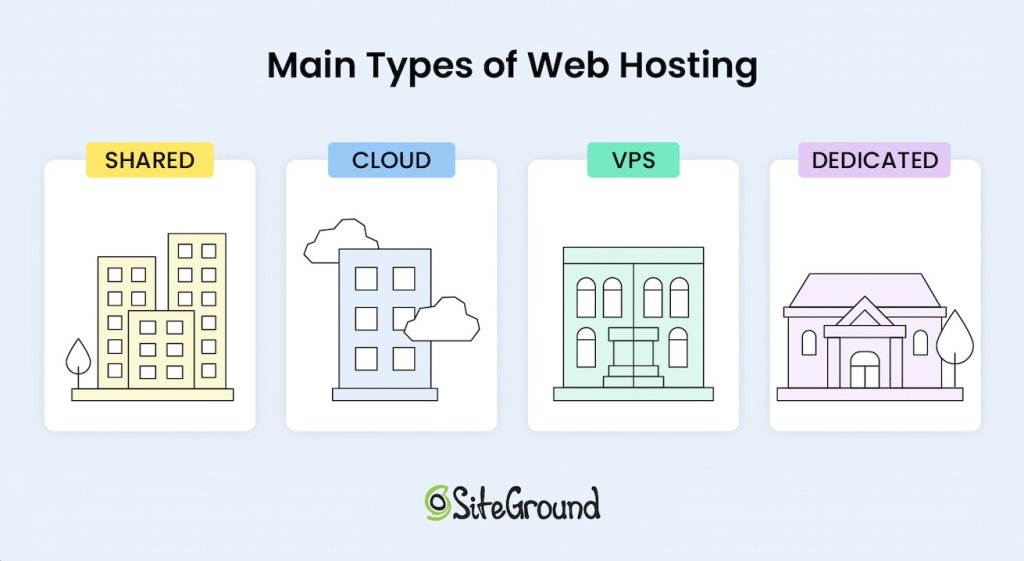
Generally speaking, there are four main types of hosting: 

1. Shared Hosting

Shared hosting, often referred to as “web hosting,” is one of the most popular types of hosting because it’s affordable, easy to use, and includes some level of managed service to assist the user. With shared hosting, multiple websites are hosted on the same physical server, sharing resources like CPU, RAM, and disk space. 

Typically, shared hosting is considered the cheapest form of hosting, which is why it also is the most widely used, but as you will see later in this article, the price of the hosting solution mostly depends on the service added to it. So don’t hurry to judge yet.

One of the biggest advantages of the shared service is that you don’t need much technical knowledge to use it. The servers are preconfigured by the hosting provider with all the software needed to run the server and tools that let you access your space and resources allocated on the machine.

One of the main disadvantages of shared hosting is the fact that your website does not get a dedicated share of the server’s resources. This means that if you have 100 sites on the same machine, and one of them gets very busy (or falls under a DDOS or other attack), that busy site might consume all of the server resources for some time and leave nothing for the rest. 

That means your site would become unresponsive, or even go down, just because one of your co-tenants abused the CPU or RAM of the machine. Naturally, good hosting providers would never let that happen to such an extreme, but the fact is the availability of your site depends on the way the other sites use the shared hosting service. 

Shared hosting is typically an excellent choice for businesses or individuals just starting their websites, or for more static sites that don’t require extensive server resources, even as their traffic and popularity grow. That said, as you’ll see later, shared hosting can also work well for dynamic online shops and high-traffic sites if the included managed services offer built-in performance and optimization solutions. 

For example, SiteGround offers shared hosting plans that vary in terms of features and server resources dedicated to them and the fact is, on the GrowBig and especially the GoGeek plans, SiteGround successfully hosts many online shops thanks to the higher server resources allocated to the accounts, the smart caching technology applied to shops, and the performance optimizations offered out of the box.

2. Virtual Private Server Hosting (VPS)

Virtual Private Server (VPS) is another type of hosting where you share a physical server with other users, but have your own dedicated share of space, CPU, and RAM resources. Using virtualization technology, VPS hosting divides a server into multiple virtual environments, giving each client their own dedicated portion of resources, such as CPU, RAM, and disk space.

This setup means that while you share the server hardware with other users, your hosting remains isolated and your resources are guaranteed, making it generally a more costly option compared to shared hosting, yet more affordable than a dedicated server. With the appearance of mass-market cloud hosting solutions which offer scalable and flexible resources, the VPS server technology is becoming obsolete. 

3. Cloud Hosting

When you think of “cloud” you probably think of Google Cloud and Amazon – these big names with huge data centers and complex service configurators. Well, cloud hosting is no longer a privilege for the technically savvy DevOps and huge enterprises that pay big bucks for infrastructure. Cloud hosting has become a very commoditized service that even small websites without an engineering team could comfortably sign up for.

What is cloud hosting? Cloud hosting utilizes a network of interconnected servers, virtually sharing their CPU, RAM, and space, creating a high level of redundancy of the service and resource scalability. With cloud hosting, resources can be quickly adjusted, meaning you can easily scale up or down based on your website’s needs in seconds. Such an upgrade does not require the physical addition of a hard drive or memory card, and there is no rebooting of the machines – you just claim more of what’s already in the cloud. 

The main benefit on top of scalability is the redundancy. Even if one of the machines in the cloud goes down (it happens more often than you think), the other machines take over and continue to deliver the service. This means that your website will not experience downtime and you get the highest level of redundancy and availability compared to all other standard hosting setups.

The downside of signing up for cloud hosting or VPS is that you need to know in advance how much CPU, RAM, and space you need so that your site gets properly served. While cloud hosting has a remedy for this with the option for very quick scaling or even automatic scaling, VPS does not offer that. 

In contrast to shared hosting, on VPS or cloud hosting without automatic scaling, a sudden traffic spike could make your site unresponsive if it temporarily needs more CPU or RAM, as it would hit its hard limits. On shared hosting, however, your site can tap into the larger pool of server resources, meaning someone else’s site might slow down instead – allowing yours to stay online.

4. Dedicated Hosting

Another main type of hosting is dedicated hosting, which involves renting an entire server exclusively for you, and thus providing you with access to all of the server’s resources. 

Unlike virtual servers, with this type of hosting you get the performance of a dedicated machine, making them suitable for specific high-demand scenarios. This type of hosting is designed for websites that require significant computing power. Clearly, dedicated hosting is the priciest option of all, with or without managed service on top. 

Dedicated servers come managed or unmanaged. Many technical experts and enterprises would rent dedicated servers as bare metal (a dedicated physical server with direct access to the hardware) in order to add the software of their choice, often experimenting with the setup and settings to get specific performance. For smaller companies and less tech-savvy clients, you should be looking for a managed dedicated server. 

Types of Hosting Based On The Services Added

Beyond choosing the right server setup, hosting can also vary significantly in the level of additional services you get on top (features, tools, management interfaces, support). Every main type of hosting – whether shared, VPS, cloud, or dedicated – usually comes with maintenance and support services, depending on the hosting provider and their hosting packages.

Managed vs Unmanaged Hosting

In terms of services, hosting generally falls into two main categories: managed and unmanaged hosting. With managed hosting, the provider installs and manages essential server software, such as Apache web server, Linux OS, MySQL, PHP, and cPanel, and also handles server setup and maintenance. Additional services like application installations, backups, security and performance solutions, and tailored support for specific CMS applications like WordPress or Joomla are also available, but may vary depending on the host and the selected price package. 

Using a managed service relieves you of much of the technical responsibility, making managed hosting a good fit for users without specialized tech knowledge or those who want to focus on other aspects of their website. 

In contrast, unmanaged hosting leaves all of these responsibilities in the user’s hands, offering greater control and flexibility, but requiring technical expertise. This option is often suitable for developers or businesses with dedicated IT staff to manage and optimize the server themselves. 

Shared hosting is the one exception, as it always comes with a managed service layer by default. This is because shared environments require consistent oversight from the provider to ensure stability and security among all users on the server.

❗ Important
Remember that each hosting plan, whether managed or unmanaged, is designed to suit different use cases – from simplicity and ease of use to full control and customization. That’s why it’s crucial to choose a hosting type that best suits your needs.

Now, let’s take a closer look at the types of web hosting options, based on the additional services offered on top of the server setup, as well as the specific needs, and use cases. 

Hosting Optimized for Specific Applications (Managed WordPress Hosting)

Hosting for specific content management applications like the popular WordPress, Joomla, Drupal, Moodle, and others means that the hosting environment is optimized to support the specific technical requirements and performance needs of the chosen application. With this type of hosting, you can be sure that your provider fully supports the application, often enhancing it with unique, tailored features and tools.

With managed hosting for specific applications, you’re also getting a hosting environment designed to help your chosen platform thrive. Whether you’re using WordPress, Joomla, or another platform, managed hosting for specific applications offers convenience, reliability, and performance optimized for your CMS.

Managed WordPress Hosting

For instance, managed WordPress hosting handles the full scope of server and application management so you can focus on your website content and business growth rather than application maintenance. This means the hosting provider handles essential tasks such as server maintenance, WordPress core and plugin updates, security patches in case of exploits, performance improvement solutions, and offers tools facilitating the workflow for WordPress users. 

At SiteGround, we provide full-featured and ultrafast managed WordPress hosting – the best-value solution for WordPress sites. In addition to features like free WordPress auto-installation, automated migrations, and auto-updates, we offer performance optimizations out of the box, security hardening with a click, and a range of advanced tools for effortless WordPress management.

WooCommerce Hosting

WooCommerce hosting is designed specifically for online stores built with WordPress and its WooCommerce plugin. WooCommerce hosting provides a range of specialized tools and user-friendly interfaces geared toward managing the needs of clients using WooCommerce for their shops.

What is specific for online shops is that they are very dynamic – every site visitor and each order they attempt to submit calls for database and PHP queries that are unique and cannot be cached, which normally can be done with more static sites. This makes e-stores more resource-heavy and in need of additional optimizations on server and application levels. Without these optimizations, the site can become significantly slower, leading to a poor user experience and potentially resulting in lost conversions.

As your store grows, this type of web hosting often provides options to handle increased traffic seamlessly, allowing you to focus on expanding your business without worrying about performance issues.

🛍️ With SiteGround’s easy-to-use WooCommerce Hosting, you can get everything you need for a successful store. Designed for simplicity and speed, it comes fully equipped with WordPress, the WooCommerce plugin, and the Storefront theme pre-installed, so you can start selling right away. Enjoy automatic updates, speed-boosting technology, and essential security features – all crafted to keep your store running smoothly and securely.

Email Hosting

Email hosting is another specialized type of hosting where the focus is on the email service you get on top of your core server setup for the needs of your business. Email hosting dedicates server resources solely to managing email accounts, communications, storage, and features. 

In addition to the basic server setup, email hosting packages include services like SMTP for sending emails, POP which allows users to download emails from the server to their local device for offline access, and IMAP, a protocol used for receiving emails that allows users to access and manage their emails from multiple devices. These protocols ensure that your email service is accessible – whether you’re on a computer, phone, or other device – and can synchronize across platforms.

One of the key features of email hosting is the enhanced security and anti-spam measures included to protect your inbox and reputation. Email hosting providers usually implement advanced filtering and scanning tools to block spam, detect malware, and prevent phishing attacks. These security layers help ensure that both incoming and outgoing communications are secure and that sensitive business information is protected.

Email hosting can be a stand-alone service, or it can be part of a bundle. For example, SiteGround offers complimentary email service in all its hosting plans, including the managed WordPress plans, which gives you the chance to create unlimited email accounts (addresses) at your site’s domain, use a webmail from any device, set autoresponders, and more. The good thing is, it comes at no extra cost but is included in the bundle.

Reseller Hosting 

Reseller hosting is a type of hosting with additional services, designed for individuals or businesses that need to manage multiple websites while providing hosting services as part of a broader offering. This type of hosting is popular mainly among developers, freelancers, and web agencies. 

Essentially, reseller hosting operates on top of shared, VPS, cloud, or dedicated setups, allowing you to create multiple hosting accounts for your clients, using standard configurations or custom resource packages tailored to their needs. Naturally, it depends on what kind of reselling you wish to do and how much flexibility you need. 

Some hosts offer volume discounts for clients who prepay or create multiple shared hosting accounts, which the client then resells at regular or custom price to their end clients – a very standard form of reselling. The more sophisticated solutions, however, allow the reseller to create multiple client accounts within the same hosting plan. This usually happens on VPS, cloud, or dedicated server setups. 

One of the main advantages of reseller hosting is that it empowers you to purchase hosting resources from a provider and then resell them under your own brand – this is usually called “white-label” reselling. This model enables you to build a hosting business without the need to manage servers, but only taking over the client-facing support. You benefit from the hosting provider’s technical expertise while creating a unique brand experience for your clients.

While you’re responsible for providing customer support to your clients, the backend management, including server maintenance, security updates, and performance optimization is handled by your host. Note that it’s important to choose a reliable hosting provider, as the performance, security, and reliability of your service will directly impact your clients’ satisfaction.

SiteGround offers reselling service on top of its GoGeek (shared web hosting plan) and its cloud plans, where resellers can create unlimited websites and provide white-label access to these sites to their end clients. This means that the end client will not know that SiteGround is the original service provider, but will contact the reseller on all hosting matters. 

In our cloud plans, we have included an additional reseller convenience – the option to create custom hosting plans that are tailored to the specific needs of the end clients. Each plan includes a different share of resources and tools, giving you the flexibility to cater to various client requirements.

How to Choose the Right Type of Hosting for Your Site?

To make a smart decision, look for a hosting provider that offers a robust array of value-added services that align with your specific needs. Ultimately, the combination of your server setup and the additional services included in your hosting plan determines the real benefits you will receive.

siteground web hosting

When evaluating hosting options, it’s essential to look beyond just the server type, whether shared, VPS, cloud, or dedicated, and consider the complete hosting package. It’s always beneficial to have essential extras like SSL certificates, automated backups, CDN, and email that can enhance your website’s security, performance, and usability. These features are crucial for creating a reliable and professional online presence.

It’s also critical to consider your specific usage needs. For instance, if you are planning to host a WordPress site and prioritize ease of use, a managed WordPress hosting service is ideal for you, as it offers specialized tools and support tailored for WordPress users. On the other hand, if you have a developer on your team, consider a hosting provider that offers collaboration tools so that you can easily give them controlled access to your websites. 

If you want to make the best choice, another important factor in your decision should also be the balance between price and value-added services. Shared hosting is typically the most affordable option, making it an excellent choice for those just starting out. However, depending on the additional features you need, the overall cost can vary. 

Be cautious of opting for the cheapest solution, as well as for what seemingly looks “premium,” as the lack of essential extras could lead to higher expenses down the line due to performance issues and the premium claim is often a marketing bubble. 

To help you navigate the selection process, here’s a quick overview of some key points to remember and consider:

✅ Understand your needs: Evaluate your website’s goals. The type of site you’re creating will influence your hosting requirements. Start by asking yourself a few questions:

  • What is the application you plan to use? Filter providers that are focused on offering services for it. If you are not sure, look for providers that offer a free “sitebuilder” in their bundles.
  • Does the host offer security and performance solutions? You might not need these right now, but eventually one of the two or even both issues could arise. You may look for terms like caching, WAF, custom PHP and MySQL setups, and more.
  • Do you need email services? Look at the features list and choose only those providers that offer email services in their plans.
  • What other services do you want and are they paid extra? Maybe SSL (everyone needs that!), CDN (mostly sites with geographically dispersed traffic), backups (an absolute must), domain (a free domain might be a good value if added to the mix), collaboration access (so your developer can get access without compromising yours), or others? When you prioritize these, then you start comparing which host on the shortlist is giving better value in their plans for the price asked.

✅ Consider your budget: Determine your budget for hosting. Generally, shared hosting is a popular, cost-effective option, while cloud and dedicated hosting may incur higher costs. Remember, though, to look for the balance between price and value-added services. A managed shared hosting plan with a variety of features may serve you better than a cloud option that lacks proper management tools or flexibility. 

The most important advice when it comes to budget: Don’t spare a few bucks per month just because it feels like you can compromise a few tools or features and they don’t seem so important. Paying $20, even $40 per month could be a game-changer and a business savior when things go bad.

✅ Assess your tech expertise: If you’re not particularly tech-savvy or you simply wish to focus on your business rather than server and website maintenance, opt for managed hosting options that come with an intuitive client dashboard and comprehensive site tools, along with reliable 24/7 customer support.

✅ Read reviews: Research recommendations from trusted sources, online communities, or groups related to your niche. User experiences can provide valuable insights into the quality and reliability of different hosting providers.

We hope this guide has equipped you with the insights you need to choose a hosting type that aligns with your website’s goals and needs.

Ready to take the next step?

Choose SiteGround, where you’ll get more than just fast and reliable hosting – you get a complete solution. Enjoy a robust managed hosting solution with essential features like easy website setup and management, automated backups, SSL certificate, caching, one-click CDN, an intuitive Client Area, and much more. Whether you’re just starting out or scaling your business, we give you the tools, flexibility, and support you need to thrive!

FAQs On the Types of Web Hosting

Which Type of Hosting Is Best for Beginners?

For beginners, shared hosting is often the most suitable option. It’s affordable, user-friendly, typically packed with useful features, requires little to no technical knowledge, and includes customer support. Most hosting providers offer easy-to-use control panels and one-click installations for popular content management systems (CMS) like WordPress, making it simple to get started. SiteGround, for example, leverages cloud infrastructure even for their shared hosting plans, offering an added layer of redundancy and performance that can be beneficial.

Which Type of Hosting Is Best for an Ecommerce Website?

Ecommerce hosting is often the best choice due to its specialized features. This type of hosting typically includes integrated shopping cart systems, payment processing features, and enhanced security to protect sensitive customer data. Plus, most ecommerce hosting providers offer scalability, which is vital for growing online stores. As your business expands, you may experience spikes in traffic, especially during sales or promotions, so it’s beneficial to have this feature out of the box.

What Is the Best Type of Hosting?

The best type of hosting greatly depends on your specific needs, goals, usage, and technical expertise. For most personal projects and online businesses starting out, shared hosting is a great starting point due to its ease of use, variety of tools, and affordability.

12 Proven Email Marketing Tips for Small Businesses

Illustration showing email marketing workflow with envelope containing product email, connected to light bulb for ideas, pie chart for segmentation, bar chart for performance tracking, and 98% growth metric graph

Email marketing keeps evolving, but here’s what hasn’t changed: the right tactics can turn your campaigns from “meh” to “wow, that actually worked.”

Whether you’re crafting your first campaign or fine-tuning your hundredth, these email marketing tips & strategies will help you cut through the noise, land in inboxes, and actually get people to click—without the trial-and-error headaches. 

From building a quality subscriber list to keeping your emails out of spam folders, this guide covers everything you need to connect with your audience and drive real results.

Ready? Let’s dive into the email marketing tips that actually move the needle for small businesses.

What Are the Best Practices for Email Marketing Success?

  1. Build and Maintain a Quality Email List
  2. Write Catchy Subject Line and Preview Text
  3. Craft Compelling, Scannable Copy
  4. Have Clear Calls to Action
  5. Design Beautiful Emails with Appealing Images
  6. Design Beautiful Emails with Appealing Images
  7. Apply Smart Segmentation and Personalization
  8. Utilize Email Automation
  9. Optimize Your Send Times
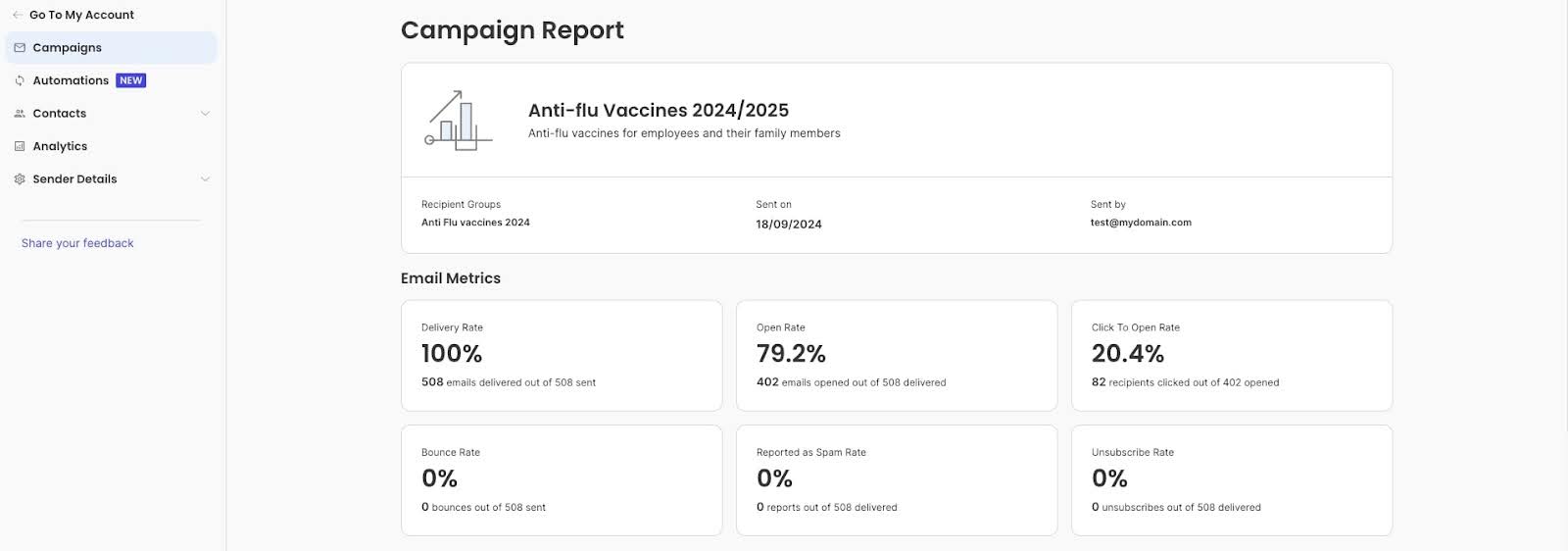
  10. Track and Analyze Performance Statistics
  11. Perform A/B Testing
  12. Maintain Strong Email Deliverability

Let’s break down each of these strategies to help you create emails that convert.

1. Build and Maintain a Quality Email List

Your email list is the foundation of successful email marketing. A quality list filled with engaged subscribers will always outperform a large list of uninterested contacts.

How to build your email list the right way:

Create valuable signup incentives

People need a reason to share their email address. So offer something specific and relevant, like a discount code, free guide, exclusive content, or early access to sales. Make the value clear upfront. Generic promises like “stay updated” rarely convert as well as concrete offers like “Get 15% off your first order” or “Download our free social media calendar.”

Use double opt-in

While it adds an extra step, double opt-in confirms that subscribers genuinely want to hear from you. That’s because after someone fills out your signup form, they receive an email asking them to confirm their subscription. This simple practice improves engagement rates and protects your sender reputation by filtering out fake or mistyped email addresses. Yes, you might lose a few signups, but the subscribers you keep will be far more engaged.

Never buy email lists

Purchased lists violate most email marketing regulations and damage your deliverability. These contacts haven’t agreed to hear from you, which leads to high spam complaints, low engagement, and potential legal issues under laws like GDPR and CAN-SPAM. Beyond the legal risks, bought lists simply don’t work—people who didn’t ask to hear from you won’t engage with your emails.

Clean your list regularly

Remove inactive subscribers every few months. If someone hasn’t opened your emails in six months, send a re-engagement email campaign with a compelling subject like “We miss you! Here’s 20% off to come back.” If they still don’t respond, remove them. A smaller, engaged list of 500 active subscribers will always outperform 5,000 inactive ones. Clean lists improve your deliverability, open rates, and overall campaign performance.

Make signup forms easy to find

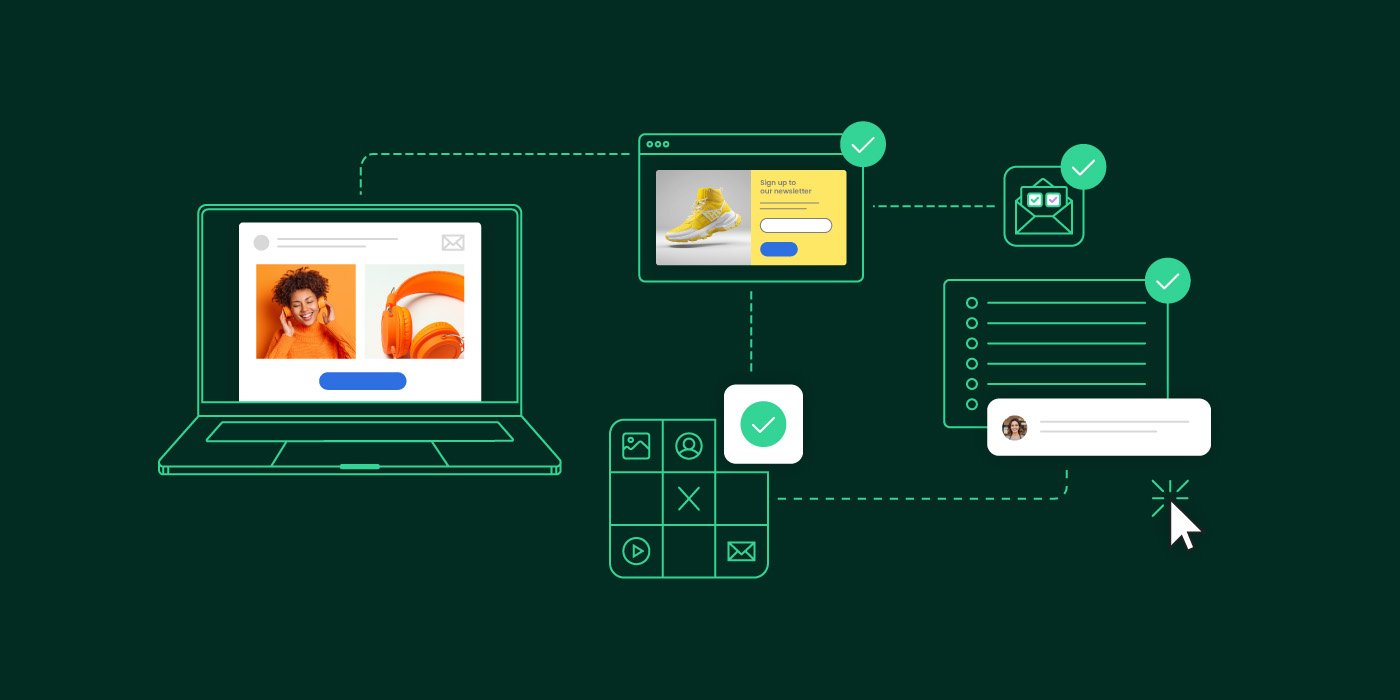
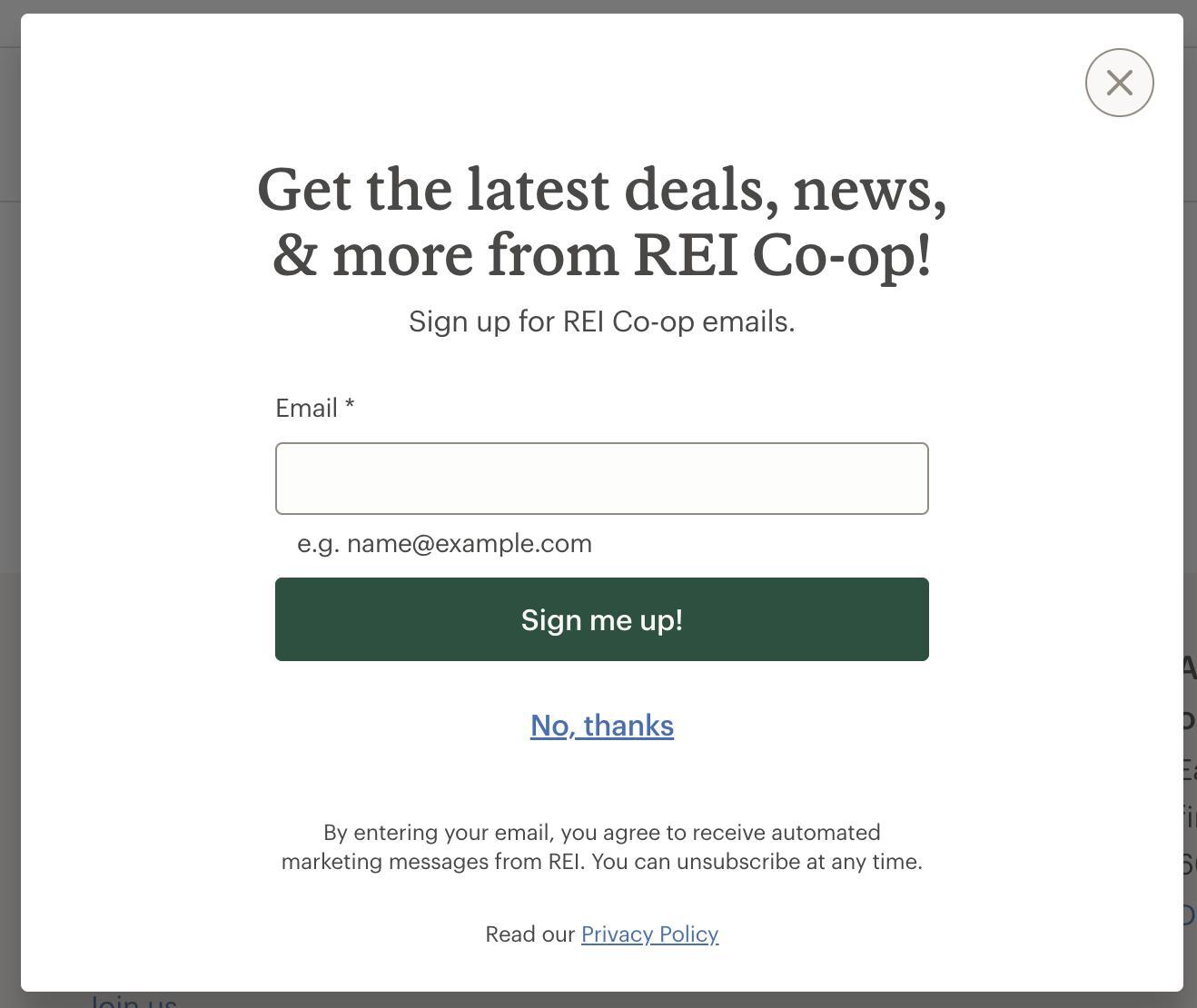
Place signup forms on your homepage, at the end of blog posts, on your checkout page, and in your website footer. Or even consider adding a popup or slide-in form for visitors who spend time on your site. The easier you make it for interested people to join your list, the faster it will grow.

That said, be patient with growth. Building a quality email list from scratch takes time. Focus on placing consistent signup opportunities across your website rather than expecting overnight results. If growth feels slow, remember: 500 engaged subscribers who open and click are far more valuable than 5,000 people who ignore your emails. Quality always beats quantity in email marketing.

2. Write Catchy Email Subject Lines and Preview Text

Your email subject line and preview text are your first – and often only – chance to grab attention in a crowded inbox. Together, they determine whether recipients open your email or scroll past.

Spark curiosity and show value

Your subject line should be clickable, but not spammy. It should make recipients want to learn more about what’s inside, without misleading them about what to expect. Address your audience’s pain points and state the benefit clearly. This builds trust and credibility. For example, “3 ways to cut your email workload in half” is specific and valuable, while “Amazing email tips inside!” is vague and forgettable.

Email header from Canon with subject line "Snap. Share. SAVE! 🎁" demonstrating promotional email formatting

Use personalization strategically

While adding a recipient’s first name helps (“Hi Sarah”), go further with location, past purchases, or interests: “Sarah, your Chicago store favorites are 20% off” outperforms generic subject lines. Use the data you have about your subscribers to make subject lines feel relevant to their specific situation. 

Personalized subject lines consistently outperform generic ones—making this one of the highest-impact tactics for improving email performance. Industry studies regularly show double-digit percentage improvements in open rates from personalization alone. Keep it concise and actionable

Use action verbs and benefit-focused language. “Get your free guide” outperforms “Our guide is available.” And keep in mind that it’s best to produce subject lines that are 50 characters or less to ensure full visibility on most devices—mobile users will only see the first 30-40 characters before deciding whether to open.

Quick note: If adding a recipient’s name pushes your subject line over 50 characters, the personalization wins—it matters more than length. Personalized subject lines on mobile (even if truncated) still outperform generic subject lines that display fully.

Create urgency carefully

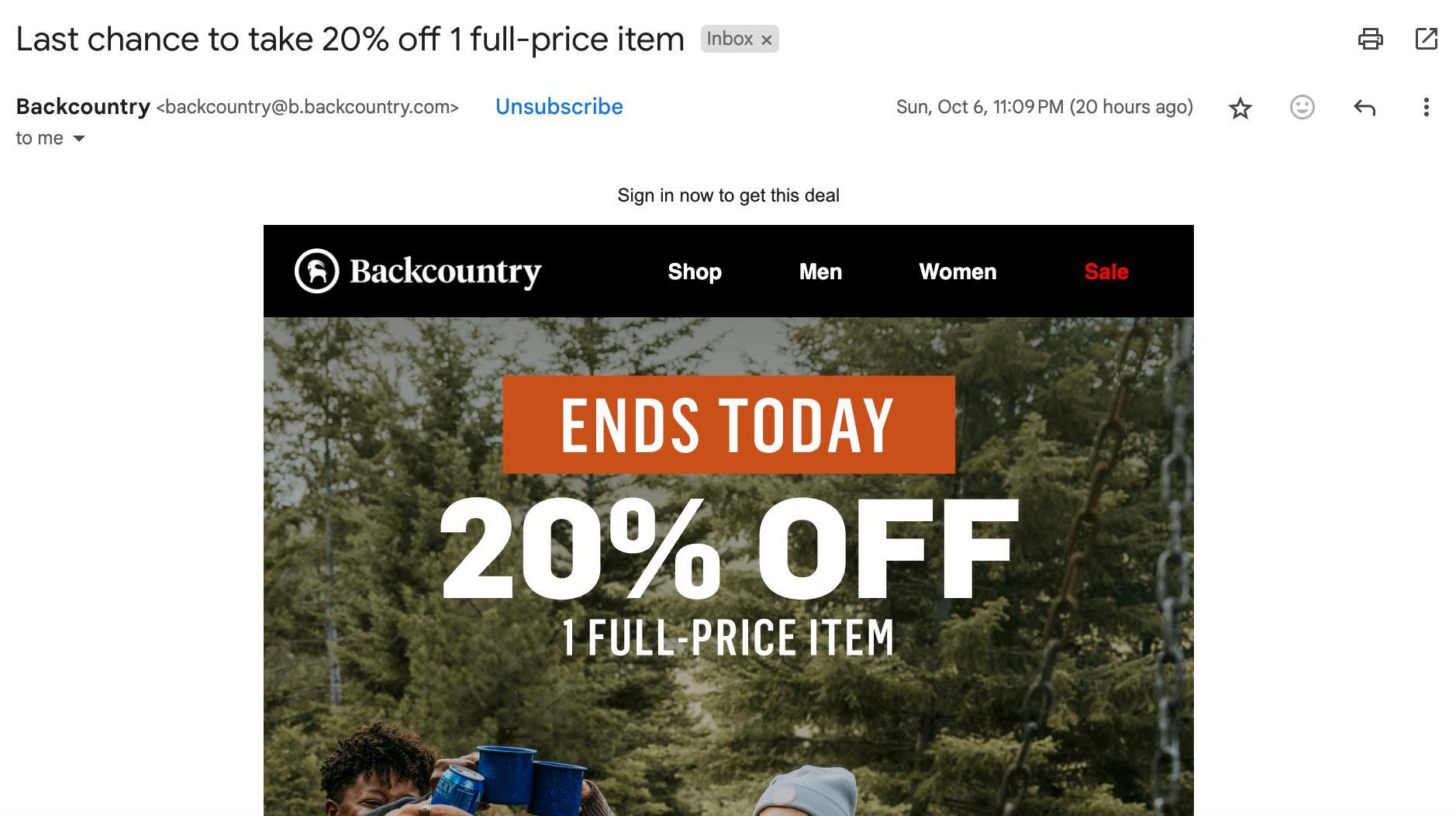
For promotional and sales emails, create a sense of urgency to encourage immediate action. Use phrases like “last chance,” “ends tonight,” or “only a few hours left.” Meanwhile, avoid spam triggers that combine urgency with money words like “Free cash now” or “Urgent—act now for free money.” Write naturally rather than desperately. Instead of “FREE MONEY – ACT NOW!!!,” try “Your exclusive offer expires Friday.” Same urgency, but professional and trustworthy. Avoid using all caps for your entire subject line.

Don’t use default preview text

Many businesses forget to customize preview text, leaving recipients with “View this email in your browser” or random body copy from the email. This wastes valuable inbox real estate. Preview text (also known as preheader text) appears alongside your subject line in the inbox, offering a sneak peek at your email’s content. It’s your last chance to make a convincing argument that your email should be opened.

Write preview text that complements—not repeats—your subject line, giving readers another compelling reason to open. Use it to provide a bit more detail about what readers can expect inside your email. While this text can be up to 90 characters, the ideal length is between 35 and 40 characters to ensure it displays fully across most devices.

Example showing subject line "Master Email Marketing in Just 6 Days—For Free" paired with preheader text "A free 6-lesson course to help you send better emails and grow faster"

3. Craft Compelling, Scannable Copy

One of the most important email marketing tips is to thoughtfully craft your email content. After all, it’s the relevant content that captures your readers’ attention and keeps them engaged with your message.

Let’s explore the best email copywriting tips:

  1. Start with relevance

Whether you’re writing an informational, educational, or promotional email, rule #1 is to make your content relevant to your audience. Your content should address your subscribers’ needs and pain points, offering them value that motivates them to take action—whether it’s making a purchase or subscribing to your newsletter. Having a strong value proposition will get you one step closer to increasing your conversion rates.

  1. How long should your emails be?

Keep promotional messages between 150-300 words and email newsletters between 300-500 words. Readers decide within seconds whether to engage, so front-load your most important message—put the key benefit or offer in the first two sentences.

  1. Make your content scannable

Most people don’t read emails word-for-word; they scan in seconds. Structure your content accordingly: use short paragraphs (2-3 sentences max), clear headings, bullet points, and plenty of white space. Don’t overstuff your content with unnecessary words—get straight to the point. Readers should grasp your main message within 10 seconds of opening. If they have to work to understand your point, they’ll simply move on to the next email.

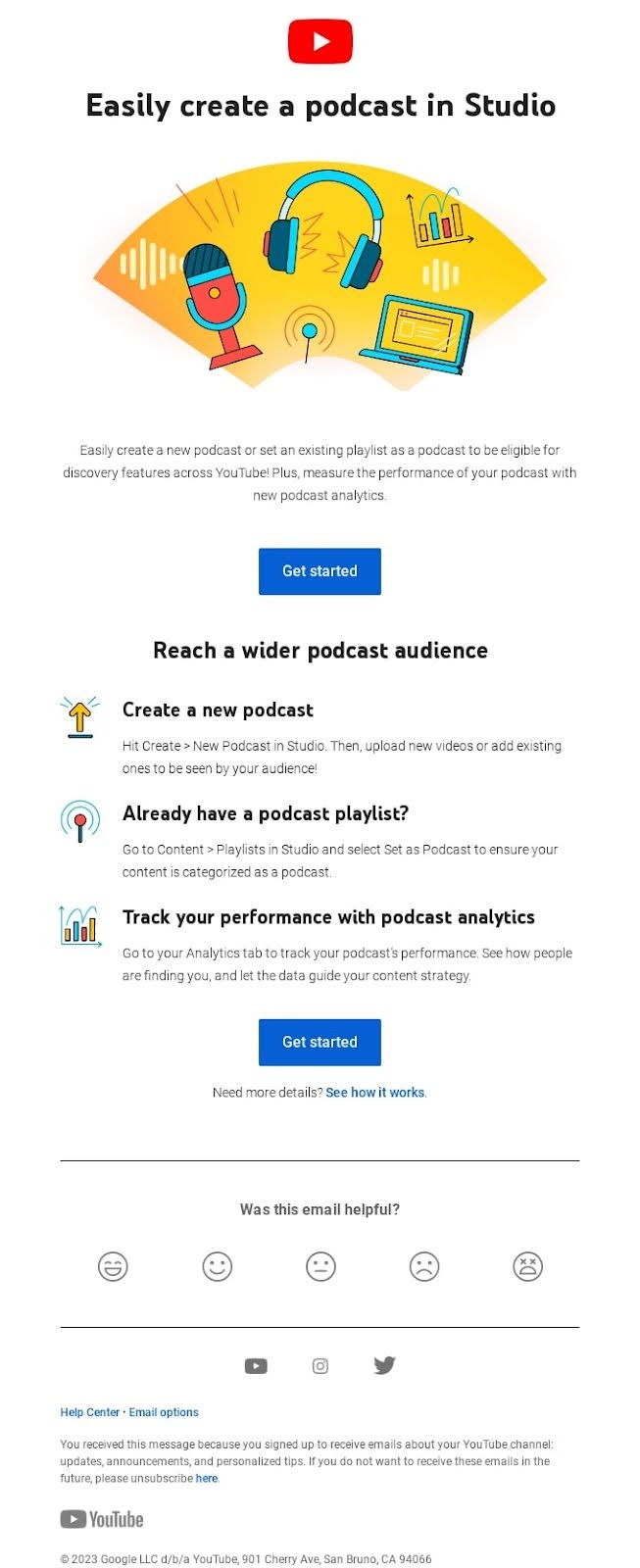
For example, here’s an email from YouTube Studio. See how scannable it is? That’s because of the bigger, bold email font in the title, followed by a catchy image, and a short paragraph. Then, it naturally flows to the blue call-to-action (CTA) button, which stands out well against the white background—a great example of how strategic colors in email marketing can guide reader attention. What’s more, the content is broken down into bullet points that are easy to scan because of the small icons at the beginning of each row.

YouTube Studio email showing scannable layout with podcast creation heading, colorful illustration of microphone and headphones, blue CTA button, bullet points with icons, and clear visual hierarchy

To help you better understand and implement these tips in your next email marketing campaign, we have a guide on how to write marketing emails, including specific examples and best strategies.

AI can also help with content creation, but knowing how to write effective ChatGPT prompts is key to getting useful results. We’ve compiled an extensive guide on how to write email prompts to help you get better output from AI tools.

[ai_prompts_download]

4. Have Clear Calls to Action

Your next crucial step is having clear calls to action. Here’s how to achieve that:

Since the main purpose of an email CTA is to drive readers to take a specific action, your first goal should be to define what you want them to do. Do you want your readers to make a purchase, sign up for your newsletter, download an eBook, or visit a sales landing page of your new product or service?

Equally important is the design and wording of your CTA buttons, as both play a vital role in driving user action. Make sure to include short and actionable words on your CTA buttons, preferably verbs. Use phrases like “Buy now,” “Read more,” or “Get started.”

The visual design of your buttons is also essential—they need to stand out and grab attention. Use contrasting colors that differentiate them from your email’s background, and opt for bold, clear fonts to ensure they are easily visible and clickable.

Last but not least, instead of a button, you can also use an image as a CTA. In this case, one of the most notable email marketing hacks is to include an alt text for that image. Since some email providers might not display your image, your alt text will “show” people what the image was all about. Make your alt text short, yet descriptive and actionable—just as you would with regular CTA button copy.

Limit CTAs per email

Too many calls to action confuse readers and dilute your message. Stick to one primary CTA. If you absolutely need a secondary action (like “Read our blog” after a “Shop now” button), make the visual hierarchy clear through size, placement, and color. Your primary CTA should be impossible to miss.

Position your primary CTA within the first scroll—readers shouldn’t need to hunt for it. If your email is longer than 300 words (common for newsletters), repeat your CTA at the bottom so people who read through don’t have to scroll back up to take action.

Optional: Add social sharing buttons

While not essential for most promotional emails, social sharing buttons (Facebook, X, LinkedIn) can extend your reach when subscribers share your content. This works best for newsletters, blog roundups, or educational content—skip them for sales-focused emails where you want readers taking one action (buying, not sharing). Keep buttons small and place them in your footer so they don’t compete with your primary CTA.

5. Design Beautiful Emails with Appealing Images

No matter how closely you follow the best email marketing techniques, if your email doesn’t have an appealing design and compelling visuals, your engagement will suffer. Beautiful emails combine smart templates, relevant images, and strong brand consistency.

Start with responsive templates

If you’re just starting with email marketing, one of the best email marketing tips you can embrace is to consider using an email marketing platform. It will not only make your life much easier, but it will also help your email campaigns become measurable, optimizable, and ultimately more successful.

Most email marketing platforms will provide you with ready-to-use templates or easily customizable layouts. With SiteGround Email Marketing, you can create stunning emails fast with our free email templates, which leverage expert best practices. We have a template for every need—promotional, newsletter, welcome emails, or seasonal (such as Black Friday emails and Cyber Monday emails).

Tap into Email Marketing Success With SiteGround

You can also lean on layouts for building your email campaigns. Layouts allow you to play around with the different elements of your email and customize them based on your own preferences and brand criteria. 

What’s the difference? Templates are pre-designed emails you can customize (colors, text, images). Layouts are structural frameworks that show where images and text blocks go, which you build from scratch. New to email marketing? Start with templates. Want complete brand consistency? Create a custom layout once and reuse it. To help you create engaging email campaigns, we’ve also compiled a list of email layout examples.

Choose compelling visuals

Whether you’re using an email template or email layout, you must complement it with appealing images. This is one of the best email marketing tips, as most people interact with your emails primarily through visuals. You need to grab their attention with the images in your email campaign.

Images should be relevant to your content and value proposition, whether you’re using individual images or creating engaging photo collages to enhance your message. They should correspond with your brand guidelines, so that readers can recognize right away that the email is coming from your brand (even if they don’t notice your logo immediately).

Appealing images are hard to find, though. That means you either need to use free stock images, invest in paid images, or even hire a professional photographer.

Another way to address this is by using SiteGround’s Email Marketing platform, which offers a free built-in AI image gallery, and provides you with a wide range of photographs and illustrations in a variety of categories.

Include alt text for all images

Just like with CTA images, the rest of your images should also include alt text. Some email clients block images by default, so alt text describes what’s in the image so readers understand your message even when images don’t load. Keep alt text short, descriptive, and actionable—especially for CTA images.

Make images clickable

You should also make sure to have your images linked to whatever page you want your readers to visit, whether that’s your sales page, downloadable assets page, or otherwise. If you decide to include a button on the image, ensure that the whole image is a link, not just the button, as users tend to pay more attention to images rather than text. People tap images more often than small text links.

6. Ensure Mobile Responsiveness

More people check email on their phones every day, and poorly formatted emails drive subscribers to delete messages or unsubscribe. If your emails don’t work well on mobile devices, you’re losing potential customers before they even read your content.

Here are some strategies to verify your emails are optimized for mobile devices:

Use responsive email templates

Start with a responsive email template that automatically adjusts to different screen sizes. Many email marketing platforms offer pre-designed templates that are mobile-ready, saving you time and ensuring consistency across devices.

Optimize image sizes

Large images can slow down load times, particularly on mobile devices without fast internet connections. Compress images without losing quality and use formats like JPEG or PNG. Additionally, consider using CSS for background images to further improve load speed.

Design clickable CTA buttons

Make sure your call-to-action buttons are easily clickable on small screens. Use a minimum size of 44×44 pixels for touch-friendly buttons, and ensure they are visually distinct with ample spacing between other elements to prevent accidental clicks.

Ensure adequate sizing of links and text

Text links should be large enough to tap easily. Avoid placing links too close together, and use a font size of at least 14 pixels for body text to maintain readability without zooming.

Prioritize key content at the top

Place the most important content and CTAs at the top of your email. This approach works because even if recipients don’t scroll, they will see the key message and action you want them to take. This is increasingly important with features like AI email summaries, which can push your content further down the screen—making that first visible section even more critical for engagement.

Test across devices

Before sending out your email, test it on various devices and email clients to catch any display issues. By implementing these email marketing tips for mobile, you can improve the mobile responsiveness of your emails, leading to higher engagement rates and improved customer interactions.

Don’t have access to multiple devices? Use your email platform’s preview feature or free tools for basic testing. Most email platforms show how your email renders on different devices before you send.

7. Apply Smart Segmentation and Personalization

One of the best tips for effective email marketing is to apply segmentation and personalization in your email campaigns.

When you segment contacts based on criteria like subscriber activity and engagement levels, you can deliver messages that are more relevant and valuable to each recipient. This targeted approach transforms generic broadcasts into personalized communications that resonate with specific audience groups.

When customers receive content that feels personal, they are more likely to feel valued and understood. This creates a stronger connection with your brand, leading to increased loyalty and long-term customer relationships, as well as higher conversions.

Here’s how to implement smart email segmentation and personalization:

Start with basic segments

If you’re new to segmentation or have a small list, start simple. With SiteGround Email Marketing, you can segment contacts based on how they interact with your campaigns—who opens your emails, who clicks through, or who hasn’t engaged recently.

After sending a campaign, check your Analytics to see who performed specific actions, then assign those contacts to groups. For example, create one group for subscribers who opened your last few campaigns and another for those who haven’t engaged in months. This lets you send re-engagement offers to inactive subscribers while rewarding engaged ones with exclusive content.

Even basic segmentation like this significantly outperforms sending the same message to everyone. Start with simple engagement-based groups and refine your approach over time. The key is to treat your subscribers as individuals with different engagement levels, not just email addresses.

8. Utilize Email Automation

Your next step in the field of email marketing best practices is automations. By leveraging email automations, you can streamline your marketing efforts, deliver personalized experiences, and achieve better results with less manual effort.

Automations not only save time but also make certain that every subscriber receives the right message at the right time, improving their journey with your brand.

Here’s how to implement email automation:

Identify key opportunities

Start by identifying opportunities within your email customer journey where automation can add value. Welcome emails for new subscribers and re-engagement campaigns for inactive contacts are two high-impact automations that save time while keeping your audience engaged.

Choose the right tools

Select an email marketing platform that supports automation features. SiteGround Email Marketing offers automated welcome emails and allows you to create email sequences based on specific triggers—making it easy to nurture new subscribers and maintain consistent communication automatically.

Define your workflows

Map out the email customer journey and design workflows that align with your marketing goals. Determine the triggers (such as signing up for a newsletter or reaching a certain engagement milestone) and the corresponding email sequence.

For example, a three-email welcome sequence might include: 

  1. Immediate: Deliver your promised lead magnet or discount
  2. Day 2-3: Share your story, best content, or customer success stories
  3. Day 7: Introduce your products or services with a special new-subscriber offer

This works for most small businesses. B2B companies or higher-ticket services often extend this to 5-7 emails over 2-3 weeks, adding educational content and case studies. 

The welcome sequence runs automatically when someone subscribes, separate from your regular broadcast campaigns. So if you send weekly newsletters every Tuesday, a subscriber who joins on Wednesday would get the welcome sequence (three emails that week) PLUS your regular Tuesday newsletter. This doesn’t violate the frequency guidelines—new subscribers expect to hear from you more often initially.

Create personalized content

Develop email templates and content that are tailored to each stage of the workflow. Personalize messages using dynamic content and segmentation for maximum relevance.

9. Optimize Your Send Times

Timing matters more than many businesses realize. Sending your email when your audience is most likely to check their inbox can significantly improve open and engagement rates.

Test different days and times

While email marketing benchmarks suggest Tuesday through Thursday mornings perform well, your audience might behave differently. Test various send times and track which gets the best response. B2B audiences often engage during work hours (9 AM – 3 PM), while B2C audiences may respond better in evenings (6 PM – 9 PM) or weekends. Don’t assume—test with your specific subscribers.

Consider time zones

If your subscriber list spans multiple time zones, segment by location and schedule sends so emails arrive at optimal local times. Sending at 10 AM EST might work for New York subscribers, but means 7 AM for your West Coast audience—and most people don’t want marketing emails with their morning coffee.

This matters most for time-sensitive emails like flash sales or event invitations. For weekly newsletters, time zone optimization is less critical.

Watch for inbox competition

Avoid sending when your subscribers’ inboxes are flooded. Monday mornings often see heavy email volume as businesses catch up from the weekend. Similarly, sending right before major holidays when people are traveling or away from work can hurt your metrics. 

Pay attention to your industry’s patterns—for example, retailers need to strategically time campaigns like finding the best time to send Black Friday emails, since inboxes become extremely crowded during major shopping events. Many successful retailers send early Thursday evening or very early Friday morning to stand out before the inbox flood begins.

Maintain consistency

Once you find a schedule that works, stick with it. But what’s the right frequency? Start with weekly emails if you have regular, valuable content to share. Many small businesses find success with one email per week, while others thrive with 2-3 monthly emails for higher-value content.

Here’s how to decide:

  1. Send your welcome email immediately when someone subscribes
  2. For regular campaigns, weekly works for most ecommerce and content-driven businesses
  3. B2B service businesses often succeed with 2-4 emails per month
  4. Watch your unsubscribe rate—if it spikes after increasing frequency, pull back

Whatever you choose, consistency matters more than frequency. If subscribers expect your newsletter every Tuesday at 10 AM, that consistency builds anticipation and habit. They’ll start looking for your email at that time. Breaking this pattern without warning can confuse subscribers and reduce engagement.

10. Track and Analyze Performance Statistics

Tracking and analyzing your email marketing metrics and KPIs is crucial for understanding the effectiveness of your campaigns and making data-driven decisions. Without tracking, you can’t accurately measure the success of your email campaigns.

Understanding how your emails perform helps you gauge whether you’re meeting your marketing goals. Analyzing data over time also allows you to spot trends and patterns in your audience’s behavior, helping you tailor future campaigns to their preferences and habits. By pinpointing what works and what doesn’t, you can make informed adjustments to your content, design, and email marketing strategy to improve engagement and conversion rates.

Focus on metrics that matter

Open rates and click-through rates are useful, but go deeper. 

Compare your performance against your own past campaigns first—that’s more valuable than generic industry benchmarks. Then look at industry averages and email marketing benchmarks to see if there are areas where you’re significantly underperforming.

Track conversion rates (the percentage of recipients who complete your desired action), revenue per email, and unsubscribe rates. These metrics tie directly to business results, not just email activity. A 50% open rate means nothing if nobody buys. Conversely, a 15% open rate that generates $5,000 in sales is excellent.

How to track and analyze email marketing statistics

Before diving into analytics, establish clear objectives for your email campaigns. Whether it’s increasing open rates, boosting click-through rates, or driving conversions, having defined goals will guide your analysis.

Next, leverage the analytics features of your email marketing platform to track these metrics. SiteGround Email Marketing, for example, offers detailed reports and insights into your email performance.

Campaign report showing email metrics: 100% delivery rate, 79.2% open rate, 20.4% click-to-open rate, 0% bounce rate, 0% spam rate, and 0% unsubscribe rate for Anti-flu Vaccines campaign

Compare performance across various campaigns to determine what the most effective marketing strategies are.

What numbers should you aim for?

Rather than chasing arbitrary email marketing benchmarks, focus on improving your own baseline. Track your averages over 3-6 months, then work to beat them. 

Small business ranges typically fall around 20-25% for open rates, 2-5% for click-through rates, and under 0.5% for unsubscribe rates (according to email platform industry reports)—but these vary significantly by sector, audience size, and business model.

11. Perform A/B Testing

Another of our email marketing recommendations is to perform A/B testing to optimize your email campaigns. A/B testing, also known as split testing, is a powerful technique that allows you to compare two versions of an email to determine which one performs better.

Here’s how you can implement A/B testing effectively:

Start by identifying what you want to achieve with your A/B test. Are you looking to improve open rates, increase click-through rates, or boost conversions? Having a clear goal will guide your testing strategy.

Then, select one element to test at a time to ensure clear results. Some common variables include: subject lines, email content, calls to action, and send times.

As a next step, divide your email list into two random, equal-sized groups. Send version A to one group and version B to the other. Ensure the sample size is large enough to yield statistically significant results.

Send out your emails and allow enough time to gather data—typically 24 hours minimum to account for different checking habits. If you send weekly, wait until your full subscriber base has had a chance to open before declaring a winner.

When you get the results, compare the performance of the two versions based on your chosen metric (including open rate, click-through rate, etc.). Use statistical significance to determine if the results are due to chance. Once you’ve identified the better-performing version, roll it out to your entire audience. Use the insights gained to inform future campaigns and continue testing new variables.

When A/B testing makes sense

You need sufficient volume for reliable results. If your list is small (under 200 subscribers), focus on testing subject lines only—they require smaller sample sizes than testing content or design changes. 

With very small lists, manual observation often works better than formal A/B tests—send an email, see what happens, try something different next time.

However, remember that A/B testing is an ongoing process. Continuously test new ideas and refine your approach to keep improving your email marketing strategy.

12. Maintain Strong Email Deliverability

You can craft the perfect email, but if it lands in spam folders, your efforts are wasted. Strong email deliverability gets your messages into inboxes where they belong.

Authenticate your domain

Set up SPF, DKIM, and DMARC authentication protocols. These technical standards verify you’re a legitimate sender, not a spammer impersonating your domain. Think of them as digital signatures proving your emails are really from you. Most email platforms provide step-by-step guides for setting these up with your DNS provider. While the setup requires a bit of technical work (or IT support), it’s necessary for maintaining high deliverability rates.

Avoid spam trigger words

We touched on this earlier when discussing subject lines, but spam trigger words don’t just affect whether people open your emails—they also determine whether your emails reach inboxes at all. Phrases like “100% free,” “Act now!!!,” “Limited time only,” “Cash bonus,” and excessive punctuation can trigger spam filters. Write naturally and avoid language that sounds overly salesy or desperate. Instead  of “CLICK HERE FOR $$$,” try “Limited spots available this weekend.” You create urgency while maintaining credibility.Retry

Monitor your sender reputation

Your sender reputation is like a credit score for your email domain. High spam complaints, bounce rates, or low engagement damage this score, making it harder to reach inboxes. Email providers like Gmail and Outlook watch how recipients interact with your emails. If lots of people delete without opening, mark as spam, or never engage, your reputation drops. Monitor your reputation using tools like Google Postmaster or your email platform’s deliverability reports.

Make unsubscribing easy

It sounds counterintuitive, but a clear, easy-to-find unsubscribe link actually helps deliverability. If people can’t unsubscribe easily, they’ll mark you as spam instead—which seriously damages your sender reputation. Include an obvious unsubscribe link in every email footer. Losing an uninterested subscriber is far better than getting spam complaints.

Stay compliant with regulations

Follow email marketing laws like CAN-SPAM (US), GDPR (EU), and CASL (Canada). Key requirements include: adding your physical business address to every email, honoring opt-out requests immediately (within 10 business days), and only emailing people who’ve given permission.

SiteGround Email Marketing handles key compliance requirements automatically—every email includes an unsubscribe link and opt-outs are processed immediately. You’ll need to add your business address to your template, but the platform takes care of the technical requirements. Beyond avoiding legal penalties, compliance builds trust with subscribers and improves deliverability.

Implement These Email Marketing Tips in Your Next Campaign

These 12 tips provide a complete framework for successful email marketing campaigns. Start with the fundamentals—building a quality list and maintaining strong deliverability—then layer in personalization, automation, and continuous testing. Track your results, learn what resonates with your audience, and refine your approach over time.

The businesses that succeed with email marketing aren’t necessarily the ones with the biggest lists or fanciest designs. They’re the ones who consistently apply these proven strategies, pay attention to their metrics, and keep improving.

Let us know in the comments below how your email marketing efforts go, and which of these tips was new and most useful for you.

Website Planning in 9 Steps + Checklist

Website Planning

This article was originally published in October 2024, and then updated in April 2026.

Planning a new website successfully comes down to 9 key steps: from defining your goals and audience, to choosing hosting, shaping your design, and finally launching your site. This guide walks you through each one—plus includes a free checklist so that you have a website planning template to follow in real time.

Key takeaways

  • Always define your goals and audience before touching design or code—it shapes every decision that follows.
  • Consistent branding (logo, colors, tone) builds trust and makes the build process smoother.
  • Your choice of website builder, CMS, or custom code has real trade-offs in cost, flexibility, and maintenance.
  • A clear sitemap improves both user experience and search engine optimization (SEO) from the start.
  • Website planning doesn’t end at launch—regular updates, SEO, and performance monitoring are part of the job.

[24]

What is Website Planning and Why Does it Matter?

The website planning process entails defining the purpose, goals, and structure of a website before any design or development work begins. It involves understanding the needs of your audience, deciding on the content, determining the website layout, and considering the technical aspects such as domains and hosting.

A proper website planning process is vital because it:

  • Ensures clarity of purpose: It helps you understand why you are planning a new website and what you hope to achieve.
  • Saves time and money: Avoids redoing work by eliminating confusion about site objectives, features, and functions.
  • Improves user experience: A successful website aligns with the needs of its audience and provides them with a seamless user experience.
  • Optimizes SEO and performance: Helps organize content and site structure in a way that is favorable to search engines and AI, making it easier to rank higher and get cited.

Planning a website becomes much more manageable when you break it down into clear steps. Here’s how to plan a website in 9 stages—from defining your goals and audience all the way through to building and launching—with everything you need to tackle each one.

What Does Planning a Website Actually Involve?

Now that we know why planning your website is critical, let’s dive into a step-by-step guide for how to plan a new website. Follow these 9 steps to ensure you have all the essential website planning tools.

1. Define Goals & Objectives

Your website goals should answer three things: what you want the site to achieve, what actions you want visitors to take, and how you’ll measure success. This will help you determine what messages to focus on, how to structure your pages, what calls to action to include, and more. So start with answering these simple questions:

  • What are the short- and long-term goals for your website? Your short-term goals might be to sell products and generate leads, while your long-term goals could be building brand awareness and customer satisfaction.
  • What actions do you want visitors to take? Such as making a purchase, signing up for an email newsletter, requesting a quote, etc.
  • How will you measure the success of the website? Options could include web traffic, conversions, email sign-ups and other email marketing metrics.

Having these important details clear and front of mind will help guide you as you continue with the following steps for how to plan a website. Note your answers down and refer to them regularly to make sure you’re staying on track.

2. Identify Your Audience

If you wish to reach the right people, you’ll need to define four things about your audience: who they are, what problems they’re trying to solve, what they want from your site, and how they consume content online. To define this, answer the following questions: 

Who are your target users?

Identify key demographic details, such as age range, location, and occupation. For example, your audience might be young professionals aged 25-40, living in urban areas across the United States, working in the tech industry. Understanding these factors helps you focus your website content planning around appealing directly to their preferences and needs.

What are their pain points or challenges, particularly as they relate to what you’re offering?

Consider the specific problems your target audience is trying to solve. Are they looking for efficient solutions to improve productivity, struggling to find reliable services, or seeking advice on complex topics? By pinpointing their challenges, you can position your products or content as the solution they’re seeking.

What are their goals when visiting your website?

Think about what actions they want to take or what problems they are trying to solve when they arrive on your site.  What will their user journey be? They may be searching for a product that addresses their specific needs, looking for expert advice on a topic, or gathering information before making a purchase decision. Knowing their goals will help you create relevant content and clear calls to action that guide them to the next step.

How do they consume information online?

Understanding how your audience interacts with content can influence both the design and layout of your site. For example, are they primarily accessing your site via mobile devices, or do they prefer a desktop experience? Are they active on social media, and if so, which platforms? Knowing this helps you determine the best way to present your content so that it’s accessible, engaging, and easy to navigate. Plus, understanding their online behavior can help you strategize how to drive traffic to your site, whether through social media, email marketing, or search engines.

Once you’ve clearly identified your audience, you can customize your website’s content, design, and user experience to meet their expectations. It will also help as you think about products, marketing copy, email newsletters, social media marketing, and so on. 

Just as when planning your website objectives, regularly refer back to your answers above to make sure you’re staying focused on your audience.

3. Establish Your Branding

There’s a good chance you’ve already developed at least some branding as part of your marketing strategy—even if that only includes a logo. Now’s the time, though, to really get your branding ducks in a row and define your brand clearly so that you can execute it on your website. Consistent branding helps build recognition and trust with your audience—and ultimately conversions.

Branding Elements to Consider:

  • Logo: When deciding on a logo design, focus on creating something that reflects your brand’s identity and values while being simple, memorable, and versatile. Consider your target audience, industry trends, and how the logo will work across various mediums and sizes.
  • Color scheme: Define the primary and secondary colors that should be used across your website. Primary colors are ones that you’ll use most of the time; secondary ones complement the primary, and are typically used as accent colors.
Brand color scheme for web planning
  • Typography: Decide on the font or fonts that you would like to use for your brand. These may all be the same font, but it is often a good idea to choose one font for your headings, and a complementary one for your body copy. Google Fonts, for example, can help you find ideal pairings for this kind of execution. It also offers a large selection of free fonts that you can download and use however you’d like. 
  • Tone of voice: Whether you adopt a casual, formal, or playful tone, it should be consistent across the website, and of course align with your brand and what you wish to transmit.
  • Visual style: Decide on the overall visual tone of the site, from minimalist and clean to bold and dynamic. This will help steer your vision as you explore and decide on layout, color usage, imagery and more.

Take note of these elements for your reference as you plan your website. Not only will it be handy for you to refer back to this information, but it will be helpful if and when you decide to work with outside designers.

4. Decide How to Build Your Website

After identifying your goals, audience, and branding, the next step is to decide how you will build your website. For most people, it comes down to three options: a website builder, a CMS like WordPress, or a custom-built site. Here’s how to know which is right for you.

Website Builder — Best for Most People

A website builder is the fastest and most accessible way to get online, and for the majority of small businesses and personal brands, it’s all you’ll ever need. With drag-and-drop functionality, built-in hosting, and no coding required, you can go from planning to live site in a fraction of the time. The SiteGround Website Builder takes this a step further—with professionally designed templates, built-in ecommerce, and hosting all included, much of the heavy lifting is already done for you.

The trade-off is customization. If your site needs highly specific functionality or a truly bespoke design, you may eventually hit a ceiling.

CMS—Best for More Complex Sites

A content management system (CMS) is a platform that lets you build and manage a website without writing code from scratch. WordPress is the most widely used CMS, and a popular choice for sites that need more flexibility—a content-heavy blog, an online store via WooCommerce, or greater control over design and functionality. It’s open-source and highly customizable, with a wide range of themes and plugins to suit most needs.

That said, it has a steeper learning curve than a website builder, and more complex customizations may require hiring a developer. It can be a cost-effective option, but that depends heavily on how much you need to customize.

CMS—Best for More Complex Sites

If your website needs functionality or design that no off-the-shelf platform can deliver, a custom build is the answer. Whether coded from scratch or built on top of an existing site or CMS, a custom site offers complete creative and technical freedom.

The downside is cost—both upfront and ongoing. Any changes typically require a developer, which makes keeping the site fresh more expensive and time-consuming than the other two options.

5. Choose Hosting and a Domain

Selecting a hosting provider and choosing a domain name are two of the most consequential decisions you’ll make—the first determines your site’s speed, security, and reliability; the second is how customers will find and remember you. Both choices can significantly impact how users experience and interact with your business online.

Choose Your Hosting

Every successful website needs hosting, and the same criteria apply regardless of how you build: speed, security, reliability, and customer support all matter. The difference is that with a website builder, hosting is built in—so those qualities are baked in too, which is why it’s worth looking beyond templates and ease of use when choosing a builder. With a CMS like WordPress or a custom-built site, you’ll need to select a hosting provider separately.

For WordPress in particular, it’s worth choosing a host that offers WordPress-specific support and services. SiteGround offers Managed Hosting for WordPress, which includes automated setup, migration, and updates, along with top-notch security and expert 24/7 support. If you’re running WooCommerce, SiteGround’s WordPress Hosting for WooCommerce is worth a look too.

Choose Your Domain

When it comes to selecting a good domain name, there are several factors to keep in mind such as keeping it simple and memorable, using relevant keywords, and avoiding numbers and hyphens. 

If you have a great idea for a website name, start by checking if your domain name is available. Then you’ll need to purchase your domain name—a cost typically paid annually, or for multiple years in a row. That said, keep in mind that sometimes your domain is actually free for the first year when you buy a new hosting plan, as is the case with SiteGround Web Hosting. So when it comes time to select a hosting service, this is something to keep in mind. 

6. Shape Your Web Design

You’ve established your brand, and how you’ll build your site—now it’s time to bring them together and determine your website needs, by either communicating that to a designer, or by choosing a template.

But first, start by exploring other sites for inspiration, focusing on businesses that align with your offerings and target audience. Competitor websites can be especially helpful in identifying effective layouts, features, and designs within your industry, as well as opportunities to stand out.

For example, if you’re a creative professional, a portfolio might be essential, while a wedding planning service might benefit from featuring client testimonials. Note common design trends—whether sites in your field are sleek and modern or colorful and content-rich – and consider how you’ll adapt these patterns for your own site.

If you’re using a designer, this research will also help you provide more specific guidance so that they create a website that matches your expectations. Even if you’re building the site yourself, analyzing websites you admire can help you identify website functionality and layouts that work best for your needs.

Meanwhile, if you’re using a website builder or CMS like WordPress, you likely have access to a wide range of predesigned templates to meet your website planning goals. These templates serve as a foundation for your site’s design, offering a quick and easy way to get started. The key is to choose a template that looks professional and includes the functionalities you need, so you can focus more on content and less on design tweaks. Just keep in mind: the less you edit the template, the better it will look! 

7. Create a Sitemap for Effective Website Architecture Planning

A sitemap is your website’s blueprint, and building one is more straightforward than it sounds once you break it into a few logical steps. Creating a clear and logical website architecture plan not only improves the user experience but also plays a key role in optimizing your site for search engines. Here’s how to approach it:

  1. Identify Core Pages: Start by listing the essential pages that your website needs. This might include a homepage, an about page, a contact page, and any specific pages related to your business such as services, products, or portfolio pages. Think about your site’s primary goals and what website content planning is necessary to fulfill those objectives.
  2. Group Related Pages into Categories: Next, organize your pages into categories or sections to make the site easy to navigate. For example, if you offer multiple services, group them under a “Services” section. Similarly, blog posts can be placed under a “Blog” or “Resources” section. Categorizing your content ensures that visitors can quickly find what they’re looking for and enhances the overall flow of your site.
  3. Determine the Hierarchy: Establish a clear page hierarchy for your sitemap. Your homepage should sit at the top, with main sections (like “About,” “Services,” or “Contact”) branching off from it. Subpages should be nested under the appropriate parent pages. This hierarchy will dictate how users and search engines interpret the importance of each page. The more organized and logical this site structure is, the easier it will be to navigate.
Website hierarchy example
  1. Prioritize Key Pages: Not all pages on your site will have the same level of importance. Determine which pages are critical for conversions or user engagement and make sure they are easily accessible. For instance, if your contact page is a key point of interaction, it should be prominently linked from the homepage or main menu.
  2. Plan for Future Growth: Consider how your sitemap might evolve as your site grows. You may want to add additional sections, subpages, or even integrate features like an ecommerce store or a member login area in the future. Building flexibility into your sitemap now can save you the trouble of major restructuring later.
  3. Optimize for User Experience: As you finalize your sitemap, think about your customer’s journey through your site. Make certain that important website pages are no more than a few clicks away from the homepage, and provide clear pathways for users to move between related content. Use intuitive navigation menus, calls to action, and internal links to guide visitors through your content seamlessly—and ultimately to conversion.

When it comes to how to plan website structure, a well-organized sitemap will set the foundation for a successful website that is both user-friendly and optimized for search engines. It acts as a roadmap for both you (and your designer, if you use one), ensuring your site’s content is logically structured and easily accessible to your audience.

8. Gather Your Website Content Planning Assets

Before building your web project, let’s take a minute to set aside all the content we’ve covered so far—plus a few extra tidbits. This will be an especially important step if you’re working with a designer, but it’ll also be helpful if you’re building your site yourself, allowing you to have all your content in one place. Website assets that you’ll want to round up include: 

Copy

Write and compile copy for all the pages you’ve identified in your sitemap. These will likely include the following pages and content:

  • Homepage: Summarize your brand’s unique selling proposition, services, benefits, and features.
  • About page: Provide background information, your company’s history, and your team.
  • Service or product pages: Detail your offerings, benefits, and how they address customer needs.
  • Blog posts or articles: Aim to have at least a few articles published so that your blog already adds value. You may also wish to leverage this content to help educate your users, so don’t be shy about using calls to action on your website in order to send users to your blog to learn more about different products, features, product uses, and more. Just be sure to include further calls to action in your blog post so that you keep users moving to the next step.

Branding Elements

Now it’s time to put together all those brand elements we discussed, and make them ready for use. Items you’ll want to have on hand for your web design include: 

  • Logo: Ensure it’s in a high-resolution format. Depending on your site color, you may want your logo to have a transparent background. Of course, always make sure you are following whatever branding guidelines you or your designer have established for your business.
  • Color scheme: Note the primary and secondary colors that should be used across the website. Have the pantone and/or hex codes accessible so that you can easily provide them to your designer, or access them as you customize your site.
  • Typography: List the fonts you’ll use for headings, subheadings, and body text. If you’ve purchased and/or downloaded your fonts, be sure to have those available as well.

Media

Finally, pull together all of the media for your website, such as: 

  • General site imagery: You’ll likely need visuals for your homepage hero section (the header image), as well as sprinkled throughout your site to add interest. Make sure these images—and all your media—consistently fit the visual style you’ve defined. (Good news here: if you’re using the SiteGround Website Builder, you can use the built-in AI image creator or the gallery of free stock images to fill any of your photography gaps.)
  • Product photos: If you’re running an ecommerce site, high-quality, cohesively styled product images are essential. 
  • Team photos: Personalize your website with professional photos of your team.
  • Icons and other brand elements: If you have other branding elements, such as icons, be sure to include these as well. They can be used to support text, or simply to infuse branding into your design.

File size is one last thing worth keeping in mind as you gather your assets. Large files can slow down your site speed, negatively impacting both user experience and Google search rankings. Ideally, your images should be compressed and served in optimized versions for different screen sizes—so a visitor on a phone isn’t downloading the same heavy file as someone on a desktop. If you’re building with SiteGround, this happens automatically: the Website Builder handles it the moment you upload an image, while WordPress users can rely on the SiteGround Speed Optimizer Plugin to do the same.

Bonus tip: To make all your assets extra handy, consider creating a shared drive, such as a DropBox folder, so that your files are easily accessible for all collaborators.

9. Bring Your Website Planning to Life 

How you build your site comes down to two paths: doing it yourself using a website builder or CMS, or handing it off to a designer—and what you do next depends entirely on which route you’ve chosen. Let’s explore next steps. 

If You’re Building Your Own Site

While building your site is a bit more hands on, you’ve already done a lot of the legwork, and you have mapped everything out on your checklist. So it’s just time to put it all in action.

Website Builder and/or CMS

If you’re using a website builder or a CMS such as WordPress, you’ll want to start off by adjusting the template to match your branding, colors and fonts. Usually this can be done easily by adjusting the template settings allowing color and font changes to take effect across your site.

From there, you’ll want to upload and start organizing all your content, including copy, images (including your logo), and any additional media. 

Lastly, you’ll want to set up any extra site functionality. In the case of a CMS like WordPress, this could include installing plugins for SEO or ecommerce, as well as adding any contact or email sign-up forms. (New to the world of email marketing? We’ve got you. Read our guide on email marketing and how to get started.)

Custom Coding 

Meanwhile, if you’re personally building your site from scratch, you’ll need to start designing and coding, and, in doing so, leveraging and implementing your gathered content as discussed above. Designing and coding a website from zero is obviously a much larger undertaking that requires more than a simple article. So enter into these waters only if you are well acquainted with how to custom-build a site. 

If You’re Working With a Designer

If building or customizing a website isn’t in your wheelhouse, but you want a custom site, then you will have chosen to hire a designer. In this case, plan to share all the information you’ve gathered thus far, including:

  • Goals and objectives of your site
  • The target audience
  • Content documents (copy, branding guidelines)
  • Branding elements (logo, font files)
  • Media files (images, videos, animations)
  • Detailed instructions for the sitemap, layout, design preferences, and functionality requirements. This should also include any sites you’ve found for inspiration. Many designers may even provide you with a design brief so that you can clearly address all their questions and needs up front.

Ultimately, whether you build your site on your own or with help, once it’s built, be sure to test all elements thoroughly before launch. Consider asking users in your target audience to interact with your test site so that you can gather valuable and relevant feedback. You’ll also want to test site responsiveness on mobile devices, any interactive elements, and page load times. Need to speed up your website? Check out these website speed optimization tips.

What Should You Do Once Your Site Goes Live?

The website planning process is ongoing. After your site goes live, you’ll need to monitor its performance, update content, and optimize it for better user engagement and SEO. Make sure to:

  • Track your metrics: Use tools like Google Analytics to measure traffic, conversions, and user behavior—and, if you’re using a website builder, check whether built-in analytics are available, as many include their own dashboard to get you started.
  • Optimize SEO: Continuously update your SEO strategy to improve rankings. If you’re using WordPress, for example, you can install plugins, such as Yoast, which will do the heavy lifting when it comes to SEO.
  • Update content regularly: Keep your website fresh by adding new blog posts, products, or case studies.
  • Maintain the site: Do regular backups, update plugins, perform security checks, and make sure your site speed is adequate, and stay on top of other web performance metrics. 

Beyond Website Planning

Successful website planning is the cornerstone of a successful online presence. Work through it step by step—define your goals, know your audience, build a strong brand, choose the right tools—and you’ll have a site that not only looks great but actually works for your business.

The work doesn’t stop once you go live, either. Regular updates, performance monitoring, and ongoing SEO are what keep a site relevant and effective as your business grows.If you’re still figuring out how to build, the SiteGround Website Builder is worth serious consideration for anyone who wants to get online quickly without sacrificing quality. Fast, secure hosting is built in, image optimization happens automatically, ecommerce functionality, professionally designed templates mean you’re not starting from scratch, and expert 24/7 support is there whenever you need it. It’s a solid foundation—and with this guide and our planning checklist in hand, you’re well set up to make the most of it.

Website Planning Checklist Download

Website Planning FAQs

What is website planning?

Website planning is the process of defining your website’s structure, purpose, and content before any design or development work begins. It covers everything from setting goals and identifying your audience to choosing hosting, mapping your sitemap, and gathering your assets—so that when you’re ready to build, every decision has already been thought through.

How long does website planning take?

It depends on the size and complexity of your site. A simple small business website can be planned in a few days; a larger site with multiple services or stakeholders can take several weeks. The steps most likely to slow you down are nailing your branding and writing your copy. If you’re using the SiteGround Website Builder, the build itself is much faster—a built-in AI writer, templates, and hosting are all handled in one place.

How much does it cost to plan and build a website?

Planning itself costs nothing beyond your time. Building is where costs vary widely—a website builder can run $10–$30 per month, a WordPress site can be launched for very little but costs more as you add plugins or hire help, and a custom-built site can run anywhere from a few thousand dollars to significantly more depending on complexity. Your biggest cost lever is how much of the work you do yourself.

This article was originally published in October 2024, and then updated in April 2026.

How Much Does It Cost to Have a Website in 2026?

website and around it icons of a dollar sign, color palette, SEO, security to represent website cost

If you’re asking, “How much does a website cost?” you’ve come to the right place.

The cost of a website can vary widely depending on several factors, including the platform you choose, whether you need web hosting, your approach to website design, the additional features or extensions you require, and how you plan to maintain it.

In this guide, we’ll break down the main factors that influence website costs, helping you understand what works best for your needs and budget.

How Much Does a Website Cost on Average?

In 2024, the average cost of starting a website ranges from $0 to $30. You can expect to pay at least another $40 per month for maintenance and extra features. As a result, you should plan for a total minimum yearly budget of around $600.

Here’s a detailed breakdown table of average website costs, covering all the key factors to consider.

Take a look, and keep reading for an in-depth exploration of each website component.

an inline cost breakdown summary table with key website expenses such as website creation, web hosting, domain registration, SSL, design, website extensions and maintenance and their average costs

How Much Does It Cost to Build a Website?

Building a website typically costs between $0 and $100 per month on average.

But when it comes to website planning, the choices can seem endless. From ecommerce platforms and CMS to open-source software or even writing custom code, there’s a wide range of possibilities. And since many of these options can overlap, it’s easy to get them confused.

To simplify things, let’s say there are generally three methods to consider – whether you’re going to use a website builder, an open-source software (usually used for content management systems like WordPress), or custom website development.

Let’s explore each of these options in depth, along with their advantages or disadvantages, and their respective average costs.

Website Builder

If you’re just starting out and you’re not that tech-savvy, you might want to choose a website builder.

Some of the most popular website builders include the SiteGround Website Builder, WIX, Weebly, Shopify, and Squarespace. There are two main advantages to using a website builder:

  • Drag-and-drop editor

Website builders often provide drag-and-drop editors for website creation, which are super easy to use. They are also very intuitive when it comes to customizing and making changes to your website design.

  • Subscription-based charges

If you choose this option, you’ll likely need to subscribe to a plan, giving you more control over your costs. You’ll just need to factor in the cost of additional apps or tools to provide the extra functionalities your site may require.

The main disadvantage, though, is that website builders are not that scalable – if you need something more from them, such as more web traffic, or space, or ad-free website, or anything else, you’ll need to upgrade your plan and pay more. They are also limited in functionality, so if you need some extra features, you’ll have to pay for apps, or for custom coding.

Website builders are an excellent choice if you’re looking for a simple way to experiment with website creation and are willing to trade some level of personalization and flexibility for ease of use.

Total cost: With website builders, basic website creation will usually cost anywhere between $10 and $30 per month.

Open-Source Software

Open-source software is a software whose source code can be inspected, modified, and enhanced by anyone. This option is often the preferred choice for many, as it provides greater freedom and more options for personalization when building websites.

For instance, one of the most popular open-source software out there is WordPress. In fact, more than 43% of all websites are built with WordPress.

Here are the main advantages of using an open-source software:

  • Free to use

Open-source software is entirely free to use. For example, you can use WordPress at no cost to build your own website.

  • Community and control

Most open-source software has large communities of users and developers, offering valuable technical support and shared knowledge. Additionally, open-source software gives you greater control over its code, allowing for more customization and flexibility.

If you go for this option, keep in mind that you will still have to pay some additional costs, such as hosting, or extra fees for performance and security tools.

That said, an open-source software like WordPress is a great option for pretty much anyone – from beginners and small businesses to medium-sized businesses and larger companies. It gives you the flexibility to start for free and scale as your site grows.

Total cost for software: Free to start using, extra charges may apply as your brand grows.

Custom-Built Website

If you need a custom-built, unique, or more complex website, you may want to consider hiring a professional web developer.

But how much does it cost to develop a website from scratch? The answer will depend on the complexity and functionalities of the website you need, its backend requirements, and security or performance extensions. A webmaster will usually charge their hourly rate to develop all these for your website.

Total cost: You can expect an average web page development cost between $100 and $180 per hour for the web developer’s hourly rates.

an inline cost breakdown table with different types of website setups such as website builder, open-source software, custom-built website, and their average costs

How Much Does It Cost to Host a Website

Whether you choose an open-source software website or a custom-built one, be sure to factor in web hosting costs when calculating your total website expenses.

Here’s what you need to consider:

Web Hosting Provider

There are different types of web hosting, such as shared, cloud, VPS, or dedicated, from which you can choose the best option for your website needs.

Shared hosting is the most popular and appropriate option for starting a blog, portfolio, or small-business website. With shared hosting, your website uses a server’s resources, such as storage, bandwidth, and processing power, alongside many other websites. This makes it not only the most affordable option, but also powerful and robust enough to cover your website needs. 

Additionally, if you’re looking for a hassle-free hosting experience, opting for shared managed hosting is your best choice, as it allows you to focus on your website without worrying about the technical details. Unlike unmanaged solutions, managed hosting providers offer extra convenience for website owners, because the web host takes care of updates and offers additional perks, such as speed and security boosts.

If you decide to use WordPress, it’s especially important to select a managed hosting service that is specifically designed for WordPress. The price of this hosting is almost the same as other alternatives, yet some hosts may charge extra for the additional software support.

Total cost: The average cost of a shared web hosting plan ranges from $2.99 to $15.00 per month.

Domain Name Registration

A domain name is not only your website’s address on the internet, but it also establishes your brand identity. For example, a domain name looks something like: www.mybrand.com.

Choosing and registering your website’s domain name is another important step when starting a new website. You’ll want a name that’s easy to remember and type, aligns with your brand, and looks professional. Next, consider the domain extension (such as .com, .org, .info, etc.), which also plays a role in your site’s credibility and appeal.

Depending on what extension you choose, your domain name registration costs will vary. For example, top-level domains like .com or .org, including your brand name, could be more expensive.

With that said, how much does a website domain cost? 

Domain name registration can range anywhere between $12 and $60 per year, depending on the above-mentioned factors. Some web hosting providers and website builder services include this domain subscription as a free bonus for the first year.

Total cost: The average cost of registering a domain name is between $12 and $60, on a yearly subscription basis.

SSL Certificate

One more thing that’s a must-have nowadays is installing an SSL certificate. It’s a security technology that encrypts all traffic that goes through your website and ensures that sensitive information, such as login credentials and credit card details remain protected.

This certificate will appear in the user’s browser as an HTTPS prefix instead of HTTP, signaling that your site is secure and safe to visit.

Most often, web hosting providers offer SSL certificates for free with their hosting plans. If your hosting provider or website builder service does not provide a free SSL certificate, you need to purchase an SSL certificate from a third-party provider. It will cost anywhere between $6 and $250 per year.
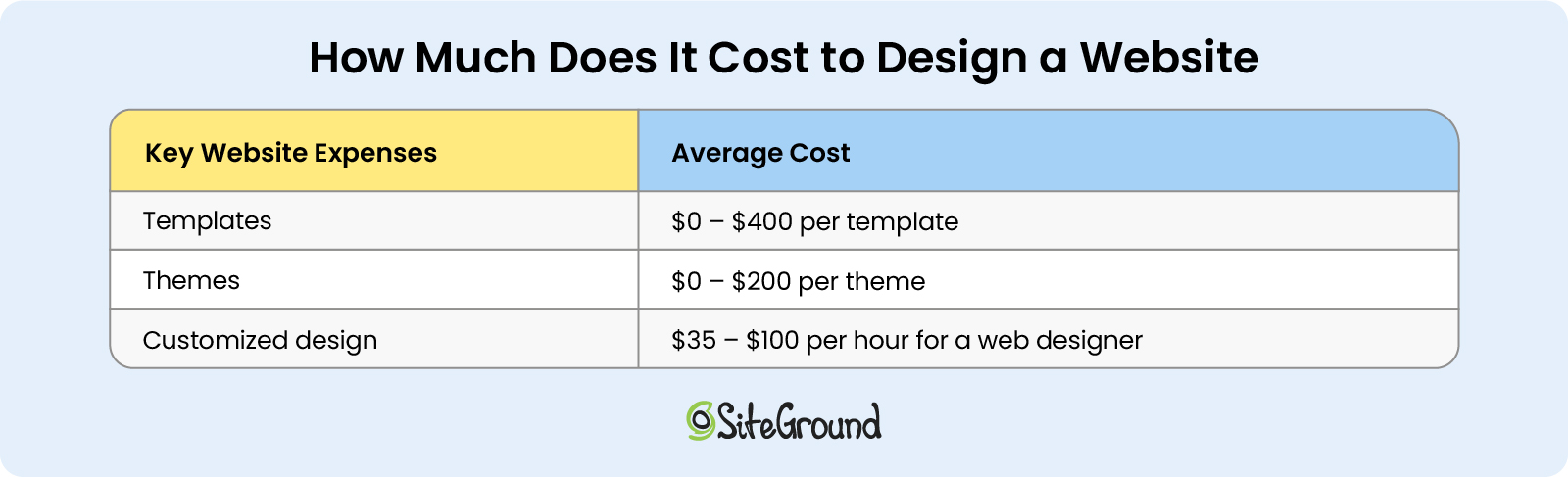
Total cost: For an SSL certificate, you need to plan to spend between $0 and $250 per year.

an inline cost breakdown table with website hosting expenses such as web hosting, domain name, SSL certificate, and their average costs

How Much Does It Cost to Design a Website

Next comes your website design cost. This cost can range from $0 to $350 per year, depending on different factors. Here are the factors to consider, depending on the type of website you initially built.

Templates and Themes

If you’re using a popular website builder, they typically offer ready-to-use templates as part of your subscription plan. These templates are included in the price you’re paying and can be customized with the builder’s drag-and-drop editor, allowing you to enhance the design and user experience of your website.

If you’re looking for a more unique look, you might need to purchase a premium template, which isn’t included in your subscription. For instance, Wix offers templates ranging from free to $70 or more, while Shopify templates can cost up to $400 or more.

On the other hand, WordPress websites use a similar feature called themes, which control your website’s appearance. Like website builders, WordPress themes come in a variety of designs and can be either free or paid. There are over 12,000 free themes available for WordPress, while paid themes offer additional customization options to improve your site’s design and user experience.

Total cost: Premium templates for website builders range from $0 to $400, while WordPress themes typically cost between $0 and $200.

Customized Design

If you want a completely unique and customized website, you’ll need to hire a professional designer to bring your vision to life. They’ll create a design that matches exactly what you imagine.

To estimate the cost of website design, start by determining the hourly rate of a designer and then calculate the number of hours required to complete your project. In some cases, designers may offer a flat rate for the entire project instead.

When choosing a freelance designer, it’s important to review their portfolio to ensure their style aligns with your vision. Be prepared with examples of websites you like, your preferred color palette, and your logo to provide a solid foundation for the designer to work from.

Total cost: A professional website designer can cost you anywhere from $35 to $100 or more per hour, depending on their experience and the project’s complexity.

an inline cost breakdown table with website design expenses such as templates, themes, customized design from a web designer, and their average costs

How Much Does It Cost to Manage a Website?

Regardless of which CMS, site builder, or ecommerce platform you use, you’ll likely need additional features that come with extra costs.

These features are typically referred to as apps, plugins, or add-ons, depending on the software. Essentially, they enhance the functionality of your site.

There are thousands of apps available, offering countless possibilities, but here, we’ll focus on the essential ones we believe every website needs:

Speed and Security Extensions

Whether you’re using a website builder service, WordPress, or a custom-built website, you’re most likely going to need speed and security extensions. These are critical to any website, no matter what purpose it serves.

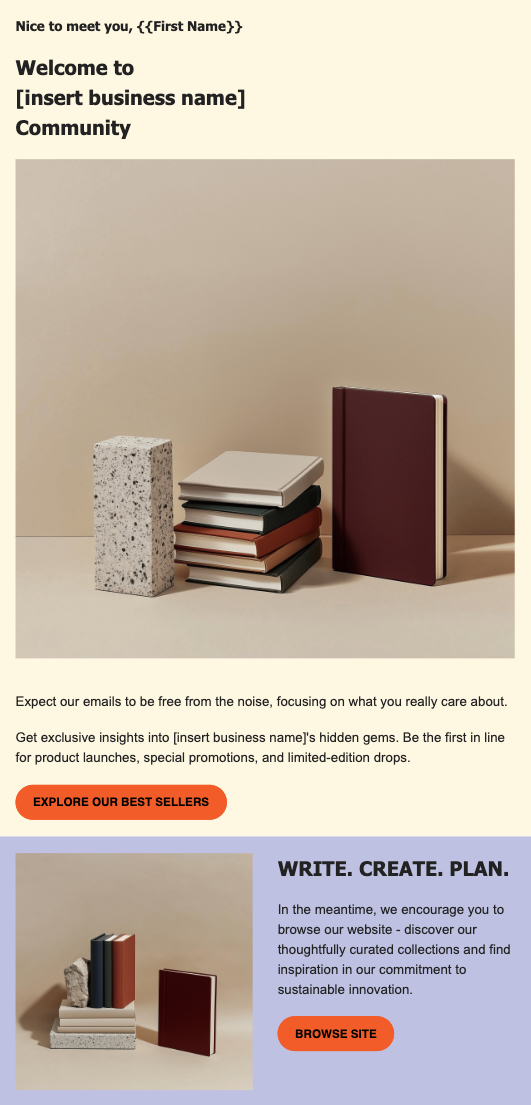
WordPress offers more than 59,000 free plugins in its official directory. Many of these plugins function as speed boosters and security enhancements. For example, with the free Speed Optimizer and Security Optimizer plugins, WordPress users get all the speed and security features their website needs, no matter where it’s hosted.
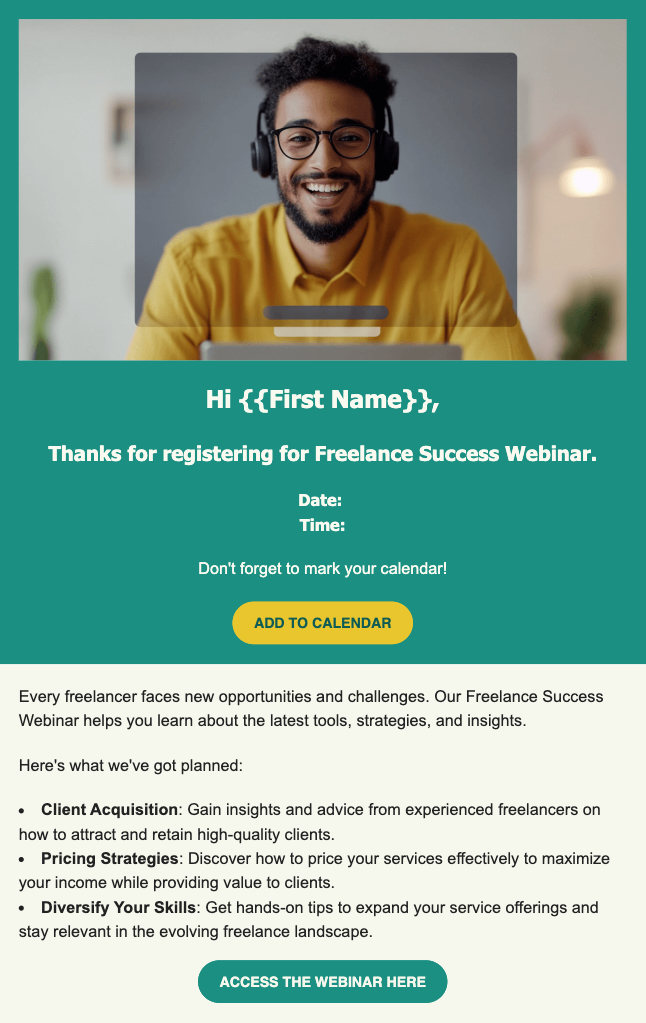
Other popular CMS platforms like Joomla and Magento provide a few thousand extensions each, too, some of which are dedicated to website speed and security.

However, not all speed and security extensions are free. For instance, for a paid security plugin on WordPress you might need to pay anywhere between $20 per month and $200 per year. Similarly, for a paid WordPress speed plugin, the cost may vary between $25 and $60 per year.

Total cost: Speed and security enhancements can cost you anywhere between $0 up to $200 per year.

SEO and Analytics Tools

You will need to install an SEO tool to make sure your website is optimized for Google Search results. 

There are free tools like Google Analytics or Google Search Console that provide crucial information on website traffic and user behavior. 

For more advanced data, there are paid tools like Ahrefs, but prices start from $120 per month and go up to $400 per month. Such tools are a game changer, but also not for every budget.

Email Marketing Tool

Email marketing is a must if you want to engage with your target audience, drive more traffic to your website, and collect new leads. To optimize and automate your email marketing campaigns, you need an email marketing tool.

The monthly subscription cost for an email marketing tool will depend on several factors, including number of subscribers, amount of emails sent out, frequency of campaigns, and additional features like automation, or analytics. 

The starting monthly prices for email marketing services typically range from $9 to $50.

Social Media Integration

To drive even more engagement and sales, you might consider promoting your products or services on social media as well. You can do this yourself, or use the help of third-party tools to save time. Some popular tools include Hootsuite (from $100 per month) and Buffer (from $5 to $100 per month, or a free version is available, too), which help you schedule your posts and manage social media content.

For WordPress, you can also use a free or paid plugin that integrates with your website and allows your visitors to share your content on social media. Paid plugins can cost anywhere from $20 to $200 per year.

Total cost: The total cost will depend on the number of extensions that you install and whether they are free or paid – anywhere from $0 to $1000 or more per month.

an inline cost breakdown table with website operational expenses such as speed and security extensions, SEO tools, email marketing service, social media integrations, and their average costs

How Much Does It Cost to Maintain a Website?

Your website maintenance costs will largely depend on the renewal fees for some of the features mentioned earlier.

Start by considering your web hosting renewal or website builder service, whether you’re paying monthly or annually. Some providers offer discounts if you choose to pay annually.

For WordPress users, there are also ongoing costs related to keeping your site updated and maintained. You can reduce this burden by opting for a Managed WordPress hosting provider like SiteGround. Otherwise, you may need to hire someone to handle maintenance, which can become expensive.

Next, factor in the annual renewals for your domain name and SSL certificate. Finally, add up the costs for any additional extensions and calculate their monthly or annual renewal fees.

Total cost: Your website maintenance can cost anywhere between $500 and $60,000 per year.

The Bottom Line on Website Expenses

The cost of a small business website will vary based on the factors mentioned above. These represent the key monthly expenses every small business owner should consider when budgeting for their website.

To calculate your total costs, you need to choose a website building option first, then go for a web hosting provider (if needed), add up the fees for design and extensions, plus the maintenance costs.

The average cost to build a website will range from $0 to $30 per month, and when you add the extra costs after creating the website, you can expect to pay around $500 per year.

We’d love to hear about your experience – let us know in the comments below how much you ended up spending on your website.

10 Email Marketing Benefits for All Types of Businesses

laptop displaying email marketing benefits

Maybe you’ve heard some people question the email marketing benefits – whether they are still effective in the age of social networks. But let’s think about it for a second – don’t we all check our inboxes at least once a day? Whether it’s searching for a discount on your favorite jeans, reading the weekly techie newsletter you’ve subscribed to, or seeing a client’s feedback on a new product, email marketing remains a go-to communication channel.

So, what exactly is email marketing? It serves a wide range of purposes, from a small business sharing updates with a few customers to a team of marketers crafting customized email sequences, known as drip campaigns, tailored to specific customer needs. Email marketing keeps you connected with your audience by retaining their interest, providing updates, facilitating transactions, or promoting your offerings.

How Effective Is Email Marketing?

The statistics show that 60% of consumers prefer to hear from brands through email. Half of these consumers open their emails to find discounts and special offers, while the other half are drawn to the relevant, personalized information brands provide. Therefore, you can leverage the benefits of email marketing for a variety of purposes and still engage an audience that values your messages. 

Regardless of the specific purpose of your email campaign, the long-term goal of your business is to convert one-time buyers into loyal customers. Marketing by email plays a crucial role in achieving this, with a revenue projected to reach $17.9 billion by 2027, highlighting its growing importance and effectiveness in driving business success.

Who Benefits the Most from Email Marketing?

Whether you are a freelance designer showcasing your portfolio and developing your personal brand, a small bakery sharing recipes and promoting small cozy events, or a large software company launching products and providing educational webinars, email marketing enables direct and meaningful interaction with your audience. 

The advantages of email marketing extend to any type of business because it offers versatile strategies for reaching out to your target audience, engaging them with personalized content, and converting them into loyal customers.

🔥 If you own a small business and are uncertain about how to begin, or wish to refine your current approach, consider exploring our comprehensive guide to mastering email marketing for small businesses.

10 Email Marketing Benefits

The possibilities of email marketing are endless, especially with modern email service platforms. As you continue reading, you’ll discover how to leverage its many benefits. 

1. Cutting Costs and Time on Marketing Communication

One of the biggest advantages of email marketing is its cost-effectiveness, making it a perfect solution for businesses with tight budgets. Unlike paid ads or influencer marketing, email allows you to directly reach your audience at a fraction of the cost. Many email-focused platforms, such as SiteGround Email Marketing, even offer free trials or low-cost plans tailored for small businesses.

In the past, sending a newsletter could take days of continuous effort, requiring copywriters, designers, and developers to work together. Today, email marketing platforms have simplified the process, allowing you to create and send an email campaign in as little as 30 minutes.

Our easy-to-use interface, no-code email builder, and integrated AI writing assistant mean you don’t need to hire a professional copywriter or designer to create effective emails. You can also draw inspiration from other brands or use AI tools like ChatGPT to generate content, streamlining the entire process even further.

By cutting down both time and cost, you can create engaging emails and deliver effective marketing communication to your audience with minimal effort.

2. Achieving a High Return on Investment (ROI)

Another significant benefit of email marketing is its ability to deliver a high return on investment (ROI) – a key metric of your campaign’s success. 

On average, email marketing yields on $36 to $42 for every $1 spent, though this can vary based on several factors:

  • The industry you’re in: retail and ecommerce tend to see the highest returns, followed by marketing and PR agencies, and the tech industry. But don’t get discouraged if you’re in a different sector; you can still win over your readers with valuable content.
  • The frequency of sending emails: sending 9 to 16 emails per month can guarantee a higher ROI. If you think you can’t keep up with high frequency, sending two to four per month can still significantly boost it. Ultimately, consistency is key.
  • The timing of your emails: while Tuesday mornings between 9 and 12 AM are often recommended for higher open rates, conducting A/B tests can help identify the best timing for your audience.
  • The content of your email: successful email campaigns largely depend on segmentation, message personalization, and email automation. We’ll explore how to implement each of these in the upcoming sections.

By understanding these factors and tailoring your approach accordingly, you can enhance your email marketing efforts and achieve a higher ROI for your campaigns.

3. Gaining New Leads

Email marketing can be a powerful tool for generating new leads. One effective strategy is to offer lead magnets – such as downloadable ebooks or exclusive access to webinars – on your website in exchange for email sign-ups. These resources provide immediate value and demonstrate your expertise, enticing visitors to share their contact information to gain access. 

With their email addresses in hand, you can nurture these leads through targeted campaigns that build trust and encourage them to explore your products or services. To maximize your efforts, we’ve gathered proven email lead generation strategies designed to elevate your business and maximize conversions.

SiteGround enhances this process with a lead generation plugin that seamlessly integrates with your WordPress website. It enables you to create subscription forms and even add subscription options to existing contact forms, making it simpler than ever to capture and expand your email list.

4. Increasing Subscribers’ Engagement 

By now, you might be intrigued by the potential of email marketing, but how can you determine which of your email subscribers are genuinely interested in what you have to offer? After all, there’s nothing more frustrating than wasting your time on leads that aren’t likely to convert into customers.

Email segmentation is one of the benefits of email marketing that can help you overcome this challenge. Indeed, segmented email campaigns result in 30% more opens and 50% more clicks than unsegmented ones. By categorizing subscribers, you can tailor content to specific groups, ensuring your messages and offers are relevant and appealing. Segmentation can be based on factors like demographics, behavior, email activity, and sales funnel position.

SiteGround Lead Generation Plugin allows you to organize your subscribers into specific groups, enabling you to customize your messages to meet the needs of different audience segments. 

5. Building Stronger Relationships with Subscribers 

Who enjoys reading an email that feels impersonal and generic? Likely, none of us do. Email marketing provides you a unique space to address your audience on a first-name basis, fostering a sense of familiarity and engagement.

Start by crafting a compelling subject line – including the recipient’s first name in the subject line can boost the click-through rate by 10.64%. Along with the sender’s name, these are the first elements people notice when receiving an email. Next, personalize the opening line of your email by using the recipient’s name instead of a generic “Dear Customer.” These simple touches can significantly enhance your engagement and connection with your subscribers.

6. Maximizing Marketing Efficiency and ROI

Businesses need more than just time-saving tools – they require solutions that maximize efficiency and return on investment. Email automation achieves this by delivering personalized, timely content without the need for continuous manual input.

Imagine being able to set up a series of emails that are automatically sent to your audience based on their engagement with your brand. For instance, a well-timed welcome email can immediately introduce your brand, offer a freebie, or provide valuable information that builds trust from the start. Automated sequences like these ensure that you stay connected with your customers while spending less time on manual tasks.

Beyond just staying in touch, automation helps you drive more revenue by delivering targeted messages at critical moments. For example, after a customer makes a purchase, an automated upsell email can suggest complementary products or services. By sending the right message at the right time, you increase the likelihood of repeat purchases and higher transaction values – all without additional effort.

The real power of email automation lies in its ability to scale your marketing efforts while maintaining relevance and personalization. This boosts both engagement and conversion rates, directly contributing to better ROI. Instead of dedicating more time and resources to manual processes, you can focus on growing your business, knowing that your email campaigns are working effectively in the background.

7. Providing More Website Traffic 

A significant advantage of email marketing is its ability to generate more website traffic. By directly communicating with your audience through targeted email campaigns, you can effectively guide subscribers to your latest content or landing page. 

Imagine you’ve just launched a course on how to become a wedding photographer. Sending an email with a compelling call to action can entice readers to visit your website, significantly boosting the traffic to your website. It’s advisable to include a link to your website in every email you send, encouraging subscribers to click and learn more about your latest content and offers.

In addition to driving traffic, email marketing provides valuable insights into how your audience interacts with your content. This data allows you to see which content drives the most traffic from your emails, enabling you to replicate or use that type of content more often to drive sales. 

8. Strengthening Your Brand Credibility

In today’s competitive market, people are more inclined to support businesses they know and trust. So another benefit of email marketing is that it allows you to maintain regular communication, ensuring your brand remains familiar and reliable in the eyes of your customers. This consistent engagement not only reinforces your brand’s credibility but also shows your commitment to transparency and customer satisfaction.

Additionally, a well-executed email marketing strategy can boost word-of-mouth referrals. When customers trust your brand, they are more likely to recommend it to friends and family. This organic growth is invaluable, as personal recommendations often carry more weight than traditional advertising.

9. Tailoring Your Products and Services to Fit Customer Needs

Email marketing offers the valuable advantage of gathering customer feedback, which is especially beneficial for businesses looking to establish themselves in the market. By incorporating customer surveys into your email campaigns, you can obtain insights into how your audience perceives your brand. 

To maximize the benefits of these surveys, incorporate quantitative questions to assess customer loyalty, satisfaction, and their likelihood of recommending your product or service. Complement these with open-ended questions to delve into the reasoning behind their responses. This strategy not only enables you to better meet customer needs but also enhances their overall experience.

Moreover, by actively seeking feedback and acting upon it, you demonstrate to your customers that their opinions are heard and valued, fostering greater loyalty and trust in your brand.

10. Providing Valuable Performance Insights

As the saying goes, you can only improve what you measure. Email marketing tools provide valuable insights into customer behavior, offering clear campaign reports that reveal everything you need to know about your performance. By tracking key metrics such as bounce rate, click-to-open rate, and unsubscribe rate, you gain a deeper understanding of how your audience interacts with your content.

When launching an email campaign, the initial engagement typically peaks within the first 24 hours. A few days after sending, you should have a nearly complete picture of the campaign’s performance. However, if your campaign involves multiple emails and spans other channels – such as paid ads, social media, individual sales outreach, or earned media – it may be beneficial to wait longer for a more comprehensive view. 

As data from your campaigns accumulates, you can test and optimize elements like subject lines, content, and send times to enhance results over time. The effectiveness of email marketing also depends on factors such as the quality of your email list, the relevance of your content, and the frequency of your emails. Regular analysis and adjustments based on your findings can lead to improved outcomes.

Leverage the Email Marketing Benefits with the Right Service Provider

As you’ve seen, email marketing benefits are truly endless – from boosting reader engagement to turning one-time buyers into loyal customers. Whether you’re just starting out or managing a large corporation, harnessing the power of email marketing can transform your communication strategy and deliver meaningful results. Now’s the time to give it a try!

The 6 Absolute Worst Email Marketing Mistakes to Avoid

worst email marketing mistakes to avoid

Whether you work for a big corporation, or run a small, family business, email marketing is an unrivaled way to captivate your audience, create brand loyalty, and drive conversions. But mastering it isn’t just about sending messages – it also requires a strategy, and avoiding a select list of common email marketing mistakes that can make or break your success. 

So, what email marketing mistakes should be avoided? This article will tackle six of the very worst email marketing mistakes – and how to easily avoid them. With just a bit of extra care in each of these areas, you can ensure that your email marketing efforts are a success, delivering the best possible results for your business.

Why It’s Important to Avoid Email Marketing Mistakes

While the field of digital marketing is crowded and complex, email marketing stands out as a unique opportunity to connect personally and directly with your audience in a highly targeted, strategic way. Not only that, but it’s fairly easy to implement, and offers an astonishing return on investment. 

Indeed, the benefits of effective email marketing are vast, including higher email open rates, a growing list of quality subscribers, increased brand and loyalty, and, importantly, more conversions and business opportunities. 

Before we get started: if you want to get your email marketing up and running but don’t know where to begin, then join our free, six-day email marketing course. It will give you all the tools you need to create highly successful email campaigns with ease – and to start implementing the tips we’ll be sharing here.

What Email Marketing Mistakes to Avoid

1. Not Using High-Converting Sign-Up Forms

Your email list is the backbone of your email marketing efforts. So one of the top email marketing mistakes you can make is not taking the extra steps to optimize how you acquire subscribers. That’s right: if your sign-up forms aren’t designed to convert, you could be missing out on heaps of potential leads. So how to make this happen? Let’s dive in.

Gather Essential Info

Most sign-up forms typically ask for just an email address and, occasionally, a first name. While this simple approach can increase submission rates, it may not help you qualify leads effectively, especially if your goal is to focus on high-quality prospects. The key is to balance the number of questions with what’s essential for your business to determine whether a lead is a good fit.

For example, an interior designer might ask for project details or budget range, while an online store may only need an email. By gathering the right information from the start, you’ll save time and concentrate on leads that are more likely to convert. That said, don’t ask for extra information unless you really need it – unnecessary fields can reduce sign-ups.

Use a Double Opt-in

While a single opt-in might seem faster and more logical, implementing a double opt-in can actually help you build a higher-quality email list. What is a double opt-in? During this second step, users verify their subscription through a confirmation email. By doing so, you as a business can be extra certain that these subscribers legitimately want to hear from you. This is an especially good thing because it not only increases engagement (because subscribers look forward to your emails!) but also helps reduce spam complaints and bounce rates.

Leverage Lead Magnets

A lead magnet, such as a downloadable resource, eBook, or exclusive content, is among the top lead generation tactics to incentivize users to sign up for your list. People are far more likely to subscribe when they receive something of value in return. Just be sure that your lead magnet aligns with both what you offer and with your target audience’s needs and interests.

2. Not Focusing on a High-Quality List, and Segmentation

One of the most common mistakes in email marketing is focusing on list quantity rather than its quality. Indeed, a smaller, well-segmented list is often way more effective than a large, untargeted one. So when it comes time to improve your list quality, it’s essential to prioritize list hygiene and segmentation.

Clean Your List Regularly

An outdated or unengaged list can harm your deliverability rates and skew your campaign metrics due to unopened, undelivered emails, and spam complaints. By cleaning your list regularly, you can avoid these pitfalls, removing inactive subscribers, reducing bounce rates and improving engagement. 

Go through your list once every three to six months to identify users who haven’t opened or clicked on your emails for an extended period, and consider sending them a re-engagement campaign. If they still don’t respond, it’s time to remove them from your list. 

Segment Your List and Send Targeted Emails

Segmentation is one of the most powerful tools in email marketing. By dividing your list based on demographics, interests, or behaviors, you can send more relevant content to specific groups of people. For example, you might wish to send one message to loyal customers (with a discount thanking them for their business), and a different one to new customers (with a unique offer that entices them to buy). These personalized emails lead to higher open rates, better engagement, and ultimately, more conversions. 

Want to become an expert on growing a high-quality email list? Read our guide on how to build your email list.

3. Not Developing Strategic Subject Lines

Your subject line is the first thing your subscribers see, and it’s often the deciding factor in whether your email gets opened or sent straight to the trash bin. With a little extra work, though, you can increase open rates – and hopefully conversions.

Generate Intrigue

Subject lines that pique curiosity tend to attract more opens – it makes it hard(er) to resist the click! The idea is to avoid revealing too much in the subject line – leave a little to the imagination so that the subscriber feels compelled to click to learn more. That said, ensure that the content inside your email aligns with the intrigue you’re building; misleading subject lines can lead to unsubscribes or spam complaints.

Create a Sense of Urgency

Urgency is a powerful motivator in any type of marketing, and that goes for email marketing just the same. Subject lines that include phrases like “only a few left” or “last chance” can encourage users to take immediate action. Urgency taps into the fear of missing out, pushing subscribers to engage with your email quickly.

Align with Email Content

Your subject line should reflect the content of your email. Subscribers don’t like bait-and-switch tactics, so make sure you’re delivering what you promise in the subject line. So be cautious not to over promise, or to mislead. Clarity in your subject line builds trust and credibility with your audience.

Launch your email marketing in no time with ease. Sign up for SiteGround Email Marketing today and get 80% off! >>

4. Not Using Strong Calls to Action

A great email is virtually worthless without a clear, actionable next step – your email essentially becomes a dead end. So it’s not surprising that one of the most detrimental email marketing mistakes marketers make is neglecting to include effective calls to action (CTAs) in their emails.

Make It Action Oriented

Your CTA should clearly instruct the reader on what to do next. Use action-oriented language that prompts them to take immediate action, such as “Shop Now,” “Download Today,” or “Claim Your Offer.” Avoid vague CTAs like “Click Here” that don’t convey what the recipient is signing up for.

Make it Specific

A generic call to action may fail to capture attention. Be as specific as possible. Instead of “Get Started,” try “Start Your Free Trial” or “Download Your Free Guide.” Specificity makes the offer more compelling and gives the recipient a better understanding of what they will gain.

Noticeable and Strategically Placed

Your CTA should be easy to spot, whether you’re using a button or a hyperlink. It’s often a good idea to include your CTA multiple times in the email—once near the beginning, once in the middle, and once at the end. Strategic placement ensures that even if subscribers don’t read the entire email, they can still easily take action.

So much more goes into creating the perfect email. If you’d like to learn more, read our comprehensive article on how to write marketing emails that people will read.

5. Not Having a Content Calendar

Successful email marketing requires a well-thought-out plan, and one of the most common email marketing mistakes is failing to create a content calendar. Without a schedule, your emails may become inconsistent or irrelevant, leading to decreased engagement. On the flip side, a well-organized schedule will help you stay on top of email marketing, and to better be able to align your marketing with business objectives.

Plan Content Types Strategically

Your emails should include a variety of content types to not only keep your subscribers engaged, but to strategically build your relationship with the customer, and to build your credibility as a brand. Planning ahead allows you to have a bird’s-eye view of what you intend to send out, thus allowing you to balance promotional content with other types of content, such as resources or educational material. A content calendar also helps to make sure that your emails stay fresh and diverse, offering value to your subscribers without overwhelming them with constant sales pitches.

Schedule Content for Consistency and Ideal Frequency

Consistency is key in email marketing. Whether you send emails weekly, bi-weekly, or monthly, a content calendar helps you maintain a consistent cadence. It also ensures that your email frequency aligns with your audience’s preferences. Too few emails can lead to disengagement, while too many can overwhelm your subscribers, increasing your unsubscribe rates.

6. Not Optimizing with Goals and Metrics

Finally, one of the biggest mistakes is not setting clear goals or tracking metrics. Without data-driven insights, it’s impossible to gauge the effectiveness of your campaigns or optimize them for future success – and this is truly where the real email marketing magic happens.

Identify Goals and Metrics

Before launching a campaign, identify what success looks like. Whether your goal is to increase open rates, drive traffic to your website, or boost sales, having a clear objective will guide your strategy. Next, determine which metrics will help you measure progress toward that goal. Maybe you want to drive sign-ups for a certain course, or increase the sales of a new product, or perhaps simply to grow your list. Whatever your goal, identifying success metrics can help you get there. Common email marketing metrics include open rates, click-to-open rates, conversion rates, and unsubscribe rates – and you can learn more about all of them in our article on email marketing metrics.

Track and Optimize

You’ve defined your goals and metrics, now you must track them. Monitoring performance after each email send allows you to adjust your email strategy from campaign to campaign. If your open rates are low, consider tweaking your subject lines. If your click-through rates are underwhelming, review your CTA or content. If unsubscribe rates or going up, check your content and clean your list. Regular analysis and optimization are essential to long-term success.

Run A/B Tests

A/B testing is a fantastic way to optimize your emails and continually improve their success. It allows you to experiment with and improve different email elements, such as subject lines, copy, CTAs, and design. 

Do this by dividing one of your email segments and sending two different versions of the same email to the two different groups – one version to one group, the other to the other group. It’s important to only change one thing in that email: the element you’ve decided to test (a subject line, CTA, etc). After sending, compare the results from the two emails to determine which one performed better – from there, optimize your campaigns accordingly. The beauty here is that testing helps you make data-driven decisions and improve your results indefinitely.

Avoid Common Email Marketing Mistakes for Lasting Success

Email marketing remains one of the most powerful channels to engage and convert customers, but only if executed smartly. By avoiding these six common email marketing mistakes – poor sign-up forms, ignoring list quality and segmentation, weak subject lines, ineffective CTAs, a lack of content planning, and failing to optimize with metrics – you can elevate your email marketing strategy and drive better results for your business.

By refining your approach, focusing on the needs of your audience, and consistently optimizing your efforts, you can turn email marketing into a reliable and effective part of your overall digital marketing strategy.

Now that you know exactly what to do and not do when it comes to email marketing, it’s time to put everything in motion. Go from email marketing beginner to expert in just six days: join our FREE, six-day email marketing course. 

And if you’re keen to get your email marketing efforts started without all the hassle, sign up for SiteGround Email Marketing – it’s super easy to use, and 80% off!

Welcome Email Guide: Best Practices and Examples in 2026

welcome emails templates and examples 2024

Every time someone joins your email list, it’s a valuable opportunity. Welcome emails are your first chance to connect and they’re critical. Often underestimated, these emails are one of the most effective ways to engage and retain new subscribers right from the start. In this article, we’ll explore the importance of using welcome emails, share key best practices, and provide templates for different business scenarios in order to help you get started. 

What Are Welcome Emails?

A welcome email is simply the first message you send to new subscribers after they’ve joined your email list. However, a welcome email is more than just a confirmation of their successful subscription or purchase! It’s your chance to make a strong first impression. This pivotal moment sets the tone for how subscribers will perceive your brand and marks the beginning of their customer journey. 

Why Welcome Emails Are Important for Your Business

Welcome emails are quite effective and offer a variety of benefits. Here are some of the most notable ones.

📬 Customers expect them: On average, 74% of people are expecting to receive a welcome email shortly after they join an email list. So, make sure you use welcome emails in order to meet the expectations of your recipients.

🫶 They help build credibility and set the tone: 

A welcome email is a powerful tool for showcasing your brand’s values and voice, helping you build credibility with customers who are new to your brand and may not yet know much about it.

🔝 They are extremely effective and boost engagement: Research shows welcome emails deliver impressive results, such as four times more opens (an average 50% open rate) and five times more clicks (an average 14.4% click rate) compared to regular email campaigns. Plus, subscribers who receive welcome emails show 33% higher engagement with the brand.

welcome emails siteground email marketing platform

Best Practices for Welcome Emails in 2024

Now that we’ve covered what welcome emails are, why they’re important for your business, and why you should leverage them, let’s dive into the key elements every welcome email should include, and what best practices you need to follow. 

Send welcome emails right after the user joins your list

In email marketing, proper timing is very important. To maximize the impact of your welcome emails, make sure they’re sent immediately after someone joins your subscriber list, or within 24 hours at the latest. This helps keep your brand top of mind and significantly reduces the chances of them losing interest or even forgetting why they signed up for your email in the first place. It also shows that you are attentive and organized, which will help you build a positive impression of your brand. 

Personalize Your Emails

Typically, personalized emails perform much better than generic ones. That’s because people are more likely to perceive such content as more relevant to them, and therefore open it and engage with it. To personalize your welcome emails, use the recipient’s name in the subject line or in the greeting at the beginning of your email.

Also, create tailored content that resonates with your audience’s interests or the way they have subscribed. You can segment your audience into groups you find relevant and create different welcome emails for each of them. For example, if you’re a photographer, and you often have prospects interested in professional corporate photography, send them a welcome email including your top corporate photography pieces.

Use Compelling Subject Lines

Your subject line is one of the most important elements of your welcome email, as it is the first thing recipients see from you. To make it effective and attention-grabbing, keep it clear, short (especially for better display on mobile), and give a hint of what subscribers can expect from you. Also, whenever appropriate, consider using emojis, as they can make your emails more visually appealing and engaging. 😉   

Brand Identity and Consistency

One of the best practices for welcome emails is to craft them in a way that aligns with your brand’s identity and maintains consistency across all the different media you use. To do so, make sure to keep the same tone of voice as on your website, social media, and other channels. Use your logo, brand colors, style, fonts, and any other elements that your audience associate with your brand.

Set Clear Expectations and Give Next Steps

Now let’s talk about the content of your welcome email. It’s obvious that in your welcome email you would want to extend a warm welcome to your new subscriber. But you’re probably wondering “what else should I include?” 

As a general rule, don’t overwhelm your readers with too much information. Share only the essential details that they’ll need. People like to know what to expect, and whether spending time on your content will be worthwhile. Set clear expectations and guide your subscribers through their journey with your brand. 

You can outline the type of tips, news or offers they will receive in your email campaigns, and how frequently they can expect to hear from you. It’s also a good idea to include next steps, like exploring your website or directing them to a specific page or blog post.

🔥 PRO TIP: Create email content effortlessly with the power of AI and SiteGround Email Marketing

If you’re lacking writing inspiration, check out the SiteGround Email Marketing platform: it’s AI Email Writer can help you create the perfect text.

Add Value

If you encourage subscribers to join by using  a lead magnet  – such as an eBook, guide, exclusive podcast episode, design sample, or discount code –  now is the perfect time to deliver on that promise. Adding the lead magnet to your welcome email will build trust and reinforce the value of being on your list. For example, if you are a style consultant, a subject line like: “Welcome aboard! Your free autumn style guide inside!” would work great. 

Integrate Your Social Media Channels

Welcome emails can be part of a broader, integrated marketing strategy. Use them to invite subscribers to connect with you outside email by integrating your social media channels to your emails. Encourage recipients to follow you for more news, updates, or promotions.

The SiteGround Email Marketing platform lets you easily add clickable social media icons to your emails, expanding your reach and boosting engagement.

Effective and Clear CTA

Be sure your subscribers know what action you want them to take next by adding an obvious and straightforward call-to-action (CTA) button or hyperlinked text. Your CTA caption should be short and clear, like “Sign Up Today,” “Start Free Trial,” or “Get Your Free Sample.” 

It’s also a good practice to place it above the fold, so that readers can see it even if they don’t read your whole email. If your email is long, consider adding your CTA two or more times. 

Provide an Unsubscribe Option

Even though unsubscribing is probably the last thing you want recipients to do, it’s essential to add it to your welcome emails. It shows that you are transparent, and it’s also an effective way to ensure that your subscriber list contains only recipients who are truly interested in your content. Moreover, the unsubscribe option is important to comply with international laws like GDPR and CAN-SPAM.   

Use Modern, Mobile-responsive Design

It’s essential that your welcome emails are optimized for mobile devices. Choose an email marketing platform that provides mobile-friendly templates that automatically adjust to smaller screens. As a general rule, keep your email content as short as possible so it looks good on mobile devices, opt for a single-column design if possible, and avoid overloading your email with too many images.

Welcome Email Templates and Examples

Now let’s explore some welcome email templates that could serve as  inspiration for what you can create in different scenarios. If you like one of them, you can use it yourself via the SiteGround Email Marketing platform, and easily adjust it to fit your brand’s style.

Welcome Email for New Clients

A well-crafted welcome email can start off your relationship with new subscribers on the right foot. Make it more personal by incorporating a warm message from the business founder. You can tell more about the inspiration behind the brand and its values.

Continue by offering additional resources, product lines or anything else that you think will be suitable to entice subscribers to explore more. Add a clear call to action (CTA) to drive engagement, and include social proof to build trust.

welcome email template for new clients

Newsletter Signup Welcome Email

When a person joins your newsletter but hasn’t yet made a purchase, it’s a good idea to immediately engage and deliver a special offer or a discount code to encourage them to make their first purchase. This combination of a welcome message, personalized exclusive offer, and clear call to action is an effective way to make subscribers take the first step with your brand.

newsletter signup welcome email

Welcome Email for Onboarding Subscribers

Here’s another welcome email example that greets a new subscriber while also explaining onboarding steps. If your business or project has a mission, be sure to mention it in your welcome email. Along with this, you could add authenticity by including a note from the founder, and encourage action with a visible CTA. When crafting an onboarding email, make sure to encourage subscribers to interact with your brand – guide them to specific products, send them helpful articles, make them add a reminder for upcoming event, etc.

onboarding welcome email

Community or Loyalty Program Welcome Email

If you have a community, loyalty, or rewards program, your welcome email could include simple steps with what the members will get from it, its benefits, how it works, and a clear call to action.

community or loyalty program welcome email

Event Registration Welcome Email

For businesses hosting events, whether online or in-person, a good welcome email practice is to provide a highlighted section with visible information about the date and time of the event and a call to action to save the date to your calendar. After that, you could add any other relevant information – more details about the event, useful links to resources, social media links, etc.

event registration welcome email

Welcome Email Template for Delivering a Freebie

If you build your email list with a lead magnet like a free guide or course, the welcome email should deliver the promised free downloadable content right away. To make it straightforward, add a button or a visible link in the beginning of your welcome email, thank the subscriber for their interest, and give more details about how the free piece of content will benefit them. It’s a nice touch to also suggest more relevant resources. This might help you drive further engagement.

welcome email template for delivering a freebie

Content/Blog Subscription Welcome Email

When a person signs up for your blog, it’s a good practice to briefly explain what they can expect from it in the future. You could add information about the themes and topics you plan to write the most, how often they can expect new content from you, and a few popular posts to get them started. This email is also a great opportunity to invite them to follow your social media channels.

blog subscription welcome email

Get Started with Welcome Emails Today

We hope the best practices and tips we’ve shared above will help you easily create your welcome emails and set the foundation for a successful and lasting relationship with your subscribers. Ready to take the next step? Go ahead and give the SiteGround Email Marketing platform a try –  it’s free for the first 30 days! 

How to Boost Your Black Friday Ecommerce Sales

Black Friday ecommerce

Statistics show that Black Friday Ecommerce sales crossed $9.8 billion in 2023, which is $680 million more than in 2022, when the recorded sales were $9.12 billion. What is more, data analysts note that 2024 is expected to generate even more than $9.8 billion in online sales for Black Friday.

With the number of online purchases rapidly increasing over the past few years, it’s expected that even more people will shop online this year.

Prepare your e-store: 15 Black Friday strategies for retailers

As a business owner, you want to make the most out of the peak shopping season. If you’re still wondering how to prepare for Black Friday ecommerce sales, worry no more: We’ve got you covered with 15 Black Friday ecommerce tips that will help you drive more online sales during the year’s most important shopping season.

Let’s explore our step-by-step guide on how to build your Black Friday Ecommerce strategy:

1. Plan ahead

This year, Black Friday begins on Friday, November 29, and continues until Cyber Monday, December 2. It might seem there’s still plenty of time, but given the fact that many retailers start promoting sales earlier and earlier (e.g. beginning of November or even late October!). The shopping season is in fact just around the corner. That’s why it’s essential to plan well in advance, which means getting started as soon as possible.

Begin by researching Black Friday best practices that other retailers have implemented in the past few years. Analyze and decide which work with your own master plan for Black Friday, then tweak and twist them to make them fit your business needs. Here are some popular Black Friday campaigns that went viral, which can serve as inspiration as you get started.

Now that you’ve checked out what your main competitors have been doing, go ahead and build upon that, make it better, more relevant to your business, and more successful.

Dig deeper and brainstorm fresh Black Friday ideas that you can even A/B test beforehand so that when the time comes, you can apply your takeaways to your actual campaign.

Create a coordinated content strategy throughout all your channels, such as your website, social media platforms, and email campaigns. Think of relevant content for each of these channels, as well as the timing for rolling everything out.

To help you attract even more online sales for Black Friday, we’ve compiled a downloadable guide with actionable steps to follow during the whole Black Friday season.

[bf_prep_checklist_download]

2. Make sure your website can handle the increased web traffic

If you’ve completed step #1 correctly, you can expect lots of traffic to your online store during Black Friday. This raises the next logical question: whether your website is ready to handle all that traffic.

Traffic spikes can consume large amounts of bandwidth, potentially exceeding your hosting plan’s limits or causing network congestion, resulting in slower data transfer rates. This can lead to slower processing times or even crashes.

As the server struggles to process requests, the time it takes to load pages may increase dramatically.

If the server cannot handle the load, it may start returning errors like 500 Internal Server Errors, or requests may time out entirely, leading to broken pages and failed transactions.

Needless to say, if your site slows down or breaks completely due to the traffic spike, you will lose sales.

As an ecommerce website owner, you need to make sure that your online store loads as fast as possible for your visitors, and that it’s reliable.

Here are a few things you can do to optimize your web pages’ loading speed:

  • Use a caching technology

Caching is one of the most powerful tools to speed up your website, especially during traffic peaks. It stores copies of your files and data in the server memory, allowing multiple users to access them faster.

  • Enable a content delivery network (CDN)

A CDN is a tool that speeds up your website when you have international traffic to your website from multiple countries and continents. It will cache your website content, distribute it over different data centers around the world, and deliver your site content from the server closest to the visitor.

  • Leverage image compression

Having a large number of images that are also heavy in size can slow down your website. Compress your images without compromising on their quality by using WebP format, which will decrease your image size by up to 85% and decrease loading times.

Learn more about how to prepare your website for Black Friday and holiday traffic.

3. Secure your website

Along with step #2, securing your website is equally important because a large part of holiday web traffic may come from bad bots. This kind of traffic can hurt your online business and reputation, leading to financial and conversion losses. Here’s what you can do to prevent it:

  • Implement CAPTCHAs

CAPTCHA is a challenge response test that can be used to determine whether the user is a human or not. That is, completing the test should be easy for humans, but difficult for a computer. For example, a human would easily identify certain objects in an image, while a bot would have a harder time guessing.

  • Use a Web Application Firewall (WAF)

A WAF is a security solution that is designed to protect web applications by monitoring and filtering the traffic between a web application and the Internet. It then blocks requests that are in violation of certain predefined security rules.

Learn more about how to avoid bad bot traffic during Black Friday.

4. Refine your product descriptions

Product descriptions usually include a title, price, product detail, tags, meta title, and meta description. They are one of the first things your visitors will be looking at. That’s why they need to be informative and engaging in order to stimulate your visitors to buy. To help you achieve that, we’ve prepared a few, easy-to-follow tips:

  • Mention features and explain how they will benefit the user and improve their life/solve their problem.
  • Use power words to trigger an emotional or psychological response to make them perform the desired action.
  • Optimize descriptions for search engines by targeting the right SEO product keywords – but remember to write for humans, not bots.
  • Make descriptions easy to scan through by using bullet points for benefits/features, and/or bold font for important information
  • Include a clear call to action (CTA) that encourages users to go to checkout.  Remember to keep it short and straight to the point.

5. Show off “happy customer” reviews

According to studies, customer reviews (along with free and fast delivery) matter the most to Black Friday shoppers. That’s why it’s super important to show your happy-customer reviews as part of your Black Friday ecommerce strategy.

For example, you can include them in a section that’s connected or linked to the specific product they’ve reviewed, or show them in a separate section with all customer reviews. Or you can prepare a few short videos with satisfied customers, where you ask them specific feedback questions.

Whatever you choose, make sure the reviews look appealing and engaging. Include stars, thumbs up, or another visual element that shows satisfaction. Also be sure that the total number of reviews is also visible, as users often prefer to reference how many customers have used the product – if there are many reviews, then the product will seem even more attractive and legitimate to them.

6. Give your biggest discounts of the year for Black Friday

One of the best Black Friday ideas for small businesses is to save your biggest discounts of the year for the Black Friday season.

Begin by researching what the average discounts for your industry are and go beyond that in order to attract more (potential) customers. Make sure that your discount stands out. This is the only time of the year when you can and should lower your prices as much as possible.

Another idea that you may consider is lowering the prices of certain categories of your products. For example, begin by promoting one of your products’ categories in early November to build up your customers’ expectations. As Black Friday approaches, include yet another category of discounted products to attract even more customers. This way, you keep your visitors engaged over a longer period of time.

7. Take advantage of special promotions

Spice up your discounts by taking advantage of special promotions. Leverage classic incentives for attracting new and returning customers, such as “free shipping”, “fast delivery”, “buy 1, get 1 free”, and the like.

You can also create a sense of urgency among your audience by including “low in stock” labels on products that are about to be sold out. Most ecommerce platforms allow for easy product management, and automatically implement such labels when the minimum quantity (that you’ve predetermined) is reached.

[bf_prep_checklist_download]

8. Offer a variety of payment methods

Credit cards were used by 49.4% of the online shoppers making them the most used payment method for Black Friday ecommerce sales in 2023. Indeed, while credit cards may often seem like the default, we shouldn’t forget that there are other payment methods that can be leveraged during the Black Friday period. These include debit cards; PayPal; gift cards; Apple Pay; Buy Now, Pay Later; store cards; Venmo; Google Pay; even cryptocurrency. And the list goes on and on.

With such a variety of payment options out there, you wouldn’t want to miss an opportunity to close a purchase. Imagine the ready-to-buy customer that goes to checkout and they don’t see the payment method they prefer or are used to, thus deciding to leave the product.

To avoid this and similar situations, implement the most popular payment methods listed above on your checkout page.

9. Simplify your store’s checkout

The competition among retailers for Black Friday ecommerce sales is rough. But there’s also competition among buyers for the products they want to acquire from their much-desired list of items. They don’t have the time to wait on your online store. With that in mind, your store’s checkout should be as simple as possible – a one-page, one-click buying process would be best.

One way to do that is to implement a safe mobile wallet that stores each customer’s payment information. It allows them to simply review their order and buy by clicking a single button.

Another useful piece of advice is to introduce dynamic checkout buttons that allow returning customers to pay with their preferred payment method, preselected from previous purchases. You can go one step further and add such buttons on the sales/products pages in order to streamline the process.

Last but not least, have a test group go through your checkout process. Let them identify pitfalls and areas for improvement to help you make the process smoother for the Black Friday ecommerce rush.

10. Leverage automated coupons and codes

Another useful Black Friday ecommerce strategy to consider is the implementation of coupons or codes. 

Make them visible on your website, along with the discount percentage they provide. That way you’ll attract more customers. 

For example, once the ready-to-buy customer is on the sales page, have a small pop-up window with the discount code and its percentage. To activate the code, the customer simply needs to click on a CTA button. It can say anything along these lines – “apply code”, “get discount,” etc. And that’s it, the code will be applied to the final price on their checkout page.

To include such functionality, either explore the options in your ecommerce platform; look for a relevant plugin; or consult a web developer to customize the functionality to your liking.

If you’re not a fan of pop-ups, you can always place a bar at the top of your website with the same information and functionality. Once a user clicks the CTA button on the bar, the discount is applied to their cart and the bar can disappear.

11. “Save” abandoned carts

An often overlooked, but important Black Friday ecommerce strategy, is “saving” abandoned shopping carts. Keep in mind that these abandoned carts are the result of ready-to-buy customers who, for one reason or another, left their online shopping cart without making a purchase. Here are the top four tips to win back abandoned carts:

  • Enable automated push notifications on your website for returning, nearly converted users
  • Create exit pop-ups, reminding them about the discount and the unfinished purchase
  • Send re-engagement emails to encourage them to complete their purchase
  • Consider offering a bonus discount if they return and finish their purchase.

Make sure that if a visitor comes back to your website, their online shopping cart is still there waiting for them with the items they’ve put in it. All they need to do is click the checkout CTA button and pay for these items. Don’t overcomplicate the process for these visitors, because that’s probably your last chance to turn them into customers.

12. Provide strong customer support

The Black Friday ecommerce period is that time of the year when your customer support should be best prepared and organized, working at its full potential. You can’t risk a single customer writing a bad review, as it can cost you brand damage and sales losses.

You can expect more customer requests during this busy period. To avoid some of their inquiries, make sure to include or update (if needed) your sales page FAQs. Include things like shipping time, regions to which you deliver or not, return policy, etc.

You may also want to consider having more customer support team members on shifts.

The channels and hours during which they are available should be clearly stated on your site. On top of that, make the process of reaching out to your team as simple and straightforward as possible.

Next, have your customer support team undergo special training before Black Friday. In this training, you can include learning the answers to Black Friday FAQs (just in case); some admin specifics you want them to follow; shift schedules; and anything else that will streamline their work process in the upcoming weeks.

At the end of the day, your support team should be fast, efficient, helpful, and – most important, – friendly.

13. Have special savings for loyal customers

Go the extra mile for your most loyal customers. They’re the ones who are most engaged with your brand, as well as the ones who are most likely to make purchases from your business this Black Friday.

Make sure that you treat them with extra care and make them feel valued. There are a few ways to do this:

  • Send them teaser emails before Black Friday so that they know what offers to expect.
  • Include them in a customer loyalty program with special offers, rewards, or benefits.
  • Give them “early bird” access to your Black Friday deals.
  • Text them an SMS saying “Thank you,” along with a special deal.
  • Reach out to them with personalized direct messages on social media.
  • Send them a custom gift box that includes a handwritten card and discount code.

Before undertaking any personalized marketing activities, make sure that you are GDPR-compliant and these customers have given you the necessary consent to receive personal messages from your brand.

Want to go on the next level with your Black Friday ecommerce? Check out our blog for even more creative Black Friday campaigns that aren’t discounts.

14. Segment your audience for your email marketing campaigns

Ecommerce email marketing plays a crucial role for the success of your Black Friday ecommerce endeavors.

Segmenting your audience is the most important step in your email marketing campaigns. You can divide them into different groups based on various factors, such as their past purchasing behavior. For example, if you identify a group that has previously bought earrings from your online store, you can use the cross-selling technique, where you send an email recommending a matching necklace. Similarly, by identifying a group of people that are on your basic subscription plan, you can send them a promotional upsell email, telling them the advantages of your premium plan. 

PRO TIP: Plan your Black Friday email campaigns strategically and well in advance:

  • Pre Black Friday emails that count down the days to the big sales event
  • “Early bird” access emails that offer VIP benefits to more engaged subscribers
  • Black Friday announcements that go out on a specific date and time
  • Last-chance emails that create a sense of urgency for your offer as it comes to a close

Read our Beginner’s Guide to Ecommerce Email Marketing and learn how to create an ecommerce email marketing strategy, get examples of must-send marketing emails, and much more.

15. Build hype on social media

Statistics show that 25% of people look for Black Friday deals on social media. That’s how important social media is for your Black Friday ecommerce. Here’s how to build buzz on social media platforms before and during Black Friday:

  • Promote your deals, by making your audience use a special hashtag
  • Encourage your followers to enter a giveaway by liking, sharing, or commenting
  • Share an inspirational customer satisfaction story and let them tell theirs

PRO TIP: Make sure that any content you post on your social media channels is both valuable and visually appealing.

Black Friday ecommerce: get ready to get the best out of it 

Planning ahead and incorporating the above tips will lead to your Black Friday ecommerce success. In the meantime, feel free to post your questions or share any ideas in the comments section below.

Have a lucrative Black Friday!

[bf_prep_checklist_download]