The SiteGround academy provides a wide variety of tips, tools, and resources related to WordPress, web performance, website optimization and site security.
Ready to rock BFCM 2025? This isn’t just any shopping spree—it’s the ultimate showdown where small businesses can shine just as bright as the big guys. From tapping into the latest BFCM trends like AI, chatbots, and full-funnel marketing to embracing the eco-friendly wave, there are a ton of ways to stand out. Buckle up, because we’re about to spill the secrets that’ll turn those casual browsers into your biggest fans.
What is BFCM?
BFCM stands for Black Friday and Cyber Monday—two of the biggest shopping events of the year. Around this time, the buzz is everywhere. But what does it really mean? Think of it as the Super Bowl of shopping: deals are hot, and wallets open wide.
So, what segment of the market do Black Friday and Cyber Monday target? Simply put—all of them. These events draw in various kinds of shoppers, from bargain hunters on the lookout for killer deals to tech lovers chasing the latest gadgets, and even folks looking to snag luxury items at a discount. With BFCM growing bigger and better every year, reaching new places and seeing spending soar, it’s the perfect moment for small businesses to jump in and make their mark with smart marketing. Whether you’re running a charming boutique or an online shop, it’s time to embrace the potential of BFCM and turn those casual browsers into loyal customers.
[46]
Black Friday Ecommerce Trends
With BFCM defined, let’s explore what’s happening in the world of Black Friday ecommerce trends. Did you know that a big chunk of BFCM sales are driven by Gen Z and Millennials?
These tech-savvy shoppers aren’t just browsing; they’re actively seeking out the best deals.
For small businesses, this is a golden opportunity to craft offerings that appeal directly to these influential demographics. With recent stats indicating a shift in consumer behavior, more young shoppers are choosing online purchases and placing a premium on convenience and value.
As these trends keep changing, it’s super important for businesses to keep up with the shifts in who’s shopping and how they’re doing it. Stay flexible, give them what they want, and you could see your sales really take off.
Longer Shopping Period
The first Black Friday trend is that it’s not just about Black Friday anymore—it’s a whole season of shopping excitement. Your BFCM strategy now stretches beyond a single day to include Thanksgiving, Cyber Monday, and even what’s being called the “Cyber Ten,” which refers to the ten-day shopping period that kicks off with Black Friday and extends through the week after Cyber Monday.
This longer shopping period means more opportunities for small businesses to engage with eager shoppers. To make the most of this extended timeframe, consider these strategies:
🚀 Launch early promotions to capture attention before the rush hits. 🔄 Offer extended deals to keep customers coming back throughout the entire period. 📅 Plan strategically to maximize sales and ensure your business stays top of mind during this shopping marathon.
These approaches can help you make the most of the extended shopping season and boost your sales.
Mobile Shopping
As we enter this extended shopping season, there’s no ignoring the mobile shopping trend that’s taking BFCM 2025 by storm. Mobile-first might not be the new kid on the block, but it’s still extremely relevant, with more people than ever grabbing their phones to score those sweet deals.
And let’s not forget about voice commerce—just a few words, and boom, your order’s on its way! In-app purchasing is also making waves, offering a slick, seamless shopping experience.
So, how can you ride this mobile wave? It’s all about optimizing your mobile presence.
📱 Ensure your site is easy to navigate, with fast loading times, and offers a hassle-free checkout. 📏 Consider different screen sizes and the various situations in which people use their mobile devices—whether they’re on the go, lounging at home, or sneaking a peek at work. 🎨 Use engaging visuals and keep your content concise to maintain customer interest
To really make the most of these trends, let SiteGround have your back, keeping your website smooth and ready for the rush.
Next up in the BFCM 2025 trends is how AI and chatbots are stepping up in the world of customer service. These tech tools aren’t just for the big guys anymore—they’re perfect for small businesses aiming to increase customer engagement and satisfaction. With Retrieval-Augmented Generation (RAG) techniques, AI systems are getting smarter, delivering spot-on responses that boost customer service for businesses big and small.
With AI and chatbots, you can:
🤖 Handle customer questions 24/7, delivering quick and accurate responses that keep folks happy and coming back for more. 💸 Explore affordable options that fit right into your business without breaking the bank. 🔄 Streamline your operations, offer personalized help, and create a shopping experience that really sticks with your customers.
While AI and chatbots can totally revamp your customer service and leave a lasting impression, it’s key to keep ethics in mind. Make sure your AI respects customer privacy, stays transparent, and avoids bias. By being mindful of these aspects, you’ll build trust and create positive vibes with your customers.
For example, SiteGround combines AI and human support by letting AI handle the routine stuff, so our human team can focus on the tricky bits, keeping the customer service both efficient and friendly.
Full-Funnel Marketing Campaigns
Let’s keep the momentum going with another hot trend in BFCM marketing: full-funnel campaigns. What does that mean? It’s about engaging customers at every stage of their journey. It’s time to look beyond just paid ads and emails and explore channels like direct messaging, social media, and affiliate marketing. These avenues let you connect with customers in ways that feel personal and real. For small businesses, the aim is to craft black friday campaigns that guide customers from “Hey, what’s this?” to “I need this in my life!” Here’s how you can do it:
📣 Use STP marketing (segmentation, targeting, positioning) to really click with your audience and tailor your messages. 🤝 Collaborate with micro-influencers, who, despite their smaller followings, have super engaged audiences that trust their recommendations, making them one of the best ways to promote your brand. 🌟 During BFCM, let micro-influencers create buzz around your products, share authentic reviews, and drive traffic to your site.
Fast and Free Shipping
Let’s jump into another crucial trend for BFCM 2025: fast and free shipping. Consumers have come to expect their goodies to arrive yesterday, and the allure of free shipping is often the cherry on top that seals the deal.
For small businesses, meeting these expectations might seem challenging, but it doesn’t have to break the bank.
🚚 Analyze your logistics to find areas where you can cut down on delivery times without adding extra costs. 🤝 Partner with local delivery services or use fulfillment centers to get products out the door quicker. 📦 Offer free shipping on minimum orders to encourage larger purchases while keeping costs manageable.
Streamlining your shipping process can keep your customers happy and coming back for more and helps you stay ahead in the busy BFCM rush.
Premium and High-Value Purchases
Let’s check out the trend of premium and high-value purchases during BFCM 2025, especially in electronics and luxury goods. Shoppers are more willing than ever to splurge on big-ticket items, and small businesses can totally get in on this action by showcasing their products as premium options.
Even on a smaller scale, there are ways to make your offerings shine.
🌟 Highlight the quality, craftsmanship, and unique features that make your items special. Your product detail page is the perfect place to do just that. 🎁 Offer personalized services or exclusive packaging to increase the perceived value. 📖 Craft a strong brand story that really connects with your audience, making them see your products as the must-have treats of the season.
With these approaches, you’ll attract customers ready to indulge in something special.
Sustainability
With climate awareness on the rise, eco-friendly shopping and shipping are becoming more important than ever.
When it comes to the demographics of the typical Cyber Monday shopper, they’re often young and increasingly eco-conscious. They actively seek out brands that share their commitment to the planet and are keen on making purchases that align with their environmental values.
Small businesses can tap into this by adopting sustainable practices, such as:
📦 Using eco-friendly packaging 🌍 Offering carbon-neutral shipping options 🌱 Sourcing materials responsibly ⚡ Utilizing renewable energy in production processes 🔄 Designing products to be easily recycled or reused
Not only does this contribute to the health of the planet, but it‘s also attractive for a green-minded crowd and sets your brand apart as a forward-thinking, responsible choice.
BFCM Trends Final Thoughts
Alright, let’s tie this all together! BFCM 2025 is shaping up to be a wild ride, and there’s no shortage of ways for small businesses to shine. Whether you’re offering fast and free shipping, diving into AI and chatbots, or crafting killer full-funnel marketing campaigns, there’s something for everyone to get a piece of the action.
Don’t overlook the power of sustainability and mobile shopping either—they’re really shaking things up. And before you jump in, grab our Black Friday Checklist. It’s your ultimate guide to staying on top of your game and crushing it this season. Here’s to making this BFCM your best one yet!
Did you know that the right SEO strategy can transform your WordPress site into a magnet for visitors and potential customers? Whether you’re a small business owner or just starting out, understanding SEO is like having a secret weapon for sending traffic to your website.
And don’t worry if tech isn’t your thing—this guide is made for SEO beginners like you.
From building a solid foundation to fine-tuning the technical details, we’ve got you covered. Ready to make your WordPress site stand out in search results? Let’s get your business noticed!
Your Ultimate WordPress SEO Guide for Beginners
In this guide, we’ll cover everything from building a strong SEO foundation to crafting content that meets search intent, optimizing on-page elements, and fine-tuning technical SEO aspects.
Simply put, search engine optimization is all about making your WordPress website more visible in search engine results. But how do you do it right? Well, here are the only seven steps you actually need to care about.
#1. Build Your WordPress Site’s SEO Strategy Foundation
Before diving into keywords and content, you need to get the technical basics right. These foundational elements directly impact how search engines crawl, index, and rank your site.
Choose Fast & Reliable Hosting
Your hosting provider is one of the main factors affecting whether your pages load quickly or slowly. Your hosting controls three critical things:
Server response time—that’s the split second between when someone clicks your link and when your server starts sending them content.
Server resources—the computing power and memory your site has to work with, like the difference between a budget laptop and a high-performance computer.
Uptime—whether your site actually stays online or goes down at critical moments.
Good hosting means your pages load in under 2 seconds—Google’s threshold for good performance. It also keeps your site online when search engines come to crawl it. Both site speed and uptime directly impact your search rankings.
If your server is slow or goes down frequently, search engines may struggle to crawl your site effectively, which means your content won’t get indexed properly or rank as well as it should.
But site speed impacts SEO in multiple ways: slow-loading sites have higher bounce rates (users leave before the page loads), lower time-on-site, and fewer pages per session. All of these user behavior signals tell Google your site provides a poor experience, which directly hurts your rankings.
Choose a hosting provider that offers: Fast server response times (under 200ms is ideal) High uptime guarantees (in SiteGround’s case it’s 99.9%) Content Delivery Network (CDN) integration Automatic WordPress updates and security patches Regular automated backups
Secure Your Site with HTTPS
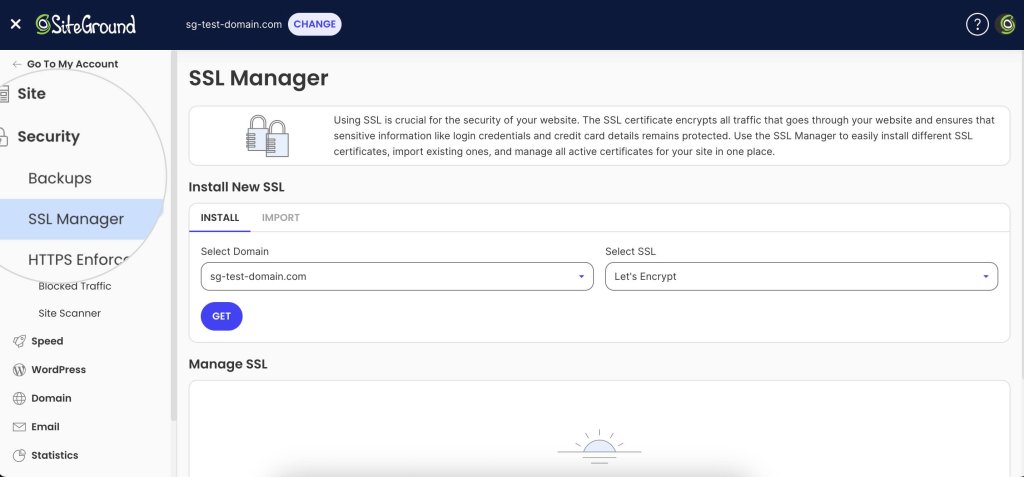
Google officially stated that HTTPS has been a ranking signal since 2014. HTTPS (where the “S” stands for “secure”) means your site has an SSL certificate installed, which encrypts data between your server and visitors, protecting sensitive information.
Apart from the SEO point of view, an SSL certificate encrypts data between your server and visitors, protecting sensitive information. Browsers now flag HTTP sites as “not secure,” which damages trust and increases bounce rates.
Since SSL certificates need to be renewed regularly (typically every three months with providers like SiteGround using Let’s Encrypt), manual management can become a hassle—and a lapsed certificate means your site suddenly shows security warnings to visitors.
That’s why it’s essential to choose hosting that includes free SSL certificates with automatic installation and renewal, ensuring your site stays secure without any ongoing effort on your part.
For WordPress users looking for hosting that handles these technical details automatically, SiteGround offers WordPress-optimized hosting with built-in speed optimization, free SSL, automated updates, and daily backups.
Check Search Engine Visibility
Even though it is obvious, it’s surprisingly common for sites to accidentally block search engines.
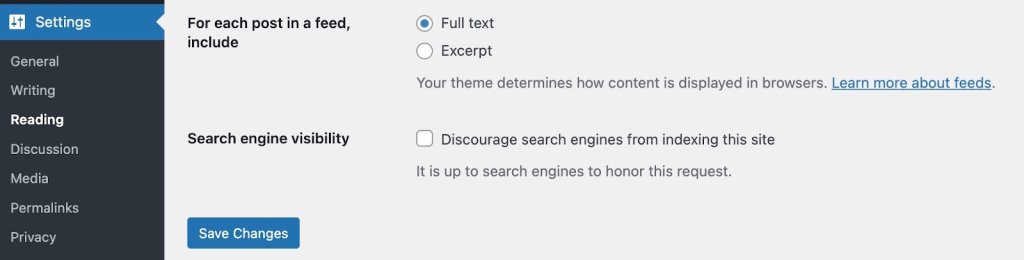
To check your search engine visibility in WordPress, go to Settings > Reading and verify that “Discourage search engines from indexing this site” is unchecked. If this box is checked, search engines won’t index your content, no matter how well-optimized it is.
Use SEO Plugins & Tools
WordPress doesn’t include built-in SEO features like meta descriptions, XML sitemaps, or schema markup. SEO plugins add these essential features directly to your dashboard.
All in One SEO (AIOSEO) is a popular WordPress plugin that handles automatic XML sitemap generation, meta tag optimization, schema markup, and local SEO tools—everything your WordPress site needs for technical SEO.
For advanced analysis beyond WordPress plugins, SEO PowerSuite is a desktop toolkit offering in-depth technical audits, backlink analysis, keyword research, and rank tracking. It works alongside your site to provide professional-level SEO insights.
Together, these give search engines what they need to properly crawl and index your site.
#2. Write Content That Demonstrates Expertise and Authority
Google now prioritizes content that demonstrates real expertise and experience over generic answers—if your WordPress content doesn’t show you actually understand your topic deeply, you’ll lose rankings to competitors who do, even if your technical SEO is perfect.
There’s an art to giving search engines (and, of course, your readers!) what they’re looking for. Let’s break down exactly what that looks like and how to do it effectively.
Understand and Match Search Intent
Before writing anything, ask yourself: “What do readers actually want to get out of the content they’re searching for?”
Understanding search intent is critical because Google prioritizes results that match what users are truly looking for, not just pages that contain the right keywords.
Search intent falls into four categories:
Informational: Users want to learn something (“how to optimize images for SEO”)
Navigational: Users are looking for a specific site or page (“WordPress login”)
Commercial: Users are researching before buying (“best SEO plugins for WordPress”)
Transactional: Users are ready to take action (“buy WordPress hosting”)
To understand the intent, simply perform a Google search with your target keyword and analyze the top results. What format dominates—guides, lists, comparisons, or product pages? What questions do they answer? What depth do they go into? Your content needs to match both the intent and the depth that’s already ranking.
Demonstrate Real Expertise and Experience
With AI-generated content flooding search results, Google has doubled down on rewarding content that demonstrates genuine notability, expertise, experience, authoritativeness, and trustworthiness (known as NE-E-A-T). This is where you separate yourself from generic content.
Google’s algorithms now actively look for signals of firsthand experience:
Share specific personal examples from your own work, not generic advice anyone could write
Include original data or statistics, case studies, or results you’ve personally achieved
Add screenshots, photos, or videos showing your actual process
Cite your credentials relevant to the topic—certifications, years of experience, client results
Show your work: Explain the “why” behind your recommendations, not just the “what”
If you’re running a food blog, don’t just list ingredients—explain why you adjusted the recipe after testing it five times, what went wrong initially, and how you fixed it. That personal experience is impossible for AI to replicate and exactly what Google wants to surface.
Provide Depth That AI Overview Can’t Match
Google’s AI Overviews now answer simple questions directly in search results, which means surface-level content gets zero clicks. Your content needs to go deeper:
Answer not just the main question, but the follow-up questions users have
Explain nuances, exceptions, and common mistakes
Provide context that requires real-world understanding
Offer strategic thinking, not just tactical steps
For example, instead of just listing “10 SEO tips,” explain when each tip matters, why it works, what happens if you skip it, and how it fits into a broader strategy.
Structure Content for Both Humans and AI
Clear structure helps search engines understand your content and helps you optimize for AI Overviews and featured snippets:
Use descriptive H2 and H3 headings that clearly indicate what each section covers
Include question-based headings that match how people actually search (“Why Does Site Speed Matter for SEO?”)
Use short paragraphs (2-3 sentences max) for better readability
Add bullet points and numbered lists for scannable key takeaways
Bold important concepts to help readers quickly identify crucial information
Create a table of contents for longer content so users can jump to what they need
Organize Content with Categories for Topical Authority
Internal organization isn’t just for user experience—it’s a ranking factor. Proper categorization creates topical authority by showing search engines you have comprehensive coverage of a subject:
Categories represent your main content pillars (e.g., “WordPress SEO,” “Content Marketing,” “Technical SEO”)
Limit yourself to 5-10 main categories—too many dilutes your authority
Each category should have at least 5-10 pieces of content to demonstrate depth
Interlink related content within categories to show the relationships between topics
While WordPress also offers tags, these are primarily useful for internal site organization and filtering rather than SEO. Focus your energy on building strong category structures instead.
Build Topical Authority Over Time
Rather than writing randomly about whatever keyword you find, build authority in specific niches:
Choose 3-5 core topics aligned with your expertise
Create comprehensive pillar content covering each topic broadly
Write supporting content that goes deep on subtopics, linking back to pillars
Regularly update existing content as information changes or you gain new insights
Interlink related content to show the relationships between topics
Search engines reward sites that demonstrate sustained expertise in specific areas rather than surface-level coverage of everything.
#3. Write Solid Meta Descriptions & URLs
Now that you’ve got your content in place, it’s time to give your on-page SEO a bit of polish. These elements help ensure that your pages are as appealing to search engines as they are to visitors.
Craft Compelling Title Tags
Your title tag is the clickable headline that appears in search results. It’s one of the most important on-page SEO elements because it tells both users and search engines what your page is about.
Keep them under 60 characters—longer titles get cut off in search results. Include your primary keyword near the beginning, and make them compelling enough to earn clicks. Add your brand name at the end, and make sure each title is unique across your site.
Example:
Bad: “Blog Post About Pizza”
Good: “Easy Homemade Pizza Recipe (Ready in 30 Minutes!)”
Most WordPress SEO plugins let you customize title tags separately from your page heading, giving you flexibility to optimize for search.
Write Meta Descriptions That Drive Clicks
Meta descriptions are the short snippets that appear under your page title in search results. They are your elevator pitch—you have just a moment to convince someone to click your result instead of scrolling past.
Aim for 150-160 characters—again, anything longer gets cut off in search results. Summarize the page content, include a call to action, use active voice, and slip in your primary keyword to keep things relevant and catch extra attention.
A good example of a meta description is: “Master homemade pizza in 30 minutes! Get easy tips for perfect dough, sauce, and toppings. Start now and wow your friends with your pizza skills!”
To make this easy, install an SEO plugin like AIOSEO. When editing a post, scroll to the SEO plugin’s section, fill in the “Meta Description” field, and preview how it looks in search results.
Create SEO-Friendly URLs
Clean, descriptive URLs help everyone understand what a page is about before clicking. They’re also easier to share and remember, and they help search engines understand your content—which is good for SEO.
Keep URLs short (under 60 characters when possible), include your primary keyword, use hyphens to separate words, and remove unnecessary stop words like “a,” “the,” “and,” or “of.”. For example: “yoursite.com/homemade-pizza-recipe/”.
When creating a post, click “Edit” next to the permalink below the title, simplify the URL slug, and click “OK.”
Note: Don’t change URLs on published pages without setting up redirects—you’ll break existing links and lose SEO value.
Optimize Your Images
Images make content engaging, but they need optimization to avoid slowing your site. Here’s how to make that happen:
Add descriptive alt text to every image—beyond SEO benefits, it’s essential for accessible web design and increasingly required by law under ADA and WCAG standards. Alt text helps visually impaired users understand your content through screen readers while also helping search engines index your images.
Use descriptive filenames before uploading, compress images to reduce file size, and enable lazy loading to keep your site accessible, compliant, and fast.
A bad example of an alt text is “image1,” while a good one is “homemade pizza with fresh mozzarella and basil on a wooden cutting board.”
To update an image’s alt text, simply click on an image in your post, find the “Alt text” field in the block settings sidebar, write your description, and save.
Speed Up Image Optimization The SiteGround Speed Optimizer plugin handles image optimization automatically—compressing images, enabling lazy loading, and optimizing delivery without any manual work. You set it up once and forget about it—no manual compression or configuration needed.
#4. Link Like a Prо
Internal linking is one of the most underutilized WordPress SEO tactics. Strategic internal links distribute page authority throughout your site, help search engines discover content, and guide visitors to related information that keeps them engaged.
Why Internal Linking Matters for SEO
Internal links serve several critical functions: they distribute authority from high-ranking pages to others, help search bots discover and crawl new pages, establish which pages are most important, keep visitors engaged longer, and show search engines you have comprehensive coverage of topics.
Create Pillar Content and Topic Clusters
The most effective internal linking strategy revolves around pillar content and topic clusters.
Pillar content is a comprehensive guide on a broad topic—like this complete WordPress SEO guide. Cluster content consists of detailed posts on specific subtopics that link back to the pillar and to each other.
Example structure:
Pillar: “The Complete WordPress SEO Guide” (this article)
Clusters: “How to Submit Your Sitemap to Google Search Console,” “WordPress Page Speed Optimization,” “Local SEO for WordPress,” “Keyword Research for Blogs”
Each cluster article links back to the pillar, and the pillar links out to all relevant clusters. This creates a tight web of topically related content that search engines love.
How to implement:
Identify 3-5 main topics your site will cover
Create comprehensive pillar content for each (2,000-5,000 words)
Write detailed cluster articles on subtopics (1,000-2,000 words each)
Link cluster articles back to their pillar using descriptive anchor text (more on this below)
Link from the pillar to all relevant cluster articles
Interlink related cluster articles within the same topic
Use Descriptive Anchor Text
Anchor text—the clickable words in a link—tells search engines what the linked page is about. Use descriptive phrases that indicate what the linked page covers, include keywords naturally, vary your anchor text, and avoid generic phrases like “click here” or “read more.”
Bad examples: Bad: “For more information about pizza dough, click here.”
Good example: “Learn how to make perfect pizza dough from scratch.”
Find and Fix Orphaned Content
Orphaned content refers to pages with no internal links pointing to them. Search engines struggle to find these pages, and they miss out on authority benefits.
How to find orphaned content:
Google Search Console: Go to Coverage or Pages, look for indexed pages with zero internal links
SEO PowerSuite WebSite Auditor: Run a site audit, go to Site Structure > Pages, sort by “# of Incoming Internal Links”—pages with 0-1 links need attention
Screaming Frog (free for up to 500 pages): Crawl your site, go to Internal > Unique Inlinks, filter for pages with 0-1 inlinks
Link to Important Pages More Often
Your most valuable pages—those that drive conversions or target important keywords—should receive more internal links. Identify your 10-15 most important pages and look for natural opportunities to link to them from blog posts and other content. Don’t force it—links should feel natural and valuable to readers.
Add Internal Links When Publishing New Content
Every time you publish new content, handle two tasks:
Add links FROM the new post: Include 3-5 internal links to relevant existing content, especially pillar content if applicable
Add links TO the new post: Identify 3-5 existing posts where the new content would be relevant and edit them to add contextual links back
This helps search engines discover new pages faster. Use your site’s search function to find posts mentioning related topics, review your categories for topically related content, or use plugins like Link Whisper that suggest relevant linking opportunities as you write.
Use Google Search Console to check for internal 404s, or install the Broken Link Checker WordPress plugin to automatically scan for broken links.
Internal Linking Checklist for Every Post:
Before publishing, make sure you’ve:
Added 3-5 contextual internal links to related content
Linked to your pillar content if relevant
Used descriptive anchor text (no “click here”)
Identified 3-5 existing posts to update with links to this new content
Checked that all internal links work (no 404s)
Varied your anchor text naturally
Strategic internal linking compounds over time. As you build more content and strengthen connections between pages, your entire site becomes more authoritative and easier for search engines to understand.
#5. Fine-Tune Technical SEO
Technical issues like broken links, slow load times, or missing sitemaps directly prevent Google from crawling and indexing your pages—fixing these backend problems can unlock rankings for content that’s already on your site but currently invisible to search engines.
Technical SEO might sound intimidating, but it’s really about making sure search engines can easily find, understand, and properly display your content. Running a technical SEO audit helps you identify these issues so you can fix them systematically. Think of it as organizing your site in a way that makes sense to both visitors and search engines.
Here are the essential technical elements every WordPress site needs.
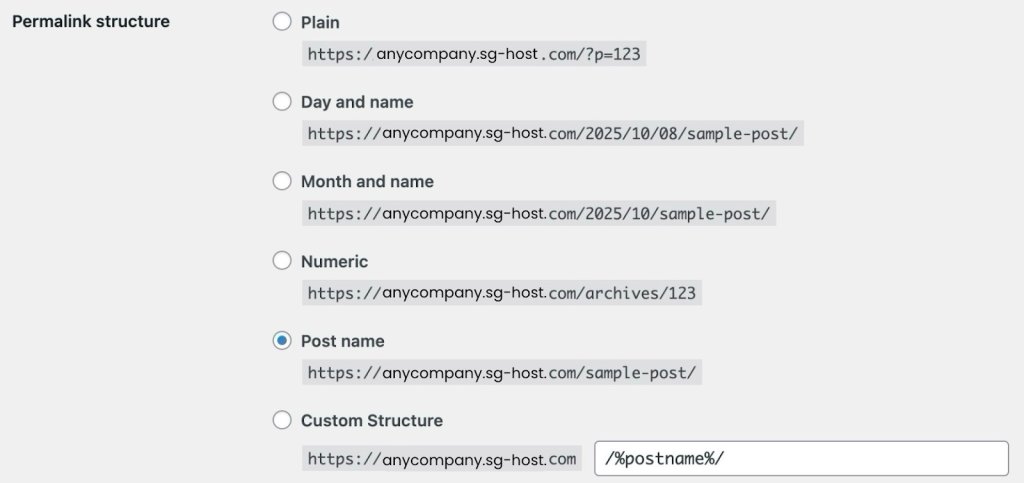
Optimize Your Permalink (URL) Structure
Permalinks are simply the web addresses (URLs) for your posts and pages. The structure you choose affects every URL on your site. For example, a post titled “Best SEO Tips” could look like:
* yoursite.com/best-seo-tips/ (recommended—clean and descriptive)
* yoursite.com/2025/10/best-seo-tips/ (includes date—not ideal for evergreen content)
* yoursite.com/seo/best-seo-tips/ (includes category—good but longer)
You should aim for clean and descriptive URLs, to help everyone understand what a page is about before clicking. They’re also easier to share and remember.
To set the permalinks (URL) structure up:
Go to Settings > Permalinks in your WordPress dashboard
Select Post name (this creates the cleanest URLs)
Click Save Changes
Important warning: Only change this setting on brand new sites. If your site is already published and ranking, changing permalinks will break all your existing links and damage your search rankings unless you’re prepared to set up technical redirects.
Set Up Your XML Sitemap
An XML sitemap is a file that helps search engines understand your website’s structure by listing its most important pages, making it easier for them to crawl and index your content. It’s like giving Google a map so it doesn’t miss anything.
The good news? Most WordPress SEO plugins create this automatically. Here’s what you need to do:
Check your SEO plugin settings—your XML sitemap is usually created automatically at a URL like yoursite.com/sitemap.xml or yoursite.com/sitemap_index.xml (which organizes different content types into separate sitemaps)
Look for options to exclude pages you don’t want indexed (like tags, author pages, or old archives)
Your sitemap should include your actual content—blog posts, important pages, and main category pages—while excluding administrative pages and thin content that doesn’t help visitors.
Add Schema Markup for Better Search Results
Schema markup is code that gives search engines extra context about your content. When implemented, it can make your search results stand out with star ratings, images, prices, FAQs, and other eye-catching elements that get more clicks.
Don’t worry—you don’t need to write code. Here’s the easiest way:
Using a Schema Plugin:
Go to Plugins > Add New in your dashboard
Search for a schema plugin like Schema Pro or Schema & Structured Data for WP
Click Install Now, then Activate
The plugin adds a new menu in your dashboard—click on it
Choose what type of content you have (blog articles, products, local business info, recipes, etc.)
Fill out simple forms with information like your business hours, author name, product prices, or recipe ingredients
The plugin handles all the technical code automatically
Using Your Existing SEO Plugin:
Many WordPress SEO plugins already include schema features:
When editing a post or page, scroll down to find your SEO plugin’s section
Look for a tab labeled Schema or Structured Data
Pick the type that matches your content from the dropdown menu
Review the results—Google will show you what enhanced features you’re eligible for in search results and flag any errors that need fixing
Start simple: use the Article schema for blog posts and the LocalBusiness schema if you have a physical store or office. You can always add more types later.
Keep Your Database Clean
Your WordPress database is where everything gets stored—every edit you make, every comment, every setting. Over time, it collects unnecessary data that slows down your site. So think of this step like cleaning out a cluttered closet.
Here’s how to clean your WordPress database:
Install a plugin called WP-Optimize or Advanced Database Cleaner (these do the work for you)
The plugin will show you what’s safe to clean: old post drafts, spam comments, and expired temporary data
Click to clean these items (the plugin won’t delete anything important)
Set it to clean automatically once a week
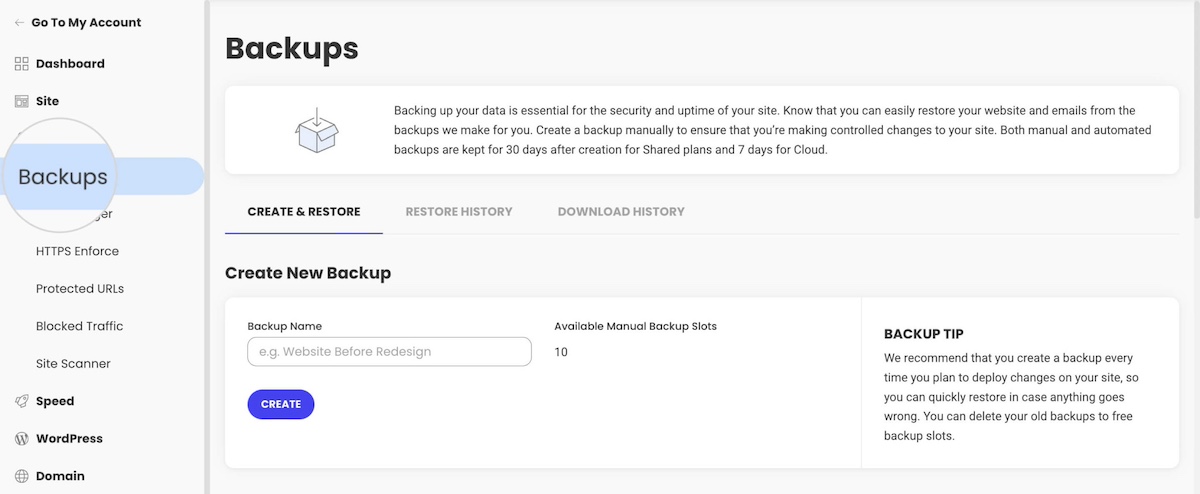
Important: Before cleaning, make sure you have a recent backup of your site (most hosting providers do this automatically, but it’s worth checking).
Configure Your Robots.txt File
The robots.txt file is like a “do not enter” sign for search engines. It tells them which parts of your site to ignore so they can focus on your actual content instead of wasting time on crawling unnecessary files.
You can easily check your robots.txt file by adding “/robots.txt” at the end of your domain. Example – www.yourdomain.com/robots.txt
Most SEO plugins let you edit this easily:
Find the robots.txt editor in your WordPress SEO plugin settings
Copy and paste this basic setup (or your plugin might offer a template):
Disallow lines tell search engines to ignore and not crawl specific paths—in this case, your WordPress admin area (/wp-admin/), core system files (/wp-includes/), plugins (/wp-content/plugins/), and theme files (/wp-content/themes/)
Allow lines tell search engines these paths are okay to crawl—here, your images and media uploads (/wp-content/uploads/)
Sitemap points search engines directly to your sitemap
This tells search engines: “Skip my WordPress system files since they’re not useful for search results, but definitely crawl my images and check my sitemap to find all my actual content.”
Prevent Duplicate Content Issues
WordPress automatically creates multiple versions of the same content—the same post might appear in your blog feed, in category pages, in tag pages, and in date archives. For example, a single blog post titled “10 SEO Tips” might be accessible at:
Your main blog page: yoursite.com/blog/
Its individual post URL: yoursite.com/10-seo-tips/
A category page: yoursite.com/category/seo/
A tag page: yoursite.com/tag/tips/
A date archive: yoursite.com/2025/10/
Author archive: yoursite.com/author/yourname/
Each of these URLs displays the same content, either in full or as an excerpt. When search engines find identical or very similar content at multiple URLs, they don’t know which version is the “real” one to show in Google search results.
This dilutes your ranking power—instead of all your SEO value going to one strong URL, it’s split across multiple weaker ones. Worse, search engines might choose the wrong version to rank, sending traffic to an archive page instead of your actual post.
A canonical tag is a piece of code in your page’s HTML that identifies the original version of your content. Canonical tags solve the duplicate content problem by pointing to the “main” version. Fortunately, most SEO plugins handle this automatically. To make sure it’s working:
Check your SEO plugin settings to confirm canonical tags are turned on
View any page on your site, right-click, and select “View Page Source”
Look for a line that says <link rel=”canonical” near the top—if you see it, you’re all set
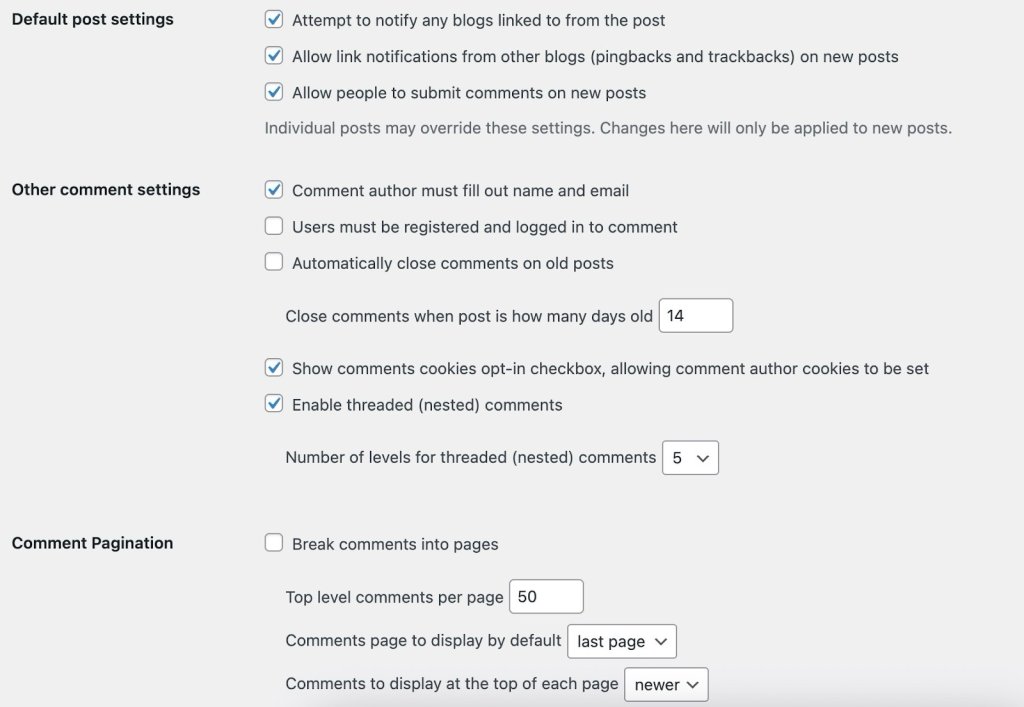
Manage Comments Without Slowing Down Your Site
Comments are great for engagement, but if you have hundreds on a single post, they can seriously slow down your page load time (which hurts SEO), and other users may try to promote their WordPress websites via the comment section on your website.
To optimize comments:
Go to Settings > Discussion in your WordPress dashboard
Check the box for “Break comments into pages” and set it to show 20-50 comments per page
Enable “Comment must be manually approved” so you can filter out spam before it appears
Require commenters to enter a name and email (reduces spam bots)
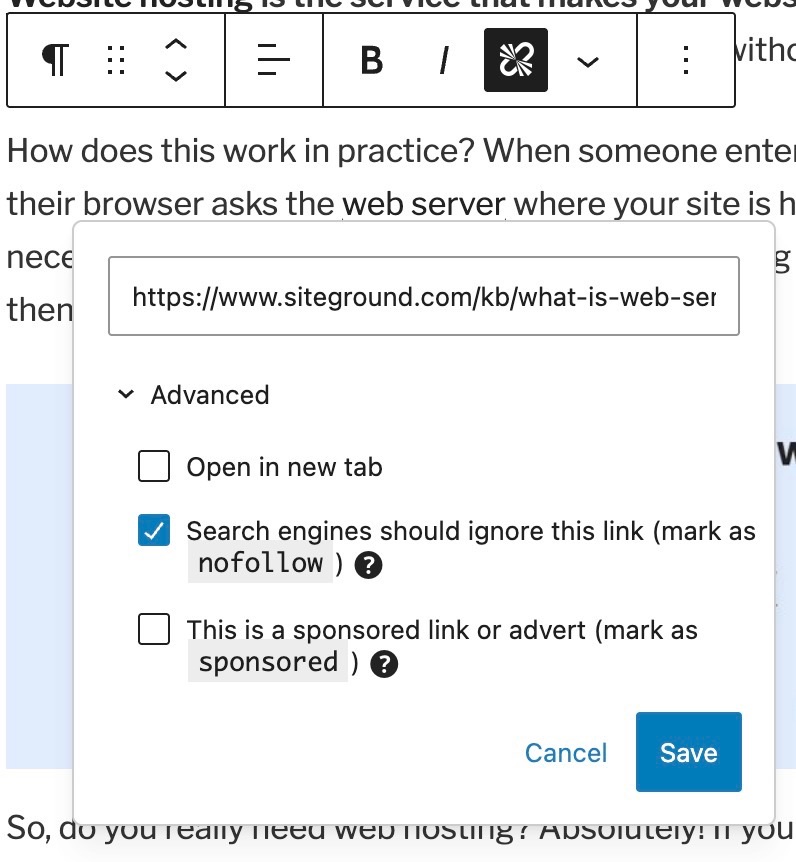
When you link to another website, you’re essentially giving them a small vote of confidence in Google’s eyes. The “nofollow” attribute tells Google, “I’m linking to this, but I’m not vouching for it.”
You should use nofollow for:
Links in comments (WordPress does this automatically)
Any links you’re paid to include (sponsored content or ads)
Affiliate links where you earn commission
Links to sites you don’t fully trust or haven’t verified
To add nofollow to a link:
Highlight the text and create your link as usual
Click the arrow next to the link to see more options
Toggle on “Add nofollow”
Most of your regular, editorial links to quality sources shouldn’t be nofollow—that’s normal, helpful linking that makes the web work.
Keep WordPress Updated
Running outdated WordPress software is like leaving your front door unlocked. Security vulnerabilities can get your site hacked or penalized by Google. One of the most important steps in securing your website is keeping WordPress, plugins, and themes updated.
Here’s your update checklist:
WordPress automatically handles small security updates—make sure this is enabled in Dashboard > Updates
Every few months, you’ll see a notification for bigger WordPress updates—click to update (most hosting providers make this one-click safe)
Keep your plugins updated—go to Plugins and click Update for any that need it
Delete plugins and themes you’re not using (don’t just deactivate them—actually delete them)
If you’re nervous about updates breaking something, ask your hosting provider if they offer a staging site where you can test updates before applying them to your live site.
SiteGround WordPress hosting includes staging environments, automatic updates, and one-click tools that make keeping your site secure simple.
Breadcrumbs are the little navigation trails you see like: Home > Blog > SEO Tips > This Article. They help visitors understand where they are on your site and give them an easy way to navigate back.
Most SEO plugins include breadcrumbs:
Go to your SEO plugin settings
Find the Breadcrumbs section and enable them
The plugin will provide simple instructions for adding them to your theme (usually just copying and pasting a small piece of code)
Breadcrumbs also show up in search results, making your listings more informative and clickable.
Fix Broken Links and Errors
Over time, links break—you delete old posts, external sites go down, or URLs change. These broken links frustrate visitors and waste the time search engines spend crawling your site.
Check the Pages section regularly for “Not found” errors (404s)
Install the Broken Link Checker plugin—it scans your site and alerts you to broken links
For deleted posts that still get traffic, install the Redirection plugin to set up 301/302 redirects for visitors to relevant replacement content
Think of this as regular maintenance, like checking your car’s oil. A quick monthly review keeps everything running smoothly.
#6. Speed Up and Secure Your WordPress Site
Two factors can make or break your WordPress SEO: speed and security.
Sites that load in under 2.5 seconds rank significantly higher—Google measures this through Core Web Vitals scores that track loading performance, interactivity, and visual stability.
On the flip side, security vulnerabilities like malware or missing SSL certificates can get your site flagged, penalized, or completely removed from search results.
Let’s optimize both to keep your site ranking well and your visitors safe.
Optimize Your Site Speed
Page speed is a confirmed Google ranking factor, but it also impacts user behavior. Slow sites have higher bounce rates, lower engagement, and fewer conversions—all signals that tell Google your site provides a poor experience.
Compress and Optimize Images
Images are often the biggest factor slowing down WordPress sites. Large, uncompressed images can add seconds to your load time, directly hurting your rankings.
Start by compressing images without losing quality before you upload them. You can use free tools like TinyPNG, or better yet, automate the entire process with a plugin.
The SiteGround Speed Optimizer plugin handles this automatically—compressing images, enabling lazy loading, and optimizing delivery without any manual work. You set it up once and forget about it—no manual compression or configuration needed. It also optimizes CSS, JavaScript, and other elements that affect load times.
Use Caching
Caching stores a static version of your pages so WordPress doesn’t have to rebuild them from scratch for every visitor. This dramatically reduces server load and speeds up page delivery. The SiteGround SuperCacher automatically handles this, along with additional performance optimizations.
Every second you shave off your load time improves your Core Web Vitals scores and can move you up in rankings. Even small speed improvements make a measurable difference in both user experience and SEO performance.
Protect Your Site with Security Best Practices
WordPress security isn’t just about protecting your data—it’s a ranking factor. Google actively penalizes or removes sites with security issues because they don’t want to send users to potentially harmful pages. A hacked site can lose all its rankings overnight.
Why Security Matters for SEO
When your site is compromised, several things can happen that destroy your SEO:
Google flags your site with security warnings, causing traffic to plummet
Hackers inject spam links or malicious code that gets you penalized
Your site could be completely removed from search results
Even after cleaning up, it can take months to recover your rankings
Essential Security Practices
Protect your site with these fundamental security measures:
Use strong, unique passwords for your WordPress admin, hosting account, and database
Keep everything updated: WordPress core, plugins, and themes should always run the latest versions—outdated software is the #1 security vulnerability
Delete unused plugins and themes entirely (don’t just deactivate them)
Enable two-factor authentication for an extra layer of login protection
Use security plugins to monitor for threats and vulnerabilities
The SiteGround Security Optimizer Plugin provides comprehensive protection specifically designed for WordPress sites. It monitors for threats, prevents common attacks, and alerts you to potential vulnerabilities before they become problems. A secure site maintains your search rankings, builds visitor trust, and protects the SEO work you’ve invested in.
#7. Keep an Eye on Progress
Now that your site is up and running, it’s important to track how it’s doing and make adjustments as needed.
SEO takes time, so set realistic expectations. It might take a few months to see results, but don’t get discouraged. Consistency and patience are key.
Use tools like Google Analytics and Google Search Console to monitor your site’s performance. Keep an eye on digital marketing metrics like traffic, bounce rates, and user behavior. For example, if you notice a high bounce rate on a particular page, it might indicate that the content isn’t engaging enough, prompting you to make improvements.
[37]
This data can help you understand what’s working and where you can improve. Keeping an eye on things regularly helps you stay on track and make smart choices.
WordPress SEO for Beginners: Next Steps
You’ve laid the groundwork for optimizing your WordPress site for SEO. From choosing the right hosting and securing SSL certificates to crafting content that aligns with what your audience is searching for, each step is crucial for enhancing your site’s visibility and performance in search engines.
Now it’s time to bring these strategies to life. Implement them one step at a time, and watch your WordPress site climb the search engine rankings.
Your journey to mastering WordPress SEO success is just beginning. Keep experimenting, learning, and adapting, and you’ll reap the rewards over time.
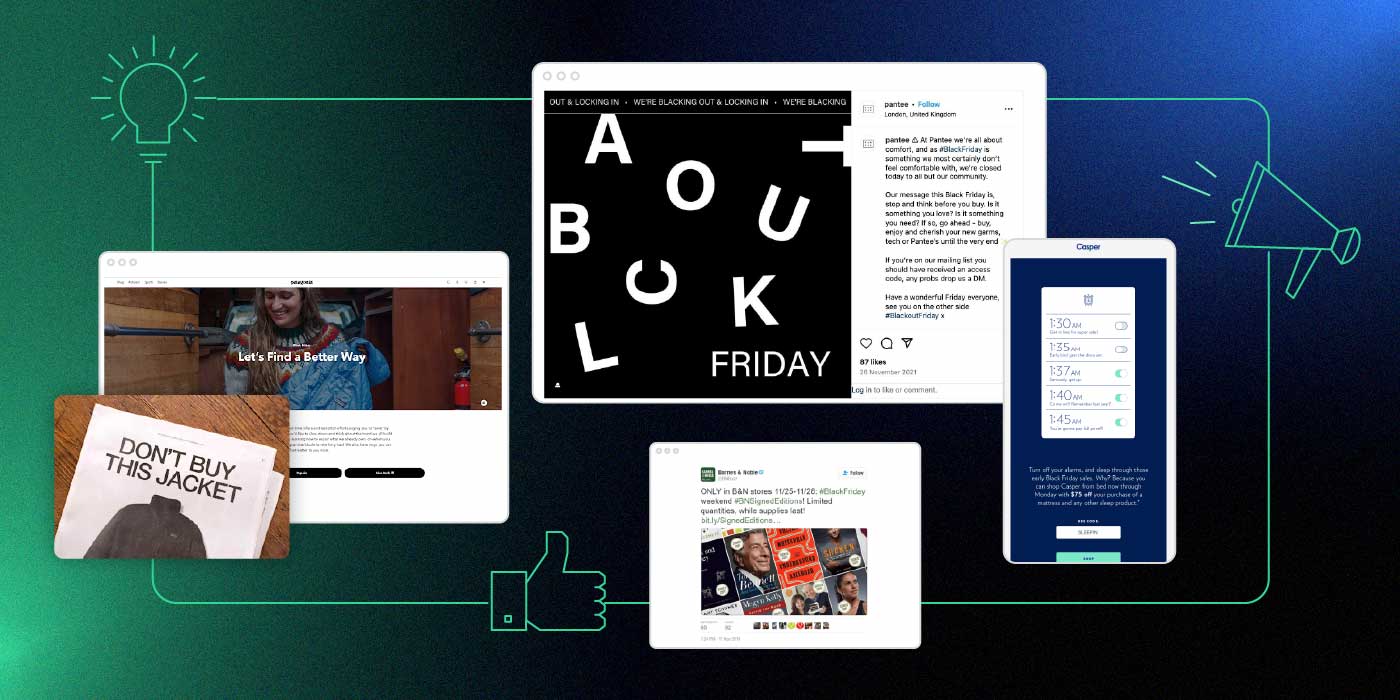
Black Friday is often seen as one of the most exciting days of the year, but it can also feel overwhelming for both consumers and businesses alike. Consumers are flooded with deals from every brand they’ve ever interacted with, browsed, or even stumbled upon, while companies are fiercely competing for attention. That’s why a well-executed Black Friday campaign is essential to stand out in a sea of offers.
However, Black Friday marketing isn’t only about offering big discounts and special deals anymore. Brands are implementing a variety of strategies nowadays to make the most of the shopping season – from eye-catching paid advertisements to creative email marketing and social media campaigns designed to engage customers and boost sales. Of course, there are always exceptions to the norm with some brands trying to promote mindful shopping habits or opting out of Black Friday altogether.
So whether you are looking for inspiration or you are just curious to see how leading brands tackle the shopping frenzy, we’ve put together a list of 10 inspiring Black Friday campaigns to have a look at.
[bf_prep_checklist_download]
1. Influencer Lookalikes by Puma India
Recognizing the popularity of their products – and the flood of their unsuccessful duplicates – Puma India took an innovative approach for their 2022 Black Friday campaign by partnering with Indian influencers. In addition to hiring lookalikes of their prominent brand ambassadors, the brand set up fake pop-up stores with altered branding outside a few of their key locations, where the famous lookalikes were seen posing in front of fake Puma merchandise.
The real influencers, including Indian national team cricketer Virat Kohli, which we see above, joined in by calling out Puma on social media, sparking curiosity. To add to the hype, the brand even made their website look like it had been hacked, prompting Instagram users to express on their social media accounts their confusion at the supposed “bugs” they spotted while visiting the site.
The underlying message of the campaign was clear: while everything can be imitated, Puma’s Black Friday deals are 100% authentic. During a shopping season where many customers are skeptical of the discounts brands offer, Puma set themself apart with truly unbeatable deals on their top products, promoted through videos featuring all the participating influencers.
The campaign was a masterpiece, capturing the attention of customers while addressing the doubt many have when shopping during this season.
2. Best Buy’s Gift Recommendations on TikTok
Another great example of leveraging social media for Black Friday comes from Best Buy, the American multinational electronics retailer. The busiest shopping day of the year isn’t only about grabbing deals on long-awaited items for ourselves, it’s also the perfect time to shop gifts, and Best Buy seized the opportunity.
For small business owners and freelancers who may not have the budget for a large-scale campaign, partnering with micro-influencers on platforms such as TikTok or Instagram, can be a smart, affordable alternative to generate buzz and to connect with your target audience.
3. Walmart’s Video Ad Campaign Targeting Millennials
As we’ve seen already, social media can be a powerful tool in your Black Friday marketing toolbox. However, instead of sticking to the usual path, Walmart took a more creative leap by launching the Mean Girls ad series, connecting with a generation that grew up with the iconic movie.
The campaign brought back Lindsay Lohan, Lacey Chabert, and Amanda Seyfried reprising their Mean Girls roles, but now as moms. Each week of November, a different character was featured in videos and social media posts alongside exclusive Walmart deals. The campaign became a success among both fans of the film and savvy shoppers.
4. AussieBum’s Black Friday Film Intro
Some campaigns remain timeless, as shown by AussieBum’s 2016 Black Friday film intro ad. The Australian apparel company cleverly parodied famous production company logos, such as 20th Century Fox, Marvel, and Warner Brothers, but with a funny twist – featuring underwear instead. While the aim of a film intro is to create excitement and anticipation for the particular film, AussieBum repurposed it to generate buzz for their substantial discount.
Feel free to draw inspiration from well-known movie openings or pop-cultural references that your audience will appreciate, but always be mindful of copyright laws.
5. Patagonia’s Sustainable Approach to Black Friday Marketing
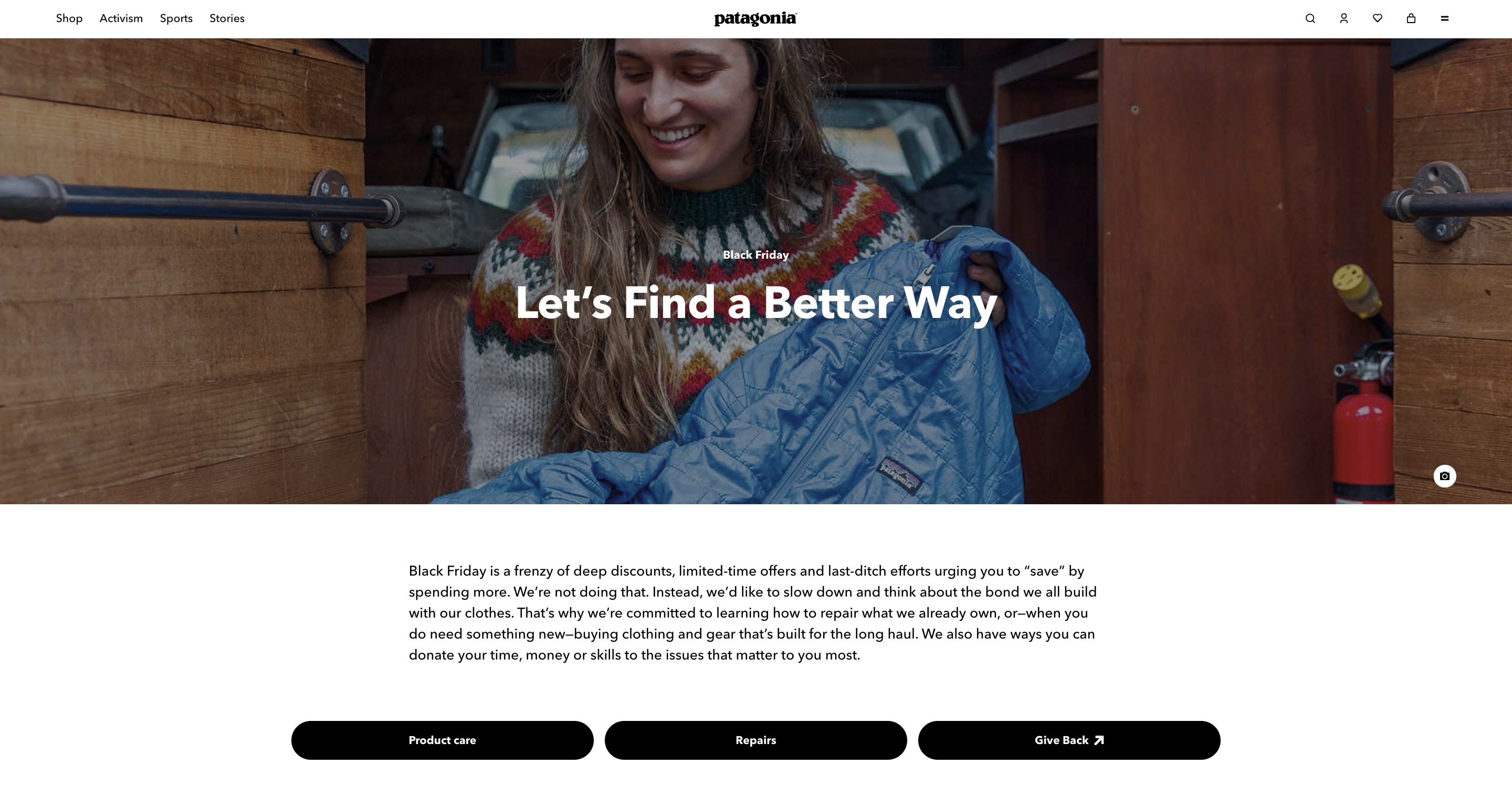
Black Friday can be a great time to distinguish your brand by highlighting their values, something that Patagonia opted for in 2011, launching one of the first ever anti-Black Friday campaigns with the “Don’t Buy This Jacket” ad in the New York Times. In it, the brand deliberately explained what resources and how many of them were needed to produce a single one of their bestselling jackets, with the aim of encouraging consumers to think twice before choosing a new one.
Staying true to their values, Patagonia is actively going against the common Black Friday trend of slashing prices and offering huge discounts. Instead, the brand uses their campaigns to advocate for mindful consumption, such as their campaign last year: “Let’s Find a Better Way.” Rather than pushing for new purchases, they urged consumers to consider buying used items, trading or repairing what they already own, and if a new purchase is necessary, to choose only high-quality gear that lasts.
💡 You don’t need to follow to a tee what the leading brands are implementing in their campaigns, but if you want to be greener this shopping season and still offer discounts, you can start with small steps by making your website more eco-friendly.
6. Black-out-Friday Campaign by Pantee
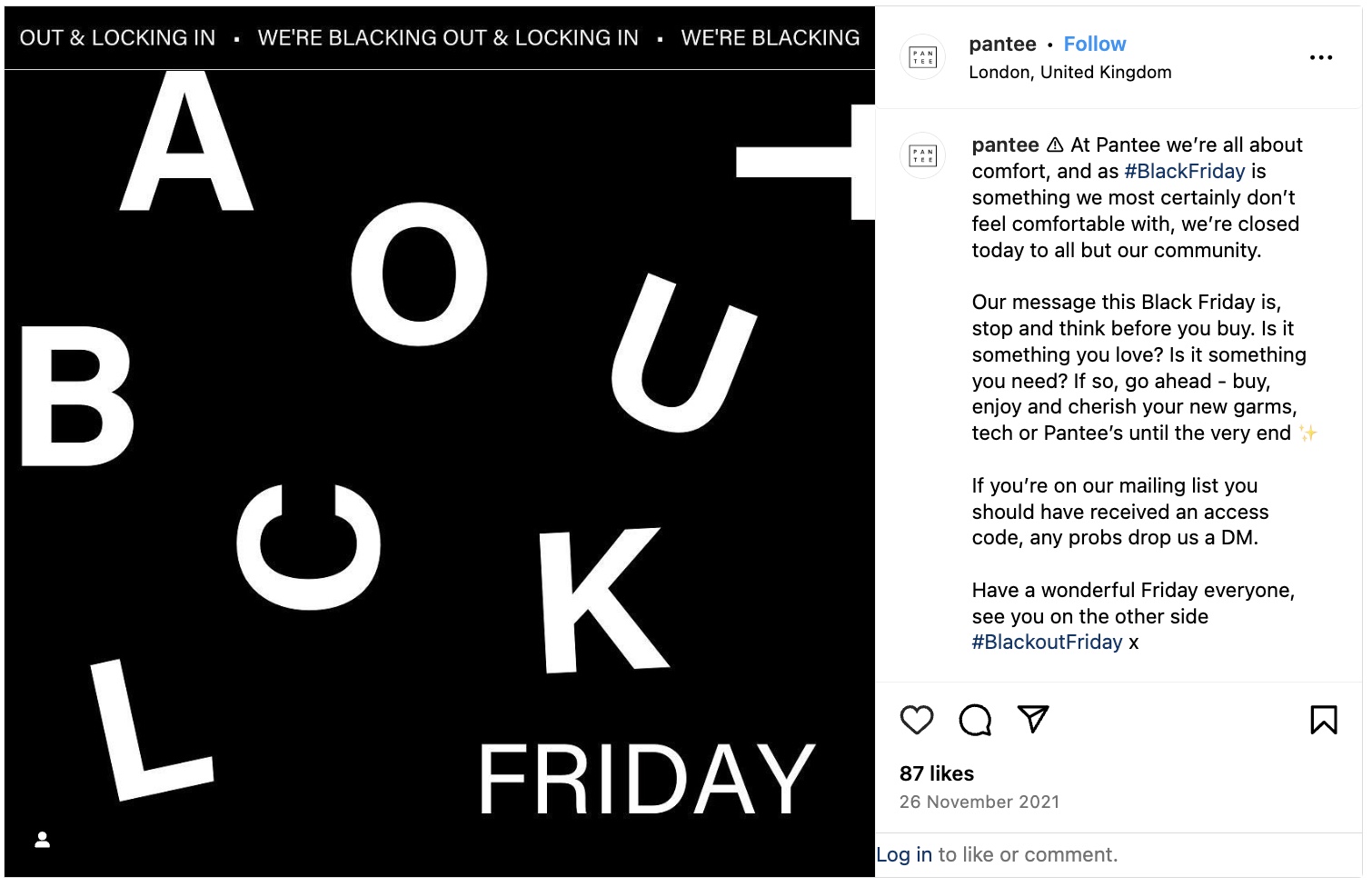
Another brand that has been known for advocating for sustainable consumer behavior is Pantee. Recognized for creating products from unsold inventory that would otherwise end up in landfills, the brand is committed to both comfort and sustainability, fighting against mindless buying.
In line with their beliefs, Pantee took a unique approach by restricting access to their Black Friday sale with a password on their website. Only subscribers to their mailing list received it, giving them exclusive access to new items and old favorites on the day. This strategy not only rewarded loyal customers, but also generated new ones as the brand provided a sign-up form on their social channels for anyone wanting to join in.
The campaign was a huge success in its launch year, 2021. Organic social media impressions reached over four times the brand’s total followers at the time, and November web traffic that year increased 122% month-on-month without any paid ads. Moreover, Pantee’s email list grew 33% in the week leading up to Black Friday.
7. Casper’s Alarm Campaign
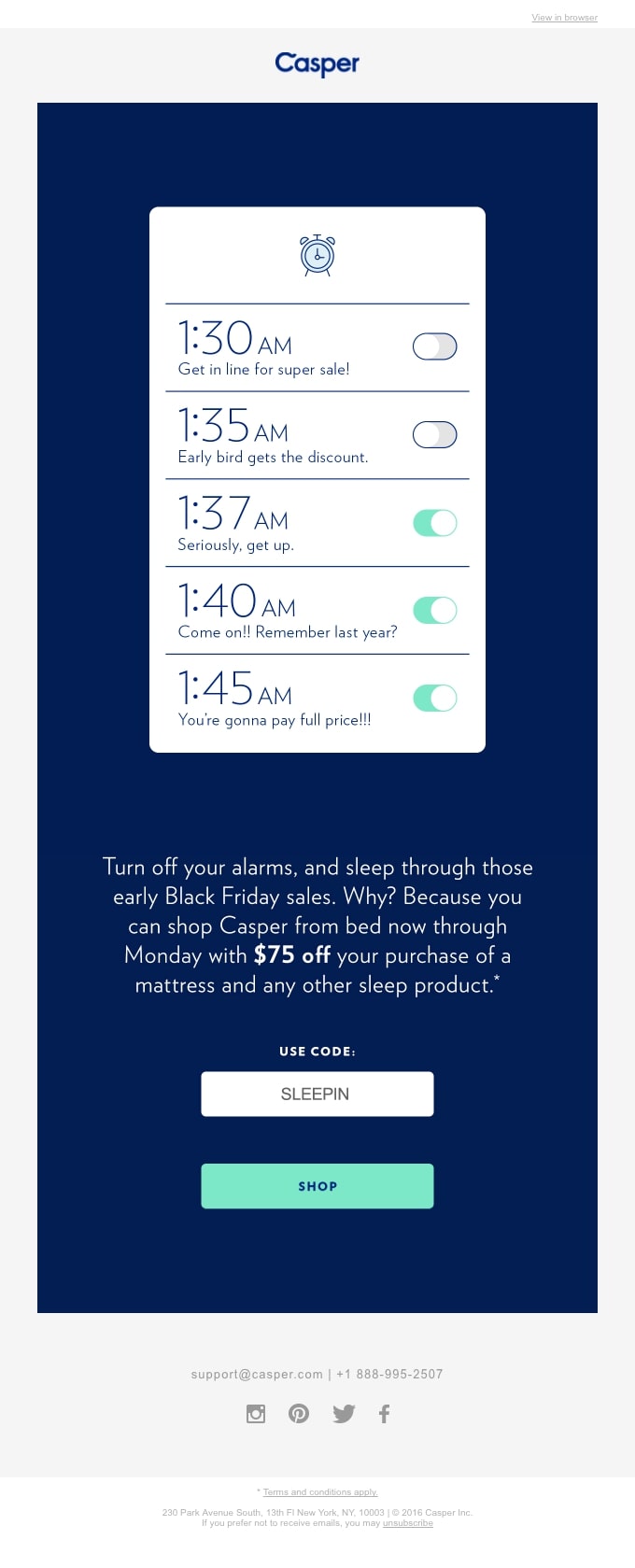
Do you find yourself setting multiple alarms in order to get up early in the morning? Casper, an American sleep product company, cleverly tapped into this relatable habit for their Black Friday email campaign. By sparking a humorous conversation around a shared morning struggle, they connected with customers on a personal level. In doing so, they also highlighted their current offers, making the campaign both engaging and effective.
🔥 Craft an irresistible email campaign this Black Friday by drawing inspiration from our carefully selected Black Friday email examples, ensuring your message captures attention and gets read.
8. Barnes & Noble’s Signed Editions Campaign
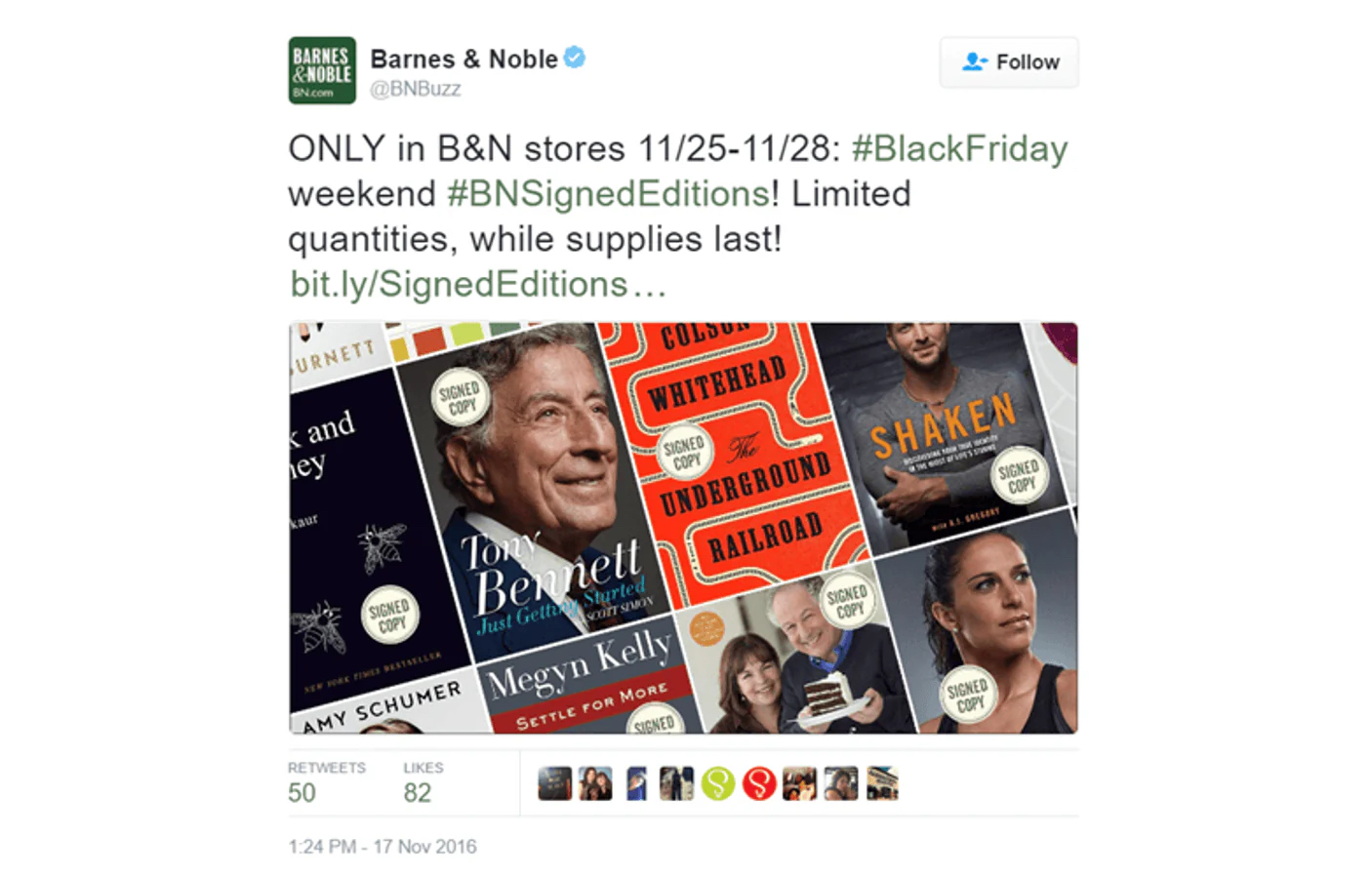
Barnes & Noble (B&N), the largest bookseller in the U.S., sought to make their customers feel special on Black Friday without relying on any splashy discounts. In 2016, the bookseller invited over 200 renowned writers across a wide variety of genres, including Lee Child, Rupi Kaur and Reese Witherspoon, to sign thousands of copies of their popular books, exclusively for Barnes & Noble customers.
To enhance the experience, Barnes & Noble shared behind-the-scenes content of the signing process, using #BNSignedEditions on Twitter (now X), Instagram, and Facebook. Customers could also enjoy personal video messages from selected authors leading up to the campaign’s launch.
As a result, the campaign contributed to one of Barnes & Noble’s most successful holiday seasons, with over 650,000 signed books sold.
9. REI’s Tradition to #OptOutside Black Friday
Have you ever wondered what would happen if you put your phone aside on Black Friday and, instead of fighting for deals, opted for a day in nature? Well, REI’s idea was not far from that. Founded by 23 climbing enthusiasts on a mission to change how people experience the outdoors, the brand started their #OptOutside movement in 2015 – a bold initiative to close REI stores on Black Friday, pay their 12,000 employees to spend the day outside, and invite everyone else to join them.
10. Cards Against Humanity Out-Of-The-Box Campaigns
In case you don’t really want to contribute to the crazy shopping madness, the fill-in-the-blank witty party game Cards Against Humanity has you covered. Known for taking a stand against mass consumerism, the brand’s Black Friday campaigns are anything but typical.
Despite their controversial name, most of their Black Friday campaigns are surprisingly altruistic. For instance, the profits the brand has made from several of their campaigns have been donated to various organizations, including the Wikimedia Foundation, which is dedicated to encouraging the growth and distribution of free, multilingual content. In 2020, the brand went further by donating their whole Black Friday budget, consisting of $250,000, to nonprofits suggested by their staff that support causes like Black Lives Matter, voting rights, and fair housing.
Another way that Cards Against Humanity boycotts the first day of the shopping season is by mocking it. In one campaign, they offered customers the chance to buy nothing for $5. Shockingly, 11,248 people gave them $5, with 1,199 contributing more than $5 by submitting the form more than once. Another campaign featured a whopping 99% price reduction on bizarre items such as an original Picasso Lithograph, a life-size Orlando Bloom cut-out, and a 2015 red Ford Fiesta, showcasing their unique approach to Black Friday marketing.
Key Takeaways for a Successful Black Friday Campaign
It’s no secret that over the last few years Black Friday has become one of the most profitable days for businesses, and because of this, brands will go to great extremes to stand out and avoid becoming yet another annoying email or social media post. Hopefully you’ve taken some useful ideas from our list to kick off the holiday shopping season – but as you prepare your Black Friday campaign, don’t forget to keep these key elements in mind:
Stay true to your brand identity
As we’ve discussed above, even though some brands opt out of offering massive sales and discounts, their loyal customers continue to support them because the brands remain true to their values. This authenticity can sometimes be the best form of advertising. For example, if your brand advocates for sustainable shopping habits, go for it – the right customers will find their way to you.
In the race to maximize revenue, many brands lose sight of their purpose. Staying aligned with your core value ensures that your messaging is consistent with your long-term goals.
Maintain consistency in your messaging and communication channels
Whether you’re opting for a traditional Black Friday marketing approach or trying something unconventional, it’s essential to set a clear vision on how you will present your brand. If your campaign supports a specific cause, communicate how it aligns with your brand values and highlight its importance throughout the whole campaign. If your focus is purely on offering discounts, prioritize the most effective channels and stick to them.
For instance, avoid starting with an email campaign announcing the start of your Black Friday sale and then shifting entirely to social media to disguise what it will be. Inconsistent messaging can confuse and frustrate your audience, ultimately leading to a drop in sales.
Kick off the Holiday Season with SiteGround’s Email Marketing Tool
If you are feeling overwhelmed by all the ideas and unsure where to begin, email marketing is a great way for starters. Whether you’re new to email campaigns or a seasoned pro, SiteGround offers a user-friendly email marketing tool that simplifies the process. With features like pre-built layouts, an AI assistant to write messages and generate images, and a lead generation plugin to easily import contacts from anywhere, you’ll be set up for success in no time.
Sounds great, right? Choose Siteground’s Email Marketing tool to engage your audience and drive results this Black Friday!
This article was originally published in September 2024, and then updated in October 2025.
Black Friday email campaigns can be tricky—juggling design, copy, and email sending is no small feat. But we’ve got you covered. Our curated collection of the best Black Friday email examples breaks down the top campaigns, highlighting key takeaways to inspire your own high-converting emails.
[bf_prep_checklist_download]
Top 25 Black Friday Email Examples that Inspire
If you’re just about to begin brainstorming your Black Friday email ideas, here are some of the best Black Friday emails to use as a solid starting point.
Pre-Black Friday Teaser Emails
To build anticipation, you can create a Black Friday teaser email. In your pre-Black Friday emails, make sure to add a sneak peek of your Black Friday sale and what your customers can expect. But don’t give away all the details just yet—you want to keep readers eager to visit your site.
Let’s explore some creative email examples:
Subject line:Snap. Share. SAVE! 🎁
Takeaways:
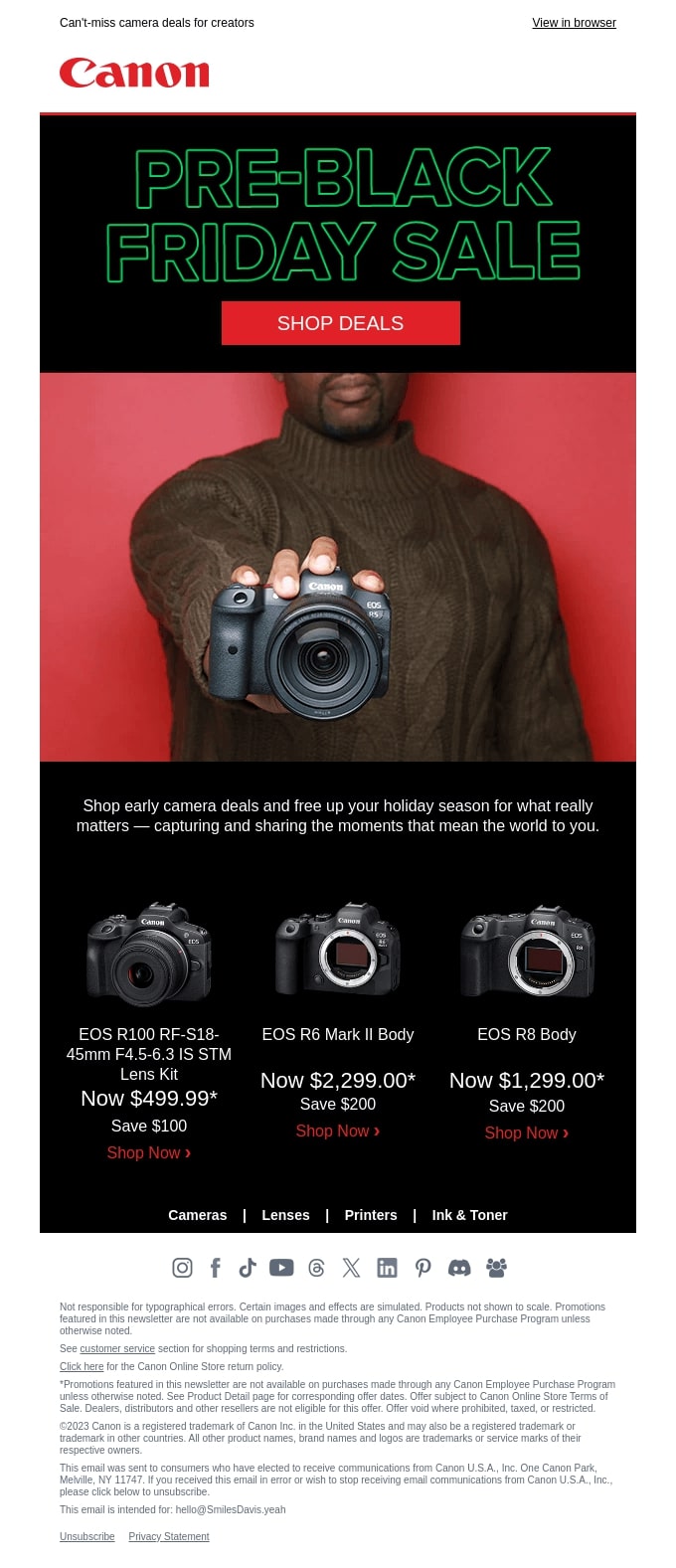
In Canon’s pre-Black Friday email, they’ve picked the top three products to catch the customer’s attention, yet customers need to visit Canon’s website to learn more about the sale. What’s more, the main CTA button is placed above the fold to attract attention. They also have their main shopping categories linked at the bottom of the email for customers to explore further.
Design: Their brand color, red, is used for the CTA button and the background in order to make the button more appealing and the camera product stand out—the two most important things in this email communication.
Content: They emphasize the reader’s desire for free time to focus on “what really matters” and “the moments that mean the world.” Their subject line is short, catchy, and to the point, while also leveraging alliteration.
Takeaways:
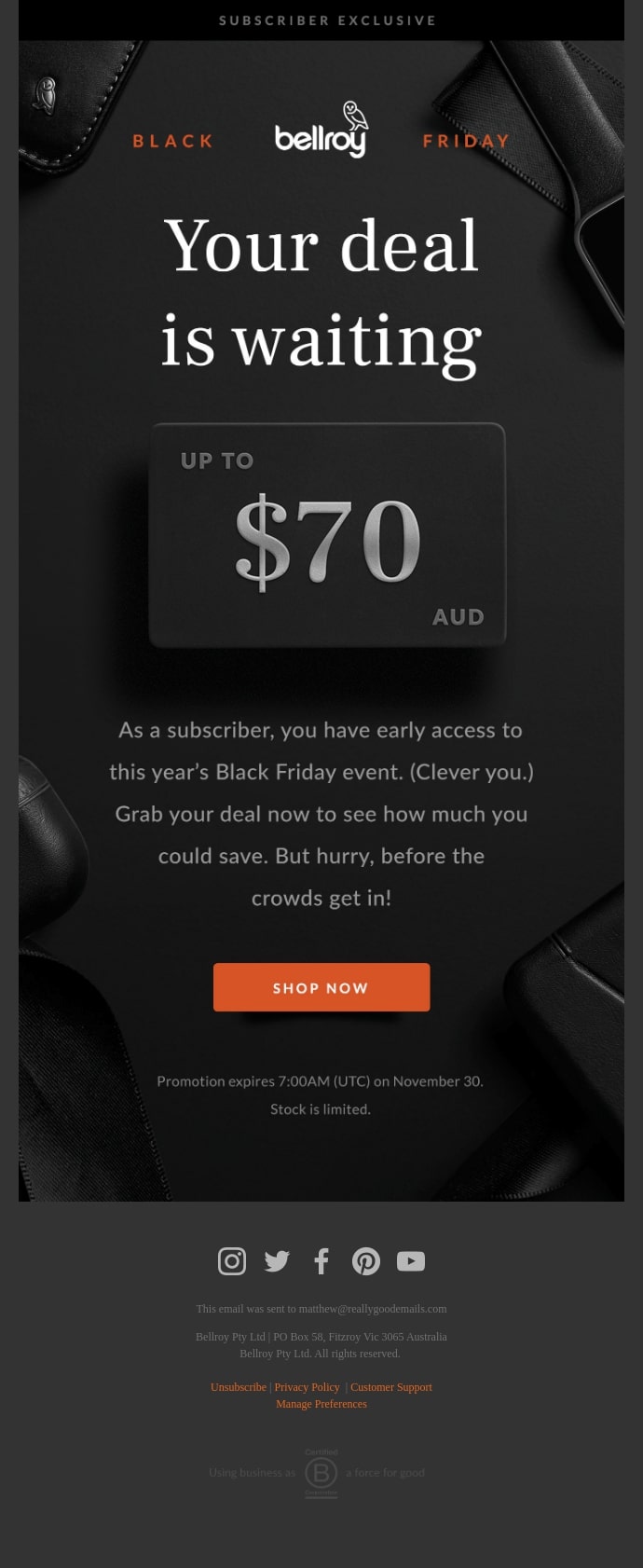
In Bellroy’s Black Friday email example, the things that catch one’s eye the most are the title—“your deal is waiting”—and the amount of the deal (up to $70 AUD). These are specifically created to attract the reader’s attention—the font is white on a black background, which makes it stand out; and the deal is a 3D-like credit card, which is inline with their brand’s products (wallets, bags, phone cases, etc.).
Content: This is one of the best VIP customer email examples. The brand emphasizes the exclusivity of their deal, using phrases like “subscriber exclusive,” “your deal,” “you have early access,” etc. It appeals to the reader, making them feel special and appreciated, differentiating them from the crowds. The copy is actionable and reader-oriented.
Design: They’ve used a black background and an orange button, as well as white and gray for the fonts, in order to make the most important aspects of their Black Friday sale message stand out.
Takeaways:
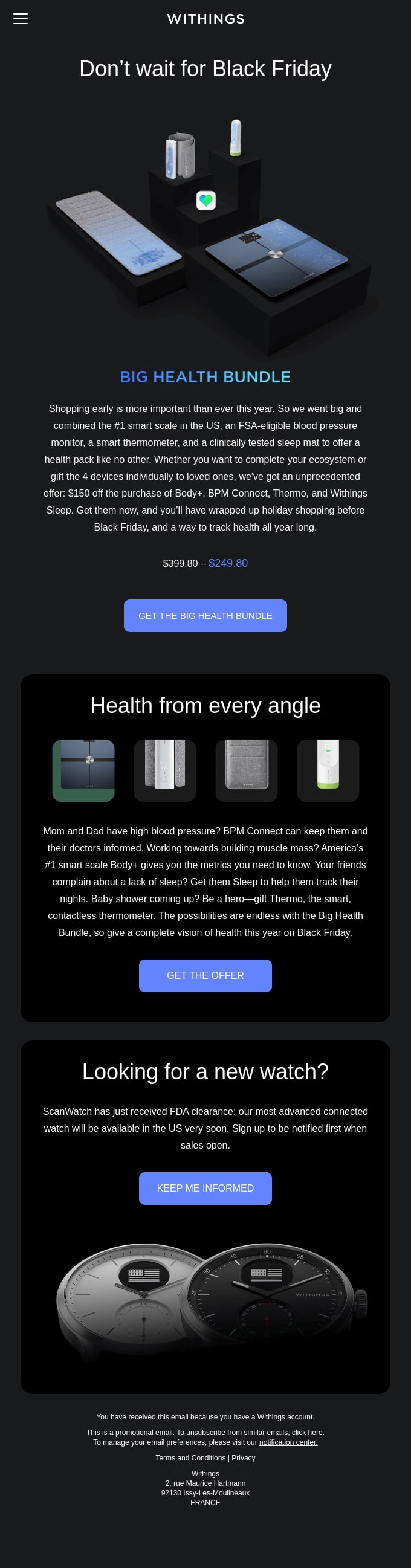
This teaser email is almost like a Black Friday newsletter example, as it’s heavily focusing on the product bundle offer. Yet it creates a sense of urgency even though it’s an early-access offer. This sense of urgency is completely logical here because the brand is promoting health-monitoring devices, and health is always the “most urgent” and important aspect of life.
Content: The copy emphasizes how big their offer is in terms of products provided and the discounted amount of the total value. They’ve repeatedly used the word “big” to describe both the offer and the product bundle.
Design: To achieve the above-mentioned effects, the brand has incorporated several elements in the email design. Their “blue” brand color is again used for titles and CTAs and made to stand out on a black background. There are different pictures of the products because here the focus is the bundle deal.
Takeaways:
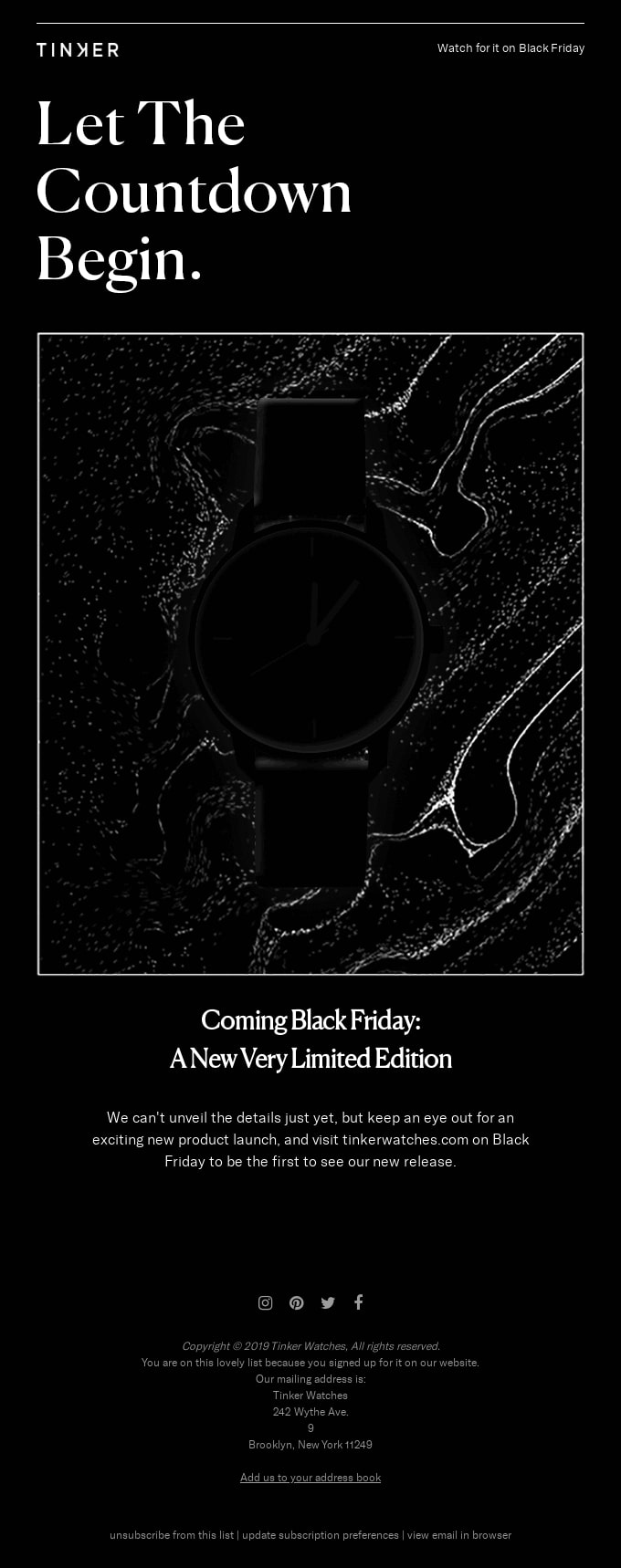
Tinker Watches uses the countdown concept, which in this case corresponds nicely with their time-focused brand. On top of that, they’re planning to release a new product; hence, the countdown concept.
Content: To emphasize the countdown for watch sales, they use phrases like “watch for it,” “let the countdown begin,” and “coming Black Friday,” which makes the message more appealing to the reader.
Design: The email design is inline with the whole countdown “mystery” concept of the upcoming release. The upcoming watch is in a black shade with blurred background, and the user can only see its outline—thus, the brand creates a sense of anticipation and excitement.
Takeaways:
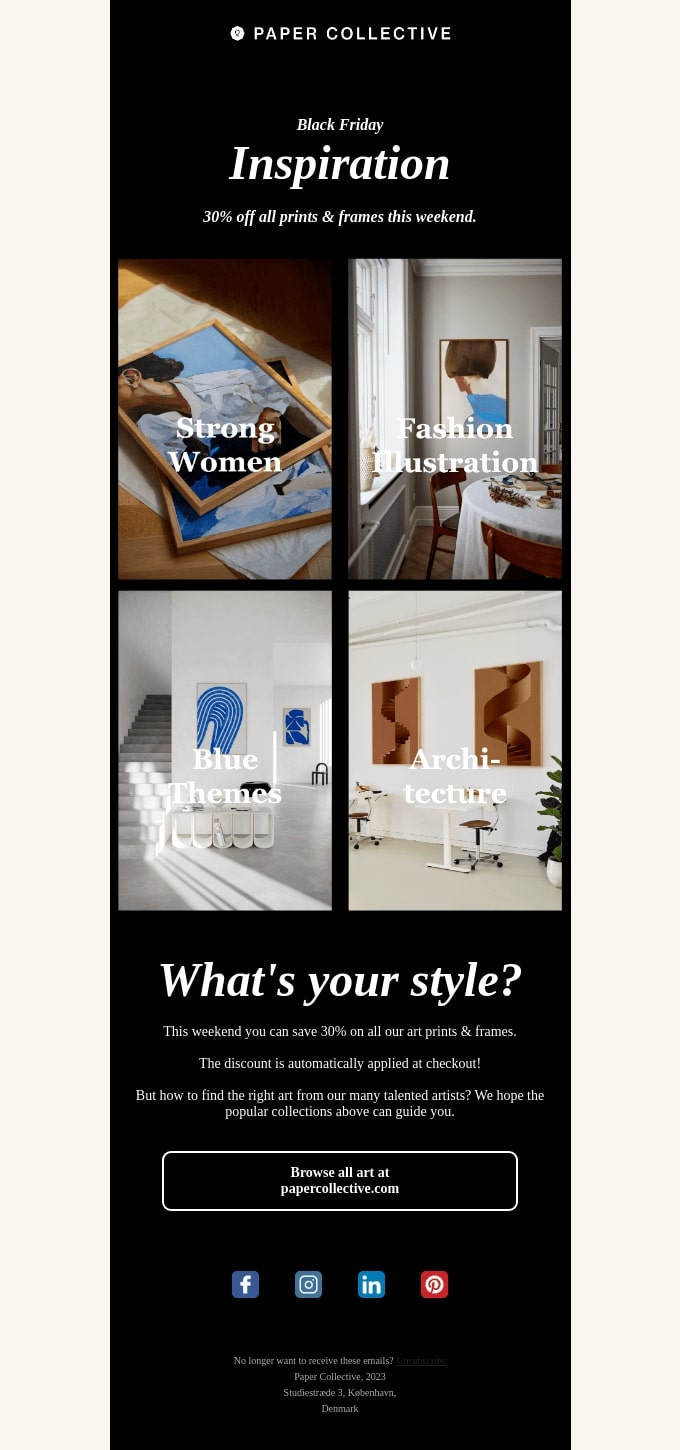
Paper Collective’s Black Friday email example focuses on inspiration for gifts. The email represents a gift guide divided into four main categories that are based on the brand’s products. They put emphasis on inspiring and guiding customers through Black Friday shopping, while also teasing them with the upcoming offer “this weekend.”
Content: The brand focuses their Black Friday email campaign content on getting gift ideas from their upcoming Black Friday sale. The title is a question that appeals to the user to think about their art-print and frame preferences.
Design: The brand’s colorful art is the focus of the email design. They highlight the art collection guide, putting it above the fold in different colors, and with large font titles for each one. They don’t focus so much on the CTA button, as the art collection guide is meant to attract users’ attention.
Black Friday Announcement Emails
Your Black Friday sale email announcement is probably the most important email you’re going to send out. That’s why it needs to be carefully crafted and designed in order to achieve maximum results and attract as many sales as possible.
Here are the top Black Friday email examples we’ve curated especially for you:
Takeaways:
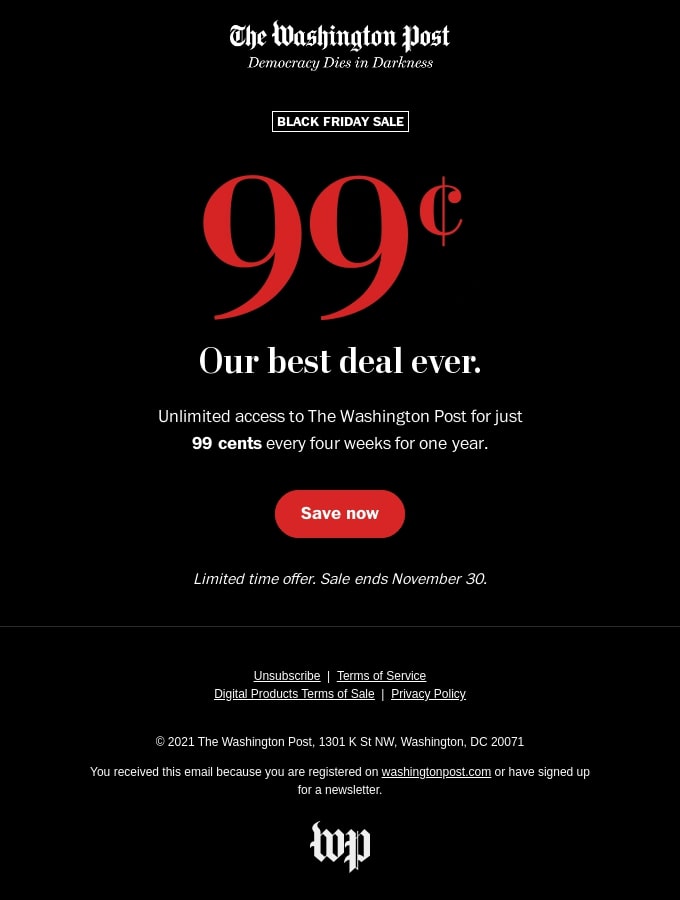
The Washington Post Black Friday campaign is one of the best discount email examples. It grabs the reader’s attention with the low price in a very big red font.
Content: The content is short and straight to the point—that it’s their best deal ever, for just 99 cents per month. They also focus on the fact that this deal provides users with unlimited access to their content, making it even more appealing.
Design: They’ve used only three colors, yet in a very impactful way—above the fold they have the low price in big red font, plus a red CTA button below, and both stand out on the black background. The text is in white, which also makes it easy to read, and it catches one’s eye.
Takeaways:
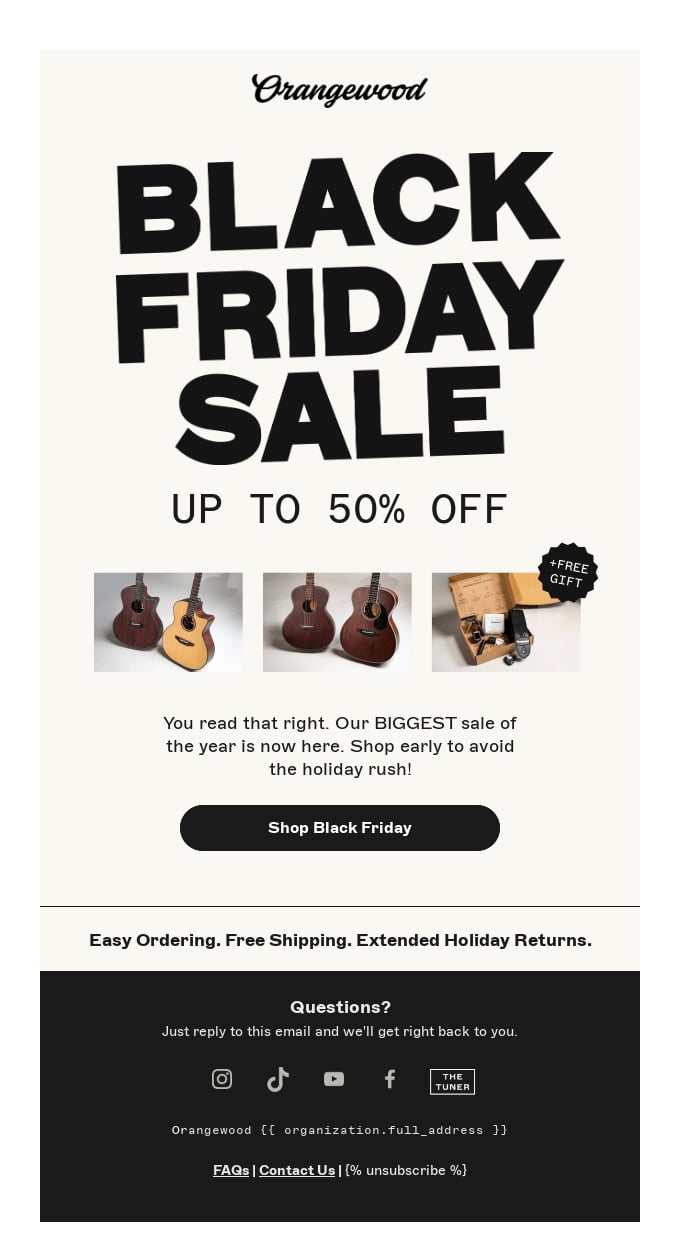
Orangewood uses a big, black, blocktype font for their above-the-fold Black Friday sale title, which is the main focus. The percentage discount and product images also take a significant part of the email design.
Content: Their copy is short and straightforward—their biggest Black Friday sale is live. They also create a sense of urgency with actionable phrases like “shop early.”
Design: The background color is inline with the guitar’s colors, yet it makes the rest of the content stand out.
Takeaways:
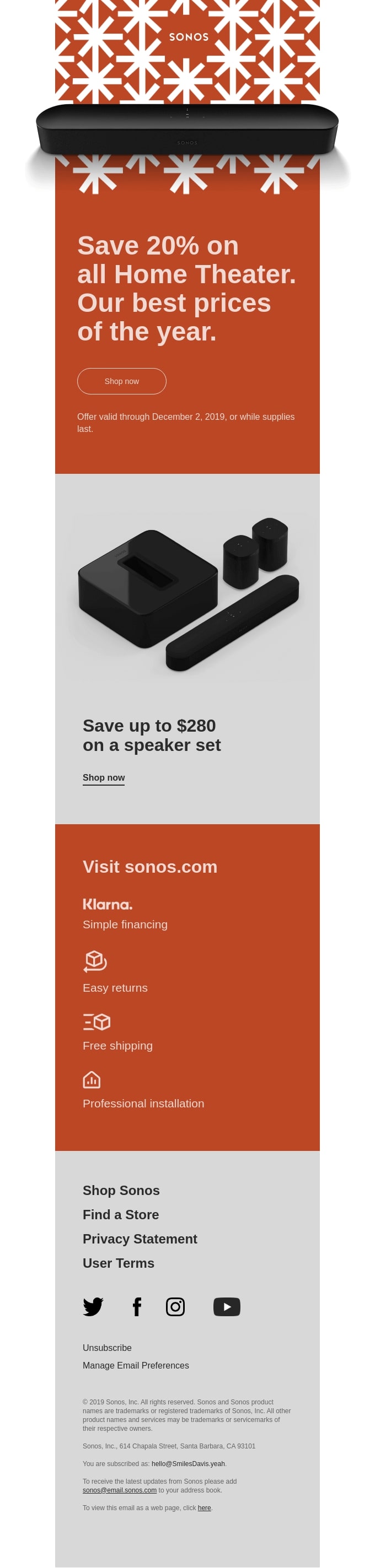
The brand has divided the Black Friday email into several sections—the most important ones being in a bright color that catches the reader’s attention.
Content: The copy uses actionable phrases like “save 20%,” “save up to,” “shop now,” and “visit” to encourage sales. It also creates a sense of urgency because the Black Friday offer will only be valid “while supplies last.”
Design: The email design is creative and compelling. The product images create a 3D-effect that make them appealing to the reader. The bright orange color, along with the gray sections, make the content stand out.
Takeaways:
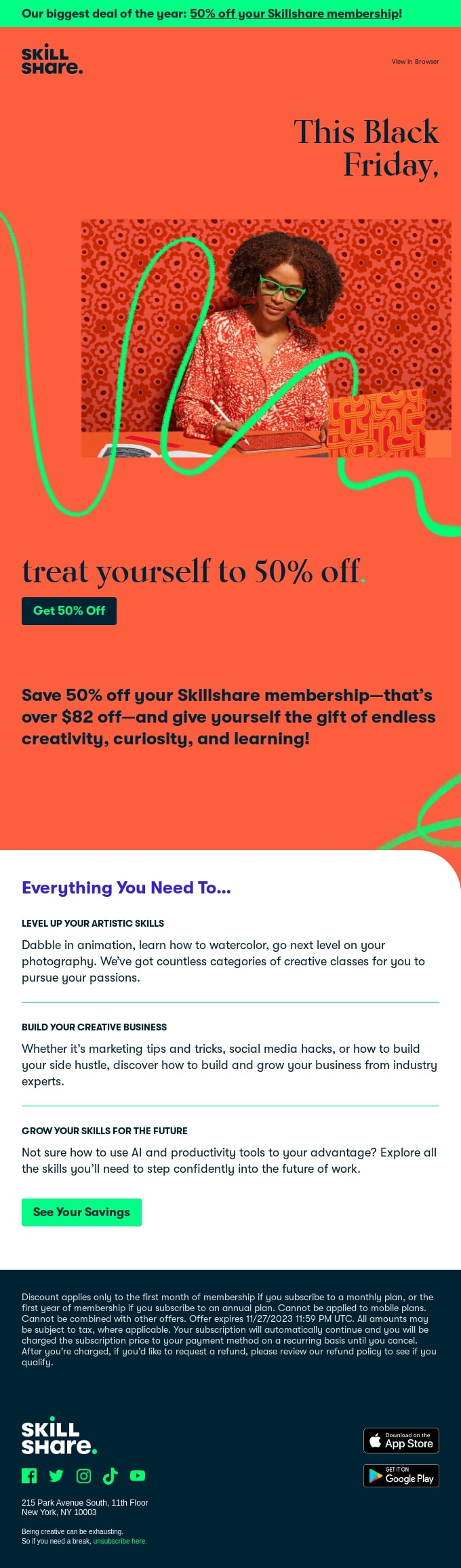
Skillshare‘s Black Friday email design heavily appeals to “you,” the reader. It uses an image of a creative professional with whom the reader can identify. The brand has also placed their product on the image in a subtle, yet compelling way—their creative glasses are in a neon green color.
Content: The content focuses on the reader’s needs with phrases like “treat yourself,” “give yourself the gift,” and “everything you need to.” It gives both a special offer (50%-off discount) and explains the benefits of their product, giving readers reasons why they should take advantage of the Black Friday sale.
Design: The bright orange background above the fold is used to make the offer stand out. There is one neon green creative line that goes through this section, drawing attention to the creative product they’re selling and grabbing the reader’s attention.
Takeaways:
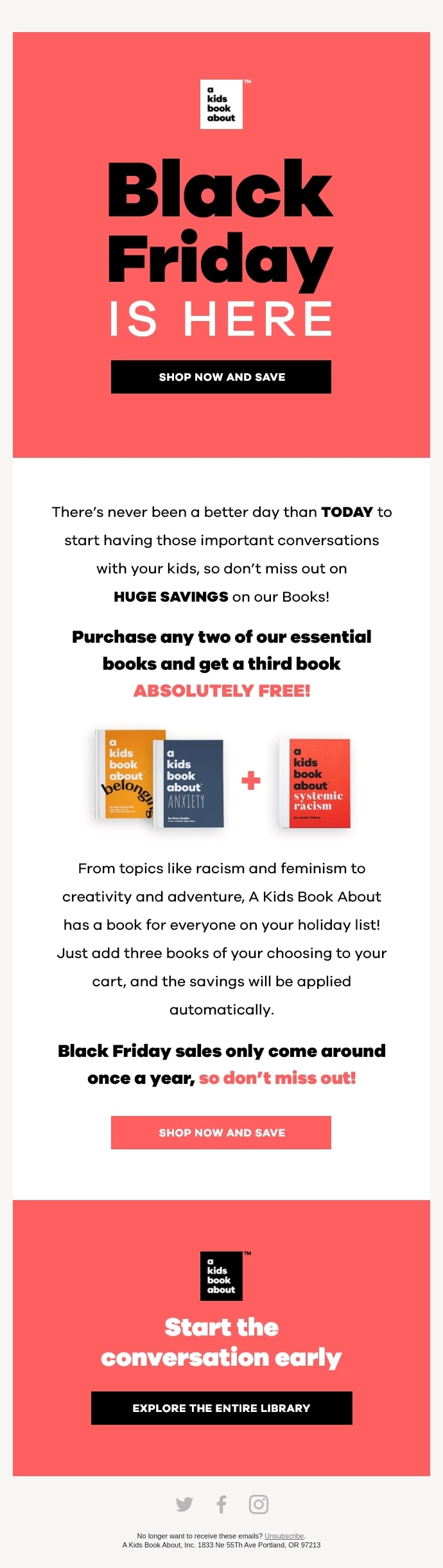
This Black Friday email example design is focused visually on the books it offers for kids. The CTA buttons are also squares with sharp edges, reminiscent of books.
Content: The content centers around how big the Black Friday sale is with phrases like “huge savings,” “get a third book absolutely free.” It also creates a sense of urgency with “only come around once a year” and “don’t miss out.”
Design: The design relies on three CTA buttons, two of which are sales-oriented (“Shop now and save”), above the fold and below in the email. At the bottom of the email, they have a third CTA button for driving traffic to their website, encouraging users to explore more products. The bold and block-type font corresponds well with the book products, and the bright and black colors create an appealing look.
Last Chance Emails
Our set of Black Friday email examples wouldn’t be complete without last chance emails. Their main objective is to create a sense of urgency in order to boost sales even further. They are usually sent a few days before the sales ends, or during the last 48 or even 24 hours. Our selection goes like this:
Takeaways:
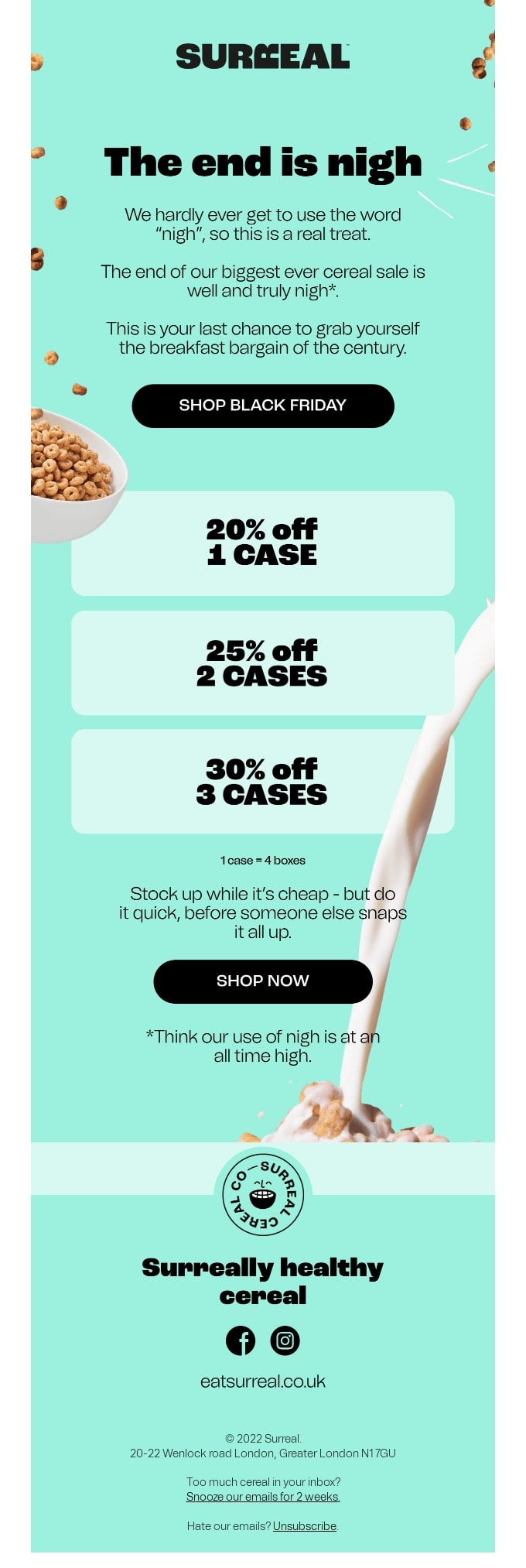
The sense of urgency is created in almost every single sentence, using phrases like “do it quick,” “the end is nigh,” “truly nigh,” “your last chance,” “while it’s cheap,” and “before someone else.”
Content: The content uses creative language, playing with the usage of the word “nigh,” as well as “snap up” and “stock up.” It also leverages the alliteration “breakfast bargain” to stress both the product “breakfast” and the sale “bargain.”
Design: Apart from their brand color, which they’ve used as a background, they’ve also whimsically implemented pouring milk and scattered cereal on the design to make it look more appealing and outside-of-the-box.
Takeaways:
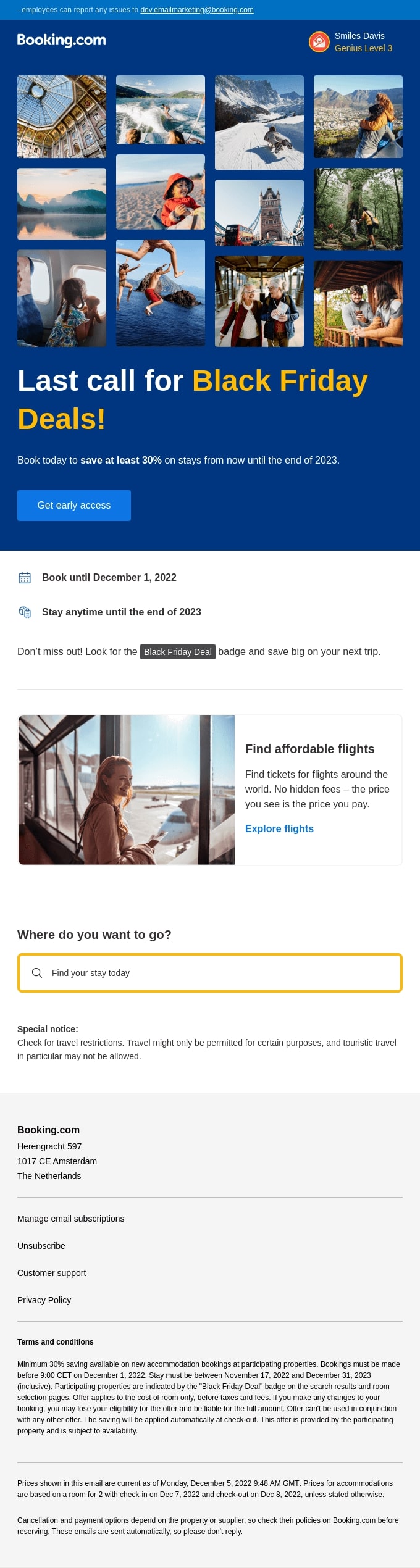
The most important part of this Black Friday email example is above the fold, and is very appealing with lots of visuals and contrasting fonts. The main CTA button is within that part as well.
Content: There isn’t much content in the email, but it’s straight to the point with phrases like “Black Friday deals,” “last call,” “book today,” and “don’t miss out.” It also has two additional sections that help the reader find flights and places to go; thus enhancing their user experience even further.
Design: The major thing about the design is that it includes photos from various locations. These are meant to inspire and encourage the reader to book their next trip with Booking and take advantage of the offer.
Takeaways:
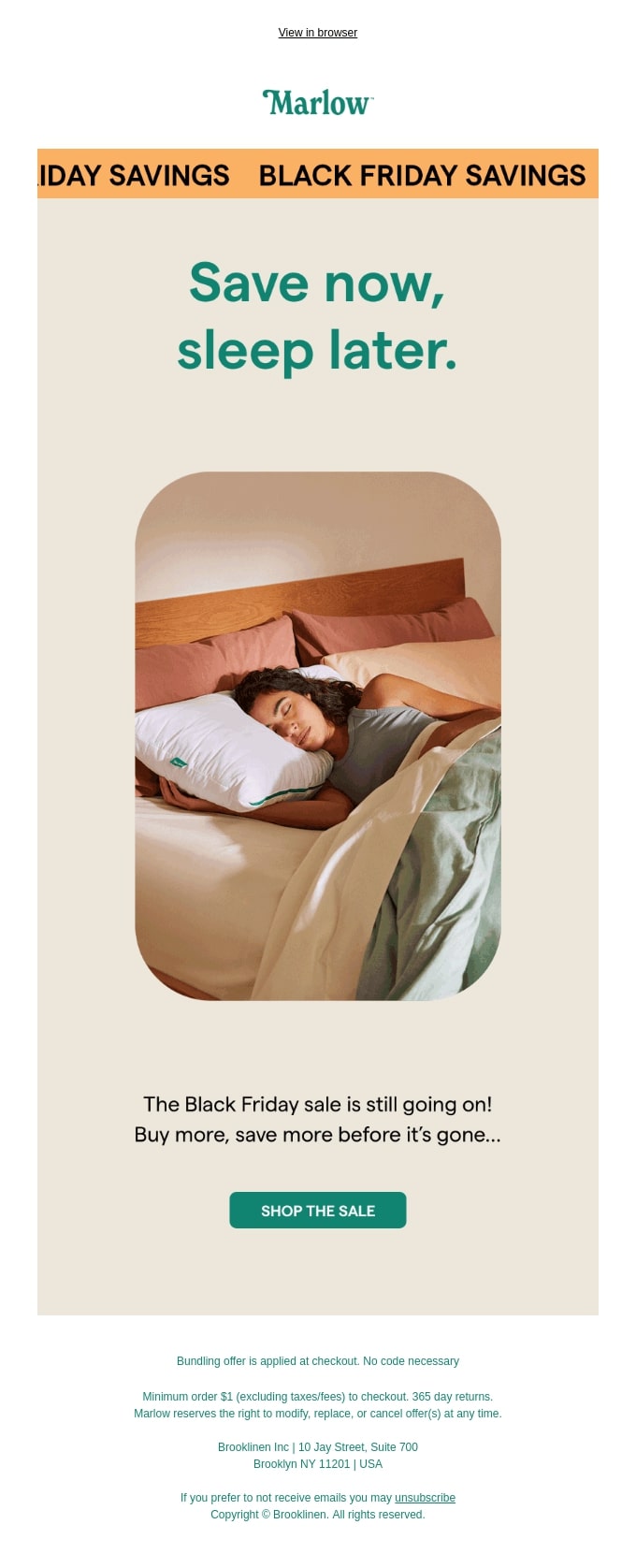
This Black Friday email example follows a traditional structure, having a title, image, paragraph, and a CTA button. What makes it stand out is the banner at the top, and the content.
Content: The email content urges the reader to “save now,” which is related in a clever way to their brand (as they sell pillows) with the phrase “sleep later.” The copy is short, yet actionable—“buy more” and “save more.” That makes the content both compelling and sellable.
Design: The main focus of the design is the actionable title and the image in the center that aims to appeal to the reader and have them identify with it. The CTA button is placed at the bottom of the email, while the Black Friday savings banner is above the fold.
Takeaways:
This last chance email, showing a woman running, corresponds in a subtle way with the brand, selling sports shoes, and with the “Black Friday finale,” which creates a sense of urgency for the final sales.
Content: The content focuses primarily on the Black Friday finale and the 60% discount. This is an effective approach for a last-chance email, as the goal is to maximize Black Friday sales.
Design: The email includes product images of the best-selling items to encourage readers to make a purchase. It also leverages bright colors that create contrast.
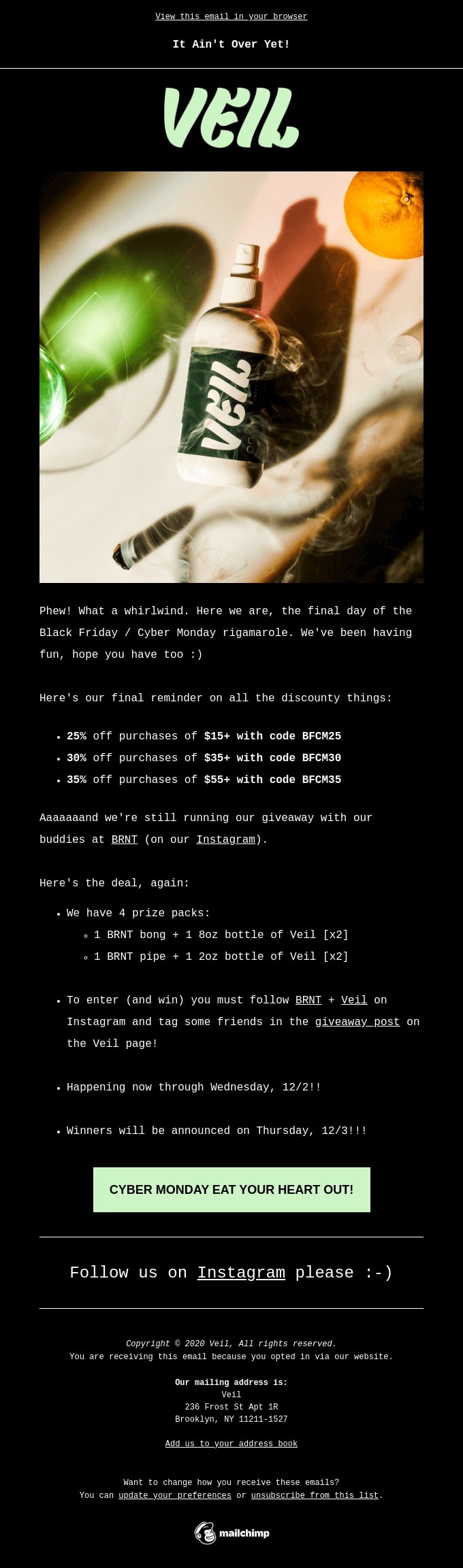
Subject line: It Ain’t Over Yet
Takeaways:
Veil emphasizes the product and the Black Friday deal, while also creating a sense of urgency. They’ve added an extra incentive with a social media giveaway game.
Content: The brand uses more casual language, starting with the subject line, the opening sentence, all the way to the CTA button. This casual language corresponds well with the brand item that’s being promoted.
Design: Their product image and logo are the main focus of the Black Friday email design, whereas the most important points are in bold font. Thus, they catch the reader’s attention and encourage them to make a purchase.
Takeaways:
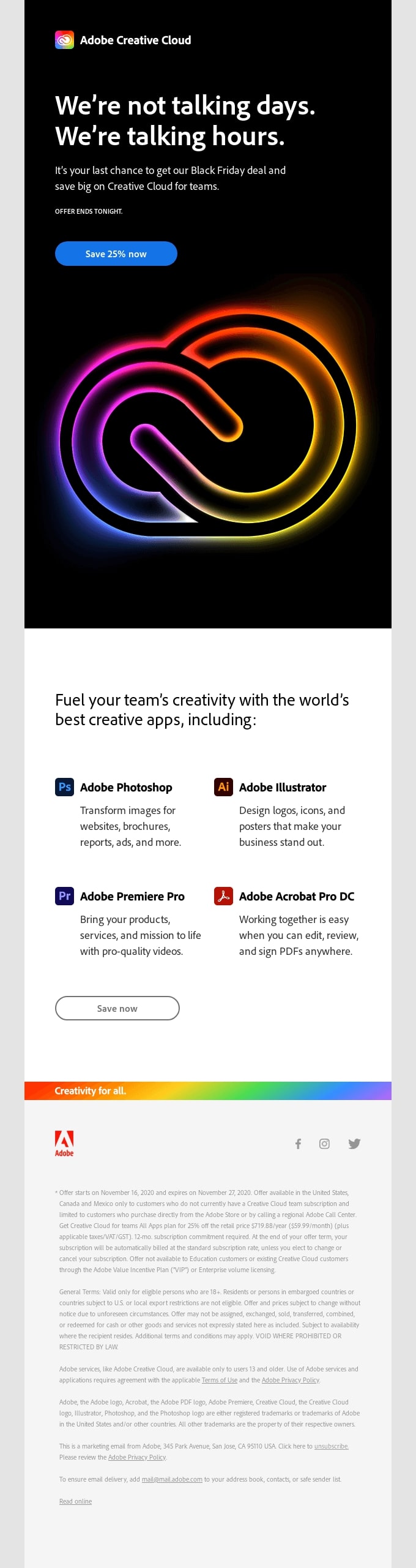
Adobe Creative Cloud has placed everything the reader needs to know above the fold—title (with a last chance vibe), deal description, CTA button, and their logo (the main thing that catches the reader’s attention).
Content: The content promotes their creative apps (with short descriptions for each one), and their corresponding icons that appeal to the reader’s visual memory of these digital products.
Design: The email design relies on a black background for the above-the-fold field in order to make the colorful logo of the brand stand out to the reader. The various colors in the logo represent the creative freedom approach that Adobe’s products provide to their users.
Extended Black Friday Emails
Oftentimes Black Friday discounts get extended in order to attract even more customers and increase sales. If you are worried you’ll run out of things to say at this point in the sale, then worry no more. We’ve prepared extended Black Friday email examples as well in order to inspire your own email campaign.
Takeaways:
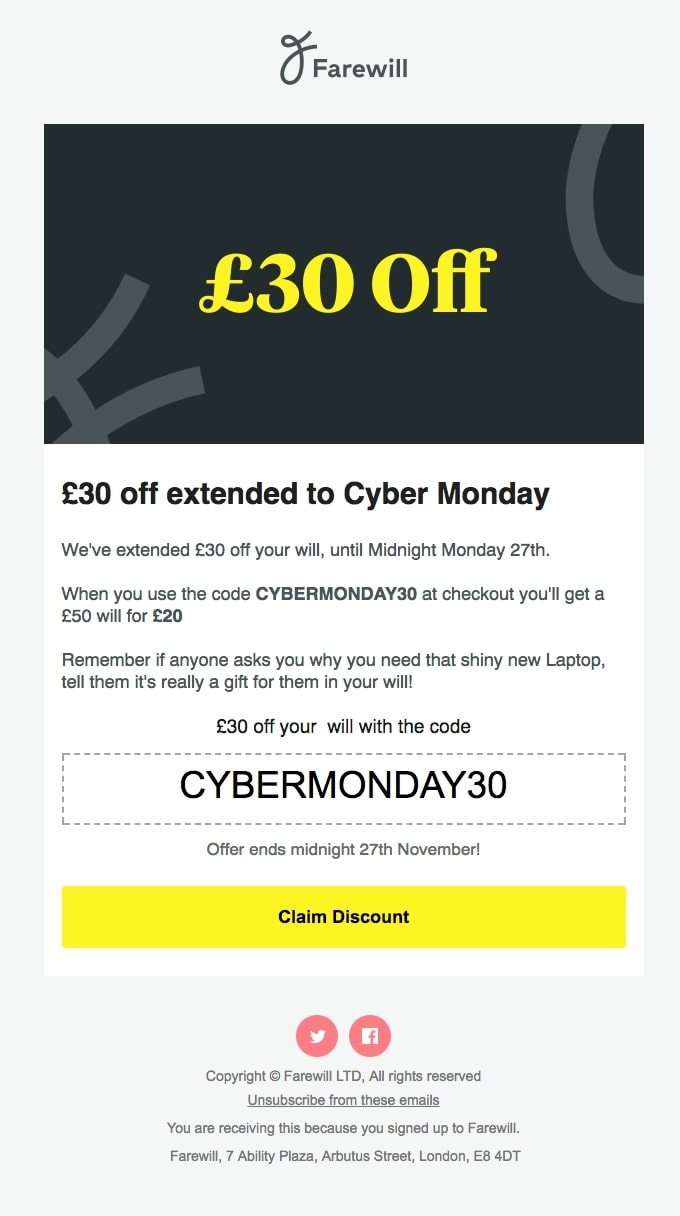
The email has a traditional structure with a header image, title, paragraph, and CTA button with the offer. That design decision corresponds well with Farewill‘s brand identity, because their business occupation is wills, funerals, and probate.
Content: The overall feel of the copy is that it’s funny (it even incorporates a joke), which is in contrast with the seriousness of writing a will. That makes the email content even more witty and compelling.
Design: The design looks simple and clean, using mainly gray and yellow (for contrast), yet the Black Friday discount and the CTA button stand out well on the white background.
Takeaways:
The National Geographic example of an extended Black Friday deal follows a newsletter-like structure in which the section above the fold contains all the vital information – title, deal, CTA button, and product images. The rest provides even more ideas for gifts, divided into categories.
Content: The content is straight to the point and product-oriented. There are a lot of listed products with simply an image and title, including the discounted price and the original price, in order to make them more appealing to the readers.
Design: The white background makes all the product images stand out with a nice contrast. This effect makes them the main focus of the email.
Subject line: ⚠️ We’ve extended our Best Black Friday Deal Ever!
Takeaways:
This is one of the free shipping email examples, as well as a great example of an extended Black Friday deal. It creates a sense of urgency, beginning with the emoji in the subject line.
Content: With phrases like “while supplies last” and “ends tonight,” the email urges readers to make a purchase as soon as possible.
Design: The design follows a newsletter-like structure with multiple sections, starting with an above-the-fold section with the offer and call-to-action. The rest of the sections follow a zig-zag format in which every section ends with a CTA button, aiming at higher click-through rates.
Takeaways:
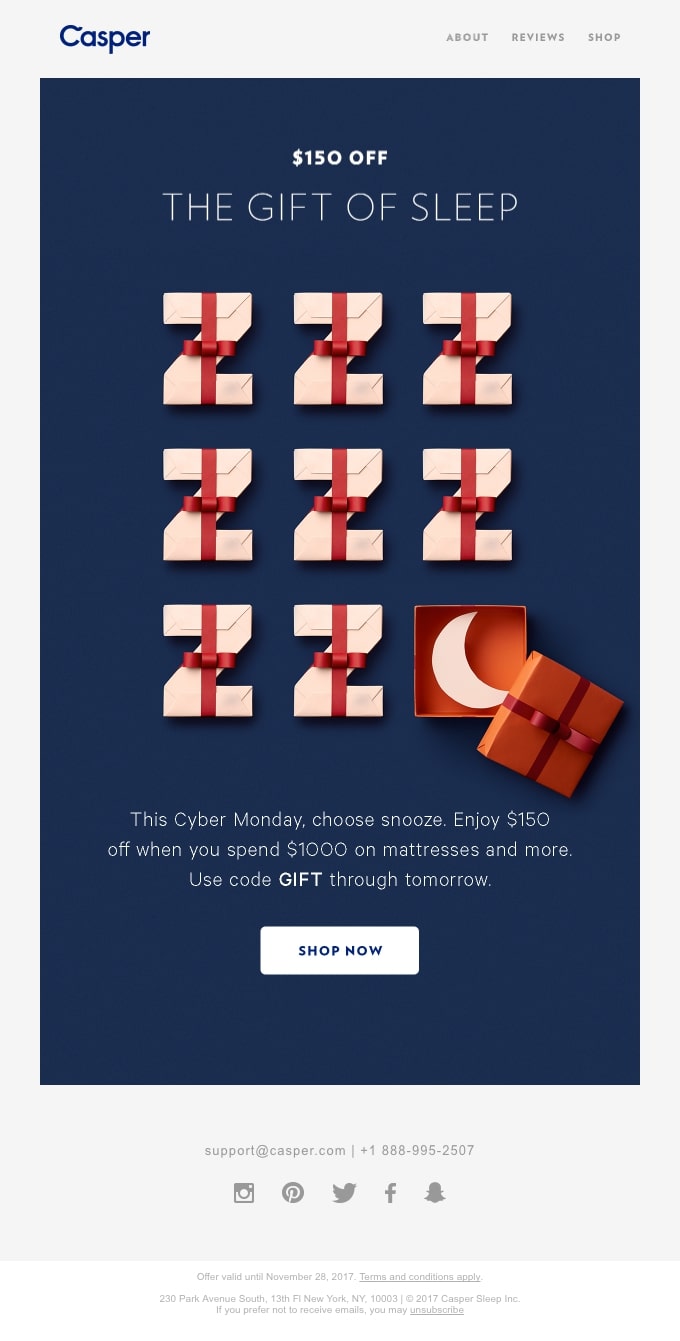
The whole concept of Casper‘s example revolves around sleep, which corresponds nicely with the sleep products they sell. Their offer is stated explicitly, yet the main focus is the content and design, which together create the overall feel that there’s an attractive deal.
Content: The content uses creative language with phrases like “choose snooze” and “the gift of sleep.” It also creates a sense of urgency saying that they can use the code “through tomorrow.”
Design: The main focus of the email is the Z-like images of gifts, which represent sleep and the gift that’s part of their Black Friday deal. This once again appeals to the reader’s subconscious in order to encourage them to make a purchase.
Bonus: Cyber Monday Emails
What about a Cyber Monday sale, you would ask. And you’d be right, because in the last years, Cyber Monday has become a vital part of the whole Black Friday weekend shopping frenzy. Cyber Monday is another great opportunity for boosting your sales this sales season.
That’s why we’ve also selected some Cyber Monday email examples:
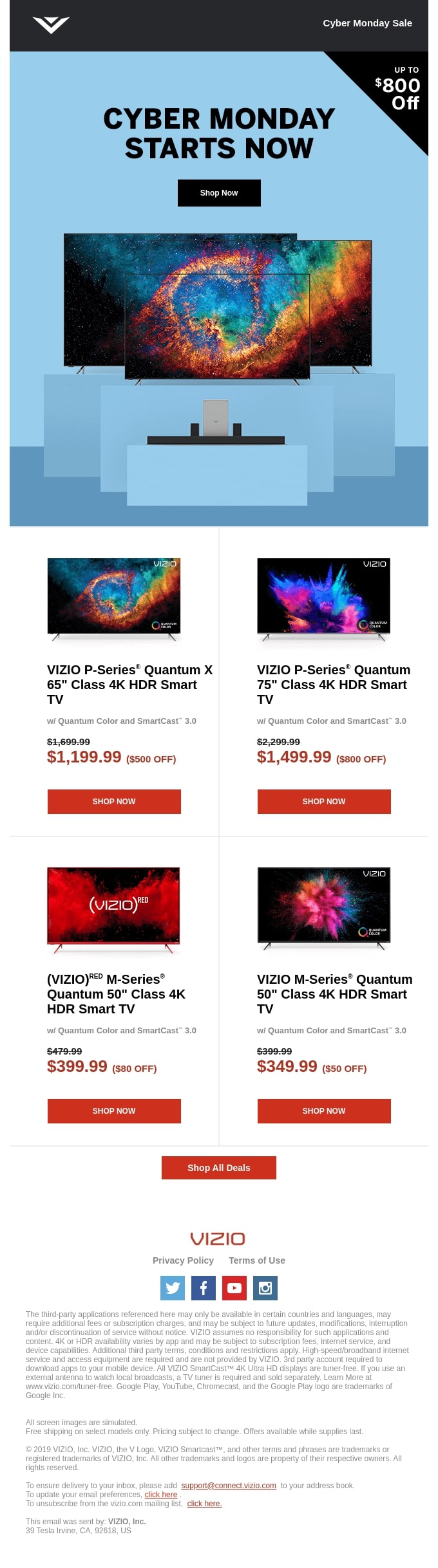
Takeaways:
In this example, the brand has put the three most important things above the fold—title, CTA button, and product image. They’ve also used a different background color for this section in order to make it stand out.
Content: The copy is short and clear—Cyber Monday has started, and subscribers are encouraged to “shop now.” The rest of the email focuses on the products on sale – they are presented with a featured image, title, short description, and, most importantly, a discounted price. This is compared to the original price, including the percentage discount for boosting sales. All these encourage the reader to buy as soon as possible.
Design: The main focus of the design is the product images of the TVs. Each TV screen is made very colorful to attract the reader’s attention. The CTA buttons are in red, which contrasts well on the white background.
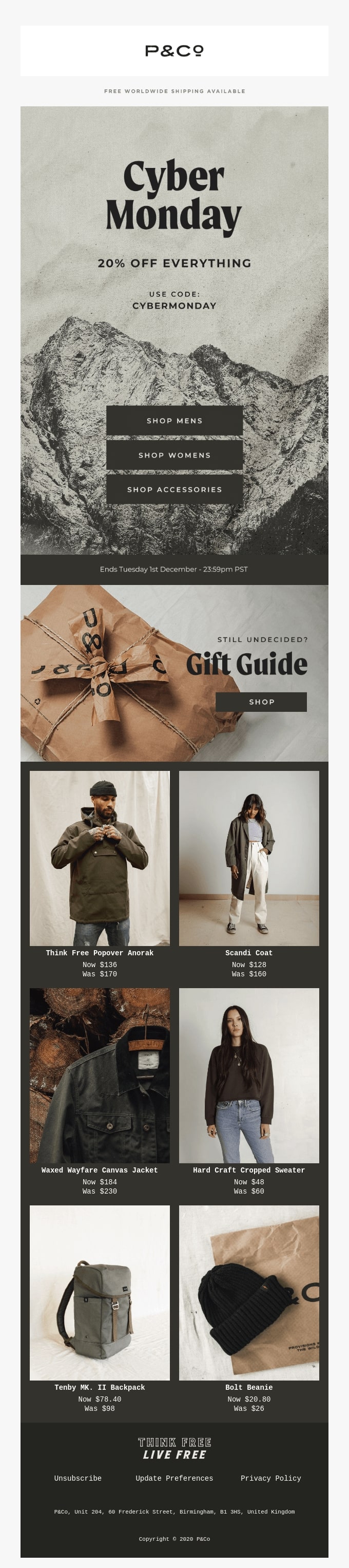
Takeaways:
In the first section, which is above the fold, the brand announces that Cyber Monday is here, what their deal is, and the categories in which they sell products. It’s basically a summary of all that their subscribers need to know.
Content: The content is very short and actionable in terms of CTA buttons. They use the simple, yet effective “shop” CTA button. The main focus is on the products and their reduced prices in an attempt to attract more customers.
Design: The product images complement the main message. The brand has picked product images from each category—women, men, and accessories, in order to attract more customers. The product image color palette is inline with the overall look and feel of the email, and they represent each product in its best light to increase sales.
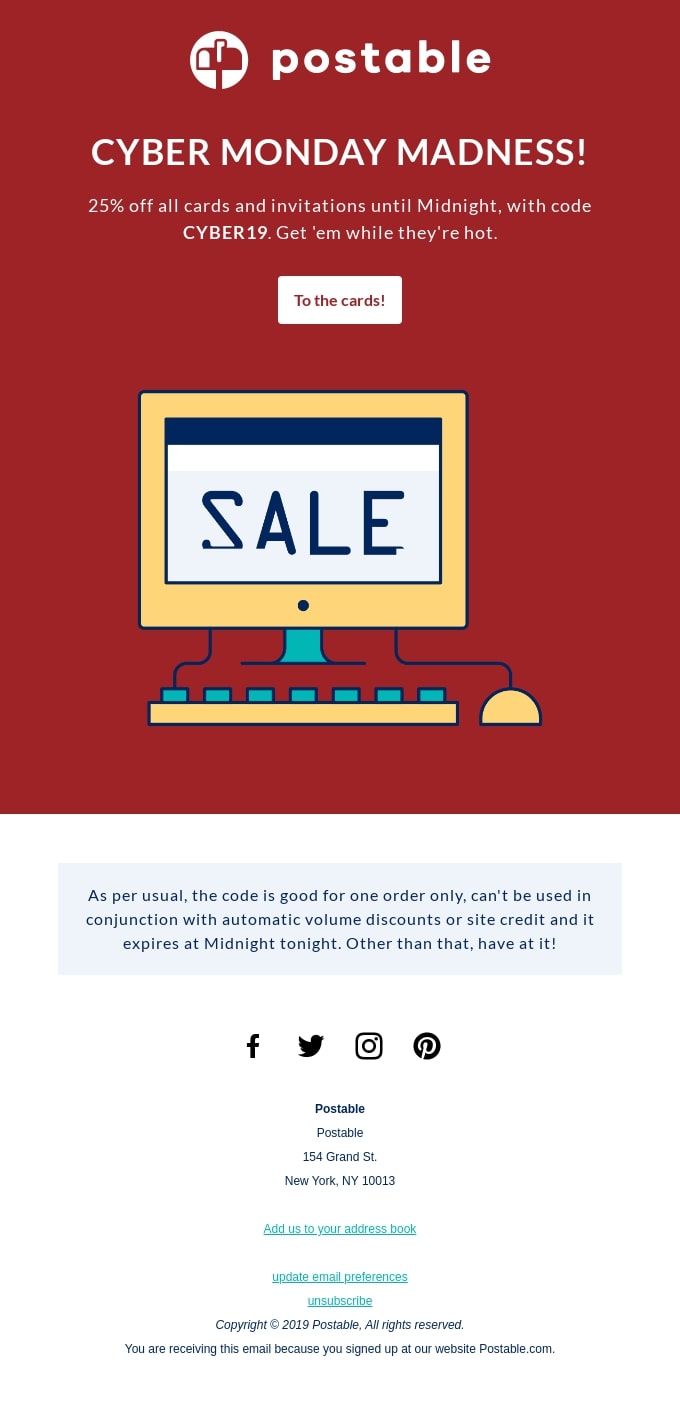
Takeaways:
This Cyber Monday email example creates a retro overall look and feel, especially with the computer image. It corresponds well with the brand’s business with cards—combining the retro element of a card with the modern touch of online cards that are sent via computers.
Content: The content is straight to the point—it introduces Cyber Monday and the deal that goes with it in two short sentences, which is a great hook for the reader to visit the website and make a purchase.
Design: The red background used for the main section makes it appealing and compelling for the readers. They’ve also used a very creative element for the label “sale,” which they’ve inserted on a computer’s screen for more effect.
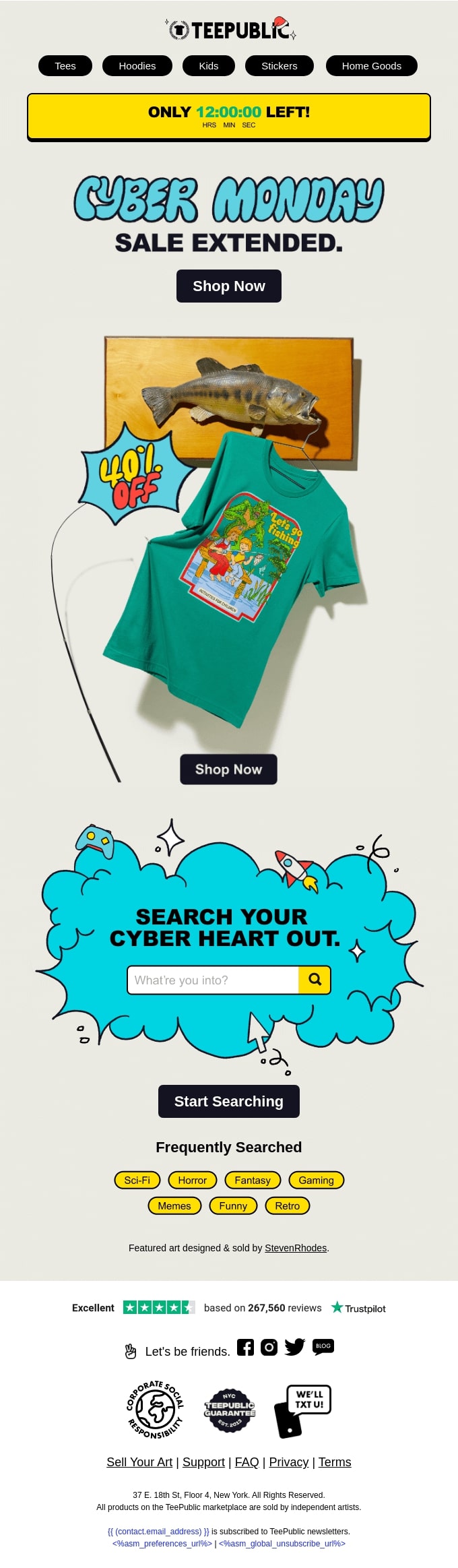
Takeaways:
The email creates a sense of urgency with the countdown timer at the top of the email, which is also in a bright color that contrasts well with the rest of the email.
Content: The content is very short—a title, CTA button, and percentage discount. The focus is on the product images that are placed in a creative way across the email to attract their target group – the younger audience.
Design: The design uses bright colors in correspondence with the brand’s products. Also, the title’s font is not traditional, but rather creative and outside-of-the-box in order to appeal to the younger audience.
Subject line: 🔮 Manifest miraculous writing with Grammarly Premium
Takeaways:
In Grammarly‘s email example, the main focus is the Black Friday discount—50% off any plan. They’ve also included their plan description in order to attract customers and upsell their premium plan.
Content: Since the brand is a writing assistant tool, the content of the email heavily relies on word play and appropriate word choice, starting with the subject line. The overall feel of the email is that words create magic.
Design: The design focuses on the “magical” header image that is used to emphasize the main idea about “magical words.” It’s the only colorful element in the email that stands out on the black background.
How To Build Your Black Friday Email Marketing Campaign
Now that we’ve looked at the Black Friday email marketing examples, it’s time to build your Black Friday email marketing campaign. Email marketing will be the backbone of your business success this shopping season. It’s important to create your Black Friday email strategy well in advance, in order to have time to implement and execute it.
Here’s all you need to know about every aspect of your Black Friday email:
Create Catchy Subject Lines
Begin by creating a Black Friday catchy subject line. Make sure it’s unique and compelling so that it can boost your open rates and click rates. Tailor it to your campaign – whether it’s a teaser, a sale announcement, last chance or an extended sale. Keep it short, straight to the point, and valuable. Above all, it should spark your subscribers’ curiosity and make them want to open your email.
You can see some great examples from popular brands below:
Snap. Share. SAVE! 🎁 (Canon)
See what’s heating up on Black Friday (WeWork)
These savings won’t stick around (Google)
50% off. Starting Now. (Brain.fm)
Cards Against Humanity Pays You $5 (Cards Against Humanity)
Black Friday Sale Starts… Now! ⏰ (Postable)
Get $50 off your reMarkable paper tablet (reMarkable)
Keep in mind that you can also perform A/B testing with different subject line ideas in order to check which one works best for your audience. By rule of thumb, you can send Version A to 20% of your audience, and Version B to another 20%. Then allow some time to see the results (e.g., open rates), and let the rest of your audience receive the winning subject line version.
[bf_prep_checklist_download]
Use Appealing Black Friday Email Templates
The next big thing to think of is your email design. Does designing an email from scratch sound scary? That’s where Black Friday email templates come to the rescue. They not only save time and effort, but can also be very effective if used correctly.
To leverage Black Friday email templates, you will need a third-party email marketing service, or hire a developer to code some email designs for you.
For instance, SiteGround Email Marketing allows you to create stunning emails fast with our free email templates. It includes templates for every need, including Black Friday and Cyber Monday, and lets you easily change colors, play with images, layouts, and everything else you need to create a beautiful email campaign in minutes.
Include a Strong Product Proposition
Now that you’ve got a beautiful email template design, you have to fill it in with value for your customers.
To succeed in ecommerce email marketing, you should have a strong product proposition and a valuable offer that goes with it. The same rule goes for your Black Friday ecommerce strategy.
If you offer a 10% discount for Black Friday, chances are that you won’t stand out among your competition. You need to come up with an attractive offer that your subscribers simply cannot pass by.
Do your research on competitors and offer better deals and more discounts. Keep your own inventory in mind as well. If you discount some of your best-selling products or services, you’ll have even better chances of boosting your sales.
Craft a Compelling Black Friday Message
Even the most appealing offer could remain unnoticed if it’s not conveyed clearly to your audience. That’s why you need to think carefully about your Black Friday messaging.
Begin by learning how to write promotional emails and incorporate these guidelines in your Black Friday email promotion strategy. Make sure to:
Communicate your value proposition in a clear, yet catchy voice
Use short and actionable words and sentences
Keep your overall message concise and straight to the point
Engage your readers by making them feel special and appreciated
Leverage phrases that create a sense of urgency
Creating compelling content is not that easy at all. You’ll need help and we’ve got you covered. With SiteGround Email Marketing, for example, you get a powerful built-in AI writer assistant that basically writes for you. All you have to do is share a bit about what you want to say and set the tone of voice, then sit back and watch the AI write the perfect email message for you.
Leverage Beautiful Images
Your Black Friday email design won’t be of any use if you don’t include beautiful and appealing visuals. If you’re selling products, ensure to include pictures that represent these products in the best way possible. In case you’re offering services, use visuals that are somehow related to the service and correspond to your brand guidelines.
If you’re using SiteGround Email Marketing, for example, you benefit from a free built-in, AI-generated image gallery. Instead of hiring a professional photographer, or paying for stock images, you can now simply generate the image you need – various topics and styles are available at no extra cost.
Make sure to keep all visuals and images inline with your brand style and guidelines so that your customers know and remember that this is your brand.
Pro tip: Use only high-quality images, but keep them low in size in order to have your site load as fast as possible for your visitors.
Include a Clear Call To Action
What if you accomplish all of the above, but you still don’t get sales? Then you’re clearly missing something—a clear call to action (button). Your CTA consists of two main parts:
Copy: Your CTA copy should be as clear, short, and actionable as possible. Use no more than 2-3 words in total. Try to be creative, but stay clear as well. Some examples to begin with include “Buy now,” “Shop now,” “Start shopping,” “Start saving,” “Get your deal,” etc.
Design: Make your CTA stand out within the overall design of your Black Friday email. It doesn’t have to be big and in a very bright color in order to achieve this. All you have to do is incorporate it in a subtle way that is both inline with your brand, and appealing design wise. It should make your readers’ eyes stop and click on it. Don’t forget to place your buttons above the fold or, in case of a longer email, in several places.
On Your Way To Black Friday Email Marketing Success
With all these Black Friday email examples in your possession, you’re on the right track to create your own and succeed during the upcoming busy shopping season.
If you have other Black Friday email marketing ideas that have proven successful, feel free to share them in the comments below. We’ll be happy to hear from you.
Your Black Friday sales promotion is locked in, and your email campaign has been created, but when it’s time to hit “send” you face perhaps the most critical decision: when? That’s right, there’s a best time to send those Black Friday emails, and getting it right can make a big difference for your bottom line. So let’s tease out the best time to send Black Friday emails, and what to send when.
But first thing’s first: hopefully you’re planning to send more than one Black Friday email! Indeed, with email recipients receiving loads of Black Friday promotions, it’s essential to have a Black Friday email marketing campaign strategy that includes sending emails in the weeks leading up to your big sale. With that in mind, let’s first tackle the ideal days and times of day, and then we’ll dive into what to send when.
When is the Best Time to Send Black Friday Emails?
The best time to send Black Friday emails is on Friday during the early morning hours, and no later than 8am.
For optimal results, it’s also recommended to send reminder or teaser emails on Tuesday, Wednesday and/or Thursday of Black Friday week. On those days, send your email in the morning – peak open rates typically land between 8am and 10am. Then, as mentioned above, schedule your main sale launch email early on Black Friday itself, by 8am or earlier.
Also, keep in mind that many sales extend through the Monday after Black Friday, so it’s a good idea to send a reminder email on Monday morning as well, by 8am.
Now that we’ve got Black Friday email days and times dialed, let’s dive deeper into what to send and when.
[bf_prep_checklist_download]
When to Send Black Friday Teaser Emails
Plan to start sending Black Friday Teaser emails at the beginning of November (or even late October if you really want to get a head start). Many marketers consider the day after Halloween to be the beginning of holiday promotions, making early November the ideal time to start previewing your promotion.
During the run-up to your sale, you’ll ideally send teaser emails once or twice a week, and especially during the two weeks just prior to Black Friday. General consensus is that the best day to send marketing emails is on Tuesday, followed by either Wednesday or Thursday. (On Mondays everyone is catching up on work life; on Fridays folks are checking out for the weekend.) If you must send an email on the weekend, opt for Sunday afternoon, when certain early birds are already starting to tackle their inboxes.Keep in mind the optimal time of day mentioned above when sending your teaser emails.
Your messages can take different angles, from countdowns, to early access, and customer rewards, among other Black Friday email examples.
When to Send Black Friday Sale Launch Emails
When your sale finally launches (either the day of Black Friday, or even before, which many businesses opt to do), it probably goes without saying that you should send an announcement email the day of, first thing in the morning – and even earlier in the morning than we’ve previously recommended. Aim to send it by 7am and, if you have customers in different time zones, consider sending your email no later than 7am in your earliest time zone. Meanwhile, if you are able to segment by time zone, then you can send batches at the optimal time for each geographic location.
When to Send Black Friday Reminder Emails
While usually it’s not recommended to send multiple promotional emails in one day, many rules go out the window during Black Friday! So if you’re running a one-day sale, don’t hesitate to send a second, reminder email later in the day, such as late afternoon or early evening. This email should communicate a sense of urgency about taking advantage of deals before they end.
Meanwhile, if you’re running a multi-day sale, consider sending a new reminder email each day, perhaps highlighting a different product or deal. Then don’t forget to send a final reminder email during your sale’s closing hours.
Black Friday Email-Timing Tips
Track Email Stats
This time of year is when email stats get tricky. That’s because email recipients are absolutely bombarded with Black Friday content, and therefore it’s very common that open rates are lower than usual – so don’t be alarmed!
That said, consider reviewing your open stats between each Black Friday email send. This way you can gather intel on which days and times might be working best. While you’re at it, review the strength of your Black Friday email subject lines and calls to action (do some perform better than others?), and consider tweaking and optimizing those as you go as well.
If you really want to fine tune timing, you may even wish to run A/B tests on some of your emails. Try sending a portion of a specific email during the morning, and the rest in the evening to see which time performs better. Apply your learnings to future sends.
Be Strategic About Email Frequency
Sending the right amount of emails during this time of year requires striking a subtle balance – you want to send enough to cut through the noise, but not so many that you are the noise. Here are a few things to keep in mind when it comes to email frequency:
Send up to a couple emails a week, but keep an eye on email stats, such as the unsubscribe rate. A noticeable increase in unsubscribes, for example, after you’ve sent a too-soon email could tell you to space out your messages a bit.
Repeat key messages since it’s likely your readers may not open all of your emails.
Offer fresh content and/or angles to capture new interest and keep readers engaged.
Pay Attention to Time Zones
If you have an online business, it’s very possible your customers span different time zones. As such, be mindful of when you send your promotional emails. For example, when you launch your Black Friday sale, you have such a small window to capture sales that it’s important you send out your email at the earliest reasonable hour in your earliest customer time zone.
Similarly, when you send out a last-call, reminder email, keep in mind possible earlier time zones. You wouldn’t want to miss reminding them when they have little or no time to take advantage of the sale.
Keep an Eye on the News
Big news events often impact whether readers pay close attention to their emails. In the US, for example, early November is election time – and if it’s presidential, it can absolutely dominate the news and people’s attention. As a result, aim to send emails when there’s a slight lull in the news cycle (that is: not on election day!).
Closing Thoughts on the Best Time to Send Black Friday Emails
Don’t drop the ball on your Black Friday sales promotion timing – it can be a game changer for your business. Indeed sending one, randomly timed, last-minute email announcement just isn’t going to cut it. It’s critical to send strategic emails at the best time of day, on the optimal day, and with the right frequency. So start crafting your Black Friday email plan now so that you’re ready to maximize sales impact when the big day arrives.
You tried to get a head start on Black Friday, but somehow—between running your business, managing customers, and juggling a million other things—it’s October and you haven’t started preparing. Don’t worry! Even at the last minute, there are a handful of essential steps you can take to get your site and promotions ready, so you’re set up to drive sales and make a real impact on the big day. Let’s dive into those last-minute Black Friday tips—no big budget or big team required.
[46]
1. Prioritize Your Website Essentials
Given that you don’t have a ton of time to prepare for Black Friday, the focus shouldn’t be on making your site fancy, but rather on making sure it works, and works well. Because at this stage, your priority is stability: your site loads quickly, runs smoothly, and can handle sales without hiccups. Here’s what to prioritize before the rush begins.
Cover Your Bases
If you do literally nothing else, take care of these two steps first. Without them, the rest of your Black Friday prep is at risk, never mind all of your potential sales.
Back up your site. If something goes wrong, you’ll want the safety net of rolling back quickly. Some hosts, like SiteGround Web Hosting, even handle daily website backups automatically, so you’re always protected without extra effort.
Test your checkout flow. Walk through the process yourself—add a product to the cart, apply a discount code, and complete a payment—on both desktop and mobile. If anything feels slow or confusing, customers will notice too.
Ensure Security
On Black Friday, more eyes will be on your site than at any other time of year—which also means more risk. A single security warning can send deal-hungry shoppers running, and even a small vulnerability could cost you a mountain of sales. That’s why having a super secure website should be a top priority even if you’re planning last minute.
Nip these security concerns in the bud straight away by double checking that your SSL certificate is active. And if you’re using WordPress, consider adding the free-to-use SiteGround Security Optimizer plugin that can address a slew of these security concerns with just a click.
Speed Things Up
On Black Friday, patience is nonexistent. Shoppers are comparing deals in multiple tabs, and if your site takes even a second too long to load, you’ll lose them—and the sale—to a faster competitor. That’s why optimizing your site speed right now is one of the smartest, most profitable moves you can make.
So if your page loading feels sluggish, it’s time to speed up your website by compressing images, minifying code, and removing unnecessary elements. And if you’re using WordPress, there’s a perfect last-minute solution for this: SiteGround’s Speed Optimizer plugin. It can handle many of these speed-improvement tasks automatically, helping your site perform at its best with very minimal effort.
Don’t Overthink SEO
At this stage, there’s no time for a full Black Friday SEO overhaul—but you can still make it easier for shoppers to find your Black Friday deals. Focus on quick, high-impact actions that drive immediate results:
Highlight your deals clearly: Make discounts visible on your homepage, product pages, and banners.
Use simple, searchable phrases: Include “[Your Brand] Black Friday” or “Black Friday deals” in headings, links, and calls to action.
Create a single promo area: If possible, have one easy-to-find section or page for all Black Friday offers.
Double-check links and codes: Ensure discount codes work and buttons lead to the correct pages.
Avoid Big Changes
Lastly, when the clock is really ticking, it’s just not the time for flashy design experiments. Forget auto-playing videos, complex pop-ups, or unnecessary widgets that slow things down. Stick to a streamlined, reliable, easy-to-navigate layout that helps customers find what they want and complete purchases without frustration.
2. Create Quick & High-Impact Promotions
Last-minute thankfully doesn’t mean low impact. So, to start, that means not defaulting to a lackluster “20% off everything” banner on your homepage. In fact, a tight timeline can actually work to your advantage, encouraging creativity and scrappiness—which, as a small business, you know is the name of the game. Let’s unpack what these quick and high-impact Black Friday ideas can look like.
Repurpose What Worked Before
First of all, if you’ve run Black Friday campaigns in the past, don’t feel pressured to reinvent the wheel. Most customers won’t remember last year’s promotions, so bringing back what worked well is a smart, time-saving move. Reuse proven offers, email templates, or even ad copy—you’ll save precious time and energy while still delivering results.
Build Bundles & Themed Sets
But if you need fresh ideas, consider pairing products that naturally go together to create themed packages. It could be a “Winter Survival Kit,” a “Self-Care Sunday Bundle,” or a “For the One Who Has Everything” set. The beauty here is that you don’t need new inventory or new anything; you can just reframe existing products in a way that feels fresh. Add a small discount or, if you’ve got the bandwidth and budget, you can even include a bonus item to make the bundle feel special and more giftable.
Flash Sales
Rather than offering a single Black Friday deal that lasts the whole day, week or weekend, create an even greater sense of urgency with Black Friday campaigns that last only a few hours. The limited-time aspect of these flash sales triggers FOMO (fear of missing out; you know the feeling), encouraging customers to act fast rather than wait. To get the full bang for your buck, be sure to promote these flash sales across your website, email list, social media, and even social media ads.
Daily or Countdown Deals
Even if you’ve exactly done zero planning, you can still set up last-minute scheduling of Black Friday deals to rotate throughout the weekend or into Cyber Monday. Highlight a few key products each day to give loyal customers a reason to return. This also helps give you something fresh to talk about, allowing you to bring in more sales each time you make you’ve got something new to announce.
Tiered Discounts
Encourage those larger last-minute orders with tiered discounts. For example: “10% off orders over $50, 20% off over $100.” This not only ups sales but also increases average order value, making every purchase more profitable. But be strategic about it: make sure your tier amounts sit just above your most popular product values—that way those customers that only planned on buying your most popular product, will be incentivized to buy just a bit more.
Free Gifts With Purchase
It’s the holidays, so who doesn’t love a little extra gift? A small bonus item can go a long way in converting hesitant shoppers. It doesn’t need to be expensive; just something that feels like a thoughtful (and ideally relevant) addition. Free gifts increase the perceived value of your offer, make your promotions more memorable, and give gift buyers the satisfaction of adding a little extra without spending more.
3. Go for Fast Marketing Wins
Even with limited time, smart marketing can amplify your Black Friday promotions and get customers to act. And the good news here for small businesses is that you really don’t need a massive budget and campaign. Instead, focus on high-impact, quick-to-execute strategies that drive results. Let’s take a look at what these fast Black Friday marketing wins can include.
Embrace Email Marketing
If you already have an email list, now’s the time to put it to work—there’s no time to start building one from zero. Even a quick, focused email campaign can drive significant Black Friday sales with minimal effort and cost. Here’s how to make it effective fast:
Segment Your Audience (If You Can): Use any existing segments to tailor your Black Friday emails—loyal customers, repeat buyers, or those who’ve interacted with past Black Friday promotions. Even small touches, like personalized subject lines or highlighting relevant product categories, can boost opens and clicks.
Keep It Simple: Focus on one clear, strong offer per email. Use straightforward headlines and bold calls to action like “Shop Now,” “Unlock this Black Friday Deal,” or “Ends Tonight.”
Time Your Sends Strategically: When it comes to the best time to send Black Friday emails, think about when your audience is most likely to check their inbox. Don’t hesitate to send a couple of targeted emails over the weekend—each highlighting a slightly different offer or reminding them of expiring deals.
Create Urgency: Simple urgency cues work better than anything fancy. Phrases like “Only a few hours left” or “Flash sale ends tonight!” can nudge customers to act immediately.
Test Before Sending: Double-check that every link, button, and CTA works correctly—broken links or confusing checkout buttons can cost sales.
Tools to Make It Easy: Platforms like SiteGround Email Marketing make last-minute campaigns stress-free. With pre-designed templates, built-in segmentation, AI-powered copy help, and real-time analytics, you can launch polished campaigns fast without extra tech headaches.
Boost Social Media Ads & Retargeting Ads
Paid ads can feel like a whole new frontier if you haven’t done them before, but the reality is that they don’t require weeks of preparation. Small budgets and targeted marketing strategies can still make a big difference, and really don’t require much time. Here are a few tricks to have in your back pocket in order to make last-minute promotions easy to execute:
Promote high-performing content: When it comes to social media marketing, find posts with strong engagement and repurpose them as ads with a clear Black Friday call to action.
Target warm audiences: Focus on followers, website visitors, or email subscribers rather than starting from scratch with cold audiences.
Retarget visitors: If you have tracking in place (like a Facebook Pixel), remind customers who have browsed but not purchased with timely ads.
Keep creative simple: A banner or badge that says “Black Friday Deal” on an existing image is often enough.
Repurpose Across Channels
No need to create entirely unique content across all marketing channels. Also no need to let any of your marketing efforts go to waste. So with that in mind, repurpose what you’re working on for one channel across all your channels. Not only does the consistency really drive home your message, but it makes last-minute content creation a whole lot easier. Keep in mind the following when repurposing content across channels:
Use the same headline, offer, and visuals across your website, social media, and email.
Adapt formats to each channel (Instagram stories, posts, email banners) but keep the core message the same.
The more places customers see your deal, the higher the likelihood they’ll act.
4. Lean into Small Business Saturday
Small businesses thankfully have their own special day to shine: Small Business Saturday! It falls the day after Black Friday and is your opportunity to really hit home with the small business message. Here’s how to make a last-minute impact on Small Business Saturday:
Promote Your Story: Shoppers love supporting businesses they feel connected to. Use this day to give them that story they can connect to, whether that’s via your brand background, your mission, or behind-the-scenes content. Calling out what sets your products or services apart can make customers feel good about buying from you—plus it can also plant the seed for long-term business.
Offer Exclusive Deals: Consider running Small Business Saturday-only promotions. Even small discounts, bundles, or freebies can motivate purchases and make shoppers feel like they’re part of something special.
Engage Locally: If you have a physical location, make it an event. Encourage in-store visits with limited-time offers, samples, or demonstrations. For online-only businesses, you can highlight local pride or showcase how your products support your community.
Tie Into Black Friday Momentum: Small Business Saturday is an opportunity to capture shoppers who might have missed your Black Friday deals. Remind them of popular products, rotate deals, or highlight new bundles (like, say, a “Small Business Bundle!”) to keep your sales momentum going.
5. Plan Efficiently
When time is tight, it’s tempting to just dive in and hope for the best. It’s that old “throw spaghetti at the wall” strategy. But even a simple, streamlined plan can save stress, keep you and your team focused, and make your Black Friday efforts more effective both now and in the future.
Start with Your Core Offer and Message: Identify your best deals and key messages first. What’s the main promotion you want to highlight? When does it start and end? Keeping this front and center ensures that all your marketing—website banners, social posts, emails—stays consistent.
Map Out Your Touchpoints: Decide where and when you’ll share your promotions: email, social media, paid ads, website updates, or even SMS. A quick customer journey map and bullet-point schedule is enough to keep everything organized.
Leverage Tools and AI: Scheduling and automation tools can save hours. Use email automation to schedule newsletters, social media managers to queue posts, and even AI tools to draft copy or graphics quickly. The goal is to free up time for engagement and last-minute tweaks rather than creating everything from scratch.
When you’re short on time, email can be one of your most effective tools. With SiteGround Email Marketing, you get ready-made templates, built-in segmentation, real-time analytics—and even AI features to help you draft subject lines and content faster. That means you can launch polished, high-impact campaigns in minutes and keep your Black Friday plan on track.
Keep It Simple: Don’t overcomplicate. Focus on the channels and promotions that will have the biggest impact. A lean, clear plan beats a sprawling, half-executed campaign any day.
Centralize Your Plan: Keep all details in one place—Google Docs, spreadsheets, or even a notebook. Tracking offers, post timing, and creative assets in a single location prevents duplication and ensures you know what’s happening across channels.
[46]
6. Monitor, Adjust, and Learn
Even at the last minute, tracking results and making quick adjustments can make a big difference in your Black Friday success. You don’t need complex metrics, but rather just focus on the digital marketing metrics that matter most.
Use the Tools You Already Have: Platforms like Google Analytics, your email marketing dashboard, and social media insights provide valuable real-time information. Check where traffic is coming from, which products are performing best, and which messages are driving engagement.
Double Down on What’s Working: If a particular email subject line, social post, or product bundle is performing well, lean into it. Promote it more heavily, rotate similar deals, or boost it with a small ad spend. Quick reactions can amplify your results.
Track Conversions, Not Just Clicks: Likes and opens are nice, but sales are the ultimate goal. Focus on which offers and channels are actually converting visitors into valuable customers. This helps you make smarter decisions for the remainder of the weekend.
Adjust in Real Time: If something isn’t performing, don’t be afraid to tweak it. Change copy, highlight different products, or adjust messaging urgency. Flexibility allows you to optimize performance even with limited prep time.
7. Think Ahead
Black Friday may be over, but your relationship with customers doesn’t—and shouldn’t!—end there. Even though you might be short on time, you can still use this once-a-year opportunity to strengthen loyalty and create long-lasting growth.
Grow Your Email List: Whether you already have an email list or are just starting one, Black Friday is a prime opportunity to grow it. If you don’t have a list yet, it may be too late to fully leverage this Black Friday—but you can still set yourself up for next year. Add a simple sign-up form on your website or offer a small bonus for newsletter subscriptions, so you’ll have a ready-to-go audience for future promotions.
Encourage Subscriptions: Encourage ongoing purchases with subscriptions, curated boxes, or memberships. Holiday promotions, bonus gifts, or short-term “giftable” subscriptions can introduce your brand to new customers while creating a predictable revenue stream.
Engage Post-Holiday: Follow up with thank-you emails, limited-time offers, or helpful content. Align your products with New Year goals or resolutions to make your brand part of customers’ routines.
Implement Loyalty Programs & Gift Cards: Introduce simple loyalty programs to incentivize repeat visits, and use gift cards to turn first-time buyers or gift recipients into ongoing customers.
Capture Insights for Next Year: Track what worked and what didn’t, whether that’s top-selling products, high-performing emails, or successful promotions. Keep a record to make next year’s planning faster, smarter, and—hopefully—a bit less last minute.
Pro tip: Leverage an easy-to-use email marketing platform to build your list, send targeted messages, create email automations, and nurture your leads.
Black Friday Ideas to Make Your Small Business a Success
Even if you’re working down to the wire, there are still plenty of smart, impactful ways to make the most of Black Friday. From tightening up your website basics to rolling out quick-turn promotions and embracing fast marketing wins, the key is to focus on what drives the biggest results with the time and resources you have. And it’s not just about Black Friday sales: The steps you take now can also set you up for stronger customer relationships and long-term growth well into the new year and beyond.
If there’s one tool that consistently delivers during the holidays, it’s email. And with SiteGround Email Marketing, it’s easier than ever to create polished, effective campaigns at the last minute. With built-in templates, segmentation, and real-time analytics, you can launch campaigns that look professional, connect with your audience, and drive sales—all without juggling extra tools or stress. Black Friday moves fast, but SiteGround helps you move faster.
Black Friday is the Super Bowl of the retail world—a moment when all eyes are on your business and the biggest opportunities of the year are on the line. With millions of shoppers searching online for the best deals, standing out in search results can make all the difference.
But this year, there’s a new twist: AI is reshaping how people search, and search engines are prioritizing content that truly helps users. For small businesses, that means it’s time to get strategic so your store stays visible during the holiday frenzy.
In this guide, we’re sharing 11 Black Friday SEO tactics to help you navigate the evolving search landscape and make this holiday season your most successful yet. Ready to dive in? Let’s go!
Key takeaways:
Black Friday = peak competition, so success relies on strong technical performance, fast websites, and clear, high-intent landing pages (not just discounts).
Search is now topic- and intent-driven: use long-tail queries, helpful content, and smart internal linking; optimize product pages with clear benefits, reviews, and trust signals.
Prepare your team + tech stack: mobile-first design, speed optimizations, security, backups, and fully tested Black Friday landing pages with strong CTAs and urgency elements.
Use social + email as SEO power sources: optimized social posts (captions, alt text), countdowns, teasers, and email sequences that drive qualified traffic.
Implement structured data + optimize for AI Overviews to increase visibility and make your pages eligible for rich results and AI-powered summaries.
What’s New in SEO and Black Friday
SEO is constantly changing, and with Black Friday just around the corner, it’s essential to keep up with the latest search trends. This shift happens as artificial intelligence becomes more integrated into how search engines operate, helping to better understand user behavior and intent.
So is Google getting rid of SEO? No, but it’s refining its algorithms to focus on helpful content and a deeper understanding of user needs. This evolution is reshaping how businesses approach holiday searches, making it crucial to adapt.
With that in mind, here are the top four changes small businesses should consider for Black Friday SEO:
Leveraging AI Tools: Search engines are increasingly using AI to better match search queries with relevant content. By using AI-driven tools, small businesses can improve their search visibility and keep you ahead in the SEO future. These tools can analyze data to identify popular trends and keywords.
For example, if you run a small bakery, AI tools can help you discover trending items like “vegan pastries,” allowing you to adjust your menu and tailor your marketing messages to attract more customers.
Sustainability and Ethical Practices: Search engines like Google are increasingly favoring businesses that prioritize sustainability and ethics. With more users searching for “green” or “ethical” brands, search engines prioritize relevant content to match this demand, aligning with the N-E-E-A-T framework (Notability, Expertise, Authoritativeness, and Trustworthiness), which we’ll explore more later in the article.
So, if your business is eco-friendly, promote it on your website to stand out.
Social Media and SEO: Now that Instagram and Facebook posts are searchable in Google searches, it’s time to step up your game. But how? Make sure your captions are packed with relevant keywords to help people find you. Add descriptive alt-texts to your images so search engines know what they’re looking at. Dive into creating fun and valuable Reels, and don’t forget to use hashtags and location tags to expand your reach. This way, you’ll not only boost your Instagram presence but also get more eyes on your business through search results.
Mobile Experience Still King: While this is not as new, having a smooth mobile experience is still key. Make sure your website is quick, easy to navigate, and looks good on all screens. If you run an online store, you want your customers to enjoy a hassle-free shopping experience, where they can browse and buy without any issues. The simpler it is, the more likely they are to make a purchase!
[41]
11 Essential Tips for Black Friday SEO
Feeling overwhelmed by the holiday shopping madness? You’re not alone. For small and local businesses, standing out among the retail giants can feel like trying to find a needle in a haystack.
Here are 11 must-know Black Friday SEO tips to help small businesses stand out and make a big impact during this bustling season.
1. Do Your Keyword and Content Research
With AI overviews making this year a bit unpredictable, it’s hard to say exactly how traffic will be impacted. Organic traffic is still one of the strongest marketing tools for small businesses—it’s budget-friendly, works long-term, and pulls in the right crowd, all while boosting your credibility.
But AI is changing the game. Google’s AI Overview Optimization (AIO) is moving away from just targeting specific keywords to focusing on semantics and context. It emphasizes broader topics, topic clusters, and long-tail keywords to deliver comprehensive, user-focused content that aligns with search intent and provides value.
Even with these changes, don’t toss your keyword research out the window just yet—it’s still incredibly important. It gives you a clear picture of what people are looking for, letting you tweak your content to fit their needs and improve your rankings. Just adapt it to fit the new focus on broader topics and clusters. Let’s examine how to make this happen.
Review last year’s performance:
Check which keywords drove the most traffic and conversions during Black Friday and Cyber Monday.
To find your top relevant keywords, navigate to Google Analytics and explore the “Acquisition” section, then head over to “All Traffic” and select “Channels.”
Conduct fresh keyword research:
Look for keywords with high search volume but low competition—this is what keyword value is all about. These are terms lots of people search for, but not many businesses target, giving you a better chance to rank.
With AI reshaping search, focus on long-tail keywords and providing context rather than just specific keywords. For example, instead of targeting “running shoes,” dive into “best footwear for marathon training” or “how to choose the right running shoes for your foot type.”
Also, keep in mind that it’s more important than ever to make sure every page has a clear CTA and a path to conversion. Mapping out the customer journey helps you get a clearer picture of how visitors navigate your site, so you can guide them smoothly from just being interested to making a purchase.
We might not be able to guarantee massive traffic numbers, but we can make the most of the visitors who do land on the site.
2. Meet the N-E-E-A-T Principles
As Black Friday approaches, optimizing your website and product pages for both search engines and user experience is crucial for driving sales.
Here’s how you can incorporate the N-E-E-A-T principles directly into your product pages and descriptions.
Start by making your products stand out with catchy titles and descriptions. And make sure they’re extra clear, so consider using expressive keywords like “Black Friday glasses deals” so people can easily find your products when they’re searching online.
Show off your expertise by giving detailed product info on the product detail page. Highlight any cool features or benefits that make your products special. And don’t forget about social proof like customer reviews—highlight them on your product pages. Positive feedback helps build trust and can really sway new buyers.
Trust is a big deal, so make sure your site feels legit by including secure payment badges, clear return policies, and an easily accessible “Contact Us” page for shoppers to reach out with any questions.
If you’re feeling up to it, consider adding some extra content like a quick guide that links back to your products. It’s not essential, but it can be a nice bonus to drive more traffic.
Here’s a quick content tip:
Think about your target audience and their pain points. If you’re selling eyeglasses, for instance, what would a potential buyer want to see during Black Friday? Maybe a guide on choosing the right frames for different face shapes or special discounts on lens upgrades.
Then, make sure your content addresses these needs directly and highlights the deals you’re offering, making it easy for them to find and act on.
This mix of easy navigation, valuable content, and trust turns your site into a trusted go-to spot for all those awesome Black Friday deals.
3. Assemble Your Dream Team
Once your quality content is ready, the next step is making sure your website can handle the Black Friday rush. How you do that depends on your setup—whether you have an in-house team, work with freelancers, or are flying solo.
If you’ve got an in-house team, you’re in a great spot since you can bounce ideas around and make changes quickly. Black Friday is going to bring a wave of traffic, and having your team on deck means you can quickly tackle any issues or jump on new opportunities. Regular check-ins help keep everyone on the same page, aiming to wow those holiday shoppers.
Working with freelancers? Fresh ideas and skills can give your site a unique twist. Just keep the lines of communication open and check in often to make sure everything’s running smoothly during this busy season.
Flying solo? Black Friday can be a wild ride, but having full control lets you focus on the essentials like fast load times and mobile-friendly design—super important when every second counts.
A few quick ways SiteGround helps you:
SiteGround Email Marketing handles everything from segmentation to automation, simplifying the process and making it easy to use effectively.
With both human and AI support, SiteGround is there to help you navigate any issues that come up, ensuring you have the assistance you need when challenges arise.
However you’re handling your website, the goal is to create something that grabs people’s attention and makes them want to come back. If your site is easy to use and looks fantastic, it builds on the trust and credibility you’ve established with your great content.
4. Create Black Friday Landing Pages
Landing pages are where you display your best deals and draw in the crowds. They play a crucial role in your Black Friday campaigns by focusing all the attention on your special offers, making it easy for shoppers to find exactly what they’re looking for. Plus, they’re great for SEO because they can help you rank for those sweet Black Friday-related searches.
Follow the key landing page best practices to help you nail it. Keep things simple and focused. Design your page to highlight your best deals with bold discounts, a countdown timer, and compelling content that clearly communicates your value propositions.
You can use a Black Friday template or the SiteGround Website Builder’s drag-and-drop feature to easily set up your offers, engaging copy, testimonials, and a strong call to action.
Think mobile-first since most folks will be browsing on their phones. Go for bold colors to create that urgency vibe, but make sure they highlight your products, not distract from them. And don’t forget to optimize those images and videos so everything loads fast, even when traffic’s heavy.
Be clear about your offers—put those discounts front and center with strike-through prices or percentage savings. A punchy headline like “70% Off All Plugins – Today Only” can grab attention, and a countdown timer with phrases like “Ends at Midnight” adds that extra push.
Keep your Black Friday landing page centered around one main message with a clear call to action, like “Claim 50% Off Now.” Adding a few testimonials can really help build trust, and it’s important to have easy navigation so visitors can find what they’re looking for without any hassle.
Before the big day, take some time to test everything out, making sure it all works perfectly for when the Black Friday crowd arrives.
It’s also about building a community, creating a buzz, and getting people excited and engaged with what you have to offer.
To get everyone hyped and heading to your website, try mixing in some fun content like countdowns to the big day, sneak peeks of your awesome deals, and live unboxing videos. Throw in a bit of humor to keep things light and engaging—because who doesn’t enjoy a little giggle while hunting for bargains?
Just be sure the humor aligns with your brand voice and resonates with your target audience, keeping your overall goals in mind to ensure the tone fits the message you’re conveying.
6. Use Email Marketing Wisely
While email marketing might not seem related to SEO at first glance, it can still have an impact. That’s because email marketing brings qualified traffic to your site, which can increase engagement metrics like dwell time and reduce bounce rates—all important for SEO. This tells search engines that your content is valuable.
Plus, it helps build brand awareness and authority by promoting high-quality content, which can lead to more backlinks and social shares, giving your site’s ranking a nice bump.
As you gear up for your BFCM marketing, here are some email marketing tips to keep in mind.
For email subject lines, remember that inboxes are jam-packed during Black Friday. So use words that create urgency, like “limited time” or “only a few left.” You can even use AI to help craft subject lines that really stand out.
For your emailCTAs, make sure they’re above the fold so subscribers don’t have to scroll to see them. Use bold colors and big fonts to make them stand out. And, make sure your CTA text matches your offer—like “Claim my gift” if there’s a freebie involved.
Finally, map out your BFCM message schedule so your emails land in inboxes at just the right moment to have the most impact. With SiteGround Email Marketing, it’s easy to manage your timing and make sure your messages get noticed.
7. Implement Structured Data & AIO
Schema markup is a type of code, often called structured data, that tells search engines exactly what your website pages are about. Using schema markup is a great way to make your website stand out in search results.
You add this to your site’s HTML, which isn’t as tricky as it sounds. WordPress users can use plugins, while others can use AI tools for help.
Just make sure your schema markup code snippets are correct and not broken. To spot and fix any issues, try using a tool like Google’s Rich Snippets testing tool. Just pop in your webpage’s link or paste your page’s code, and it will check for any structured data problems.
Also, keep in mind Google’s AI Overviews (AIO), which provide quick content summaries in search results. Structured data plays a key role here by helping search engines understand and organize your content effectively. This means your site is more likely to be featured in AIO summaries.
To make the most of AIO, break your information into easy-to-read “chunks” that are perfect for featured snippets. This strategy not only helps your site grab attention but also delivers useful info quickly to users. Getting featured in AIO can really get you noticed and take your online presence up a notch. It’s all about making your content accessible and engaging.
8. Reuse and Refresh Evergreen Content
While keeping up with trends is great and sometimes essential, evergreen content is always a solid bet. Think of it like a classic little black dress in your content wardrobe—never out of style and easy to accessorize.
Take those timeless pieces, like gift guides, how-to articles, and product reviews, and give them a fresh twist by adding Black Friday specifics. For example, update a gift guide with this year’s trending products, or add new tips to a popular how-to article. This way, you keep them relevant and engaging all year long without starting from scratch.
There are some great SEO perks, too. By reusing and updating evergreen online content, you can strengthen your site’s authority through smart internal linking. This approach also helps you avoid the pitfalls of duplicate content penalties, keeping your site in good standing with search engines.
For small businesses, this strategy is a real time-saver. Instead of starting from scratch, you can take last year’s posts and turn them into this year’s hits with minimal effort. It’s all about making the most of what you already have and giving it a new lease on life.
9. Improve Website Loading Speed & Security
For Black Friday SEO, having a fast and secure website is crucial. A quick-loading, secure site not only keeps your customers happy but also helps your search engine rankings. A slow site can mean lost sales, especially on Black Friday when every second matters.
Start by compressing images to improve your website performance and speed up load times, enabling HTTPS for secure transactions, and using caching to handle those Black Friday traffic surges smoothly.
For ecommerce small businesses, focusing on speed and security is key to capturing sales and improving your site’s SEO performance during the busiest shopping day of the year.
10. Focus on Local SEO
Local SEO is all about optimizing your online presence to attract more business from relevant local searches. For example, if someone searches for “Black Friday deals near me,” a well-optimized Google Business Profile can help your online store appear in the search results. Start by claiming and optimizing your profile, and make sure to include Black Friday hours, special deals, and location-based keywords.
For brick-and-mortar businesses looking to expand online, this is a great way to turn local loyalty into digital sales.
Adopt a hybrid approach that drives foot traffic (the number of customers physically visiting your store) while increasing online searches for “near me” queries. This strategy not only brings people into your store but also helps them find you online.
11. Monitor & Measure Your Marketing Efforts
So, with all these tips in mind, the next step is to observe and see how they all come together. Keeping an eye on how your Black Friday SEO strategies are performing is essential. Track key digital marketing metrics like website traffic, conversions, and keyword rankings both during and after the event. This helps you see what’s working and what needs tweaking.
Free tools like Google Analytics can help you make data-driven decisions in real-time. They offer valuable insights into who’s visiting your site, what other relevant pages they’re checking out, and how long they stick around. You can also see what devices people are using and where your traffic is coming from, whether it’s social media, search engines, or direct visits.
Keep in mind that Google Search Console holds data for up to 16 months, giving you a clear view of clicks and impressions from last year. This historical data is invaluable for making informed SEO and keyword decisions.
And while you’re busy keeping tabs on your Black Friday SEO, SiteGround’s got the tech side covered. With 24/7 checkups and automatic alerts, we handle the nitty-gritty for you. Plus, daily backup servicemeans your data is safe and sound. So you can focus on your Black Friday sales without worrying about technical hiccups, making your Black Friday run a whole lot smoother and more relaxed.
After Black Friday: Sustaining Momentum
Once Black Friday is over, it’s time to keep the momentum going. Start with a post-event analysis to review what worked well—such as top-performing keywords—and apply these insights to optimize your strategies for Cyber Monday and the rest of the holiday season. This way, your Cyber Monday search efforts can build on the success of your Black Friday campaigns.
Think about long-term strategies to convert that seasonal traffic into loyal, year-round customers. Sending follow-up and other types of emails and refreshing your content are great ways to keep your audience interested and eager to return.
For small business owners, Black Friday is just the beginning. It’s a launchpad for ongoing growth.
Let’s Crush Black Friday Together with SEO!
Ready to make this Black Friday your best one yet? With a few smart SEO moves, your small business can really stand out during the holiday rush. Think mobile-friendly websites, optimizing for AI, and making sure your content is exactly what your customers are searching for.
And don’t worry, with SiteGround you can enjoy peace of mind knowing your site is in good hands, so you can make this Black Friday truly unforgettable!
A website builder and a custom website can both get your business online—but they’re built for very different situations. One prioritizes speed, affordability, and ease. The other offers deeper control and flexibility, at a cost. For most businesses, one of these is a clearly better fit than the other. This guide breaks down the key differences so you can decide with confidence.
Key takeaways
Website builders and custom sites serve different needs depending on your budget, timeline, and technical requirements.
Website builders are ideal for speed, affordability, and ease of maintenance—especially for small and growing businesses.
Custom websites offer maximum flexibility but require more time, budget, and ongoing technical support.
Many businesses can launch, grow, and even sell online successfully without custom development.
The best choice is the one that supports your current goals while leaving room to grow later.
[24]
What is a Website Builder?
A website builder is an online tool that allows you to create a website without needing to write code or hire a developer. Most website builders use a drag-and-drop editor, pre-designed templates, and built-in features like contact forms, image galleries, and ecommerce options. This makes it possible to design and launch a professional site quickly and with little budget, even if you have little or no technical expertise.
One of the key distinctions of a website builder is that the website builder platform typically manages the technical side for you. This includes hosting, performance optimization, security updates, and ongoing maintenance, so you don’t have to worry about keeping your site running smoothly. Many website builders also provide dedicated support, helping you troubleshoot issues and make updates easily.
What is a Custom Website?
A custom website is a site that’s designed and built from the ground up, usually by a web developer or development team as well as with the help of a web designer. Instead of relying on builder templates, every element—from the website layout and design to advanced features and functionality—can be adapted to your exact needs. Generally it comes with much higher costs, both for initial creation, and ongoing maintenance.
According to GoodFirms’ Web Development Cost Survey, a custom small business website typically runs between $1,500 and $10,000+, with most projects landing in the $1,500–$4,000 range for a basic site and climbing well beyond that as complexity increases. That’s before factoring in ongoing developer costs for updates, security, and maintenance.
Website Builder or Custom Website: Which is Right for Your Business?
The best option for your website depends largely on your business type, stage of growth, and long-term goals. Below, we break down when an online website builder makes the most sense and when a custom site might be worth the investment.
Website Builder vs. Custom Website: At a Glance
Website builder
Custom website
Cost
Low monthly subscription
High upfront + ongoing
Time to launch
Days
Weeks to months
Technical skill needed
None
High
Maintenance
Handled for you
Your responsibility
Design flexibility
Template-based
Fully custom
Best for
Most small-medium businesses
Complex or enterprise needs
Entrepreneurs & Freelancers
For most freelancers and solo business owners, a website builder is all you need. It offers an option that is professional, affordable, and easy to manage so you can focus on your work—not on technical details.
When a website builder works best:
You need a polished site live in days, not weeks
You’re creating a personal website with few or no other stakeholders
You want to keep upfront costs low while still looking professional
You don’t want to handle updates, hosting, or security—builders manage that for you
You’d like to make quick edits to your site without relying on a developer
You mainly need common features like a portfolio, contact form, or standard ecommerce
When a custom website makes sense:
You want a completely unique design to stand out in a crowded industry
You require advanced functionality, such as complex booking tools or client dashboards
You have the time and budget to hire a website designer and developer and maintain the site over time
Or, you’re a developer yourself and have the knowledge to build and manage a site from scratch
Bottom line: For most entrepreneurs and freelancers, using a website builder offers the right mix of speed, affordability, and ease of use. It gives you a professional presence online—without the hassle of ongoing tech management—so you can focus on growing your business.
Take your freelance or solo business online quickly and professionally with SiteGround Website Builder. The all-in-one platform handles hosting, security, performance, and updates for you, so you don’t have to worry about technical maintenance. With an intuitive editor and customizable templates, you can create a polished website in no time—all without relying on a developer. Plus, with 24/7 support, help is always just a click away.
For most small businesses, a website builder is the most practical choice, as it’s professional, affordable, and easy to maintain without a developer or in-house tech team. Custom development has its place, but fewer small businesses actually need it than you’d think. Your website is often the first place customers evaluate you, so here’s when each option makes sense.
When a website builder works best:
You want a professional, affordable online presence and web design without a big upfront investment
You don’t have an in-house IT team and prefer not to worry about hosting, security, or maintenance
You need built-in features like appointment booking, online payments, or product catalogs
You’d like the ability to quickly update your site—adding new products, seasonal promotions, or testimonials—without relying on outside help
Your growth plans are steady but don’t require highly complex or custom integrations right away
As you can see in the image above, with a website builder, you can easily integrate pre-built functionality such as appointment booking without any technical skills or know-how.
When a custom website makes sense:
You need specialized functionality, like a highly complex ecommerce setup or advanced inventory management
You want an extremely tailored design that goes beyond what templates can offer
You’re planning for rapid growth and need a scalable site that integrates tightly with other business systems
You have the budget and resources to hire developers and website designers for both the build and ongoing support
Bottom line: A website builder is often the most practical choice for small businesses. It provides the right balance of cost, flexibility, and ease of use, while freeing you from the technical headaches of site management. If your business requires more advanced, specialized tools, custom development might be worth the investment.
Growing Startups
In the early stages, a website builder is almost always the right call because speed and cost matter more than custom features. And it’s not just about having an online presence, but also building credibility with investors, supporting customer acquisition, and adapting to new opportunities as they come.
When a website builder works best:
You need to launch quickly to validate your idea or reach early customers
You want a professional look without dedicating large chunks of your budget to web development
Your team prefers to make fast edits in-house as your offerings evolve
You need built-in marketing features (landing pages, forms, email marketing integrations) to support growth campaigns
You’re focused on speed to market
Most website builders make it easy to add key features like email newsletter sign-ups (as seen in the example above). For example, with the SiteGround Website Builder, you can quickly build your site and integrate an email form that connects seamlessly with SiteGround Email Marketing, helping you generate leads and engage customers from day one.
When a custom website makes sense:
You’re scaling fast and need custom or advanced features and integrations that website builders can’t provide
You require complete control over every element of your site and its functionality and presentation in order to differentiate from competitors
You’ve secured funding and have resources to invest in long-term scalability and technical support
Bottom line: For startups, website builders are excellent for moving fast and keeping costs lean during the early stages. But as you scale your business, a custom-built site might be a natural next step depending on your website needs and budget.
Established Enterprises
For established enterprises, the answer often goes the other way—custom development is usually the right foundation for core business operations. That said, website builders still have a clear role: campaign sites, microsites, and product launches where speed and low maintenance matter more than deep customization. It depends on what you’re building and why.
When a website builder works best:
You need quick, professional microsites for campaigns, events, or product launches
You want to create landing pages or temporary sites without involving your development team
You value ease of updates, built-in maintenance, and website security handled by the website builder platform
You want a cost-effective solution for projects that don’t require deep custom integrations
When a custom website makes sense:
You need a fully custom site that integrates with multiple internal systems or third-party tools
Your design and functionality requirements call for complex features and exceed what templates and plug-ins can provide
You have the resources to build and maintain a complex site over the long term
Bottom line: For established enterprises, custom sites are often necessary for core business operations, but website builders remain a smart choice for smaller, campaign-specific projects where speed, ease of use, and low maintenance are priorities.
Website Builder or Custom Website: Final Considerations
Choosing between a website builder versus a custom site comes down to your business goals, budget, and technical needs. Website builders are especially ideal for entrepreneurs, freelancers, and small to medium businesses that need a professional online presence quickly and easily, with minimal ongoing maintenance.
Custom websites, on the other hand, can provide unmatched flexibility and advanced functionality, making them better suited for enterprises or businesses with very specific requirements—but, of course, they typically require more time, resources, and technical skills.
Long story short: for many businesses, a website builder is the smartest choice. Platforms like the SiteGround Website Builder give you everything you need to launch a professional, fully functional website without worrying about hosting, security, or complex technical setup. With intuitive tools, customizable templates, built-in features, and around-the-clock support, it balances speed, affordability, and flexibility. This makes it a great fit for a wide range of businesses looking to grow online. And if selling online is part of your plan, SiteGround Ecommerce lets you add ecommerce functionality with ease—making it a great fit for a wide range of businesses looking to grow online
FAQs: Website Builder vs. Custom Website
What’s the cost difference between using a website builder and hiring a web developer?
Website builders typically run on a low monthly subscription and include hosting, security, maintenance, and support. Custom sites require a larger upfront investment and may involve ongoing costs for hosting, updates, and developer support. For most small businesses and freelancers, an online website builder provides a professional site at a fraction of the cost.
Is it easier to maintain a website builder or a custom-built site?
Website builders simplify maintenance by handling updates, security, and hosting for you. Custom website development requires more hands-on management and often calls for a dedicated developer for technical updates. For those who want to focus on running their business rather than managing tech, a website builder is generally easier to maintain.
Which is more secure: a website builder or a custom website?
Both options can be secure, but website builders often include built-in security features like SSL certificates, automated backups, and platform-level monitoring. Custom sites can also be secure, but you or your development team need to manage updates, patches, and security protocols.
How do website builders and custom websites compare in terms of speed and performance?
Website builders are optimized for speed right out of the box and often include performance enhancements automatically, such as caching, content delivery, and image optimization. Custom websites can also achieve high performance, but this requires careful development, testing, and ongoing optimization, as well as a reliable web host. With a platform like SiteGround Web Hosting, both website builders and custom sites can benefit from fast, secure servers, global content delivery, and built-in caching, ensuring your website loads quickly and reliably for visitors.
Can a website builder match the SEO potential of a custom website?
Yes, modern website builders include search engine optimization (SEO) tools such as customizable URLs, meta tags, alt text, and integration with analytics platforms. While a custom website may offer more granular control, many small and medium businesses can achieve strong search engine optimization performance using a website builder.
A high-converting service page does one thing: turn curious visitors into paying clients. Pages that fail tend to share the same flaws, whether that’s vague headlines, feature-heavy copy that forgets to explain why it matters, or layouts that overwhelm instead of persuade. The ones that work make the value instantly clear, back it up with proof, and never leave a visitor wondering what to do next.
This article breaks down the copy, the design, and the common mistakes to avoid, so you can build a service page that actually does its job.
Key takeaways:
An effective service page combines clear, benefit-driven copy with intentional design.
Each service deserves its own web page to address specific problems and guide visitors toward action.
Headlines, proof points, and CTAs work together to establish trust and drive conversions.
Strong structure and scannability matter as much as the words themselves.
Avoid common mistakes—like vague messaging, weak CTAs, or poor mobile design—that cause visitors to drop off.
What Is a Service Page?
A service page is a dedicated websitepage that explains a specific service your business offers. It combines persuasive copy with smart service page design to clearly communicate value, address objections, and guide website visitors toward taking action—whether that’s filling out a contact form, booking a consultation with your sales team, or making a purchase.
When it comes to structure, there are two common approaches. An overview services page lists all of your different services on one single page, with short descriptions of each. This works well for smaller or newer businesses that are still defining what they offer. The second approach is individual specific pages, one per service, which allows you to offer more detail, benefits, and proof points for each offering. This is the model most established businesses use, and the one this article focuses on.
It’s also worth noting that the two aren’t mutually exclusive. Many businesses have both: a main services page that gives an at-a-glance overview, with each service linking through to its own dedicated page.
What’s the difference between a homepage and a service page?
Unlike a homepage, which gives a broad overview of your business, each service deserves a separate page. This lets you dive deeper into the details, fine-tune your message and benefits appropriately, and lead potential clients toward a carefully chosen action.
Before You Start: Get the Message Right
Before writing a single word or toiling over image placements, you need to make sure you’ve got your message dialed. During the website planning process, it’s likely that you defined your unique selling proposition (USP) and target audience, and hopefully woven it into your homepage. So your service page should carry that narrative forward, customizing the UVP specifically to each service.
To orient you in terms of what your service page should cover, ask yourself:
Who is this service for, and what problem does it solve?
How does this service support or extend the USP we’ve already established?
Why is our solution better or different from competitors?
When you keep your USP and audience front of mind, your copy and service page design will work together to create a consistent, compelling experience. This kind of thoughtful and targeted messaging reassures visitors, builds trust, and sets the stage for conversion—because a confused visitor rarely converts. A clear and convinced one, on the hand, clicks and keeps going.
What Are the Key Elements of a Service Page?
Before you start creating, remember that a service page isn’t just about words on a screen. It’s a carefully constructed mix of copy and design elements that work together to inform, persuade, and convert. To make sure your service page does its job, here are the core building blocks to consider including on your service page.
Headline: The first line visitors see, usually at the top of the service page. It sets the tone and captures attention by stating the main benefit or promise.
Intro/Subhead: A short opening paragraph or statement that acknowledges the reader’s problem and introduces your solution.
Service Details & Benefits: The main body of the service page where you describe the service or services offered and—most importantly—how they help the potential client.
Proof Points: Elements like testimonials, star reviews, case studies, or customer logos that show credibility and build trust.
CTA (Call to Action): A clear, action-oriented invitation telling the reader what to do next, such as “Book a Call” or “Start Your Free Trial.”
Consistent Branding: Fonts, colors, tone, and imagery that match the rest of your site so the service page feels professional and cohesive.
Visual Hierarchy: The way the service page is structured and laid out, guiding readers naturally from the problem to the solution, through proof, a sales-oriented FAQ section, and finally toward action.
Think of these elements as a website checklist for your service page—covering everything from headlines to proof points to CTAs in order to make the page as effective as possible.
How Do Copy and Design Work Together on a Service Page?
You know the elements you need, but how can you make it all work together to truly convince? Indeed, a high-converting service page requires both compelling copy and thoughtful web design. Here’s a step-by-step approach for making sure your message and layout are as effective as possible with potential customers.
Step 1: Develop a Strong Headline
The headline is the first thing a potential client sees in the website layout of your service page, and it sets the tone for the entire page. A strong headline immediately communicates why your service matters and grabs attention.
Content tips: Your headline should immediately communicate the main benefit of your service. It should answer the visitor’s question: “Why should I care?” Include your UVP if possible and focus on the outcome for the user. Examples: “Get More Leads with Our SEO Services” or “Secure Your Website in Minutes.”
Design tips: Make the headline visually prominent with bold typography, clear hierarchy, and placement above the fold. You can pair it with a hero image, video, or background that visually reinforces the benefit.
Step 2: Include an Introduction or Problem Statement
After the headline on your service page, you need to quickly connect with potential customers by showing you understand their challenges. This section sets the stage for why your service is relevant.
Content tips: On your service page, speak directly to your audience’s pain points and show that you understand their needs. Opening with a question, statistic, or brief scenario can make the section relatable. Keep the language clear and concise to maintain engagement.
Design tips: Use whitespace, supporting icons, or high-quality images to visually illustrate the problem if appropriate. Ensure the section (and entire service page) is scannable and visually inviting, helping readers connect quickly.
Step 3: Outline Service Details & Benefits
Once visitors understand the problem, it’s important for your service page to explain how your service addresses it. This is where you clearly show the value you provide.
Content tips: Focus on the value your service provides rather than just listing features. Explain how each service component solves a problem or delivers results. Use bullet points, short paragraphs, or numbered lists on your service page to make content easy to scan.
Design tips: Incorporate icons, diagrams, or images to illustrate key points. Organize the content with subheadings to guide the eye and reinforce the benefit of each service detail.
Step 4: Demonstrate Social Proof
Potential customers need reassurance that your service delivers on its promises. In fact, 49% of consumers say they trust online reviews as much as personal recommendations from friends and family. So including proof points on your service page is one of the most important elements you can include.
Content tips: Include case studies, customer logos, statistics, or social proof such as client testimonials, to establish credibility and reduce hesitation. Specific examples and measurable results can be especially persuasive.
Design tips: Highlight proof points using boxed quotes, shaded backgrounds, or badges. Arrange them for easy scanning and make them visually distinct without overwhelming the service page.
Pro Tip: Make It Effortless with SiteGround With SiteGround, creating a service page that both looks great and converts is effortless. Pre-designed sections let you easily add testimonials, spotlight benefits, and showcase your process—no coding or design skills required.
After showing value and credibility, guide visitors toward action. How to do that? A well-designed and clear call to action turns interest into conversions.
Content tips: Keep your CTAs clear, actionable, and persuasive. Use specific language like “Book a Free Consultation” or “Start Your Free Trial,” and consider adding microcopy to reduce hesitation, such as “No credit card required.” Include a button in the header, but also repeat CTAs at natural points in the flow of the service page, especially after you’ve explained benefits or shared testimonials.
Design tips: Make CTAs stand out with contrasting colors, consistent branding, and enough breathing room to be noticeable. Place them strategically—above the fold, mid-page after a proof point, and again near the close—so potential clients are never far from a next step. On mobile, ensure that service page buttons are easy to tap and stay visually prominent without overwhelming the design.
Also important to keep in mind here: consider where the CTA leads. Many service page CTAs naturally direct visitors to a contact page, signup page, or contact form—so make sure the internal link destination matches the action you want users to take.
Once visitors take action through your CTAs, you can keep them engaged with follow-up emails using SiteGround Email Marketing. It makes it easy to generate leads from your service page and send targeted campaigns that nurture prospects and drive conversions. With pre-built templates and simple automation, you can share offers, updates, or helpful resources—all without needing a separate platform.
Even with a solid framework, service pages can underperform if certain—and unfortunately common—pitfalls aren’t addressed. Here are the most common mistakes and how to avoid them:
1. Focusing on Features Instead of Benefits
Many service pages list features without showing visitors why they matter. Simply stating what your service does doesn’t communicate value. Instead, highlight the benefits and outcomes that your audience cares about.
For example, rather than saying “24/7 support,” try “24/7 support to ensure your website stays live and your business never misses a lead.”
2. Weak or Vague Headlines
If your headline is unclear or full of industry jargon, visitors may not understand why your service is relevant to them. A strong service page headline should immediately communicate a clear, benefit-driven value proposition. Keep it simple, specific, and aligned with your UVP.
For example, instead of: “Comprehensive Business Solutions for Growth,” which is vague and could mean almost anything, try: “Grow Your Revenue Faster with Our Data-Driven Marketing Strategies,” which clearly communicates the benefit and outcome.
3. Walls of Text & Poor Readability
Dense paragraphs can overwhelm readers, especially online. Break your service page content into short paragraphs, bullets, and subheadings, and use visuals or icons to illustrate key points. This improves scanning, helps visitors digest information quickly, and keeps them engaged.
Take a look at the service page examples below. They both communicate the exact same information, but one is more scannable, visually appealing, and effectively pulls you in.
Service Page Example 1:
Service Page Example 2:
Lest there be any doubt, the clear winner here is service page example 2!
4. Inconsistent Branding
Fonts, colors, and tone of voice that don’t match your homepage or overall branding basics can make your service page feel unprofessional. Consistency in branding reinforces trust and recognition across the site.
The good news about this is that, if you use a site builder, like the SiteGround Website Builder, it’s super easy to implement unified branding across your site in a click. From fonts to colors, everything plays nicely together, making all your individual pages, including your service page, look instantly professional.
5. Neglecting Proof Points and Social Validation
Without testimonials, case studies, or client logos on your service page, visitors may doubt your credibility. Include specific proof points and highlight them visually to build trust and make your claims more convincing.
6. Ignoring Mobile and Responsive Design
Many pages are designed primarily for desktop and fail to consider mobile users. And yet mobile devices now account for around 60% of global web traffic, making responsive design non-negotiable for any service page. Whether it’s your service page or your homepage design, make sure your layout, text, images, and CTAs look great on all devices to maintain readability and usability.
Not sure how to make your site and service page mobile responsive? Not a problem. The SiteGround Website Builder automatically does this for you, plus while you’re designing, you can easily preview what your site will look like on different screens.
7. Not Considering SEO Basics
Even a perfect service page may struggle to attract visitors if it’s not optimized for search engines. Follow SEO basics by including relevant and competitive keywords naturally in headings, body copy, image ALT text, and the meta description. These simple steps will help your site get recognized by search engines so that you show up in organic search results, thus bringing more online traffic to your business.
[24]
Build Your Service Page Today
Whether you’re launching a new service or refreshing an existing one, taking the time to craft a thoughtful, conversion-focused service page pays off. When you combine clear, benefit-focused copy with thoughtful design, you can guide visitors from understanding their problem to taking action.
With the SiteGround Website Builder, creating a service page that both looks great and converts is easier than ever. Pre-designed sections make it simple to drop in testimonials, highlight benefits, or showcase your process without the hassle of code or design skills. Every page is mobile-ready by default, and built-in tools make it simple to optimize for SEO, update content, and adjust layouts as your business grows. Plus, when paired with SiteGround Email Marketing, your service pages can seamlessly feed into your digital marketing efforts—capturing leads, nurturing prospects, and turning visitors into loyal customers.
There’s no universal rule on size or word count, but a service page should be long enough to answer your visitor’s key questions and short enough to keep them engaged. In practice, that usually means covering the problem, your solution, key benefits, proof points, and a CTA. A simple service might need 400–600 words; a complex or high-ticket one might need 1,000 or more.
What if I don’t have testimonials yet?
Start with what you have. Case studies, before-and-after results, or even a brief quote from a beta tester or early client can work in the meantime. You can also lean harder on credentials, certifications, or data that demonstrates your expertise until reviews start coming in.
How many CTAs should a service page have?
At minimum, three: one above the fold, one after your benefits or proof points, and one at the bottom. The goal is to make sure a visitor is never far from a next step, regardless of how far down the page they’ve scrolled.
How do I know if my service page is converting?
The most direct signal is your conversion rate (the percentage of visitors who complete your desired action). Beyond that, bounce rate, time on page, and heatmap data can tell you where visitors are dropping off or losing interest, and give you a clear starting point for improvements.
Should I include pricing on my service page?
It depends on your business model, but as a general rule, transparency wins. If your pricing is fixed or packageable, showing it upfront saves time for both you and your visitors. People who can’t afford your services self-select out, and those who can move forward with more confidence. If your pricing varies based on scope or client needs, you don’t need to list exact figures, but giving a starting price or a range sets expectations and reduces the back-and-forth. The only case for leaving pricing off entirely is when the sales conversation itself is part of how you qualify and close clients, which is common in high-ticket or highly customized services.
This article was originally published in September 2025 and updated in May 2026.
Website hosting is like the plumbing of your online business; when it works, you don’t even notice it, but when it doesn’t, it’s a major headache.
That’s why we’re here with a guide on how to host a website, breaking it down into simple, no-nonsense steps. Plus, there’s a self-assessment quiz here to help you figure out exactly what you need from your web hosting, so you can make the best choices for your business.
Whether you’re launching your first website or expanding your digital footprint, we’ve got you covered.
So get ready to unlock your business’s full potential with our easy-to-follow guide to web hosting success!
What is Website Hosting and Why Do You Need It?
Website hosting is the service that makes your website accessible on the internet. Without hosting services, your site is like a book without a shelf—no one can find it.
How does this work in practice? When someone enters your website’s URL or clicks a link, their browser asks the web server where your site is hosted in order to send over the necessary files. The server quickly responds, sending the files back to the browser, which then turns them into the web page your visitor sees.
So, do you really need web hosting? Absolutely! If you want people to visit your site, hosting is a must.
But what is the cost of hosting a website? Hosting prices can vary quite a bit, depending on things like how much storage and bandwidth you need. No need to worry, though, there are hosting options for every budget, and we’ll explore the costs by type of hosting in this article, so you can find something that fits just right.
How To Host a Website in 6 Steps
You now know what web hosting is, so roll up your sleeves and let’s get started. Learning how to host a website might seem tricky, but we’ve laid it out in six simple steps to get you up and running quickly.
Each step is a building block for your online presence, helping you create a website that engages visitors and enhances your brand’s credibility.
Step 1: Decide on Your Hosting Needs
Before you kick off your web hosting adventure, it’s essential to educate and prepare yourself by understanding the goals and needs for your website. This is where website planning comes into play.
Consider how your website fits into your broader marketing funnel. Are you looking to attract new customers, engage existing ones, or perhaps show off your work? Defining your goals will help shape your hosting decisions.
Quick quiz: Self-assess your hosting needs
What type of website are you building? A. Personal blog or hobby site B. Small business or portfolio site C. Ecommerce store D. Large-scale corporate or media site
How much traffic do you expect? A. Fewer than 1,000 visitors per month B. Between 1,000 and 10,000 visitors per month C. Between 10,000 and 100,000 visitors per month D. More than 100,000 visitors per month
What’s your monthly budget for hosting services? A. $0-10 (Looking for the most budget-friendly option) B. $10-50 (Willing to invest for moderate features) C. $50-100 (Prepared to pay for advanced features and performance) D. $100+ (Seeking top-tier resources and support)
How comfortable are you with the technical setup? A. Not comfortable at all (Prefer a fully managed service) B. Somewhat comfortable (Can handle basic tasks with guidance) C. Comfortable (Able to manage most tasks with some support) D. Very comfortable (Experienced and can handle complex tasks independently)
If you mostly selected A’s, a basic shared hosting plan could be perfect for your needs, offering affordability and ease of use.
If your responses lean towards B’s, consider a managed hosting plan or cloud hosting that provides more resources and support for growing websites.
For those who chose C’s, a dedicated server or an advanced cloud hosting might be ideal, providing enhanced performance and control.
Lastly, if you found yourself selecting D’s, a high-end dedicated server hosting would suit your complex needs and high web traffic demands.
[24]
Step 2: Choose a Reliable Web Hosting Provider
Once you’ve figured out what you need, it’s time to choose a hosting provider—basically, the company that will give your site a home on the internet.
Choosing the right provider is super important for your site’s success. You’ll want to look for a few key things like uptime, support, speed, and scalability. Here’s how each one of them plays out in reality:
Uptime: This is like having a reliable power supply for your own website. You want your site to be up and running all the time. SiteGround offers 99.9% uptime, so your site won’t be “down” or unavailable.
Customer Support: Whether you’re into tech or not, having a friendly expert on speed dial is invaluable. You’ll want a hosting provider with a broad scope of support, offering help around the clock. This way,if something goes wrong, you can get assistance anytime, day or night.
Site Speed: You’ve seen the stats on modern attention spans—people want things fast.A fast site means happy visitors and it can even help your site show up higher in search results. Plus, site speed directly impacts conversions; with every passing second it takes your page to load, conversions drop. So, choose a provider that keeps things zippy. So, choose a provider that keeps things zippy.
Scalability: As your website grows, you’ll need more resources. A good hosting provider will make it easy for your hosting to grow along with your site’s needs.
Hosting Multiple Websites
Managing multiple websites can be a great way to grow your online presence or juggle different projects all in one place. Whether you’re a web agency, a business with several brands, or just someone with a bunch of interests, having the right hosting setup is crucial to keep things running smoothly.
For example, SiteGround’s client PixWeb, a web agency, effectively uses our hosting to manage up to 40 websites on a single server, leveraging its scalability to bundle hosting with maintenance for consistent revenue. With built-in tools like daily backups and performance optimizers, SiteGround simplifies website management, underscoring its reliability and support as essential for business growth.
Hosting multiple websites can be a fantastic way to expand your online presence or manage various projects under one roof.
To make sure you make the best choice, read customer reviews on trusted tech sites, check provider websites for uptime and support details, and test their customer support responsiveness.
Step 3: Select the Right Hosting Plan
Now that you’ve decided on your provider, your next task is to choose the right hosting plan. You need something that meets your current needs but also has the flexibility to grow with you. Start small and look for web hosting plans that offer scalability options. Many web hosting providers offer money-back guarantees, so you can try before you buy and see what feels right for you.
Next, let’s break down the different hosting types and weigh their pros and cons. This will help you quickly pinpoint which option aligns best with your website’s needs and future website hosting plans.
Shared Hosting
Pros: Shared hosting is affordable and easy to set up, making it suitable for beginners.
Cons: It has limited resources and the potential for slower website performance due to shared resources.
Cost: Typically ranges from $3 to $10 per month, making it the most budget-friendly option.
VPS Hosting
Pros: With VPS hosting, you gain greater control, scalable resources, and enhanced performance.
Cons: It demands some technical know-how and is costlier than shared hosting services.
Cost: Generally costs between $20 to $100 per month, depending on the resources and features.
Cloud Hosting
Pros: Cloud hosting excels in scalability, reliability, and performance, and it’s cost-effective with pay-as-you-go pricing.
Cons: Managing it can be complex, plus costs can vary.
Cost: Prices vary widely, often starting around $10 per month and increasing based on usage and resources.
Dedicated Hosting
Pros: This option provides a dedicated server with dedicated resources, exceptional performance, and extensive customization options.
Cons: It’s expensive and requires a high level of technical expertise to manage effectively.
Cost: Typically ranges from $80 to $300+ per month, depending on the server specifications and additional services.
Managed WordPress Hosting
Pros: Managed WordPress hosting takes care of server maintenance, updates, and security, making it perfect for those with limited technical skills.
Cons: It tends to be more expensive than unmanaged options and offers less control over server configurations. When deciding between managed and unmanaged hosting, consider whether you prefer convenience and support or greater control and customization.
Step 4: Register Your Domain Name
Your domain name is your website’s unique address on the internet, like “yourwebsite.com.” A custom domain makes your brand look professional, is easy to remember, and can help your website rank higher in search results. With free website addresses that include the hosting company’s name—like ‘yourname.siteground.com’—your site can seem less trustworthy and harder for people to find.
You can easily do this by going to SiteGround. Plus we have an AI domain name generator tool that can help you come up with a name.
Tips for choosing a domain name:
SEO-friendly names: With or without the help of AI, secure a domain name that reflects your website’s purpose and, if possible, includes relevant keywords. This can help improve your search engine rankings.
Consider privacy add-ons: SiteGround offers domain privacy protection to keep your personal information private from public databases, enhancing your website’s security.
With your domain registered, you’re one step closer to establishing your online presence and building a recognizable brand.
Step 5: Create Your Website
Now comes the fun part—creating your website! There are several paths you can take here, depending on your comfort level and needs.
You might consider using a standard CMS platform like WordPress. While WordPress offers a wide range of themes and plugins to customize your site, its interface can sometimes feel a bit overwhelming with a steep learning curve, especially for beginners. However, opting for managed WordPress hosting can solve this problem by handling updates and maintenance.
Alternatively, you can use tools like the SiteGround Website Builder, which makes things as easy as it gets. The difference here is that the Website Builder is designed for simplicity, offering drag-and-drop features and pre-made templates that are fully integrated, so you can get up and running quickly without any technical & coding knowledge.
Step 6: Upload, Test, and Launch Your Website
If you’ve built your site locally, once your website is ready, you’ll need to upload your files to get everything set for the big launch. Put your website files in the public_html folder, which is where your main domain’s files should go. If you have additional sites, like subdomains, make sure to upload their files into their own specific folders.
Besides your website files, most modern sites also use databases to handle dynamic content. Make sure you upload your database and set it up correctly on your server.
Here, you can set up new FTP accounts or manage the ones you already have. For existing accounts, you can check your credentials and update the name, username, password, account quota, or directory. This control helps you easily upload and organize your website files.
Before going live, check your website for errors, mobile responsiveness, and speed. These factors are vital for a good user experience and can significantly impact your site’s success.
Launch tips:
SSL Setup: Secure your site with an SSL certificate. SiteGround automatically provides a free SSL certificate for your domains, making this step hassle-free.
SEO Basics: Submit your sitemap to search engines to enhance your site’s visibility. Crafting meta descriptions and maintaining a clear SEO hierarchy are also crucial for optimizing your site. For instance, the SiteGround Website Builder offers built-in SEO functionality that guides you through essential steps to effectively optimize your site.
If all of this sounds too techy, here’s the summary. To launch your site, upload your files using FTP, check that everything works smoothly, secure it with SSL, and make sure search engines can find it.
If you’re using SiteGround’s managed WordPress hosting, you can skip these upload steps because WordPress is automatically installed, making things a lot easier.
If you’re looking for an even easier option, give the SiteGround Website Builder a try. It simplifies the process with drag-and-drop tools and pre-designed templates. And if you run into any issues, expert support is just a click or call away to help guide you through the process.
And tada! You’ve learned how to host a website, and now it’s ready for users to jump in and explore. You’ve come a long way, and it’s time to recap the journey.
Your 6 steps to host a website:
Understand your needs Choose a web hosting provider Select the right hosting plan Register your domain name Create your website And finally, upload, test, and launch your site.
Knowing how to host a website is essential for making your website accessible on the internet, providing the infrastructure and support your site needs to thrive.
Ready to take the plunge? Give SiteGround hosting a try. We cover all the bases we’ve discussed and offer user-friendly Site Tools to make managing your website a breeze. Plus, with the SiteGround Website Builder you will get a seamless integration of SSL and SEO functionality to improve your site’s performance and security.
Whether you’re just starting out or looking to grow, SiteGround provides the tools and reliability to support your online journey.