
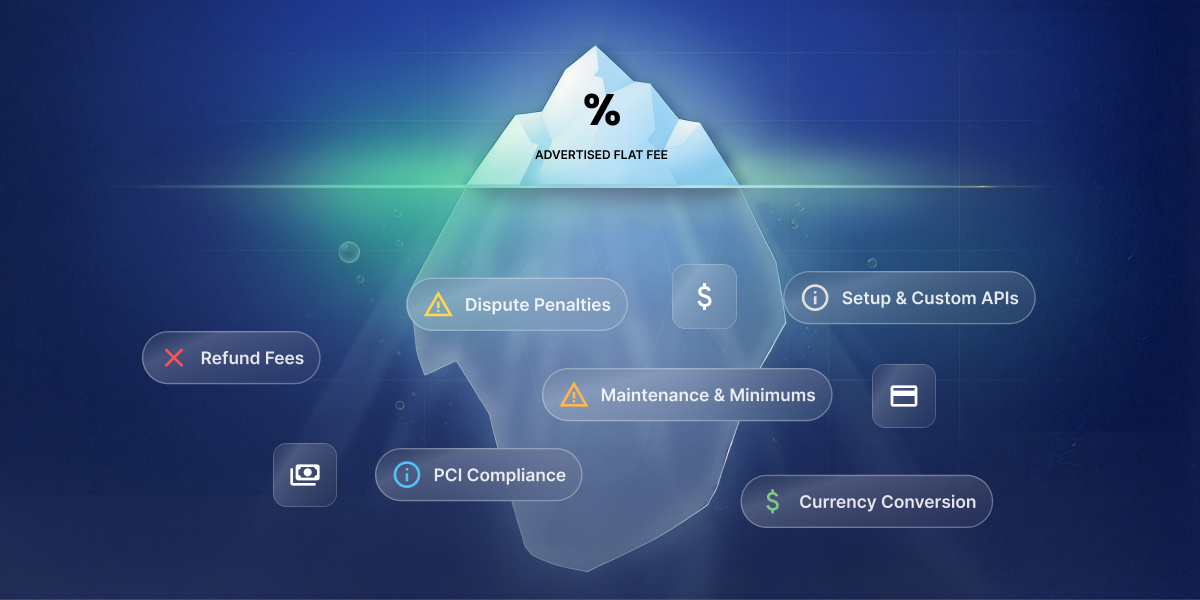
At first blush, payment gateway fees seem pretty straightforward: a processor takes a small cut of every transaction, and that’s the end of it. But when all is said and done, that also means getting checkout live, keeping it running, covering the fees that only show up when something goes sideways, and cleaning up after any mistakes that show up three months in. Knowing these costs beforehand turns a surprise bill into a number you already expected.
Key takeaways:
- Payment gateway fees typically run around 2.9% plus $0.30 per online card transaction in the US, but that line is rarely the full bill.
- Checkout setup cost ranges from minutes to connect payments through an existing platform to several weeks for a custom developer build.
- Whether checkout, inventory, and order records stay connected automatically or need manual wiring by hand depends entirely on which setup approach is used.
- Hidden payment gateway fees, including refund fees, dispute fees, currency conversion, PCI compliance charges, and platform-level transaction fees, add up fast when nobody’s tracking them.
- A payment dispute typically triggers a $15 flat fee on top of the disputed amount, refunded by some processors on a win, kept by most on a loss.
- Subscription businesses carry extra payment costs beyond one-time sellers: failed-renewal churn, plus often a separate billing-tool fee on top of standard processing.
- Disconnected tools, a payment processor that doesn’t talk to your accounting software or CRM, cost more in reconciliation time than in fees.
What are payment gateway fees, really?
Payment gateway fees are the cut a payment processor keeps for handling a card transaction, usually a percentage of the sale, plus a small flat fee. Here’s what that looks like on a single transaction:
- A gateway captures the customer’s card details at checkout.
- A processor moves the money and takes its cut. For example, Stripe fees are 2.9% plus $0.30 per successful US card charge, with no monthly fee on its Standard plan.
- The payout lands in the business’s bank account a few days later, minus that fee.
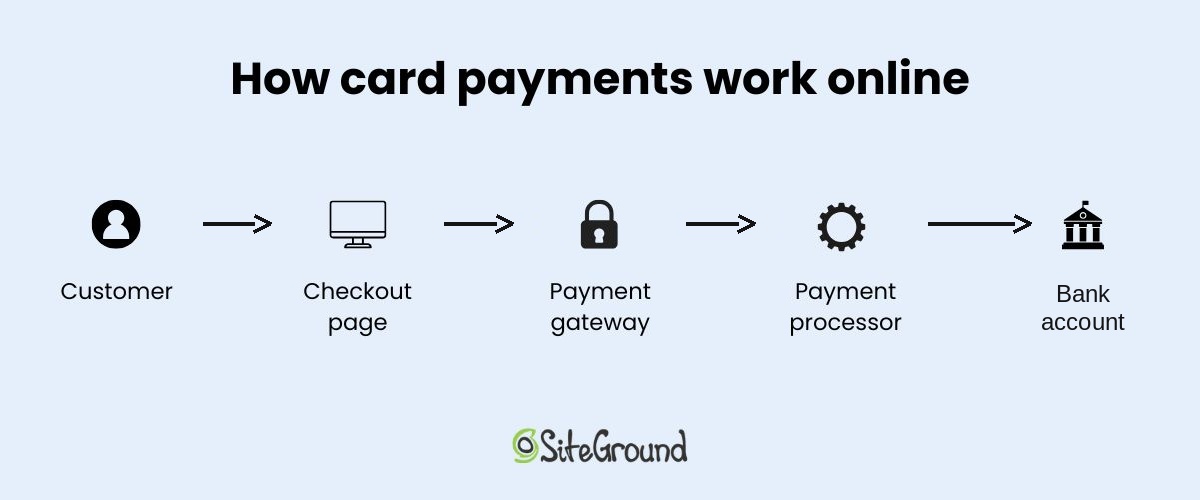
That fee, though, is the smallest number when it comes to how businesses accept payments online, and the one most comparison articles stop at. It doesn’t cover what it takes to get checkout live or keep it running, which is where the real budget lives.
Note: All fees and plan details in this article are as of August 2026. Stripe’s the running example throughout this piece because its pricing is public and it’s a common default for small businesses; PayPal, Square, and other major processors land in a similar range, just with their own rate cards, so the cost categories below apply no matter which one ends up running checkout. Getting these Stripe basics down early makes the rest of this easier to follow.
What it costs to get payments live
Indeed, most people underestimate the total cost of taking payments. They see the processor’s fee and stop there, and yet, in practice, there’s a lot more to actually getting paid. Part of that is dictated by your setup approach, which determines how much time you’ll be spending getting everything live.
What kind of setup complexity are you looking at? It comes down to who builds the payment experience and where it lives. That splits into five basic setups:
- DIY with Stripe’s API (Stripe Elements): you write the code yourself, and the payment form lives directly on your own site. Best suited to a business owner comfortable coding a fairly simple checkout personally, using Stripe’s own building blocks rather than hiring anyone.
- Stripe Checkout: Stripe hands over a pre-built, hosted page; customers get redirected there and back.
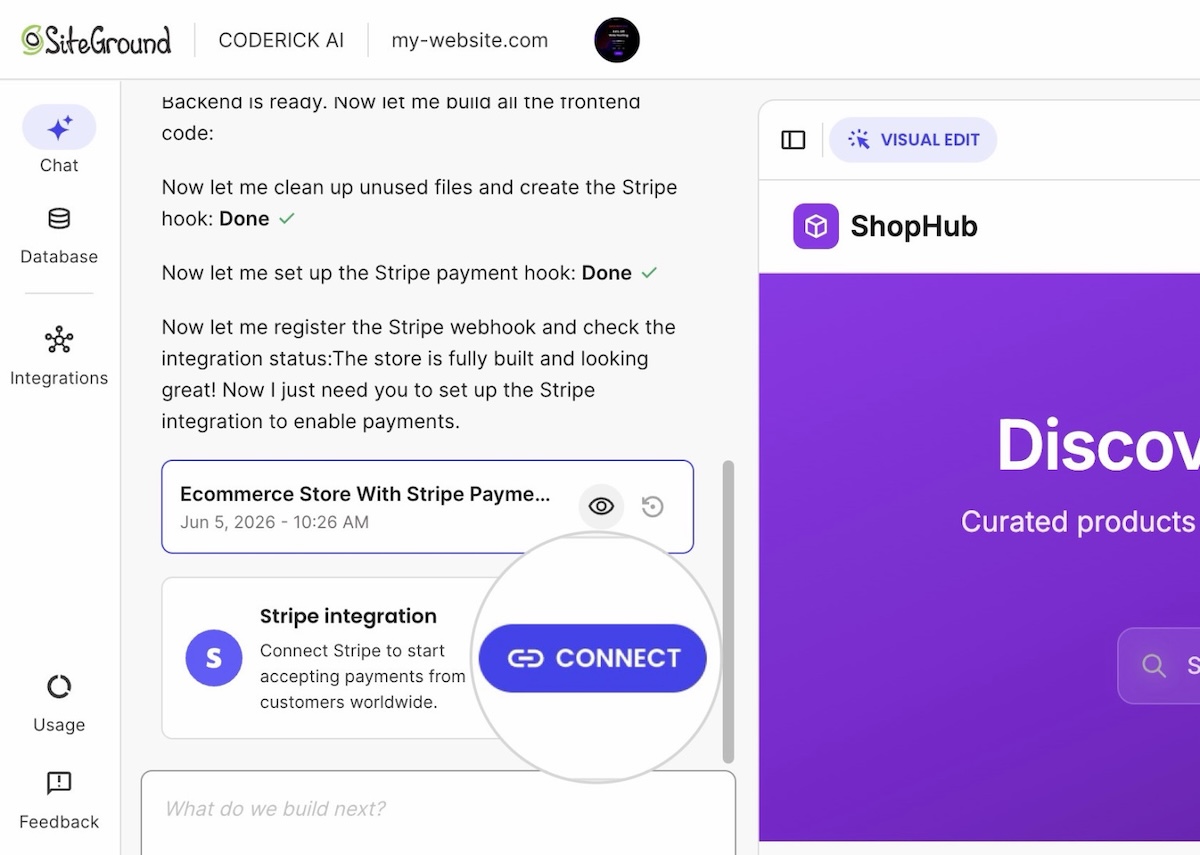
- Coderick AI (SiteGround’s AI website and app builder): describing the store to it is the entire setup step, no custom Stripe build required. The store, products, and checkout flow live inside your site’s own design; the payment window itself, where the card gets entered, is Stripe’s. No page to design, no API to wire up. The screenshot below shows this step in action: Coderick AI registering Stripe’s own confirmation webhook, the internal signal that tells the app a payment succeeded, not a connection to any outside tool.
- Custom development: a hired developer builds it, anything from a simple embedded form to a multi-step, split-payment checkout. Unlike DIY, someone else does the coding, which removes the ceiling DIY has on complexity, at the cost of paying for that work instead of spending your own time.
- A full ecommerce platform, such as SiteGround Ecommerce: signing up for the platform is the setup step. Checkout lives inside the platform’s own storefront, with Stripe (or an equivalent) running underneath.
That last one is a bigger decision than the other four: it comes with a storefront and product catalog attached, not just a way to take payments. That bigger footprint earns its keep for a catalog-driven store that needs shipping, tax, and marketing tooling built in from day one. For a handful of products or a single checkout flow, it’s often more machinery than the job needs, and Coderick AI or Stripe Checkout gets there faster.
Time and cost still swing widely across all five, though. Here’s the breakdown:
Checkout setup cost
| Approach | Setup time | Setup cost | Typically used for |
| DIY with Stripe’s API | A few hours to a few days | $0 in tool fees, unpaid time spent building it | Developers writing their own integration by hand |
| Stripe Checkout | A few hours | $0 setup fee, standard processing rate | A fast payment page that doesn’t touch the site’s design |
| Coderick AI | Same day | $10 to $40 a month, no developer invoice | Getting a store live the same day without writing or hiring for code |
| Custom development | Two to six-plus weeks | $5,000 to $50,000-plus upfront, then hourly for changes | Complex logic: marketplaces, split payments, unusual rules |
| Full ecommerce platform | A few minutes to a few hours to connect payments | $18 to $36 a month, no separate developer cost | A full storefront and checkout bundled into one signup |
That table covers building a checkout, five ways to do it. For anyone comparing a lighter ecommerce setup against building everything from scratch, the fifth row is the one to study most closely. Turning any of these into a working checkout that can actually run a business adds to the payment integration cost, regardless of approach.
What payment integration cost actually includes
Moving the money is the easy part. A working checkout also needs:
- Order confirmation emails: a basic payment receipt often comes free once that setting’s turned on, but a proper order confirmation with your own branding and order details is usually separate logic that needs building or wiring up.
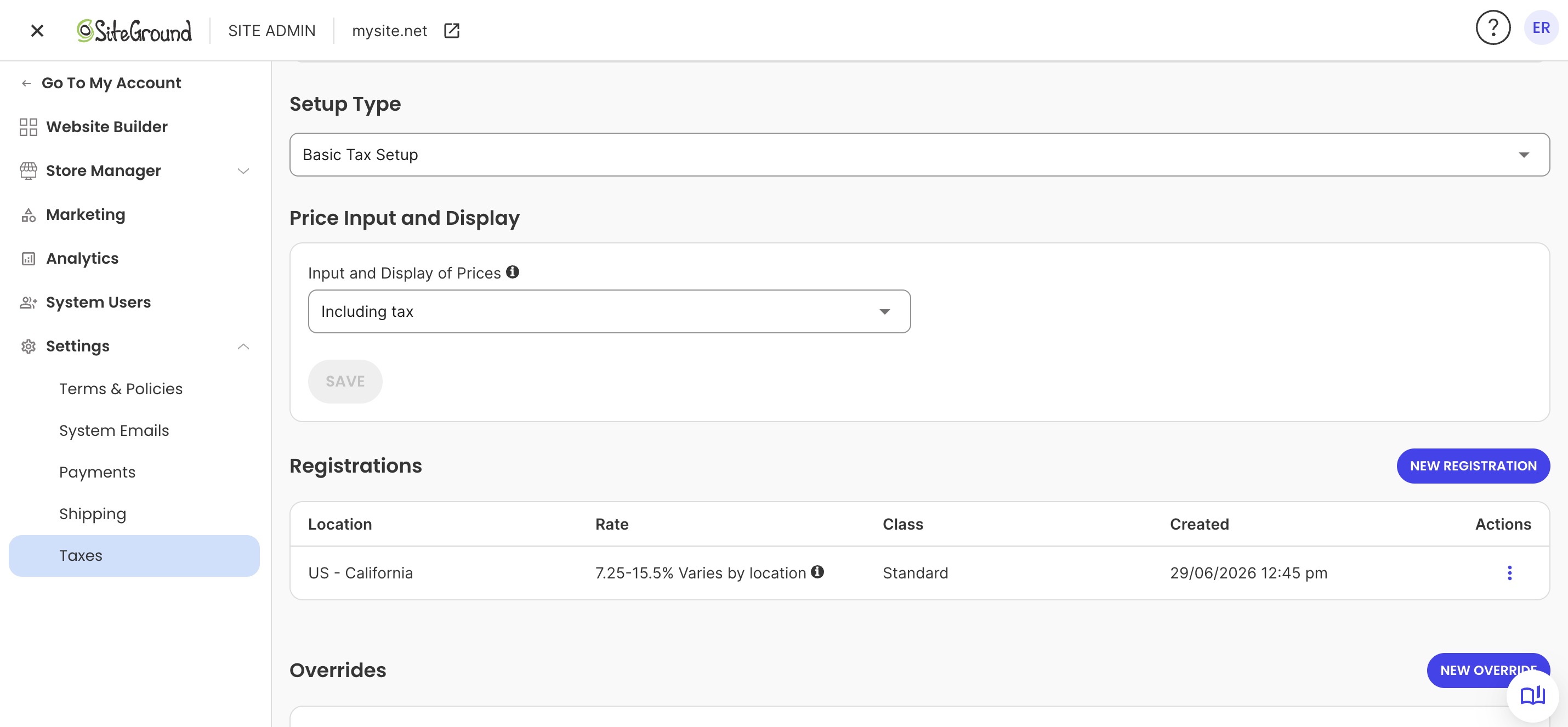
- Tax calculation: applying the right ecommerce sales tax based on where the customer’s buying from. Stripe Tax is available with its own fee whether Stripe runs directly or through an ecommerce platform’s tax settings (as seen below); otherwise it’s a dedicated tax service or manual handling.
- Inventory updates: no payment processor tracks what’s in stock, that’s a store feature, not a payment one.
- Refund handling your team can use without needing direct access to the processor’s own dashboard: most processors already have a one-click refund button built in, so this only becomes a build item if refunds need to happen from your own admin panel or CRM instead, and even then, the processor’s own API key needs refund permissions specifically enabled for it to actually work.
Who this applies to: DIY, Stripe Checkout, and custom development mean connecting these pieces (confirmations, tax, inventory, refunds) by hand, self-taught code or a developer’s invoice. A full ecommerce platform ships with them already built in; Coderick AI can build the same pieces if specifically asked, but that takes prompting and testing, not something that comes bundled by default.
None of this applies to a single one-off payment, a portfolio deposit, a restaurant reservation hold, an event ticket, as a hosted payment link or an embedded pay button covers these simple payment flows instead. An ongoing store needs all of it.
Payment maintenance costs after launch
Payment maintenance costs don’t show up on the invoice for getting checkout live. They only start once a checkout’s actually been running for a while, and they come in two flavors: keeping tools connected to each other, and handling renewal payments that don’t go through cleanly if the plan includes subscriptions. Let’s break it down.
How disconnected tools add to your maintenance costs
Watch for this pattern: checkout runs through one tool, bookkeeping happens in a separate accounting app, and payment status in your CRM or project tool sits disconnected from both. Disconnected integrations like this turn every sale into:
- Copying the transaction into the books by hand
- Updating the order or client record separately
- Matching any refund across all three, so nothing gets missed
For agencies invoicing multiple clients, closing this exact gap, checkout status not showing up where the client record lives, is usually the difference between faster client payments and constantly chasing down who’s actually paid.
Who this applies to: all five setups. Custom development can have an accounting or CRM connection built in, for a price. The other four handle payment confirmation internally, that’s how any checkout works at all, but none of them expose a way to connect out to a separate accounting or CRM tool.
The fix: a manual routine, though what that actually looks like depends on the setup:
- Full ecommerce platform: often handled through a built-in order export.
- Coderick AI: doesn’t include one by default, but it can be asked to add an export option, and refined further with more specific instructions if needed. It still can’t create a live connection to an external accounting or CRM tool.
- DIY and Stripe Checkout: writing that export step yourself.
- No export at all: block off ten minutes a week to copy new orders and refunds into the books and the client tracker by hand.
Recurring payment costs for subscription businesses
Anyone building a subscription business should budget for involuntary churn from the start. Imagine: a card expires or a bank declines a renewal, the subscription lapses unless something catches it, and sales go down. Two things reduce this:
- Automatic retries: re-attempting a failed renewal a few times over one to two weeks, sometimes on by default, sometimes a setting to turn on
- Card-expiration emails: sent before the renewal date instead of only after it fails, though this is often a setting that needs switching on rather than something that happens automatically
Who this applies to: it depends on whether a subscription layer already sits on top of the processor. A full ecommerce platform or a dedicated subscription app usually handles both without the business owner touching a setting; wiring a processor directly means checking what’s on by default and switching on the rest.
There’s a second cost to plan for on top of that: processors that offer dedicated subscription tools, automated invoicing, retries, dunning, usage tracking, often charge extra for it. For example, Stripe’s version, Stripe Billing, adds a flat 0.7% of subscription volume on top of its standard 2.9% plus $0.30 per charge. Treat both the churn risk and this extra billing fee as built-in costs of running subscriptions at all, not one-off surprises to troubleshoot later.
The hidden costs behind payment gateway fees
Maintenance costs show up on a predictable timeline, whether or not anything goes wrong. Hidden payment gateway fees are different: they only show up when something other than a clean, successful sale happens. Refunds, disputes, and a handful of smaller charges all live here.
- Refund fees: most processors don’t charge extra to process a refund, but they typically don’t return the original processing fee either. Refund a $50 sale, and the $1.75 already paid to accept it (2.9% plus $0.30) is usually gone for good.
- Dispute fees: a chargeback usually triggers a separate $15 flat fee on top of the disputed amount, refunded by some processors if the merchant wins, kept by most if they lose.
- Currency conversion and cross-border fees: expect another percentage point or two on top of the standard rate whenever a customer pays in a different currency or from a different country.
- Monthly minimums and PCI compliance fees: PCI compliance is the security standard card networks require for handling card data safely, usually confirmed through a short questionnaire. Modern processors like Stripe handle most of this through their own checkout tools, so it rarely shows up as a separate charge. Traditional merchant account providers are a different story: some still charge a monthly non-compliance fee, often $20 to $100, for skipping the paperwork.
Platform fees stacked on top of processing fees
Some ecommerce platforms and website builders add their own per-transaction cut on top of whatever the payment processor already charges. That’s a second fee stacked on every sale, not a replacement for the first, and it’s easy to miss when comparing platforms by their processing rate alone.
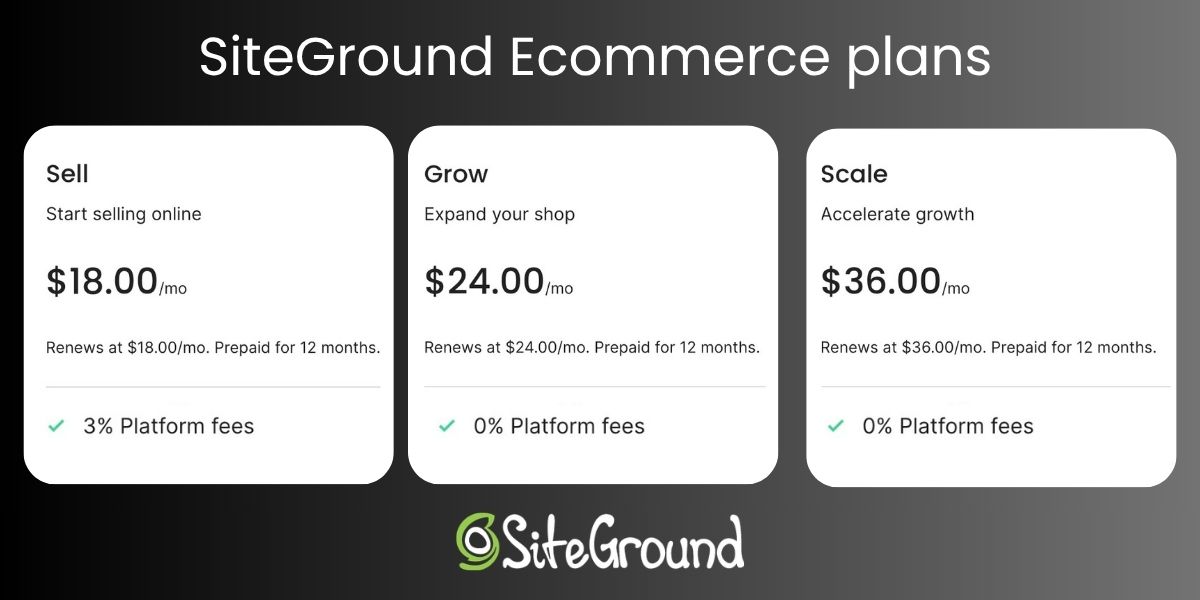
Who this applies to: the ecommerce platform route specifically. DIY, Stripe Checkout, custom development, and Coderick AI don’t have a platform layer sitting between the processor and the sale, so there’s no platform fee. SiteGround Ecommerce, for example, drops that extra fee entirely on its Grow and Scale plans, leaving just standard processing, a detail that matters when comparing platforms for selling digital or physical products. Sell runs $18 a month plus the 3% fee, Grow is $24 with none, so past roughly $200 in monthly sales, upgrading pays for itself.
Common payment setup mistakes that cost you more later
Every cost covered so far is baked into how payments work, no mistake required. What follows is different: these are payment launch risks, avoidable and rare on launch day itself. They show up the first time something other than a clean transaction happens: the first refund, the first disputed charge, the first server change.
1. Never testing a real transaction end to end
A checkout that “looks” done and a checkout that’s actually processed a real card, a refund, and a confirmation email are different things. Test all three before launch, including what a customer sees when a card gets declined.
Who this applies to: every setup, regardless of path.
2. Moving hosting without re-checking payment notifications
A site migration is a common place for this exact mistake to surface: moving a live site to new hosting can leave the automatic message a processor sends to confirm a payment pointed at a server that no longer exists, so an order shows “confirmed” on the site while the payment never actually clears on the backend. That kind of gap can run for a couple of days before a customer emails to ask where their order is.
Who this applies to: self-managed hosting, DIY or custom development. A managed platform like Coderick AI or a full ecommerce platform includes hosting already set up for the merchant, so there’s no server to move or a payment notification to break in the first place.
3. Leaving test API keys live in production
Real charges silently fail, or a store looks like it’s taking payments when it’s actually just running in test mode, when test and live keys get mixed up.
Who this applies to: DIY and custom development, where a live key can end up hardcoded into exposed project files. Coderick AI has a dedicated popup for pasting in a Stripe restricted key, separate from typing it into the chat or the project’s code directly. It’s still worth confirming it’s the right key, test or live, each time.
4. Treating PCI compliance as optional
It isn’t a suggestion. For Stripe-based setups, skipping it usually doesn’t show up as its own line item, since Stripe absorbs most of the compliance work into its own tools, but it still raises liability if a breach happens.
Who this applies to: everyone, though the consequence differs by setup. For example, when it comes to Coderick AI, customers enter their card details directly through Stripe, so Coderick AI itself never handles the card data, and there’s no PCI compliance for Coderick AI to carry in the first place. On a traditional merchant account, it’s more direct: skipping it is how a monthly non-compliance fee ends up on a statement.
So, what do payment gateway fees really cost?
Here’s what all of this can look like in practice for a small store doing around $5,000 a month in sales, 100 orders averaging $50 each:
| Cost | Amount | The math |
| Processing fees | $175 | 2.9% + $0.30 per order, across 100 orders |
| Platform fee (Sell tier) | $150 | 3% of $5,000 in monthly sales |
| One dispute | $15 | Flat fee per chargeback |
| Total | $340 |
That’s before the one-time cost of getting checkout live in the first place, or the cost of fixing a mistake made at launch.
Payment gateway fees, and what comes next
Payment gateway fees are the smallest, most visible line in this whole picture. The real total is provider fees plus setup time plus ongoing maintenance plus whatever a rushed launch costs to fix later, and that last category is the one most small businesses pay for without ever seeing it itemized. Which of these apply, and how much, depends entirely on the path in question.
Coderick AI’s distinct advantage in this comparison is the build process itself: whatever gets described (checkout, inventory tracking, order records) comes out connected, and updates work the same way, describing a change instead of filing one with a developer. That’s what makes it the right fit for a single checkout or a lean store built around exactly what’s needed. Build with Coderick AI to get the same connected checkout without paying a developer to build it.
[96]
Frequently asked questions
Payment gateway fees are what a payment processor charges to move money from a customer’s card to a business’s bank account, typically a percentage of the sale plus a small fixed amount per transaction.
Payment gateway fees themselves usually cover just the per-transaction rate. The broader payment gateway costs around them, refund handling, dispute fees, currency conversion, and monthly minimums, gets billed separately and often gets missed when comparing providers.
Hidden payment gateway fees include refund fees (the processing fee that doesn’t come back on a refund), dispute fees, cross-border and currency conversion charges, and PCI compliance fees for skipping the annual security questionnaire.
The real cost of taking payments online is the processing rate plus setup time plus ongoing maintenance plus the cost of fixing launch mistakes, not just the percentage listed on a pricing page. The processing rate alone is usually the smallest piece of that total.
Checkout setup cost for a website ranges from minutes to connect payments through an existing platform to several weeks and several thousand dollars with a custom developer build.
Payment integration cost for a small business covers more than connecting a processor: order confirmation emails, tax calculation, inventory syncing, and refund handling all need building or configuring too.
Payment maintenance costs after launch include handling failed or expired cards, retrying subscription renewals, and keeping payment records synced with accounting or CRM tools.
Payment setup mistakes that make online payments more expensive include skipping end-to-end testing, missing a payment notification update after a hosting migration, mixing up test and live API keys, and treating PCI compliance as optional.
Yes. Refund fees and dispute fees increase payment costs because most processors keep the original processing fee on a refund and charge a separate flat fee for every dispute, refunded by some processors on a win, kept by most on a loss.
Stripe Checkout is usually cheaper than building a custom checkout, since it skips developer hours entirely, though Stripe checkout in Coderick AI can be faster still because it handles the surrounding integration work, such as order records and confirmation emails, too.