
Random prompts get random results. A vibe coding workflow gives you a repeatable way to work with Coderick AI and other AI website and web app builders so each session builds on the last instead of starting from scratch.
A vibe coding workflow is a structured process for working with AI tools: you define one outcome, give the AI the right context, review the first output, refine with focused follow-up prompts, and document the decisions that shaped the project. The goal is a consistent, reviewable build process instead of a prompt session that spirals into something you can’t explain, repeat or undo.
Key takeaways:
- A vibe coding workflow turns random prompting into a repeatable process: plan the outcome, prompt with context, review the output, refine one change at a time, document decisions, and test the result.
- Start with one outcome before asking AI to build anything. The clearer the goal, the easier it is to judge the output.
- Better AI outputs come from better context: audience, goal, constraints, examples, and what the first version should include.
- Prompt refinement works best when you ask for one focused change at a time instead of rewriting the whole brief.
- Prompt documentation helps you save useful prompts, track decisions, and restart with a clean context when the conversation gets messy.
- Coderick AI works best when you describe the goal clearly, review the generated first version, and refine the project in small specific steps.
What is a vibe coding workflow?
A vibe coding workflow consists of the following points:
- А defined start (the goal)
- А defined end (a result that meets your success criteria)
- А series of steps in between that keep the session on track
Workflow vs. random prompting
Random prompting is an unstructured approach: you open an AI tool, type whatever comes to mind, and evaluate the result by feel. There’s no defined goal, no way to judge whether the output is right, and no record of what you asked for. When the result is off, you rewrite the prompt from scratch and hope the next version lands closer.
Here’s a quick example of random prompting:
“Build me a website for my HVAC business.” Result is off. “Make it better.” Still off. “Add more stuff.”
A vibe coding workflow moves through defined phases, as covered earlier in this guide. Here’s what that looks like in practice:
Step 1. Describe: “Build a one-page site for a residential HVAC company. Main action: service request form. No ecommerce, no blog. Clean layout, phone number at the top.”
Step 2. Review: Result is close, but the form is below the fold and the heading is too generic.
Step 3. Refine: “Move the form above the fold.” Done. “Rewrite the heading to focus on same-day repairs.” Done.
Three prompts, one clear outcome. That’s the workflow.
Start with one outcome before you prompt
The clearest prompt you’ll ever write comes from a goal you’ve already defined on paper. Spend five minutes here and the rest of the session gets easier.
- Name the thing you want built
Be specific about the deliverable. “A website” isn’t a deliverable. “A three-page website for a yoga studio with a class schedule, a contact form, and an About page” is. The name of the thing sets the scope for everything that follows.
- Define who it’s for
The audience shapes every decision the AI makes: the language it uses, the features it includes, the layout it defaults to. “Homeowners needing HVAC repairs” and “facilities managers for commercial properties” are both potential audiences for the same type of service, but they expect very different experiences.
- Write the success criteria
A success criteriа is a check you can run after the first output to decide whether it worked. It doesn’t need to be long. “The main call-to-action button links to a contact form” is a success criterion. “The page looks good” isn’t.
Two or three criteria is enough for a first session. The goal isn’t to define everything the project will ever need; just enough to judge whether the first output is on track.
- Set the first-version boundary
The first version doesn’t need to include everything. A smaller scope produces a cleaner output and gives you a clearer baseline to build from. Decide what the first output must include and what it doesn’t need yet. This stops the AI from adding features you didn’t ask for and gives you a clean baseline to review.
What context should you give before prompting?
Context is what separates a useful first version from one that needs to be thrown away. The AI builds from the context you provide. If the description is incomplete, the output will fill the gaps with guesses.
Business context
Tell the AI what kind of business or project this is for. “Residential HVAC company serving suburban homeowners” gives the AI enough to make reasonable decisions about tone, layout, and functionality.
Audience context
Describe who will use the result. Age, technical confidence, and the specific thing they need to do all matter. “Homeowners who aren’t especially tech-savvy and want to book a repair quickly” is useful. “Regular people” is not.
Style and brand context
If there are visual or tonal constraints, say them upfront. Color preferences, an existing logo, a formal or casual voice. Without this context, the AI is more likely to produce generic output.
Feature context
List what the first version needs to include. The goal here isn’t to define the whole project — it’s to get a reviewable first draft. Three to five features gives the AI enough to build something concrete without producing an output that’s too complex to evaluate in one sitting. More detail can come in follow-up prompts once the structure is right.
Constraints and must-not-do items
What the AI should avoid is just as important as what it should include. No ecommerce. No user accounts. No multi-page navigation for now. These constraints prevent the AI from solving problems you didn’t ask it to solve.
| Context type | What to include | Example |
| Business | What you do | “Residential HVAC company” |
| Audience | Who it’s for | “Homeowners needing repairs” |
| Goal | What should happen | “Book a service call” |
| Style | Tone and visual direction | “Clean, minimal, blue and white” |
| Constraints | What to avoid | “No ecommerce features” |
How should your prompting workflow work?
A prompting workflow has four moves: create, review, fix, and test. Each one has a job. Don’t combine them in a single prompt.
Prompt 1: create the first version
The first prompt is the broadest prompt in the workflow. Include the goal, the audience, the key context, and the first-version boundary. Ask for the first complete version. Don’t hold back important context here because you’re trying to keep the prompt short.
A first prompt for Coderick AI might look like:
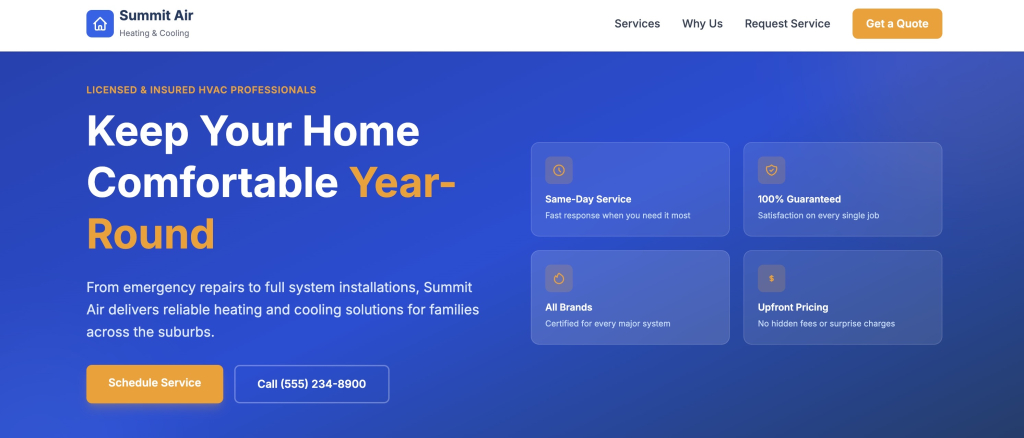
“Build a one-page website for a residential HVAC company. The audience is homeowners in suburban areas. The main action is filling out a service request form. No ecommerce, no blog, no user accounts. Clean layout with a phone number visible at the top.”
And here’s the first result that Coderick AI generates:
Prompt 2: Review and improve structure
Before refining details, check whether the structure is right. Is the layout doing what you wanted? Is the information in a sensible order? Is the main action easy to find? A structural problem is harder to fix later, so catch it now.
Prompt 3: Fix one issue at a time
Once the structure is right, move to specifics. One change per prompt. “Move the contact form above the fold” is a good prompt. “Move the contact form, change the heading text, add a testimonial section, and make the buttons blue” is four prompts crammed into one, and the AI will handle some of them well and others poorly.
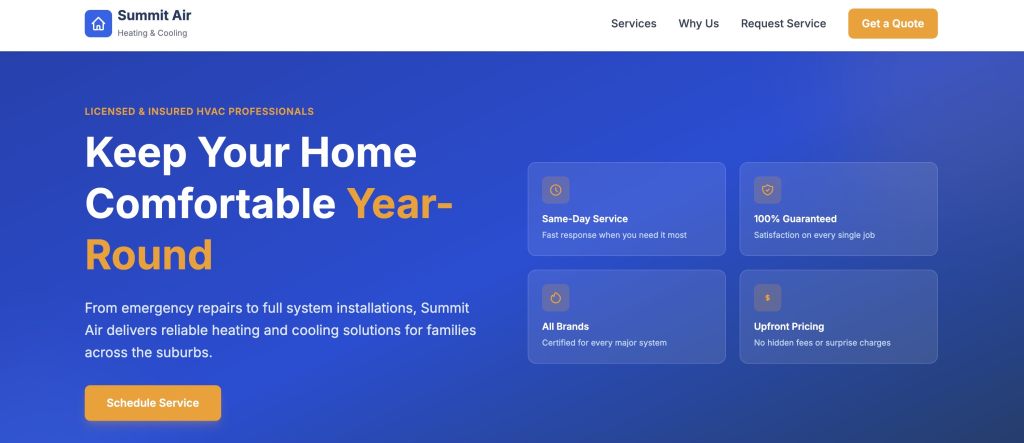
In our case, if we want the service request form to be the only action a visitor can take in the hero section, we’d use this prompt:
“Remove the phone number button from the hero. The only primary action should be the service request form.”
Prompt 4: Test the main user action
Before you call the project done, test the one thing the project is supposed to do. For a booking site, that means going through the booking flow. For a landing page, that means reading it as a first-time visitor. What’s missing or broken?
Document what changed
AI sessions have no memory between prompts. When a session runs long, it’s easy to lose track of what you changed, why you changed it, and which version actually worked. A one-sentence note after each significant prompt — what you asked for and why — is enough to keep the session recoverable.
For example: “Removed the pricing section because it confused the target audience in testing.”
A session that runs four prompts deep already has three decisions worth keeping: what you built, what you changed, and why. Without a record, the next session starts from scratch. With one, it starts from where you left off.
In Coderick AI, every saved state is stored in version history, which means you can roll back to any earlier version if a change takes the project in the wrong direction. Pair that with a short decision log and you have two layers of recovery.
How do you review the first AI output?
Reviewing the first AI output is a specific skill, not just a gut check. Work through a short checklist before you ask for changes.
✅ Check if it matches the original goal
Does the output match what you asked for in the first prompt? Not whether it looks good, but whether it does the job you defined. A beautiful website that doesn’t have a contact form failed the brief.
✅ Check what’s missing
What did you ask for that isn’t there? Go back to your first-version boundary and compare it to the output line by line.
✅ Check what’s wrong
What’s present but incorrect? Wrong copy, wrong layout, wrong tone. Note each issue separately so you can fix them one at a time.
✅ Check what’s too complicated
What did the AI add that you didn’t ask for? AI tools tend to add features. Anything you didn’t request is a candidate for removal before the project gets bigger.
✅ Check what needs human judgment
Some things the AI can’t decide for you:
- Whether the copy sounds like your brand
- Whether the color palette fits your audience
- Whether the flow makes sense to someone who doesn’t know the product
Mark those for a manual review pass.
How does prompt refinement work?
Prompt refinement is the discipline of improving the AI output with targeted follow-up requests. It’s not rewriting the whole brief from scratch. It’s asking for one specific change, checking whether it worked, and deciding what to do next.
For example: instead of going back to the AI with “redo the whole page, it’s not quite right,” you’d say “move the service request form above the fold.” Check the result. Then: “rewrite the heading to focus on same-day repairs.” Check again.
Ask for one change at a time
This is the most important rule in the refinement loop. One change per prompt keeps the output predictable and the session recoverable. When you ask for three things at once, the AI changes all three but you can only evaluate one at a time, so you don’t know which change caused the result you’re looking at.
Reference the previous output
Tell the AI what it just built. “In the version you just created…” or “Keep everything from the last version except…” grounds the follow-up prompt in a specific state. Without this, the AI may drift back to defaults.
Give the reason for the change
“Simplify the navigation because users are arriving from mobile and need to reach the contact form in one tap” is a better prompt than “simplify the navigation.” The reason helps the AI make a proportionate change instead of guessing what level of simplification you want.
Avoid rewriting the whole request
Rewriting the whole prompt from scratch restarts the context window and loses decisions you already made. The AI forgets the decisions you’ve already made. Work from the existing output, not from a blank slate.
Stop when the output meets the success criteria
Go back to the success criteria you wrote before the first prompt. If the output clears them, stop. You don’t need perfection. You need something that works well enough to test with real users or review with a real audience.
Why prompt documentation matters
Prompt documentation is the habit of recording what you asked for, what changed, why it changed, and what you kept. It’s the difference between a session you can hand off, restart, or learn from and one that only makes sense in the moment.
Save the prompt that worked
When a prompt produces a result you want to keep, save it. Save it somewhere outside the AI session. The session context gets messy over time, and what worked in turn 3 is easy to lose by turn 15.
Record what changed
Note every significant change you made and why. Not every tiny adjustment, but every decision that affected the direction of the project.
Track decisions you don’t want to lose
Some decisions aren’t about prompts, they’re about the project. “Decided to remove the pricing page because it confused the target audience” is a decision worth recording even if it happened in a conversation, not a prompt.
Keep a short changelog
A changelog doesn’t need to be formal. A date, a description, a reason, and a result is enough. This is the pattern that makes sessions restartable.
Context rot is what happens when a long AI session accumulates so many follow-up prompts and partial rewrites that the AI’s responses stop being consistent with the original goal. A changelog is the best defense against it because it lets you restart a clean session with a summary of the goal, decisions, and current version.
| Date | Prompt/change | Why it changed | Result |
| May 3 | Simplified homepage CTA | Too many actions on the first version | Cleaner user path |
| May 4 | Removed pricing section | Early user confusion | Leaner page |
| May 5 | Added testimonials block | Brief required social proof | Added above fold |
Restart with clean context when needed
When a session gets long enough that the AI starts contradicting earlier outputs or forgetting constraints, start a new session. Paste in a short summary of the goal, the decisions made so far, and the current state of the project. You’ll get cleaner results from a fresh context than from a conversation that’s been running for fifty turns.
When should you stop prompting and start reviewing?
There’s a point in every session where more prompting makes things worse, not better. Knowing when you’ve hit that point is part of the vibe coding workflow.
Stop prompting when:
- The same issue keeps coming back after you’ve addressed it twice
- The output from the last prompt is worse than the output from the previous one
- You can’t clearly explain what change you’re about to ask for
- The next change involves a judgment call that only you can make
- The first version is good enough to test with a real audience
At any of these points, the right move is to stop prompting and review manually, test with a real user, or start a new session with a cleaner brief. For higher-risk builds, run the security checks before publishing.
A reusable vibe coding workflow template
Use this template at the start of any new project. Fill it in before you open Coderick AI or any other AI website and web app building tool.
1. Outcome: What should this build accomplish?
2. Audience: Who is it for?
3. Context: What does the AI need to know about the business, style, and constraints?
4. First prompt: What should the AI create in the first version?
5. Review: What’s missing, wrong, or too complicated in the first output?
6. Refine: What one change should happen next?
7. Document: What decision should be saved before moving on?
8. Test: What result proves the current version works?
Put the workflow into practice with Coderick AI
Everything in this vibe coding workflow maps directly to how Coderick AI is built. You describe the goal, Coderick AI generates the first version, and you refine the project without switching tools or managing infrastructure.
The Visual Editor handles credit-free refinements for design changes you want to make without reprompting. Version history works as your decision log: every saved state is a checkpoint you can roll back to or reference when you start a new session. Publishing happens inside Coderick AI, with hosting and SSL included.
The result is that the full workflow: plan, prompt, review, refine, document, test, publish — happens in one place. No separate tools, no technical decisions before you can start.
Test the full workflow free for 14 days.
[96]
Frequently asked questions about vibe coding workflow
A vibe coding workflow is a repeatable process for working with AI to build websites, apps, or other projects. You define the goal, provide context, write the first prompt, review the output, refine with focused follow-ups, and document what changed. It replaces random prompting with a structured session that produces reviewable, consistent results.
AI output depends heavily on the instructions and context you provide. Without a defined process, prompts drift, changes accumulate without a record, and the project gets harder to steer over time. A workflow keeps each step tied to one clear outcome, so you can judge progress against something specific.
Define the project goal, the audience, the main action the project needs to support, and the constraints. In Coderick AI, that means describing the business, what the website or app should do, who will use it, and what the first version must include. Five minutes of planning before the first prompt significantly changes the quality of what comes back.
A good prompting workflow covers the goal, context, first prompt, a review pass, a refinement step, and documentation. The sequence moves from broad to specific: create the first version, check the structure, then fix one issue at a time.
Prompt refinement means improving the output with targeted follow-up requests. Keep what works and ask for one specific change: simplify a section, fix a layout, adjust the copy, remove an unnecessary feature. One change per prompt keeps the output predictable and the session recoverable.
Prompt documentation is the habit of saving useful prompts, recording key decisions, and tracking changes. A short decision log that notes what you asked for, why it changed, and what result you kept is all you need. It makes sessions restartable and decisions reversible.
Stop when the output meets your success criteria, when the same issue keeps recurring, or when the AI starts making the result worse. At that point, test the project manually, review it with a real audience, or start a clean session with a shorter, clearer brief.
No. A vibe coding workflow covers the overall process of planning, prompting, reviewing, refining, and documenting. App requirements go further: they define users, data models, screens, business rules, and acceptance checks for a production web app. The workflow supports the requirements process but doesn’t replace it.