
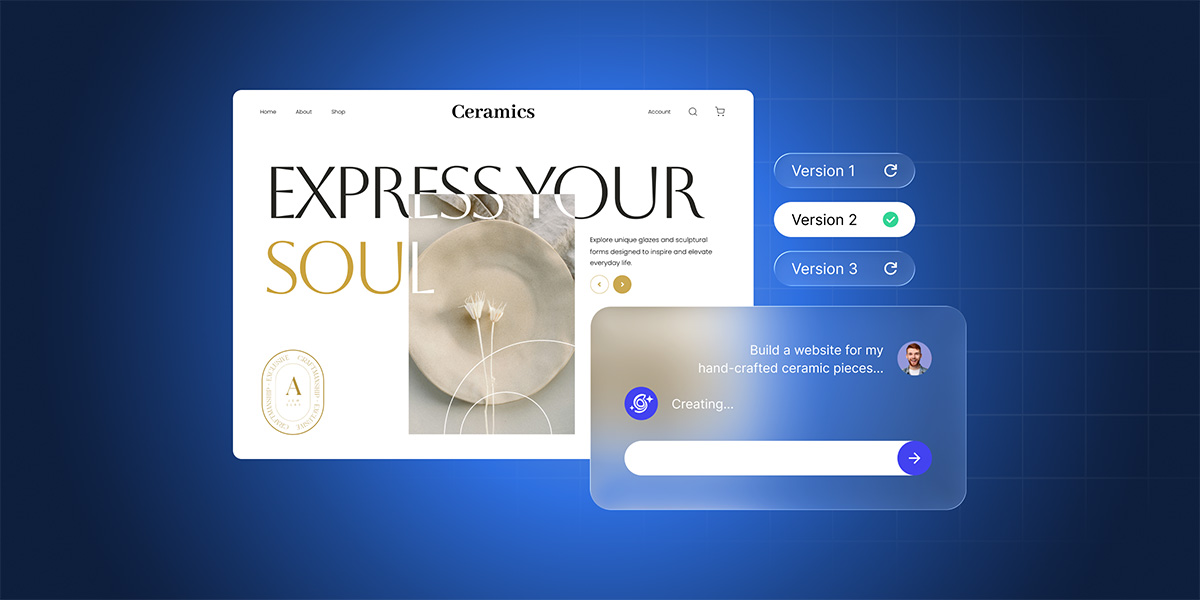
Not long ago, creating a small business website meant either hiring a developer or losing a few weekends to tutorials, templates, and trial and error. Today, an AI website builder can turn a plain-language description into a draft website with pages, layout, design, and starter copy, without you writing any code.
This guide walks you through the full process: how AI website builders work, what a small business should check before choosing one, and how to review your site before publishing. If you’ve been putting off building a website because the process felt too technical, too expensive, or too time-consuming, this is for you.
Key takeaways:
- AI website builders generate your pages, site structure, features, and copy. You just have to describe what you need and give them the details that make your business yours: your services, prices, hours, policies, or even the vision and brand voice that sets you apart.
- Not all sites are built the same. Service businesses, local businesses, single-offer landing pages, and small stores each have a different structure and page elements to convert. Advanced AI website builders like SiteGround’s Coderick AI know how to pick the right structure for you.
- Before committing to a no-code website builder, check that it gives you editing control, works well on mobile, supports the features your business needs (contact forms, booking, ecommerce, and so on), and includes hosting, a custom domain, and SSL so your site is ready to go live the moment you are.
- Before publishing, test forms, review the mobile version, check page titles, and confirm that pricing, policies, claims, and contact details are accurate. A five-minute check can save you from problems that cost you customers later on.
What is an AI website builder?
An AI website builder is a tool that turns a plain-language description of your business into a working website, without requiring you to design, code, or build anything yourself. You type something like “I run a dog grooming salon in Austin, I offer bathing, haircuts, and nail trims, and I want clients to book online,” and the AI generates a homepage, a services page, an about page, a contact page, and draft copy for each.
It’s all part of a broader shift in how sites and web apps are created, known as vibe coding. This is an AI-driven software development method that replaces writing code with writing in plain language (prompting). To learn more about it, take a look at the detailed vibe coding glossary we recently prepared.
What AI handles vs. what you decide
The best results come when you treat AI as the site-structure expert and yourself as the business expert.
An AI website maker can handle the first draft: page structure, navigation, responsive design (meaning the site adapts to phones, tablets, and desktops), visual styling, and draft copy for each section. Give it your business details, and it can turn them into structured pages and editable copy.
What it can’t do is know your business the way you do. Service descriptions, pricing, customer testimonials, opening hours, return policies, legal disclaimers: anything that involves a specific fact about your business or a commitment to your customers needs to come from you. The same goes for your unique selling proposition (USP) and what makes you stand out from competitors. If you don’t provide these details, the AI will fill in the gaps with plausible-sounding content that may not be accurate, and inaccurate information on your site can cost you trust and customers.
The AI gets you 80% of the way there. Your input is the 20% that isn’t technical and that you already know. These are the details that actually convert visitors into customers, so be as specific as possible. When someone lands on your site, details are what build trust and drive action. “Haircuts starting at $45, book online” tells a visitor exactly what to expect and what to do next. “Affordable grooming services” might also be true, but it tells them nothing.
AI website builder vs. templates vs. drag-and-drop builders
- A template builder gives you a pre-designed layout as a starting point. You browse a gallery, pick the one that looks closest to what you need, and replace the placeholders with your own content. Since templates are built for everyone, they’re built for no one in particular. You’ll likely find sections you don’t need and miss ones you do, and adjusting that takes more time than most people expect.
- A drag-and-drop builder gives you a blank canvas and a toolkit of blocks (text, images, buttons, forms, galleries) that you arrange however you like. You’re making every layout decision yourself, which requires either a good eye for design or a lot of trial and error.
- An AI website builder does something different: it generates a complete first version: the structure, the layout, and the initial content based on what you described. Instead of choosing from a gallery or dragging blocks around, you get a complete first version of a site that already reflects your type of business.
The advantage is more than just speed. You get the right structure for your type of business, you start from a nearly complete site rather than a blank page or a generic template, and the AI handles the decisions you’d otherwise have to make yourself: what sections to include, how to organize the navigation, what kind of copy fits your industry. Instead of figuring out what your site needs, you’re reviewing a version that already has it.
What does an AI website maker create after you describe your business?
Once you submit your first prompt, the AI website maker interprets it and builds a complete draft. Here’s what that typically looks like, and what to focus on first when reviewing.
The “site brief” output (what it includes)
Before generation, the AI decides on a structure: how many pages your site needs, what order they appear in the navigation, which sections belong on each page, and what visual style fits your business type. Most builders let you review or refine the structure before you start editing the details. It’s worth spending a minute here to make sure the overall shape is right before you get into the copy.
Typical pages (home, services, about, contact, policy)
Most AI-generated small business sites include five core pages, though the specifics shift depending on your site type:
- Homepage: A headline, a short description of what you do, and a primary call to action. A plumber’s might lead with “Licensed plumbing repairs in Portland” and a “Request a quote” button. A restaurant’s might feature the cuisine type and “View menu.”
- Services or menu page: What you offer, organized by category. A salon lists haircuts, coloring, and treatments. A restaurant lists starters, mains, desserts, and drinks with prices.
- About page: Your story, credentials, and why customers should trust you.
- Contact page: Phone, email, address, a contact form, and (for local businesses) an embedded map.
- Policy pages: Privacy policy, terms of service, and (for stores) return and shipping policies. The AI generates plausible versions if you don’t give it information in your first prompt, but these need to reflect your actual terms before you publish.
Whatever the structure, it’s usually your starting point. Every page can be adjusted, reordered, or expanded through chatting with the AI builder. For guidance on organizing these pages well, SiteGround’s website structure guide covers the principles behind effective site architecture.
Copy you should check first
The AI writes with confidence, even when details are incomplete, which is exactly the problem with certain sections. A few areas need your attention before anything else:
- Pricing and rates: If you haven’t included them in your initial prompt, the AI may invent plausible numbers. Swap in your actual rates.
- Guarantees and timelines: The AI might have added generic statements like “Satisfaction guaranteed” and “delivered in 48 hours.” But those are actual commitments. If you didn’t make them, they shouldn’t be on your site.
- Legal claims: Anything involving licensing, insurance, certifications, or regulatory compliance needs to come from you, not from generated text.
- Testimonials: If the AI produced sample reviews, replace them with genuine ones. Fabricated testimonials damage trust quickly and may violate advertising regulations.
The 10-minute review that matters most: Open the draft and read it as if you were a customer visiting for the first time. Every time you see a number, a promise, or a claim, ask: “Is this actually true for my business?” That single pass catches the most important issues before they go live.
Which types of business websites can an AI site builder create?
An AI website builder can create almost any type of business site. However, four site types come up most often for small business owners, and knowing which one fits yours helps you write a sharper first prompt and get a better first draft.
Service business site
If you’re a plumber, consultant, photographer, personal trainer, or any professional who sells expertise or hands-on work, your site needs to do three things: explain what you offer, build trust, and give visitors a clear way to get in touch or book.
Visitors want to quickly understand what services you provide, see evidence that you’re good at what you do (testimonials, portfolio, credentials), and take action without hunting for a phone number or contact form. That usually means a homepage, a services page, an about page, a contact page, and a testimonials or portfolio section.
Example prompt you can start with:
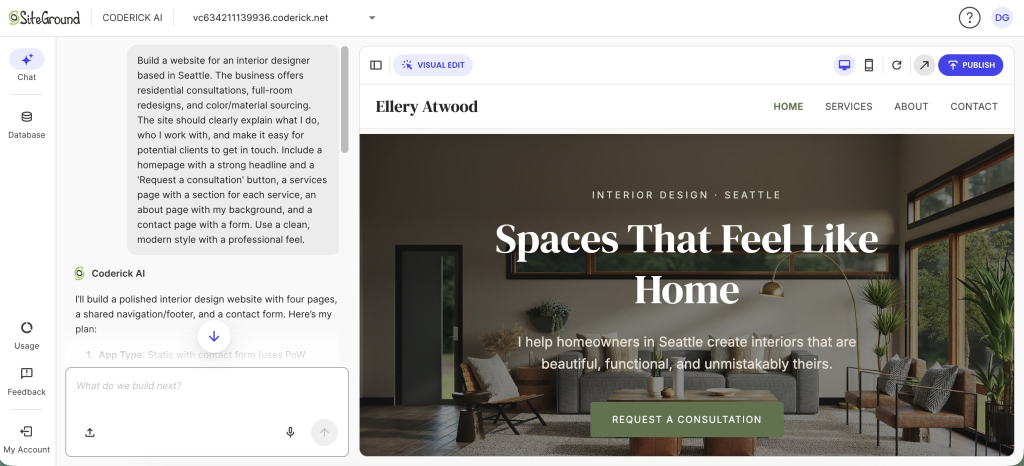
“Build a website for a [your profession, e.g., interior designer] based in [your city]. The business offers [list your main services, e.g., residential consultations, full-room redesigns, and color/material sourcing]. The site should clearly explain what I do, who I work with, and make it easy for potential clients to get in touch. Include a homepage with a strong headline and a ‘Request a consultation’ button, a services page with a section for each service, an about page with my background, and a contact page with a form. Use a clean, modern style with a professional feel.”
Here’s what Coderick AI builds from that prompt (and you can keep refining it from there).
Local business site
If you run a bakery, a barbershop, a dental clinic, or a repair shop, your visitors usually have one question first: where are you and when are you open? Local business sites are similar to service sites but put much more emphasis on physical presence: embedded maps, directions, local phone numbers, and neighborhood-specific language that helps you show up in local search results.
A restaurant, for instance, needs a menu page with items and prices organized by category (starters, mains, desserts, drinks), an hours-and-location section with a map, and a reservation or ordering option. A salon needs a list of treatments with pricing, photos of the space, and a way to book an appointment.
Example prompt you can start with:
“Create a website for [business name], a [business type, e.g., family-run Italian restaurant] in [your city]. The site should make it easy for local customers to see the menu, check opening hours, and book a table. Include a homepage with a hero image and a ‘Book a table’ button, a menu page with sections for starters, mains, desserts, and drinks (each item with name, description, and price), an hours-and-location page with our address and an embedded map, and a contact page. Design it to feel warm and inviting, with a good mobile experience.”
Single-offer landing page
If you’re launching one product, running a seasonal promotion, or collecting sign-ups for a workshop, you need a single focused page with one clear call to action. (A “call to action” is the button or link that tells visitors what to do next, like “Book now” or “Sign up.”) Landing pages strip away navigation distractions and focus the visitor on a single decision. They work well for product launches, event registrations, limited-time offers, and lead-generation campaigns where you want every visitor’s attention on one thing.
Example prompt you can start with:
“Build a landing page for [your offer, e.g., ‘a weekend pottery workshop on June 14 in Austin, $120 per person’]. The page should open with a strong headline, explain what attendees will learn and take away, show the date, location, and price clearly, and include a ‘Sign up now’ button as the main call to action. Add a section for 2-3 testimonials from past attendees and a short bio of the instructor. Keep the design focused, with no navigation menu. Make it mobile-friendly.”
Small store
If you sell a handful of products (handmade candles, custom T-shirts, specialty coffee beans), you need product listings, a cart, and a checkout flow. Customers need to see what you sell with clear photos and descriptions, understand pricing and shipping, and complete a purchase without leaving your site. An AI website maker can generate a small online store with product pages, pricing, and basic ecommerce structure. Some AI builders even support integrations with trusted payment systems: for example, you can add a Stripe checkout to anything you build with Coderick AI right in the chat.
This works well for stores with modest catalogs and straightforward shipping. For larger catalogs, complex inventory management, or advanced shipping rules, a dedicated ecommerce platform like SiteGround Ecommerce is a better fit.
Example prompt you can start with:
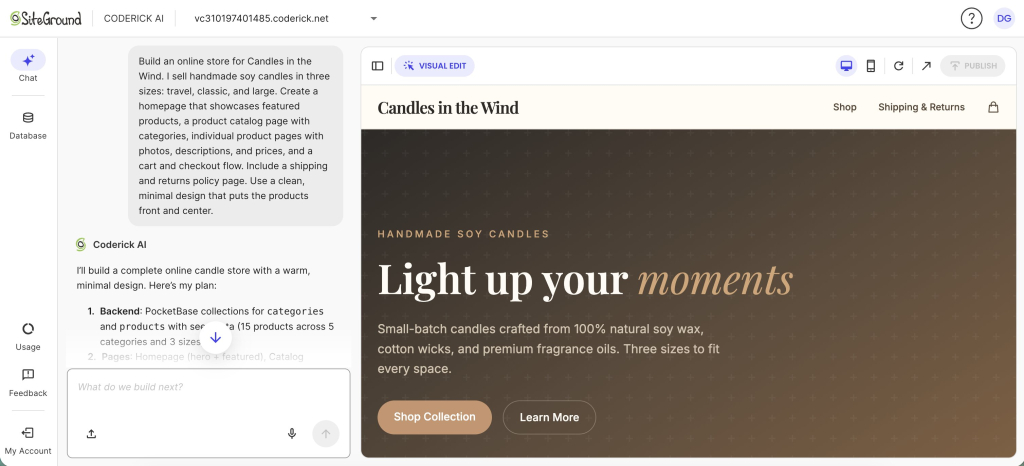
“Build an online store for [your brand name]. I sell [your product types, e.g., ‘handmade soy candles in three sizes: travel, classic, and large’]. Create a homepage that showcases featured products, a product catalog page with categories, individual product pages with photos, descriptions, and prices, and a cart and checkout flow. Include a shipping and returns policy page. Use a clean, minimal design that puts the products front and center.”
Here’s how SiteGround’s Coderick AI uses this prompt to generate a draft website you can then perfect:
You’ll notice the example prompts above include some guidance on structure and page elements. AI builders like SiteGround’s Coderick AI would figure most of this out on their own, but spelling it out upfront tends to produce a stronger first version and saves you follow-up iterations. If you’re not sure what elements your site needs yet, don’t worry. You can always add, remove, or rearrange pages after you see the first result with short follow-up prompts to refine: “add a pricing section,” “change the headline to something more specific,” “make the contact form include a phone number field.” Building iteratively, one change at a time, consistently produces better results than trying to describe everything in a single prompt. For more on this approach, SiteGround’s guide to key principles for building with AI covers the fundamentals.
Quick reference
| Site type | Best for | Must-have sections |
| Service business site | Consultants, photographers, trainers, contractors | Home, services, about, contact, testimonials |
| Local business site | Restaurants, salons, clinics, repair shops | Home, menu or services, hours and location, contact, reviews |
| Single-offer landing page | Product launches, workshops, seasonal promos | Hero section, offer details, one call to action, social proof |
| Small store | Handmade goods, specialty food, small product lines | Home, product listings, cart, checkout, shipping and returns policy |
When an AI website builder is not the right choice
AI website builders are the right tool for most small business sites and among the fastest ways to create a publishable first version. But not every project fits that mold, and it’s worth knowing where the boundaries are before you start.
- If you need a large ecommerce catalog with hundreds of products, complex inventory rules, or advanced shipping logic, a dedicated ecommerce platform will give you more control. SiteGround Ecommerce is built for exactly that.
- If you need custom integrations with niche software (medical records systems, real estate MLS feeds, enterprise resource planning), a developer is still the way to go.
- If you need pixel-level control over every design element, a drag-and-drop builder or a fully custom design gives you more precision.
The honest question to ask yourself: does my site need to do something that a typical small business site doesn’t? If the answer is yes, check whether the builder supports it before committing your time.
No-code website builder checklist: features that matter for small businesses
For small businesses, the best no-code website builder is not the one with the longest feature list. It is the one that lets you create, edit, publish, and maintain the site without needing technical help every time something changes.
Not every no-code website builder gives you the same level of control, publishing support, or business features. Before you invest your time in any platform, check for these five things. They’re the difference between a tool that produces a publishable business site and one that produces a demo you can’t actually use.
Editing control (layout, sections, styles)
Once the AI generates your site, the editing experience is what separates a useful tool from a frustrating one. It should be easy for you to rearrange sections, edit text, swap images, adjust colors and fonts, add or remove pages. Some builders like Coderick AI give you a combination of chat and easy-to-use visual editors for this. Others let you make changes only through the chat interface, where you describe what you want (“make the header darker,” “add a page for the team”) and the AI updates accordingly.
Whatever the method, the test is simple: can you make changes freely after the AI generates your site?
Business blocks (forms, booking, store)
A business site without a way for customers to reach you is just a brochure. Make sure the builder supports contact forms, appointment booking or scheduling (if your business takes appointments), and product listings with cart and checkout (if you sell goods). In many AI builders, you can describe the functionality you need (“add a booking form for consultations” or “add a product page with an add-to-cart button”) and the tool generates it.
Some of these features need a database behind them to store submissions, bookings, or orders. In some builders, like Coderick AI, the database is set up automatically. In others, you’ll need to configure it yourself, which would require some additional technical steps.
SEO controls (titles, descriptions, alt text)
SEO stands for search engine optimization. It’s the set of things you do so that when someone searches Google for what you offer, your site shows up. Here are the basics:
- Page titles (also called “title tags”): The clickable headline that appears in search results. Each page needs a unique, descriptive one.
- Meta descriptions: The short summary below the title in search results. A good meta description tells the searcher why they should click.
- Image alt text: A short written description of each image. Search engines can’t see images the way we do; alt text tells them what’s in the picture. It also helps make your website more accessible for visitors who use screen readers (software that reads web content aloud for people with visual impairments).
Most AI website builders generate these automatically, but the defaults tend to be generic. Take a few minutes to rewrite any that don’t match how your customers actually search. “Best bakery in Savannah” is more useful for Google searches than “Welcome to our homepage.” For ecommerce-specific SEO, SiteGround’s ecommerce SEO guide covers the fundamentals.
Mobile and speed basics
Over half of all website visits now come from mobile. A “responsive” site adjusts its layout automatically to fit whatever screen it’s viewed on. Most modern builders generate responsive layouts by default, but that doesn’t mean the result is perfect on every device. You still need to check font sizes, button spacing, and form usability on an actual phone before you publish.
Speed matters just as much. If your site takes more than three seconds to load, a significant share of visitors will leave before they see anything. Builders like Coderick AI include hosting, which removes separate server setup and gives your site a managed publishing environment. Builders that only export code leave you to figure out hosting, server configuration, and optimization on your own.
Domain, hosting, SSL
Three terms that sound technical but are simpler than they seem:
- Domain: Your web address, like “yourbakery.com.” You register it through a domain registrar and point it at your site.
- Hosting: The server where your website files live. When someone types your domain into a browser, the hosting server delivers your site to their screen. Think of the domain as your street address and hosting as the building at that address.
- SSL certificate: A security layer that encrypts (scrambles) data between your site and your visitors so nobody else can read it. Sites with SSL show “https” instead of “http” in the address bar. SSL protects sensitive information like form submissions and payment details, and search engines rank sites with it more favorably.
Some builders require you to set these up separately, while others (like Coderick AI) bundle everything together. This all-in-one approach is usually the best fit for non-technical owners, because there’s nothing to configure and nothing to forget.
Quality checks before you publish a business website
If you’re one click away from publishing, hold your horses and spend five more minutes on these checks. They prevent the most common post-launch headaches and make sure your first visitors see a polished, working site.
Forms and booking tests (send, receive, reply)
Submit every form on your site yourself. Send a test message through the contact form and confirm it arrives in your inbox. If you have a booking widget, complete a test booking. If you accept payments, run a test transaction. “I didn’t know my contact form wasn’t working” is the single most common complaint after launch, and it’s completely avoidable.
Mobile check (spacing, tap targets)
Open your site on your actual phone, not the browser’s mobile preview. Tap every button. Scroll through every page. Check that text is readable without zooming, that buttons have enough spacing so you don’t accidentally tap the wrong one, and that images load without breaking the layout.
Trust signals (reviews, address, policies)
Trust signals are the elements that tell a visitor they’re dealing with a legitimate business:
- A physical address or service area
- A phone number
- Genuine customer reviews or social proof
- Business licenses or certifications, if applicable
- A privacy policy and terms of service
The AI may have generated placeholder text for some of these. Tell it to replace every placeholder with your actual information before you go live.
Basic SEO pass (titles, one H1, indexable pages)
Before launch, run through these four checks. Most AI builders let you review and edit SEO settings for each page through a settings panel, or you can simply ask the AI to review them for you.
- Each page has a unique title tag that describes what the page is about. The title tag is what appears as the clickable headline in Google results. “Plumbing repair in Portland, OR” works. “Page 1” doesn’t. You can usually find and edit title tags in your builder’s page settings or SEO section, or ask the AI: “Show me the title tags for all pages.”
- Each page has exactly one H1 heading. The H1 is the main title of the page, like the headline of a newspaper article. Having more than one confuses search engines about what the page is actually about. To check, ask the AI: “Does any page have more than one H1 heading? If so, fix it.”
- All pages are set to indexable. This means search engines are allowed to find and show them in results. Most builders enable this by default, but you can confirm by looking for an “indexing” or “search engine visibility” toggle in your page or site settings. If you’re not sure where to find it, ask the builder: “Are all my pages set to indexable?”
- Your images have descriptive alt text. Alt text is a short written description of what the image shows. Instead of “IMG_4392.jpg,” something like “freshly baked sourdough loaves on a wooden counter” helps search engines understand the image and makes your site more accessible. You can usually edit alt text by clicking on an image in your builder’s editor, or ask the AI: “Add descriptive alt text to all images on the site.”
Ten minutes here gives your site a baseline for search visibility. For the full planning process, SiteGround’s website planning guide walks through everything from goals to launch.
From prompt to live: how it all comes together in Coderick AI
Generating a website and publishing it are two very different problems. Most AI builders solve the first one and leave you to figure out the second: finding hosting, configuring SSL, setting up a database, connecting a domain. By the time you’re done, you could have paid for three separate services and spent an afternoon on setup.
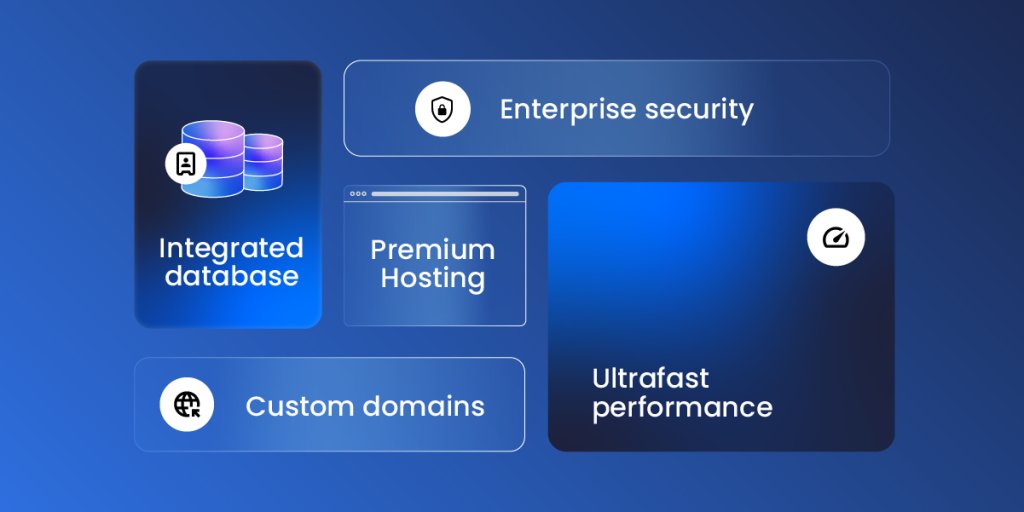
That’s exactly why SiteGround built Coderick AI as a complete platform that takes you from prompt to live, not just a builder. With Coderick AI, you build, edit (by chatting and by making visual edits), and publish in a single environment. Every plan includes premium hosting built directly into the platform, automatic database setup and configuration, ultrafast performance backed by SiteGround’s infrastructure (the same systems that serve millions of websites), and custom domain support on all paid plans.
Connect domain and go live (what “publish” means)
When you click “Publish” in Coderick AI, your site goes live instantly. It’s hosted on SiteGround’s infrastructure with SSL already active, the database already configured, performance already optimized, and responsive by default (meaning your site will look right on phones, tablets, and desktops without any extra configuration).
You connect your custom domain through the dashboard, and the site becomes publicly accessible. There’s no separate hosting account to set up, no server to configure, no certificate to install. If you don’t have a domain yet, you can register one through SiteGround and connect it in the same workflow.
If you’ve been putting off building a website because the process felt too technical, too expensive, or too time-consuming, an AI website builder removes those barriers. Describe what your business does, review what the AI builds, adjust the details that matter, and go live.
FAQs
An AI website builder uses AI to generate a draft website from your inputs. You describe what your business does, who it serves, and what the site should achieve, and the AI creates pages, layout, navigation, starter copy, and design. Then you review, edit, and publish when it’s ready.
A no-code website builder does not require coding or technical skills. You describe your business, audience, and site goal, then review the generated version and refine the layout, copy, and business details before publishing.
AI website builders create a working first version from a short business description. Instead of starting from a blank page or a template you fill in piece by piece, you get pages, layout, and starter copy in minutes, then edit the details that matter.
Yes. With Coderick AI, you can connect a custom domain and publish on SiteGround hosting. Hosting and SSL are included, so you do not need to configure a separate server or install a certificate.
Most modern AI website builders generate responsive layouts, meaning designs that automatically adjust to different screen sizes. That said, “responsive by default” doesn’t mean flawless on every device. Check spacing, font sizes, tap targets, and form usability on your phone before you publish.
Most AI website builders create basic SEO elements such as page titles, meta descriptions, headings, and site structure. Review them before publishing because the AI can draft useful defaults, but only you know how your customers describe your services.
Yes. Most AI website builders let you add appointment booking, payments, or a small online store by describing what you need. In Coderick AI, payments run through Stripe on paid plans, so you can sell products, services, bookings, subscriptions, or digital downloads through Stripe’s secure checkout. Start with the one feature that matters most today, test it, publish, and add more as you grow.
AI-generated website copy is a strong first draft, not a final approval. Review pricing, guarantees, timelines, legal claims, policies, and testimonials before publishing. If the AI added a promise or fact you did not provide, replace it with your real business information.
For a simple business site, yes. An AI website builder can handle a homepage, services page, contact page, forms, booking, and a small store. You may still need a developer for unusual integrations, advanced custom features, or complex security and performance needs.