9 Contact Us Page Mistakes – Fixed with Real Examples

Contact us page header image

So, you want to make sure your Contact Us page isn’t just another forgotten link on your website? You’re in the right place.

In this article, we’ll explore 9 mistakes you’re probably making with your Contact Us pages and how you can fix them using real-life examples. Let’s transform your page into a functional, inviting, and engaging space.

Ready to get started? Let’s do this!
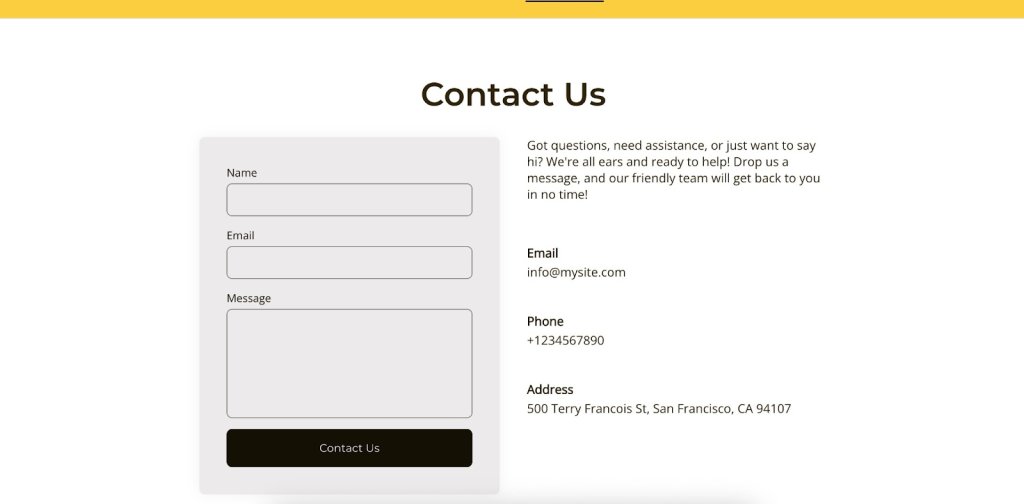
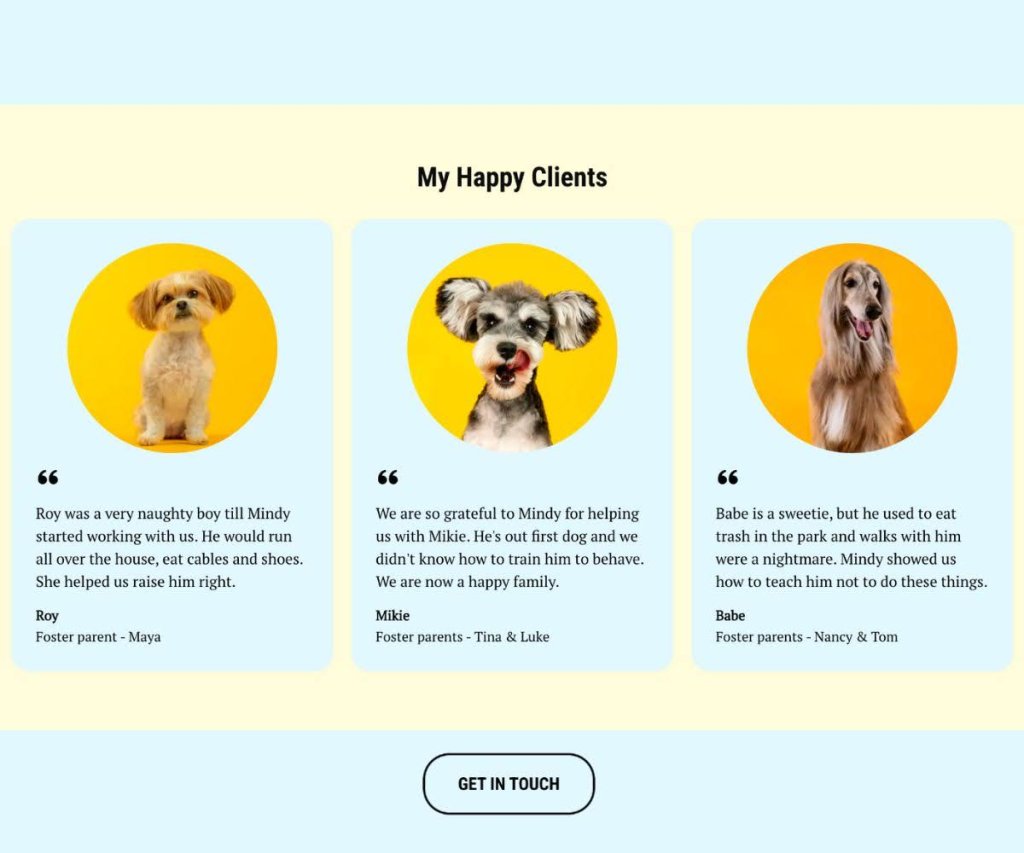
A Contact Us page with warm, conversational language, reflecting a friendly brand tone.

Why Is a Contact Us Page Important?

Think of your Contact Us page as your website’s conversation starter—it’s the inviting nudge that encourages visitors to reach out and engage with you. Whether they’re asking questions, sharing feedback, or just saying hello, this page is your chance to show that you’re approachable and eager to connect. 

But why exactly is it so important? Unlike other pages like the About Us or Homepage, which primarily provide information, the Contact Us page is all about interaction. It’s a direct line between you and your audience, offering them a personalized space to engage with your brand. A well-designed Contact Us page isn’t just about getting messages—it can turn passive browsing into a lively chat, helping you build relationships and earn some trust along the way. 

Ready to turn those casual browsers into enthusiastic customers? With SiteGround’s super user-friendly Website Builder, you can craft a killer Contact Us page in a flash! Dive in and watch the magic happen!

9 Mistakes on Contact Us Pages and How to Avoid Them

Alright, so you’ve got the basics down for your Contact Us page, but are you sure it’s hitting all the right notes? Even with the best intentions, some pages can slip up and send your visitors running instead of sticking around.

But don’t worry—we’ve got your back. Let’s check out some of the most common slip-ups businesses make on their Contact Us pages and, more importantly, how you can dodge them. With these tips, you’ll be on your way to crafting a page that’s not just working, but also gets your website visitors excited to reach out.

Mistake 1: Making the Contact Us Page Hard to Find

Let’s face it—if people have to go on a digital scavenger hunt just to get in touch, they’re likely to throw in the towel. That’s why this first mistake tops our list; making your Contact Us page hard to find is like hiding the key to your front door, leaving visitors feeling frustrated and ready to give up.

💡To avoid this, make sure your Contact Us page is easy to spot. Pop a link in your main menu, stick it in the footer, or even throw in a call-to-action button on important pages. The idea is to make it super simple to find and use, so people feel welcome and ready to connect whenever they need to chat.

If you’re going for a simple and minimalist website, make sure that the ‘contact’ option is right there in your menu. That way, as soon as someone lands on your homepage, they’ll know exactly how to get in touch with you.

A website navigation menu with a clearly visible Contact Us link, demonstrating easy accessibility.

Mistake 2: Overcomplicating the Design

Once visitors find your Contact Us page, you don’t want to lose them with a complicated design. So, keeping it simple is the way to go. Don’t cram it with too many bells and whistles, flashy graphics, or info that nobody really needs. This can totally overwhelm visitors and make it a real hassle for them to find what they’re looking for.

💡Instead, go for a clean and straightforward design that’s super easy to navigate. For example, if you offer services, focus on the info your potential customers really need, like your email, phone number, and address. Everything else might just end up being a distraction rather than a help.
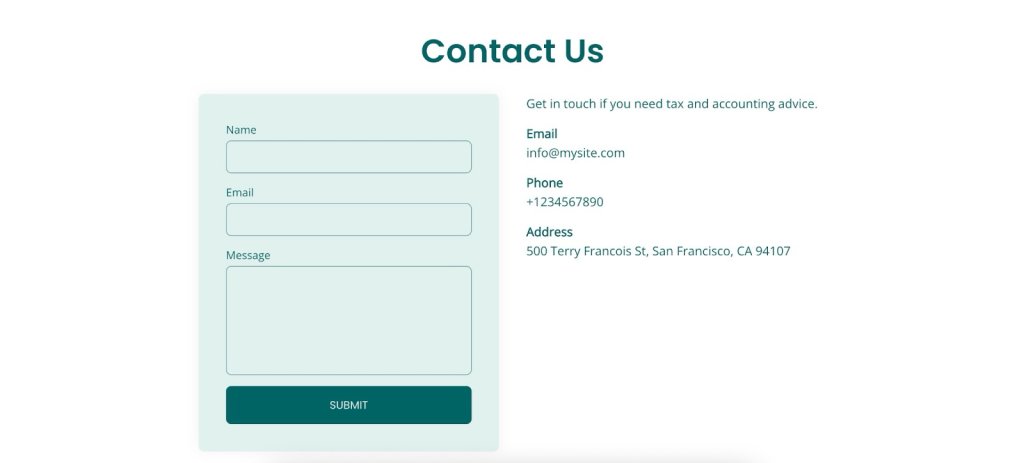
A Contact Us page with a minimalist and clean design, featuring simple navigation and essential contact information without unnecessary clutter.

Mistake 3: Offering Limited Contact Options

Imagine this: a visitor finally lands on your Contact Us page, ready to reach out—only to find a phone number and nothing else. What if they’re not into phone calls? They might just bail and never come back. That’s why mistake number three is not offering a mix of contact options. 

💡Make sure everyone can get in touch in a way that suits them. The usual go-tos are phone, email, and address, but depending on your business type and location, different platforms might be more popular. For example, Instagram is a hit in the US, while WhatsApp is the go-to in Spain. 

Just make sure those links make sense and serve a purpose—nothing’s more frustrating than being sent in circles, only to end up back at an email that keeps bouncing you around. Keep it straightforward and functional.

Pro tip: Keep your contact links in tip-top shape by clicking on them regularly to make sure they go where they’re supposed to. Check them out on different devices and browsers, and verify that emails actually land in the inbox.

And hey, let them know your average response time—it’s a nice touch that sets clear expectations.
A Contact Us page displaying various contact options, including phone, email, and social media links.

Mistake 4: Ignoring Mobile Optimization

Skipping mobile optimization for your Contact Us page? That’s a big no, especially with everyone glued to their phones these days. If your page isn’t looking sharp or working smoothly on mobile, visitors might just throw their hands up in frustration and peace out. Let’s make sure your page is ready to impress, no matter the screen size.

💡Give it a spin on different devices to make sure everything, from text to buttons, is easy to read and use. When your page is mobile-friendly, it means everyone, no matter what gadget they’re on, can easily reach out and connect with you.

Quick tip: Make sure your buttons are easy to tap, no matter what device folks are using. Whether they’re on their phone during a crowded train ride, sitting at their desk with a huge screen, or relaxing on the couch with a tablet, your page should be a breeze to navigate.
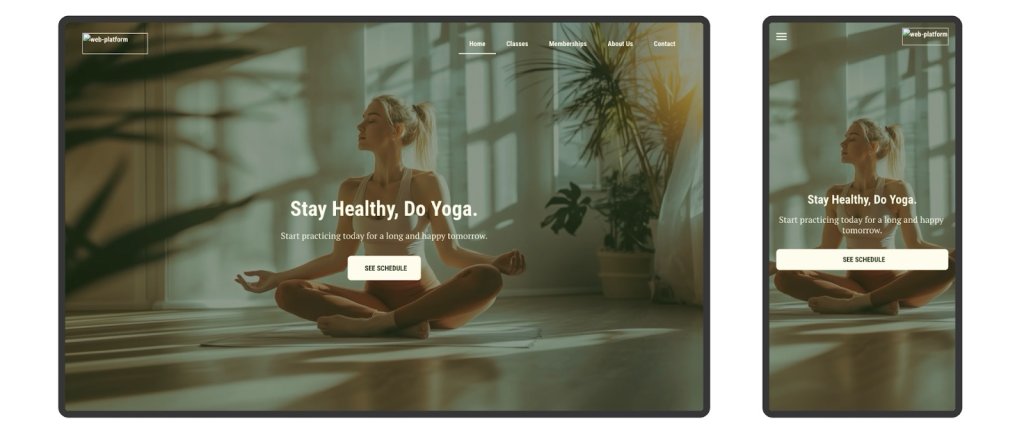
A Contact Us page displayed on a smartphone, showing a mobile-friendly design.

Mistake 5: Using the Wrong Tone or Language

Once you’ve got your Contact Us page working smoothly on mobile, it’s time to think about the words you’re using. If your tone doesn’t match your brand or feels too stiff, it might make your business seem a bit distant or off-putting.

💡Try using a tone that fits your brand and makes visitors feel like they’re chatting with a friendly guide. This makes your brand more relatable and keeps the experience enjoyable.

Here are some tips to nail your copy:

  • Reflect Your Brand’s Vibe: Whether you’re all about being chill, professional, or a little quirky, let that personality shine in your language. It helps create a consistent and welcoming experience.
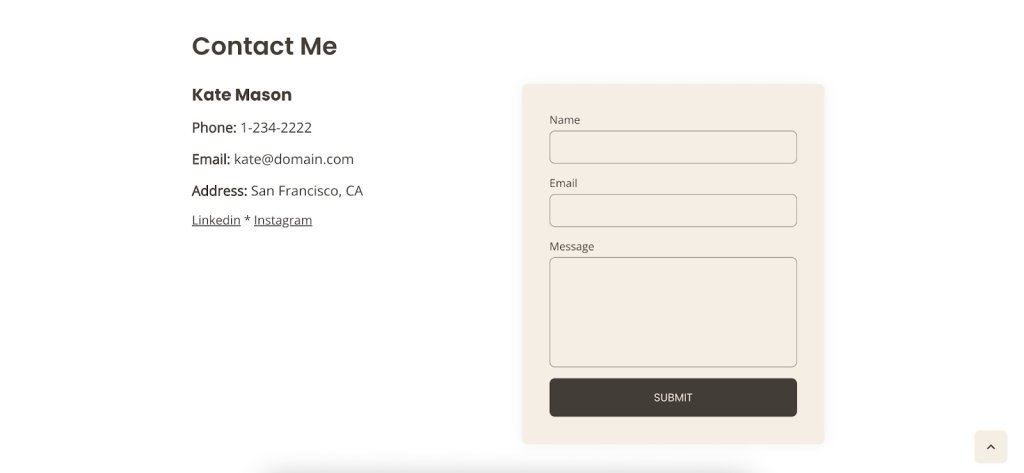
  • Keep It Warm and Friendly: Use conversational language to make visitors feel at home. Phrases like “We’d love to hear from you” or “Drop us a line” can make things more inviting. Even small tweaks, like changing “Contact” to “Contact Me,” can work wonders by adding that personal touch and turning a generic page into a friendly invitation.
  • Look for Creative Inspiration: Check out brands that have nailed their Contact Us pages. Some use humor or storytelling to make their pages stand out and be more memorable.

Need a little help crafting that perfect message? The right ChatGPT prompts can give you a hand, but remember, nothing beats your own judgment and unique flair. After all, you’re the best at knowing what makes your brand shine.
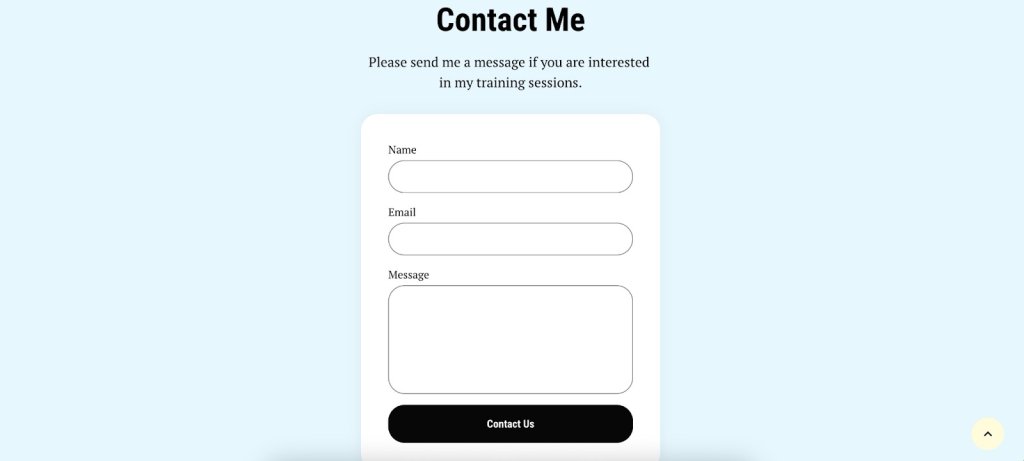
A Contact Us page with warm, conversational language, reflecting a friendly brand tone. The button is named "Contact Us".

Mistake 6: Using Weak or Unclear CTAs

Now that you’ve got the tone and language perfectly aligned with your brand, let’s make sure visitors know exactly how to take the next step. If your calls to action are unclear or not very inviting, visitors might not know what to do next and could just leave without reaching out. So, ditch those snooze-fest CTAs like “Submit,” “Click Here,” “Learn More,” or “Fill Out the Form.” They’re vague, lack context, and sound about as exciting as watching paint dry, leaving visitors scratching their heads instead of engaging.

💡Make sure your CTAs are clear and catchy so they stand out. Use simple, action-driven words like “Get in Touch,” “Send Us a Message,” or “Chat Now” to guide people on what to do. When your CTAs are easy to find and clear, it makes connecting with you super simple, giving visitors a smooth path from browsing to reaching out.
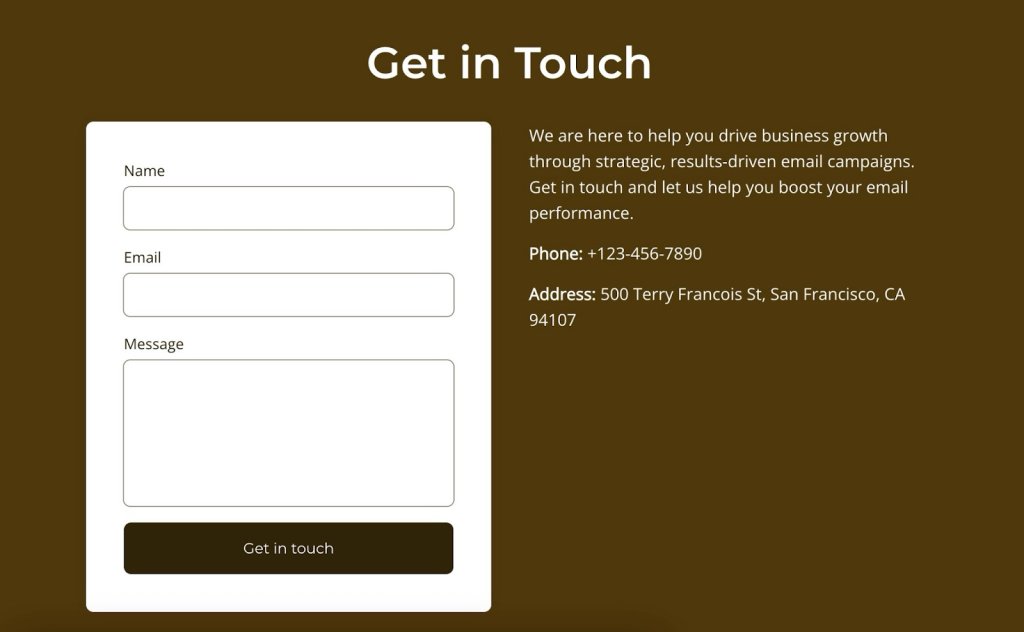
A Contact Us page featuring clear and inviting calls to action, such as 'Get in Touch' and 'Send Us a Message'.

Mistake 7: Providing Incomplete Business Information

Leaving out key details is like giving someone a map with missing pieces—totally confusing and frustrating. 

💡Make sure your business info is thorough and crystal clear so visitors can connect with you without any guesswork.

Here’s a quick checklist to keep things simple:

✅ Business address
✅ Operating hours
✅ Contact numbers
✅ Email address
✅ Social media links

And depending on your business, think about adding those extra details that save people from feeling lost. A few smart fields, such as dropdown menus for selecting the department or type of inquiry (like sales, support, or feedback), can be super handy. You don’t want to overload visitors, but these options can easily point them to the right team or service.

For example, if you offer yoga classes, maybe ask if they’re curious about classes types or pricing. It’s those little touches that make reaching out smooth and hassle-free. Take this studio, for example. They’ve nailed it by not only having a contact form and phone number but also giving folks a heads-up on how early they need to call to book a class.

Check out this windows and doors shop. They’ve got it all sorted with a super handy form that asks if you’re after windows or doors and even nudges you to add measurements for a spot-on estimate. It’s those little touches that make reaching out hassle-free, so customers get exactly what they need.
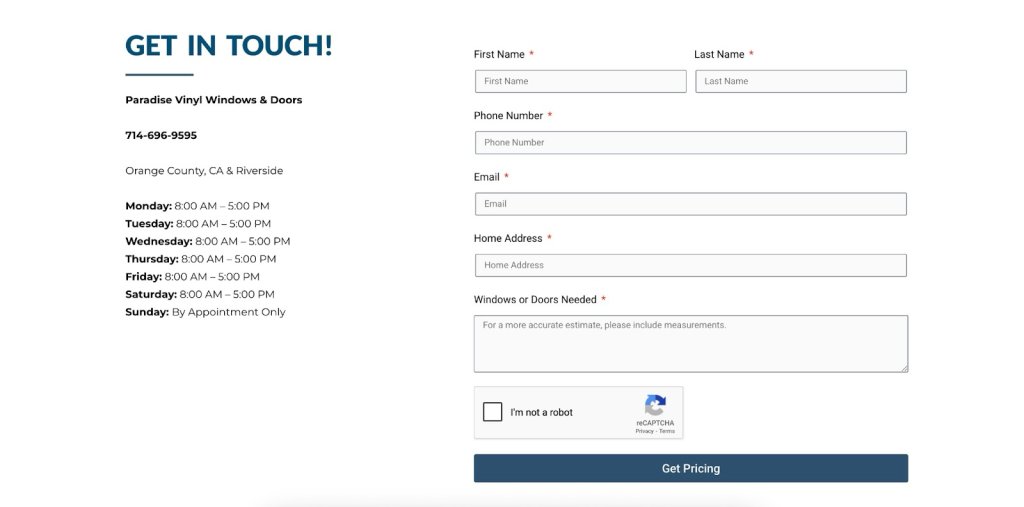
A Contact Us page with comprehensive business information, including address, phone number, service needed, and operating hours.

Mistake 8: Lacking a Follow-Up Process

Next up, it’s important to think about what happens after someone reaches out. Even if you’ve perfected all the other steps, it’s all for nothing if you don’t have a proper follow-up process to manage your inquiries. Make sure you have a system in place to respond promptly and keep the conversation going.

💡Instead, get a system in place to give inquiries a friendly nod and a speedy reply. Whether it’s a quick automated email that says, “Hey there, we got your message—you’re on our radar” or a friendly team member ready to dive in with a response, having a clear follow-up process shows you genuinely appreciate them reaching out.

SiteGround Email Marketing can really make things easier with its email automation feature. You can set up a series of automated emails that kick in as soon as someone subscribes or reaches out. This way, every inquiry gets a quick acknowledgment and follow-up without you having to do a thing. With triggers and automated responses, you can keep the conversation going smoothly and let your customers know how long they’ll be waiting for a reply—whether it’s 24, 48, or 72 hours.

This not only builds trust but also makes the experience feel more natural and approachable, encouraging visitors to reach out again in the future. Keep the tone aligned with your brand, and watch those connections grow.
The SiteGround Website Builder banner: Create Successful Email Campaigns with SiteGround Email Marketing. We've got everything you need to grow your subscriber list, design beautiful campaigns effortlessly, and quickly craft the perfect messages (thanks to our AI Assistant).

Mistake 9: Failing to Test and Optimize

After establishing a solid follow-up process, it’s essential to keep your Contact Us page in top shape by regularly testing and optimizing it. Neglecting to monitor your page’s performance means you might miss valuable opportunities to enhance user experience. 

💡Instead, use analytics to see how visitors interact with the page and spot areas that could use a little tweaking. Check metrics like time on page, bounce rates, or how often visitors reach out. Whether it’s adjusting the layout, refining the language, or simplifying the form fields, regular testing and optimization help keep your Contact Us page effective and user-friendly. This ongoing effort not only keeps your users satisfied but also makes it easier for them to engage with your brand, opening the door to better communication.

How to Add a Contact Us Page to Your Website

Creating a Contact Us page for your website is a straightforward process. Here’s a step-by-step guide to help you add it:

1. Navigate to Content Creation
Go to Content > Add Content > Basic Page to begin setting up your new page.

2. Enter Page Details
Fill in the necessary information for your Contact Us page, such as your contact details, a contact form, or any other relevant information you want to include.

3. Set the URL Alias
Before saving, expand the URL alias settings tab and specify a simple URL, like contact-us. This will make it easy to remember and access.

4. Add to Menu
Head over to the Menu Settings tab and check the box for Provide a menu link. This ensures your Contact Us page is easily accessible from the main navigation menu.

5. Save Your Changes
Once everything is set up, save your changes to create the page.

Start Building Trust with the Perfect Contact Us Page

You can transform your Contact Us page into a warm, inviting space that truly welcomes people in. Easy to find, simple to use, and full of personality—these are your secret ingredients.
Ready to give your page a little TLC? Try the SiteGround Website Builder, where you can easily craft your perfect Contact Us page and more. Here’s to building trust, sparking conversations, and creating lasting relationships with everyone who stops by!

The SiteGround Website Builder banner: Create Your Dream Website with SiteGround's Easy-to-Use Builder.

AI Ethics in Marketing: What It Really Means in Practice

abstract of ethical considerations in ai

AI is now officially baked into our daily lives—whether we’re getting eerily accurate product suggestions, binge-worthy content queues, or always-available customer support. And if you’re in marketing, chances are you’re using AI tools more and more to get your job done. In many ways it’s great news, but as AI becomes a bigger part of our workflow and strategy, so does the looming question: What are the ethical considerations of AI in marketing?

So today we’re going to tackle what this means for your marketing in practical terms, and not just in philosophical ones. From chatbots to ChatGPT, we’ll be examining how you should be thinking about the ethics of AI in your day-to-day marketing and business efforts. 

What Is AI in Marketing, Really?

Search for “AI ethics in marketing” and you’ll find a lot of big ideas—data privacy, algorithmic bias, transparency—but not much clarity on what those issues actually look like in real life. Are we talking about the ethics of ad targeting? Of AI-generated content? Customer data? And which of these actually apply to your corner of the marketing world?

Indeed “AI in marketing” is a broad umbrella of considerations that includes everything from writing email subject lines to predicting who’s most likely to click “buy.” It can automate, analyze, personalize, and generate at a scale that wasn’t possible even a few years ago—transforming everything from campaign targeting to content creation, and even how AI shapes SEO strategy.

But not all AI tools carry the same issues and risks—or raise the same ethical questions.

To make this more actionable, we’re going to break these considerations down by use case and explore what to watch out for with each:

  • Generative AI that creates text, images, or video
  • Predictive analytics that forecast behavior and outcomes
  • Personalization engines that tailor content or offers
  • Chatbots and virtual assistants that manage interactions
  • Ad targeting algorithms that decide who sees what

Each of these issues comes with its own set of implications and benefits—and its own ethical blind spots. So instead of talking ethics in the abstract, we’re going to look at these considerations in context.

Let’s get into it.

The Ethical Considerations of AI by Marketing Use Case

1. Generative AI & Content Creation

AI tools like ChatGPT, Jasper, or DALL·E have all become commonplace go-tos in any marketers toolbox. Product descriptions, blog posts, ad campaigns—they’re all fair game when it comes to AI-generated content. Which is also why it has a lot of marketers scratching their heads, wondering about the ethical considerations at play.

Visual of a generative AI tool helping to craft email copy

Key Concerns

  • Transparency: When consumers take in content, they very likely assume it was created the old-fashioned way (by a human, that is!), and not by AI. This assumption can be problematic because it may mislead readers about the source or credibility of the information. For example:
    • In educational or informational content, AI can easily present outdated or inaccurate facts with confident and not-so-transparent wording, which could misinform readers who trust it as expert insight.
    • In thought leadership, audiences expect original ideas or firsthand experience—something AI, by nature, cannot provide.
    • In customer support, using AI without disclosure can negatively impact trust if users discover they’re interacting with a bot, especially in sensitive or high-stakes scenarios.

In short, when using an AI tool or ChatGPT for marketing, the output may lead people to believe they’re hearing from a human—particularly an expert, authority, or representative. Customers make decisions based on that perceived authenticity, and if your content isn’t original, it can undermine trust.

  • Information Security: Many marketers use AI tools by inputting customer details, drafts, or internal business info into platforms like ChatGPT. But unless you’re using an enterprise-level solution with strict privacy policies, that information could potentially be stored or used to train future models. This raises concerns about safeguarding proprietary content and protecting customer privacy—especially when using free or public AI tools.
  • Plagiarism & Originality: Generative AI tools are trained on large datasets scraped from the internet. While they create “new” content, there’s always a risk of closely replicating existing work—potentially without proper attribution or awareness.
  • Brand Authenticity: Content generated by AI can lack nuance, emotional depth, or contextual awareness—especially when used without human review. This can lead to tone-deaf messaging, inconsistencies in voice, or even reputational harm if the content misrepresents your values.

Recommendations:

  • Clearly label AI-generated content when appropriate, especially in editorial or informational contexts.
  • Be mindful of what you share: Avoid pasting sensitive, personal, or proprietary information into generative AI tools unless they’re designed for secure, enterprise use. Treat AI like an external collaborator—one who needs boundaries to protect your business and your customers.
  • Be smart about your ChatGPT prompts, making sure they are extra precise in order to yield highly custom responses, then refine to really make the content your own.
  • You’re the brain, AI is just the assistant: AI is a powerful creative partner, but it shouldn’t replace your own thinking. Use it to draft, brainstorm, or edit—but the final insight, perspective, and voice should come from you. That’s what keeps your content original, credible, and human.
  • Use plagiarism checkers and editing tools to review AI output for originality and quality.
  • Maintain human oversight to ensure the tone, message, and brand identity are preserved.

Pro tip: As AI content becomes more prevalent across blogs, landing pages, and campaign assets, a new consideration is emerging: how to ensure it gets found. This is where Generative Engine Optimization—or GEO—comes into play. GEO is about crafting AI-generated content that’s not just high-quality, but also structured and styled to perform well in AI-driven discovery tools like ChatGPT, Perplexity, and Google’s AI Overviews. It’s just another reason to make sure your content is original and worth discovering.

[108]

2. Predictive Analytics

AI-driven predictive analytics allow marketers to identify trends, segment customers, and forecast behaviors—from churn risk to likelihood to purchase. It unlocks a whole lot of marketing potential! But when applied without care, it also raises ethical red flags.

Key Concerns:

  • Data Privacy: Predictive models rely on vast amounts of behavioral and demographic data, a lot of which is collected passively or indirectly. So if customers aren’t aware of how their data is being used, or didn’t explicitly consent, you as the marketer risk violating privacy norms or even regulations.
  • Bias: If the training data reflects real-world inequalities, the model can reproduce and reinforce them. For example, a model predicting “high-value customers” could unintentionally prioritize certain age groups, zip codes, or socioeconomic classes, leading to exclusion or discrimination.
  • Over-targeting: Just because you can anticipate a customer’s behavior doesn’t mean you should act on it. Hyper-personalized targeting can cross the line into manipulation, nudging users in ways that feel intrusive or exploit emotional vulnerabilities (like targeting someone during a late-night scroll binge).

Recommendations:

  • Be clear about consent: Ensure that data used in predictive models is collected ethically and transparently. Revisit your privacy policies to make sure they align with how you actually use data.
  • Test for fairness: Regularly audit models for biased outcomes. This means checking whether certain groups are being unfairly excluded or overly targeted—and adjusting the model or dataset accordingly.
  • Use data to empower, not pressure: Aim to support customer decisions, not manipulate them. For instance, predictive models can be used to help users find what they need faster—not to push unnecessary purchases or create urgency traps.
  • Involve cross-functional review: Bring in legal, compliance, and ethical oversight—especially for sensitive use cases—to ensure predictive tools are aligned with your company’s broader values and obligations.

3. Personalization Engines

Everyone loves a good recommendation—like a spot-on product pick or an ad that feels like it just read your mind. When personalization is done right, it can feel like magic. But there’s a fine line between helpful and just plain creepy.

Key Concerns:

  • Manipulation: Personalization can quickly become persuasion. Nudging someone toward a product they might like is one thing, but designing experiences that subtly push them into spending more or clicking faster can feel exploitative, especially if emotional triggers are involved.
  • Fairness: Algorithms often determine who sees what, but not everyone gets the same deals, opportunities, or exposure. We’ve touched on this already, but if your system unintentionally favors certain demographics or behaviors—like showing premium products only to high-income areas or reinforcing gender stereotypes in recommendations—you might be leaving others out without realizing it. And that’s just not good business.
  • Data Transparency: People should know how and why they’re seeing certain content. If your site feels like it knows too much without ever asking, it can set off privacy alarms.

Recommendations:

  • Be helpful, not pushy: Use personalization to guide, not pressure. That means going with: “Here’s what we think you’ll love,” instead of “Buy this now or miss out forever.”
  • Audit for fairness: Check who’s getting shown what, and who’s not. Test across different personas to make sure your engine isn’t creating a digital popularity contest.
  • Explain the magic: A simple “We recommend this based on your recent views” goes a long way in making people feel informed, not tracked. Transparency builds trust and keeps the creep factor low.

4. Chatbots and Virtual Assistants

AI-powered chatbots and virtual assistants are everywhere—from answering FAQs to helping customers track orders or make product decisions. They’re efficient, available 24/7, and can handle a shocking number of queries without human help. But while they’ve come a long way, they still raise some eyebrows and come with their own set of implications.

Key Concerns:

  • Disclosure: Users often assume they’re chatting with a human, especially when the bot is extra chatty or friendly, and introduces themselves by a name. So when you fail to make it clear that it’s an AI behind the screen, it can make the customer feel a bit duped (even more so if the conversation involves important or sensitive issues).
  • Accuracy: Chatbots are only as smart as the data and rules behind them. They might give outdated or incomplete answers—or worse, confidently provide wrong information. When users rely on that info to make decisions, a simple mistake can have real consequences.
  • The Empathy Gap: As hard as they try, Bots don’t have feelings, and yet they’re often used in situations that call for empathy, like complaints, cancellations, or product issues. So if a customer is frustrated or upset, a scripted bot response can feel cold or dismissive, damaging trust and sales instead of saving time and budget.

Recommendations:

  • Be upfront about the bot: Start every interaction with a clear intro like, “Hi! I’m an AI assistant here to help.” This manages expectations and builds trust from the first message.
  • Set smart limits: Know when to hand things off to a human. If a chatbot hits a complex or emotional issue, the best response might be, “Let me connect you to someone who can help further.”
  • Train bots with care: Keep responses helpful, accurate, and human-sounding—but not too human. Also, regularly update content to make sure answers reflect current policies, inventory, or terms.
  • Add emotional intelligence cues: Even if bots can’t feel, they can still respond in ways that feel thoughtful. Phrases like “I understand that must be frustrating” can go a long way in softening automated replies. And again, set those smart limits, so that if a customer is truly frustrated, they get connected with a real, feeling human being.
Visual of an AI assistant along with disclosure

5. Ad Targeting Algorithms

AI-driven ad targeting is what makes those eerily relevant ads follow you around the internet—from the shoes you almost bought to the flight you only searched once, and the car you merely thought about researching when you saw it on the freeway yesterday. This kind of ad targeting is powerful, efficient, and often boosts ROI—but its creepy precision also raises some big questions about privacy, fairness, and how much users really know about what’s happening behind the scenes.

Key Concerns:

  • Surveillance: We’ve all felt it: ad targeting can feel a lot like digital stalking. These algorithms track behavior across websites, apps, and devices, often collecting more data than users realize. And when people feel watched rather than understood, they start to get suspicious and trust a whole lot less.
  • Algorithmic Bias: Bias strikes once again because AI learns from data patterns, but those patterns can reflect real-world inequalities. That means targeting algorithms might unintentionally exclude or stereotype certain groups—like showing job ads mostly to men or financial products only to wealthier users.
  • Transparency: Most users don’t know why they’re seeing a certain ad, what data was used to target them, or how to control it. The more opaque the process, the more people feel manipulated instead of marketed to.

Recommendations:

  • Collect responsibly: Be mindful of how much data you’re gathering and why. Stick to what’s needed, disclose it clearly, and give users real control over tracking and targeting preferences.
  • Audit your targeting regularly: Like in other cases, check who your ads are reaching and, just as importantly, who they’re not. Make sure your campaigns aren’t unintentionally reinforcing bias or limiting reach.
  • Offer transparency tools: Give users a way to understand and manage their ad experience (like “Why am I seeing this?” links or personalized ad settings). It’s good ethics and good UX.
  • Balance relevance with respect: Smart targeting doesn’t have to feel invasive. Focus on delivering value, not just visibility. If your ad makes someone feel seen—in a good way—you’ve nailed it.

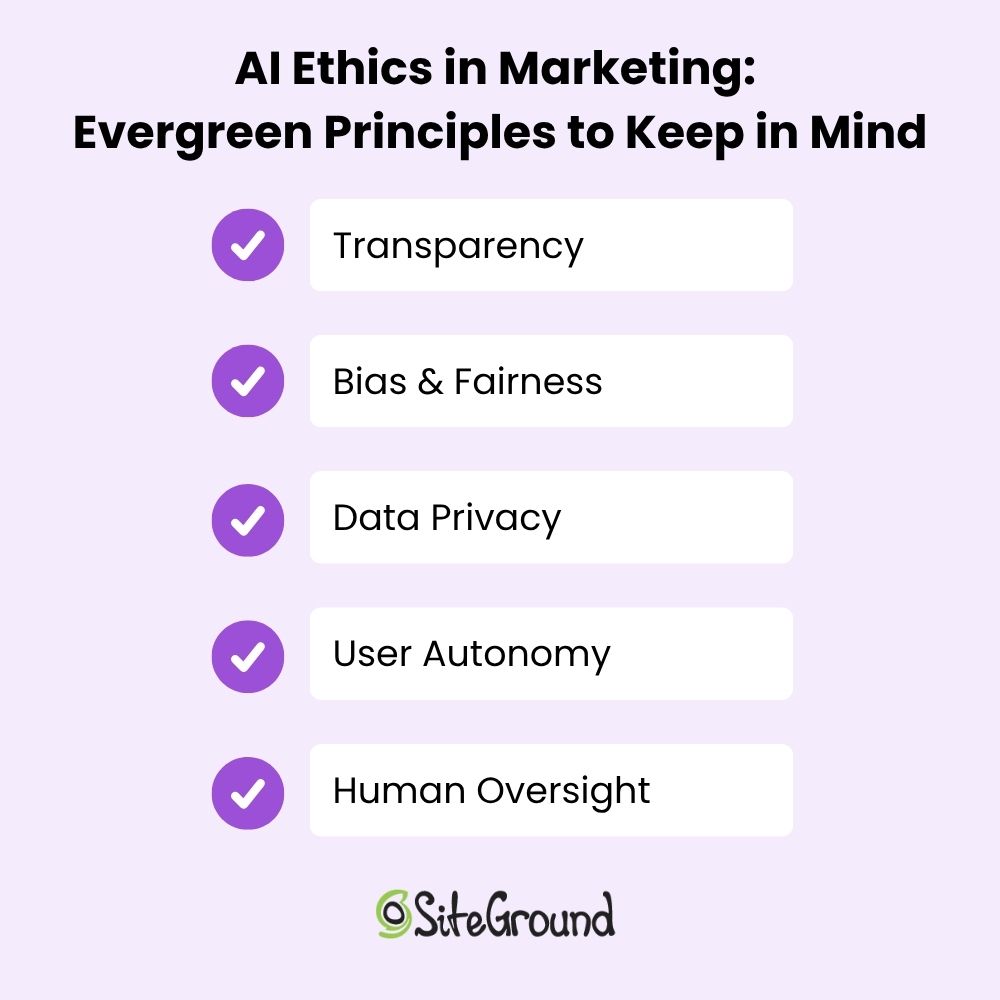
AI Ethics in Marketing: Evergreen Principles to Keep in Mind

As we’ve seen across different AI tools—from content generators to chatbots and ad engines—the ethical concerns and considerations may vary in detail, but they revolve around a few core themes. So as you move through the world of AI in marketing, no matter the context, you’ll always want to keep the following in mind: 

Transparency 

Whether it’s content, conversations, or ads, people deserve to know what’s AI-generated and how their data is being used. The more open you are, the more trust you earn.

Bias & Fairness 

AI doesn’t operate in a vacuum. It learns from us, flaws and all. That means unchecked models can reinforce stereotypes or unfairly exclude certain groups. Ethical marketing means that businesses should actively work to catch and correct those patterns.

Data Privacy

Just because data is accessible doesn’t mean it should be used indiscriminately. Ethical AI marketing respects customer privacy—not only to comply with regulations like GDPR, CCPA, or other regional laws, but also to limit exposure of private data when using external AI tools. Transparent data practices and secure handling are non-negotiable pillars of trust. 

User Autonomy

Personalization and prediction should empower users and not manipulate them. Ethical AI marketing supports better decision-making rather than pushing people into a corner.

Human Oversight

AI can do a lot, but it shouldn’t be doing it all alone. Keeping humans in the loop—especially for sensitive decisions or customer touchpoints—is what makes AI feel like a tool, not a replacement. It’s not meant to be the brain—it’s there to assist your brain. Your ideas, your judgment, and your expertise are still the most valuable parts of the process.

Together, these considerations form the foundation of responsible AI marketing and business. They’re not just “nice-to-haves,” but in fact critical for building brands that last.

A list of AI ethics and principles in marketing

Ethical Implications of AI: Where Marketers Go From Here

AI isn’t going anywhere—and neither are the ethical questions and implications that come with it. As marketers, we’re in a powerful position, as we get to shape how AI shows up in the world, how it interacts with real people, and how much trust it earns (or loses) in the process. That means asking hard questions, pushing for transparency, and making ethics an integral part of the process from the start.

We at SiteGround lean into AI, and it’s thoughtfully weaved into the fabric of what we do. For web hosting, our Antibot AI blocks millions of brute-force attacks before they ever reach your site. When it comes to finding the perfect domain, AI powers our search tools to suggest names that are relevant, memorable, and on-brand. And when it’s time to build your website or craft your next campaign, our Website Builder and Email Marketing Platform include built-in AI tools to help you create fresh content that’s clear, polished, and ready to go.

6 Social Proof Examples That Will Transform Your Marketing Strategy

Social proof examples header image

Social proof taps into our natural instinct to follow the crowd—because if others love it, it must be good, right? It’s one of the most powerful ways to influence buying decisions, showing potential customers that people just like them are already raving about your brand.

When you know how to make the most of social proof, it can take your advertising from “meh” to “must-have” magic. It helps you build trust and credibility with potential customers in a way that feels genuine and makes a real impact.

In this article, we’ll first explore what social proof means and the psychology behind it. Then, we’ll check out six practical examples that can totally revamp your marketing strategy and help you connect more authentically with your audience.

What Is Social Proof?

Social proof is when people check out what everyone else is doing to help them decide what to do when they’re not sure. It’s like saying, “Hey, if they’re doing it, it must be good.” In marketing, it means showing proof that customers are happy—like reviews, ratings, or testimonials—to help new customers trust your business.

The Psychology Behind Social Proof

Think of the last time you planned a vacation to a city you’d never visited before. As you searched for a hotel, you probably came across endless options. So to narrow things down, maybe you poked around in the review sections, checked all the ratings, and perhaps even asked friends for their tips and recommendations. In the end, you probably found yourself leaning toward the hotel with heaps of positive reviews accompanied by photos of happy guests. Why? Because, since others had a great experience there, chances are you will too. 

This is the perfect example of social proof. Indeed, if many people are into a product or service, others see it as trustworthy and something they should consider too.

Actually, social proof comes in two flavors: informational, where we trust what others know, and normative, where we just want to fit in. So, as a marketer, when you use social proof strategies, you’re tapping into people’s natural instinct to follow the crowd, helping them feel more confident about picking your business.

The 6 Types of Social Proof

Social proof comes in all shapes and sizes, and knowing the different types can help you win over customers. Each one has its own perks and can be cleverly used to up your brand’s game. By weaving these elements into your website layout, you can make sure they catch the eye and give your brand that extra boost of credibility.

1. Customer Reviews

These are one of the most powerful forms of social proof out there. They’re usually unfiltered and hopefully you’ve accumulated a lot of them, giving potential buyers a real sense of how happy people are with what you offer. Plus, they can help you spot any common themes or issues with your services or products. No wonder reviews are the go-to for getting the inside scoop on a product’s quality and reliability!
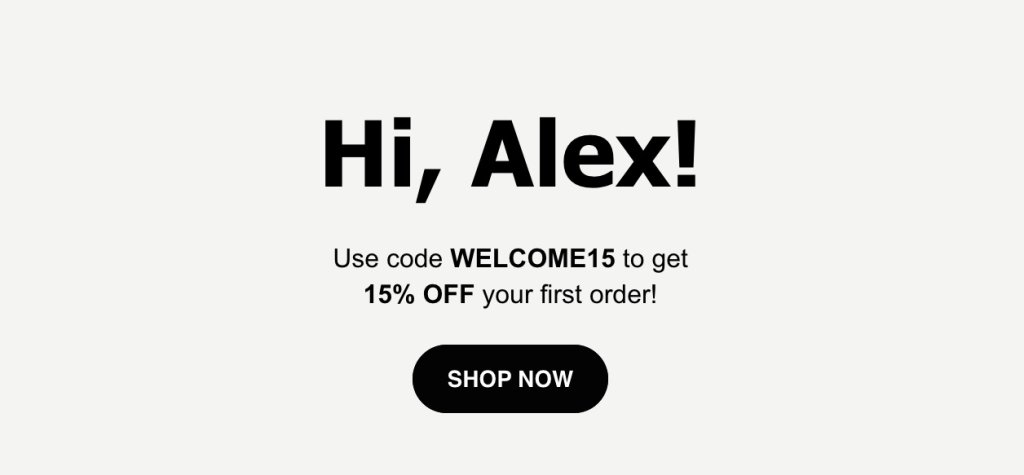
So how can you really tap into this? To add customer reviews, you can integrate a review system within your product pages or use third-party platforms like Google Reviews or Yelp. For a simpler way to gather feedback, try reaching out to customers with follow-up or re-engagement emails. Ask for their thoughts and, with their permission, highlight these reviews on your website. This approach not only boosts your conversion rates but also keeps happy customers coming back and spreading the word about your products.

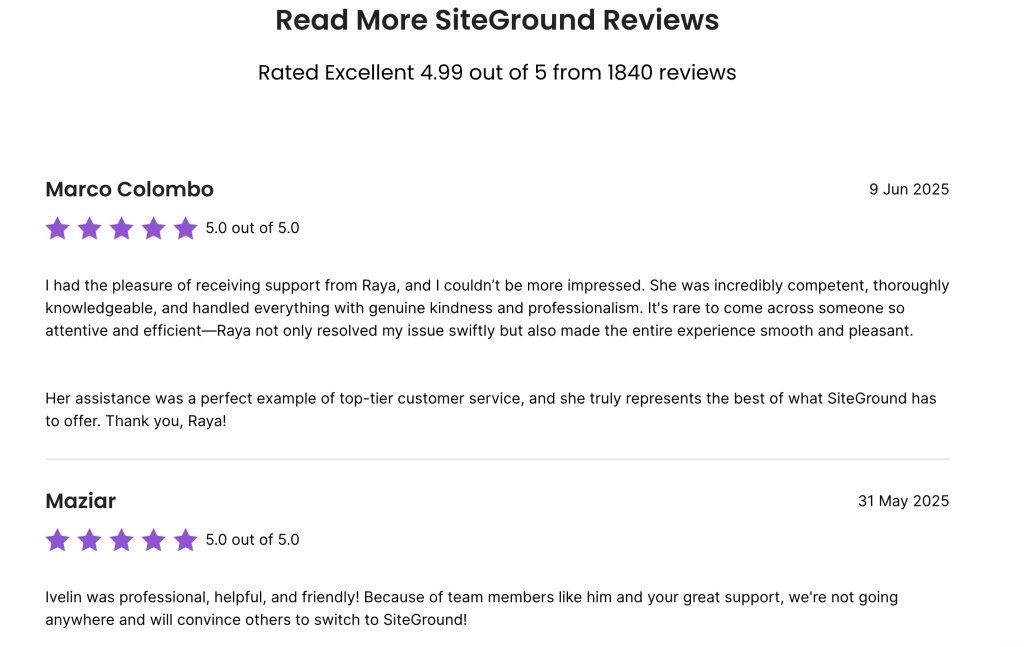
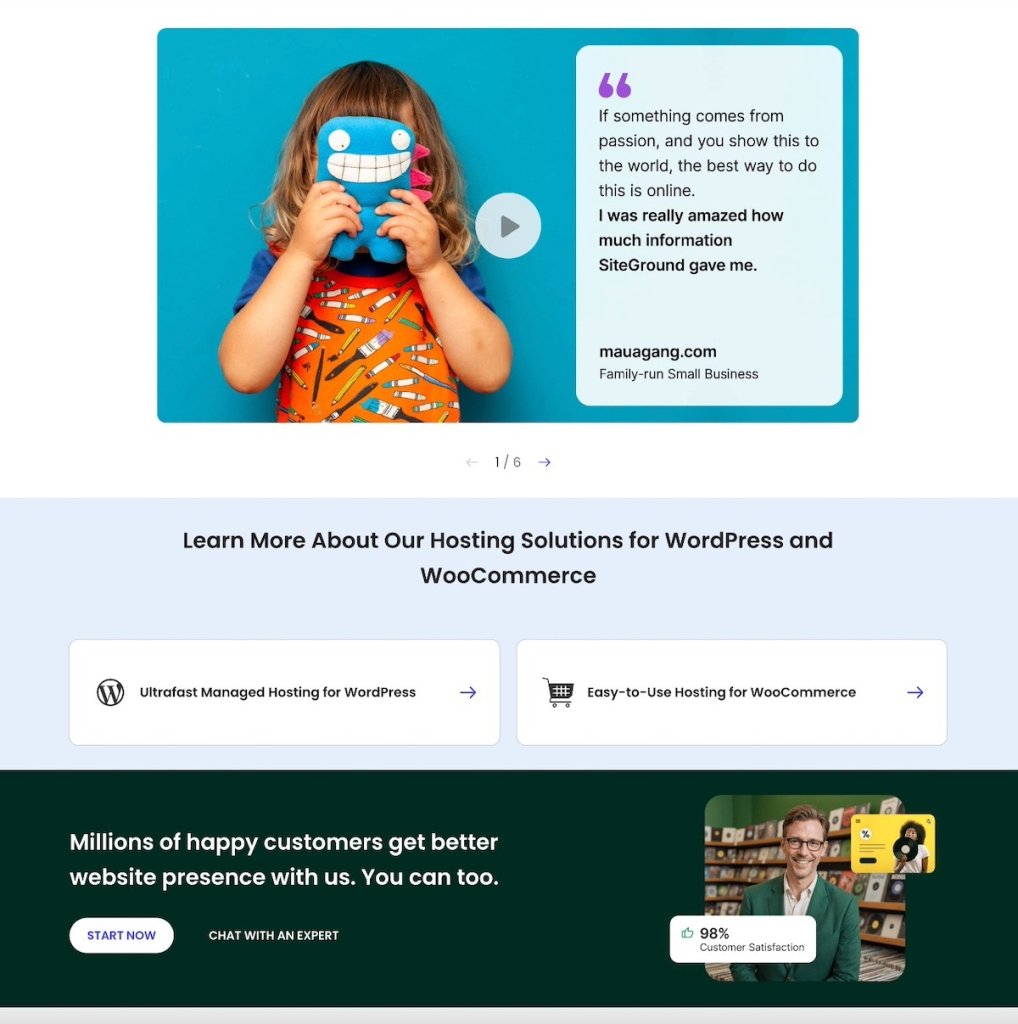
For instance, if you’re searching for a hosting plan and look at SiteGround’s reviews, it’s hard to miss all the gushing reviews about customer service and reliable performance. This kind of feedback gives you that warm, fuzzy feeling that picking SiteGround is a really smart move. When other customers are singing your praises, it can seriously help tip the decision scale in your favor.

social proof example

2. Testimonials

Happy customers make the best hype team. A few personal stories or glowing shout-outs can go a long way. Testimonials are quick to read, easy to trust, and give people a real feel for what it’s like to be on the other side of “Add to Cart.”

Reach out to your happiest customers and ask them to share a few lines about their experience. It could be over email, through a quick feedback form on your site, or even by sending out survey emails. Just be sure to get their okay to share those testimonials publicly, especially if you’re using their names.
Once you’ve got those gold nuggets, show them off on your homepage or create a dedicated testimonial page. It’s a great way to win over new customers and keep the buzz going. When people see real stories from real customers, it builds instant trust. Positive vibes are contagious—reading how others loved their experience makes potential buyers feel like they’re making the right move too.

social proof example

3. Case Studies

And for those who love a deeper dive, we’ve got case studies. These detailed customer stories demonstrate how your product or service has tackled someone’s specific problems or needs. They provide comprehensive examples and insights, painting a clear picture of real-world results that highlight just how effective and valuable your brand really is.

Producing case studies is your chance to flex those creative muscles. Start by having a chat with your client, dive into their business story, and spotlight how your product came to the rescue. Share these compelling stories on your website and in your marketing materials to show off those real-world results.
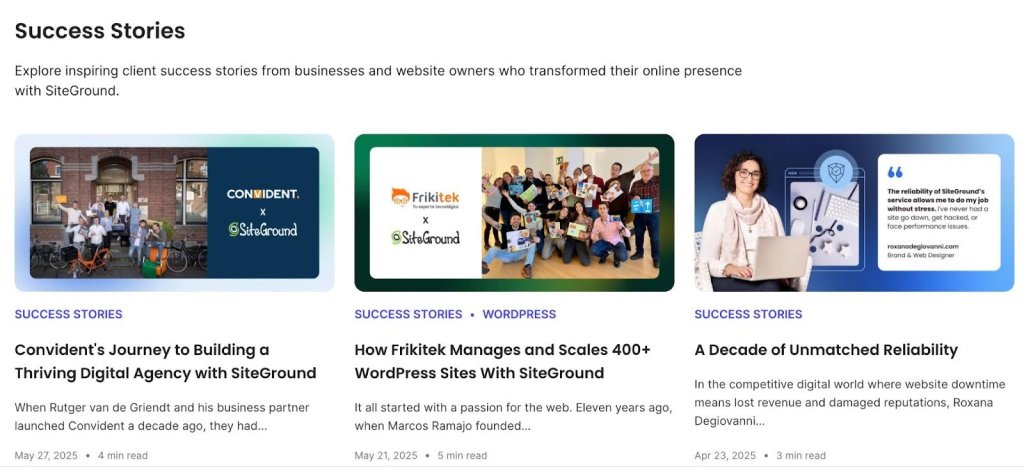
SiteGround Customer Success Stories, for instance, highlight how various businesses have improved their website performance and reliability using SiteGround’s hosting solutions. These stories don’t just demonstrate the real-world perks of what you offer—they also give potential customers a sneak peek into how others have struck gold with your help.

social proof example

4. Influencer Endorsements

Influencers, influencers—they seem to be everywhere these days, and for good reason. Teaming up with influencers is not just a hot trend; it’s a fantastic way to promote your site. Indeed, partnering with those who vibe with your brand can bring in a loyal audience that already trusts what they say. Their followers view these endorsements as personal recommendations, which can quickly spark interest and engagement with your brand.

Start by scouting out influencers whose fans are your kind of people. Slide into their DMs with a pitch to check out or shout out your product. Then, team up to whip up some authentic, creative content that truly makes it stand out. By tapping into the trust influencers have with their followers, you’re opening up a whole new way to introduce your brand. This can lead to more people discovering your products and, with any luck, clicking that “buy” button.

social proof example

5. User-Generated Content

Photos, videos, or social media posts—content created by your customers is virtual thumbs-up. It offers a real, unfiltered look at your brand. Plus, user-generated content is one of the top SEO trends right now and helps to get your brand noticed online.

Okay, but where do you start? Start by offering fun perks like discounts, loyalty points, or a chance to win a prize when they post photos on Instagram with your catchy hashtag. Encourage them to create short TikTok videos of your product in action by hosting a fun contest with prizes for the most creative content. You can also reach out directly through email or social media, inviting them to share reviews and unboxing videos on YouTube. Remember, the goal is a win-win: they get a chance to snag a prize, and you get awesome content that shows off how much they love your stuff.

Remember, the best platform depends on your business type. For example,TikTok is great for trendy fashion or beauty products, Instagram works well for visually appealing brands, and LinkedIn is ideal for B2B services. This way, your content reaches the right people.

Next, you can embed videos and social media posts right on your website or sprinkle screenshots into your marketing materials. Share user-generated content on your own social media and tag the creators to spotlight real customer experiences. This builds a sense of community and also gives you genuine proof of customer satisfaction to jazz up your marketing.

social proof example

6. FOMO Advertising

And let’s not forget about the power of FOMO Advertising. FOMO advertising isn’t your typical social proof, but it works on a similar idea. It doesn’t show people endorsing a product directly, but it makes you feel like everyone’s already in on it, pushing you to act fast so you don’t miss out.

FOMO ads tap into that fear of missing out, nudging people to act fast. It’s all about creating that ‘I gotta have it now’ feeling. This kind of advertising works wonders because it creates a sense of urgency and exclusivity that really gets people to take action.
Use landing pages, website banners, and social media posts to spotlight those limited-time offers, exclusive deals, or low-stock alerts. Throw in phrases like “only a few left” or “limited-time offer” to crank up the urgency. Keep the buzz alive with reminder emails and push notifications to keep your customers in the loop.

social proof example

Easy Social Proof Tips to Keep in Mind

As you mix social proof into your marketing strategy and website planning, here are a few handy tips to keep in mind for collecting and showing off these awesome testimonials.

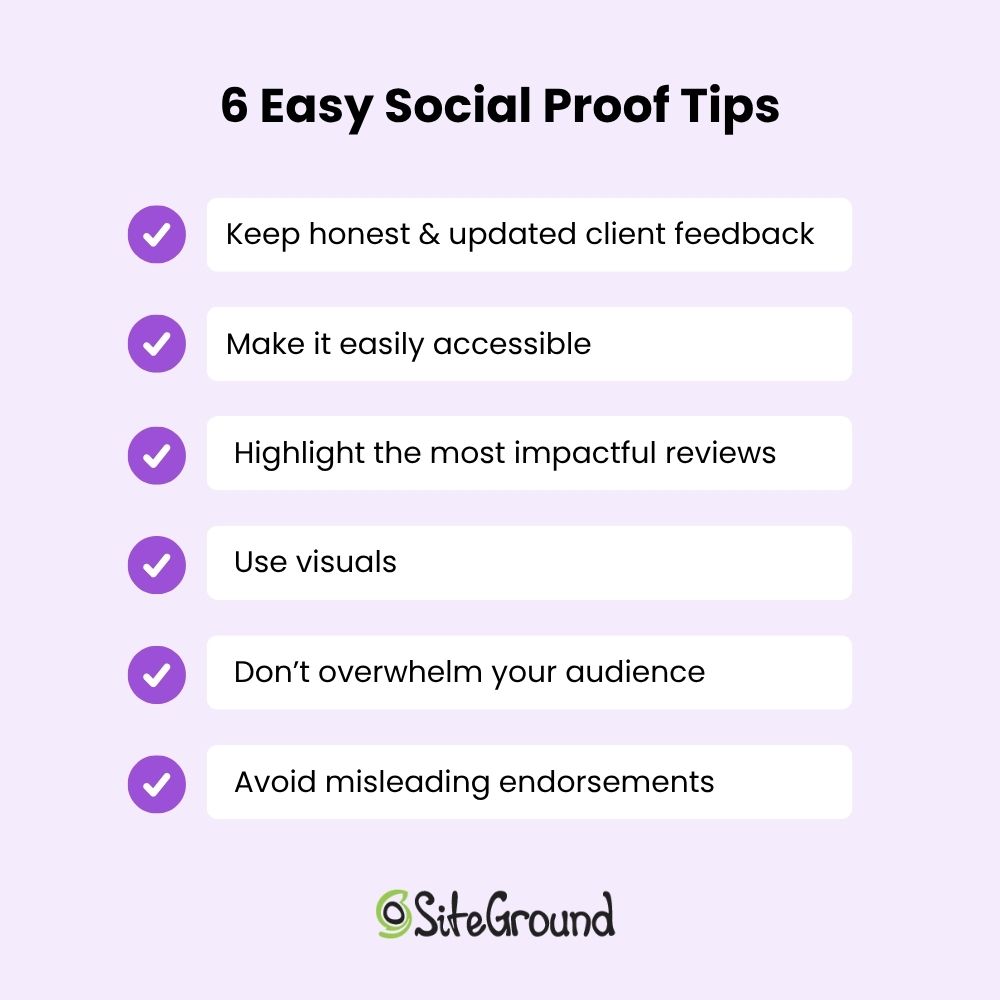
social proof tips

🎯Find out what kind of social proof makes your audience go “Wow!” and share it where they spend their time online.

✅ Keep it real with customer feedback. Ask yourself if it’s genuine, can be verified, and is fresh to keep your credibility solid. Make it a habit to check in with recent customers for fresh testimonials, and use tools or platforms to make sure those reviews are the real deal.

🌟 Place your social proof front and center—make it easy to find and part of your overall message. Chances are, people won’t go looking for testimonials unless they’re right in their faces. Pop those review snippets or testimonials right next to your call-to-action buttons to build trust and give people that little nudge toward making a purchase when they’re ready.

social proof example

🎨 Let visuals do the talking—make your standout reviews and testimonials shine. People naturally gravitate toward eye-catching visuals, so take a page from web design tips and use bold fonts or splashy backgrounds to make those killer quotes pop. Throw in some customer photos or star ratings to grab even more attention and make your social proof impossible to miss.

social proof example

🚫 Keep it simple—don’t drown your audience in too much info, and steer clear of fake or misleading endorsements—they’ll only hurt your credibility. Focus on quality over quantity by choosing a few standout testimonials and again, refresh them occasionally to keep things relevant.

📊 Stay in the loop by tracking the feedback and engagement your ads are getting—this will clue you in on what’s hitting the mark and what might need a little tweak. Regularly dive into your analytics to see which social proof elements are making waves, and adjust your strategy based on those insights.

Ready to Add Social Proof Examples to Your Site? 

Social proof is a fantastic way to step up your marketing game and give potential customers that extra boost of confidence in choosing you. Whether it’s heartfelt reviews, genuine testimonials, success-packed case studies, or influencer shout-outs, each one has its own unique perks that can really shake up your marketing strategy. So, gear up to make your brand the go-to choice for your customers.

SiteGround’s got your back with a super easy-to-use Website Builder that’s perfect for small business owners. You can seamlessly weave in social proof examples—even if tech isn’t your thing. Explore our awesome templates and give your brand a push with fun drag-and-drop design and layouts you can totally make your own.

So, are you ready to sprinkle some social proof magic on your site and watch your brand shine? Dive into SiteGround’s Website Builder and see how easy it is!
siteground website builder

What Is a Favicon—and Why Does Your Website Need One?

What Is a Favicon: Benefits, Best Practices and Usage 

A favicon is the small icon you see in browser tabs, bookmarks, and search results—it’s your website’s visual calling card, and it does more for your brand than you might think. A well-designed one makes your site look polished and helps users find their way back to you easily. This guide covers everything you need to know: what favicons are, where they show up, how to create one, and how to add it to your site.

Key takeaways:

  • Favicons are small but mighty — that tiny icon in your browser tab plays a big role in brand recognition and user experience.
  • They show up everywhere — browser tabs, bookmarks, search results, mobile home screens, and even desktop shortcuts.
  • Size and format matter — offering multiple sizes (16×16 up to 72×72) and formats (ICO, PNG, SVG) ensures your favicon looks sharp on every device.
  • Keep the design simple — small icons don’t have room for detail, so stick to clean visuals, brand colors, and no text.
  • Adding one is easier than you think — whether you’re on WordPress, a website builder, or a custom site, implementation is just a few steps.
  • Favicons can indirectly boost SEO — a recognizable icon can improve click-through rates and signal professionalism to both users and search engines.

What Is a Favicon Image?

A favicon, short for “favorite icon,” is a small (usually 16×16 pixel) image that serves as a visual representation of a brand’s website. It’s a subtle but important element of web design, reinforcing brand identity and improving user experience. You’ll typically find them displayed in:  

  • Browser tabs 
  • Browser history tabs 
  • Browser bookmarks 
  • Mobile home screens 
  • Search engine results pages 
  • Google search bars 
  • Desktops 

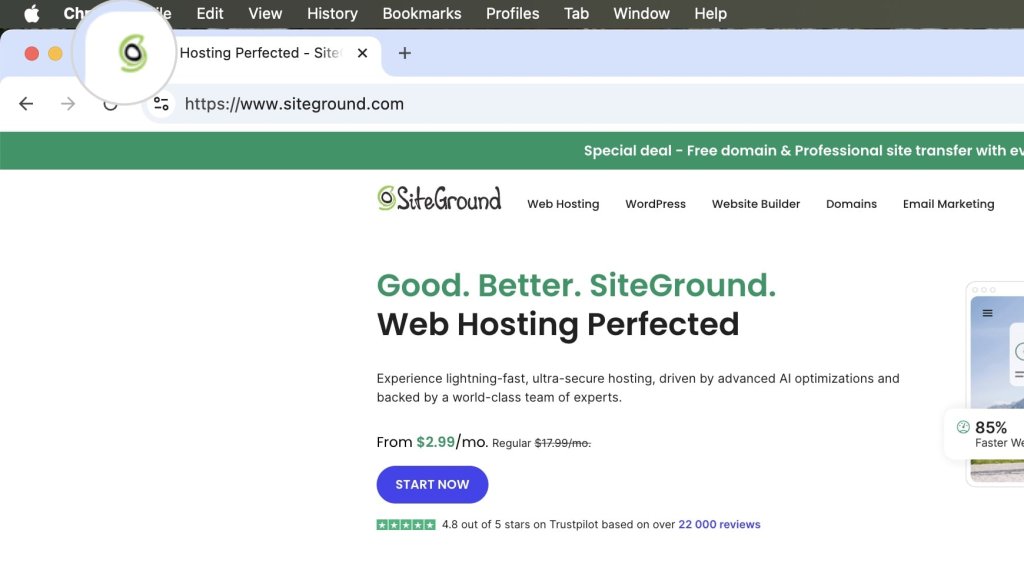
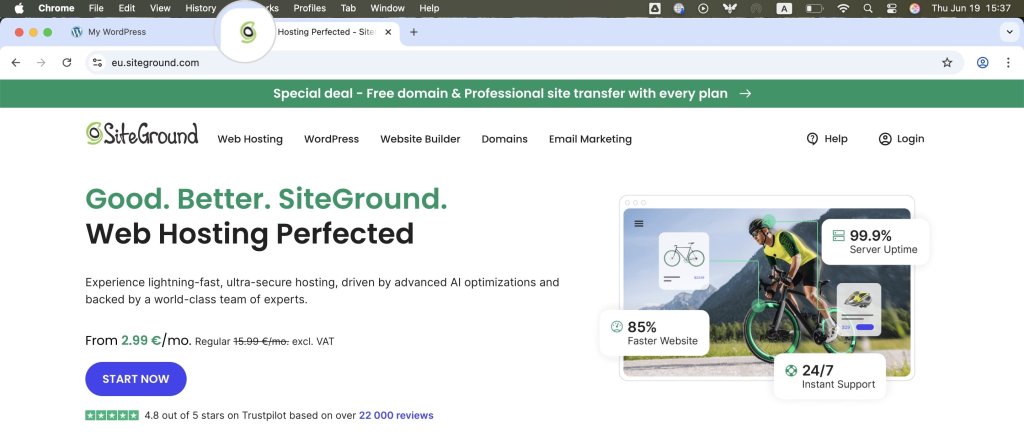
They’ve become so common that you see them everywhere all the time, yet you might not even notice them. The most typical use in practice is as small icons next to the web page titles in browser tabs. 

screenshot showing what is a favicon and its location in the browser tabs

First introduced by Microsoft with the release of Internet Explorer 5 in 1999, favicons originally appeared as small icons in the bookmarks (Favorites) and address bar when a user bookmarked a webpage. The original implementation required the favicon to be named favicon.ico and placed in the root directory of a website. This simple yet effective feature quickly gained popularity, leading to widespread adoption across various web browsers.

Over time, the role of the favicon expanded beyond a bookmark icon. It started appearing in browser tabs, bookmarks, and even search engine results pages. As web design evolved, so did the formats and sizes of favicons, accommodating the needs of modern devices and high-resolution displays. Today, favicons are a standard element of web design, playing a crucial role in site identity and user experience. 

Where Are Favicons Used?

Favicons have a broad range of usage in modern devices and applications. Below, we’ll examine the most common places where you’ll encounter them. 

Browser Tabs

In browser tabs, favicons appear next to the page title, enabling users to identify and differentiate between multiple tabs quickly. This is particularly useful when visitors have numerous tabs open, as the favicon provides a visual cue that helps them locate the desired tab without having to read the full title. 

Favicons in browser tabs

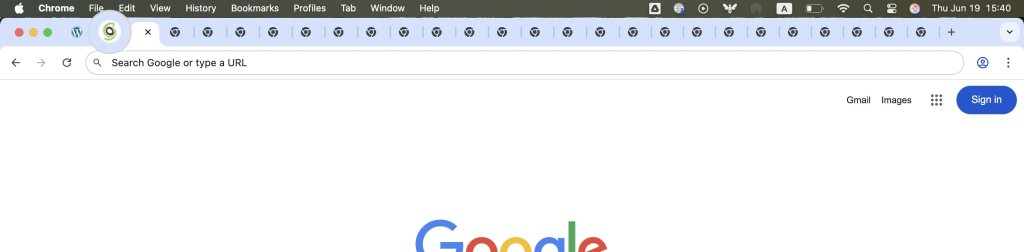
Favicons become even more important when the tabs are stacked next to each other, reducing their area and making the page titles unreadable. The favicon tab icon remains the last distinguishable part of the tab.   

Multiple tabs displaying only favicons

Browser History Tab

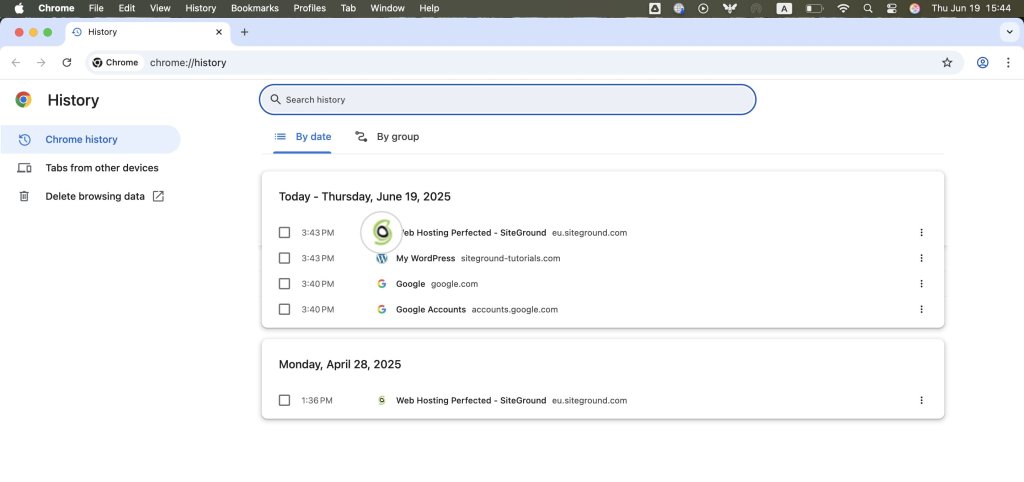
Favicons are also displayed in the browser history tab, which helps users more easily identify previously visited websites. This visual element makes finding and revisiting websites simple, improving the overall website navigation experience and improving websites’ client retention. 

Favicons in browser history

Bookmarks

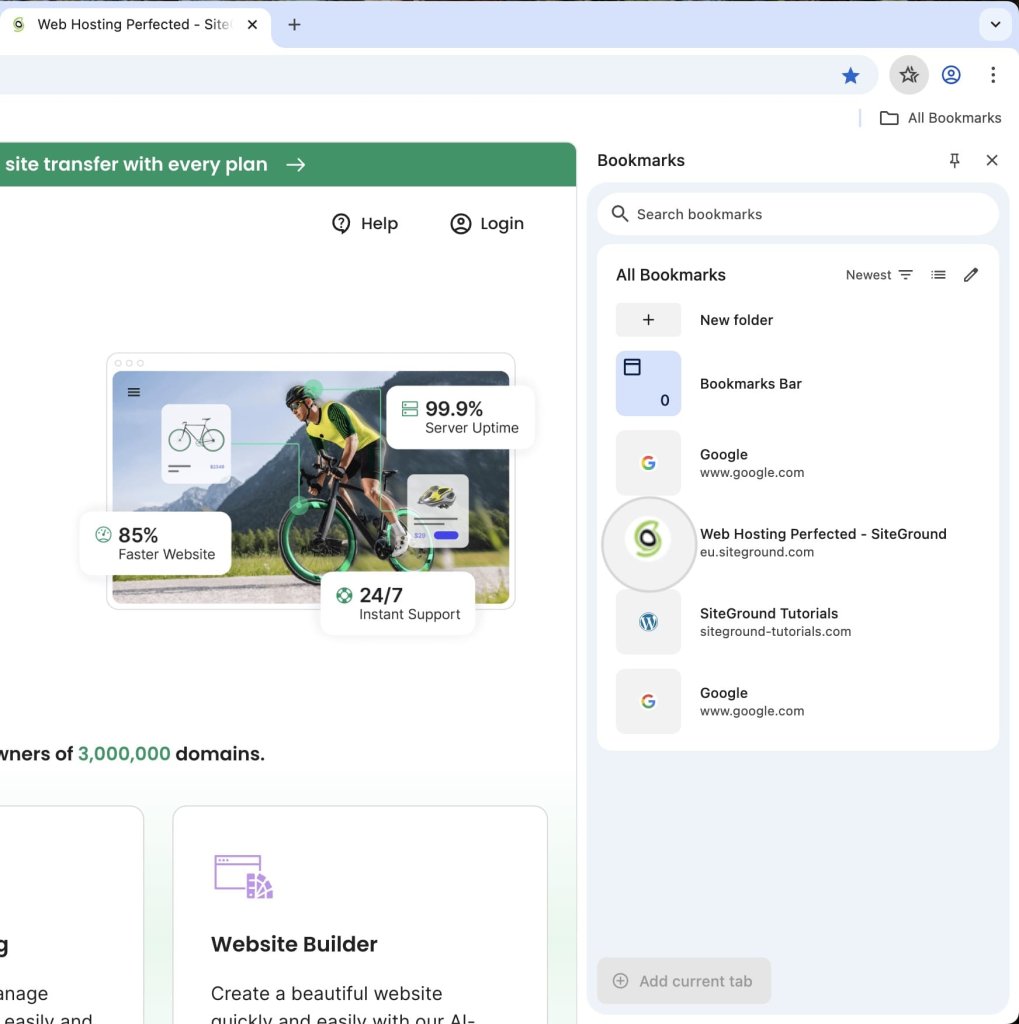
When a user bookmarks a website page, the favicon is saved alongside the page title in their bookmarks list. This not only helps users quickly recognize and access their saved sites but also improves the organization of bookmarks by providing a visual element that stands out.

A favicon in bookmarks

Mobile Home Screens

On mobile devices, users have the option to add websites directly to their home screens. In the context of mobile web design, favicons function like app icons, providing a convenient and recognizable shortcut for users to access their favorite sites quickly. 

A favicon on a mobile device

SERP (Search Engine Results Pages)

Search engines display favicons alongside search results on the SERPs (Search Engine Result Pages). This visual element can capture users’ attention, potentially increasing click-through rates by making the website more appealing and trustworthy in SERPs.

A favicon for a result on a SERP (Search Engine Results Page)

Within the Google search bar, favicons appear next to search suggestions and results. As a result, they reinforce brand identity and help users quickly identify the websites they’re interested in visiting.  

A favicon on a Google search bar

Desktops

Favicons can be used as desktop shortcuts as well, allowing users to create direct links to websites from their computer desktops. This provides a convenient way for users to access their preferred sites without opening a browser first.

A favicon on a desktop

What Are the Favicon Sizes?

Favicons are available in multiple sizes to ensure compatibility across different devices and platforms, including:

  • 16×16 – standard size for browser tabs, bookmarks, browser history, and search engine results.
  • 32×32 – suitable for desktop shortcut icons and taskbar shortcut icons.     
  • 48×48 pixels – common for Windows desktop icons and larger displays. 
  • 72×72 and above – ideal for larger screens like smart TVs, tablets, etc. 

Providing multiple sizes is crucial for displaying the favicon correctly on all screen types. Additionally, larger sizes may be used for high-resolution displays, ensuring that the favicon remains sharp and clear.  

Favicon File Types

Favicons support several file formats. The common favicon file formats include: 

  • ICO Format – The ICO format is the most widely supported and is ideal for ensuring compatibility with older browsers. It can contain multiple image sizes within a single file, allowing for flexibility in display across different contexts.
  • PNG Format – The PNG file extension offers high-quality images with support for transparency, making it suitable for modern browsers. PNG favicons are often used for their clarity and ability to maintain image quality.
  • SVG Format – SVG (Scalable Vector Graphics) is a format that provides scalability without loss of quality. This makes it perfect for high-resolution displays and responsive designs, as the favicon can be resized without becoming pixelated.  

Favicons in JPG are not quite common, since their lack of detail makes them unsuitable for smaller images. 

How Do You Create Favicons?

Even if you’re not a seasoned designer, there are plenty of graphical software and online favicon generator applications to help you craft your own custom favicon. Adobe Photoshop, Figma, and RealFaviconGenerator are just a few from the long list of powerful design tools you can choose from.       

Once you have the design ready, you can upload your file to the RealFaviconGenerator. The tool will convert it into multiple formats, ensuring broad browser compatibility. You can also preview how the favicon appears on different devices and color modes, and generate the HTML code to insert into your index file.   

If You’re a SiteGround Client, Check Out AI Studio
If you host your website with SiteGround, you also have access to SiteGround AI Studio — an all-in-one AI platform designed for small businesses. Among its many tools, the Image Designer agent lets you generate and edit images using natural language, making it a great option for creating favicon concepts without needing a separate design tool. It’s worth exploring what’s available to you as a SiteGround client.
Learn more>>

A favicon generated by RealFaviconGenerator

How Do You Add a Favicon to Your Website? 

You’ve designed the perfect favicon and are looking to implement it on your website. So, how do you go about it? 

Adding a favicon is straightforward, regardless of what application your website is built upon. For some applications, it’s as simple as a few mouse clicks, while others require a few extra steps. 

Below, we’ll go through some of the more common cases.

How to Add A Favicon to a Custom Website

Generally, you must upload the favicon file to your website and configure the index file to display it. This method is valid for all kinds of websites, but with some applications, it’s a matter of a few clicks. However, if you have a custom PHP/HTML website, you’ll have to do it the old-fashioned way. 

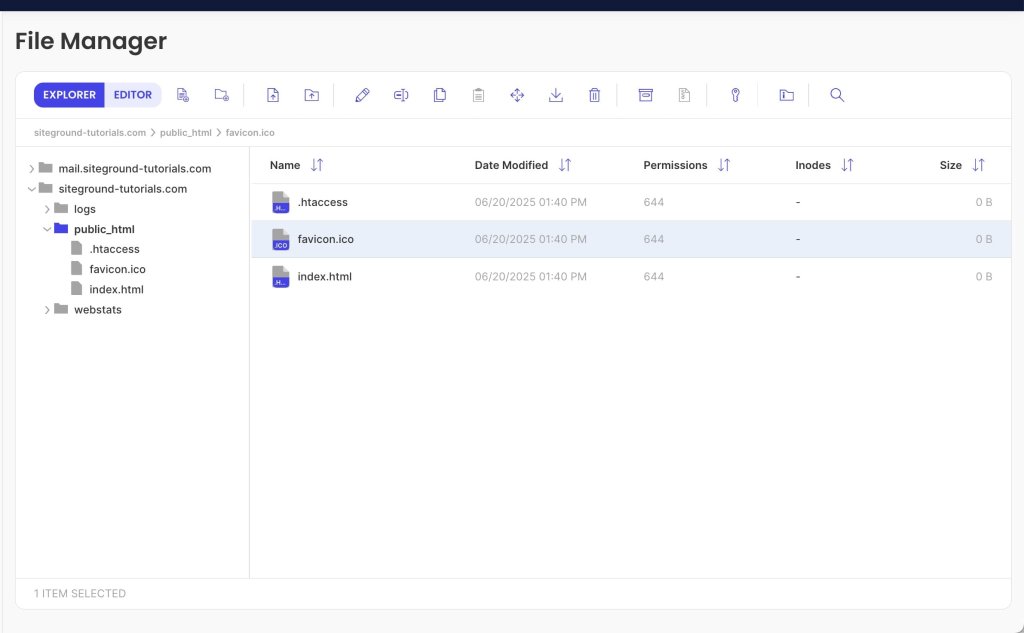
First, access your website files through FTP or File Manager and upload the favicon file to the root folder (typically public_html). The file can be named anything you want and in any of the supported formats. The typical naming convention, however, is favicon.ico (or another extension).

A favicon in a website's root folder (public_html)

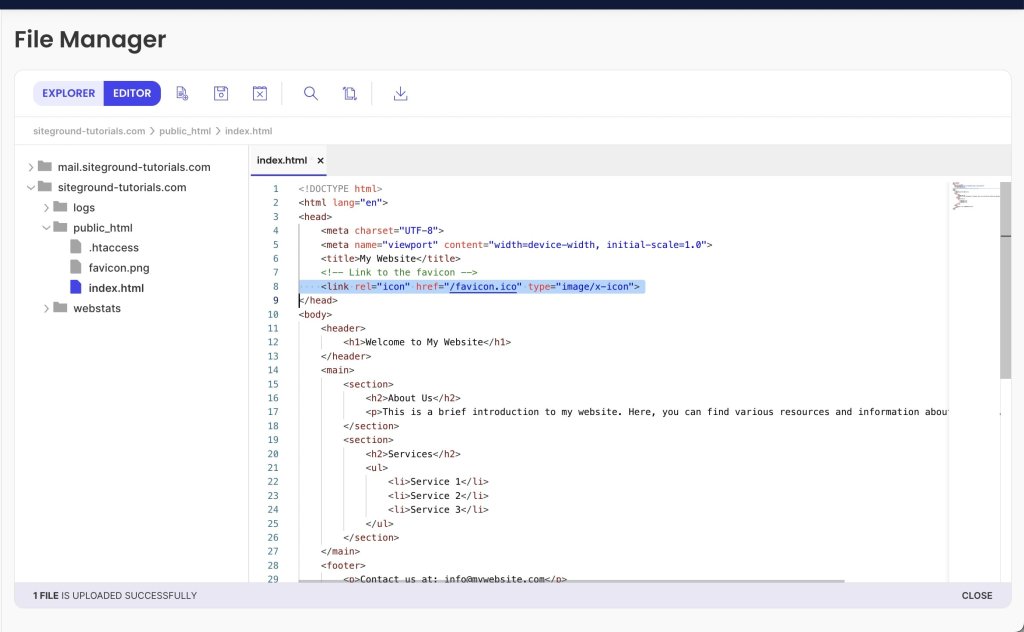
Then, open your index file (index.php or index.html), and add the following code in the <head> section to specify the favicon file. 

<head>

  <link rel="icon" href="/favicon.ico" type="image/x-icon">

</head>

Here is how this piece of code would look inside the index file.

A favicon element in an index file

Note that the favicon path /favicon.ico corresponds to the public_html directory. If the file is located in a subfolder, you must specify it in the file path. 

For example, if your favicon is named favicon.ico and located in the subfolder public_html/images, the file path should be /images/favicon.ico.

To ensure that your favicon is rendered correctly on various screen sizes, you can upload several favicon files of different sizes. Then, add multiple <link> elements to your HTML file, each assigning the proper file to a different screen size. The code would look similar to this. 

<link rel="icon" type="image/png" href="/favicon-96x96.png" sizes="96x96" />

<link rel="icon" type="image/svg+xml" href="/favicon.svg" />

<link rel="shortcut icon" href="/favicon.ico" />

<link rel="apple-touch-icon" sizes="180x180" href="/apple-touch-icon.png" />

<link rel="manifest" href="/site.webmanifest" />

How to Add a Favicon in SiteGround Website Builder 

SiteGround Website Builder is our own proprietary page builder making crafting web pages a fun and rewarding experience. With its intuitive interface, you can instantly build eye-catching and professional-looking websites without writing a single line of code. 

Adding a favicon to your website using our Website Builder is easy and only takes a few clicks, just like many other features.

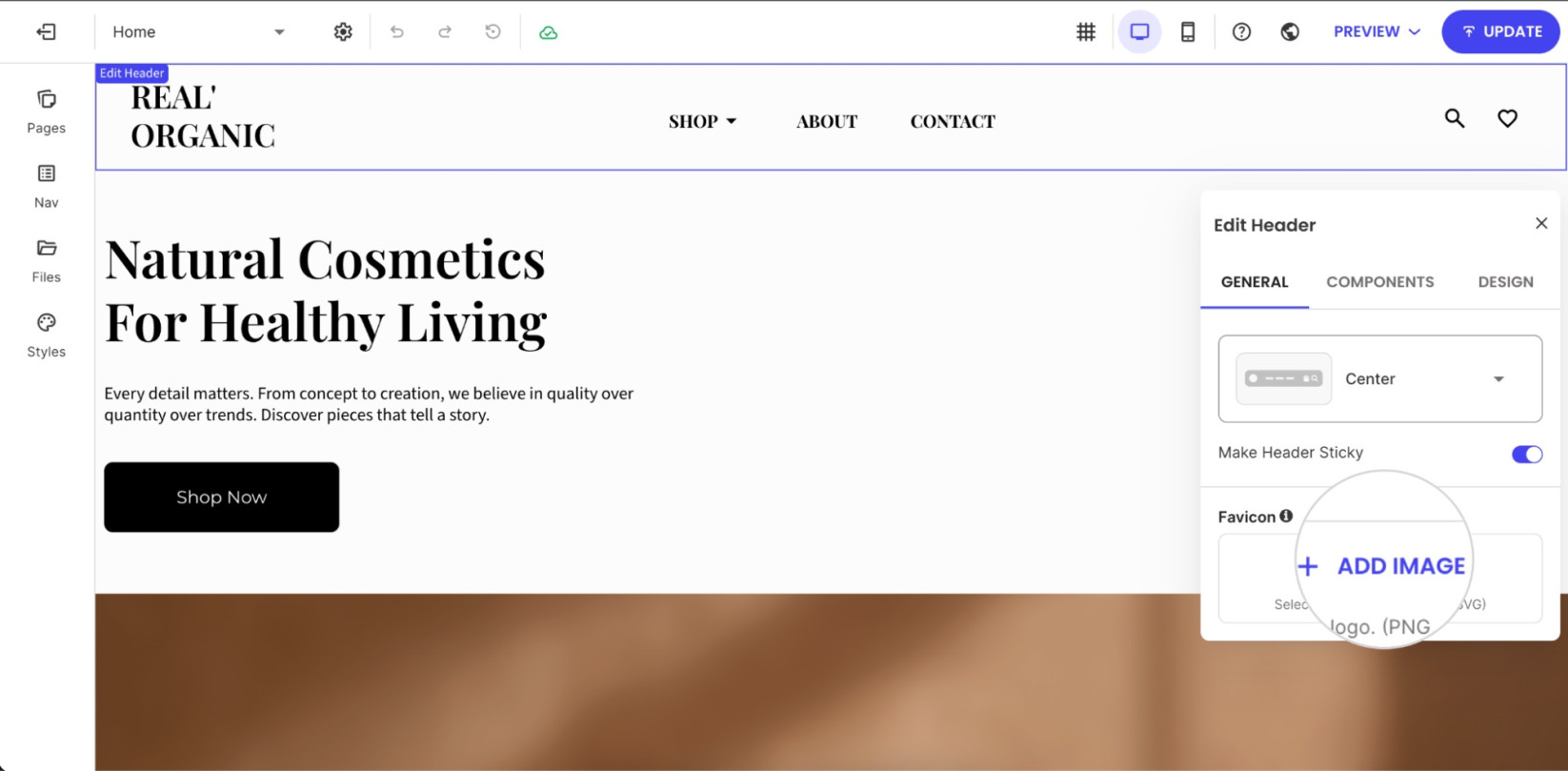
While in the page editor, go to the Content tab, and click the Header section at the top of any page.

Adding a favicon to the SiteGround Website Builder

From the Edit Header menu, navigate to the Favicon section and click on Add image. Select or upload the image you want to use as your favicon. The favicon will then appear in browser tabs once the changes are saved and the site is updated.

How to Add a Favicon in WordPress

WordPress uses the term “site icon” instead of “favicon,” but both are practically the same. Adding a favicon to a WordPress site has always been easy, but it’s become even easier since the release of WordPress 6.5 in April 2025. 

Previously, you had to use the theme customizer, theme editor, or a plugin. But after the changes introduced in version 6.5, you can simply add the favicon from the general settings section.

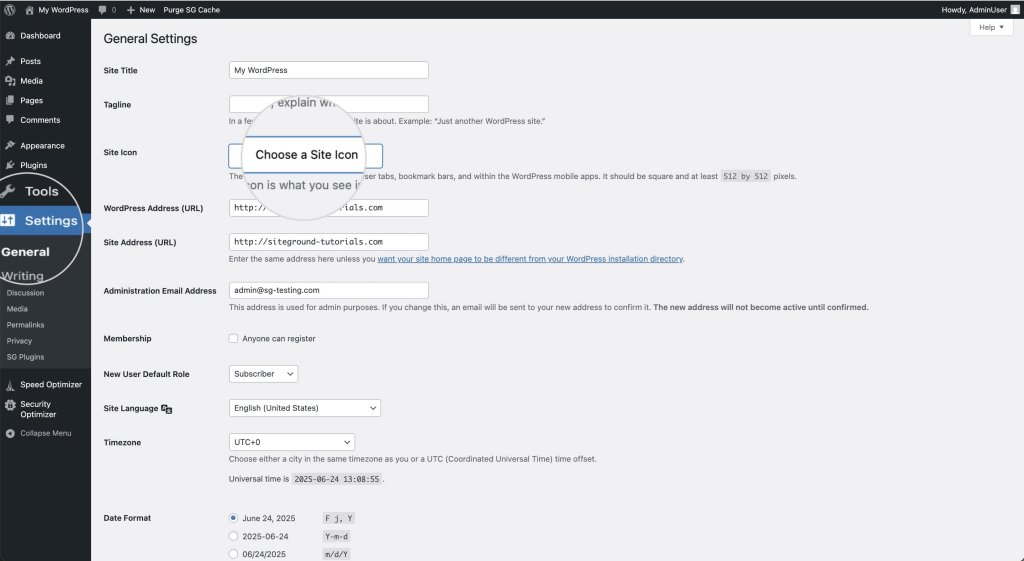
To add a favicon, log in to your WordPress dashboard. Navigate to the Settings > General section, and click the Choose a Site Icon button next to Site Icon. 

Uploading a site icon to a WordPress website

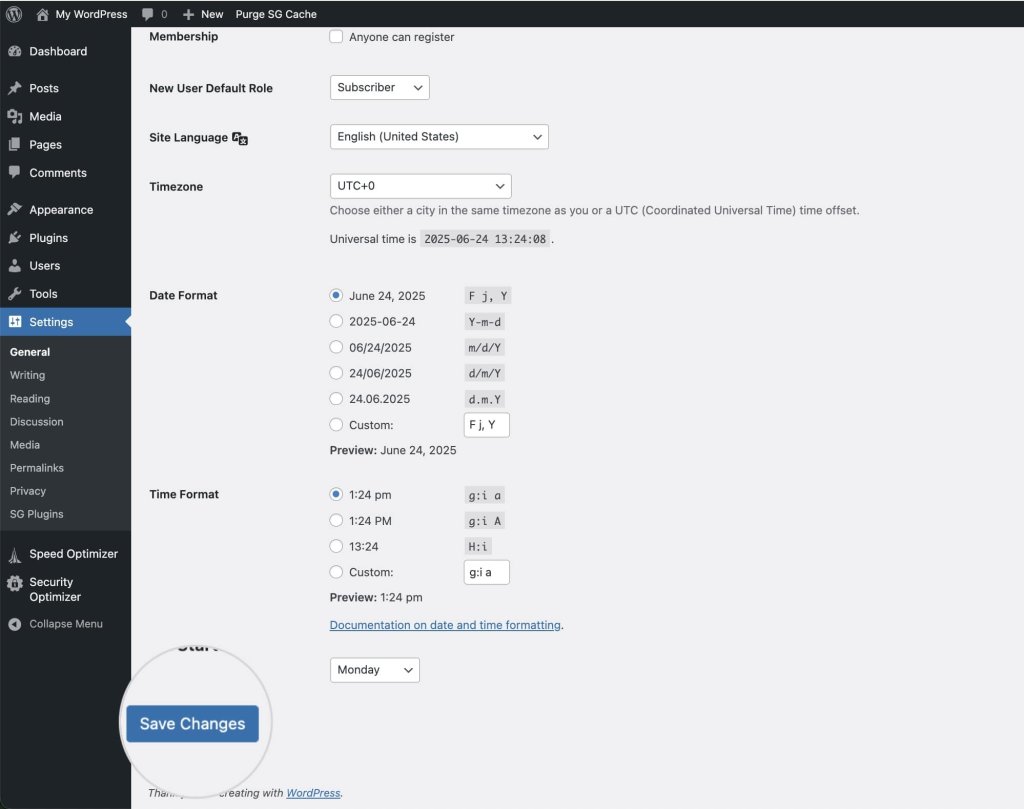
In the pop-up window, choose an image file from your computer or your website’s media gallery. The recommended site icon size is 512×512 pixels at a ratio of 1:1. Once you’re ready, hit the Save Changes button. 

Saving a favicon in a WordPress website

What Are the Benefits of Using Favicons?

Better User Experience

Favicons enhance user experience by providing a visual identifier for websites, making navigation more intuitive and efficient. Web users can quickly locate and switch between tabs, bookmarks, and history entries, improving overall satisfaction and ease of use.

Improved User Retention

By helping users easily locate and return to websites, favicons contribute to improved user retention and engagement. A recognizable favicon can encourage users to spend more time on a site and return more frequently, fostering a loyal user base.

Establishing Brand Identity and Visibility

Favicons play a crucial role in reinforcing branding basics. They serve as a constant reminder of the brand, ensuring that a website stands out in users’ minds. A well-designed favicon can enhance brand recognition and make a lasting impression on users.

What Are the Best Practices for Favicons?

The best favicon is simple, on-brand, and legible at tiny sizes—think clean shapes, brand colors, and no text. Here are the key design and implementation practices to keep in mind.

Keep It Simple

Simplicity is key when designing a favicon. Given the small size, it’s important to create a design that is clear and easily recognizable. Avoid intricate details that may become lost or unclear when scaled down.

Use the Logo as a Foundation, But Don’t Duplicate It

While it’s effective to use the logo as a foundation for the favicon, avoid exact duplication. Instead, create a simplified version that captures the essence of the brand while remaining distinct and recognizable.

Convey the Brand Identity

Ensure the favicon reflects the brand’s identity and values, serving as a visual representation of the company. It should align with the overall branding strategy and communicate the brand’s message effectively.

Use Minimum Text

Text can become unreadable at small sizes, so it’s best to avoid using text in favicons altogether. Focus on strong visual elements that convey the brand identity without relying on words.

Consider the Colors

Choose colors that align with the brand’s color scheme. Make sure they contrast well to remain visible against various backgrounds. A well-chosen color palette can enhance the favicon’s impact and recognition.

Provide Multiple Favicon Sizes      

Visitors nowadays access websites from various devices with different screen sizes, so a single default favicon size might not look good on all of them. Add several files of varying dimensions to ensure your favicon appears clearly on all devices.      

Do Favicons Affect SEO? 

Favicons can indirectly impact SEO (Search Engine Optimization) by improving user experience and engagement. A recognizable favicon can increase click-through rates in search results and encourage users to spend more time on a site, both of which can contribute to better search performance. Additionally, favicons contribute to a cohesive and professional online presence, which can enhance a website’s credibility and trustworthiness.

Additionally, favicons contribute to a cohesive and professional online presence, which can enhance a website’s credibility and trustworthiness.  

Final Thoughts on Favicons

Every detail of your website matters, and favicons are no exception. Though small, these icons play an important role in establishing credibility and reinforcing brand identity. By optimizing user experience and improving audience engagement, favicons help your website remain memorable and easily recognizable. Don’t overlook this essential element—capitalize on its potential to effectively draw and retain visitors’ attention.

Ready to put it all together? With the SiteGround Website Builder, adding your favicon is just a few clicks—no code, no hassle. And the same goes for building your entire site. Its intuitive drag-and-drop interface makes it easy to create a professional, polished website without any technical know-how. Give it a try and see how simple it can be.

[24]

Favicon FAQs

What is a favicon used for?

A favicon is used to visually represent your website across browsers and devices—appearing in browser tabs, bookmarks, search results, and mobile home screens. It helps users quickly identify and return to your site, especially when they have multiple tabs open.

Is a favicon the same as a logo?

Not exactly. A favicon is often inspired by your logo, but it’s a simplified version designed to work at very small sizes. Where a logo can include text, detail, and multiple elements, a favicon needs to be instantly readable at 16×16 pixels, so it’s usually just the most recognizable part of your brand mark.

How do I generate a favicon?

There are several easy ways to create a favicon. Free online tools like RealFaviconGenerator let you upload a logo or image and automatically convert it into all the necessary sizes and formats. Design tools like Figma and Adobe Photoshop give you more creative control if you want to build one from scratch. If you’re a SiteGround client, AI Studio‘s Image Designer is another great option for generating custom icon concepts using AI.

What is an example of a favicon?

Some of the most recognizable favicons are Google’s multicolored “G,” Facebook’s white “f” on a blue background, and Amazon’s smiling arrow. They all share the same quality: a simple, bold visual that’s instantly identifiable even at tiny sizes.

This article was originally published in June of 2025, and then updated in April of 2026.

The only 9 rules of email etiquette you need to know

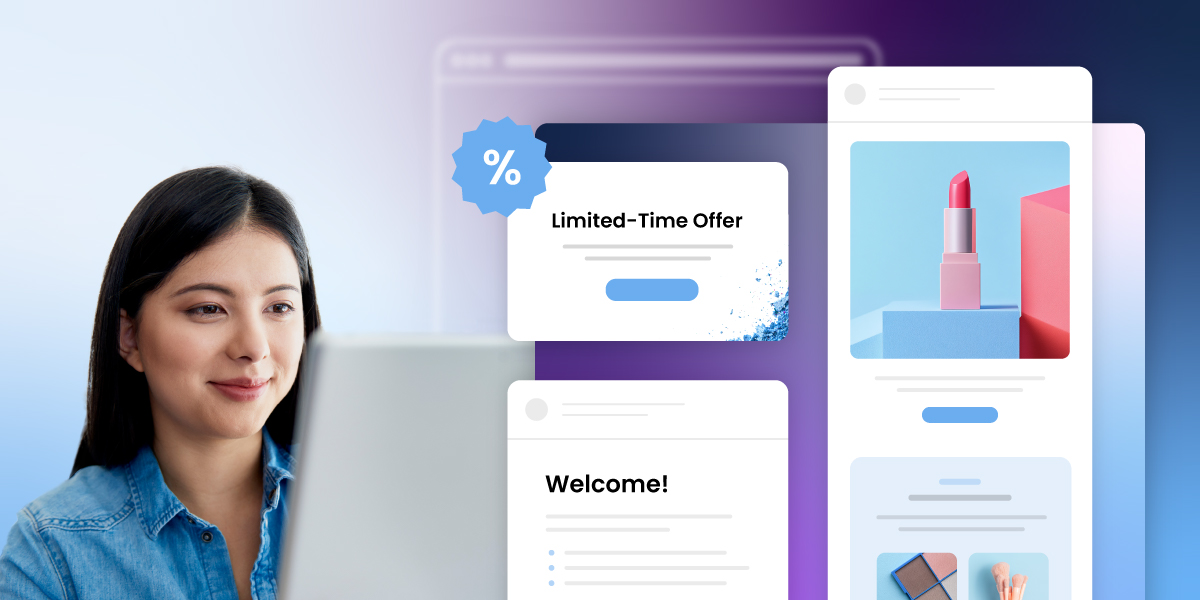
A woman smiling at her laptop, practicing email marketing etiquette while designing campaign templates, including a limited-time offer email and a welcome email with product imagery.

You land a promising lead, send what feels like a solid pitch, and hear nothing back. You follow up with a client and somehow the tone comes across as pushy, even though that wasn’t the intention. Small things: a vague subject line, a missing CTA, an overly casual opener, can work against you before the other person has even finished reading.

Email etiquette (the rules and best practices for writing clear, professional emails) is what separates messages that get results from ones that don’t. This guide covers the 9 email etiquette rules that actually move the needle, plus the 7 C’s framework to keep them in check, with examples you can use straight away.

Key takeaways:

  • Your email address is part of your professional image. Use your name and domain, not a generic provider.
  • Subject lines determine whether your email gets opened. Keep them specific and honest about what’s inside.
  • Get to the point fast. Busy readers skim, and they’ll drop an email that makes them work for the main message.
  • A clear call to action removes ambiguity and gets you faster responses.
  • Reply within 24 to 48 hours. Silence reads as disinterest, even when you’re just busy.

What is email etiquette?

Email etiquette is the set of guidelines for writing clear, respectful, and professional emails. It covers how you address someone, how you structure your message, and when you reply.

It’s basically the unwritten rulebook for business communication. Follow it, and people see you as reliable and easy to work with, plus it does wonders for your email engagement. Ignore it, and even a solid message can land the wrong way. In a world where so much of professional life plays out over email, those little details add up fast.

SiteGround Email Marketing Course

How to write professional emails: 9 etiquette rules + examples

The golden rule is keep it clear, to-the-point, and respectful. Every part of an email counts: from the subject line to the signature, and these nine tips, packed with examples, will help your emails pop.

1. Use a professional email address

Your email address shapes how people perceive you before they’ve read a single word. In a business context, that means using your name and your own domain name, not a generic provider like Gmail or Yahoo.

A good rule of thumb: If you wouldn’t put it on a business card, it probably shouldn’t be in your form field either. 

Stick with something like yourname@yourdomain.com and leave coolcat99@gmail.com in the past.

It sets the tone and shows you’re serious about your professional image right from the get-go.

2. Write a subject line people will open

Your subject line is the first thing people see in their inbox, and in most cases it’s the only thing they use to decide whether to open your email or skip it. Keep it short, specific, and true to what’s inside.

And don’t forget about the preview text. It’s the second line people see after your subject, so use it to add context rather than just repeating it.

Example of a clear and professional email subject line

3. Start with a proper greeting

The right email salutation sets the tone for everything that follows. Use the recipient’s name, check the spelling twice, and match the formality to the relationship. “Hi Sarah” works fine for a warm intro or an ongoing exchange. “Dear Ms. Thompson” is safer when you’re writing cold or to someone senior you’ve never met.

Not sure how formal to go? Look at how they signed their last email to you. People usually signal the tone they’re comfortable with.

Professional email greeting example using the recipient's name and formal title

4. Keep your email body concise and relevant

State your purpose in the first sentence, cover what’s necessary, and stop there. Nobody wants to dig through three paragraphs of email body to find out what you actually need.

Re-read your email and ask yourself: what do I want the reader to know, do, or decide? If that’s not obvious within the first few lines, trim it down until it is.

Example of a concise and relevant professional email body

5. Always proofread

Spell-check catches typos, but it won’t save you from sending “Hi Mark” to someone named Marc, or confidently misspelling a client’s company name. 

Give your email a proper read-through before sending, out loud if you can, since your ear catches things your eyes skip over. And pay extra attention to the three things autocorrect loves to get wrong: names, technical terms, and numbers.

Overwhelmed by email copywriting and avoiding errors? Let AI do the work. SiteGround’s AI Email Writer can help you craft error-free emails effortlessly.

6. Use the right formatting for your email

Email formatting is about making it easy for the reader to process. A two-line paragraph gets read. A six-line block gets skimmed at best. Use short paragraphs, break up distinct points with bullet points, and put the most important information where the eye lands first: at the top, in bold if needed, never buried in the middle of a paragraph.

Email formatting example with short paragraphs and bullet points

7. Include a clear email call to action

Every email call to action should make it obvious what happens next. Be specific about what you need, who needs to do it, and by when. That’s what turns a message into a response.

Good to know: One email, one ask. The moment you add a second request, your response rate drops. If you genuinely need two things, lead with the more important one and make the second feel like a quick add-on.

Example of a clear call to action in a professional email

8. Add a professional email signature

Your email signature is the last thing people see, and it should make it effortless for them to know who you are and how to reach you. At minimum: your name, role, company, and one direct contact method. Beyond that, keep it clean. A signature with five phone numbers, a motivational quote, and an animated banner does more harm than good.

email etiquette example

Match your sign-off to the tone of the email. 

  • “Best” and “Thanks” work for most situations.
  • “Warm regards” adds a personal touch for relationship-building emails.
  • “Cheers” is fine if that’s how you normally talk to someone.

Leaving no sign-off at all can read as abrupt even when you don’t mean it that way.

9. Respond promptly

A slow reply sends a message even when you don’t mean it to. 24 to 48 hours is the generally accepted window for professional email. Beyond that, people start wondering whether you saw it, or whether you’re avoiding them.

A small thing that makes a big difference: If you can’t give a proper response yet, a quick “Got this, I’ll get back to you by Thursday” buys you time without leaving anyone in the dark.

What are the 7 C’s of email etiquette

With the nine essential rules under your belt, it’s time to explore the seven C’s of email etiquette to complement your guide to effective personal or business communication.

The nine rules cover the structure of a good email. The seven Cs are about the quality of the writing itself.

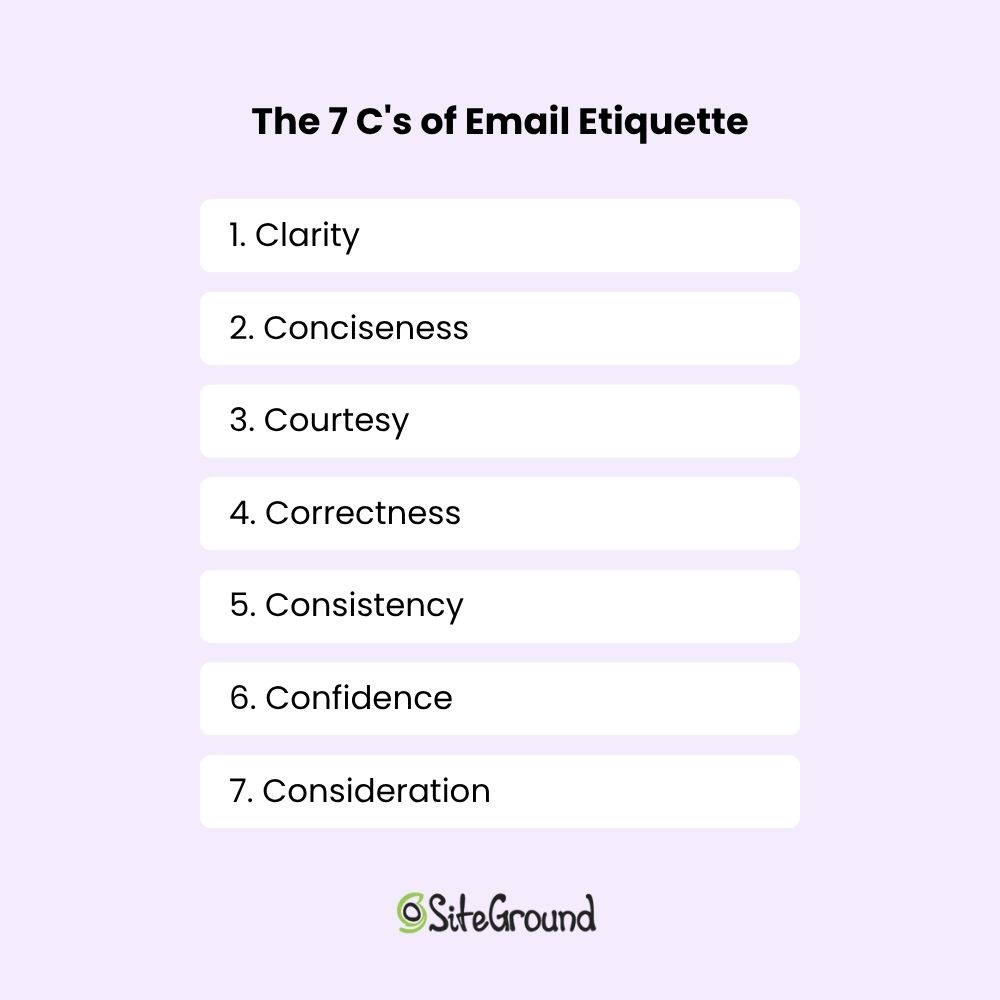
7 Cs of Email Etiquette

1. Clarity 

Clarity means your message can only be read one way. Organize your thoughts before you start typing, say what you mean in the order it makes sense, and cut anything that doesn’t move things forward. If you can’t state your ask in one sentence, the email probably needs another pass.

2. Conciseness 

The shorter your email, the more likely it gets read in full. Say what you need to say, then stop. Every extra line you add is another reason for someone to skim past the part that actually matters. 

Keep it short. That’s it. Like this paragraph.

3. Courtesy 

Email courtesy is the practice of communicating with respect and consideration for the person you’re writing to. Use their name, acknowledge their time, and say thank you when it’s warranted. A polite email doesn’t take longer to write, but it leaves a noticeably better impression than one that reads like a demand.

4. Correctness 

Email correctness means your spelling, grammar, and punctuation are accurate and your facts are right. A typo in a casual message is forgivable. A typo in a proposal, a cold outreach, or an email to someone you’ve never met says you didn’t care enough to check. And that’s enough for some people to question your credibility before they’ve finished reading.

5. Consistency 

Consistency builds familiarity, and familiarity builds trust, especially in ongoing professional relationships. Your tone and style say as much about you as your words do. If you’re warm and conversational in one email then stiff and formal in the next, it creates a subtle disconnect. 

6. Confidence 

Confident writing is direct and clear. It doesn’t over-apologize, hedge every statement, or bury the point under qualifiers. 

“I’d love to connect sometime if you’re not too busy and it’s not too much trouble” versus “Would you be open to a quick call next week?”: one of those gets a reply.

7. Consideration 

Put yourself in the recipient’s position for a moment. What questions might they have? What context are they missing? What are they actually trying to figure out from your message? The emails that get the best responses are usually the ones that answered those questions before they were even asked.

Together, the 7 C’s give you a practical filter for every email you send. Run your message through them before sending and you’ll catch most of the things that make emails easy to ignore  and keep more of what makes them easy to act on.

Up your email etiquette game with SiteGround’s Email Marketing

Good email etiquette gets you further than you’d think. Once it clicks, every email you send works harder: clearer, more professional, and a lot more likely to get the response you’re after.

To take it a step further by exploring SiteGround Email Marketing. We provide easy-to-use tools to help you keep your emails organized and respect privacy, ensuring your messages always hit the mark.

[58]

This article was originally published in July 2025, and then updated in April 2026.

Frequently asked questions about email etiquette

Why is email etiquette important?

Email etiquette matters because it directly affects how you’re perceived. A well-written email signals professionalism and respect for the recipient’s time. A sloppy one (wrong name, vague subject line, no clear ask) can cost you a reply, a deal, or a client relationship. In business communication, the way you write is often the first impression you make.

What is a proper email etiquette example?

A good email etiquette example is a cold outreach email that gets a reply. It has a specific subject line, opens with the recipient’s name, gets to the point in the first sentence, makes one clear ask, and closes with a direct CTA. No filler, no life story, no “I hope this email finds you well.” Just a respectful, well-structured message that respects the reader’s time.

What is a common mistake to avoid in email etiquette?

A common email etiquette mistake is burying the point. Most people write emails the way they think: context first, request last. But readers scan from the top, and if they don’t see why your email matters within the first few lines, many won’t get to the part where you finally ask. Lead with the point, then back it up.

How do you follow the email etiquette rules?

To apply email etiquette, start with the basics: a professional email address, a clear subject line, and the right greeting. From there, keep your message focused, format it so it’s easy to read, include one clear ask, and reply to others within 24 to 48 hours. The rules aren’t complicated — the hard part is being consistent about them when you’re busy and tempted to fire something off quickly.

How quickly should you respond to a professional email?

The generally accepted window is 24 to 48 hours. Within that timeframe, a reply signals that you’re attentive and easy to work with. If you need more time, a short acknowledgement like “Got this, I’ll get back to you by Thursday” is better than silence.

What makes an email unprofessional?

A few things consistently undermine an otherwise good email: a missing or vague subject line, the wrong level of formality for the relationship, spelling errors especially in names, no clear ask, and slow replies. Any one of these can affect how you’re perceived, even if the content itself is solid.

.com and Beyond: A Guide to Domain Extensions in 2026

Abstract of domain extensions

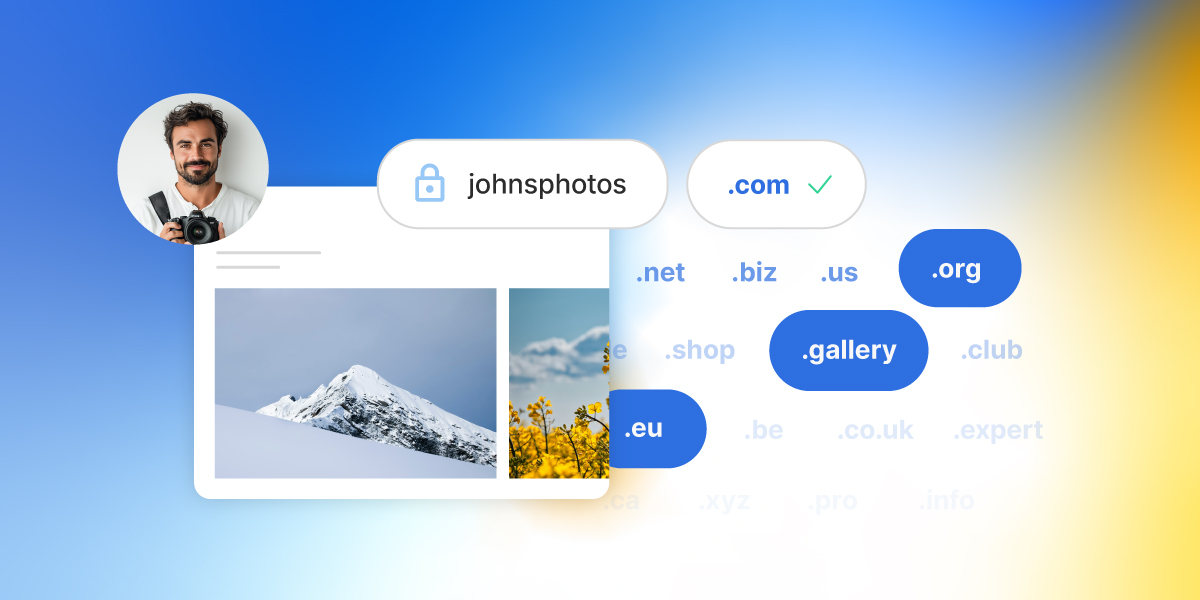
When it comes to domain names, everyone knows .com—it’s the internet’s classic go-to and still the best choice for most websites. But with over 1,500 domain extensions available today, from .tech to .shop to .bio, the domain landscape sure has a lot more to offer than just what remains of .com. What’s more, choosing the right extension goes beyond just getting you online—it can shape how your brand is perceived, who finds you, and even how memorable your site is.

In this guide, we’ll break down what domain extensions are, why .com still reigns supreme, and how savvy businesses and creators are using newer, niche extensions to stand out in 2025. Because startups, online stores, personal brands: there’s a perfect domain extension out there waiting for you.

What is a Domain Extension? 

A domain extension is the part of a website’s address that comes after the final dot—like .com, .org, or .net. A slightly more techy audience might also hear it referred to as a top-level domain (TLD), which refers to the highest level in the domain name system hierarchy. These terms are used interchangeably, though, with domain extension being the more user-friendly version.

Domain extensions have become a routine part of our digital day as we browse the web, but they do in fact serve an actual and important purpose behind the scenes. That is, they help organize the internet by categorizing websites based on their purpose, location, or sponsoring organization. And that’s where different types of domains come in.

Types of Domain Extensions

Indeed, domain extensions come in several varieties, each serving different roles and audiences. Understanding these types can not only help you in your website planning, but also get those creative juices flowing, and maybe even inspire some of your branding.

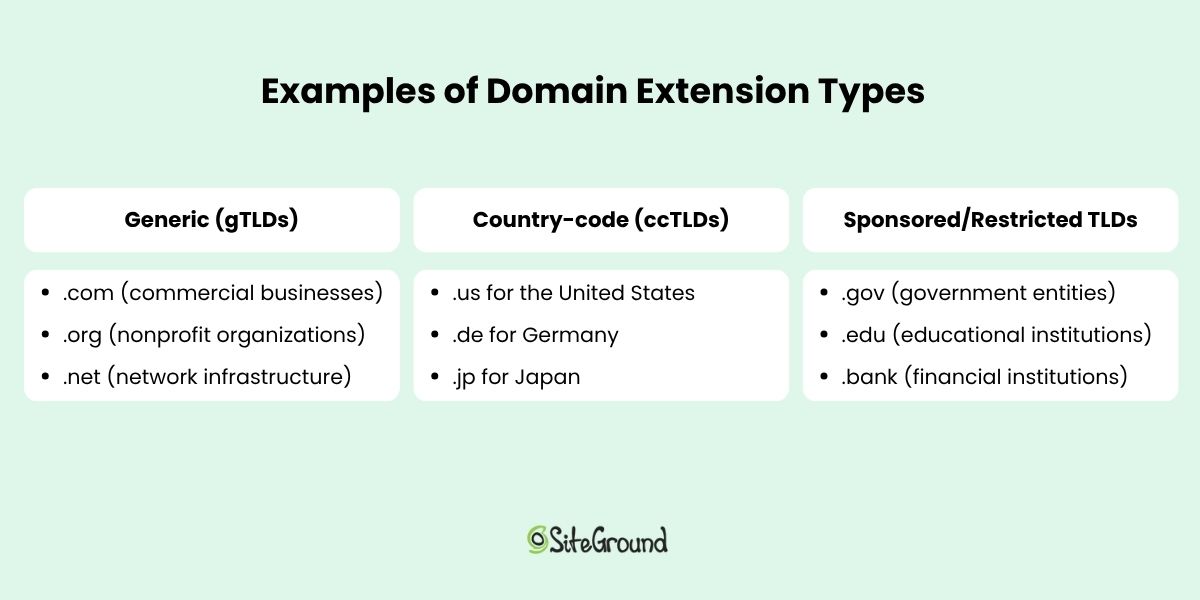
Generic (gTLDs)

Generic top-level domains (gTLDs) are the most common and recognizable domain extensions. They were originally created for general use without any geographic or organizational restriction. Examples include:

  • .com (commercial businesses)
  • .org (nonprofit organizations)
  • .net (network infrastructure)

In recent years, hundreds of new gTLDs have been introduced to help websites stand out and signal their industry or purpose, such as .app, .blog, .shop, and .tech. 

Country-code (ccTLDs)

Country-code top-level domains (ccTLDs) are two-letter extensions assigned to specific countries or territories. They help indicate the geographic focus of a website, such as:

  • .us for the United States
  • .es for Spain
  • .jp for Japan
example website with a ccTLD

Sponsored/Restricted TLDs

Sponsored and restricted TLDs are specialized domain extensions that are regulated or managed by designated organizations. These often require applicants to meet certain criteria or verification processes to assure that the domain’s use fits specific industries or communities. Examples include:

  • .gov (government entities)
  • .edu (accredited educational institutions)
  • .bank (verified financial institutions)
  • .health (trusted health organizations)

These domains add credibility and trustworthiness, but they aren’t open for general registration.

Examples of domain extension types

How to Choose the Right Domain Extension

Alright, now we’ve got the basics covered, but what does this mean for you as you contemplate the perfect domain name? 

1. When in Doubt, Go with .com

Despite the explosion of new domain extensions, .com remains a top choice for businesses and personal websites alike. If you’re able to find a great domain name with a .com extension, it’s usually the safest and most effective choice. Here’s why:

  • Universal Recognition: .com is the most familiar and trusted domain extension worldwide. People automatically type “.com” when entering web addresses, making it easier for your audience to find you.
  • Credibility and Professionalism: Because it’s so well-established, .com domains often convey authority and legitimacy. Visitors may trust a .com site more than less familiar extensions.
  • SEO Stability: While Google states that domain extensions don’t directly affect search rankings, users’ trust and click behavior often favor .com sites, which can indirectly benefit SEO.
  • Better Resale Value: If you ever decide to sell your domain, .com names tend to have higher market value and demand.
  • Widespread Availability: Many services, platforms, and email providers default to .com, making integration easier.

Those are some pretty compelling reasons, but securing a short, catchy .com domain can be like panning for gold: just plain hard to find. So if your ideal .com isn’t available, don’t worry—newer domain extensions can offer creative and even more ideal alternatives, which we’ll be covering in the sections to come.

2. Know Your Audience

We’ve established that .com is the default choice—and for good reason. But, apart from the limited availability, it’s important to keep in mind that not every audience responds to domain extensions in the same way. 

That is, if you’re building a brand, and want to get more adventurous with your domain extension, then it’s worth considering how your domain extension will land with your audience. In fact, in some cases, going beyond .com might actually make your brand feel more relevant, more modern, or more trustworthy. 

So what does this look like?

If your audience is tech-savvy, you can more confidently use newer, less conventional extensions, like .io or .ai (which we discuss more about in a bit).

example website with a .ai domain extension

If your audience is more mainstream, it’s best to stick with traditional, widely recognized extensions like .com (still the most familiar and trusted), .org (well-established for nonprofits and mission-driven brands), and .net (occasionally used for networking or infrastructure services). Mainstream users may be confused or skeptical of unfamiliar extensions, which can hurt trust and click-through rates.

Bottom line: Choose an extension your audience will recognize and trust—especially if you’re targeting users who aren’t in the habit of exploring the internet’s cutting edge.

3. Build Trust with the Right Extension

Beyond audience preferences, your domain extension also sends a subtle signal about your site’s trustworthiness and professionalism. Some extensions instantly convey authority, while others can feel unfamiliar—or even spammy—to certain users.

Here’s how different extensions shape perception:

  • Trusted and stable: Extensions like .com, .org, and .edu are long-established and widely respected. They’re safe bets when you want to signal legitimacy and reliability.
  • Potentially risky: Some extensions—such as .biz, .info, or obscure gTLDs—may raise eyebrows. Even if they’re valid, they’ve historically been linked with spammy or low-quality content.
  • Contextually strong: Industry-specific or verified extensions (like .health, .law, or .bank) can build credibility if they clearly match your offering and audience expectations.
example website with a .org domain extension

While having a familiar domain extension like .com might not necessarily improve your Google ranking, choosing an extension that feels untrustworthy or unfamiliar can negatively impact your SEO—primarily by reducing user trust and click-through rates. Since Google values user engagement, a domain that inspires confidence encourages people to click, explore, and interact with your site, indirectly supporting better search performance.

4. Consider Your Geographic Reach 

If your business or website primarily serves a specific country or region, using a country-code top-level domain (ccTLD)—like .es for Spain or .ca for Canada—can help signal your local presence. Beyond that, local TLDs can:

  • Improve relevance for local search results
  • Increase visitor confidence that your site is tailored to their region
  • Help comply with country-specific regulations

All this said, if your brand or business operates globally, it’s usually better to stick with a single domain—preferably a generic TLD like .com—and organize your content using subdirectories (that is, yourbrand.com/es/ for Spain) rather than multiple country-specific domains. Here’s why:

  • SEO Benefits: Domain authority does not transfer between multiple ccTLDs, so managing several domains splits your SEO power. A single domain consolidates your site’s authority, making it easier to rank.
  • Simplified Tracking: Managing analytics and marketing campaigns is easier when all traffic funnels through one domain. Multiple domains complicate performance tracking and increase costs.
  • Consistent Branding: A single domain ensures a unified brand identity across regions without confusing visitors.

In short, reserve local ccTLDs if your audience is narrowly focused on that region. Otherwise, use a single global domain and organize content by language or country within it for better SEO, tracking, and brand consistency.

5. Think About Branding 

Your domain extension is part of your brand—it shows up in every link, every email, and often in spoken conversation. That means it should be easy to remember, simple to say, and visually clean.

Sometimes, the right domain extension can even enhance your brand identity or make a clever name possible when the .com version is already taken. For example:

  • Creative use of the TLD: A site like calm.app or notion.so feels modern and on-brand without needing .com.
  • Shorter, cleaner names: If yourbrand.com is taken, but yourbrand.tech or yourbrand.store is available, you can keep the name you want without adding awkward dashes or extra words.
  • Memorability over convention: A domain like join.us or studio.design might stand out more and be easier to remember than a longer or compromised .com.

Pro tip: Before choosing an extension, say the full domain name out loud. If it sounds awkward or hard to explain to someone, it may not be the right fit, regardless of how clever it looks on paper.

6. Align with Your Industry 

Choosing a domain extension that reflects your industry can help you stand out, clarify your offering, and create a more intuitive experience for your audience. It shows visitors what you do before they even land on your site.

Some examples of industry-specific extensions include:

  • .tech – For startups, engineers, and tech-focused brands
  • .design – Popular with creatives, agencies, and portfolio sites
  • .health – For healthcare providers, wellness brands, and medical tech
  • .law – Used by law firms and legal professionals
  • .photography, .finance, .marketing, and many more

These extensions aren’t just creative, they can also help to:

  • Establish relevance: Visitors instantly associate your site with your field
  • Improve memorability: A descriptive extension can be easier to recall than a generic one
  • Enhance branding: You get a cleaner, more brand-aligned domain when .com versions are taken

Pro tip: Make sure the extension is widely understood within your industry and won’t confuse your audience. As we discussed above, some niche TLDs still feel unfamiliar to the general public.

7. Check Availability

Before you fall in love with a name, make sure it’s actually available, and be sure to buy the domain. But don’t just make sure the domain isn’t in use: these days, consistency across platforms is essential, so you’ll want to make sure your name is available across the board. 

searching for a domain extension with a domain search tool

Domain availability

Use a domain search tool to see if your desired name is available for domain registration. If the .com is taken, consider alternatives like .co, .io, or an industry-specific TLD—but always double-check that the alternative domain extension (or extensions) isn’t already in use by an active brand or competitor (because, if so, and you proceed with using the domain, this could equate to domain squatting). 

Even if the domain is used by a non-competitor, think carefully about potential confusion. Do you want your brand mistaken for another? Could it impact your visibility, credibility, or future expansion plans? Before settling on a name and extension, make sure to evaluate the broader implications for your brand.

A Quick Note on Pricing

Domain pricing varies depending on the extension. Standard domains like .com, .org, or .net usually cost around $10–$20/year. Newer or niche extensions—like .ai, .tech, or .design—can range from $30 to $100+ annually, while short or keyword-rich names may be considered premium and priced higher.

SiteGround makes it easy to check domain availability and compare prices during registration. And if you’re starting a new website, your first year of domain registration is free for select extensions when you sign up for hosting.

Social handle availability

Social media marketing is an inevitably important part of growing a business, so you’ll want to make sure your domain’s name (or a close variation) is available on key social platforms like Instagram, Twitter/X, TikTok, LinkedIn, and YouTube. At the end of day, a unified identity across web and social helps build brand recognition and makes it easier for people to find you.

How to choose the right domain extension

Modern Domain Trends in 2025

At this point, we’ve got the general domain extension landscape pretty well mapped out. So, what fresh trends are shaping the way we choose domains in 2025?

Trend #1: Startups Are Steering Away From .com

As we’ve covered, .com usually remains the go-to, but many startups today are opting for modern extensions like .io, .ai, and .dev to signal innovation and stand out. These newer TLDs are often shorter, more brandable, and directly reflect the tech focus of many startups.

  • .io is popular with SaaS and developer tools.
  • .ai highlights artificial intelligence products.
  • .dev targets developer-focused platforms.

These extensions aren’t just practical—they’re strategic branding choices that speak to a tech-savvy audience and help startups differentiate themselves. In fact, in some spaces, a .com might even feel outdated or overly corporate.

Trend #2: Brands Are Rethinking ccTLDs

Country-code top-level domains (ccTLDs) were originally tied to specific countries—but today, brands are using them creatively to signal what they do rather than where they are.

For example, the aforementioned .io was originally meant for the British Indian Ocean Territory, .ai was tied to Anguilla, and .tv represents Tuvalu but has become popular with media and streaming sites.

One caveat: while these ccTLDs act like generic TLDs in practice, they’re still technically country-specific. That means some policies or restrictions could apply, and their long-term status depends on agreements with the respective country’s domain authority.

Example website with a .io domain extension

Trend #3: Online Stores Are Getting Creative

Ecommerce websites are also moving beyond traditional .com domains and embracing extensions like .store, .shop, and .fashion to clearly communicate what they sell. These extensions make URLs more descriptive and oftentimes memorable, helping brands stand out.

Using a niche TLD gives retailers more flexibility to claim their ideal brand name without awkward add-ons, numbers, or hyphens. It can also reinforce brand identity at a glance, making it easier for customers to find, remember, and trust the site.

Trend #4: Creators Are Branding with Personal TLDs

Freelancers, influencers, and content creators are using extensions like .me, .bio, and .name to build personal brands that feel approachable and authentic.

These extensions are perfect for personal websites, landing pages, and social link hubs—and they make domains feel more custom and human.

  • .me domains are great for showcasing personal work
  • .bio works well as a link-in-bio or intro page
  • .name is a niche but fitting choice for personal sites

Trend #5: Big Brands Are Launching Their Own TLDs

Major companies are going a step further by securing custom, brand-owned TLDs like .apple and .barclays. These exclusive domains offer full control over the namespace and reinforce brand identity at every level.

example of a website with a custom domain extension

While this strategy is still limited to large enterprises with the resources to manage their own TLD, it points to where the web is headed—more personalized, brand-specific domains.

The Perfect Domain Extension Is Waiting for You

Whether you stick with a tried-and-true .com or venture into trendy new territory with a creative or industry-specific TLD, your domain extension plays a meaningful role in shaping how people find, perceive, and remember your brand. Just be sure to balance recognition and trust with creativity and clarity—that way you can stand out without confusing your audience. With more options than ever before, 2025 is the year to really get smart about your domain.

Ready to launch your next great idea? Buy your domain with SiteGround and get free domain privacy for the first year—plus access to expert support whenever you need it. Want to take things further? Explore powerful tools for web hosting, site building, and email marketing to bring your vision to life.

FAQs for Domain Extensions

What are the Most Common Domain Extensions?

The most common domain extensions include .com, .org, and .net, which have been around since the early days of the internet. .com is by far the most widely used and trusted, while .org is often associated with nonprofits and communities, and .net serves as a solid alternative when a .com isn’t available. Other frequently seen extensions include .edu (for educational institutions), .gov (for U.S. government entities), and newer favorites like .co, .io, and .ai, especially among startups and tech companies.

How Many Domain Extensions Are There?

There are currently over 1,500 domain extensions available, with new ones being introduced regularly. This includes classic options like .com, .org, and .net, as well as hundreds of newer generic extensions (like .app, .design, .xyz), country-code TLDs (like .de or .jp), and specialized or restricted domains (like .bank or .gov). While not all are widely used, the variety gives website owners more flexibility than ever before.

How Much Does a Domain Extension Cost?

The cost of a domain extension varies depending on the type and popularity of the TLD. Common extensions like .com or .net typically cost between $10 and $20 per year, while newer or niche extensions like .tech, .ai, or .design can range from $30 to $100+ annually. Premium domains or restricted TLDs may cost even more. If you’re starting a new website with SiteGround, you can register a domain for free for the first year when you sign up for hosting—making it even easier to get started.

How to Search for a Domain Extension?

You can search for a domain extension using any domain registrar or web hosting provider with a domain search tool. Simply enter the name you want, and the tool will show you which extensions are available—like .com, .net, .shop, or .tech—along with their prices. If you’re using SiteGround, you can easily check domain availability and register your preferred extension directly during the hosting signup process.

Do Domain Extensions Affect SEO?

When it comes to whether domain extensions affect your SEO rankings, Google, in theory, treats all domain extensions equally when it comes to search algorithms. However, indirect factors—like user trust, click-through rates, and memorability—can influence performance. So a .com may not necessarily improve your SEO, but it might get more clicks than a less familiar extension simply because users recognize and trust it. Alternatively, a less trustworthy domain extension could have the opposite affect.