

You land a promising lead, send what feels like a solid pitch, and hear nothing back. You follow up with a client and somehow the tone comes across as pushy, even though that wasn’t the intention. Small things: a vague subject line, a missing CTA, an overly casual opener, can work against you before the other person has even finished reading.
Email etiquette (the rules and best practices for writing clear, professional emails) is what separates messages that get results from ones that don’t. This guide covers the 9 email etiquette rules that actually move the needle, plus the 7 C’s framework to keep them in check, with examples you can use straight away.
Key takeaways:
- Your email address is part of your professional image. Use your name and domain, not a generic provider.
- Subject lines determine whether your email gets opened. Keep them specific and honest about what’s inside.
- Get to the point fast. Busy readers skim, and they’ll drop an email that makes them work for the main message.
- A clear call to action removes ambiguity and gets you faster responses.
- Reply within 24 to 48 hours. Silence reads as disinterest, even when you’re just busy.
What is email etiquette?
Email etiquette is the set of guidelines for writing clear, respectful, and professional emails. It covers how you address someone, how you structure your message, and when you reply.
It’s basically the unwritten rulebook for business communication. Follow it, and people see you as reliable and easy to work with, plus it does wonders for your email engagement. Ignore it, and even a solid message can land the wrong way. In a world where so much of professional life plays out over email, those little details add up fast.

How to write professional emails: 9 etiquette rules + examples
The golden rule is keep it clear, to-the-point, and respectful. Every part of an email counts: from the subject line to the signature, and these nine tips, packed with examples, will help your emails pop.
1. Use a professional email address
Your email address shapes how people perceive you before they’ve read a single word. In a business context, that means using your name and your own domain name, not a generic provider like Gmail or Yahoo.
A good rule of thumb: If you wouldn’t put it on a business card, it probably shouldn’t be in your form field either.
Stick with something like yourname@yourdomain.com and leave coolcat99@gmail.com in the past.
It sets the tone and shows you’re serious about your professional image right from the get-go.
2. Write a subject line people will open
Your subject line is the first thing people see in their inbox, and in most cases it’s the only thing they use to decide whether to open your email or skip it. Keep it short, specific, and true to what’s inside.
And don’t forget about the preview text. It’s the second line people see after your subject, so use it to add context rather than just repeating it.
3. Start with a proper greeting
The right email salutation sets the tone for everything that follows. Use the recipient’s name, check the spelling twice, and match the formality to the relationship. “Hi Sarah” works fine for a warm intro or an ongoing exchange. “Dear Ms. Thompson” is safer when you’re writing cold or to someone senior you’ve never met.
Not sure how formal to go? Look at how they signed their last email to you. People usually signal the tone they’re comfortable with.

4. Keep your email body concise and relevant
State your purpose in the first sentence, cover what’s necessary, and stop there. Nobody wants to dig through three paragraphs of email body to find out what you actually need.
Re-read your email and ask yourself: what do I want the reader to know, do, or decide? If that’s not obvious within the first few lines, trim it down until it is.

5. Always proofread
Spell-check catches typos, but it won’t save you from sending “Hi Mark” to someone named Marc, or confidently misspelling a client’s company name.
Give your email a proper read-through before sending, out loud if you can, since your ear catches things your eyes skip over. And pay extra attention to the three things autocorrect loves to get wrong: names, technical terms, and numbers.
Overwhelmed by email copywriting and avoiding errors? Let AI do the work. SiteGround’s AI Email Writer can help you craft error-free emails effortlessly.
6. Use the right formatting for your email
Email formatting is about making it easy for the reader to process. A two-line paragraph gets read. A six-line block gets skimmed at best. Use short paragraphs, break up distinct points with bullet points, and put the most important information where the eye lands first: at the top, in bold if needed, never buried in the middle of a paragraph.
7. Include a clear email call to action
Every email call to action should make it obvious what happens next. Be specific about what you need, who needs to do it, and by when. That’s what turns a message into a response.
Good to know: One email, one ask. The moment you add a second request, your response rate drops. If you genuinely need two things, lead with the more important one and make the second feel like a quick add-on.

8. Add a professional email signature
Your email signature is the last thing people see, and it should make it effortless for them to know who you are and how to reach you. At minimum: your name, role, company, and one direct contact method. Beyond that, keep it clean. A signature with five phone numbers, a motivational quote, and an animated banner does more harm than good.
Match your sign-off to the tone of the email.
- “Best” and “Thanks” work for most situations.
- “Warm regards” adds a personal touch for relationship-building emails.
- “Cheers” is fine if that’s how you normally talk to someone.
Leaving no sign-off at all can read as abrupt even when you don’t mean it that way.
9. Respond promptly
A slow reply sends a message even when you don’t mean it to. 24 to 48 hours is the generally accepted window for professional email. Beyond that, people start wondering whether you saw it, or whether you’re avoiding them.
A small thing that makes a big difference: If you can’t give a proper response yet, a quick “Got this, I’ll get back to you by Thursday” buys you time without leaving anyone in the dark.
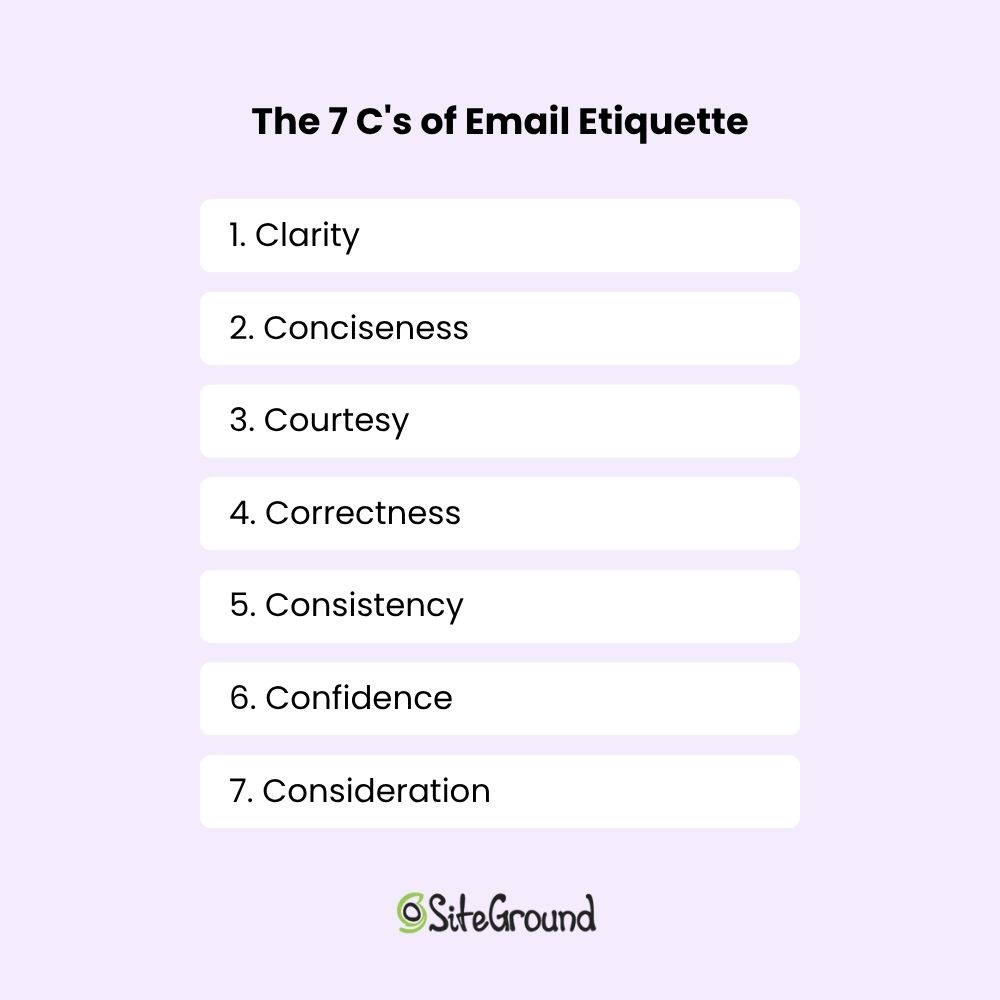
What are the 7 C’s of email etiquette
With the nine essential rules under your belt, it’s time to explore the seven C’s of email etiquette to complement your guide to effective personal or business communication.
The nine rules cover the structure of a good email. The seven Cs are about the quality of the writing itself.
1. Clarity
Clarity means your message can only be read one way. Organize your thoughts before you start typing, say what you mean in the order it makes sense, and cut anything that doesn’t move things forward. If you can’t state your ask in one sentence, the email probably needs another pass.
2. Conciseness
The shorter your email, the more likely it gets read in full. Say what you need to say, then stop. Every extra line you add is another reason for someone to skim past the part that actually matters.
Keep it short. That’s it. Like this paragraph.
3. Courtesy
Email courtesy is the practice of communicating with respect and consideration for the person you’re writing to. Use their name, acknowledge their time, and say thank you when it’s warranted. A polite email doesn’t take longer to write, but it leaves a noticeably better impression than one that reads like a demand.
4. Correctness
Email correctness means your spelling, grammar, and punctuation are accurate and your facts are right. A typo in a casual message is forgivable. A typo in a proposal, a cold outreach, or an email to someone you’ve never met says you didn’t care enough to check. And that’s enough for some people to question your credibility before they’ve finished reading.
5. Consistency
Consistency builds familiarity, and familiarity builds trust, especially in ongoing professional relationships. Your tone and style say as much about you as your words do. If you’re warm and conversational in one email then stiff and formal in the next, it creates a subtle disconnect.
6. Confidence
Confident writing is direct and clear. It doesn’t over-apologize, hedge every statement, or bury the point under qualifiers.
“I’d love to connect sometime if you’re not too busy and it’s not too much trouble” versus “Would you be open to a quick call next week?”: one of those gets a reply.
7. Consideration
Put yourself in the recipient’s position for a moment. What questions might they have? What context are they missing? What are they actually trying to figure out from your message? The emails that get the best responses are usually the ones that answered those questions before they were even asked.
Together, the 7 C’s give you a practical filter for every email you send. Run your message through them before sending and you’ll catch most of the things that make emails easy to ignore and keep more of what makes them easy to act on.
Up your email etiquette game with SiteGround’s Email Marketing
Good email etiquette gets you further than you’d think. Once it clicks, every email you send works harder: clearer, more professional, and a lot more likely to get the response you’re after.
To take it a step further by exploring SiteGround Email Marketing. We provide easy-to-use tools to help you keep your emails organized and respect privacy, ensuring your messages always hit the mark.
[58]
This article was originally published in July 2025, and then updated in April 2026.
Frequently asked questions about email etiquette
Email etiquette matters because it directly affects how you’re perceived. A well-written email signals professionalism and respect for the recipient’s time. A sloppy one (wrong name, vague subject line, no clear ask) can cost you a reply, a deal, or a client relationship. In business communication, the way you write is often the first impression you make.
A good email etiquette example is a cold outreach email that gets a reply. It has a specific subject line, opens with the recipient’s name, gets to the point in the first sentence, makes one clear ask, and closes with a direct CTA. No filler, no life story, no “I hope this email finds you well.” Just a respectful, well-structured message that respects the reader’s time.
A common email etiquette mistake is burying the point. Most people write emails the way they think: context first, request last. But readers scan from the top, and if they don’t see why your email matters within the first few lines, many won’t get to the part where you finally ask. Lead with the point, then back it up.
To apply email etiquette, start with the basics: a professional email address, a clear subject line, and the right greeting. From there, keep your message focused, format it so it’s easy to read, include one clear ask, and reply to others within 24 to 48 hours. The rules aren’t complicated — the hard part is being consistent about them when you’re busy and tempted to fire something off quickly.
The generally accepted window is 24 to 48 hours. Within that timeframe, a reply signals that you’re attentive and easy to work with. If you need more time, a short acknowledgement like “Got this, I’ll get back to you by Thursday” is better than silence.
A few things consistently undermine an otherwise good email: a missing or vague subject line, the wrong level of formality for the relationship, spelling errors especially in names, no clear ask, and slow replies. Any one of these can affect how you’re perceived, even if the content itself is solid.