
Choosing the right website template comes down to seven criteria: scalability, customization ease, mobile performance, page speed, SEO structure, built-in features, and AI assistance. Get these right and everything you build on top of them compounds. Get them wrong and every growth milestone comes with a tax.
But most first-time sellers don’t think about it that way. They pick a template the same way they choose a phone case: they find one that looks good and move on. The problem is that looks don’t load fast, rank in search engines, or scale with your business. The template you choose today shapes how easy it is to add products, reach mobile shoppers, and grow without starting over. This guide gives you a practical framework for evaluating templates on the criteria that actually matter.
Key takeaways:
- Looks aren’t enough. A template that wins on aesthetics but loses on speed, SEO, and scalability will cost you more to fix than it saved upfront.
- Your template choice is also a platform choice. The platform behind your template shapes everything from SEO controls to support. You’re choosing both.
- Choose for fit, not flexibility. Pick a template for your business that’s already close to what you need, make a few targeted changes, and launch.
- Mobile and speed aren’t nice-to-haves. Google ranks your mobile site first and penalizes slow ones. Underperforming on either hurts your visibility.
- Built-in beats add-ons. Native features mean fewer subscriptions, fewer failure points, and less time maintaining a stack.
- Think past launch day. The right template handles more products, more traffic, and more complexity a year from now, without a rebuild.
Why your template choice is a long-term business decision
A website template is a pre-designed starting point — a ready-made layout with structure, styling, and content placeholders that you adapt to fit your brand identity and business. The template you choose shapes everything that follows: how individual pages are organized, how search engines read your content, how quickly everything loads, and how well it works on a phone. Think of it as setting the foundation. The stronger it is at launch, the less you’ll find yourself rebuilding instead of growing.
Start with your setup, not your aesthetic
What kind of website do you actually need?
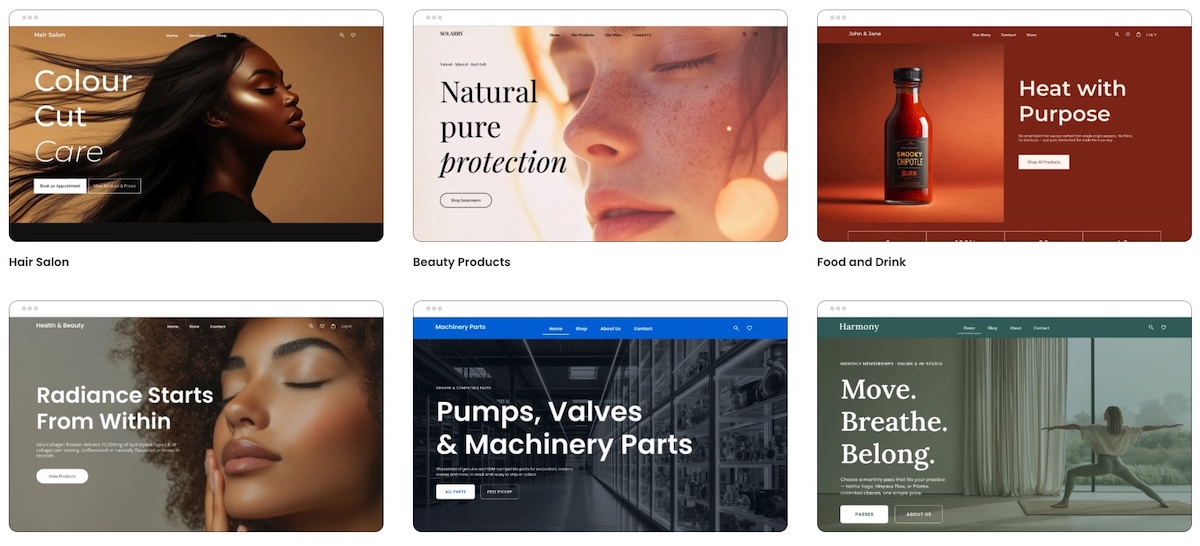
Before you open a single template preview, answer this: what does your website need to do? A portfolio website needs strong image presentation and a clean contact path. An ecommerce store needs a product grid, cart functionality, and checkout. A service business needs trust signals, a booking form, and a clear call to action.
Your template choice flows from your website’s job. A visually striking portfolio template is a poor foundation for a growing product catalog, and vice versa.
Template or all-in-one builder: what are you actually choosing?
Not all templates are created equal, and that’s partly because not all platforms are. A template for WordPress, for example, gives you web design and structure, but you’re responsible for assembling everything else: hosting, plugins, security, updates, and integrations.
An all-in-one website builder, on the other hand, bundles the template with the platform, which often means that hosting, ecommerce tools, email marketing, security (like SSL), and support are all part of the same package.
Neither is universally better, but the distinction matters as you work through this guide. Many of the criteria below (speed, built-in features, scalability, support) depend as much on the platform as on the template itself. Keeping in mind which kind of setup might be best for you will help you assess each point more clearly. If you’re still deciding between the two, our guide to choosing a website builder is a good place to start.
[79]
What features will you need in 6 to 12 months, not just today?
New sellers consistently underestimate how quickly their needs expand. You launch with five products and no email list. Six months later, you have thirty products, a newsletter, and customers asking for a size guide. A template that can’t accommodate that growth without a rebuild doesn’t end up being quite so cheap.
How to choose a website template
1. Customization: what you actually need
Customization is one of the first things people get excited about when choosing the right website template, but it’s also easy to pick the wrong one. A template that advertises a thousand different ways to customize every last feature sounds appealing. In practice, though, most of those options go unused, and having too many of them makes the editor infinitely harder to navigate, never mind launching harder to justify.
Here’s a more useful way to think about it:
- Choose for fit, not flexibility. The goal isn’t a template you can turn into anything; it’s one that’s already close to what you need. A template that fits your business type well out of the box will serve you better than one that technically allows infinite customization but requires hours of work to hopefully get there.
- Prioritize the few things that actually matter. Most businesses only need to change a handful of things to make a template their own: branding basics, the homepage hero, and navigation structure. Get those right and launch. Everything else can follow once you have real customers telling you what actually needs improving.
- Get your website structure right early. Navigation and URL structure are harder to change later without affecting your search rankings. These are worth deciding deliberately at the start, and not something to revisit once you’re live.
- Test how easy it actually is. Beyond what you can customize, pay attention to how easy it is to do. On WordPress, customization often means navigating a theme options panel, a page builder plugin, and the block editor simultaneously. It’s powerful, but it comes with a real learning curve. On an all-in-one builder, the same changes should be achievable in one place without extra tools. Look for a platform that offers a free trial, and then be sure to use it. Get into the builder and try making a few changes yourself before committing.
Scenario: Jake picks a template partly because it advertises over 200 layout options and granular control over every design element. Two weeks in, he’s still navigating a settings panel with more options than he knows what to do with and hasn’t launched. A competitor who picked a simpler template that was already close to what she needed made four targeted changes and went live on day three. More customization options didn’t make her website better. They just made Jake’s harder to finish.
2. Mobile performance
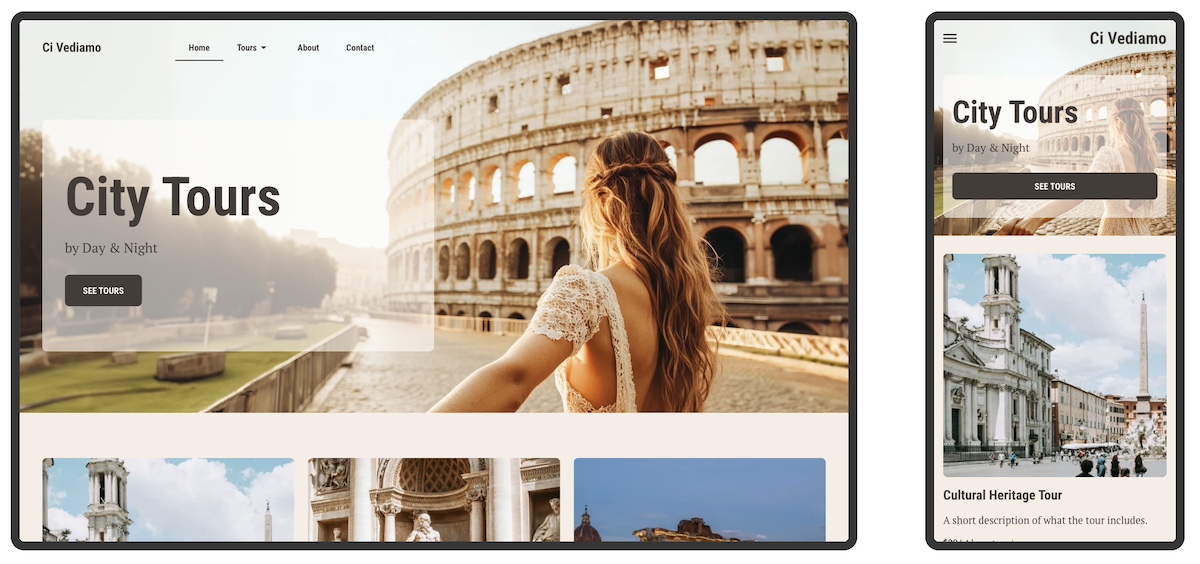
Nearly two thirds of all web traffic comes from mobile devices, and Google uses your mobile website, not your desktop website, to determine your search rankings. So a template that looks great on a large monitor but not on a phone can actually be a much bigger problem.
- What to watch for: Text that’s too small to read without zooming, buttons placed too close together for a thumb tap, images that crop or overflow on smaller screens, and navigation that collapses into an unusable menu are all signs a template wasn’t built with mobile in mind.
- How to check: Always preview a template’s mobile web design on a real device before committing. If you’re already in a free trial, pull up your work-in-progress on your actual phone, and not just the browser’s mobile view, to ensure that the responsive design works as it should.
Scenario: A customer finds your store through an Instagram post, taps the link, and lands on a page where the text is tiny, the buy button is half off-screen, and pinching to zoom is the only way to read the product description. They close the tab. So the product might be great, the marketing might even be great, but if the template isn’t mobile friendly? None of it matters.
3. Page speed and template bloat
A slow website costs you in two ways: search rankings and sales. Indeed, users abandon pages that take more than three seconds to load, and Google factors speed into where your website appears in results. The good news is that speed problems are often predictable (and avoidable) before you commit to a template.
- Know what causes bloat: The most common culprits are parallax scrolling effects, auto-playing video backgrounds, heavy animation libraries, and built-in sliders. These features add weight to every page load, and templates built around them are rarely fast. Whether you’re browsing a template gallery or tinkering with a free trial, treat elaborate visual effects as a warning sign rather than a selling point.
- Check the platform’s reputation for speed: The template is only part of the speed equation. The platform or host your site runs on determines how quickly files are delivered to visitors, and some are significantly faster than others. Before committing, look beyond the template itself: read independent reviews, and check benchmark comparisons. If you’re on a CMS like WordPress, your hosting for WordPress plan matters as much as the template itself. A lean template on slow hosting is still a slow website.
Scenario: A shopper sees your product via your Instagram marketing, taps the link, and waits. The page half-loads. The header appears, then nothing for two seconds, then the images pop in one by one. Tick tock. She’s already losing interest. By the time the buy button is visible, she’s gone back to scrolling. She didn’t bounce because the product was wrong, but because the template was too heavy and the hosting too slow to keep up.
4. SEO basics: what to look for
Search engine optimization (SEO) isn’t something a template does for you automatically; it’s something you build in. But how easy that is depends on both the template and the platform behind it. That is, the controls that matter most to your SEO strategy should be accessible without jumping through hoops.
Here’s what to look for when it comes to easy-to-implement SEO:
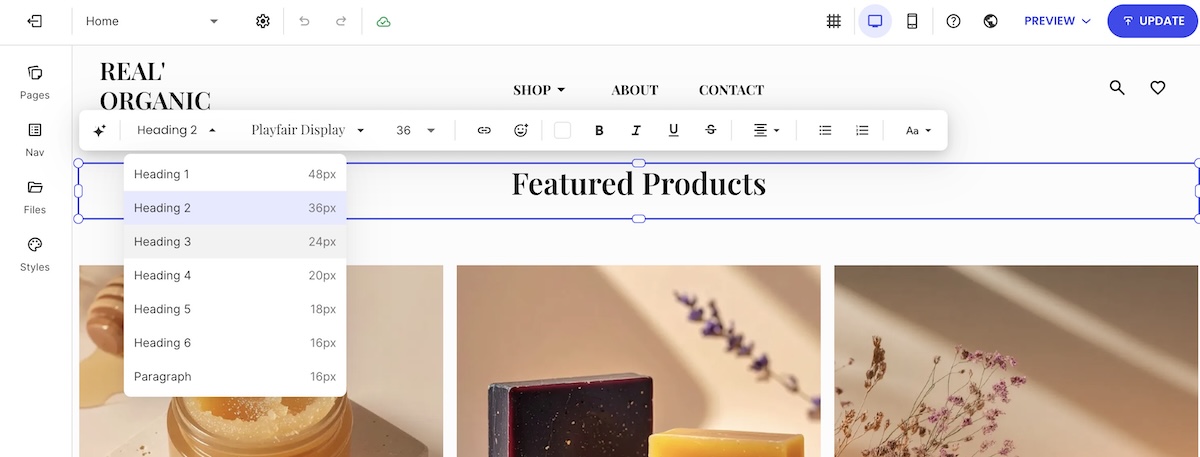
- Heading hierarchy: Every page should have exactly one H1, followed by H2 and H3 subheadings in logical order. This tells search engines what each page is about and how the content is organized. The risk with many templates, though, isn’t that the headings are wrong by default; it’s that the editor makes them easy to misuse, applying heading tags for visual styling rather than content structure. Look for a builder that keeps heading controls intuitive and clearly labeled.
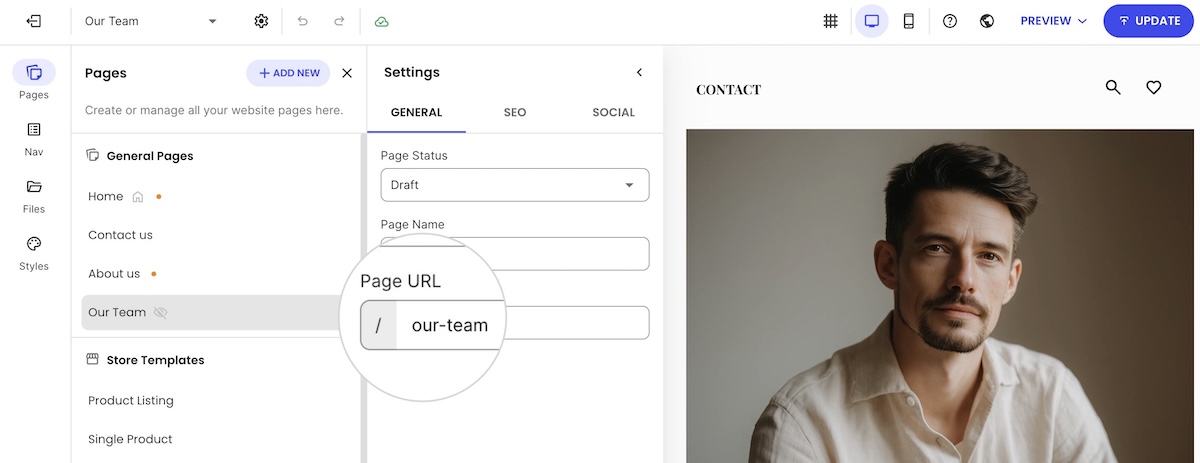
Crawlable navigation and clean URLs: Search engines follow your navigation to discover pages. A good platform gives you URLs that are readable and descriptive by default (something like /products/ceramic-mug rather than a string of random characters) and lets you edit them easily.
- Meta titles and descriptions: Every page needs a unique meta title and meta description (these are what appear in search results and directly affect whether someone clicks through to your website). A good all-in-one builder will make these easily editable directly in the page editor. On WordPress, however, you’ll typically need an SEO plugin to access these fields, which is a common setup but an extra step to get right (and another plugin to wrangle).
- Schema markup: For SEO, product schema should be a priority on your SEO checklist. It can tell search engines your product’s name, price, availability, and reviews, and can generate rich results in search listings. On a good all-in-one builder, this is handled automatically without any manual setup. On WordPress, it requires an SEO plugin, which means one more thing to configure correctly.
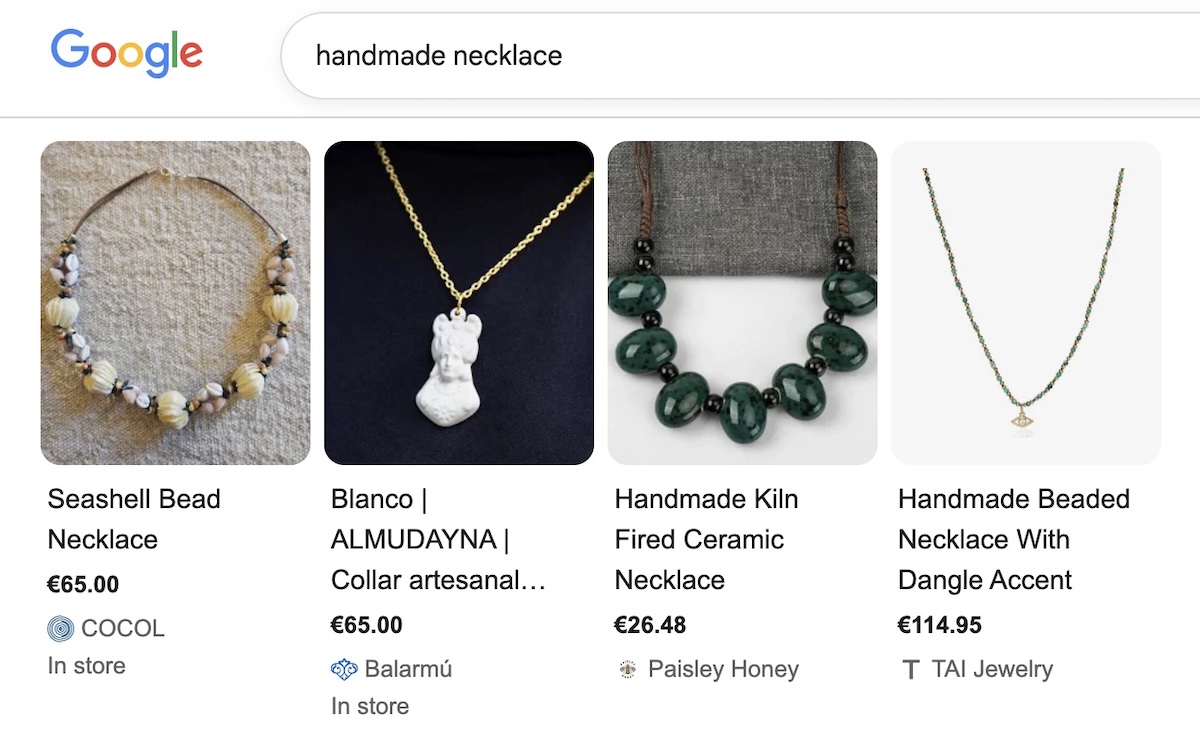
Scenario: Two entrepreneurs launch competing handmade jewelry shops on the same day with nearly identical products and prices. One is on a platform that auto-generates product schema and offers heading controls that are easy to use and understand. The other picked a visually stunning template where schema requires a plugin nobody told her about and not-so-straight-forward heading tags. Three months in, the first shop appears in search results. The second is on page three — not because the products are worse, but because search engines can barely make sense of the website.
SiteGround’s Website Builder takes care of all of this out of the box. Templates are easy to adapt without getting lost in options, fully optimized for mobile, and fast by default. On the SEO side, heading structure is easy to set correctly in the editor, URLs are fully editable from the start, and product schema is generated automatically. The groundwork is already laid, and you just have to build on it.
Start building your website for free>>
5. Built-in features vs. plugins and integrations
When you’re evaluating a template, it’s easy to focus on how it looks and forget to ask what it actually comes with. The answer depends a lot on your setup. On a CMS like WordPress, plugins are simply how things work — ecommerce, email marketing, and SEO controls all require them, and that’s a known tradeoff. On an all-in-one builder, these features should be native. Before committing to either, it’s worth knowing exactly what’s included and what isn’t.
- What to look for natively: The features that matter most for small businesses should be available without installing anything extra. Look for product and inventory management, checkout and payment processing, email marketing, contact forms for lead generation, and basic SEO controls. A free trial will tell you more than any feature spec, though. Open the settings, poke around the dashboard, and try to set up a product listing or a contact form. If you hit a wall that points you to the app store, that’s your answer. If you hit a wall that points you to the app store, that’s your answer.
- What to watch out for: Some platforms are built around a marketplace of third-party apps, which means features that feel basic can carry an extra cost. Read the pricing page carefully, not just the monthly plan fee. Look for transaction fees, per-app charges, and anything described as an “integration” rather than a built-in feature.
Scenario: One seller builds on a free template using a popular open-source CMS. She spends her first month configuring five plugins: an ecommerce tool, an email marketing integration, an SEO plugin, a forms plugin, and a cookie consent tool. Two conflict with each other and take the website offline for two days. Another seller goes with a well-known hosted ecommerce platform, only to find that customer reviews require a separate paid app, and that using her preferred payment processor means getting charged an additional fee on every sale. A third seller, on a platform with these features built in, spends that same month selling.
6. Scalability
A template that serves you well at launch needs to keep serving you as your business grows. This sounds obvious, but many templates that look super pretty at launch are built for small, static websites. They weren’t designed for a scaling business or a growing product catalog. Here’s what to look for:
- Content and structure: The real question isn’t whether a template can accommodate growth; most can, technically. It’s whether it makes growth easy. Can the website navigation adapt as you add categories, or does restructuring it become a chore? Can you add pages easily and intuitively? Does the layout hold up at 200 products as well as it does at 20? If you’ve already tested the builder, you’ll have a head start here — add a page, restructure a menu, duplicate a product section, and see how it holds up.
- Traffic: Content and structure is only half the picture. Your site also needs to handle sudden spikes in visitors without slowing down or going offline. A promotion that goes viral or a product picked up by a major publication can send a flood of traffic your way fast. How well your website handles that depends less on the template and more on your hosting or platform. If you’re on a CMS like WordPress, that’s a conversation with your web hosting provider; if you’re on an all-in-one builder, it’s worth checking that the platform is built for traffic surges, not just the quiet steady state of a new website.
Scenario: A seller expands his shop from eight products to forty, spread across four new categories. The products are ready, but updating the template to reflect that means digging through a clunky admin panel, hunting for where navigation menus are controlled, making the same change in three different places, and testing it on mobile to find it’s broken. Two hours later, he’s still not done. Meanwhile, a press mention sends a wave of traffic to his site, and because he’s on budget hosting, pages slow to a crawl. On a template with an intuitive editor and a platform built for traffic spikes, the same week looks very different.
7. AI assistance
The newest and most underrated criterion for first-time sellers is whether the template (and the platform behind it) uses AI to reduce the work of launching and maintaining a website. On an all-in-one builder, this can be built directly into the editor. On WordPress, AI tools are available but come through plugins and third-party integrations, which means more setup and more subscriptions to manage.
- At launch: Some templates now come with AI copywriting tools and assistants built into the editor, which means you don’t start with a blank page. Service page descriptions, homepage headlines, and sales pages can be drafted from a few inputs, giving you a working starting point rather than a blank screen. AI image generation takes this even further. Instead of sourcing stock photos or hiring a designer, you can create visuals for your site directly inside the builder.
- After launch: Running a small business means wearing a lot of hats, and most owners don’t have an analyst or a store manager on staff to fall back on. This is where the platform behind your template matters beyond just hosting. Some platforms now include a built-in AI agent that can answer questions about your store’s performance and, when you’re ready to hand off more, manage the day-to-day work itself: creating products, updating orders, managing coupons. No extra tools, no additional subscriptions. You ask or delegate, and the work gets done.
Scenario: An outdoor gear shop owner is gearing up for his busiest week of the year: a Black Friday sale. He needs to know which tents and packs to feature, which sizes are almost sold out, and he needs a site-wide discount live before customers start showing up. Normally that means digging through spreadsheets and updating each product one by one late into the night. Instead, he asks his AI store agent which products are trending and lets it apply the sale across his catalog in a few minutes. Same launch, same pressure, a fraction of the scramble.
For SiteGround Ecommerce store owners, this now comes standard through the AI Store Agent. Ask it something the way you’d ask an analyst, like which product is your top performer or what your average order value looks like this month, and it pulls from your orders, products, and customer data to answer in seconds. Switch on Power Mode and it goes further, creating and managing products, coupons, and customer accounts on its own.
Start building your online store now>>
8. Support
AI assistance is great, but sometimes you just need a human. So it’s important to keep in mind that when you choose a template, you’re also choosing a support ecosystem. And how complicated that ecosystem is depends largely on your setup.
- One platform, one team: On an all-in-one builder, there’s a single support team who understands your entire setup — your domain, your template, your store configuration, your email marketing, and everything in between. On a CMS like WordPress, support is fragmented by design: your host handles server issues, your theme developer handles template problems, and each plugin has its own support channel. Figuring out who’s responsible when something breaks (and it will because that’s the nature of plugins) can take longer than fixing the problem itself.
- What good support looks like: A single point of contact only helps if that contact is responsive, knowledgeable, and available when you need them. Before you commit to any template, check what support looks like for the platform it runs on. Look at independent reviews, not just what the platform says about itself.
Scenario: A product page goes down the night before a sale. One seller opens a chat with their platform’s support team (the same team that handles their domain, their template, their store, and their email marketing) and has the issue diagnosed in ten minutes. Another spends two hours filing tickets with three different vendors: the theme developer, the plugin maker, and the hosting company, each pointing the finger at someone else. The site stays down. The sale doesn’t happen.
Choose a website template that grows with your business
By now you have a different framework for this decision than most first-time sellers do. You’re not picking a template because it looks impressive; you’re picking one because it loads fast, reads cleanly on mobile, scales without rebuilding, ranks in search, and doesn’t require five plugins to run basic features.
The template that works best at launch is the one that’s still working a year later, when you have more products, more web pages, and more to lose from a rebuild. That’s the standard worth holding.
SiteGround’s Website Builder is designed around exactly that standard. It’s fast, flexible templates with native ecommerce and email marketing tools, AI assistance built in, and 24/7 support from a single team. Make your checklist, test the demos, and choose the foundation, not just the facade.
Frequently asked questions
Start with your business goals, not aesthetics. Identify what your site needs to do (sell products, book services, build a portfolio) and look for a template that handles that use case natively. Then evaluate it against the practical criteria in this guide: scalability, mobile performance, page speed, SEO structure, and built-in features.
The seven most important factors are scalability, customization ease, mobile performance, page speed, SEO-friendly structure, built-in vs. plugin-dependent features, and AI assistance. Aesthetics matter, but they should be the last thing you evaluate, not the first.
The terms are often used interchangeably, but there’s a practical distinction. A template typically refers to a pre-designed layout for a specific page or site type, while a theme is a broader design system applied across an entire site (common in WordPress). In most modern website builders, you choose a template that includes a full design system, effectively functioning as both.
For small businesses and first-time sellers, the most important native features are ecommerce (product listings, cart, checkout), email marketing, contact forms, and SEO controls. If these require third-party plugins, you’re adding cost, complexity, and points of failure from day one.
Look for templates that keep visual effects to a minimum — parallax scrolling, auto-playing video backgrounds, animation libraries, and built-in sliders all add weight to every page load. Beyond the template itself, check the reputation of the platform or host for speed through independent reviews. A lean template on fast infrastructure will always outperform an elaborate template on a slow one.