What You Need to Know About Domain Squatting in 2026

Domain squatting abstract

You’ve built your brand, brainstormed the perfect name, and checked if the domain is available—only to find out it’s already taken. Not by a legit business, but by someone who beat you to the punch…and now they’re asking thousands just to hand it over. Welcome to the frustrating world of domain squatting.

In 2025, domain squatters have gotten smarter and faster. But so has the know-how when it comes to fighting back. Indeed, when businesses understand how domain squatting works, it makes it a whole lot easier to avoid falling victim to the practice.

This guide breaks it all down given the state of domain squatting in 2025: what domain squatting actually is (and isn’t), the smart steps you can take right now to protect your business, and how you can take action if necessary. Let’s get into it.

What is Domain Squatting?

Domain squatting, or cybersquatting, happens when someone registers a domain name that closely resembles an existing brand, trademark, or business—not to build something real, but to cash in on someone else’s reputation. These individuals often sit on the domain, waiting to sell it back at a steep price or use it to divert web traffic. It’s frustrating for businesses trying to protect their brand, and in many cases, it’s illegal.

What is domain squatting

What Domain Squatting Isn’t

Not every domain conflict is a case of squatting. Domain squatting requires bad-faith intent—like registering a domain just to profit from someone else’s trademark or mislead users. But there are plenty of legitimate reasons someone might own a domain you want. For example, someone may have registered the domain for a personal project or business with the same name, bought it as a generic investment (also known as domaining, which we’ll touch on in a moment), or owned it long before your brand even existed.

If there’s no intent to deceive, extort, or capitalize unfairly on your trademark, it’s not domain squatting—it’s just an unfortunate overlap. Understanding this distinction is key before you take action.

Domain Squatting vs. Domaining

While they might sound similar, domain squatting and domaining are very different practices. Domain squatting involves registering domain names that match someone else’s trademark, and with the bad-faith intent to profit from it later. It’s generally illegal and can lead to lawsuits or forced domain transfers.

Domaining, on the other hand, is a legitimate business. Domainers buy and sell domain names that are generic and brandable (like bestshoes.com or glimmer.io), and without targeting specific trademarks. It’s like digital real estate investing: profitable, legal, and often helpful for startups looking to acquire a relevant, available name.

The key difference lies in the intent and trademark infringement. If a domain is registered to hijack or hold hostage someone else’s brand, it’s squatting. If it’s about spotting valuable opportunities in unused domain names, it’s domaining.

How Domain Squatting Can Impact Your Business

Domain squatting can seriously derail your brand, especially if you’re a startup or creator building your online presence.

It disrupts your ability to establish a consistent identity, confuses customers, and can hurt your credibility. Worse, squatters often demand high payouts for the domain, or force you into expensive, time-consuming legal battles, draining resources you’d rather invest in growth.

Simply put, domain squatting can stall your brand before it even has a chance to thrive. So let’s nip this one in the bud before it becomes a bigger problem. 

How to Avoid Domain Squatting

When it comes to domain squatting, starting your prevention measures early is the best way to save you from major headaches later on. So let’s begin at the earliest phases, because this is where you can make the smartest moves.

Step 1: Secure Your Brand Identity Early

Building a strong brand starts with securing your identity — and that means locking down the name you want before someone else does. Here’s how:

Choose a Distinctive Name

Great brand names are memorable, easy to pronounce, and hard to confuse with others. Steer clear of generic or overly descriptive names that competitors can easily mimic. The more unique your business and website name, the easier it is to protect.

Check Trademark Availability

Before falling in love with a name, check if it’s already trademarked. A quick search through the USPTO (United States Patent and Trade Organization) or your country’s trademark registry can save you from costly legal headaches later.

Register Your Trademark (When You’re Ready)

Trademarking offers strong legal protection but can take time and money. If you’re not ready to file yet, consider registering a DBA (“Doing Business As”) in your state or municipality. It’s a practical first step that gives you some rights while you grow.

Step 2: Lock Down Key Domains

Once you’ve got your brand name locked in, the next step is to make sure no one else can claim your digital turf. Securing the right domains isn’t just an important part of website planning—it’s about covering all your bases to keep domain squatters at bay.

Buy Your Primary Domain

Your primary domain—the one that matches your brand name exactly—is your online home base. Once you choose a domain name, snag it as soon as possible, ideally with a .com extension, since it’s still the most recognized and trusted by customers worldwide. And don’t wait around hoping it’ll be available later; once it’s gone, it’s often gone for good. You can secure your perfect name today easily and confidently by registering your domain via SiteGround.
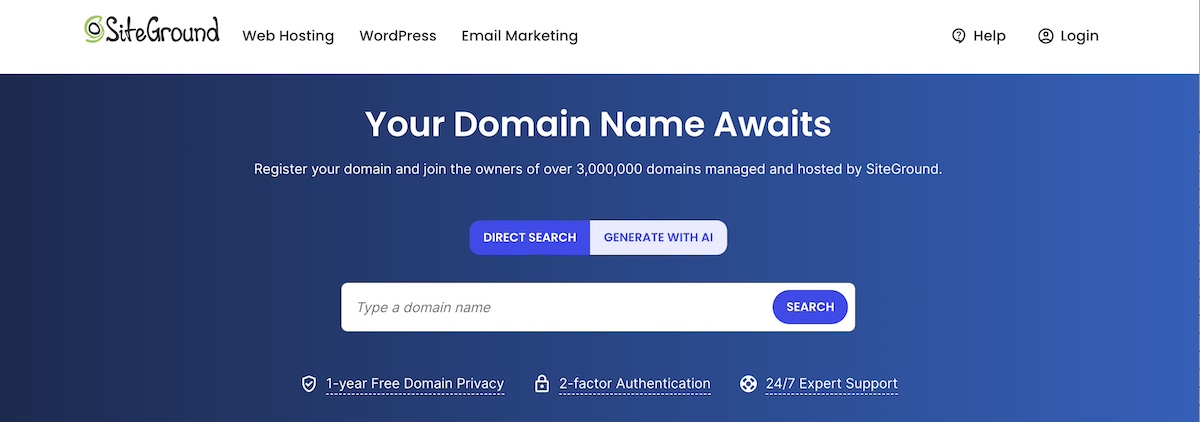
Lock down key domains to avoid domain squatting

Register Common Misspellings and Variations

You have a domain name, but now what? People make typos—it’s inevitable. To prevent potential visitors from landing on a squatter’s site or a competitor, register common misspellings, plural forms, and slight variations of your domain. These small investments can save you from problems and lost traffic down the road.

Consider Multiple TLDs 

The domain world has expanded way beyond .com, with plenty of new top-level domains (TLDs, also called domain extensions) like .net, .co, .biz, or industry-specific options like .tech or .store. Depending on your budget and brand strategy, it’s wise to register your name across several relevant domain extensions. This doesn’t just block squatters, it also gives you flexibility for future growth or marketing campaigns.
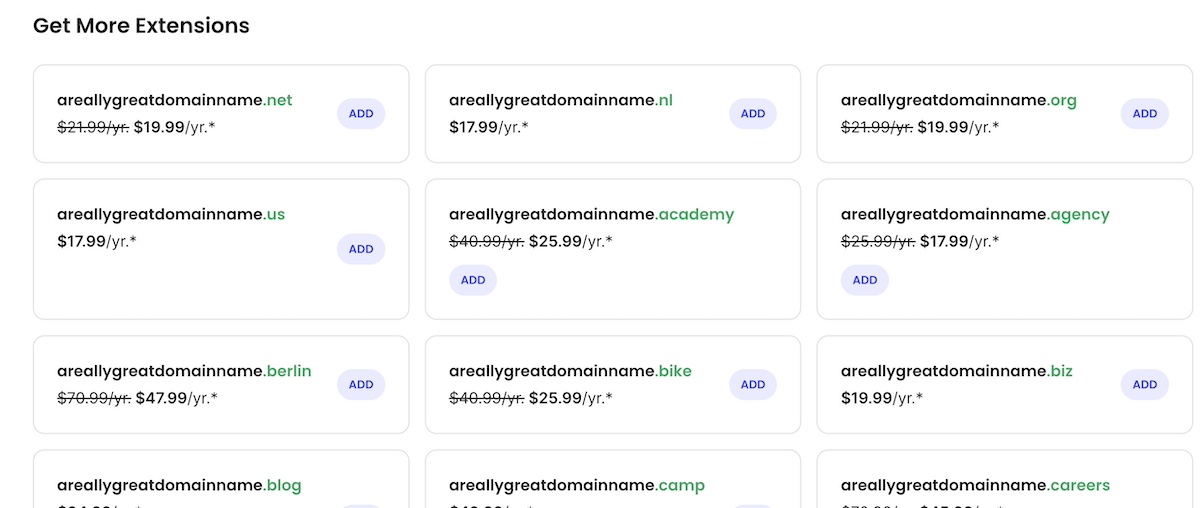
Consider multiple TLDs to avoid domain squatting

Locking down these variations and top-level domains early gives you control over your brand’s online presence and makes it much harder for domain squatters to catch you off guard.

Step 3: Claim Your Name on Social Media

Just like domain squatting, social media handle squatting is a sneaky tactic where someone grabs your brand’s name on social platforms—not to generously build your presence, but to block you or profit off your success. As part of your social media marketing strategy, securing consistent handles across major platforms can easily be just as important as locking down your domain name. It helps you keep your brand identity tight and trusted everywhere online.

Example of avoiding domain and social media squatting

Step 4: Set Up Monitoring Alerts

Even after securing your domains and social handles, staying vigilant is still a good plan. Domain squatters and impersonators can strike anytime, so setting up monitoring alerts helps you catch problems early, before they turn into those big headaches.

Use Domain Monitoring Services

There are specialized services that keep an eye on new domain registrations that resemble your brand name. These tools alert you if someone registers a suspicious domain, giving you a chance to act quickly—whether that means reaching out to the owner or preparing to take legal steps.

Set Up Google Alerts for Your Brand Name

Google Alerts is a free, easy way to stay informed about mentions of your brand online. Set alerts for your brand name, common misspellings, and related keywords. This way, you’ll be notified if someone is using your name in unexpected places, helping you spot social media squatting, fake accounts, or even negative publicity fast.

Set up alerts to avoid domain squatting

Monitoring alerts are your early warning system, as it helps you defend your brand from domain squatting and online impersonation before they do any real damage.

Step 5: Work with a Reputable Domain Registrar

When it comes to domain name registration, choosing where you register is just as important as what you register. A trusted, well-established domain registrar—such as SiteGround, for example—offers tools and safeguards that can help prevent domain hijacking and squatting risks down the line. Let’s examine.

Enable Domain Privacy

When you register a domain, your personal details (like name, email, and phone number) are often listed in the public WHOIS database—unless you opt for domain privacy protection via your registrar. This feature masks your information, helping protect you from spammers, scammers, and opportunistic squatters who monitor registrations to target new businesses.

Use Domain Locking for Extra Security

Most reputable registrars also offer domain locking, which prevents unauthorized transfers of your domain name. It’s a simple but powerful way to stop someone from trying to hijack your domain without your permission.

Set Up Two-Factor Authentication

Once you’ve secured your domain, protect your account by enabling two-factor authentication. This adds an extra layer of security beyond just a password, helping prevent unauthorized access to your domain registrar account and reducing the risk of hijacking or theft.

Always-Available Customer Support

Dealing with domain issues like squatting can be tricky and stressful. Having knowledgeable support available 24/7 means you’re never alone when navigating these challenges. Whether you need help securing your domain or resolving disputes, expert assistance ensures you get the right guidance quickly, keeping your brand protected and your site running smoothly.

SiteGround offers all of the above: from two-factor authentication and domain locking to expert support and even free domain privacy for the first year. It’s a secure, reliable choice that helps protect your online identity from day one. Even better? SiteGround is an all-in-one platform for everything your business needs to grow online—domain registration, hosting, easy site-building tools, and professional email marketing—all backed by top-rated customer support.

Get your domain now and start growing with SiteGround>>

how to avoid domain squatting

What to Do If Your Desired Domain Is Squatted On

If your ideal domain is already taken, don’t panic—there are smart, practical steps you can take to understand if and how to make your next move. Whether it’s a case of domain squatting or simply a name that’s already in use, you still have options.

Step 1: Investigate the Current Owner

Find out who owns the domain

Use WHOIS lookup tools to access public registration details like the owner’s name, contact info, and registration date. This data can help you determine whether the owner is an individual, a business, or possibly a domain squatter.

Check the domain’s history

Use tools like the Wayback Machine to see how the domain was used in the past—whether it was active, abandoned, or linked to questionable content. Knowing its history can help you decide if pursuing the domain is worth it or if you should explore other options, and it can also inform your approach if you need to contact the current owner.

Step 2: Determine If It’s a Case of Squatting

Not every taken domain is a case of squatting—sometimes it’s just a coincidence (we’ll explore some examples in a moment). But if someone’s sitting on your brand name without a legitimate reason, it may cross into squatter territory. How do you know? 

Look for trademark infringement

If you’ve registered your trademark (or even if you have strong common law rights), and someone is using the domain in a way that could confuse customers or damage your brand, that’s a red flag.

Assess the owner’s intent and use 

Is the domain just parked with ads or for sale at an inflated price? Is the site mimicking your business or redirecting traffic elsewhere? If the owner has no legitimate interest in the name and seems to be holding it hostage, you might be dealing with a classic case of domain squatting.

Step 3: Consider Your Options

Once you’ve confirmed that your desired domain is taken—and possibly being squatted—you have a few paths forward. The right choice depends on your budget, timeline, and how aggressively you want to pursue the name.

Negotiate a Purchase

Sometimes the simplest solution is reaching out to the owner with a reasonable offer. Use a domain broker if you’d prefer to stay anonymous or want help navigating the negotiation. Be prepared for counteroffers—especially if the domain matches a trending term or business name.

File a Complaint (UDRP or URS)

If the domain clearly violates your trademark rights and was registered in bad faith, you may be able to file a formal dispute with ICANN under the Uniform Domain-Name Dispute-Resolution Policy (UDRP) or the faster Uniform Rapid Suspension (URS) system. These administrative procedures are typically quicker and less expensive than going to court, but they require clear evidence that: you hold trademark rights to the name, the current registrant has no legitimate interest in it, and the domain was registered and used in bad faith. For more details on how to initiate these disputes, you can visit the WIPO Domain Name Dispute Resolution Center, which administers many of these cases internationally.

Pursue Legal Action

In serious cases, especially where damages are involved, legal action might be necessary. The Anticybersquatting Consumer Protection Act (ACPA) is a law in the U.S., for example, that gives trademark holders a way to sue domain squatters in court. It’s the most involved route, but sometimes the most effective.

Noteworthy Domain Squatting Dispute Examples

Domain squatting doesn’t just impact small businesses on a budget—it hits major brands, celebrities, and startups alike. And not surprisingly: because that’s where the domain squatting jackpot is at. Here are a few entertaining and headline-worthy examples that show the nuances of domain squatting, and the outcomes.

1. Nissan.com

One of the most cited examples—though often misunderstood. In the late 1990s, Uzi Nissan, a computer repair shop owner, registered nissan.com for his legitimate business, long before Nissan Motor Corporation pursued the domain. Despite years of legal pressure from the automaker, Uzi Nissan held on to the domain because it was, quite literally, his name. This wasn’t a textbook case of domain squatting, since there was no bad-faith intent to profit off the brand. But it highlights how valuable domain names can become—and why businesses should secure theirs early.

2. Madonna.com

In the early 2000s, pop icon Madonna filed a successful complaint under the UDRP to reclaim madonna.com from an individual who had filled the site with adult content. The panel of course found clear evidence of bad faith and awarded her the domain.

3. MikeRoweSoft.com

In one of the more playful domain disputes, a Canadian high school student named Mike Rowe registered mikerowesoft.com for his part-time website design business. The name was a pun—“Mike Rowe Soft”—but it phonetically resembled Microsoft, and the tech giant took issue. While it looked like a case of cybersquatting on the surface, Mike’s intent wasn’t malicious or deceptive, just clever wordplay. After some public backlash and media attention, Microsoft softened its stance and reached a friendly resolution—complete with an Xbox for Mike.

4. Tesla.com

Before Tesla became a household name, tesla.com was registered by Silicon Valley engineer Stuart Grossman, who had held the domain since the 1990s. Unlike a typical squatter, Grossman wasn’t trying to sell the domain for profit or capitalize on the Tesla brand—he simply had a long-standing personal interest in Nikola Tesla. For years, Tesla Motors operated under teslamotors.com while reportedly trying (and failing) to negotiate a deal. Eventually, in 2016, the company acquired tesla.com—but only after what Elon Musk described as years of “painful” back-and-forth. Though not a squatting case per se, it’s a cautionary tale about how hard (and expensive) it can be to get the perfect domain after your brand takes off.

5. Airbnb.ca

When Airbnb expanded into Canada, they discovered that airbnb.ca was already registered—not by the company, but by a domain investor who had set up a generic travel-related website. While it wasn’t outright impersonation, Airbnb argued that the registrant was capitalizing on their growing brand recognition in bad faith. They filed a UDRP complaint, citing trademark infringement and lack of legitimate interest by the domain holder. Ultimately, the panel sided with Airbnb, and the company regained control of the domain.

These examples show that domain squatting affects everyone—from garage startups to global icons. Learn from their mistakes: don’t wait to secure your brand’s domain and trademarks, because once your business takes off, the stakes (and the price tags) only get higher.

Protecting Your Brand from Domain Squatting: The Bottom Line

By now, you’re surely convinced: you need to jump on that prized domain name, and you need to do it now. Because it’s at the heart of your online identity, and a key piece of your long-term success. Choosing the right name takes a mix of creativity, strategy, and a little bit of legal know-how. So the earlier you secure it, the better positioned you’ll be to grow with confidence.

When you’re ready to claim your domain, build your website, and get it online fast, SiteGround makes it easy. From domain registration to reliable hosting and intuitive website tools, we’ve got everything you need to get started and stand out.

The Ins and Outs of Managed Hosting

website-surrounded-by-the-benefits-of-managed-hosting

Choosing a hosting plan can be overwhelming. Every server type comes with its own pros and cons—and on top of that, there’s the choice between managed and unmanaged hosting.

This guide breaks down what managed hosting is, how it works, and how to decide if it’s right for you.

What Is Managed Hosting?

Managed hosting is a type of web hosting service where the provider handles the technical management of your website’s server. Unlike unmanaged hosting, where you take on most of the responsibilities, managed hosting allows you to focus on your business while experts handle the backend.

Reputable managed providers offer support, make sure backups are taken regularly, and optimize your server for better performance. This means the hosting company takes care of your server’s security, speed, and hardware.

Managed hosting services can be perfect for businesses that want to save time and resources without having to hire an in-house IT team. 

[80]

Types of Managed Hosting

When it comes to managed hosting, there isn’t a one-size-fits-all solution. Depending on your needs, different types of managed hosting can offer specialized services to support your project. Here’s a breakdown of the main types: 

1. Fully Managed Hosting

In a fully managed hosting plan, the hosting provider handles all aspects of your server, from updates to security, backups, and performance monitoring. You won’t need to worry about server management—the provider takes care of the entire infrastructure. 

This is a great option for businesses that want a hassle-free experience and don’t have the resources to manage technical details. 

2. Partially or Semi-Managed Hosting 

Partially managed hosting is a hybrid approach. While the hosting provider manages critical server functions like security updates, you still have more control over other aspects. 

This can include installing software or managing certain server configurations. It’s ideal for businesses that need some support but still want a level of customization. 

.post-page__colored-blocks.post-page__colored-blocks–update p { margin: 15px 0px; }

❗ IMPORTANT

Managed hosting refers to the level of support your hosting provider offers to simplify server management and ease your workload. 

On the other hand, cloud, VPS, shared, and dedicated hosting determine the server type and how server resources are allocated. Each of these four types of hosting can be either fully managed, semi-managed or unmanaged, depending on the provider and your needs.

3. Specialized Managed Hosting Solutions

Specialized managed hosting solutions are designed for specific use cases. For example, if you run a WordPress site, you might opt for a managed WordPress hosting plan where the provider handles everything and also offers built-in tools for WordPress. 

Similarly, if you’re hosting ecommerce sites or resource-intensive applications, you might need a solution tailored to those needs. 

  • Managed WordPress hosting

When using WordPress, no matter whether it’s on managed or unmanaged hosting, you benefit from its abundance of resources. This includes templates, plugins, tools, and its supportive community. 

What managed WordPress hosting does is enhance these advantages by handling different technical tasks such as core updates, server-level caching, and automated daily backups. 

Additionally, your hosting provider may develop exclusive in-house tools to improve your WordPress site’s performance. 

At SiteGround, we offer ultrafast, full-featured managed WordPress hosting, designed for seamless WordPress management.

  • Managed WooCommerce hosting

We also offer a robust and user-friendly managed WooCommerce hosting, where you can enjoy the same features as with our managed WordPress hosting while focusing on what matters most—increasing sales.

Benefits of Managed Hosting

Understanding the benefits of managed hosting is important, especially if you are just starting a new project.

1. Cost-Effective in the Long Run

While managed hosting services may have higher upfront costs compared to unmanaged hosting, they can be more cost-effective in the long run. With managed hosting, you save on hiring in-house IT teams and avoid unexpected repair or downtime costs. 

Plus, providers typically include services like backups and security updates, which can further reduce overall expenses.

  • No hidden costs – with unmanaged hosting, managing hardware, updates, and security on your own requires additional resources that aren’t always budget-friendly. Moreover, without expert oversight, this can lead to mistakes, increasing unexpected expenses.
  • Reduced need for additional expertise – managed hosting services include technical support, security updates, and performance optimization, reducing the need to hire IT staff or outsource server management, thus saving on significant labor costs.
  • Time savings – with managed hosting, you’re not responsible for any technical aspect of your hosting, freeing up time to focus on what will really drive you profit: growing your business or planning your website.
  • Scalability – managed hosting providers often offer scalable solutions that adapt to your needs without requiring costly hardware upgrades or additional IT resources.   

2. Enhanced Security and Monitoring

One of the primary benefits of managed web hosting is its enhanced security. Hosting providers take on the responsibility of protecting your website from cyber threats. This includes implementing regular updates, monitoring for vulnerabilities, and managing firewalls. 

They also provide proactive measures, such as malware and spam protection, which are essential for maintaining a secure online presence. 

Here are some of the most important security measures a managed provider maintains: 

  • Firewalls that aim to block unauthorized access by monitoring and regulating data traffic.
  • Brute-force prevention that implements CAPTCHAs, or uses two-factor authentication.
  • Denial-of-service attack (DDoS) protection ensures that legitimate users can still access your services during a cyber attack.
  • Data encryption is used to protect sensitive information.
  • Patch management ensures that all server components are up-to-date and secure via regularly software updates 
  • Security audits assess the effectiveness of security measures.

Keep in mind that the level of security varies between providers. At SiteGround we’re constantly updating our security arsenal with out-of-the-box technology and additional features to keep your website safe.

3. Consistent and Optimal Performance

Running servers optimally demands ongoing attention and technical know-how. Managed hosting assumes this responsibility—it includes continuous monitoring and maintenance to make sure your systems perform efficiently around the clock.

Here are some typical server maintenance tasks that your managed hosting provider handles for you:

  • Hardware and software updates. The latest software versions, such as the default PHP 8.2 and the latest MySQL 8 that are used on all SiteGround servers.
  • Server backups. SiteGround provides automatic daily backups for all hosting plans, storing each for up to 30 days in a separate data center location different from the one hosting the live account, for added security. Additional features are available through our Premium Backup service.
  • Proactive issue resolution. SiteGround’s 24/7 monitoring checks servers every 0.5 seconds, detecting, fixing, and preventing issues automatically.
  • Load balancing. SiteGround’s in-house CDN 2.0, included for free in all plans, features cross-region load balancing and automatic multi-region failover.

4. Streamlined Website Management

Managing a website doesn’t have to be complicated. In the past, building and maintaining a site meant dealing with code like HTML, CSS, or PHP—a challenge for anyone without technical skills. Today, content management systems (CMS) like WordPress make it easy to create and update your site through visual editors and simple interfaces.

Managed hosting makes it even easier. Features like one-click CMS installations, staging, and search and replace tools eliminate a lot of headaches. Already have a site elsewhere? Managed hosting often includes hassle-free migration services.

🔥 With SiteGround, you can launch your site with WordPress or another CMS in just a few clicks—or migrate your existing site at no extra cost. 

5. Access to Expert Support

As a website owner, encountering a worst-case scenario without knowing what to do can be incredibly stressful and damaging to your reputation. Issues like data breaches, extended downtime, or being locked out of your systems can lead to losing customer trust and, ultimately, revenue.

This is where managed hosting providers can be invaluable. A good managed hosting plan includes dedicated, around-the-clock support through various channels such as live chat, support tickets, and phone. 

In contrast, unmanaged hosting typically provides minimal support, focusing primarily on hardware or network-related issues, with little to no help for application-level concerns.

Potential Drawbacks of Managed Hosting

Using a managed hosting provider means no backend work, however, it also comes with some limitations. 

1. Limited Control and Customization

Unlike unmanaged hosting, where you can customize freely and have access to the server, managed hosting limits users to the functionalities, apps, and tools provided by the host. This may not suit those seeking extensive customization. 

However, keep in mind that such flexibility is necessary only for highly technical users with very specific needs, such as developing custom server configurations or running niche applications. 

For most users, managed hosting not only simplifies the process but also offers optimal performance, security, and support without the hassle of managing everything yourself. 

2. Dependency on the Hosting Provider

With managed hosting, users typically do not have control over when scheduled server maintenance and system updates occur, as these are handled by the hosting provider. 

Additionally, if an issue arises with the hosting environment, the managed provider’s dedicated support team is responsible for resolving it, with minimal impact on your website’s availability and performance.

This is why it is crucial to opt for a provider offering 24/7 monitoring and a rapid response.

How to Choose a Managed Hosting Provider

No two companies offer the same managed hosting services. The level of security, support and speed can vary significantly across providers, so we’ll explore the most important factors to consider when choosing one.

1. Security Practices and Backups

Security should be a top priority when choosing a managed hosting provider. A reliable provider will include up-to-date security protocols, virus and spam protection, and regular malware scans as part of their core hosting services.

Additionally, look for automated daily backups and easy restoration options. These are vital against data loss caused by cyberattacks, accidental file deletion or data breach due to phishing. If a provider doesn’t include backups, it’s a red flag. 

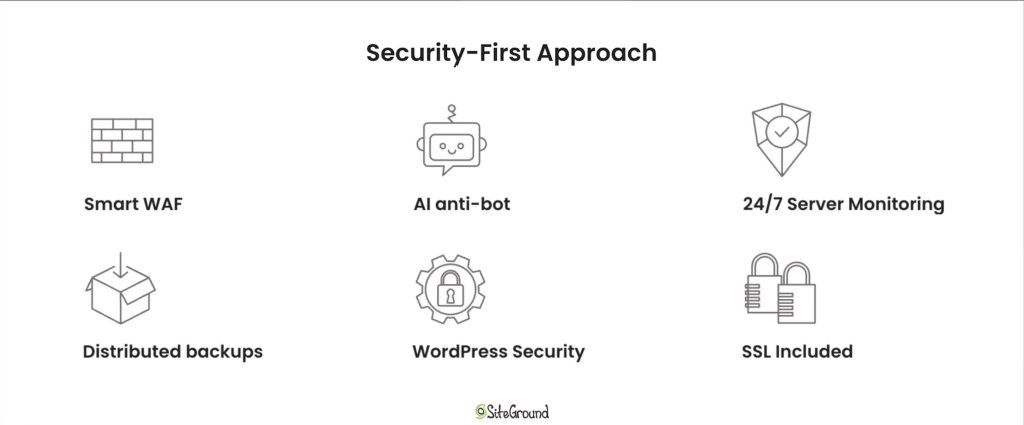
Finally, strong firewalls, SSL support, and basic security measures like two-factor authentication should come standard with any robust hosting plan.

A visual highlighting SiteGround's security-first approach for hosting. It shows Smart WAF, AI anti bot, 24/7 Server Monitoring, distributed backups, WordPress security and free SSLs as pillars of a secure hosting platform.

2. Support Availability and Expertise

When something goes wrong, having access to an experienced managed hosting team can make all the difference. Choose a managed hosting company that offers 24/7 support with fast response times and multiple contact channels—live chat, tickets, and phone.

More importantly, make sure that the support staff has deep technical expertise. Whether it’s troubleshooting a server issue, optimizing performance, or helping with website and application administration, knowledgeable support can save you time, money, and stress.

Great customer service benefits aren’t just about responsiveness—they’re about resolution. Look for companies with a proven hosting provider’s success rate and positive customer feedback.

3. Performance Technologies

A reliable managed hosting provider should use cutting-edge technology for optimal website performance. This includes modern server hosting infrastructure like SSD or NVMe storage, built-in caching, HTTP/3 support, and a powerful CDN.

Some managed hosting services also offer custom in-house software that help with server performance tuning, traffic scaling, and uptime monitoring. These features are crucial for maintaining reliable site performance, especially for high-traffic or resource-intensive sites like a growing WordPress site or online store.

A banner highlighting the premium technology used in SiteGround's infrastructure.

In short, advanced performance tech isn’t just a nice-to-have—it’s a critical part of a robust hosting plan that supports your business as it grows.

4. Scalability and Upgrade Options

As your business grows, so do your hosting needs. A good managed hosting provider makes it easy to scale. Whether you’re adding more hosting resources, launching new projects, or handling traffic spikes, your hosting company should offer seamless upgrade paths.

Look for hosting solutions that support vertical and horizontal scaling—such as moving up to a higher plan or expanding into multiple environments. This flexibility means your site won’t suffer from bottlenecks or affect server performance during peak times.

Also, check if your provider allows you to increase storage, bandwidth, or memory without downtime. This kind of adaptability helps you stay focused on your business operations without worrying about the backend.

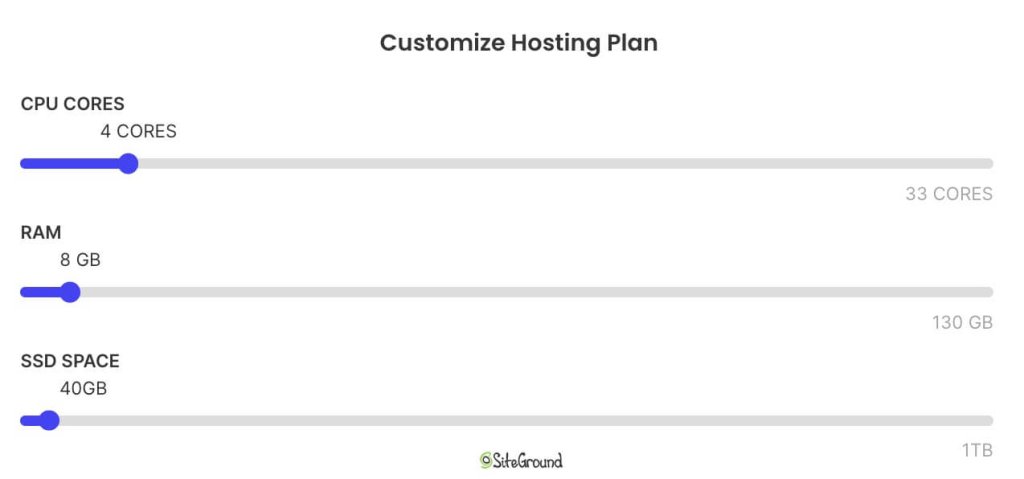
Screenshot of SiteGround's options to adjust Cloud Hosting CPU, RAM and SSD resources.

5. User-Friendly Tools and Dashboard

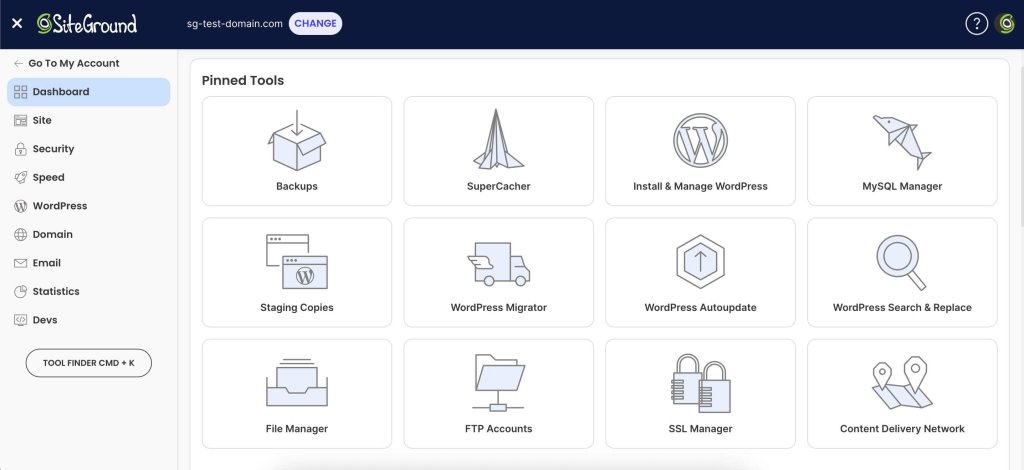
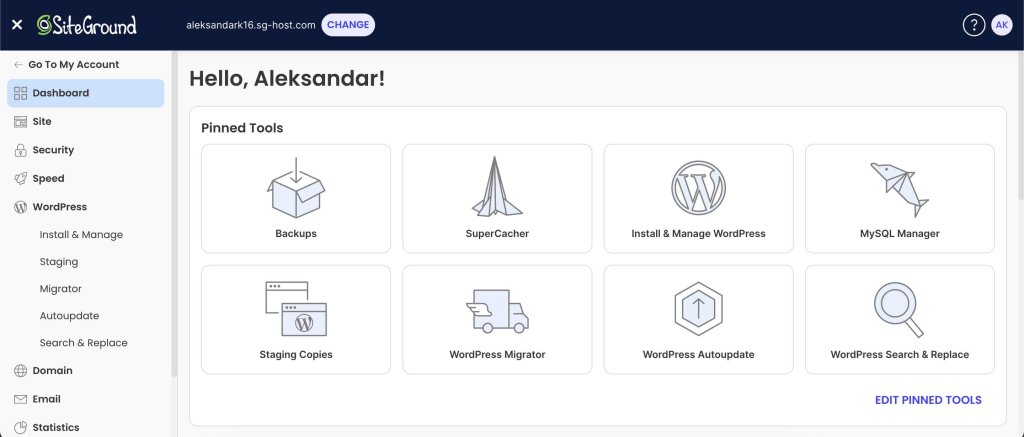
A smooth control panel experience can make a big difference, especially for users who don’t have deep technical expertise. The best managed hosting providers offer intuitive dashboards where you can monitor server performance, manage domains, access backups, and install apps—all in a few clicks.

Screenshot of SiteGround's hosting dashboard and pinned tools.

Whether you’re managing a WordPress site, updating DNS settings, or reviewing hosting plan details, a clean interface saves time and reduces the chance of errors. Features like one-click staging, automatic updates, and integrated analytics empower both developers and beginners.

Ultimately, your hosting company should simplify administration, not add to your to-do list. A well-designed dashboard helps you get more out of your managed hosting services—without needing to rely on support for every task.

Make Your Business Thrive with SiteGround

Choosing the right hosting provider will take a load off your shoulders. From handling hardware management and server hosting to keeping websites safe with up-to-date security, a reliable partner does the heavy lifting so managed hosting customers can focus on growing their business.

Whether you’re running a WordPress site, an online store, or a custom app, managed hosting lets you tap into expert support, robust hosting technology, and a fully maintained network. You don’t need your own infrastructure or an experienced hosting IT team—your provider takes care of it all.

In the end, the right managed hosting services aren’t just about convenience—they’re about enabling business success. So when you’re ready to move beyond the limitations of unmanaged hosting, choose a hosting company that offers not only the right tools, but also a proven hosting provider’s success rate and commitment to excellence.

SiteGround is managing over 3,000,000 domains globally, with 98% satisfied customers, and is renowned for its 5-star support services. So, why not give us a try?

A promotional banner inviting users to try SiteGround's plans, with a button to get hosting.

How to Sell a Domain Name (4 Easy Steps)

abstract of how to sell a domain name

This article was originally published in May 2025, and then updated in October 2025

So you’ve got a domain name you aren’t using, and it’s doing nothing but gathering digital dust. Maybe you bought it for a project that never took off, or perhaps you’ve got a few too many domains to manage. 

Whatever the reason, it’s very possible that your domain has some value and could be worth selling rather than just abandoning. Not only can you clear up some space, but you might also make a nice little profit while you’re at it. 

But how to sell that domain name? Indeed the idea of actually selling a no longer-needed domain might seem like a hassle. It doesn’t need to be though. 

Today, we’re breaking it down in four simple steps for the best ways to assess your domain’s value, including tools that can estimate its worth. And then how to easily sell it, and hopefully make a pretty penny while you’re at it.

Why Sell a Domain Name?

Cold, hard cash is a pretty solid reason to sell a domain. Afterall, some domains can certainly command a higher price than whatever you may have initially purchased them for. But there are also some perhaps less obvious reasons to get that dusty domain off your plate. 

Beyond profit, selling also:

  • Reduces renewal costs for domains you no longer use
  • Simplifies your portfolio if you own multiple domains
  • Frees up creativity and focus by letting go of abandoned projects
  • Provides value to others who are actively seeking the right domain for their business

Maybe you’re a casual domain collector or an experienced investor—either way, selling a domain can turn dormant potential into actual value. So let’s explore the best tips for making it happen.

Rethinking Your Website? Start Fresh with SiteGround.

Whether you’re revamping an old project, launching a new idea, or finally building that site you’ve been thinking about, SiteGround makes it simple. Get your ideal domain and power your website with high-performance hosting, unmatched speed, and top-tier security. Plus, every hosting plan includes SiteGround’s easy-to-use website builder, so you can bring your vision to life without extra cost.

Pick your domain, power up your site, and get going—fast>>

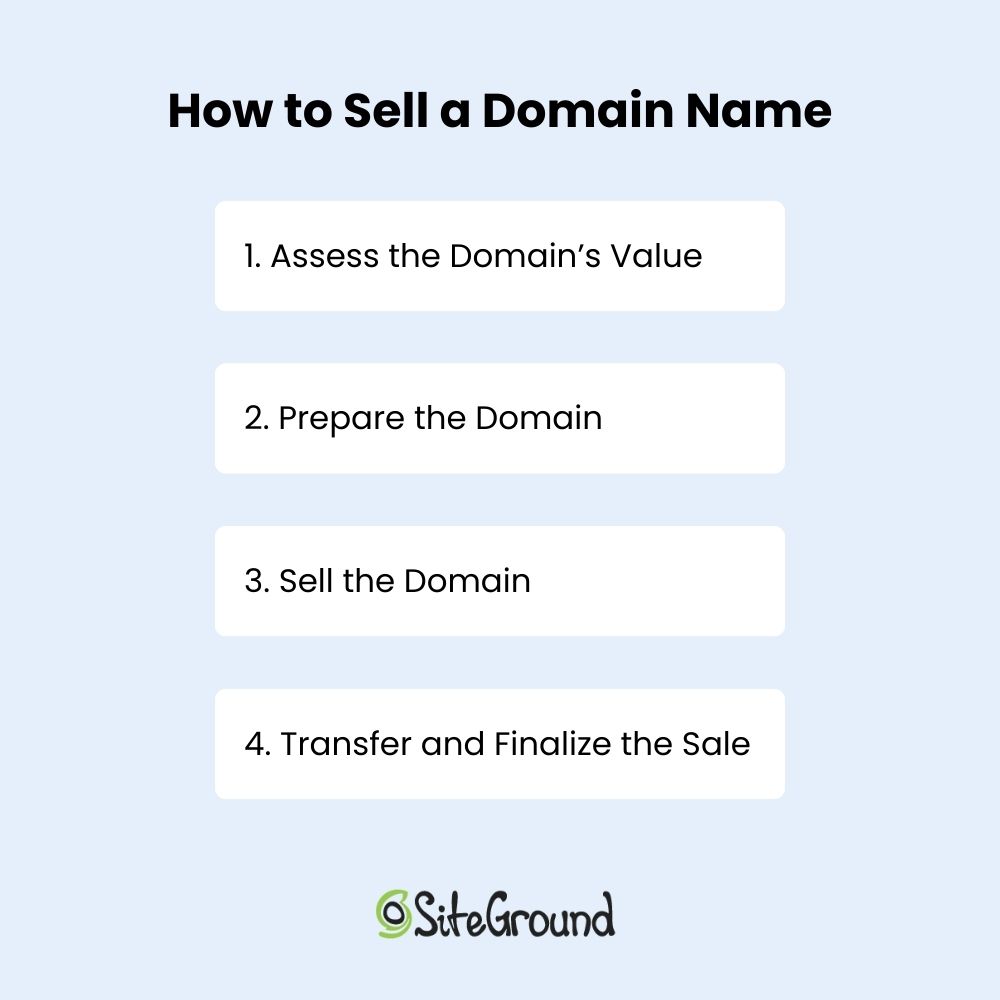
How to Sell a Domain Name—4 Simple Steps

Alright, your mind’s made up and you’re going to sell your domain. Let’s dive into the easy steps you can take to make it happen.

1. Assess the Domain’s Value 

Before you put your domain up for sale, it’s important to know what it’s worth. Just like a tangible piece of real estate, your virtual property could have a lot of value, or not be worth much at all.

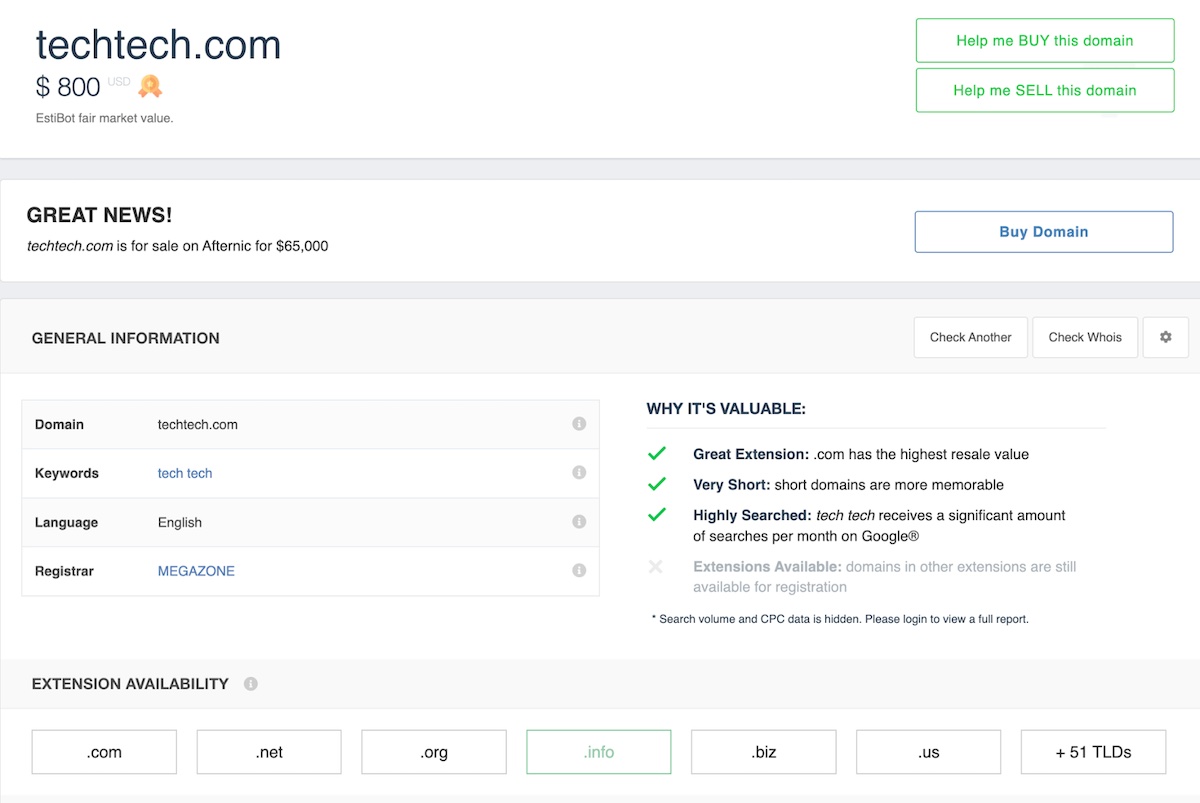
To make this process easier, there are several online domain appraisal tools available, such as EstiBot and Sedo.com. These tools give you a rough estimate based on recent sales data, keyword trends, and similar domains. Of course, just like any other sales transaction, the true value of a domain is ultimately determined by what a buyer is willing to pay. So knowing what makes it appealing helps you price it right and negotiate more confidently.

Online domain appraisal example

Here are the main reasons someone might want to buy your domain—and the factors that influence its perceived value:

1. Branding Opportunities

Buyers often look for domains that have the potential to become strong, memorable brand names. That means they’re easy to spell, pronounce, and remember. If your domain sounds like a real brand or includes popular industry keywords, that increases its value. Here are the key branding-related factors that can affect the value:

  • Exact Match Domain (EMD): Domains that directly match a product, service, or keyword—like BestCoffeeMugs.com—can rank more easily in search engines and instantly communicate what the site is about.
  • Short and Catchy: The shorter and simpler, the better. One- and two-word domains are like prime internet real estate.

2. Traffic and SEO Value

If your domain already has an existing website with traffic or backlinks, that adds significant value. Many buyers are looking to tap into that SEO history rather than start from scratch, so they might consider the following:

  • Established Traffic: Domains that already attract visitors can be monetized immediately.
  • Strong Backlink Profile: If other reputable websites link to your domain, that’s valuable SEO juice a buyer can inherit—especially if they plan to redirect or rebuild.
  • Keyword Quality: Domains that include highly sought-after keywords or phrases (especially ones with high search volume) tend to be more valuable. For example, a domain related to a popular industry like “fitness” or “tech” could command a higher price than something more obscure, like a domain focused on niche accounting software or specialized warehouse supplies.

Use tools like Ahrefs or SEMrush to check your domain’s SEO strength.

3. Investment and Resale Potential

Domains are digital assets—some buyers want to use them now, while others see them as long-term investments. Here are some factors that influence a domain’s investment potential:

  • Domain Flipping: Investors may buy your domain with the goal of reselling it for a profit.
  • Scarcity: Good .com domains are becoming harder to find, and rarity can drive up value.

4. Domain Extension

Speaking of domain extensions (also known as the TLD—top-level domain)—they can significantly impact a domain’s value, and not just because they are rare. Buyers often consider extensions based on:

  • Recognition and Trust: “.com” domains are the most familiar and widely trusted, which makes them the most valuable in most cases.
  • Niche Relevance: Other extensions like “.net,” “.org,” “.io,” or “.co” can still hold value—especially if they align with the domain’s industry or audience.

5. Local, Niche, or Trending

A domain tied to a city, region, or specific industry or trend can appeal to local businesses or specialists. So buyers could be interested in a purchase related to: 

  • Location-Based Domains: Something like DentistChicago.com is super appealing to a local dentist looking to dominate local search.
  • Niche or Trending Industries: Domain names (and not just TLDs), in growing areas like AI, eco-products, or remote work tools can be especially valuable today. 

6. Brand Protection

Larger companies may buy domains not to build new sites, but to protect their brand with the goal to:

  • Avoid Cybersquatting: Businesses may want to prevent competitors or impersonators from owning similar domains.
  • Control Variations: Owning different extensions or common misspellings helps brands control their online identity.

2. Prepare the Domain 

If you were to sell a house, you’d have to clean it up and give the realtor a set of keys. That’s what this step represents: prepping your property for sale! You want your domain to be as ready for the new owner as possible, without any loose ends or complications. Here’s what you need to do:

Update WHOIS Information 

WHOIS information is essentially the contact information for the domain. It’s how the buyer can reach you if there are any issues with the transfer, or to finalize the sale. So before listing the domain for sale, update your WHOIS info to make sure it’s accurate and reflects your current email address. You can make this update via your domain provider.

This step helps the buyer feel confident that they can communicate with you directly, and it also ensures the transfer process goes off without a hitch. If you’re selling the domain through a marketplace, they may handle this for you as part of the process.

Evaluate Existing Website Content 

If your domain currently hosts a website, think carefully before removing any content. In many cases, the site’s existing traffic, content, and backlinks can add significant value for potential buyers—especially if they’re interested in maintaining SEO performance or repurposing the site.

Instead of wiping the site clean, consider leaving the content up and letting the buyer decide what to do with it. In fact, some buyers may be willing to pay more if you include a license to the original content as part of the deal.

That said, if you want to signal that the domain is for sale, you can add a discreet banner or a dedicated “For Sale” page with contact information, which won’t impact the site’s visibility or performance.

Domain for sale landing page example

This step is all about making sure the domain is “move-in ready.” A clean, clear, and empty domain makes it easier for the buyer to envision their own brand or website on it, and it’s a professional way to show that you’re serious about the sale and that the process will be easy. The smoother you make this transition, the more likely you are to close the deal successfully.

3. Sell the Domain

Time to find those prospective buyers! Once your domain is prepped and primed, you’ve got to put it out into the world. Here’s what you’ll need to do:

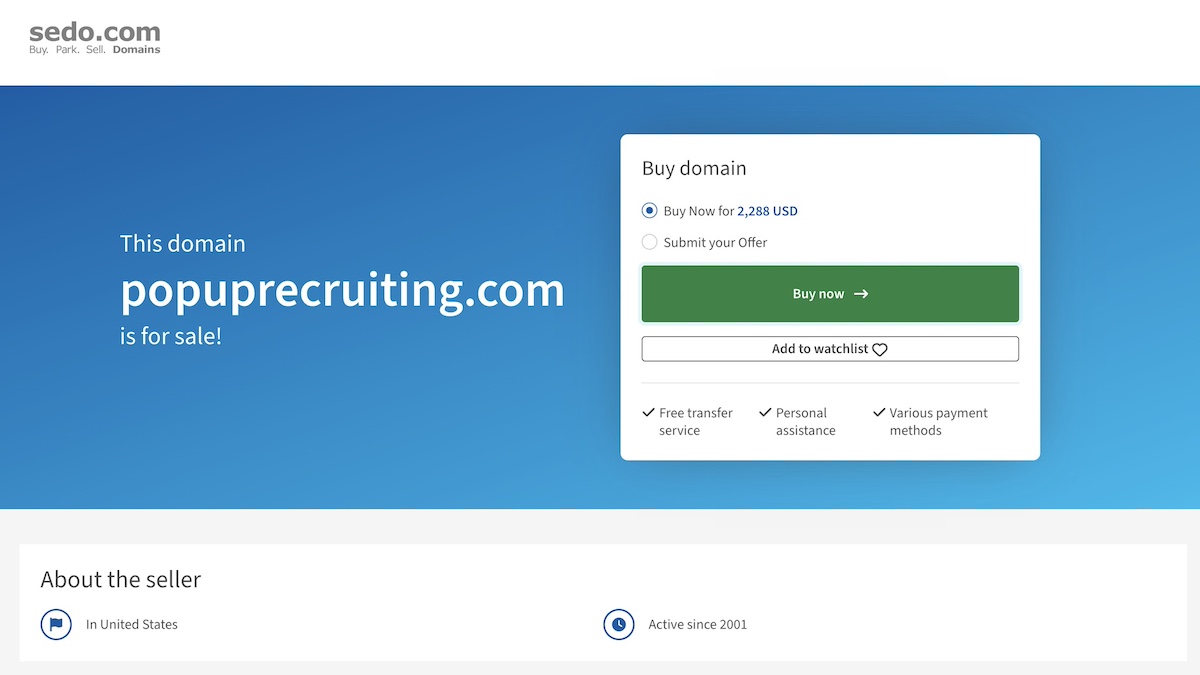
  • List it on a marketplace like Afternic or Sedo to get it in front of interested buyers. Think of these as the real estate agents of the internet. Some platforms even allow you to auction the domain, creating urgency and competitive bidding—ideal if you have a premium name.
Domain for sale marketplace example
  • Write an enticing listing that highlights the domain’s strengths—is it short, keyword-rich, or brandable? Let people know why it’s valuable.
  • Promote your listing on social media, in your email signature, or even on relevant forums and communities.
  • Reach out to potential buyers directly—businesses, entrepreneurs, or anyone relevant who might be trying to choose a domain name for their site.
  • Negotiate the price with interested buyers, but stay realistic and flexible.
  • Use an escrow service—a legal and trusted third party that holds the payment until both parties have fulfilled their part of the agreement—to ensure a secure transaction and smooth domain transfer. Legal requirements may vary by country, so be sure to check local regulations.

4. Transfer and Finalize the Sale

You’ve made it to the final step and now you just need to seal the deal. Here’s how to wrap things up properly:

Confirm payment through escrow

Before doing anything else, make sure the funds have cleared via your escrow service. Once the money’s locked in, you’re good to go.

Initiate the domain transfer

Follow the platform’s or registrar’s process to transfer the domain to the buyer’s account. This usually involves unlocking the domain, providing an authorization code (also called an EPP code), and accepting the transfer on both ends.

Communicate with the buyer

Keep the buyer in the loop during the transfer process. A quick message to let them know what’s happening (and when) goes a long way.

Confirm completion

Once the buyer has successfully received the domain and the transaction is marked complete, you’re officially done! Most escrow services will release the payment at this point.

And now, just celebrate a job well done!

How to sell a domain name

Challenges When Selling a Domain Name

Selling a domain can be smooth sailing, but sometimes you can run into challenges. Here are some common hurdles to watch out for:

  • Overvaluing your domain: Automated appraisals or personal bias can inflate expectations. Check comparable sales to price realistically.
  • Low buyer demand: Niche or long domains may take longer to sell. Optimize your listing title and keywords to increase visibility.
  • Scams and fraud: Fake escrow services and phishing attempts are common. Always use reputable marketplaces and verified payment platforms.
  • Transfer delays: Locked domains, outdated WHOIS data, or registrar policies can slow the process. Prepare your domain before listing.
  • Tough negotiations: Expect low offers and long discussions. Set your minimum price in advance and stay professional.
  • Market shifts: Trends and keyword popularity can change domain values quickly. Revisit your pricing if interest drops.
  • Legal and tax issues: Trademarked terms or unreported profits can lead to problems. Do a quick legal check and understand tax obligations.

Sell Your Domain Name with Confidence

Selling a domain name requires a smidge of effort, but really doesn’t need to be complicated with the right preparation and expectations. Just follow these easy steps, and savor having lightened your digital load while making a profit in the process. 

And if you’re planning to purchase your next domain and build something amazing with it, SiteGround has you covered. Get top-rated, high-performance hosting with industry-leading speed, advanced security, and 24/7 support. Every hosting plan includes free access to SiteGround’s easy-to-use website builder—so you can bring your ideas to life without hiring a developer.

FAQs

How do Domain Name Marketplaces Work?

Domain name marketplaces are platforms where you can list your domain for sale, browse available domains, and connect with potential buyers or sellers. You create a listing (often with a price or an option to negotiate), and the marketplace helps handle the process, oftentimes even assisting with payment and domain transfer. Some charge a commission, but in return, you get exposure to a large audience and a more secure, straightforward transaction.

How Do I Sell a Domain Name Instantly?

If you’re looking to sell a domain name fast, your best bet is to set a competitive “Buy It Now” price and list it on popular domain marketplaces. These platforms have large audiences and offer instant purchase options. Then just be sure to follow all the mentioned steps above. 

How Do I Make Money with my Domain Name?

You can sell it, of course, but it’s not the only way to make money from a domain name. You can also lease it to a business for ongoing monthly income, or park it using a domain parking service that displays ads — you earn money every time someone clicks. If your domain gets decent traffic or includes valuable keywords, it can become a surprisingly profitable asset!

How Do I Sell a Domain Name Privately?

To sell a domain name privately, you’ll skip the public marketplaces and handle the deal directly with a buyer. Start by reaching out to potential buyers—businesses, entrepreneurs, or investors who might find your domain valuable. You might also want to implement a custom landing page on the domain or a simple “This domain is for sale” message to attract interest. 

Once you find a buyer, agree on a price and use a trusted escrow service, as mentioned above, to handle payment and transfer safely. 

I’ve Decided Not to Sell My Domain Name—Now What?

Maybe you’ve read all this and decided you’d rather keep that valuable domain for yourself. But you have this domain, now what? The next steps are to build your online presence by choosing a hosting provider, building your website, and creating content. You should also secure matching social media handles, set up a professional email address, and take basic security measures like adding an SSL certificate. 

This article was originally published in May 2025, and then updated in October 2025

What is a Dedicated Server? Everything You Need to Know

What is a Dedicated server featured image

Not every website or application needs a dedicated server — and for most, it’s not the most practical option. But in certain high-demand scenarios, it becomes a necessary choice.

Most websites, blogs, and online stores run efficiently on shared, VPS, or cloud hosting — all of which offer a balance of cost, scalability, and ease of management. However, businesses dealing with high-traffic, resource-heavy applications or strict security requirements often need the exclusive resources and control that only a dedicated server can provide.

In this guide, you’ll learn:

  • What a dedicated server is, and how it works
  • Who needs a dedicated server, and who doesn’t
  • The pros and cons compared to other hosting options
  • Key features to look for when choosing a provider
  • How much do dedicated servers cost

By the end, you’ll know whether a dedicated server is the right choice for your needs — or if another hosting option makes more sense. 

Let’s get started.

What is a Dedicated Server?

A dedicated server is a physical machine used by one client only — unlike shared hosting, where multiple users share the same resources. This means all of the server’s power — CPU, RAM, storage, and bandwidth — is fully dedicated to a single website, application, or business.

Because no other users are on the server, performance is faster, security is stronger, and there’s full control over settings and software. 

However, this level of control comes at a cost:

  • High expenses — Dedicated servers require substantial investment in hardware and maintenance.
  • Technical expertise — Users must configure, secure, and optimize the server themselves (or hire experts).
  • Complex management — Unlike managed hosting, dedicated servers demand manual updates, security patches, and troubleshooting.

Dedicated servers are best for heavy-traffic websites, large databases, gaming servers, and businesses that need strict security and customization.

In short, a dedicated server may be the best choice if you need maximum speed, security, and control.

How Dedicated Server Hosting Works

A dedicated server is stored in a data center operated by a hosting provider. The provider owns and maintains the physical server hardware, while the client rents or leases the entire server.

Here’s how it works:

  1. Server Setup — The hosting provider installs the operating system (Linux or Windows Server), configures the server hardware, and connects it to high-speed internet.
  2. Resource Allocation — Since the entire server is dedicated to one client, CPU power, RAM, storage, and bandwidth are not shared with other users.
  3. Customization — The client controls server settings, security configurations, and installed software.
  4. Maintenance & Security — Depending on the plan, monitoring, updates, and security patches can be handled by the service provider (managed hosting) or the client (unmanaged hosting).

Because the user is fully responsible for server management, technical knowledge is required to keep everything secure and operational.

Dedicated Server vs. Other Hosting Options

Choosing between hosting options starts with understanding how resources are allocated, managed, and scaled. Here’s how dedicated servers compare to other common setups.

Difference Between a Web Server and a Dedicated Server

A web server is any machine that processes and delivers website data to users. A dedicated server is a type of web server that is reserved for a single client, allowing faster performance, stronger security, and full control.

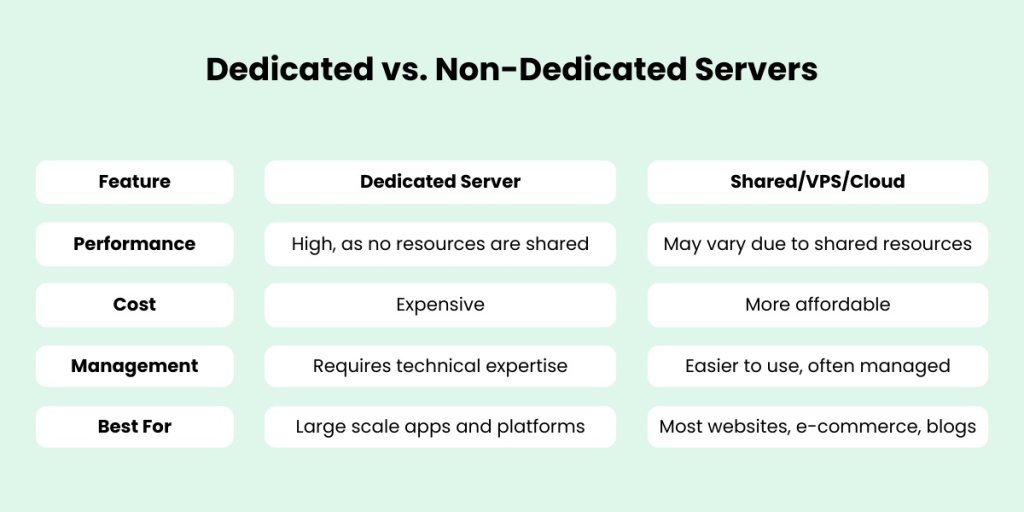
Dedicated vs. Non-Dedicated Servers

A non-dedicated server (like cloud or VPS hosting) splits resources among multiple users, leading to potential slowdowns and security risks. A dedicated server, however, is fully dedicated to a single client, providing better stability and performance.

Dedicated vs non-dedicated servers comparison table

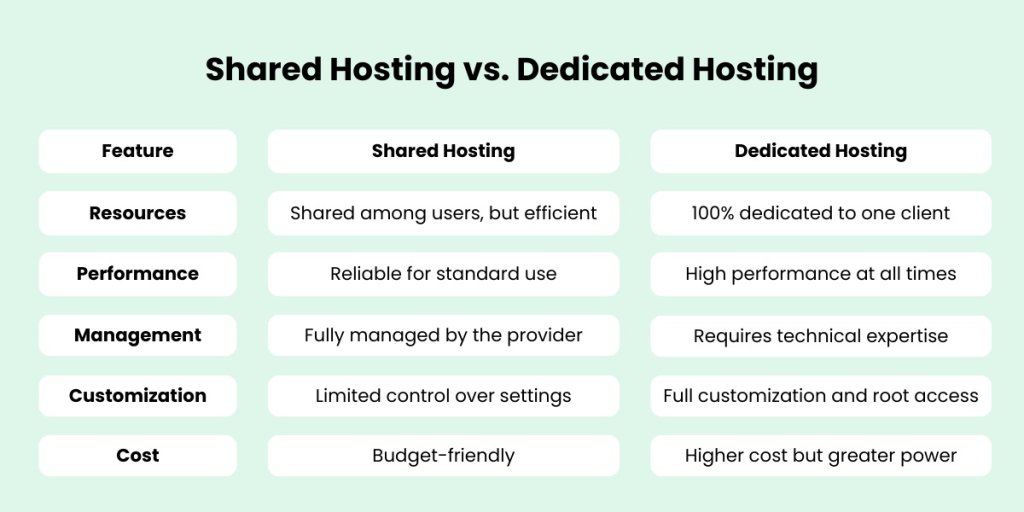
Shared Hosting vs. Dedicated Hosting

Shared hosting is the most cost-effective and user-friendly option for most websites — especially blogs, service-based businesses, and small to mid-sized online stores. It allows multiple websites to share server resources, which keeps costs low and simplifies maintenance through managed environments.

While a dedicated server offers full control and resource exclusivity, it comes with significantly higher costs and requires advanced technical knowledge or a dedicated IT team. For the majority of websites, this level of power isn’t necessary and often results in overpaying for unused capacity.

Shared hosting is ideal for businesses looking for:

  • Affordable monthly plans without hardware management
  • Managed hosting environments with automatic updates and support
  • Scalable performance for everyday traffic demands

Unless you’re running a resource-intensive platform or handling extreme levels of traffic, shared hosting provides more than enough performance — with far less complexity.

Shared Hosting vs. Dedicated Hosting comparison table
Smarter Hosting Starts With SiteGround

When to Choose a Dedicated Server & Who Needs One?

For most businesses, shared hosting or cloud hosting solutions offer the perfect balance of cost, ease of management, and performance. However, certain use cases demand a dedicated server’s exclusive control, scalability, and security. 

Below, we explore the scenarios where dedicated hosting is not just beneficial but often essential.

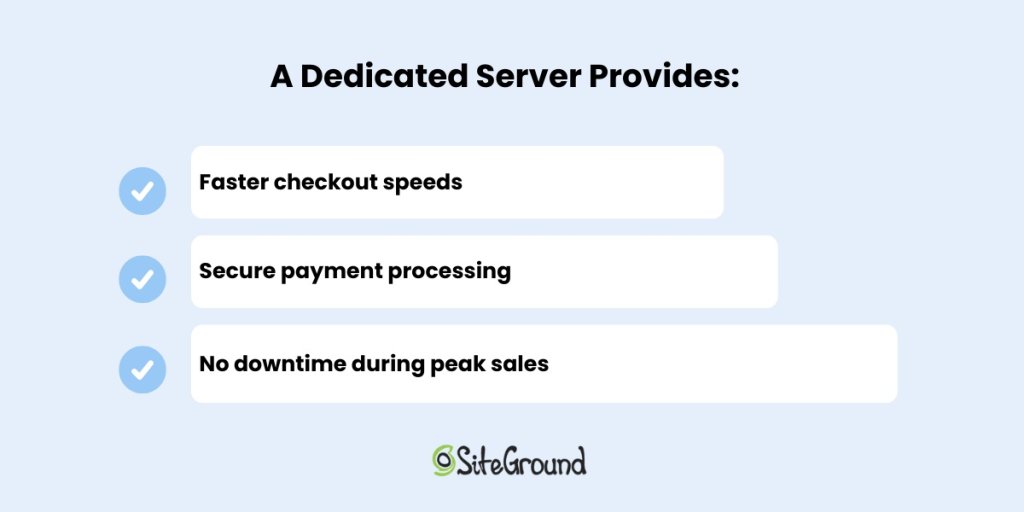
Large-Scale E-Commerce Businesses

Online stores with thousands of products and high daily traffic require robust hosting solutions. Large-scale e-commerce sites with thousands of daily transactions may experience peak load spikes during sales events. Such events may slow down shared or Cloud hosting. 

However,  dedicated servers provide fast load speeds, high uptime, and strong security that such high-market platforms need.

Benefits that a Dedicated server provides

Enterprises Handling Sensitive Data & Compliance-Heavy Industries

Industries like finance, healthcare, and government must meet strict data protection regulations (HIPAA, PCI-DSS, GDPR). That requires full control over the server’s information processing.

Therefore, a dedicated server is often necessary for:

  • Full security control with encryption and firewalls tailored to compliance needs.
  • Custom configurations to meet industry-specific data protection policies.
  • Secure storage of sensitive customer or financial data without third-party access risks.

High-Traffic Websites & SaaS Platforms

Websites and Software-as-a-Service (SaaS) platforms that attract millions of visitors per month need reliable dedicated hosting to prevent downtime and slow page loads. Additionally, a dedicated server allows for full customization, scalability, and lots of computing power. That enables businesses to tailor server configurations to meet specific needs and easily adapt to growing demands.

A dedicated server is useful for:

  • Handling thousands of simultaneous user requests without performance loss.
  • Offering smooth functionality for data-intensive SaaS applications.
  • Preventing crashes that could impact business reputation.

Streaming Services & Gaming Servers   

Game servers and streaming services require dedicated servers due to the specific demands and expectations of their users. These services need high-performance computing and robust performance.

Many gaming environments, for example, require real-time interaction, which means latency must be minimized, especially in multiplayer online games.

For video streaming platforms, performance and latency are critical because viewers expect playback without interruptions.

A dedicated gaming server provides:

  • Seamless gaming experience
  • Lag-free streaming with high bandwidth
  • Protection against DDoS attacks

Businesses Needing Full Customization & Control

If you require specific server configurations, custom software, or advanced security measures, and complete access, you may need your own dedicated server.

 A dedicated server allows:

  • Root access for complete control
  • Custom firewall and security settings
  • Ability to install any software or operating system

While dedicated servers offer advantages in these specific cases, they also come with significant responsibilities. Most businesses can achieve high performance, security, and scalability using managed cloud hosting or VPS solutions — without the need for dedicated server management.

Cost Considerations – What is the Cost of a Dedicated Server?

While dedicated servers offer exclusive control and high performance, they also come with a significant cost burden. The total expense of a dedicated hosting solution depends on several factors, making it essential to evaluate whether this investment aligns with your business’s needs and budget.

For most businesses, VPS or cloud hosting provides the best balance of cost, performance, and ease of management. Dedicated servers are typically only necessary for organizations that require complete control and exclusive resources.

Pricing Factors in Dedicated Server Hosting

The cost of a dedicated server varies widely depending on the infrastructure and level of support provided. Unlike shared or VPS hosting, where resources are distributed, dedicated servers provide access to the full capabilities of a physical machine — and that comes with a price.

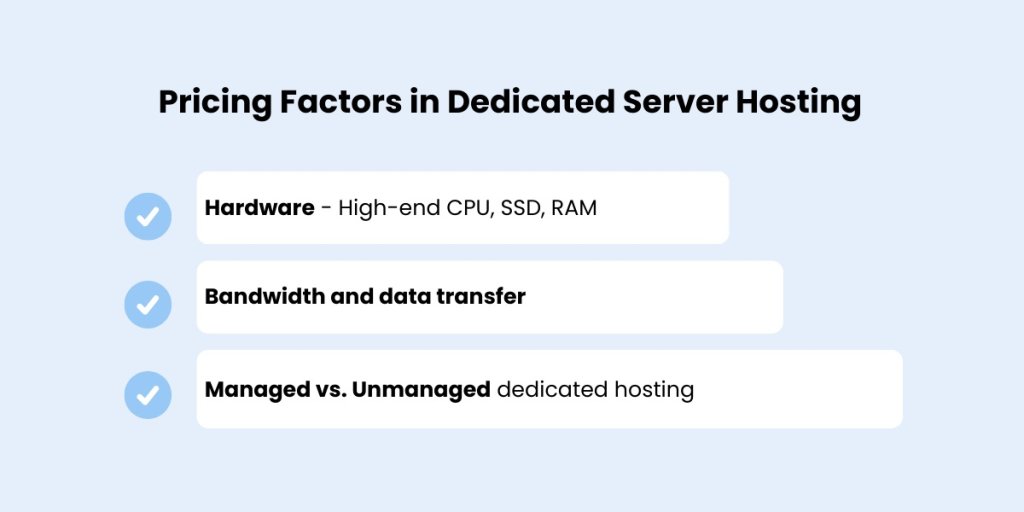
Pricing factors of dedicated server hosting

Hardware Specifications 

The type and quality of server hardware directly impact cost. Servers with industry-leading hardware, including multi-core processors, large memory capacity, and high-speed SSD storage, will cost significantly more. Businesses needing high-performance computing or running resource-intensive applications must invest in advanced server configurations to ensure consistent performance.

Bandwidth Usage 

Bandwidth is another major cost factor. Dedicated servers used for streaming services, hosting multiplayer online games, or traffic-heavy websites often require extensive data transfer capacity. Hosting providers typically offer bandwidth tiers, and exceeding them can result in extra charges. Sites with large user bases or data-heavy applications should factor this into their budget.

Managed vs. Unmanaged

A managed dedicated hosting solution includes ongoing support such as server monitoring, security patches, operating system updates, and technical assistance from the hosting provider’s server administrators. 

While convenient, managed hosting costs more. Unmanaged servers are less expensive but demand in-depth technical knowledge, as the user is responsible for setup, maintenance, and troubleshooting. Companies without a dedicated IT team should be prepared to outsource support if opting for an unmanaged plan.

Each of these elements affects the overall pricing, and it’s important to weigh them carefully based on your technical capacity and hosting requirements.

Comparing Costs With Other Hosting Types

When considering a dedicated server, comparing costs with other hosting options is important to determine if the benefits justify the investment.

Dedicated Hosting Prices vs. Other Hosting Types comparison table

Before investing, weigh your technical capacity, performance goals, and long-term needs. For most growing businesses, Shared or managed cloud hosting is far more practical. 

Looking for powerful hosting without the high cost of a dedicated server?

Types of Dedicated Server Hosting

Not all dedicated servers are the same. Your choice — whether cloud-based, OS-specific, or fully managed — will impact performance, cost, and the technical work required.

Managed vs. Unmanaged Dedicated Hosting

A managed dedicated server means the provider handles technical maintenance, security patches, updates, and backups. This includes technical support, making it ideal for large-scale businesses that want a hassle-free experience.

A managed dedicated server means the hosting provider takes care of:

  • Server monitoring
  • Security patches and updates
  • Operating system maintenance
  • Backup and disaster recovery

On the other hand, Unmanaged Dedicated server hosting refers to having an entire server to yourself. This implies that you have the technical expertise and know-how to manage all the aspects of a web server.

Dedicated Linux Server vs. Windows Dedicated Server

Choosing between a dedicated Linux server and a Windows dedicated server depends on the applications you plan to run, your team’s familiarity with the operating system, and your overall hosting strategy.

Linux servers are often favored for web hosting due to their stability, security, and open-source flexibility. They support widely-used technologies like Apache, MySQL, and PHP, and are well-suited for hosting websites, email servers, and software development environments. Linux tends to have lower resource overhead, and because it’s open-source, licensing costs are minimal or nonexistent — which reduces the total cost of ownership.

Windows servers, on the other hand, are essential for businesses that rely on Microsoft technologies like .NET applications, Microsoft SQL Server, or Active Directory. Windows servers provide a familiar interface and integrated support for Microsoft-based software, but they come with licensing fees and require more system resources. They’re also more commonly used in enterprise settings where Microsoft infrastructure is already in place.

Both options can be used on bare metal server hosting or through dedicated cloud hosting. However, the choice between them should be based on your technical requirements, in-house expertise, and software dependencies.

Dedicated Cloud Hosting vs. Traditional Dedicated Servers

When evaluating dedicated hosting options, it’s important to understand the difference between traditional dedicated servers and dedicated cloud hosting. While both offer exclusive access to server resources, they differ in structure, scalability, and maintenance.

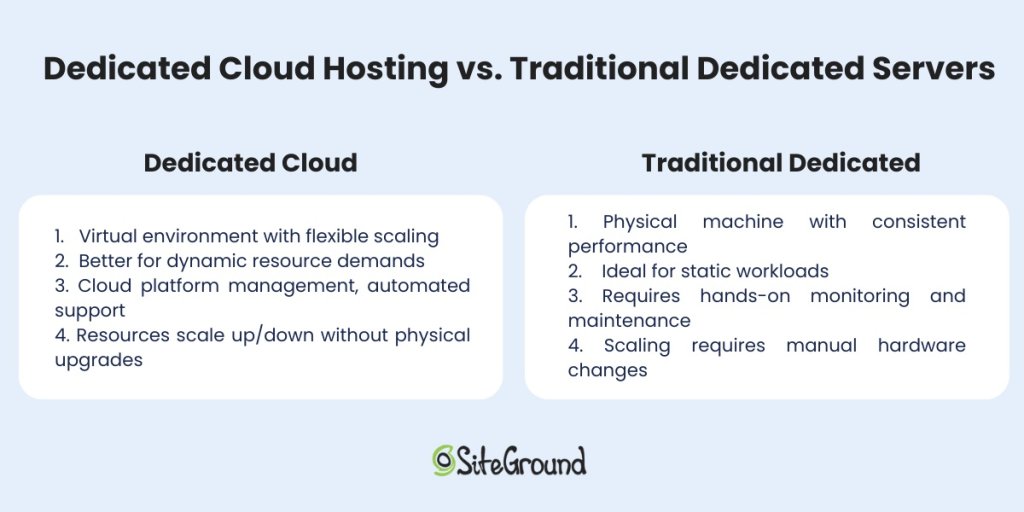
Dedicated Cloud server vs. Traditional Dedicated server

A traditional dedicated server is a physical machine located in a hosting provider’s data center. It provides fixed, high-performance hardware reserved for a single user. This setup is ideal for applications requiring stable performance, robust processing power, and low-level customization. 

However, traditional dedicated servers lack flexibility — scaling resources up or down often requires manual hardware changes or migrations. They also come with greater responsibility for server monitoring, hardware maintenance, and backups.

Dedicated cloud hosting, on the other side, delivers similar resource exclusivity but on a virtualized infrastructure. The server environment is built on a cloud platform that allows for elastic scaling, rapid deployment, and better fault tolerance. 

Businesses can increase or decrease computing power, memory, or storage without replacing physical hardware. This model is especially useful for applications that need high availability and agility, such as e-commerce stores, SaaS platforms, or data analysis environments.

In short, traditional dedicated servers offer control and predictable performance, while dedicated cloud servers offer scalability and resilience. Choosing between the two depends on your operational needs, budget, and comfort with managing server infrastructure versus leveraging a cloud-based service.

Features to Look for in Dedicated Server Providers

Before committing to a dedicated server hosting solution, it’s essential to understand what to look for in a provider. The right features can make a major difference in how your server performs, how secure your data remains, and how easily you can scale as your business grows.

Note that your selected features will directly impact your server’s ability to handle real-world workloads and future growth.

Hardware and Performance Considerations

The performance of a dedicated server depends heavily on the underlying hardware, making it crucial to choose a provider that offers reliable, high-performance components built for demanding workloads.

  • Processing power — Look for industry-leading hardware like Intel Xeon or AMD EPYC CPUs.
  • Memory usage — More RAM means smoother performance for high-traffic websites and a smoother gaming experience.
  • Storage type — SSDs are faster than HDDs, especially for database-driven applications.

Security and Scalability Options

Dedicated servers must be equipped to handle modern threats while supporting long-term growth. Look for providers that offer:

  • Network security — This should include robust DDoS protection, firewalls, and intrusion detection.
  • Backup solutions—Automated backups for data recovery are a must in case of system failure, cyberattack, or human error.
  • Scalability — Can the server handle future growth without requiring migration?

Together, these features ensure your dedicated hosting solution performs well.

Is a Dedicated Server Right for You?

Dedicated servers offer high performance, control, and security — but they’re not the right fit for everyone. If your website handles extremely high traffic, processes large volumes of sensitive data, or runs custom applications that require full server control, a dedicated server might be necessary.

That said, this level of hosting comes with increased complexity, higher costs, and the need for in-house technical expertise or a managed support plan. 

For most blogs, small-to-medium e-commerce stores, and service-based websites, a shared server, VPS, or managed cloud hosting solution will provide more than enough resources — without the overhead.

Ultimately, choosing a dedicated server should be based on your operational needs, performance demands, and available technical resources. If you don’t have a clear use case that justifies the cost and effort, it’s likely not the best fit.

SiteGround is all the hosting most websites ever need

Web Hosting vs. Cloud Hosting: How to Choose the Right Solution

Web Hosting vs. Cloud Hosting Featured Image

Are you deciding between web hosting and cloud hosting? Both solutions have their own strengths and weaknesses. But, with terms like “web hosting” and “cloud hosting” thrown around, it’s easy to get confused. That’s why understanding them is key to making the right choice to meet your needs.

In this article, we’ll break down web hosting vs. cloud hosting in simple terms. We’ll also examine their differences, help you identify the best fit for your project, and cover everything you need to make an informed decision.

Web Hosting vs. Cloud Hosting – Key Takeaways

  • Web Hosting: Traditional, often more affordable, but with limited scalability.
  • Cloud Hosting: Flexible, scalable, and reliable, but can be more expensive.
  • Performance: Cloud hosting generally offers better performance and uptime.
  • Security: Both have robust security options. But, cloud hosting often provides more advanced features.
  • Scalability: Cloud hosting excels in scalability, adapting to traffic changes seamlessly.
  • Cost: Web hosting is typically cheaper; cloud hosting can vary based on usage.

Understanding Web Hosting

Web hosting is the foundation of getting your website online. Let’s begin by clarifying what web hosting is and the different web hosting services it encompasses.

Definition of Web Hosting

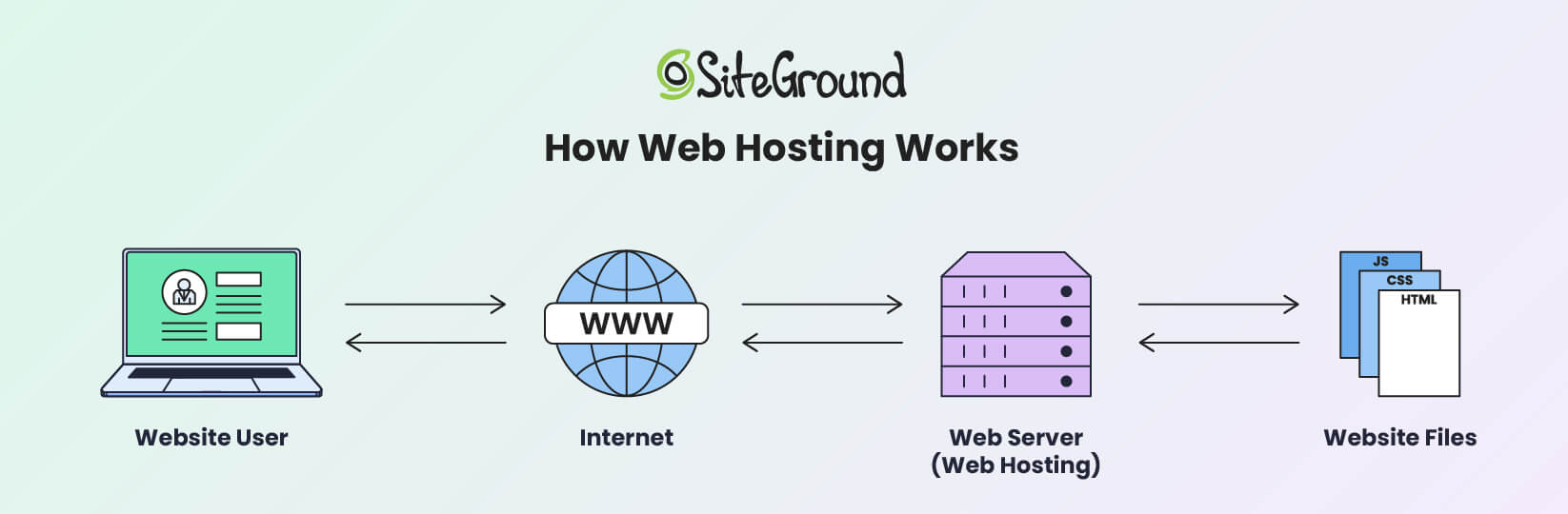
Web hosting is a service that allows individuals and organizations to make their websites accessible on the internet. When someone visits a website, their browser communicates with a web server to deliver the necessary content.

This is the most common type of hosting, in which your website’s files and data are stored on a single physical server.

An infographic depicting how web hosting works

Essentially, traditional web hosting is like renting a specific amount of space on a single server to house your website. This server handles all the requests for your website, and its resources are divided among all the websites it hosts.

Depending on the type of web hosting service you choose, your website gets a portion or all of the server’s resources. A hosting service provider runs websites using specialized web server software.

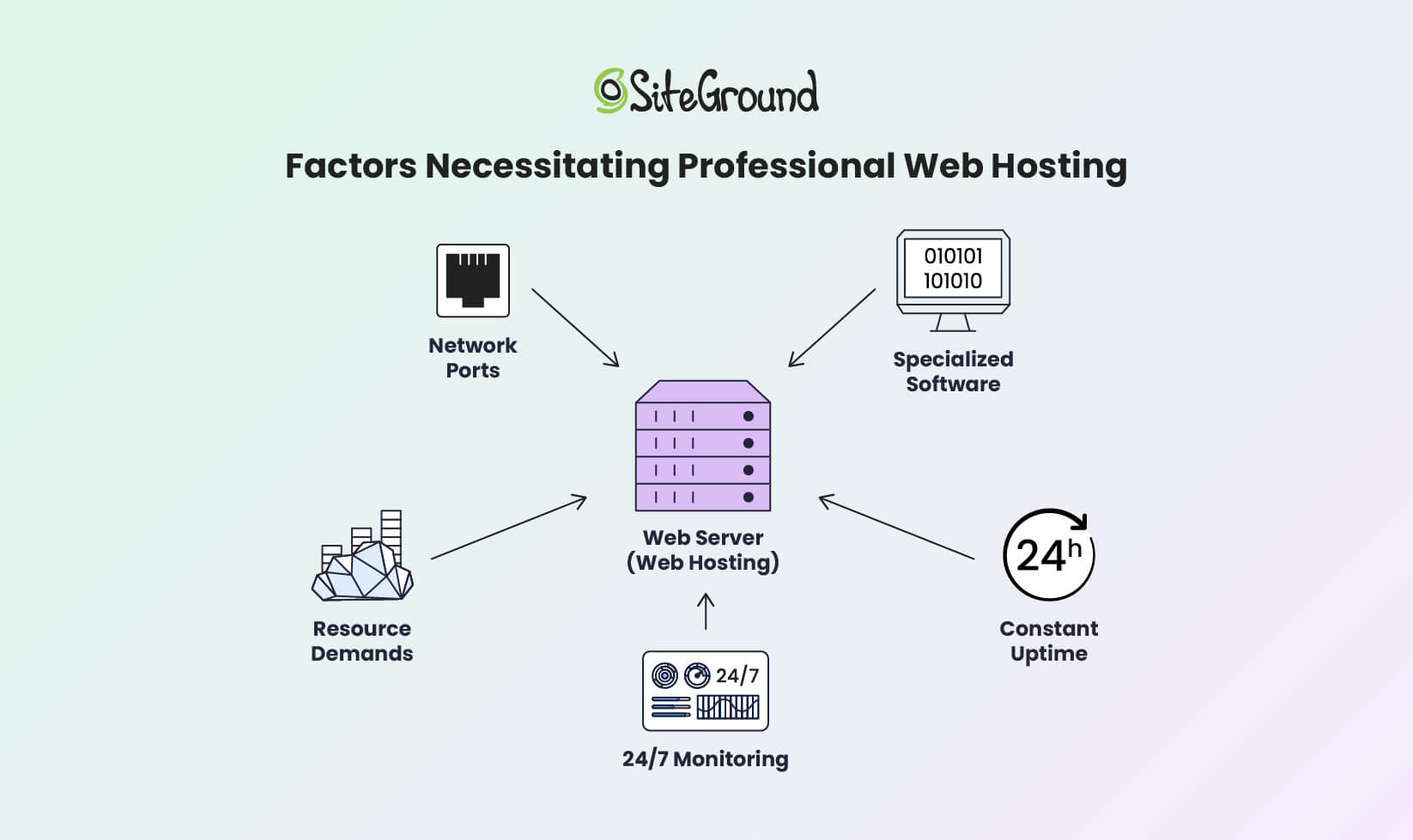
Hosting providers offer the necessary network infrastructure, so users don’t need to manage server complexities or worry about port accessibility. That facilitates constant uptime and 24/7 monitoring to handle traffic and technical issues.

An infographic depicting the factors necessitating the use of professional web hosting services

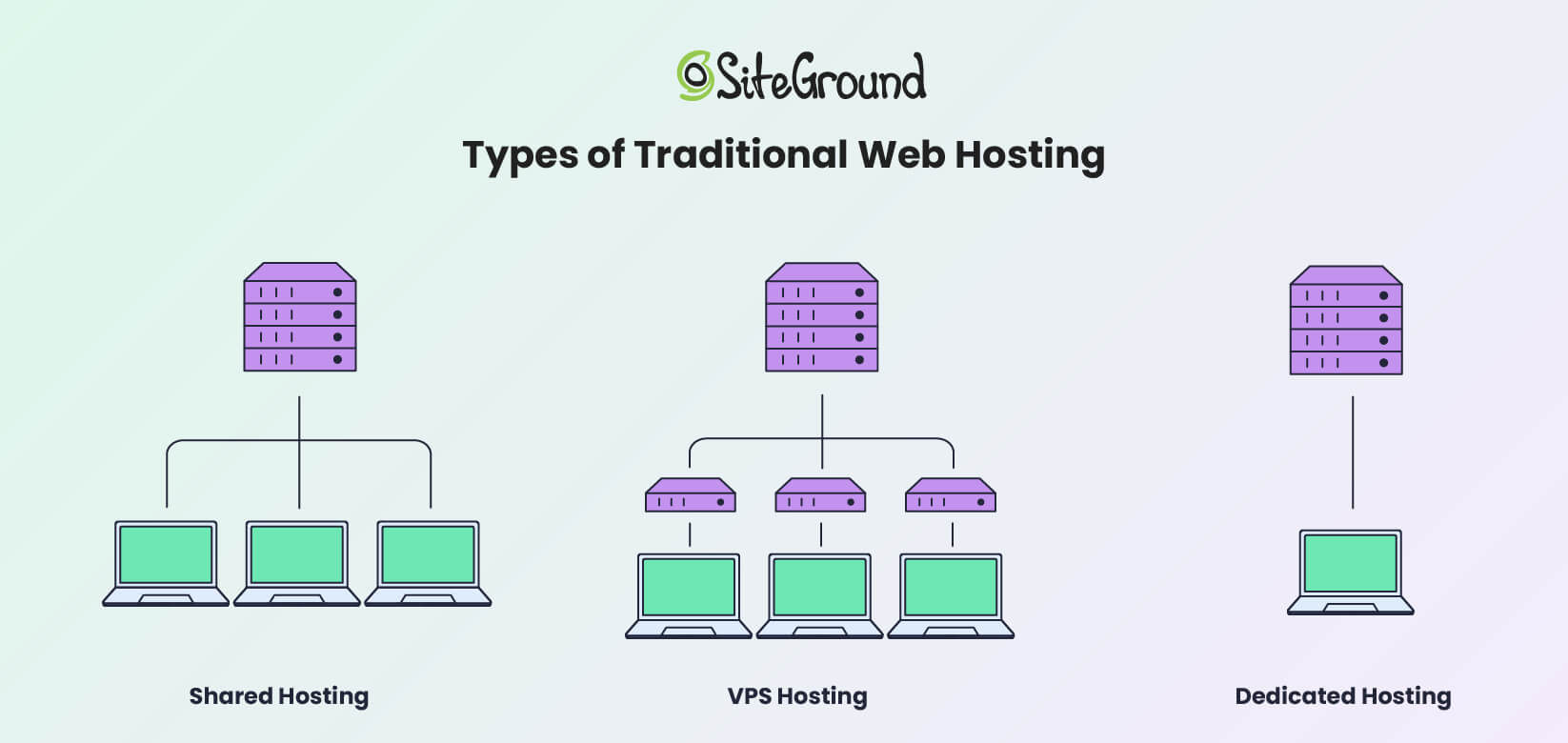
A web hosting provider offers multiple servers and web hosting options to host various websites. This allows service providers to deliver different hosting solutions, like shared, dedicated, VPS, or cloud hosting. Each type offers different levels of cost, control, and performance.

Types of Traditional Web Hosting

Traditional web hosting includes shared, dedicated, and VPS options. Here’s a closer look at each type and what they bring to the table.

An infographic showing the main types of web hosting solutions

Shared Hosting

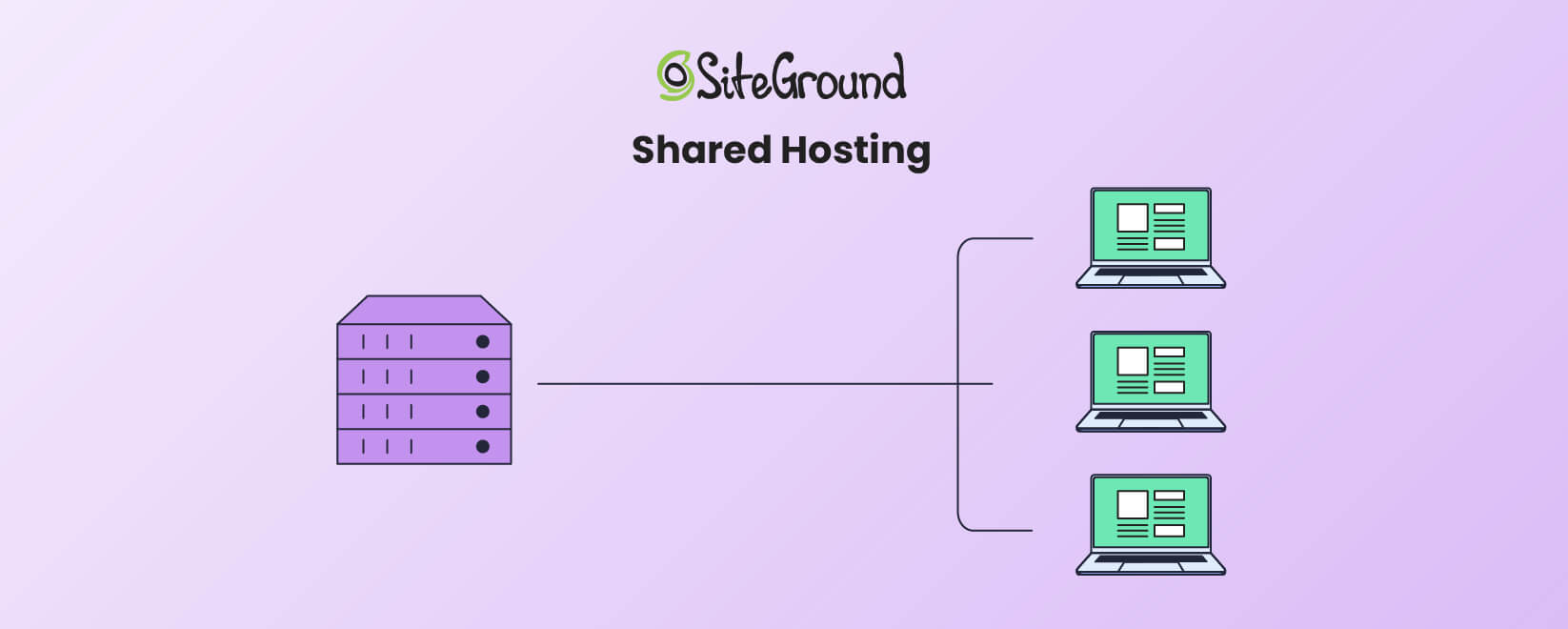
An infographic showing how Shared hosting works

Shared hosting is the most affordable and beginner-friendly option. It allows multiple websites to share a single server’s resources, reducing costs for everyone. However, sharing resources also means that if one website experiences a web traffic surge, others on the same server may suffer slower performance.

Shared hosting is ideal for small websites or businesses with limited traffic. For instance, if you’re running a personal blog or a portfolio site, shared web hosting vs. cloud hosting comparisons lean heavily toward shared hosting for its affordability and simplicity.

Dedicated Hosting

An infographic showing how Dedicated hosting works

Dedicated hosting provides an entire server exclusively for your website. This gives you full control over server settings, performance, and security on a fully dedicated server. It’s ideal for high-traffic websites or businesses handling sensitive data.

However, dedicated hosting is expensive and requires technical skills for server management. Dedicated hosting might be the right choice if your website demands the highest level of control and performance.

VPS Hosting

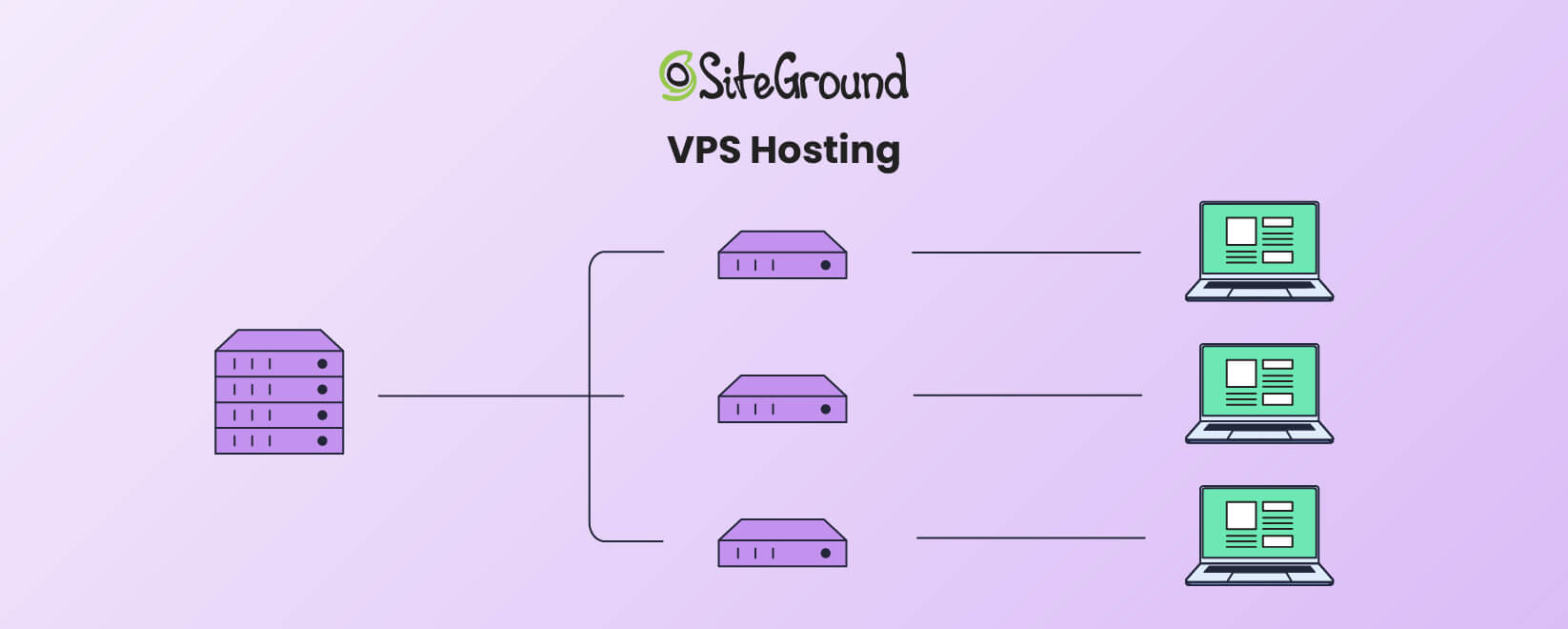
An infographic showing how VPS hosting works

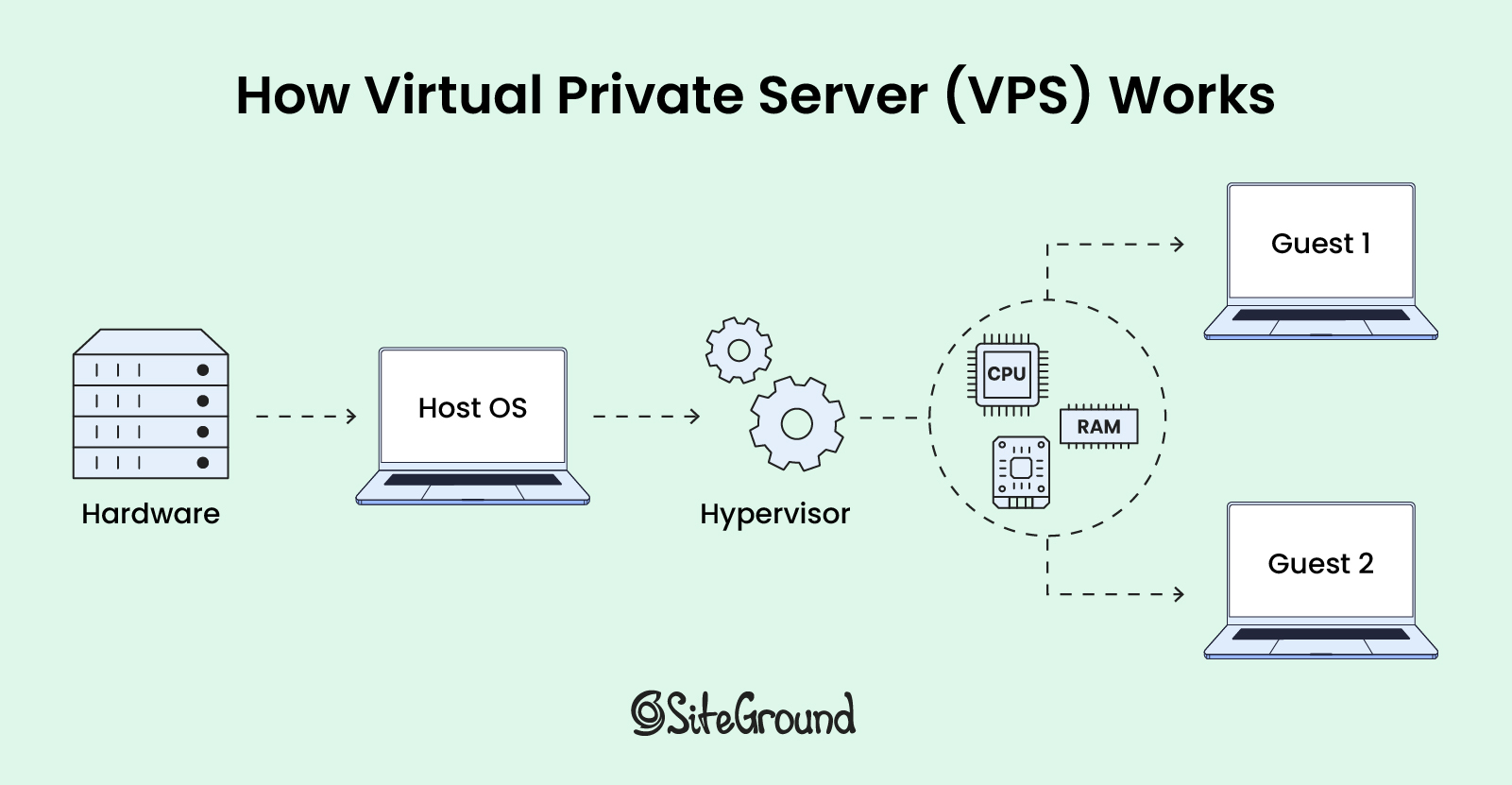
VPS hosting splits a physical server into several virtual servers. Each virtual private server acts independently. This gives you more control and dedicated resources than shared hosting. It’s a middle-ground solution for businesses that need more scalability and higher performance than shared hosting but don’t want the full expense of dedicated hosting.

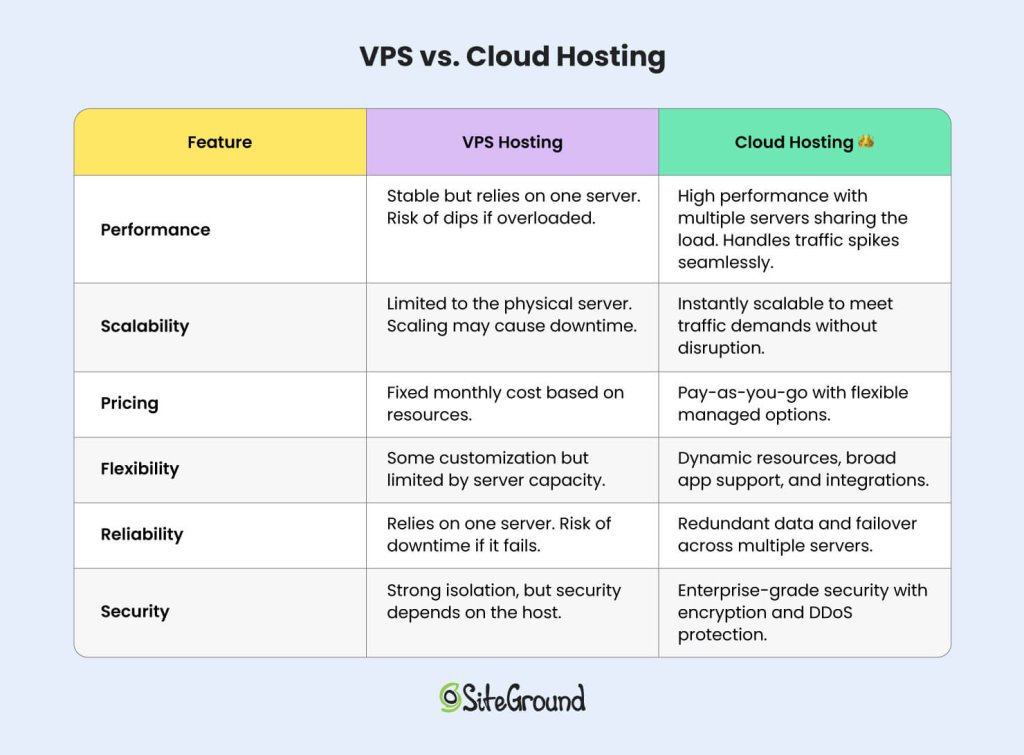
When comparing web hosting versus cloud hosting versus VPS hosting, VPS is a solid option for medium-sized businesses looking for better performance without the complexity of cloud hosting. However, it’s more costly than a shared hosting service.

Benefits of Traditional Web Hosting

The traditional hosting model offers several advantages that make it a popular choice for many users.

  • Affordability – Shared hosting is one of the most cost-effective ways to get a website online.
  • Ease of Use – Most traditional hosting providers include intuitive control panels like cPanel or custom control panels like SiteGround’s SiteTools, which are easy for beginners to navigate.
  • Predictable Pricing – With fixed plans, it’s easy to know your hosting costs upfront.

Disadvantages of Traditional Web Hosting

Traditional web hosting also has its drawbacks that are important to consider.

  • Resource Limitations – Since your server resources are capped, sudden traffic spikes can cause slowdowns or downtime.
  • Downtime Risks – If the server experiences issues, your website will go offline until the problem is resolved.
  • Lack of Flexibility – Upgrading to a higher-tier plan or migrating to a new server can be a time-consuming process.

Despite its simplicity and affordability, traditional web hosting may fall short for websites that require high scalability, consistent uptime, or robust performance during traffic spikes.

This is where cloud hosting comes into play, offering a modern, flexible alternative to meet the demands of growing or dynamic online projects.

What is Cloud Hosting?

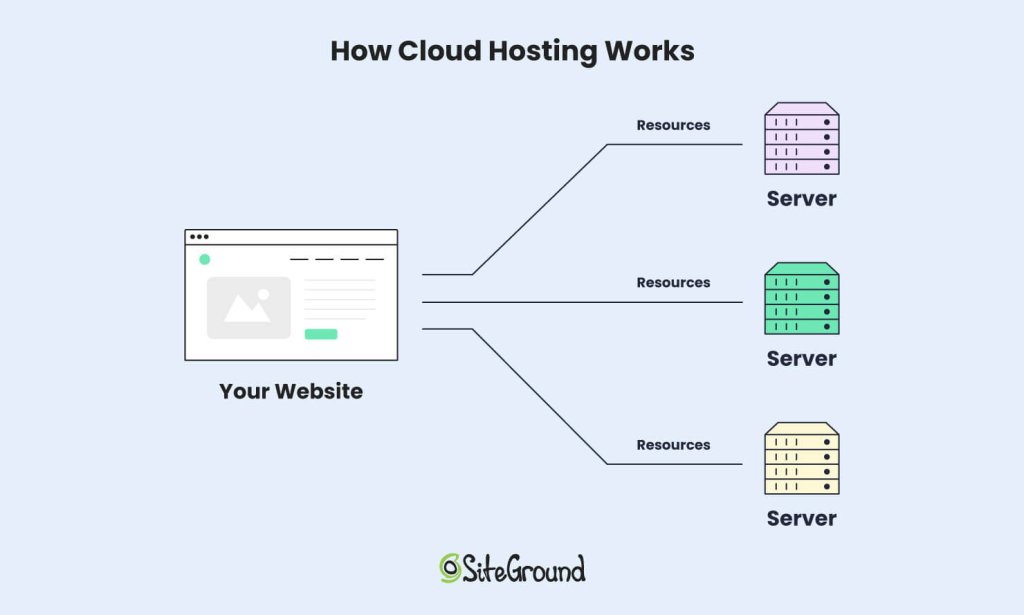
An infographic showing how Cloud hosting works

Unlike traditional web hosting, cloud hosting uses a network of multiple interconnected servers to deliver high performance, scalability, and reliability. This flexibility makes it an increasingly popular choice among businesses of all sizes.

Below, we’ll look into the basics of cloud hosting, its benefits, and potential drawbacks to help you better understand how it compares to traditional hosting.

Cloud Hosting Basics

At its core, cloud hosting uses a network of virtual servers hosted across multiple physical machines. This interconnected infrastructure, often referred to as the “cloud,” ensures that resources such as CPU, RAM, and storage can be dynamically allocated as needed.

In essence, this means your website isn’t tied to the limitations of a single server, and thus it offers unmatched scalability and uptime.

One of the key advantages of cloud hosting is its reliance on cloud hosting providers like Google Cloud.

Siteground, for example, leverages Google Cloud‘s robust and scalable infrastructure. This way, you benefit from Google’s global network, advanced security features, and reliable performance. This integration allows SiteGround to offer managed cloud hosting services backed by Google’s power and reliability.

In contrast to traditional hosting, where resources are fixed, cloud hosting allows you to scale resources up or down on demand. This is particularly beneficial for businesses experiencing seasonal traffic spikes or rapid growth.

Additionally, cloud hosting comes with features like load balancing and automatic failover. If one server in the network goes down, the workload is immediately shifted to another server. This makes cloud hosting a reliable and superior solution.

Benefits of Cloud Computing

Cloud hosting offers several key advantages that set it apart from traditional web hosting. These include improved performance, reliability, scalability, and cost efficiency.

  • Scalability and Flexibility. One of the biggest advantages of cloud hosting vs. web hosting is its dynamic resource allocation, which allows you to adjust resources instantly. If your website experiences a sudden spike in visitors during a promotional campaign, cloud hosting allows you to scale up instantly to meet demand.

When traffic decreases, you can scale back down, ensuring that you’re not overpaying for unused resources.

  • Uptime and Reliability. Cloud hosting minimizes downtime because data is stored across multiple servers. If one server fails, another seamlessly takes over.This built-in redundancy makes cloud hosting a reliable option for mission-critical websites or businesses that cannot afford downtime.
  • Cost Efficiency. Unlike traditional hosting, where you pay a fixed monthly rate, cloud hosting operates on a pay-as-you-go model. You’re only charged for the resources you actually use.

Disadvantages of Cloud Computing

While cloud hosting has many advantages, it’s not without its drawbacks. Understanding these limitations is crucial to making an informed decision.

  • Complexity – Setting up and managing a cloud hosting environment often requires technical expertise. For beginners, this can be a steep learning curve.Many hosting providers (like SiteGround) offer managed cloud hosting services. Still, businesses need to understand the basics to fully make use of their hosting solution.
  • Higher and Variable Costs – While cloud hosting can be cost-effective, unexpected traffic spikes could lead to higher-than-expected bills.For those with predictable traffic, traditional hosting may offer more cost stability.
  • Limited Control Over Customization – While managed cloud hosting simplifies technical aspects, it limits advanced user control. Certain configurations or customizations may not be possible without contacting the hosting provider’s support team.

Web Hosting vs. Cloud Hosting – Comparison & Differences

When deciding between web hosting and cloud hosting, it’s important to understand their key differences. This section will compare their performance, security, scalability, and cost to help you choose the best option for your needs.

In this section, we’ll take a closer look at how these hosting solutions stack up against each other.

Feature Web Hosting Cloud Hosting
Performance & Reliability Dependent on a single server, which can result in downtime. High availability due to interconnected servers.
Scalability Fixed resources, requires manual upgrades for higher plans. Dynamic scaling to handle traffic changes.
Cost Predictable pricing, generally lower for shared hosting. Pay-as-you-go model, can fluctuate based on usage.
Security Basic security measures, shared hosting may share resource vulnerabilities. Advanced measures, including redundancy and backups.

Performance & Reliability

Cloud hosting generally outperforms traditional web hosting in terms of speed and uptime. By leveraging multiple servers, it ensures your website remains accessible even if one server fails. Traditional hosting can suffer from performance issues if other sites on the same server experience high traffic.

Scalability & Flexibility

Cloud hosting is the clear winner when it comes to scalability and flexibility. It allows you to easily adjust resources based on demand, making it ideal for websites with fluctuating traffic. Traditional hosting is more rigid. Plus, certain server constraints can make upgrading plans time-consuming and limited.

Security

Both web hosting and cloud hosting offer robust security features. Still, cloud hosting often provides more advanced options. With cloud hosting, you can implement additional security measures like firewalls and DDoS protection. However, traditional hosting can still be secure if you choose a reputable provider and follow best practices.

Cost

Traditional web hosting is typically more affordable, with fixed pricing plans that make budgeting easier. Cloud hosting costs can vary based on usage, which can be a disadvantage if you’re not careful. However, the scalability and performance benefits can justify the higher cost for many businesses.

Choosing the Right Hosting Solution

Choosing between web hosting and cloud hosting will be easier once you’ve addressed the questions below.

What kind of traffic do you expect?

  • Normal & steady traffic: Web Hosting
  • Traffic spikes & rapid growth: Cloud Hosting

What’s your budget?

  • Low, fixed budget: Web Hosting
  • Flexible budget for growth: Cloud Hosting

Do you need scalability?

  • Limited scalability needed: Web Hosting
  • High, on-demand scalability: Cloud Hosting

Web Hosting vs. Cloud Hosting: Final Verdict

Traditional web hosting remains a reliable and affordable solution for small, static websites or users on a tight budget. However, cloud hosting is the superior choice for businesses that need flexibility, high uptime, and the ability to scale on demand.

Ultimately, the decision between web hosting vs. cloud hosting depends on your specific requirements. Evaluate your traffic, budget, and growth expectations to choose the solution that best aligns with your goals.

PHP 8.4 Highlights: What is New, Features and Improvements Explained

A featured image with a laptop, displaying the official PHP.net logo of PHP 8.4, and the signature PHP elephant icon.

Packed with powerful features and enhancements, the latest PHP 8.4 version promises to make coding more efficient and flexible.

Released officially in late November 2024, at SiteGround, PHP 8.4 has been around in beta since August 2024, when we were among the first companies to make it available for testing on all our servers.

Since then, we’ve seen that it is becoming more and more popular. Over 6000 website owners hosting with SiteGround have already tried it on their website.

If you’re wondering whether you should make the switch and what’s the fuss about, keep reading as we’re covering all you need to know about PHP 8.4, from its standout features to practical tips who will benefit from it the most. Let’s dive in!

PHP 8.4 Key Takeaways

PHP 8.4 marks a significant update in PHP’s lifecycle, introducing bug fixes, features and enhancements that optimize performance and development.

Features like enhanced property handling, new helper functions, and advanced database tools simplify coding and improve efficiency.

Using the latest versions also helps protect against vulnerabilities in the long-run.

However, as a website owner, you have to be careful – the most recent versions may not be compatible with your website. We recommend testing it on a website staging copy first.

Release Timeline and SiteGround

PHP 8.4 (Beta 3) was released on August 15th, 2024. SiteGround introduced early access to it on August 20th, 2024, so our clients could use it for testing as early as possible.

PHP 8.4’s general availability release (GA) was on November 21, 2024. SiteGround added the official version to our servers on November 26th, 2024, just five days after it was announced.

What is New in PHP 8.4?

PHP 8.4 introduces multiple new features that can be categorized into syntax enhancement, library and API improvements, and better array manipulation.

1. Syntax and Language Enhancements

1.1. Property Hooks

In PHP versions prior to 8.4, managing property access and modification typically involved defining explicit getter and setter methods within a class.

This approach, while functional, often led to more verbose code and separated the property’s behavior from its declaration.

class User {
    private string $firstName;
    private string $lastName;

    public function __construct(string $firstName, string $lastName) {
        $this->firstName = $firstName;
        $this->lastName = $lastName;
    }

    public function getFullName(): string {
        return $this->firstName . ' ' . $this->lastName;
    }

    public function setFullName(string $fullName): void {
        [$this->firstName, $this->lastName] = explode(' ', $fullName, 2);
    }
}

$user = new User('John', 'Doe');
echo $user->getFullName(); // Outputs: John Doe
$user->setFullName('Jane Smith');
echo $user->getFullName(); // Outputs: Jane Smith

In this example, the getFullName and setFullName methods are used to access and modify the user’s full name.

With the introduction of property hooks in PHP 8.4, developers can now define custom behavior for property access (get) and modification (set) directly within the property declaration.

This feature streamlines the code by embedding the logic within the property itself.

Using Property Hooks in PHP 8.4:

class User {
    private string $firstName;
    private string $lastName;

    public function __construct(string $firstName, string $lastName) {
        $this->firstName = $firstName;
        $this->lastName = $lastName;
    }

    public string $fullName {
        get => $this->firstName . ' ' . $this->lastName;
        set {[$this->firstName, $this->lastName] = explode(' ', $value, 2);}
    }
}

$user = new User('John', 'Doe');
echo $user->fullName; // Outputs: John Doe
$user->fullName = 'Jane Smith';
echo $user->fullName; // Outputs: Jane Smith 

In this updated example, the fullName property utilizes property hooks to define the get and set behaviors directly within its declaration.

This approach reduces the need for separate methods and keeps the property’s logic encapsulated within its definition.

For a comprehensive understanding and additional examples, refer to the official PHP manual on property hooks.

1.2. Asymmetric Visibility

In PHP 8.4, asymmetric visibility allows developers to define separate access levels for reading and writing class properties.

A screenshot of a code snippet from the official PHP.net documentation, highlighting how new asymmetric visibility enhancements change coding practices.

The visibility declaration public private(set) is used to allow public access for reading but restrict private access for setting the value. This allows the property to be readable from outside the class but only modifiable within the class.

1.3. #[\Deprecated] Attribute

In PHP 8.4, the #[\Deprecated] attribute was introduced to mark classes, methods, functions, or properties as deprecated.

This serves as a formal indication that the marked element is discouraged for use and may be removed in future versions.

Utilizing this attribute enhances code clarity and assists developers in identifying and transitioning away from deprecated features.

1.4. New MyClass()->method() without Parentheses

In PHP 8.4, the syntax for invoking a method directly after creating a new instance of a class has been enhanced. Previously, you would instantiate a class and then call a method on that instance in two separate steps:

$instance = new MyClass();

$instance->method();

With PHP 8.4, you can now chain the method call directly to the instantiation, eliminating the need for parentheses:

new MyClass->method();

This streamlined syntax improves code readability and reduces verbosity.

2. Library and API Improvements

2.1. Object API for BCMath

In PHP 8.4, the BCMath extension introduces the BcMath\Number class, providing an object-oriented approach to arbitrary precision arithmetic.

A screenshot of a code snippet from the official PHP.net documentation, highlighting how to implement an object-oriented approach to arbitrary precision arithmetic using the new BcMath\Number class.

This enhancement allows for more intuitive and readable code when performing decimal calculations.

2.2. New ext-dom Features with Enhanced HTML5 Support

The ext-dom extension has been enhanced to provide robust, standards-compliant support for parsing and manipulating HTML5 documents.

This improvement addresses long-standing issues and introduces new features that streamline working with HTML5 content.

Key Enhancements:

  1. Introduction of Dom\HTMLDocument Class:
    • A new class, Dom\HTMLDocument, has been added to the Dom namespace. This class offers a modern, object-oriented interface for handling HTML5 documents, ensuring better integration and usability.
  2. Improved Parsing and Serialization:
    • The new API provides accurate parsing and serialization of HTML5 documents, resolving previous compliance issues. This ensures that HTML5 content is handled correctly, facilitating more reliable document manipulation.
  3. Enhanced Functionality:
    • Several new functions have been introduced to simplify common tasks, such as querying elements using CSS selectors and traversing the DOM. These additions make it more convenient to work with HTML5 documents.

2.3. PDO Driver-Specific Subclasses

In PHP 8.4, the introduction of PDO driver-specific subclasses enhances the flexibility and functionality of the PDO (PHP Data Objects) extension. This enhancement allows developers to access database features such as driver specific sql parsers, that were previously inaccessible through the generic PDO class.

Key Features:

  • Access to Driver-Specific Methods: Each PDO driver now has its own subclass, enabling access to methods unique to that database system. For example, the Pdo\Sqlite subclass provides methods like createFunction(), which are specific to SQLite.
  • Improved Code Clarity: By utilizing these subclasses, code becomes more readable and maintainable, as database-specific functionalities are encapsulated within their respective classes.
// Using PDO::connect() to instantiate the driver-specific subclass

$pdo = PDO::connect('sqlite:/path/to/database.db');

// Using the driver-specific method

$pdo->createFunction('my_function', function($value) {

return strtoupper($value);

});

In this example, PDO::connect() returns an instance of Pdo\Sqlite, allowing access to SQLite-specific methods like createFunction().

Backward Compatibility:

This enhancement maintains backward compatibility. Existing code using the generic PDO class continues to function as before. Developers can choose to utilize the driver-specific subclasses when they need access to database-specific features.

2.4. Standard Library Updates

Beyond major library and API changes, PHP 8.4 refines its standard library with helpful new utility functions and subtle enhancements.

For example, developers now have access to fpow() for floating-point exponentiation, new lazy objects and new methods for managing HTTP response headers.

Additionally, the DateTime library receives precision-focused updates, which improves how PHP handles time-related tasks. These updates, though smaller in scope, contribute to a smoother and more efficient development experience.

3. New Helper Functions

PHP 8.4 introduces new array functions, providing more versatile and efficient ways to manipulate arrays.

  • array_find – Searches an array for the first element that satisfies a given condition.
  • array_find_key – Finds the key of the first element in an array that meets a specified condition.
  • array_any – Checks if any element in an array satisfies a given condition.
  • array_all – Determines if all elements in an array meet a specified condition.
$numbers = [1, 2, 3, 4, 5];

// Find the first even number
$firstEven = array_find($numbers, fn($n) => $n % 2 === 0);
echo $firstEven; // Outputs: 2

// Find the key of the first number greater than 3
$key = array_find_key($numbers, fn($n) => $n > 3);
echo $key; // Outputs: 3

// Check if any number is greater than 4
$anyGreaterThanFour = array_any($numbers, fn($n) => $n > 4);
var_dump($anyGreaterThanFour); // Outputs: bool(true)

// Check if all numbers are positive
$allPositive = array_all($numbers, fn($n) => $n > 0);
var_dump($allPositive); // Outputs: bool(true)

These additions streamline array operations, enhance code clarity, and reduce the need for verbose loops.

PHP 8.4 Deprecations

With each new PHP release, some features are marked as deprecated to pave the way for better alternatives. Deprecations help PHP to evolve while giving developers time to adjust their code.

One notable deprecation in PHP 8.4 is the removal of dynamic properties on standard objects, a feature long used for quick, ad-hoc property assignments. Another example is the deprecation of implicit nullable types.

Developers are now encouraged to use typed properties or magic methods like __get and __set for better performance and clarity.

For a complete list of deprecated features, you can check out the official documentation released by the php team.

1. Backward incompatible changes

There is a difference between deprecations and backward incompatible changes. With each release, there are also changes that fully break how certain syntax and code functions work.

For a full list of backward incompatible updates, refer to the official PHP documentation.

This means you have to be extra careful about switching to a more recent version. Often, if you are using 3rd party software, you may run into issues since it takes time for developers to update their products so they are compatible with the most recent PHP version.

This is why you should use a staging environment to test if the newest release breaks parts of your website. This is especially important if you are currently running a version older than 8.0.

We’ll show you how you can safely do this using SiteGround’s tools later in the article.

If you manage a website, it’s a good time to audit your code for deprecated features. Addressing these changes now can save you headaches when future PHP versions remove them entirely.

You can request a PHP compatibility check as part of our Expert Care services, so the review and upgrade can be handled professionally by our technicians.

2. Version Support

PHP 8.4 will receive active support for two years, followed by two years of critical security updates. You can review the official PHP documentation for the exact cutoff dates.

If you are using a deprecated version of PHP, we strongly recommend updating to the most recent stable version for improved security and performance.

How to Upgrade to PHP 8.4?

For most users, we recommend staying on Managed PHP to avoid any complications and breaking your production website. If you are technically savvy, and wish to test how your site runs on 8.4, keep reading so you can learn how to do it safely.

1. SiteGround’s Managed PHP

By default, all SiteGround clients are set to our Managed PHP service, which means that we will automatically update your PHP version once a newer stable version is available.

This is recommended for most users that are not tech-savvy, because the newest versions may introduce a conflict in your application due to a plugin or theme incompatibility.

We carefully evaluate each new PHP release and perform tests for compatibility with the most widely used applications on our platform.

As of February 2025, SiteGround’s default Managed PHP version on our servers is 8.2.

We recommend this version as the most widely-compatibale latest release. Before upgrading our default PHP version, we always make sure we have enough usage data to ensure the security, stability, and performance for the majority of websites on our platform.

That’s why we allow some time before switching our default version to each new release, even though the latter are available for testing on our servers almost immediately after going out.
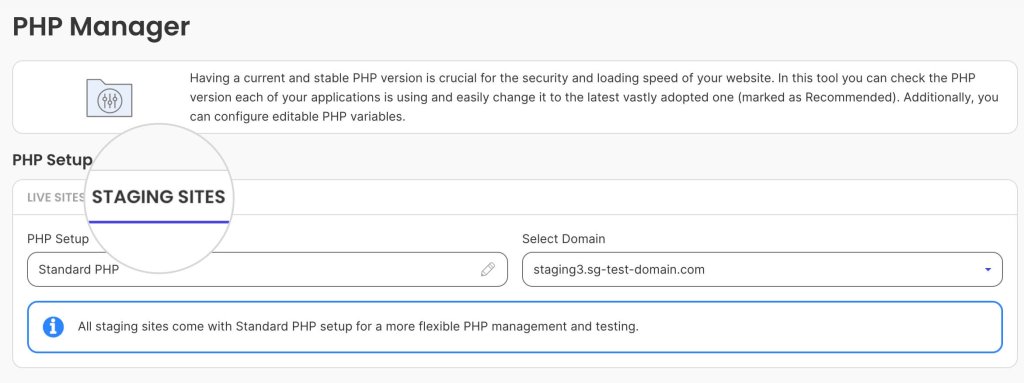
Advanced users can manually switch to PHP 8.4 at any time via Site Tools.

2. Compatibility

As we mentioned, all newest PHP releases can cause errors on your website, so it’s always recommended to test the most recent versions in a staging environment first.
We offer a hassle-free, one-click tool that allows you to easily create a clone of your WordPress site, which you can use to check for any plugin or theme conflicts before upgrading your main website.
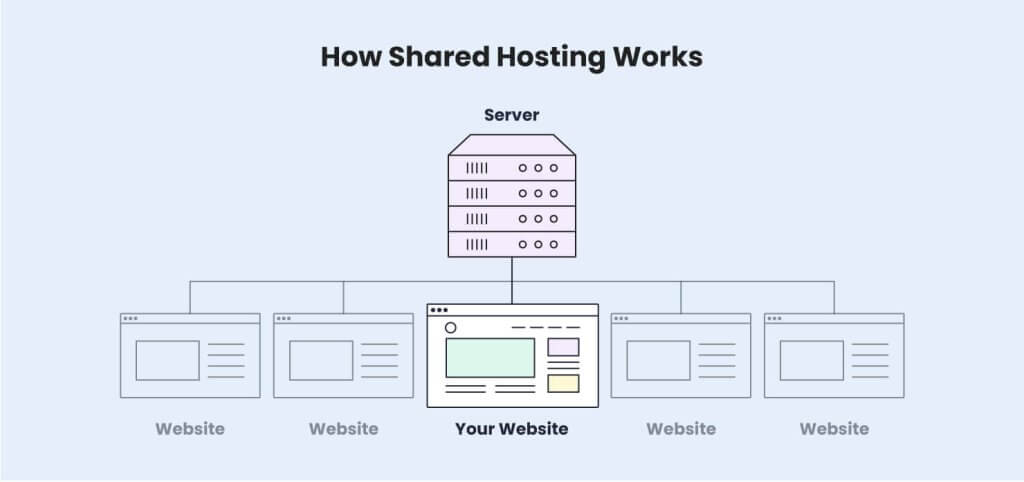
A screenshot of SiteGround's Site Tools dashboard page, where you can create a Staging copy of your WordPress site.

Once you’ve created a staging copy, follow the steps below if you wish to to switch it to PHP 8.4 and test how it works on your site.

3. Test PHP 8.4.

Most providers offer a PHP management tool to switch between different versions for your website. To upgrade to 8.4 manually on SiteGround, go to your Site Tools dashboard > Devs > PHP manager:

A screenshot of SiteGround's Site Tools dashboard PHP manager, where you can change the PHP settings of your sites.

Switch to the Staging Sites tab:

A screenshot of SiteGround's Site Tools dashboard PHP manager, where you can change the PHP settings of a staging site.

Click the Edit button under Actions, switch from Managed PHP to Change PHP version manually, and select 8.4.3.

A screenshot of SiteGround's Site Tools dashboard menu, where you change the PHP version of a website, with a dropdown showing available versions ranging from 8.0 to 8.4.

It’s that simple! The next step is to check if the website works as expected. If some functionality breaks, you would need to investigate further.

Maybe a plugin or the theme that you are using is not fully compatible with the newest version yet. Or, there could be some custom PHP code in your site that needs to be revamped.

In such cases, it’s best to remain on our Managed PHP version and wait until these issues are addressed, before upgrading your main website to the latest PHP release.

4. Ultrafast PHP

SiteGround has a well-established reputation for focusing on performance optimization. This is why our team has developed a custom rendition of PHP that increases website performance by up to 30%.

It is exclusively available to our users on GrowBig plans (and above) and is fully compatible with PHP 8.4. If you wish to take advantage of it, check out our Managed Hosting solutions and sign up today to boost your website speed!

A promotional banner listing SiteGround's unique speed hosting features.

PHP 8.4: Recap and Next Steps

PHP 8.4 is a useful improvement for developers and website owners alike. With its streamlined syntax, improved APIs, and new features, it simplifies coding while boosting website performance and reliability.

Staying up to date with PHP versions is essential for maintaining a fast and reliable online presence. Upgrades should be handled carefully, to ensure a smooth transition and a seamless experience for your visitors.

This is why it is important to use a hosting provider that is up to speed with the latest technologies and offers the necessary tools to safely manage your website.

At SiteGround, we make upgrading hassle-free. With our Managed PHP and Ultrafast PHP services, you can enjoy peak performance and seamless updates.

Ready to experience the best PHP 8.4 has to offer? Sign-up for our Managed Hosting plans today and future-proof your website!

Shared vs. VPS: Choosing the Right Hosting Solution for You

Shared vs. VPS: Choosing the Right Hosting Solution for You

You’ve finally decided to dip your toes into running your own website. It’s an exciting new endeavor, but then you hit your first roadblock—which hosting should you choose? The two types you will hear of most often are shared hosting and VPS (virtual private server). 

Both options will get the job done, but they’re typically suited for different setups and budgets. So, instead of diving in blindly, take the time to make an informed decision by balancing your needs with your budget.

At first, all this may seem overwhelming. But fear not; this article will help you understand the differences between shared and VPS hosting, what each solution is suitable for, and what to look for when choosing a plan. 

Shared Hosting vs. VPS Hosting 

Shared and VPS hosting are two foundational pillars of the web hosting industry, both known for their efficiency and stability. However, as with many things, there is no “one size fits all” solution in web hosting. Each plan has its strengths and weaknesses, and it’s up to you to decide which one best suits your needs. Let’s explore what makes each setup unique.

What Is Shared Hosting?

In a shared hosting environment, multiple clients are located on the same web server and share the same resources—RAM and CPU. The storage space is divided into multiple isolated accounts allocated to separate users. 

How Shared Hosting works

Think of it like a dormitory—you have your own room but share amenities like the bathroom, kitchen, and living room with other roommates. This means your website’s performance is not entirely under your control. Even if you follow best practices, your neighbors can influence performance, especially if one or several of them are resource hogs.

Still, responsible web hosts try to alleviate this by leveraging strict resource monitoring and restricting excessive usage, which ensures equal and fair distribution of server resources. They also implement mechanisms like a CDN (Content Delivery Network) and caching to reduce server strain.

That said, shared hosting remains the most affordable option for running a website. Hosting multiple clients on the same shared server reduces the costs for the hosting provider, who can, in turn, offer the service at a much lower price. 

Shared hosting is usually managed, meaning the web host is responsible for the operating system, server configuration, security, and standard maintenance procedures. That makes it perfect for beginners and people who don’t want to delve too much into the technicalities of running a website. 

Who Can Benefit from Shared Hosting?

  • Personal blogs with growing audiences
  • Startup companies looking to expand operations
  • Medium-sized businesses with consistent numbers of users
  • Beginners looking for easy-to-manage website applications and tools   

Pros 

  • Low cost–Shared hosting is cheaper since multiple users share the server cost.
  • Managed server–The hosting provider typically manages the server configuration. 
  • Easier management–Out-of-the-box management tools provided by the hosting company for better website management.
  • Beginner-friendly–Shared hosting is great for beginners. They can focus on their website while the host takes care of the server.

Cons

  • Shared server resources–No dedicated resources for your website. You share the resources with other users. 
  • Server limits–There are usually bandwidth or traffic limits to reduce the server load.
  • Limited customization–Limited access to the server configuration since multiple users share the same environment.
  • No root access–Root access is not permitted on shared hosting since the service is managed.

If you’re seeking a reliable and affordable shared hosting solution, SiteGround offers a range of plans tailored to meet diverse needs. Our shared hosting packages provide an ideal platform for small, medium, and large websites alike. 

What Is Virtual Private Server (VPS Hosting)?

In a VPS setup, you also share a physical web server with other users. However, you have your own virtual web server partition with its own operating system and reserved resources. 

This means that you are independent of your neighbors since you have your own dedicated disk space, CPU, and RAM. 

However, it also means that you are solely responsible for maintaining the entire VPS. Thus, your website performance depends on your server maintenance knowledge. 

VPS hosting plans are usually located on less crowded servers, primarily containing other VPS users.     

What is VPS Hosting

Since you are independent of other users, you have much more freedom in modifying the server configuration. Usually, VPS plans come with root access, which means you have full control. You can tweak almost everything as you see fit. 

It’s like living in a building where others rent smaller apartments and share common spaces and amenities, but you have your own condo with its bathroom, kitchen, and everything you need. 

There is a tradeoff, though: VPS servers are usually more costly than many other hosting types, including shared hosting. Furthermore, you are solely responsible for the server maintenance. While the host will maintain the physical server, you are on your own when it comes to installing and managing the operating system, modifying the server configuration, and all other technical aspects. 

VPS is often confused with dedicated server hosting, but there is one stark difference. With dedicated hosting, you own an entire physical server, while with virtual private server hosting, you share the physical server with others.

Going back to the analogy above, if a VPS is a condo in a building, a dedicated server is the entire building that you have for yourself. 

Who Should Get a VPS? 

  • Large businesses with a lot of visitors and traffic and who are able to afford more expensive solutions
  • Large ecommerce stores with higher budgets that consume more resources
  • Technically proficient users with an innate understanding of server maintenance 

Pros

  • Improved performance and uptime–Performance is more predictable since you are not sharing resources with others.  
  • Guaranteed server’s resources–You have dedicated server resources. 
  • Increased bandwidth limits–Bandwidth limits on VPS hosting are typically more lenient. The limits depend on the web host.              
  • Unaffected server usage–You are independent of your neighbors on the same physical server. 
  • More control–Root access and access to the entire server configuration. 

Cons

  • Expensive–More expensive than shared hosting. 
  • Not beginner-friendly–Requires advanced technical knowledge of server maintenance. The web hosting provider doesn’t get involved in server maintenance. 
  • Unmanaged–You are on your own when running the server, which can be time- and effort-consuming. You may need to hire extra staff.  

SiteGround doesn’t offer VPS hosting but provides a more sophisticated and advanced alternative: cloud hosting. This solution is both powerful and highly scalable, allowing you to adjust resources dynamically to meet your website’s demands. Cloud hosting ensures that your site can handle traffic spikes effortlessly, maintaining optimal performance and reliability. By choosing SiteGround’s cloud hosting, you gain the flexibility and power of a scalable infrastructure without the complexities of managing a virtual private server.

For more information on this topic, read this article about cloud hosting vs VPS hosting.

Differences Between Shared Hosting and VPS Hosting 

The main difference between shared and VPS hosting is that on VPS hosting, you have your own virtual instance of a web server with reserved resources, while shared hosting users share the same server environment, resources, and operational system (OS). 

VPS hosting is more expensive and suitable for advanced users who require more control and possess the technical knowledge to maintain a web server independently.       

Shared hosting is a simple, budget-friendly solution and a great choice for medium-sized websites. You can’t customize the server setup, but in some cases, that’s not a bad thing. Shared hosting is usually managed, meaning your web host takes care of server maintenance, allowing you to focus on managing your website without worrying about actions that could harm the server.    

But let’s go through all the differences between shared and VPS so you can make the best choice for your needs.

FeatureShared HostingVPS Hosting
PerformancePerformance can fluctuate due to shared resources. It depends on how well the hosting provider manages the servers. Higher performance potential given dedicated resources, but it depends on your technical proficiency. Requires server maintenance knowledge since the hosting provider is not involved. 
SecurityManaged security with strict rules maintained by the hosting provider. Your site is protected from the get-go. Isolated environment with full control over the server. Security is your responsibility. 
ScalabilityLimited scalability. Requires plan upgrade for more resources. More scalable. Upgrading resources can be easy or difficult, depending on the provider. 
CustomizationLimited customization due to a shared environment with strict restrictions. The hosting provider has pre-configured the server for you. High customization freedom, including server configuration and root access. You must know what you’re doing or you can break the server configuration.
Level of ControlMinimal control over server settings and OS due to the shared environment. Server management is taken care of by the hosting provider.Full control over the server and OS. Root access. The user is responsible for the server management. 
Ease of Use Easy. Typically, the hosting provider maintains the server configuration and provides management tools.Hard. You are responsible for installing applications, running the server, and maintaining security. 
PriceMore affordable, with plans starting at a few dollars per month.Generally more expensive, with some basic plans offering fewer resources than shared hosting.

Performance

Performance is a crucial aspect of running a website. You want your visitors to stay on your web page, and to do so, your website should load quickly before they give up waiting and abandon it. Performance also plays a huge role in the SEO rankings, especially since Google introduced Core Web Vitals.

In a shared server environment, the website speed can fluctuate since you don’t have fixed resources. More or less, you depend on the other users—if another website eats up too many resources, your speed may also suffer. These fluctuations can be mitigated by a reliable web hosting provider who imposes resource monitoring and fair resource distribution.   

At a base level, you can squeeze out more performance from virtual private servers. You have a reserved amount of resources exclusive only to your websites, so other users on the same physical server don’t influence your website. 

This comes with one caveat: on a VPS hosting plan, you are responsible for the server maintenance. Thus, you should have advanced knowledge of how to run the entire server and all applications to make sure that it doesn’t fall apart. Alternatively, you might need to spend extra cash hiring additional staff to monitor your VPS.   

Security

Security is another critical facet of running a website, and similar to performance, there are elements of it that just aren’t so straightforward.

A shared server hosts multiple websites, and the more websites there are, the greater the exposure to security breaches. If one website falls victim to malicious attacks, the other websites might follow. However, in most cases, shared web hosting is managed, meaning hosting providers enforce strict security rules, firewall protection, and malware prevention measures to keep you safe.

SiteGround offers robust security features to protect your website, such as proactive server monitoring, advanced firewall systems, and AI-driven anti-bot systems to fend off potential threats and malicious activities. With SiteGround, you can have peace of mind knowing that your website is safeguarded by top-tier security measures and technology, allowing you to focus on growing your online presence.

On a VPS plan, you benefit from an isolated environment dedicated exclusively to your websites, eliminating concerns about infections from other users. However, this autonomy also means that maintaining the server’s integrity is entirely your responsibility. To prevent security breaches, you must remain vigilant and proactive, implement robust security measures, and continuously monitor your server.

Scalability and Flexibility

As your business grows, it’s crucial to scale your server to handle traffic spikes without losing momentum. In this regard, shared servers are less flexible than VPS servers. Shared hosting providers typically offer plans with fixed resources that cannot be increased separately. You must upgrade to a higher plan in order to scale up the resources.  

With SiteGround shared hosting plans, upgrading is as easy as a single click. Changing your plan does not require reconfiguration or downtime, allowing you to enjoy a smooth transition to a more powerful solution. 

VPS plans, on the other hand, are generally more flexible. They are often hosted on premium servers, with resources distributed among fewer users, providing more headroom for expansion. However, the ease of scaling can vary depending on your provider. With some, adding extra resources may be as simple as clicking a button, while others may require a more complex and time-consuming configuration process.

When it comes to scalability, SiteGround offers an excellent alternative to VPS—cloud hosting. Cloud servers provide the same power as VPS but excel in scalability. Users can adjust resources up or down as needed without experiencing downtime. You can even configure a cloud server to autoscale. This allows the system to monitor resource usage and automatically allocate more resources when CPU or RAM usage nears its limit. For more information, check out this guide on setting up autoscale for cloud servers.

Customization

In terms of customization, VPS servers are the clear winner. Shared hosting providers are able to offer cheaper web hosting solutions by accommodating multiple users on the same physical server. But for this to work, they need to maintain strict restrictions that cannot be surpassed—certain ports are closed, firewall rules are tougher, server configuration is off-limits, etc.

In contrast, a VPS provides you with your own isolated server environment, separate from other servers and accounts on the same physical machine. This grants you significantly more freedom to customize your server—you can close or open ports, set up a dedicated IP address more easily, modify the server configuration files, etc.  

But again, most users will do just fine with the pre-set configurations hosting providers usually offer. So unless you have a very technical background and really know your way around this, you will probably be better off with shared hosting. 

Level of Control

With a shared hosting plan, you don’t have the level of control that VPS hosting offers. Since you share the same server configuration and operating system with other users, any changes to the configuration could impact everyone differently.

If you require greater control, VPS hosting is the way to go. However, remember the wise saying: “With great power comes great responsibility.”. While you’ll have much more control over your server, this also means you can inadvertently cause issues if you lack the necessary knowledge and expertise in server maintenance.

Price

When it comes to pricing, shared hosting is significantly more affordable than VPS hosting. By optimizing costs in a shared hosting environment, providers can offer budget-friendly yet reliable solutions that cater to various financial needs, with some plans starting at just a few dollars per month.

While VPS hosting is generally more expensive, there are some extremely low-cost options available. However, these budget VPS plans often come with limited resources, and many shared hosting plans can surpass them in terms of performance.

A reliable and well-equipped VPS server is typically a more costly investment. It’s important to assess whether you truly need the advanced features it offers in exchange for the higher price.

VPS vs. Shared – How to Pick a Plan

Each of the two hosting options has its unique advantages and limitations, and understanding these differences is key to making an informed decision. In this section, we’ll explore the essential factors to consider when choosing between VPS and shared hosting, helping you determine the best fit for your specific needs and budget.

Website Type and Size

The size of your website is one of the most important criteria when choosing among the different types of web hosting. For a modest blog with just a few pages, extensive resources aren’t necessary. A shared hosting plan would be more than adequate to ensure your website runs smoothly and efficiently.

However, if you own a large ecommerce store, you are more likely to need something more substantial. Dedicated servers might be too expensive, but VPS servers would also do a good job of handling resource-hungry websites. 

Speed and Performance

Everyone wants their website to load blazingly fast; that’s a given. However, it’s important to consider whether you truly need the power that a VPS server provides. While a VPS typically offers more CPU and RAM than a shared hosting plan, these resources won’t significantly impact performance if your website isn’t optimized.

Focus on optimizing your website’s software first; this can often make a more noticeable difference than simply upgrading to a more powerful VPS plan. Of course, if your website is large and complex, you’ll need the hardware to support it, which may require transitioning to a VPS.

Traffic and Resource Usage

A website generating lots of traffic is bound to exhaust more server resources. Shared hosting plans come in different sizes, but in general, they are limited by bandwidth or monthly visits. 

VPS plans are usually unmetered and have no bandwidth limits, so you can use all the resources available to you. 

However, keep in mind that if the traffic outgrows the VPS resources, your website might start crashing. If you decide to go with VPS, you should explore what options the hosting provider offers for scaling.  

Level of Security 

Your hosting plan choice will also depend on how invested and proactive you are in maintaining your website’s security. Shared servers can be more vulnerable, as you share server space with other websites, and if one is compromised, others might be affected. However, even with shared plans, web hosts implement various protective measures—such as firewalls, account isolation, and malware scanning—to keep websites as secure as possible with minimum intervention by the website owners.

With a VPS plan, you don’t have to worry about vulnerabilities from other websites since you’re running your own isolated server. However, this also means you are solely responsible for maintaining your server’s security. This includes installing security applications, setting up firewalls, monitoring for suspicious activities, and potentially hiring security specialists.

Budget

Ultimately, your choice of hosting plan will largely depend on your budget. If you’re just starting an online business or running a modest personal blog, VPS hosting might be more than you need. A shared hosting plan would suffice, ensuring smooth website operation with minimal investment. Most shared hosting plans are managed, meaning the provider handles server maintenance, allowing you to focus on running your website.

Conversely, if your website experiences high traffic or involves resource-intensive applications, you might need a more powerful and pricier option like VPS hosting. This provides a robust platform capable of handling substantial traffic. However, since VPS plans are often unmanaged, you may need to hire additional staff to manage the server, which can increase your expenses.

Final Thoughts: Is VPS Better Than Shared Hosting?

The choice between VPS and shared hosting depends on your specific needs and circumstances. If you’re a beginner, have a limited budget, or run a small website, shared hosting is a cost-effective and manageable solution. It provides essential features without requiring technical expertise.

On the other hand, if you manage a high-traffic website, need dedicated resources, or require extensive customization and control, VPS hosting is the better choice. It offers improved performance, scalability, and security but at a higher cost and with a steeper learning curve.

Ultimately, the decision should be based on the website’s size, traffic, budget, and your technical proficiency. Carefully assess your requirements to choose the hosting type that best aligns with your goals and resources.

VPS vs. Cloud Hosting: Key Differences, Pros & Cons Explained

Comparison of VPS and cloud hosting with a stylized cloud, a server, and a website interface, illustrating flexible and secure web hosting solutions.

When choosing a hosting solution for your website, two popular options stand out: VPS (Virtual Private Server) hosting and cloud hosting. 

At first glance, they may seem similar, since both give you a set of allocated resources (CPU, RAM, and storage). However, there are important distinctions you should consider before choosing a plan for your website. 

In this article, we’ll explore their differences, benefits, and drawbacks to help you decide which is the right choice for your project.


VPS vs. Cloud Hosting

The main difference is the method of virtualization and the utilization of the available system resources. This makes cloud hosting more scalable, flexible, and reliable, while VPS hosting is better suited for stable, smaller websites.

  • VPS Hosting: Offers dedicated resources on a single server, providing stable performance but limited scalability compared to Cloud. Best for sites with predictable traffic.
  • Cloud Hosting: Uses a network of servers to provide scalable, highly reliable performance with real-time resource adjustments. Ideal for growing businesses or websites with fluctuating traffic.

1. What is VPS Hosting?

VPS hosting uses virtualization technology to divide a single physical server into multiple smaller “virtual” servers. Each virtual server operates independently, with its own allocated resources like CPU, RAM, and storage. 

While shared hosting users share the total amount of a single server’s resources, VPS users benefit from dedicated portions of these resources.

An infographic showing how VPS technology works, illustrating how a hypervisor divides resources across multiple virtual machines.

1.1. Pros of VPS Hosting

There are certain advantages of VPS hosting, especially compared to shared or dedicated hosting servers: 

  • Cost-effective: VPS hosting is generally more affordable than having a dedicated server.
  • Root access: Many VPS plans offer root access, giving you the ability to install and configure software as needed.
  • Customization: With a VPS, you can choose your operating system and customize server settings.

1.2. Cons of VPS Hosting

  • Scalability: While VPS can handle more traffic compared to shared hosting, resources are tied to a single physical server, so scaling up may require moving to a new VPS plan or physical machine. 
  • Technical expertise required: Using a VPS involves knowledge of server management and troubleshooting.
  • Downtime risks: If the physical server hosting your VPS has issues, it can affect all virtual servers on it.

1.3. When to Choose VPS Hosting

  • Predictable traffic: For websites with steady traffic patterns, VPS hosting provides sufficient resources.
  • Technical expertise: If you’re comfortable managing servers, VPS gives you more control over configurations.

While a VPS server is ideal for tech-savvy users, most website owners prefer a managed shared hosting plan. It provides all the essential features without the hassle of configurations or the need for technical expertise. This allows them to focus entirely on what really matters: running their business.

2. What is Cloud Hosting

Cloud hosting services leverage a network of interconnected servers to host your website. Instead of relying on a single server, your data is distributed across multiple servers in a “cloud.” This means if one cloud server fails, others pick up the slack.

This allows cloud hosting providers to offer a high uptime guarantee and significantly higher redundancy rates compared to other types of hosting. 

An infographic showing how cloud hosting works, illustrating how website resources are pooled from a network of multiple servers.

2.1. Pros of Cloud Hosting

  • Scalability: You can scale resources like CPU and RAM up or down instantly based on demand.
  • Reliability: With data spread across multiple servers, there’s no single point of failure. If one server goes down, others keep your site running.
  • Global reach: Cloud hosting often includes content delivery networks (CDNs), which help with faster load times worldwide.

2.2. Cons of Cloud Hosting

  • Learning curve: Understanding how to manage resources and costs in a cloud environment can take time.
  • Potentially higher costs: For small, static websites, cloud hosting is more expensive compared to shared hosting.

2.3. When to Choose Cloud Hosting

Cloud hosting is the next step if your project is growing and you need more resources to handle increasing traffic. For most website owners, a managed cloud hosting plan is the best choice for expanding one’s business!

  • Growing businesses: Cloud hosting is perfect for scaling quickly without downtime.
  • Unpredictable traffic: If your site experiences traffic spikes, cloud hosting adjusts resources in real time.
  • Global reach: Businesses targeting international audiences benefit from the speed and reach of cloud hosting.
  • Critical uptime needs: For ecommerce or SaaS platforms, where downtime equals lost revenue, cloud hosting offers unmatched reliability.

Our Cloud Hosting services are fully managed and come with built-in speed and security features, auto-scaling, and an uptime guarantee of 99.99%!

Illustration showing scalable cloud hosting with interconnected cloud, firewall, and a laptop, highlighting managed and auto-scalable cloud solutions for business growth.

Differences Between VPS and Cloud Hosting

Comparison Chart: VPS vs. Cloud Hosting

FeatureVPS HostingCloud Hosting 👑
PerformanceStable performance due to dedicated resources but dependent on a single server. Performance dips if the server is overloaded or encounters issues.Distributed infrastructure results in high performance. Traffic spikes and hardware issues are mitigated with multiple servers supporting your site.
ScalabilityLimited by the physical server. Scaling requires migrating to a larger plan, which can lead to downtime.Real-time scalability with instant resource adjustments. Ideal for handling unpredictable or seasonal traffic.
PricingFixed monthly pricing based on allocated resources. Pay-as-you-go model based on usage. Fixed but flexible prices for managed cloud hosting due to seamless upgrades/downgrade options.
FlexibilityAllows some customization but is constrained by physical server limits.Ultimate flexibility with dynamic resource adjustments, wide application support, and seamless third-party integrations.
ReliabilityDependent on the physical server. Downtime occurs if the server fails unless backups and redundancy are in place.Highly reliable with data redundancy across multiple servers. Automated failover ensures minimal disruption during hardware issues.
SecurityStrong isolation between users. Additional security depends heavily on the host’s infrastructure and user management.Enterprise-grade security with features like firewalls, encryption, and DDoS protection. Compliance with industry standards offers additional assurance.
  1. Performance

VPS hosting provides stable performance, as resources are allocated specifically to your server. However, performance can dip if the physical server is overloaded or faces technical issues.

Cloud hosting outshines VPS in performance, thanks to its distributed architecture. With multiple servers supporting your site, traffic spikes and hardware issues don’t slow you down.

  1. Scalability

VPS hosting has fixed resource limits tied to a single server. To scale up, you often need to migrate to a larger VPS plan.

Cloud hosting offers unparalleled scalability. Resources can be added or removed in real time, making it ideal for businesses with unpredictable or seasonal traffic.

  1. Pricing

VPS hosting typically involves fixed monthly pricing based on the allocated resources. It’s predictable but can result in paying for unused capacity.

Cloud hosting operates on a usage-based pricing model. This flexibility can save costs, especially for sites with variable traffic.

  1. Flexibility

VPS hosting provides some flexibility, allowing you to customize the server environment. However, it’s limited by the hardware it resides on.

Cloud hosting offers ultimate flexibility. You can configure scaling, deploy apps, and integrate third-party tools without any concern for resource limitation.

  1. Reliability

VPS hosting can experience downtime if the physical server fails. Backups and redundancy depend on your hosting provider. 

Cloud hosting is inherently reliable. Data redundancy across servers makes sure your site remains live, even during hardware issues. 

  1. Security

Both VPS and cloud hosting provide robust security. However, VPS hosting depends heavily on the host’s measures, while cloud hosting inherently includes additional layers like firewalls, data encryption, and DDoS protection.

Final Verdict on Cloud Hosting vs. VPS

As shown above, cloud hosting beats VPS hosting in all categories. 

A comparison table showing the differences between VPS and Cloud hosting when it comes to performance, scalability, and security.

While VPS hosting still meets the needs of many users, cloud hosting is the future of web hosting. 

Its scalability, performance, and reliability make it the preferred choice for growing websites. Are you ready to elevate your online presence? Explore SiteGround’s premium cloud hosting solutions and experience the difference!

Cloud hosting concept with a cloud, firewall, and laptop interconnected, alongside a 'Get Started' call-to-action promoting a hosting provider's money-back guarantee.


FAQs

Which Is Better, VPS or cloud?

Cloud hosting generally outperforms VPS hosting in scalability, reliability, and flexibility. It’s ideal for dynamic websites and growing businesses. VPS hosting is a great choice for small, stable sites with fixed budgets and tech-savvy owners.

Is Cloud Hosting Better for SEO?

Yes, cloud hosting can boost SEO. Fast load times, reliable uptime, and global server locations mean a better user experience, which Google rewards with higher rankings.

Can I Use Both VPS and Cloud Hosting?

While uncommon, some businesses use VPS for basic needs and cloud hosting for critical or high-traffic applications. However, cloud hosting often eliminates the need for VPS altogether.


What Is a VPS, and Does It Fit Your Hosting Needs?

This is an illustration of a physical server divided into multiple virtual private servers (VPS)

Selecting the right web hosting can be overwhelming, especially if you’re not tech-savvy. As a small business owner or freelancer with a tight budget, you want to maximize your resources.

You might have heard that VPS hosting surpasses the limits of shared hosting while offering comparable performance to a dedicated server, all at an affordable price. But is this true?

In this article, we’ll explain what a VPS is, how it works, and what you can expect when using it as your hosting environment. 

What Is a VPS?

A Virtual Private Server (VPS) is a virtualized server that provides dedicated resources within a shared physical server. It offers more control and isolation than shared hosting, ensuring users have private access to allocated computing power.

How Does VPS Work?  

Virtualization technology allows one physical server to be divided into several virtual private servers using special software called a hypervisor. The hypervisor creates and manages these virtual servers (guest 1 and 2), distributing a portion of the host physical server’s resources, such as memory and processing power, to each one.

This process allows each virtual server to function as an independent computer, enabling users to install their own software and operating system (OS) on top of the host OS.

Illustration of virtualization technology: a single physical server is divided into multiple virtual private servers using a hypervisor software

What VPS Is Used For?

Beyond traditional web hosting, a virtual private server (VPS) is best for more complex and resource-intensive operations and programs, such as:  

  • development and testing, where isolated environments are crucial for accurate results;
  • artificial intelligence and machine learning, providing the necessary computational power and flexibility;
  • software as a service (SaaS) platforms, offering the scalability and security needed to support multiple users;
  • web applications that have custom software requirements, providing the customization and control required to meet specific needs.

What Is VPS Hosting?

Virtual private server (VPS) hosting is a type of hosting where you share a physical server with other users but have your own dedicated share of server resources, such as space, CPU, and RAM. 

This setup means that while you share the server hardware with other users, your hosting remains isolated and your resources are guaranteed, making it generally a more costly option compared to shared hosting, yet more affordable than a dedicated server. 

Conceptual analogy: Renting an apartment with private space and control, while sharing building infrastructure with others

Think of VPS hosting as renting an apartment in a building. Unlike sharing a room in a dormitory, you have your own private space that you can furnish and decorate as you like. You have control over your apartment’s utilities and layout, but you still share the building’s infrastructure, like the elevators and hallways, with other tenants.

Types of VPS Hosting

VPS hosting can be categorized as either managed or unmanaged, depending on the level of additional services provided beyond the basic server setup.

With unmanaged VPS hosting, you need to have expertise in server configuration, troubleshooting software, and managing the apps and services installed on your VPS. In contrast, managed VPS hosting takes care of all these complex tasks for you, allowing clients to focus on their core business while experts handle the technical details. However, it can be on the pricier side.

Who Is VPS Hosting For?

VPS hosting is best for website owners whose medium-level traffic exceeds the limits of shared hosting plans but doesn’t yet require the extensive resources of a dedicated server. It is often chosen by developers and those with advanced technical knowledge who need direct access to the server for greater control and customization. 

Key Features and Limitations of VPS Hosting

VPS strikes an optimal balance between affordability, customization, and guaranteed performance for many growing websites and web applications. However, it does come with some limitations.

Let’s explore the pros and cons of VPS hosting in more detail below.

1. Customization and Control

In general, with VPS hosting you gain full admin and root access to your virtual server. That means you can change the server settings and install any software. This level of access is beneficial for advanced users who need to configure server applications, manage files directly, and install software. 

🚩 Limitations: Keep in mind that if you lack the technical knowledge, installing the operating system (OS) on your own can be risky and may lead to configuration issues. While some managed hosting providers can handle this for you, be sure to double check this with the particular provider. 

However, if you’re confident in your technical capabilities to install your OS, make sure that the provider supports the OS you need, as all providers support both Linux and Microsoft. 

2. Scalability          

Whenever you need additional resources like storage or memory, you can easily add or borrow from another virtual private server if needed. This easy scalability is thanks to the hypervisor, which we mentioned at the beginning, as it enables the host computer to support other virtual machines by sharing its resources.       

🚩 Limitations: While VPS hosting involves multiple virtual servers, the scalability is limited to the resources of the single physical server on which they reside, unlike cloud hosting, which can dynamically allocate resources across a broader network of physical servers.

3. Uptime and Reliability

The dedicated resources of a VPS help ensure that your website’s performance is generally more stable and less influenced by other sites on the same physical server, leading to faster loading times and a better user experience. 

🚩 Limitations: It’s important, however, to note that performance can still be affected if the physical server is heavily loaded, particularly if other VPS instances are consuming a lot of resources. This issue can occur when the web host oversells its server space, assuming that not all accounts will use their full allocation of resources.

4. Enhanced Security

VPS hosting provides enhanced security due to the isolation of resources for each virtual server. This prevents one compromised account from affecting others on the same server. 

🚩 Limitations: There are potential security risks associated with virtualization, particularly if there are vulnerabilities in the hypervisor software. These vulnerabilities could, in theory, allow a guest OS to “escape” its isolation and affect other virtual machines.

VPS Hosting Compared to Other Types of Hosting 

While many articles attempt to compare different hosting solutions, they might not give the full picture. It’s important to remember that each type – whether VPS, dedicated, cloud, or shared – excels in different use cases and has its own set of advantages and limitations.

Some hosting providers address this by developing in-house tools and features to enhance server performance, ensuring your website runs smoothly. Therefore, it’s essential to consider these add-ons when evaluating your hosting options.

1. Shared Hosting vs. VPS Hosting

One of the main differences between VPS and shared hosting is the use of virtualization technology. Shared hosting involves multiple websites being hosted on a single physical server, where resources are shared among all users. This setup is generally more cost-effective than VPS hosting but offers fewer scalability options.

Therefore, shared hosting is suitable for individuals, bloggers, and small businesses, whose websites don’t require large-scale operations or custom configurations. 

SiteGround offers managed shared hosting plans for up to 400,000 monthly visits. These plans include easy website setup and management, as well as ultrafast PHP, custom MySQL, SSL certificates, and three-layer caching. Such features enhance your hosting by improving performance, capacity, and security, addressing common shared hosting challenges.

2. Dedicated Hosting vs. VPS Hosting

The primary differences between a virtual private server (VPS) and a dedicated server are price and computing power. While both can run the same operating system, dedicated servers typically provide greater computing power at a more expensive cost.

Dedicated hosting is suitable for large-scale corporations that require high levels of customization and control over their hosting environment, such as financial institutions and healthcare organizations.

3. Cloud Hosting vs. VPS Hosting

One of the main differences between VPS and cloud hosting is how they use servers. In cloud hosting, your website draws resources from a network of interconnected physical servers, forming what’s known as the “cloud.” This setup allows resources to scale dynamically based on demand, whereas VPS is confined to the resources of a single physical server and cannot scale across multiple servers.

Therefore, cloud hosting is suitable for high-traffic websites, web development agencies, and enterprise applications. 

SiteGround offers managed cloud hosting plans that are built on top of GCP’s infrastructure. This means that while clients benefit from the scalability and reliability of Google Cloud Platform, they also receive additional support, custom features, and management tools from SiteGround.

Does VPS Fit Your Web Hosting Needs?

If you’re managing a high-traffic website or developing a resource-intensive application, VPS hosting solutions provide the necessary control, computing power, and scalability.

However, if you don’t want to deal with server configuration and technical tasks, other hosting options might be more suitable for you. Reach out to our sales team if you wish to learn more. 


Virtual Private Server (VPS) FAQs

Is There a Difference Between VPS, Virtual Machine, and Cloud Instances?

These terms all involve the same underlying technology  – they describe a virtual environment created using a hypervisor, where virtual servers run on top of a physical server.

Is VPS Better than VPN?

You can’t directly compare a VPN and a VPS to determine which is better, as they serve different purposes. A Virtual Private Network (VPN) is a technology that allows users to establish a secure and encrypted connection between two remote computers over the internet. However, while a VPS itself doesn’t inherently provide VPN features, it serves as a secure environment where you can implement those by setting up a VPN.

Is VPS Free?

No, VPS is not free, just like any other hosting plan, regardless of the server setup. Website hosting costs are a necessary consideration, though some providers may offer a free trial period. It’s important to check with them directly to understand the pricing details and any trial offers they might have.

WordPress Hosting vs. Web Hosting – Everything You Need to Know

Creating a successful website starts with choosing the right hosting solution. When choosing between WordPress hosting and general web hosting, many users struggle to understand the differences and determine which option best suits their needs.

Each type of hosting comes with unique features and is better suited for specific types of websites. This blog post will explain the different web hosting options and clarify any confusion around choosing the right one for your website.

What Is Web Hosting?

Web hosting is a broad term that refers to all services designed to make websites accessible on the Internet. 

All web hosting providers offer server space to store a website’s files, images, databases, and other assets.

There are various types of web hosting. The most common way to classify them is in four main categories:

  • Shared Hosting: Multiple websites share a single server’s resources, making it a cost-effective option for small sites.
  • VPS Hosting: Users share a physical server, but each website operates in its isolated environment. It provides more control and scalability than shared hosting.
  • Dedicated Hosting: Users have access to an entire server for their website, giving them full control over performance and security. This is suitable for large or high-traffic websites that are maintained by experienced web developers.
  • Cloud Hosting: Websites are hosted across a network of virtual servers, providing high reliability, scalability, and flexibility.

As you can see, this distinction refers to the technology that web hosting providers use to distribute their services. 

An illustration depicting the main types of web hosting: Shared Hosting, Cloud Hosting, VPS Hosting, and Dedicated Hosting, represented by stylized buildings with distinct labels and colors.

Web hosting is an umbrella term that can also refer to specialized web hosting services, such as WordPress hosting. 

Hosting can be specifically configured for content management applications like WordPress, Joomla, Drupal, Moodle, etc. This means that the hosting environment is optimized to support the technical requirements and performance needs of the chosen application.

With managed hosting for specific applications, you’re getting a hosting environment designed to help your chosen platform thrive. Whether you’re using WordPress, Joomla, or another platform, specialized managed hosting offers convenience, reliability, and performance optimized for your content management system (CMS).

Whether it’s shared, cloud, VPS, or dedicated hosting, all the main types mentioned above can be considered WordPress hosting if they’re tailored for WordPress websites.

What Is WordPress Hosting?

WordPress hosting refers to web hosting that is specifically optimized for WordPress websites. These hosting environments are configured to enhance WordPress performance, security, and compatibility. 

This specialized hosting option often includes features like pre-installed WordPress, automatic updates, and built-in caching mechanisms. All these features are designed to make WordPress websites faster and more secure.

Frequently Asked Questions

1. Is WordPress a Web Host?

No, WordPress itself is not a web host. WordPress is a content management system (CMS) used to create and manage websites. It is open-source and free to use. 

WordPress users need to choose a hosting provider, whether it’s general web hosting or a specialized WordPress hosting provider, to make their website accessible on the internet.

2. Does WordPress Include Hosting?

No, WordPress.org doesn’t include hosting and you will need a hosting service for it.

That said, there is an important distinction between WordPress.org and WordPress.com. 

WordPress.org is the official site where anyone can download the free, open-source WordPress software.

On the other hand, WordPress.com is a hosted platform managed by Automattic (the main company behind WordPress). It includes a custom site builder that is based on the free, open-source WordPress.org project.

If you use WordPress.com, hosting is included as part of the platform. If you choose to use WordPress.org, the self-hosted version, you will need to arrange for hosting separately. 

There are certain benefits of using WordPress.com, such as ease of use and access to additional proprietary features and tools. However, WordPress.org is significantly more popular due to its flexibility and open-source nature, powering over 40% of today’s internet. 

3. Do I Need WordPress Hosting? Is WordPress Hosting Worth It?

WordPress hosting is worth it if you’re running a WordPress site and want the best possible performance, speed, and security. 

Managed WordPress hosting offers benefits such as automatic updates, staging environments, and enhanced support, which can be a significant advantage. This is especially true for non-technical users or businesses aiming for scalability.


Key Differences Between WordPress Hosting and Web Hosting

Understanding the key distinctions between WordPress hosting and general web hosting is essential to choosing the right service for your website.

1. Infrastructure and Server Environment

The server infrastructure in WordPress hosting is specifically designed to support WordPress. 

This includes server configurations, caching mechanisms, and sometimes even specific hardware optimized for running WordPress smoothly. 

General web hosting servers, on the other hand, have a more versatile setup to support various types of websites and CMS applications. However, this also means they lack the performance and security of specialized hosting plans. 

2. Tools

WordPress hosting dashboards are optimized for managing WordPress websites. 

A good WordPress hosting service includes additional features such as automated updates, WordPress plugins, and migration services. 

For example, our custom Site Tools dashboard has a site-centric design and offers multiple tools to make your WordPress site management easier.

A screenshot of SiteGround's custom Site Tools dashboard with pinned WordPress management tools.

With regular web hosting, users have access to a more generic dashboard and need more technical expertise to manage their website.

Differences Between Web Hosting and WordPress Hosting

FeatureWeb HostingWordPress Hosting
DefinitionAn umbrella term for various hosting types (shared, VPS, dedicated, cloud) supporting all website types.A specialized hosting type optimized exclusively for WordPress sites.
Supported PlatformsDifferent CMS applications and custom-built sites.Optimized for WordPress.
Server OptimizationGeneral optimizations suitable for different CMSs; may require manual setup for caching and performance.Specifically optimized for WordPress, with built-in caching and faster database connections.
SecurityGeneral security features, like firewalls and malware scanning.WordPress-specific security enhancements, including plugin vulnerability scans and CMS-targeted firewalls.
Updates and MaintenanceManual updates.Automatic updates for WordPress. 
SupportGeneral technical support.Specialized WordPress support.
Performance ToolsBasic performance tools; additional caching or performance optimizations may need to be installed manually.Often includes advanced performance tools like server-side caching controllers and image optimization.
Ease of UseManual setup and configuration based on the site.Pre-configured settings optimized for WordPress.
CostAffordable.Can be more costly due to additional specialized features.
Staging EnvironmentsRarely included; usually available only on higher-end plans.Frequently included in managed WordPress plans for testing changes safely.
When to UseIf you need to host a different CMS or a custom-coded site.If you have WordPress and want to optimize for speed and security.

Advantages of WordPress Hosting 

WordPress hosting offers distinct advantages. Here are some of the most notable benefits:

  • Enhanced Security: WordPress hosting environments often come with WordPress-specific security features, such as web application firewalls, malware scanning, and protection against vulnerabilities commonly associated with WordPress plugins and themes.
  • Faster Loading Times: Performance optimizations like server-side caching, content delivery networks (CDNs), and PHP enhancements lead to quicker loading times for WordPress sites.
  • Simplified Management: Managed WordPress hosting often includes automated tasks like updates, backups, and maintenance, which is a relief for website owners focused on content and growth.
  • Dedicated Support: WordPress hosting providers frequently offer support teams specialized in WordPress, which means faster, more accurate help when technical issues arise.
  • One-Click Tools: Many WordPress hosting providers offer tools such as a staging environment, one-click WordPress installations, and built-in search and replace, which are specifically designed to make WordPress site management easier. 

Essential Considerations for WordPress Sites

If you’re planning to host a WordPress website, there are several important considerations to keep in mind when choosing a hosting plan.

1. Security

WordPress is popular, which unfortunately makes it a common target for malicious attacks. 

WordPress hosting providers often incorporate extra security measures tailored to WordPress-specific vulnerabilities, making it safer for WordPress sites than standard hosting options that lack these focused protections.

It’s also important to improve your website security, regardless of where you’re hosting your site. Our free Security Optimizer for WordPress is an all-in-one tool to protect your website on an application level.

2. Performance

Optimizing your speed performance is essential, especially for high-traffic sites. With WordPress hosting, optimizations for caching, image compression, and faster database connections are often pre-configured to enhance speed. 

General web hosting users may need to manually set up caching and other speed optimizations. This requires technical knowledge and usually does not offer the same results as a specialized hosting service.

SiteGround’s Speed Optimizer is a free plugin specifically designed to improve WordPress performance. It acts as a cache controller for SiteGround-hosted websites, including multiple frontend, media and environment optimizations to boost your site’s speed!

3. Auto-Updates

WordPress frequently releases updates to improve security, add new features, and enhance performance. 

WordPress hosting often includes automatic updates for the core software, themes, and plugins. This ensures your site remains secure and up-to-date without the need for daily manual maintenance.

4. Staging

A staging environment allows users to test changes to their website before implementing them on the live site. 

This feature is highly beneficial for WordPress sites, especially those with complex designs or plugins. 

While some web hosting providers also offer staging, it’s a more common feature in managed WordPress hosting.

5. Migration Options

Migrating a website to a new host can be challenging, particularly for WordPress sites with complex configurations. 

Many WordPress hosting providers offer free migration services, simplifying the process of transferring an existing WordPress site.

Besides free manual migration, SiteGround offers a free migration plugin that allows you to easily move your WordPress site with just a few clicks!


WordPress Hosting vs. Web Hosting – Which One is Right For You?

When it comes to choosing between WordPress hosting and general web hosting, your decision should be based on your website’s specific needs, your budget, and your technical expertise. 

Here’s a breakdown of when each option is most likely to be the best fit:

1. When to Choose WordPress Hosting

  • You’re Running a WordPress Site: If you’re already committed to using WordPress, choosing WordPress hosting is best. The environment is tailored to support WordPress, and offers improved performance, security, and support.
  • You Want Simplified Management: Managed WordPress hosting reduces the burden of managing technical aspects like updates, security, and backups, allowing you to focus on creating content.
  • You Need WordPress-Specific Features: WordPress hosting often includes features like staging environments, auto-updates, and specialized support, which are valuable for WordPress users.

[106]

2. When to Choose Web Hosting

  • You’re Using a Different CMS or have a custom-coded website: If you plan to use a CMS other than WordPress, or build a custom-coded site from the ground up, a general web hosting service is a better option, as it supports various platforms.
  • You’re Looking for Budget-Friendly Options: Shared web hosting tends to be more affordable than managed WordPress hosting, making it a suitable choice for smaller websites with limited budgets.

You Prefer More Control Over Server Configurations: General web hosting allows for more control over server configurations, making it ideal for users with technical knowledge who want to customize their environment to meet specific needs.

A comparison table showing the differences between web hosting and WordPress hosting, including features like supported platforms, security, updates and maintenance, support, and recommended use cases. Web hosting supports multiple CMSs and custom-built sites, while WordPress hosting is optimized specifically for WordPress.

Final Thoughts on the Difference between WordPress Hosting and Web Hosting

To sum up, WordPress hosting is a sub-type of web hosting that includes specific optimizations, features, and tools to make your WordPress site faster, more secure, and easier to manage. 

If your website is not WordPress – going with a general web hosting solution is the right choice. 

If you are building your site on WordPress – go for managed WordPress hosting, as it will help you significantly optimize your website and boost your online presence

Check out our Managed WordPress plans with free migration if you wish to start your WordPress journey today!