The SiteGround academy provides a wide variety of tips, tools, and resources related to WordPress, web performance, website optimization and site security.
Category: Web Hosting
Navigate the world of web hosting with ease using our comprehensive resources, designed to help you choose the right solution, and optimize your website’s performance.
Curious about cloud hosting and how it can boost your website performance? This blog post dives into everything you need to know about cloud hosting – how it works, its benefits, and why it’s a top choice for growing businesses.
What Is Cloud Hosting?
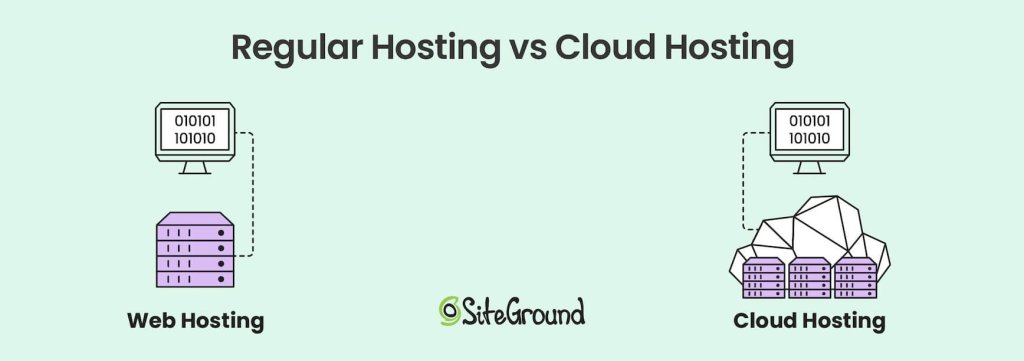
Cloud hosting is a modern web hosting model that utilizes multiple virtual servers. Instead of relying on a single physical server, it operates within a cloud computing environment, where resources are pooled from a network of interconnected physical servers, known as the “cloud.”
Through cloud hosting solutions, businesses can access computing power, storage, and hosting services without the limitations of physical infrastructure.
Cloud hosting has become especially popular for its scalability, flexibility, and cost-effectiveness.
How Does Cloud Hosting Work?
Cloud hosting works by using virtualization technology, which connects physical web servers and divides them into multiple virtual machines.
These virtual servers can be configured and allocated based on the needs of each business, providing dedicated resources without the need for separate physical infrastructure.
The cloud hosting environment is a complex network of servers located in data centers across multiple locations.
Both in shared and dedicated web hosting, a website relies on a single physical server. However, with cloud hosting, if one server fails, another server in the cloud network seamlessly takes over.
This system provides high availability and minimal downtime for websites.
1. The Role of the Hypervisor
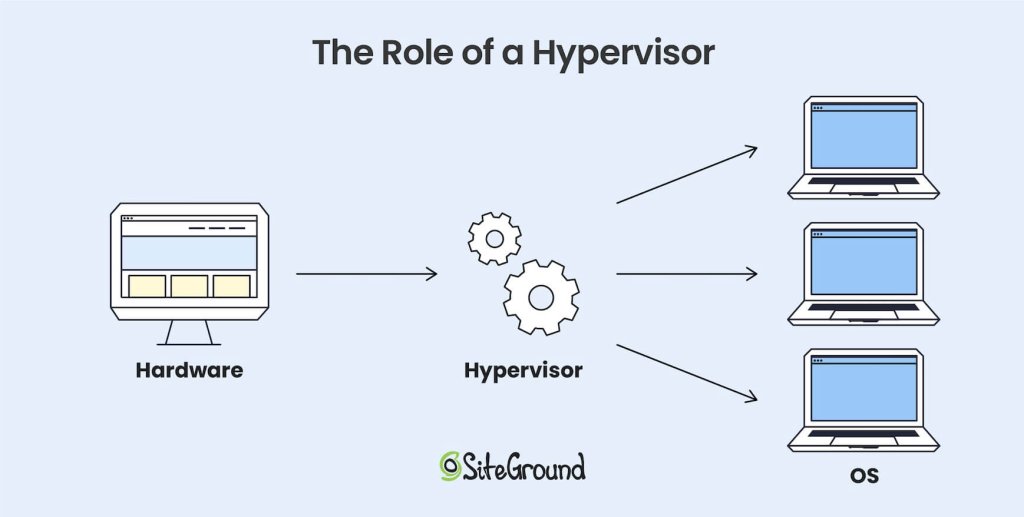
The hypervisor is a type of software installed on physical servers that controls the creation of virtual machines and distributes resources to them. It connects physical servers, turning them into virtual resources that work as a single unit.
The hypervisor is a critical component in virtualization and manages this setup. It ensures that each cloud server operates independently.
This gives cloud hosting providers the ability to dynamically allocate computing resources, maximizing efficiency and performance.
Benefits and Key Features of Cloud Hosting
1. Scalability and Flexibility
One of the biggest advantages of cloud hosting is that it offers scalable resources. With cloud hosting services, businesses can easily scale their resources up or down based on demand, without the limitations of a single server’s processing power.
This makes cloud hosting a great choice for websites experiencing fluctuating traffic or seasonal spikes.
2. High Uptime and Reliability
Cloud hosting offers exceptional reliability because websites are hosted on multiple servers. When a server fails, the system automatically shifts the load to another server in the network, ensuring minimal downtime.
Most cloud hosting providers guarantee uptime percentages of 99.9% or higher, which is particularly important for businesses where website availability is critical.
3. Cost-Effectiveness
With cloud hosting services, the need for costly hardware investments is eliminated. Instead, businesses can rely on a third-party provider that manages and maintains the physical infrastructure.
The pay-as-you-go pricing model in cloud hosting is budget-friendly. It allows companies to avoid upfront expenses and scale their costs according to their actual usage.
This gives flexibility to managed hosting providers like SiteGround. We can dynamically scale resources to meet traffic demands and optimize costs. For end-users, this means SiteGround can offer scalable, high-performance plans with predictable monthly pricing.
4. Security and Compliance
Cloud hosting solutions often come with advanced security measures, including data encryption, firewalls, and strict access control policies.
Leading providers like Google Cloud Platform (GCP) invest heavily in security, offering reliable protections for customer data stored in the cloud. While security risks exist in cloud hosting, reputable cloud providers take proactive steps to mitigate them.
5. Global Accessibility
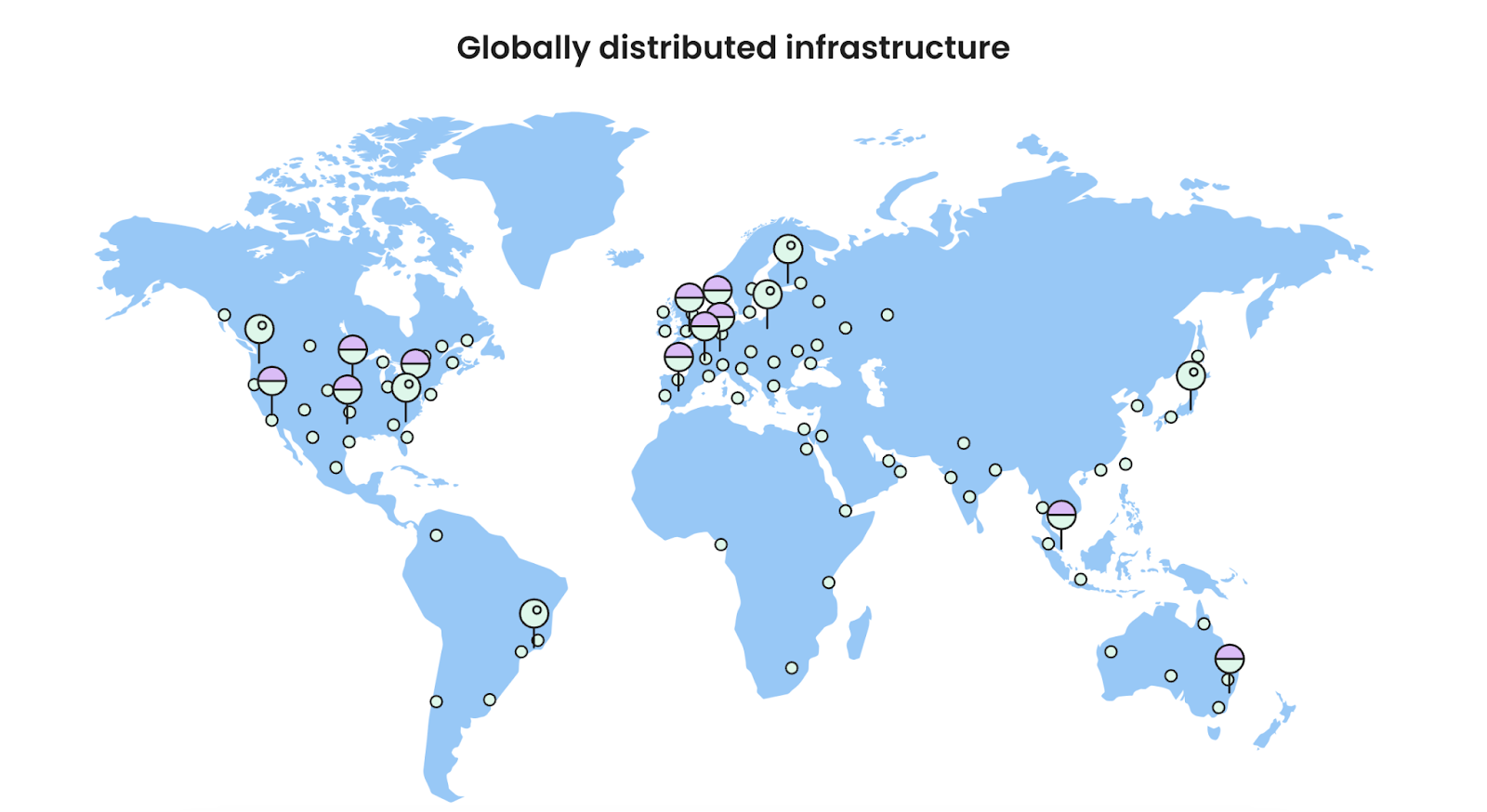
Cloud hosting enables businesses to reach a global audience, thanks to the widespread distribution of data centers. As such, leading providers offer cloud services through a network of data centers that spans multiple regions around the world.
Furthermore, cloud providers offer multiple data center locations, enabling companies to host data closer to their target audience for faster load times and optimized performance.
We currently offer hosting services in 11 data centers on four continents, and also have an in-house built CDN system with close to 20 CDN locations and multiple CDN edges.
Who’s Cloud Hosting Best For?
Cloud hosting is versatile, so it’s suitable for various applications and businesses.
Small and Medium Businesses (SMBs): Cloud hosting’s scalability and cost-efficiency make it ideal for SMBs looking to grow without substantial upfront investments.
High-Traffic Websites and Ecommerce: Websites that need increased processing power, traffic capacity, and disk space benefit from cloud hosting’s resource flexibility and better performance.
Web Development Agencies: Agencies with multiple clients and projects can leverage cloud hosting to streamline management across different websites.
Enterprise Applications: Companies that need extensive computing resources for analytics, artificial intelligence, or large-scale applications can achieve this more affordably with cloud hosting solutions.
Types of Cloud Hosting
Cloud services can be categorized into four different types of hosting. Each type uses different technologies for backend management and resource allocation.
1. Public Cloud
In a public cloud setup, a third-party provider supplies all the servers, resources, and management. Businesses don’t need to own physical servers – they scale resources on demand, and develop custom features on top of the public cloud infrastructure.
Common examples of large-scale public cloud providers are the Google Cloud Platform (GCP), Amazon Web Services (AWS), and Microsoft Azure.
2. Private Cloud
A private cloud is managed and hosted by the business itself. All servers, storage, and resources are owned in-house, which gives full control, but requires managing the infrastructure.
Financial institutions or government agencies may use a private cloud setup for compliance, enhanced security, and full control over sensitive data handling.
3. Hybrid Cloud
Hybrid clouds combine private and public clouds, allowing businesses to store some data privately and use third-party resources for other needs. This approach supports flexible data and application handling.
4. Managed Cloud
A managed cloud is a public cloud where the provider takes care of operations, from monitoring to security and performance optimizations. This model is great for companies that want cloud power but prefer to focus on core business, not backend IT management.
SiteGround offers managed cloud hosting plans that are built on top of GCP’s infrastructure. This means that while clients benefit from the scalability and reliability of Google Cloud Platform, they are also provided with additional support, custom features and management tools from SiteGround.
Choosing a Cloud Hosting Provider
Selecting the right cloud hosting provider is essential to get the most out of cloud hosting. Here are some key factors to consider:
Performance and Reliability: Look for providers with high uptime guarantees, efficient cloud infrastructure, and reputable data centers.
Scalability: Ensure the provider offers easy scaling options to support your business growth.
Pricing Models: Compare pricing structures and choose a hosting plan that aligns with your budget and expected usage.
Security Measures: Evaluate the provider’s security offerings, such as encryption, firewalls, and compliance with industry standards.
Customer Support: Reliable, 24/7 customer support is critical, especially if you lack in-house technical expertise.
Many cloud hosting providers offer trial plans or flexible pricing options, which can help you test out their services before committing.
1. Why Choose a Managed Cloud Hosting Provider for Your Website?
Using a large-scale public cloud provider like GCP or AWS can be cumbersome from a technical standpoint. While it’s less involved than setting up a private cloud network, it still requires a lot of expertise to utilize public cloud services for website hosting.
For most users, a managed cloud hosting plan is the best choice. SiteGround has invested a lot of time and resources in optimizing their cloud servers, offering performance, security and management features that allow users to focus on their site and business.
The main benefits of SiteGround’s Managed Cloud Hosting are:
Expert Support and Maintenance: 24/7 support and proactive monitoring to keep your site running smoothly.
Enhanced Security: Built-in security features, regular updates, and compliance support.
Optimized Performance: Load balancing, autoscaling, and uptime guarantees for reliable site performance.
Cost Efficiency: Predictable pricing, optimized resource use, and no hardware costs.
Scalability: Seamlessly adjust resources to handle traffic growth or fluctuations.
Simplified Management: Focus on your business while we handle the technical backend.
Cloud Hosting vs Other Hosting Types
Cloud hosting can be distinguished from other hosting models, like shared hosting, VPS hosting, and dedicated hosting in a variety of ways – let’s explore how.
1. Cloud Hosting vs. Shared Hosting
Shared hosting is an entry-level hosting solution where multiple websites share resources on a single server. While cost-effective, it lacks the scalability and reliability of cloud hosting.
Cloud hosting, on the other hand, allows websites to draw from a large pool of resources across multiple servers.
For growing businesses, cloud hosting is preferable as it offers more computing resources and flexibility.
2. Cloud Hosting vs. VPS Hosting
Virtual Private Servers (VPS hosting) provide dedicated resources on a shared physical server. While it offers better performance than shared hosting, VPS is still limited to a single physical server.
Cloud servers provide enhanced scalability and resilience, as they aren’t confined to a single server. Cloud hosting works by allowing resources to scale dynamically based on demand, whereas VPS has more rigid limitations.
3. Cloud Hosting vs. Dedicated Hosting
Dedicated hosting gives exclusive access to a dedicated server for a single customer. Although this offers the highest level of control, it comes at a higher cost and lacks the flexibility found in cloud hosting.
For example, if you are on a dedicated server and need to upgrade your CPU or RAM memory, the process must be done manually by someone with the necessary expertise, and physical access to the machine.
In contrast, cloud hosting providers deliver similar performance but with the added benefits of resource scalability, making it a more cost-effective solution for many businesses.
Get Started with Cloud Hosting Today!
Cloud hosting provides a combination of scalability, performance, and security that’s hard to match with traditional web hosting models.
Whether you’re running a high-traffic website, managing multiple client projects, or looking for a way to grow your website, cloud hosting solutions can offer you the necessary tools and resources.
Using a managed cloud hosting service can take your website or online business to the next level. Reach out to our sales team if you wish to learn more!
If you’re just starting your website or online project, you probably have many questions about hosting. You may have heard about the popular WordPress application and wondered: What is WordPress hosting, and is it the right choice for my website?
In this article, we’ll answer all your questions, help you decide if WordPress hosting is the best fit for your needs, and guide you on what to look for when navigating the wide range of WordPress hosting providers and options available.
But first, let’s clarify what WordPress is.
What Is WordPress?
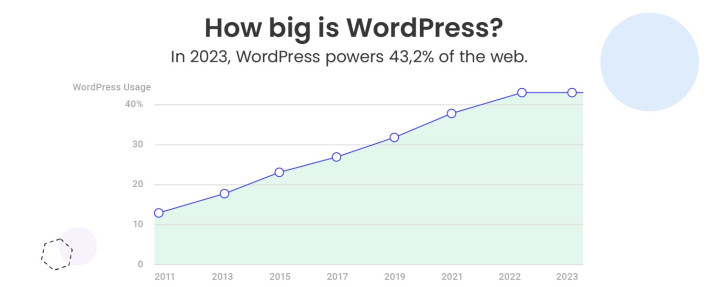
WordPress is the most popular Content Management System(CMS), currently powering over 40% of all websites on the internet. But why is it so popular?
WordPress is an intuitive, open-source platform that’s incredibly easy to use, even if you have no technical expertise. It allows you to create a high-quality website, whether it’s a simple blog, a complex online store, or a portfolio. Thanks to its flexibility, WordPress can cater to a wide range of needs and is perfect for both beginners and experienced web developers.
Another reason behind WordPress’s success is its large and supportive community. From tutorials and forums to plugins and themes, there’s a wealth of resources available to help you build and customize your site with ease.
Now, what is hosting and how does it relate to WordPress?
What Is WordPress Hosting?
In simple terms, it is a type of hosting specifically optimized to meet the unique technical requirements and performance needs of the WordPress application. Hosting providers specialized in WordPress hosting typically offer customer support, as well as additional or even custom-built features and solutions designed to enhance the speed, security, and functionality of WordPress sites.
WordPress hosting plans typically include performance enhancements, such as server configurations optimized for WordPress, caching mechanisms that speed up loading times, and seamless integration with content delivery networks (CDN) to further improve load speed.
Security is another cornerstone of WordPress hosting. Providers often include automated updates for WordPress core files, plugins, and themes, ensuring your site stays protected against vulnerabilities. Many hosts also implement advanced measures like custom firewalls, malware scans, and backups, all fine-tuned for WordPress websites to ensure higher security.
Additionally, with WordPress hosting you often get tools like one-click installations, which simplify the website setup process, as well as staging environments that allow users to experiment with new website designs, features, and code without risking their live site.
WordPress Hosting vs. Web Hosting
When it comes to web hosting, there’s often some confusion, especially for those new to building websites. The terms can seem interchangeable, but they aren’t always. Let’s break it down to help you understand the difference between WordPress hosting and Web hosting.
Generally speaking, there are different types of web hosting that could be categorized based on two factors:
server setup (shared, VPS, cloud, and dedicated hosting)
services provided on top of the server setup (unmanaged or managed hosting)
Web hosting, on one hand, is a broad, umbrella term that could be used for any type. And since web hosting is a general term, it can also refer to specialized hosting services tailored for specific applications – like WordPress hosting.
And here’s the key point: any type of web hosting – shared, VPS, cloud, or dedicated – can be considered WordPress hosting if it’s designed for WordPress. For example, many managed WordPress hosting plans are built on shared hosting infrastructure, but they come with additional features and optimizations to enhance performance, security, and ease of use for WordPress users.
What Is Managed WordPress Hosting Used For?
WordPress hosting is perfect for users planning to use WordPress as their Content Management System (CMS). If it’s your platform of choice, opting for hosting specifically designed for WordPress is highly recommended.
Creating a website with WordPress has never been easier, especially with managed WordPress hosting. This type of hosting is widely used for websites of all sizes and purposes due to its simplicity and efficiency. This includes online stores, blogs, personal websites and portfolios, business sites, membership platforms, non-profit organizations, educational websites, and more.
Managed WordPress hosting has become a popular choice among webmasters because it allows you to focus on the important aspects of your business, such as content creation, SEO, and driving site traffic, without having to worry about the technical details of server management.
The real difference in the services you receive for your WordPress site, however, depends on the value-added features included in your hosting plan and the host’s infrastructure. But don’t worry, we’ll dive deeper into this topic later in the article.
[106]
Managed WordPress Hosting: Benefits and Key Features
Now, let’s explore Managed WordPress hosting a bit further and take a look at the main advantages it offers.
Effortless and Stress-Free Maintenance
Managed WordPress hosting is designed to remove the tedious task of maintaining your website. With a managed plan, you can say goodbye to the headaches of installing updates for WordPress, its plugins and themes, handling server configurations and optimizations, and adding security patches.
Your hosting provider takes care of all the technical tasks, ensuring your site remains secure, up-to-date, and performing at its best, so you don’t have to lift a finger.
Perfect Hosting Environment for Your WordPress Site
With managed WordPress hosting, you’re ensuring that your website operates in the ideal environment designed specifically for WordPress. Unlike generic hosting plans, managed WordPress hosting offers a platform tailored to the needs of the CMS, providing a streamlined and efficient experience.
This means your site benefits from a hosting setup that’s fine-tuned to optimize performance, reliability, and overall functionality. Reputable WordPress hosting providers ensure that everything is configured to make sure your WordPress site runs smoothly and is always ready to perform at its best.
Optimized Performance, Tougher Security, and Up-To-Date Software
With managed WordPress hosting, the environment is specifically optimized for WordPress, ensuring your site performs at its best. This optimization leads to faster loading times, which is crucial not only for delivering an exceptional user experience but also for improving your website’s SEO rankings. Search engines like Google prioritize fast-loading sites, so this is a key factor in helping your website rank higher and attract more traffic.
Additionally, managed WordPress hosting offers enhanced security. Since your hosting provider handles all updates and maintenance, your WordPress software will always be kept up-to-date, which is essential for protecting your site. Regular updates often include important security patches and bug fixes that help keep your website safe from potential threats.
Furthermore, some reputable hosting providers offer custom security solutions, adding an extra layer of protection to safeguard your WordPress site from malicious attacks.
Saves You Time to Focus on Business
As we’ve mentioned, managed WordPress hosting frees you from the time-consuming tasks of maintaining and managing your website. With these technical responsibilities handled by your hosting provider, you can dedicate your time and energy to crafting engaging content, working on email marketing campaigns, and ensuring a seamless, enjoyable experience for your visitors. This gives you the freedom to grow your site and focus on your business, without getting overwhelmed by doing server management.
Customer Support
One of the major advantages of managed WordPress hosting is the customer support that comes with it. When you choose a hosting provider that specializes in WordPress, their support team is generally much more knowledgeable about that particular platform and its specific needs.
With managed WordPress hosting, you’re more likely to receive quick, accurate, and expert assistance when you have questions or encounter issues with your website. However, it’s important to note that not all WordPress hosting providers offer the same level of support.
While many providers may claim to specialize in WordPress, the quality of their support can vary significantly. That’s why it’s crucial to do your research and choose a hosting provider known for excellent customer service. Don’t worry, we’ll guide you on how to make the right choice when selecting a WordPress hosting provider further down in the article.
Quick Website Setup and Ease of Use
Another benefit of using managed WordPress hosting is that setting up your WordPress site is quite easy and fast. Most managed WordPress hosting providers offer WordPress auto-installers that you can use to configure WordPress with your domain in just a few clicks.
These tools simplify what might otherwise be a complex process, allowing even beginners to get their websites up and running quickly with no tech skills. Within minutes, you can have a fully functional WordPress site ready for customization. This ease of setup makes managed WordPress hosting an ideal choice for small business owners and freelancers who want to focus on building their site rather than dealing with technical details.
Expandable and Scalable
If you’re planning on growing your website, managed WordPress hosting is an excellent option. One of the major advantages of this type of hosting is its scalability. As your site expands in scope, most WordPress hosting providers make it easy to scale up by offering simple hosting plan upgrade options to ensure it can handle higher traffic without problems.
Additionally, WordPress benefits from a vast community of developers who create plugins and themes that extend the platform’s capabilities. If you need specific features like ecommerce capabilities, membership systems, or SEO tools, you can quickly find plugins that integrate seamlessly with WordPress.
Many managed hosting providers offer support for these plugins, ensuring that your site remains fast and responsive even as it grows. The ability to scale both in terms of resources and functionality is a huge plus for businesses looking to expand and grow.
Is Managed WordPress Hosting Right for You?
With all the advantages outlined above, it’s clear that managed WordPress hosting is the best option if you plan to use WordPress as your content management system (CMS). Whether you’re creating a personal blog, an ecommerce site, or a business website, the specialized features of managed WordPress hosting are tailored to the platform’s needs.
However, it’s also essential to evaluate your website’s current and future needs. If your project involves a platform other than WordPress or requires total control over server configurations, you may want to explore other hosting options. But, for the vast majority of WordPress users, managed hosting offers unparalleled convenience and peace of mind.
How to Choose the Right Managed WordPress Hosting Provider
If you’ve decided that WordPress hosting is the right fit for your website, that’s a fantastic start! However, with so many hosting providers out there, choosing the right one can be overwhelming. In this section, we’ll guide you through the key factors to consider to make a smart and informed decision.
1. Speed and Performance
When choosing a managed WordPress hosting provider, one of the most critical factors to consider is website speed and performance. Website speed not only affects user experience but also has a direct impact on your SEO ranking. Search engines like Google prioritize fast-loading websites, so if your site takes more than 2-3 seconds to load, you risk losing visitors and increasing your bounce rates. A slow site can lead to frustrated users and fewer sales, making it essential to select a hosting provider that prioritizes speed.
Look for a hosting company that uses a reliable network and has servers specifically optimized to deliver top-notch performance for WordPress sites. The best providers ensure your website is supported by powerful hardware, like fast SSD drives to store website data, and offer services or tools such as caching or content delivery networks (CDNs) to speed up load times.
At SiteGround, for example, we leverage the Google Cloud platform, which provides exceptional speed and reliability. We also provide a widespread and highly available network with multiple data centers across four continents. Our cutting-edge SSD technology helps store your files and databases more efficiently, and we improve performance even further with custom solutions like Ultrafast PHP and MySQL implementations. Additionally, we offer a free CDN and built-in caching to further enhance speed. To make things even easier, our free Speed Optimizer plugin delivers a significant performance boost, ensuring that your WordPress site loads faster and operates more efficiently than ever before.
Security is another key factor to keep in mind when selecting a WordPress hosting provider. Your website’s security is essential in preventing malicious attacks, keeping your data safe, and ensuring the trust of your visitors.
With the rise in cyber threats, it’s crucial to choose a provider that goes beyond basic security measures. While managed WordPress hosting already includes automatic updates for WordPress software and plugins, look for a hosting provider that offers additional layers of protection.
For instance, at SiteGround, we take security seriously and provide several advanced features to keep your website safe. These include a free SSL certificate to encrypt your site’s data, automated daily backups to ensure you can quickly recover from any disaster, a built-in WordPress Security Plugin, a smart web application firewall that blocks harmful traffic before it reaches your site, and an AI system that detects and stops brute-force login attempts.
3. Customer Support
Having access to responsive, knowledgeable, and friendly customer support is a significant advantage for you as a website owner. You want to make sure that when you run into issues or need guidance, you’re able to quickly reach a team that can help you with WordPress-specific questions and concerns. Since most managed WordPress hosts provide customer support, it’s important to evaluate the quality of that support before committing to a plan.
To ensure you’re choosing the right provider, do some research first. Look for customer reviews and testimonials to get a sense of the support quality, check out their response times, the expertise of the team, and their overall helpfulness. If possible, contact their support team directly before purchasing hosting. This can give you insight into how quickly they respond and how well they communicate.
4. Scalability for Growth
When considering WordPress hosting, scalability is a critical element to ensure your website can grow as your business expands. As your site attracts more visitors, it’s crucial to have a hosting provider that can accommodate increased traffic and resource demands. Scalable hosting solutions allow you to easily upgrade your plan or adjust server resources as needed, preventing performance slowdowns during traffic spikes.
Before committing to a hosting provider, it’s a good idea to reach out to their support team and inquire about their scalability options. Ask if they offer flexibility in upgrading your plan or server resources as your site grows. Renowned providers will offer seamless upgrades to handle increased traffic, ensuring that your website remains responsive and efficient without downtime or performance issues.
5. Pricing and Value
The cost of your managed WordPress hosting plan is, of course, important. However, don’t focus solely on the website hosting cost, it’s crucial to also evaluate the full package you’re getting. These add-ons can make a significant difference in your site’s performance, security, and overall success.
When thinking about your budget, it’s important to strike the right balance between price and the value-added services that come with the plan. Don’t be tempted to cut corners by opting for the cheapest option, as it may lack vital tools and features that could ultimately impact your site’s operation.
Even paying a bit more can prove to be a wise investment, especially when you need added reliability or security in times of unexpected issues. A few extra dollars could save you time, headaches, and potentially even revenue down the road.
Choose a Fast and Full-Featured Managed WordPress Hosting for Your Site
To wrap it up, selecting the right managed WordPress hosting provider can significantly impact your site’s speed, security, and success, so make sure to do proper research. SiteGround’s managed WordPress hosting offers all the features and services you need for a high-performance WordPress site, including free WordPress installation, auto-updates, speed and security plugins, staging, backups, SSL, CDN, and more. Ready to see the difference? Try SiteGround today and join millions of satisfied customers!
What Is WordPress Hosting: Frequently Asked Questions
What Is the Difference between WordPress Hosting and Normal Hosting?
“Normal hosting” generally refers to standard web hosting (e.g. shared hosting). The primary difference is that WordPress hosting is specifically optimized for WordPress sites, offering features like pre-installed WordPress, automatic updates, and enhanced performance. In contrast, “web hosting” is a broad category that includes various types of web hosting (shared, cloud, VPS, dedicated) without specific optimizations for WordPress. WordPress hosting ensures a tailored environment for smoother performance and added benefits.
Is WordPress Hosting Free?
While the WordPress software is free to use and download, hosting your WordPress site requires a paid hosting service. The cost will depend on the plan you choose. While some providers offer free hosting, these often come with restricted features, limited storage, and reduced performance. For a seamless, professional WordPress hosting experience, investing in a paid plan is advisable, as it ensures enhanced speed, security, and professional customer support.
Do I Need Hosting with WordPress?
Yes, WordPress is a content management system (CMS) that allows you to create and publish content. However, it requires a server and, by extension, hosting to store your website’s files and make them accessible online.
Having a website is essential for businesses, bloggers, and anyone looking to establish an online presence. However, before you can create a website, you need a place to store your site’s files so that people can access them over the Internet.
This is where web hosting comes in. One of the most popular and cost-effective hosting options available is shared hosting.
In this article, we’ll explore what shared hosting is, how it works, and why it might be the right choice for your website.
What Is Shared Hosting?
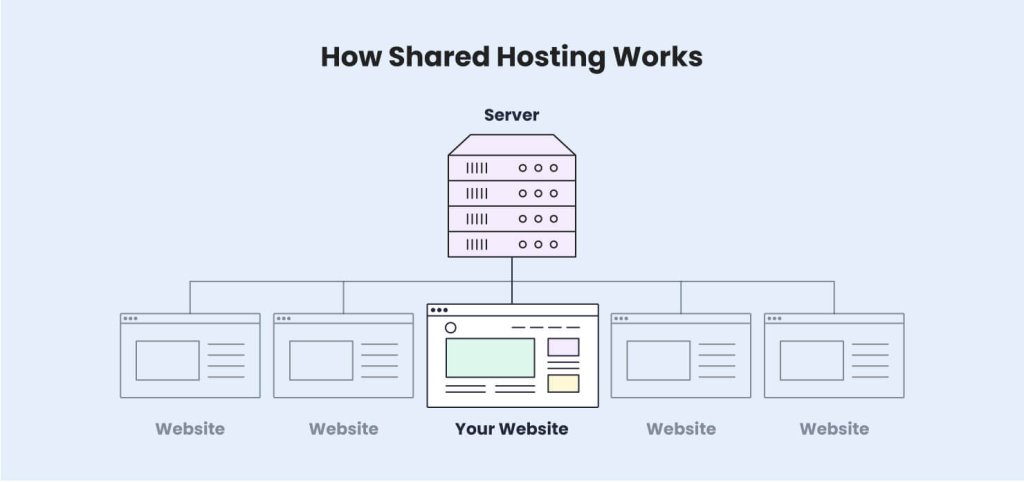
Shared hosting is a type of web hosting service where multiple websites are hosted on a single physical server. Each website shares the server’s resources (such as CPU, RAM, storage, and bandwidth), with other websites.
With shared web hosting, the hosting provider takes care of server maintenance and security, so it is an ideal choice for beginners. A shared hosting service is often the best entry-level option for individuals (freelancers, bloggers, etc.) and small businesses. It offers an affordable way to get started online without the need for technical expertise or a complicated setup.
How Does Shared Hosting Work?
In a shared hosting environment, a single physical server is partitioned into multiple spaces, and each of these spaces is allocated to different users.
The hosting provider sets up a server and installs the necessary software, including an operating system, web server software, and a control panel. They divide the server’s resources into smaller units, which are shared by multiple users.
Additionally, the web host manages the server, taking care of maintenance tasks such as software updates, security patches, and monitoring. This centralized management is one of the main reasons shared hosting is popular among beginners – it reduces the need for technical knowledge, as all of the backend work is handled by the provider.
Since all websites are on the same server, they share the overall processing power and bandwidth. This is why hosting providers set per-user limits for CPU seconds usage, disk space, and memory. However, this should not worry you! Shared plans can handle tens or even hundreds of thousands of visits.
These restrictions are there so that it’s not possible for one user to negatively impact the performance of the whole server and the other sites hosted on it.
Pros and Cons of Shared Hosting
Shared hosting is a great fit for many website owners. Naturally, the lower cost also comes with some downsides you should consider when evaluating different web hosting plans. We’ll take a closer look at the pros and cons of shared hosting providers below.
1. Advantages of Shared Hosting
1.1. Cost-Effective
The main benefit of shared hosting services is the price – it is significantly less expensive than cloud hosting or a dedicated server. Since all users are sharing one high-powered server, they are also sharing the total cost of that machine. This allows web hosting companies to offer better prices, focus on server maintenance, and implement custom add-on features for users at a low cost.
1.2. Ease of Use
As opposed to VPS, cloud or dedicated hosting, where you are responsible for the technical setup of your server, shared hosting is usually fully managed by the hosting company. Most providers offer a control panel that allows you to easily upload files, manage FTP accounts, and add domain-related features like SSL certificates. This means you do not need to have any technical expertise to host a site, and you would never have to worry about system administration or command lines.
1.3. Maintenance-Free
Another benefit of shared hosting is that your web hosting company is responsible for the backend management of your server. This includes performance and security optimizations, and updates to application and database servers. This allows website owners to focus entirely on their business and website content.
1.4. Scalability
Small businesses can easily scale their accounts by upgrading to a higher plan. Even though you are sharing a server with other users, most providers offer upgrade options so you can increase your resource allocation significantly.
Most top-level shared plans can handle up to several hundred thousand visitors per month. The exact capacity and limitations vary depending on how well a hosting provider has optimized their web servers.
At SiteGround, we offer seamless upgrades between shared hosting packages. The process is fully automated, and does not involve any downtime or DNS changes for your domain name.
2. Limitations of Shared Hosting
2.1. Resources
This point is especially important for sites that are getting more than 500,000 visits per month. If your website’s audience is growing and you start getting more web traffic, you may hit some of the resource limitations of your shared plan. As a result, your websites could be suspended until the issue is addressed.
As we mentioned, these limits are there to ensure the stability of the server, so this may be a sign that you need to either optimize your site, or upgrade to a higher plan with more capacity.
2.2. Potential for Slower Speeds
While there are many technologies in place to prevent abuse, it is possible to experience poor performance if something goes wrong with the shared server. If another site overloads the whole server, it would affect the loading speed of your own website. This does not happen often but is possible given there are multiple users sharing the same server environment.
If this is a concern, consider having your website on a different type of hosting plan, such as a cloud server. There, you have your own dedicated set of CPU, RAM memory, and disk space. This would give you the peace of mind that no other user can affect your site and resource usage.
2.3. Less Customization
Using a managed shared hosting environment means you do not have root access to your server and cannot install server software on your own.
Usually, it’s not possible to request such a customization from your provider, because any changes done for you by the web host would also affect other users sharing the same server.
This is more relevant for larger online businesses and complex website applications that require different layers of technology in order to function properly. In such cases, the owners employ technicians that are fully responsible for setting up, customizing, and maintaining dedicated servers.
2.4. Security Considerations
While hosting providers take measures to ensure security, the shared environment means that vulnerabilities on one website can potentially affect others on the same server. If one site gets hacked or infected with malware, there is a higher risk that other sites could be impacted as well. This is why it’s crucial to keep your website software up to date and to implement additional security measures.
Server-level security can vary significantly across different providers. At SiteGround, we offer 24/7 monitoring, advanced Firewall protection, and DDoS protection to make sure your site is well-protected.
Our Security Optimizer for WordPress sites is a great way to increase your application-level security and prevent any issues with malware.
Who Should Use a Shared Hosting Server?
Shared hosting is an excellent choice for individuals, bloggers, and small businesses.
It is also a great solution for personal projects, portfolios, and smaller eCommerce stores that do not require large-scale operations or custom configurations.
Since the hosting provider manages the technical setup, users with little to no technical experience can use shared hosting without any difficulties.
In essence, it’s the best option for almost everyone, unless you’re running a highly customized site or have an exceptional amount of traffic.
1. When to Consider Other Options
If your website has high traffic, includes complex applications, or requires specific server configurations, shared hosting may not be the best choice.
In such cases, you might want to explore cloud hosting, or dedicated hosting options that provide more control and flexibility. These options are also better suited for larger businesses or ecommerce platforms with significant data and customer management needs.
How to Choose the Right Shared Hosting Plan
1. Performance and Reliability
When selecting a shared hosting plan, make sure to check the provider’s uptime guarantee and performance optimizations. A reliable hosting service should offer consistent server uptime (ideally 99.9% or higher) to ensure your website remains accessible to visitors. They should also offer other technologies to reduce server load and optimize performance. This includes caching, custom application layers, and optimized database servers.
Since shared hosting is mainly targeted at smaller websites and beginner users, it is highly important to choose a provider that has a strong customer service team and a good reputation for the support they offer.
Make sure your hosting provider offers 24/7 support via chat, phone, or ticket so you can get assistance whenever you need it.
SiteGround offers support via chat, phone, and a ticketing system. There is also a rich Knowledge Base and an AI assistant to help you with any questions regarding your shared hosting package.
3. Scalability Options
Manual migrations to other platforms are a hassle that most people do not know how to deal with.
No website owner wants to feel stuck with a limited provider so it’s essential to pick a web host that allows you to upgrade to a higher plan if your website starts growing. Check if the provider offers easy upgrades so you can smoothly scale your online presence as your business grows.
4. Security Features
Security is crucial, especially on a shared server where multiple users are hosted together. Look for hosting providers that offer SSL certificates, firewalls, DDoS protection, and regular security patches. Some hosts also offer automated backups, which can be a lifesaver if something goes wrong.
We offer free SSL certificates, 24/7 monitoring, an AI firewall, and daily backups for all plan tiers.
5. Price vs. Features
Evaluate the price of the hosting plan in comparison to the features offered. While shared hosting is generally affordable, some plans may have extra perks like one-click installations, built-in caching, and free domain registration. Ensure you’re getting the best value for your money by comparing features and customer reviews.
Also, check if they offer a money-back guarantee, so you have enough time to get familiar with all the available tools and test the service.
Get Started with Shared Hosting Today!
Shared hosting is an accessible and affordable way to build your online presence, whether you’re launching a blog, setting up an online store, or starting a portfolio site.
By choosing the right hosting provider, you can get your website up and running quickly without worrying about the technical aspects of server management.
Take advantage of the features that shared hosting offers, and as your site grows, you’ll have options to scale up seamlessly. Ready to get started? Check out our recommended shared hosting plans and kickstart your online journey today!
Your online business success relies heavily on your website. That’s why it’s important to choose the right web hosting plan for your site. But where do you begin research for your website hosting costs if you’ve never hosted a website before or need up-to-date information?
In this guide, we will go over the most popular types of hosting, their average prices, and what type of website they are most suitable for. We’ll also cover some additional hidden expenses that you need to consider before hosting your website. At the end of this guide, you will be able to make an informed decision about your website hosting.
What is the average website hosting cost?
Average website hosting costs range from $2 to $500 per month. They will depend on the type of web hosting necessary for your website. Each type of hosting comes with different server configurations and resources, such as CPU, RAM, and disk space. Depending on these, the website hosting price varies, and each web hosting type is suitable for different types of websites.
Let’s explore the various types of hosting to determine which one best fits your needs.
Shared hosting
With shared web hosting, you get to share a server’s resources, such as storage, bandwidth, and processing power, with hundreds or thousands of other websites.
The average cost on a shared web hosting plan starts between $2 and $15 per month, and increases to around $10–$40 per month upon renewal.
A shared web hosting plan is designed to suit the needs of a blog or portfolio website, as well as a small business website. Shared web hosting is a great fit for beginners, all the way up to more advanced business owners, too. It’s one of your best options, not only because it’s the cheapest type of web hosting, but it provides you with many benefits – e.g. no advanced technical knowledge and skills required, plus additional, essential features.
With SiteGround shared hosting plans, you get to choose from three different plans, depending on your website’s needs and requirements. On top of that, each of these shared web hosting plans comes with key features, such as an SSL certificate, email business account, daily backups, and other benefits included at no additional cost.
Here are some specific subtypes of shared hosting:
Managed WordPress hosting
Managed WordPress hosting is shared hosting that’s specifically optimized for WordPress website owners. This type of hosting provides an extra layer of convenience, as the web host takes care of WordPress updates and offers additional perks, such as speed and security boosts.
The cost of WordPress website hosting is roughly the same as the shared hosting price – but managed hosting costs vary, as some hosts may charge extra for the additional software support. With SiteGround, Managed WordPress hosting plans provide all the extra perks for WordPress users, yet the price remains the same as for the shared web hosting, ranging between $2.99 to $7.99 per month.
Managed WordPress hosting is suitable for a blog, hobby website, small business website, or any site built on WordPress content management system.
WooCommerce hosting
WooCommerce hosting is a popular plugin for WordPress. To build an online store, you need both WordPress and WooCommerce installed. WooCommerce hosting includes both of them preinstalled, while also providing additional features to help you sell different products or use various payment gateways. What’s more, WooCommerce hosting may require more server resources for proper website functioning. That’s why WooCommerce hosting may be more expensive than Managed WordPress hosting, which starts at around $4–$9 per month to $19–$30 per month, but in some cases it can go higher. With SiteGround, WooCommerce hosting comes at the same price as Managed WordPress hosting.
VPS hosting
VPS hosting stands for virtual private server, where a single physical server is divided into several virtual servers. With VPS hosting, users still share server space with other websites, but these websites are fewer. This allows for stronger security and the ability to manage higher traffic volumes, while also having more control over the hosting environment.
VPS hosting is best suited for growing websites that have higher traffic and large amounts of data. For example, most shared web hosting plans can handle up to ~500,000 monthly visits. If you regularly exceed that monthly capacity, or you simply need unlimited bandwidth, you might want to consider upgrading to VPS hosting. Bear in mind, though, that with VPS hosting, having control over your hosting requires you to be technically proficient in order to be able to maintain your server configuration.
The average monthly VPS website hosting fees range from $20 to $100, where the price varies due to the provided RAM, CPU, and SSD storage on the server.
Cloud hosting
Cloud web hosting is the superior and more expensive alternative to VPS hosting. It consists of multiple servers connected in a network that host your website. Its main advantages include better scalability and reliability, greater uptime, and faster loading times.
Thus, cloud web hosting fees start at a higher price than shared hosting. For instance, cloud hosting plans begin at $30 per month and can reach up to $400 per month on the high end. SiteGround cloud hosting offers flexible plans, allowing you to grow your business to the next level anytime.
Cloud hosting is best for medium and large business websites, as well as small business websites that expect to grow at a fast pace.
Dedicated hosting
Dedicated hosting provides the user with an entire physical server solely for their website. This allows for complete control over your website, as well as higher performance and stronger security. With complete control comes complete responsibility, though. A dedicated server will require you to have extensive knowledge about server maintenance, while technical support from your hosting provider will be limited.
Dedicated hosting is the most expensive hosting option available. Its price generally starts at around $100 per month, reaching up to around $500 per month.
If you have a large-scale website that generates high amounts of traffic and consumes many resources, you may think about purchasing dedicated hosting. For example, a large online store, a multimedia-based website, or a website with large amounts of data.
Reseller hosting
Have you ever considered making money off of hosting yourself? With reseller hosting, you get to rent server space and hosting services in order to resell them to others. A good hosting provider should offer you tools and services that make reselling easy for you, e.g. white labeling, easy setup, affordable prices, and others.
Reseller hosting may cost between $4–$35 per month for shared plans, while the prices will go up if you need cloud reseller hosting. With SiteGround, reseller hosting plans allow you to easily manage your sites and resources, giving you all the necessary tools to do that.
To help you get an overview idea of the above mentioned hosting types and their respective price ranges, here’s a website-hosting comparison table:
Type of Web Hosting
Per Month Price Range (with Annual Subscription)
Upon Renewal Price Range (with Monthly Payment)
Shared web hosting
$2 – $15
$10 – $40
Managed WordPress hosting
$2 – $15
$10 – $280
WooCommerce hosting
$4 – $9
$19 – $40
VPS hosting
$4 – $20
$20 – $100
Cloud hosting
$30 – $100
$25 – $400
Dedicated hosting
$100 – $500
$80 – $700
Additional expenses for hosting a website
Keep in mind that the cost to host a website does not end with paying for a web hosting plan. There are several extra, yet must-have add-ons that you need to calculate in advance in order to have the full picture of your business website hosting costs.
You can read about some of these additional expenses below:
Domain name
A domain name is the web address of your website, which is easier to remember and enter in the browser than its IP address. For example, your domain name can be something like mycatshop.com, while its IP address will be a difficult-to-remember combination of numbers.
Having a domain name for your website is a basic paid necessity. There are different ways to buy a domain name. You can buy one from a domain name registrar (for around $10–$30 for common extensions like .com or .net) or your hosting provider.
Some web hosting plans even come with a free domain name registration for the first year, like the current SiteGround limited-time offer. Just pick a domain name and go ahead and register it. Keep in mind that since domain names are paid for on a yearly subscription basis, you will have to pay your domain hosting price for subsequent years.
SSL certificate
An SSL certificate is a security feature that encrypts all the traffic going through your website and ensures that sensitive data and information (e.g. login credentials, credit card details) remain protected.
Having an SSL certificate is important even if your website doesn’t handle sensitive data. For example, Google prioritizes the ranking of sites with SSL certificates, while some browsers won’t allow users to visit websites without an SSL certificate.
Many hosting providers, like SiteGround, for example, provide SSL certificates for free with their hosting plans. However, some may charge you separately for an SSL certificate. In such cases, it may cost around $10–$1000 per year, depending on the type of SSL certificate and the number of domains it will cover.
Themes and Plugins
If you want to customize the appearance of your website and make it more appealing to users, you will need a theme. To further enhance your website’s functionalities, you may wish to use additional extensions (also called plugins for WordPress, or apps for other platforms).
Let’s explore your options for the above-mentioned extras:
Free vs. paid themes
Themes, or templates, can make a real difference for your website users’ engagement and influence them in their decision to convert. That’s why you’d want to be able to customize your website in a way that corresponds to your user’s expectations and enhance their experience.
You can use a free, pre-selected theme, or you can go for paid, premium themes that allow you to further customize your site.
For instance, there are over 12,000 free WordPress themes that are great for a beginner’s website. The average cost of a paid theme for WordPress can be around $60.
Free vs. paid plugins
As mentioned above, some plugins, or extensions, enhance your site’s functionalities. For example, they allow you to add things like social media integrations, booking appointments, and more. Other plugins are used to increase your website’s security or boost your conversion rates.
For example, WordPress offers over 59,000 free plugins, and premium paid WordPress plugins can start from $5, reaching up to $400.
Marketing tools
Similarly, marketing tools can help you further customize and optimize your website to attract more visitors and turn them into conversions. Let’s explore the most important categories of marketing tools, such as email marketing, search engine optimization, social media marketing, and website traffic analytics.
SEO tools
One of the things that will help you attract more visitors is to have your website rank in top positions in search engine results. For this purpose, you will need an SEO tool that helps you optimize content for search engines by backlinking, analyzing keywords, and allowing you to customize descriptions in search engine results – in addition to other features.
With WordPress, for example, you will need an SEO plugin – a free or a paid one (prices ranging around $100 or more per year). Other SEO tools’ may cost between $100 and $1000 for a monthly subscription.
Email marketing tools
Having successful email marketing campaigns that actually convert leads into customers depends heavily on the email marketing tool you use. Whether you plan to send regular newsletters with educational or informational content, or send special offers and promotions, you need an email marketing tool by your side.
An email marketing tool is usually a third-party service or an extension, paid on a monthly subscription basis or based on your number of subscribers. The costs generally start at around $10 per month.
With SiteGround, you can also take advantage of an easy-to-use email marketing platform that helps you drive growth for your business without the hassles of other hard-to-get-started platforms.
Social media integrations
To increase your website visibility even further, you have to be present on different social media platforms. That doesn’t mean that all of them are relevant to your website’s business or content, but it’s important to have a social media presence.
As such, you need to make it easy for your website visitors to share your content on social media or follow your social media profiles. This may already be built-in via your website builder, but sometimes it might only be available only on premium plans. For example, WordPress users can take advantage of a free plugin, or a paid one that would cost between $20 and $200 per year.
Site traffic analytics tools
Last but not least, it’s important to monitor and analyze your website traffic. Where do most of your visitors come from? How much time do your visitors spend on your site? On which pages? The list of questions you can ask yourself goes on and on.
All you need to answer these questions is a tool that tracks these statistics. For example, some popular ones include Google Analytics, MonsterInsights, and Hotjar.
Some web analytics tools have free versions, while they can also reach up to a few hundred dollars per month.
Add-ons Expenses
Price Range
Domain name
$10 – $30 (usually paid annually)
SSL certificate
Free with most hosting plans ($10–$1000 per year, if purchased separately)
Themes
Some are free ($60 on average for a paid WordPress theme)
Plugins
Some are free ($5 – $400 for paid WordPress plugins)
SEO tool
More than $100 per year on average
Email marketing tool
Start at around $10 per month on average
Social media integration
Some are free ($20 – $200 per year for a paid WordPress social media plugin)
Web analytics tool
More than $100 per month
Website hosting cost FAQs
What is the cheapest website hosting option?
The cheapest website hosting option is to host your website for free with a free hosting platform (for example, GitHub Pages, WordPress.com, and many others). However, such platforms often come with strict limitations in regard to storage space, bandwidth and customization options. You may want to consider paid website hosting for a more advanced website with enhanced features and functionalities.
What features should be included in my web hosting charges?
Your web hosting charges should include essential features to get you started with your website, such as enough storage space; bandwidth and processing power on the server level; free domain name registration or website transfer to streamline your online journey; as well as an email account, SSL certificate, and site backups.
Bear in mind that web hosting plans, and the features included in them, may vary depending on the hosting provider you choose. Look for the above-mentioned features before making your decision, as these can make a difference when it comes to the right web hosting plan for your website.
Is it better to pay for an annual or monthly web hosting subscription?
It’s better to go for an annual web hosting subscription because hosting providers usually provide discounts and savings. At the end of the day, when you calculate your website hosting charges per year, you get to pay a lower price every month in comparison to paying monthly.That said, you may find paying monthly web hosting fees more appealing if you are just starting and unsure about your project in the long run, and/or prefer flexible monthly pay without a long-term commitment.
How do I choose the best website hosting service?
To choose the best hosting service for your website, you need to consider different factors, such as your website’s size, its expected traffic, and general goals, e.g. selling online products. Having said that, the decision does not always come down to choosing the best web hosting prices or simply searching for low-cost website hosting. It’s much more than that.
Once you identify the above-mentioned factors, you also need to consider what type of hosting would be best for your website, what additional features you need, and if they are included in your hosting plan or not.
For example, you may need a business email address, or 24/7 technical support, or a free SSL certificate, free domain name registration to get you started, and other features. All of the above need to be considered before you make an informed decision.
Bottom Line for Your Website Hosting Cost
If you are asking yourself: “How much do I need to host a website?”, you need to be prepared to pay anything within the range of $2 (for a shared hosting plan) up to $500 (for a dedicated hosting plan), plus additional expenses, depending on the add-ons you’d need for your website.
The bottom line is that the total sum you are going to pay for hosting a website will depend on different factors – for example, type of web hosting, subscription period, as well as additional features and tools.
Now that you understand the main types of hosting and their respective average costs, along with the hidden expenses you may expect, you can go ahead and host your website with SiteGround, where there are no hidden costs – everything you might need is included in our hosting plans.
Congrats – you’ve purchased a domain! But now you’re thinking, “ok, I have a domain name, now what?” Indeed, owning a domain is a great first step in establishing an online presence for your business, project, or personal brand. But now that you have one, the question is how to use a domain name? What comes next? This guide will walk you through eight essential steps to help you get your domain up and running, ensuring that you’re set up for success online.
What to Do With Your Purchased Domain
Choosing a domain name is exciting, but turning that purchased domain into a fully functional and professional online presence requires several key steps. Below, we’ll explore what you need to do after purchasing a domain, starting with simple-but-essential steps – like securing social media handles – and then getting into the nitty gritty of creating a website, and more. Let’s get started!
1. Secure Social Media Handles
You’ve got a domain, and social media may not be on your radar just yet – but it should be. Even if you don’t plan on actively using social media right away, securing social media handles that match your domain name is a smart move. Consistent branding across platforms helps maintain a cohesive identity, making it easier for customers to find, recognize, and remember you.
Check availability for your domain name on popular social media sites like Facebook, Instagram, Twitter, and LinkedIn. You can use tools like Namechk or KnowEm to quickly see which handles are available across multiple platforms. Once reserved, these social media accounts will be ready for use whenever you decide to start promoting your brand.
If, however, you find that your name isn’t available, consider getting creative by adding an extra word to the handle name. For example, you could add words like “hello,” “get” or “shop” to the beginning of your brand name. Or, if your business is regionally based, you might consider adding your city or region to the social media handle. By adding an extra word, you’ll have more name options at your disposal. This, by the way, is also a great strategy for choosing a domain name if you find that your first choices aren’t available.
2. Register and Trademark Your Business
If you haven’t already, registering and/or trademarking your business name is a good step to protect your brand legally and reduce the risk of litigation. This process helps prevent others from using your name in ways that could create confusion or harm your reputation, and it also safeguards you from potential legal issues with other businesses that might later claim rights to your brand name. Trademarking and registration requirements vary by country, so it’s best to consult local government resources or legal guidance for accurate information.
3. Plan Your Website
Now it’s time to start thinking about how exactly you want to build your site. You can choose various methods, ranging from website builders to content management systems (like WordPress), and custom coding. Which route you go with will depend on various factors, including your budget, customization needs, and level of tech savviness.
Website builders, for example, typically offer a user-friendly, drag-and-drop approach that simplifies website creation without needing much technical knowledge. Also, many site builders often host your site for you, which means you don’t have to think about web hosting (which we’ll get to in a moment).
All this said, you typically have to pay a monthly fee to publish and use your site, and there are often ongoing costs for extra features. Plus, they typically don’t offer extensive customization unless you pay for added plugins or custom coding.
Alternatively, a content management system (CMS) like WordPress enables users to easily create and customize sites of all kinds – from blogs to online stores – given its vast array of themes, plugins, and tools. While it may require a bit more technical skill, WordPress offers flexibility and scalability, making it a cost-effective choice for a customizable website.
Meanwhile, a custom-built site offers the most unique functionality and design options but comes with higher upfront and ongoing costs, especially if external developers are involved. In both these latter two cases – a CMS and a custom-built site – you would likely need to make a decision around web hosting, which brings us to step 4!
4. Get a Web Hosting Plan
If you don’t use a web-hosted sitebuilder, then you’ll need a web hosting plan in order to bring your website and domain name to life. Hosting provides the servers, storage, and infrastructure required to keep your website files online and accessible to users. Essentially, hosting acts as the foundation for your website, allowing your domain to connect with the servers where your site data is stored so that visitors can view it on the web.
There are several types and combinations of hosting available, including shared hosting, cloud hosting, managed WordPress hosting, and more – each suited to different levels of website traffic, control, and technical needs.
For example, SiteGround offers managed WordPress hosting, which is particularly beneficial for WordPress users seeking ease of use with optimized security, performance, and automatic updates.
Ready to launch your online presence effortlessly? Get started easily with SiteGround web hosting. Enjoy famously fast web speed and performance, backed by multi-level security, and top-rated support. Explore plans now>>
5. Ensure Your Purchased Domain Points to the Right Hosting Servers
Whether you’ve chosen to use a web-hosted sitebuilder, or to buy your own hosting and create a site with a CMS, you’ll need to make sure that your domain directs to your actual site. If you’ve purchased your domain and hosting from the same provider, the setup may already be done for you.
However, if you’ve bought your domain from one provider and your hosting from another, you’ll need to point your domain to your hosting provider. This process, known as “domain pointing,” involves updating your domain’s DNS (Domain Name System) settings to connect it to your website’s files on your hosting server.
To do this, you will need to consult your domain and hosting providers for exact instructions, but the process is generally pretty simple.
Moving a domain is really quite easy – nevermind that the benefits of having a truly top-notch hosting provider make the few minutes it takes to correctly point your domain absolutely worth it.
6. Build a Website
Now to finally put that domain name to work: by building your website! Start by defining your goals – both short-term (like lead generation) and long-term (like brand awareness) – and determine the actions you want visitors to take, as well as how you’ll measure success.
Another important step to take during this process is to spend time identifying your target audience so that you can build your website content to speak directly to them. You’ll also want to establish and round up branding elements, such as your logo, color scheme, typography, etc.
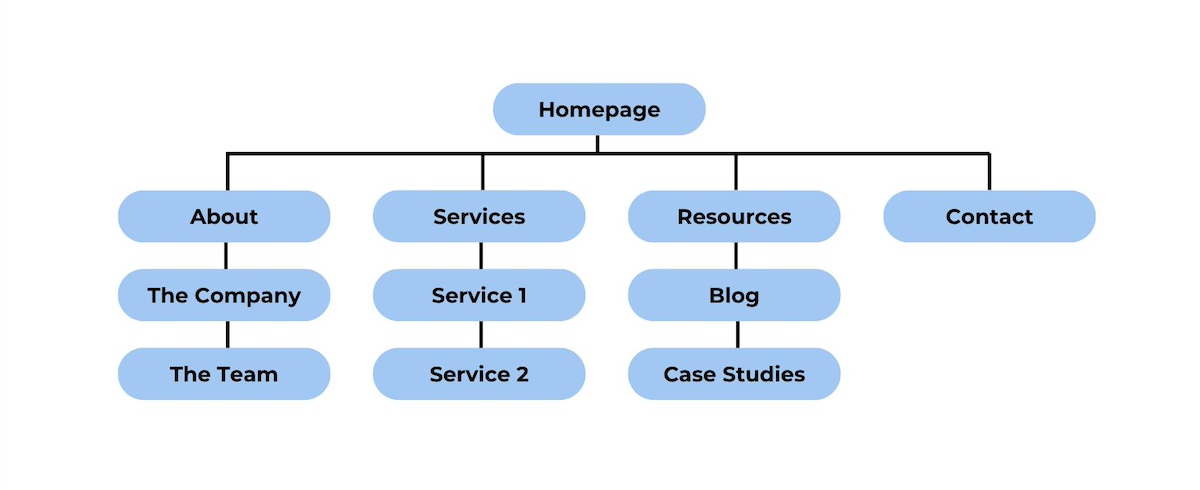
It will also be helpful to map out your website architecture so that you know exactly what content you need to round up – from copy to imagery and other design elements. From there, you can start putting everything together and bringing your website to life!
The process is of course a bit more elaborate than what we can cover here. For a detailed breakdown of the process of creating a website, check out our comprehensive guide on website planning. It covers everything you need to get started and get a website up and running.
7. Submit Your New Website to Search Engines
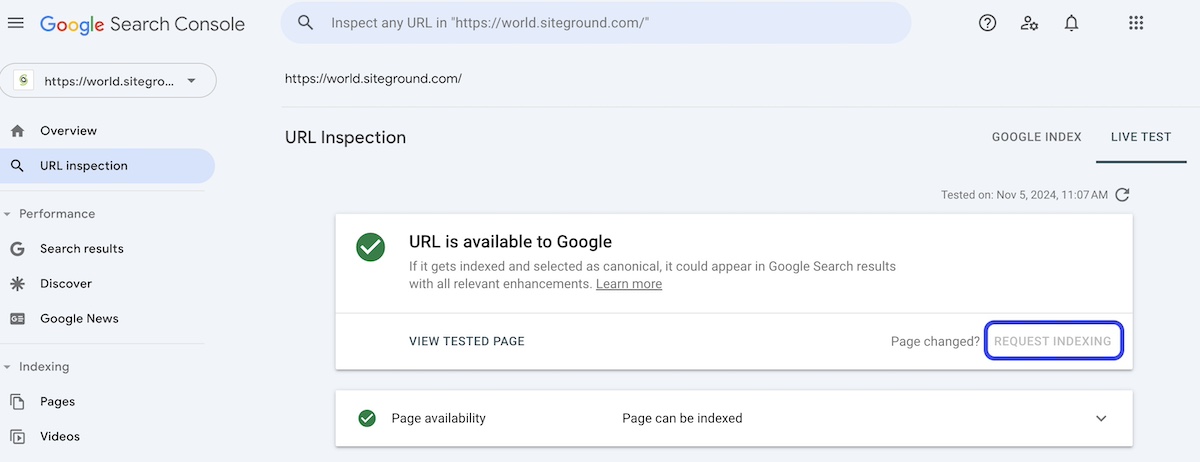
Once your website is live, you’ll want search engines to start indexing it so that people can find it. Google Search Console, for example, allows you to submit your website and sitemap, which helps search engines crawl your site more efficiently.
Submitting your site to search engines gives it the best chance to appear in search results and drive organic traffic. While search engines may eventually find your site on their own, submitting it directly can speed up the process so that people can start seeing the fruits of your labor sooner rather than later.
8. Create a Personalized Email Address Using Your Domain Name
A professional email address using your domain (such as yourname@yourdomain.com) adds credibility and strengthens your brand’s identity – and it’s also more memorable. Most hosting providers include email services, allowing you to create domain-based email addresses directly from their control panel.
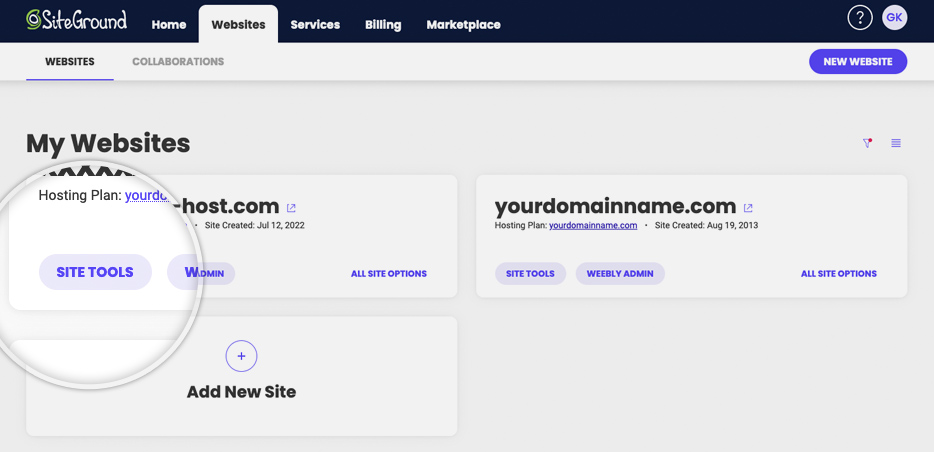
For example, it’s super easy to create an email account with Site Tools at SiteGround. You just go to your account in your Site Tools control panel, choose your domain, type the desired email address, create a secure password, and click “Create.” And there you have it: an email account is set up and ready to use!
After this step, you can set up your email on a computer by configuring it to work with popular email clients like Outlook, Gmail, or Apple Mail. A personalized email address is a small but impactful way to present a professional image to your audience and potential customers.
Takeaways on What to Do After Buying a Domain Name
Purchasing a domain name is just the first step in building a strong online presence. Following these eight steps will help you transform your domain into a fully functioning, professional website (and email!) that’s ready to serve your audience and grow your brand. From securing social media handles, to selecting hosting, and building a website, each step ensures your online setup is optimized for success.
Get the most out of your domain name by choosing SiteGround. Benefit from a faster, better-performing, and lower-maintenance website, all which translate to more conversions for your business. Plus, SiteGround hosting is bolstered by unparalleled security, and live 24/7 customer support that’s there to help you every step of the way.
When you buy a domain, you don’t technically “own” it outright. Instead, you’re registering the rights to use it for a specific period (typically one year, which is renewable). As long as you continue renewing it, you retain control of the domain and can use it as your online address. If you haven’t yet registered a domain name, note that usually there is an annual cost – that said, some domain sellers, like SiteGround, offer the domain for free for the first year when you sign up for web hosting.
Can I Move My Domain to a Different Hosting Provider?
Yes, you can transfer your domain from one hosting provider to another if you choose. The basic steps for this process include unlocking the domain and requesting an authorization (EPP) code from your current registrar (likely a current or previous hosting provider). Then, initiate the transfer with your new provider by entering the domain name and EPP code. Note that you may need to update your DNS settings as well. If you choose to transfer an existing domain to SiteGround, 24/7 live support is available to assist you with any questions or doubts that you might have during the process.
What is Domain Privacy Protection and Do I Need It?
Domain privacy protection, also known as WHOIS privacy, is a service that keeps your personal information – such as your name, address, phone number, and email – confidential when you register a domain name. Without this protection, your details become publicly accessible through the WHOIS database, which can lead to unwanted solicitations, spam, and even identity theft.
How do you hide your personal information in the domain name WHOIS details? You can usually select domain privacy protection during the registration process with your hosting provider or domain registrar. Many web hosts and registrars, including SiteGround, offer this service, ensuring your personal information is replaced with their contact details in the WHOIS database.
When you’re building your online presence, one of the first decisions you’ll face is choosing the right type of web hosting for your website. With so many options available, it’s easy to get overwhelmed by the technical jargon and differences between hosting services. What are the different types of web hosting, and more importantly, how do you know which one is best for your website?
There are plenty of resources online about web hosting, but many of these terms may be confusing, as the limits between the different types of hosting are blurred. In this article, we’ll break them down clearly and explain the differences, so you can easily choose the right one for your specific needs and use case. Whether you’re launching a small business site, an ecommerce store, or a personal blog, this guide will help you confidently decide what hosting you need – without the stress!
Why Choosing the Right Hosting Type Is Crucial
There are several types of web hosting, but before we dive into the specifics, it’s important to understand just how crucial your hosting choice is for your website. Hosting isn’t just the “place where your site lives.”
Choosing the right hosting can do more than just boost your website’s speed and stability. It can streamline your workflow and also reduce costs thanks to many automated features. One-click setups and auto-updates, for example, simplify the process of creating your site and keeping it up to date.
Security tools like daily backups and built-in protection solutions safeguard your data and provide peace of mind, helping you avoid costly downtime or data loss. Solutions such as a CDN and caching tools can help improve user experience by reducing website load times and speeding it up.
There are many, many other additional solutions and services a web host can equip you with, so choosing a reliable provider is key. If you’re just starting out, it’s worth looking into hosting options carefully, as it can influence the success of your site and, in turn, your business.
Types of Web Hosting Based On the Server Setup
When discussing types of web hosting, it’s helpful first to understand that hosting services can be categorized based on two main factors: the server setup (how the resources are allocated) and theadditional services you receive on top by the hosting provider. Let’s first take a look at the web hosting types, based on the server setup.
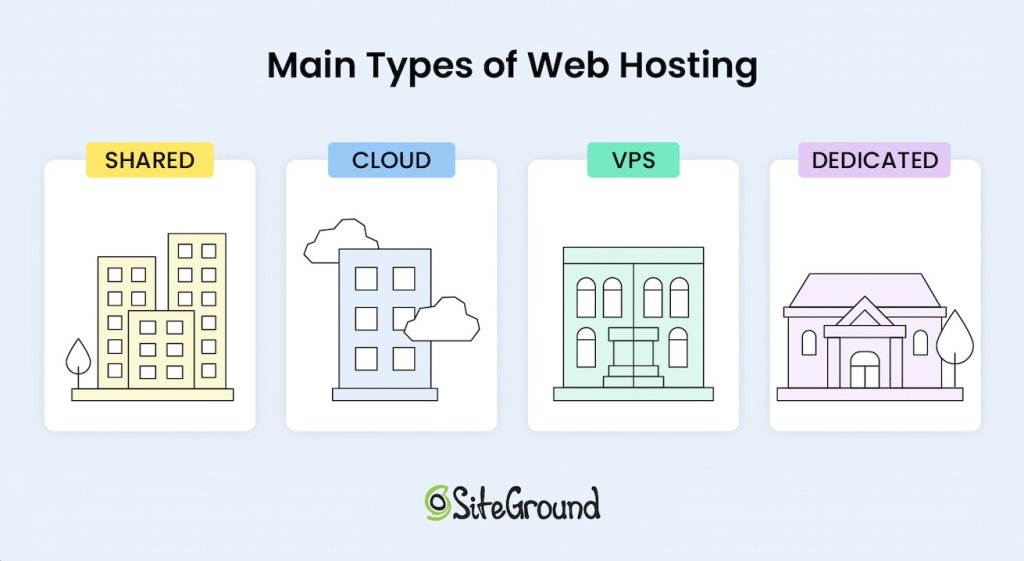
Generally speaking, there are four main types of hosting:
Shared hosting, often referred to as “web hosting,” is one of the most popular types of hosting because it’s affordable, easy to use, and includes some level of managed service to assist the user. With shared hosting, multiple websites are hosted on the same physical server, sharing resources like CPU, RAM, and disk space.
Typically, shared hosting is considered the cheapest form of hosting, which is why it also is the most widely used, but as you will see later in this article, the price of the hosting solution mostly depends on the service added to it. So don’t hurry to judge yet.
One of the biggest advantages of the shared service is that you don’t need much technical knowledge to use it. The servers are preconfigured by the hosting provider with all the software needed to run the server and tools that let you access your space and resources allocated on the machine.
One of the main disadvantages of shared hosting is the fact that your website does not get a dedicated share of the server’s resources. This means that if you have 100 sites on the same machine, and one of them gets very busy (or falls under a DDOS or other attack), that busy site might consume all of the server resources for some time and leave nothing for the rest.
That means your site would become unresponsive, or even go down, just because one of your co-tenants abused the CPU or RAM of the machine. Naturally, good hosting providers would never let that happen to such an extreme, but the fact is the availability of your site depends on the way the other sites use the shared hosting service.
Shared hosting is typically an excellent choice for businesses or individuals just starting their websites, or for more static sites that don’t require extensive server resources, even as their traffic and popularity grow. That said, as you’ll see later, shared hosting can also work well for dynamic online shops and high-traffic sites if the included managed services offer built-in performance and optimization solutions.
For example, SiteGround offers shared hosting plans that vary in terms of features and server resources dedicated to them and the fact is, on the GrowBig and especially the GoGeek plans, SiteGround successfully hosts many online shops thanks to the higher server resources allocated to the accounts, the smart caching technology applied to shops, and the performance optimizations offered out of the box.
2. Virtual Private Server Hosting (VPS)
Virtual Private Server (VPS) is another type of hosting where you share a physical server with other users, but have your own dedicated share of space, CPU, and RAM resources. Using virtualization technology, VPS hosting divides a server into multiple virtual environments, giving each client their own dedicated portion of resources, such as CPU, RAM, and disk space.
This setup means that while you share the server hardware with other users, your hosting remains isolated and your resources are guaranteed, making it generally a more costly option compared to shared hosting, yet more affordable than a dedicated server. With the appearance of mass-market cloud hosting solutions which offer scalable and flexible resources, the VPS server technology is becoming obsolete.
3. Cloud Hosting
When you think of “cloud” you probably think of Google Cloud and Amazon – these big names with huge data centers and complex service configurators. Well, cloud hosting is no longer a privilege for the technically savvy DevOps and huge enterprises that pay big bucks for infrastructure. Cloud hosting has become a very commoditized service that even small websites without an engineering team could comfortably sign up for.
What is cloud hosting? Cloud hosting utilizes a network of interconnected servers, virtually sharing their CPU, RAM, and space, creating a high level of redundancy of the service and resource scalability. With cloud hosting, resources can be quickly adjusted, meaning you can easily scale up or down based on your website’s needs in seconds. Such an upgrade does not require the physical addition of a hard drive or memory card, and there is no rebooting of the machines – you just claim more of what’s already in the cloud.
The main benefit on top of scalability is the redundancy. Even if one of the machines in the cloud goes down (it happens more often than you think), the other machines take over and continue to deliver the service. This means that your website will not experience downtime and you get the highest level of redundancy and availability compared to all other standard hosting setups.
The downside of signing up for cloud hosting or VPS is that you need to know in advance how much CPU, RAM, and space you need so that your site gets properly served. While cloud hosting has a remedy for this with the option for very quick scaling or even automatic scaling, VPS does not offer that.
In contrast to shared hosting, on VPS or cloud hosting without automatic scaling, a sudden traffic spike could make your site unresponsive if it temporarily needs more CPU or RAM, as it would hit its hard limits. On shared hosting, however, your site can tap into the larger pool of server resources, meaning someone else’s site might slow down instead – allowing yours to stay online.
4. Dedicated Hosting
Another main type of hosting is dedicated hosting, which involves renting an entire server exclusively for you, and thus providing you with access to all of the server’s resources.
Unlike virtual servers, with this type of hosting you get the performance of a dedicated machine, making them suitable for specific high-demand scenarios. This type of hosting is designed for websites that require significant computing power. Clearly, dedicated hosting is the priciest option of all, with or without managed service on top.
Dedicated servers come managed or unmanaged. Many technical experts and enterprises would rent dedicated servers as bare metal (a dedicated physical server with direct access to the hardware) in order to add the software of their choice, often experimenting with the setup and settings to get specific performance. For smaller companies and less tech-savvy clients, you should be looking for a managed dedicated server.
Types of Hosting Based On The Services Added
Beyond choosing the right server setup, hosting can also vary significantly in the level of additional services you get on top (features, tools, management interfaces, support). Every main type of hosting – whether shared, VPS, cloud, or dedicated – usually comes with maintenance and support services, depending on the hosting provider and their hosting packages.
Managed vs Unmanaged Hosting
In terms of services, hosting generally falls into two main categories: managed and unmanaged hosting. With managed hosting, the provider installs and manages essential server software, such as Apache web server, Linux OS, MySQL, PHP, and cPanel, and also handles server setup and maintenance. Additional services like application installations, backups, security and performance solutions, and tailored support for specific CMS applications like WordPress or Joomla are also available, but may vary depending on the host and the selected price package.
Using a managed service relieves you of much of the technical responsibility, making managed hosting a good fit for users without specialized tech knowledge or those who want to focus on other aspects of their website.
In contrast, unmanaged hosting leaves all of these responsibilities in the user’s hands, offering greater control and flexibility, but requiring technical expertise. This option is often suitable for developers or businesses with dedicated IT staff to manage and optimize the server themselves.
Shared hosting is the one exception, as it always comes with a managed service layer by default. This is because shared environments require consistent oversight from the provider to ensure stability and security among all users on the server.
❗ Important Remember that each hosting plan, whether managed or unmanaged, is designed to suit different use cases – from simplicity and ease of use to full control and customization. That’s why it’s crucial to choose a hosting type that best suits your needs.
Now, let’s take a closer look at the types of web hosting options, based on the additional services offered on top of the server setup, as well as the specific needs, and use cases.
Hosting Optimized for Specific Applications (Managed WordPress Hosting)
Hosting for specific content management applications like the popular WordPress, Joomla, Drupal, Moodle, and others means that the hosting environment is optimized to support the specific technical requirements and performance needs of the chosen application. With this type of hosting, you can be sure that your provider fully supports the application, often enhancing it with unique, tailored features and tools.
With managed hosting for specific applications, you’re also getting a hosting environment designed to help your chosen platform thrive. Whether you’re using WordPress, Joomla, or another platform, managed hosting for specific applications offers convenience, reliability, and performance optimized for your CMS.
Managed WordPress Hosting
For instance, managed WordPress hosting handles the full scope of server and application management so you can focus on your website content and business growth rather than application maintenance. This means the hosting provider handles essential tasks such as server maintenance, WordPress core and plugin updates, security patches in case of exploits, performance improvement solutions, and offers tools facilitating the workflow for WordPress users.
At SiteGround, we provide full-featured and ultrafast managed WordPress hosting – the best-value solution for WordPress sites. In addition to features like free WordPress auto-installation, automated migrations, and auto-updates, we offer performance optimizations out of the box, security hardening with a click, and a range of advanced tools for effortless WordPress management.
WooCommerce hosting is designed specifically for online stores built with WordPress and its WooCommerce plugin. WooCommerce hosting provides a range of specialized tools and user-friendly interfaces geared toward managing the needs of clients using WooCommerce for their shops.
What is specific for online shops is that they are very dynamic – every site visitor and each order they attempt to submit calls for database and PHP queries that are unique and cannot be cached, which normally can be done with more static sites. This makes e-stores more resource-heavy and in need of additional optimizations on server and application levels. Without these optimizations, the site can become significantly slower, leading to a poor user experience and potentially resulting in lost conversions.
As your store grows, this type of web hosting often provides options to handle increased traffic seamlessly, allowing you to focus on expanding your business without worrying about performance issues.
🛍️ With SiteGround’s easy-to-use WooCommerce Hosting, you can get everything you need for a successful store. Designed for simplicity and speed, it comes fully equipped with WordPress, the WooCommerce plugin, and the Storefront theme pre-installed, so you can start selling right away. Enjoy automatic updates, speed-boosting technology, and essential security features – all crafted to keep your store running smoothly and securely.
Email Hosting
Email hosting is another specialized type of hosting where the focus is on the email service you get on top of your core server setup for the needs of your business. Email hosting dedicates server resources solely to managing email accounts, communications, storage, and features.
In addition to the basic server setup, email hosting packages include services like SMTPfor sending emails, POP which allows users to download emails from the server to their local device for offline access, and IMAP, a protocol used for receiving emails that allows users to access and manage their emails from multiple devices. These protocols ensure that your email service is accessible – whether you’re on a computer, phone, or other device – and can synchronize across platforms.
One of the key features of email hosting is the enhanced security and anti-spam measures included to protect your inbox and reputation. Email hosting providers usually implement advanced filtering and scanning tools to block spam, detect malware, and prevent phishing attacks. These security layers help ensure that both incoming and outgoing communications are secure and that sensitive business information is protected.
Email hosting can be a stand-alone service, or it can be part of a bundle. For example, SiteGround offers complimentary email service in all its hosting plans, including the managed WordPress plans, which gives you the chance to create unlimited email accounts (addresses) at your site’s domain, use a webmail from any device, set autoresponders, and more. The good thing is, it comes at no extra cost but is included in the bundle.
Reseller Hosting
Reseller hosting is a type of hosting with additional services, designed for individuals or businesses that need to manage multiple websites while providing hosting services as part of a broader offering. This type of hosting is popular mainly among developers, freelancers, and web agencies.
Essentially, reseller hosting operates on top of shared, VPS, cloud, or dedicated setups, allowing you to create multiple hosting accounts for your clients, using standard configurations or custom resource packages tailored to their needs. Naturally, it depends on what kind of reselling you wish to do and how much flexibility you need.
Some hosts offer volume discounts for clients who prepay or create multiple shared hosting accounts, which the client then resells at regular or custom price to their end clients – a very standard form of reselling. The more sophisticated solutions, however, allow the reseller to create multiple client accounts within the same hosting plan. This usually happens on VPS, cloud, or dedicated server setups.
One of the main advantages of reseller hosting is that it empowers you to purchase hosting resources from a provider and then resell them under your own brand – this is usually called “white-label” reselling. This model enables you to build a hosting business without the need to manage servers, but only taking over the client-facing support. You benefit from the hosting provider’s technical expertise while creating a unique brand experience for your clients.
While you’re responsible for providing customer support to your clients, the backend management, including server maintenance, security updates, and performance optimization is handled by your host. Note that it’s important to choose a reliable hosting provider, as the performance, security, and reliability of your service will directly impact your clients’ satisfaction.
SiteGround offers reselling service on top of its GoGeek (shared web hosting plan) and its cloud plans, where resellers can create unlimited websites and provide white-label access to these sites to their end clients. This means that the end client will not know that SiteGround is the original service provider, but will contact the reseller on all hosting matters.
In our cloud plans, we have included an additional reseller convenience – the option to create custom hosting plans that are tailored to the specific needs of the end clients. Each plan includes a different share of resources and tools, giving you the flexibility to cater to various client requirements.
How to Choose the Right Type of Hosting for Your Site?
To make a smart decision, look for a hosting provider that offers a robust array of value-added services that align with your specific needs. Ultimately, the combination of your server setup and the additional services included in your hosting plan determines the real benefits you will receive.
When evaluating hosting options, it’s essential to look beyond just the server type, whether shared, VPS, cloud, or dedicated, and consider the complete hosting package. It’s always beneficial to have essential extras like SSL certificates, automated backups, CDN, and email that can enhance your website’s security, performance, and usability. These features are crucial for creating a reliable and professional online presence.
It’s also critical to consider your specific usage needs. For instance, if you are planning to host a WordPress site and prioritize ease of use, a managed WordPress hosting service is ideal for you, as it offers specialized tools and support tailored for WordPress users. On the other hand, if you have a developer on your team, consider a hosting provider that offers collaboration tools so that you can easily give them controlled access to your websites.
If you want to make the best choice, another important factor in your decision should also be the balance between price and value-added services. Shared hosting is typically the most affordable option, making it an excellent choice for those just starting out. However, depending on the additional features you need, the overall cost can vary.
Be cautious of opting for the cheapest solution, as well as for what seemingly looks “premium,” as the lack of essential extras could lead to higher expenses down the line due to performance issues and the premium claim is often a marketing bubble.
To help you navigate the selection process, here’s a quick overview of some key points to remember and consider:
✅ Understand your needs: Evaluate your website’s goals. The type of site you’re creating will influence your hosting requirements. Start by asking yourself a few questions:
What is the application you plan to use? Filter providers that are focused on offering services for it. If you are not sure, look for providers that offer a free “sitebuilder” in their bundles.
Does the host offer security and performance solutions? You might not need these right now, but eventually one of the two or even both issues could arise. You may look for terms like caching, WAF, custom PHP and MySQL setups, and more.
Do you need email services? Look at the features list and choose only those providers that offer email services in their plans.
What other services do you want and are they paid extra? Maybe SSL (everyone needs that!), CDN (mostly sites with geographically dispersed traffic), backups (an absolute must), domain (a free domain might be a good value if added to the mix), collaboration access (so your developer can get access without compromising yours), or others? When you prioritize these, then you start comparing which host on the shortlist is giving better value in their plans for the price asked.
✅ Consider your budget: Determine your budget for hosting. Generally, shared hosting is a popular, cost-effective option, while cloud and dedicated hosting may incur higher costs. Remember, though, to look for the balance between price and value-added services. A managed shared hosting plan with a variety of features may serve you better than a cloud option that lacks proper management tools or flexibility.
The most important advice when it comes to budget: Don’t spare a few bucks per month just because it feels like you can compromise a few tools or features and they don’t seem so important. Paying $20, even $40 per month could be a game-changer and a business savior when things go bad.
✅ Assess your tech expertise: If you’re not particularly tech-savvy or you simply wish to focus on your business rather than server and website maintenance, opt for managed hosting options that come with an intuitive client dashboard and comprehensive site tools, along with reliable 24/7 customer support.
✅ Read reviews: Research recommendations from trusted sources, online communities, or groups related to your niche. User experiences can provide valuable insights into the quality and reliability of different hosting providers.
We hope this guide has equipped you with the insights you need to choose a hosting type that aligns with your website’s goals and needs.
Ready to take the next step?
Choose SiteGround, where you’ll get more than just fast and reliable hosting – you get a complete solution. Enjoy a robust managed hosting solution with essential features like easy website setup and management, automated backups, SSL certificate, caching, one-click CDN, an intuitive Client Area, and much more. Whether you’re just starting out or scaling your business, we give you the tools, flexibility, and support you need to thrive!
For beginners, shared hosting is often the most suitable option. It’s affordable, user-friendly, typically packed with useful features, requires little to no technical knowledge, and includes customer support. Most hosting providers offer easy-to-use control panels and one-click installations for popular content management systems (CMS) like WordPress, making it simple to get started. SiteGround, for example, leverages cloud infrastructure even for their shared hosting plans, offering an added layer of redundancy and performance that can be beneficial.
Which Type of Hosting Is Best for an Ecommerce Website?
Ecommerce hosting is often the best choice due to its specialized features. This type of hosting typically includes integrated shopping cart systems, payment processing features, and enhanced security to protect sensitive customer data. Plus, most ecommerce hosting providers offer scalability, which is vital for growing online stores. As your business expands, you may experience spikes in traffic, especially during sales or promotions, so it’s beneficial to have this feature out of the box.
What Is the Best Type of Hosting?
The best type of hosting greatly depends on your specific needs, goals, usage, and technical expertise. For most personal projects and online businesses starting out, shared hosting is a great starting point due to its ease of use, variety of tools, and affordability.
Website metrics offer a window into how users engage with your site, revealing insights like daily or monthly visitor numbers, how they discovered your site, and how many leave for other options. While you can explore endless data points, the real challenge is knowing which metrics truly matter. So, which ones should you track to grow your website effectively?
Let’s dive into the essential metrics that provide the biggest impact on understanding and improving your site’s performance.
Why Is Website Speed Important?
By now, you should need no convincing that website speed is crucial for your online business. That’s because website performance has an impact on your brand reputation, SEO rankings and conversion rates. Here are the main reasons how and why this happens:
Brand Reputation 👍
Let’s be honest, when your website loads slowly, it irritates your visitors, and eventually they leave your site. That’s why it’s important to have a website that loads as fast as possible. According to Google, 53% of visits are abandoned if a website takes more than three seconds to load.
Indeed, the slower your website, the more likely it is for your visitors to leave and be less likely to return ever. If they don’t find what they’re looking for quickly, they won’t interact with your site, as they would consider it inaccessible and unreliable.
This directly impacts your brand reputation, because visitors could have a bad impression of your site. And we all know that a negative brand reputation is harmful for your online business presence.
SEO Rankings 📈
Google and search engines in general aim to provide web users with the best possible user experience. Website speed is an official and important ranking factor in Google’s algorithm, in addition to being a crucial part of your website’s UX. If your website is slow, this will definitely affect your SEO rankings, it will hurt your site visibility among users, and eventually you’ll start losing traffic to your website.
Conversion Rates 🛒
If all this sounds scary, it may not come as a surprise that a slow website can affect your conversion rates, too! The longer it takes for your website to load, the bigger the drop in potential conversion rates. According to a study by Portent, a site that loads in one second has a 3x higher conversion rate than a site that loads in five seconds. This is a huge difference in conversions due to just a matter of a few seconds. Since conversions are among your top website KPIs, you wouldn’t want to allow this to happen, right?
How to Measure Your Website Performance Score
Now that we’re on the same page that website speed is a crucial factor for your successful online presence, let’s explore how to measure your site’s performance with what’s often known as client-side testing. This type of testing evaluates the speed of your web application by analyzing performance directly in the browser.
You can test your website speed with different free online tools. Some of the most popular ones include Pingdom, Google PageSpeed Insights, GTMetrix, webpagetest.org, and others. All you need to do is go to one of these tools, paste your website/webpage URL, and start the test. It will take only a few seconds for the tool to show you the results.
Now comes the hardest part – the analysis. What does each metric tell you and is there a way to improve it?
What Website Metrics Mean and How to Improve Them
1. Page Load Time
One of the most important website metrics is page load time. Page load time is the time it takes your browser to fully load the requested website. It measures the entire time – from entering a URL or clicking a link, until the page finally loads. Ideally, that should happen in less than two seconds.
If your site is not hitting this target, your overall page load time can be improved by following the tips below for each of the individual metrics. What is more, if you’re using WordPress, we recommend our free all-in-one SiteGround Optimizer plugin that works on any hosting platform and can save you loads of time and effort in improving the majority of your WordPress website performance metrics.
2. Time to First Byte (TTFB)
Time to First Byte measures the time it takes for the web browser to receive the first byte of information after sending a request for a resource. A good TTFB result (0.8 seconds or less) means that your browser is responsive. To improve your TTFB, here’s what you can do:
Make sure you runyour site on thelatest PHP version and have a proper server-level setup. At SiteGround, we have already developed a custom ultrafast PHP setup that has lower memory usage and allows the server to process a bigger number of queries faster. All this cuts the TTFB and makes web pages load 30% faster on average.
Next, check with your hosting provider if they offer full-page caching on your host server. This would store (“memorize”) your web pages on the server and then serve them to your users the next time they are requested. SiteGround clients take advantage of our in-house developed powerful Caching technology enabled by default, which results in up to five times faster sites.
Even if everything is optimized on the server-level, as mentioned above, visitors located far from the origin server may still experience slow TTFB. For this reason, and to cut TTFB, start using a content delivery network (CDN). The CDN will use a distributed network of servers that are closer to your users and serve them the content of your website from their closest location. SiteGround has its own in-house built CDN that’s included for free in every hosting plan we offer.
No matter where you’re hosted, though, if your website is using WordPress, you can download and install our free SiteGround Optimizer Plugin. With just a few clicks, you can take advantage of its powerful caching capabilities that can make your site up to 20% faster than comparable plugins.
3. Time to Start Render (TTSR)
Time to start render (TTSR) measures the time it takes for the content (i.e. any element from it) to begin displaying on the page after the initial request for the website to load. Lower TTSR keeps the attention of the user because they see the content quickly. A good result for TTSR is less than 750 milliseconds. If your result is not as good, here’s what you can do about it:
First, make sure that you keep your JavaScript, HTML, and CSS files lightweight by minifying them. Minification will remove all unnecessary characters from these files. You can do this yourself manually in the source code or use a tool to help you, in case you’re not so tech-savvy. Again, for WordPress sites, our free SiteGround Optimizer Plugin has an option to enable that with a single click.
Next, optimize and preload the fonts you’re using. To do that, make sure that you’re not using too many fonts (less than four is best), embed them in the CSS, and optimize them before uploading them on your website. You can do this manually or with the help of our free SiteGround Optimizer Plugin for WordPress where this happens in a click.
Another useful thing you can do is defer JavaScript. By deferring JavaScript, your browser will only process and load JavaScript files after parsing the HTML. This significantly speeds up TTSR, because there’s nothing to block the process of displaying your website on a screen. Again, you can easily do that with the SiteGround Optimizer Plugin for WordPress websites.
Last, but not least, make sure you use the HTTP/2 protocol. HTTP/2 protocol is the latest version of the HTTP protocol and allows browsers to load websites much faster. However, it might be a bit technical to do this yourself, so it’s good to ask your web host about it. If you’re hosted with SiteGround, HTTP/2 protocol is enabled by default on our servers for you.
4. Time to Title
Time to title measures the time it takes for your website’s title to display in the browser tab. This tells your website visitors that your site is loading. It’s an important metric because it shows your users that your site is legitimate and gives them a hint of whether your site will provide them with the content they’re looking for.
If your website is fast enough and you follow the tips we’ve provided in this blog post, then it will improve your time to title as well. To make your website load more quickly, and thus improve your time to title, the ultimate solution is to use caching, as this will display the title in the browser tab from the server memory the next time your users try to open your site.
5. Time to Interactive (TTI)
Time to interactive (TTI) is the time it takes for your website to be interactable, i.e. for users to be able to interact with it (scroll, click buttons, etc.). This is a crucial metric, because even if your website loads fully, but it’s not responding to user interactions, then you’ll lose them again. A good TTI should be less than 3.8 seconds.
To improve your TTI, here are some things to consider. As mentioned above, minification is a powerful way to cut TTI as well.
Apart from that, make sure to enable compression. Some good compression mechanisms are Brotli (Google’s next generation compression algorithm) and gzip – they both reduce the size of HTML, CSS and JS files. SiteGround clients enjoy the Brotli compression algorithm out-of-the-box and benefit from up to 15-20% speed gains. If you’re hosted elsewhere, ask your hosting provider to find out which compression methods they use.
Last, but not least, eliminate render-blocking resources – eliminate all resources that pause or slow down your website’s ability to display on a screen. If you’re doing this on your own, refactor your code or hand-edit your HTML. If you don’t feel like doing it yourself, the SiteGround Optimizer Plugin for WordPress sites provides powerful frontend optimization options that are just a few clicks away.
6. Connection Time
Connection time is the time between a user’s request and when that request establishes a connection between the user’s browser and your website’s server. Connection time might be slow for your website visitors due to various reasons, such as too much server traffic (e.g. from bots), or users in distant geographic locations from your origin server.
To improve connection time for your visitors, consider hosting your website on a better infrastructure. For example, SiteGround-hosted websites take advantage of the modern Google Cloud platform, which ensures high availability and fast connectivity.
Using caching and enabling a CDN are other powerful tools for speeding up connection time. SiteGround clients enjoy our in-house developed Caching technology out-of-the-box and take advantage of our free in-house built SiteGround CDN included in all of our hosting plans.
7. Time to Last Byte (TTLB)
Time to last byte (TTLB) is when the user’s browser receives the last byte of your website. An average TTLB should be 750 milliseconds per endpoint response. A factor that can influence your TTLB is the quality of your database queries.
To improve TTLB, make sure that your slow database queries are optimized by using a fast MySQL setup. For example, at SiteGround we’ve developed a custom MySQL setup that reduces the number of slow queries between 10 and 20 times and is available by default for all our clients.
8. DNS Lookup Time
Domain name system (DNS) lookup time measures the amount of time it takes for your DNS provider to translate a domain name into an IP address. If your average DNS lookup speed is more than 120 milliseconds, then you might need to improve it.
One of the reasons for a slow DNS lookup time could be your DNS provider. If this is the case, you’ll have to switch to a faster DNS provider. Another reason could be the high number of third-party resources on your web pages (that also need to be translated into IP addresses, on top of your own domain name). Reducing the number of third-party resources would improve your DNS lookup speed.
SiteGround customers have the advantage of not needing to think about either of the above, because our central anycasted DNS system ensures faster domain resolving and faster website loading. What’s more, WordPress users can enable the DNS prefetch feature in the Speed Optimizer plugin to speed up their websites when loading content from third-party domains.
9. Bounce Rate
One of the most important web page metrics is bounce rate. Bounce rate refers to the percentage of visitors that leave your website immediately, before taking any action on it. If your bounce rate is high (anything above 46%, according to SemRush), one of the possible reasons could be slow website speed.
10. Conversion Rate
Next on the list is conversion rate, which reflects the percentage of visitors who take a desired action on your website, and is derived from your overall site traffic statistics. Having a high conversion rate means that your website performs well among your visitors and meets their expectations. In general, a good conversion rate is between 2% and 5%, but you must keep in mind that these numbers might differ for various industries.
11. Average Time on Page
Our list wouldn’t be complete without one of the most important web analytics metrics – namely, average time on page. Average time on page measures the average amount of time spent on a single page by all users of a given website. The majority of studies show that the average time a visitor spends on a web page is around 50 seconds, across all industries. If your visitors spend more time on your website, this could be a clear indication of a good user experience.
12. Error Rate
One of the less popular, but just as important website metrics is error rate. Error rate refers to the number of requests that return an error code, relative to the total number of requests over a period of time. A high error rate can be caused by issues with your server. The higher the error rate, the fewer times your site has loaded properly for visitors, leading to lower satisfaction with their experience.
Grow Your Online Presence with Optimized Website Metrics
Having a fast and reliable hosting provider can help speed up your website tremendously, which will have a direct positive impact on conversion rates, average time on page, bounce rates, error rates, and the rest of your web traffic metrics.
As a result, your site’s loading speed and your website metrics are vital parts of a successful online business presence. Selecting the right hosting provider can save you significant time and effort, as a quality host can handle much of the website optimization for you—letting you focus on growing your online presence.
If you’re not a SiteGround client already, get a head start on a new website project, or transfer an existing one to improve its performance with one of our current hosting offers: