
Yes, you can add payments to an AI-built app without hiring a developer. What you can’t do is stop at a checkout button that just sits there looking pretty. Real payment readiness means your app also knows whether the charge succeeded, and what to do next: confirm an order, unlock access, update a subscription, or something else. Here’s what that actually takes, step by step.
Key takeaways:
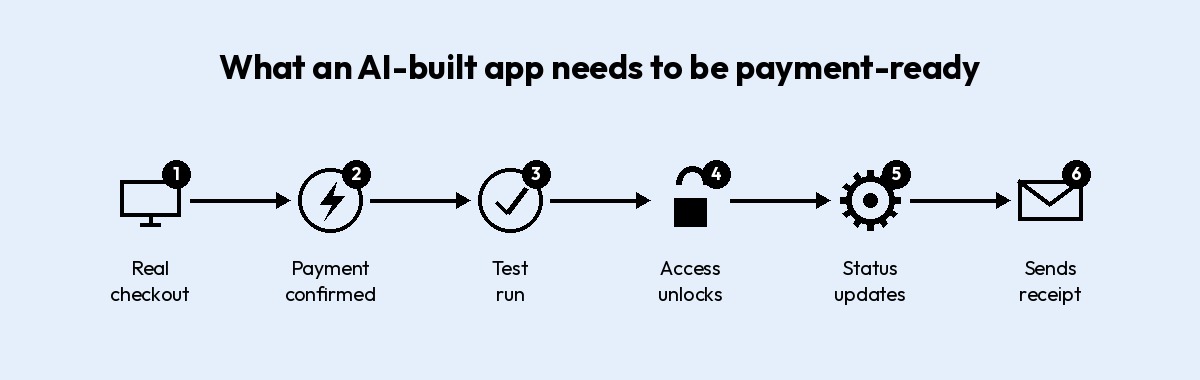
- To add payments to an AI-built app, you need six things working together, in this order: a real checkout connection, a working webhook (the signal that tells your app a payment actually went through), a test run through failure cases, controlled access, accurate payment status, and a confirmation step.
- A checkout button that isn’t wired to a real payment integration, Stripe or otherwise, is a shape with a border-radius, not a payment flow.
- Many AI app builders connect to Stripe using a restricted API key rather than your account’s main secret key, so you control exactly what gets accessed.
- The webhook, not the redirect back to your site, is what actually tells your app a payment succeeded, but only if that webhook checks Stripe’s signature first.
- Testing an AI-built app’s payment flow means running a decline, a cancellation, a refund, and a duplicate order, not just one successful purchase.
- One-time payments and subscriptions need different logic for what happens when access should turn off.
Why a checkout button isn’t the same as payment-ready
Is a checkout button enough for an AI-built app? Nope. A button just opens the door. Whether real payments actually work depends on six pieces working together behind it, and a good-looking checkout is only one of them.
Here’s what those six pieces are:
- A checkout connection to a real payment processor, not a mockup.
- A way for the app to hear back when a payment actually succeeds.
- Testing against real failure cases before a real customer hits them.
- Access that unlocks only after the webhook confirms payment, not before.
- Accurate payment status tracking: paid, unpaid, refunded, failed.
- A confirmation step that tells the customer what happens next.
How to add payments to an AI-built app, step by step
This section covers three of the six pieces from above: connect a real checkout, wire up a way for your app to hear back when payment succeeds, then test the whole thing before real money moves. Testing comes right after the connection here, not at the end of all the steps, since there’s no point building access, status, and confirmation logic on top of a checkout you haven’t verified.
Note: We’ll use Stripe as the running example below, since it’s what most AI app builders connect to first.
Step 1: Connect a real checkout
Get a Stripe account
Getting a Stripe account takes minutes: just a name, an email, and a password, no code involved. Once you’re in, Stripe walks you through a short onboarding step before it’ll let you take real payments, where it asks for:
- Your business name, or your own name if you’re a sole proprietor
- A bank account for payouts
- Basic details about what you’re selling
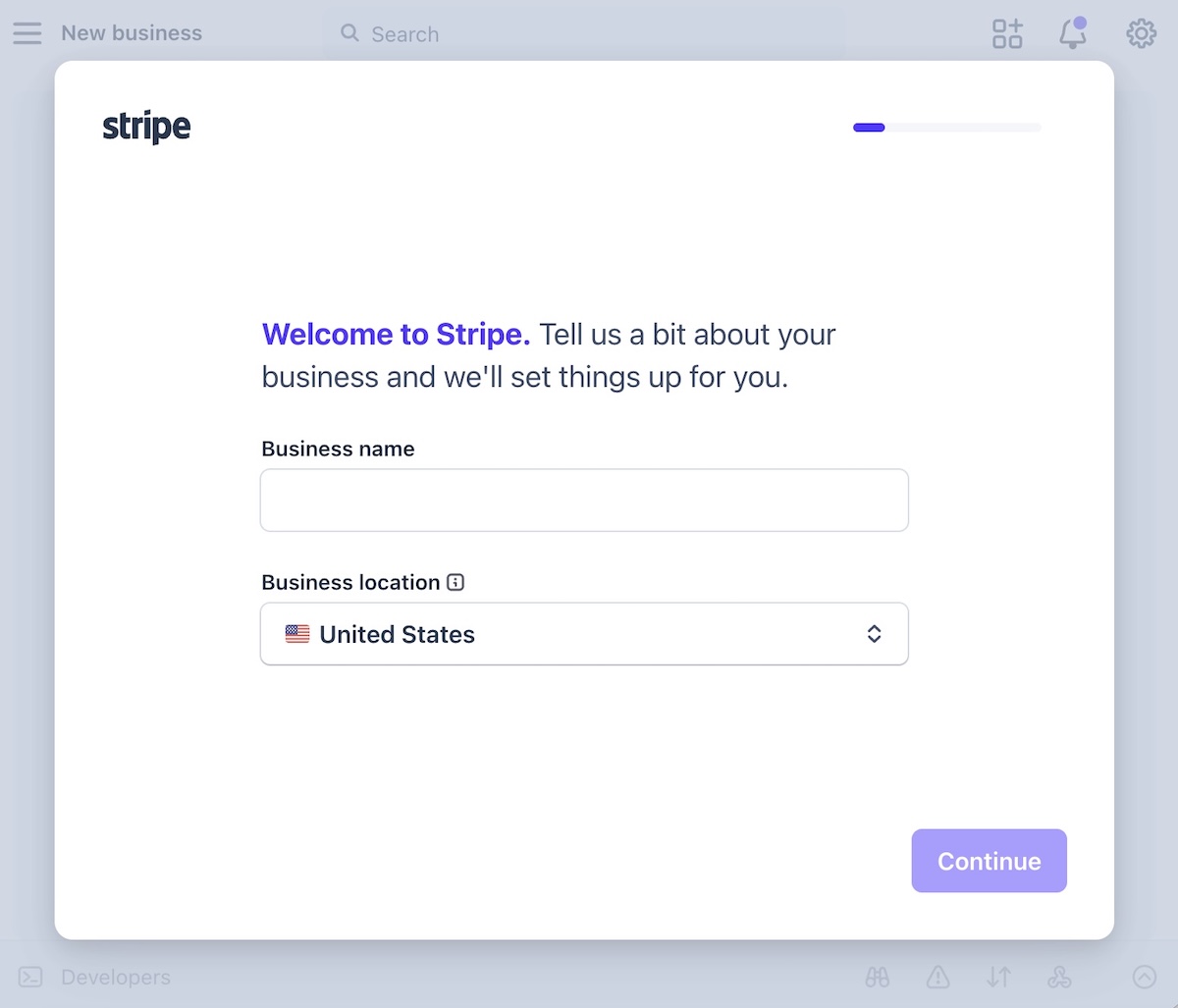
A Stripe integration for an AI-built app starts here, with an account, and, thankfully, not a line of code in sight. Stripe’s payments overview covers everything an account can do, but for a single app, one account and one connected key is enough to get started. You can save tax handling, multiple currencies, and marketplace splits for later.
Add a real checkout instead of a static button
A checkout button design is indeed just a shape. It looks functional, but it doesn’t necessarily process anything. Swapping it for a real payment flow means connecting to a processor’s hosted checkout page, where the processor collects the card details directly, so they never touch your app’s own code or servers.
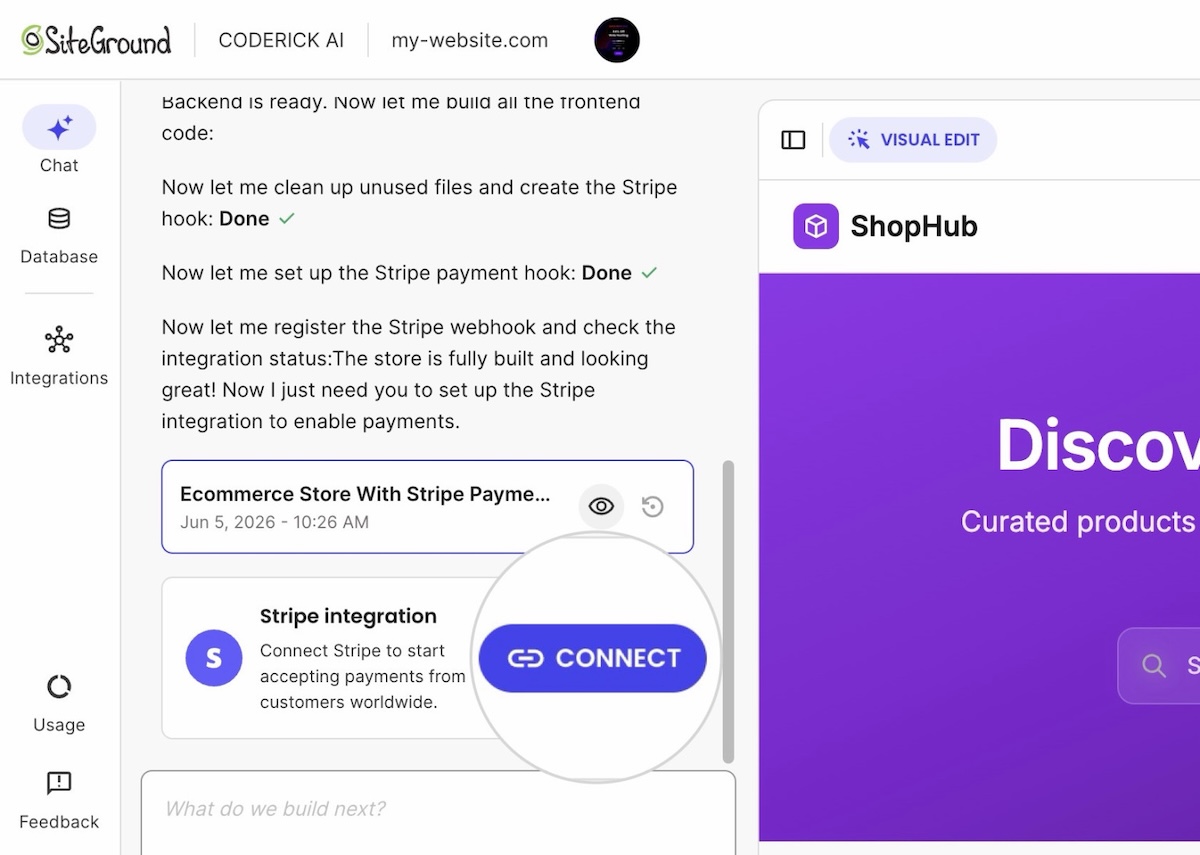
Some AI app builders, such as Coderick AI, let you add Stripe payments to your app without custom code. You simply describe what you’re selling and the price, and the builder wires a Stripe Checkout session behind the button. What’s still on you is confirming that the right product, price, and currency actually get passed into that session.
Stripe’s own checkout page covers the technical detail behind the scenes. Stripe go-live basics, like switching from test keys to live keys, come later, after testing, not before.
What’s Coderick AI? SiteGround’s own AI app builder: describe what you’re building in plain language, and it generates a working app, not a prototype, that publishes straight to SiteGround’s hosting. More on how it handles the rest of this checklist further down.
Step 2. Connect it so your app hears back when someone pays
Your app needs to hear back from Stripe the moment a payment actually completes. That message is called a webhook: a notification Stripe sends directly to your app, separate from the redirect that sends the customer back to your site after paying.
This is exactly where AI-built apps tend to trip up, because the two signals look like twins but they very much aren’t:
- The redirect back to your site after checkout is just a page load. It tells your app that someone landed there, not that Stripe actually processed a charge. Someone could open that page directly, or the redirect could fire before payment finishes confirming.
- The webhook is the trustworthy message, since it comes from Stripe’s own servers reporting what actually happened, and not from a browser passing through a page.
The takeaway here: a payment should never get recorded as successful based on the redirect alone. Status, access, and confirmation should all wait for the webhook, in that order.
Most AI app builders wire up webhook handling automatically once you connect a Stripe account (an internal signal from Stripe confirming the payment, not a connection out to an external tool like a CRM or accounting platform). What’s worth checking is whether that handler verifies the webhook’s signature, the check that proves a request actually came from Stripe and not from someone who found your webhook URL and faked a payment. Ask this directly in the same chat you used to build the app: “Does my webhook handler verify Stripe’s signature using the signing secret?” If you don’t get a clear yes, don’t launch until you do.
Step 3: Test before you charge real users
What should you test before charging users in an AI-built app? Run the following five scenarios before a single real customer does:
- Place a real test transaction using your processor’s test card numbers.
- Decline a test card on purpose, and confirm your app shows the right status.
- Cancel mid-checkout, and confirm access stays off.
- Request a test refund, and confirm access turns off the same way.
- Place the same order twice, and check your records show one order, not two.
Congratulations, you just faked five transactions and nobody’s card got charged for real. This mirrors the same edge-case checklist SiteGround already covers for how to test before taking payments on an AI-built store, since an app and a store fail in exactly the same places. If a developer is handling setup, Stripe’s own go-live checklist covers the account-level items, like registering live webhook endpoints, worth checking once the list above is clean.
What happens after someone pays: access, status, and confirmation
Once a payment goes through, three things need to happen on your side of the app, not Stripe’s: access turns on, the order’s status updates, and the customer gets told what’s next. Let’s unpack one by one.
Step 4: Unlock access after payment
“Access” refers to whatever the payment unlocks: a feature, a download, a membership area, or a product page. Access should switch on only when a payment actually succeeds, never when someone simply opens the checkout page. Because a checkout page loading doesn’t mean money changed hands — the customer could have closed the tab, or abandoned the flow halfway through, or the card could have been declined.
The safest pattern ties access to the webhook’s payment status, and not to any action on the checkout page. This is what that looks like:
- Access turns on after the webhook confirms success, not after a redirect back to your site.
- A canceled or failed payment leaves access off, with no separate step needed to undo anything.
- A refund reverses access the same way a failed payment would.
Long story short: if you tie access to the redirect instead, you’ll eventually grant it to someone whose payment never actually went through. Not good.
In practice: Payments inside Coderick AI apps can have that access logic wired in, tying the unlock to the webhook rather than the redirect, but it’s worth prompting for explicitly rather than assuming it comes bundled in once Stripe’s connected. You’ll also need to specify what “access” actually means for your app, which feature, page, or download it’s gating, since that’s specific to what you’re selling.
Step 5: Track payment status and customer records
Customer payment status in an AI-built app needs more than a single paid or unpaid flag, and it needs to live somewhere your app can actually check it, not just in Stripe’s own dashboard. A real customer record inside your app tracks four separate states, since each one triggers a different action:
- Paid. Access stays on, and fulfillment continues as normal.
- Unpaid. No access and no fulfillment, until payment clears.
- Refunded. Access and fulfillment both reverse, on the same trigger as a failed payment.
- Failed. The same as unpaid: nothing unlocks until a successful charge comes through.
Many AI app builders connect to Stripe using a restricted API key rather than your main secret key, limiting exactly what the connection can touch on your account. This is the kind of connection mentioned earlier: a customer payment status that updates automatically as Stripe reports each event, instead of a static list you have to update by hand.
Note: Collect only the customer information you actually need to fulfill the order. An email address and a name cover most cases; a shipping address only matters if you’re shipping something.
Step 6: Send payment confirmation
A payment confirmation has two separate jobs from two different places. Stripe sends the receipt: it’s a single toggle in your dashboard, and it doubles as proof the charge went through. Your app sends the actual next step: what the customer gets, when, and how to reach you if something’s wrong.
On Coderick AI specifically, that next step happens on the screen the customer lands on right after paying, since there’s no follow-up email to fall back on yet.
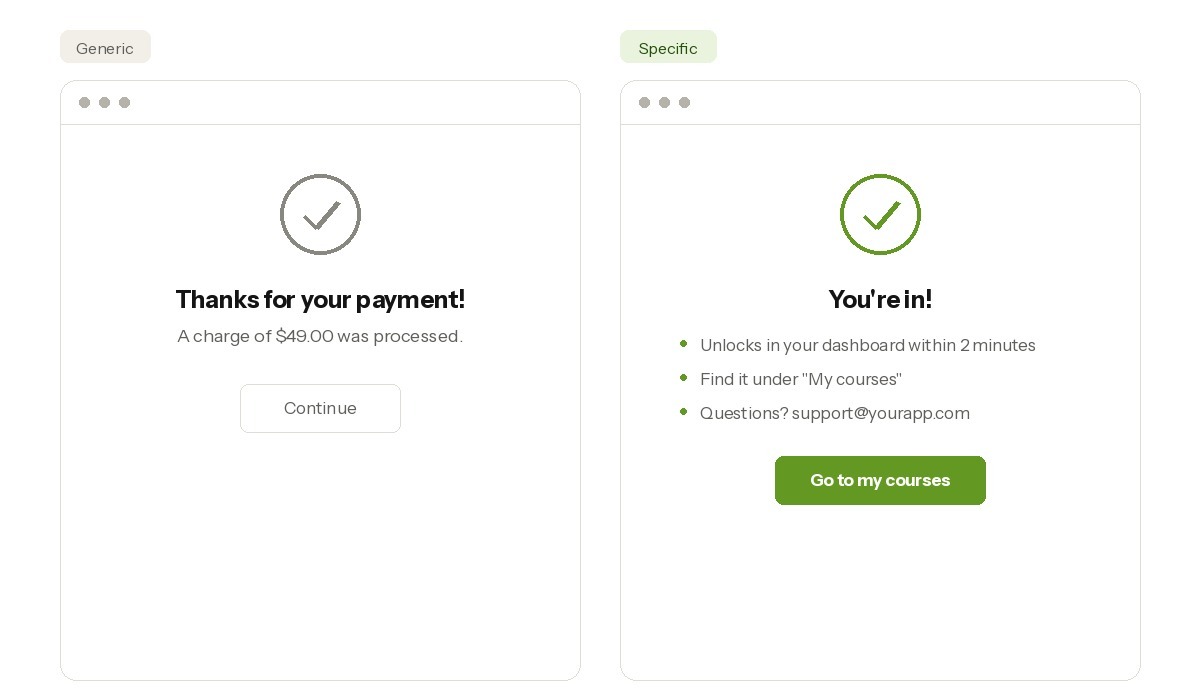
Whatever builder you’re using, a generic thank-you message does about as much as saying nothing at all. Instead, state what happens next in specific terms:
- When access unlocks, if it isn’t immediate.
- Where to find what the customer just bought.
- How to reach support if the confirmation doesn’t match what they expected.
One-time payments vs. subscriptions in an AI-built app
One-time payments and subscriptions need different logic, even on the same Stripe connection. AI-built app monetization usually starts as a one-time payment flow: a single purchase, a single confirmation, access granted once and left alone. A paid subscription flow adds recurring billing, plus a decision about what happens when a charge fails or a customer cancels.
| Factor | One-time payment flow | Paid subscription flow |
| Access logic | Granted once, stays on | Re-checked on every billing cycle |
| Failure handling | A failed payment simply means no access | A failed renewal must revoke access already granted |
| Cancellation | Not applicable after purchase | Needs a clear cutoff date, not an immediate one |
| Testing focus | One successful transaction, one decline | A full billing cycle, including a forced renewal failure |
Most AI-built apps handle the first charge just fine. The real test shows up on renewal three, when a card has expired or a payment failed somewhere in the background, and nobody notices until the customer does. Unclear refund or cancellation terms don’t just create a support headache: they lead directly to chargebacks and disputes. Decide those terms before the pricing page copy gets written, not after.
Why AI-built apps fail at payments
Most AI-built apps that fail at payments don’t fail because the AI did something wrong. They fail because a step got skipped after the AI finished building.
The same four gaps show up again and again:
- A checkout button with nothing behind it. It looks finished in a demo, since nobody clicked pay with a real card.
- No confirmation step. The payment succeeds, but the message doesn’t say what happens next, so support tickets fill in the gap.
- No access logic tied to payment status. A feature unlocks when checkout opens instead of when payment clears, so a canceled payment can still grant access.
- Skipping test mode entirely. The first real transaction becomes the first test, and the customer becomes the test case.
Each traces back to the same root cause: treating a working checkout button as the finish line instead of the starting point for testing.
What to look for in an AI app builder with Stripe
Before committing to an AI app builder for a paid product, run it against four checks: built-in checkout, real access logic, zero required code, and basic security handled by default.
- Built-in checkout. The builder should connect to Stripe without a separate integration built from scratch. Coderick AI, for example, is an AI app builder for paid products: describe what you’re charging for, and it wires the Stripe connection behind a real checkout session.
- Access logic, not just design. A builder that only generates a visual mockup of member access, like a “Members Only” page that still opens for anyone who clicks it, without gating content by payment status, leaves that logic for you to build later.
- No code required. If a feature needs a developer to wedge payments in after the fact, you’ve basically hired the developer you were trying to skip. AI-built store setup works the same way: the builder should handle products, checkout, and orders without a separate development project.
- Basic security by default. Card numbers should route to the processor directly, never sit on the builder’s own servers.
Coderick AI is SiteGround’s own AI app builder. Describe what you’re building in plain language, and it generates a working app, not a prototype, meant to run in production from day one, then publishes straight to SiteGround’s own hosting infrastructure, so there’s no separate step to figure out where it actually lives once it’s built. The Stripe connection and basic security come set up as part of that build. Access logic is worth prompting for explicitly, what should unlock and when, rather than assuming it’s already covered.
Agencies managing client app payment flows face the same four checks, just multiplied: each client app needs its own Stripe connection, not a shared setup that links every client’s account to the same one behind the scenes. The payment setup costs are also worth comparing across processors before committing to one for every client.
Ready to launch a payment-ready AI-built app?
Great news: none of this requires a developer. It does, however, require the six pieces above working together: a wired checkout, a working webhook, controlled access, accurate status, a clear confirmation, and a test run through every failure case. Add payments to your AI-built app, run a real test transaction through that list, and once it comes back clean, the app has graduated from launched to payment-ready.
If you’re still building the app itself, Coderick AI is built to check off checkout, access, and confirmation from day one, so setup time goes toward testing instead of wiring. Describe what you’re charging for, connect your own Stripe account, and launch a paid app with Coderick AI once the checklist above comes back clean.
[96]
Frequently asked questions
To add payments to an AI-built app, connect a real checkout to a processor like Stripe, set up a webhook so the app knows when a payment succeeds, and gate access to that status rather than to the checkout page loading. Most AI app builders handle the checkout connection; testing and access logic are still on you.
Yes. An AI-built app can take real payments once it’s connected to a processor like Stripe and tested against a live transaction, not just a design preview. The build method doesn’t limit whether payments work. What was verified before launch does.
An AI-built app is payment-ready once it has a real checkout connection, a way to hear when payment succeeds, access tied to that status, accurate status tracking, a confirmation step, and a completed test run through failures. Skipping any one leaves a gap that only shows up once real money moves.
Yes. Coderick AI connects to your own Stripe account and builds the checkout, webhook handling, and confirmation page around it, so you describe the payment behavior instead of coding it. What happens after a refund or a canceled subscription is still your decision.
Payment integration is the technical connection to a processor like Stripe: the checkout, the webhook, the keys. Payment access is what the app does with that connection, like unlocking a feature or product only once payment status confirms as paid.
Coderick AI builds the app and connects to Stripe’s hosted checkout without custom code, while Stripe handles payment processing, card security, and compliance behind it. Together, they cover the checkout connection and the underlying infrastructure automatically. Wiring access to the webhook instead of the redirect, deciding what gets unlocked, and testing every failure case are all worth prompting for explicitly, not assumed to come free.
No. A checkout button alone isn’t enough for an AI-built app to take real payments. It also needs a working processor connection, a webhook that confirms payment succeeded, access tied to that confirmation, and a tested failure path.
Before charging users in an AI-built app, test a successful payment, a declined card, a canceled checkout, a refund, and the same order placed twice in a row. If any of those five produces a confusing result, fix it before a real customer hits it first.
AI-built apps fail at payments when a checkout button isn’t wired to a real processor, when there’s no webhook to confirm success, when access doesn’t check payment status, or when nobody tests declines, cancellations, and refunds before launch. Each failure traces back to skipping one of the same six requirements.