
You quote a website build. Partway through, the client asks if people can actually pay through it: a checkout, a deposit, a subscription, whatever the case. Treat that like a custom-dev request, and your fixed-scope build turns into open-ended work.
That’s not where the real cost is, though. It’s custom payment code, unclear scope, a broken checkout handoff, and the post-launch fixes that eat your margin after delivery. Doing it right means delivering a payment-ready client site before launch: the checkout works, the confirmation fires, the record gets kept. This piece walks through how to add payments to client websites the right way: matching the setup to each client, building it with Coderick AI and Stripe instead of custom code, and handing it off clean.
Key takeaways:
- You can add payments to client websites without custom payment code. Stripe handles the transaction layer; you handle the configuration.
- The agency margin risk isn’t the website build. It’s custom payment code, unclear scope, and the post-launch fixes that follow a broken checkout handoff.
- Payment-ready client sites need an end-to-end payment flow that runs itself: an automatic confirmation, a business notification, a status update, and a record you can actually search. Miss one, and you’re the tech support line now.
- Client payment flows differ by project. A booking deposit, a one-time invoice, and a recurring membership charge each need a different setup, not a different codebase.
- Standardizing agency payment workflows is what actually lets you ship client websites faster. Skipping the testing step just moves the slowdown to launch week.
What it means to add payments to client websites
Adding payments to a client website means connecting two separate things, and most of the confusion comes from treating them as one:
- Payment access: having a Stripe account and API keys. Takes about five minutes.
- Payment integration: the working path from “client clicks pay” to “client’s business records the sale.”
When agencies stop at access, they end up shipping a checkout button that looks finished and does about half the job.
To be clear on the scope here: this isn’t about an agency invoicing its own clients, and it isn’t about a business owner setting up payments on their own site themselves. It’s about building that payment flow into a site for someone else’s customers to use.
The gap between access and integration shows up in what a client actually means when they ask to “add payments to my website.” Usually it’s “let people pay me and tell me when it happens,” and that second half, the notification and the record, is the part nobody truly scopes and everybody just assumes is included. Closing that gap once, by matching the client’s situation to the right setup, means you’re not re-solving it on the next project. That match-up is exactly what the next three flow types cover.
Types of payment-ready client sites: bookings, stores, and memberships
Alas, “client website” covers a wide range of projects, and each one maps to a different Stripe object (Stripe’s term for a pre-built checkout, billing, or customer resource that already handles the logic for you) as part of the client payment setup. Match a format to a setup once, and that pairing holds for every future project of the same type. Here’s what each looks like.

Booking and service pages
A salon, a consultant, or an event venue usually needs a deposit or a full payment collected at the time of booking, tied to a specific date and service. But this payment has to be linked to the booking record, not just logged as a generic transaction, or the client ends up cross-referencing two systems…by hand…every week. No thanks.
So nail down the deposit amount, the cancellation policy, and the calendar sync before setting up client booking pages, because those decisions decide the Stripe setup, not the other way around.
Simple stores
A small catalog (say, ten to 20 products) doesn’t need a full ecommerce platform to take payments. Indeed, a Checkout Session with a short product list can handle it just fine. The right store setup depends on catalog size and how often it changes, not on defaulting to the heaviest tool on the shelf.
Membership and subscription sites
Recurring billing is a different beast entirely from a one-time charge. Stripe’s Billing product already handles proration, failed payments, and cancellations, so none of that needs custom code. What it doesn’t handle is whether the site checks a member’s status before letting them in, and that’s the part client membership sites actually break on.
Where agency payment workflows break down
Matching a flow to the right object solves the technical half. It doesn’t solve the payment setup cost side. The website build isn’t what blows the budget on a payment project. That said, four finicky things reliably do:
- Custom payment code. Writing a bespoke checkout form and backend handler for a single client site takes days and creates a one-off system nobody else on the team can maintain.
- Unclear scope. “Add payments” without a defined flow (one-time, deposit, subscription) invites scope creep the moment the client sees what’s possible.
- Broken checkout handoff. The payment succeeds, but the confirmation email, the CRM entry, or the fulfillment step downstream doesn’t fire.
- Post-launch fixes. Refund requests, failed webhook deliveries, and currency mismatches surface after launch, right when the project’s margin has already left the building.
None of these actually require more code. What they do require is a workflow that treats payments as configuration with a testing step, and not as a feature to be built from scratch every time. That’s the difference between agency payment workflows that scale and ones that end up eating their own margin. It’s the same repeatable pairing from the last section, just applied to the whole process instead of one flow: build it once, and it holds for the next client project instead of getting rebuilt from scratch.
How to build client websites with payments without custom code
Stripe already provides the hosted objects agencies need:
- Payment Links
- Checkout Sessions
- Customer Portal
- Billing for subscriptions
Each one handles the card form, the fraud checks, and the receipt. Building a payment-ready flow without custom code comes down to five steps:
- Connect the client’s Stripe account. This is the payment access piece from earlier: a real account, live API keys, nothing generated yet.
- Pick the Stripe object for this client’s flow. This is the same matching from the last section, just applied to an actual client instead of a category: a booking gets a Checkout Session, a subscription gets Billing, and so on.
- Describe the flow in plain language. Something like “when this Stripe Checkout Session completes, mark this booking as paid and send this confirmation” is enough for an AI-built app to skip payment code entirely.
- Let the app generate the plumbing. The success page, the webhook listener (the bit of code that catches Stripe’s automatic “this just happened” notification and reacts to it), and the record that ties a payment to a specific client all get built from that one description. The agency still makes every decision; it just isn’t hand-coding the webhook handler and the database write for every client separately.
- Review the result before it goes live. This step doesn’t get to skip a turn. A generated webhook handler can fail on a declined card the same way a hand-coded one can, and the failure stays invisible until a customer emails asking where their confirmation went.
Steps 3 and 4 are the ones that repeat: describe the flow once, and the same description applies to every future client who needs that same setup.
How Coderick AI builds client payment flows
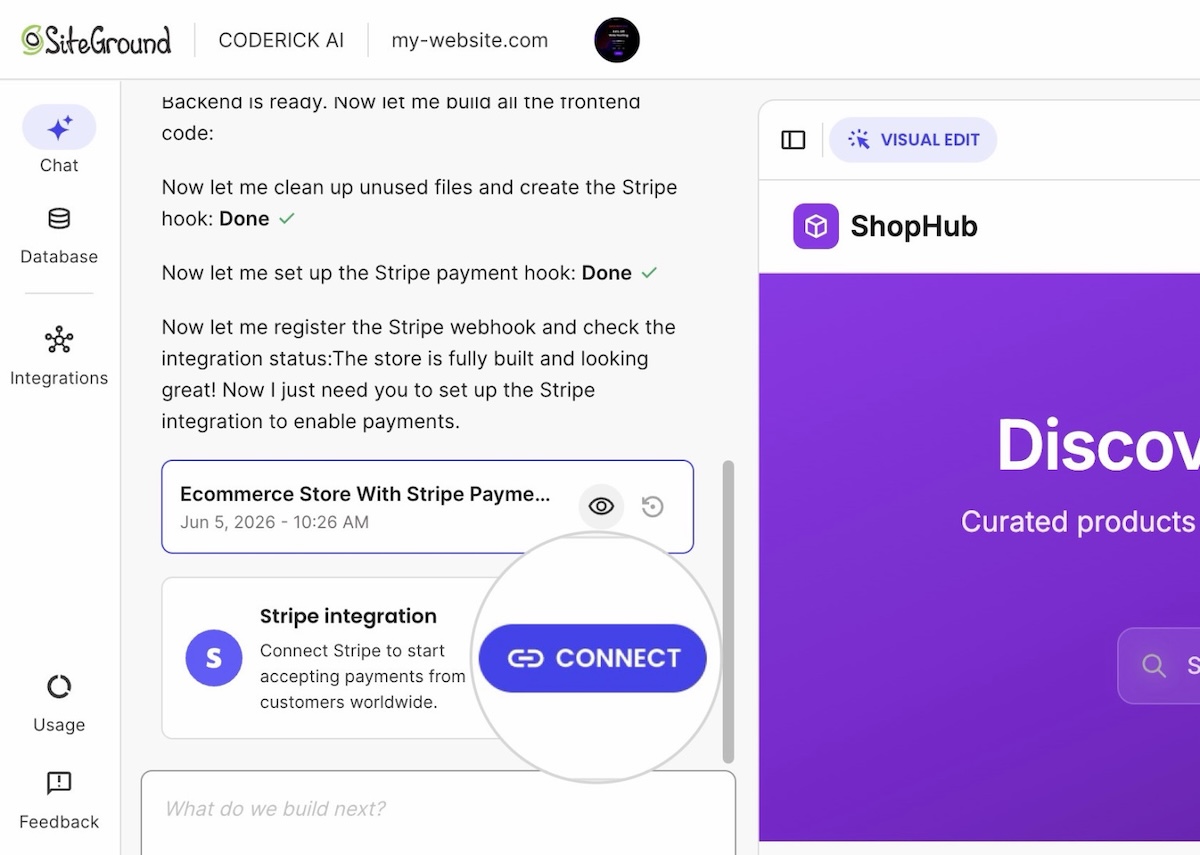
Coderick AI payment flows turn a described payment flow into working code, connected to a real Stripe account, without a developer starting from a blank file each time. So you, as a noncoder, describe the flow (deposit, one-time charge, or subscription), and it generates the checkout, the webhook listener, and the confirmation logic to match. Note, of course, that the output still needs testing in Stripe’s test mode before it touches a live client account.

Think of it as generating the plumbing, not the plumbing decisions (and, oh, you don’t need to be a proper “plumber”). The agency still decides:
- Which Stripe object fits this client’s flow
- Whether a client needs a deposit or a full charge
- Whether a booking cancels the payment or just the slot
- The deposit amount, cancellation policy, or calendar sync, if it’s a booking flow
- What the confirmation should actually say
Coderick AI turns those decisions into working code connected to the client’s own Stripe account, so the same webhook-and-confirmation pattern doesn’t get rebuilt by hand on every new client site.
This is also where agencies protect project margins: once a booking flow, a simple checkout, and a subscription flow each have a known pattern, quoting a new client project takes minutes instead of a scoping call about what’s technically possible. Working this way with an AI builder for client projects means the variable becomes the client’s business rules, not the underlying plumbing.
Pre-launch checks that prevent post-launch fixes
Before handing a payment-ready site to a client, run through a short list:
- Complete a test transaction with a Stripe test card and confirm the webhook fires.
- Confirm the confirmation email or notification reaches the right inbox, not a developer’s testing address.
- Test the refund path once, even if the client hasn’t asked for it yet (they will).
- Check the mobile checkout flow specifically; card entry on mobile is where most abandoned payments happen.
- Confirm the site’s currency and language match the client’s actual market.
These client launch checks take under an hour and remove most of the support tickets that would otherwise show up in the first week after launch. Most agencies that run this checklist once end up reusing it as a fixed step in every project. That’s the actual efficiency gain: not skipping verification, but never having to reinvent it per client.
What a clean payment-ready client handoff looks like at launch
Before calling a site ready to hand off, confirm it clears all of this:
- These three things happen automatically after a payment. A confirmation to the customer, a notification to the client’s business, and an update to whatever system tracks status (booking calendar, membership list, order queue).
- The checkout is tested, not just connected. A checkout button only proves Stripe is connected. A payment-ready app handoff proves the business can operate on the payments it receives without a person in the loop, which is exactly what the pre-launch checks above were for.
- Every payment lands somewhere searchable. Who paid, how much, what for, one-time or recurring, stored as paid client records, not left as receipts buried in Gmail.
If any of these depend on someone checking an inbox, or the client manually checking Stripe’s dashboard, the site isn’t ready to hand off yet, no matter how finished it looks.
Once all three actually hold, the handoff itself comes down to three things: who owns the account, what gets documented, and what access changes hands.
Who should own the payment account and payout details?
The client should normally own the live payment account, payout details, tax settings, and customer payment records. The agency should keep only the access needed for agreed maintenance or support, and should document all retained permissions during handoff.
What the agency should document and hand off
Handoff documentation should cover:
- Which Stripe object handles which flow
- How to check whether a payment’s confirmation fired, using the Events log in the Stripe dashboard
- What confirmation each flow sends, and to whom
Skip this, and the client ends up calling the agency for things they could’ve handled themselves, which defeats the point of handing it off in the first place.
What access the agency should remove or retain after launch
Once launch is confirmed, remove any development or test-mode API keys from production and transfer account ownership to the client’s own Stripe login. If there’s an ongoing maintenance contract, keep only the specific access that contract requires, spelled out by name, not a blanket admin role left over from the build.
Making payments part of the build, not a detour
Every format in this piece, from bookings to stores and memberships, comes down to the same three questions: which Stripe object fits, what has to happen after the charge, and where the record lives. Answer those once, reuse the answer, and you can add payments to client websites the same way you handle fonts or hosting: as a standard part of the build and not a separate quote with its own risks attached. That’s what keeps client website delivery predictable, project after project.
Build client sites with Coderick AI, and connecting Stripe is simple. The site runs on SiteGround’s own hosting the moment it’s published, so there’s no server to configure or database to set up on the side, and every version along the way gets saved automatically, so testing a payment flow doesn’t put a live project at risk. The booking, store, and membership setups from this piece already exist as a starting point. The only real variable left is the client’s own business rules, not whether the checkout works.
[96]
Frequently asked questions
You can add payments to client websites without custom code by using a payment processor’s hosted objects, such as Stripe Checkout or Payment Links, and generating the surrounding confirmation logic instead of hand-coding a payment form and backend.
Payment access is having a processor account and API keys connected to a site. Payment integration is the complete working path from checkout to confirmation to a recorded transaction, which is what actually makes a site payment-ready.
Yes, Coderick AI can generate a client website and payment flow connected to a Stripe account, including the checkout flow and the confirmation logic, though the resulting flow still needs testing in Stripe’s test mode before it goes anywhere near a live client.
Before handing off a payment-enabled client website, test a full transaction in the processor’s test mode, confirm the webhook and confirmation notifications fire correctly, and check the refund path once, even before a client requests one.
No, a checkout button alone isn’t enough for a payment-ready client website. It proves the payment processor is connected, but the app also needs a confirmation step and a way to record the payment against the right customer or booking.