
Vibe coding prompts are structured plain-language instructions that tell an AI builder what website, app, or MVP to create inside any vibe coding tool. An MVP, or minimum viable product, is the smallest version that tests one idea with real users. The prompt only works if it’s structured though; a vague ask like “build me a website” produces a generic result.
The difference is structure. “Build me a website” gives you a generic result; a prompt that names the pages, the content, and the rules gives you something you can use. The five-part formula below is how you get that structure every time. Reuse it in a vibe coding tool like Coderick AI at every stage of a build, from the first draft to the version you launch.
Key takeaways:
- A working vibe coding prompt needs five parts: context, goal, constraints, output format, and success criteria.
- Website prompt templates focus on pages and content; web app prompt templates need to specify data, logic, and user roles.
- MVP prompts work best when they scope one feature and name what you’re testing with real users.
- Testing prompts before launch catch broken forms, missing states, and mobile layout issues that the first build usually misses.
- Coderick AI uses the same prompt structure across every build stage, from a first draft to a pre-launch check.
What a vibe coding prompt needs to include
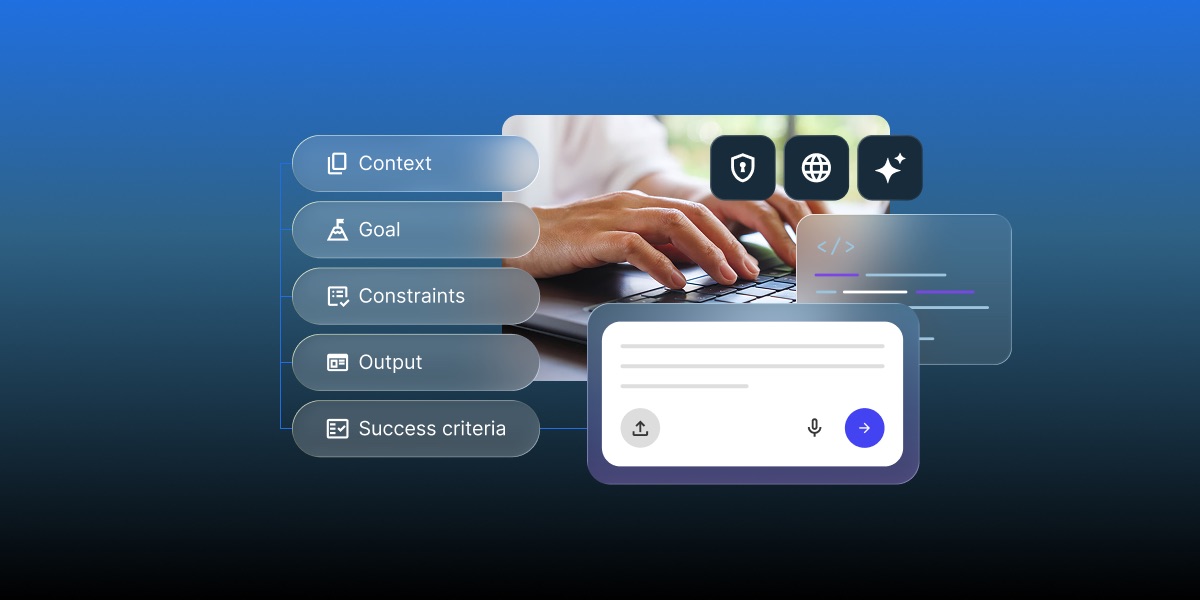
A vibe coding prompt works best for you when it answers five questions: who it’s for, what it should do, what rules it follows, what the output should look like, and how you’ll know it worked. Skip any of the five and the AI builder fills the gap with a generic version, not yours.
The five-part prompt formula: context, goal, constraints, output, and acceptance criteria
- Context: who the site or app is for, and where it fits. Example: an internal tool for a five-person team.
- Goal: the single outcome the build needs to achieve, stated as a specific action, not a vague theme.Example: let customers book a table without calling.
- Constraints: the pages, data fields, or rules the AI can’t improvise around. Example: three service tiers, a contact form with four fields, no login.
- Output format: what you expect back. Example: a dashboard with a table and a chart.
- Acceptance criteria: what “done” looks like in concrete terms, so you can tell a usable build from a half-finished one. Example: a visitor can submit the form and see a confirmation.
This is the same context-goal-constraints logic behind writing effective ChatGPT prompts: specificity replaces guesswork, whether the AI is writing a paragraph or generating a page.
A vague prompt vs. a structured prompt
Vague: “Build me a website for my bakery.”
Structured: “Build a four-page website for a neighborhood bakery: home, menu, ordering info, and contact. The goal is for a visitor to find the menu and place a pickup order within two clicks. The home page needs a hero image spot, a short intro, and a call-to-action button linking to the menu. The menu page lists eight items with a name, description, and price for each. Use a warm, handwritten-style font for headings and a cream-and-brown color palette. No online payment; the contact page just needs a form with name, email, and message fields. Done means every price is visible without scrolling and the contact form submits without errors.”
The second version names the pages, the content on each, the visual direction, and what’s explicitly out of scope. That’s the difference between a build you can use and one you’ll spend an afternoon fixing.
Got one page or feature that turned out exactly right? Use reverse meta prompting: paste that result back into the AI and ask it to generate the exact prompt that would produce it. A request like “Analyze this [page/component]. Break down its structure, tone, and formatting, then write a reusable prompt that would produce a response like this in one try” turns a lucky result into a template for the rest of the site or app.
Vibe coding prompts for a business website
Vibe coding prompts for websites are the easiest starting point because the output is mostly pages, content, and layout rather than data or logic. The prompt still needs to name every page and what belongs on it, or the AI builder will invent a generic template.
First-build prompt template
“Build a [number]-page website for a [type of business]. Pages: [list each page and its purpose]. The homepage should include [hero section, intro copy, call-to-action]. Use a [style descriptor] visual style with a [color palette] color scheme. Target audience: [who visits this site and what they’re looking for]. No [explicitly excluded features, like ecommerce or a blog].”
This website prompt covers the same five parts from the formula above: business type and audience as context, the page list as goal, the style and color rules as constraints, the page format as output, and the excluded feature as a scope boundary.
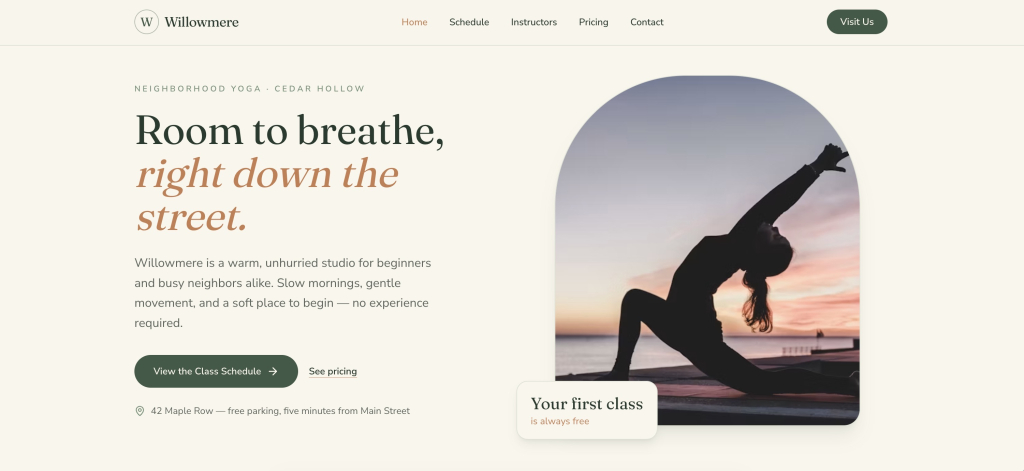
Here’s what Coderick AI did with this prompt template, adjusting it for a yoga studio for local residents in their 20s and 30s:
Page-by-page refinement prompt template
“On the [page name] page, change [specific element] to [specific change]. Keep [element that should stay the same] as it is. The [section name] section should now include [new requirement].”
And our Coderick AI-built result:
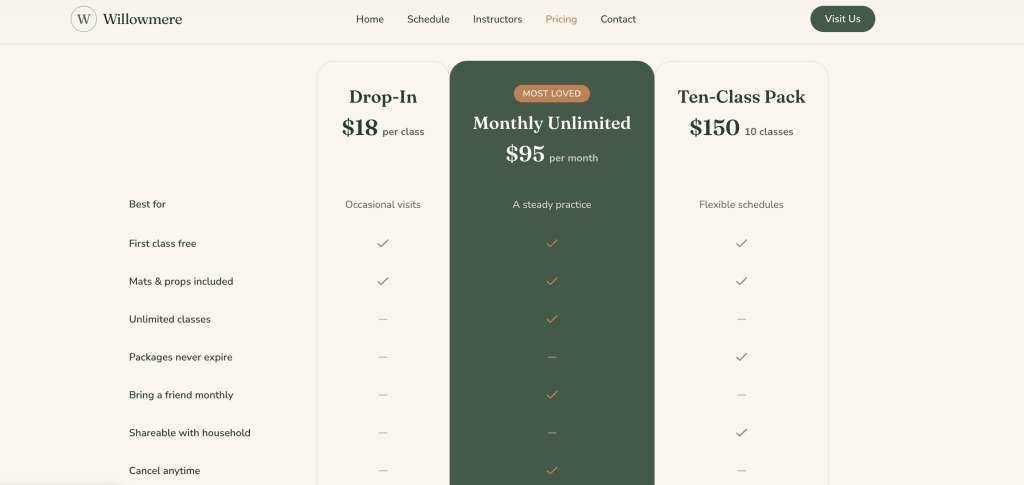
Refinement prompts work best one page and one change at a time. Asking for five changes across three pages in one prompt tends to produce a build that fixes two things and breaks a third.
For small tweaks like a text swap or a button’s color change, Coderick AI’s Visual Edit skips the prompt entirely: click the element directly in the preview and edit it on the spot, at zero credit cost. Save the templates above for changes that touch layout or logic; use Visual Edit for the one-line fixes.
Vibe coding prompts for a web app
Vibe coding prompts for building web apps carry more weight than website prompts because they need to define data, user roles, and behavior, not just content and layout. A web app prompt that skips the data model will get you a UI shell with no logic behind it.
Core functionality prompt template
Core functionality is the one thing your web app actually needs to do to be useful, not every feature you can imagine adding later. A task app’s core functionality is adding and completing tasks; everything else (tags, reminders, sharing) is an addition, not the job itself.
“Build a [type of app] for [specific use case]. The core action is: [the one thing a user does most, e.g. adding and completing tasks]. Track [specific data fields, e.g. name, email, due date] for each [record type]. Include a [table/dashboard/form] view showing [specific columns or metrics]. [User role, if any] can [permission, e.g. submit], while [other role] can only [more limited permission, e.g. approve].”
Here’s a Coderick AI output after the initial prompt.
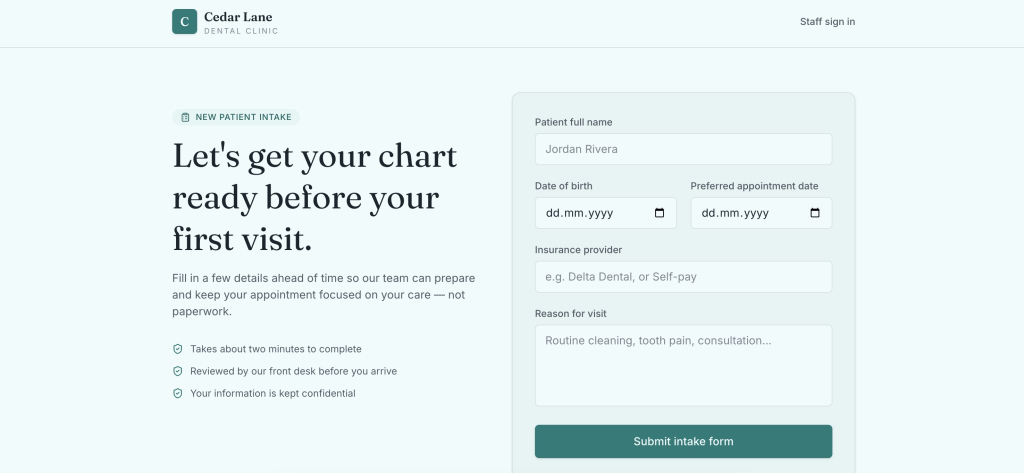
Naming the exact fields and permissions up front is what separates a working internal tool from one that needs three rounds of follow-up prompts to fix. Reviewing your current setup with our guide to building a website without Claude Code is a useful gut check if you’re not sure how much technical detail your builder actually needs from you.
Data and workflow prompt template
“When a customer submits the [form], the app should [what happens next] and save it as a record with [the details you want to keep].”
Here’s how Coderick AI handled this in our scenario:
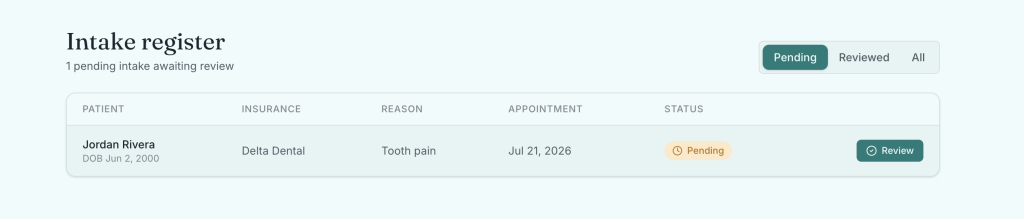
Want an at-a-glance number or a follow-up flag? Add them one prompt at a time, the same way you’d refine anything else:
“Show a count of this week’s bookings on the dashboard.”
“Flag any booking for more than six people so I can confirm it by phone.”
This template handles the workflow logic that a static form-and-table app usually lacks: what happens after a submission, not just what the submission form looks like.
Vibe coding MVP prompts
A vibe coding MVP prompt asks for less than a website or web app prompt does. Instead of a finished product, it asks for the smallest version that tests one specific assumption with real users, nothing more. Padding that prompt with features meant for later versions is a common way founders slow down their own launch.
Scope-definition prompt template
“Build an MVP for [product idea] that does exactly one thing: [core action]. Skip [authentication/payments/admin panel/anything not required to test the core action] for now. The goal is to test whether [target user] will [specific behavior you’re validating], not to build every feature.”
And here’s what Coderick AI created from one prompt, following this template.
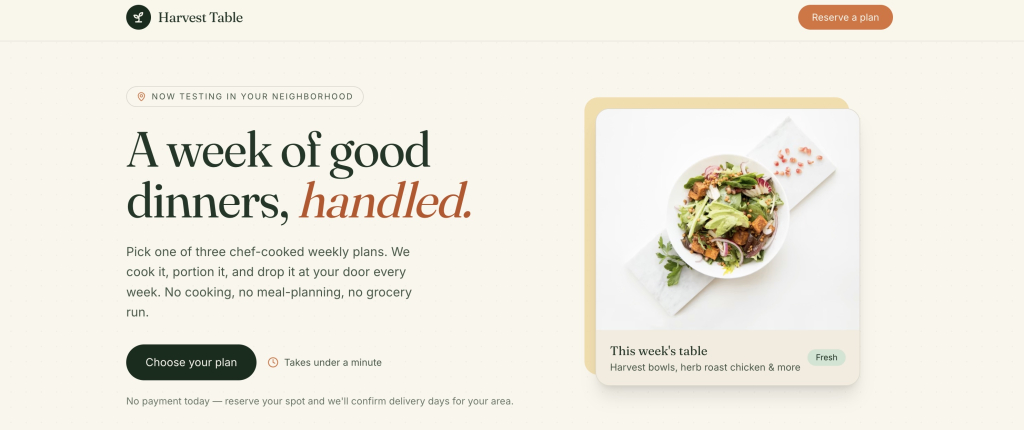
Naming what to skip is as important as naming what to build. If terms like “scope” or “hypothesis” feel unfamiliar once you start writing prompts around them, vibe coding’s glossary of terms is worth a quick check.
Feature-prioritization prompt template
“I have these [number] possible features for [product]: [list them]. Given that the MVP needs to test [core hypothesis], which one feature is essential and which can wait? Rebuild the app with only the essential feature included.”
The result:
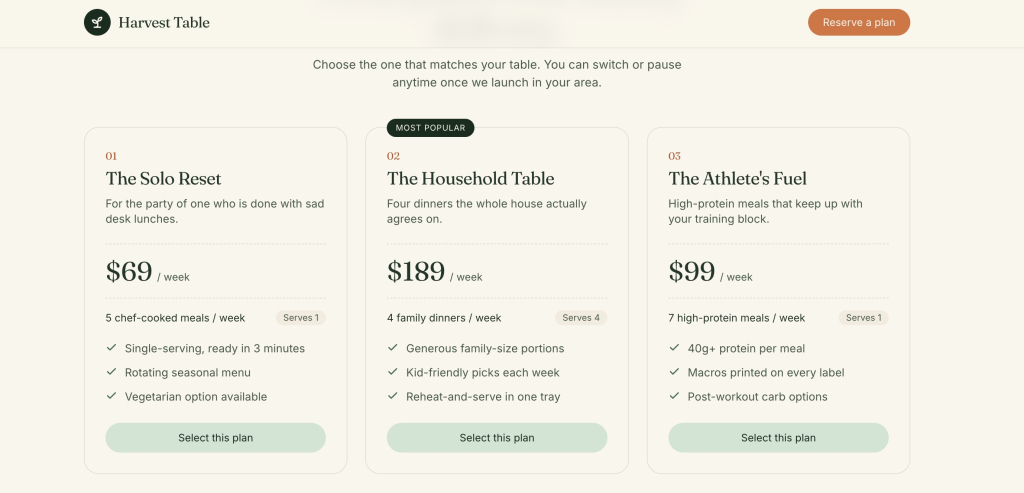
Asking the AI builder to prioritize, rather than just build everything you listed, forces a decision you’d otherwise put off until the build is already bloated.
Prompts to refine an AI-built site or app
The first version from any AI builder or AI app builder is a starting point, not a finished product. Refinement prompts work best when they change one thing at a time and reference what already exists, rather than restating the entire original request.
“In the [component/section] you just built, change [specific element] to [specific change]. Keep everything else as it is.”
“The [page/feature] feels [specific problem: cluttered, slow, confusing]. Simplify it by [specific direction: removing X, combining Y and Z, reducing the number of steps].”
“Add [missing state] for when [specific condition]: an empty state for no results, a loading indicator while data fetches, an error message if the submission fails.”
Testing Harvest Table with these prompts caught a form that silently failed on bad emails, let people type a 200-character name it couldn’t actually save, three buttons too small to tap comfortably, and a selected plan that seemed to vanish once you scrolled down, all fixed.
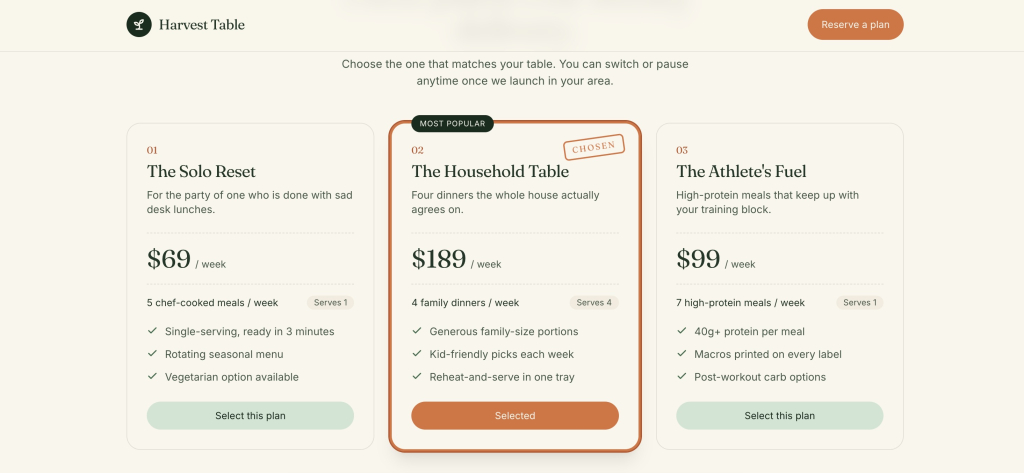
Missing states, the loading spinner, the empty list, the failed-submission message, are the most common reasons a first build feels unfinished even when the core feature works. If you started from a design file rather than a blank prompt, our guide on how to turn a Claude Artifact into a real website covers the extra refinement pass that step usually needs.
Prompts to test a build before launch
Testing prompts are the stage every vibe coding prompt library in this space skips, and it’s the one that catches the problems a reader actually ships with if they skip review. Before launch, a build needs to survive a form submitted with bad data, a screen narrower than a laptop, and a user who clicks the back button mid-flow.
“Test the [form/signup/checkout] flow: what happens if I submit it empty, with an invalid email, or with a name that’s 200 characters long? Fix any case that breaks or fails silently.”
“Check the site or app on a mobile screen width of 375 pixels. Fix any text that’s cut off, any button smaller than 44×44 pixels, and any table that doesn’t scroll.”
“Walk through the full user flow for [core action] as a first-time visitor with no prior context. Note anywhere the next step isn’t obvious.”
A website, web app, or MVP that passes these three prompts before launch has already caught issues that might otherwise show up as a support email or a confused first user. It’s a smaller set of checks than a full QA pass, but it covers the failure modes that matter most for a small business site or app, not a developer’s edge-case list.
How to use these vibe coding prompts in Coderick AI
These templates work in Coderick AI the same way they work anywhere else: fill in the brackets with your specifics, paste the result in, and treat the output as a first draft rather than a final answer. Coderick AI reads plain-language prompts and generates the website, app, or MVP draft, so the five-part formula, context, goal, constraints, output, and success criteria, maps naturally onto its build flow without any translation needed.
One detail worth knowing before your initial prompt: Coderick AI keeps a running history of your build, so a refinement prompt can just say “on the page you just built” without repeating the original request. That’s useful for the page-by-page and one-change-at-a-time templates above, since each prompt builds on the last one directly.
If you’re comparing Coderick AI against other options first, our roundup of the best AI tools for business covers where AI website and app builders fit next to broader categories like AI writing and research tools.
Write better vibe coding prompts by starting with the result
Every vibe coding prompt template above works the same way: state the result you want before you describe how to get there. That’s what separates vibe coding prompts that ship a usable website, web app, or MVP on the first try from ones that need three rounds of guesswork to fix.
Ready to put these templates to work? Try Coderick AI and paste in a prompt from any section above, adjusted for your business.
[96]
Frequently asked questions about vibe coding prompts
A vibe coding prompt should include five things: context, goal, constraints, output format, and success criteria. Context explains who it is for, the goal defines what the build should do, constraints set limits, output format names what the AI should create, and success criteria define “done.”
The best vibe coding prompts for building a business website name the page structure, the goal of each section, and the tone or style upfront, rather than asking for “a website” in general terms.
To write a prompt for an AI website builder, describe the pages you need, what each page should do, your target visitor, and any brand or style references, then refine section by section.
To write a prompt for an AI app builder, define the core user action, the data it reads or writes, user roles if any, and the exact UI format (form, dashboard, list) you expect back.
To prompt an AI builder to create an MVP, scope one core feature only, state what you’re testing with real users, and explicitly exclude anything not needed to validate that.
The difference between website prompts and web app prompts is that website prompts focus on pages, content, and layout, while web app prompts need to specify data, logic, and user interactions.
To improve the first version from an AI builder, give small, targeted follow-up prompts, one change at a time, instead of re-writing the entire original prompt.
Yes, these vibe coding prompts can be used in Coderick AI. Adapt the bracketed details to your business, website, web app, or MVP requirements, and paste the prompt into Coderick AI; the structure works the same across build stages.