

To turn a Claude Design project into a real website, finalize the design in Claude Design, document the design intent, and then choose a production path.
Developers can use Claude Design’s native handoff to Claude Code. Non-technical users can use Coderick AI as the managed production path after Claude Design. Coderick AI handles the full launch — hosting, SSL, custom domains, and deployment — without any manual setup.
Key takeaways:
- Claude Design is the design and prototype layer for creating and validating a website’s visual direction
- Claude Code is the native developer handoff path for users who want codebase control
- Coderick AI is where your validated Claude Design project becomes a live website; no repositories, no server setup, no deployment configuration
- The safest workflow is Claude Design project → handoff brief → production website
What is Claude Design?
Claude Design is a research-preview workspace from Anthropic Labs where each design project lives on its own canvas. You describe what you want, Claude generates a visual version, and you refine it through chat, inline comments, direct edits, and layout sliders: all in the same place, without starting over.
Released on April 17, 2026, it runs on Claude Opus 4.7 and is available to Claude Pro, Max, Team, and Enterprise subscribers. Unlike most AI tools that respond to prompts with text, code, or images that disappear into the chat, Claude Design keeps your work in a persistent, shareable project that can be reviewed, refined, exported, or handed off.
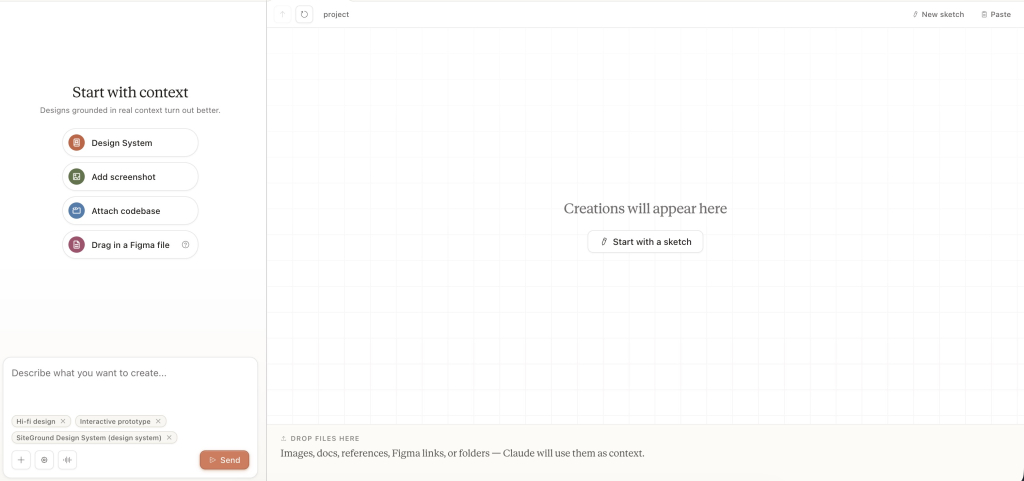
What you can create in Claude Design
In Claude Design, you can create:
- Interactive prototypes
- Product wireframes, mockups, and website concepts
- Design explorations
- Pitch decks and presentations
- One-pagers, visual concepts, and presentation-style assets
During onboarding, Claude reads your codebase and existing design files and generates a design system (colors, typography, and component patterns) that carries through every project automatically.
How Claude Design supports design iteration and sharing
Iteration happens through two inputs:
- Chat for broad changes to layout, color scheme, or structure
- Inline comments for targeted edits to specific elements on the canvas
You can pin comments across multiple elements and send them as a single batch. Claude resolves everything in one turn.
Sharing is organization-scoped with three permission levels:
- Private: visible only to you
- View-only link: anyone in your organization with the link can see it
- Edit access: collaborators can modify the design and chat with Claude together
Not every project needs to start in Claude Design. If you already know what you want to build and you are ready to go live, you can skip the design step entirely and start directly in Coderick AI. Claude Design earns its place when the visual direction needs validation before production; not every project does.
Why a Claude Design project is not the same as a live website
Claude Design can export to an internal URL, a .zip folder, Canva, PDF, PPTX, or standalone HTML, but none of those outputs are a live website. A Claude Design project has no hosting, no custom domain, no SSL certificate, no backend, and no deployment pipeline. It shows what a website should look like and how it should behave. It does not run as one.
Can a Claude Design project become a real website?
Yes. A Claude Design project can become a real website after the design intent, page structure, copy, user flow, and production requirements are documented.
Claude Design is built for the work that happens before production: aligning on layout and visual direction, testing user flow through an interactive prototype, presenting a concept to a client or stakeholder, and documenting design intent before handoff. When those things are done, its job is done.
Moving the design into production means translating the approved Claude Design project into a working site. The design intent, page structure, copy, and user flow carry over, but the prototype does not. This is one version of the broader AI prototype to published website process.
A production website needs hosting, an SSL certificate, a custom domain name, a deployment pipeline, and a system for ongoing updates. None of that exists inside Claude Design. It belongs to whoever owns the production path.
How to create a Claude Design
Claude Design works best when your prompt is specific. Open Claude.ai, click the palette icon in the left-hand navigation, and start a new project. The more detail you give upfront, like a visual direction, page structure, copy intent, and user flow, the closer the first output is to what you actually want.
Here’s an example of a well-structured starting point:
“I want to create a website for a freelance brand strategist called Mara Studio. The target audience is small business owners looking for brand identity work.
Visual direction: Clean and minimal. Warm off-white background (#FAF8F5), dark charcoal text (#1C1C1C), and a muted sage green accent (#6B7F6E) for CTAs and highlights. Use Inter for body text and Fraunces for display headings. Generous white space throughout.
Pages: Homepage, Services, About, Portfolio, and Contact.
Start with the homepage. It needs:
A full-width hero with a bold headline, one-line value proposition, and a single “Let’s talk” CTA in sage green
A services overview below the hero with three cards: Brand Identity, Logo Design, Brand Strategy
A short about teaser with a link to the About page
Two portfolio thumbnails with project name and category labels
A sticky navigation bar with links to all five pages
A simple footer with social links and a copyright line
Once the homepage looks right, generate the remaining four pages to match the same design system. Make the Contact page include a form with name, email, a project type dropdown (Brand Identity, Logo Design, Brand Strategy, Other), and a message field.
When all five pages are done, create an interactive prototype so I can click through the full user flow from the homepage to the contact form submission.”
And here’s the first result that Claude Design gives you:
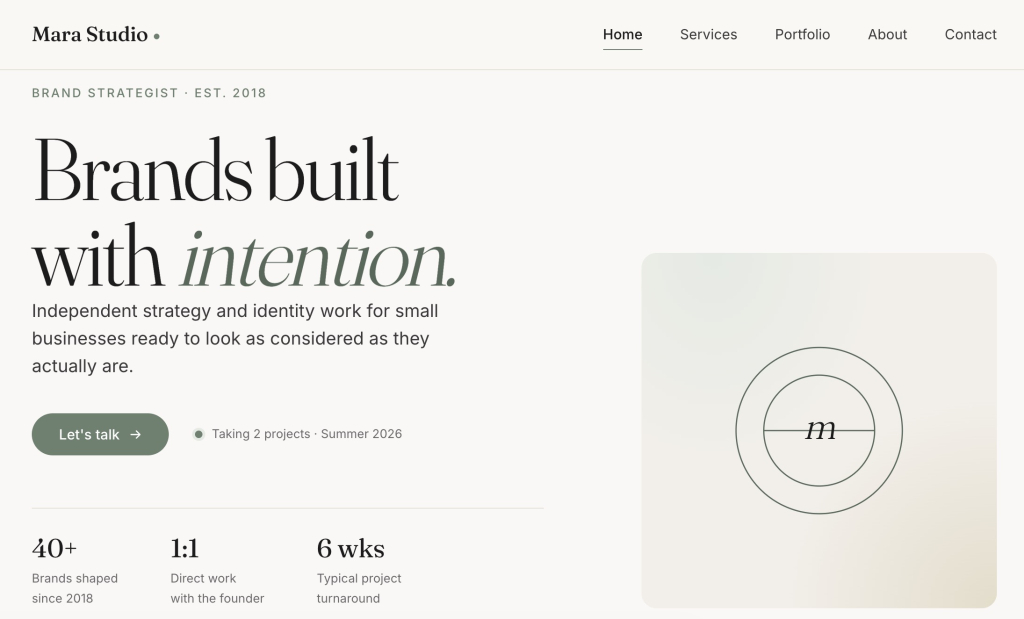
This is a starting point, not a finished design. Claude Design is iterative and the first output gives you something to react to, and you refine from there through chat and inline comments. When the design looks right and the user flow works, that is when the production path begins.
How do you turn a Claude Design project into a real website?
To turn a Claude Design project into a real website, follow these five steps.
Step 1: Finalize the Claude Design project
Finish all design iterations before the production build starts. Approve the layout, visual direction, page structure, and user flow. Confirm that the design intent is documented and that stakeholders have reviewed the interactive prototype. Changes cost more to fix in a production build than in Claude Design.
Before handing off, confirm five things are true:
| Checkpoint | What it means |
| Design direction is approved | Stakeholders have signed off. No major changes expected. |
| Design intent is documented | Layout decisions, component choices, and interaction patterns are captured in writing. |
| Page structure and content are clear | Every page, heading, call to action, and form field is defined. |
| Interactive prototype has been reviewed | Navigation, form interactions, and state changes have been tested. |
| Production requirements are known | Hosting, domain, backend needs, and the production path are decided. |
Anything unresolved here gets decided by the builder, not the designer, which can create mismatches between the approved design and the live website.
Our original prompt covers the visual direction and homepage structure well, but it leaves three gaps: the inner pages (Services, About, Portfolio) are underspecified, the interactive prototype is requested but never reviewed against a defined user flow, and there is no production handoff summary to document design intent for production.
Once you have reviewed the first output, use the production readiness checklist above to identify what is still missing.
Here are the additions that turn the initial prompt into a complete handoff-ready brief:
“Apply this design system consistently across all pages.
Pages and structure:
Services: Page headline and one-line intro. Three service sections — Brand Identity, Logo Design, Brand Strategy — each with a title, three-line description, and starting price. A “Let’s talk” CTA at the bottom of the page.
About: Page headline. Short bio paragraph. Headshot placeholder. List of four working principles. A “See my work” link to the Portfolio page.
Portfolio: Page headline and one-line intro. Six-item image grid with project name and category label on each item.
User flow: Visitor lands on the homepage → reads the hero → scrolls to services → clicks “Let’s talk” CTA → lands on the Contact page → submits the form.
Also test that the navigation bar links work correctly on every page.
Finally, give me a handoff summary with the following:
Visual direction and design intent: colors, typography, spacing rules, and the reasoning behind key layout decisions
Component inventory: every component used, how it looks, and how it behaves
Page-by-page structure: sections, headings, CTAs, and form fields for each page
User flow: the full path from homepage to form submission
Any placeholder content, unresolved layout questions, or missing elements that need a decision before production starts”
Step 2: Choose your production path
Three production paths are available. Claude Design stays as the source of design intent, while Claude Code, Coderick AI, or a developer turns that intent into a live website.
| Path | Best for | What happens next |
| Coderick AI | Non-technical users, founders, marketers, freelancers, and small teams that want a managed launch path | Use the finished Claude Design project as a production brief and build/publish the live site in a managed environment |
| Claude Code | Technical users and teams that want codebase control | Use Claude Design’s handoff bundle or export files to move the design into a developer-controlled build |
| Developer or agency | Projects needing custom engineering, integrations, complex backend logic, or strict QA | Hand off the design intent, export files, user flows, and requirements for a manual production build |
Claude Design has a native handoff to Claude Code, but not every user wants a developer-controlled workflow. Users who find that path too technical can explore Claude Code alternatives for beginners. If the project doesn’t require codebase ownership, a managed path can help users build without Claude Code while still moving the approved design toward a live site.
Step 3: Export or document the design intent
Export the project in the format that fits your chosen path.
If you chose Claude Code:
When a design is ready to build, Claude Design packages the project into a handoff bundle that can be passed to Claude Code with a single instruction — design to production code, inside Anthropic’s ecosystem. The handoff bundle packages the design intent, layout structure, and component context into a format Claude Code can read and act on.
Send the project to Claude Code when:
- The design is approved and the page structure is clear
- The team wants to own the source code and manage a Git repository
- The build requires tests, custom deployments, or developer-controlled infrastructure
If the team is not using Claude Code directly, use the export that fits:
| Export format | Best for |
| HTML bundle | Developer working outside Claude Code |
| PPTX or PDF | Client proposals, presentations, review documents |
| Shareable link | Internal stakeholder review and approval |
If you chose Coderick AI:
The Claude Design project does not import directly into Coderick AI, but it does not need to. The validated design is the production brief. Export the project as a PDF, PPTX, or standalone HTML and upload it alongside your brief.
Coderick AI also accepts existing code files (.js, .jsx, .ts, .tsx, .html, .css, .scss, and .md) so any existing code or content comes with you too. The validated design becomes the production brief: describe the page structure, design intent, copy, user flow, functionality, domain requirements, and update needs, and Coderick AI builds from there.
Below is your everything-you-could-possibly-need list, not a homework assignment. If you are uploading an HTML export or code files from Claude Design, a good chunk is already covered. Focus on what the files cannot tell Coderick AI: your copy, user flow, forms, backend needs, domain, and how you plan to keep the site updated.
Use this as your reference and fill in what applies to your project:
| Field | What to include |
| Claude Design project reference | Direct link to the finished project, or exported files if sharing externally |
| Exported files | Screenshots, (.png, .jpg, .jpeg, .gif, .webp) or HTML export of each page. Coderick AI accepts .js, .jsx, .ts, .tsx, .html, .css, .scss, and .md files — upload any existing code or content alongside the visual reference. |
| Goal of the website | What the site needs to achieve and for whom |
| Target audience | Who will use the site and what they are trying to do |
| Pages needed | Full list of pages with purpose and priority |
| Design intent | Describe in your prompt: the visual direction, tone, and layout logic behind the approved design |
| Brand colors and typography | Exact hex codes, font names, sizes, and weight rules |
| Component behavior and visual states | Buttons, cards, navigation, headers, footers — how they should look and behave |
| Final copy | All headlines, body text, CTAs, labels, and microcopy — ready to use |
| Calls to action | Exact CTA text, placement, and destination for each page |
| User flow | The path from landing to conversion, with any branching or conditional steps |
| Forms | Fields, validation rules, and where form submissions should go |
| Backend/database needs | Any data that needs to be stored, retrieved, or managed |
| Authentication needs | Login, sign-up, roles, or access control requirements |
| SEO title and meta description | Per-page SEO metadata, ready to paste |
| Custom domain | The domain to connect after publishing |
| Launch requirements | Any staging, review, or approval steps before going live |
| Ongoing update and maintenance expectations | How often the site will be updated and by whom |
The more specific the brief, the closer the first build is to the approved design.
With this checklist in mind, here are the fields the original Claude Design prompt does not cover — and what to add to your Coderick AI brief before you start the build:
“Claude Design project: [Link to the finished Mara Studio Claude Design project as HTML and upload it to Coderick AI. Include screenshots (.png or .jpg) of each page as visual reference.]
Backend/database needs: None beyond contact form submission handling. Form submissions go to hello@marastudio.com.
Authentication needs: None. The site is fully public with no login or member areas.
SEO title and meta description:
Homepage: “Mara Studio — Brand Identity for Small Businesses” / “Mara Studio helps small business owners build a visual identity that means something. Brand identity, logo design, and brand strategy.”
Services: “Brand Identity, Logo Design & Brand Strategy — Mara Studio” / “Explore Mara Studio’s brand services for small businesses. Clear pricing, considered process, and work that lasts.”
About: “About Mara — Mara Studio” / “Mara is a freelance brand strategist helping small businesses find their visual voice. Learn about her process and working principles.”
Portfolio: “Portfolio — Mara Studio” / “A selection of brand identity and logo design projects by Mara Studio.”
Contact: “Work With Mara — Mara Studio” / “Ready to start a brand project? Tell Mara about your business and she will be in touch within two working days.”
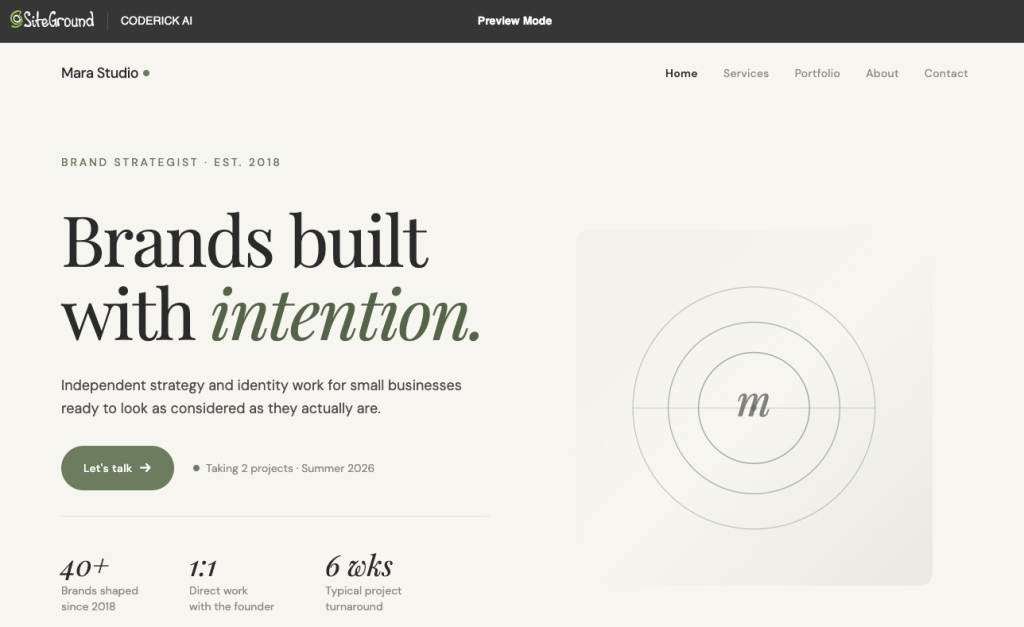
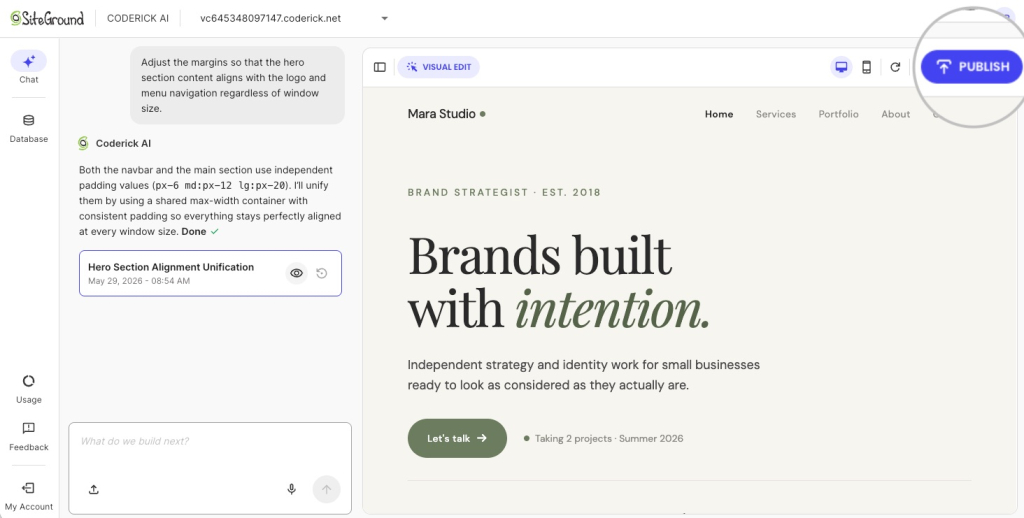
And this is what Coderick AI builds: not a prototype, not a design file, but a working website on live infrastructure with hosting, SSL, and a custom domain ready to connect.
If you chose a developer or agency:
Hand off the exported files, design intent notes, page structure, user flow, and production requirements. Use the PPTX, PDF, or HTML export from Claude Design as the visual reference, and document anything that is not visible in the export — interaction logic, backend requirements, authentication needs, and launch criteria.
Step 4: Build, publish, and maintain the live website
Build from the approved design using the chosen path. With Coderick AI, publishing is one click: hosting, SSL, and deployment are included, and ongoing updates happen through the same chat interface. With Claude Code or a developer, hosting, SSL, and deployment need to be configured separately after the build is complete.
How can Coderick AI turn a Claude Design project into a managed website?
Once the brief is ready (design intent, page structure, copy, user flow, and functionality notes documented), Coderick AI takes it from there. This is the managed production path after Claude Design for building, publishing, hosting, and updating the live website, without a developer-controlled workflow.
Start with a full project description, then refine by section
Start with a framing prompt before sharing any files: something like “I am starting a new website project and will be sharing a Claude Design brief and files.” This prevents Coderick AI from building before your full brief is in. Then share everything together: the design intent, page structure, copy, user flow, functionality notes, and any exported files or screenshots from Claude Design.
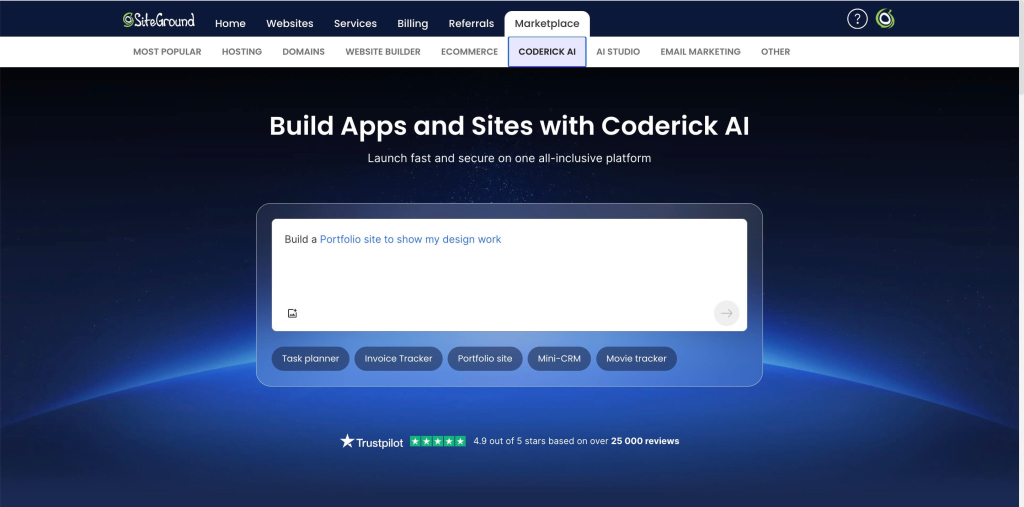
Build and refine the website inside Coderick AI
Building with Coderick AI works the same way as the Claude Design iteration process: describe what you want, review the output, and refine through chat. You can adjust layout, update copy, add pages, and change functionality without leaving the platform.
Coderick AI is suitable for business websites, landing pages, portfolios, booking systems, membership areas, CRMs, dashboards, and internal tools. It also accepts existing files like .js, .jsx, .ts, .tsx, .html, .css, .scss, and .md, so you can bring in any existing code or content alongside the Claude Design brief.
Publish and update the site in a managed environment
When the build is ready, Coderick AI publishes it to SiteGround’s infrastructure with hosting, SSL, and automatic deployment included. That makes it a managed path without Claude Code for users who want the approved design to become a live site without handling infrastructure separately. Connect a custom domain, and the site is live. Ongoing updates, such as new pages, content edits, or feature additions, all happen through the same chat interface, without touching a codebase or logging into a separate hosting control panel.
What should you test after the Claude Design project becomes a live website?
Testing after a Claude Design to production build is not a generic hosting checklist; it is a design-to-production QA pass. The goal is to confirm the live site matches the approved design and functions correctly for real users.
Visual match to the approved Claude Design project
Compare the live site against the approved Claude Design project page by page. Check that layout, spacing, typography, colors, and component styles match the design intent. Visual drift is common during production builds — catch it before users do.
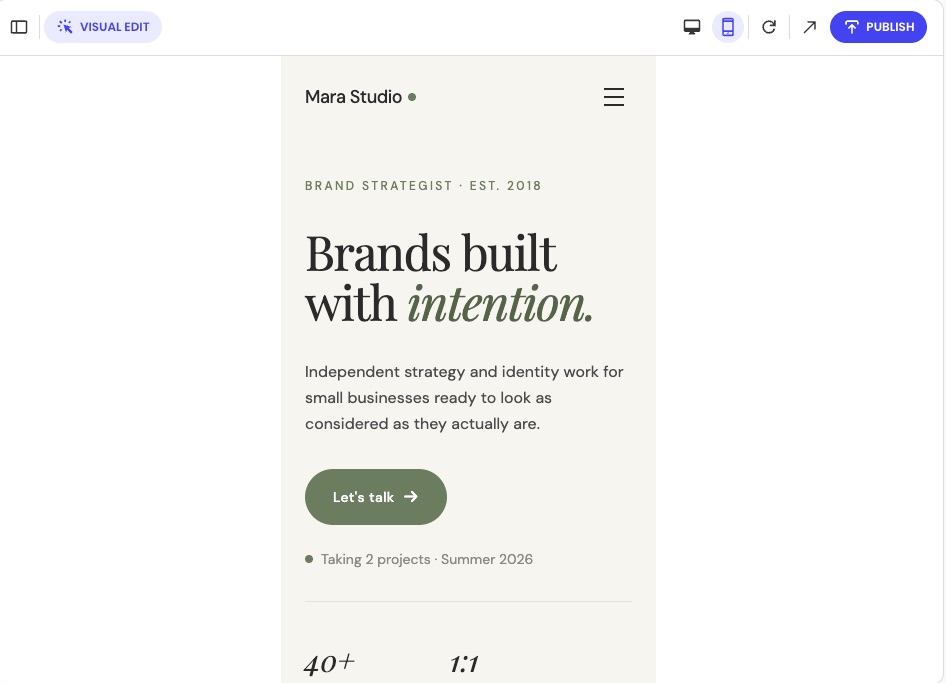
Responsive behavior on mobile, tablet, and desktop
Test every page at three breakpoints: mobile, tablet, and desktop. Check that layouts reflow correctly, touch targets are large enough, navigation works on small screens, and no content is clipped or hidden unintentionally.
Navigation, forms, and interactive states
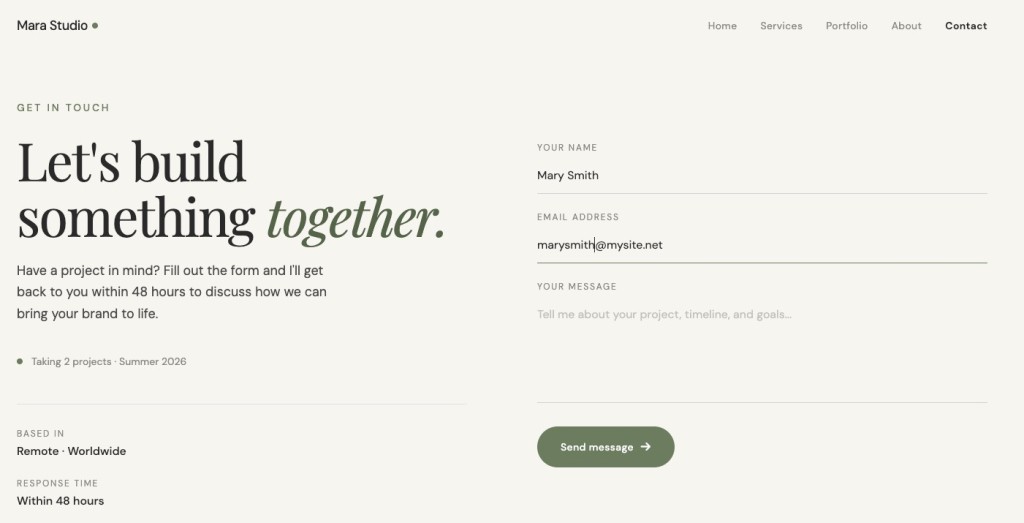
Test every navigation path in the site. Submit every form and confirm it reaches its destination. Check hover states, focus states, error states, and empty states. Interactive elements that work in the Claude Design prototype need to work the same way in the live build.
Accessibility, contrast, and readable typography
Check color contrast ratios against WCAG AA minimums. Confirm all images have alt text. Test the site with keyboard navigation. Verify that font sizes are readable at every breakpoint and that line lengths do not make body text hard to scan.
Page speed, image optimization, and layout stability
Run a Lighthouse or PageSpeed Insights audit on key pages. Check that images are compressed and served in modern formats (which is done automatically with Coderick AI). Confirm there is no layout shift on load — elements jumping as the page renders hurt both user experience and Core Web Vitals scores.
Custom domain, SSL, metadata, and indexability
Confirm the custom domain resolves correctly, and SSL is active. Check that every page has a unique title tag and meta description. Verify the site is not accidentally set to noindex.
Test that canonical URLs are correct and the sitemap is accessible. Before launch, also confirm the update workflow: in Coderick AI, test that chat-based edits apply correctly; for Claude Code or developer builds, confirm the staging environment is in place and the deployment process is documented.
Related workflows: Claude Artifact and Google Stitch
This article covers the Claude Design workflow: from a finished Claude Design project to a live website via Claude Code or Coderick AI. Two other starting points lead to similar production questions but follow different paths.
Use the Claude Artifact workflow for interactive Claude prototypes
If the starting point is a Claude Artifact — an interactive component, tool, or prototype built inside Claude — the production path is different. See the Claude Artifact production workflow for how to move from an artifact to a live build.
Use the Google Stitch workflow for UI design screens
If the starting point is Google Stitch (Figma-style UI screens and components), as opposed to Claude Design, the design handoff and production requirements are a bit different. See the Google Stitch design workflow for that path.
Ready to take your Claude Design project live?
A Claude Design project gets the hardest part done — the visual direction, the page structure, the user flow, and the stakeholder sign-off. What comes next is a production decision, not a design one.
Most founders, freelancers, and small teams do not need a codebase. They need a live website. If that sounds like you, take the Claude Design project you just validated and bring it straight into Coderick AI.
Your design work is done. The infrastructure is handled. All that is left is the build. If you do need codebase control, the Claude Code handoff is there for you. But chances are, it’s not your next step; Coderick AI is.
[96]
FAQs about turning Claude Design projects into real websites
Yes. A Claude Design project can become a real website once the design direction, page structure, copy, user flow, and production requirements are clear. The next step is choosing a production path: Claude Code for developer control, Coderick AI for managed publishing, or a developer/agency for custom engineering.
Claude Design is better understood as a design and prototype tool inside Anthropic’s ecosystem. It helps users create polished visual work such as designs, prototypes, slides, and one-pagers. A real website still needs production work such as hosting, custom domains, SSL, publishing, testing, and maintenance.
The Claude Design to Claude Code handoff is Anthropic’s native developer workflow. When a design is ready to build, Claude can package it into a handoff bundle that can be passed to Claude Code with a single instruction. This path is best for users or teams that want codebase control.
Yes. Claude Design supports export to HTML bundles, PPTX, PDF, and handoff to Claude Code. The right export depends on whether the next step is developer implementation, presentation, documentation, or production planning.
Coderick AI fits after the Claude Design project has been validated, and the user wants a managed production path rather than the Claude Design-to-Claude Code developer workflow. The Claude Design project becomes the production brief: design intent, layout, copy, user flow, and functionality notes guide the live site build.
Coderick AI works best as a managed production path after the Claude Design project is ready. You can use the design project, exported files, screenshots, copy, page structure, user flow, and functionality notes as the blueprint for building and publishing the live website inside Coderick AI.
Use Claude Code when you want developer control, source-code ownership, Git workflows, custom integrations, tests, and manual deployment. Use Coderick AI when you want to move from a validated Claude Design project to a managed website or app without handling repositories, hosting, SSL, backend setup, or deployment manually.
After the handoff, Coderick AI helps turn the validated Claude Design direction into a live website or web app. It supports building, editing, publishing, hosting, custom domains, responsive design, backend generation, security, version control, staging, and ongoing updates through a managed website-building environment.
Include the Claude Design project link, exported files if available, design intent, page structure, screenshots, final copy, CTAs, user flows, brand rules, form fields, backend needs, SEO metadata, custom domain requirements, and maintenance expectations. The goal is to give Coderick AI a clear production brief.
The simplest workflow is: create and validate the project in Claude Design, document the design intent and production requirements, then use Coderick AI as the managed production path. This avoids manual setup for repositories, hosting, deployment pipelines, SSL, domains, backend configuration, and ongoing maintenance.
Yes. You do not need a Claude Design project to use Coderick AI. If you already know what you want to build (the pages, the layout, the copy, and the user flow) bring that brief straight into Coderick AI and start the build. Claude Design is useful when you need to validate the visual direction first. If that work is already done, skip it.