

You’ve heard both sides: PayPal is the easiest way to get paid, and PayPal is one bad week away from freezing your money. Both are true. The fees are manageable, more manageable than most sellers assume once you know which button to use at checkout. The real risk is a hold with zero warning and no promised release date. Here’s what the fees really add up to, why holds happen, and whether PayPal, Stripe, or both deserve a spot in your checkout.
Key takeaways:
- Standard PayPal Checkout costs 3.49% + $0.49 per domestic sale when a customer pays from their PayPal balance, bank, or Venmo. Card payments through the same checkout button run lower, 2.99% + $0.49, automatically.
- International sales add a 1.50% surcharge on top of the domestic rate, and currency conversion typically adds another 3% to 4% on top of that.
- No LLC is required to open a PayPal Business account. A sole proprietor can sign up with an SSN.
- Refunding a sale returns the customer’s money, but PayPal keeps the original transaction fee, anywhere from $3.48 to $3.98 on a $100 sale.
- PayPal issues a 1099-K once you cross $20,000 in payments and 200 transactions in a year, but every dollar of business income is taxable whether or not a form ever shows up.
- Frozen funds, not fraud, are the most common small-business complaint about PayPal. They’re usually triggered by a sudden sales spike or an unresolved dispute, not wrongdoing
What is PayPal for small business?
A PayPal Business account is the version of PayPal built for accepting customer payments, sending invoices, and keeping business money separate from personal funds. It’s free to open, has no monthly fee, and works for anyone from a solo Etsy seller to a multi-employee retailer.
If you’re an early-stage seller trying to keep startup costs down, a payment processor with no monthly fee is one line item you can cross off your online store budget before you’ve made a single sale.
What features come with a PayPal Business account
- Invoicing: send professional invoices with built-in payment links, no separate tool needed
- Checkout buttons: embeddable PayPal Checkout for your website or online store
- In-person card reader: a physical Zettle reader for markets, pop-ups, or a storefront counter
- Multi-user access: add employees or bookkeepers with permission-based logins
- Brand recognition: customers already trust the PayPal button, which can reduce checkout drop-off
PayPal business vs. personal account
The two accounts aren’t interchangeable once you’re actually running a business:
| Personal account | Business account | |
| Intended use | Paying friends, occasional purchases | Accepting payments for goods or services |
| Selling limits | Restricted, can trigger holds if exceeded | Built for ongoing commercial volume |
| Invoicing | Not available | Included |
| Multiple users | No | Yes |
| Transaction fees | Same fee structure applies to commercial payments | Same fee structure, with business tools included |
Using a personal account to run a business violates PayPal’s terms and is one of the fastest ways to trigger a hold, since PayPal’s fraud systems flag business-pattern activity on personal accounts.
How much does PayPal really cost small businesses?
A standard PayPal Business account has no monthly fee. What it charges instead is a percentage plus a fixed amount on every transaction, and that rate changes depending on how the customer pays.
Standard transaction fees
| Payment type | Domestic rate |
| PayPal Checkout (pay with PayPal balance, bank, or Venmo) | 3.49% + $0.49 |
| Standard credit or debit card payment | 2.99% + $0.49 |
| QR code or in-person card (Zettle) | 2.29% + $0.09 |
| Invoicing, paid by PayPal or Venmo | 3.49% + $0.49 |
| Invoicing, paid by card | 2.99% + $0.49 |
| International transactions | add 1.50% to the domestic rate |
Source: PayPal’s official merchant fee schedule, last updated July 2026.
Take a $100 sale. Run it through standard PayPal Checkout and PayPal walks away with $3.98. Run the same sale through standard card processing, and PayPal settles for $3.48. Not a huge gap on one sale, but multiply it by every transaction you process and it stops feeling like pocket change.
For more on comparing PayPal against other options, see our guide on payment processing providers for online sellers.
Other fees to keep in mind
Beyond the headline rate, a few charges only show up once you’re already using the account:
- Currency conversion: a 3% to 4% spread on top of the exchange rate for cross-border sales
- Chargeback fee: $20 when a buyer disputes a charge through their card issuer
- Dispute fee: $15 for a standard dispute filed through PayPal, rising to $30 if your account is flagged for a high dispute rate
- Instant transfer: 1.50% of the amount (minimum $0.50) to move your balance to your bank in minutes
- Refunds: issuing a refund returns the customer’s money, but PayPal keeps whatever fee you paid to receive it in the first place, anywhere from $3.48 to $3.98 on a $100 sale, depending on how the customer paid.
That last one catches a lot of new sellers off guard. PayPal doesn’t deposit money to your bank account by default. It sits in your PayPal balance until you either withdraw it manually (free, 1 to 3 business days) or pay for an instant transfer. If you’d rather not remember to move money every week, PayPal’s Auto Transfer setting handles it automatically.
One more cost worth factoring in: most ecommerce platforms charge their own platform fee on top of whatever your payment processor charges. SiteGround Ecommerce only applies one on its Sell plan; other plans skip that fee entirely, so it’s one variable worth checking regardless of which platform you land on.
How to reduce or avoid PayPal’s 3% fee
A few practical moves lower your effective rate without switching processors:
- Skip instant transfers unless you genuinely need the cash same-day. Standard transfers are free.
- Contact PayPal directly once your monthly volume is consistent and ask about negotiated rates. PayPal offers reduced pricing to higher-volume sellers, though the terms aren’t published and are set case by case.
- Pass processing costs to the buyer through PayPal’s invoicing settings, where allowed by your state and card network rules.
Pros and cons of PayPal for small business
Where PayPal has a genuine edge
Most of what people credit to PayPal (fast setup, no monthly fee, buyer trust) isn’t unique. Stripe matches or beats PayPal on all three: its standard rate is 2.9% + $0.30 (cheaper than PayPal’s own card rate), setup takes minutes, and it natively supports Apple Pay, Google Pay, and other wallets buyers already trust. What PayPal actually offers that a lot of alternatives don’t:
- Existing balance checkout: a huge number of shoppers already have money sitting in a PayPal account, and paying from that balance skips re-entering card details entirely
- No business website required: PayPal accounts can activate for sellers running purely through social media or marketplaces, where some other processors expect a live storefront to verify against
- Crossover from personal use: customers who use PayPal to split rent or pay a friend are one click from checking out with the same account, which lowers the barrier for occasional or one-off buyers
The real risk: frozen funds and account holds
Ask around in any seller forum and this is the complaint that comes up first, the one most PayPal roundups mention in a single throwaway line and move on. Here’s the real version: PayPal can hold your balance for up to 21 days if its risk systems flag your account, according to PayPal’s own funds availability policy, and it doesn’t ask permission first. What tends to set it off:
- A sudden spike in sales volume compared to your account’s history
- A new seller account processing large transactions early on
- A wave of disputes or refund requests in a short window
- Selling in a category PayPal classifies as higher risk
Deep breath, though: none of these require actual fraud to have taken place on your part. A viral product launch can trigger the same hold as a genuine problem. To lower the odds of this kind of thing happening:
- Notify PayPal before a known spike, such as a planned launch or seasonal sale
- Keep tracking numbers and delivery confirmation on file for every order
- Respond to disputes immediately rather than letting them escalate to a chargeback
- Avoid relying on PayPal as your only source of operating cash, since a hold can freeze funds you were counting on
How to set up a PayPal business account
What you need before you start
You don’t need an LLC to open a PayPal Business account. A sole proprietor can sign up with a Social Security Number; an LLC or corporation will need an EIN instead. Either way, have ready:
- Your legal business name and address
- SSN or EIN, depending on your business structure
- A linked bank account
- A description of what you sell
One more thing worth knowing before you start selling: PayPal issues a 1099-K once your account crosses $20,000 in payments and more than 200 transactions in a year. That threshold has moved around in recent tax law (a lower $600 threshold was passed, delayed several times, then repealed in 2025), so treat this as a reporting rule, not a taxability rule: business income is taxable on your return regardless of whether a 1099-K ever arrives, and it’s worth understanding how ecommerce sales tax works alongside it if you’re selling to customers in multiple states. Thresholds and requirements can change, and this isn’t tax advice, so confirm your specific obligations with a tax professional or the IRS directly.
Step-by-step setup walkthrough
- Go to PayPal’s business signup page and select Business account
- Enter your business name, category, and website or social profile
- Add your SSN or EIN and confirm your business address
- Link a bank account for withdrawals
- Verify your email and confirm your identity if PayPal requests it
Most accounts are approved instantly; some are held for manual review, which can take a few business days.
Connecting PayPal to your online store
Once your account is active, PayPal plugs into most store platforms through a checkout button or a plugin, no custom code required for the standard integration. If you’re building your ecommerce website from scratch, PayPal is typically one of two or three payment methods you’ll want live before launch, alongside a card processor.
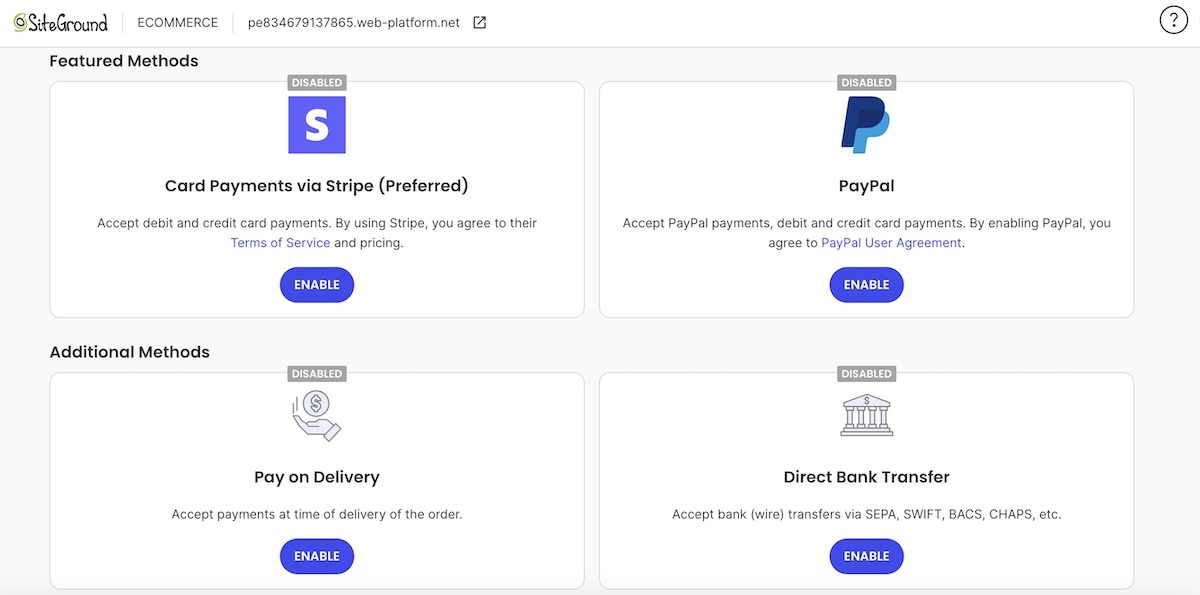
If you’re building on SiteGround Ecommerce specifically, PayPal is one of the payment options ready to switch on from your store settings, alongside Stripe, with no plugin hunting or custom code involved. That comes with high-performance hosting and around-the-clock support already built in, so the payments part of your launch isn’t the piece you’re left troubleshooting alone.
Start building your online store now >>
Choosing the best payment processor for your small business
This isn’t really a question of picking one processor and sticking with it. It’s a question of which processor, or combination of processors, actually matches how you sell. PayPal alone covers plenty of small businesses. Others need to add a second option next to it.
Signs PayPal alone could be enough
PayPal by itself is a solid fit if most of these describe your business:
- You sell simple, one-time purchases rather than subscriptions or recurring billing
- Your monthly volume is modest enough that a flat rate doesn’t eat into margins
- Most of your sales are domestic, so you’re not stacking international and conversion fees
- You want a working checkout today, not a week spent on a custom integration
- Your customers already expect to see the PayPal button and trust it
Signs you need more than PayPal alone
PayPal alone starts to show its limits once you hit any of these:
- High transaction volume, where flat-rate fees add up faster than a negotiated processor rate
- A preference to accept card payments directly rather than routing everyone through PayPal’s interface
None of these are reasons to drop PayPal. They’re reasons to add a second processor alongside it.
Running Stripe and PayPal together
Stripe and PayPal aren’t an either-or choice for most small businesses. Running both means covering more of your customers’ preferred payment methods than either processor covers alone, card payments, digital wallets, and checkout flexibility that neither one fully replaces on its own. If Stripe is new to your setup, what to check on Stripe before going live walks through the parts that trip people up first: test mode, checkout, and receipts.
Is PayPal the right fit for your small business?
For low-volume sellers, freelancers invoicing a handful of clients, or anyone who wants to start accepting payments today, PayPal is a reasonable default. The fees are predictable, the setup takes minutes, and buyers already trust the button. Where it falls short is at scale: higher volume, international sales, or a dispute-heavy niche all make the hidden costs and hold risk more likely to bite.
Most small businesses land on running PayPal and Stripe together rather than choosing one exclusively. SiteGround Ecommerce supports both natively, so you can offer customers the payment options they already expect without a pile of extra plugins to manage. You also get high-performance infrastructure and around-the-clock expert support built in, so payments aren’t the only thing running smoothly.
[103]
Frequently asked questions
Yes, for low-volume or straightforward selling. It’s less suited to high-volume, international, or dispute-heavy businesses without a second processor to back it up.
Standard PayPal Checkout costs 3.49% + $0.49 per domestic sale; standard card payments run 2.99% + $0.49. See the full fee table above for invoicing, international, and in-person rates.
There isn’t one universal answer. PayPal works well for straightforward, lower-volume selling. Stripe adds deeper checkout customization and subscription support. Most small businesses end up running both rather than picking one exclusively.
No. A sole proprietor can open a PayPal Business account with an SSN. An LLC or corporation uses an EIN instead, but the business structure itself isn’t a requirement.
Skip instant transfers in favor of free standard ones, ask PayPal about negotiated rates once your volume is consistent, and pass processing costs to the buyer through invoicing where your state and card network rules allow it.