The SiteGround academy provides a wide variety of tips, tools, and resources related to WordPress, web performance, website optimization and site security.
Email bounce rate is a key metric in email marketing. If it’s too high, it could cause serious damage to your email campaigns and even your sender reputation. In this blog post, we’ll help you understand what email bounce rate is, what causes it, and how to keep it in check so you can enjoy high email deliverability.
What is Email Bounce Rate?
Еmail bounce rate refers to the percentage of emails that were sent, but not successfully delivered to recipients’ inboxes. More specifically, this rate tracks messages that were rejected by the recipients’ email servers but returned with an automated bounce message to the sender indicating a delivery error.
Note: The bounce rate will not take into account email messages that got flagged as SPAM and rejected at network level without any feedback being sent to the sending server. You may check out our article on How to Avoid Your Emails Going to Spam for more information on the topic of spam.
In email marketing, bounces aren’t just minor hiccups. They’re more like signals, telling you that something is not okay. It could be anything from a typo in the email address to an issue with the email content or the recipient’s mail server.
Hence, recognizing and understanding your email bounce rate is crucial. It goes beyond just making sure your messages are getting through. More importantly, it helps maintain your reputation as a sender, moving your business communications up the ladder.
Now, keep in mind that not all of your marketing messages will be delivered or bring conversions, and that is normal. (You may check out our article on email deliverability for an in-depth understanding of the email journey and the different obstacles on its way.) However, if the percentage of bounced emails is too high, your business will suffer.
How does the email bounce rate affect your business?
A high bounce rate blocks your marketing efforts and can damage your sender reputation with email service providers. That can even spiral into more delivery challenges and further lower your email campaigns’ reach.
As a provider of email hosting services, throughout the years, we’ve had clients contacting us in search of the reason for their messages coming back undelivered. And, we know how frustrating this may be as it affects their operations as a business. Sometimes, the reason for the bounce is simply a mistyped recipient’s address. On other occasions, the reason may be more complex.
Let’s first clarify how high email bounce rates can affect your business so you know what you may have to deal with if you do not take corrective actions.
Lowered Engagement & Conversion Rates
When your email messages bounce back, they don’t reach the intended recipients and this naturally leads to lower open and click-through rates, which means reduced engagement with your content. If your emails aren’t getting through, this means that fewer people are seeing and interacting with your content. Consequently, this drop in engagement leads to fewer conversions, which in turn, impacts your bottom line.
Wasted Resources
Each email that bounces back is a waste of your time, effort, and money. You should know that even if you’re following all the best practices, there will still be messages that come back, so be prepared. Yet, you should strive to keep that count as low as possible. Practically, high bounce rates mean you are not maximizing the return on investment of your marketing efforts because a portion of your audience is not even receiving your messages. It’s essentially pouring your costly business efforts down the drain.
Biased Analytics
Bounce rates can distort the accuracy of your campaign’s analytical data. That happens because metrics like open rates and conversions can’t accurately reflect your audience’s behavior if a high number of emails never reach their destinations. Even if your other metrics look great, you must not leave the bounce rates unattended.
If you ignore the bounce rate, that can lead to incorrect interpretations of the performance of your email campaigns. That, in turn, could lead you to make misinformed business decisions – not seeing the full picture can cause you to invest in the wrong areas.
Damaged Sender Reputation
Internet Service Providers (ISPs) track the number of bounces you generate in an attempt to prevent spam. The higher your bounces are, the more ISPs and ESPs would assume that you are buying email lists or scraping emails. Thus, they would start punishing you by flagging your emails as spam, and this can harm your reputation as a sender. That eventually results in reduced email deliverability.
Restoring a good sender reputation is hard, so, you better put your thoughts into preventing such an outcome.
Potential for Blacklisting
Continuing to send messages to email addresses that consistently bounce can not just trigger spam filters with email service providers, but eventually get your domain and/or IP on a denylist. This means that recipient email servers will start rejecting all your messages as spam at network level, further plummeting your email deliverability.
As you can see, keeping your eyes on the prize without considering the potential negative outcomes and not taking measures can cause lots of damage to your business. Thus, to take actions to minimize bounce rates, you must understand their nuances better.
Types of Email Bounces
When it comes to email marketing, not all bounces are equal. You’ve got two main types to keep an eye on – hard bounces and soft bounces. Understanding the difference between these can help you improve your overall campaign results.
Hard Bounces
A hard bounce is a permanent delivery failure. Hard bounces occur when you send marketing emails to:
Inactive contacts – these are emails that are no longer in use. They were once active, valid addresses, but no more.
Non-existent (mistyped) emails – these are addresses that are not registered.
Invalid email addresses – these include both inactive and wrong addresses, the two groups above.
If you think about it – why would you have such addresses on your email list? Maybe you have users who signed up too long ago and their addresses are no longer in use? Or, your subscribers left “fake” email addresses in your signup form contacts to make sure you won’t bother them? Like when you give the wrong phone number to a guy who you don’t like and want to get rid of. Or, you got your email list from somewhere and you didn’t know how these users got on the list in the first place, so maybe they tricked you with a bad list?
Each hard bounce is a clear signal to remove the problematic address from your list ASAP. Email service providers would flag you if you get too many hard bounces since they would recognize a “spam pattern” – they would think you bought or scraped emails, or you are trying to “guess” emails within an organization, or else. Hence, failing to remove such emails immediately can harm your sending reputation with mail providers.
SiteGround Email Marketig users can safely rely on us to take immediate action and “suppress” hard bounce email addresses so you can never send emails to them again and thus avoid penalties. If we see an abnormally high rate of bounced emails while sending out a campaign for you, we would pause it in order to prevent any bad consequences.
Soft Bounces
Soft bounces are temporary delivery failures due to issues that don’t necessarily indicate a problem with your mailing list, but usually result from full inboxes, messages exceeding mailbox limits, server problems and downtime, autoresponders, and others.
When these soft bounces occur, different email service providers may take different actions. At SiteGround we do not give up, but have a strategy to make multiple attempts to resend the email, starting with more frequent tries in the first few hours and then tapering off. This retry system is designed to deliver successfully your email campaign as soon as possible, ensuring it stays on track and reaches your subscribers’ inboxes in a timely manner. We aim to optimize email deliverability while maintaining the momentum of your email marketing efforts.
How to measure your email bounce rate?
Monitoring this metric is essential for a healthy email marketing strategy. To measure your bounce rate, count the number of bounced emails, divide it by the total number of sent emails and multiply by 100. Sounds like too much math, doesn’t it?
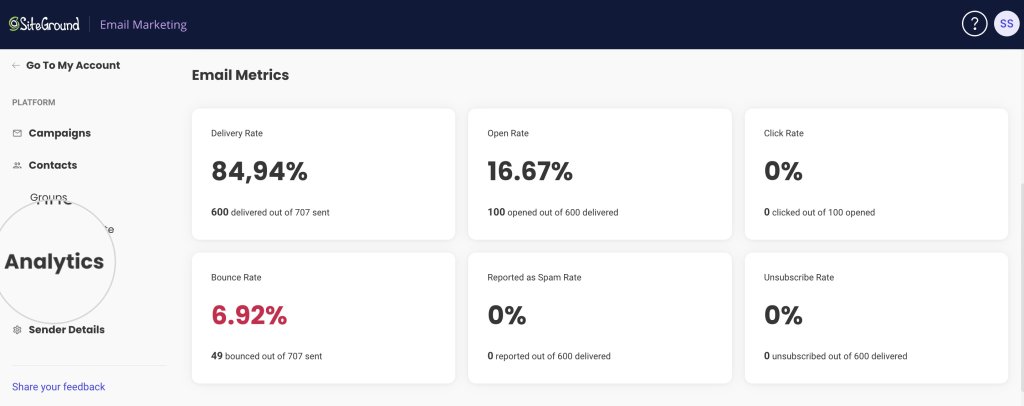
That is why our friendly Email Marketing platform does the math for you. We calculate the average email bounce rate that each of your email marketing campaigns generates, so we can help you with your campaign results analytics.
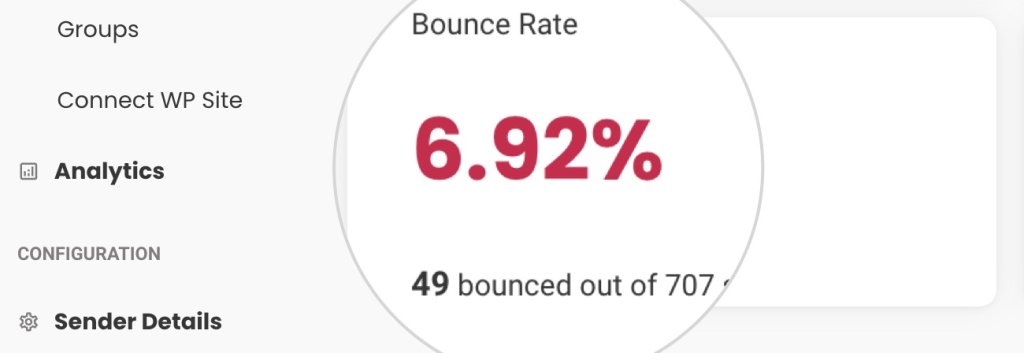
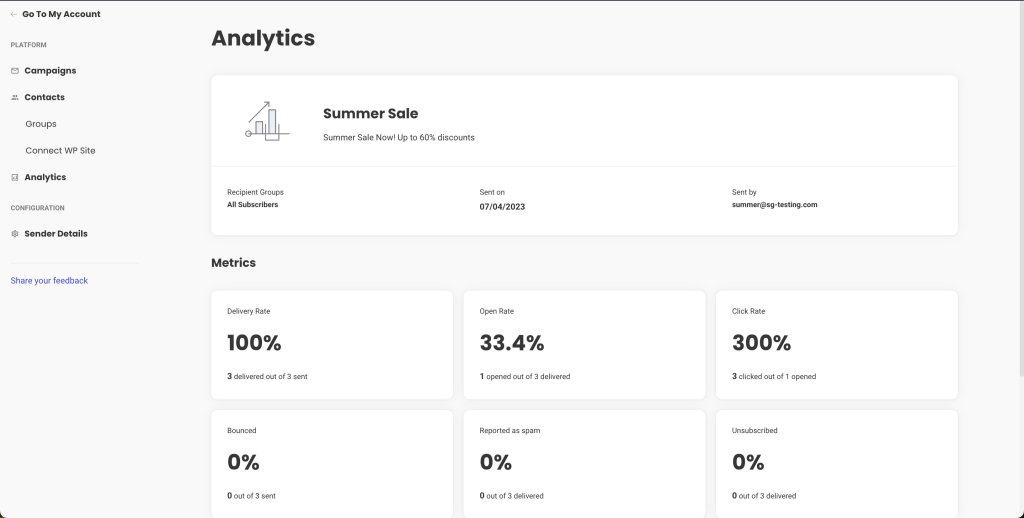
The email bounce rate, calculated in the Analytics section of the Email Marketing platform shows the percentage of bounced email addresses. The Bounce rate in the Analytics section is an average bounce rate that consists of both soft and hard bounces.
How to reduce your email bounce rate?
After analyzing the negative impact of a high bounce rate on your business operations, we give you the strategies for reducing it effectively. Follow these best email practices diligently, and you will get better results.
Remove unengaged and inactive emails
Clean your email list from inactive and unengaged subscribers every few months. Users who do not open your emails are not simply unengaged, they are likely to soon become “inactive” accounts.
Do not buy email lists or scrape sites for emails
Maintaining fresh and clean mailing lists is a key practice for achieving a low email bounce rate and ensuring list quality. Avoid purchasing mailing lists at any cost, since they will not bring you the desired results if the users in it have not consented to receive your messages.
Implement Double Opt-In
With double opt-in, subscribers confirm their email address after the initial sign-up by clicking on a verification link sent to their inbox. Double opt-in allows you to enroll only valid email addresses in your list and ensures that the owner of the email is genuinely interested in your content and willing to engage. It’s a powerful way to protect your reputation as a sender and keep your email bounce rate on the low end.
Avoid Spammy Practices
Steer clear of tactics that trigger spam filters and rack up spam complaints. If you’re too aggressive or irrelevant, your emails might end up in the spam folder. Obviously, that is not your goal, so you must pay attention to what you include in your campaigns.
Sending emails with misleading subject lines or stuffing your content with excessive trigger keywords and salesy language are classic spammy practices.
Monitor and Analyze All Campaign Performance Data
Keeping tabs on how your bounce rate and other email metrics isn’t just smart—it’s essential. As you have already seen in this article, bounce rates and spam rates and all engagement metrics are correlated and work together to assist email marketers in creating better content and keeping engaged email list.
SiteGround Email Marketing tool gives you a clear view of your campaign’s performance. Access the Analytics section to review key metrics like open rates and click-through rates, which help you understand audience engagement.
That is where you get to check what works, what doesn’t, and how your audience is really feeling about your emails.
Conclusion
To wrap things up, remember that keeping your email bounce rate low is crucial for robust email marketing. Understanding the why and how of bounces empowers you to maintain a healthy sender reputation and ensures your emails effectively reach your audience.
Stay on top of cleaning your lists and avoid anything that might trigger spam filters. With these practices in place, paired with consistent monitoring, you’ll keep your bounce rate low and your engagement high.
So, take these insights, put them into practice, and watch as your email marketing efforts yield better results.
Email Bounce Rates FAQs
1. What’s an acceptable email bounce rate?
An acceptable bounce rate is typically below 2%. Rates higher than this may indicate issues that need to be addressed.
2. How often should I clean my email list?
List hygiene should be an ongoing process, but a thorough cleaning every 3 to 6 months is a good practice.
3. Can a high email bounce rate affect my entire email marketing strategy?
Yes, a consistently high bounce rate can lower your sender reputation. Especially if you get many hard bounces. That can potentially cause more of your emails to be sent to the spam folder.
4. Is there a difference between cleaning an email list and segmenting it?
Yes, cleaning involves removing invalid or inactive subscribers. On the other hand, segmenting organizes active subscribers into specific groups for targeted campaigns.
5. How do I fix a high email bounce rate?
To fix a high email bounce rate, start by cleaning your email list to remove invalid or inactive addresses. Implement a double opt-in process to ensure subscribers emails are valid, and adjust your email content to avoid triggering spam filters. Finally, monitor your campaigns to identify which emails bounce back and why, then make data-driven adjustments to your strategy.
Despite your best efforts as an email marketer, like strict adherence to all general anti-spam policies, you may still find out that some of your recipients don’t receive your emails. Although there is no way to secure 100% email deliverability, you should consider the different reasons why your emails do not reach the subscribers’ inboxes and one of the biggest reasons is that they get flagged as spam.
Although it may seem intimidating at first, overcoming spam filters and other related delivery issues is not rocket science. With the right knowledge, you can trim down the chances of your emails getting trapped by spam filters and achieve better delivery rates.
Here, we’ll demystify how spam filters work and how they evaluate whether an email is spam or not. We’ll also explore the most critical factors that spam filtering algorithms take into account. Finally, we’ll unravel the 10 most effective tips to make your emails pass even the most strict spam filters.
So, let’s roll up our sleeves and get your email deliverability soaring.
Why Emails End Up In SPAM?
Let’s face it – everyone has fallen victim to unsolicited and spam emails and wondered how to get rid of them. At best, they are simply annoying but harmless, littering your inbox with irrelevant ads and promotions. However, at their worst, they can cause serious harm, leading to substantial financial and reputational losses. Through spam emails, bad actors conduct social engineering, spoofing, data theft and create all other kinds of trouble.
To protect their clients from such malicious events, Internet service providers and Email service providers incorporate spam protection systems and spam filters to keep recipients and their networks spam-free. They act as gatekeepers to the recipient’s inbox, putting incoming emails through rigorous and thorough checks before being given a pass. From the moment you send your email till it actually reaches the recipient, it passes through one or more filters aiming to identify and stop malicious or unwanted messages. Every spam filter has its own set of rules, threshold, sensitivity, spam trigger words, etc. You can’t anticipate and predict all, but at least you can understand the most common reasons that trigger spam filters and minimize the chances of your emails ending up in spam folders.
How Spam Filters Work?
Spam filters use a complex set of rules, algorithms, and AI to evaluate emails and set spam score thresholds. They put every incoming email message under the microscope to decide its fate. After the filters have gone through all checks, they assign a spam score to the emails. If the emails meet the predefined threshold, they are given a safe passage to the recipient’s inbox. However, if the score is higher, they might get expelled to the spam folder; get completely rejected at the network level without any feedback to the sending server; or get directly dropped with an error, something like a hard bounce.
Types of Spam Filters
In general, there are several different types of spam filters, which have a different approach to how they catch spam.
Blacklists
These filters monitor different Denylist/Blacklist databases globally and will stop emails coming from IPs listed in such blacklists. Denylists (blacklists) are databases containing lists of domains and server addresses that have been reported as regular senders of spam content.
Content Filters
Content filters go through the email message and look for specific words and language that could suggest that the email is clickbait, phishing, or other types of spam. Most content filters look for similar things – bad words used multiple times, such as “offers,” “limited-time,” sexual language, and others. They also watch out for common scams such as the “ 419 scam”, best known when impersonated by a Nigerian prince asking for money against the promise to return a larger sum in the future.
Header Filters
These filters are focused on reading the information transmitted via the header of the email, such as the source IP, if the email is sent to a group of recipients, and more, and aim to ban messages from bad sources, such as IPs known to be used by spammers.
Language Filters
Some Email service providers monitor the language of the emails, and if that language varies from the country language of the recipient, they might stop the messages. These filters may be set differently, but in general, they aim to protect recipients from content that is not tailored to their needs.
Rule-based Filters
Email service providers and users alone can use a filter to set up specific rules that can be applied to all emails coming in. For example, you can set the filter to stop all emails from one specific sender or look for specific words or phrases in the body or in the header of the incoming emails, and if such are detected, the message gets sent to the spam folder.
Bayesian Filter
The Bayesian filters monitor the recipients’ preferences by examining the emails that they send to spam and set rules based on the patterns they detect to automatically flag similar emails in the future.
AI Filters
AI is being increasingly used to fight spam. Its purpose is to detect patterns in emails, sender behavior, and other suspicious content to help spam filters flag more accurately the messages that go through the network. AI gets trained on the actual incoming and outgoing content of the network, using real messages to learn what is good and what is bad, and its contribution to this fight is getting more and more valuable.
How Spam Filters Calculate the Spam Score?
The Email Service providers constantly update the rules their spam filters use in response to the ever-changing and inventive ways spammers find to catch email users off guard. But even so, there are a few essentials and common criteria that all spam filters consider when forming the spam score of your emails.
Sender Reputation
The first thing spam filters do, no matter what, is check the sender’s reputation. As discussed in detail in our article on Email deliverability, this refers to the credibility of your sender IP. If your IP is listed in any Denylists/Blacklists, your emails will be flagged as spam.
Domain Reputation
Let’s assume your IP is clean, but your domain has a bad history and is known to be sending spam. Again, this information may be recorded in public denylists or private databases of the recipient’s email provider. Unlike the sender reputation, where responsibility is shared with your ESP, the domain reputation is something that you are personally responsible for, and you should monitor it with care.
Email Content Quality
Email content quality is fundamental for both user engagement and spam filter avoidance. High-quality content is relevant, well-written, and provides value to the recipient. When creating email campaigns, email marketers should learn to avoid “spam trigger words” – specific words or phrases that can activate spam filters. You don’t have to overthink it, but as a rule of thumb, these words are often associated with deceptive or aggressive marketing practices. Remember the Nigerian prince and the content filters above? Just like those.
The quality of the served content heavily impacts user engagement with your emails. High user engagement is a positive signal to email providers that recipients value your content and that you are not sending spam. And vice versa. You can easily monitor that engagement with several metrics – open rates, click rates, replies, and forwards and aim to improve the quality of your emails with every campaign.
Unengaged subscribers tend to ignore your emails. Like a one-sided conversation,you will have a silent partner who will have no reaction to what you are saying.If your emails are consistently unopened, it signals that your content might not be relevant or desired, and as a result, your future emails are more likely to be directed straight to spam.
What is worse, some of the recipients who open the emails but are not interested in your content might launch spam complaints. With so many scammers online, users have become sensitive to what’s landing in their inboxes, even when they have given consent to receive emails from a certain sender. If you don’t follow strict sending patterns and maintain pristine content quality, they might complain against you and flag your emails as spam. A spam complaint is a significant blow to your sender reputation. Here are some common triggers that might irritate recipients and lead to spam complaints, which you may want to consider:
Unexpected Frequency – Sending emails too often or at irregular intervals can frustrate subscribers.
Irrelevant Content – Content that doesn’t relate to subscribers’ interests or needs can lead to disengagement.
Misleading Subject Lines – Crafting misleading subject lines that don’t align with the email body is usually frowned upon.
Lack of Personalization – Generic, “one-size-fits-all” messages can make subscribers feel undervalued and disengaged.
Difficult Unsubscription Process – Making it hard to unsubscribe can push users to report your emails as spam instead.
You may also want to consider that the industry-acceptable standard spam complaint rate is less than 0.1% (1 complaint for every 1,000 messages sent). These kinds of rates are not set in stone, but they are set by major email providers like Google and are a good indicator for marketers what to expect if they go above that. Google, AOL, Yahoo, and others give you the opportunity to monitor the complaint rate through their platforms via unique interfaces, which you may want to check out if you wish to keep track and be a better sender.
Now that we have analyzed how spam filters work and what triggers them, let’s get practical and go over the top 10 tips to avoid your emails going to spam.
10 Tips To Avoid The Spam Folder
Let’s dive into 10 of the most practical strategies to keep your emails landing right where you want them – in your subscribers’ inboxes.
1. Build Your Own Email List
The cornerstone of any successful email marketing campaign is a solid, organically grown email list. Refrain from taking shortcuts like buying lists or scraping emails. It can damage your sender reputation and violate privacy laws. Build your list the right way, with people who genuinely want to hear from you.
Do not ever buy email lists or scrape emails! One of the biggest risks, besides the obvious low engagement rate of such contacts, is that you might fall into honeypots. Honeypots are spam trap email addresses used by organizations to catch spammers. They are inactive email addresses solely existing to lure unsuspecting spammers who send unsolicited marketing emails. If you have such an address in your list, it can lead to serious deliverability issues for your campaigns in general.
Craft a blueprint for your list-building strategy that focuses on attracting subscribers through valuable content, engaging social media campaigns, and enticing lead magnets. Make it easy and rewarding for people to sign up, and watch your list grow with interested, engaged subscribers.
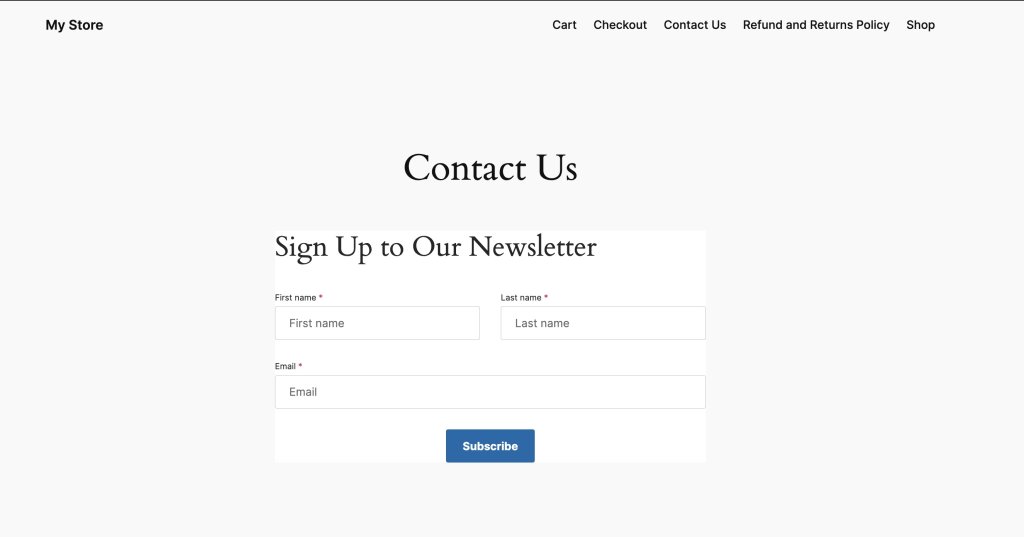
SiteGround Email Marketing service comes with a free WordPress Email Marketing plugin that allows you to create signup forms on your website and WooCommerce checkout for collecting leads. That is the first step towards successful email list building since it opens the funnel for all those subscribers to start enrolling.
Once you have a signup form, you may want to revise its positioning – by strategically placing sign-up forms on your web pages and giving them visibility in high-traffic areas, you ensure that more people will engage with them.
And ultimately, you should consider the “incentive” you give your users to subscribe. It may be access to a discount, free content, or else. We have a great article on how to build an email list if you wish to dive deep into the topic.
2. Use Double Opt-In Signup Forms
Forms that require “double opt-in” ensure that only those who truly want to engage with your brand make it onto your list. It’s a two-step process where users confirm their subscription, typically by clicking a link sent to their email. This extra step reduces the likelihood of spam complaints and improves the overall health of your email list.
Implementing double opt-in might seem like a hurdle, but it’s actually an advantage. It seeds out people who accidentally signed up for your newsletter and are unaware of it. They might be unpleasantly surprised when they start receiving your campaigns and act on impulse. There is a high probability that they could report you as spam and damage your reputation.
The double opt-in helps you verify the subscriber’s interest and email address validity, leading to a more engaged audience and better deliverability.
Each protocol plays a unique role. SPF prevents email spoofing by verifying sender IP addresses.DKIM adds a digital signature to your emails, ensuring they haven’t been tampered with. DMARC ties the two together, telling receiving servers what to do if an email doesn’t have SPF or DKIM records set. All three mechanisms combined form a strong shield against forging your domain, which instills trust into recipient mail servers and increases your sender reputation.
If you use SiteGround Email Marketing service to send your emails and your DNS is managed by SiteGround, we automatically set the DKIM and SPF records for you, validating the authenticity of your email campaigns. Here, you can read more about domain authentication in general and specifically on the SiteGround platform.
4. Include Unsubscribe Option in your emails
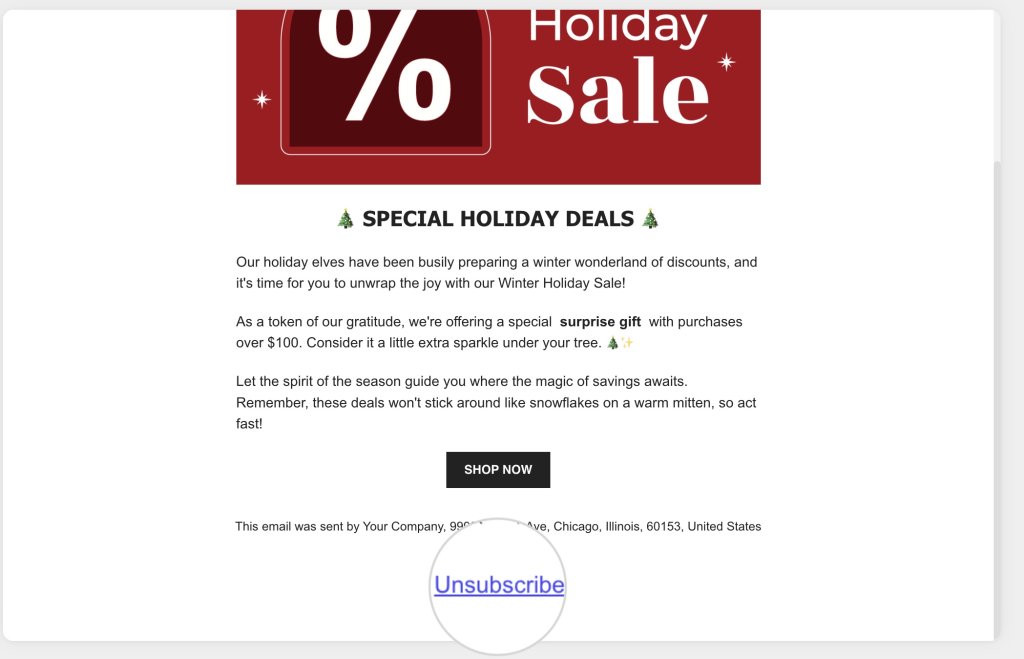
Always leave the choice for your users to unsubscribe – not only is it a mandatory requirement in many anti-spam laws, but it also helps you maintain a strong core of an engaged audience. This feature gives the opportunity to users who do not like your content or are not interested to leave your list without harming your reputation. Without an unsubscribe link, these users would just click “report spam” and hit you really hard.
SiteGround Email Marketing users shouldn’t worry about unsubscribe options. All emails sent through our platform contain an Unsubscribe link in the footerby default, and recently, we added an automatic 1-click unsubscribe feature in the email headers to comply with the latest email providers’ requirements.
5. Clean Your Email List Regularly
Regularly removing inactive and unengaged subscribers from your list is fundamental to keeping high email deliverability and improving engagement rates.
Make it a habit to review your list periodically. Remove subscribers who haven’t engaged with your emails over a set period of time. Consider a re-engagement campaign before you hit delete, but if they still don’t give in, it’s time to let them go.
6. Monitor Denylists
Ending up on a denylist can be disastrous for your sender and domain reputation. Avoiding that requires a proactive approach to monitoring your reputation.
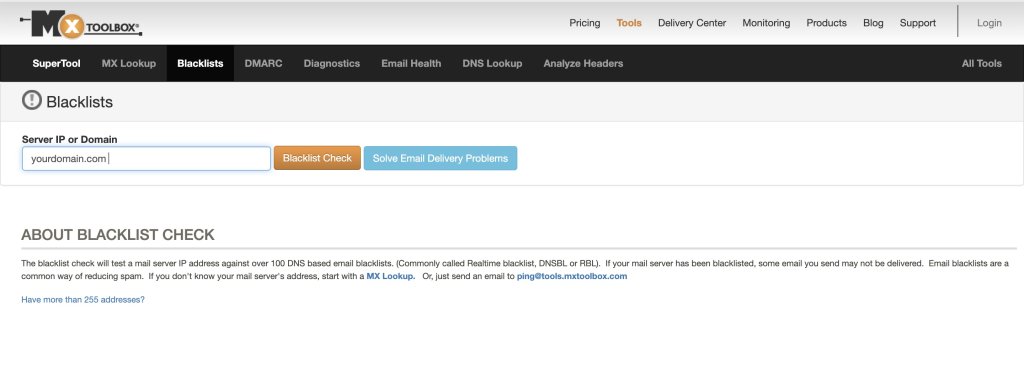
You can regularly check if your sender IP or domain is on a denylist using online tools. If you find yourself listed, take immediate action to remedy the situation by reaching out to the denylist operator and rectifying any issues that led to your listing.
If you are using an email service provider to send your campaigns and you notice that your IP is on a blacklist, you should contact that ESP for assistance.
One such tool to monitor your reputation is MXToolBox, which can provide insights into how your IP address and domain fares in some of the most authoritative denylists.
7. Be Compliant with Internet Privacy Laws
Internet privacy laws like the CAN-SPAM Act, CASL, GDPR, and CCPA are not just guidelines; they are mandatory for any serious email marketer. Compliance ensures your emails are not only legal but also more likely to be welcomed by recipients.
Understand the requirements of each law, such as providing a clear opt-out mechanism, including your physical mailing address, refraining from using misleading subject lines, and obtaining explicit consent before sending emails. Staying informed and compliant keeps you out of legal trouble and builds trust with your audience.
8. Avoid Spam Triggers
When crafting your emails, think of spam triggers as landmines on the path to a recipient inbox. These triggers are specific words, phrases, formatting choices, and even punctuation that can raise red flags for spam filters. Steering clear of these can significantly improve your chances of avoiding the dreaded spam folder.
Spam triggers can be sneaky, often hiding in plain sight within your email content. They range from overly salesy language to aggressive calls to action and even certain words associated with spammy behavior (like “free,” “guarantee,” or “no risk”). Common spam triggers are:
Words and phrases suggesting large financial benefits – free money, save big, risk-free, no fees, financial freedom, etc.
Phrases and words prompting urgency and immediate actions – urgent, act now, last chance, once in a lifetime, instant, etc.
Words and phrases promising on medical cures, health benefits, and sexual stimulants – cure, miracle, life-changing, lose weight, baldness, cure-all, etc.
Overly persistent calls to action – get it now, do it today, join millions, start now, etc.
Excessive use of text in CAPS
Words and phrases associated with cheap marketing tricks – buy direct, special promotion, increase sales, great offer, you have won, bargain, best prices, etc.
Here is a small list with spam trigger words you must use cautiously:
Free
Guarantee
No risk
Winner
Unlimited
Discount
Act now
Offer expires
Urgent
Congratulations
Miracle
Incredible deal
Special promotion
Risk-free
Prize
All natural
Easy money
Get paid
Eliminate debt
Extra cash
Lowest price
Winner
Buy direct
Cancel at any time
Cheap
Save big
Exclusive deal
Hidden charges
Great offer
No obligation
Another thing to moderate in your email content is images. If you add too many or slow-loading images, this may trigger the spam watchers. Keep it at around 1-2 well-optimized images (using a web tool like TinyPNG) to pass successfully through the spam checkers.
The key is to communicate your message effectively without setting off alarms. Of course, some of those words will show up in your message, but having too many of those in combination and as a percentage of the overall text is what makes it shady and a spam trigger. Here are some tips on how to steer away from spam triggers:
Use Natural Language – Write as if you’re speaking to a friend. Avoid excessive use of text in capital letters, bold text, and exclamation points, as these can appear shouty and spam-like.
Be Mindful of Subject Lines – Your subject line is the first thing a recipient sees. Make it engaging but never misleading or “too-good-to-be-true.”
Balance Text and Images – Emails that are heavy on images with little text can be a red flag. Aim for a healthy balance that’s visually appealing yet informative.
Keep It Clean – A cluttered layout with multiple fonts, colors, links and images can not only look spammy but may also confuse your readers. A clean, simple design is more effective and less likely to trigger filters.
Avoid Deceptive Tactics – Never try to trick spam filters by using tactics like inserting dots in words (e.g., f.r.e.e). Not only do modern filters see through them, but they also damage your credibility with subscribers.
The definition of what constitutes a spam trigger can evolve as email clients update their filtering algorithms. It’s essential to stay on top of these changes by regularly testing your emails and tweaking content as necessary.A/B testing different elements of your emails can also provide insights into what resonates best with your audience without setting off spam filters.
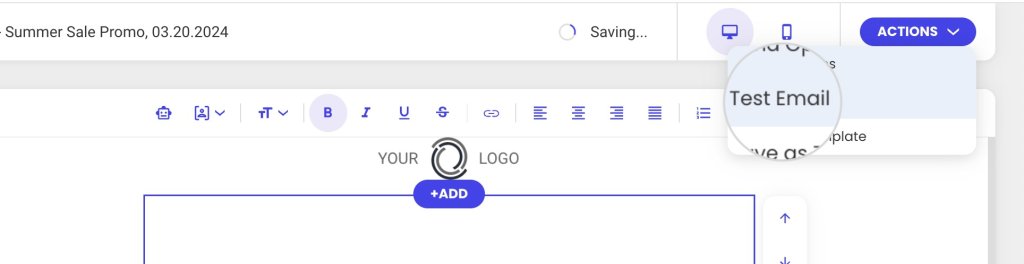
If you are using SiteGround Email Marketing, you can test your email campaigns by sending them to your own address to catch any spam triggers in advance.
9. Monitor Your Email Engagement Metrics
Data is your best friend when it comes to avoiding spam. Sadly, there is no way for you to know the exact percentage of the emails you send that get flagged as spam by spam filters. Depending on the reason why your emails get flagged, as well as on the specific filter settings and what they are instructed to do, different things may happen to a “spam” email. They may be rejected by the recipient server at a network level, which means they would never be delivered and reach the spam folder. What is more, recipient servers do not like to communicate specifics on how they handle various types of situations in order to not facilitate spammers into cutting corners. Since often there is no real feedback loop, the sending server cannot gather actual statistics on how many of your emails ended up in spam.
As the second best alternative, you may want to keep a close eye on metrics measuring email deliverability and user engagement in general. They will provide insights into how your audience and email filters respond to your content:
Reported as spam rate – The percentage of recipients who mark an email from a campaign as spam or junk. This metric indicates how many subscribers consider the emails unwanted or irrelevant enough to report them to their email service provider as spam. It is also your only real “spam” metric, but it does not include data on the emails that ended up in spam folders or got rejected at the network level by filters, which makes this metric alone insufficient.
Open rate – Measures the percentage of email recipients who open a given email out of the total number of emails sent. Too many unopened emails as a percentage of the total not only indicate a problem with your subject line but also put you at risk of your future emails being flagged as spam.
Delivery rate – Indicates the percentage of emails that were successfully delivered to the recipients’ mailboxes (inbox and spam folder including) out of the total number of emails sent in a campaign. The delivery rate focuses on the reachability of the emails. It only measures what part of the sent emails have reached their recipients but doesn’t tell you where they landed or what happens to those that didn’t hit the target. Still, if you have too many undelivered emails there might be different reasons, one of which being a high spam rate.
Click rate – Measures the percentage of email recipients who clicked on one or more links within an email. This metric is crucial for gauging the level of engagement and interest your content generates among your audience. It can provide insights into how effective your email content, calls to action, and overall design are at prompting recipients to take the desired action. If your content does not manage to engage subscribers systematically, a chain reaction may follow of declining open rates, unsubscriptions from your email list and increased spam complaints.
Unsubscribe rate – Tracks the percentage of recipients who opt out of a mailing list after receiving an email campaign. It is an indicator of how well the content aligns with the audience’s interests and whether the email campaigns meet their expectations. Obviously, it does not indicate any spam risk on its own, but if you notice your unsubscribe rate is high or growing, you may assume that your spam complaint rate might be increasing as well since that shows recipients are getting impatient with your content and will start punishing you in various ways.
Bounce rate – Refers to the percentage of email addresses in your campaign that didn’t receive your message because the recipient’s mail server returned it. In a different article, we discuss the different types of email bounces, so here, we only remind you that “hard” bounces show that you have invalid emails on your list. If your bounce rate is too high, that might indicate to email providers that you are not collecting your subscribers in the right way, and they might start flagging your domain and content for spam.
Use these metrics to map out what works and what doesn’t.High engagement rates are a sign you’re on the right track, while dips could indicate it’s time to tweak your strategy. On the contrary, you want to keep the unsubscribe, bounce, and reported as spam rates as low as possible. An increase in these metrics should prompt you to reassess your marketing campaigns.
Your email marketing service might offer analytics tools out of the box, or you can use third-party instruments to measure these metrics. With SiteGround Email Marketing, every email campaign is monitored, and the vital statistics are displayed in a user-friendly and intuitive interface.
10. Send Relevant Content
Relevance is the key to engagement. Your emails should be timely, targeted, and full of value.Personalize your content to resonate with your audience’s needs and interests.
Don’t flood your users with repetitive and irrelevant content just for the sake of sending. Prioritize quality over quantity and make each email campaign meaningful and impactful.
Segment your list to deliver more personalized content. Use data like past purchases, location, or engagement history to tailor your messages. The more relevant your content is, the more likely subscribers are to engage and the less likely they are to report your messages as spam.
11. Bonus Tip: Use Spam Checkers
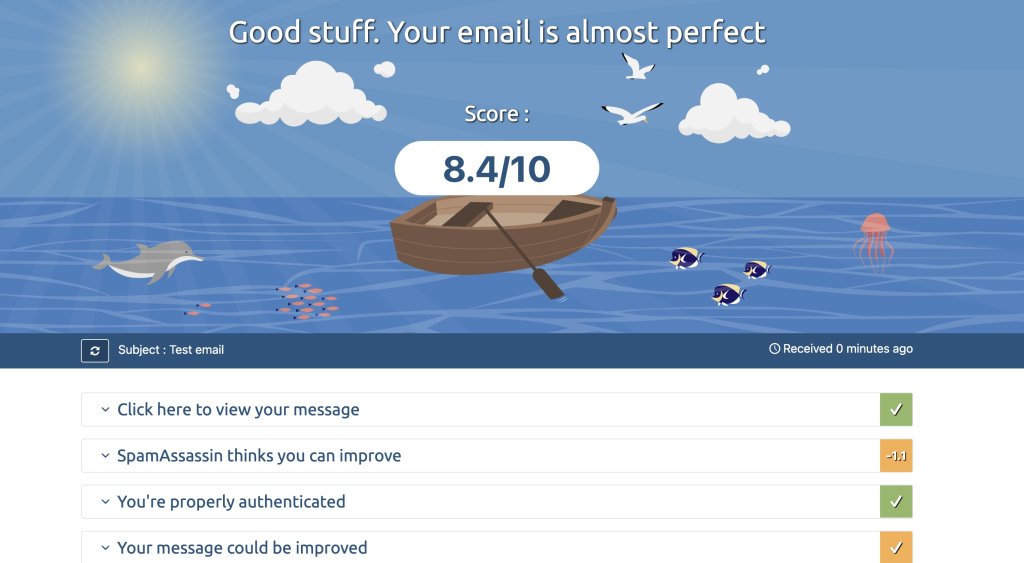
Before you send out your emails, run them through a spam checker. These tools analyze your emails for common spam triggers and give you a chance to correct any issues before pressing send.
Look for reliable spam-checking tools like Mail Tester and make them a part of your email review process. Incorporate their feedback to reduce the chances of your emails being flagged as spam.
FAQ
Let’s tackle some common questions to help you navigate the world of email deliverability.
Why Are My Emails Going to Junk?
Your legitimate emails could be going to junk for a variety of reasons, including poor sender reputation, low engagement rates, or content that triggers spam filters. To pinpoint the exact reason, you’ll need to analyze your email practices, from the way you collect email addresses to the relevance and frequency of your content.
Take notice of instances when your emails end up in junk and look for patterns. Are there specific types of content that consistently get flagged? Are certain email clients more likely to mark your emails as spam? Use this information to refine your email strategy.
Send Wanted Emails
The golden rule of email marketing is to send emails that your subscribers actually want to receive. This means understanding their preferences, providing value, and respecting their time.
Tune into your subscribers’ wavelength by asking for feedback, conducting surveys, and analyzing engagement data. Adjust your content strategy to align with their interests, and you’ll see better results.
Avoid Email Honeypots
To avoid such spam traps, only collect email addresses directly from your audience through legitimate sign-up forms and never purchase lists. Regularly validate your email addresses to ensure they are legitimate and engaged.
Conclusion
Mastering the art of email deliverability takes time, effort, and a willingness to learn and adapt. By following the tips outlined in this guide, you’ll be well on your way to ensuring your emails reach their intended inboxes. Remember to build a solid foundation with a permission-based email list, authenticate your emails, maintain list hygiene, and always provide value to your subscribers.
As you continue your email marketing journey, keep testing, tweaking, and improving. The landscape of email deliverability is ever-changing, and staying informed is key to success. Implement these preventive measures, monitor your email deliverability consistently, and you’ll find your emails welcomed by both subscribers and their inboxes.
Here’s the hard truth about email marketing: your beautifully crafted campaign means absolutely nothing if it lands in the spam folder. You can have the perfect subject line, gorgeous design, and compelling offer, but none of it matters if your subscribers never see it.
But here’s what matters: email deliverability isn’t magic—it’s a system you can control. Once you understand the technical and strategic elements that mailbox providers use to separate legitimate emails from spam, you can consistently land in the inbox instead of getting filtered out.
This guide breaks down how email deliverability actually works, what you can control, and the steps you need to take to consistently land in the inbox.
What Is Email Deliverability?
Email deliverability is the measure of how successfully your emails reach subscribers’ inboxes rather than being filtered into spam, promotions, or getting blocked entirely. It’s how you do successful email marketing—without it, even your best campaigns may go unseen.
Email Deliverability vs. Email Delivery
Here’s where it gets tricky—delivery and deliverability aren’t the same thing:
Delivery means your email reached the recipient’s mail server.
Deliverability means it reached their inbox.
Email delivery is binary: your email either got accepted by the receiving server or it didn’t. Email deliverability is about whether your email reaches the inbox, gets filtered to spam or promotions, or bounces back before delivery.
Why Email Deliverability Matters
Poor deliverability wastes your marketing budget and damages your email sender reputation, making future campaigns even harder to deliver.
Imagine you’ve spent hours perfecting an email campaign: polished subject line, tailored message, smart contacts segmentation, compelling email CTA. But all that effort depends on one critical factor—whether your email actually reaches inboxes. An undelivered email is like a billboard in the desert: it might be a masterpiece, but if no one sees it, you get zero engagement and zero results.
Here’s the critical distinction: you can have 100% delivery (every email accepted by recipient servers) but terrible deliverability if all those emails land in spam. That’s why deliverability is what actually matters for campaign success.
When an email gets stuck in spam or bounces back, you get zero engagement and zero conversions. But the damage doesn’t stop there. Email service providers track how recipients interact with your emails, and each ignored, deleted, or spam-marked message signals that your content isn’t wanted. Over time, providers learn to automatically filter your future emails based on this pattern.
Without solid deliverability, you’re essentially wasting your marketing budget on messages nobody will ever see.
What Factors Affect Your Email Deliverability?
The good news about email deliverability is that most of it is within your control. While you can’t force mailbox providers to deliver your emails, you can influence their decision by managing these key factors:
Sender Reputation
Email Infrastructure
Email Authentication
Email List Quality
Recipient Engagement
Email Content
We’ll dive deep into each of these factors throughout this guide and show you exactly how to optimize them.
Sender Reputation
Your sender reputation is a score mailbox providers assign based on your sending behavior. Low reputation means spam folder placement, while high reputation means inbox delivery.
Mailbox providers track everything: email bounce rates, spam complaints, email engagement levels, sending patterns, and authentication setup. This data determines whether your emails deserve inbox placement.
What is Sender Score?
Sender Score is a specific metric (ranging from 0-100) that indicates how good or bad your sender reputation is. It’s calculated by tracking your IP address’s email sending behavior over time. A score above 80 is considered good, while anything below 70 can hurt your deliverability.
Your reputation has two key components: IP reputation and domain reputation. Both matter, but they work differently and require different management strategies, so let’s break it down.
IP Reputation
IP reputation tracks the behavior of your sending server’s IP address.
If you’re on a shared IP, you share reputation with other senders using that IP. On a dedicated IP, the reputation is yours alone to build or destroy. Businesses typically use a dedicated IP when they send high volumes of email or want full control over their deliverability, but that also means you must build a positive reputation from scratch. We’ll explain the differences between shared and dedicated IPs in more detail later in this guide.
When your IP is brand new, you have to build trust gradually—which is why new IP addresses need a slow ramp-up in sending volume over 4–6 weeks. Mailbox providers have no data about you yet, so sending thousands of emails immediately matches classic spammer patterns and triggers blacklisting or heavy filtering.
IP Warming Schedule:
Week 1: Send to your most engaged subscribers only, low volume
Week 2-3: Gradually increase volume by 50-100% weekly
Week 4-6: Continue scaling until you reach target volume
IP blacklists are databases maintained by various organizations that track IP addresses suspected of sending spam or malicious content. If your IP address gets listed, mailbox providers will either block your emails completely or send them straight to spam, severely damaging your deliverability.
Common causes of blacklisting:
High bounce rates, especially hard bounces (we’ll cover bounces in detail in the Email List Quality section)
Excessive spam complaints
Hitting spam traps
Sending to purchased or scraped email lists
Sudden unexplained volume spikes
Now, with all this said, most businesses don’t need their own dedicated IP because their email platform handles IP reputation on their behalf. So one of the main goals of email service providers is to maintain a good sender reputation for their servers and IP addresses to guarantee high email deliverability for their clients.
Reputable email service providers do this by monitoring networks continuously to keep IP addresses clear of activities that could lead to blacklisting. They manage pools of multiple sending IP addresses, building reputation carefully for each one. If a blacklisting event occurs, the problematic IP is removed and replaced with a clean one—without affecting sender scores or raising red flags with mailbox providers.
This proactive approach to managing mail servers and keeping IP addresses clear of spam-related behavior increases the likelihood that mailbox providers will accept your emails, helping your messages reach subscribers’ inboxes and supporting your campaign success.
At SiteGround, system administrators monitor the network 24/7 using this shared IP management approach. Multiple sending IP addresses are managed in a pool, with reputation carefully built and maintained for each one. If any IP faces issues, it’s immediately rotated out for a clean one—all happening behind the scenes without disrupting your campaigns.
Domain Reputation
Domain reputation tracks the behavior of your sending domain and has become increasingly important as authentication has improved.
Unlike IP reputation, domain reputation follows your sending domain regardless of which IP or email service provider you use. Even if you switch providers or IPs, your domain reputation travels with you—making it both more stable and harder to escape if damaged.
What Affects Domain Reputation:
Authentication setup: Proper SPF, DKIM, and DMARC configuration
Sending history: How long your domain has been sending emails
Engagement patterns: How recipients interact with emails from your domain
Spam complaints: Reports tied to your domain across all IPs
Consistency: Stable sending patterns over time
Why domain reputation matters even more now:
Mailbox providers increasingly weight domain reputation over IP reputation because:
Authentication protocols tie emails to domains, not just IPs
Spammers frequently switch IPs but can’t easily switch established domains
Domain reputation provides a longer-term view of sender trustworthiness
The key difference between IP reputation and domain reputation is thata bad IP reputation can be fixed by switching IPs (which your email service provider can manage). A bad domain reputation is harder to recover from because it’s tied to your business identity. This is why maintaining proper authentication, list hygiene, and engagement is critical.
Email Authentication
Authentication protocols prove your emails are legitimately from your domain and haven’t been tampered with. Without them, mailbox providers will filter or reject your emails.
Mailbox providers need to verify you’re not a spammer or phisher—it’s how they protect users from fraud, prevent unauthorized access to information, and maintain service integrity. They check authentication records in your DNS, which act as your digital credentials confirming your identity and sending authorization.
Quick Authentication Overview
Let’s break down the four main authentication protocols, what each one does, and why you need them. We’ll dive into the details of how each works right after this.
Next, let’s break down exactly how each protocol works.
SPF (Sender Policy Framework)
SPF is like a guest list for your domain—it tells receiving servers which mail servers are allowed to send emails on your behalf.
When someone receives an email claiming to be from your domain, their server checks your SPF record (stored in your DNS settings) to see if the sending server is on your approved list. If it’s not listed, the email gets rejected or sent to spam.
This prevents spammers from pretending to send emails from your domain. However, SPF alone isn’t enough anymore—it’s the oldest authentication protocol and mailbox providers now require additional layers of verification. That’s where DKIM comes in.
DKIM (DomainKeys Identified Mail)
DKIM adds a digital signature to your emails that proves they came from your domain and weren’t altered in transit.
DKIM works like a tamper-proof seal on your emails. You create two digital keys: a public key that goes in your DNS records where anyone can see it, and a private key that stays with your email server to “sign” outgoing messages.
When you send an email, DKIM stamps it with an encrypted signature (a unique digital code that can’t be forged). Receiving servers check that signature against your public key to confirm everything matches. If it does, they know the email is authentic and unmodified.
This digital signature is a powerful trust signal that significantly improves inbox placement rates.
DMARC (Domain-Based Message Authentication)
DMARC combines SPF and DKIM, then tells receiving servers what to do with emails that fail authentication checks.
DMARC creates a policy layer on top of SPF and DKIM. You specify whether failing emails should be quarantined (sent to spam), rejected entirely, or delivered with a warning. You also get reports showing who’s sending emails from your domain and whether they’re passing authentication.
Think of DMARC as the security guard who knows exactly how to handle uninvited guests based on your specific instructions.
TLS Encryption
TLS (Transport Layer Security) encrypts the connection between sending and receiving mail servers, protecting email content from interception.
When your mail server connects to a recipient’s server, TLS creates an encrypted tunnel for your email to travel through. This prevents anyone from reading or tampering with your message during transmission.
While TLS doesn’t directly authenticate your domain, mailbox providers increasingly favor senders who use encryption. It’s a trust signal that you take email security seriously.
Setting Up Authentication at SiteGround
To help you in this process and make sure your sender reputation and email deliverability do not get hurt we do two things:
Every new client who signs up for our email marketing service and whose DNS zone is managed by SiteGround gets all these records automatically set.
And for everyone using the service with or without your DNS being managed by SiteGround, we block the sending of email campaigns from domains that are missing any or all of these records, saving you from hurting your domain and sender reputation until you set them up.
In February 2024, Gmail and Yahoo made authentication mandatory for bulk senders (5,000+ emails daily). Without proper SPF, DKIM, and DMARC setup, your emails won’t reach Gmail or Yahoo inboxes—regardless of content quality.
SiteGround handles the technical setup automatically for managed DNS users. However, you’re responsible for maintaining list quality and keeping spam complaint rates below 0.3%. Learn more about Gmail and Yahoo sender requirements.
Bottom line: All four of these protocols work together to prove you’re a legitimate sender. Set them up once, and they run automatically in the background.
Email infrastructure
Email infrastructure is the technical foundation that sends your emails—including mail servers, IP addresses, DNS configurations, and network systems.
It determines whether your emails can be sent reliably and how mailbox providers perceive your sending servers.
Server failures, downtime, or poorly managed IP addresses will kill your deliverability before content or design ever comes into play. This is why partnering with an experienced email service provider—one that handles high volumes daily and has backup systems in place—is so important.
Did you know that campaigns sent through SiteGround Email Marketing achieved a 98.80% delivery rate and 36% average open rate? Those numbers don’t happen by accident—they’re the result of infrastructure designed specifically for reliability and inbox placement. Here’s how SiteGround makes that happen:
SiteGround’s Unmatched Infrastructure Redundancy
SiteGround offers both email marketing and email hosting services. Over 20 years, this has built expertise in managing email servers from both perspectives—the sender side (what email marketing platforms do) and the recipient side (what hosting companies and email service providers do).
SiteGround processes 6+ million outgoing emails daily while receiving millions more through hosting services. This dual perspective has led to infrastructure customizations and software solutions that increase deliverability for outgoing emails and reduce spam on both sides. This expertise has made SiteGround a leader in email deliverability.
Multiple Redundant Infrastructures
SiteGround maintains several fully functional email infrastructures across different data centers. If one system hits technical issues, another takes over within minutes with zero disruption to your campaigns. This eliminates single points of failure from power outages, connectivity issues, or data center problems.
What does this mean for you? No waiting around for servers to come back online, no rescheduling sends, no wondering why the promotional email never went out.
Managed IP Pool with 24/7 Monitoring
SiteGround’s team monitors IP address pools around the clock, building and maintaining reputation for each one. If an IP gets blacklisted, we swap it out immediately for a clean one—no impact to sender scores, no red flags with mailbox providers.
In other words, you don’t have to worry about IP reputation management. SiteGround handles it so your emails keep getting delivered even if something goes wrong behind the scenes.
Dedicated IP Addresses vs. Shared IP Addresses
Shared IPs are IP addresses used by multiple senders to send their emails. They work well for most businesses sending under 50,000 emails monthly. With shared IP addresses, you benefit from the established reputation that IP has built, assuming your provider manages it well. This works perfectly for smaller senders because building IP reputation requires consistent, high sending volume.
Dedicated IPs are IP addresses used exclusively by you—no other senders share them. They’re best for high-volume senders (typically 100,000+ emails monthly) who need full control over their reputation. You control your reputation completely, but you start from zero.
So how do you choose?
If you’re sending under 50,000 emails monthly, stick with shared IPs. If you’re consistently sending 100,000+ monthly and need full control, go dedicated.
Email List Quality
List quality determines whether you’re sending to real, engaged people who want your emails—or to invalid addresses, spam traps, and uninterested recipients who’ll hurt your reputation.
Building a clean email list of permission-based subscribers is your most valuable deliverability asset. A dirty list full of old, invalid, or non-consenting addresses will destroy your sender reputation no matter how good your infrastructure or content is.
Building and Cleaning Your List
Only add people who explicitly opted in to receive your emails. Never buy lists, scrape websites, or add people without permission.
Building Permission-Based Lists:
Use double opt-in whenever possible. This requires new subscribers to confirm their email address before being added to your list. It filters out typos, spam traps, and fake addresses while ensuring only genuinely interested people join your list.
Single opt-in, on the other hand, is faster but riskier—you’ll capture more addresses but also more invalid ones and people who didn’t fully understand what they were signing up for.
Regular List Cleaning:
Inactive subscribers tank your engagement metrics, which mailbox providers track closely. A smaller list of engaged subscribers delivers better results than a large list full of inactive addresses.
Remove subscribers who haven’t opened emails in 6+ months
Delete obviously invalid addresses (missing @ symbol, no domain extension)
Suppress hard bounces immediately
Remove spam complainers permanently
Understanding Bounces and Spam Traps
Two major threats to list quality are bounces and spam traps:
Bounces signal deliverability problems.
Spam traps are email addresses designed to catch senders with poor list practices.
Hard Bounces
Hard bounces occur when the recipient email address doesn’t exist or is invalid. The receiving server permanently rejects delivery.
High hard bounce rates scream “spammer” to mailbox providers because spammers typically guess email addresses or use old, unverified lists. If you consistently hit hard bounces, providers assume you’re not managing your list responsibly.
At SiteGround, hard bounced addresses are immediately suppressed—they’ll never receive another email. If a campaign generates too many hard bounces, it’s paused automatically to protect sender reputation.
Soft Bounces
Soft bounces are temporary delivery failures, which can happen for reasons such as:
The recipient’s inbox is full
The email message too large
The recipient’s server is temporarily down or overloaded
Temporary blocks or maintenance
Soft bounces aren’t as damaging as hard bounces, but persistent soft bounces to the same address should eventually be treated as hard bounces.
When soft bounces occur, different email service providers take different approaches. SiteGround doesn’t give up—the platform makes multiple resend attempts, starting with frequent retries in the first few hours and then tapering off. This retry system is designed to successfully deliver email campaigns as soon as possible, keeping them on track to reach subscribers’ inboxes in a timely manner while optimizing email deliverability.
Spam Traps
Spam traps are email addresses that look real but exist only to catch senders with bad list practices. They come in three types:
Recycled spam traps: Previously active addresses that were abandoned, then repurposed as traps after a dormancy period
Typo traps: Common misspellings of popular domains (gmial.com instead of gmail.com)
Pristine spam traps: Addresses created specifically as traps, embedded in websites to catch scrapers
Hitting spam traps can blacklist your IP instantly because it proves you either bought a list, scraped websites, or haven’t cleaned your list in years.
How to Avoid Spam Traps
Never buy or scrape email lists
Use double opt-in to verify addresses
Remove subscribers who haven’t engaged in 3-4 months
Check for obvious typos in email domains
Managing Unsubscribes and Complaints
Not all negative responses are created equal:
Unsubscribes are healthy—they remove uninterested people from your list.
Spam complaints are dangerous—they severely damage your reputation.
Unsubscribes
When someone unsubscribes, they’re telling you they don’t want your emails anymore. That’s valuable information. Keeping them on your list only generates poor engagement metrics and potential spam complaints.
At SiteGround, for example, unsubscribed contacts are automatically suppressed and won’t receive future emails.
Regardless of how your email marketing platform treats unsubscribes, it’s still important to monitor your unsubscribe rate per campaign. That’s because spikes indicate content problems or audience mismatch, so you can use this data to refine your email marketing strategy or segment your list better.
Make Unsubscribing Easy
Every email must have a clear, one-click unsubscribe option. Making it hard to unsubscribe frustrates people into clicking “Report Spam” instead—which is far worse for your reputation.
Spam Complaints
When recipients mark your email as spam, it sends a severe negative signal to mailbox providers. Too many complaints and your emails will be filtered automatically.
Common reasons for spam complaints:
Recipient never agreed to receive your emails
They forgot they signed up (poor welcome email, long gap before first campaign)
No clear unsubscribe option visible
Content doesn’t match what they expected when signing up
At SiteGround, anyone who marks emails as spam is automatically suppressed. If a campaign triggers excessive complaints, it’s halted mid-send to prevent further damage. Repeat offenses may result in account suspension.
Compliance Requirements
Different regions have laws requiring explicit consent for email marketing:
GDPR (EU): Requires clear, unambiguous consent before adding anyone to your list
Opens, clicks, replies, and time spent reading all factors into deliverability algorithms.
On the other hand, immediate deletes, spam reports, and consistent non-engagement tell providers your emails aren’t valuable.
Why Engagement Matters
Email providers use engagement as a primary signal for inbox placement because it reveals whether recipients actually want your emails.
Traditional spam filtering looked at content and sender authentication. Modern filtering uses AI and machine learning to analyze behavior patterns across millions of emails.
Gmail, Yahoo, and Outlook, for example, use modern filtering. Their algorithms track:
Open rates: Apple’s Mail Privacy Protection (2021) makes this less reliable for iOS/Mac users, but it’s still tracked for other email clients
Click-through rates: Whether recipients click links in your emails
Deletion speed: How quickly emails are deleted without being read
Replies: Whether recipients reply to your emails
Folder movements: Whether recipients move emails from spam to inbox (or vice versa)
Engagement over time: Whether recipients consistently interact with your emails or ignore them
These metrics give mailbox providers an overall view of engagement. High engagement tells providers: “People want these emails, prioritize them.” Low engagement says: “Nobody cares about these, filter them out.”
This is why bought lists never work—those recipients didn’t ask for your emails and won’t engage, tanking your reputation immediately.
What to Do About Low Engagement
Monitor your engagement metrics regularly to identify warning signs:
Declining open rates campaign over campaign
Low click-through rates (under 2-3%)
High delete rates without opens
Increasing unsubscribe or spam complaint rates
If you’re seeing low engagement, adjust your approach:
Sending less often can actually improve engagement. If weekly emails aren’t working, try bi-weekly or monthly for less engaged subscribers.
Focus your higher-frequency campaigns on subscribers who consistently open and click. They’re your deliverability champions and the ones who actually want to hear from you more often.
The goal isn’t to email everyone constantly—it’s to email the right people with relevant and personalized content that they actually want at a frequency they appreciate.
Segmentation and Re-Engagement Strategies
Send different content to different audience segments based on interests, behavior, and engagement level. This increases relevance and engagement for everyone.
This is the core principle of STP marketing (Segmentation, Targeting, Positioning)—you divide your audience into meaningful groups, target each with relevant content, and position your message to resonate with their specific needs. In email marketing, this approach directly impacts deliverability because more relevant emails generate better engagement signals.
Segmentation Strategies:
Don’t send every email to your entire list. Segment by:
Interests/preferences: Send product-specific content only to people interested in those products
Engagement level: Send more frequently to highly engaged subscribers, less to occasional openers
Purchase behavior: Different messaging for customers versus. prospects
Demographics or firmographics: Tailor content to different audience characteristics
Better targeting means better engagement, which directly improves deliverability.
Re-Engagement Campaigns:
Identify subscribers who haven’t opened emails in 3-6 months and send targeted re-engagement email campaigns:
“We miss you” messaging
Special offers or incentives
Preference center to update interests
Simple “Do you still want to hear from us?” question
If they don’t respond to re-engagement attempts, remove them from your list. Continuing to email unengaged subscribers damages your metrics and reputation for zero benefit.
Sunset Policies:
Create a systematic process to remove chronically unengaged subscribers:
90 days no opens: Tag as “low engagement”
120 days: Send re-engagement campaign
150 days: Final re-engagement attempt
180 days: Remove from active list
This keeps your list healthy and your engagement metrics strong.
Email Content Best Practices
Your content determines whether recipients engage with your emails or mark them as spam. Even a perfect technical setup won’t save poorly crafted content.
Content quality affects deliverability in two ways: directly through spam filter algorithms that scan for trigger patterns, and indirectly through recipient behavior that signals engagement or annoyance.
AI-Generated Content
With AI tools making it easy to generate email content at scale, mailbox providers have gotten smarter about detecting generic, mass-produced messages. In 2025, spam filters analyze:
Whether your content sounds templated or formulaic
If multiple email senders are using identical or near-identical phrasing
Whether your emails show genuine personalization or just token customization
Using these words occasionally won’t destroy you, but stacking them makes you look like spam. Keep language natural and conversational.
Email Body Content:
Avoid too many images with little text (high image-to-text ratio)
No hidden text or deceptive formatting
Include proper grammar and spelling—errors trigger filters
Don’t use URL shorteners excessively (masks destination, looks suspicious)
Test all links before sending
Not sure how to nail your email content? Follow these email copywriting best practices to avoid spam filters and keep readers engaged:
Design and Personalization
Clean, mobile-friendly design with personalized, relevant content drives engagement and avoids spam filters.
Design Best Practices:
Mobile optimization is non-negotiable: Over 50% of emails are opened on mobile devices. Use responsive design that adapts to screen size. Test on multiple devices before sending.
Keep it clean: Avoid cluttered designs with too many fonts, colors, or competing calls to action. Simple, professional layouts perform better and avoid overwhelming recipients.
Balance images and text: Too many images with little text looks like spam. Aim for at least 60% text content. Always include alt text for images.
Include plain-text versions: Some email clients don’t render HTML well, and some spam filters prefer seeing a plain-text alternative included.
Personalization:
Basic personalization (using recipient’s name) is table stakes. Go deeper:
Use recipient names: Basic personalization is table stakes, but it’s still essential.
Reference past behavior: Mention past purchases or browsing activity to show you’re paying attention.
Acknowledge lifecycle stage: Treat new subscribers differently than loyal customers.
Tailor recommendations: Use their interests and preferences to suggest relevant products or content.
Personalized emails generate higher engagement, which improves deliverability for future campaigns.
Consistency:
Maintain consistent sending schedules so subscribers know when to expect your emails. Random, unpredictable sending patterns lower engagement and can trigger filters if volume suddenly spikes.
General frequency guidelines:
Daily emails: Only works for news/media companies or if subscribers explicitly opted in for daily content. High risk of fatigue.
2-3 times per week: Suitable for ecommerce with frequent promotions or content-heavy businesses. Requires strong segmentation.
Weekly: The sweet spot for most businesses. Predictable, manageable, and maintains engagement without overwhelming.
Bi-weekly: Works for B2B, consulting, or businesses with less frequent updates. Lower fatigue risk.
Monthly: Minimum recommended frequency to maintain list warmth and recognition. Less than this and subscribers forget who you are.
Warning signs you’re sending too often:
Unsubscribe rate increases with each send
Open rates declining campaign over campaign
Spam complaint rate rising above 0.1%
SiteGround’s Preventive Campaign Checks
Before sending any campaign,SiteGround’s AI examines it for spam signals, phishing patterns, and policy violations, stopping problematic campaigns before they hurt your reputation.
Navigating spam filters and deliverability rules is complex. SiteGround’s advanced AI scans every campaign pre-send, evaluating:
Likelihood of spam folder placement
Content that violates usage policies
Phishing or malicious patterns
Authentication and technical setup issues
If issues are detected, the team manually reviews and alerts senders before the campaign goes out, giving them the chance to fix problems that would damage reputation.
For new Email Marketing users, SiteGround manually reviews the first three campaigns to help start with strong deliverability and avoid common mistakes.
Monitoring Your Deliverability
Track key metrics to identify deliverability problems early, before they become reputation-damaging crises.
Reactive deliverability management means waiting until campaigns fail. Proactive management means monitoring trends and fixing small issues before they escalate.
Key Metrics and Troubleshooting
What to Track and What the Numbers Mean:
Bounce Rate: Total bounces divided by emails sent. Hard bounces over 2% indicate list quality problems. Soft bounces over 5% may indicate technical issues or content size problems.
Spam Complaint Rate: Complaints divided by emails delivered. Anything over 0.1% (1 complaint per 1,000 emails) is concerning. Over 0.3% and you’re risking serious reputation damage.
Unsubscribe Rate: Unsubscribes divided by emails delivered. 0.2-0.5% is normal. Sudden spikes indicate content or targeting problems.
Open Rate: Opens divided by emails delivered. While less reliable post-iOS privacy changes, declining trends still signal engagement problems.
Click-Through Rate: Clicks divided by emails delivered. Low CTR means your content isn’t resonating or your targeting is off.
Inbox Placement Rate: Percentage of delivered emails that reached the inbox versus spam folder. This requires specialized testing tools. Aim for 95%+.
[47]
Common Deliverability Problems and Solutions:
Sudden deliverability drop: Check if your IP was blacklisted, authentication records broke, or a recent campaign triggered high complaints.
Consistently low open rates: List is stale or disengaged. Implement re-engagement campaigns and sunset policies.
High bounce rates: List needs cleaning. Remove invalid addresses and verify your acquisition sources.
Emails going to spam folder: Check content for spam triggers, verify authentication is set up correctly, improve engagement through better targeting.
Increasing spam complaints: Review whether you have proper consent, make unsubscribe more visible, ensure content matches subscriber expectations.
Set up automated alerts for metric thresholds so you catch problems immediately rather than discovering them after multiple campaigns fail.
Your Deliverability Action Plan
Mastering email deliverability requires ongoing attention to infrastructure, authentication, list quality, and content.
Follow this roadmap to build and maintain strong deliverability:
Immediate Actions (Do Now):
Set up SPF, DKIM, and DMARC authentication recordsImplement double opt-in for new subscribersAdd clear one-click unsubscribe to all emails Clean your list of obvious invalid addresses and hard bounces
Monthly Maintenance:
Review engagement metrics and identify declining trendsClean inactive subscribers (6+ months no opens)Test email campaigns before sending to full listMonitor blacklist status of your sending IPsAnalyze spam complaint rates and adjust content/targeting
Quarterly Deep-Dive:
Audit your entire email list healthReview and update audience segmentsTest inbox placement rates with deliverability toolsEvaluate and refresh email templates for mobile optimizationRun re-engagement campaigns for inactive segments
Best Practices Always:
Never buy or scrape email listsSend consistently—no sudden volume spikesKeep content relevant through segmentationMake unsubscribing easyMonitor recipient engagement patternsWork with reputable email service providers
Ready to Maximize Your Email Deliverability?
Email deliverability isn’t something you set up once and forget—it requires ongoing attention to infrastructure, authentication, list quality, and content. But you don’t have to manage it all alone.
What SiteGround handles for you:
98.80% delivery rate with redundant infrastructure across multiple data centers
Automatic SPF, DKIM, and DMARC setup for domains we manage
24/7 IP reputation monitoring and blacklist management
AI-powered campaign scanning before every send
Gmail and Yahoo 2024 compliance built-in
One-click unsubscribe functionality included automatically
Whether you’re sending your first campaign or your ten-thousandth, deliverability is the foundation that makes everything else possible. The difference between a message that reaches the inbox and one that disappears into spam can be the difference between a sale and a missed opportunity.
Are you spending countless hours drafting and revising marketing emails? Or maybe you don’t even want to hear about email marketing since you think it’s gonna take so much work? Well, not any more! The integration of AI tools such as ChatGPT into our daily routines has significantly simplified the process of writing emails and other content. Yet, the success of writing a persuasive email using ChatGPT depends on a crucial factor: the clarity and precision of the email prompts you provide. The more targeted your input, the more persuasive and impactful your email will be.
What are email prompts?
Email prompts are clear instructions you give to an AI tool, like ChatGPT, to help it understand what you need, especially when you want to write an email. Think of such a prompt as a straightforward task you’re asking the AI to do, like a typical email task. For example, if you need to create emails, you would provide ChatGPT with a prompt that explains exactly what you’re looking for. This could be as simple as “write an email to promote my product” or something more detailed. The better the instructions, the more effectively the AI can produce the email communication you’re aiming for. ChatGPT uses its built-in knowledge and programming to come up with a response that matches your request, based on how you’ve framed the email prompt.
The power of email prompts: AI’s role in your email marketing success
So here’s how AI tools like ChatGPT and the right email prompt help you whip up emails that turn readers into buyers, nudging up those all-important sales numbers.
Write emails faster and save precious time – The true beauty of using AI lies in its speed. Imagine inputting a ChatGPT email prompt and receiving a polished first draft of your persuasive email in a blink, allowing you and your team to focus on strategy and growth rather than getting bogged down in the writing process. With email prompts, you’re always just a few clicks away from your next great email.
It helps if you’re not a copywriter –Not everyone has the knack for writing, but that shouldn’t stop you from creating engaging emails. AI steps in as your virtual copywriter, crafting content that resonates with your audience when you give it the right email prompt. It can adapt to your brand’s voice, ensuring that each message feels engaging, even if you’re new to the art of copywriting, giving you the confidence to communicate effectively with your customers.
Come up with new ideas – One of the most daunting tasks in email marketing is keeping content fresh and exciting. Software like ChatGPT, fortified with extensive data from countless human-written texts, serves as a boundless wellspring of creativity, offering valuable insights and relevant email marketing ideas, ensuring your campaigns stand out in a crowded inbox. And email prompts are the spark that ignites this creative engine, providing the direction needed for AI to generate engaging content.
Boost conversions – At the heart of email marketing is the desire to convert readers into customers. By leveraging a well-crafted ChatGPT email prompt, you can create emails that capture attention and encourage action. The result? Improved click-through rates and conversions, driving measurable success for your campaigns.
Better text quality and tone of voice – If you have a draft but are unsure about the tone, wording, or structure, tell ChatGPT your goals, and it will iterate with that draft to convert it into a polished, compelling email copy.
ChatGPT email prompts that convert
When you’re using ChatGPT to write emails, the key to success is crafting a respectful and concise request, known as prompt. But how do you create the perfect ChatGPT email prompt? It might seem tricky, but with the right communication skills and some helpful tips, you can master the art of creating awesome emails with the help of email prompts in no time.
To help you get started, we’re offering a guide filled with email prompt templates. These templates are designed to make your email writing process faster and more efficient. By following the provided prompts, you’ll be able to craft emails that are clear, impactful, and tailored to your needs. Ready to harness the power of ChatGPT for your email writing? Keep reading to get our free, ready-to-use ChatGPT email prompt templates and start creating amazing emails effortlessly.
With these prompts, ChatGPT becomes your trusted assistant for all things related to email marketing. It can help you create attention-grabbing subject lines, write persuasive email content, and offer tips on increasing your subscriber base. Learn how to create the right ChatGPT prompts, and you can save both time and mental capacity while ensuring your emails are compelling and you reach your business goals.
Access Ready-to-Use Email Prompt Templates
Our team has crafted a collection of ready-to-use prompt templates, available to everyone at no cost, so you can immediately harness the efficiency of ChatGPT in your upcoming campaigns. Simply download the document containing these templates, and inside you’ll discover:
ChatGPT prompt templates that can generate diverse email campaigns with a single command.
Additional bonus prompts that provide creative campaign ideas and strategies for growing your subscriber list.
Tailored prompts specifically designed for the SiteGround Email Marketing Tool.
Avoid the hassle of learning the intricacies of prompt crafting and save time by using our pre-made templates straight away.
[45]
Mastering ChatGPT Prompts: A Step-by-Step Guide to Crafting Professional Emails That Engage
Interested in writing emails more effectively? To make the most of a smart tool like ChatGPT, you need to provide it with the right ChatGPT prompts. This skill is essential for guiding ChatGPT to write effective professional emails.
We’ll guide you through the process by using a practical example: we’ll design an engaging campaign for an imaginary yoga studio – a situation any small business owner can tailor to their marketing efforts. Our easy strategies come with handy prompt templates that help you write emails your readers will want to read.
Step 1: Crafting Email Subject Lines with a Personal Touch
Your subject line is the first thing recipients see, so it needs to grab their attention. When you’re coming up with a subject line, being specific is key. Highlight the main attraction of your promotion, event, or new product.
Express Genuine Interest: Summarize your email’s core message or special offer in a nutshell.
Valuable Tips for Context: Mention the specific event or occasion your email is about, like a seasonal sale or a new product launch, to give your subject line the right flavor.
Create Excitement: Decide if you want your subject line to spark curiosity, create a sense of urgency, or offer something exclusive.
Personal Touch with A/B Testing: If you’re experimenting with different subject lines, request a few options to find out which one resonates most with your audience.
Keep It Short: Aim for a subject line that’s between 30 to 50 characters or 4 to 7 words for optimal impact.
Here’s how we could phrase the prompt: “Create a punchy subject line for a yoga studio’s 1-year anniversary, offering 20% off gift cards, with a celebratory and urgent tone.”
Step 2: Crafting Email Headers That Engage and Inform
Email headers are crucial for keeping your reader’s attention after they’ve opened your email. When you’re coming up with a header, consider what information you’re about to share. Are you telling stories of customer success? Highlighting your newest product features? Or maybe you’re offering exclusive early access to a special deal?
Inform Customers: Clearly describe what the next section of your email will cover.
Relevant Information with the Right Tone: Choose the right tone for your message, whether it’s professional, casual, or light-hearted.
Inviting Email with Keywords: Include any specific keywords that are important to your message.
Brevity and Clarity: Keep your titles short and to the point, but make sure they accurately preview the content that follows.
Here’s how you could phrase your prompt: “Generate a short email headline about a yoga studio’s anniversary gift card sale, with a celebratory tone, including ‘anniversary’ and ‘discount’.”
Step 3: Prompts for Email Body Copy That Connects and Converts
The main content of your email is where you truly engage with your audience. This is your opportunity to share information, spark interest, and encourage action. When you’re preparing to write this part, you’ll want to give clear instructions that outline the purpose of the email, the tone it should convey, and all the details and as much context that need to be included.
Define the Purpose: Be clear about what you want the email to achieve. Are you looking to educate, promote a sale, or extend an invitation?
Know Your Audience: Identify who you’re speaking to. This helps you write an informative email that addresses specific pain points and interests.
Set the Right Tone: Choose a tone that matches your message, whether it’s formal, friendly, compelling, or strictly professional.
Highlight Key Features: Ensure you include essential information such as product benefits, event information, or exclusive deals.
Consider Length: Decide on the length of the email. A newsletter might be a lengthy email packed with information, while sales emails should be shorter to quickly create excitement and prompt action.
Here’s how you could phrase your prompt: “Craft a brief, engaging email body for a yoga studio celebrating its 1-year anniversary, offering a 20% discount on gift cards, aimed at existing customers, with a friendly and celebratory tone.”
Step 4: Prompts for Email Images
Visuals can speak louder than words, and AI can help you pick the right ones. When you’re looking for images that tell your story, ask your AI to suggest visuals that complement your message. Here’s a structured approach to formulating your prompt:
Define the theme: Clearly articulate the central theme or subject of your email campaign. This sets the foundation for the type of imagery you’re seeking.
Specify elements: Include key elements that must be present in the image, such as objects, colors, or actions that are relevant to your message.
Set the mood: Describe the desired mood or emotion the image should evoke. This could range from joyful and vibrant to serene and calming, depending on your campaign’s tone.
Mention style and aesthetics: If there’s a particular art style or aesthetic you want the image to reflect, such as minimalist, hand-drawn, or photorealistic, include this in your prompt.
Consider composition: Offer guidance on the composition or layout, especially if the image needs to accommodate text overlays or other design elements.
Provide context: If the image needs to fit within a specific cultural or seasonal context, make sure to mention this.
Here’s how you could phrase your prompt: “Generate a photorealistic image that captures the essence of a yoga studio’s 1-year anniversary, incorporating elements like a tranquil yoga setting, celebratory accents like balloons or candles, in a soft, warm color palette that conveys a sense of joy and community, with a clean, modern aesthetic.”
Step 5: AI prompts for CTAs That Get Clicks
A strong call-to-action (CTA) is key to turning readers into customers. When you’re coming up with CTAs, make sure you’re clear about the action you want the reader to take and why they should take it promptly.
Clear Call to Action: Specify exactly what you want your email recipients to do next.
Urgency: If it’s time-sensitive, add a note that conveys urgency to prompt quick action.
Incentives: If there’s a special deal or advantage, make sure your CTA highlights this benefit.
Here’s how you could phrase your prompt: “Create a subject line that prompts email recipients to act now on a limited-time 20% discount offer for yoga studio gift cards in celebration of the studio’s 1-year anniversary.”
SiteGround Email Marketing: Effortless AI-Powered Campaigns at Your Fingertips
What if you had a tool that is already pre-trained AI for email marketing, so you wouldn’t have to worry about the above? And even if you’re unsure how to ask for what you want to still get the best results?
That’s what our SiteGround Email Marketing tool offers. It has a built-in AI tool ready to write emails for you out-of-the-box. Users are one click away from accessing the powerful AI email writer directly in our easy, no-code email builder. The AI email writer is educated by our AI engineers and Content creators to deliver spot-on content for different types of emails with just a few clicks, taking care of subject lines, section titles, bodies, CTA’s, and more. The best part is that you don’t need to provide lengthy email prompts. Our tool is happy with short commands from you and uses its knowledge to smartly fill in any missing information. Plus, you can easily adjust the tone of the content or regenerate it with just one click. This feature gives you complete creative control with minimal effort and all that’s left for you is hit send.
And just to show you how easy it is, we put our own prompt templates to the test. Using the SiteGround Email Marketing tool, we crafted an email campaign for our fictional yoga studio celebrating its 1-year anniversary in a mere 5 minutes — complete with content from our AI email writer and visuals from our AI image gallery.
Pro ChatGPT email prompt tips
To ensure that your ChatGPT email prompts hits the mark, avoid common pitfalls and follow these strategic tips.
Tip 1: Segment Your List
Before you even begin writing email prompts, segment your email list. Tailor your AI prompts to each segment’s interests, behaviors, and demographics to increase relevance and engagement.
Tip 2: Be Specific
Vague prompts produce vague results. Provide the AI with detailed information about the purpose of the email, the tone, the desired action, and any unique selling points.
Tip 3: Leverage Brand Voice
Ensure your email prompts reflect your brand’s voice. Whether it’s professional, whimsical, or authoritative, maintaining a consistent voice helps build brand recognition and trust.
Tip 4: Focus on Clarity
Your email prompts should be clear and concise. Ambiguity can lead to confusing content that fails to resonate with your audience.
Tip 5: Prioritize Relevance
Make sure your prompts lead to content that’s relevant to your audience’s current needs and interests. Tie in current events, seasonal themes, or trending topics when appropriate.
Tip 6: A/B Test Your Email Prompts
Don’t rely on a single prompt. Test different variations to see which generates the best content and, ultimately, the best open and click-through rates.
Tip 7: Analyze and Adapt
Use analytics to track the performance of your AI-generated emails. Refine your prompts based on what works and what doesn’t to continually improve your campaigns.
Tip 8: Craft Clear CTAs
Your email prompts should guide the AI to create clear and compelling calls-to-action. Be explicit about what you want the reader to do next.
Tip 9: Create Urgency
Incorporate elements of urgency or scarcity in your prompts to encourage prompt action, such as limited-time offers or exclusive deals for the first few subscribers.
By avoiding common mistakes and implementing these tips, you are well on your way to using AI for your email writing like a pro!
How to track your success from using ChatGPT prompts?
To figure out if using GhatGPT email prompts actually pays off, watch for key signs like how many people are opening your emails, how many are clicking on links, how many are taking the action you want them to (like making a purchase), and how much money you’re making from these emails. By looking at these numbers, you can see what’s working and what’s not, and make your next emails even better.
Welcome to January, a month synonymous with new beginnings – but let’s face it, it’s also a time when your email campaign ideas might be in a post-holiday creative slump. You know you need to reach out to your audience to keep your business running, but the big question is – What on earth do I write about after the holiday frenzy?
Below you’ll find practical email campaign ideas that are perfect for January and you can easily recreate with our intuitive SiteGround Email Marketing solution. From leveraging the “New Year, New Me” mindset to tapping into the power of year-in-review stories, you’ll find something for you here.
Free Holiday Marketing Guide Download
Download our free Holiday Marketing Guide featuring content from SiteGround and our partner experts in ecommerce, email marketing, web design and code optimization to help your business in any holiday season.
1. Send a New Year’s resolution email campaign
New Year’s resolutions are all about taking action now. This sense of urgency can be leveraged in your email campaign. By aligning your product or service with the idea of a “new start,” you encourage your audience to act quickly, capitalizing on their current motivation.
Subject line ideas
Make 2024 the year you finally (achieve a specific goal) with us
New Year, New You: Here’s how we can help
Start your year right with (your product/service name)
Quick to-do’s
Connect with a resolution: Think about how your product or service fits into a popular New Year’s resolution. For example, if you’re crafting handmade candles you can cater to resolutions about practicing self-care, dedicated personal “me” time, or even being more environmentally conscious (if your candles are eco-friendly).
Pro tip: If you’re stuck with your messaging or need ideas on how to connect your product or service to a resolution, you can try our AI Email Writer – a popular feature of our Email Marketing solution, that will craft the message for you.
Decide on a promotion: Think of a special offer that adds value to your audience. This could be a discount, a buy-one-get-one deal, or a limited-time product bundle. Although it is not obligatory to include such, adding a special offer reinforces the sense of urgency and stimulates clients to take action.
End purpose of a New Year’s resolution email campaign:
Boost sales
Clearing last year’s inventory: This is a great opportunity, especially if you’re offering products and you have to clear last year’s inventory.
Nurturing leads and client relationships
This email campaign works exceptionally well for: businesses offering products or services that align with common resolutions like health and wellness, productivity, learning, lifestyle enhancement, as well as business growth goals where businesses are looking for all sorts of services helping them boost performance.
However, even if your business doesn’t directly cater to these typical resolution themes, don’t underestimate the power of this email campaign. It’s all about how you position your product or service as a motivation for a fresh start. Take SiteGround, for example. As a premium web hosting company, we might not seem like a typical New Year’s resolution ally. Yet, every year, we successfully link our web hosting services to the idea of launching your dream project with an awesome website. It’s a compelling angle that resonates with people eager to begin with a new project as the calendar turns, proving that with the right messaging, any business can find its place in the New Year narrative.
2. Send a Recap email campaign
A recap email serves as a valuable touchpoint, bringing your audience up to speed on what they might have missed and reinforce the value your business has offered over the past year. Don’t worry that it’s already 2024, this is actually a desired effect. After the holidays, people are just getting back to their usual routines, checking their emails more often, thus giving your email campaign a chance for better open rates and engagement.
Subject line ideas
2023 in Review: Highlights from (your business name)
Thanks for being part of our 2023 journey! Here’s a recap.
Our Year Together: A Look back at 2023
Quick to-do’s
Gather highlights: Compile the key highlights and achievements of your business from the past year. This could include product launches, significant milestones, customer testimonials, improvements, or any special events.
Pro tip: Even though you’re promoting your achievements, make the messaging about how those achievements are beneficial for your audience – what do they get from it. Don’t just list your highlights. For example, SiteGround’s 2023 Recap was entirely focused on our customers and on how our service improvements helped them succeed online.
End purpose of a Recap email campaign:
Customer retention and loyalty
Brand awareness and reinforcement
This email campaign works exceptionally well for: businesses that have had a dynamic year with multiple product launches, significant updates, events, or key milestones.
However, even without a year filled with major launches or events, a recap email can still work. You can focus on celebrating the consistent quality of your product or service, share customer testimonials, highlight smaller improvements, recap educational content, showcase community engagement, or share personal insights from your team.
3. Send an email campaign with a sneak peek of what’s coming next
Give your audience a sneak peek into what they can expect in the upcoming year. Be it a launch of a new product, exciting service updates, or a fresh redesign, this type of email campaign, giving in some way a promise of what’s to come next, makes the connection with your audience personal, and personal connections are stronger for your business. Especially if such a message is signed by the CEO of the company.
Subject line ideas:
A sneak peek into our exciting 2024 plans!
Be the first to know: Big things coming your way
Our pledge for 2024
Quick to-do’s
Define your content: Decide on what you’re previewing. It can be a new product, service update, feature addition, or a promise of what will come in the new year. Make sure it’s something that will genuinely interest your audience and that you will actually deliver one way or another.
Pro tip: It is best if this email is personalized and gets signed by the highest-ranking person in your business. This adds a layer of authenticity, making the message more impactful. If you’re a solo entrepreneur, this is your moment to shine.
End purpose of a sneak peek email campaign:
Enhance brand loyalty
Increase engagement
Drive pre-launch sales: If you’re encouraging early orders for the upcoming new products or service.
This email campaign works exceptionally well for: businesses that frequently update or launch new products or services. This includes ecommerce and brick-and-mortar stores, fashion brands, subscription-based services, and creatives like bloggers, designers, and photographers. These businesses benefit from building anticipation and excitement among their audience, making a sneak peek campaign a powerful tool to engage their actual and potential customers.
4. Send a post-holiday “Thank you” email campaign
In the aftermath of the holiday season, a post-holiday Thank you email can be an effective solution for any business that didn’t get the chance to send one in December. This is your opportunity to show appreciation, re-engage your customers in the New Year, and potentially set the stage for future sales.
Subject line ideas
You made our year!
A special thank you to you, from all of us at (your brand name)
We couldn’t have done it without you – Thank you!
Quick to-do’s
All you need to do is just write a genuine thank you message – it doesn’t even have to be long.
It is better if it is signed by someone in the company, preferably the highest-ranking person in your business.
End purpose of a post-holiday “Thank You” email campaign:
Re-engage your audience after the holidays
Enhance brand loyalty
This email campaign works exceptionally well for: honestly, everyone. But it’s especially beneficial for both e-commerce and brick-and-mortar stores, service providers, restaurants, and anyone who experienced customer interaction during the past year.
As you begin crafting your January email campaign using the ideas we provided, keep in mind that great email marketing results come when you are continuously engaging with your audience, and adapting your messages to their preferences. Stay responsive to their needs, use the momentum of the New Year, and watch how your email marketing efforts drive amazing results for your online business or project!
Email marketing is a powerful tool that helps business owners connect with their audience and boost results. If you’ve been holding back on email marketing because you don’t have an email list, or because past attempts haven’t done the job, worry not.
In this article, we dive into the “why” and “how” of email list building, providing you with practical tips and strategies to maximize your marketing efforts.
What is an Email List?
The heart and soul of email marketing is your email list: it’s one of your most valuable marketing assets. At first glance, it’s just a list of emails of all the people who’ve opted in to receive more information from you – whether that includes news, promotions, product launches, or other updates.
But really it’s so much more than that. Ultimately, these are potential customers who are not only interested in what you have to say, but have agreed to hear more! And, as we will discuss further, this list can include just email addresses, or it can include more detailed information about each customer. As a result, you can segment your list based on a variety of criteria, and thus better target and test your messages – and improve sales conversions!
Why Is It Important to Build an Email List?
Before diving into practicalities and strategies, let’s understand why building an email list is important for your business growth, and why experts recommend it as one of the most crucial email marketing strategies.
1. Bring business opportunities with every subscriber
Email marketing fosters business growth at every turn, from engaging first-time visitors to nurturing long-standing customers. And each person on your email list is a gateway to new opportunities.
Find new customers
Not all visitors to your website or offline store are ready to make a purchase or act on their first (even second) visit. By engaging them with email newsletters, educational content, and introductory offers, you have the opportunity to guide them from initial awareness to making their first purchase. Regular email communication keeps your brand top-of-mind, gradually creates a connection and familiarity, and eventually urges the subscriber to act when the right trigger is presented.
Bring repeat business from current customers
Existing customers, having already experienced the quality of your products or services, are naturally more inclined to make repeat purchases, recommend your brand to others, and share their positive feedback. Their familiarity with your brand builds a foundation of trust on which you could easily capitalize.
By sending regular newsletters, offers with exclusive discounts, asking them for feedback, or just keeping them up to date with your new product or service additions, you strengthen your connection with them. As a result, you can improve customer retention, and encourage them to come back for repeat business.
2. Less expensive and more effective than other forms of advertising
Email marketing doesn’t require a significant investment to start. Also, it’s typically substantially less expensive compared to other advertising channels such as paid search or social media ads. Beyond that, the return on investment for email marketing is exceptionally high, with more than $36 generated for every $1 invested!
Also key: relying on third-party platforms for advertising can be risky due to changes in algorithms, policies, or costs. Email marketing reduces this dependency, giving you more control over how and when you reach your audience, thus allowing you to boost effectiveness.
3. Allows you to precisely segment and target your subscribers with relevant content
Email marketing is a powerful tool in digital marketing, particularly given its ability to segment and target audiences precisely. Unlike other marketing channels, email marketing lets you group your subscribers based on specific criteria, including their interests, past purchases, demographic data, and behavioral patterns.
Segmentation means you can tailor your content to fit different groups’ unique preferences and needs. This custom approach is becoming increasingly vital, especially as search engines and digital platforms move away from cookie-based tracking. Indeed, the decline in cookie tracking decreases the efficacy of paid ads, which makes email marketing an even more attractive option.
What makes a high-quality email list?
Developing an email list isn’t just about gathering as many emails as possible. On the contrary: valuable email lists prioritize quality over quantity. It might seem tempting to send emails to anyone and everyone, but doing so might not only dilute your messaging for this less-targeted audience, but these less-interested subscribers are more likely to mark your emails as spam. The result? A bad sender reputation, and thus fewer of your emails reaching those people that really want to hear from you.
With that said, the important part is to make sure your list is full of engaged users – people that really want to hear from you. As such, here’s a list of ways to ensure your list is composed of high-quality subscribers.
Clear opt-in (double opt-in based)
What makes email marketing particularly effective is that its recipients have proactively expressed interest in hearing from you. That’s why it’s especially important to make sure your subscribers have knowingly signed up to hear from you.
This is where a clear opt-in comes into play, and the best way to do this is with a double opt-in. That is, let’s say a subscriber first signs up for your list via an online form – this is the first opt-in. The second opt-in comes as a confirmation email through which they confirm that they are indeed interested.
This double opt-in affirms that subscribers really do want to hear from you, and it also helps eliminate possible spam sign-ups. This translates into a lower email bounce rate, fewer unsubscribes, and ultimately more sales!
Fresh & Up to date
Along similar lines, to be sure that your list is filled with legitimate, genuinely interested subscribers, it’s important to keep it fresh and up to date. To do this, it’s critical to use an email marketing platform that flags old and/or bounced email addresses, and allows you to easily remove them. It is also recommended to go through your list every three to six months to remove inactive contacts – this includes those that haven’t opened your last several emails. Additionally, as previously discussed, a double opt-in can help eliminate invalid email addresses from the start.
No purchased email lists
It can be tempting to buy email lists in order to increase your marketing reach. But purchased lists are often filled with spam traps and include invalid or unused emails. Whether you’re sending emails to users who haven’t opted in, or to a bunch of potentially invalid emails, this can lead to much higher bounce rates. This in turn can impact your sender reputation, increasing the likelihood of your future emails going to spam – for all recipients, even the ones who really want to hear from you.
Remember: what makes your list especially successful is that it’s filled with subscribers who’ve actively opted in (even double opted in) to hear what you have to say.
Easy-to-find unsubscribe option
It might seem counterintuitive to make it easy for subscribers to unsubscribe, but in actuality you want to make it easy for uninterested subscribers to remove themselves from your list. Not only does this keep your email content targeted toward those who are truly interested, but especially important: it reduces the likelihood of your emails being marked as spam. This can impact your sender reputation and ultimately your ability to successfully reach those who do want to receive your emails. By allowing uninterested subscribers to opt out, you will promote list quality, email delivery, and conversions.
Compliant with regulatory standards
Email marketing compliance with regulatory standards is no laughing matter. At a minimum, noncompliance can harm your brand and business – but if you really get into hot water, you can face extremely costly fines.
Across the board, regulations such as GDPR and CAN-SPAM boil down to permission-based marketing: that is, they require that your subscribers opt in, that they can easily unsubscribe, and that you’re transparent about how you manage their data. It’s important to familiarize yourself with these regulations to make sure you’re mindful of how they might impact your email marketing.
Constant Growth
The simplest way to determine your list’s quality is if it’s constantly growing. Keeping an eye on email list growth can not only affirm your list’s success, but sudden growth, for example, could alert you to unexpected publicity (yay!). That said, not all list growth is great news: a bump in email growth could indicate spam emails being added to your list by nefarious actors. Another reason to keep that list fresh and up to date!
Promising Stats
Another way to determine list quality is to review your email stats, including open rate, bounce rate and unsubscribes. Open rates will tell you if your subject lines are resonating; rising bounce rates encourage you to clean up your list; and growing unsubscribes might indicate that you should revise your email content or sending frequency.
Additionally, if you are tracking links, you can monitor how subscribers engage with your website after clicking and, importantly, if your emails are leading to sales.
What you need to start building an email list
Your business journey is unique, and you may find that its stages evolve as you explore email marketing. You might be starting with a small shop that’s just opened its doors, or as a booming business that’s seeing exponential growth.
Regardless of what stage your business is at, creating a strong subscriber list is both possible and essential — and we’ll give you the steps on how to build an email list effectively based on where your business is at.
Create an email sign-up form
Online sign-up forms are the best place to start building your email list from scratch. That’s because your site visitors are people who are already interested in your brand, product, or service, and that makes them good candidates for your email list.
But first, imagine if you don’t offer them the opportunity to sign up for your list. Consider their journey: they land on your website, where they might either make a purchase or leave undecided. In this period of deliberation, they could explore other providers or, more critically, they might completely forget about your brand altogether.
This is where the real value of a sign-up form and email marketing comes into play. Encouraging visitors to subscribe to your emails creates an avenue to keep in touch with them. It’s an opportunity to nurture a relationship with them, providing valuable content, updates, and offers that may sway their decision in your favor.
To create a sign-up form that effectively gains subscribers, certain key elements are essential:
The fields in your form
The fewer fields in your form, the better. Every additional field can decrease the likelihood that visitors complete the sign-up process. To keep it straight forward and user-friendly, aim for the essentials, such as collecting email addresses, and names. This simplicity respects the user’s time and reduces the entry barrier, leading to more subscribers.
Incentives to subscribe
Offer a clear incentive for visitors to subscribe. This could include exclusive discounts, early access to new products, insightful newsletters, or delivery of free resources like e-books or guides. Clearly communicate what they gain by subscribing, making the value of joining your email list undeniable.
Call to action
The call-to-action button should be eye-catching and use direct, action-oriented language. Phrases like “Get Exclusive Offers,” “Join Now,” or “Download Free Guide” are effective. The design of the button should stand out, drawing attention and prompting action.
Sign-up form placement
Once you’ve determined the content of your form, you’ll need to determine where and how best to implement it on your site – after all, there’s a whole art to placing your form at just the right place and time to best capture leads.
Where to place your forms
The positioning of a sign-up form on your website is crucial for maximizing visibility and encouraging sign-ups. Here are key places to consider:
Homepage: This is often the first point of contact for visitors. Placing a sign-up form prominently on the homepage, such as in the header, as a popup, or in a dedicated section, ensures maximum exposure.
Online store checkout: During checkout, customers are actively engaged with your brand, making it an opportune moment to encourage them to subscribe. They’ve already shown interest by making a purchase, indicating a higher likelihood of wanting to stay connected for future updates and offers. Adding a simple opt-in checkbox in the checkout process is a non-intrusive way to invite customers to subscribe. This can be positioned near the customer’s contact information or payment details. The key is to make it visible but not a barrier in the purchasing process. Use straightforward, inviting language for the opt-in. For instance, a phrase like “Would you like to receive updates and special offers via email?” followed by a checkbox with “Yes, please!” is direct, clear, and friendly.
Blog Posts: Embedding the form within or at the end of blog posts can be very effective. Readers engaged with your content are more likely to be interested in subscribing for more. You can place it midway through the article or at the end, where readers who find value in the content are likely to sign up.
Comments section: Adding an email subscription checkbox in a comment form is a seamless way to encourage sign-ups. Since the visitor is already entering their details to leave a comment, it’s a convenient and non-intrusive addition.
Footer: Including a sign-up form in the website footer enables visibility on every page, providing a constant reminder to visitors to subscribe.
Remember, the goal is to make the form visible without being intrusive, balancing exposure with a positive user experience.
How to add a form to your website
Adding a sign-up form to your website can be approached in various ways – whether coding it from scratch or using third-party services that integrate with your website platform (like WordPress, etc.).
The best method depends on your specific needs, technical expertise, and the platform your website is built on. If you’re not comfortable with coding, the best approach is to use an email marketing service provider that offers easy form creation with popular website platforms.
SiteGround’s Lead Generation plugin for WordPress
We’ve created a Lead Generation Plugin for WordPress tailored for our Email Marketing platform. It empowers you to easily create and add sign-up forms anywhere on your website. What’s more, it automates the process of adding new subscribers to your email list, allowing you to categorize them into specific groups for precise targeting.
Beyond that, our plugin goes the extra mile by integrating a user-friendly sign-up checkbox directly into your WooCommerce checkout, as well as standard WordPress forms like comments and registrations. This means that your website visitors have a variety of convenient options for joining your mailing list, ensuring you capture leads efficiently and effortlessly.
Follow through
Once you’ve got the form set up, and the number of subscribers is growing, you’ll want to follow through by nurturing that list. That requires sending regular emails that include information that is valuable to your readers. While designing and writing marketing emails can feel intimidating or tedious, you can make the process as easy (and even cost-free) as possible by using an email platform that has user-friendly features such as free email templates.
7 Strategies to grow your email list
Growing your email list effectively involves a blend of different strategies, both online and offline. Each of them focuses on effectively using different mediums or platforms to reach potential subscribers, and on giving people a strong incentive to join your email list. Here are some key strategies:
1. Incentives that motivate people to join your email list
It’s about creating a win-win situation where subscribers feel they are gaining something worthwhile in exchange for their email address. And you can start by answering this crucial question for potential subscribers: “What’s in it for me?”
Exclusive Content: This could be in the form of informative articles, videos, e-books, or webinars that are only available to email subscribers. The key is that this content isn’t accessible elsewhere and provides significant value.
Special Offers: Discounts, promotions, or early access to sales can be very enticing. For instance, you could offer a 10% discount code for their next purchase upon subscription.
Insider Information: Some audiences appreciate being “in the know.” This could include early product announcements, behind-the-scenes glimpses, or industry insights.
Valuable Resources: Free tools, templates, guides, or resources that help your audience solve a problem or improve their life in some way can be a good reason for them to give you their email.
2. Create a landing page
A landing page can act as a sign-up form with no distractions – no website pages to get lost in, no other messages to pull away the reader’s attention. When it comes to gathering emails, landing pages can be used in a variety of ways, including prior to launching a business, to offer a specific promotion, or to sign up for news on a specific new product, among many other objectives. You might send potential subscribers to your landing page by promoting it via social media, QR code, ads, or paid or organic search.
3. Timing and placement – when to show the form
The success of online sign-up forms greatly depends on their timing and placement. For instance, a pop-up form might appear after a visitor has spent a certain amount of time on your site, or when they are about to leave. That way the visitor has had time to engage with your content, making them more likely to subscribe.
A very popular strategy is to have a sign-up form hijack certain pages, such as your homepage. This means the user can’t proceed to your other content and/or browse through your site without either closing the form or filling it in. This is the most aggressive strategy to push subscriptions, as it implies you prioritize sign-ups over direct purchases or other website objectives.
4. Use social media
Your social media platforms can serve as powerful tools to promote your email subscription. Here’s how to leverage them effectively:
Share snippets: Use your social media accounts to share teasers of the content or offers that subscribers receive via email. Create compelling posts that encourage your followers to join your email list for access to exclusive content or deals.
Direct Links: Include direct links to your email sign-up page in your social media profiles and posts.
5. Encourage offline sign-ups
While online methods are often the focus of email list building tactics, there are plenty of effective offline strategies that can also help you grow your subscriber base. This can not only include in-store sign-ups, as mentioned above, but also industry events, conferences, trade shows, local community pop-up shows, and more.
6. Giveaways
Everyone loves a giveaway, so offering something for free is often a very successful way to grab people’s interest and get them to sign up. The key here is that your goal should still be to only acquire qualified subscribers: that is, people who are genuinely interested in what your business has to offer. So when doing giveaways, be sure that your giveaway item aligns with your brand and offering, and that users are signing up because their interests truly match with what you’ll provide them.
7. Host a webinar, workshop or masterclass
An extremely effective way to acquire qualified subscribers is by hosting an educational opportunity, such as a webinar, workshop or masterclass. Of course it’s critical that you not only be an expert on the subject matter but, of course, that it corresponds with what you intend to offer this set of future clients. By providing relevant expertise and value to these new subscribers, you will begin a relationship with them, building customer loyalty and positioning your business as credible and trustworthy.
Building an email list is among the most valuable marketing assets for any business or organization. By implementing the strategies outlined in this guide, you can effectively grow your number of subscribers, and establish a direct line of communication with your audience. Remember, consistency and providing value are key to developing a strong and engaged email list, and ultimately more sales. Start implementing these strategies today and watch your list grow.
Build your email list and boost sales
Take advantage of SiteGround’s easy-to-use email marketing platform
An email marketing campaign is a series of targeted emails sent to a specific audience with one clear goal, whether that’s driving sales, nurturing leads, or winning back inactive subscribers. Email marketing widely considered one of the most cost-effective marketing channels available — with an average ROI of $36 for every $1 spent cited across most industry reports.
This guide covers everything you need to build one: what email campaigns are, which types exist, how to set one up, and what to track to know if it’s working. Whether you’re sending your first campaign or improving an existing one, here’s how to do it right.
Key takeaways:
Email campaigns are sequences of targeted emails built around one goal — a sale, a sign-up, a re-engagement
The five main types are promotional, welcome, nurture, re-engagement, and transactional — each serves a different purpose
Before you write a single word, define who you’re sending to and what you want them to do
The three numbers to watch: open rate (are they opening?), CTR (are they clicking?), conversion rate (are they doing the thing?)
A well-timed email to the right segment will outperform a perfect email sent to the wrong people
What is an email campaign?
An email campaign is a sequence of marketing emails sent to your subscribers with a single goal in mind. This could be encouraging engagement, nurturing leads, promoting a new product or driving sales.
Each email points readers toward one specific action: signing up for a webinar, claiming an offer, booking a call. That’s your call to action, and everything in the email should be built around it.
Types of email marketing campaigns
Different goals call for different campaign types. Here are the five most common ones and when to use each.
Promotional campaigns
Sales announcements, product launches, seasonal offers, and discount emails. The goal is direct: get the reader to buy, claim an offer, or act before a deadline. These work best when they’re specific — a clear offer sent to an audience that’s already shown interest in what you’re promoting.
Welcome campaigns
A series of emails triggered when someone joins your list. It’s your first real conversation with a new subscriber, and it sets the tone for everything that follows. A good welcome sequence introduces your brand, sets expectations, and ideally leads the subscriber toward their first meaningful action.
Nurture campaigns
Also called drip campaigns, these are sequences designed to build a relationship with leads who aren’t ready to buy yet. They deliver value over time — educational content, case studies, product comparisons — moving subscribers closer to a decision. Particularly effective for products or services with a longer buying cycle.
Re-engagement campaigns
Some subscribers go quiet: no opens, no clicks, sometimes for months. A re-engagement email campaign is how you find out whether they’re still interested or ready to move on. Two to three emails is usually enough: a “we’ve missed you” opener, a follow-up with a reason to come back (a discount, an update, something new worth seeing), and a final “stay or go” email that makes unsubscribing easy. Letting go of uninterested subscribers isn’t a loss. A smaller, engaged email list outperforms a bloated one every time.
Transactional emails
Order confirmations, shipping notifications, password resets, and receipts. They’re triggered by a user action rather than a marketing schedule, and they consistently get high open rates because recipients expect them. They’re worth optimizing; they’re often the most-read emails your brand sends.
How to run an email marketing campaign
Now let’s get into the nitty gritty of email campaigns. Email is not an exact science but there are a certain number of tips you can follow to create some of the best email marketing campaigns and improve your email marketing strategy.
Identify Your Audience
Start by defining who you’re sending to: their demographics, buying behavior, and what problem they need solved. That’s the foundation of any campaign that performs. Here are the steps you need to follow:
Analyze current customers: Start by examining your existing customer base. Identify common characteristics such as demographics, buying behaviors, and preferences. This information forms the foundation of understanding your audience.
Use surveys: If you lack detailed information about your audience, consider launching survey email campaigns. These can provide valuable insights into what your audience wants and expects from your brand.
Monitor engagement: Pay attention to who is actively engaging with your brand, both online and offline. This can include social media interactions, website analytics, or in-store behaviors.
Segment your audience: Divide your target audience into smaller, more manageable groups based on shared traits, needs, or behaviors. Consider creating segments for existing customers and prospective ones.
Personalize communication: Email marketing thrives on personalization. By understanding and segmenting your audience, you can tailor messages that resonate with each group. This ensures that you’re sending the right message to the people most likely to engage with it, maximizing the impact of your campaign. This is where email is the strongest – sending the right message to the audience most likely to engage with it.
[58]
Set goals for your campaign
Every successful email campaign begins with a clear email marketing goal. This could be increasing website traffic, boosting product sales, or improving customer engagement. Align your goals with your overall strategy and audience to create a focused and actionable roadmap for your email campaign. This will provide a clear framework for evaluation success and learning from each campaign.
Have in mind that for a goal to be as effective as you need it to be, it should be SMART. This stands for:
Specific: Clearly define what you want to achieve. Avoid vague or general statements.
Measurable: Set quantifiable metrics to track progress and success.
Achievable: Ensure that the goal is realistic and attainable with the resources available.
Relevant: Align the goal with your overall business objectives and target audience’s needs.
Time-bound: Establish a timeframe for achieving the goal to maintain focus and urgency.
An example for a SMART email marketing campaign goal could be: increase website visits by 20% over the next month.
Choose your email campaign type
Your campaign type should align with your set goals. If you’re looking to promote a new product, a promotional email campaign would be fitting. If you’re seeking customer feedback, opt for a survey email campaign.
So, to further improve our SMART goal from before, we can phrase it like this: increase website visits by 20% over the next month using a promotional email campaign.
Write a subject line worth opening
Now that we’ve identified our target audience, and set our goals, let’s dive into one of the most important parts of our campaign — the subject line.
The subject line is one of the first things your audience sees, making it a crucial element. Based on just this one little detail of your email, subscribers can choose whether to open it or not. And it can cut the number of people who see your message by more than half of your recipients. In addition, it can also affect the deliverability of your emails.
That’s why it should be engaging, relevant, and give a hint of what’s inside. Here are some examples of compelling subject lines (that you can steal):
You’re early. Black Friday isn’t. (Up to 79% off inside)
⚡️ Our biggest sale ever. No, really. 25% off everything.
Go on, treat yourself. 40% off, just because.
For Christmas:
Order by [date] and it’ll be there under the tree
🎁 Santa called. He left something for you.
We asked the elves. They said to grab it before it’s gone.
Your Christmas list just got a lot cheaper.
For win-back campaigns:
It’s been a while. Here’s $10 to catch up.
We’ve been busy since you left — come see what’s new.
Did we do something wrong? Here’s $10, no questions asked.
You’re missed. (And so is your cart.)
Write email copy that sells
Now let’s write a memorable copy for your audience. Crafting email copy that sells is both an art and a science. It’s about delivering the right message in a way that resonates with your recipients and prompts them to take action.
Before we dive into email copywriting, here’s the most important thing you need to have in mind before you start writing:the content of your campaign email should meet the expectation set by your sender name, subject line, and preview text. This is not only important for your subscribers, but also for email clients, such as Google and Outlook.
First, consider the tone of voice of your email. Generally speaking, this is your brand voice. But you need to decide how you’re going to speak to the different segments of your audience. Here are some examples of tone of voice that you can step on, or even combine:
Conversational
Professional
Humorous
Friendly
Inspiring
Formal
Informal
Witty
Serious
Optimistic
After you’ve decided on a tone of voice for your emails, you need to think about the email’s structure. Similarly to the website layouts, there are different email structures and each one can serve the goals you’ve set for your campaign:
Inverted Pyramid: Heading, image, subheading, call-to-action button. This structure aims to lead your subscribers’ eyes to the call-to-action.
Z-pattern: Heading, image right, text left, image left, text right. This structure is great for newsletters as it leads the eye of the subscribers left and right and keeps them engaged.
F-pattern: Heading, text left, image right, text left, image right. Similar to the Z-pattern, this structure also keeps subscribers engaged but might be easier for some to read as the text is only left-aligned.
If you want to use the Z-pattern or the F-pattern, we recommend A/B testing what your audience prefers.
Then, let’s move to the actual copy of your email. You should deliver your main message in a clear and concise way. Don’t confuse the recipients of your email with too much information.
You have only a few seconds to grab the readers’ attention. How to keep them engaged? Personalize your message. Use a friendly and conversational tone, and focus on the benefits for the reader. Ask yourselves “What’s in it for them?”. Then answer this question in your copy.
And don’t underestimate the power of short sentences. Write sentences that are easy to read and avoid using jargon or difficult words.
Email accessibility is also key. Make sure your email is readable on all devices. Use headings, bullet points, and short paragraphs to make it scannable, and provide alt text for images to support readers with visual impairments.
Create call to actions that people want to click
Email call to actions (CTAs) are pivotal in guiding your audience towards the desired action, be it making a purchase, signing up for a webinar, or downloading a resource. Creating CTAs that people want to click is essential.
For a CTA to work, be specific about what happens when someone clicks. “Buy Now” and “Sign Up” are fine, but “Get my free plan,” “Reserve my spot,” or “Start my 30-day trial” tell readers exactly what they’re getting — and make the action feel like their choice, not your ask.
Urgency works when it’s honest. “Sale ends Friday” or “Only 4 spots left in the webinar” pushes people to act because the reason is concrete. A button that says “Limited Time Offer” with no deadline attached doesn’t create urgency — it just sounds like every other email in the inbox.
Before you finalize your CTA copy, ask yourself: what does my reader actually get by clicking this? “Download” tells them nothing. “Get the free email checklist” tells them exactly what’s waiting on the other side. The more specific the benefit, the easier the click.
And last but not least, make your CTAs stand out visually. Use contrasting colors, larger fonts, or eye-catching buttons to draw attention to them.
The best send time depends on your audience, so test before you commit. If you’re reaching new parents, early morning might catch them before the day kicks off. If your list is full of business managers, weekends tend to work better. That’s when they actually have time to read.
Sending intervals between your emails are also important. Sometimes a very engaged audience would like to receive emails sooner rather than later while disengaged subscribers might prefer to hear from you less often.
Key metrics to track for email campaigns
Sending the campaign is only half the job. These are the benchmarks that tell you whether it worked and where to improve next time.
Hard bounces mean invalid addresses that hurt your sender reputation. Clean your list if this climbs.
Below 2%
Track these after every campaign and look for patterns over time, not just one-off results. A single campaign with a low open rate might mean a bad subject line. Three in a row is a segmentation or deliverability problem worth digging into.
Common email campaign mistakes
Most underperforming campaigns come down to the same recurring issues. Here are the ones worth watching out for:
Sending to your full list unsegmented. Not everyone needs the same email. Segment first, even if it’s just two groups.
A vague or misleading subject line. If the subject line doesn’t reflect what’s in the email, you’ll get opens but no clicks — and frustrated subscribers.
Multiple competing CTAs. One email, one action. If you ask readers to do three things, they’ll often do none.
Ignoring mobile. Over half of emails are opened on a phone. An email that breaks on mobile loses those readers immediately.
Never testing anything. Subject lines, send times, CTA copy — all of these can be A/B tested. Skipping this means leaving improvements on the table with every send.
Never cleaning your list. A large list with low engagement hurts your deliverability. Remove or re-engage inactive subscribers regularly.
Start sending campaigns that actually work
Despite the constant shifts in the digital landscape, email remains one of the most personal and direct channels available. It builds loyalty in a way that social media rarely does — because it lands in someone’s inbox, not their feed.
But strategy and content only get you so far. You also need the right tools to put it all into practice. SiteGround Email Marketing gives you everything covered in this guide in one place: easy audience segmentation, a no-code editor with ready-made templates, built-in AI tools for copy and images, and campaign analytics to track opens, clicks, and conversions.
This article was originally published in September 2023, and then updated in May 2026.
Frequently asked questions about email campaigns
How much does an email marketing campaign cost?
Most email marketing platforms charge between $10 and $20/month for small lists, scaling up with your subscriber count. SiteGround Email Marketing starts at $11.99/month for up to 500 contacts.
What is the most effective email marketing campaign strategy
Welcome sequences consistently outperform every other campaign type because subscribers are most engaged right after they sign up. Beyond that, the strategies that work share three things: a segmented audience, a specific and relevant offer, and one clear CTA.
What makes an email campaign effective?
A specific goal, a segmented audience, a subject line that earns the open, copy that leads with what’s in it for the reader, one strong CTA, and consistent tracking. The biggest difference between campaigns that perform and ones that don’t usually comes down to segmentation and specificity.
What is the 30/30/50 rule for cold emails?
It’s a cold outreach framework where 30% of your effort goes to identifying the right prospect, 30% to personalizing the opening line, and 50% to crafting a compelling offer. It’s specific to cold email rather than standard email marketing, but the core principle — relevance over volume — applies to any campaign.
Of all the marketing tools out there, email marketing for small businesses is arguably the most valuable. Let’s face it, as a small business owner, you need to stretch investment to gain impact, and there’s just no better way to do that than with email marketing. That’s because email marketing allows you to reach a highly interested and engaged audience at a very low price and with minimal effort.
While it may sound simple – just send emails! – there are many ways to maximize your email marketing efforts, from building your list to analyzing results, and more. So we’ve put together a comprehensive set of how-tos in order to make your small business’s email marketing as successful as possible.
What is email marketing?
But first, what actually is email marketing? It consists of sending targeted emails to customers who’ve actively opted in to hear more of what you have to say. These emails could include promotions, news, product launches, and incentives, among other content. The goal: to provide relevant information that your subscribers will find valuable, and to develop customer relationships in order to generate trust and loyalty.
What makes email marketing for small businesses particularly unique and important is that it’s direct and personalized, allowing you to cut through the noise and focus on the message you want to get across. Whether the purpose is to promote, inform, retain customers, or transact, emails give you the flexibility and precision to accomplish meaningful business objectives.
Even better, email marketing can be leveraged by any type of business, regardless of its objective or size. Making it successful has little to do with actual monetary investment (great news for those on a budget!), and everything to do with strategy. That’s why we are getting down to the basics on how to make it especially fruitful for your small business.
How can email marketing help your small business?
Email marketing is one of the most valuable tools in your marketing toolbox. Indeed, half of marketers say email marketing is their most impactful channel. That’s because, unlike other forms of marketing, it allows you to communicate with your most engaged customers, as well as with potential new customers. This allows you to develop a relationship with them, increasing credibility and loyalty, and ultimately generating more sales.
What also makes it particularly worthwhile for small businesses is that it builds on an already-existing point of differentiation in your business story: that you aren’t a massive corporation and, as such, your direct connection with the customer is even more genuine and meaningful.
Need more convincing? Here’s a list of key ways email marketing will be especially helpful for you and your small business:
Low cost
It’s possible to start email marketing for next to nothing. With the smallest investment of time, you can start creating what will come to be one of your most precious marketing assets. All you need to start building your list is an easy-to-make online form.
Higher ROI
Particularly of note for small businesses is that email marketing has a fantastically high return on investment – more than $36 earned for every dollar spent! So given a small business’s, well, small budget, the ability to invest a little and gain a lot is not to be underestimated.
Reach your audience directly
Few forms of marketing permit you to speak directly to your most targeted audience, and without any distractions. This allows you to send very relevant messages and precisely measure and improve their success.
Create loyal customers
Building an email list gives you direct access to your most interested audience, permitting your small business to develop credibility and a connection with your clients. As such, existing customers are more likely to come back for more, and potential customers are more likely to turn into actual customers.
Track and measure results (and direct sales)
The beauty of email marketing is that you can track and measure your results, and thus improve and fine-tune your efforts. By tracking data such as open rate, bounce rate, unsubscribes, conversions, and more, you can modify your list and message-sending in order to up your engagement and sales.
How to start using email marketing for your small business?
To start with email marketing, there are a few steps you must take. Follow these guidelines to run a successful email marketing campaign:
1. Choose an easy-to-use email marketing platform
If you’re managing your email campaigns manually, you probably don’t have the time for anything else. As a small business owner, you can’t afford to lose all your energy on just one aspect of your business when you have a whole business to run!
That’s why having an email marketing platform is crucial. What’s even more important is choosing the right email marketing tool to meet your business needs. Here are key features to look for when selecting your email marketing service:
User-friendly editor
First and foremost, search for a tool that has a user-friendly editor. Whether you’re a tech person or not, an easy-to-use editor will save you loads of time and effort. Features could include the ability to drag and drop, or any other intuitive editor that allows you to create your emails in a few simple clicks.
Professional-looking emails
Look for email marketing tool features that help you create professional-looking emails. Such features can include ready-to-use layouts or, even better, templates that you can customize depending on your business needs and goals.
Customization options
Email customization options allow you to include your branding, such as your logo, brand colors, brand fonts, and other elements. It’s important that your customers recognize that the email is coming from your brand, based not only on the content but on its visual appearance as well.
Responsive email design
Your emails should have a responsive design – that is, they need to look equally good both on desktop and mobile. That’s because users live in a dynamic world and open emails on various devices, depending on their current location.
Personalization options
With so many emails sent out every day, it’s important to personalize yours and stand out from the crowd. Personalization options can include, for example, the ability to automatically address your recipients by their first and/or last names within the emails you send to them.
Healthy subscriber list
To keep a healthy subscriber list, the optimal email marketing platform will permit you to easily manage unsubscribed, hard-bounced and other such contacts. This will, for example, help you to reduce bounce rate and maintain a good record as an email sender/marketer (and thus avoid your emails going to spam). Your email marketing platform should have these features, and they should be as automated and easy-to-manage as possible.
Analytics tools
A detailed analytics tool is a vital feature of your email marketing platform in general, as you need to be able to track the performance of your email campaigns. By analyzing results, you can identify potential weaknesses and strengths, and then improve upcoming email campaigns accordingly.
Deliverability
Not all email marketing platforms are created equally when it comes to your emails actually reaching recipients’ inboxes. To ensure high email marketing deliverability, choose a platform that has a good track record and reputation.
Excellent customer support
You may come across doubts or concerns when using even the best email marketing platforms. So having the ability to ask questions and get quick answers and help from an excellent customer support team is absolutely critical and game changing. The ideal way to ensure the quality of a platform’s customer support is through personal experience (if you’re able), or to read reviews and ratings.
Scalability
Successfully executed email marketing translates into business growth. As a result, if you’re on the right track, you will find your list growing, and you may even need to import more new customers and/or leads into the platform. This calls for an email marketing platform that can scale along with your business needs, and all for a reasonable price and no extra effort on your side.
Segmentation options
Last but not least, you need to be able to segment your audience in order to send content that’s relevant to each group’s interests and needs. This further increases your opportunity to drive sales. Segmenting your audience (by labels, filters, etc) in an email marketing platform should be easy to do.
Email Marketing Made Easy
Cover all your bases in one place with SiteGround Email Marketing. Its user-friendly panel makes it easy to expertly build and send email campaigns, plus it comes with a slew of other features that help take the guesswork out of email marketing for small business. Some of the benefits include:
➡️ Easily create campaigns with our friendly interface, free professional templates and layouts, and intuitive customization tools
➡️ Build your email list with a sign-up form generated by our lead-gen plugin for WP
➡️ Boost sales by segmenting your audience and sending targeted messages
➡️ Keep a clean list with the help of automatic unsubscribes and hard bounce removal
➡️ Ensure high deliverability and a solid sender reputation thanks to our smart AI checks and spam-prevention practices
➡️ Track performance with ease by leveraging in-depth reporting
Benefit from all of these features and more, including best-in-class customer support. Get started now with SiteGround Email Marketing.
2. Define your audience
Critical to any business is that of defining your target audience. This is just as important when getting started with email marketing for small business because you will want to be clear about who your recipients are, what they are looking for, and how you can offer them what they want.
As a part of this effort, you may wish to break your audience out into different groups based on relevant criteria – for example, what they purchased, if they were added to your list via a specific campaign, if they are repeat customers, and so on. This will allow you to further target each individual segment with relevant email marketing messages, and – you guessed it – track those results!
3. Set the Right Goals
Setting the right goals for your email marketing campaign starts with asking yourself the right questions:
What are my business objectives?
Identify the business goals of your email campaign. These could be:
What are my targets in regards to KPIs (what are my benchmarks for success)?
It’s important to measure the success of your email campaigns. Consider the following metrics:
Open rate
Click-through rate (CTR)
Conversion rate
Bounce rate
Unsubscribe rate
Set goals for these metrics and monitor them closely after each email campaign.After analyzing the results, you can adapt and optimize your email strategy and future email campaigns.
Once you’ve set your goals, you’re one step closer to small-business success. Let’s explore what’s next.
4. Choose the type of emails to send
Identify the type of email you’ll send to a selected audience – this could include:
From there, it will be easier to determine the optimal email design, and to be precise with your messaging.
5. Start Building Your Email List
Anytime is a good time to start creating your mailing list. Here are some smart ways to go about building and maintaining your subscriber audience:
Add a sign-up form on your website
Start by adding a sign-up form on your website. With the SiteGround Email Marketing platform, for example, growing and managing your subscribers has never been easier. Our lead generation plugin for WordPress helps you create and embed sign-up forms within your website’s theme, and with just a few clicks.
Encourage visitors to sign up
Use a lead magnet. For example, you can offer some discount, free trial, or samples in exchange for an email address.
Create valuable content. This needs to be qualitative, relevant, engaging and compelling. Publish diverse types of content and do it regularly.
Leverage social media channels. To generate more subscribers, share your valuable content via social media posts and run advertising campaigns on Google, Facebook, and LinkedIn. This way you’ll reach more people and send more traffic to your website.
Organize online and offline events. These could be webinars, onsite conferences, giveaways, workshops, and many others. Use them to encourage your followers to become subscribers (and eventually loyal customers!).
Work with partners. From influencers to guest bloggers and affiliates, collaboration is key. You’ll just want to make sure you partner with those that are relevant to your brand in order to ensure high-quality subscribers.
Run a referral program. Offer your subscribers a meaningful incentive if they refer a friend to your email list successfully.
This is just a quick rundown on how to get your email list going, but you can take a deep dive into list creation by reading our how-to on building an email list.
6. Craft Effective Email Campaigns
By having clear goals and knowing your audience, you’ve already completed the first steps to a successful email campaign. Now it’s time to create meaningful content that encourages your subscribers to take action.
Compelling subject line
To craft a compelling email subject line, the first step is to make it short, concise and to the point. Use it to create a sense of urgency in your email and to leverage the curiosity of your readers.
For this purpose, you can ask them a question, use numbers and/or emojis, and employ actionable language to spark action. That said, avoid spam triggers, such as “BUY NOW,” in your subject line. You can also personalize your subject line for additional impact by including the receiver’s first name.
The most crucial part, however, is to highlight the value of your email or offer. Here are a few examples of catchy subject lines:
Get 80% off our best-selling beauty product [your product name]
Celebrate love with a heart-melting offer – up to 75% off
Are you ready for an exclusive deal? Get your free trial with [your brand name]
Valuable and relevant content
Then, of course, it’s important to write marketing emails that provide valuable and relevant content – after all that’s what your subscribers signed up for! And then be sure to include calls to action (which we’ll discuss in more detail in a moment) in the relevant places to stimulate your readers to convert to customers/subscribers. Don’t forget to use a readable and responsive email design, both on mobile and desktop!
Strong a Call To Action (CTA)
To make your emails effective, you must include a call to action (CTA). These are a few of rules to follow:
First and foremost, make it visually compelling and appealing in order to grab your readers’ attention. Next, make sure to place it strategically within your email content. Experiment with different formats and email layouts to find out which one works best for your small business. Test with buttons, links with anchor texts, images, etc. Last but not least, optimize your CTA for both mobile and desktop alike.
Compliant with Regulatory Standards
Last, but not least, comply with regulations. Make sure your email policy is GDPR-compliant such that all your emails include an unsubscribe option, your company’s physical address, etc.
7. Track & Analyze Results
Crafting your email campaign is just as important as analyzing the results afterward. But if the results aren’t as good as expected, don’t panic: this gives you room for improvement. Here are the main email marketing KPIs to monitor (+ a few quick tips on how to improve them):
Open rate
The open rate represents the percentage of recipients who’ve opened your email.
Tip: Improve your subject lines to achieve higher open rates.
CTR (click-through rate)
CTR is the percentage of recipients who clicked on one or more links in your email.
Tip: Improve link positions and visibility to get a higher CTR.
Conversion rate
Conversion rate is the percentage of subscribers who took a particular action (e.g. purchase, webinar subscription, etc.) after opening your email.
Tip: Improve the quality and readability of your content to increase conversion rates.
Bounce rate
Bounce rate is the percentage of emails that were not delivered to your recipients (either a hard bounce or a soft bounce / permanent or temporary issue). Learn more about email bounces and how to reduce them here.
Tip: Keep a healthy recipient list for better deliverability results.
Unsubscribe rate
The unsubscribe rate is the percentage of recipients who opted out of your email list after they received your email.
Tip: Try sending emails more infrequently, as certain subscribers might get turned off if they hear from you more than they would like.
Spam complaint rate
This stat measures the percentage of email recipients who mark your email as spam, which can very negatively impact your sender reputation. To help prevent this, read more about how to avoid your emails from going to spam.
Bonus Tip: A/B Testing
It is recommended to do A/B testing. It consists of sending two different versions of your email to the same segment. The goal is to measure which version performs better so that you can improve success rates of future emails. You can compare any number of factors, some of which include the subject line, type of sales offering, which incentives produce the most clicks, and so on.
Mistakes small businesses make with email marketing
Not having mobile-friendly design
Many email marketing recipients view emails on their mobile device as opposed to a desktop computer. As such, it’s exceedingly important to review the mobile version of your email. Thankfully, on most email platforms this can be done very easily during email creation by toggling between mobile and desktop view.
Not checking the email message previews
Before hitting that final “send,” it is essential to send yourself, and potentially other team members, an email message preview. This allows you to view the email – including its subject line and preview text – in the exact same context as your subscribers. Oftentimes you’ll catch errors or needed optimizations that you wouldn’t have seen otherwise.
Bad subject lines
Subject lines are your opportunity to grab a reader’s attention, or relegate your email to the trash bin. With that in mind, take advantage of AI to polish your subject lines. If you’re new to this, check out our how-to article on using AI for email writing, and download ready-to-use AI email prompts to get started. Meanwhile, SiteGround Email Marketing platform offers a built-in AI email writer that can help you optimize and improve your subject lines as you go.
Sudden & significant increase in the volume of sent emails
The more emails sent the better, right? Not so. If email volume suddenly increases by a large amount, it could be due to your list having been targeted with fake or irrelevant emails. This can result in an increased bounce rate or unsubscribe rate, can impact your sender reputation, and ultimately affect your ability to reach subscribers who truly want to hear from you.
Conclusion
Email marketing is one of the most powerful marketing channels, especially for small businesses. It allows you to begin instant communication with your subscribers in order to drive new sales and increase customer retention. To make this happen, you need to focus on the quality of both your email’s content and design alike. If things are not working as desired, email marketing lets you measure and monitor your results in real-time, and undertake the necessary actions for improvement.
Email Marketing Built for Your Small Business
Sign up for SiteGround Email Marketing and save 80%!
Tick, tock, the countdown has begun. Yes, the holidays are right around the corner and it’s time to gear up your website and business strategy to make the most of it.
You might wonder, why start so early? Well, today’s users are no longer last-minute shoppers. They begin scouting for deals and promotions as early as October, much ahead of the Black Friday frenzy. That’s why it’s important to start planning your strategy now, to reach these early birds throughout their shopping journey. Starting early gives you the chance to get your website ready, adjust your marketing efforts, and take full advantage of the holiday season.
Let’s dive into a journey through the holiday season, exploring how you can utilize key dates like Halloween, Black Friday, Cyber Monday, and more to enhance your business game plan.
Halloween: The spooky start (October 31)
Halloween is the starting whistle for the holiday season. It’s an excellent opportunity to stir up excitement among your users with themed content, promotions, and special events. How about a Halloween-themed marketing campaign to kick things off?
Simple steps for big wins
Launch a themed campaign: Embrace the Halloween spirit by creating haunting graphics. Create visuals featuring pumpkins, witches, ghosts, and other iconic symbols of the season. These will add a touch of magic to your social media posts and email newsletters, captivating your audience’s attention.
Decide on a special offer: Launch a “Halloween sale” with discounts on selected items or services. Whether it’s a percentage off or a free add-on, make sure your special discount resonates with the spooktacular theme. This will not only drive sales but also enhance customer engagement.
Design an email to share the offer: Craft an email that oozes Halloween charm while communicating your exclusive promo to your subscribers. Use bewitching subject lines to pique curiosity and entice recipients to open the email. Incorporate your Halloween-themed graphics and provide a clear call-to-action that directs users to your website or a special landing page dedicated to the exclusive promotion. Make the experience seamless and spellbinding, ensuring a smooth journey from email to purchase.
Black Friday: The shopping frenzy (Nov 24)
Black Friday, one of the most anticipated shopping events of the year, has evolved beyond a single day into an extended period of retail frenzy. As shoppers eagerly scout the market for the best deals, this occasion presents a great opportunity for your business to amplify sales and foster customer loyalty.
Simple steps for big wins
Prepare your website for high traffic: Make sure your website can handle the traffic increase without crashing or slowing down. After all, 70% of consumers say that page speed impacts their willingness to buy online. Check your site’s loading speed and ensure the checkout process is smooth and easy. If necessary, contact your web hosting partner to upgrade your plan.
Ensure your site is secure: With increased traffic comes an increased risk of cyber-attacks. Make sure you have an SSL certificate for secure transactions, regularly back up your data, and have a system in place to detect and prevent any potential cyber threats. Keep in mind that 64% of users would leave a site instantly if they saw a “not secure” warning.
Plan exclusive deals: This could be a flat discount, buy-one-get-one-free offers, or special bundles. Make sure to promote these offers in advance through email newsletters and social media.
Send a series of promotional emails: Create a series of emails to build anticipation before the sales days, highlighting special deals during the sale, and send out final reminders as the sale ends. This will ensure your customers are well-informed and eager to take advantage of your Black Friday offerings.
Small Business Saturday: The authentic experience (Nov 25)
Small Business Saturday is the ultimate celebration of local businesses, providing a platform to connect with your community and amplify your brand’s presence. This cherished day shines a spotlight on the invaluable contributions small businesses make to the fabric of our society.
Simple steps for big wins
Run a local promotion: Collaborate with local influencers, community leaders, or social media enthusiasts who embody the essence of your target audience. Engage them to promote your products or services through captivating content, authentic reviews, or creative collaborations. By leveraging their influence, you can tap into their loyal followers and expand your reach within the local community.
Showcase your uniqueness: What makes your small business stand out from the crowd? Take this opportunity to highlight your distinct qualities and tell your story. Showcase your expertise, craftsmanship, or the exceptional quality of your products and services. This authenticity will resonate with customers seeking a more personal and meaningful shopping experience.
Cyber Monday: The digital rush (Nov 27)
Cyber Monday, the digital counterpart to Black Friday, has emerged as a monumental online shopping event. You don’t want to miss out on this yet another incredible opportunity for your project or business.
Simple steps for big wins
Create irresistible offers: Cyber Monday shoppers are hungry for deals that make their hearts race and their wallets open. To capture their attention, develop irresistible offers that are genuinely difficult to resist. Bundle products, offer exclusive discounts, provide free shipping, or introduce limited-edition items. The key is to create a sense of urgency and excitement around your promotions.
Gear up your email marketing game: Let’s use the power of a well-crafted email campaign. Create personalized and compelling emails that showcase your Cyber Monday offerings, highlighting exclusive deals, limited-time promotions, and enticing incentives. Remember, the goal is to stand out in a crowded inbox and drive engagement.
Christmas: The season of giving (Dec 25)
Christmas, the grand finale of the holiday season, is a golden chance to show your customers your gratitude and appreciation.
Simple steps for big wins
Curate gift guides: Create and share gift guides on your website. Segment your guides based on different recipient profiles, such as “Gifts for Him,” “Gifts for Her,” or “Gifts for Kids.” Provide personalized recommendations, showcase your best-selling products, and highlight unique or exclusive items. This not only helps your customers find the perfect gift but also increases your chances of making a sale.
Send a holiday appreciation email: A heartfelt gesture like sending a holiday appreciation card can leave a lasting impression on your customers. Take the time to personalize and send physical cards to express your gratitude for their support throughout the year. Include a handwritten note or a special discount code as a token of appreciation. This personal touch demonstrates your thoughtfulness and strengthens the bond between your brand and your customers. Remember, a simple act of sending a holiday card can go a long way in nurturing customer loyalty and fostering genuine connections.
The Aftermath: Prepping for the New Year
Once the holiday dust settles and the New Year dawns, it’s time to step back and reflect. Evaluate your performance, pinpoint areas for improvement, and start strategizing for the exciting year ahead.
Remember, every step taken today can turn into a leap of success tomorrow. Happy planning!
According to Kissmetric research, 40% of website users will abandon your site if it takes over three seconds to load. With just 3 seconds delay, and you can lose almost half of your website visitors, increasing your bounce rate, lowering website conversions, and profit. Here are our tips on how to speed up your website to keep your bounce rates low, and user engagement high.
Why is it important for your website
Bounce rate is the percentage of visitors who leave your web page without taking any action – clicking a link on it, or making any purchase. What’s even worse is that this experience sticks, and they are unlikely to ever return to this web page. So keeping your bounce rates low is crucial for all of the following reasons:
Increase conversion rates – when you lower your bounce rate, you’ll have more returning customers, which can increase your conversion rates.
Improve brand awareness – if your bounce rates are lower, this means that your visitors are engaged with your content, which leads to better brand recognition.
Achieve better SEO rankings – having lower bounce rates can improve your SEO rankings in Google and other search engines.
What factors influence your website bounce rate
A high bounce rate usually means that your website’s content and/or design is not relevant or appealing to your users, which will ultimately hurt your online business goals. Here are some of the main things that can lead to higher bounce rates on your website:
Slow page loading times;
Not a mobile-friendly page;
Poor web page UX;
Messy navigation structure;
Low quality and/or irrelevant content;
Bad internal linking and/or lack of clear CTAs.
What is a good bounce rate and how to figure out yours
The average bounce rate depends on the industry and type of website that you have. According to Custom Media Labs, here are the benchmarks for high-low bounce rates:
20-45% for ecommerce websites;
25-55% for B2B websites;
30-55% lead generation websites;
35-60% non-ecommerce content websites;
60-90% for landing pages;
65-90% for blogs, dictionaries, portals.
You can monitor and analyze your bounce rates and other important statistics by using tools like Google Analytics. You can even migrate to Google Analytics 4 in order to be in line with the latest version.
Bounce rate vs. Exit rate
There’s an important distinction between bounce rate and exit rate. Exit rate is the percentage of people who leave your website from a certain web page, after they have visited a number of pages on your website. For instance, a visitor may land on a blog post article on your site, in which case they click an internal link in that blog post that leads them to another blog post. Then, they exit that second blog post, which will increase this blog page’s exit rate. On the contrary, bounce rate will mean that a visitor closed that same page they’ve initially landed on.
A high exit rate isn’t necessarily a bad thing. There are two main factors to consider when making conclusions about your exit rate – the type of web page and the average time on the web page. For instance, if you have an online store and your “Thank you” page (the one appearing to your visitors, after they’ve made a purchase) has a high exit rate – that’s good, because it means that many people have completed a purchase. If it’s another type of page, e.g. a landing page with your products and visitors still spend lots of time on it, but the exit rate is high – this could mean that you have some UX design issues on this particular page. If a blog post page exit rate is high, but average time on page is high too – this means visitors are engaged with your content and it’s still a good sign.
How to reduce your website bounce rate
A high bounce rate, however, is something you need to worry about, and take action to keep as low as possible. Let’s explore what you, as a website owner, can do to reduce your bounce rates:
1. Improve your web page load speed
If your website takes more than 3 seconds to start loading, chances are that your visitors won’t wait for it – they’ll leave and move on to another website. To avoid that, you should make sure your website loads as fast as possible. Here are some basic, plus advanced tips on how you can optimize your website performance:
Use a CDN
Enabling a Content Delivery Network (CDN) is an important factor that can speed up your website. A CDN keeps copies of your website on servers in different locations around the world. Then, when a user requests to view your website, the CDN makes sure that the content is served to your visitors from a server that’s close to them. This makes it possible for your website to load faster upon user’s request, especially for your international visitors. SiteGround has its own, in-house developed SiteGround CDN which comes with free and premium plans, it’s easy-to-use and navigate, and ensures blazingly-fast page loading times.
Enable Website Caching
Caching is a powerful technology that can speed up your website. It stores copies of your data in the server memory which then serves this content to your users faster. In this way, your users can access your website and files much faster, as it won’t be necessary to fetch them anew, but rather take them from this cached memory.
SiteGround clients leverage our powerful caching technology, built in-house on three levels – NGINX Direct Delivery for caching static content, Dynamic Cache for caching dynamic content and Memcached for object caching (caching database queries). All three in power can speed up websites up to 5 times!
Optimize your website code and media
To further speed up your website, you can consider a few other techniques as well. First, compress large images and videos (without compromising their quality). This will make your web pages load faster and improve your overall website performance. Next, make sure to combine (combine multiple files into one to reduce number of requests) and minify (remove all unnecessary characters) CSS and JavaScript files. Thirdly, remove all unnecessary plugins on your website, as they slow it down. Even if they’re just deactivated, they can still cause slow loading times, so make sure to delete them completely.
Use fast MySQL setup
If you have a growing database on your website, your website will need to handle a number of requests to fetch data from this database upon users’ requests. This could cause heavy MySQL queries which significantly slow down your TTFB (Time to First Byte) and affect your overall website performance.
All SiteGround clients benefit from our custom MySQL setup, enabled by default, which allows for the simultaneous processing of a large number of requests which in turn brings down the number of slow queries between 10 and 20 times.
Make sure your PHP is fast
It’s crucial that your website runs on the latest and fastest PHP version. Not only that, but you also need to make sure that your web server is handling that PHP version in the most efficient way in order to improve your overall website performance.
SiteGround clients have the advantage of our custom ultrafast PHP setup (available on GrowBig and GoGeek plans) that uses less server memory, which in turn allows the server to process a bigger number of queries faster. In this way, our ultrafast PHP setup cuts TTFB and makes web pages load 30% faster on average, compared to a standard PHP setup.
Keep tabs on your website speed
Last but not least, it’s important to keep an eye on your website speed on a regular basis. Run regular speed tests on your websites with online tools at least once a month. When you see some worrying results, take immediate action to improve the relevant areas. However, given the fact that this is yet another thing you need to take care of, keep in mind that it might take you much time, effort and money.
SiteGround clients have the unique opportunity to receive free monthly performance reports, straight into their inboxes. Our monthly performance reports provide our clients with useful information about their website speed status in different categories (e.g. cache ratio, CDN usage, WordPress optimization, etc.) in an easy-to-read format, including actionable tips for areas that might need improvement.
You can check off most of the tips and tricks outlined in both of these articles with a single plugin – the SiteGround Speed Optimizer plugin, free and available for all WordPress users, regardless of your hosting platform. The plugin provides you with multiple features, divided into the most important categories for your website – powerful caching (to reduce your site TTFB), frontend optimizations (to keep your website HTML, CSS, and JavaScript files and fonts optimized), media optimizations (to optimize your site media without compromising on quality), and environment optimizations (to manage your site resource usage and save bandwidth).
2. Optimize your website for mobile
Another important step you need to take is making your website mobile-friendly. A lot of the traffic to your site will come from mobile devices, so you need to make sure that your site is responsive. Check whether fonts, large images and videos, and other important elements work well on mobile. Your website’s mobile version should be easy to navigate from your users, giving them the content or information they need quickly and concisely.
3. Design appealing landing pages
Landing pages are the first thing users see when they land on your website. Make them catchy, appealing and engaging. Keep your landing pages straight to the point, with focused content, and clear CTAs. They should be navigable and readable. Include appealing and appropriate visuals, such as images and short videos. Make your landing pages correspond with the needs of your audience. If your audience is diverse, make sure to create multiple landing pages for different groups of users.
4. Have a clear website navigation structure
When your audience visits your website, they need to have a pleasant user experience in order not to leave your website and even come back to it. To achieve this, make sure that you remove things that might annoy your visitors, but are not absolutely necessary for your website’s success, such as bots, too many popups and ads, and other distracting elements.
Another crucial step is to analyze your users’ intent in order to design the page in a way that will answer their needs. Keep in mind how your content and visual elements are organized on the website and whether it’s easy for users to navigate through the different parts of your site.
To do all that, you can use GA4 to analyze which of your pages have high bounce rates, then optimize their navigation structure and rearrange content order.
5. Improve your content
The quality of your website’s content might be another factor that makes your visitors bounce. Focus on improving your content by making it more relevant to your audience, in the first place. The three main things you should focus on are the following:
Quality – provide valuable and quality content that brings something extra to your readers;
Relevance – write content with relevant keywords that not only make users land on your site, but also help them find the content they’ve been looking for;
Readability – keep your content clear, concise and in an easy-to-read format with subheadings, short paragraphs and proper fonts.
6. Have clear CTAs
To reduce your bounce rates, you can also include clear calls to action on your website. These will not only lower bounce rates, but help in converting your visitors. Encourage your audience to take the action you want them to take, such as clicking a link, making a purchase, downloading a resource, by including clear CTAs on the relevant places in your site. Here are some quick tips for your CTAs:
Make your CTAs be visible on the web page – use appropriate colors and designs, e.g. buttons.
Write short, concise and actionable texts on your CTAs that encourage your visitors to take action, e.g. READ NOW.
Place your CTAs on key locations on the web page, such as towards the top of the page, or another highly-visible place.
7. Use internal linking
Another proven strategy for keeping your visitors engaged and thus reducing bounce rates is to place internal links on your web pages. These links should lead to other relevant content on your own website. For example, while your visitors are reading a blog post, you provide them with a link to another blog post they might find useful. You could also provide them with links to relevant blog posts, pages at the end of the article they’re reading. This way, you will keep your visitors longer on your website.
8. Implement exit surveys
Last but not least, you can implement exit surveys or exit-intent popups. They are windows that popup to your visitors when they move the cursor of their mouse on closing the window, i.e. when they are about to leave your website.
These “Before you go” popups could ask your visitors to either give feedback on what you could improve on your website (e.g. add shipping options, offer more products, etc.), or give them an incentive to stay on the website (e.g. discount, free shipping, newsletter subscriptions, eBooks, and others in exchange for their email address).
Now, before you “bounce” to another one of our blog posts, leave us a comment below to share some other strategies that have proven successful for you.