
Two WordPress AI assistants describe themselves as all-in-one AI solutions, but they do very different jobs on your site. AI Puffer (formerly known as AI Power) is a modular toolkit that packs a visitor chatbot, content generator, AI forms, and scheduled tasks into a single plugin. SiteGround’s AI Agent for WordPress acts as a personal site manager that you talk to directly inside your WordPress control panel to handle your daily website chores.
AI Agent for WordPress vs AI Puffer comes down to choosing between a dedicated manager that runs your website and a toolkit that adds AI features for your visitors. While AI Puffer requires you to sign up with outside AI companies and set up API keys before anything works, the AI Agent for WordPress comes ready to use out of the box with built-in access.
Key takeaways:
- AI Agent for WordPress vs AI Puffer comes down to functionality: AI Puffer adds a collection of individual AI tools and modules, whereas the AI Agent for WordPress provides a single conversational assistant that helps you manage WordPress itself.
- AI Puffer relies on scheduled background automations that you set up in advance for repeatable content pipelines, while the AI Agent for WordPress carries out administrative tasks on demand whenever you ask in live chat with zero advance setup.
- AI Puffer requires you to create outside accounts and manage your own API keys (which bill you separately), while the AI Agent for WordPress includes built-in access to top AI models out of the box without third-party keys or separate provider billing.
- Many websites can benefit from using both tools together: AI Puffer for customer-facing chatbots and forms for visitors, and the AI Agent for WordPress for daily site maintenance and WooCommerce administration.
Two kinds of all-in-one: an AI toolkit and a management agent
AI Puffer adds a set of AI tools to your site and admin area. As an all-in-one AI plugin, it’s built from modules (separate features you switch on or off), which reach your site through pages, shortcodes (short snippets you paste into a page to show a feature), blocks and scheduled tasks.
Some modules are for your visitors: a chatbot, AI forms and an image generator they use on your pages. Others are for you: the Content Writer for articles and product copy, and automations that produce or rewrite content on a schedule. The AI Puffer WordPress plugin shows these modules as soon as you install it, and setting up any of them, a chatbot included, starts with connecting an AI provider using your own key.
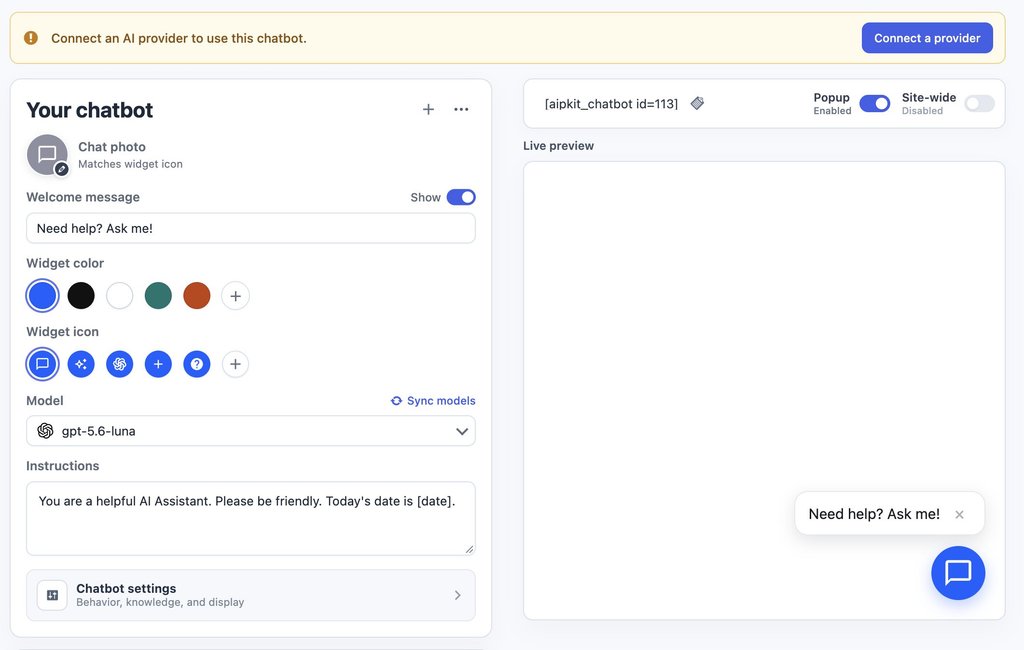
SiteGround’s AI Agent for WordPress manages your entire site through a single chat. You open the chat directly in your WordPress control panel or SiteGround AI Studio, type what you need done, and the assistant carries out all your WordPress tasks: publishing posts, updating plugins, changing user permissions, adjusting settings, and managing WooCommerce online store orders and stock.
Under the hood, the agent automatically selects and pairs the best AI model for your specific request. Whether you need quick text, a custom image, or something more complex, it routes the task behind the scenes to top models from Google (like Gemini) or OpenAI’s ChatGPT.
This intelligent model selection ensures you always get the highest quality result for the job at hand without ever having to sign up for outside AI accounts, enter connection codes, or choose models yourself.
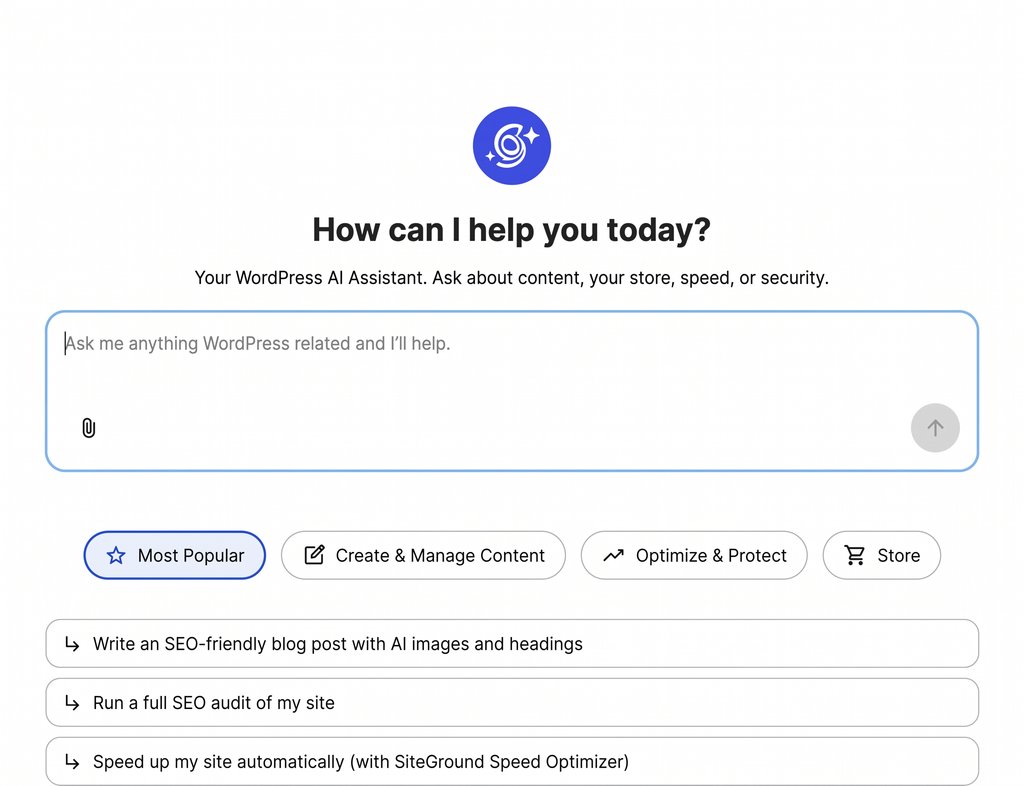
AI Agent for WordPress vs AI Puffer, side by side
To see how SiteGround’s AI Agent for WordPress and AI Puffer compare across daily website workflows, the table below breaks down their main features, setup requirements, and capabilities:
| Dimension | AI Puffer | AI Agent for WordPress |
|---|---|---|
| What it is | A toolkit of AI modules inside WordPress | A conversational agent for WordPress site management |
| How you use it | Configure each module, and set up tasks with sources, prompts and schedules | Ask in a chat inside the WordPress admin, or from SiteGround AI Studio |
| Who supplies the AI | Your own API keys from OpenAI, Anthropic, Google and others, billed by each provider | Includes managed AI access automatically with no third-party API keys or separate billing needed |
| Before first use | Connect an AI provider: an account with billing, an API key added to AI Puffer, and a model sync. Setting up a chatbot or any other module needs it | Pre-connected on SiteGround. Elsewhere, install the plugin and paste a connection key from SiteGround AI Studio |
| What decides which features work | The providers you connect: image generation and the knowledge base need a provider that offers those kinds of models | Available without choosing providers |
| Content | Article and product generation, bulk rewrites, and SEO fields for Yoast, Rank Math, All in One SEO and The SEO Framework, in both the block and Classic editors | Posts, pages, media and SEO metadata (the titles and descriptions search engines show), created and edited on request |
| Visitor-facing AI | A chatbot trained on your site content, with web search, voice and lead forms, plus AI forms and an image generator for visitors | Operates inside your administration area for site management rather than public visitor pages |
| Plugins, users, settings and menus | Not covered | Manages plugins, themes, user permissions, and core settings, with high-impact changes protected by Power Mode (a setting that stays off until you allow high-impact changes) |
| WooCommerce | Bulk product titles, descriptions, tags and SEO fields. Doesn’t change price, SKU, stock, categories or attributes. Sells AI credits as products | Manages complete store catalog tasks, bulk price changes, inventory, sales reports, and customer orders |
| Automation | Scheduled tasks for creating and rewriting content, keeping the knowledge base current and replying to comments | Executes tasks on demand whenever you request them in chat |
| WordPress AI connectors | Can route other plugins’ AI requests through your keys, logs and pricing rules | Connects your website(s) to SiteGround AI Studio via the Connectors screen, providing built-in AI access without third-party API keys |
| Multi-site management | A separate copy per site, each with its own settings and keys, under 2-, 5- or 10-site licenses | Runs administrative tasks simultaneously across multiple connected websites from one chat |
| Safety | New content can be reviewed before saving or saved as a draft, while rewrites of existing content apply directly. Module access can be limited by user role | Keeps Power Mode off by default to guard deletions, user edits, settings, and orders until explicitly confirmed |
| Cost | Free, or Pro from $9.99 a month for one site, plus your AI provider’s usage charges | 20,000 free AI tokens to start on any website, whoever hosts it, then top up or subscribe monthly. Included with SiteGround hosting plans, which add free monthly AI tokens |
Managing the AI versus managing the site
Both products come with management features, and they manage different layers. AI Puffer’s settings run its own AI: which provider answers, which modules appear, who can use them and how much they can use. The AI Agent for WordPress manages WordPress itself: the content, plugins, users, settings and store behind your site.
Keys, models and the features each one allows
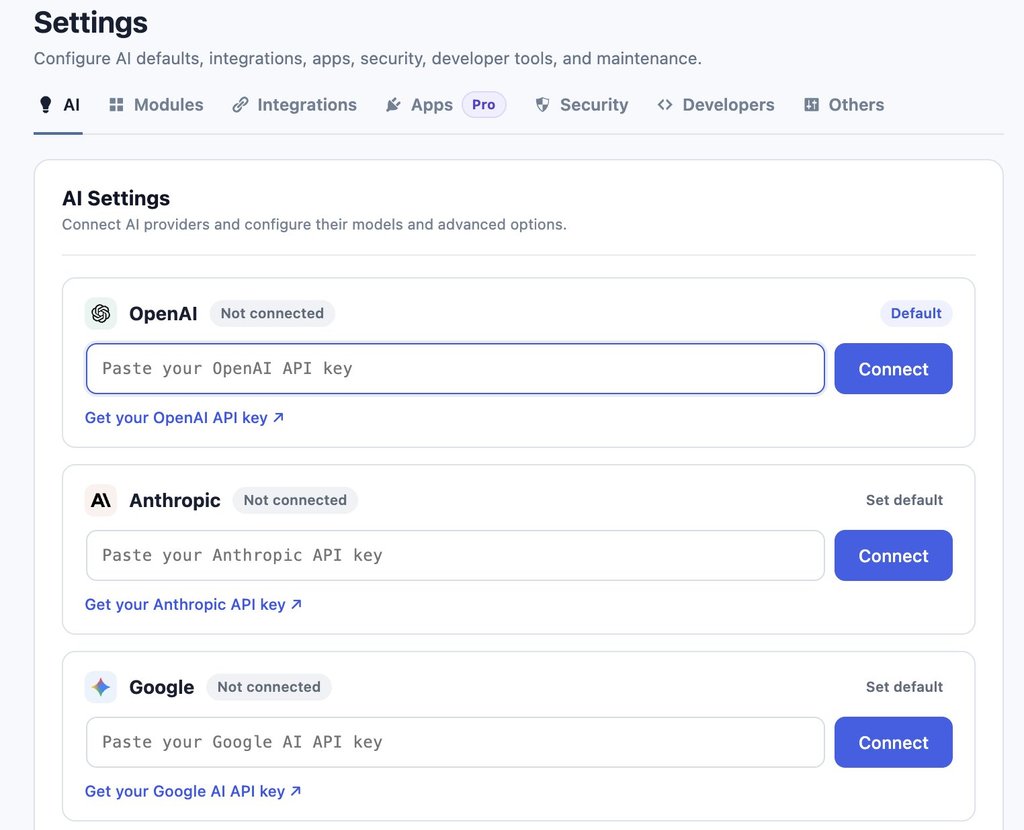
Connecting a provider to AI Puffer takes three steps:
- You create an account with an AI company such as OpenAI, Anthropic or Google and add billing details, since it charges for each request.
- You copy the API key from that account into AI Puffer’s settings.
- You sync the model list, so AI Puffer knows which AI models your account can use.
Once the AI Puffer API key is in place, the providers you’ve connected decide which features work. OpenAI covers the widest range, including images, speech and the embedding models (the kind of AI model that turns your content into something a chatbot can search) that the knowledge base depends on. Anthropic, the company behind Claude, covers text and web search only, so a site that connects only Anthropic gets a chatbot and a writer, and no image generation or knowledge base. On Pro, Ollama runs free AI models on a server you manage yourself.
AI Puffer Pro includes no AI credits, so a Pro site pays twice: once for the plugin and once for each provider it connects. The upkeep is yours too, from topping up an exhausted provider account to replacing a revoked key.
In the meantime, the AI Agent for WordPress includes its AI access, so there’s no provider account to top up and no key to replace, which is the practical side of choosing managed AI access over your own keys.
Pro tip: Set a spending limit with your AI provider. OpenAI, Anthropic and Google all let you set a monthly budget or usage alert in the billing section of your account. If you connect your own key to any WordPress plugin, a limit keeps a busy chatbot or a large automation from running up a bill you didn’t expect.
What AI Puffer’s connector and access controls do
On WordPress 7.0 or later, AI Puffer can take over WordPress’s AI connector layer (the shared system that lets plugins ask for AI through one set of settings). AI requests from other plugins and WordPress features then run through AI Puffer’s provider keys, model defaults, logs and pricing rules, so AI Puffer decides which AI account answers them.
Its access controls work the same way. The Role Manager sets which WordPress user roles, such as editors or shop managers, can use each AI Puffer module, and usage limits cap how much AI a guest, a user or a whole role can use. All of these govern AI use, and none of them can change your site’s plugins, user accounts or settings.
AI Puffer automation versus asking a WordPress AI agent
AI Puffer’s WordPress automation is set up in advance. You create a task by choosing what it does, the source it draws from, and the prompts, images, SEO fields and schedule it uses. Sources include a simple list or a CSV file (a spreadsheet saved as plain text), and on Pro an RSS feed (the automatic list of new posts a website publishes), web addresses or a Google Sheet. It then runs by itself, five items at a time, which suits a content pipeline you repeat every week.
Those tasks run on WordPress cron (WordPress’s scheduled-task system), which checks for due tasks only when someone visits your site, so on a quiet site a task can run late unless your host sets up a server cron, a timer that runs on the server itself. Rewrite tasks change published content directly once they run.
Pro tip: Run a rewrite task on one post first. Because AI Puffer’s rewrite tasks change published content directly, its own documentation advises testing a new task on a single item before pointing it at a whole category. Check the result on the live page, then widen the task once the prompt produces what you want.
SiteGround’s AI Agent for WordPress works on demand directly inside your chat window with zero advance setup. Instead of configuring feeds, prompts, or timers beforehand, you tell the agent what you need whenever you are ready (whether that is drafting an announcement, updating plugins, or managing online store inventory) and it carries out the work immediately in live chat.
The same week on four kinds of sites
A blog that publishes every day
Running a daily blog highlights the core difference between these two tools: AI Puffer focuses on building an automated content pipeline, while the AI Agent for WordPress handles the active management of the website surrounding that content.
AI Puffer excels at setting up automated background publishing. It can turn plain text lists, CSV files, RSS web feeds, or Google Sheets into scheduled blog posts complete with generated images, search engine details, and automated comment replies. On its Pro plan, a “Smart SEO” feature evaluates each draft against popular plugins (like Yoast or Rank Math) and can revise a post up to three times (though each rewrite counts as a separate request to your outside AI provider). Connecting a Google Sheet also requires setting up a technical connection key inside Google Cloud so the plugin can access your spreadsheet.

SiteGround’s AI Agent for WordPress handles the ongoing maintenance and administration of the blog itself. Instead of configuring background feeds or spreadsheet connections beforehand, you use live chat to publish and reorganize articles on demand, clean up categories and tags, update plugins, and maintain site configurations.
A WooCommerce store with a growing catalog
When running an online shop, the difference between these two tools comes down to whether you need help writing product text or managing your store’s daily operations.
AI Puffer focuses primarily on product copywriting and SEO. As a Pro feature, it can rewrite product titles, descriptions, short descriptions, tags, web addresses (slugs), and search engine fields in bulk. However, core store details (such as prices, stock levels, SKUs (product identification codes), categories, and product attributes) are only read as background context for the AI and remain completely unchanged. Additionally, store owners can use AI Puffer to sell AI credit packages to their site visitors as WooCommerce products.
Good to know: AI credits you sell aren’t credits from your AI provider. The credit packages AI Puffer sells to visitors are its own units, priced by rules you set, such as per 1,000 tokens or per image. Your AI provider still bills you for every request those visitors make, so set your credit prices above what each request costs you. Credits also reach a buyer only when the order completes and only on a logged-in customer account, not a guest checkout.
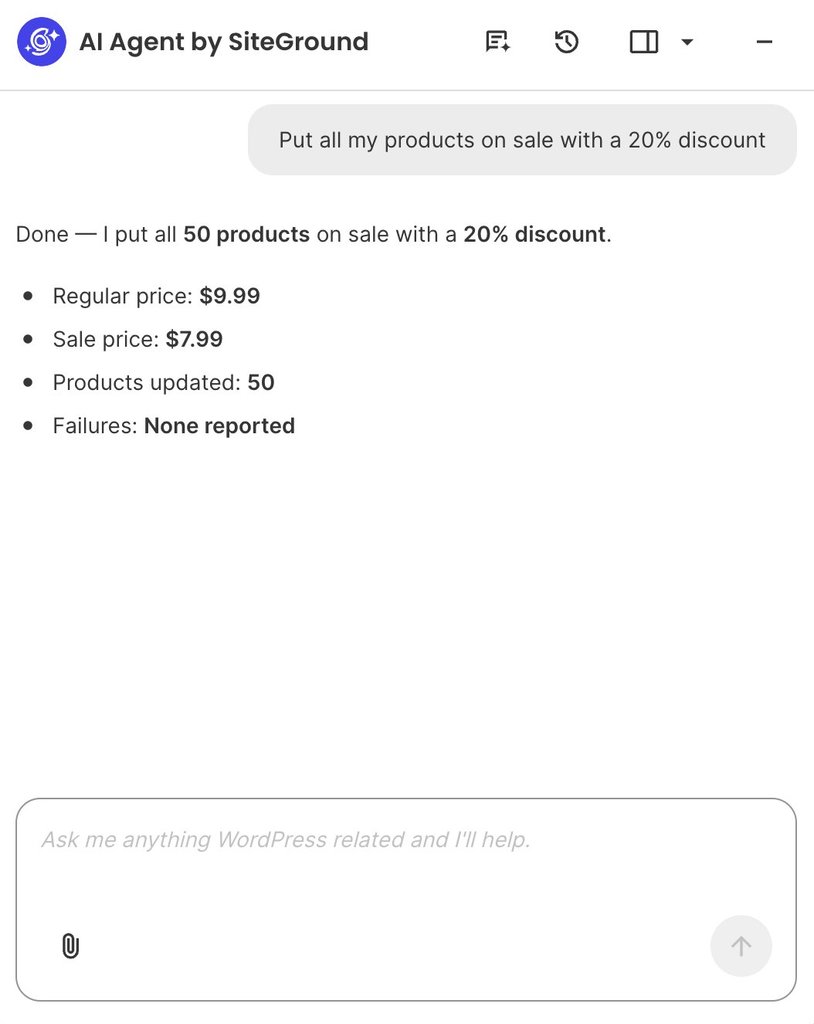
By contrast, SiteGround’s AI Agent for WordPress handles WooCommerce management across both your product pages and your store’s underlying operations. Beyond drafting product details, it carries out live e-commerce tasks directly through chat, including updating prices across multiple items at once, managing customer orders, tracking inventory stock, and generating sales reports.
For example, running a storewide promotion takes a single plain-language request instead of hours of manually editing individual product pages. You can simply instruct the assistant to apply a discount across your entire catalog, and it automatically calculates the new prices, updates every item at once, and confirms the exact changes right in the chat:
A service business that wants a chatbot
For a business that wins clients through its website, AI Puffer’s chatbot captures leads as well as answering questions, drawing on your site content and uploaded files. On Pro, chatbot rules can show a quote form when a visitor asks about pricing, save what they submit, and send it to HubSpot or Pipedrive (CRM tools, which businesses use to track leads and customers). AI forms can run guided intakes, and a feature AI Puffer calls its Realtime Voice Agent adds live voice to the chatbot, rather than being an agent that manages the site.
The AI Agent for WordPress works in the WordPress admin, not on your public pages, so this is the case where running both makes sense: AI Puffer for the chatbot and forms visitors see, and the AI Agent for WordPress for running the site behind them.
An agency with client sites on different hosts
AI Puffer operates independently on each website, requiring separate license keys (sold in 2-, 5-, or 10-site tiers), API keys, and settings for every client. Making a single configuration change across ten client sites requires logging into ten separate WordPress dashboards to update each one individually.
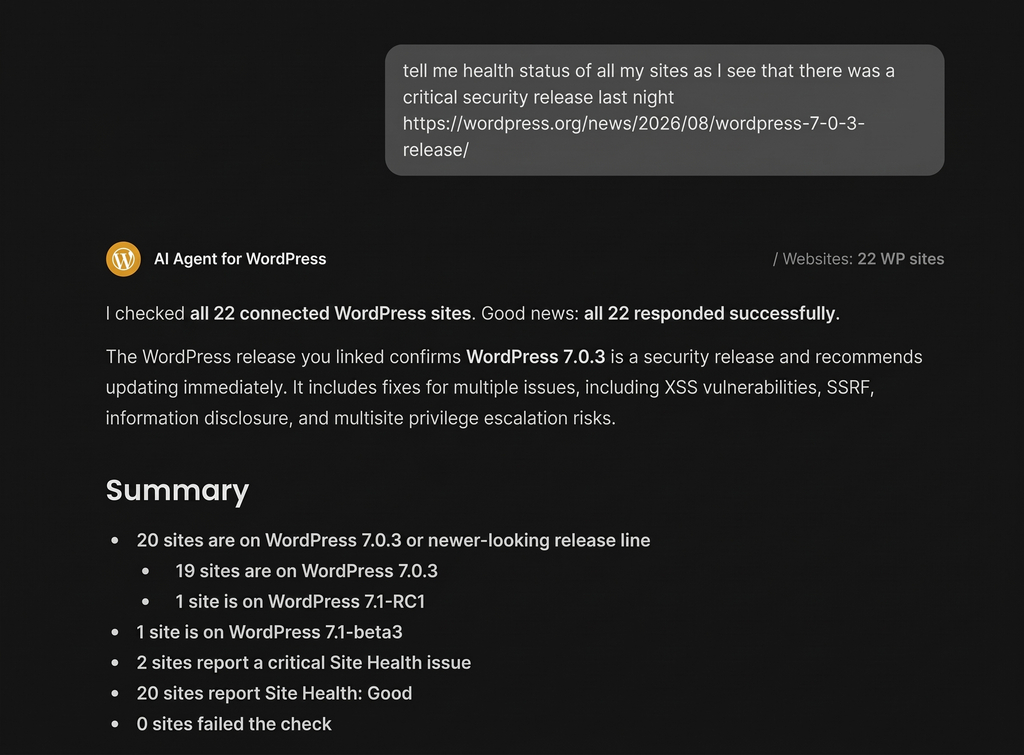
SiteGround’s AI Agent for WordPress enables centralized multi-site management from a single chat workspace, regardless of where each website is hosted. Agencies can run bulk administrative tasks (such as checking user permissions, updating plugins, or reviewing core security updates) across their entire portfolio with a single prompt.
For example, when a critical WordPress security patch is released, confirming update status across 22 client sites would traditionally require logging into 22 separate admin areas. With the AI Agent for WordPress, you can check and confirm update statuses across all 22 sites at once in a single prompt:
The bottom line: AI Puffer or AI Agent for WordPress?
AI Agent for WordPress vs AI Puffer comes down to one question: do you want to add individual AI features to your website, or do you want an assistant to help you run it?
AI Puffer provides a toolkit of AI features for your visitors, such as customer chatbots and smart web forms, along with background content schedules, all running on third-party API keys you set up and manage yourself. SiteGround’s AI Agent for WordPress acts as a personal site manager that handles your daily website operations, from updating plugins and managing user permissions to adjusting store prices and processing customer orders, with built-in AI access ready right out of the box.
FAQs
The difference between AI Agent for WordPress and AI Puffer is what each one works on. AI Puffer adds AI features to your site, including a visitor chatbot, AI forms, content generation and scheduled tasks, using your own AI provider keys. AI Agent for WordPress manages the site itself from a conversation, including plugins, users, settings and WooCommerce operations, with AI access included.
AI Puffer is an all-in-one WordPress AI plugin. It combines a chatbot, content writer, AI forms, image generator, knowledge base and automations in one toolkit. Its Realtime Voice Agent is a voice mode for the visitor chatbot, not an agent that manages the site.
No. AI Puffer cannot manage an entire WordPress site through chat. Its chatbot answers visitors from your content, and its tools cover content, forms, images and scheduled tasks. It doesn’t update plugins, change users or settings, or handle store operations.
AI Agent for WordPress updates plugins, changes users and settings, raises prices across many products, handles WooCommerce orders and runs changes across several sites, all from a conversation. AI Puffer’s product tools write and rewrite product content, and don’t change prices, stock or categories.
Yes. AI Puffer requires your own API key from at least one provider, such as OpenAI, Anthropic or Google, and you need one connected before you can set up a chatbot or any other module. The provider bills you directly for usage, including on AI Puffer’s free version. AI Agent for WordPress includes AI access, so there’s no key to create or manage.
No. AI Puffer Pro doesn’t include AI credits. Pro adds plugin features, and your AI provider bills you separately for usage, so a Pro site pays for the plugin and for each provider it connects.
No. AI Puffer can’t update WordPress plugins, users or settings. Its settings manage its own AI features, such as provider keys, which roles can use each module, and usage limits.
AI Agent for WordPress handles more of WooCommerce management. AI Puffer writes and rewrites product titles, descriptions and tags in bulk, while AI Agent for WordPress also changes prices across the catalog, handles orders and pulls sales reports.
Yes. AI Puffer and AI Agent for WordPress do different jobs, so a site can use AI Puffer for a visitor chatbot or AI forms and AI Agent for WordPress to manage the site and store.
Yes. AI Puffer is the plugin’s current name, so an AI Agent for WordPress vs AI Power comparison covers the same plugin. Its WordPress.org listing still uses the older address, gpt3-ai-content-generator.