

Vibe coding turns a plain-language description into a working website or app. And it’s everywhere right now. But so is the jargon that comes with it. LLMs, context windows, prompt injection, agentic coding: terms that come up constantly but nobody stops to explain in plain English.
This glossary does. Start with the basics or skip ahead to the more advanced terms when you’re ready.
Key takeaways:
- Vibe coding and AI-assisted coding are not the same thing. AI-assisted coding is the broad category; vibe coding is a specific approach within it.
- Not all vibe coding tools are equal: IDE AI tools are built for developers, while AI app builders like Coderick AI are built for people who have never written a line of code.
- The vibe coding platform you pick matters as much as the prompt you write. Type the same thing into two different AI app builders and you can get completely different results.
- Most of the time, when the AI produces something off, the problem is how you asked (your prompt), not the tool itself.
- Hallucinations are one of the most common beginner surprises: AI can generate something that looks completely finished and working, but references tools, steps, or features that don’t actually exist. Make sure to test what the AI built before making it live.
- When AI seems to forget what you discussed earlier in a session, it’s not broken. It just hit its memory limit.
- AI-generated code can look complete and polished and still have security gaps you’d never spot just by looking at it. Always check before it goes live.
What exactly is vibe coding?
Vibe coding is a way of building software without writing a single line of code. You describe what you want in plain language: “build me a booking page for my photography business”, and AI turns it into a working website, app, or tool for you.
A few years ago, building software meant learning to code, hiring a developer, or both. Now, all you need is a clear idea and the words to describe it.
The term was coined by AI researcher Andrej Karpathy in February 2025. The “vibe” part is intentional: instead of reading through code line by line, you go by the feel of what’s being built. The idea spread fast. What started as a tweet on social media turned into a mainstream movement in a matter of weeks.
The reason any of this is possible is LLMs (large language models): AI systems trained on extensive amounts of text and code that translate plain-language descriptions into functional software. The more specific your description, the better what gets built.
Vibe coding vs. AI-assisted coding
AI-assisted coding is the broad category: any use of AI to help write, review, or fix code. Vibe coding is a specific approach within it: the AI does the building, you do the directing. A developer using Cursor (an AI-powered code editor) to autocomplete a function is doing AI-assisted coding. Someone with no coding background describing an app idea and letting the AI build it is vibe coding.
TL;DR: 5 basic terms to start with & 5 more to grow into
| Term: | What it means: |
| The basics | |
| Prompt | The plain-language instruction you give the AI |
| LLM | The AI system powering every vibe coding tool; it reads your instructions and builds from them. |
| Code generation | The process of the AI turning your description into actual working code. |
| Hallucination | A type of error where the AI produces output that looks correct but isn’t |
| Code review | The practice of checking what the AI built before it goes live |
| 5 terms to know next | |
| Prompt engineering | Structuring your prompts with enough detail to get reliable results |
| AI agent | An AI tool that handles a whole task from start to finish, not just a single prompt |
| Context window | The limit on how much of your conversation the AI can hold in memory at once |
| Technical debt | Code that works now but wasn’t built properly, creating hidden problems that make the project harder to update or fix over time |
| SAST (Static Application Security Testing) | An automated tool that scans your code for security problems before it goes live |
Core vibe coding concepts
These are the concepts behind every vibe coding tool: what powers them, how they process your instructions, and what sets different tools apart.
LLM (large language model)
An LLM is an AI system trained on vast amounts of text and code. It predicts the most likely next word, line, or block of code based on your input: translating plain-language descriptions into working functions. Every vibe coding tool runs on one.
You’ll encounter this term when comparing tools. Мost platforms name the LLM they use, and different models have different strengths. Some handle creative output better, others write cleaner, more structured code.
Code generation
Code generation is the process of translating plain-language instructions into functional code (files, functions, and configuration). It’s the direct output of an LLM doing its job.
When something comes out wrong, the question is always: was it the prompt or the model?
Say you ask for a contact form and emails never arrive.
- You try the same prompt in a different tool and it works → model issue.
- You go back and try a more specific prompt in the original tool: “Build a contact form that sends submissions to my email address.” It works → prompt issue.
Knowing the difference saves you from blaming the wrong thing.
IDE AI (Integrated Development Environments) tools & AI app builders
IDE AI tools and AI app builders both use code generation, but they’re built for different users and different workflows.
| Definition | Examples | Who it’s for | Best for | |
| IDE AI tools | AI embedded in a developer’s existing coding workspace; you still write and manage the code yourself, the AI assists. | Cursor, Replit Agent | Developers with coding knowledge | Speeding up existing dev workflows |
| AI app builders | All-in-one platforms that handle code generation, hosting, databases, and deployment | Coderick AI | Non-technical users | Going from idea to live product |
Bottom line: An IDE AI tool makes a developer faster. An AI app builder makes building accessible to someone who isn’t a developer at all.
To make things even easier for non-developers, SiteGround’s Coderick AI takes this concept and develops it further. It’s built on SiteGround’s hosting infrastructure, and is designed for projects meant to run in the real world, not just look good in a demo.
[96]
Prompts and context
In vibe coding, you talk to the AI through plain-language instructions called prompts.This section breaks down how to structure a prompt that works, and why the AI sometimes loses track of what you’ve built together.
Prompt
A prompt is the plain-language instruction you give an AI tool: what you want it to build, fix, or explain. If there’s one term you’ve already heard before opening this glossary, it’s this one. Chances are you’ve already written one: any time you’ve asked ChatGPT to draft an email or summarize something, that was a prompt. In vibe coding, your prompt acts as the spec (the brief that tells the AI exactly what to build and how).
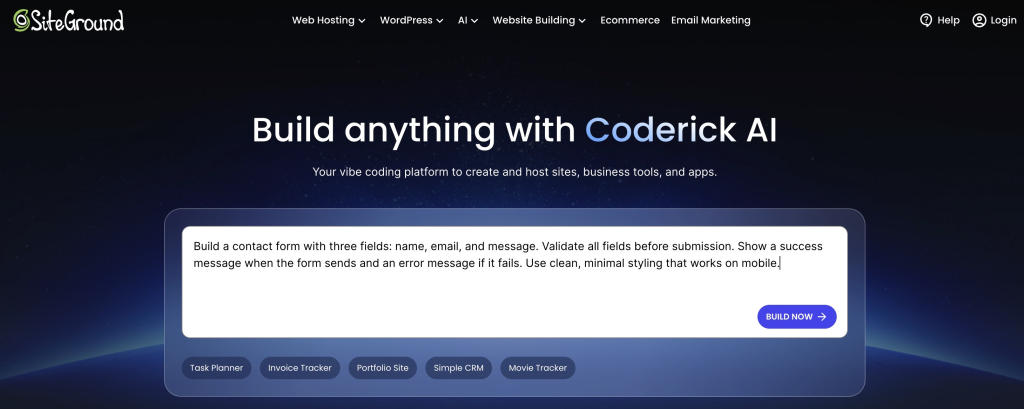
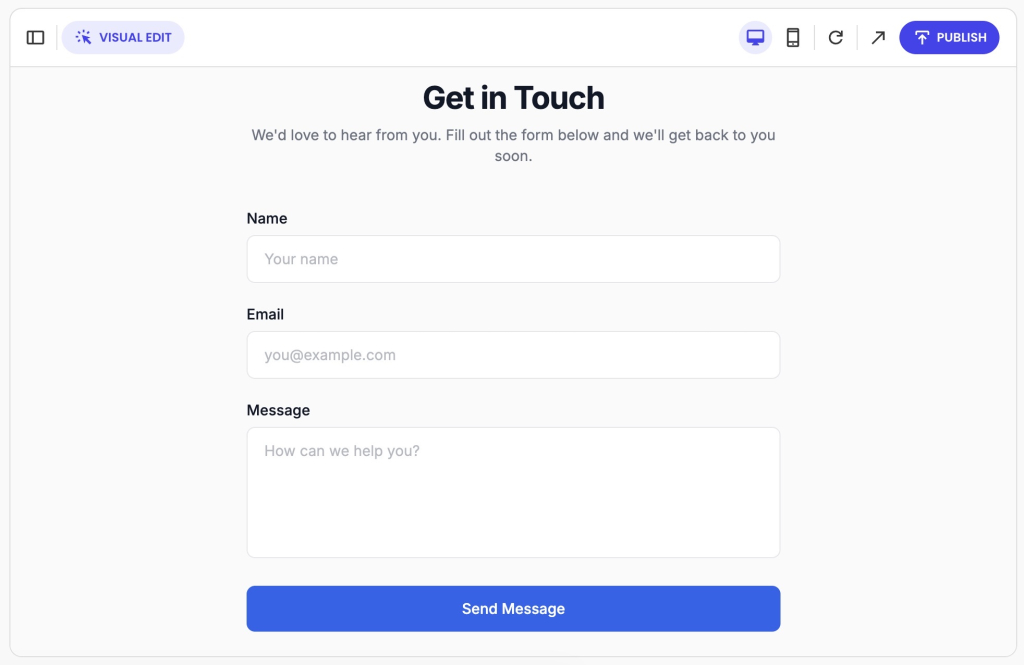
Every interaction in vibe coding starts with a prompt. The quality of that prompt directly determines the quality of the output: “Build a contact form with three fields: name, email, and message. Validate all fields before submission. Show a success message when the form sends and an error message if it fails. Use clean, minimal styling that works on mobile.” will get you further than “add a contact form to my website.”
Here’s what Coderick AI builds from that prompt, and you can keep refining it from there.
Prompt types and scope
Not all prompts are the same. Here’s a breakdown of the most common types:
| Prompt type | What it means | Example |
| Zero-shot | A direct instruction with no examples or context | “Build a contact form with name, email, and message fields” |
| Few-shot | You give the AI examples first to guide what it builds | “Here are two forms I like. Build me something similar but with a file upload field” |
| Instructional | A direct command with specific requirements | “Build a contact form. Validate all fields. Show a success message on send” |
| Role-based | You ask the AI to take on a persona | “Act as a senior web developer and build me a secure contact form” |
| Chain-of-thought | You ask the AI to reason through the problem step by step before building | “Think through what a contact form needs, then build it” |
There are three more terms that directly affect how your prompts are interpreted and how much you should ask for at once.
- System prompt: A preset set of instructions that shapes how the AI behaves before you type anything, set by the platform, not you. This is why the same LLM can feel completely different across different tools.
- Prompt engineering: The practice of structuring prompts with enough context, constraints, and detail to get reliably good results. When the AI produces something off, the prompt is usually the problem, not the tool.
- Prompt scope: How much your prompt asks for in one go: a single specific task or an entire feature at once. Broad prompts produce inconsistent results; smaller focused prompts give more accurate output.
The bottom line: The more thought you put into how you write a prompt, the less time you’ll spend fixing what the AI gets wrong.
Context window
The context window is the total amount of text an LLM can read and hold at one time: your instructions, the conversation history, and any code already generated. Think of it as the AI’s working memory.
If you’ve ever caught the AI contradicting itself mid-project and thought “what’s going on”, you’ve hit the context window. The AI isn’t being inconsistent; it literally can’t see earlier parts of your conversation anymore.
Context limits
Context limits are the specific boundaries of a context window, measured in tokens, that vary by LLM and tool. The larger the limit, the more of your project the AI can hold in mind at once; and the less often you’ll hit the context window ceiling as your project grows.
Tokens and credits
Tokens are the small chunks an LLM breaks text into before processing it: a single word, part of a word, or even a punctuation mark. Your prompt, the AI’s response, and all previous conversation history all consume them. The context window itself is measured in tokens, which is why longer conversations eat into it faster.
For example, in Coderick AI, tokens translate into credits. That’s the unit that measures how much data is processed per interaction. The longer and more complex the request, the more credits it uses.
You’ll notice this when a large, vague prompt produces a partial or cut-off response. Breaking large builds into smaller, focused requests gets you more targeted output, and makes your credit allowance go further.
Temperature
Temperature is a parameter that controls how predictable or creative the AI’s output is. You won’t find a temperature slider in most vibe coding tools as they set it automatically. However, knowing what it does helps you understand why output sometimes can feel too safe or too unpredictable.
| Temperature | Output | Best for |
| Low | Consistent, conservative | Functional builds, production code |
| High | Creative, unpredictable | Exploring ideas, brainstorming |
For code generation, lower temperature is the right default. You want accurate, reliable output, not a creative interpretation of your instructions. Most vibe coding tools handle this automatically.
Hallucination
A hallucination is AI-generated output that looks correct but isn’t: wrong logic, invented functions, or references to libraries and APIs that don’t exist.
You’ve likely run into one if you’ve ever followed an AI’s instructions step by step, only to find that one of the tools, settings, or steps it described doesn’t actually exist or work the way it said.
Agents and automation
Answering a single prompt is just the start. Modern AI tools can plan multi-step tasks, connect to real services, and test what they build. Here’s what that actually looks like in practice.
AI agent / agentic coding
An AI agent is an AI system that handles a whole task from start to finish. You describe what you want, and it figures out how to get there, without you prompting each step. SiteGround’s Coderick AI is a great example of this: describe what you want to build, and it handles the rest.
It’s more powerful than a single prompt, but works best when you stay involved and review what it builds along the way.
Say you need a portfolio site that showcases your work, lets visitors filter by project type, and includes a contact form. Instead of building each piece separately, you describe the end result and the agent handles the full build.
“Build me a portfolio site with a project gallery, a filter by category, and a contact form. Use clean, minimal styling that works on mobile.”
And here’s what Coderick AI makes of it:

Function calling
Function calling is how an AI agent interacts with external tools, APIs, or services mid-task. You’ll come across this term as you explore more advanced AI tools. Rather than just generating code, the agent can trigger real actions: querying a database, calling an API, or executing code.
Say you’re building an online store and ask the agent to set up payment processing. It doesn’t just write the code — it calls the Stripe API directly, verifies the connection, and confirms the integration is working, all as part of the same task.
Human-in-the-loop, code review & testing
There are three different ways to catch problems — at different stages of the build:
| Definition | When it happens | Worth knowing | |
| Human-in-the-loop | A workflow where the AI pauses at key decision points and waits for your approval before continuing | During the build | The safer default for beginners working with agents |
| Code review | Reading through generated code to check it works as intended and doesn’t introduce security or performance problems | After the build, before deployment | Running is not the same as working correctly or safely |
| Testing | Automated verification that code behaves as expected across different conditions | Continuously | AI can write tests that pass without catching real problems — always check what each test is actually verifying |
The three layers of catching problems:
- Human-in-the-loop stops the AI before it makes a decision
- Code review is you reading the finished output
- Testing is the code running automatically against real conditions to check if it behaves the way it should.
Debugging
Debugging is the process of identifying and fixing code that isn’t working as expected. In vibe coding, this typically means feeding error messages back into the AI and asking it to diagnose and resolve the problem.
A fix can introduce new problems while resolving the original one. Always verify.
Your booking form was working fine, then stopped sending confirmation emails after the AI updated the notification logic. Copy the exact error message, paste it into the AI alongside the relevant code, and ask it to explain what changed and why, before asking it to fix anything.
CI/CD (continuous integration and continuous deployment)
CI/CD is the automated process of testing and publishing code changes so updates go live reliably without manual intervention each time.
As a beginner you might need help setting this up yourself, and AI app builders handle this infrastructure by default.
Every time you make a change and it goes live automatically without manually uploading files, CI/CD is running in the background.
Evaluation (evals)
Evals are structured tests used to measure how well an AI model performs on specific tasks, essentially a scoring system for the quality and reliability of AI output across different scenarios.
You won’t run evals yourself, but they explain two things worth knowing:
- Why one vibe coding tool handles certain tasks significantly better than another
- Why a model update can suddenly change how your prompts behave
Knowing this helps you make a more informed choice when picking a tool, and stops you from blaming your prompts when a model update is actually what changed.
Security and risks
Fast builds come with real risks. AI-generated code can look clean, run without errors, and still expose your users’ data, break under real traffic, or become impossible to maintain. Knowing these terms is about being informed, not alarmed.
Many of these risks are handled automatically when you build with a reputable platform. Coderick AI, for example, is built on SiteGround’s infrastructure: a hosting environment with over 20 years of experience powering millions of websites securely and reliably.
Prompt injection
Prompt injection is an attack where malicious instructions are hidden within the content your AI processes (a form field, an uploaded file, a webpage) with the goal of hijacking what the AI does next. Instead of following your instructions, the AI follows the attacker’s.
This is one of the most underestimated risks in vibe coding. If your project takes any user input and feeds it into an AI, prompt injection is a surface you need to think about.
Here’s a real example: someone submits your support form with hidden instructions telling your AI to ignore previous rules and expose sensitive data. Without input validation in place, the AI processes it as a legitimate instruction.
Security vulnerability
A security vulnerability is a weakness in your code that an attacker could exploit: to access data they shouldn’t, break functionality, or take control of parts of your application. This is true of any codebase, human-written or AI-generated. The difference with vibe coding is speed: AI generates plausible-looking code fast, and vulnerabilities can hide in code that runs perfectly on the surface.
Credentials and secrets
Two terms beginners often confuse, and both can cause serious damage if mishandled:
Secrets vs. API keys
API keys grant access to a specific service. Secrets is the broader term covering any sensitive credential: API keys, passwords, and other access credentials your app uses to connect to external services. Every API key is a secret, but not every secret is an API key.
The rule for both: Never hardcode them, never paste them into prompts, never commit them to a repository.
Input security and access control
Your code needs to control what gets in and what each part of your system can touch:
| Definition | What it protects against | Worth knowing | |
| Input validation | A security check that verifies data submitted by a user matches what your application expects before processing it | Malicious input being processed as legitimate instructions | AI-generated code doesn’t always include this by default; worth adding it explicitly to your prompt just to be sure. |
| Principle of Least Privilege (PoLP) | A security practice that limits what each part of your app can access to only what it actually needs | Unnecessary access creating unnecessary risk if something gets compromised | When your AI agent requests broad access, question whether it actually needs it |
| Data privacy | A set of practices governing how personal and sensitive information is collected, stored, and shared within your project, including what leaves your environment through AI prompts | Accidental exposure of customer or business data through prompts | Never paste real customer data into a prompt; use anonymized or synthetic data instead |
SAST (Static Application Security Testing)
SAST is an automated tool that scans your code for security problems before it goes live. Because it works independently of the AI that wrote the code, it catches issues the AI wouldn’t flag about its own output.
Your AI builds a search feature that takes user input and passes it directly into a database query. A SAST scan flags it as an injection risk before anyone uses it. Without the fix, a malicious user could manipulate that query to access or delete your data. The scan points you to the exact line of code to fix, so you’re not hunting blind.
Dependency risk
A dependency is any external library or package your project relies on. Dependency risk is the chance that one of those packages is outdated, unmaintained, or has known security vulnerabilities.
The AI will recommend and include packages without telling you whether they’re safe or still supported. You ask for a file upload feature, the AI picks a library to handle it, but that library hasn’t been updated since 2021 and has two open security advisories. Before accepting any package the AI recommends, check when it was last updated.
Sandboxing
Sandboxing is the practice of running code in an isolated environment with no access to your file system, database, or network unless you explicitly allow it. If something goes wrong, the damage stays contained.
It’s one specific security measure, not a complete strategy. Most relevant when running AI-generated code for the first time or letting an agent execute code on its own.
Say you let an agent generate a script to reorganize your database. Run it in a sandbox first. If it misbehaves, your live data stays untouched.
Sandboxing vs. security
Sandboxing contains damage in one place. Security covers everything else: credentials, validation, dependencies, vulnerability scanning.
Rate limits
A rate limit is a cap on how many requests your application can make to an external service within a given time period. Exceed it and the service stops responding until the limit resets.
AI-generated code doesn’t always account for this. If your app works perfectly in testing but breaks under real usage, a rate limit is one of the first things worth checking.
For instance, your store works fine in testing, but breaks on launch day when real customers start checking out at the same time. The payment service stops responding: you hit the rate limit.
Before you deploy anything
Running without errors is not the same as working correctly, securely, or ready for real users. Before anything goes live, paste the generated code back into the AI and ask: “What does this code do, what assumptions does it make, and what could go wrong?” If the answer surprises you, don’t ship it yet.
If you’re building with Coderick AI, this step looks different. Every change is first applied to a private preview environment where you can check that everything works as expected. Only when you’re happy with the result do you publish it to your live site. You’re not reviewing raw code, but the actual outcome before it goes public.
Keeping things working after the build
Vibe coding makes it easy to build fast. What it doesn’t do automatically is make sure what you built still works, makes sense, or can be updated six months from now. That’s what this section is about. The terms below explain what to watch for, and what to ask your AI to do differently, so your project stays healthy long after the first build.
Maintainability
Maintainability is the ease with which a codebase can be updated, fixed, and extended over time. In vibe coding, it’s the difference between a project that grows with you and one that becomes untouchable after the first month.
When prompting the AI, add “keep functions small and single-purpose” and “add comments explaining non-obvious logic.” One extra line in your prompt, significant difference later.
Technical debt
Technical debt is the cost of shortcuts and poorly structured code that accumulates over time, making a project harder to update, debug, or scale.
It’s not always avoidable, but it is always cumulative. If adding a simple new feature keeps breaking other parts of your project, technical debt is likely why.
Quick note: this is more relevant if you’re working directly with AI-generated code in a developer environment. With all-in-one builders like Coderick AI, code structure is handled by the platform.
Code health: refactoring, documentation, and versioning
Three practices that keep a vibe-coded project from becoming impossible to maintain:
| Definition | Why it matters in vibe coding | |
| Refactor | Rewriting existing code to make it cleaner and better structured without changing what it does | The primary tool for paying down technical debt |
| Documentation | Written explanation of what your code does, how it works, and why certain decisions were made | AI-generated code often arrives without it and would need to ask for it specifically |
| Versioning | Tracking changes to your codebase over time so you can see what changed and roll back if something breaks | AI can make sweeping changes across multiple files in a single step — versioning is what makes that recoverable |
Git and PRs (pull requests)
- Git is a version control system that tracks every change made to your codebase.
- A PR is a way of proposing changes before they go live, creating a review step before anything gets merged.
Even building solo, Git means every change the AI makes is tracked and reversible. Before accepting a large block of AI-generated changes, save a snapshot of where your project is right now. If something breaks, you have a clean version to return to.
Linters and formatters
- A linter scans your code for errors and inconsistencies without running it.
- A formatter restructures it to follow consistent style rules. Together they keep a codebase readable and catch basic mistakes early.
AI-generated code doesn’t always follow a consistent style. Running both as a standard step keeps your project clean as it grows. If the tool you’re building in doesn’t do this automatically, ask the AI to set it up for you.
Logging and observability
- Logging is the practice of recording what your application does as it runs: errors, events, user actions.
- Observability is the broader ability to understand what’s happening inside your application based on that data. Without it, debugging a live application means working blind.
Ask the AI to include basic logging in every feature it builds. If you’re using an IDE AI tool, this is something you’ll need to set up yourself. With Coderick AI, common errors are detected and flagged automatically, so you don’t have to dig through logs yourself.
You’re fluent now. Go vibe code something.
You don’t need to memorize this glossary before you start. But the next time your AI hallucinates a function, hits a context window, or generates code you probably shouldn’t ship, you’ll know exactly what’s happening.
Knowing these terms makes you a more informed builder, whatever tool you use. If you’re working with an IDE AI tool (like Cursor), the security, infrastructure, and deployment concepts in this glossary are directly relevant to your day-to-day decisions.
If you’re building with an all-in-one platform like Coderick AI, many of those things are handled for you by the platform, but understanding what’s happening under the hood still helps you make better choices and ask better questions. Coderick AI runs on SiteGround’s infrastructure, with 20+ years of hosting experience behind it, so the foundations are solid before you write your first prompt.
Frequently asked questions about vibe coding terms
Through prompts: plain-language descriptions of what you want to build. Add constraints (what the code must not do) and acceptance criteria (what “done” looks like) to get more reliable code. Instead of “make a login page,” try: “Build a login page with email and password fields, a forgot password link, and an error message for wrong credentials.”
Describing a booking form and having the AI build it, connect it to a database, and set up confirmation emails, without writing a single line of code. Or using a platform like Coderick AI to go from a project description to a live, hosted application.
The five foundational elements of programming are variables, data structures, control structures like conditionals and loops, syntax, and functions. In vibe coding, you don’t need to write any of these manually — but knowing they exist helps you give the AI more precise instructions when something isn’t working the way you expected.
Vibe coding is not inherently risky. But it becomes risky when you skip the basics like reviewing generated code, scanning for vulnerabilities, handling credentials correctly, and not deploying code you haven’t verified. AI generates code fast, and mistakes can pile up faster than you’d expect.
A bug is a mistake in the code that causes something to break or behave unexpectedly when you use it. A hallucination is different: the AI produces something that looks right but is based on something it made up — a feature, a setting, or a step that doesn’t actually exist. Bugs are fixable. Hallucinations require you to spot that something was never real in the first place.