Your first 90 days: an ecommerce marketing plan for growing sales

abstract of ecommerce marketing

Here’s the plan: a focused 90-day ecommerce marketing roadmap in four phases, with real benchmarks and tactics that work whether your budget is zero or a few hundred bucks a month. No need to become an overnight expert. Whether you’re selling a productivity planner, custom phone cases, or a home-cooked hot sauce, the path is the same: get your store ready, launch, learn from your first customers, then double down on what works.

Key takeaways

  • You don’t need a complicated ecommerce marketing strategy — you need a focused 90-day plan built in phases.
  • Get your store ready to convert before spending time or money driving traffic.
  • Set up essential email flows early — they work in the background and drive consistent revenue.
  • Choose two marketing channels and commit to them before adding more.
  • Use customer data from your first customers to guide decisions instead of guessing.
  • Double down on what works and cut what doesn’t by day 60 to scale smarter in days 61–90.

What is ecommerce marketing?

Ecommerce marketing is everything you do to bring people to your store and turn them into paying customers. That includes social media marketing, the emails you send, the ads you run, how your store ranks in search engine and AI results, and even the words on your product pages.

Ecommerce marketing success is less about making a lot of noise and more about finding the right people and giving them a reason to buy. The good news is that you don’t need to do all of it at once, and especially not in your first 90 days.

Your 90-day ecommerce marketing plan

PhaseTimeframeFocusKey goal
1: Pre-launchDays 1–30BuildStore ready, email set up, audience started
2: LaunchDays 31–37SellFirst customers
3: ValidationDays 38–60LearnWhat’s working
4: ScaleDays 61–90GrowDouble down and expand

Phase 1: Pre-launch (days 1–30): build before you sell

The biggest mistake new sellers make when it comes to ecommerce marketing is spending money driving traffic to a store that isn’t ready to convert. Phase 1 is about getting the foundations right before a single ad goes live or a single email gets sent.

1. What’s your ecommerce marketing budget?

Before anything else, figure out what you’re working with. This shapes every decision in the phases ahead.

Budget stageMonthly marketing budgetWhat this means for your strategy
No budget$0-$200Organic-first. Lean on free (or almost-free) channels — social media, email, word of mouth. Hustle over spend.
A little to work withUp to $200You can start testing low-cost options like a small social media ad boost or a promoted post. Be selective.
A bit more budget to invest$200–$500Enough to run a real paid campaign or try a few channels at once. Spend intentionally and track everything. 

2. Optimize your store before you drive traffic to it

Before you market anything, make sure your store is actually ready to convert visitors into buyers. Go through each of these:

  • Product descriptions: Make sure your product detail pages are ready to go. That is, answer the questions a customer would actually ask. What is it made of? How does it work? What size should I get? Don’t assume they know what you know.
  • Photos: Use clear, well-lit images that show the product from multiple angles. Lifestyle shots help people picture owning it.
  • Checkout: Go through the checkout yourself. Is it quick and easy? Every extra step loses customers.
  • Trust signals: Add a clear returns policy, contact information, and if you have any early reviews or press mentions, show them.
  • Mobile: Check that everything looks good and words as it should on a phone. Paying special attention to mobile web design is essential, as most of your visitors will be on one.
  • Site speed: Every extra second your store takes to load loses you customers. Test your load time using a free tool like Google PageSpeed Insights and fix any obvious issues (oversized images are usually the biggest culprit). Choosing a website builder with web hosting built for performance means you’re starting from a strong baseline.
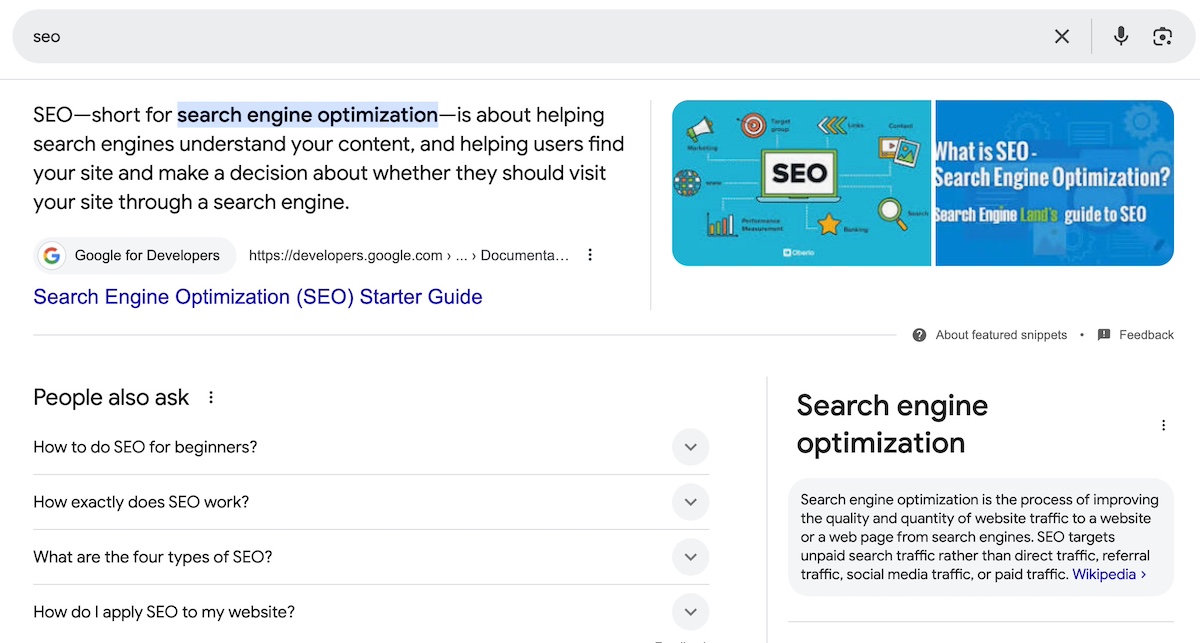
  • Search visibility basics: Set your store up for search from day one — clear page titles, meta descriptions, and product copy that uses the words your customers actually search for. SiteGround’s SEO checklist and guide to generative engine optimization are good places to start.

3. Set up your essential email flows and sequences before day one

Email is one of the highest-returning marketing channels available, and the best part is you set it up once and it works in the background. Before launch, you need two things in place: automated flows that trigger based on what a customer does, and email sequences that guide someone along the email customer journey over time.

Automated flows respond to behavior. Get these three set up before you launch:

1. Abandoned cart: Sent a few hours after someone leaves without buying. Cart abandonment sits around 70% industry-wide, so a simple “you left something behind” email with a link back to their cart recovers more sales than you’d expect. Consider a follow-up a day later if they still haven’t completed their purchase.

2. Post-purchase: Sent after a completed order. Thank them, tell them what to expect, and start building the relationship that leads to a second purchase. This is also a good place to ask for a review.

3. Email sequences are the planned journey you take someone on from the moment they join your list. Rather than sending one email and hoping for the best, a good welcome email sequence spans 4–5 emails over a couple of weeks — introducing yourself, showcasing your product, handling common questions, building social proof, and ending with a first-purchase incentive for anyone who still hasn’t bought. 

Each email moves the reader along an email customer journey — from awareness to re-engagement — one step closer to buying rather than asking them to go from stranger to customer in a single send. Once you launch, this sequence transitions naturally into your ongoing email rhythm. 
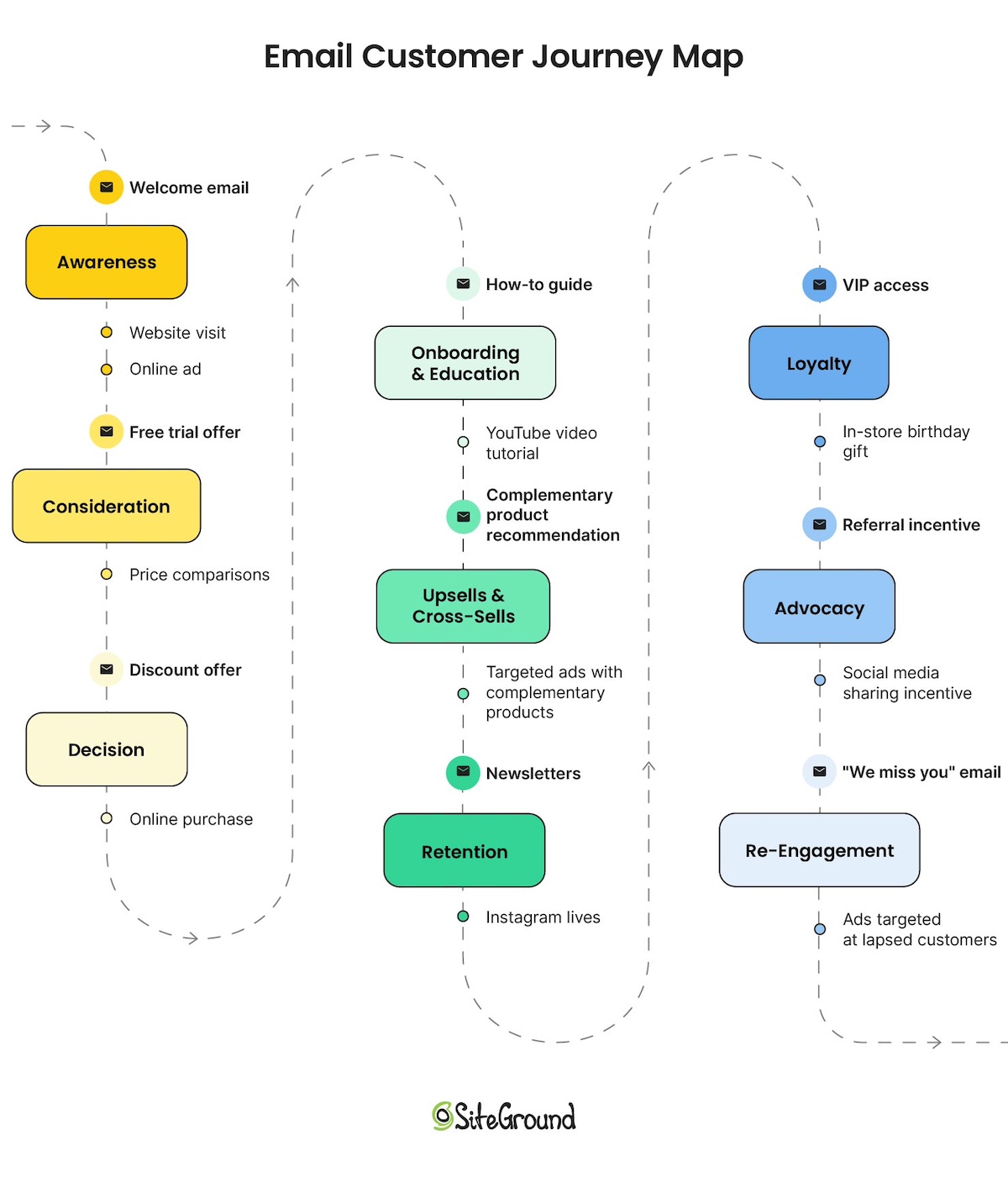
Diagram of an email customer journey map with all touchpoints

As soon as you start sending, note your open rates, click-through rates, and unsubscribe rates for each email. These email marketing benchmarks will look different for every ecommerce business and audience — what matters isn’t hitting a universal benchmark, but establishing your own baseline so you can spot meaningful changes over time.

4. Build your pre-launch audience

You don’t have to wait until launch day to start building an audience; in fact, the sooner you get started, the better. Here’s how to get some ecommerce marketing momentum going before you go live:

  • Set up a simple email marketing waitlist on your site and link to it everywhere. (If you’re using SiteGround, adding a simple email subscribe form is super easy to do.)
  • Consider offering an incentive (often called a lead magnet) to encourage sign–ups. For example, early-bird access or a small discount for people who sign up before launch is a great way to get people to join your list. Just remember to keep the incentive relevant to what you offer so that you attract people that are genuinely interested in your product or services. 

Example of a pre-launch incentive form to build email sign-ups
  • Post behind-the-scenes content on social media — people love seeing how a product is made
  • Tell your personal network what you’re working on (yes, actually tell them and even ask them kindly to give you a follow; oftentimes and a genuine request is all it takes)

5. Choose your first two channels and ignore the rest (for now)

Pick two marketing channels and focus on them entirely. Your goal is to reach potential customers where they already spend time, not to be everywhere at once. Use this to decide:

  • Visually driven products (home goods, fashion, food, art): Instagram, TikTok, or Pinterest. Instagram marketing or Pinterest presence are your go-tos TikTok can be great for small business and is worth serious consideration if you’re comfortable on camera — its organic reach for new accounts is hard to beat, and behind-the-scenes and “how it’s made” content performs particularly well for independent sellers.
  • Products for professionals or other businesses: LinkedIn is where it’s at
  • Products with a passionate niche community: Find where that community already lives — a subreddit, a Facebook group, a niche newsletter
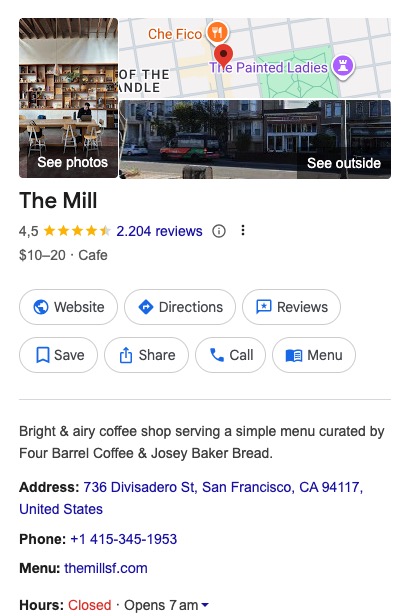
  • Local or service-adjacent products: Facebook or even Google Business Profile

Once you’ve chosen your two channels, here’s how to approach them based on your budget:

If you have no budget: Go all in on organic. That means showing up consistently (aim for at least 3–4 posts a week) and focusing on content marketing that gives people a reason to follow you before they buy. Behind-the-scenes content, product demos, your story, customer reactions. Engagement matters more than follower count at this stage, so respond to every comment and message.

If you have a little to spend: Start with organic to figure out what content resonates, then put a small amount behind your best-performing posts to extend their reach so that you can build your following, hype, and momentum. Even $5–10 a day on a boosted post to a targeted audience can meaningfully increase visibility. 

If you have some budget to invest: You could run proper paid campaigns, but keep in mind that paid social media works best when your organic presence is already established and your store is converting well. So best to save this investment for a later phase while you get the foundations in place.

Whichever budget level you’re at, consistency beats volume. Two channels done well will always outperform five channels done poorly. Commit to those two for the full 90 days before dabbling in a third.

Phase 1 success metrics

By the end of day 30, you should have:

  • A store that’s ready to convert, with complete essential pages and trust signals
  • Three email marketing flows set up and tested
  • A pre-launch email list of at least 50–100 subscribers
  • Two channels chosen and active with a content rhythm established

AI pro tip

Phase 1 involves a lot of writing — product descriptions, email flows, social media bios, page copy. Use AI (either your favorite LLM, or a built-into-your platform AI writer) to draft and refine these faster. Give it context about your product and your customer and let it do the heavy lifting on the first draft. 

You can also use AI to help research your target audience. Ask it what questions your ideal customer is likely to have, what objections they might raise, and what language they use.

One tool to bring it all together
By this point you’ve set up a store, built email flows, started growing an audience, and chosen your channels. If you’re stitching together separate tools to do all of this, it gets expensive and complicated fast. 

SiteGround Ecommerce is built to handle all of it in one place: a high-performing store optimized for speed, mobile-ready design out of the box, built-in search engine optimization tools, a built-in AI writer, email marketing that integrates seamlessly, and access to AI Studio to help you create content faster. And if anything goes wrong or you just need a hand, 24/7 support is there. Less time managing tools means more time actually marketing your store.

Start building your ecommerce website now>>

Phase 2: Launch week (days 31–37): get your first customers

Launch week is about turning all that setup into your first sales. Start with a clear goal, then follow a day-by-day plan to get in front of customers immediately.

1. Set your launch goal

Before launch week begins, decide what success looks like, and be specific about what that means for your type of business. A store selling $15 digital downloads and one selling $500 handmade furniture are playing very different games. Your goal and the metrics you track should reflect that.

Use this to set your launch goal:

Business typeGood launch week goalKey metrics to track
Low-price products ($10–$50)First 5–10 salesNumber of sales, conversion rate, email click-through rate
Mid-price products ($50–$200)First 1–3 salesNumber of sales, add-to-cart rate, abandoned cart recovery
High-price or considered purchases ($200+)First inquiry or consultationInquiries received, email replies, time spent on product page
Digital products or downloadsFirst 10+ salesNumber of downloads, conversion rate, traffic source
Services or bookingsFirst booking or discovery callBookings made, contact form submissions, email open rate

Write your goal down and keep it visible. Every ecommerce marketing decision you make this week should be answering the same question: is this getting me closer to that number?

2. Plan your launch week

Launch week is not the time to sit back and see what happens. Here’s a day-by-day framework:

Day 1:

  • Send a product launch email to your waitlist — make it personal, tell the story behind the product, and include a clear reason to buy now (a launch discount, limited first batch, or free shipping for the first 48 hours).
  • Post your launch announcement on both of your chosen channels.
  • Message people in your network directly. Again, don’t be shy about leaning on your people for that initial momentum — and don’t just post and hope they notice. 

Days 2–4 + ongoing:

  • Post on your chosen channels every day.
  • Vary your content to keep it fresh. Some ideas that tend to perform well for new stores:
    • Behind-the-scenes: how the product is made, packaged, or shipped
    • Founder lives or videos: put a face to the brand and talk directly to your audience
    • How-tos: show the product in use or explain how to get the most out of it
    • Problem/solution posts: who is this for and what does it solve?
  • Respond to every comment and message. Early engagement signals matter for algorithm reach.
  • Share any positive first reactions or purchases (with permission) as social proof. Even better: encourage customers to share photos or videos of their purchase and tag you. Reposting real user-generated content is more convincing than anything you could create yourself, and it costs nothing.

Days 5–7:

  • Send a second launch email with a fresh angle — a different email subject line, a reminder that a launch offer is ending, or a customer story if you have one. Not everyone opens the first email, and a follow-up gives you a second shot at their attention.
  • Follow up personally with anyone who expressed interest but hasn’t bought.
  • If you have a small budget, boost a post to a warm audience or run a small targeted ad. As soon as you start spending, track your customer acquisition cost (CAC) — simply divide what you spent by the number of customers you got. It’s the clearest way to know if your marketing spend is paying off.

Phase 2 success metrics

The ecommerce marketing metrics that matter here depend entirely on the goal you’ve set and the type of business you’re running — so refer back to those before reading this list. Then ask yourself:

  • Did people show up? Look at your traffic. If you had visitors but no sales or enquiries, the issue is likely your store or your offer — not your ecommerce marketing strategy.
  • Did your email do its job? Look at your open rates and click-through rates. Are people opening but not clicking? Your subject line is working but the content or offer inside isn’t landing. Low opens across the board? Try a different subject line approach on your next send.
  • Did you get the response you were looking for? Whether that’s a first sale, a product enquiry, a booking, or a sign-up — did people take the action you were hoping for?
  • Did people engage? Comments, shares, replies, and DMs all indicate interest — even from people who didn’t buy yet. That’s an audience worth nurturing into Phase 3.

AI pro tip

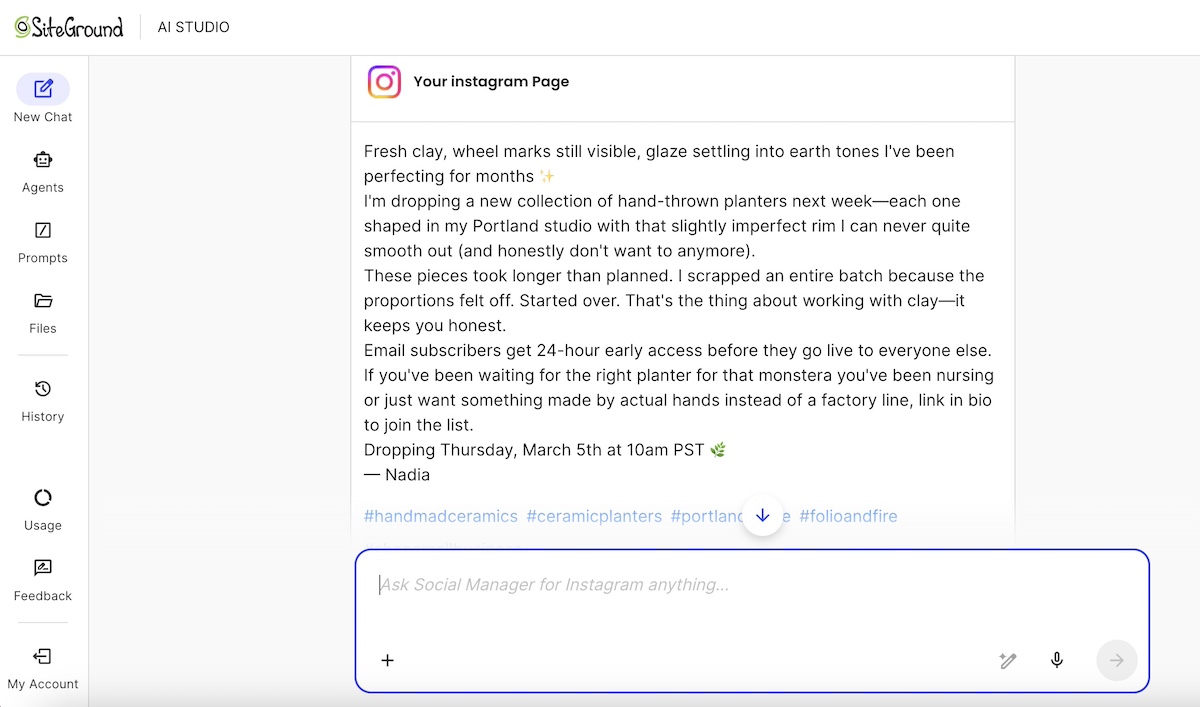
Launch week means a lot of content to produce in a short amount of time. SiteGround AI Studio has specialized agents built for exactly this: the Copywriter Agent can draft your launch email and follow-up in minutes, the Ads Expert for Meta can generate ad copy with multiple variants ready to test, and the Instagram and Facebook Manager Agents can create and post social media content directly to your channels —no copy-pasting between platforms. Just explain what you need in plain language and the work gets done.

Phase 3: Validation (days 38–60): what’s working?

Reading your early numbers accurately means looking at what’s working, what’s not, and adjusting before you scale.

1. How to read your results and what to do next

You don’t need a data science degree to read your early numbers. Using the signals you gathered in launch week as your starting point, look for these patterns, and act on what you find:

  • People visiting but not converting: Something on the page isn’t convincing them — usually copy, photos, pricing, or trust signals. Don’t keep driving more traffic to a website page that isn’t converting. Pause and fix the page first — copy, photos, pricing, or trust signals — before spending more money or energy on marketing it. 
  • Your customer journey has friction: Walk through your customer’s journey to purchase — from awareness to decision — to make sure it runs smoothly. Pay special attention to your online business as if you’re a first-time visitor. Does each step lead naturally to the next? Is it obvious where to go, what to do, and how to buy? A confusing website navigation, a buried call to action, or a checkout that asks for too much too soon can lose customers at any point.
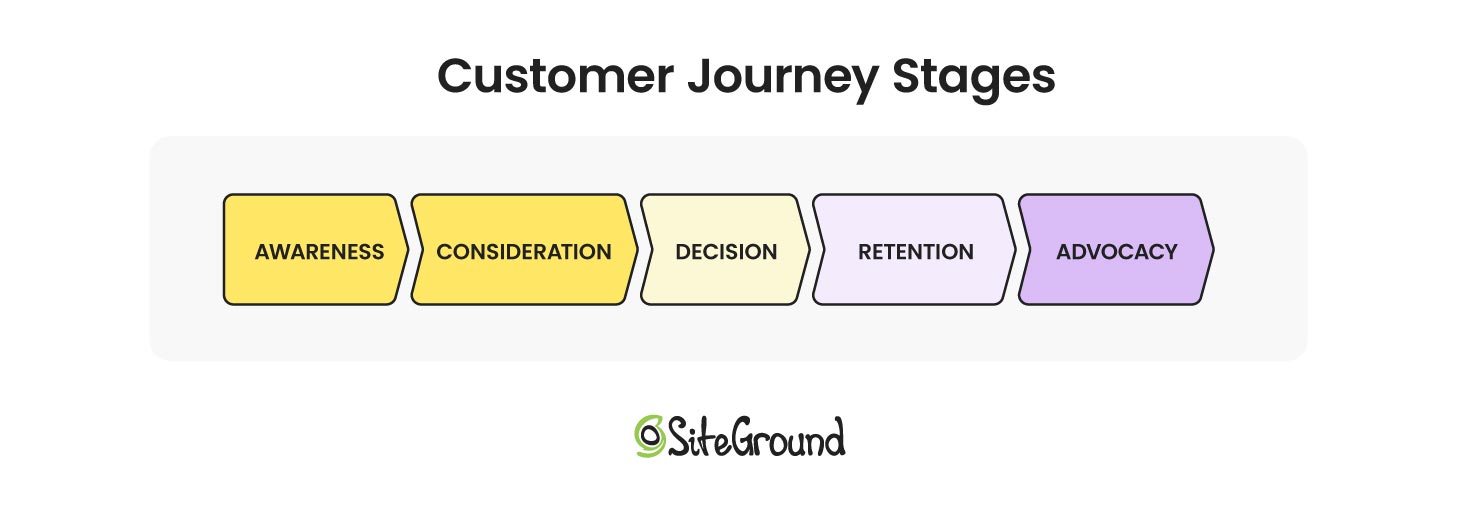
diagram of customer journey stages
  • Low traffic: Your marketing isn’t reaching enough people, or the right people. Double down on the channel that’s showing even small signs of life before adding anything new.
  • Customers not coming back or re-engaging: Depending on your sales cycle it may be too early to expect repeat purchases — but if customers aren’t opening your post-purchase emails or showing any sign of engagement, go back to your email flows. Check your email marketing metrics to see which email gets the most clicks? Is your timing right? Small adjustments to subject lines, content, or send timing can make a real difference.
  • You’ve been consistent on a channel for 3–4 weeks with no engagement: Before switching channels, consider whether your content marketing approach is right for it. TikTok rewards casual, personality-driven video; Pinterest rewards polished, searchable visuals; LinkedIn rewards insight and expertise. Try adapting your format or messaging before writing the channel off entirely.

Check your store analytics once a week. What “working” looks like will be different for every business; a high-ticket product with one inquiry a week might be right on track, while a low-price digital product with the same result is not. Use your own goal and business type as the benchmark, not someone else’s.

2. Ask your first customers directly

Send a short survey email to your first buyers to gain customer feedback. Keep it to 3–5 questions:

  1. What made you decide to buy?
  2. Was there anything that almost stopped you?
  3. How would you describe this product to a friend?
  4. What would you love to see us add or improve?

You’ll learn more from 10 honest responses than from weeks of guessing. Offer a small discount code as a thank-you for their time. Accumulate and save the responses — you’ll use them in Phase 4.

3. Try things, see what works

You don’t need fancy tools to figure out what’s resonating. At this stage, testing just means trying one thing, watching what happens, and adjusting. Keep it simple:

  • Send two different subject lines on consecutive email sends and see which gets more opens
  • Try a different lead image on your best-selling product page and see if it changes behavior
  • Post two different content styles on the same channel in the same week and see which gets more engagement

Change one thing at a time, give it enough time to mean something, and write down what you learn. Small, consistent tweaks add up quickly.

If you have some budget to work with, this is also the right moment to start putting small amounts behind what’s already showing organic traction. A post that performed well organically, a product page that’s getting traffic but not converting, or an email offer that got strong clicks — these are worth a small ad spend to see if paid amplification moves the needle. Don’t spend on anything that hasn’t already shown a sign of life.

Phase 3 success metrics

By the end of day 60, aim for:

  • At least one clear signal of what’s working — a channel, a message, a product
  • Email metrics moving in the right direction from your own baseline — open rates, click-through rates, and unsubscribe rates should be improving or holding steady. A consistent drop is a signal to act on.
  • First signs of repeat engagement or returning visitors, depending on your sales cycle
  • A short list of things to stop doing and things to do more of going into Phase 4

AI pro tip

Use AI to generate copy variations quickly. Instead of rewriting a subject line or product description from scratch, paste in your original and ask for five alternatives, then try the most promising one in your next send. AI is also useful for making sense of early data: describe what you’re seeing in basic language and ask it to help you spot patterns or figure out what to focus on next.

Phase 4: Scale (days 61–90): build on what’s working

You’ve validated that people want what you’re selling. Now it’s time to do more of what’s working and less of what isn’t.

1. Apply what you learned from your customers

Go back to those survey responses from Phase 3. Put them to work:

  • If several customers mentioned the same hesitation before buying, address it directly in your product copy or FAQ. Even consider posting an Instagram or TikTok video addressing those hesitations directly — it builds trust and reaches people who are on the fence.
  • If people described your product in a specific way, use that exact language in your ecommerce marketing. Customer words almost always outperform brand-written copy.
  • If someone mentioned a feature or product they wished you had, that’s a roadmap idea.
  • This is also a good moment to think about customer lifetime value (CLV): the total a customer spends with you over time. Someone who buys three times is worth far more than their first order suggests. In fact, acquiring a new customer costs 5 to 25 times more than retaining one (Harvard Business Review, citing Bain & Company research), which is why investing in customer loyalty and retention often pays off more than chasing new customers.
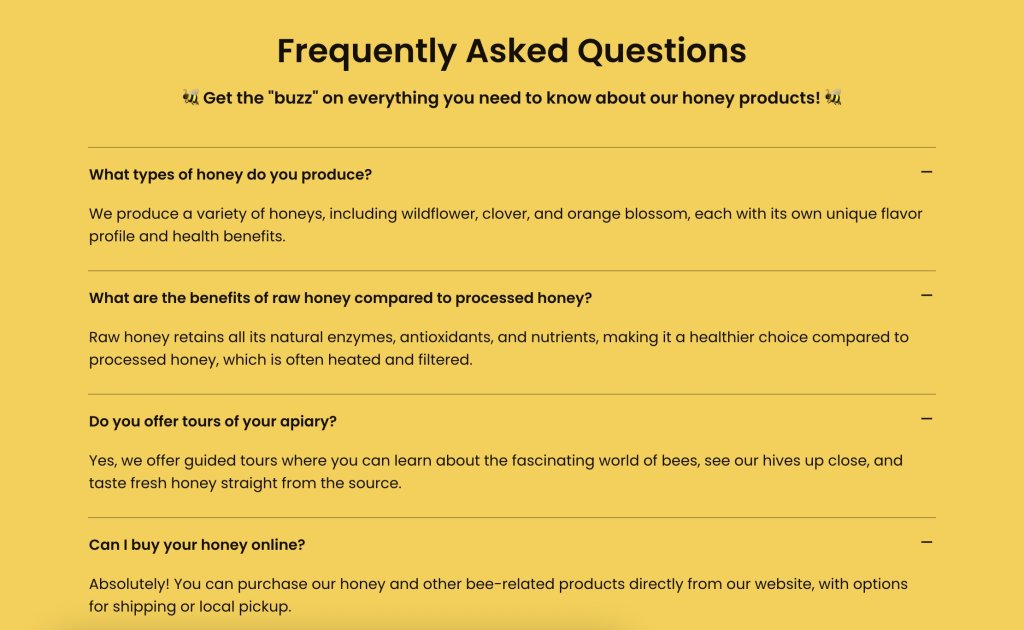
example of faqs addressing customer feedback

And don’t stop there. Your first customers are your biggest asset, so make it easy for them to come back, leave a review, or refer a friend. Actively encourage user-generated content too: a simple ask to share a photo or tag you on social media can kickstart a stream of authentic content that builds trust far more effectively than any ad.

2. Double down on what the data is telling you

By day 60 you have enough information on customer behavior to make more confident decisions — not just small tweaks, but real shifts in where you spend your time and money. This is different from Phase 3, where you were looking for early signals. Now you’re acting on them decisively.

Here’s how to put your data to work:

  • Find your best channel and invest more in it. Which channel is sending the most traffic that actually converts? Increase your posting frequency there, put budget behind it if you have any, and deprioritize the channel that’s consistently underdelivering.
  • Identify your best-performing email. Which email in your flow drives the most clicks or revenue? Model your next campaign around what’s working in that email — the offer, the tone, the subject line format.
  • Find your best product and lead with it. Which product is getting the most traction and why? Make it the centerpiece of an effective ecommerce marketing strategy (feature it in ads, emails, and social media content) and consider whether a bundle or upsell opportunity exists around it.
  • Look for opportunities to increase average order value (AOV). Bundles, upsells, or a free shipping threshold can meaningfully grow revenue from the same number of customers.
  • Cut what isn’t working. If something has had 60 days and shown no signs of life, stop doing it. The time and budget you free up is better spent doubling down on what is.

3. Run an early SEO and reputation audit

By day 60 you have enough history to take stock of how your store is showing up beyond your own ecommerce marketing efforts. Set aside some time to review:

  • Search visibility: Are any of your product or category pages showing up in search engine results yet? Which search terms are bringing people to your site? Use Google Search Console (free) to see what queries you’re appearing for and where there’s room to improve. Also consider how your store is showing up in AI-powered search tools — are your product pages clear and authoritative enough to be surfaced by tools like ChatGPT or Google’s AI Overviews? Well-structured, descriptive content is what gets picked up.
  • Revisit SEO: Review your product descriptions, page titles, and meta descriptions with fresh eyes. Are they using the language your customers actually search for? Are they clear and compelling enough to earn a click from a search result? Conduct an SEO audit to make sure everything is working as it should.
  • Your online reputation: Search for your brand name and your products. What comes up? Are there any early reviews, mentions, or social media posts you should be aware of or responding to? Keep in mind that a positive online presence helps you get found by both search engines and AI. Getting on top of this early makes it much easier to manage as you grow.
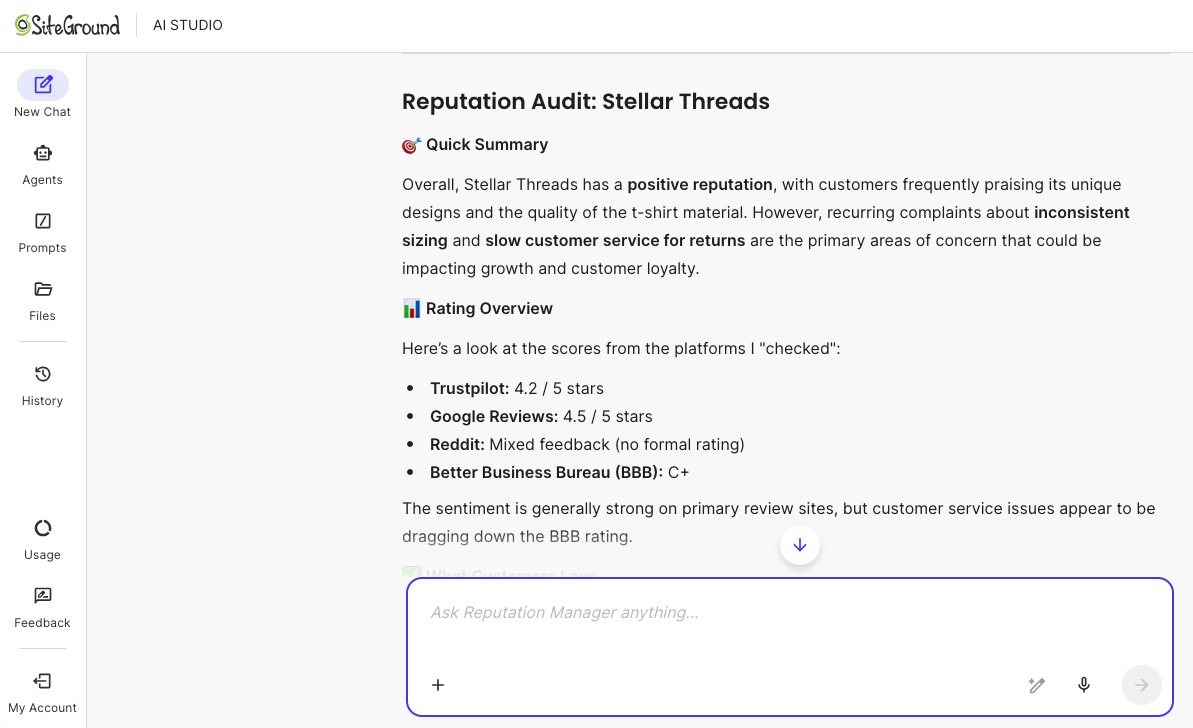
example of a business reputation audit done by an AI agent

4. Add a third channel based on what’s working

Look back at the channel options from Phase 1 and pick the one you left on the table. Here’s how to decide:

  • You’re seeing engagement from a niche community: Find the subreddit, Facebook group, or newsletter where your customers hang out and start showing up there.
  • You’ve been organic-only on social media: Put a small budget behind your best-performing content on the platform that’s already working.
  • You tried one social media channel and it’s running well: Start giving another relevant social channel a try.

Pick one, commit to it for the rest of Phase 4, and measure it against the same signals you used for your first two channels.

5. Explore partnerships and PR for organic growth

Some of the best growth at this stage comes from other people’s audiences:

  • Micro-influencers: Reach out to creators and social media influencers in your niche with 1,000–10,000 engaged followers. Influencer marketing is a way to get a genuine recommendation from a trusted voice, and that often converts better than a paid ad.
  • Complementary brands: Find businesses selling to the same customer but not competing with you. A cross-promotion, giveaway, or bundle deal can introduce you to a whole new and highly targeted audience, plus it comes with the default endorsement of the partnering brand.

example of an instagram post with a co-branded partnership
  • Press and blogs: Pitch your story to a local publication or news station, a niche blog, or a relevant newsletter. New brand stories are genuinely interesting to editors. To do this, find the writer or journalist who seems most likely to cover your area. Reach out with a thoughtful pitch, and follow up a couple weeks later. Not sure how to reach them? Apart from the obvious contact form, don’t be shy about sending an Instagram direct message — for news journalists this is often a top source for story leads.

Phase 4 success metrics

By the end of day 90, ask yourself:

  • Is your third channel showing any traction? Even early engagement (followers, clicks, or inquiries) is a positive sign. If it’s completely flat after a few weeks, reassess the channel or your content approach.
  • Are your best-performing channel and email doing more work than before? You should be seeing more traffic, better engagement, or more conversions from the things you doubled down on in this phase.
  • Are you growing month on month? Whether that’s revenue, inquiries, bookings, or email list size, pick the number that reflects your business goal and check whether it’s moving in the right direction.

AI pro tip

SiteGround AI Studio has specialized agents that make Phase 4 auditing much faster. The SEO Expert agent can run a full audit of your website and deliver a set of concrete recommendations — from keyword gaps to page-level improvements. The Reputation Manager agent actively scans the web to surface how your brand is being talked about, without you having to hunt it down manually. Both give you a clear picture of where you stand and what to fix before you scale further, helping you multiply your output even with a small team.

Your ecommerce marketing journey starts here

Ninety days from now you could have a store that’s live, tested, and growing — with real customers, real data, and a clear sense of what’s working. That’s what a focused 90-day ecommerce marketing plan actually looks like in practice.

The best time to start is before you feel ready. Pick your budget level, get your store ready, set up your emails, and go. And if you want a platform that brings the whole thing together without the tool-juggling, SiteGround Ecommerce gives you everything you need to build, market, and grow your store in one place.

Ecommerce marketing FAQs

What is ecommerce marketing?

Ecommerce marketing is the process of driving traffic to an online shop and converting that traffic into online sales. It covers channels like email marketing, social media marketing, paid advertising, search engine optimization, and content marketing, all used together to attract, convert, and retain customers.

What is the 80/20 rule in ecommerce?

The 80/20 rule (also known as the Pareto principle) suggests that roughly 80% of your revenue comes from 20% of your customers. For new stores, this is a reminder to focus early energy on retaining your first buyers rather than constantly chasing new ones.

What are the four types of ecommerce?

The four main types are B2C (business to consumer), B2B (business to business), C2C (consumer to consumer, like a marketplace), and D2C (direct to consumer, where a brand sells directly without a retailer). Most independent online stores fall into the B2C or D2C category — and knowing which one you are matters for your marketing. B2C and D2C businesses typically focus on emotional connection, social proof, and impulse-friendly content, while B2B requires a longer nurture cycle, more educational content, and channels like LinkedIn over Instagram.

What does ecommerce mean in marketing?

In a marketing context, ecommerce refers to the strategies and tactics used specifically to drive sales through your website. It combines elements of digital marketing — like SEO, email, and paid ads — with conversion optimization and customer retention to grow an online business.

Website migration guide: how to safely move a live site

Header illustration showing a stylized website editor interface with a product image being uploaded, a hand placing a plant photo into the page layout, floating icons representing email, performance optimization, security, and database services, and an analytics chart overlay indicating website growth and performance monitoring.

Moving a live site is fundamentally different from launching a new project. A website migration carries real operational risk: DNS changes propagate unpredictably, email can break silently, and third-party integrations can fail without warning.

Even a few minutes of downtime can mean lost revenue, damaged trust, and a drop in search visibility that takes weeks to recover from.

Most website migration guides treat moving a site as a simple checklist: copy files, update DNS, done. That works for a staging site. It doesn’t work when real visitors are hitting your existing site every second.

This guide walks you through a structured site migration process designed to protect uptime, email continuity, SEO performance, and critical integrations, before, during, and after the DNS switch. Whether you’re moving to a new hosting provider, changing domains, doing a site redesign, or restructuring your infrastructure, the goal is the same: move with control, and move safely.

Key takeaways:

  • Live site migrations are risky because traffic, email, payments, and search indexing must keep working during the move.
  • Most downtime happens when DNS is switched before the new environment is fully tested.
  • Lowering DNS TTL 24–48 hours before the switch shortens propagation time and reduces split-traffic risk.
  • Email is often overlooked—MX records can be overwritten during a nameserver change, causing messages to disappear silently.
  • The safest migrations follow a staged process: audit, build and test the new environment, switch DNS, then monitor.
  • For hosting-only moves, updating the A record is usually safer than switching nameservers.

What makes live site migration risky?

A live site has active dependencies, and all of them need to keep working while everything underneath changes. Visitors are loading pages. Customers are completing transactions. Email is flowing. Search engines are crawling and indexing your website’s content. Any gap in service is immediately felt.

How downtime actually happens

Most migration-related downtime comes from the DNS cutover, the moment traffic redirects from the old site to the new site. If the new environment isn’t fully tested, visitors land on a broken or incomplete page.

The propagation window

DNS propagation adds unpredictability: when you update nameservers or A records, the change doesn’t take effect instantly. During propagation, some visitors reach the new server while others still hit the old one. This split-traffic window can last from minutes to 48 hours, depending on TTL settings and ISP caching.

Example:

A customer in New York loads your checkout page on the new server, where the product catalog is current. Meanwhile, a customer in London still hits the old server, where the database hasn’t been updated in six hours. One sees correct pricing; the other sees stale data. Neither knows they’re on different servers, and you have no control over who lands where.

The cost of even brief outages

For content-driven sites, downtime disrupts crawl schedules and affects search engine traffic. Search engines that encounter errors may temporarily drop pages from google search results or delay re-indexing. For ecommerce or SaaS sites, the stakes are more immediate: failed transactions, abandoned carts, and support tickets.

A site receiving 10,000 daily visits that goes down for two hours doesn’t just lose two hours of traffic. It risks a ripple effect, including lost conversions, damaged trust, and organic traffic dips that take days to stabilize.

Email disruption during DNS changes

MX records, the DNS entries that route email, can be overwritten or misconfigured during a DNS switch. When that happens, inbound email silently fails. Messages don’t bounce; they never arrive. If your email is hosted on the same server as your website, changing hosting providers without preserving MX records can reroute email to a server that isn’t configured to handle it.

Example: 

You switch nameservers on Tuesday morning but forget to recreate MX records at the new DNS provider. A client sends a signed proposal to your business email at 10 a.m. The message doesn’t bounce. No error is generated. The client assumes you received it. You have no idea it was sent. By the time you notice the gap on Wednesday, the proposal deadline has passed.

Broken integrations and third-party services

Many sites depend on external services tied to the domain or server IP: CDNs, payment gateways, CRM platforms, analytics software, and API endpoints. These integrations often rely on IP whitelists, domain verification, or webhook URLs. A migration that changes the server IP without updating these dependencies can silently break critical workflows.

DNS misconceptions that increase risk

DNS changes aren’t instant or binary. Since DNS is a distributed caching system, changes propagate at different speeds across networks. Pointing DNS to the new server isn’t the final step; it’s the most sensitive step, and should come only after the new environment is fully built, configured, and tested.

Pre-migration planning

The work before the DNS switch determines whether the migration process goes smoothly. This phase is about understanding exactly what you’re moving, where it’s connected, and what could break if something is missed. The goal: eliminate surprises before they become outages.

Audit your current hosting and DNS setup

Start with a thorough site audit. Document your server environment:

  • OS, PHP version, database version, and server-level modules
  • All DNS records: A, CNAME, MX, TXT (including SPF and DKIM)
  • Current IP addresses and nameservers
  • CDN configuration and caching rules
  • SSL certificate type: Let’s Encrypt auto-renewal, provider-issued, or custom

Watch for these common audit gaps:

  • PHP version mismatch (such as moving from PHP 8.1 to 7.4) → errors surface only after the switch, when real visitors are already hitting the new server
  • Missing DNS record → silent failure of the service that depends on it
  • Missing or expired SSL → browser security warnings the moment DNS resolves to the new IP

Confirm the new hosting service supports your SSL setup and plan for provisioning a new certificate before switching traffic.

Inventory email and third-party integrations

This step catches dependencies most checklists overlook:

  • Email hosting — If it runs on the same server as your website, migrating without preserving MX records will break delivery. If email is external (Google Workspace, Microsoft 365), verify MX, SPF, DKIM, and DMARC records are documented.
  • Payment gateways — Webhook URLs tied to your domain (Stripe, PayPal).
  • CRM and marketing tools — Domain-based authentication, API keys linked to endpoints.
  • Analytics tracking — Scripts like Google Analytics, tracking pixels, tag managers.
  • API connections — Services using IP-based whitelisting need updating before the switch.

Document everything in a spreadsheet: each service, its connection method, and what needs updating. This is your migration plan for dependencies.

Lower DNS TTL in advance

TTL (Time to Live) tells resolvers how long to cache a DNS record. A default TTL of 86400 means resolvers may serve the old IP for up to 24 hours after a change.

Recommended TTL: 300 seconds (five minutes), set at least 24–48 hours before the planned DNS switch.

This preparatory window lets the old TTL expire across networks, so when you make the actual change, most resolvers pick up the new IP quickly.

Example: 

You lower TTL to 300 on Monday and switch DNS on Wednesday. The old 24-hour TTL has long expired, so resolvers worldwide pick up the new IP within minutes. Compare that to lowering TTL and switching DNS on the same day: most resolvers are still caching the old value, and propagation drags on for hours with traffic splitting unpredictably between servers.

Create a full backup

Always create a complete backup, this is your rollback safety net:

  • All website files via SFTP or SSH, including hidden directories and configuration files
  • Full MySQL database dump
  • Mailboxes, if email is hosted on the same server
  • Store everything independently of both old and new hosting environments

For WordPress or any content management system, verify the export is complete by checking file size and table counts.

Technical migration steps

Nothing in this phase should affect your current site. DNS still points to the old server. Visitors, search engines, and email all continue operating normally. The goal is to build a fully functional copy of your site on the new environment and verify it works before touching DNS.

1. Transfer website files

Upload the entire site to the new host. You can do this via the File Manager, SFTP or SSH. Preserve the original site structure exactly; changing paths or renaming folders breaks internal references and hardcoded paths.

After upload, verify the transfer:

  • Compare file counts and directory sizes between source and destination
  • Confirm hidden files (like .htaccess) transferred correctly
  • Check that file permissions were preserved

A missing configuration file or an incomplete upload is easy to catch now and painful to troubleshoot after DNS has switched.

2. Export and import the database

Export using a full MySQL dump that captures all tables, views, and stored procedures. On the new server, create a fresh database and user with correct privileges, then import. For large databases, command-line import via SSH is usually more reliable than browser tools.

Verify data integrity: check that table counts match, that key content is present, and that no import errors were logged. A partial import produces a site that loads but fails silently on checkout, login, or content rendering.

3. Update configuration files

Connect files and database by updating the configuration file (wp-config.php for WordPress):

  • Database name, username, password, and host → new server’s credentials
  • File paths, temporary directories, caching configurations → new environment
  • .env file or multi-environment profile → new server’s resources
  • Secondary config files → check for hardcoded paths or server-specific variables

4. Update URLs (if needed)

If domain changes are involved, moving from an old domain to a new domain, update all URLs stored in the database. For WordPress and similar platforms, internal links, image paths, and serialized data store the full domain.

Even if the domain stays the same, check for hardcoded server IPs or CDN paths in templates and plugin settings. The new site should be entirely self-contained, with no lingering dependencies on the old host.

5. Test before the DNS switch

This is the most important step. Preview the site using a temporary URL from your hosting company, or modify your local hosts file to point the domain to the new server’s IP (more accurate, since it tests SSL validation and cookie handling).

Test everything:

  • Submit forms and confirm delivery
  • Log in to admin areas and verify access
  • Walk through checkout end to end
  • Load media-heavy pages and verify all assets render
  • Remove any password protection used during setup
  • Confirm SSL shows a valid certificate with no mixed content warnings

When you change DNS, the only thing that should change for visitors is which server responds.

How to change DNS without downtime

DNS is where most migration risk concentrates. Every step up to this point has been preparation: building and verifying the new environment while the live site continues running untouched. Now, traffic needs to move from one server to the other.

Nameserver switch vs. A record update

Nameserver switchA record update
What changesDNS authority for the entire domain. All records (A, MX, CNAME, TXT) move to the new provider.Only the IP address the domain points to. All other records stay at the current DNS provider.
Risk levelHigher: every record transitions at once. Any missing record breaks its associated service.Lower: isolates the change to the web server. Email and other services remain unaffected.
Best forFull infrastructure moves where DNS management is also migrating.Hosting-only migrations where DNS provider, email, and third-party services stay the same.
PrerequisiteEvery DNS record must be correctly recreated at the new provider before switching.Only the new server IP is needed.

If your migration only involves changing hosting providers, and DNS, email, and third-party services stay the same, an A record update is the safer choice.

Choosing the right cutover method

  • Hosting-only migration: Update the A record (and AAAA for IPv6) to the new server’s IP. Most contained change.
  • Full infrastructure move: Nameserver switch required. Recreate all records at the destination, verify MX, SPF, DKIM, CNAME, and TXT records before switching.
  • Domain change: Beyond DNS, you need 301 redirects from old URLs to corresponding new URLs, updates to Google Search Console, analytics tracking, and external links. The old domain should remain active and redirecting to preserve ranking signals and search engine trust.

Example:

An agency migrating a client’s WordPress site from one host to another, with the same domain and external email, only needs an A record update. A business moving its entire infrastructure to a new provider, including DNS management, requires a nameserver switch with every record rebuilt first. A company rebranding under a new domain needs both a DNS change and a full 301 redirect map, plus updates to Google Search Console, analytics, and directory listings.

Sequencing the change

Execute during your lowest-traffic window. If you lowered TTL in advance, most resolvers pick up the change within minutes to hours.

Keep the old server running; don’t cancel the current hosting provider or delete anything until propagation is confirmed complete. Keep the old environment available for at least 48–72 hours.

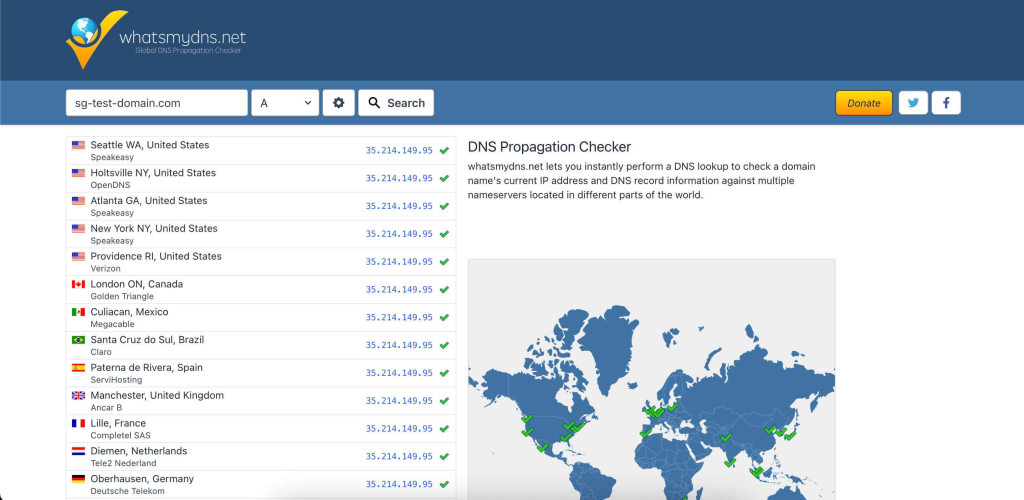
Monitor incoming traffic on the new server. If it shows zero traffic while analytics still reports visitors, something is wrong. Use a DNS propagation checker to see which regions have resolved to the new IP.

Screenshot of the whatsmydns.net DNS propagation checker showing an A record lookup for a test domain, with multiple global locations (United States, Canada, Europe, and others) resolving to the same IP address and green check marks indicating successful DNS propagation, alongside a world map highlighting the responding DNS servers.
Example of a DNS propagation check using whatsmydns.net, showing how a domain’s A record resolves across multiple DNS servers worldwide after a DNS change.

Protecting email and critical services

DNS changes don’t just affect your website. They affect every service that depends on your domain’s DNS records, and email is the most common casualty. Payment gateways, CDN configurations, and API integrations are close behind.

MX records and email continuity

When MX records are misconfigured during a nameserver switch, inbound messages disappear without a bounce or error. This can go undetected for days.

  • If you’re updating only the A record, MX records stay untouched.
  • If a nameserver change is necessary, verify MX records at the new provider before switching: same priority values, same mail server hostnames.

After the DNS change, test email in both directions:

  • Inbound: Send a message to your domain from an external address → confirm it arrives
  • Outbound: Send a message from your domain → verify delivery, check it doesn’t land in spam
  • Authentication: Inspect message headers for SPF, DKIM, and DMARC → confirm all resolve correctly

Consider separating email from web hosting entirely to eliminate this risk for future migrations.

CDN, payment gateways, and API integrations

  • CDN — Update the origin IP to the new server and purge the cache entirely.
  • Payment gateways — Verify webhooks still process. A failed webhook may let orders appear complete on the frontend while the backend never receives confirmation.
  • CRM and API services — Update IP whitelists and domain verification.

Example:

A WooCommerce store migrates to a new server. The site loads perfectly. A customer adds a product to their cart, checks out, and sees “Order confirmed.” But the Stripe webhook URL still points to the old server’s IP, which is no longer processing requests. Stripe never confirms the payment on the backend. No shipping notification is triggered. The store owner doesn’t notice until the customer emails support two days later asking where their order is.

These failures are quiet. They surface in transaction logs, missed notifications, and customer complaints, often well after the migration is considered complete. Proactive verification before and immediately after the DNS change is the only reliable way to catch them.

Post-migration monitoring

Once DNS changes are live, the migration enters its most critical observation window. The new server is now receiving real traffic, handling real transactions, and serving real visitors. Active monitoring in the first 24 to 72 hours is what separates a successful migration from one that creates problems that compound silently.

Uptime and error monitoring

Set up uptime monitoring before the DNS switch, with checks every one to five minutes. Watch server logs for:

  • 500-series errors — server-side failures, misconfigured settings, missing dependencies
  • 404s on key pages — broken links, missing files, redirect rules that didn’t transfer

Monitor the old server in parallel: declining traffic there and increasing traffic on the new one confirms propagation is progressing.

Functional testing

Walk through every critical path on the production domain, not the temporary URL or local hosts file:

  • Submit forms and confirm delivery to the correct inbox
  • Log in / log out of user accounts and admin areas
  • Complete a transaction end to end: cart, checkout, payment, order confirmation
  • Verify transactional emails fire: password resets, order confirmations, shipping notifications
  • If you use an SMTP relay (SendGrid, Mailgun), confirm the connection is intact
  • Test across devices and browsers

SEO signals to verify

  • 301 redirects — Every old URL should reach its final destination URL, not the homepage or a 404. Avoid redirect chains; collapse them into single hops.
  • XML sitemap — Resubmit through Google Search Console (add and verify the new domain property if the domain changed). Monitor Index Coverage for errors across all the pages and all the URLs.
  • Canonical tags — Confirm key pages reference the correct URLs on the migrated site.
  • Google Analytics — Verify it fires correctly. Compare real-time data with your pre-migration baseline. A drop in sessions may indicate a tracking code issue.
  • Crawler activity — Review server logs to ensure search engines access your pages and receive 200 responses. Check that meta descriptions and other on-page elements render correctly.

Post-migration monitoring isn’t a one-day task. Keep watching search console, analytics, and your site’s performance for at least 30 days. SEO recovery, even from a successful website migration, takes time as search engines recrawl, reindex, and recalculate your site’s rankings.

Don’t want to handle the migration yourself?

Get a free website migration from SiteGround and let our experts move your site for you.

A promotional banner inviting users to try SiteGround's plans, with a button to get hosting.

Common website migration mistakes

MistakeWhy it causes damage
Changing DNS before testingOnce DNS points to the new server, real visitors land there immediately. If the site is broken, every minute spent troubleshooting is a minute of downtime. Always test on the new website before touching DNS.
Overwriting MX recordsA nameserver switch replaces your entire DNS zone. If MX records weren’t recreated, email stops silently with no bounce or error notification.
Migrating during peak hoursMaximum visitors affected during propagation delays. Maximum pressure to fix issues quickly, increasing the chance of compounding one mistake with another.
Ignoring third-party integrationsA site that loads doesn’t mean every service behind it works. Payment gateways, CRM webhooks, CDN origins, and API connections can all fail silently when the server IP changes.
Skipping post-migration testingForms, checkout, transactional emails, and analytics all need active verification. A migration is complete when every service is confirmed working, not when the page loads.
Forgetting to lower TTLHigh TTL means slow, unpredictable propagation with split traffic across two environments. How many URLs resolve to which server becomes uncontrollable.
Deleting the old server too earlySome resolvers hold cached records longer than expected. Keep the old environment running 48–72 hours minimum as a fallback.

Website migration checklist

Pre-migration

  • Audit hosting and DNS: document server environment, all DNS records, IPs, SSL, CDN config. Run a site audit to baseline site speed and page speed.
  • Inventory email and integrations: confirm hosting, list services, note dependencies. Check for broken links and update links to other sites where possible.
  • Lower TTL to 300s, 24–48 hours before the switch.
  • Back up files, database, email, and store off-server. Confirm all your pages, including new pages and existing content, are captured. Verify how many URLs and website’s URLs need migrating. Review URL structure and website architecture of the existing site.

Migration

  • Transfer files. Preserve structure and permissions.
  • Import database. Verify integrity.
  • Update config files for the new server.
  • Run serialization-safe search-and-replace if changing domains. Handle old URLs mapping to new URLs.
  • Test on new server: forms, login, checkout, media, SSL. Verify the staging site matches the existing website. Check internal links, incoming links, and that the entire site functions. Confirm technical SEO elements are intact.

DNS cutover

  • Execute during low-traffic window.
  • Verify all records, especially MX and TXT.
  • Confirm the solid plan for domain changes or URL changes is in place.

Post-migration

  • Monitor uptime, server logs, traffic distribution.
  • Test all critical functions on production: forms, transactions, login, emails.
  • Verify email delivery including SPF, DKIM, DMARC.
  • Confirm SEO signals: 301 redirects (with the same page mapping correctly), XML sitemap resubmission via search console, canonical tags, analytics tracking. Verify google search indexing and that search engines access all the URLs.
  • Review site’s performance, page speed, and search engine traffic recovery.
  • Keep the old server running 48–72 hours minimum. A successful site migration, and truly successful migration, means every service confirmed working.

Final thoughts

A website migration doesn’t have to be high-risk. The downtime and broken email people associate with migrations result from skipped steps and poor sequencing, not inherent complexity.

When the website migration process is staged correctly (audit, build, test, switch, verify), each phase reduces risk. DNS isn’t a leap of faith. It’s a controlled handoff after the destination is confirmed ready.

The core principle: never send live traffic to an environment you haven’t tested. The planning phase eliminates unknowns. The migration phase builds a verified copy. The DNS switch moves traffic only when ready. And post-migration monitoring catches anything that slipped through.

Whether you’re moving to a new hosting service, changing domains, or consolidating infrastructure, the steps should always be the same: map dependencies, prepare the destination, control the cutover, and verify the result. That’s how you achieve a smooth site migration and protect uptime, search visibility, and the services your site depends on.

Migration is a process, not a moment. Treat it that way, and the risk drops to nearly zero.

Your email unsubscribe rate, explained like a human metric

Dashboard showing a declining unsubscribe rate and subscriber growth chart next to a furniture product photo

Every time you send an email, a small number of people will opt out. That number has a name, a formula, and — once you know how to read it — a lot to say about the health of your email list. It’s called your email unsubscribe rate, and it’s one of several numbers your email platform tracks automatically after every send. 

Understanding where it comes from and what’s actually happening when someone opts out makes it a lot easier to know what to do with it. This post breaks down how the metric works, where it comes from, and what it’s actually worth paying attention to.

Key takeaways:

  • The unsubscribe rate shows the percentage of recipients who opt out after an email.
  • It’s calculated as: (Unsubscribes ÷ Emails delivered) × 100.
  • For most small businesses, 0.2%–0.5% is normal. Above 1% deserves attention.
  • People can unsubscribe using the one-click button in their inbox or the link in your email footer.
  • Easy unsubscribe options protect your list by sending unhappy readers away instead of to the spam button.

What is an email unsubscribe rate?

An email unsubscribe rate is an email marketing metric that shows the percentage of people who opt out after receiving your email.

Did you know? The unsubscribe rate didn’t always exist as a metric. In the early days of commercial email, opting out meant replying to an email with “remove” and there was no guarantee anyone would actually honor it. That changed in 2003 when the CAN-SPAM Act made a working opt-out mechanism a legal requirement for every marketing email sent in the US. Once unsubscribe links became mandatory, email platforms started tracking who clicked them and the unsubscribe rate as we know it today was born.

How to calculate unsubscribe rate

The formula is straightforward:

(Unsubscribes ÷ Emails delivered) × 100

Let’s say you sent an email to 1,000 subscribers. Your email service delivered 980 of them (20 bounced). Out of those 980 delivered emails, five people unsubscribed.

Your calculation: (5 ÷ 980) × 100 = 0.51% unsubscribe rate

What is a good unsubscribe rate

A rate between 0.2% and 0.5% is perfectly normal for most small businesses. Anything above 1% is worth reviewing because it usually signals a mismatch between what your audience expected and what they’re receiving.

How the Unsubscribe process works and why easy opt-outs help you

Subscribers can opt out in two ways: before they ever open your email, or directly within it.

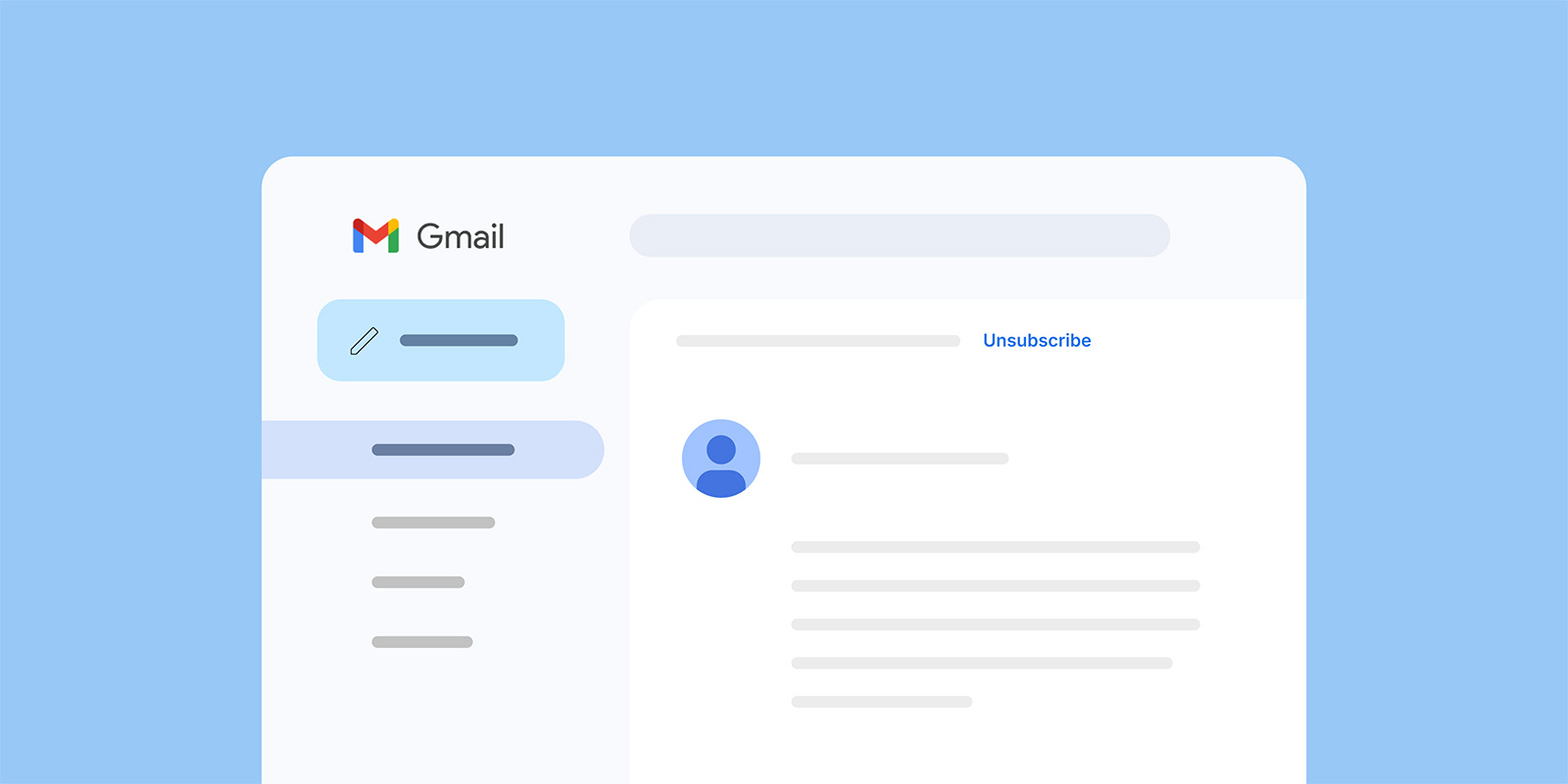
Your subscribers can unsubscribe from your emails before they even open them. That’s because major email providers like Gmail and Yahoo show an “Unsubscribe” link right next to your sender name in the inbox view.

Gmail inbox interface showing an open email with an unsubscribe link visible in the header

This change took effect in early 2024: senders who send 5,000+ messages per day must include a one-click unsubscribe mechanism in the technical headers of their emails.

If you’re a small business sending to a few hundred or a few thousand subscribers, you probably don’t hit that threshold. But the principle still matters: when unsubscribing is visible and simple, people use it instead of pressing the “spam” button — and a spam complaint is far more damaging than a clean unsubscribe (we’ll get into that in a moment). 

Gmail and Yahoo also actively prompt subscribers to unsubscribe from senders they haven’t engaged with recently, typically after about 30 days of inactivity. If someone on your list hasn’t opened your emails in a while, their email provider may already be nudging them toward the unsubscribe.

Now this isn’t a ploy against small businesses. It’s an effort to make inboxes cleaner and more trustworthy for everyone, so genuine senders with real audiences (like you) benefit from less spam and better email deliverability.Most modern email solutions handle this automatically. If you use SiteGround Email Marketing, the one-click unsubscribe headers are built into every campaign you send.

The other way people opt out is through the unsubscribe link in your email footer, the one at the bottom of every marketing email you’ve ever received.

Email newsletter template with a cafe and coffee photo, ending with an Unsubscribe link in the footer

This link is a legal requirement under CAN-SPAM (US) and GDPR (EU). Every marketing email must include a clear, working way for people to opt out. With SiteGround Email Marketing, the unsubscribe link is automatically added to every campaign footer.

Between the inbox-level button and the footer link, your subscribers have two clear paths to leave. That’s a good thing. Every person who unsubscribes through either path instead of treating your emails as spam is protecting your ability to reach everyone else on your list.

Common reasons people unsubscribe

Unsubscribes are valuable feedback. These are the usual patterns behind them:

  • The email frequency feels too high or erratic.
  • The content no longer matches what subscribers signed up for.
  • Topics or tone feel off — too promotional, not enough value.

Viewed this way, unsubscribes act like a built-in feedback loop helping you fine-tune both message and audience fit.

What to do when unsubscribe rates rise

A few strategic tweaks can bring them back down:

  • Revisit your opt-in promise. Check if your signup form still accurately describes what subscribers get.
  • Segment your list. Send more personalized content to different groups rather than one-size-fits-all blasts.
  • Review your send frequency. Sometimes sending less, but with higher relevance, cuts unsubscribes sharply.
  • Analyze recent content. Did you recently shift topics, style, or promotions? Look for patterns.
  • Let inactive subscribers go. Clinging to disengaged contacts hurts your email engagement metrics and signals to inbox providers that your audience isn’t responsive.

Unsubscribes vs. list churn

Unsubscribes are only one slice of list health. True list churn also includes:

  • Bounces: Invalid addresses or outdated contacts.
  • Spam complaints: The most damaging form of disengagement.
  • Inactivity: Subscribers who never engage but don’t opt out.

In simple terms, list churn measures how quickly contacts drop off your email list, whether by unsubscribing, bouncing, marking emails as spam, or becoming inactive. A high churn rate means you’re losing subscribers faster than you can replace them, which can signal issues with targeting, content relevance, or mailing frequency.

Keeping an eye on all these behaviors helps you maintain a list that’s both compliant and genuinely engaged.

Do unsubscribes hurt deliverability? 

Short answer: not directly, no.

Unsubscribes often feel negative, someone explicitly says they don’t want your emails. But inbox providers see them as a neutral signal. They classify recipient behavior into three groups:

  • Positive signals: opens, clicks, replies
  • Negative signals: spam complaints, deleting without reading
  • Neutral signals: unsubscribes

Unsubscribes don’t help your reputation, but they don’t harm it either. Spam complaints, on the other hand, are highly damaging. They tell providers you’re sending unwanted messages, which can tank your sender reputation and land your future emails in spam.

A high unsubscribe rate (usually above ~1%) is a sign to investigate your targeting or content, not your deliverability setup. The real risk comes when people can’t find your unsubscribe link. That frustration leads to spam complaints, and those do lasting damage to your deliverability.

Why email providers encourage people to unsubscribe

If unsubscribes were harmful, Gmail and Yahoo wouldn’t make them so easy. Instead, they’ve built one-click unsubscribe buttons and required senders to honor clear opt-out requests.

Why? Because the alternative is worse. When people can’t easily unsubscribe, they either disengage — hurting engagement metrics — or hit the spam button out of frustration.

When unsubscribes are easy, spam complaints fall and engagement among remaining subscribers rises. It’s a win for everyone, especially your sender reputation.

Why easy unsubscribing is actually good for your business

Unsubscribes help us avoid spam complaints

Spam complaints are the biggest threat to deliverability. Each one is a “bad sender” signal to inbox providers. Enough of them, and even your legitimate messages start landing in junk folders.

Unsubscribes prevent that by giving recipients a safe, frustration-free exit. A visible, one-click unsubscribe link is your built-in pressure release valve. It redirects dissatisfaction away from the spam button and keeps your reputation clean.

Unsubscribes improve the recipient experience

Easy unsubscribing makes the inbox experience better for everyone. It shows recipients you respect their preferences and gives them control over the kind of content they see. That builds trust in your brand, even among people who leave, and trust is what keeps your remaining subscribers engaged.

When people know they can opt out easily, they’re more likely to opt in with confidence next time.

Unsubscribes help keep the email ecosystem healthy

Beyond email marketing metrics and algorithms, unsubscribes play a fundamental role in keeping the email ecosystem trustworthy.

Email providers care about keeping their users happy, that’s their business model. If inboxes fill up with unwanted messages, people switch providers. Easy unsubscribing keeps users satisfied and ensures commercial email remains a marketing channel people want to engage with.

And your subscribers’ lives aren’t static. They change jobs, move cities, start or close businesses, shift interests. An email list that was perfectly matched six months ago will naturally lose some relevance. Unsubscribes allow your list to adapt in real time, keeping it relevant, engaged, and cost-effective to maintain.

Just a number? Put your unsubscribe rate in context

Your unsubscribe rate is one of the easier metrics to understand once you know what’s behind it. It tells you how many people opted out, gives you a signal about list health, and when it spikes it points you toward something worth looking at. It doesn’t tell you your emails are bad, your business is struggling, or that you’re doing something wrong.

Most of the time, a few unsubscribes per send is just email working as it should. Focus on the people who stay, keep showing up with content worth reading, and the number will take care of itself.

Email unsubscribe rate: Frequently asked questions

What does unsubscribe mean in email marketing?

Unsubscribe means a recipient asks to stop receiving your marketing emails, usually by clicking an unsubscribe link or button that removes them from your mailing list.

Does unsubscribe rate vary by industry?

Yes, typical unsubscribe rates differ by industry, audience, and region, with many sectors falling roughly around 0.1%–0.5% per campaign.

Why is my unsubscribe rate suddenly high?

A sudden spike often points to a recent change: new content themes, a big promotional push, more frequent sends, or attracting the wrong subscribers with your signup promise.

What causes high email unsubscribe rates?

Common causes include sending too often, generic or low-value content, poor audience targeting, or a mismatch between what people were promised at signup and what they actually receive.

Do unsubscribes hurt email deliverability?

Individual unsubscribes do not directly hurt deliverability and are generally seen as a neutral (even preferable) signal compared to spam complaints.

Is a high unsubscribe rate bad for sender reputation?

Unsubscribes themselves aren’t a strong negative, but a consistently high rate is a warning sign that something in your targeting, expectations, or content may eventually lead to more spam complaints and threaten your sender reputation.

Where should I place the unsubscribe link in an email?

Place a clear unsubscribe link in the footer of every marketing email, and avoid hiding it in dense text or making people log in to manage preferences.

Can someone unsubscribe without opening my email?

Yes, major inbox providers like Gmail and Yahoo let people unsubscribe directly from the inbox view via a one‑click “Unsubscribe” link next to the sender name.

Website marketing in the AI era: a guide for the small business owner

abstract of website marketing

You built a website. You were pretty pleased with a job well done. And then…you waited. For the visitors. The orders. The inquiries. The love.

Crickets.

Alas, a website without marketing is like a storefront in the middle of the ocean. Beautiful, possibly. Discoverable, not so much. Website marketing is what puts your business on the map, and in 2026, that map has gotten a lot more interesting.

You can still count on core tactics like SEO, content, social media, email, and paid ads. The new wrinkle is that AI tools like ChatGPT, Perplexity, and Google AI Overviews are changing how customers find businesses in the first place. Most small businesses aren’t prepared for that shift. After reading this, you will be.

Key takeaways:

  • A website without marketing won’t generate traffic — you need intentional channels to get found.
  • The core channels still matter: SEO, content, social media, email, and paid ads each play a distinct role.
  • The most effective strategies combine channels so they reinforce each other and build momentum over time.
  • SEO fundamentals — clear titles, structured content, and relevant keywords — are the foundation of visibility.
  • Email marketing is one of the most reliable long-term assets a small business can build.
  • AI search is reshaping discovery, but businesses that do the fundamentals well are already positioning themselves to benefit.

What is website marketing?

Website marketing is every tactic you use to attract visitors to your website and turn them into customers. That includes showing up in Google search, sharing content on social media, sending emails to your list, running paid ads, and, increasingly, getting recommended by AI tools when someone asks for exactly what you offer.

For small businesses, it matters more than ever. You’re not competing just on product or price; you’re competing for attention (and even more so with the launch of ChatGPT ads). People have more options and less patience. If they can’t find you quickly and trust you fast, they move on.

The landscape has also shifted in a meaningful way. It used to be that web marketing was about driving clicks. Now it’s about earning recommendations — from search engines, from social platforms, and from AI tools that are becoming the first stop for millions of people looking for answers (and businesses like yours). We can work with this, so let’s.

Website marketing channels: your core toolkit

No single channel does everything. The businesses that grow consistently are the ones that smartly use several channels together, each one reinforcing the others. Here’s what’s in the toolkit.

1. Search engine optimization

Search engine optimization (SEO) is the practice of making your website easy for search engines to find, understand, and recommend to the right people. When someone searches for “best bakery in Austin” or “how to fix a leaky faucet,” SEO is what determines whether your business shows up.

The SEO basics start on your own pages:

  • Title tags, (often called meta titles) tell search engines and searchers what each page is about. If you’ve never set one, your page might be showing up as something deeply unhelpful, like the name of the template you used. Gulp. A good title tag is specific, includes a relevant keyword, and stays under 60 characters so it doesn’t get cut off. Usually you can set them in your website platform —  if you’re using the SiteGround Website Builder, for example, adding your meta title is super easy.
  • Headers (H1, H2, H3) organize your content the way a good outline would. Your H1 is the main title of the page; H2s and H3s are the subheadings underneath. In most website builders and CMS platforms, you set heading tags by highlighting your text and selecting the heading level from a dropdown or toolbar (as seen below). Search engines read these to understand what your page covers, so they should describe your content clearly rather than be clever for the sake of it.
Example demonstrating how to change the header tags in a website builder
  • Keywords are the words and phrases your customers actually type into search engines. Think about what someone would search if they needed exactly what you offer — “emergency plumber Chicago” or “custom wedding invitations” — and make sure that language appears naturally in your titles, headers, and page copy. The goal is to match how your customers talk, not how you describe yourself internally.
  • Content makes up the actual words on your pages. It should answer the questions your customers are asking. The more directly and clearly you do that, the better your chances of showing up when it matters.

These are the basics, but to really tackle SEO thoroughly (especially tasks like keyword research) consider making an SEO checklist. The bonus: the same fundamentals that help you rank on Google are increasingly what help AI tools find and recommend you. We’ll come back to that.

Already set up for SEO, right out of the box

SiteGround’s Website Builder takes care of the technical SEO fundamentals automatically — title tags, sitemaps, SSL, and mobile optimization — so you’re starting from a solid foundation without any setup headaches. It’s designed for business owners, not developers: an intuitive interface, professional templates, and built-in tools that mean you spend less time figuring out your website and more time running your business.

Start building your website now >>

2. Content marketing

Content marketing means creating useful, interesting material that attracts people who are already looking for what you do. Think guides, FAQs, how-tos, articles — anything that answers a real question your customers are asking.

A plumber who publishes “5 signs your water heater is about to give up” isn’t just being helpful. They’re getting found by homeowners at the exact moment those homeowners are worried about their water heater. That’s not a coincidence. That’s good marketing at work.

For small businesses, the formats that work hardest are:

  • Articles and guides that answer common customer questions
  • How-to guides related to your product or service area
  • FAQ pages that cover what people actually ask before buying

Content that answers real questions doesn’t just rank on Google; it’s exactly the kind of material AI tools pull from when they’re generating answers for users. More on that shortly.

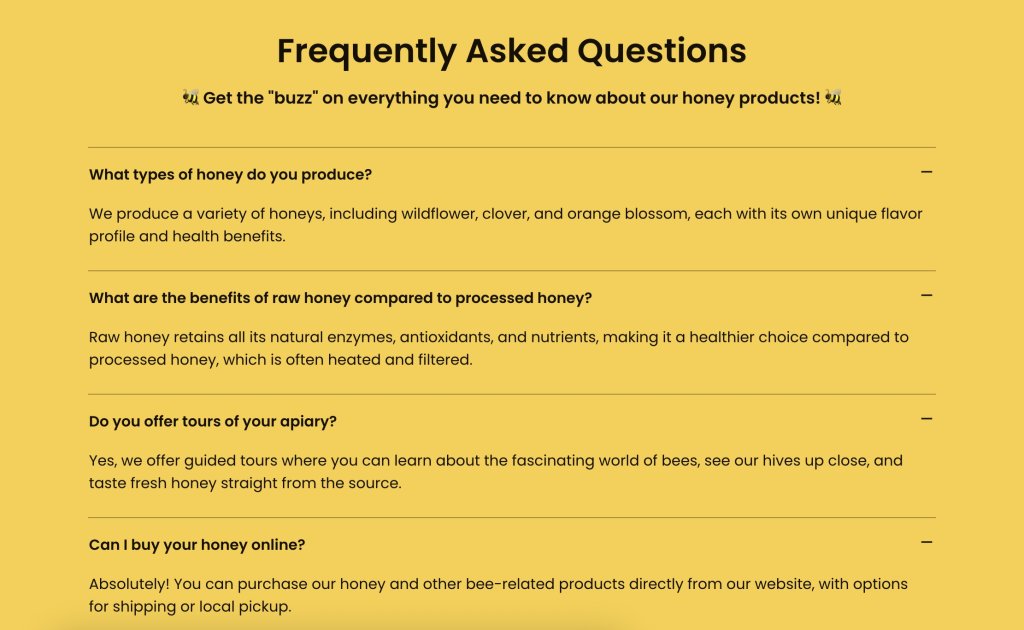
Sample FAQs and what they look like when done well

3. Social media marketing

Social media marketing won’t replace your website, but it feeds it. Platforms like Instagram, Facebook, LinkedIn, and TikTok are where you build awareness, show personality, and give people a reason to click through.

Not every platform makes sense for every business. A B2B consultant might tap into LinkedIn, whereas a boutique florist might invest time in Instagram marketing, because indeed each has very different target audiences living in very different places online. The key is picking one or two platforms where your customers actually spend time and showing up there consistently.

Social presence also signals credibility to AI tools. When your business is mentioned, tagged, and discussed across the web (not just on your own site) it builds the kind of authority that gets you recommended.

4. Email marketing

Email is the channel that doesn’t play by anyone else’s rules other than yours. No algorithm decides whether your subscribers see your message. No platform change can wipe out your list overnight. It all belongs to you.

Here’s how to get started:

  1. Pick an email platform. You need somewhere to collect addresses and send email marketing campaigns. Look for something simple with templates, a sign-up form builder, and basic analytics. 
  2. Create a reason to sign up. Often called a lead magnet, this is the thing you offer in exchange for someone’s email address. A first-purchase discount, a helpful guide, a free resource, early access to a sale — whatever makes sense for your target audience. Add the sign-up form to your website, ideally somewhere it’s easy to spot.
  3. Send something. A welcome email when someone joins, a monthly newsletter, a promotion when you have one. The bar isn’t perfection — it’s consistency. Paying attention to the email customer journey will help you figure out what to say and when.

Building an email list takes time, but it compounds. A hundred engaged subscribers who actually want to hear from you will outperform thousands of social followers who scroll past your posts.

Example of an email marketing message

Try SiteGround Email Marketing
Built for small businesses that want professional results without the complexity. Design campaigns, grow your list, and track performance — all from the same place you manage your website. No steep learning curve, no enterprise price tag.

Get started with SiteGround Email Marketing →

5. Paid advertising (PPC)

Organic growth takes time. Paid advertising — Google Ads, Meta ads, and similar platforms — gets you in front of people immediately. You’re essentially paying to skip the line.

For small businesses, paid ads make the most sense when:

  • You need visibility fast (new launch, seasonal push)
  • You have a specific offer with a clear return
  • You’ve already defined your marketing mix and validated it

Paid isn’t a substitute for organic. But as part of a balanced strategy, it can fill gaps while your longer-term digital marketing efforts build momentum.

The new channel every small business needs to understand: AI search

Something has been quietly (or perhaps not so quietly!) shifting in how people find both information and businesses. Tools like ChatGPT, Claude, and Google AI Overviews don’t just return a list of links. They read across the web, synthesize information, and hand users an answer.

Example of an AI Overview in Google search

Instead of “search and click,” it’s “ask and get told.”

Someone used to Google “best accountant for freelancers in Denver” and scroll through results. Now they might ask ChatGPT the same question and get a direct recommendation — maybe with a name, a reason why, and a link. If your business isn’t part of that answer, you don’t exist in that moment. 

AI has changed marketing for small businesses, and it’s necessary to adapt. Because being recommended by AI is becoming as valuable as ranking on page one of Google. And the businesses positioning for it now have a head start.

The genuinely good news: AI tools don’t require a completely different online marketing strategy. They favor businesses that do the fundamentals well — authoritative content, clear expertise, mentions across credible sources. The same SEO checklist that helps you rank on Google is also feeding your AI visibility. SEO and AI work together, so you’re not starting over. You’re building on what you already have (or are building toward).

How to get your business recommended by AI tools

Check if AI is already finding you

This takes a tiny chunk of time and is a great starting point, because you can’t improve what you don’t know.

Step 1: Search for yourself like a customer would. Open ChatGPT, Claude, Google (for AI Overviews), and any others you use. Search using natural, conversational language — the way a real customer would ask. Something like “who offers the best [your service] in [your city]?” or “where can I buy [your product] near [your location]?”

Step 2: Record what you find. In a simple spreadsheet, note the query, the platform, whether your business appeared, and who else showed up. Aim for 10 or so queries that matter to your business.

Step 3: Understand the gap. Not showing up? Look at who is, and what their content looks like. That gap tells you where to focus your content and authority-building efforts. Already showing up? Note which topics are earning you citations. Those are the subjects to build on: create supporting content around them, add FAQ sections, and make sure those pages have clear Q&A formatting so AI has even more to cite.

Step 4: Some AI tools pass referral data that shows up in Google Analytics 4 (GA4), though not all do. Traffic from certain tools may appear as direct traffic instead. It’s still worth checking monthly.

Here’s how:

  1. Log in to Google Analytics 4.
  2. In the left-hand menu, click Reports.
  3. Go to Acquisition → Traffic acquisition.
  4. Look at the Source/Medium column.
  5. Scan for referrals from AI platforms such as Perplexity or ChatGPT.

If you see them, click into the source to see which pages visitors landed on. Those landing pages are the topics AI is already associating with your business, and a strong signal to create more supporting content in that area.

Write content that AI can cite

Now you have an idea for where you should put your focus, but how to do so? AI tools pull answers from content that is clear, specific, and directly addresses real questions. To give them something to work with:

  • Write in a conversational, question-and-answer style. Instead of “Our services include X, Y, and Z,” try “What services do we offer? We specialize in X, Y, and Z for [type of customer].”
  • Make definitive statements. Vague content is hard to cite. “We’re one of the top options in the area” is easy to skip. “We offer same-day service for plumbing emergencies in the greater Phoenix area” is something an AI can actually use.
  • Aim for featured snippets on Google. A featured snippet — the answer box that appears at the top of search results — is a strong signal that your content is authoritative. AI tools and featured snippets favor the same thing: a clear, direct answer to a specific question.
example of a featured snippet in Google search

The tactics above are a strong starting point, but there’s a whole practice dedicated to making your content more visible to AI tools specifically. It’s called generative engine optimization (GEO), and our guide breaks down exactly how it works and what steps to take.

Build authority signals across the web

AI tools don’t just look at your website. They look at what the broader web says about you. A business mentioned in local directories, customer reviews, industry publications, and reputable third-party sites is a business that looks trustworthy.

Practical ways to build this:

  • Claim and complete your Google Business Profile, like the one seen below
  • Encourage satisfied customers to leave reviews on Google, Yelp, or industry-specific platforms
  • Get listed in relevant directories and local business associations
  • Look for opportunities to be mentioned in local press, guest posts, or community sites

Each mention compounds. The more places your business appears credibly, the more authoritative you look to both search engines and to AI.

Example of a Google Business Profile as it shows up in search

Don’t have time for PR babysitting? No problem. SiteGround’s AI agents do. If you’re a SiteGround client, you can access AI Studio, which offers loads of AI tools. And with the Plus Plan, you unlock 15+ specialized agents that can handle a surprising amount of the marketing work. Like a Reputation Manager Agent who can comb the dusty corners of the internet to get the pulse on your reputation, plus deliver action items. Or an SEO Agent who can audit your site and breakdown how best to optimize. Or an Image Agent with access to Nano Banana and other image tools so that you can create on-brand artwork in a flash. It’s the kind of output that used to require a whole team, but now it’s manageable for a team of one.

Explore AI Studio now >>

Building your website marketing strategy

You don’t have to do everything at once. In fact, trying to do everything at once is a great way to do nothing well.

Start with the channels that match your current bandwidth and budget:

  • Just getting started? Focus on SEO and one social platform (Tiktok marketing for small business can be surprisingly beneficial depending on your market). Get your pages optimized, start answering customer questions in writing, and show up consistently in one place.
  • Also add email marketing. It’s easy to set up, doesn’t cost much, and a growing subscriber list will accelerate your impact over time.
  • When you’re ready to accelerate, Layer in paid ads strategically and start preparing your content for AI visibility.

All these channels reinforce each other. An optimized website brings in organic traffic. Social shares send people to your site. New visitors join your email list. Email drives repeat visits. Good content earns mentions that build authority. Authority feeds AI recommendations. It’s a flywheel — slow to start, hard to stop.

AI visibility isn’t a separate online marketing strategy. It’s what happens when you do the other channels well, with a bit of intentional framing on top.

Put your website marketing into action

Remember that storefront in the middle of the ocean? Website marketing is what moves it to Main Street. The channels covered here — SEO, content, social, email, paid, and AI visibility — are how you get foot traffic, earn trust, and turn curious visitors into actual customers. None of it is out of reach for a small business. It just takes showing up consistently and building one layer at a time.

What it does require is a solid website underneath it all. One that’s fast, secure, mobile-responsive, and set up to be found. The SiteGround Website Builder gives you that foundation — plus built-in email marketing, AI Studio tools, ecommerce features, and expert support whenever you need it. Because you may have a tiny team, but you shouldn’t have to figure all of this out alone.

Your marketing is only as strong as the website it sends people to. Make sure yours is ready; we’re here to help make it happen.

Website marketing FAQs

What is website marketing?

Website marketing is the collection of strategies used to attract visitors to your website and convert them into customers. It includes SEO, content marketing, social media, email, paid advertising, and increasingly, visibility in AI-powered search tools.

What is the best way to market your website?

There’s no single best way — the most effective approach combines channels. For most small businesses, starting with SEO and content marketing builds a strong organic foundation, while social media and email amplify reach. Paid ads can accelerate results when you’re ready to invest.

What are the most important website marketing channels for small businesses?

SEO, content marketing, and email tend to offer the best long-term return for small businesses because they build compounding value over time. Social media builds awareness, and paid ads provide immediate visibility when needed.

Do I need a separate website marketing strategy for AI search engines?

No, not a completely separate marketing strategy. AI tools favor the same things traditional SEO does: clear, authoritative, well-structured content and credible mentions across the web. Focus on those fundamentals, and you’re already building AI visibility.

How long does website marketing take to show results?

Paid ads can show results within days. SEO and content efforts typically take three to six months to gain traction, but the results last much longer. Email marketing delivers one of the highest returns on investment, with results appearing as soon as you have a list to send to.

How much should a small business budget for website marketing?

It depends on your goals and channels. Many small businesses start with a minimal budget by focusing on organic tactics (SEO, content, social) and scale paid investment as revenue grows. Even a few hundred dollars a month in the right places can move the needle early on.

How do I know if my website marketing is working?

Track your digital marketing metrics. Google Analytics 4 shows where your traffic comes from and what visitors do on your site. Monitor organic search rankings, email open rates, and social referral traffic. For AI visibility, do monthly manual searches in ChatGPT, Perplexity, and others to see if your business is showing up.

Marketing mix strategy for first-time sellers: maximum impact with minimum budget

abstract of the marketing mix with the 4 ps

Most small business owners start marketing by doing. They post on Instagram, run a quick ad, send an email to their list. Cross fingers; hope something sticks. It’s not a bad instinct. Taking action beats waiting for a perfect plan. But without a framework connecting all those moves, you end up scattered, second-guessing yourself, and spending time (and money) in the wrong places.

That’s exactly the problem the marketing mix was designed to solve.

The marketing mix is a structured way of thinking about how you bring your product or service to market. It helps you stop guessing and start making deliberate decisions, even when your budget is tight, your team is small (or nonexistent), and your time is limited.

In this guide, you’ll learn what the marketing mix is, how each element works, and, most importantly, how to actually apply it as someone starting out with real constraints. We’ll also cover how the framework has evolved from 4 Ps to 7 Ps, and when that distinction matters for you.

Key takeaways

  • The marketing mix helps you stop guessing and build marketing that works as a system, not scattered tactics.
  • Start with the 4 Ps of marketing — Product, Price, Place, and Promotion — before adding complexity.
  • Prioritize owned marketing channels like your website and email list before investing in paid ads.
  • Focus on one or two channels you can consistently maintain instead of trying to be everywhere.
  • Test and refine continuously: sustainable growth comes from iteration, not one-time marketing campaigns.
  • Move to the 7 Ps only as your business grows and customer experience becomes more complex.

What is the marketing mix?

The marketing mix is a strategic framework that helps businesses make deliberate decisions about how to bring a product or service to market. It organizes marketing into four core elements — Product, Price, Place, and Promotion — so that every decision works together as a system rather than a set of disconnected tactics.

The concept was introduced by professor E. Jerome McCarthy in the 1960s, who organized marketing strategy into these four categories, now known as the 4 Ps of marketing. While the model has expanded over time, the original four remain the foundation every marketer — beginner or seasoned — should understand first.

For small businesses, defining the marketing mix is especially valuable because it forces clarity before spending. Rather than asking, “What should I post today?”, it asks, “What am I selling, to whom, at what price, and through which channel?” That shift in thinking can save you months of effort, never mind a lot of existential spiraling over your analytics dashboard. Once your mix is in place, it also becomes the foundation for more advanced approaches like growth marketing, but that’s a later chapter.

The 4 Ps of the marketing mix

The 4 Ps represent the pillars of basic marketing — understanding what you sell, who it’s for, where customers find you, and how you promote it. Before layering in more advanced concepts, every small business owner should have a clear answer to each of these four concepts. Think of them as the building blocks. Get these right, and everything else in your marketing becomes easier and more effective. So let’s unpack.

1. Product

Your product isn’t just what you sell. It’s the problem you solve and how you position that solution for a specific person. A product can be a physical item, a digital download, a service, or a subscription. What matters is that you can articulate what it does, who it’s for, and why it’s the right choice over the alternatives. Product clarity is the foundation of your entire mix. Get this fuzzy, and everything downstream suffers, including perhaps your will to keep going.

  • The one-sentence test: Can you describe what you sell and who it’s for in a single sentence? If it comes out murky, your marketing will too. Your pricing will feel arbitrary, your promotion will feel generic, your brand will feel scattered, and your ideal customer won’t recognize themselves in your messaging.
  • The differentiation question: What makes your product different from the next option your customer might choose? You don’t need a unique answer that no one else on earth can claim, but you do need a true and specific one.

In practice:
Nadia runs Folio & Fire, a small business selling hand-thrown ceramic planters and a companion digital guide called Roots: A Beginner’s Guide to Plant Care. When she first tried to write her Instagram bio, she couldn’t get it under four sentences. That was the signal. She went back to basics: “I make ceramic planters for plant lovers who want their home to feel intentional.” One sentence. Suddenly her website, product photos, welcome email, and packaging copy all had something to align to.

Example of the first p in the marketing mix about product and getting your message right

Like what you see? The Folio & Fire website was made in only ten minutes using SiteGround’s Coderick AI. Just a simple prompt and additional tweaking can turn out a beautiful site in no time.

Start creating with Coderick now>>

2. Price

Price is in fact more than a number. It’s actually a signal. Decades of consumer research show that people often use price as a shortcut for judging expected quality — when something is priced higher, they tend to assume it will be better before they ever experience it. So before a customer reads your description or visits your product detail page, your price is already communicating something about the quality, exclusivity, and value of what you offer. Getting it right matters more than most beginners realize.

Common mistakes to avoid:

  • Underpricing out of fear. Charging less than your product is worth might feel safe, but it attracts price-sensitive buyers, undercuts your margins, and makes your offer look less credible.
  • Copying competitors without context. Competitor pricing reflects their costs, positioning, and target customers, none of which may apply to you.

How to validate pricing with limited data:

  • Offer two or three pricing tiers and see where customers land
  • Send survey emails and ask early buyers whether price was a factor in their decision
  • Run a short A/B test on a landing page

For service providers and creators especially: raising your price often increases interest rather than reducing it, because a higher price can increase perceived value, implying expertise and seriousness that a low one undercuts.

In practice: Nadia launched her planters at $18 because she was nervous. They sold, but barely. A maker friend pointed out that similar planters at a local market were going for $55 and selling out. She also had to make peace with something else: yes, someone could find a planter on Amazon for $10. But that person was never her customer. Nadia wasn’t selling a planter — she was selling something handmade, considered, and worth displaying. Pricing like the $10 option only undermined that. Nadia ran a small test: she listed three new planters at $45 and emphasized the hand-thrown, local-business process in the description. They sold faster than the $18 ones ever had. Her digital guide followed the same logic: she’d been offering it as a free download, but when she priced it at $12, people started treating it like the resource it actually was.

Example of an online shop and the second p in the marketing mix about price and getting it just right

3. Place

“Place” refers to where your target market finds you and where the transaction actually happens. In modern marketing, these touchpoints are often called distribution channels — the paths through which customers discover, evaluate, and buy from your business. 

The central question isn’t “where should I be?” It’s “where does my customer already go, and can I meet them there?” For small businesses today, that typically means some combination of a website, email list, social platforms, and online marketplaces.

Owned vs. borrowed channels

  • Owned: Your website, your email list. These belong to you and compound over time.
  • Borrowed: Your Instagram following, your TikTok audience. These live on someone else’s online platform, and are subject to algorithm changes, policy updates, and outages you can’t control. Social media marketing matters, but it’s important to keep in mind that it can be unpredictable.

It’s worth noting that organic reach on platforms like Instagram can be in the single digits as a percentage of your followers, which means most people who chose to follow you never see your content in their feed anyway.

Building an email list, on the other hand, is building an asset. Growing a follower count on a platform you don’t own is renting space, and the landlord can change the rules at any time. Grow your own email list? That makes you the landlord.

When you can’t be everywhere (which is most small businesses), prioritize the marketing channels where your target audience is most active and where you have the most control. Turns out, being really present in two places beats being kind of present in five. A strong website and a growing email list are your top go-tos.

In practice: Nadia was spread across Instagram, Pinterest, Etsy, and a website she’d barely touched. Nothing felt consistent and she was exhausted keeping up with all of it. She made a call: Instagram marketing for discovery, her own website for purchasing, and an email list for everything else. She stopped posting on Pinterest entirely. Within two months, her website traffic was up and she had 200 people on her list — people she actually owned access to, regardless of what any algorithm decided to do next.

Instagram post made with a prompt and the Instagram Manager via SiteGround AI Studio

Did you know? 
As a SiteGround client, you already have access to marketing tools available in AI Studio — and for small businesses trying to do more with less, it’s worth exploring. With the Plus plan, you unlock 15+ specialized agents that can handle a surprising amount of the marketing work on this list: a social media manager that publishes directly to your connected profiles, an email marketing agent that builds campaigns and exports them straight to SiteGround Email Marketing, and an AI image designer for banners, social posts, and more. It’s the kind of output that used to require a whole team, but now it’s manageable for a team of one.

4. Promotion

Promotion is how you communicate your offer to the right people at the right time. It’s the part of the marketing mix most people jump to first, but it works best when the other three Ps of marketing are already solid. A great sales promotion strategy can’t rescue a vague product, a wrong price, or the wrong channel.

Main promotion channels for small businesses:

  • Organic social media: low cost, slow build, algorithm-dependent
  • Content marketing and SEO: slow to start, compounds well over time
  • Paid advertising: fast results, but requires budget and ongoing spend
  • Partnerships and referrals: high trust, often underused by beginners
  • Email marketing: owned audience, high ROI, works at every stage

Why email deserves a featured spot here: Unlike social, email reaches people who already opted in to hear from you. Unlike paid ads, it doesn’t stop working the moment you stop spending. Unlike SEO, it can produce results relatively quickly even with a modest list. Plus, it consistently delivers some of the highest ROI of any marketing channel, which makes it a natural starting point when budget is limited.

This highlights an important distinction in marketing: understanding which distribution channels generate sustainable organic traffic versus where paid investment makes sense.

Free vs. paid — a realistic breakdown:

  • Free/near-free traffic to your website: Organic social, content, SEO, email marketing
  • Worth paying for once you have traction: Paid ads to amplify what’s already working organically, not as a substitute for building owned channels first

In practice: Nadia’s first promotion instinct was to run Facebook ads. Instead, she started a simple monthly email: new planter drops, a care tip for whatever plant was in season, and a link to her digital guide. It took 30 minutes to write and cost nothing. By the time she did try paid ads — six months later, with a real list and a converting website — she already knew what messaging worked, because her email subscribers had told her.

Example of the fourth p in the marketing mix about promotion via an email marketing message

Tools like SiteGround Email Marketing make it straightforward to get started with email campaigns like the one above. Build your list, design campaigns, amply your marketing communications, and track performance without needing a dedicated marketing team or a large budget. 
Start sending emails now>>

From 4 Ps to 7 Ps: when does it matter?

The 7 Ps are an extended marketing mix, building on the original framework by adding three more elements: People, Process, and Physical Evidence (sometimes called Packaging). These additions came out of the services marketing world, where the customer experience itself is part of the product. That said, they’re increasingly relevant to any business that has repeat customers and wants to grow.

  • People refers to the human side of your brand. We’re talking about your team, your customer service, and the way anyone who represents your business interacts with customers. For a solo creator or one-person shop, “people” is largely you. Your responsiveness, your tone, and your follow-through all shape how customers feel about buying from you.
  • Process is how customers experience doing business with you. This includes the entire customer journey, from how easy it is to buy, to how you onboard a new client, to how you handle fulfillment and follow-up. A smooth process reduces friction and increases repeat purchases. A clunky one creates frustration even when the product itself is great.
  • Physical Evidence (or Packaging) covers how your brand looks and feels across every touchpoint — your website, your packaging, your email templates, your invoices. Consistency here builds trust and makes your brand feel more established, even if you’re a team of one.
Example branded packaging of the fourth p physical evidence

In practice: This on-brand packaging image for Folio & Fire was made in minutes using the SiteGround AI Studio Image Agent. With a quick prompt, marketing and packaging dreams come to life. 

Explore AI Studio>>

For beginners, the 7 Ps are best understood as a “level up” rather than a starting requirement. Get the 4 Ps working first. Build your offer clarity, price with intention, show up in the right place, and promote consistently. Then revisit the additional three Ps as your business grows and the customer experience becomes a more complex thing to manage.

Diagram of the marketing mix pyramid adapted for small business

How to build your own marketing mix on a small budget

Knowing the framework is one thing, but, alas, using it is another. Here’s a practical sequence for building your own marketing mix when you’re working with limited time and money.

Step 1: Audit what you already have. Before adding anything new, take stock of what exists. Can you describe your offer clearly? Do you have a website? An email list, even a small one? A social presence? Existing customers you could ask for feedback? Most beginners have more to work with than they realize — the audit just makes it visible.

Step 2: Identify your one primary promotion channel. Trying to be active on five channels at once is a reliable path to burnout and mediocre results everywhere. Pick the one channel where your target audience is most active and where you can show up consistently. That’s your primary channel for now. Everything else is secondary.

Step 3: Start with owned channels before investing in paid. Your email list and your website are assets that compound over time. Social media followings and paid ad audiences are not. Build the owned foundation first (get people onto your list, plan your website) before pouring money into channels that stop working the moment you stop paying.

Step 4: Test one thing at a time. The marketing mix is a framework for iteration and not a one-time marketing plan. Change one variable at a time (your pricing strategy, your messaging, your call to action) so you can actually learn what made a difference. Testing everything at once makes it impossible to know what worked.

Focus NowLayer In Later
Offer clarity and positioningPaid advertising
Website that convertsPartnership and affiliate programs
Email list buildingAdvanced SEO checklist and content
One primary social channelMultiple platforms and formats
Pricing validationTiered products and upsells

Common marketing mix mistakes first-timers make

Most marketing mistakes don’t happen because you chose the wrong tactic. They happen because fundamentals get neglected. Here’s a rundown of the common marketing mix mistakes to avoid:

  1. Skipping product clarity and jumping straight to promotion is the most common. If you don’t know precisely what you’re selling and who it’s for, no amount of posting or advertising will fix it. All it does is amplify the confusion.
  2. Pricing based on fear rather than value keeps a lot of small businesses stuck. Underpricing doesn’t end up coming off as humility. Instead, it’s a positioning problem that attracts the wrong customers and makes sustainable growth harder.
  3. Spreading too thin across channels is the natural result of trying to do everything at once. You end up with a mediocre presence in five places instead of a strong one in the right one.
  4. Treating sales promotion as the whole marketing strategy means neglecting product, price, and place. This is like trying to sell a house by putting up a good sign and without first checking if the plumbing even works.
  5. Ignoring email in favor of social is one of the costlier long-term mistakes. Social platforms can change their algorithms or terms of service any time they fancy. Your email list, on the other, belongs only to you. Building on rented land has real risk.
  6. Not revisiting the mix as the business evolves turns a living framework into a dusty document. Your marketing mix should change as your offer matures, your customer base grows, and your budget expands. Schedule a quarterly check-in with yourself to ask whether the mix still fits.

Your marketing mix is the strategy — start here

You started this article posting on Instagram, running a quick ad, and crossing fingers. You’re leaving it with an actual framework — and that’s not nothing. Most people skip the marketing strategy entirely, go straight to tactics, and spend the next six months wondering why nothing compounds.

So start with the basics: get clear on your product, pressure-test your pricing strategy, pick two or three channels and own them. Once those are solid, promotion gets easier and cheaper  because you’re no longer paying to send the right message to the wrong person in the wrong place. 

At that stage, owned channels matter most, and email is often the first one that truly compounds. It gives you direct access to people who already chose to hear from you, without relying on algorithms or ongoing ad spend. SiteGround Email Marketing is built for exactly this moment: when your marketing strategy is clear and you’re ready to turn attention into lasting relationships.

Then,when you’re ready to scale without hiring, AI Studio is how you multiply what you’ve built — agents that handle the execution while you stay focused on the bigger picture. The framework gave you the strategy. Now go build something.

Marketing mix FAQs

What’s the difference between the 4 Ps and 7 Ps, and which should I use?

The 4 Ps (Product, Price, Place, Promotion) are the original framework and the right starting point for most small businesses. The 7 Ps add People, Process, and Physical Evidence, which are elements that become more relevant as your business grows and the customer experience becomes more complex to manage. Start with 4. Revisit the additional 3 when your operations and team have grown enough that they matter.

What is the difference between a marketing mix and a marketing strategy?

Your marketing strategy is the big picture, such as your goals, your target market, your competitive positioning, and the direction you’re heading. Your marketing mix is the operational layer beneath that strategy, including the specific decisions about product, price, place, and promotion that bring the strategy to life. Think of the marketing strategy as where you’re going and the mix as how you’re getting there.

How do small businesses use the marketing mix?

Small businesses use the marketing mix as a decision-making framework — a way to think through each element of their offer before committing time or budget to any tactic. In practice, this means auditing your offer clarity, validating your pricing strategy, choosing the right channels for your target market, and selecting promotion methods that fit your budget and goals. It’s a tool for prioritization as much as planning.

How does the marketing mix apply to digital marketing?

The 4 Ps translate directly to digital: your product is your offer and how it’s positioned online; your price includes any free tiers, trials, or dynamic pricing; your place is your website, email list, and the platforms where your target market finds you; and your promotion includes SEO, content, email, social media, and paid advertising. The digital environment gives you more ways to test and iterate each P quickly and affordably.

How do you create a marketing mix on a limited budget?

Start by auditing what you already have (your offer, your existing channels, and your current pricing). Then choose one primary promotion channel and focus on building owned assets (your email list and website) before spending on paid channels. Test one variable at a time so you know what’s actually driving results. The marketing mix doesn’t require a big budget, but it requires clear thinking and consistent execution. If you want to multiply your output on a limited budget, SiteGround AI Studio is a great place to start.

How often should you review your marketing mix?

A quarterly review is a reasonable cadence for most small businesses. Your mix should evolve as your offer matures, your customer base grows, and your budget changes. If something in your marketing stops working (such as conversion rates drop, a channel goes quiet, pricing starts to feel off) that’s a signal to revisit sooner rather than waiting for the next scheduled check-in.