

AI can help with almost every part of starting a business, from researching an idea to building your website. The hard part is knowing which tools to use, when to use them, and what to decide yourself, and that’s where a lot of first-time founders get stuck. This guide shows how to use AI to start a business in 7 steps, from your first idea to your first customer, with a clear sign at each step that you’re ready to move on.
Key takeaways:
- Using AI to start a business works best one step at a time: problem, validation, offer, legal setup, website, first customers, and automation.
- Each step comes down to 3 things: what AI handles, what you decide, and the customer evidence that says you’re ready to move on.
- Most new businesses can benefit from 3 kinds of AI help as they grow: an AI assistant, an AI website builder, and built-in AI tools that handle routine site, store, and email tasks.
- You can use AI for every step without coding, from researching problems to building your site and handling routine updates through chat.
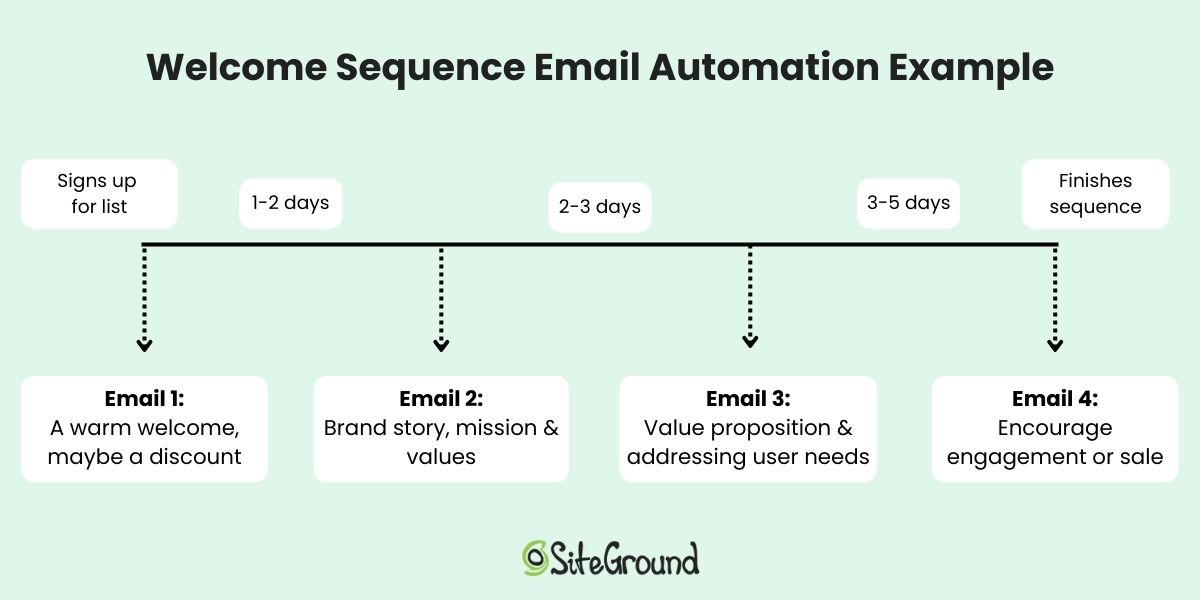
- Add automation when a task becomes repeatable, such as a welcome email for new subscribers, and skip automations for situations you haven’t run into yet.
How to use AI to start a business in 7 steps
The safest way to use AI to start a business is to let it research, draft, and build while you keep the decisions. That’s because AI can certainly summarize a market, write an offer, and generate a website, but it can’t confirm that real customers want what you’re selling.
Steve Blank, the Stanford lecturer behind the customer development method, made this very point to CNBC in March 2025. He conveyed that AI speeds up a founder’s work, but it doesn’t remove the need to test assumptions about who your customers are and what they want.
With that in mind, here’s how to start a business using AI in 7 steps:
- Find a specific problem worth solving
- Validate your business idea with real customer evidence
- Turn the problem into a clear offer
- Set up your business legally
- Build the minimum business website you need with AI
- Get your first customers
- Let AI handle the repetitive business tasks
Step 1: Find a specific problem worth solving
A business starts with a problem that a specific group of people already wants solved (even if they haven’t realized it yet!). This is where AI is particularly good at finding such problems in public conversations. That said, it’s much worse at judging which one of those problems truly deserves the next year of your life.
When starting a business with AI, either starting point works:
- You already have an idea. Use AI to look for evidence that the problem exists outside your head, and to see how people deal with it today.
- You don’t have an idea yet. Start with a group you know well, such as your former industry, a hobby community, or local businesses, and use AI to explore what they struggle with.
Once you start noodling over a specific problem and idea, you need to ask yourself whether that problem is actually worth solving. Usually it is when it shows a few of these signs:
- It comes up again and again in reviews, forums, and social posts.
- People already spend money or time on a workaround.
- You can reach the people who have it.
- You understand it well enough to solve it better than the current options.
Now, every AI model will give its own spin on what it finds and concludes. So rather than depend on one, SiteGround AI Studio gives you several AI models in one workspace, so you can ask more than one the same question and see where they align. Plus, you can continue to use this as a resource throughout your business creation process, leveraging access to the various models in order to the best output possible. (Note that AI Studio usage is token-based, and a current free monthly allocation comes with qualifying paid SiteGround services.)
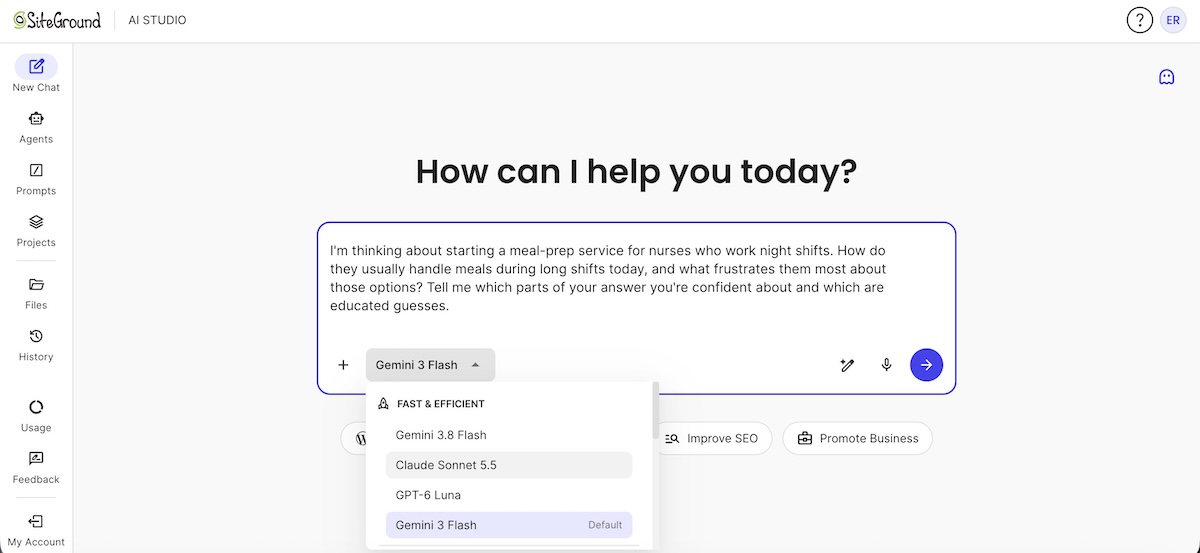
Step 1 at a glance
- AI handles: exploring where a problem shows up and how people deal with it today.
- You decide: which problem is worth your time, based on the signs above.
- You’re ready for Step 2 when: you’ve picked one problem, for one customer group you can reach, that shows at least a few of the aforementioned signs.
Step 2: Validate your business idea with real customer evidence
Step 1 showed the problem exists. Step 2 checks, directly with the people who have it, whether they want someone to solve it. In a CB Insights analysis of 431 venture-backed startups that shut down since 2023, 43% cited poor product-market fit, the most common underlying cause after running out of cash. This step is the cheapest place to catch it.
Two methods work well, and you can run them side by side:
- Conversations. Talk to 10-20 people in your target group and ask about the last time they had the problem. Try to find people beyond just your own circle of family and friends in order to ensure transparent and varied responses.
- Something people can react to. Share a short description of the solution you have in mind, in your conversations or in the communities from Step 1, and ask people whether they’d want to hear when it launches. If your idea is a tool or app, Coderick AI can even build a simple working demo to show instead. Either way, this is a quick test, and your actual business website comes later, in Step 5.
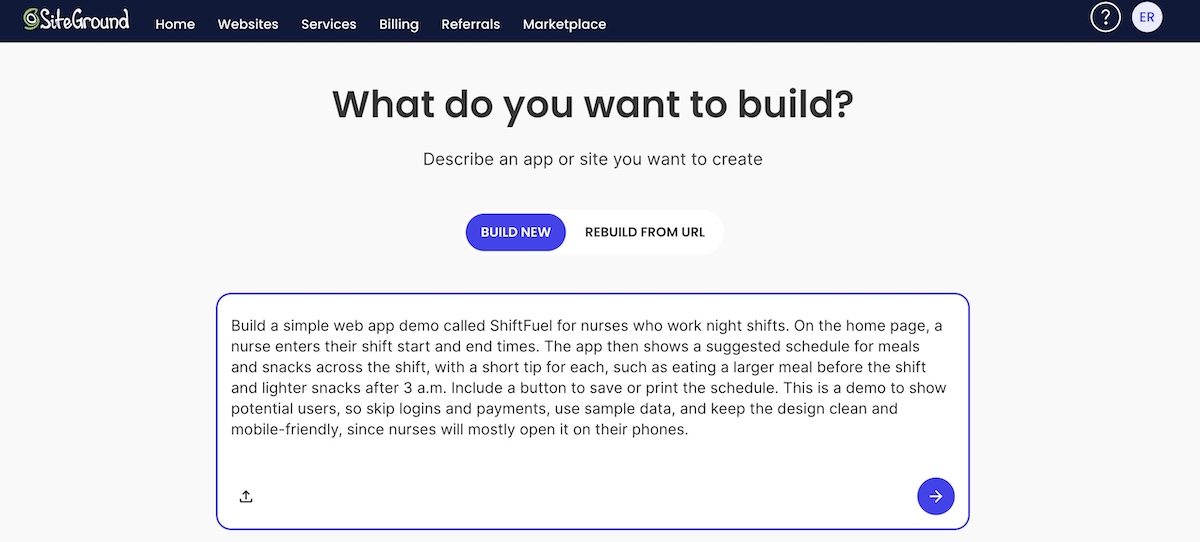
AI can then definitely jump in to help you draft interview questions as well as summarize what people tell you, even finding patterns or noteworthy sentiments.
Step 2 at a glance
- AI handles: drafting interview questions and summarizing what people told you.
- You decide: who to contact first, where to dig deeper or pivot, and how much interest counts as enough.
- You’re ready for Step 3 when: several people you’ve contacted directly confirm the problem and show interest in a solution, such as asking when it’ll be available.
An offer is the specific thing you’ll sell, to whom, for what result, and at what price. This step turns the interest you found in Step 2 into something a customer can more concretely say yes or no to.
Step 3: Turn the problem into a clear offer
An offer is the specific thing you’ll sell, to whom, for what result, and at what price. This step turns the interest you found in Step 2 into something a customer can more concretely say yes or no to.
Write your offer in one sentence
Fill in this template using the words people used in your Step 2 conversations:
For [customer] who [problem], I offer [solution] so they can [outcome], unlike [current alternative], for [price].
For example: “For independent physiotherapists who lose hours each week to appointment reminders, I offer a done-for-you text reminder setup so they can cut no-shows, unlike chasing patients by phone, for $150 plus $30 a month.”
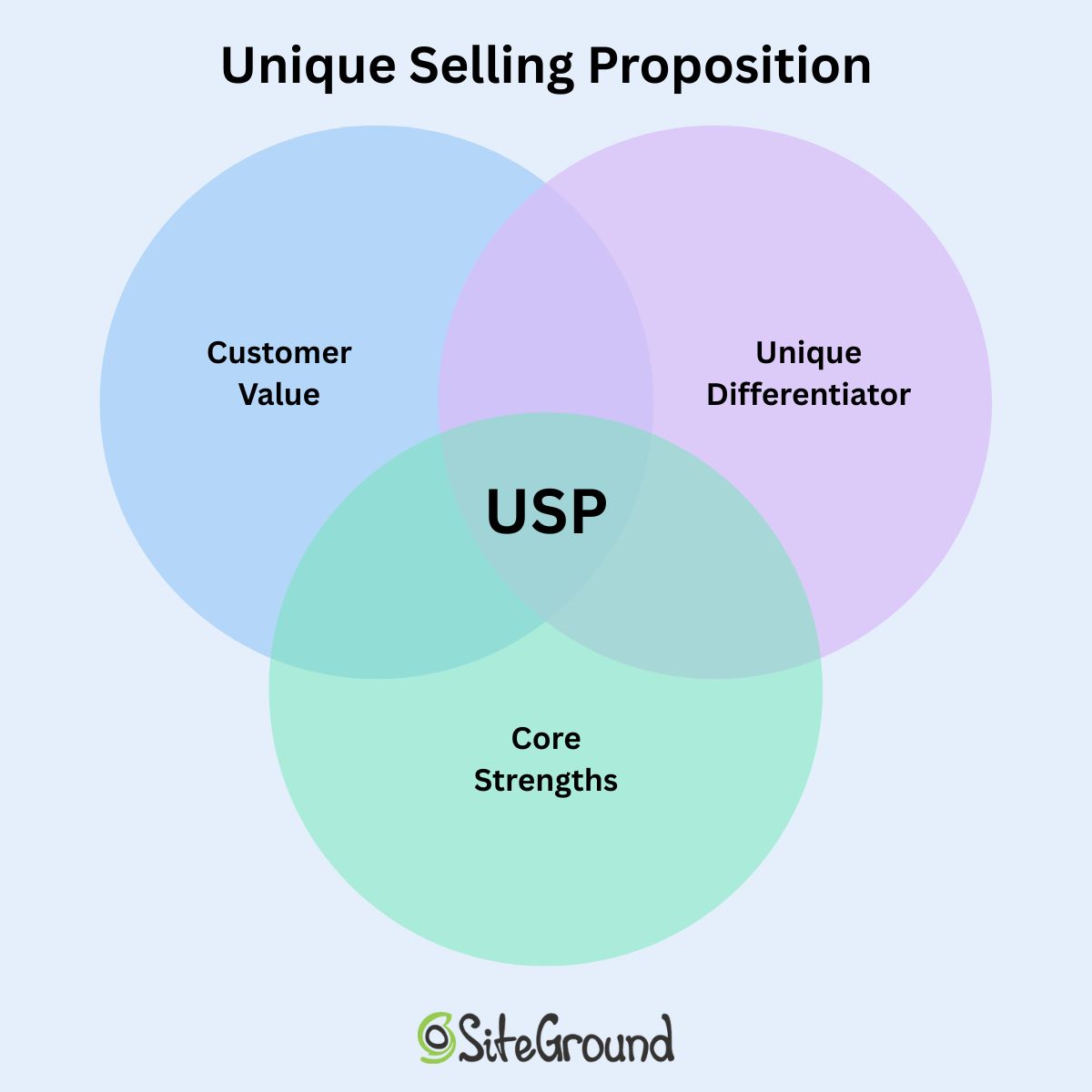
AI is useful here for drafting a few versions and listing the objections a skeptical customer would raise. Its drafts tend to sound generic, so pick the one closest to how your customers talk, and tweak as necessary. At the end of the day, the strongest unique selling proposition usually names one specific result your competitors don’t claim.
Set a starting price
A starting price usually sits between two numbers:
- Your floor: what it costs you to deliver, including your time, materials, and any software or payment fees. Below this, every sale loses money.
- Your ceiling: what customers spend on their current workaround, in money or time, and what competitors charge for something similar.
AI can help you gather both, such as summarizing competitor prices or adding up your costs, but check the numbers it gives you. Pick a price in that range you’d be comfortable defending out loud, and expect to adjust it after your first few sales.
Once you’ve got your offer dialed, AI can help expand it into a one-page business plan covering customer, offer, channels, and startup costs.
Test it before you build
Show the offer to the people you spoke with in Step 2, through a message, a one-page document, or a call. If you can, ask for a pre-order, as this is the strongest way to assess true interest. This can be done easily by jumping to Step 5, where will cover this step in more detail.
Step 3 at a glance
- AI handles: drafting the offer, generating alternatives, gathering pricing data, and predicting objections.
- You decide: the final wording, the price, and the format.
- You’re ready for Step 4 when: people consistently ask how to buy, accept the price without heavy pushback, or commit to a pre-order or booking. If the response is polite interest and nothing more, revise the offer first.
Step 4: Set up your business legally
Legal setup is where AI works best as a translator and worst as an authority (which it of course loves to do). Rules for business structure, registration, taxes, and licenses vary by country, state, and industry, so every answer AI gives you here is a draft to check against an official source or a professional.
US readers can start with the U.S. Small Business Administration’s business guide, which covers structure, registration, tax IDs, and licenses. Elsewhere, your national government’s business portal or a local accountant is the right reference.
Pick a name and register your domain
You need a name before you can register the business, so start here — and AI is a great brainstorming partner for this exercise. Give it your offer, customer, and tone, and ask for 20 options with a one-line reason for each.
Meanwhile, when it comes to choosing a domain, SiteGround’s AI domain name generator works from your keywords, and every name it suggests is already available, so you can skip checking availability one name at a time.
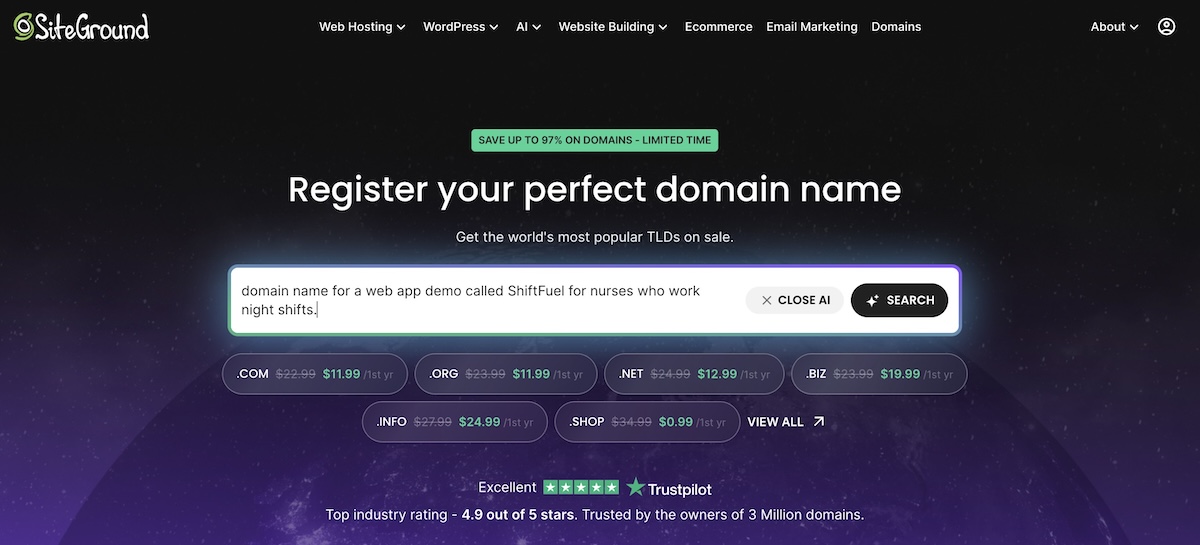
Note: Before you settle on a business name or register your domain, search your country’s trademark database for the name. Just because a domain is available doesn’t mean the name is free to use.
Choose a business structure
Your business structure decides two things: whether your personal savings are at risk if the business owes money, and how much paperwork you’ll handle. More protection usually means more paperwork. The names and rules vary by country, but the basic options look similar:
| Structure | Personal liability | Paperwork | Typical fit |
| Sole proprietorship | You’re personally responsible for business debts | Lowest | Testing a service business on your own |
| Partnership | Shared among partners | Moderate | Two or more founders sharing ownership |
| LLC or limited company | Generally limited to the business | Moderate, with registration and annual filings | Most small businesses once revenue is steady |
| Corporation | Limited to the business | Highest | Businesses planning to raise outside investment |
AI can explain these trade-offs for your situation if you give it your location, expected revenue, and whether you’ll have partners. The final choice, and an accountant’s sign-off, stay with you.
Register, get your tax ID and licenses, and separate your finances
A typical setup checklist covers:
- Registering your business name with the relevant authority
- Getting a tax ID, such as an EIN in the US
- Applying for any licenses and permits your industry or city requires
- Opening a separate business bank account
- Getting insurance that matches your risks
A useful prompt: “Create a checklist of registrations, tax IDs, and licenses for a [type of business] in [city, country], and name the government office that handles each one.” Check every item on the official site. Links to government pages are a common place for AI to invent URLs, so always check sources.
Step 4 at a glance
- AI handles: name ideas, explaining your options, and drafting checklists.
- You decide: your name, your business structure, and which questions need an accountant or lawyer.
- You’re ready for Step 5 when: your name and domain are secured, your business is registered, and your finances are separate.
Step 5: Build the minimum business website you need with AI
A minimum website is the smallest version that lets a customer understand your offer and take the next step. Everything else can wait until customers ask for it.
Choose your build path
Pick the path that matches what the business needs to do on day one:
| If you need | Use | Keep in mind |
| A simple business site with no code, and no selling via the site | SiteGround Website Builder | AI drafts the pages, and you edit the copy and images |
| Custom functionality, such as a booking flow, calculator, or client portal | Coderick AI | Stripe payments and custom domains depend on your plan, and features like confirmation emails or access rules need to be requested explicitly in your prompt |
| An online store for products | SiteGround Ecommerce | Includes the AI Store Agent for sales questions later |
| Full control over your site’s design and features, with plugins to add almost anything | SiteGround Hosting for WordPress | More setup than a builder, but managed hosting takes care of much of the admin, including WordPress updates, daily backups, and security. The AI Agent for WordPress, included with every plan, handles day-to-day site tasks through chat. |
Not every business aligns with every option. A consultant who books calls rarely needs a store, and a jewelry maker rarely needs a custom web app.
Note that for taking those pre-orders or deposits from Step 3 online, a simple store is the quickest route. With SiteGround Ecommerce, you can start with just your one offer so early buyers can pay you directly, then add more products as orders come in.
Develop your branding
Whichever path you choose, AI can draft branding basics in a flash. Give it your offer, customer, and name, and ask for:
- 3 or 4 logo concepts
- A color palette and a pair of fonts
- A short brand voice guide with a few example sentences
You choose which direction fits, and you keep it consistent across your website, emails, and social profiles.
Add the pages you need
For most new businesses, that’s 4 pages:
- A home page that states the offer from Step 3
- A page or form to buy, book, or get in touch
- An about page that explains who’s behind the business
- Your policies (typically linked in the website footer)

AI can draft the copy for each page from your Step 3 offer. Edit it until it sounds like you and uses your customers’ words.
As for policies, most business websites need three:
- A privacy policy explains what personal data you collect, such as names and email addresses, and how you use it. In many places, the law requires one as soon as your site collects that data.
- Terms of service set the rules for using your site and buying from you.
- A refund policy tells customers what happens if they want their money back.
AI can draft all 3 from a short description of your business. Have them reviewed before you publish, especially if you sell to customers in regions with strict privacy rules, such as the EU.
Step 5 at a glance
- AI handles: building the site, drafting page copy and policies, and branding drafts.
- You decide: which build path fits the business, and the look.
- You’re ready for Step 6 when: a stranger can land on your site, understand the offer, and take the next step without asking you a question.
Step 6: Get your first customers
Your website is live, but nobody knows it exists yet. Your first customers usually come from the people you talked to in Step 2 and the places you found them in Step 1, so start there.
Use AI to draft outreach, not replace it
A website marketing strategy for a new business usually leans on a few channels:
- Direct messages to people who have the problem you picked in Step 1
- Community posts in the forums and groups where your customers spend time
- Social media on 1 or 2 platforms your customers already use, with posts about the problem you solve as much as the product. For more tactics, see how to go from social media likes to business leads.
- Local search listings, if you serve a specific area
- Partnerships with businesses that serve the same customers
AI can help with the writing behind each channel, from personal messages to community and social posts to your local listing. Keep the sending and replying personal, though, since early customers can tell when a message was written for everyone.
Build an audience you own
Most of the channels above run on someone else’s platform. Followers on social media and members of online communities belong to those platforms, which decide who sees your posts and can change the rules anytime. That’s why it’s worth building at least one channel you control, and for most new businesses, that’s an email list.
Email marketing means sending updates and offers directly to people who’ve given you their email address. To start a list, add a sign-up form to your site and offer something useful in exchange for an address, such as a checklist built from the questions people asked in your Step 2 conversations.
Be sure to set up an automated welcome email at the same time as the form, so every new subscriber hears from you right away. SiteGround Email Marketing can draft it with its built-in AI writer and send it automatically once you’ve set everything up.
Measure what actually brings customers in
Track a small set of numbers from the start:
- Where your customers come from. Website analytics typically show which sites, searches, and posts send you visitors. To connect those visits to actual sales or inquiries, set up conversion tracking in a free tool like Google Analytics, which records the source behind each one.
- How many visitors become inquiries or sales. Compare your visitor count with the inquiries or orders you got in the same period.
- What each customer costs you. Add up the time and money you spent on a channel, and divide by the customers it brought in.
- How many customers come back. Watch how many orders come from returning customers over time.
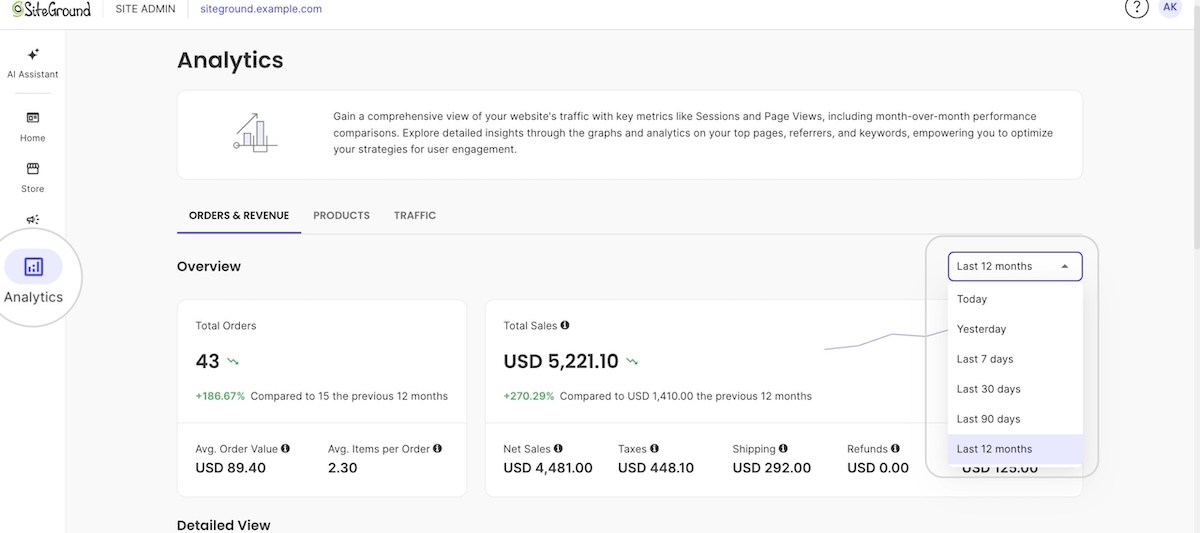
Worth noting: If you build with SiteGround Website Builder or SiteGround Ecommerce, the built-in Analytics section covers most of this. It shows your visits, page views, and top referrers, and stores also get a list of every order showing whether the customer is new or returning, plus your best-selling products. You can also ask the AI Store Agent about your numbers in plain language, such as your average order value. On any platform, AI can turn your numbers into a monthly summary of what’s working.
Step 6 at a glance
- AI handles: drafting outreach and emails, and summarizing your sales data.
- You decide: which channels get your time, and what goes out under your name.
- You’re ready for Step 7 when: at least one channel brings in customers predictably, and you know which one it is.
Step 7: Let AI handle the repetitive business tasks
Running a business comes with a steady stream of tedious tasks: a welcome email for every new subscriber, regular site updates, and the same customer questions over and over. They multiply as you grow, so it pays to hand them to AI once the process works consistently instead of waiting until they pile up. Just be sure to skip automations for situations you haven’t run into yet, like a five-email sales sequence before anyone has bought.
Three kinds of work are usually worth handing over first:
- Emails. The welcome email from Step 6 already runs on its own. As your list grows, SiteGround Email Marketing’s built-in AI writer can also draft your regular updates and newsletters, as well as allow you to automate other email sequences.
- Site and store upkeep. On a WordPress site, the AI Agent for WordPress handles plugin updates, content edits, and settings changes through chat. In a SiteGround Ecommerce store, the AI Store Agent can make store changes for you. Both ask for your permission before making bigger changes.
- Repeat customer questions. AI can turn the questions you keep answering into an FAQ page and a set of reply templates. Review them before they go live.
For anything involving refunds, payments, or customer data, keep a person in the loop.
Step 7 at a glance
- AI handles: drafting your emails, along with routine site and store updates.
- You decide: which tasks to hand over, and which changes need your approval.
- You’re done when: the tedious work runs in the background, and a quick check now and then is all it needs.
Your first customer matters more than your first prompt
Getting stuck on which AI tools to use, and when, is an easy way for a business idea to stall. Weeks go into comparing options instead of talking to customers. The 7 steps above take most of those choices off the table: each stage has one job, a short list of what AI handles, and a clear sign that you’re ready to move on. Knowing how to use AI to start a business mostly comes down to taking it one step at a time, and letting real customers tell you when you’re ready for the next one.
It also helps to have one partner for the whole journey instead of a pile of tools to compare. SiteGround brings core digital tools together as you build and grow your business, from researching your first idea to your domain, website, store, email marketing, and the AI agents that take the tedious work off your plate, with each piece added as you need it.
[111]
Frequently asked questions
Yes, you can start a business using AI for research, writing, branding, and building your website. AI can’t confirm demand for you, so pair it with real customer conversations before you invest in building.
Most new businesses can benefit from 3 AI-enhanced tools at the start: an AI assistant for research and writing (such as ChatGPT, Claude, and Gemini), an AI website builder for your site or store, and built-in AI tools that handle routine site, store, and email tasks.
AI can speed up the research behind validation, such as summarizing competitors and drafting interview questions. It can’t validate a business idea on its own, because validation comes from what real customers do: sign up, book, or pay.
You can use AI for every step of starting a business without writing any code. AI assistants work in plain language, so they can help you research problems, draft your offer, write your marketing, and answer customer questions. No-code tools like SiteGround Website Builder and Coderick AI then build your site or web app from a description, and AI agents can handle routine site and store updates through chat.
Yes. SiteGround Website Builder can build your business website with AI, and you then fine-tune the copy, images, and layout yourself. If you need a web app or custom functionality, or prefer a less structured, chat-based way of building, Coderick AI creates your site from plain-language prompts. Either way, review the copy, design, and functionality before launch.
Start automating business tasks with AI from the beginning, as you set up each part of your business, such as a welcome email when you add a sign-up form. Skip automations for situations you haven’t run into yet, approve bigger changes yourself, and keep a person in the loop for anything involving payments, refunds, or customer data.