
Automated email flows are sequences that send themselves. The three worth building first are a welcome flow, a lead nurture flow, and a re-engagement flow, covering the moments that matter most: someone joins your list, shows interest in something specific, or stops opening your emails.
This article covers the flow types worth building first, what triggers each one, how to time them, and how to set up your first automated email marketing campaigns.
Key takeaways:
- Automated email flows send the right message at the right moment without manual effort. Once built, they run on their own.
- Three flows cover the vast majority of subscriber interactions: welcome, lead nurture, and re-engagement. Start there.
- What separates a flow that performs from one that doesn’t comes down to four variables: trigger, segmentation, timing, and exit conditions.
- SiteGround Email Marketing lets you build and launch automated flows without any technical experience.
What are automated email flows?
An automated email flow is a sequence of emails that fires automatically based on a trigger event. Every flow has three components:
- A trigger (what starts it)
- A sequence (the emails that go out, in order),
- A goal (the action or outcome you want at the end).
Once a flow is live, it runs in the background. A subscriber meets the trigger condition, enters the flow, and moves through the sequence without any manual input on your end.
That’s what makes flows fundamentally different from one-time email campaigns. Campaigns go out to a list at a set time: you write, schedule, and send. Flows run continuously, triggered by individual subscriber behavior. The table below shows the key differences:
| Feature | Email campaign | Automated email flow |
| When it sends | On a date you choose | When a subscriber meets the trigger |
| Who it goes to | A list or segment, all at once | Subscribers who meet the trigger, one at a time as it happens |
| How often you build it | Every time you want to send | Once, then it runs on its own |
| Best for | Announcements, promotions, newsletters | Onboarding, nurturing, re-engagement, retention |
Good to know: Timing and relevance are the two variables that determine whether an email gets read or ignored. In fact, 74% of people expect a welcome email immediately after subscribing, as reported by Invesp. And a welcome email sent in that window gets opened far more often than the same message sent three days later.
Immediacy drives engagement: that first email lands when the subscriber is at peak attention.
The flows to set up first
Start with the flows that run on actions every subscriber takes. The three flows below trigger on the most common things subscribers do: join your list, lose interest, or signal they want something specific. Every business has those moments. These flows handle them automatically.
Welcome email flow
The welcome email flow is the single highest-impact sequence in email marketing for one reason: open rates. Welcome emails average an open rate of around 50%,according to Invesp which is two to three times the average for standard campaigns.
The reason is simple: the subscriber just signed up. They took a deliberate action, they’re expecting a response, and your name is fresh in their mind. That window closes fast and a well-built welcome flow is how you make use of it.
Trigger: A new subscriber joins your email list (via sign-up form, website opt-in, or lead magnet download).
What it should do: Confirm the sign-up, deliver whatever you promised (a discount, a resource, access to something), introduce who you are, and set clear expectations for what comes next. The welcome flow is not the place to sell hard; it’s the place to prove the subscription was worth it.
How to structure a welcome email flow
| When it sends | Job | |
| Email 1: Confirmation and delivery | Immediately | Confirm the sign-up and deliver what you promised. One sentence about what to expect next. Subject line example: “Here’s what you signed up for.” |
| Email 2: Brand introduction | 2 days after email 1 | Who you are, what problem you solve, why it matters. Human and specific — not a company bio. One soft call to action: read a post, visit a page, reply with a question. |
| Email 3: First real ask | 4 days after email 2 | One clear ask: book a call, browse your services, try your product. By now it’s earned. |
With SiteGround Email Marketing, the email automation setup is straightforward: create a group for new subscribers, set it as the trigger in the automation builder, and add your email steps. You can set a delay before each email based on your goals and audience — more on that in the following sections.
What a good welcome email flow looks like in practice
A good welcome email is personal, on-brand, and delivers exactly what the subscriber signed up for. Here’s an example built using a SiteGround Email Marketing template:
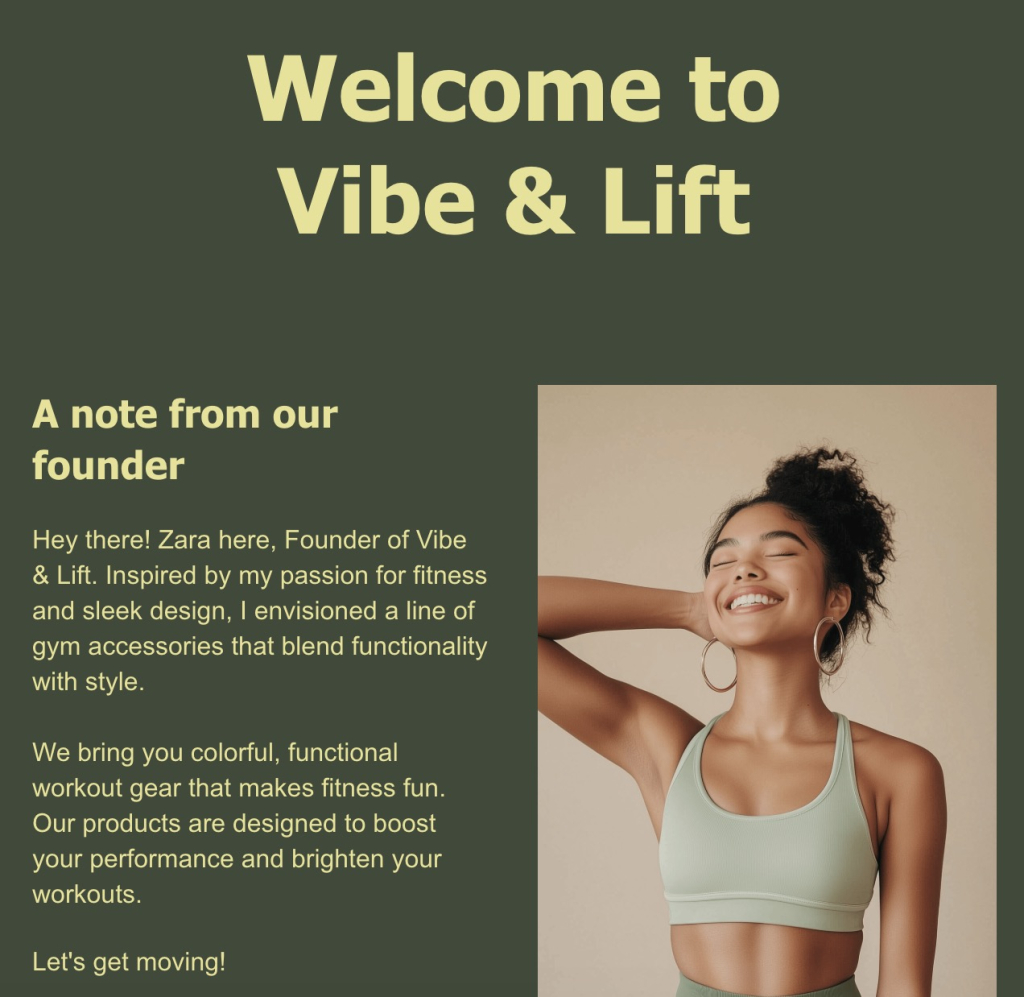
Clear welcome, a founder note that puts a human face on the brand, and a visual that matches the tone. That’s it.
Lead nurture flow
A lead nurture flow is a sequence triggered by a specific sign-up — a guide download, a quote request, a contact form submission — that follows up on that interest with relevant content before making an ask. The goal is to move the subscriber from “I gave you my email” to “I trust this business enough to take the next step.”
Unlike the welcome flow, which is about building the relationship, a nurture flow is about the decision. The emails look different: less brand introduction, more proof, education, and value tied to the specific thing that brought them in.
Trigger: A subscriber joins via a specific sign-up source — a lead magnet, a landing page, a demo request, or a contact form tied to a particular service or topic.
What it should do: Address the specific interest that brought the subscriber in, build credibility through useful content and social proof, and move them toward a decision — whether that’s booking a call, starting a free trial, or making a purchase.
How to structure a lead nurture flow:
| When it sends | Job | |
| Email 1: Deliver and orient | Immediately | Deliver what they signed up for. Confirm what this sequence covers. |
| Email 2: Educate | Day 3 | One specific, useful piece of content related to their interest. No ask yet. |
| Email 3: Build proof | Day 6 | A customer story, a case study, or a concrete result that answers: “Does this work for someone like me?” |
| Email 4: Address hesitation | Day 9 | Handle the most common objection — price, time, complexity, or fit. Keep it honest. |
| Email 5: Direct ask | Day 12–14 | One call to action, one link, no ambiguity. |
In SiteGround Email Marketing, create a separate group for each sign-up source and set each one as the trigger for its own automation, so every subscriber gets a sequence built around what brought them in.
What a nurture email flow looks like in practice
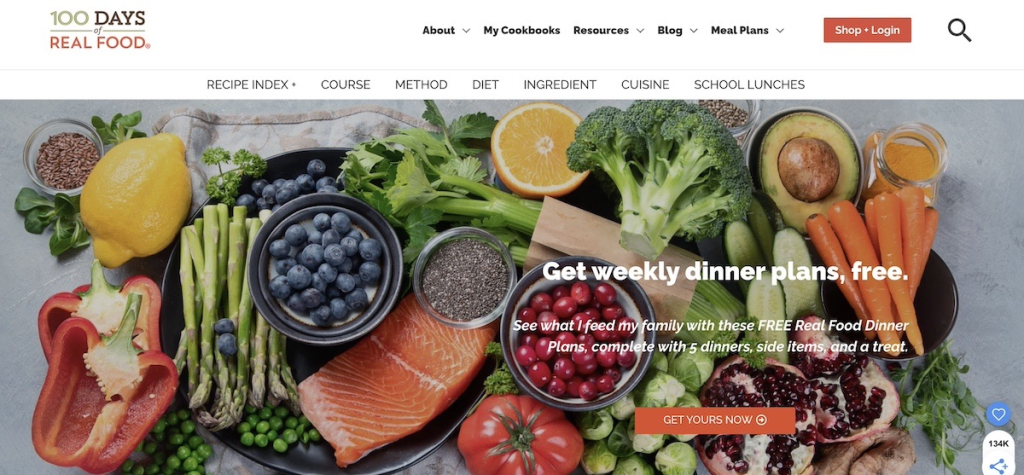
A specific, high-value offer, like this free meal plan from 100 Days of Real Food, is exactly the kind of sign-up that should trigger a nurture flow, not just a welcome email. The subscriber came for something specific. The sequence that follows should speak directly to that.
Re-engagement campaigns
A re-engagement email flow is an automated sequence that targets subscribers who’ve gone quiet and either wins them back or removes them from your active list.
Inactive subscribers hurt your sender reputation. Low open rates signal to email providers that your content isn’t worth delivering, which affects how reliably your emails reach everyone else. A re-engagement flow fixes that proactively.
Trigger: A subscriber hasn’t opened or clicked any email in the past 60–90 days. The exact threshold depends on your typical send frequency. If you email weekly, 60 days is reasonable. If you send monthly, 90–120 days may make more sense.
What it should do: Remind the subscriber why they signed up, give them a reason to re-engage (a specific offer, a piece of content, a direct question), and, for those who still don’t respond, cleanly remove them from your active list.
How to structure a re-engagement email flow:
| When it sends | Job | |
| Email 1: “We miss you” | Day 1 | Acknowledge the gap, remind them of the value they signed up for, include something useful. Subject line example: “Still want [what they signed up for]?” |
| Email 2: Final nudge | 5–7 days after email 1 | Make the ask clearer. Add a small incentive if appropriate — a discount, a free resource, early access. Subject line example: “One click to stay in the loop.” |
| Email 3: Sunset email | 5–7 days after email 2 | Tell them honestly you’re about to remove them and give one last chance to stay. Subject line example: “Should we say goodbye?” |
Exit conditions: If a subscriber opens or clicks any email in the flow, pull them out immediately and return them to your regular list. The goal of the flow is re-engagement — the moment that happens, the flow has done its job.
Subscribers who complete all three emails without engaging should be unsubscribed or moved to a suppression list. Keeping them on your active list costs you in deliverability and distorts your reporting.
What a re-engagement email looks in practice
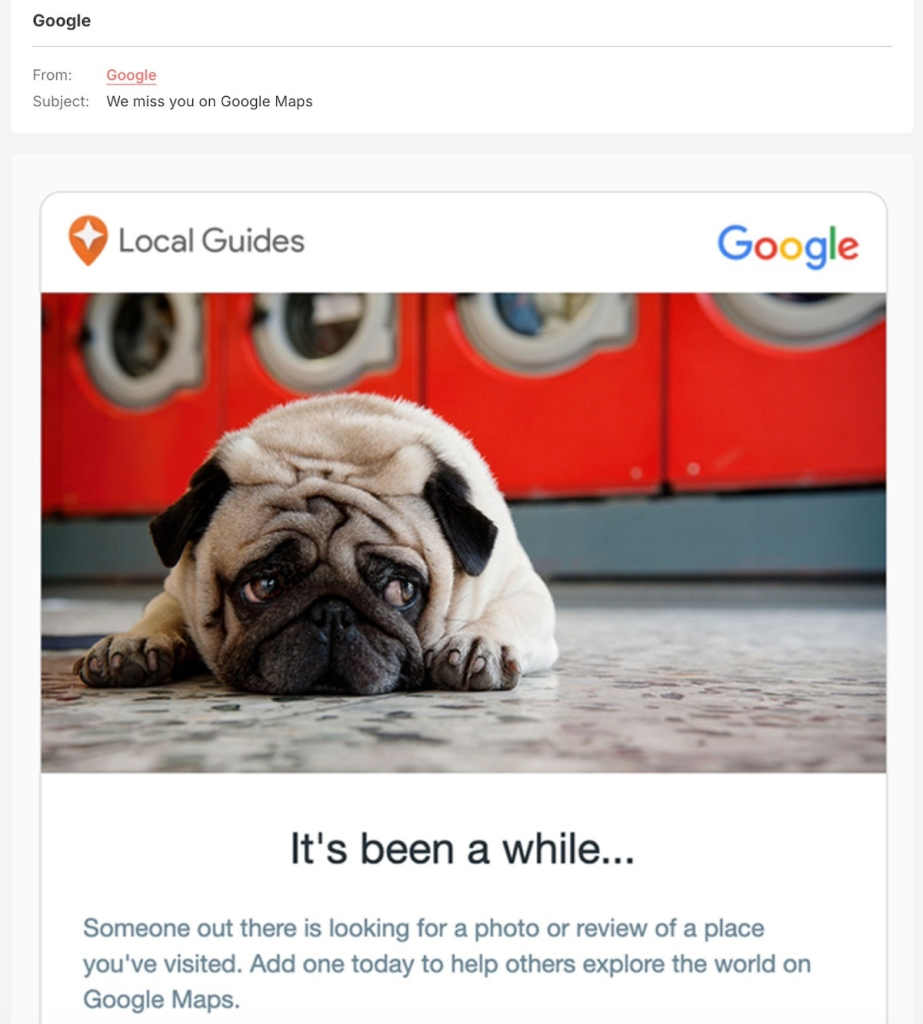
A good re-engagement email acknowledges the gap without making it awkward. Google’s Local Guides example does this well — a disarming visual, a subject line that’s hard to ignore, and a single, low-friction ask.
Flows to add once the basics are running
Once your welcome, lead nurture, and re-engagement flows are live, these are the logical next builds. They’re valuable, but they’re not urgent until your foundational flows are in place. Think of this as your second round of automation: each flow below targets a more specific trigger or a more defined group of subscribers.
Onboarding flow
An onboarding email flow is a sequence that guides new customers through their first steps with your product or service. If someone just bought your course but never logs in, or signed up for your tool but never completes setup, they’re already on their way out — and you may not even know it.
A well-built onboarding flow catches them at that moment: here’s what to do first, here’s what to do next, here’s how to get value fast. The result is fewer support requests, less early churn, and customers who actually get what they paid for.
Event or webinar follow-up flow
An event follow-up flow is a sequence triggered by registration or attendance at a webinar, live event, or workshop.
Someone who carved out time for your webinar is already more interested than the average subscriber; don’t let that momentum go cold with a single replay link. A well-timed follow-up sequence delivers the replay, surfaces related resources, and moves them toward a clear next step while the topic is still fresh. If you can, split attendees from no-shows: they showed up for different reasons and should get different emails.
Birthday or anniversary flow
A birthday or anniversary flow is a single email or short sequence, triggered by a date field in the subscriber profile: a birthday, a sign-up anniversary, or a customer anniversary.
In an inbox full of promotions and newsletters, an email that acknowledges a personal milestone stands out. It’s low effort to build, but it lands as something thoughtful — and a genuine targeted message with an optional offer on the right date can quietly outperform campaigns you spent hours on. The only requirement: collect the date field at sign-up.
Content engagement flow
A content engagement flow is a short sequence triggered when a subscriber clicks a specific link in one of your emails — a pricing page, a product, a resource. That click is a signal: they’re interested in something specific, right now.
Unlike the nurture flow, this one fires mid-relationship, when an existing subscriber shows renewed intent. Two or three focused emails on exactly what they clicked on can turn a casual browse into a real conversation.
What makes an email flow actually work
The difference between a flow that performs and one that sits in your platform collecting dust usually comes down to four variables. Competitors cover these briefly or not at all, but they’re worth understanding in detail, because getting even one of them wrong can undermine an otherwise solid sequence.
The trigger
The trigger is the most important decision you make when building a flow. It defines who enters, when, and with what context. A vague or broad trigger like “anyone who joined my list” produces a flow that goes to people who may have very different expectations and needs.
A precise trigger such as “anyone who signed up via the free SEO checklist download on my homepage” produces a flow that can be highly specific, because you know exactly what brought that person in.
When setting up a trigger, ask two questions:
- What did this subscriber just do?
- And what do they likely want next?
The more directly your flow answers the second question based on the first, the better it will perform.
In SiteGround Email Marketing, segmentation happens at the group level. You define who belongs in a flow by deciding which group triggers it. A group for inactive subscribers triggers the re-engagement flow. A group for guide downloads triggers the nurture flow. The group is both the segment and the trigger.
Segmentation
Segmentation is the process of defining who qualifies to enter an automation flow and just as importantly, who doesn’t. In practice, this means being deliberate about which group triggers a flow: a re-engagement flow should only be linked to a group of inactive subscribers; a lead nurture flow for a specific service should only go to subscribers who expressed interest in that service.
Poor segmentation is one of the most common reasons email flows underperform. When irrelevant subscribers enter a flow, they’re more likely to ignore or unsubscribe, which drags down the engagement metrics for the entire sequence. Before you build a flow, define the audience clearly: which list, which segment, and what behavior or attribute qualifies someone for entry.
Timing and frequency
Spacing between emails in a flow is not a set-and-forget decision. Too close together, and subscribers feel pressured or overwhelmed, which leads to unsubscribes. Too far apart, and the context of what triggered the flow gets lost, which leads to irrelevance. The right cadence depends on the flow type and your audience’s expectations.
As a general starting point: welcome flows work well with emails 2–3 days apart. Lead nurture flows typically run on a three-day cadence over two weeks. Re-engagement flows need more space: 5–7 days between emails gives subscribers time to notice the gap.
The best way to calibrate is to monitor open rates across the sequence and look for where customer engagement drops. A sharp drop between email two and three often signals the timing is too tight or the content isn’t holding relevance.
Exit conditions
Exit conditions define when a subscriber should leave a flow before completing it. Without them, flows keep sending to people who’ve already converted, already unsubscribed, or are now in a different flow with conflicting messaging.
A subscriber who purchases during a nurture flow shouldn’t keep receiving “still thinking about it?” emails. A subscriber who re-engages in your win-back flow shouldn’t receive the sunset email telling them they’re about to be removed.
Every flow you build should have at least one exit condition defined: the action that signals the goal has been achieved.
How to set up automated email flows with SiteGround Email Marketing
Setting up your first flow doesn’t have to feel like a project. Here’s what the process looks like in practice — from prep to going live.
What to have ready before you build
Before you start, get three things clear: what action triggers the flow, who should receive it, and what each email needs to say. A rough outline per email is enough. And if the writing part feels like the biggest hurdle, SiteGround Email Marketing has a built-in AI text generator to help you get the copy done faster.
Build your first flow
- Create your account and access the Email Marketing dashboard.
- Set up a group for the subscribers who will trigger the flow — new sign-ups, contacts from a specific form, or any segment that makes sense for your sequence.
- Build your email sequence in the automation builder — add emails, write your content using the email editor, and set delays between each step.
- Activate the flow and it runs automatically from that point forward — every new contact who joins the trigger group moves through the sequence on their own.
Pick one automated email flow and press send
Still deciding where to start? Build the welcome flow. It has the clearest trigger, the highest open rates, and the most immediate impact — and once it’s live, every new subscriber gets a real introduction to your business without you lifting a finger.
That’s the compounding value of automated email flows. Build them once, and they handle the most common subscriber interactions on their own — freeing your time for the work that actually needs you.
SiteGround Email Marketing gives you everything you need to get your first flow live today.
[58]
Frequently asked questions about automated email flows
An automated email flow is a sequence of emails that sends automatically based on a subscriber’s action or behavior. When a subscriber meets a trigger condition — signing up for a list, going inactive, clicking a specific link — the flow starts and delivers emails at pre-set intervals without any manual input. The flow runs continuously, so every subscriber who meets the trigger gets the same sequence, timed to their individual entry point.
An email campaign is a one-time send that goes to a list or segment on a date you choose. An automated email flow runs continuously and sends to individual subscribers when they meet a trigger condition. Campaigns are best for announcements, promotions, and newsletters. Flows are best for onboarding, nurturing, re-engagement, and any situation where timing relative to a subscriber’s action (or inaction) matters more than timing relative to a calendar date.
Set up the welcome flow first. It triggers on the most common subscriber action (joining your list), has the highest average open rates of any email type, and delivers value immediately. A three-email welcome sequence — confirmation and delivery, brand introduction, and a clear next step — covers the essentials and can be built in a few hours.
It depends on the flow’s goal and the subscriber’s stage in their relationship with your business. Welcome flows typically run three emails over six days. Lead nurture flows work well at four to five emails over two weeks. Re-engagement flows rarely need more than three. The right number is the minimum needed to achieve the flow’s goal — adding emails for the sake of volume tends to hurt performance rather than help it.
Yes. Automated email flows are effective at any list size because they’re triggered by individual subscriber behavior, not list volume. A welcome flow with 50 subscribers delivers the same value as one with 50,000 — every new subscriber gets a relevant, timely introduction to your business. Small lists are actually a good time to set flows up, because you’ll have the sequence running before your list grows, rather than trying to retroactively add automation later.
Track four metrics: open rate (are subscribers reading the emails?), click rate (are they taking action?), conversion rate (are they completing the flow’s goal?), and unsubscribe rate (are the emails relevant enough to keep them subscribed?). Compare each email in the sequence individually — a sharp drop in open rate at email three, for example, often signals a timing or relevance problem at that step, not a problem with the flow as a whole.
Profitability in email automation comes from relevance and timing, not volume. Start by defining a clear goal for each flow — what action do you want the subscriber to take by the end? Then build the trigger, sequence, and exit conditions around that goal. Flows that underperform typically have one of three problems: a trigger that’s too broad (the wrong people are entering), timing that’s too aggressive (emails are going out too fast), or an unclear call to action in the final email. Fix those three variables and most flows will improve measurably.