Drip Marketing: What Is It and How It Works

A laptop displaying an email that marks the beginning of a drip sequence.

Turning curious browsers into loyal customers can feel like a Herculean task. Leads often play hard to get, and even when they’re ready to take action, holding their attention is no small feat. 

But what if you could captivate them with well-timed messages that gently nudge them toward conversion? 

Fortunately, this isn’t just wishful thinking—it’s a practical strategy you can easily implement. Follow along to learn about drip marketing and how to leverage its power to deliver the right message at the right time.

What Is Drip Marketing?

Drip marketing is a strategy that involves automatically sending out personalized messages based on a schedule or segments, or that is triggered by specific user actions. These messages can be delivered through email, SMS, or push notifications, with email being the most commonly used channel. 

💡An email drip campaign may also be referred to “an automated email campaign,” “lifecycle emails,” or “autoresponders.”

Oftentimes, a drip marketing campaign is used to influence its target market over time by delivering a series of messages that follow a predetermined course. One common example is the welcome email sequence, used to greet newcomers. 


For instance, a welcome email can be sent automatically when someone registers on your website. Depending on whether the first email was opened, you can follow up with a different message tailored to guide them further down their email customer journey. If they don’t engage, you can remove them from this specific campaign. However, if they do engage, you can encourage further interaction by subtly prompting them to make a purchase.
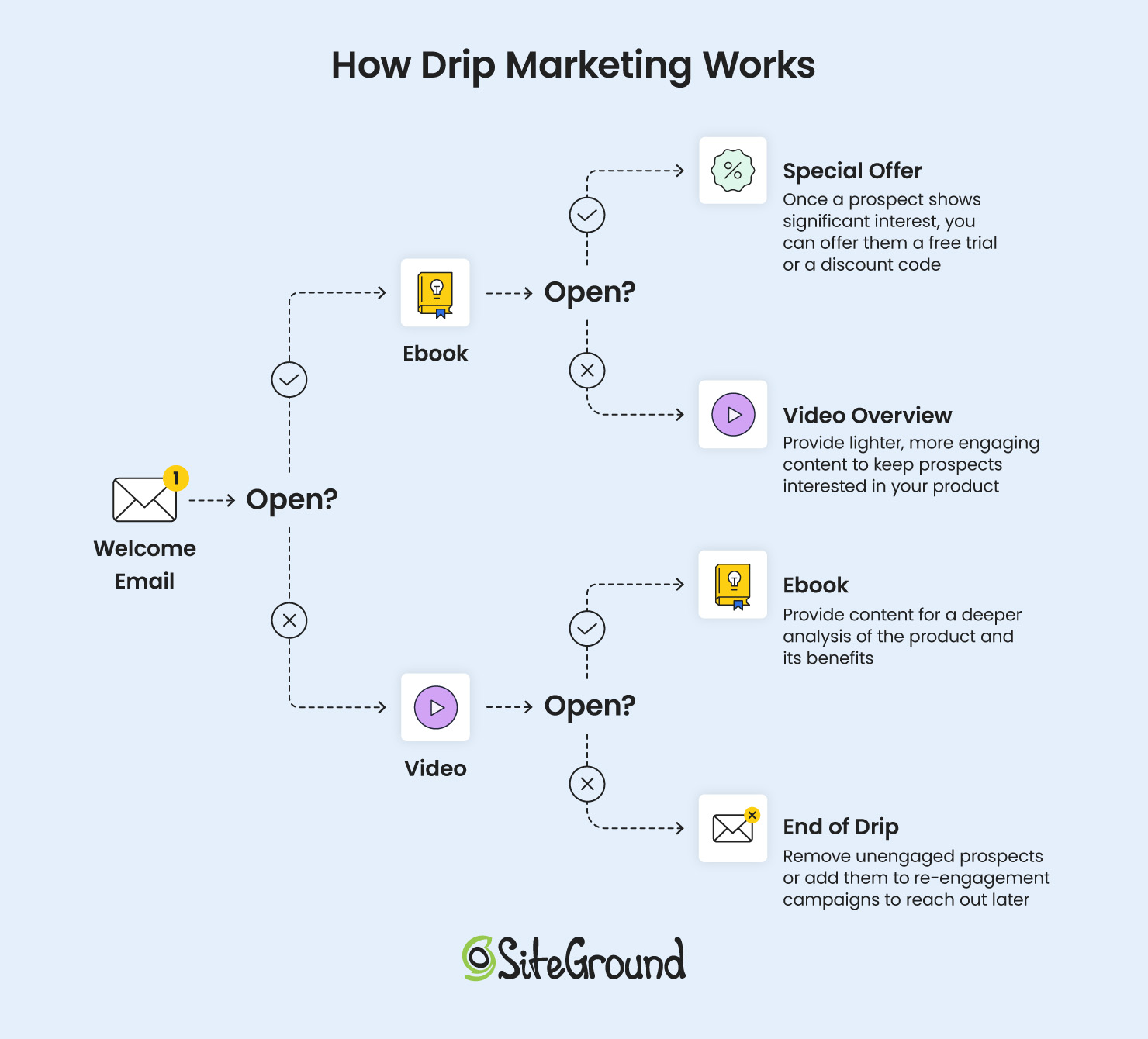
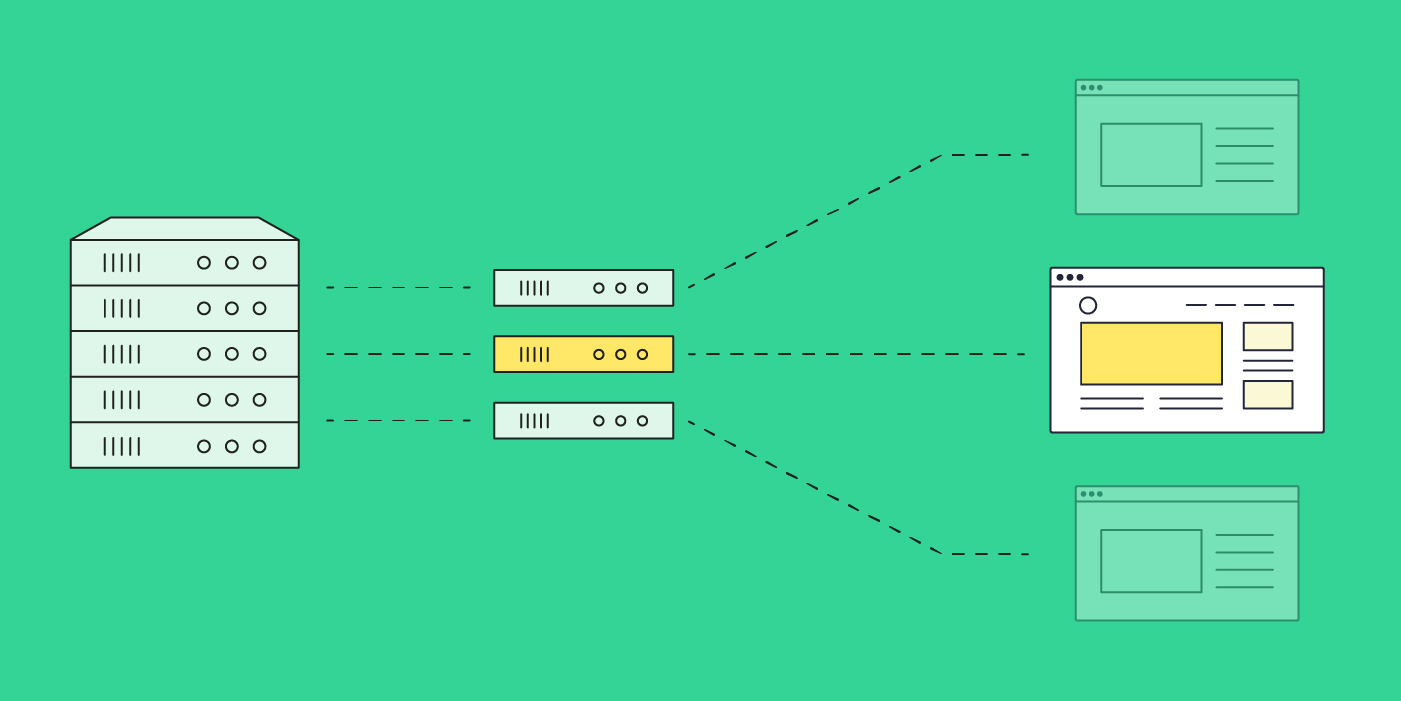
Illustration of how a welcome drip campaign works

Although transactional emails can be sent individually, they can also play an effective role in drip marketing. These types of emails include account alerts, such as password resets or subscription renewals, as well as commercial transactions like order confirmations and shipping notifications.

Why Run a Drip Marketing Campaign?

Email automation isn’t just about logistics, though: it can help grow your business. Indeed, here are several reasons why you should consider implementing it in your email marketing strategy:

Time-Saving and Scalable

Drip marketing allows your business to communicate in real-time and in ways that manual outreach simply can’t replicate. That is, as a small business owner focused on growth, manually greeting every new subscriber or tracking each website visitor’s actions in order to send individual emails would be overwhelming, if not impossible. 

With drip marketing, you set up your automation workflows once, and they run automatically in the background, working their magic. This way, you not only save time to focus on other important tasks, but you can also handle a larger number of subscribers without extra effort. As a result, you spend less time on tedious activities while achieving greater results.

Increased ROI 

Speaking of greater results, did you know that three out of four marketers who implement marketing automation achieve a positive return on investment (ROI) within a year, and almost half see a positive return within just six months? 

This success is largely due to drip campaigns’ ability to effectively highlight calls to action at the most opportune moments. For example, if someone is exploring your premium plans, they receive a message showcasing the benefits of upgrading. After making a purchase, they receive an upsell or cross-sell message to encourage further interest. In each scenario, they receive tailored messages during critical-decision moments, which increase the likelihood of success and therefore your ROI. 

Gradual Relationship Building

Retaining existing customers is both easier and more cost-effective than constantly pursuing new ones. Automated flows can help you achieve this efficiently.

For instance, you can have one drip campaign for when someone signs up to download a resource, showing interest in your content. An automated sequence can follow up with related articles, helpful tips, or exclusive offers, gradually nurturing their interest and naturally guiding them from lead to customer. Once they make a purchase, transition them to a loyalty series. This might start with a thank-you email, followed by usage tips for their new product and exclusive discounts on future orders.

This approach ensures that customers receive messages relevant to their current situation, keeping them engaged with your brand and increasing the chances of repeat purchases and loyalty.

Personalization Made Easy

When subscribers receive emails that feel personal, they are more likely to engage—whether by opening, clicking, or even making a purchase. Drip campaigns simplify personalization by allowing you to set up the flow once and customize it for each recipient’s unique attributes, such as user data, behavior, and preferences.

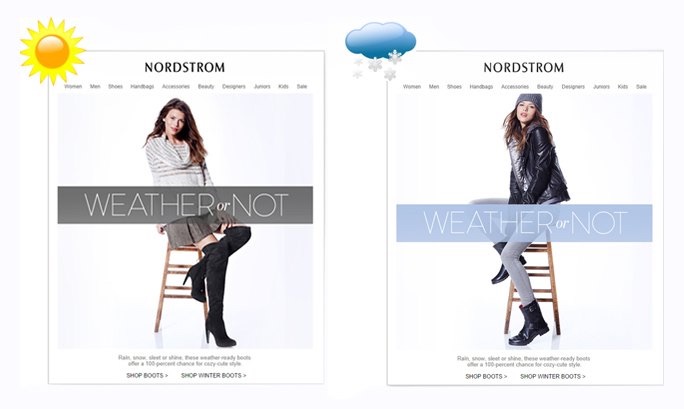
Nordstrom, for instance, customized their promotional emails to reflect each visitor’s local weather conditions, providing content that was directly relevant to their environment. This level of personalization makes the communication feel more relevant and engaging, increasing the likelihood of interaction and conversion.
How to Set Up an Email Drip Campaign?

Now that you’re versed on what drip marketing is and its many perks, let’s pull back the curtain and explore the behind-the-scenes processes. From choosing your email triggers to crafting a compelling message, let’s examine all you need to know in order to create seamless customer experiences.

1. Choose an Automation Software

First and foremost, you can’t set up a drip campaign without automation software.  That’s because manually managing dynamic content and conditional statements would likely be mind-bogglingly time-consuming and error-prone. Fortunately, most email marketing or CRM platforms include automation features that simplify the process.

Here’s a quick list of key features to look out for when selecting an email automation tool: 

  • Ease of Use: Look for intuitive navigation and a no-code builder so you can manage workflows without needing lengthy tutorials. 
  • Deliverability: Ensure your platform allows you to authenticate your sending domain via DNS records (DKIM, DMARC, SPF) to prevent emails from landing in spam folders or getting blacklisted.
  • Recipient Segmentation: Look for a platform that allows for straightforward recipient segmentation into cohorts that align with your marketing efforts.
  • Analytics and Reporting: To identify the most effective email elements and increase conversions, your platform should provide access to key email marketing metrics like open rates, click rates, bounce rates, and interactions.

SiteGround Email Marketing happens to have them all! With its intuitive interface, AI writing assistant, and pre-built templates, you can effortlessly schedule welcome sequences, deliver freebies, and keep your audience engaged with simple, targeted email flows. Discover how easy it is to nurture, engage, and grow your audience.

2. Determine Your Email Triggers

In the world of drip campaigns, triggers, also known as rules, act as the signals that determine when and why a user receives a particular email. It’s important to choose triggers that resonate with your audience to avoid overwhelming them with irrelevant information. Here are the four main types of email triggers you might consider:

Action-Based Triggers

As you can guess, action-based triggers are initiated by a specific action a user takes, either on your website or within your app, like:

  • Sign-Up Confirmation
  • Product Purchase
  • Webinar Registration
  • Abandoned Cart

Date-Based Triggers

Engage with your audience on the days that are important to them—or to you. These automations can be utilized for a range of occasions, including:

  • Subscription Renewal Reminder
  • Milestone Achievement
  • Brand Anniversary
  • Birthdays

Demographic-Based Triggers

Demographics provide valuable insights into your users, allowing for more personalized interactions. Consider factors such as:

  • Gender
  • Age
  • Location

However, it’s crucial to use this information responsibly and respect your audience’s privacy consent.


User Characteristic-Based Triggers

You might also try targeting audience segments based on user characteristics such as:

  • Visit Frequency: How often do they visit your site, or how long do they linger on your premium services page?
  • Account Inactivity: How long ago did they sign up, or make their last purchase?
  • Content Preferences: Which types of content do they engage with most?

💡 TIP: We suggest starting with these automation sequences that every business should implement:
– welcome sequence
– lead magnet delivery sequence
– nurture sequence
– client loyalty sequence
Once you’ve mastered these, you can try setting up drip campaigns based on more advanced triggers.

3. Determine Your Calls to Action

The primary goal of a drip campaign is to guide your prospects through the customer journey by encouraging them to take specific actions. 

To achieve this, each email in your series should include a call to action (CTA) that prompts subscribers to engage in activities that advance them further down your sales funnel, such as:

  • “Download Guide” 
  • “Redeem Your Discount”
  • “Watch Video”
  • “Purchase Now”

To motivate subscribers, it’s important to associate a clear benefit with the action you want them to take. Additionally, the actions subscribers take—or choose not to take—serve as triggers for the subsequent email in the campaign.

4. Plan Out Your Drip Campaign

How many emails should your drip campaign include? How should you space them out? These are crucial questions, and the answers depend on several factors:

  • The type of drip campaign 
  • The complexity of the information you need to convey
  • The length of your customer journey

Research indicates that increasing the number of emails in an autoresponder sequence can lead to reduced engagement. Surprised? After all, nobody enjoys being blasted with emails. 

However, there are a few guidelines to help you hit the sweet spot regarding the number of emails in your sequence and the intervals. Here are a few to consider:

  • Identify the amount and type of content needed to effectively guide a subscriber through your sales funnel.
  • Break your content into small, easy-to-digest chunks
  • Assign the content to each stage of your customer journey
  • Experiment with different drip sequences

5. Don’t Forget to Set Exit Conditions

We’ve talked about setting email triggers; now let’s focus on how your audience exits these triggers—that is, how they finish the email drip campaign. To stop subscribers from receiving your sequence after they’ve already taken the desired action, it’s important to establish exit conditions. These conditions define the specific actions or criteria that, when met, automatically remove subscribers from the campaign, ensuring they only receive relevant content.

Consider a situation where a prospect is enrolled in a drip campaign aimed at gathering feedback. They receive an email requesting feedback about their experience with your brand’s support team. After submitting the form, they expect a thank you email but receive another feedback request instead, leading to confusion. This is not the reaction you want from your prospects, right?

To ensure a smooth process, remember to set exit conditions for your email triggers, which will automatically disenroll a prospect once they complete the desired action.

6. Craft Action-Inspiring Content

Now that you know who you’re targeting, you need to generate a message that’s helpful and grabs their attention. What do you want the customer to do or learn? Based on your answer, write copy that’s clear, actionable, and on brand. 

🔥 Learn how to write marketing emails that people actually read. 

In an email drip marketing campaign, each message should be able to stand alone, even though it’s part of a series. For instance, if a prospect skips the first two emails but engages with the third, they should still be able to follow along and understand the call to action.

Don’t assume subscribers read every email, just as you likely don’t either. Instead, ensure each message provides context and relevance.


[ai_prompts_download]

7. A/B Test Your Drip Campaign

Once you’ve crafted your emails, you might think it’s time to send them out. But wait! To make the most out of your email drips and to continuously improve, it’s important to conduct A/B testing. For an email drip campaign, this means sending slightly different versions of an email to various groups of subscribers to determine which performs best.

You can test each component of your emails to find the optimal combination that drives results. However, remember to change only one element at a time. For instance, try different subject lines or images while keeping everything else constant. This approach will help you identify the specific change that made the campaign more successful, allowing you to fine-tune your drip campaigns.

Examples of Email Drips

Now that you have the know-how to start your drip campaign, here are some real-life examples to ignite your creativity.

1. Welcome Email 

Imagine how bewildered a newcomer might feel during their first encounter with your business. That’s why a welcome email series is an essential first step in engaging a new or potential customer.

This type of drip marketing triggers immediate next steps based on actions users take on your website or app, such as subscribing to your newsletter or creating an account in your application.

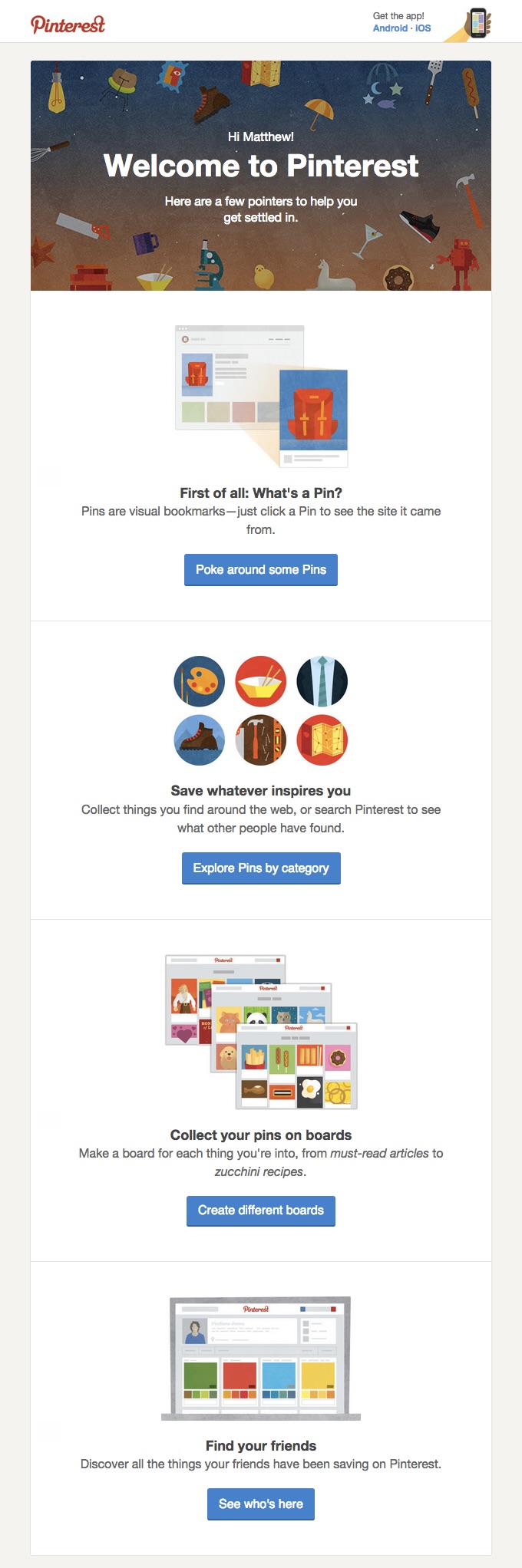
Welcome drips allow you to share everything a newcomer needs to know about your business—from your brand’s values and story to your product selection or even a quick guide on how your platform works. This email from Pinterest is a good example.
2. Cart Abandonment

Abandoning a fully loaded shopping cart is unfortunately quite common, but a well-crafted abandoned cart email can encourage customers to reconsider their purchase. Be cautious not to come across as overly intrusive or “big brother”-like. Instead, find a subtle way to say, “We understand, life happens,” without any judgment or pressure.

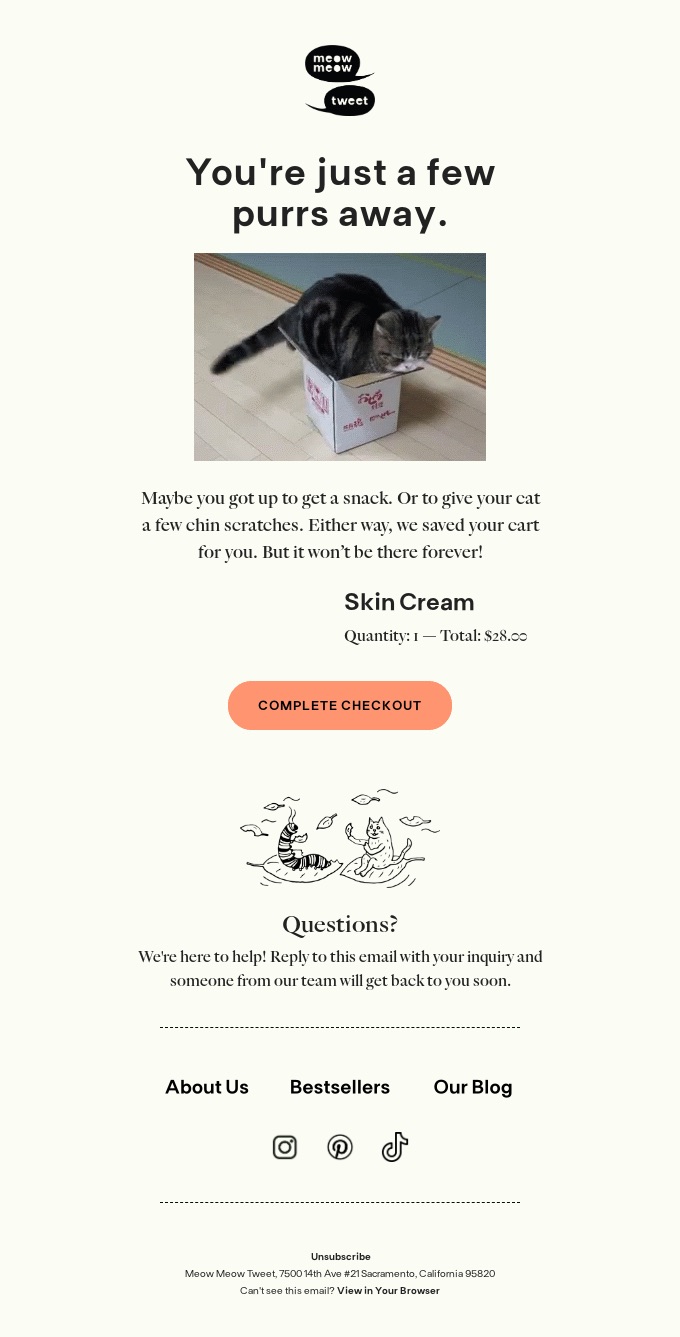
For example, Meow Meow Tweet sends a light-hearted reminder to customers that something is waiting for them, gently encouraging them to return and complete their purchase.
3. Post-Purchase 

When someone makes their first purchase from you, it’s a great opportunity to thank them, showcase the product’s features, provide tips on getting the most out of it, and reassure them that they made a smart decision.

Expressing gratitude at this early stage of your business relationship can make customers feel like they’re part of a special community, much like this email from Ilia.

4. Order Confirmation

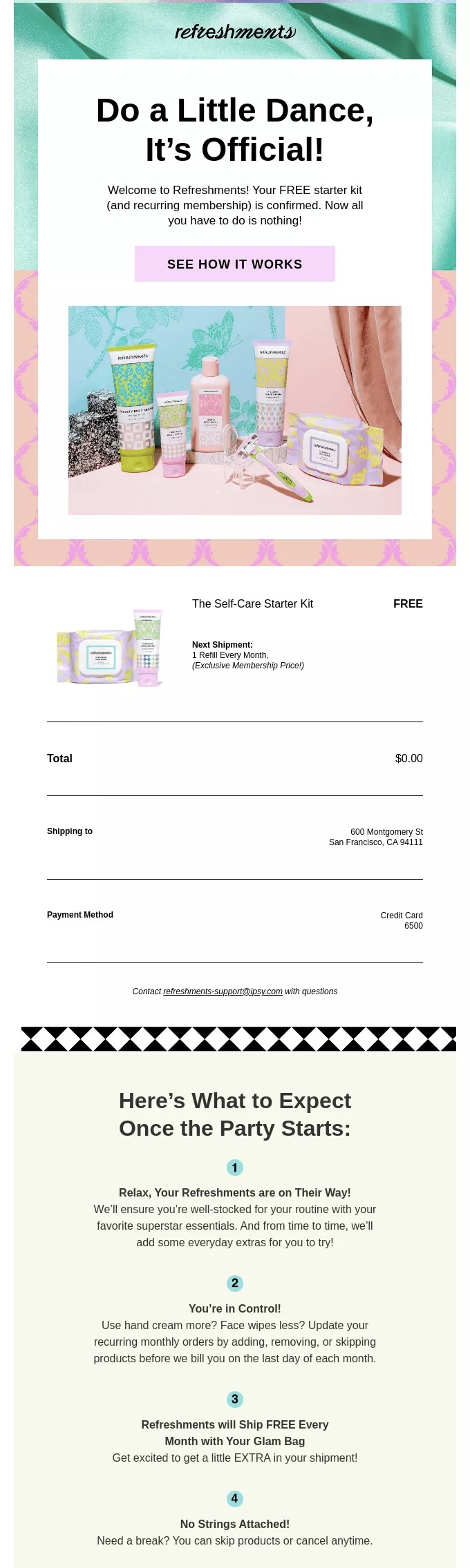
When a customer completes a purchase, an order confirmation email is the initial communication they anticipate from any brand or business. It reassures them that their transaction was successful and provides important details such as shipping information and an order summary.

However, these emails can be more than just a receipt, and Ipsy is a perfect example of that. They even provide a how-to guide in order to educate the customer on how to get the most out of the product.
5. Birthday Celebration 

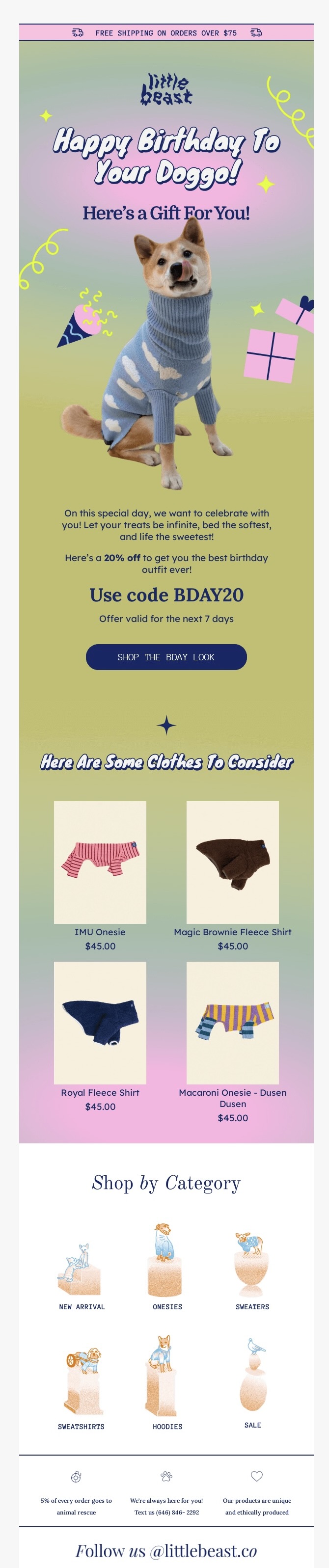
Sending an email on a customer’s birthday, the anniversary of their first purchase, or another significant event can be an excellent way to reinforce your brand’s value—and might even prompt a purchase.

Take a cue from Little Beast, which remembers to delight its customers, even if those customers aren’t exactly human.
6. Unsubscribe 

While unsubscribing emails might not be the most exciting aspect of a marketing plan, they are essential, particularly when building a high-quality email list.

These emails can be used to try to win back customers by understanding their reasons for unsubscribing, and thus offer valuable insights to enhance your marketing strategy. Alternatively, you can suggest they customize their preferences to receive more relevant information, if this was the problem.

7. Subscription Renew

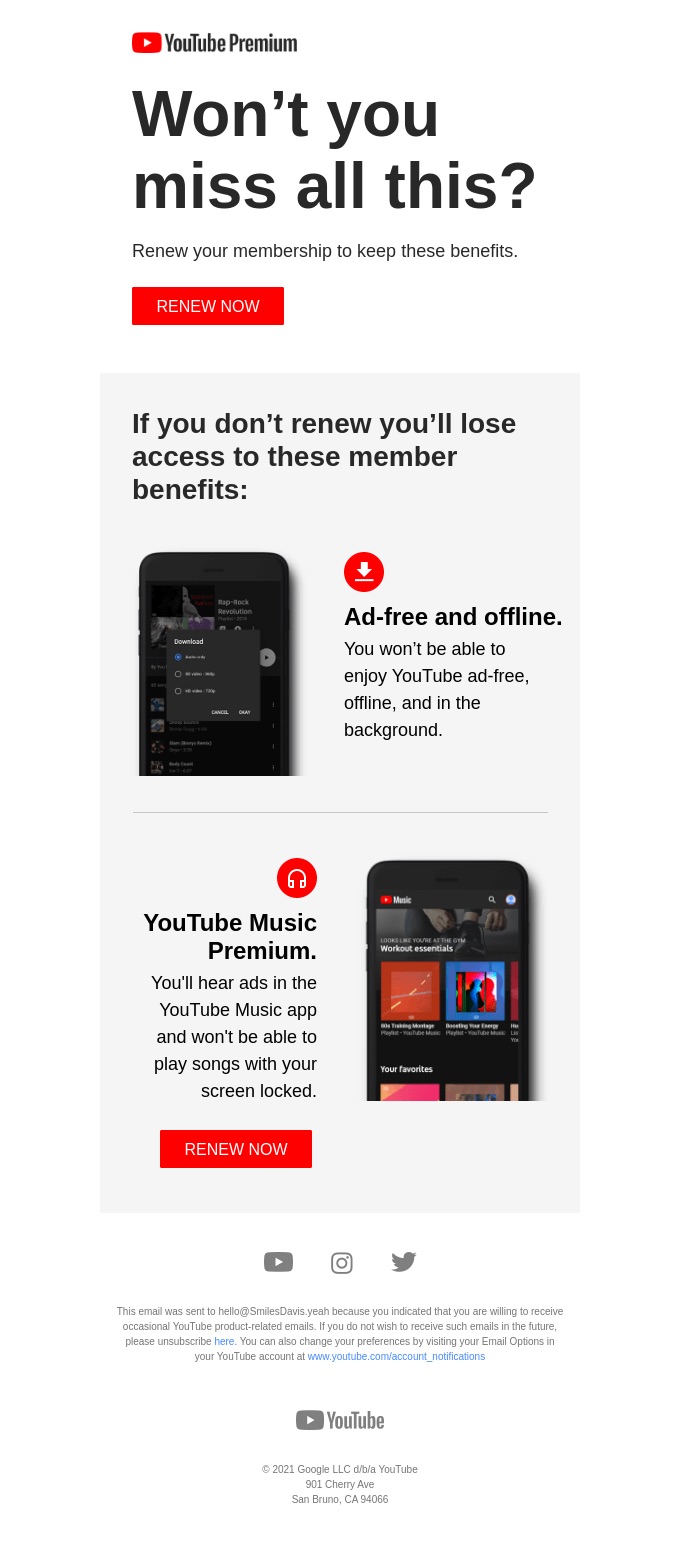
If your subscriptions don’t auto-renew, design a compelling drip campaign with a clear call to action, urging users to renew their service. Use this opportunity to showcase the advantages of maintaining their subscription, such as access to exclusive content and exciting new features introduced since their last renewal.

For instance, YouTube Premium successfully encourages users to keep enjoying the enhanced experience of their premium service by highlighting what they would miss out on if they don’t renew.
Final Words on Drip Marketing

Drip marketing is like having a friendly digital concierge for your audience, ready to deliver just the right message at just the right time. 

With drip marketing, you can send personalized, timely messages, effortlessly guide prospects through their customer journey, enhance their experience, and build lasting relationships. Whether you’re rolling out the welcome mat for new subscribers, giving a gentle nudge to those who left items in their cart, or assisting someone who has forgotten their password, drip campaigns offer a strategic and efficient way to communicate that saves time and drives results.
What Is an Email Blast and Should You Send One?

Header image showing a girl surrounded by emails

You’ve come across the term “email blast,” and now you’re wondering if it could be the key to increase your brand’s visibility or, even better, skyrocket your conversion rates. 

Historically, email blasts were a go-to strategy for reaching large audiences quickly and efficiently. However, in today’s digital landscape, this approach can sometimes backfire, leading to messages being flagged as spam.

In this article we’ll uncover what “blasting” is all about, discuss whether it deserves a place in your email marketing strategy, and explore effective ways to implement it if you choose to do so.

What Is an Email Blast?

An email blast refers to a uniform message sent to your entire email subscriber list simultaneously. The main goal of email blasting is to disseminate information quickly and on a large scale, much like “blasting” a message with a loudspeaker.

Email blasts gained popularity in an era when technology didn’t support the personalization and segmentation of emails. Today, however, the email marketing approach is more nuanced.

On one hand, numerous regulations have been introduced, like the EU’s GDPR (General Data Protection Regulation) and California’s CAN-SPAM Act, which govern customer consent and data privacy, impacting email marketing practices. On the other hand, companies now prefer to create more targeted and personalized email campaigns, as they see better results. 

💡 Email blasts are also known as “e-blasts,” “broadcast emails,” or “mass emails.”

Some articles might suggest that “email blasts” and “email campaigns” are the same, but that’s not entirely true. Sending a well-targeted email is different from blasting everyone with the same content.

An email campaign involves sending either a single email or a series of emails to your subscribers as part of a broader marketing strategy. Some campaigns, like drip campaigns, are designed to guide recipients through an email journey, often involving multiple touchpoints and interactions. Whereas, an e-blast is a broad, one-time message.

Here are the key differences between an email blast and an email campaign:

Email BlastEmail Campaign
TargetingLess targeted; not sensitive to recipients’ past behaviour and preferencesMore targeted; often involves segmentation based on user behavior, demographics, or preferences
AudienceOften sent to everyone on the mailing listSent to specific segments of the mailing list
FrequencyUsually a one-time communication, without a follow-up emailPart of a border marketing strategy, often includes a sequence of emails (e.g. welcome series)
PurposeUsed for company-related topics or general information that is relevant to a broad audienceAims to engage recipients more deeply and drive specific actions (like conversions, sign-ups, or purchases)
EffectivenessMay have lower engagement rates due to lack of personalizationTypically includes tracking and analysis of email marketing metrics to measure engagement and effectiveness

When to Consider Sending an Email Blast?

Email blasts can be effective when you need to quickly deliver a single, important message. For example, updates or changes to your business’s privacy policy or terms and conditions are critical updates that all your customers need to know about. Similarly, announcements like the opening of a new store can be communicated through an e-blast.

It’s less about the “blast” itself and more about how you carry it out. If your content is valuable and your subscribers are engaged, occasionally sending a uniform email to everyone won’t be harmful.

However, if you send e-blasts without a clear purpose and just for the sake of sending emails, you may encounter:

  • Damage to your sender reputation: today, it’s easier than ever for emails to be marked as spam. If your emails have a high spam complaint rate, email providers might block them from reaching subscribers entirely.
  • Decrease in website traffic and sales: when your emails end up in spam, subscribers are less likely to open them. This means the links inside your emails won’t get clicked, making  it harder to drive traffic to your website and reducing the chances of making a sale.

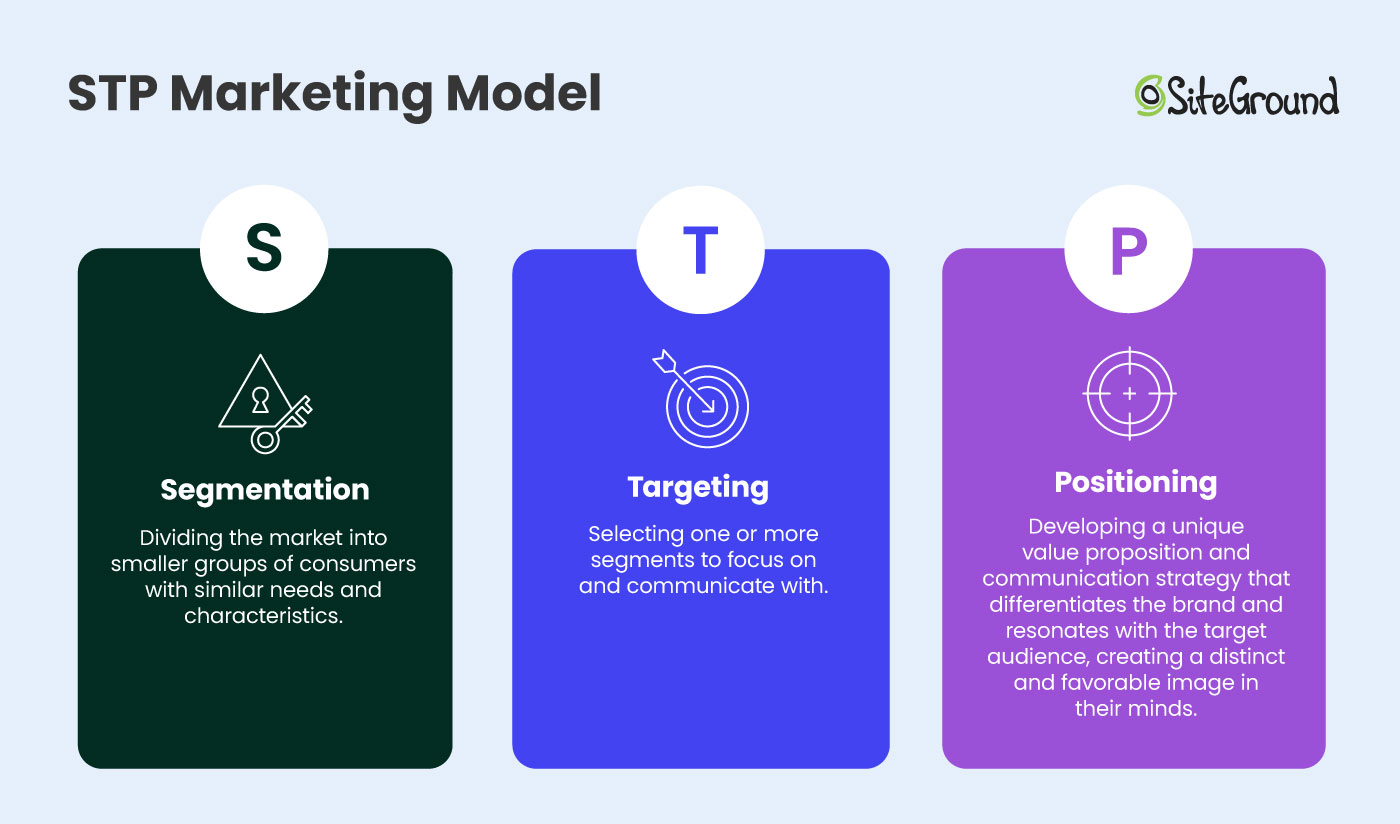
This can happen because when blasting your subscribers, you won’t follow the STP (Segmentation, Targeting, and Positioning) marketing model. 

The three-step model involves analyzing your products or services and tailoring your communication to meet the needs of specific customer segments. Without following this approach, e-blasts risk being too generic, leading to lower engagement and higher spam complaints. 

That’s why it’s important to be cautious when sending an e-blast. We’ll provide some tips on how to do this effectively in the next sections.

Email Blast Examples 

We’ve compiled a short list of email blast examples to help you see how they work in practice.

  • Company-Related Information

As we’ve already pointed out, e-blasts are often the go-to for spreading the word about important announcements. Some are must-sends, while others are optional—as we’ll explore in the next example. But regardless, your email should never come across as generic or dull.

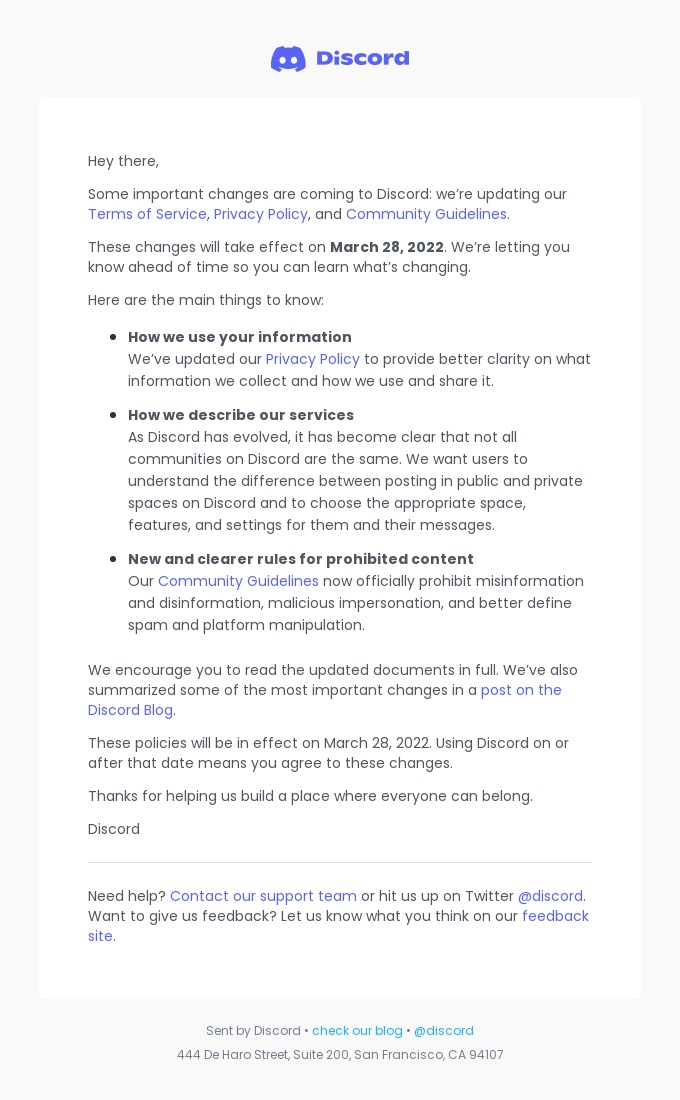
Take a cue from Discord – they masterfully use clear and concise messages to explain upcoming policy updates, detailing how these changes will affect users. The instant messaging platform ensures the details are a breeze to digest by spotlighting key changes with bullet points and offering links for more information.

  • New Features/Products

A product or feature release email is your chance to share exciting updates about recent changes to your product or service, whether it’s new features or entirely new product lines under your brand.

By directly emailing your email subscribers, you can captivate a larger segment of your users, instead of just posting updates on your website, which many people might miss.

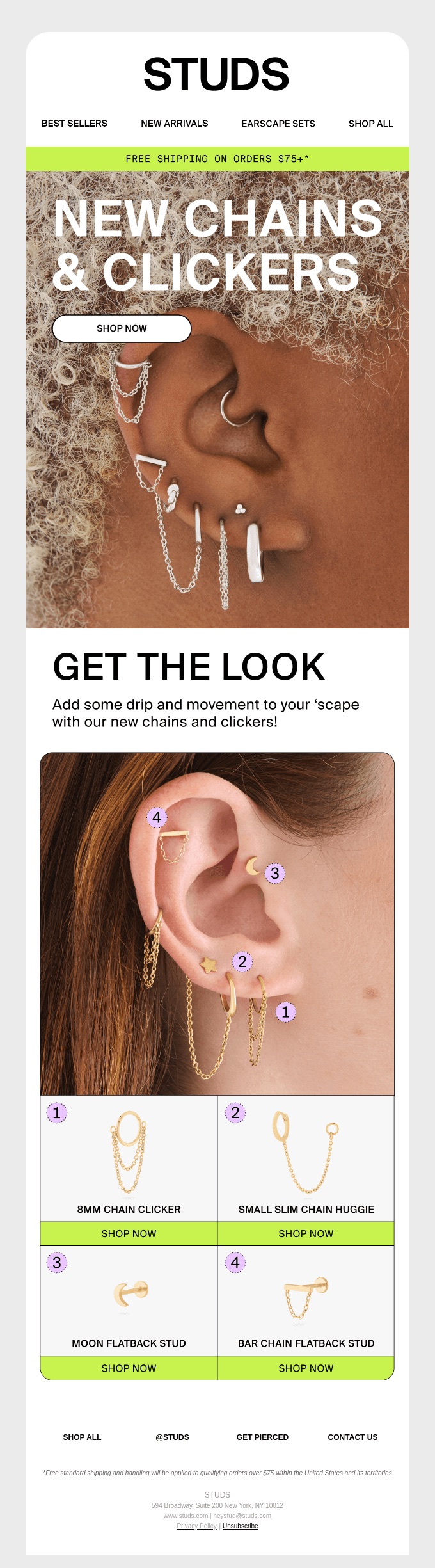
You can whip up excitement with a full-scale email campaign, or simply craft one captivating email and send it to your entire list—just like Studs, the jewelry brand, does with flair!

  • Flash Sales

Promotional emails are all about turning subscribers into customers or enticing existing customers to buy more. You can run various email campaigns, like one targeting new email subscribers or another focused on upselling with a tempting discount code.

If you’re aiming to sweep out unsold inventory or offload out-of-season products, a well-timed email blast to your subscribers might be just the magic wand you need.

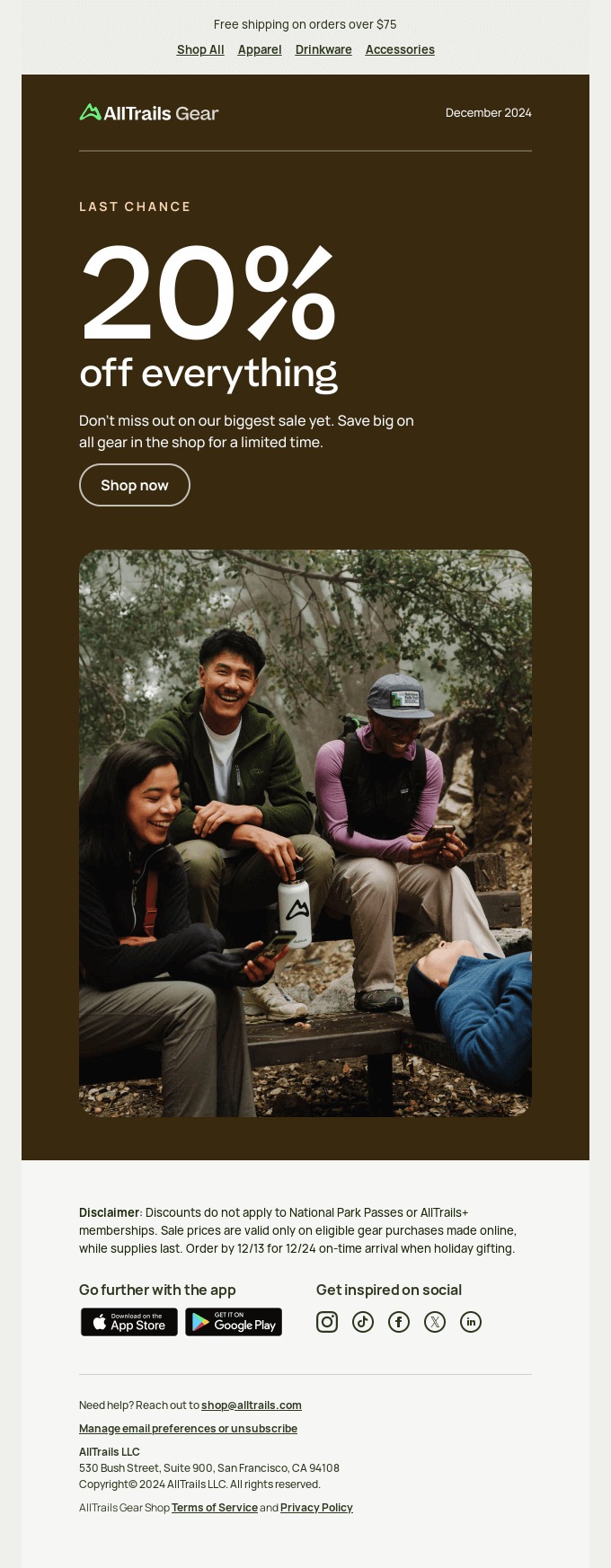
Take AllTrails’ all-product sale email, for instance. It employs a straightforward yet effective visual hierarchy that clearly conveys the main message, stirs up a sense of urgency, and features an easy-to-find CTA button. No fluff, no fuss—just straight to the point.

  • Surveys and Feedback

E-blasts are also a fantastic tool for gathering feedback and conducting surveys since they’re relevant to your entire audience. Plus, they allow you to collect valuable insights for segmenting your list for future targeted campaigns.

Additionally, these surveys can provide insights into customer preferences, helping you refine your products or services and improve customer satisfaction. They also offer a chance to engage with your audience, strengthening the relationship and building brand loyalty.

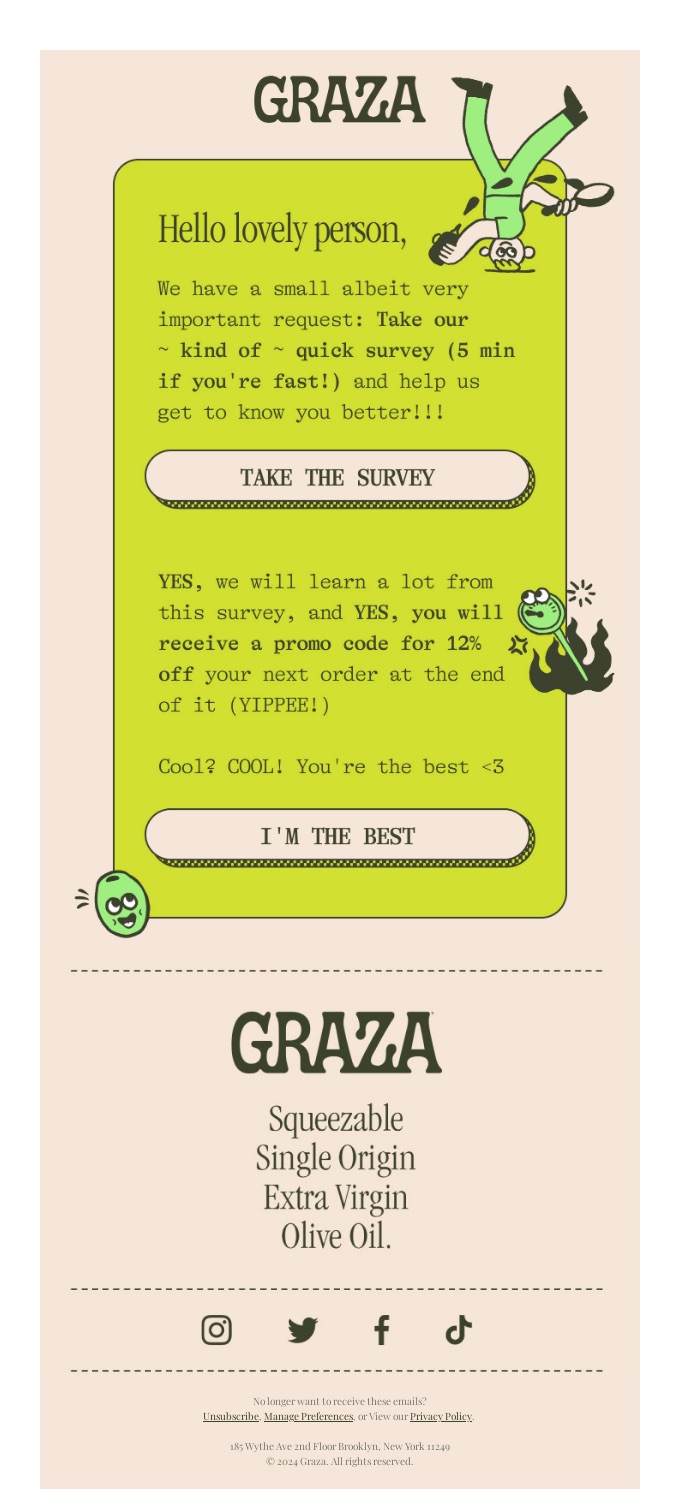
To spark participation, consider offering incentives like a discount code, entry into a giveaway, access to exclusive content, or a promise to share survey results—just like the olive oil producer Graza successfully did in their survey email.

How to Send an Email Blast?

Now that you’re in the know about when it’s appropriate to send an email blast to your subscribers, we’re here to lend a hand with some common email mistakes to avoid. This way, your emails will be welcomed with open arms, not eye rolls. 

1. Use Double Opt-in

You might think, “If people sign up to receive my emails, isn’t that enough?” Well, not necessarily. While a single opt-in can grow your email list quickly, a double opt-in option ensures that the list consists of real, engaged subscribers. 

By requiring people to confirm their subscription through email, you reduce the number of incorrect or bogus addresses (often added by bots), which will lead to a good sender reputation and high email deliverability. 

2. Include a Dynamic Element

Dynamic content allows you to send the same email to your subscribers but personalize emails based on different factors. Such content can be changed automatically based on the audience receiving the email. 

You can sprinkle in dynamic elements like first name fields to personalize the subject line or body content with each subscriber’s name. 

You can enhance this approach by customizing it for different audiences based on factors like location, gender, age, or even their previous interactions on your website. However, this would no longer qualify as an email blast.

3. Remember Your Subscribers Are Real People

If you’ve done a good job building your buyer persona, you’ll understand your subscribers’ concerns and interests.

When launching something new, go beyond simply informing them about it. Explain how your offerings meet their needs. In surveys, highlight how their feedback can help improve their satisfaction with your brand. Even in company-related updates, skip the jargon and use clear, direct language to explain changes and their impact—just as you’d want it explained to you.

4. Use a Reputable Email Service Provider

As your email list expands, it’s essential to rely on a reputable email provider. Without one, you’ll encounter limits on the number of emails you can send and will have to track email metrics, run spam checks, and verify whether your sender IP or domain has landed on a denylist—all of this manually. 

Fortunately, many email providers offer analytics tools to help you monitor email performance. They can also track your sending IP and alert you to any issues that might affect your email deliverability.

SiteGround Email Marketing can assist you with that too! Our platform automatically sets DKIM and SPF records to validate your email’s authenticity and runs AI-powered spam checks. Plus, you can take advantage of professional, fully customizable email templates, email automation features, and analytics reports—all within a user-friendly and intuitive interface.  

5. Respect Unsubscribe Requests

You’ve likely encountered emails from organizations you never signed up for, or from ones you thought you’d unsubscribed from. So, you know how annoying this can be. An unsubscribe request is a clear indication that the recipient is no longer interested in your messages.

Even though it’s hard to watch your email subscribers go, it’s best to respect their decision and stop bombarding them with further emails. Ignoring such requests can damage your sender reputation, and even result in legal troubles, especially under regulations like GDPR or the CAN-SPAM Act.

The Final Verdict: To Blast or Not to Blast?

The power of email blasts depends on the context. As we’ve explored, mass emails are perfect for important announcements or quick updates, and they can also shine in promotional and feedback scenarios.

However, to ensure your e-blasts reach your subscribers, remember to use a double opt-in, incorporate dynamic elements, write in natural and relatable language, use a reliable email provider, and always respect unsubscribe requests.

That said, for long-term success, blasting shouldn’t be your go-to strategy. Instead, focus on crafting tailored, strategic campaigns that build relationships and boost engagement.

11 Must-Have WordPress Plugins For Your Website

Featured image for the blog post about must-have WordPress plugins

WordPress isn’t just a content management system – it’s a powerhouse with over 60,000 plugins ready to up your site’s performance and functionality. But let’s be honest: with so many options, it can feel like searching for a needle in a haystack. How do you know which plugins are worth your time?

To help you out, we’ve put together a list of 11 must-have WordPress plugins that will equip your site with the features it needs to succeed. Whether you’re optimizing the backend, enhancing the design, or improving SEO rankings, these plugins have you covered.

11 Must-Have WordPress Plugins

Discover the most essential plugins for WordPress, handpicked by our expert developers, that can enhance all types of websites, from online stores to personal blogs.

1. Build Custom Pages with Elementor

Banner for the Elementor plugin within the WordPress repository

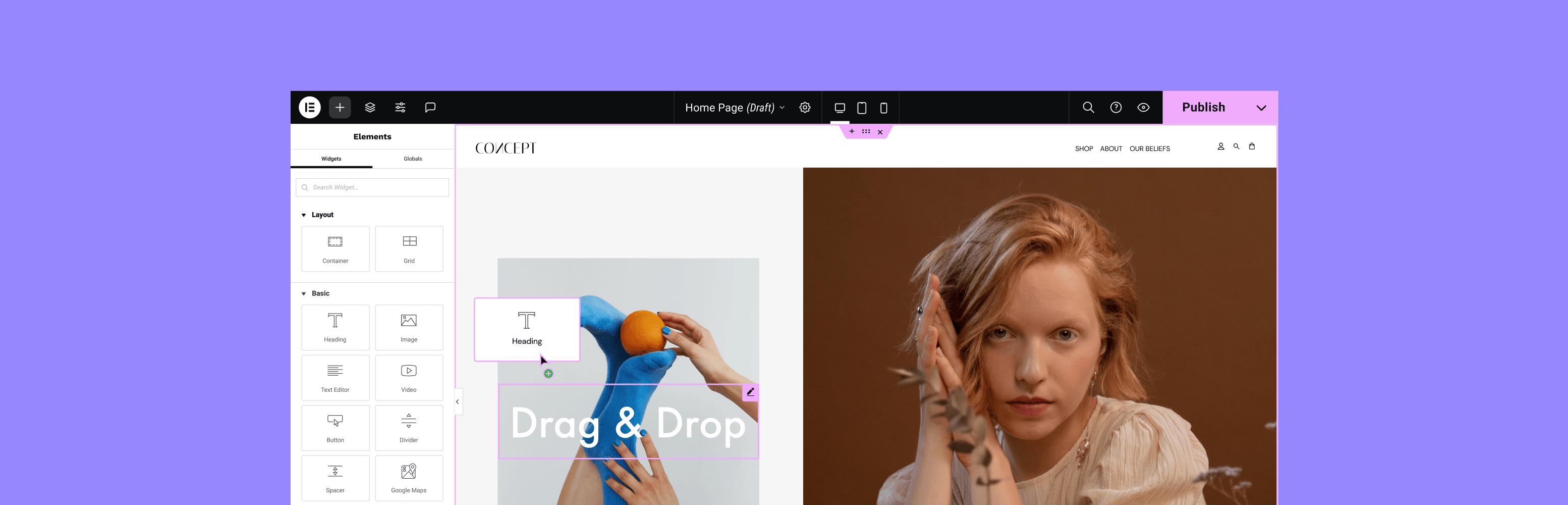
While WordPress allows you to create websites without coding and simplifies much of the backend work, it does have limitations in terms of building blocks, theme templates, and overall design flexibility. To address this, Elementor, a popular website and page builder, integrates with WordPress to offer powerful drag-and-drop visual editing and enhanced web-building capabilities.

With Elementor, your webpage transforms into a canvas where you can add, move, and style elements in real-time. It provides a wide array of widgets and templates for crafting professional-looking pages. Additionally, you can apply custom CSS to entire pages or individual elements, which is particularly useful for integrating tracking codes from tools like Facebook Pixel or Google Analytics into headers or footers.

Unlike many plugins that offer limited features in their free versions, Elementor’s free version is generous with functionality, allowing you to create a simple, yet functional website. If you need additional features beyond what the plugin offers, its extensive ecosystem of third-party extensions allows you to further enhance your website’s appearance and capabilities.

Pricing (freemium): 

  • The basic version of Elementor is available in the WordPress plugin repository for free.
  • Elementor also provides premium features in tiered subscriptions, starting at $59 per year.

Key features include:

  • Dedicated landing page tool
  • Popup builder
  • Floating buttons
  • Revision history
  • Zapier and WooCommerce integration

2. Create Contact Forms with WPForms

Banner for the WPForms plugin within the WordPress repository

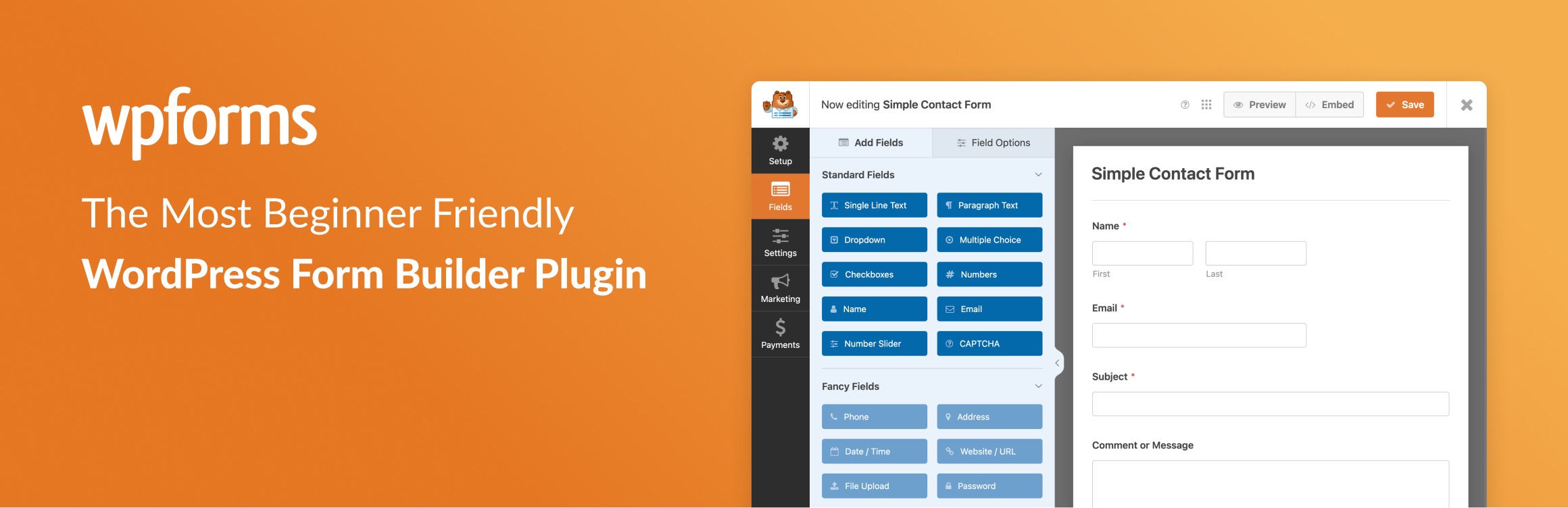
Contact forms are an essential addition to any WordPress site because they allow your visitors to easily get in touch with you. Beyond facilitating communication, they help you build relationships and foster trust with your visitors, making your site feel more personal and approachable. While WordPress doesn’t include built-in form functionality, WPForms fills this gap effectively.

WPForms is a popular drag-and-drop form builder that lets you add any type of form to your website – feedback forms, payment forms, you name it. The plugin includes over 2,000 professionally designed templates that are fully optimized for all devices and comply with GDPR regulations. You can also convert any form into a landing page to increase conversions, and it offers customizable permalinks for easy promotion across social media, email, and other marketing channels.

Additionally, WPForms comes with various addons that allow you to track the customer journey of your website visitors, enable user registration, and much more. 

Pricing (freemium): 

  • The basic version, WPForms Lite, is available in the WordPress plugin repository for free.
  • WPForms also offers premium features in tiered subscriptions, starting at $99 per year.

Key features: 

  • Built-in spam protection
  • Collection of visitors’ geolocation data
  • Auto-save of partially completed forms 
  • Offline forms for submission collection without internet
  • Custom form confirmations with success messages or thank you pages

3. Restrict Content with Ultimate Member 

Banner for the Ultimate Member plugin within the WordPress repository

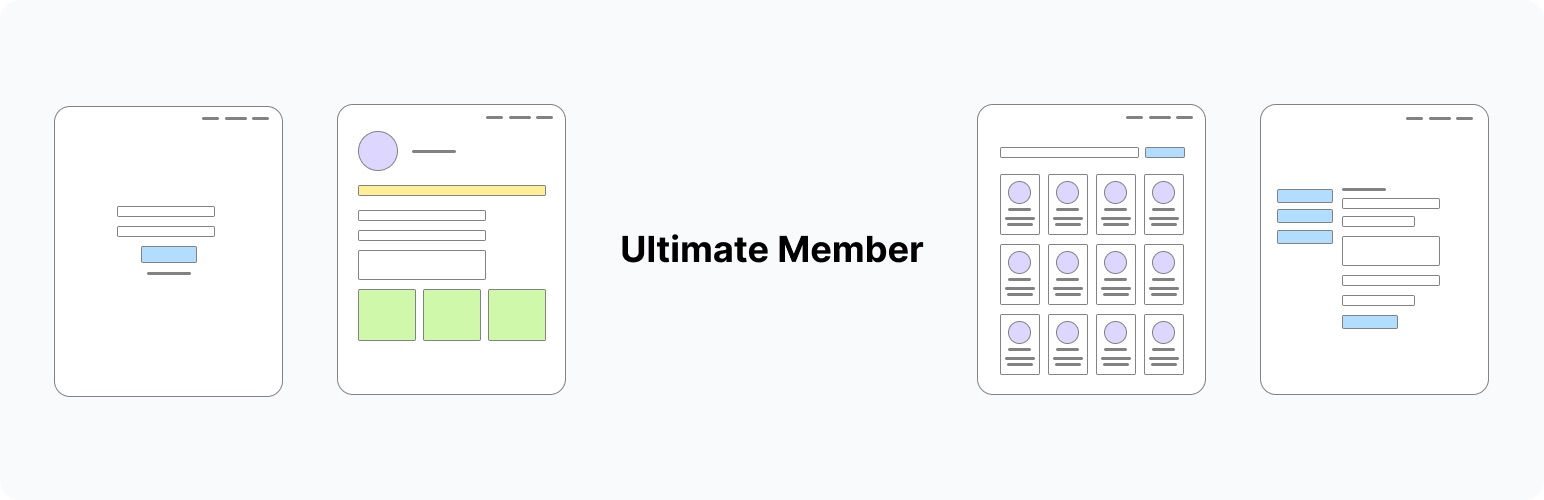
Now that you’ve built your website – whether it’s a blog, an online store, or a community forum – and you’re happy with the results, you might want to restrict access to certain areas in exchange for a fee. Ultimate Member provides everything you need to manage memberships, subscriptions, and member-exclusive content seamlessly.

With Ultimate Membership, you can establish multiple membership levels, each featuring its own pricing, rules, and benefits. This flexibility enables you to tailor your offerings to suit the unique needs of your audience, whether you’re providing a single product subscription, a tiered content access system, or a combination of both.

Moreover, the plugin is fully integrated with WooCommerce, making it an ideal solution for online business owners who want to provide special pricing, discounts, or exclusive products to their members.

Pricing (freemium):

  • The basic version of Ultimate Member is available in the WordPress plugin repository for free.
  • Ultimate Member also provides premium features in tiered subscriptions, starting at $249 per year.

Key features:

  • Flexible membership plans
  • Hassle-free subscription management
  • Content restriction
  • Automated recurring payments
  • Insightful membership reports

4. Fortify Your Site with SiteGround’s Security Optimizer 

Banner for the SiteGround Security Optimizer plugin within the WordPress repository

A website owner’s worst fears – such as a damaged reputation, loss of traffic, and poor SEO rankings – can become a reality if security measures are lacking. To prevent this from happening, consider safeguarding your WordPress site with the Security Optimizer plugin, developed by the experts at SiteGround and trusted by over 1,000,000 users worldwide.

The plugin brings together all essential security features for your WordPress site into one user-friendly package, eliminating the need for multiple plugins. It covers advanced login protection, firewall configuration, and activity monitoring. Additionally, It secures your site by safeguarding critical system folders, blocking unauthorized access, and tracking all activity for suspicious behavior. If a breach occurs, the detailed activity logs help you quickly understand what happened and take action to fix it.

The Security Optimizer plugin is compatible with every hosting provider, and it comes preinstalled with all new WordPress installations hosted at SiteGround. 

Pricing: free 

Key features:

  • Disabling of XML-RPC, RSS, and ATOM feeds
  • Enabling of advanced XSS protection
  • Limitation of login access and attempts
  • Creation of custom login URL
  • Enabling of two-factor authentication (2FA) for admins and editors
  • Monitoring of visits, bots, and login attempts
  • Blocking of suspicious IPs

🛡️Safeguard your website against malicious attacks by following our security tips!

5. Combat Spam Effectively with Akismet

Banner for the Akismet plugin within the WordPress repository

All websites are targets for bots that scour the internet, attempting to send spam through comments and form submissions. The Akismet plugin, a cloud-based application, filters spam on your WordPress site without using your server resources. Developed by Automattic, the company behind WordPress, the plugin has been downloaded over six million times.

Akismet tackles spam through two primary methods. First, it analyzes comments and form submissions by comparing them to its extensive database of known spam entries. Second, it assesses user behavior on your web pages to distinguish between humans and spambots.  

When spam is detected, Akismet either automatically blocks it or moves it to the WordPress spam folder for you to review, ensuring that your forms do not store any spam entries.

Pricing (freemium): 

  • The basic version of Akismet is available in the WordPress plugin repository for free, but only for small non-commercial websites.
  • For commercial websites, Akismet offers premium features in tiered subscriptions, starting at $8.33 per month when billed annually.

Key features: 

  • Automatic comment spam filtering
  • Comment status history tracking
  • URL visibility in comment body
  • Moderator view of approved comment counts
  • Discard feature for blocking severe spam

6. Maximize Performance with SiteGround’s Speed Optimizer

Banner for the SiteGround Speed Optimizer plugin within the WordPress repository

You’ve likely experienced the frustration of a slow-loading website as a user. But as a website owner, it’s important to know that every extra second a page takes to load can lower your conversion rates by an average of 7%. Additionally, Google factors site speed into its ranking algorithm, so a slow-loading website can negatively affect your SEO score.

But no need to worry, with SiteGround’s award-winning Speed Optimizer plugin, you can instantly boost your WordPress site’s speed and performance without installing multiple plugins. It optimizes all aspects of your site, from streamlining code and files for HTML, CSS, JavaScript, and fonts to reducing image sizes by up to 85% without compromising quality.

Moreover, it executes WordPress Heartbeat control and scheduled database maintenance, ensuring that no unnecessary backend queries consume resources needed for more critical tasks. The plugin also includes built-in caching, enabling the server to deliver pre-generated pages to visitors instead of generating them dynamically each time, eliminating the need for additional caching addons.

The Speed Optimizer plugin is compatible with any hosting provider, but SiteGround users benefit from additional features like dynamic and object caching, and image compression.

Pricing: free

Key features:

  • File-based caching
  • Minification of HTML, CSS, and JavaScript
  • Defer render-blocking JavaScript
  • Font optimization
  • Advanced lazy loading for media
  • Enforce HTTPS
  • GZIP compression

⚡Don’t gamble with your site’s performance – unlock its full potential with our speed improvement tips!

7. Stay Compliant with iubenda

Banner for the iubenda plugin within the WordPress repository

Websites nowadays have to adhere to a broad range of legal and data protection requirements. While there are many plugins available to help websites meet these compliance standards, choosing a trustworthy one can be challenging. The iubenda plugin offers a comprehensive, user-friendly compliance solution developed with input from legal experts.

The plugin supports GDPR, UK-GDPR, ePrivacy, LGPD, CPRA/CCPA, CalOPPA, PECR, and other regulatory documents. Additionally, its built-in site scanner regularly checks your site and notifies you if any compliance updates are necessary. It also detects and blocks third-party scripts like Google Analytics, Facebook, and PayPal, ensuring these services don’t operate without user consent.

Furthermore, iubenda integrates with Google Consent Mode and IAB’s TCF, providing a standardized approach to managing consent across different platforms. It also enables users to manage their preferences by category giving them greater control over their data.

Pricing (freemium): 

  • The basic version of iubenda is available in the WordPress plugin repository for free.
  • Iubenda also provides premium features through tiered subscriptions starting at $5.99 a month per site or application when billed annually.

Key features:

  • Fully customizable privacy and cookie policy
  • CCPA notice with functional DNSMPI link
  • Auto-detection of user location 
  • Generation of professional Terms and Conditions
  • One-click translation of all documents (in 10 languages only)

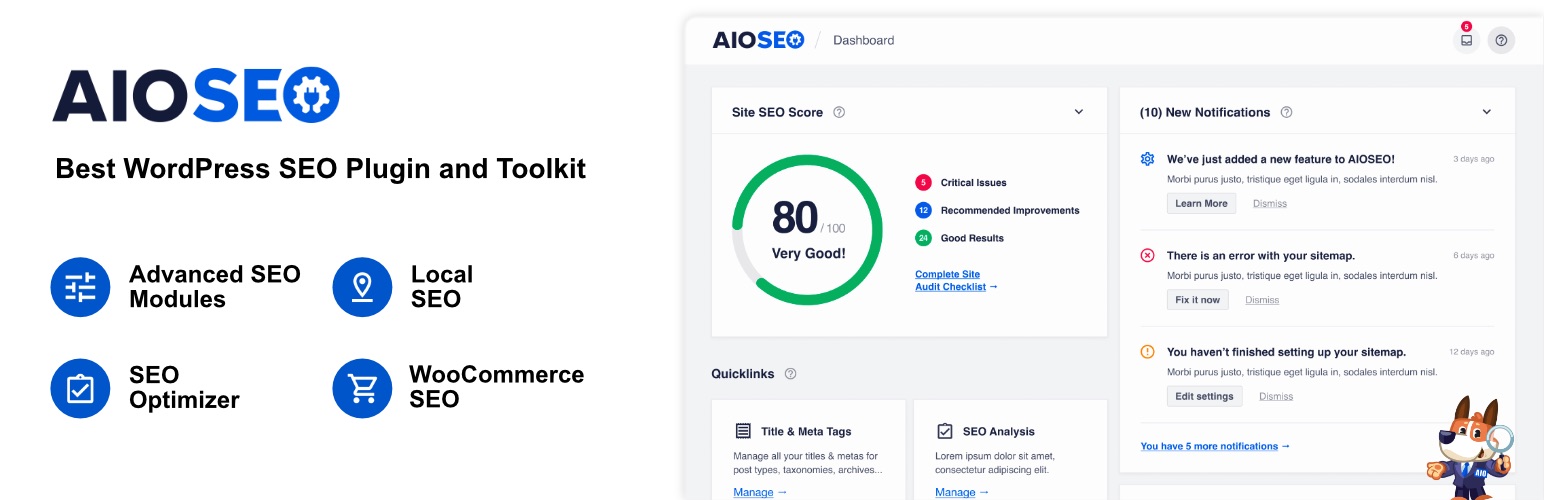
8. Improve Your Organic Reach with All in One SEO (AIOSEO)

Banner for the All in One SEO plugin within the WordPress repository

Writing meaningful and relevant content is only half the battle; the next challenge is getting people to see it. If you’re on a budget, relying on pay-per-click ads might not be ideal. Fortunately, search engine optimization (SEO) offers an effective alternative to help your website rank higher in search engine results.
While WordPress offers mobile-responsive themes, customizable URLs (permalinks), and RSS feeds, these features alone don’t cover all your SEO needs. Plugins like All in One SEO offer valuable features such as on-page analysis with checklists to improve post titles, meta descriptions, and focus keyphrases. You can also assess the readability of your content by examining paragraph and sentence length, passive voice usage, and subheading distribution.

If you have a WooCommerce site, you can further optimize your storefront by refining product titles, descriptions, and images. Additionally, All in One SEO generates XML, RSS, and HTML sitemaps and integrates with analysis tools like Google Search Console and Bing Webmaster Tools to enhance your site’s visibility across various search engines.

Pricing (freemium): 

  • The basic version of All in One SEO is available in the WordPress plugin repository for free.
  • All is One SEO also provides premium features through tiered subscriptions, starting at $124.00 per year.

Key features:

  • Frontend SEO inspector
  • XML, RSS, and HTML sitemaps creation
  • Site audit
  • Local SEO
  • Competitor analysis

9. Transform Visitors into Leads with SiteGround’s Lead Generation 

Banner for the SiteGround Lead Generation plugin within the WordPress repository

A WordPress site without a lead generation plugin is like a store without a front door – visitors may pass by, but they won’t easily become customers. Such a tool helps you transform casual visitors into email subscribers and, eventually, into devoted customers

With SiteGround’s Lead Generation plugin the process of setting up and managing email marketing forms is a breeze. It allows you to create professional, highly customizable forms that align with your branding. The plugin also adds a subscription checkbox to contact forms, sign-up forms, and comment sections. When selected, this option adds the user to your email marketing leads. 

And when it comes to retaining these leads, SiteGround Email Marketing allows you to  easily create and send email campaigns, targeting different segments of your audience. The platform also offers customizable and mobile-friendly pre-built templates, an AI image and copywriting assistant, unlimited sign-up forms, built-in DKIM and SPF authentication to keep your emails out of spam folders, and more cool features.

❗Keep in mind that although you don’t need to host your website with SiteGround to use the Lead Generation plugin, you will need to purchase SiteGround’s Email Marketing service.

Pricing: 

  • While the Lead Generation plugin is available in the WordPress plugin repository for free, the SiteGround email marketing service is a paid offering, currently available at an 80% discount.

Key features:

  • Customizable forms
  • Responsive design
  • Integration with WPForms, Ninja Forms, Gravity Forms and many more

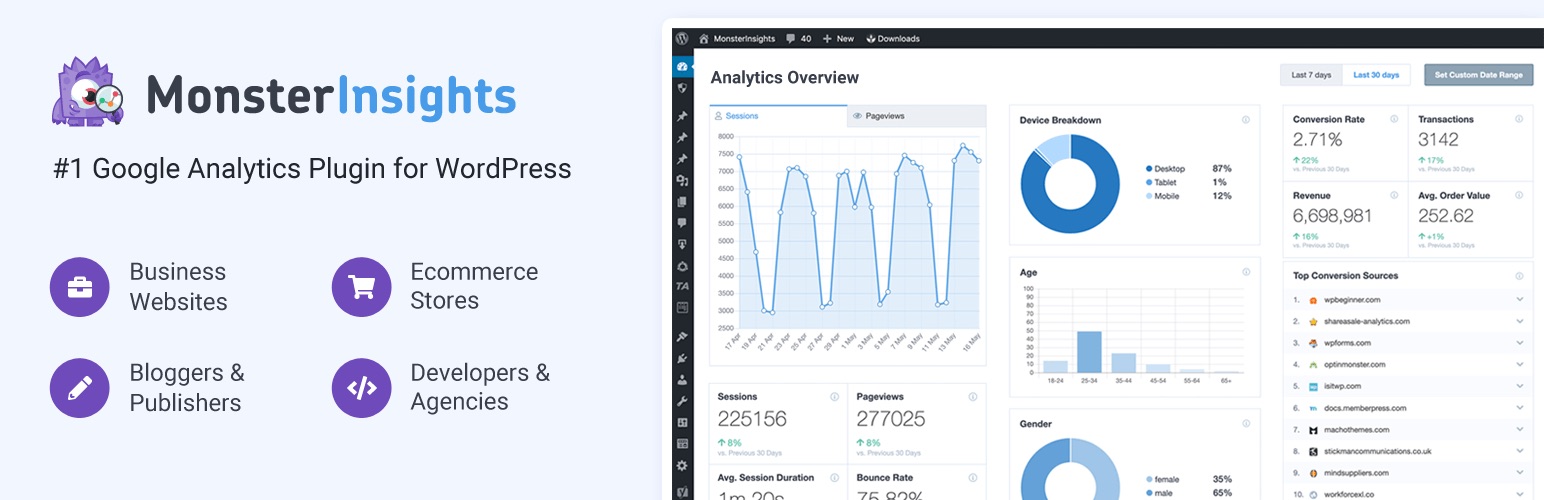
10. Track Analytics with MonsterInsights

Banner for the MonsterInsights plugin within the WordPress repository

Understanding how visitors perceive and interact with your website can help you address areas for improvement, ultimately increasing your traffic and sales. With over three million active installations, MonsterInsights is the one of the most recognizable Google Analytics plugins for WordPress. 

MonsterInsights enables you to link your WordPress site with your Google Analytics account, offering insights into your visitors’ behavior. Additionally, it presents all the essential statistics directly in your WordPress dashboard through intuitive, easy-to-read reports.

While the lite version of MonsterInsights lets you track basic analytics, such as audience demographics, file downloads, and outbound link clicks, the premium version unlocks detailed reports, additional ecommerce tracking features and ad performance monitoring. Recently, the developers added a Conversations AI feature, allowing you to ask questions about your analytics and receive instant answers, facilitating quicker data analysis.

Pricing (freemium): 

  • The basic version of MonsterInsights is available in the WordPress plugin repository for free.
  • MonsterInsights also offers premium features in tiered subscriptions, starting at $99.60 per year.

Key features:

  • Headline analyzer
  • Customer funnel report 
  • Affiliate link tracking
  • Content report for visit statistics
  • Landing page report for optimization needs

11. Build An Ecommerce Store with WooCommerce 

Banner for the WooCommerce plugin within the WordPress repository

Whether you’re selling e-books or handmade jewelry, WooCommerce is an excellent choice. It is one of the most popular ecommerce platforms, managed by the developers behind WordPress. This means that you can manage all elements of your store from within your WordPress dashboard, plus benefit from regular updates that ensure optimized performance.

WooCommerce has many options for customization – from showing reviews and ratings, setting up tiered pricing, and allowing visitors to sort and filter products to find exactly what they need. It integrates seamlessly with various payment and shipping providers, as well as email and social media marketing tools, to streamline your operations. Additionally, WooCommerce is SEO-friendly and supports multiple languages and currencies, making it perfect for global businesses.

You can further enhance your store’s functionality with thousands of free and paid extensions from the official WooCommerce Marketplace. Moreover, a WooCommerce App is available for free for both iOS and Android.

Pricing: free

Key features: 

  • 24 languages and various currencies
  • Custom shipping solutions
  • Extensive payment options with common payment providers
  • Geo-location for tailored services
  • Email templates tailored for customers at various stages
  • Google Analytics and Yoast SEO integration

Final Thoughts on Must-Have WordPress Plugins

While some plugins are tailored to your site’s specific needs, many essential ones can benefit nearly any WordPress site. In this article, we’ve introduced the best plugins for WordPress – whether you’re aiming to improve your website loading time, enhance security, add more engaging features or streamline your workflow. 

You can always add more plugins to your WordPress site to expand its functionalities. However, make sure to download them from reliable sources such as the official WordPress repository, the developer’s website, or reputable third-party marketplaces. Prioritize plugins that are well-reviewed and frequently updated to ensure better security and minimize compatibility issues.

Also, don’t overlook your hosting platform, as it plays a crucial role in ensuring smooth operation. SiteGround offers Managed WordPress hosting plans for up to 400,000 monthly visits. These plans feature easy setup, ultrafast PHP, custom MySQL, SSL certificates, and three-layer caching, all enhancing performance, capacity, and security.

Call-to-action button regarding SiteGround managed WordPress hosting service

WordPress Plugins FAQs

What Should Be Considered When Choosing a WordPress Plugin?

Ideally, you want to choose a plugin that meets your specific needs, comes from a reputable developer, offers responsive support, fits within your budget, and is compatible with recent WordPress versions.

How Do I Install a WordPress Plugin?

There are three ways you can install a WordPress plugin: automatically, from a file or manually. The WordPress dashboard contains a dedicated Plugins section where you can add, remove and manage the plugins. We’ve prepared a tutorial for you to guide you through the process of installing plugins on your WordPress site.

Which Is Better: Paid vs. Free WordPress Plugins?

We can’t definitively say one is better than the other, as the choice between paid and free plugins largely depends on your budget and needs. Free plugins can be useful but often focus on basic functionality that can be limiting. In contrast, premium plugins, which require payment, offer more advanced features that may be needed by your website in order to be more secure, load faster, offer better user experience, among other benefits. 

How Many WordPress Plugins Are Too Many?

On average, a medium-sized WordPress website has around 20-25 plugins. If your hosting server is powerful and you use stable and reliable plugins, your website should be able to handle more. However, avoid bloating your site with redundant or useless features, as this can have a negative effect on your speed and performance. 

Do I Need a Backup Plugin?

You may not need to install a WordPress backup plugin if your web host meets all your backup needs. Many hosting providers, including SiteGround, offer built-in backup features accessible directly from your control panel.

What Is a VPS, and Does It Fit Your Hosting Needs?

This is an illustration of a physical server divided into multiple virtual private servers (VPS)

Selecting the right web hosting can be overwhelming, especially if you’re not tech-savvy. As a small business owner or freelancer with a tight budget, you want to maximize your resources.

You might have heard that VPS hosting surpasses the limits of shared hosting while offering comparable performance to a dedicated server, all at an affordable price. But is this true?

In this article, we’ll explain what a VPS is, how it works, and what you can expect when using it as your hosting environment. 

What Is a VPS?

A Virtual Private Server (VPS) is a virtualized server that provides dedicated resources within a shared physical server. It offers more control and isolation than shared hosting, ensuring users have private access to allocated computing power.

How Does VPS Work?  

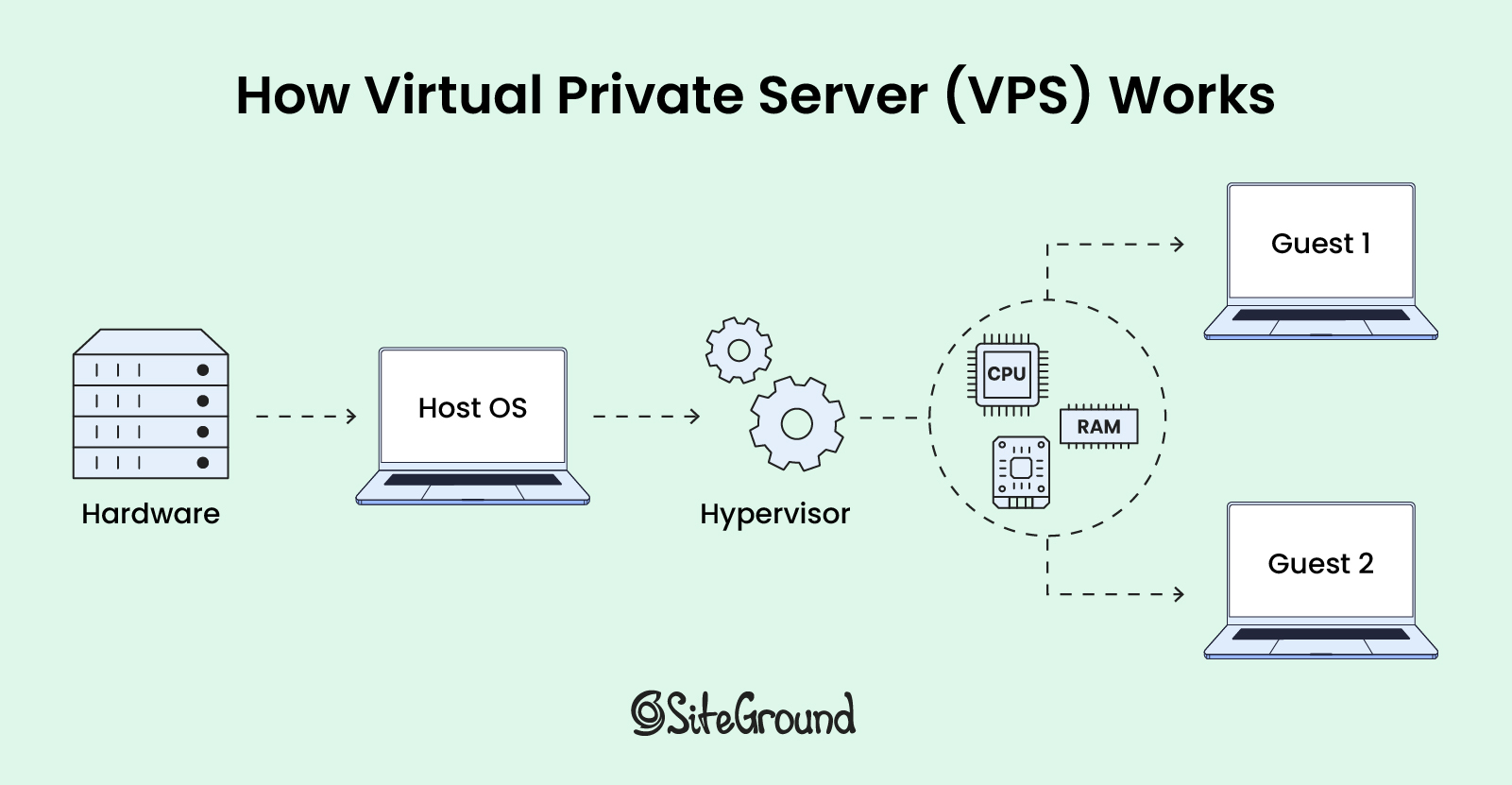
Virtualization technology allows one physical server to be divided into several virtual private servers using special software called a hypervisor. The hypervisor creates and manages these virtual servers (guest 1 and 2), distributing a portion of the host physical server’s resources, such as memory and processing power, to each one.

This process allows each virtual server to function as an independent computer, enabling users to install their own software and operating system (OS) on top of the host OS.

Illustration of virtualization technology: a single physical server is divided into multiple virtual private servers using a hypervisor software

What VPS Is Used For?

Beyond traditional web hosting, a virtual private server (VPS) is best for more complex and resource-intensive operations and programs, such as:  

  • development and testing, where isolated environments are crucial for accurate results;
  • artificial intelligence and machine learning, providing the necessary computational power and flexibility;
  • software as a service (SaaS) platforms, offering the scalability and security needed to support multiple users;
  • web applications that have custom software requirements, providing the customization and control required to meet specific needs.

What Is VPS Hosting?

Virtual private server (VPS) hosting is a type of hosting where you share a physical server with other users but have your own dedicated share of server resources, such as space, CPU, and RAM. 

This setup means that while you share the server hardware with other users, your hosting remains isolated and your resources are guaranteed, making it generally a more costly option compared to shared hosting, yet more affordable than a dedicated server. 

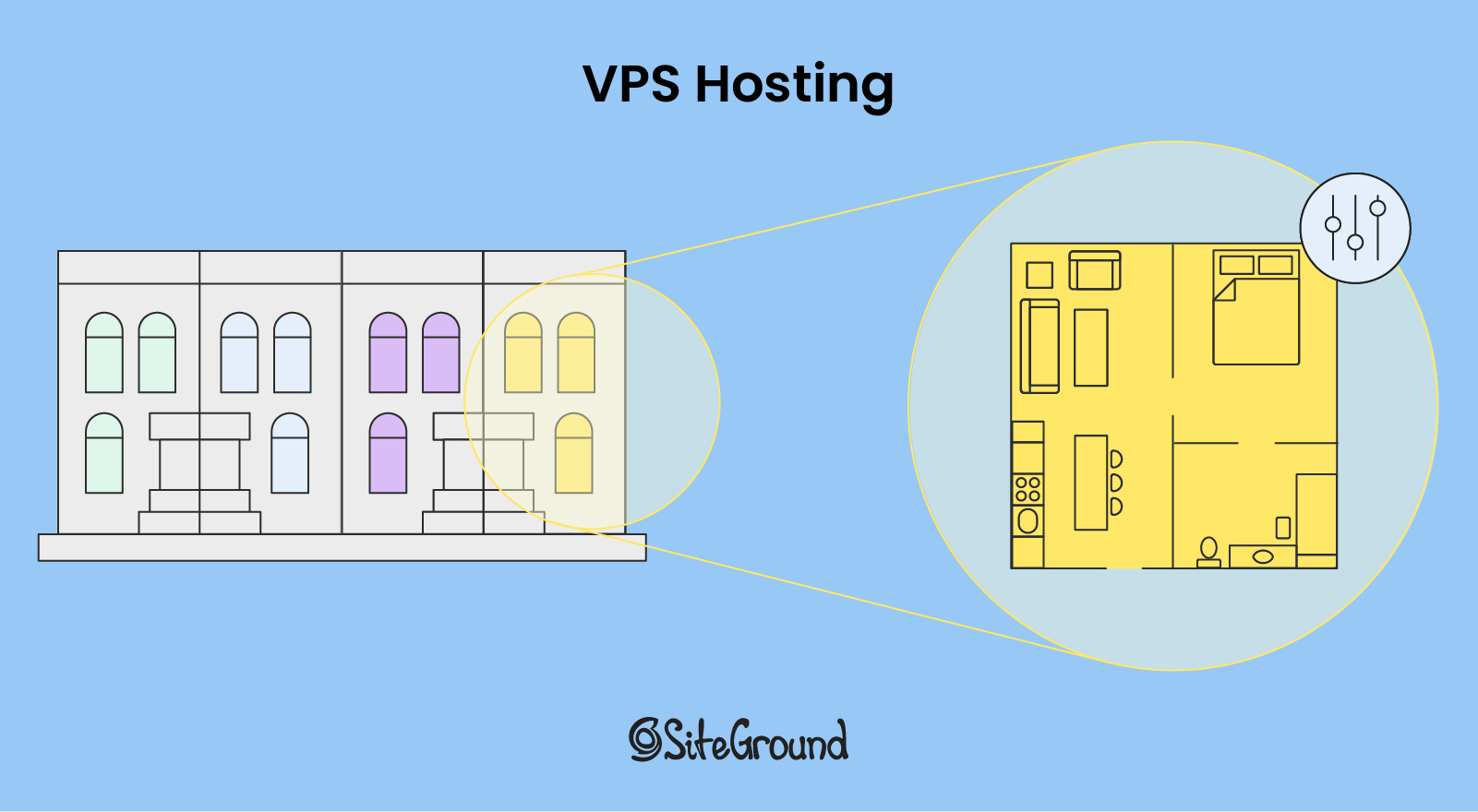
Conceptual analogy: Renting an apartment with private space and control, while sharing building infrastructure with others

Think of VPS hosting as renting an apartment in a building. Unlike sharing a room in a dormitory, you have your own private space that you can furnish and decorate as you like. You have control over your apartment’s utilities and layout, but you still share the building’s infrastructure, like the elevators and hallways, with other tenants.

Types of VPS Hosting

VPS hosting can be categorized as either managed or unmanaged, depending on the level of additional services provided beyond the basic server setup.

With unmanaged VPS hosting, you need to have expertise in server configuration, troubleshooting software, and managing the apps and services installed on your VPS. In contrast, managed VPS hosting takes care of all these complex tasks for you, allowing clients to focus on their core business while experts handle the technical details. However, it can be on the pricier side.

Who Is VPS Hosting For?

VPS hosting is best for website owners whose medium-level traffic exceeds the limits of shared hosting plans but doesn’t yet require the extensive resources of a dedicated server. It is often chosen by developers and those with advanced technical knowledge who need direct access to the server for greater control and customization. 

Key Features and Limitations of VPS Hosting

VPS strikes an optimal balance between affordability, customization, and guaranteed performance for many growing websites and web applications. However, it does come with some limitations.

Let’s explore the pros and cons of VPS hosting in more detail below.

1. Customization and Control

In general, with VPS hosting you gain full admin and root access to your virtual server. That means you can change the server settings and install any software. This level of access is beneficial for advanced users who need to configure server applications, manage files directly, and install software. 

🚩 Limitations: Keep in mind that if you lack the technical knowledge, installing the operating system (OS) on your own can be risky and may lead to configuration issues. While some managed hosting providers can handle this for you, be sure to double check this with the particular provider. 

However, if you’re confident in your technical capabilities to install your OS, make sure that the provider supports the OS you need, as all providers support both Linux and Microsoft. 

2. Scalability          

Whenever you need additional resources like storage or memory, you can easily add or borrow from another virtual private server if needed. This easy scalability is thanks to the hypervisor, which we mentioned at the beginning, as it enables the host computer to support other virtual machines by sharing its resources.       

🚩 Limitations: While VPS hosting involves multiple virtual servers, the scalability is limited to the resources of the single physical server on which they reside, unlike cloud hosting, which can dynamically allocate resources across a broader network of physical servers.

3. Uptime and Reliability

The dedicated resources of a VPS help ensure that your website’s performance is generally more stable and less influenced by other sites on the same physical server, leading to faster loading times and a better user experience. 

🚩 Limitations: It’s important, however, to note that performance can still be affected if the physical server is heavily loaded, particularly if other VPS instances are consuming a lot of resources. This issue can occur when the web host oversells its server space, assuming that not all accounts will use their full allocation of resources.

4. Enhanced Security

VPS hosting provides enhanced security due to the isolation of resources for each virtual server. This prevents one compromised account from affecting others on the same server. 

🚩 Limitations: There are potential security risks associated with virtualization, particularly if there are vulnerabilities in the hypervisor software. These vulnerabilities could, in theory, allow a guest OS to “escape” its isolation and affect other virtual machines.

VPS Hosting Compared to Other Types of Hosting 

While many articles attempt to compare different hosting solutions, they might not give the full picture. It’s important to remember that each type – whether VPS, dedicated, cloud, or shared – excels in different use cases and has its own set of advantages and limitations.

Some hosting providers address this by developing in-house tools and features to enhance server performance, ensuring your website runs smoothly. Therefore, it’s essential to consider these add-ons when evaluating your hosting options.

1. Shared Hosting vs. VPS Hosting

One of the main differences between VPS and shared hosting is the use of virtualization technology. Shared hosting involves multiple websites being hosted on a single physical server, where resources are shared among all users. This setup is generally more cost-effective than VPS hosting but offers fewer scalability options.

Therefore, shared hosting is suitable for individuals, bloggers, and small businesses, whose websites don’t require large-scale operations or custom configurations. 

SiteGround offers managed shared hosting plans for up to 400,000 monthly visits. These plans include easy website setup and management, as well as ultrafast PHP, custom MySQL, SSL certificates, and three-layer caching. Such features enhance your hosting by improving performance, capacity, and security, addressing common shared hosting challenges.

2. Dedicated Hosting vs. VPS Hosting

The primary differences between a virtual private server (VPS) and a dedicated server are price and computing power. While both can run the same operating system, dedicated servers typically provide greater computing power at a more expensive cost.

Dedicated hosting is suitable for large-scale corporations that require high levels of customization and control over their hosting environment, such as financial institutions and healthcare organizations.

3. Cloud Hosting vs. VPS Hosting

One of the main differences between VPS and cloud hosting is how they use servers. In cloud hosting, your website draws resources from a network of interconnected physical servers, forming what’s known as the “cloud.” This setup allows resources to scale dynamically based on demand, whereas VPS is confined to the resources of a single physical server and cannot scale across multiple servers.

Therefore, cloud hosting is suitable for high-traffic websites, web development agencies, and enterprise applications. 

SiteGround offers managed cloud hosting plans that are built on top of GCP’s infrastructure. This means that while clients benefit from the scalability and reliability of Google Cloud Platform, they also receive additional support, custom features, and management tools from SiteGround.

Does VPS Fit Your Web Hosting Needs?

If you’re managing a high-traffic website or developing a resource-intensive application, VPS hosting solutions provide the necessary control, computing power, and scalability.

However, if you don’t want to deal with server configuration and technical tasks, other hosting options might be more suitable for you. Reach out to our sales team if you wish to learn more. 


Virtual Private Server (VPS) FAQs

Is There a Difference Between VPS, Virtual Machine, and Cloud Instances?

These terms all involve the same underlying technology  – they describe a virtual environment created using a hypervisor, where virtual servers run on top of a physical server.

Is VPS Better than VPN?

You can’t directly compare a VPN and a VPS to determine which is better, as they serve different purposes. A Virtual Private Network (VPN) is a technology that allows users to establish a secure and encrypted connection between two remote computers over the internet. However, while a VPS itself doesn’t inherently provide VPN features, it serves as a secure environment where you can implement those by setting up a VPN.

Is VPS Free?

No, VPS is not free, just like any other hosting plan, regardless of the server setup. Website hosting costs are a necessary consideration, though some providers may offer a free trial period. It’s important to check with them directly to understand the pricing details and any trial offers they might have.

15 Successful Email Marketing Campaigns Examples

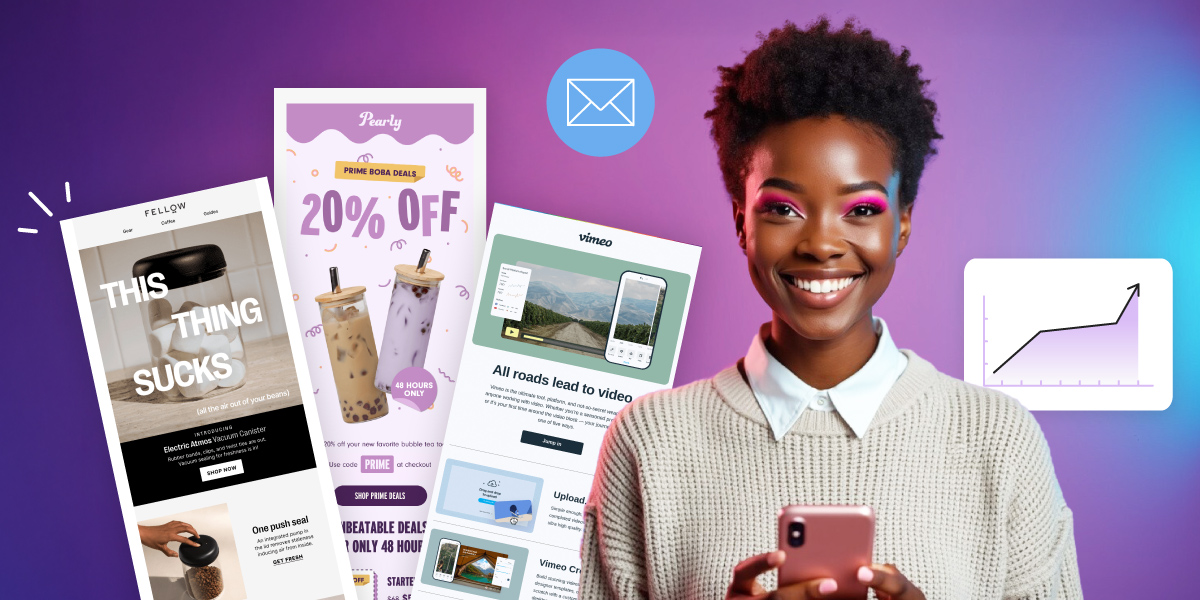
Girl-displaying-email-marketing-campaigns-examples-on-purple-gradient-background

Is there someone on this planet whose inbox isn’t flooded with emails? Given the sheer volume of emails people receive daily, making your brand’s messages stand out can be challenging. But don’t worry, we’ve got you covered!

In this article, we will show you effective email marketing campaigns examples and guide you on what to consider when crafting your future campaigns.

[ai_prompts_download]

What Is an Email Marketing Campaign

An email marketing campaign is the process of sending a single email or a series of emails to your subscribers, with a particular goal in mind. 

It’s important to understand that an email campaign is most often integrated into a broader marketing strategy that can include other types of advertisement like paid ads, social media, etc. These campaigns can serve various purposes, such as raising brand awareness, nurturing leads, driving website traffic, or boosting sales. 

Some of the common types of emails marketing campaigns you can stumble upon are: 

  • Informational campaigns. They include newsletters, resource emails, loyalty/rewards emails, year-in-review emails, and other engaging or educational emails. 
  • Promotional emails. They feature product launches, seasonal deals, limited-time sales, and other sales-driven emails.
  • Drip campaigns (also known as lifecycle emails or email flows). They include welcome emails, abandoned cart reminders, product recommendations, order confirmations, and other emails that can be automated.  

Why Are Email Marketing Campaigns Important

Sending purposefully crafted emails, rather than sporadic messages, can enhance brand awareness, boost your credibility, and offer numerous other benefits of email marketing. Moreover, people generally are more inclined to support businesses or freelancers with whom they have a connection.

Additionally, email marketing campaigns serve as an effective tool for gaining a deeper understanding of how your audience interacts with your content. By tracking key email metrics such as bounce rate, click-to-open rate, and unsubscribe rate, you can make improvements on your subject line, copy, layout, and send time, leading to better outcomes.

15 Successful Email Marketing Campaigns

We’ve gathered some of the best email campaigns that can inspire you as you develop your own strategies and ideas. These email campaign examples are thoughtfully organized into categories to help you easily find the ones that suit your business needs at different times.

🔥 Learn the key elements and strategies to stand out in your readers’ inboxes with our tips for crafting high-performing email campaigns. 

5 Email Marketing Campaigns that Nurture Leads

When it comes to lead nurturing, drip campaigns are crucial. These automated email sequences provide timely, relevant content to prospects based on specific actions they’ve taken, with the aim of guiding them further down the sales funnel.

Here are some of the best email campaign examples to inspire you when a customer makes their first purchase, when you’re launching a new product, or when you want to gather feedback on your products and services.

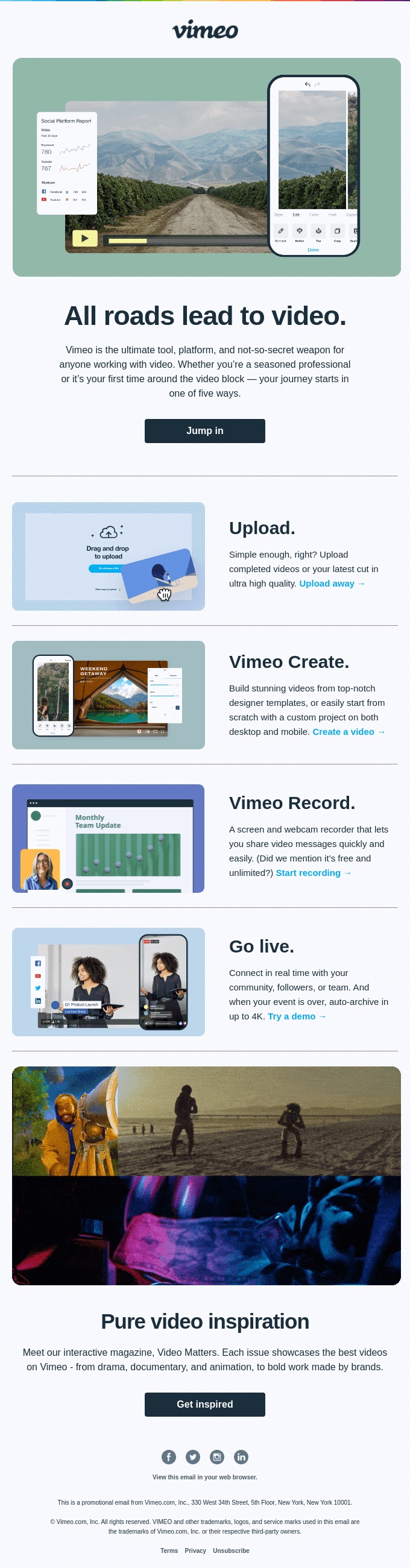
1. Welcome Email by Vimeo

Screenshot of a welcome email from Vimeo, showcasing its visual and text elements

Subject line: Welcome! Here’s how to get started.

Welcome emails are a great way to kick off customer relationships when they join your email list, and the video streaming platform Vimeo utilizes them well.

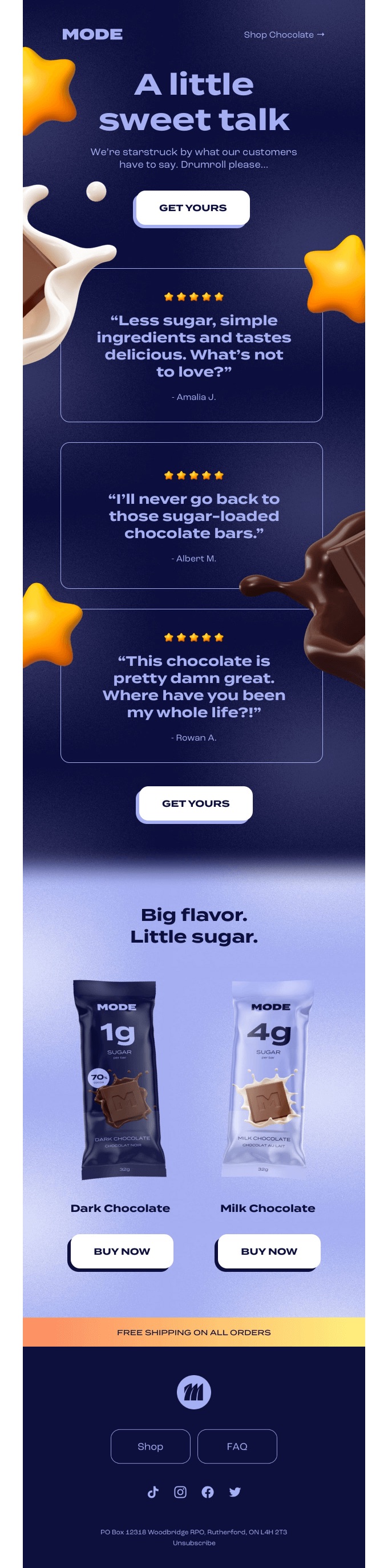
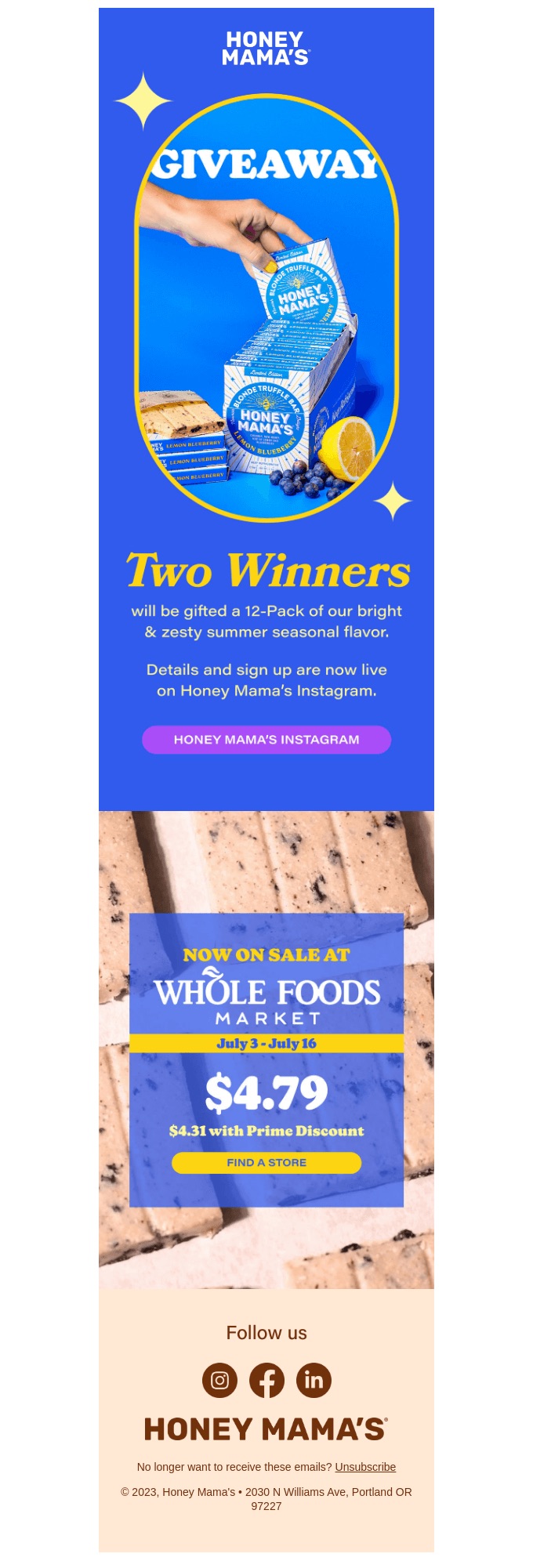
What makes this email stand out: the skillful application of visual elements to engage the reader. The inverted pyramid layout starts with a captivating image at the top, immediately drawing the reader in and smoothly guiding their attention toward the primary goal – exploring their website, which will lead to more traffic. 

The brand also incorporated images to highlight its services, including clear call-to-action (CTA) phrases that simplify the exploration of the specific service. The simple copywriting makes things sound so easy that anyone will feel like clicking the final CTA. It’s a great example of moving the user further into the customer journey.

The email concludes with another inverted pyramid layout, elegantly closing the framework and prompting readers to take action once more – this time, encouraging them to find their muse, again boosting website traffic.

2. Abandoned Cart Email by Surreal

Screenshot of an abandoned cart email from Surreal, showcasing visual and text elements

Subject line: Thinking about Surreal?

Surreal not only provides out-of-this-world cereal, but their emails are equally impressive. The brand often relies on the principle that “a little laugh can’t hurt anybody,” and they nailed it once again.

What makes this email stand out: it doesn’t feel like an abandoned cart email. The headline pun “Grab breakfast by the bowls” is clever and bold, capturing the reader’s attention instantly and encouraging them to rethink their breakfast choice.  

The message afterwards humorously suggests alternatives like oats or even spaghetti but quickly brings it back to why Surreal is a better choice. Followed by a vibrant and funny “Feed Me” CTA button, inviting the customer to return and complete their purchase. 

The lighthearted, quirky tone carries through to the chart below, where Surreal demonstrates how it surpasses competitors with the health benefits of its cereal. The section wraps up with another humorous call to action, reminding you that this is, after all, an abandoned cart email.

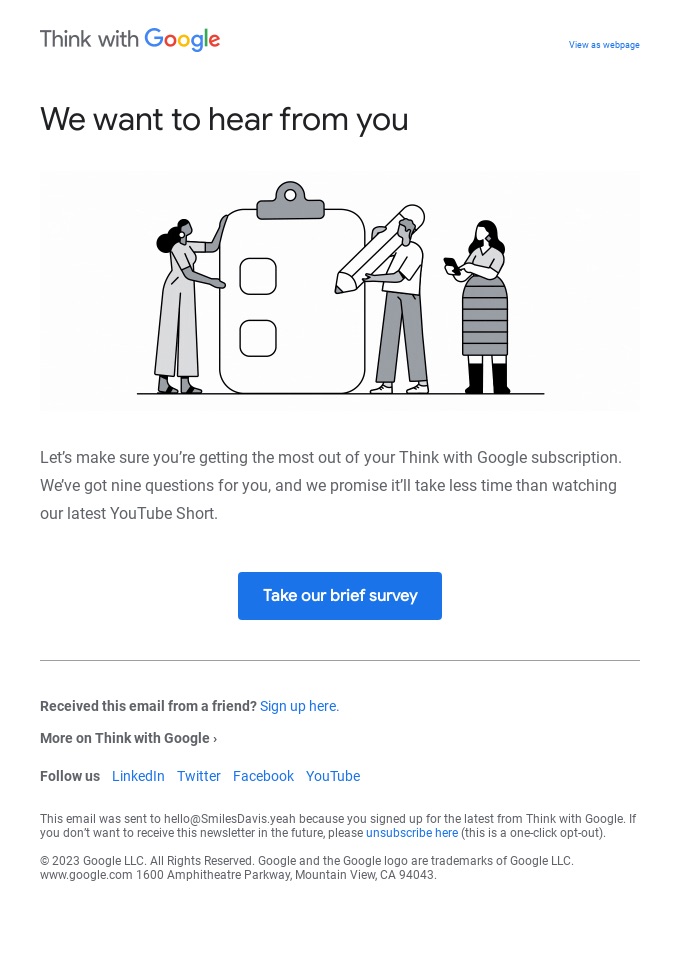
3. Customer Satisfaction Survey by Google

Screenshot of a satisfaction survey email from Google, showcasing visual and text elements

Subject line: Got opinions? We’re all ears

Receiving feedback is essential for business improvement, yet many people postpone providing it, particularly when it involves completing a survey sent to their email inbox.

What makes this email stand out: its simplicity and direct approach. Not every email needs to be flashy to capture attention. Google recognizes that surveys aren’t always a preferred task, so they effectively communicate that it “will take less time than watching our latest YouTube Short.” This clever comparison entices readers with the idea that the survey will be quick and effortless, while also sparking curiosity about the latest Short. Genius!

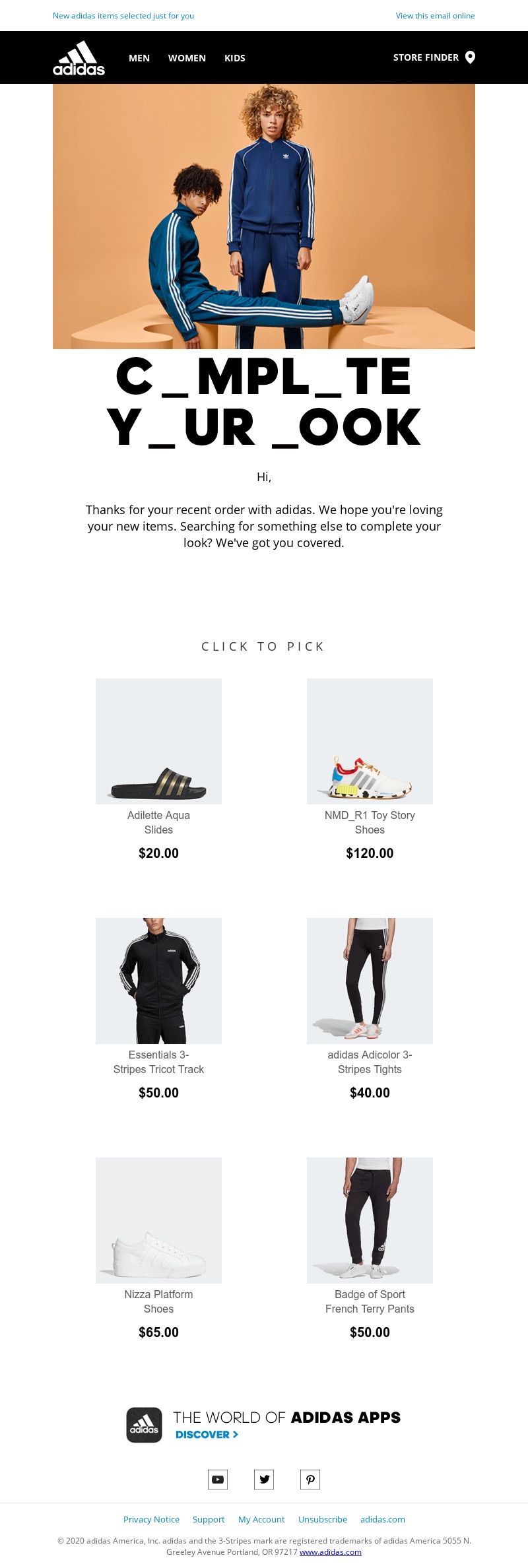
4. Upsell Email by Adidas

Screenshot of an upsell email from Adidas, showcasing visual and text elements

Subject line: Complete Your Look

After a purchase, timely follow-up emails can introduce complementary items. Cross-selling and upselling leverage the excitement of the initial purchase and can lead to additional sales. 

What makes this email stand out: Adidas’s masterful use of wordplay. The email begins by thanking the customer for their recent purchase, but cleverly suggests their look might not be complete through an animated headline with initially missing letters.

The sports apparel brand then recommends a few products that would complement the customer’s purchase. They opted for a minimalist approach, avoiding any pushy sales tactics, as there are no visible CTA buttons. Instead, they made the images clickable, encouraging the reader to “click to pick” whatever they like.

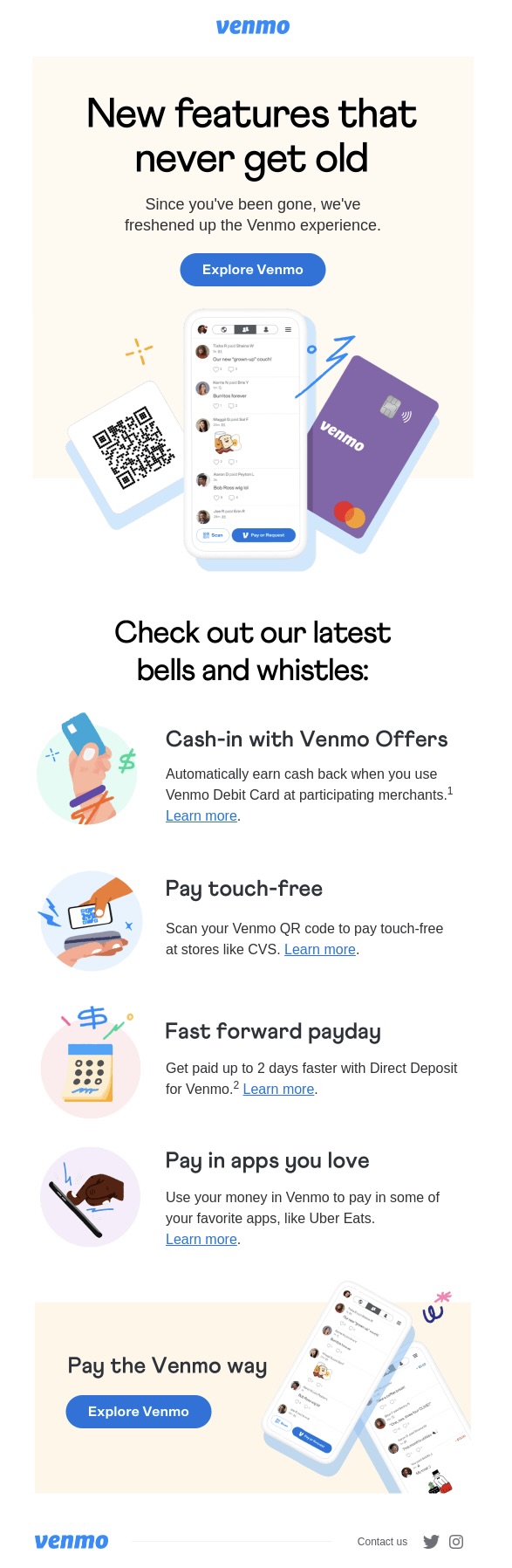
5. Renew Email by Venmo

Screenshot of a renew email from Venmo, showcasing visual and text elements

Subject line: An update on your subscription renewal and pricing

You might think it’s hard to appreciate an email from a company whose services you’ve used and then canceled. However, the mobile payment app Venmo is here to prove they deserve a second chance.

What makes this email stand out: re-engage the customer by promoting essential “never get old” features, while emphasizing that they have been “freshened up,” so that they spark curiosity. The use of the phrase “latest bells and whistles” further highlights the special features added to the product, enticing customers to see if they live up to the promise.

The email is designed with a simple one-column layout, ensuring readability on mobile devices, which aligns with the application’s intended mobile use. This layout also helps to highlight the new features, which are briefly explained with relevant and intriguing to the customers descriptions like “fast forward payday” and “pay in apps you love.”

The design takes a similar approach to Vimeo’s welcome email, using various graphics to showcase the platform’s new features. Clear call-to-action (CTA) phrases are included to simplify the exploration process.

5 Email Marketing Campaigns that Engage 

Informational campaigns are designed to educate, recognize, or engage readers, gradually turning them into loyal customers. They allow you to connect with both existing and potential clients by sharing valuable insights or offering something special, all while subtly promoting your products or services.

Here are some of the best email campaigns to inspire you when you’re looking for ways to keep your audience engaged.

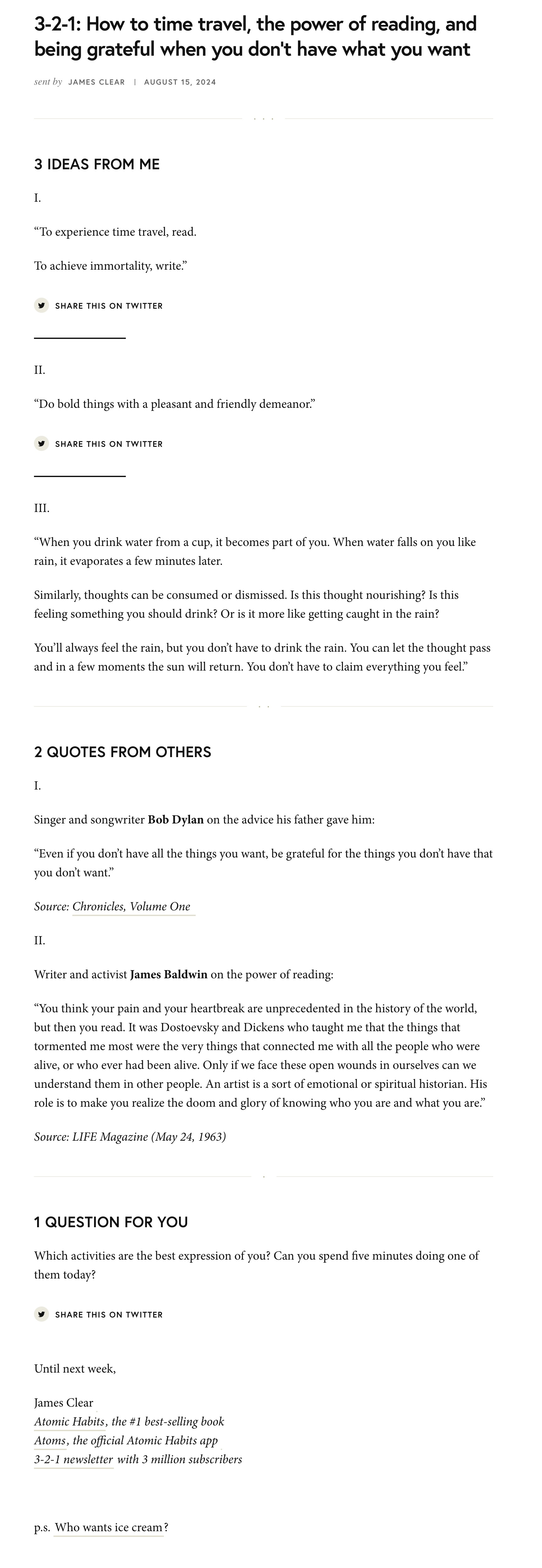
1. The 3-2-1 Newsletter by James Clear

Screenshot of a newsletter from James Clear, showcasing visual and text elements

Subject line: 3-2-1: How to time travel, the power of reading, and being grateful when you don’t have what you want

The habits guru and best-selling author James Clear sends out a newsletter every Thursday featuring 3 short ideas from him, 2 quotes from others, and 1 question for readers to ponder. His newsletter is an excellent example of how an all-text message can be both elegant and engaging, without relying on visual elements.

What makes this email stand out: its  direct approach, effectively engaging readers by highlighting the value they will gain from reading the email. Strategically placed headings help maintain the reader’s attention, while the short sentences and paragraphs ensure easy readability. 

While some argue that adding social media links within emails isn’t effective, James Clear demonstrates how to do it right. By inviting readers to share their thoughts on social media, he not only fosters engagement but also enhances his online presence. This approach shows that, when integrated thoughtfully, social media links can extend the conversation beyond the inbox and build a stronger connection with your audience.

2. Travel Guide by Booking

Screenshot of a travel guide email from Booking.com, showcasing visual and text elements

Subject line: 5 city guides for your next long weekend away

Who doesn’t love a quick getaway without the hassle of planning? Recognizing this, one of the most popular travel marketplaces, Booking, created tailored travel guides for their email subscribers.

What makes this email stand out: the creative use of visual design. By pairing color blocks with city images, it creates a visually pleasing experience without overwhelming the reader. The CTA buttons are stacked in a way that follows a natural flow, guiding readers to either the complete city guide or the accommodation options on the website, effectively driving more traffic to both.

Additionally, if none of the featured destinations appeal to you, Booking has smartly integrated a search bar. This feature not only allows readers to explore other options but also directs them to the website, increasing traffic. The search bar enhances user experience by providing immediate access to personalized travel searches, making the email both functional and engaging.

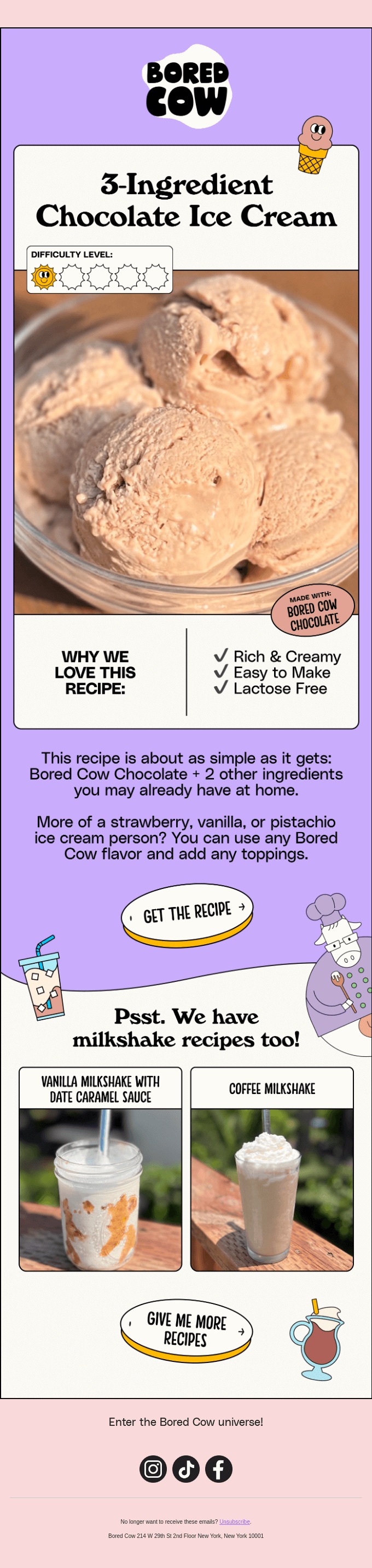
3. How-to Email by Bored Cow

Screenshot of a recipe email from Bored Cow, showcasing visual and text elements

Subject line: I scream you scream…

Providing your audience with a step-by-step or how-to guide is a great strategy for retaining customers and turning them into brand ambassadors. This delightful ice cream recipe from the dairy-free milk brand, Bored Cow, taps into nostalgia by featuring the universal love for ice cream

What makes this email stand out: the masterful use of a pop culture reference, instantly capturing attention with a nostalgic, song-themed subject line: “I Scream, You Scream, We All Scream for Ice Cream.” This clever nod not only grabs the reader’s interest but also creates a personal connection by evoking fond memories.

The email further distinguishes itself with a well-designed layout that includes vibrant graphics and 3D call-to-action buttons, enhancing the overall childhood feel. The inclusion of a difficulty level bar underscores the simplicity of the recipe, encouraging readers to dive into memory land while preparing the ice cream. 

The brand also thought about those who aren’t ice cream enthusiasts or don’t catch the reference, by offering milkshake recipes. They are prominently displayed against a white background, distinct from the rest of the email, ensuring the reader’s eye won’t miss them.

4. Anniversary Email by Duolingo

Screenshot of an anniversary email from Duolingo, showcasing visual and text elements

Subject line: EXCLUSIVE: Embarrassing photos of Duo inside 😈

Name a better occasion to remind all your customers of your brand than an anniversary celebration. The language education platform, Duolingo, used this opportunity to highlight key milestones while promoting its services in a clever and engaging way. 

What makes this email stand out: the storytelling approach, which draws readers in and keeps them engaged. A powerful brand story has the potential to boost customer loyalty by 20%.

Duolingo, famous for its playful and lighthearted brand voice, infuses humor right from the subject line by teasing “embarrassing” photos of its main character, Duo. The use of the word “EXCLUSIVE” enhances the sense of connection between the users and the brand, fostering a community feel. Even if readers suspect the brand is joking, it’s a clever way to add intrigue and entice recipients to open the email.

Additionally, eye-catching visuals and a zig-zag pattern make the email easy to skim, allowing information to be conveyed quickly and effectively.

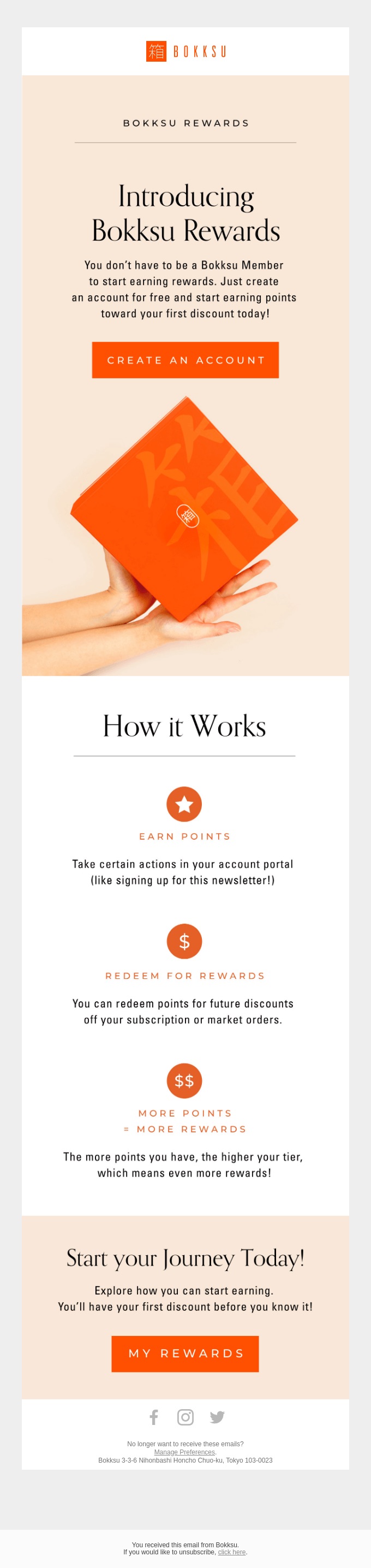
5. Rewards Email by Bokksu

Screenshot of a rewards email from Bokksu, showcasing visual and text elements

Subject line: We give you a reason to stick around, promise!

Many brands use gamification as part of their strategy to keep clients engaged and to boost sales, and the Japanese snack brand Bokksu has also embraced this trend.

What makes this email stand out: its vibrant and joyful look while using only two colors – orange and white. When used in an email, orange gives the energy and brightness of red but with a softer edge, making it less intense and easier to get along with. It’s a warm color that can get people interested. 

The brand masterfully incorporated two shades of orange, using the more intense shade for the CTA buttons to signal attention, while the softer shade conveys a calm, joyful vibe. This approach highlights the importance and impact of colors in email marketing.

For the content, the subject line should pique recipients’ curiosity about what’s inside while accurately setting expectations. Bokksu successfully fulfilled their promise of “We give you a reason to stick” by clearly outlining the benefits of their loyalty programs in a straightforward one-column layout.

5 Email Marketing Campaigns that Boost Sales 

Promotional campaigns tend to include sales-driven emails, which typically include a call to action, encouraging readers to take specific actions.

Here are some of the best email campaigns to inspire you the next time you want to announce a product launch, promote limited-time sales, or run a seasonal campaign.

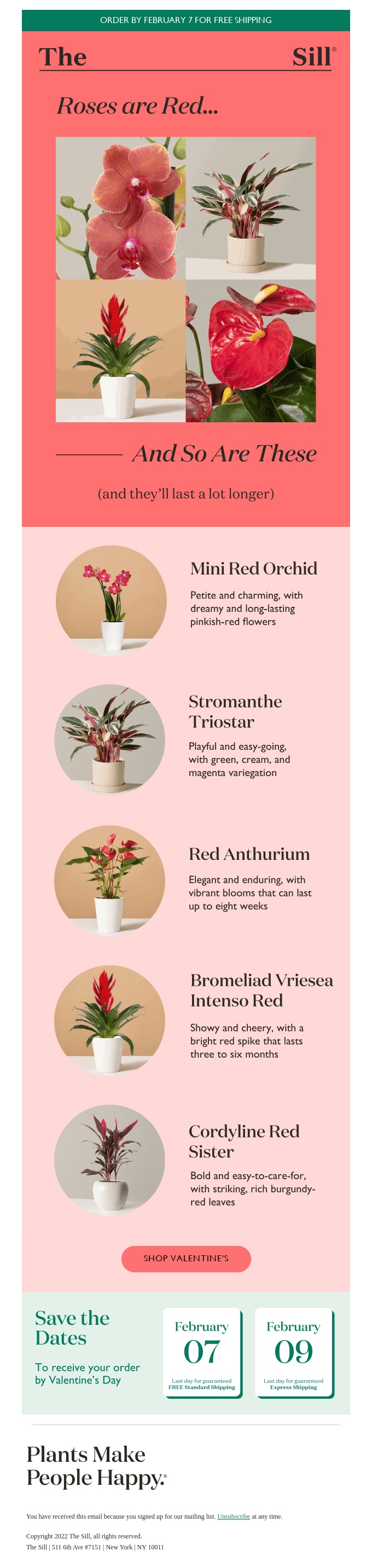
1. Seasonal Email by Sill

Screenshot of an email dedicated to Valentine’s Day from Sill, showcasing visual and text elements

Subject line: Roses are Red, & These Plants Are Too!

When you think of “holiday email marketing” your mind might jump straight to Christmas, but there are other holidays sprinkled throughout the rest of the year that you can create campaigns around. 

What makes this email stand out: the brand thought about every little detail – from the header image to the CTA button. As Valentine’s Day is a celebration of love, using red is ideal – associated with strong emotions, it’s a color that commands attention and is meant to be noticed. It shouts ‘look at me” and adds a sense of enthusiasm and boldness to anything it’s applied to.

The strategically placed phrase “and they’ll last a lot longer” highlights the benefits of buying this product (a plant) rather than its competitors (a soon-to-die flower). When trying to sell your products, it would be hard not to provide visuals so that the reader gets an idea of what to expect. However, if the appealing images don’t do the trick for you,  the catchy and amusing plant descriptions are what would convince you to buy!

2. Product Launch by Fellow

Screenshot of a product launch email from Fellow, showcasing visual and text elements

Subject line: Our new product sucks…

You probably wouldn’t think to promote your new product by stating that it sucks. But let’s be honest. Wouldn’t you be intrigued to open the email and see what the problem is? Fellow is a brand dedicated to making coffee a pleasant experience without the clunky equipment.

What makes this email stand out: the playful, tongue-in-cheek approach undertaken to promote a product. The new Electric Atmos is designed to remove air from your coffee beans – and yes, it “sucks,” but in the best way possible.

The zig-zag layout, paired with a black-and-white color scheme, creates an elegant and minimalist aesthetic that complements the subtle humor and highlights the product images. The email wraps up with the playful phrase “They’re all keepers,” cleverly underscoring the product’s ability to keep your coffee fresh for as long as possible.

3. Customer Reviews by Mode Chocolate  

Screenshot of a customer recommendations email from Mode, showcasing visual and text elements

Subject line: We’re starstruck ⭐️

Showcasing positive client reviews is always a smart move – it boosts your brand’s reputation and encourages potential customers to try your products. Mode Chocolate, known for its zero-added sugar treats, nails this with a simple design and captivating graphics.

What makes this email stand out: it tells a story even though it’s a promotional email. The opening line, “A little sweet talk,”  sets the stage for customer reviews that likely praise the delicious treat. The three-dimensional graphics of spilling chocolate enhance the narrative, making you almost taste the chocolate the email promotes. 

The use of purple, with its unique blend of warm and cool tones, is a great choice, as purple is known to spark curiosity. This blend of colors also helps clearly distinguish the two sections – the reviews and the products –  and highlights the featured chocolates bars.

4. Giveaway by Honey Mama’s

Screenshot of an email featuring a giveaway from Honey Mama's, showcasing its visual and text elements

Subject line: Lemon Blueberry Giveaway! 🍋

Often, a bold subject line is needed to capture readers’ attention. However, when offering discounts or giveaways, being direct can be just as effective. Honey Mama’s, known for its healthy candy bars, ran a giveaway campaign that grabbed attention with its straightforward subject line, encouraging immediate engagement.

What makes this email stand out: it effectively leverages email marketing to boost social media channels. The email provides just enough information to entice you to participate and is intriguing enough to prompt a click on the strategically placed CTA button.

The header image helps visualize what you might miss out on if you don’t participate, enhanced by yellow stars that add a sense of joy and warmth. The phrase “two winners” provides a feeling of excitement, imagining you can be one of these lucky people. The use of yellow brings enthusiasm and optimism to the email, making it perfect for highlighting the urgency to join now.

 5.  Limited-Time Sale by Pearly

Screenshot of a limited-time sale email from Pearly, showcasing its visual and text elements

Subject line: Prime Deals Start Now: 20% Off

And the last email that we’ll take a look at is from the bubble tea company, Pearly, which decided to make their customers happy by offering a limited-time sale.

What makes this email stand out: it screams urgency – from the subject line to the purple label stating “48 hours only.” If you didn’t get the idea that you should be running to catch the discounts, the strategically placed heading “unbeatable deals for only 48 hours” is there to remind you.

They have categorized their bubble bundles starting from beginners to more advanced customers, ensuring that none of their audience feels left out. They have also strategically crossed out the old prices and put the new ones in bold and bigger fonts, so you see that their discounts are worth taking advantage of. 

Additionally, using bullet points helps readers easily understand and retain the information. If you’re convinced to purchase the bundle, the darker CTA button, prominently displayed against the warmer purple background, is designed to catch your eye.

Send Your Next Email Marketing Campaign with SiteGround

Are you inspired by the creative email marketing campaign examples we just shared and eager to create your own? Take a look at how you can seamlessly craft email campaigns using the SiteGround Email Marketing Platform 👇🏼

Sign up for our email marketing platform today and take advantage of our limited-time offer. Get everything you need to create effective emails that deliver results!

10 Email Marketing Benefits for All Types of Businesses

laptop displaying email marketing benefits

Maybe you’ve heard some people question the email marketing benefits – whether they are still effective in the age of social networks. But let’s think about it for a second – don’t we all check our inboxes at least once a day? Whether it’s searching for a discount on your favorite jeans, reading the weekly techie newsletter you’ve subscribed to, or seeing a client’s feedback on a new product, email marketing remains a go-to communication channel.

So, what exactly is email marketing? It serves a wide range of purposes, from a small business sharing updates with a few customers to a team of marketers crafting customized email sequences, known as drip campaigns, tailored to specific customer needs. Email marketing keeps you connected with your audience by retaining their interest, providing updates, facilitating transactions, or promoting your offerings.

How Effective Is Email Marketing?

The statistics show that 60% of consumers prefer to hear from brands through email. Half of these consumers open their emails to find discounts and special offers, while the other half are drawn to the relevant, personalized information brands provide. Therefore, you can leverage the benefits of email marketing for a variety of purposes and still engage an audience that values your messages. 

Regardless of the specific purpose of your email campaign, the long-term goal of your business is to convert one-time buyers into loyal customers. Marketing by email plays a crucial role in achieving this, with a revenue projected to reach $17.9 billion by 2027, highlighting its growing importance and effectiveness in driving business success.

Who Benefits the Most from Email Marketing?

Whether you are a freelance designer showcasing your portfolio and developing your personal brand, a small bakery sharing recipes and promoting small cozy events, or a large software company launching products and providing educational webinars, email marketing enables direct and meaningful interaction with your audience. 

The advantages of email marketing extend to any type of business because it offers versatile strategies for reaching out to your target audience, engaging them with personalized content, and converting them into loyal customers.

🔥 If you own a small business and are uncertain about how to begin, or wish to refine your current approach, consider exploring our comprehensive guide to mastering email marketing for small businesses.

10 Email Marketing Benefits

The possibilities of email marketing are endless, especially with modern email service platforms. As you continue reading, you’ll discover how to leverage its many benefits. 

1. Cutting Costs and Time on Marketing Communication

One of the biggest advantages of email marketing is its cost-effectiveness, making it a perfect solution for businesses with tight budgets. Unlike paid ads or influencer marketing, email allows you to directly reach your audience at a fraction of the cost. Many email-focused platforms, such as SiteGround Email Marketing, even offer free trials or low-cost plans tailored for small businesses.

In the past, sending a newsletter could take days of continuous effort, requiring copywriters, designers, and developers to work together. Today, email marketing platforms have simplified the process, allowing you to create and send an email campaign in as little as 30 minutes.

Our easy-to-use interface, no-code email builder, and integrated AI writing assistant mean you don’t need to hire a professional copywriter or designer to create effective emails. You can also draw inspiration from other brands or use AI tools like ChatGPT to generate content, streamlining the entire process even further.

By cutting down both time and cost, you can create engaging emails and deliver effective marketing communication to your audience with minimal effort.

2. Achieving a High Return on Investment (ROI)

Another significant benefit of email marketing is its ability to deliver a high return on investment (ROI) – a key metric of your campaign’s success. 

On average, email marketing yields on $36 to $42 for every $1 spent, though this can vary based on several factors:

  • The industry you’re in: retail and ecommerce tend to see the highest returns, followed by marketing and PR agencies, and the tech industry. But don’t get discouraged if you’re in a different sector; you can still win over your readers with valuable content.
  • The frequency of sending emails: sending 9 to 16 emails per month can guarantee a higher ROI. If you think you can’t keep up with high frequency, sending two to four per month can still significantly boost it. Ultimately, consistency is key.
  • The timing of your emails: while Tuesday mornings between 9 and 12 AM are often recommended for higher open rates, conducting A/B tests can help identify the best timing for your audience.
  • The content of your email: successful email campaigns largely depend on segmentation, message personalization, and email automation. We’ll explore how to implement each of these in the upcoming sections.

By understanding these factors and tailoring your approach accordingly, you can enhance your email marketing efforts and achieve a higher ROI for your campaigns.

3. Gaining New Leads

Email marketing can be a powerful tool for generating new leads. One effective strategy is to offer lead magnets – such as downloadable ebooks or exclusive access to webinars – on your website in exchange for email sign-ups. These resources provide immediate value and demonstrate your expertise, enticing visitors to share their contact information to gain access. 

With their email addresses in hand, you can nurture these leads through targeted campaigns that build trust and encourage them to explore your products or services. To maximize your efforts, we’ve gathered proven email lead generation strategies designed to elevate your business and maximize conversions.

SiteGround enhances this process with a lead generation plugin that seamlessly integrates with your WordPress website. It enables you to create subscription forms and even add subscription options to existing contact forms, making it simpler than ever to capture and expand your email list.

4. Increasing Subscribers’ Engagement 

By now, you might be intrigued by the potential of email marketing, but how can you determine which of your email subscribers are genuinely interested in what you have to offer? After all, there’s nothing more frustrating than wasting your time on leads that aren’t likely to convert into customers.

Email segmentation is one of the benefits of email marketing that can help you overcome this challenge. Indeed, segmented email campaigns result in 30% more opens and 50% more clicks than unsegmented ones. By categorizing subscribers, you can tailor content to specific groups, ensuring your messages and offers are relevant and appealing. Segmentation can be based on factors like demographics, behavior, email activity, and sales funnel position.

SiteGround Lead Generation Plugin allows you to organize your subscribers into specific groups, enabling you to customize your messages to meet the needs of different audience segments. 

5. Building Stronger Relationships with Subscribers 

Who enjoys reading an email that feels impersonal and generic? Likely, none of us do. Email marketing provides you a unique space to address your audience on a first-name basis, fostering a sense of familiarity and engagement.

Start by crafting a compelling subject line – including the recipient’s first name in the subject line can boost the click-through rate by 10.64%. Along with the sender’s name, these are the first elements people notice when receiving an email. Next, personalize the opening line of your email by using the recipient’s name instead of a generic “Dear Customer.” These simple touches can significantly enhance your engagement and connection with your subscribers.

6. Maximizing Marketing Efficiency and ROI

Businesses need more than just time-saving tools – they require solutions that maximize efficiency and return on investment. Email automation achieves this by delivering personalized, timely content without the need for continuous manual input.

Imagine being able to set up a series of emails that are automatically sent to your audience based on their engagement with your brand. For instance, a well-timed welcome email can immediately introduce your brand, offer a freebie, or provide valuable information that builds trust from the start. Automated sequences like these ensure that you stay connected with your customers while spending less time on manual tasks.

Beyond just staying in touch, automation helps you drive more revenue by delivering targeted messages at critical moments. For example, after a customer makes a purchase, an automated upsell email can suggest complementary products or services. By sending the right message at the right time, you increase the likelihood of repeat purchases and higher transaction values – all without additional effort.

The real power of email automation lies in its ability to scale your marketing efforts while maintaining relevance and personalization. This boosts both engagement and conversion rates, directly contributing to better ROI. Instead of dedicating more time and resources to manual processes, you can focus on growing your business, knowing that your email campaigns are working effectively in the background.

7. Providing More Website Traffic 

A significant advantage of email marketing is its ability to generate more website traffic. By directly communicating with your audience through targeted email campaigns, you can effectively guide subscribers to your latest content or landing page. 

Imagine you’ve just launched a course on how to become a wedding photographer. Sending an email with a compelling call to action can entice readers to visit your website, significantly boosting the traffic to your website. It’s advisable to include a link to your website in every email you send, encouraging subscribers to click and learn more about your latest content and offers.

In addition to driving traffic, email marketing provides valuable insights into how your audience interacts with your content. This data allows you to see which content drives the most traffic from your emails, enabling you to replicate or use that type of content more often to drive sales. 

8. Strengthening Your Brand Credibility

In today’s competitive market, people are more inclined to support businesses they know and trust. So another benefit of email marketing is that it allows you to maintain regular communication, ensuring your brand remains familiar and reliable in the eyes of your customers. This consistent engagement not only reinforces your brand’s credibility but also shows your commitment to transparency and customer satisfaction.

Additionally, a well-executed email marketing strategy can boost word-of-mouth referrals. When customers trust your brand, they are more likely to recommend it to friends and family. This organic growth is invaluable, as personal recommendations often carry more weight than traditional advertising.

9. Tailoring Your Products and Services to Fit Customer Needs

Email marketing offers the valuable advantage of gathering customer feedback, which is especially beneficial for businesses looking to establish themselves in the market. By incorporating customer surveys into your email campaigns, you can obtain insights into how your audience perceives your brand. 

To maximize the benefits of these surveys, incorporate quantitative questions to assess customer loyalty, satisfaction, and their likelihood of recommending your product or service. Complement these with open-ended questions to delve into the reasoning behind their responses. This strategy not only enables you to better meet customer needs but also enhances their overall experience.

Moreover, by actively seeking feedback and acting upon it, you demonstrate to your customers that their opinions are heard and valued, fostering greater loyalty and trust in your brand.

10. Providing Valuable Performance Insights

As the saying goes, you can only improve what you measure. Email marketing tools provide valuable insights into customer behavior, offering clear campaign reports that reveal everything you need to know about your performance. By tracking key metrics such as bounce rate, click-to-open rate, and unsubscribe rate, you gain a deeper understanding of how your audience interacts with your content.

When launching an email campaign, the initial engagement typically peaks within the first 24 hours. A few days after sending, you should have a nearly complete picture of the campaign’s performance. However, if your campaign involves multiple emails and spans other channels – such as paid ads, social media, individual sales outreach, or earned media – it may be beneficial to wait longer for a more comprehensive view. 

As data from your campaigns accumulates, you can test and optimize elements like subject lines, content, and send times to enhance results over time. The effectiveness of email marketing also depends on factors such as the quality of your email list, the relevance of your content, and the frequency of your emails. Regular analysis and adjustments based on your findings can lead to improved outcomes.

Leverage the Email Marketing Benefits with the Right Service Provider

As you’ve seen, email marketing benefits are truly endless – from boosting reader engagement to turning one-time buyers into loyal customers. Whether you’re just starting out or managing a large corporation, harnessing the power of email marketing can transform your communication strategy and deliver meaningful results. Now’s the time to give it a try!