The Beginner’s Guide to Ecommerce Email Marketing

shopping cart with emails going out from it

Ecommerce email marketing is how online stores turn one-time buyers into repeat customers by using targeted, automated emails that land at exactly the right moment in someone’s shopping journey. It’s also one of the few marketing channels where the numbers truly justify the effort: for every $1 spent, email marketing returns between $36 and $45, outperforming paid ads by a widely impressive margin.

If you’re just starting out or suspect your current setup is leaving money on the table, this guide covers everything you need: how to build and segment your list, which emails to send at each stage, and how to measure what’s working. Everything you need to get started, nothing you don’t.

Key takeaways

  • Ecommerce email marketing is one of the highest-ROI channels, helping online stores turn one-time buyers into repeat customers with targeted, timely emails.
  • Segmentation and personalization matter most—sending a relevant message to the right customer improves open rates, clicks, and conversions.
  • A strong email marketing strategy starts with a healthy email list: collect subscribers ethically, use clear opt-ins, and avoid purchased lists that hurt deliverability.
  • Different email types serve different goals—promotional, transactional, and lifecycle emails work together to support the full customer journey.
  • Automation saves time and increases sales by triggering emails like welcome sequences, abandoned cart reminders, and win-back campaigns at exactly the right moment.
  • Tracking key metrics like open rate, click-through rate, and conversion rate helps you improve performance and make smarter email marketing decisions.
six day email marketing course for beginners

What Is Ecommerce Email Marketing?

Ecommerce email marketing is a direct marketing channel that lets online stores reach customers with targeted emails, from promotional campaigns and abandoned cart reminders to post-purchase follow-ups and loyalty offers.

Ecommerce businesses use this type of email marketing for a range of purposes. These messages can include promotional emails with special offers and product discounts, transactional emails, such as order status updates and abandoned cart details, and regular informative and educational newsletters.

Segmentation and personalization are what make ecommerce email marketing outperform other channels. That is, when you group your audience by interests and customize the content they receive, you get better open rates, more clicks, and higher conversions. All because the right message is reaching the right person at the right time.

What Are the Benefits of Ecommerce Email Marketing?

The main benefits of ecommerce email marketing include full ownership of your audience, high ROI, precise targeting, stronger customer retention, and insights that sharpen your future campaigns. Here’s a closer look:

1. Gives You Control Over Your Audience

Email is a marketing channel you fully control. You own your email list and decide the content you share, unlike social media marketing and display ads where you rely on third-party algorithms that affect visibility of your message.

That said, ownership comes with responsibility. Getting your emails to the inbox (not the spam folder) depends on maintaining a clean email list, sending to engaged subscribers, and using a platform with solid deliverability. SiteGround Email Marketing, for example, is built with all of this in mind, so your campaigns land where they should.

2. Has the Highest ROI 

In general email marketing is more effective than other marketing channels with a higher return on investment. Research shows it can turn every $1 spent into somewhere between $36 to $45. In contrast, Google ads generate $2 for every $1 spent. That’s a very noteworthy difference.

In ecommerce, that targeting potential goes even further—you’re not just sending newsletters to a general list, but reaching the right people at exactly the right moment in their shopping journey. But, this requires a strategy—more on that in a moment.

3. Offers Targeted and Personalized Communication 

Ecommerce businesses gather email addresses through various methods—from paid campaigns and newsletter sign-ups to checkout processes and referrals. The advantage is being able to organize those subscribers into well-defined segments based on the email customer journey: where and when they subscribed, their interests and intent, and the types of emails they prefer to receive. The more closely your emails match what a subscriber actually cares about, the better your open rates, clicks, and conversions.
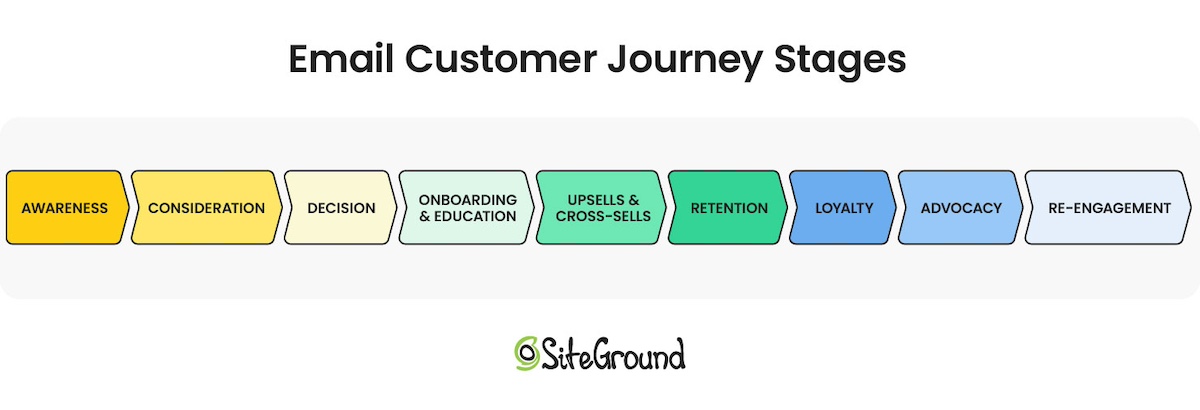
email customer journey stages diagram

4. Improves Customer Retention and Loyalty

Email does more than drive one-off sales. It’s how you build a relationship that outlasts any single purchase. Regular touchpoints keep your brand top of mind, nudge potential customers toward repeat buys, and when engagement starts to slip, re-engagement emails give you a second shot at winning them back. Over time, that consistent presence is what turns a one-time buyer into a loyal customer.

5. Drives Growth Across Your Entire Business

There are three key ways to grow your ecommerce business: increase the total number of customers, boost the number of purchases each customer makes (repeat purchases), or raise the average order value.

Ecommerce email marketing is a powerful tool that simultaneously impacts these three growth strategies. A simple email can win-back inactive subscribers, promote repeat purchases, stimulate upsells, or recover abandoned orders and bounced sales. Having customers return is important for your business because it keeps your average cost of acquiring a customer down.

6. Provides Unique Insights

Last but not least, ecommerce marketing emails serve as a valuable learning tool for businesses. By analyzing how customers interact with your emails, you can gain deep insights into their interests and behaviors. This knowledge removes the guesswork and enables more effective segmentation and targeting in future campaigns.

How to Create an Ecommerce Email Marketing Strategy

Building a successful ecommerce email marketing strategy comes down to a handful of core steps. Here’s how to set it up from the ground up.

1. Build (and Grow) Your Email List

Collect the Emails of New Clients

Your buyers are your warmest audience. They already know your brand and like what you sell. Whether you’re selling online or in person, start collecting their emails at checkout. They’ve already shown they’re interested, which makes them far more likely to engage with your emails down the line.

Collect Emails of Visitors With Opt-in Forms and/or in Person

Beyond buyers, your website visitors are another strong source of leads. They’re already interested enough to show up. Add sign-up forms in high-visibility spots like your homepage, sales pages, or footer, and give people a compelling reason to subscribe: a discount, early access, or a useful resource (this is what’s known as a lead magnet). For a deeper dive, see our guide on how to build an email list.

If you use SiteGround Ecommerce, your sign-up forms, subscriber management, and email campaigns are already in the same place—no extra plugins or third-party connections needed.

Get Explicit Consent & Use Double Opt-in forms

A bigger list isn’t always a better list. You want subscribers who actually want to hear from you, which means getting explicit consent and skipping the temptation to buy lists. Purchased lists violate GDPR (the EU’s data privacy regulation) damage your email deliverability and sender reputation, and rarely convert anyway.

The best way to keep your list clean from the start is a double opt-in — a confirmation email that asks new subscribers to verify their sign-up. It adds one extra step but filters out bad addresses and ensures everyone on your list genuinely wants your marketing emails, which helps you reduce bounce rates and stay out of spam folders.

2. Segment Your Audience 

List segmentation means grouping your subscribers by shared characteristics (where they signed up, what they’re interested in) so you can send each group content that’s actually relevant to them. The more targeted the message, the better your chances of getting the open, the click, and the sale.

The most natural place to start is where and how someone signed up. But if your sign-up form includes a simple preference question—”Which sports are you interested in?” for a sports brand, for example—you immediately have a basis for more meaningful segmentation. A 10% Black Friday discount hits differently when the soccer fan sees soccer gear and the golf enthusiast sees clubs. Every answer becomes a tag in your subscriber database that you can build campaigns around.

SiteGround Email Marketing makes this straightforward: you can filter subscribers by custom fields like interests or signup source, and have a tightly targeted segment ready before you hit send.

3. Set up Different Types of Ecommerce Email Marketing Campaigns

With your list built and your audience segmented, it’s time to think about what to actually send. Ecommerce email marketing campaigns generally fall into three categories, and most stores need all three working together to cover the full customer journey:

  • Transactional Emails: These are automated messages triggered by customer actions. Examples include order confirmations, purchase receipts, and shipping updates. Because they’re expected and relevant, they’re among the most-opened emails you’ll ever send, making them a key trust-building tool.
  • Promotional Emails: These emails aim to increase product visibility and sales through announcements of discounts, special deals, or product launches. For instance, promoting a new collection or a Black Friday-Cyber Monday sale. They are designed to attract and engage customers, driving both immediate purchases and long-term brand loyalty.
  • Lifecycle Emails: Often called “triggered” emails, these are sent in response to specific customer interactions with your site. Examples include a welcome email upon subscription or a loyalty program email to encourage ongoing sales. Lifecycle emails are effective for nurturing customer relationships and guiding potential buyers along the marketing funnel, from initial interest to final purchase and beyond.

4. Organize Your Emails with a Calendar

To effectively reach different customer groups who have varying needs, plan your email campaigns using an email marketing calendar. This helps you schedule your emails and follow-ups, ensuring you stay organized and on track with your campaigns.

You can create your own email calendar using tools like Google Sheets or Microsoft Excel. When setting up your calendar, include entries such as:

  • Campaign name
  • Email type (newsletters, win-back, welcome emails)
  • Subject line
  • Product or service features/offers
  • Target audience
  • Calls to action (CTAs)
  • Send date and time
  • Status (in progress, scheduled)
  • Owner (the person in charge of the email)
  • Goals (generate leads, welcome new subscribers, re-engage inactive customers)

This structured approach helps you deliver targeted content at the right time to the right audience.

5. Automate as Much as Possible

Automation is what turns a good email strategy into one that runs while you sleep. Most platforms handle the basics out of the box—welcome emails, order confirmations, shipping updates. But email automation goes further: you can set up trigger-based sequences that respond to what a subscriber actually does. A customer shows interest in a product—they get a follow-up email with more information, a related recommendation, or a timely discount to nudge them toward a purchase.
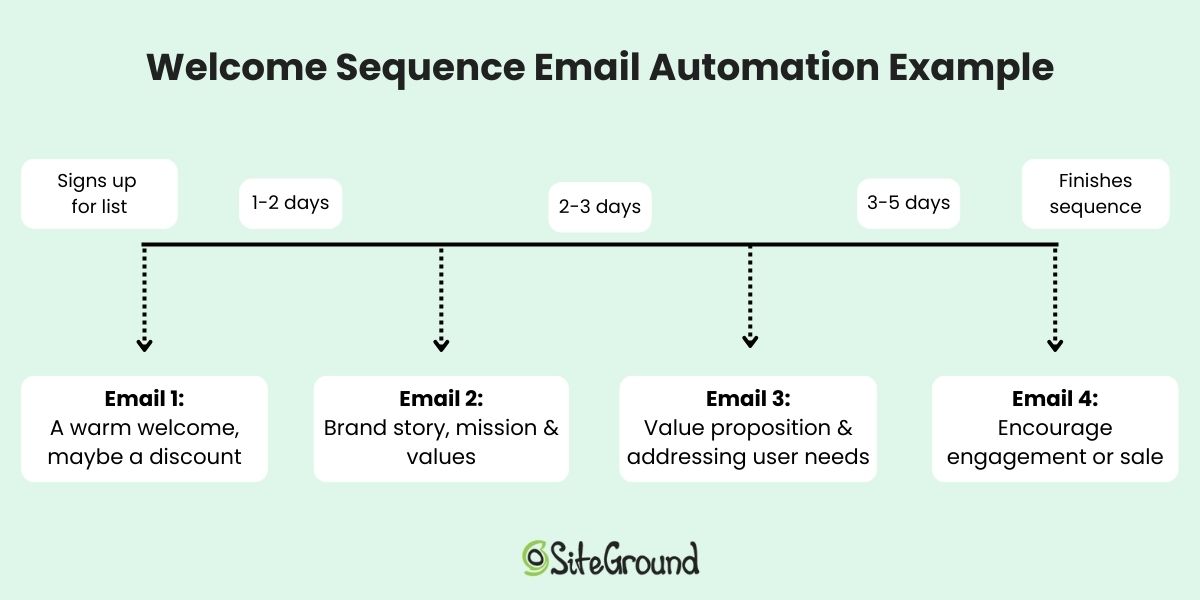
Welcome sequence email automation diagram

The more of this you set up upfront, the less manual work your campaigns require over time.

Must-Send Ecommerce Marketing Emails (+ Examples)

1. Sales and Promotional Emails

These emails aim to drive sales and usually communicate discounts and special offers. They need to be straight to the point—what’s the value of the product or service you offer and include a strong CTA. These messages should be designed to drive instant traffic to your website and increase your sales.
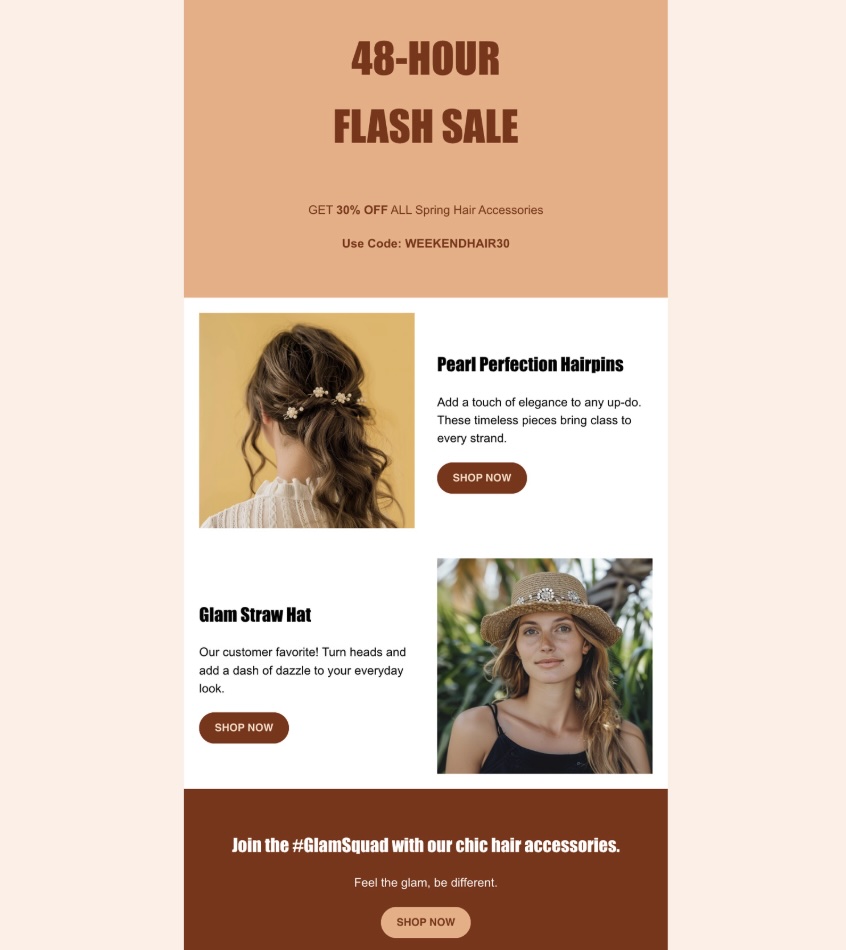
Example of a promotional email with a sale

Here are a few subtypes to consider:

  • New product or service launch: Whenever you introduce a new product or service, make sure your customers and subscribers are the first to know. This keeps your audience engaged and excited about your ecommerce brand’s developments.
  • Special or seasonal discounts: Make the best out of special or seasonal discounts to generate urgency. These are time-sensitive offers built around seasonal marketing, from holidays like Christmas and Valentine’s Day to major shopping events like Black Friday email campaigns. These promotions encourage quick decision-making and increase sales during peak shopping times.
  • Cross-sell emails: Send emails that suggest complementary items based on what a customer has already purchased. If they’ve ordered a book from a collection, let them know there are other books in this series, to spark their interest and drive sales.
  • Upsell emails: Upsell emails are a chance to increase your earnings per customer by promoting premium versions of the products or services they already use, or by offering related products. Encourage your customers to pay extra for more features and convince them that they need these features. Let them know that the upgrade will enhance their experience even further.

2. Abandoned Cart Emails

Abandoned cart emails target shoppers who got close but didn’t quite convert. Keep them simple: address the customer by name, show them what they left behind, and include a clear CTA back to their cart. The less friction between the email and the checkout, the better.

3. Relationship Marketing Emails

These emails let you build and maintain a long-term relationship with your customers. Customize and personalize them as much as possible to strengthen your connection with each subscriber. Examples include: 

  • Newsletters: Sending regular newsletters helps keep your subscribers informed and engaged with your brand. Aim to maintain a balance—regular updates are good, but too many can overwhelm their inboxes. Always prioritize quality content that adds value.
  • Birthday emails: Sending birthday emails not only makes your customers feel special and appreciated, but it also provides an opportunity to offer them a limited-time discount or promotion. This gesture celebrates their special day while simultaneously boosting your sales.
  • Referral emails: Referral emails allow your customers to recommend your products or services in return for a discount, free shipping, or another win. These emails also make them feel special, because their loyalty to the brand brings them benefits.
  • Feedback survey emails: Once a customer makes a purchase, you can send them a survey email to rate your product or service. This approach shows your customers that you value their opinions and will use their feedback to improve your services in the future. It’s another effective way to create a connection and make your customers feel respected and involved.
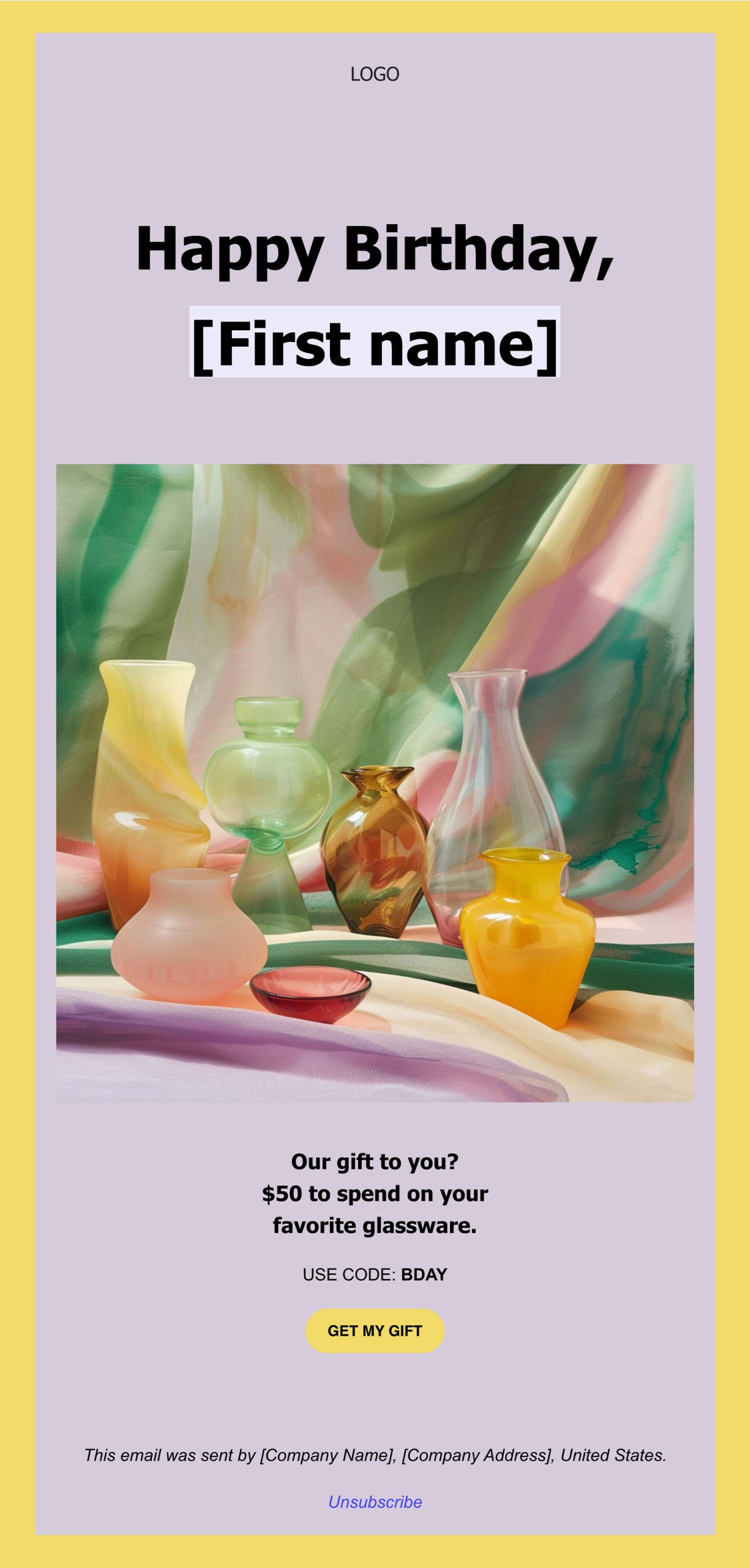
Example of a birthday email for email marketing

4. Personalized Product Recommendations

Your secret weapon in ecommerce email marketing are recommendation emails. In these emails, you can include product suggestions that match your customers’ interests, making it easy for them to discover products they actually want to buy.
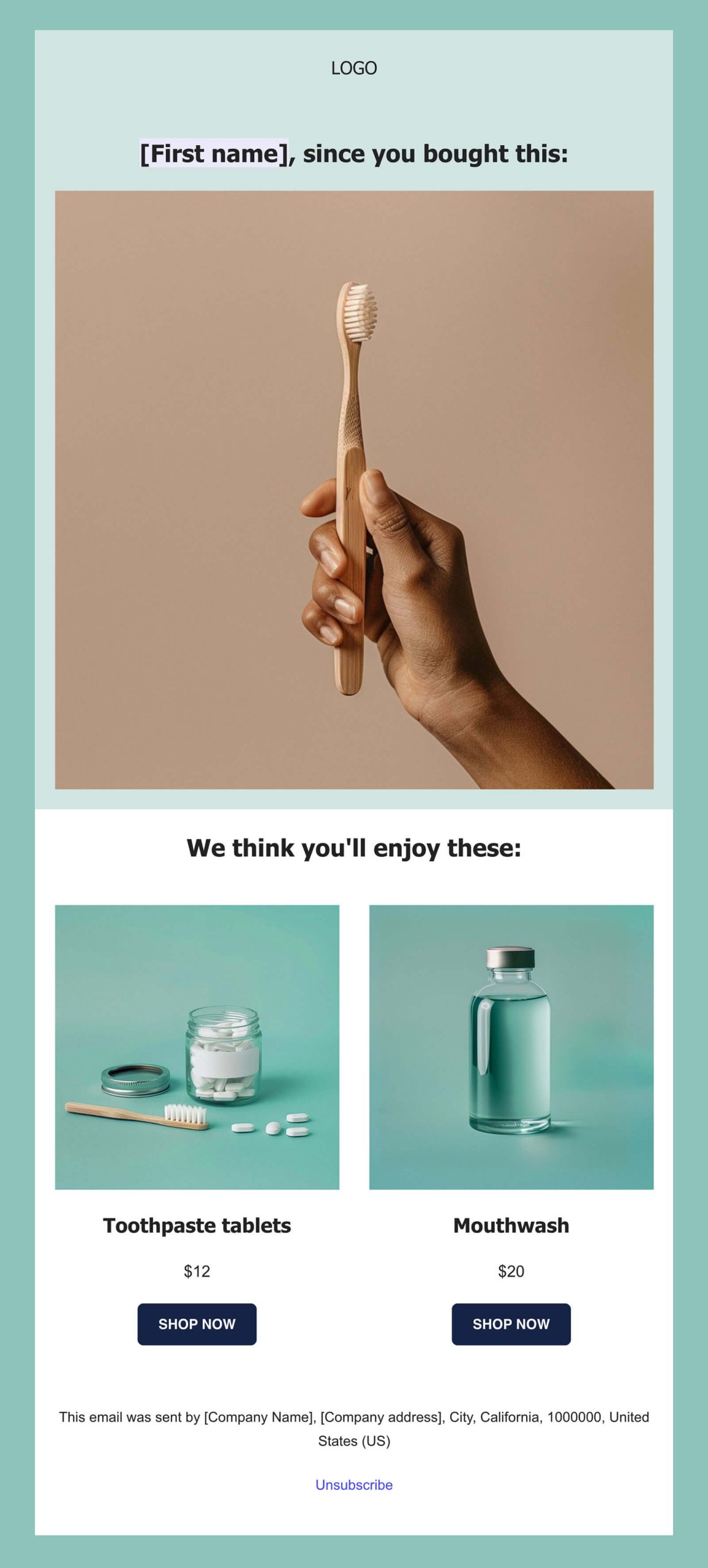
Example of an ecommerce email marketing email recommending a related product

5. Win-Back Campaigns to Reactivate Subscribers

If part of your subscribers has become inactive, it’s time to get their attention. Create a win-back email series designed to give these audience members a reason to reconnect with your brand. A friendly “we miss you” email can go a long way.

Example of an ecommerce email marketing we miss you email

6. Transactional Emails

Transactional emails are important in ecommerce because they confirm a user’s actions on your website. For example, you send confirmation emails when customers make a purchase, providing them with an order receipt and reassuring them about their product’s upcoming delivery.

Since these emails are expected by your customers, they have one of the highest open rates among all types of marketing emails. Their main goal is to streamline the ecommerce process, not to sell or call to a specific action.

The core transactional emails every ecommerce store should have set up:

  • Order confirmation: sent automatically after a purchase, with a receipt, order summary, and key details. It doesn’t need to be creative, just clear and professional.
  • Shipping confirmation: lets the customer know their order is on its way, with an estimated delivery date and tracking link if available.
  • Thank you email: a simple acknowledgement that goes a long way toward making customers feel valued and keeping your brand top of mind after a purchase.
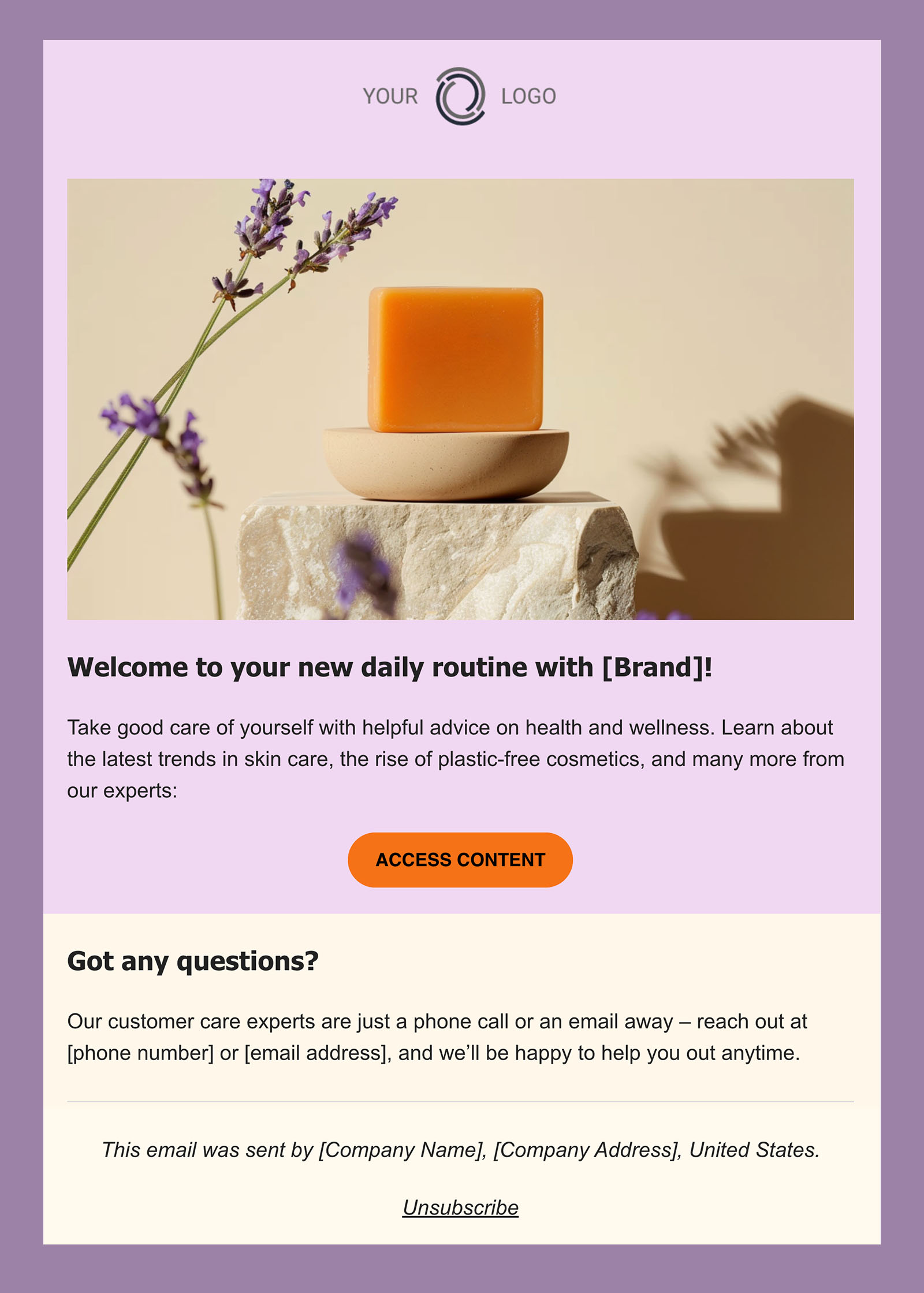
example of an ecommerce transactional email welcoming a new customer

Ecommerce Email Marketing Best Practices

Once your strategy is running, these best practices will help you sharpen it and get better results with every campaign.

1. Choose the Right Email Marketing Platform 

Before you can send a single email, you need a platform to send it from. When evaluating your options, look for a tool that covers the basics well: an intuitive email builder, list management and segmentation, automation capabilities, and built-in analytics to track performance. Easy integration with your store is also worth prioritizing, as the fewer manual connections you have to manage, the better.

2. Collect the Right Customer Data in Your Sign-up Forms

Your sign-up form is your first opportunity to collect customer data that makes segmentation possible. Keep it simple—one or two questions max—but make them count. A question like “What products are you interested in?” with a handful of predefined category options gives you an immediate basis for grouping subscribers and tailoring what you send them. Every answer becomes a tag in your subscriber database that you can build campaigns around.

3. Consider How You Use Segmentation for Each Campaign

Segmentation is only as good as the customer data behind it, which is why what you collect at sign-up matters. Once you have that data, the key is knowing when to use it and when not to. Not every campaign needs a finely sliced audience: a storewide discount is relevant to everyone, so sending to your full list is perfectly valid. Think about who actually needs to hear this message, and segment from there.

4. Schedule Your Emails Effectively

Timing matters more than most beginners expect. Mid-week mornings tend to work best, but here are a few rules of thumb to keep in mind:

  • Nights and weekends: avoid these; your email will get buried by the time people check their inbox.
  • Mondays: inboxes are already swamped from the weekend, so your email is competing for attention from the start.
  • Fridays: generally not great for promotions, unless your offer is something people would enjoy over the weekend.
  • Holidays: a well-timed holiday promotion can work brilliantly or fall completely flat depending on what you sell. High-stakes seasonal events like Black Friday have their own timing rules worth knowing before you hit send.

5. Craft Emails Worth Opening

With so many ecommerce stores flooding inboxes, quality is what sets you apart. A few things that make a real difference:

  • Subject line: it’s the first thing people see, and often the only thing that determines whether your email gets opened. Keep it short, specific, and honest. If it sounds like a promotional cliché, it’ll get ignored or flagged as spam.
  • Content: prioritize usefulness over volume. A well-timed, relevant email wins over five generic ones.
  • Visuals: use images that support your message, not just fill space. Decorative visuals that don’t add context are a distraction.
  • Mobile responsiveness: most people will read your email on their phone. If it doesn’t render well on mobile, it doesn’t matter how good the content is.

6. Explore AI for Email Marketing

Content creation is where most beginners hit a wall. And it’s also where AI can take a lot of the weight off. A few ways to put it to work:

  • Writing your emails: a built-in AI writer like the one in SiteGround Email Marketing lets you generate and refine email copy without staring at a blank page.
  • Crafting better email subject lines: AI can generate and help you test multiple subject line variations quickly, improving your chances of getting that open.
  • Using the right prompts: the quality of your AI output depends heavily on how you ask. Our guide on email prompts for AI models is a good place to start.
  • Planning and scheduling: AI can help you map out a campaign calendar, suggest send timing, and identify gaps in your strategy. If you want to go further, SiteGround AI Studio can help you plan and execute across your broader marketing effort.
  • Personalizing at scale: instead of writing separate versions for every segment manually, AI can help you adapt the same core message for different audiences without the heavy lifting.

7. A/B Test Your Emails

A/B testing is how you stop guessing and start knowing what works. The idea is simple: send two versions of an email to a subset of your list, see which performs better, then send the winner to the rest. And you can test almost anything—subject lines, CTA placement, visuals, offer size, even whether you need a particular email at all. Those small optimizations add up to meaningfully better open rates, clicks, and conversions over time.

The metrics you’ll learn about in the next section are what tell you which version won—and whether your strategy is improving over time.

How to Measure Your Ecommerce Email Marketing Performance

Sending emails is only half the job. Understanding how they perform is what lets you improve over time. Keep a regular eye on these three core email marketing metrics:

  • Open rate: the percentage of delivered emails that were opened. A strong open rate signals that your subject lines are working and your sender reputation is healthy.
  • Click-through rate (CTR): the percentage of recipients who clicked a link in your email. This tells you how relevant and engaging your content actually is.
  • Conversion rate: the percentage of recipients who completed a desired action after clicking, whether that’s making a purchase, signing up, or filling out a form. This is the metric that ties directly to revenue.

SiteGround Email Marketing tracks all of these automatically—open rates, click rates, unsubscribe rates, and more—so you always know what’s working and what needs adjusting.

Make Your Ecommerce Email Marketing a Success

Ecommerce email marketing is one of the few channels where consistent effort compounds over time: more repeat purchases, stronger customer relationships, and a list that grows in value the longer you work it. The strategy, the segmentation, the timing—all of it gets easier once you have the right tools underneath it.

SiteGround Email Marketing gives you everything you need to build, send, and track campaigns from day one—an intuitive builder, audience segmentation, automation, a built-in AI writer, and analytics that show you exactly what’s working. 

[58]

Ecommerce Email Marketing FAQs

What is ecommerce email marketing?

Ecommerce email marketing is the practice of using email to communicate with potential and existing customers of an online store. It covers everything from automated transactional emails like order confirmations, to promotional campaigns, product recommendations, and win-back sequences—all aimed at driving sales, building loyalty, and keeping existing customers engaged throughout their journey.

How often should I send emails to my ecommerce subscribers?

There’s no universal answer, but a good starting point for most stores is one to two emails per week. The right frequency depends on your audience, your content, and the stage of the customer journey. New subscribers may need more touchpoints, while long-term customers may disengage if emailed too frequently. Monitor your unsubscribe and open rates closely; they’re the clearest signal that you’re sending too much or too little.

What is a good open rate for ecommerce emails?

Industry data puts ecommerce open rates around 30% according to email marketing benchmarks, but open rates are increasingly unreliable as a standalone metric—Apple’s Mail Privacy Protection and email bots can inflate the numbers significantly. A more meaningful signal is your click-through rate, which shows actual email engagement, and your own historical trends. If your open rates are suddenly dropping, that’s worth investigating, but chasing an industry average is less useful than building your own baseline over time.

What’s the difference between transactional and marketing emails?

Transactional emails are triggered by a specific customer action, such as an order confirmation, a shipping update, a password reset. Their job is to inform, not to sell. Marketing emails, on the other hand, are sent proactively to promote products, nurture relationships, or re-engage subscribers.

This article was originally published in May 2024 and then updated in May 2026

Email Marketing Guide For Small Business

an illustration of a woman on a laptop sending many emails

Of all the marketing tools out there, email marketing for small businesses is arguably the most valuable. Let’s face it, as a small business owner, you need to stretch investment to gain impact, and there’s just no better way to do that than with email marketing. That’s because email marketing allows you to reach a highly interested and engaged audience at a very low price and with minimal effort.

While it may sound simple – just send emails! – there are many ways to maximize your email marketing efforts, from building your list to analyzing results, and more. So we’ve put together a comprehensive set of how-tos in order to make your small business’s email marketing as successful as possible.

What is email marketing?

But first, what actually is email marketing? It consists of sending targeted emails to customers who’ve actively opted in to hear more of what you have to say. These emails could include promotions, news, product launches, and incentives, among other content. The goal: to provide relevant information that your subscribers will find valuable, and to develop customer relationships in order to generate trust and loyalty.

What makes email marketing for small businesses particularly unique and important is that it’s direct and personalized, allowing you to cut through the noise and focus on the message you want to get across. Whether the purpose is to promote, inform, retain customers, or transact, emails give you the flexibility and precision to accomplish meaningful business objectives. 

Even better, email marketing can be leveraged by any type of business, regardless of its objective or size. Making it successful has little to do with actual monetary investment (great news for those on a budget!), and everything to do with strategy. That’s why we are getting down to the basics on how to make it especially fruitful for your small business.

How can email marketing help your small business?

Email marketing is one of the most valuable tools in your marketing toolbox. Indeed, half of marketers say email marketing is their most impactful channel. That’s because, unlike other forms of marketing, it allows you to communicate with your most engaged customers, as well as with potential new customers. This allows you to develop a relationship with them, increasing credibility and loyalty, and ultimately generating more sales.

What also makes it particularly worthwhile for small businesses is that it builds on an already-existing point of differentiation in your business story: that you aren’t a massive corporation and, as such, your direct connection with the customer is even more genuine and meaningful.

Need more convincing? Here’s a list of key ways email marketing will be especially helpful for you and your small business:

  • Low cost

It’s possible to start email marketing for next to nothing. With the smallest investment of time, you can start creating what will come to be one of your most precious marketing assets. All you need to start building your list is an easy-to-make online form.

  • Higher ROI

Particularly of note for small businesses is that email marketing has a fantastically high return on investment – more than $36 earned for every dollar spent! So given a small business’s, well, small budget, the ability to invest a little and gain a lot is not to be underestimated. 

  • Reach your audience directly

Few forms of marketing permit you to speak directly to your most targeted audience, and without any distractions. This allows you to send very relevant messages and precisely measure and improve their success.

  • Create loyal customers

Building an email list gives you direct access to your most interested audience, permitting your small business to develop credibility and a connection with your clients. As such, existing customers are more likely to come back for more, and potential customers are more likely to turn into actual customers.

  • Track and measure results (and direct sales)

The beauty of email marketing is that you can track and measure your results, and thus improve and fine-tune your efforts. By tracking data such as open rate, bounce rate, unsubscribes, conversions, and more, you can modify your list and message-sending in order to up your engagement and sales.

How to start using email marketing for your small business?

To start with email marketing, there are a few steps you must take. Follow these guidelines to run a successful email marketing campaign:

1. Choose an easy-to-use email marketing platform

If you’re managing your email campaigns manually, you probably don’t have the time for anything else. As a small business owner, you can’t afford to lose all your energy on just one aspect of your business when you have a whole business to run!

That’s why having an email marketing platform is crucial. What’s even more important is choosing the right email marketing tool to meet your business needs. Here are key features to look for when selecting your email marketing service:

  • User-friendly editor

First and foremost, search for a tool that has a user-friendly editor. Whether you’re a tech person or not, an easy-to-use editor will save you loads of time and effort. Features could include the ability to drag and drop, or any other intuitive editor that allows you to create your emails in a few simple clicks.

  • Professional-looking emails

Look for email marketing tool features that help you create professional-looking emails. Such features can include ready-to-use layouts or, even better, templates that you can customize depending on your business needs and goals.

  • Customization options

Email customization options allow you to include your branding, such as your logo, brand colors, brand fonts, and other elements. It’s important that your customers recognize that the email is coming from your brand, based not only on the content but on its visual appearance as well.

  • Responsive email design

Your emails should have a responsive design – that is, they need to look equally good both on desktop and mobile. That’s because users live in a dynamic world and open emails on various devices, depending on their current location. 

  • Personalization options 

With so many emails sent out every day, it’s important to personalize yours and stand out from the crowd. Personalization options can include, for example, the ability to automatically address your recipients by their first and/or last names within the emails you send to them.

  • Healthy subscriber list

To keep a healthy subscriber list, the optimal email marketing platform will permit you to easily manage unsubscribed, hard-bounced and other such contacts. This will, for example, help you to reduce bounce rate and maintain a good record as an email sender/marketer (and thus avoid your emails going to spam). Your email marketing platform should have these features, and they should be as automated and easy-to-manage as possible.

  • Analytics tools

A detailed analytics tool is a vital feature of your email marketing platform in general, as you need to be able to track the performance of your email campaigns. By analyzing results, you can identify potential weaknesses and strengths, and then improve upcoming email campaigns accordingly.

  • Deliverability

Not all email marketing platforms are created equally when it comes to your emails actually reaching recipients’ inboxes. To ensure high email marketing deliverability, choose a platform that has a good track record and reputation.

  • Excellent customer support

You may come across doubts or concerns when using even the best email marketing platforms. So having the ability to ask questions and get quick answers and help from an excellent customer support team is absolutely critical and game changing. The ideal way to ensure the quality of a platform’s customer support is through personal experience (if you’re able), or to read reviews and ratings.

  • Scalability

Successfully executed email marketing translates into business growth. As a result, if you’re on the right track, you will find your list growing, and you may even need to import more new customers and/or leads into the platform. This calls for an email marketing platform that can scale along with your business needs, and all for a reasonable price and no extra effort on your side.

  • Segmentation options

Last but not least, you need to be able to segment your audience in order to send content that’s relevant to each group’s interests and needs. This further increases your opportunity to drive sales. Segmenting your audience (by labels, filters, etc) in an email marketing platform should be easy to do.

Email Marketing Made Easy

Cover all your bases in one place with SiteGround Email Marketing. Its user-friendly panel makes it easy to expertly build and send email campaigns, plus it comes with a slew of other features that help take the guesswork out of email marketing for small business. Some of the benefits include:

➡️ Easily create campaigns with our friendly interface, free professional templates and layouts, and intuitive customization tools

➡️ Build your email list with a sign-up form generated by our lead-gen plugin for WP

➡️ Boost sales by segmenting your audience and sending targeted messages

➡️ Keep a clean list with the help of automatic unsubscribes and hard bounce removal

➡️ Ensure high deliverability and a solid sender reputation thanks to our smart AI checks and spam-prevention practices

➡️ Track performance with ease by leveraging in-depth reporting

Benefit from all of these features and more, including best-in-class customer support. Get started now with SiteGround Email Marketing.

2. Define your audience

Critical to any business is that of defining your target audience. This is just as important when getting started with email marketing for small business because you will want to be clear about who your recipients are, what they are looking for, and how you can offer them what they want. 

As a part of this effort, you may wish to break your audience out into different groups based on relevant criteria – for example, what they purchased, if they were added to your list via a specific campaign, if they are repeat customers, and so on. This will allow you to further target each individual segment with relevant email marketing messages, and – you guessed it – track those results!

3. Set the Right Goals

Setting the right goals for your email marketing campaign starts with asking yourself the right questions:

What are my business objectives? 

Identify the business goals of your email campaign. These could be:

  • Brand awareness
  • Lead generation
  • Lead nurturing
  • Driving conversions
  • Customer retention

Who is my target audience?

To create relevant content, you need to first get to know your audience. You may consider:

  • Demographics (age; gender; location; education, etc.)
  • Psychographics (interests; hobbies; values; lifestyle, etc.)
  • Professional life (occupation; industry; income, etc.)
  • Behavioral patterns (purchasing and using products and services)

Based on these characteristics, you can segment your followers and start crafting relevant and engaging email marketing campaigns.

What type of content will help me achieve my goals?

Once you know your audience, you can think of the type(s) of content that will resonate with them. Here are some suggestions:

  • Informative (blog posts; articles; white papers; case studies, etc.)
  • Educational (how-to guides; tutorials; webinars; e-learning courses, etc.)
  • Promotional (sales pages; promotional emails; social media ads, etc.)
  • Entertaining (videos; podcasts; quizzes, etc.)
  • Inspirational (interviews; success stories, etc.)
  • News (press releases; newsletters, etc.)

What are my targets in regards to KPIs (what are my benchmarks for success)?

It’s important to measure the success of your email campaigns. Consider the following metrics:

  • Open rate
  • Click-through rate (CTR)
  • Conversion rate
  • Bounce rate
  • Unsubscribe rate

Set goals for these metrics and monitor them closely after each email campaign. After analyzing the results, you can adapt and optimize your email strategy and future email campaigns.

Once you’ve set your goals, you’re one step closer to small-business success. Let’s explore what’s next.

4. Choose the type of emails to send

Identify the type of email you’ll send to a selected audience – this could include:

  • welcome emails 
  • announcement emails 
  • monthly newsletters 
  • promotional emails
  • reminder emails 

From there, it will be easier to determine the optimal email design, and to be precise with your messaging.

5. Start Building Your Email List

Anytime is a good time to start creating your mailing list. Here are some smart ways to go about building and maintaining your subscriber audience:

Add a sign-up form on your website

Start by adding a sign-up form on your website. With the SiteGround Email Marketing platform, for example, growing and managing your subscribers has never been easier. Our lead generation plugin for WordPress helps you create and embed sign-up forms within your website’s theme, and with just a few clicks. 

Encourage visitors to sign up

  • Use a lead magnet. For example, you can offer some discount, free trial, or samples in exchange for an email address.
  • Create valuable content. This needs to be qualitative, relevant, engaging and compelling. Publish diverse types of content and do it regularly.
  • Leverage social media channels. To generate more subscribers, share your valuable content via social media posts and run advertising campaigns on Google, Facebook, and LinkedIn. This way you’ll reach more people and send more traffic to your website.
  • Organize online and offline events. These could be webinars, onsite conferences, giveaways, workshops, and many others. Use them to encourage your followers to become subscribers (and eventually loyal customers!).
  • Work with partners. From influencers to guest bloggers and affiliates, collaboration is key. You’ll just want to make sure you partner with those that are relevant to your brand in order to ensure high-quality subscribers.
  • Run a referral program. Offer your subscribers a meaningful incentive if they refer a friend to your email list successfully.

This is just a quick rundown on how to get your email list going, but you can take a deep dive into list creation by reading our how-to on building an email list.

6. Craft Effective Email Campaigns

By having clear goals and knowing your audience, you’ve already completed the first steps to a successful email campaign. Now it’s time to create meaningful content that encourages your subscribers to take action. 

  • Compelling subject line

To craft a compelling email subject line, the first step is to make it short, concise and to the point. Use it to create a sense of urgency in your email and to leverage the curiosity of your readers. 

For this purpose, you can ask them a question, use numbers and/or emojis, and employ actionable language to spark action. That said, avoid spam triggers, such as “BUY NOW,”  in your subject line. You can also personalize your subject line for additional impact by including the receiver’s first name. 

The most crucial part, however, is to highlight the value of your email or offer. Here are a few examples of catchy subject lines:

  1. Get 80% off our best-selling beauty product [your product name]
  2. Celebrate love with a heart-melting offer – up to 75% off
  3. Are you ready for an exclusive deal? Get your free trial with [your brand name]
  • Valuable and relevant content

Then, of course, it’s important to write marketing emails that provide valuable and relevant content – after all that’s what your subscribers signed up for! And then be sure to include calls to action (which we’ll discuss in more detail in a moment) in the relevant places to stimulate your readers to convert to customers/subscribers. Don’t forget to use a readable and responsive email design, both on mobile and desktop!

  • Strong a Call To Action (CTA)

To make your emails effective, you must include a call to action (CTA). These are a few of rules to follow:

First and foremost, make it visually compelling and appealing in order to grab your readers’ attention. Next, make sure to place it strategically within your email content. Experiment with different formats and email layouts to find out which one works best for your small business. Test with buttons, links with anchor texts, images, etc. Last but not least, optimize your CTA for both mobile and desktop alike.

  • Compliant with Regulatory Standards

Last, but not least, comply with regulations. Make sure your email policy is GDPR-compliant such that all your emails include an unsubscribe option, your company’s physical address, etc.

7. Track & Analyze Results

Crafting your email campaign is just as important as analyzing the results afterward. But if the results aren’t as good as expected, don’t panic: this gives you room for improvement. Here are the main email marketing KPIs to monitor (+ a few quick tips on how to improve them):

  • Open rate 

The open rate represents the percentage of recipients who’ve opened your email.

Tip: Improve your subject lines to achieve higher open rates.

  • CTR (click-through rate)

CTR is the percentage of recipients who clicked on one or more links in your email.

Tip: Improve link positions and visibility to get a higher CTR.

  • Conversion rate

Conversion rate is the percentage of subscribers who took a particular action (e.g. purchase, webinar subscription, etc.) after opening your email.

Tip: Improve the quality and readability of your content to increase conversion rates.

  • Bounce rate

Bounce rate is the percentage of emails that were not delivered to your recipients (either a hard bounce or a soft bounce / permanent or temporary issue). Learn more about email bounces and how to reduce them here.

Tip: Keep a healthy recipient list for better deliverability results.

  • Unsubscribe rate

The unsubscribe rate is the percentage of recipients who opted out of your email list after they received your email.

Tip: Try sending emails more infrequently, as certain subscribers might get turned off if they hear from you more than they would like. 

  • Spam complaint rate

This stat measures the percentage of email recipients who mark your email as spam, which can very negatively impact your sender reputation. To help prevent this, read more about how to avoid your emails from going to spam.

Bonus Tip: A/B Testing

It is recommended to do A/B testing. It consists of sending two different versions of your email to the same segment. The goal is to measure which version performs better so that you can improve success rates of future emails. You can compare any number of factors, some of which include the subject line, type of sales offering, which incentives produce the most clicks, and so on.

Mistakes small businesses make with email marketing

Not having mobile-friendly design

Many email marketing recipients view emails on their mobile device as opposed to a desktop computer. As such, it’s exceedingly important to review the mobile version of your email. Thankfully, on most email platforms this can be done very easily during email creation by toggling between mobile and desktop view. 

Not checking the email message previews

Before hitting that final “send,” it is essential to send yourself, and potentially other team members, an email message preview. This allows you to view the email – including its subject line and preview text – in the exact same context as your subscribers. Oftentimes you’ll catch errors or needed optimizations that you wouldn’t have seen otherwise.

Bad subject lines

Subject lines are your opportunity to grab a reader’s attention, or relegate your email to the trash bin. With that in mind, take advantage of AI to polish your subject lines. If you’re new to this, check out our how-to article on using AI for email writing, and download ready-to-use AI email prompts to get started. Meanwhile, SiteGround Email Marketing platform offers a built-in AI email writer that can help you optimize and improve your subject lines as you go.

Sudden & significant increase in the volume of sent emails

The more emails sent the better, right? Not so. If email volume suddenly increases by a large amount, it could be due to your list having been targeted with fake or irrelevant emails. This can result in an increased bounce rate or unsubscribe rate, can impact your sender reputation, and ultimately affect your ability to reach subscribers who truly want to hear from you.

Conclusion

Email marketing is one of the most powerful marketing channels, especially for small businesses. It allows you to begin instant communication with your subscribers in order to drive new sales and increase customer retention. To make this happen, you need to focus on the quality of both your email’s content and design alike. If things are not working as desired, email marketing lets you measure and monitor your results in real-time, and undertake the necessary actions for improvement.

Email Marketing Built for Your Small Business

Sign up for SiteGround Email Marketing and save 80%!

The article was updated on July 30th, 2024.

[subscribe_cta]

8 Steps to Lower Your Website Bounce Rate and Keep Visitors Engaged

slow loading and fast loading websites

According to Kissmetric research, 40% of website users will abandon your site if it takes over three seconds to load. With just 3 seconds delay, and you can lose almost half of your website visitors, increasing your bounce rate, lowering website conversions, and profit. Here are our tips on how to speed up your website to keep your bounce rates low, and user engagement high.

Why is it important for your website

Bounce rate is the percentage of visitors who leave your web page without taking any action – clicking a link on it, or making any purchase. What’s even worse is that this experience sticks, and they are unlikely to ever return to this web page. So keeping your bounce rates low is crucial for all of the following reasons:

  • Increase conversion rates – when you lower your bounce rate, you’ll have more returning customers, which can increase your conversion rates. 
  • Improve brand awareness – if your bounce rates are lower, this means that your visitors are engaged with your content, which leads to better brand recognition.
  • Achieve better SEO rankings – having lower bounce rates can improve your SEO rankings in Google and other search engines.

What factors influence your website bounce rate

A high bounce rate usually means that your website’s content and/or design is not relevant or appealing to your users, which will ultimately hurt your online business goals. Here are some of the main things that can lead to higher bounce rates on your website:

  • Slow page loading times;
  • Not a mobile-friendly page;
  • Poor web page UX;
  • Messy navigation structure;
  • Low quality and/or irrelevant content;
  • Bad internal linking and/or lack of clear CTAs.

What is a good bounce rate and how to figure out yours

The average bounce rate depends on the industry and type of website that you have. According to Custom Media Labs, here are the benchmarks for high-low bounce rates:

  • 20-45% for ecommerce websites;
  • 25-55% for B2B websites;
  • 30-55% lead generation websites;
  • 35-60% non-ecommerce content websites;
  • 60-90% for landing pages;
  • 65-90% for blogs, dictionaries, portals.

You can monitor and analyze your bounce rates and other important statistics by using tools like Google Analytics. You can even migrate to Google Analytics 4 in order to be in line with the latest version.

Bounce rate vs. Exit rate

There’s an important distinction between bounce rate and exit rate. Exit rate is the percentage of people who leave your website from a certain web page, after they have visited a number of pages on your website. For instance, a visitor may land on a blog post article on your site, in which case they click an internal link in that blog post that leads them to another blog post. Then, they exit that second blog post, which will increase this blog page’s exit rate. On the contrary, bounce rate will mean that a visitor closed that same page they’ve initially landed on.

A high exit rate isn’t necessarily a bad thing. There are two main factors to consider when making conclusions about your exit rate – the type of web page and the average time on the web page. For instance, if you have an online store and your “Thank you” page (the one appearing to your visitors, after they’ve made a purchase) has a high exit rate – that’s good, because it means that many people have completed a purchase. If it’s another type of page, e.g. a landing page with your products and visitors still spend lots of time on it, but the exit rate is high – this could mean that you have some UX design issues on this particular page. If a blog post page exit rate is high, but average time on page is high too – this means visitors are engaged with your content and it’s still a good sign.

How to reduce your website bounce rate

A high bounce rate, however, is something you need to worry about, and take action to keep as low as possible. Let’s explore what you, as a website owner, can do to reduce your bounce rates:

1. Improve your web page load speed

If your website takes more than 3 seconds to start loading, chances are that your visitors won’t wait for it – they’ll leave and move on to another website. To avoid that, you should make sure your website loads as fast as possible. Here are some basic, plus advanced tips on how you can optimize your website performance:

Use a CDN

Enabling a Content Delivery Network (CDN) is an important factor that can speed up your website. A CDN keeps copies of your website on servers in different locations around the world. Then, when a user requests to view your website, the CDN makes sure that the content is served to your visitors from a server that’s close to them. This makes it possible for your website to load faster upon user’s request, especially for your international visitors.
SiteGround has its own, in-house developed SiteGround CDN which comes with free and premium plans, it’s easy-to-use and navigate, and ensures blazingly-fast page loading times.

Enable Website Caching

Caching is a powerful technology that can speed up your website. It stores copies of your data in the server memory which then serves this content to your users faster. In this way, your users can access your website and files much faster, as it won’t be necessary to fetch them anew, but rather take them from this cached memory. 

SiteGround clients leverage our powerful caching technology, built in-house on three levels – NGINX Direct Delivery for caching static content, Dynamic Cache for caching dynamic content and Memcached for object caching (caching database queries). All three in power can speed up websites up to 5 times!

Optimize your website code and media

To further speed up your website, you can consider a few other techniques as well. First, compress large images and videos (without compromising their quality). This will make your web pages load faster and improve your overall website performance. Next, make sure to combine (combine multiple files into one to reduce number of requests) and minify (remove all unnecessary characters) CSS and JavaScript files. Thirdly, remove all unnecessary plugins on your website, as they slow it down. Even if they’re just deactivated, they can still cause slow loading times, so make sure to delete them completely.

Use fast MySQL setup

If you have a growing database on your website, your website will need to handle a number of requests to fetch data from this database upon users’ requests. This could cause heavy MySQL queries which significantly slow down your TTFB (Time to First Byte) and affect your overall website performance. 

All SiteGround clients benefit from our custom MySQL setup, enabled by default, which allows for the simultaneous processing of a large number of requests which in turn brings down the number of slow queries between 10 and 20 times.

Make sure your PHP is fast

It’s crucial that your website runs on the latest and fastest PHP version. Not only that, but you also need to make sure that your web server is handling that PHP version in the most efficient way in order to improve your overall website performance.  

SiteGround clients have the advantage of our custom ultrafast PHP setup (available on GrowBig and GoGeek plans) that uses less server memory, which in turn allows the server to process a bigger number of queries faster. In this way, our ultrafast PHP setup cuts TTFB and makes web pages load 30% faster on average, compared to a standard PHP setup. 

Keep tabs on your website speed 

Last but not least, it’s important to keep an eye on your website speed on a regular basis. Run regular speed tests on your websites with online tools at least once a month. When you see some worrying results, take immediate action to improve the relevant areas. However, given the fact that this is yet another thing you need to take care of, keep in mind that it might take you much time, effort and money.

SiteGround clients have the unique opportunity to receive free monthly performance reports, straight into their inboxes. Our monthly performance reports provide our clients with useful information about their website speed status in different categories (e.g. cache ratio, CDN usage, WordPress optimization, etc.) in an easy-to-read format, including actionable tips for areas that might need improvement.

Speed up your WordPress website

In case your website is WordPress-based, there are some extra steps that you can take to ensure your WordPress application runs as fast as possible. We’ve summarized the best WordPress Website Speed Optimization Tips and Tricks, and added some more expert tips on optimizing your WordPress website on our blog. 

You can check off most of the tips and tricks outlined in both of these articles with a single plugin – the SiteGround Speed Optimizer plugin, free and available for all WordPress users, regardless of your hosting platform. The plugin provides you with multiple features, divided into the most important categories for your website – powerful caching (to reduce your site TTFB), frontend optimizations (to keep your website HTML, CSS, and JavaScript files and fonts optimized), media optimizations (to optimize your site media without compromising on quality), and environment optimizations (to manage your site resource usage and save bandwidth).

2. Optimize your website for mobile

Another important step you need to take is making your website mobile-friendly. A lot of the traffic to your site will come from mobile devices, so you need to make sure that your site is responsive. Check whether fonts, large images and videos, and other important elements work well on mobile. Your website’s mobile version should be easy to navigate from your users, giving them the content or information they need quickly and concisely.

3. Design appealing landing pages

Landing pages are the first thing users see when they land on your website. Make them catchy, appealing and engaging. Keep your landing pages straight to the point, with focused content, and clear CTAs. They should be navigable and readable. Include appealing and appropriate visuals, such as images and short videos. Make your landing pages correspond with the needs of your audience. If your audience is diverse, make sure to create multiple landing pages for different groups of users.

4. Have a clear website navigation structure

When your audience visits your website, they need to have a pleasant user experience in order not to leave your website and even come back to it. To achieve this, make sure that you remove things that might annoy your visitors, but are not absolutely necessary for your website’s success, such as bots, too many popups and ads, and other distracting elements. 

Another crucial step is to analyze your users’ intent in order to design the page in a way that will answer their needs. Keep in mind how your content and visual elements are organized on the website and whether it’s easy for users to navigate through the different parts of your site.

To do all that, you can use GA4 to analyze which of your pages have high bounce rates, then optimize their navigation structure and rearrange content order.

5. Improve your content

The quality of your website’s content might be another factor that makes your visitors bounce. Focus on improving your content by making it more relevant to your audience, in the first place. The three main things you should focus on are the following:

  • Quality – provide valuable and quality content that brings something extra to your readers;
  • Relevance – write content with relevant keywords that not only make users land on your site, but also help them find the content they’ve been looking for;
  • Readability – keep your content clear, concise and in an easy-to-read format with subheadings, short paragraphs and proper fonts.

6. Have clear CTAs

To reduce your bounce rates, you can also include clear calls to action on your website. These will not only lower bounce rates, but help in converting your visitors. Encourage your audience to take the action you want them to take, such as clicking a link, making a purchase, downloading a resource, by including clear CTAs on the relevant places in your site. Here are some quick tips for your CTAs:

  • Make your CTAs be visible on the web page – use appropriate colors and designs, e.g. buttons.
  • Write short, concise and actionable texts on your CTAs that encourage your visitors to take action, e.g. READ NOW.
  • Place your CTAs on key locations on the web page, such as towards the top of the page, or another highly-visible place.

7. Use internal linking

Another proven strategy for keeping your visitors engaged and thus reducing bounce rates is to place internal links on your web pages. These links should lead to other relevant content on your own website. For example, while your visitors are reading a blog post, you provide them with a link to another blog post they might find useful. You could also provide them with links to relevant blog posts, pages at the end of the article they’re reading. This way, you will keep your visitors longer on your website.

8. Implement exit surveys

Last but not least, you can implement exit surveys or exit-intent popups. They are windows that popup to your visitors when they move the cursor of their mouse on closing the window, i.e. when they are about to leave your website.

These “Before you go” popups could ask your visitors to either give feedback on what you could improve on your website (e.g. add shipping options, offer more products, etc.), or give them an incentive to stay on the website (e.g. discount, free shipping, newsletter subscriptions, eBooks, and others in exchange for their email address).

Now, before you “bounce” to another one of our blog posts, leave us a comment below to share some other strategies that have proven successful for you.

[subscribe_cta]

Top 12 Website Metrics to Increase Performance

website performance metrics explained

Website metrics offer a window into how users engage with your site, revealing insights like daily or monthly visitor numbers, how they discovered your site, and how many leave for other options. While you can explore endless data points, the real challenge is knowing which metrics truly matter. So, which ones should you track to grow your website effectively? 

Let’s dive into the essential metrics that provide the biggest impact on understanding and improving your site’s performance.

Why Is Website Speed Important?

By now, you should need no convincing that website speed is crucial for your online business. That’s because website performance has an impact on your brand reputation, SEO rankings and conversion rates. Here are the main reasons how and why this happens:

Brand Reputation 👍

Let’s be honest, when your website loads slowly, it irritates your visitors, and eventually they leave your site. That’s why it’s important to have a website that loads as fast as possible. According to Google, 53% of visits are abandoned if a website takes more than three seconds to load. 

Indeed, the slower your website, the more likely it is for your visitors to leave and be less likely to return ever. If they don’t find what they’re looking for quickly, they won’t interact with your site, as they would consider it inaccessible and unreliable. 

This directly impacts your brand reputation, because visitors could have a bad impression of your site. And we all know that a negative brand reputation is harmful for your online business presence.

SEO Rankings 📈

Google and search engines in general aim to provide web users with the best possible user experience. Website speed is an official and important ranking factor in Google’s algorithm, in addition to being a crucial part of your website’s UX. If your website is slow, this will definitely affect your SEO rankings, it will hurt your site visibility among users, and eventually you’ll start losing traffic to your website.

Conversion Rates 🛒

If all this sounds scary, it may not come as a surprise that a slow website can affect your conversion rates, too! The longer it takes for  your website to load, the bigger the drop in potential conversion rates. According to a study by Portent, a site that loads in one second has a 3x higher conversion rate than a site that loads in five seconds. This is a huge difference in conversions due to just a matter of a few seconds. Since conversions are among your top website KPIs, you wouldn’t want to allow this to happen, right?

How to Measure Your Website Performance Score

Now that we’re on the same page that website speed is a crucial factor for your successful online presence, let’s explore how to measure your site’s performance with what’s often  known as client-side testing. This type of testing evaluates the speed of your web application by analyzing performance directly in the browser.

You can test your website speed with different free online tools. Some of the most popular ones include Pingdom, Google PageSpeed Insights, GTMetrix, webpagetest.org, and others. All you need to do is go to one of these tools, paste your website/webpage URL, and start the test. It will take only a few seconds for the tool to show you the results.

Now comes the hardest part – the analysis. What does each metric tell you and is there a way to improve it?

What Website Metrics Mean and How to Improve Them

1. Page Load Time

One of the most important website metrics is page load time. Page load time is the time it takes your browser to fully load the requested website. It measures the entire time – from entering a URL or clicking a link, until the page finally loads. Ideally, that should happen in less than two seconds.

If your site is not hitting this target, your overall page load time can be improved by following the tips below for each of the individual metrics. What is more, if you’re using WordPress, we recommend our free all-in-one SiteGround Optimizer plugin that works on any hosting platform and can save you loads of time and effort in improving the majority of your WordPress website performance metrics.

2. Time to First Byte (TTFB)

Time to First Byte measures the time it takes for the web browser to receive the first byte of information after sending a request for a resource. A good TTFB result (0.8 seconds or less) means that your browser is responsive. To improve your TTFB, here’s what you can do:

Make sure you run your site on the latest PHP version and have a proper server-level setup. At SiteGround, we have already developed a custom ultrafast PHP setup that has lower memory usage and allows the server to process a bigger number of queries faster. All this cuts the TTFB and makes web pages load 30% faster on average.

Next, check with your hosting provider if they offer full-page caching on your host server. This would store (“memorize”) your web pages on the server and then serve them to your users the next time they are requested. SiteGround clients take advantage of our in-house developed powerful Caching technology enabled by default, which results in up to five times faster sites.

Even if everything is optimized on the server-level, as mentioned above, visitors located far from the origin server may still experience slow TTFB. For this reason, and to cut TTFB, start using a content delivery network (CDN). The CDN will use a distributed network of servers that are closer to your users and serve them the content of your website from their closest location. SiteGround has its own in-house built CDN that’s included for free in every hosting plan we offer.

No matter where you’re hosted, though, if your website is using WordPress, you can download and install our free SiteGround Optimizer Plugin. With just a few clicks, you can take advantage of its powerful caching capabilities that can make your site up to 20% faster than comparable plugins.

3. Time to Start Render (TTSR)

Time to start render (TTSR) measures the time it takes for the content (i.e. any element from it) to begin displaying on the page after the initial request for the website to load. Lower TTSR keeps the attention of the user because they see the content quickly. A good result for TTSR is less than 750 milliseconds. If your result is not as good, here’s what you can do about it:

First, make sure that you keep your JavaScript, HTML, and CSS files lightweight by minifying them. Minification will remove all unnecessary characters from these files. You can do this yourself manually in the source code or use a tool to help you, in case you’re not so tech-savvy. Again, for WordPress sites, our free SiteGround Optimizer Plugin has an option to enable that with a single click.

Next, optimize and preload the fonts you’re using. To do that, make sure that you’re not using too many fonts (less than four is best), embed them in the CSS, and optimize them before uploading them on your website. You can do this manually or with the help of our free SiteGround Optimizer Plugin for WordPress where this happens in a click.

Another useful thing you can do is defer JavaScript. By deferring JavaScript, your browser will only process and load JavaScript files after parsing the HTML. This significantly speeds up TTSR, because there’s nothing to block the process of displaying your website on a screen. Again, you can easily do that with the SiteGround Optimizer Plugin for WordPress websites.

Last, but not least, make sure you use the HTTP/2 protocol. HTTP/2 protocol is the latest version of the HTTP protocol and allows browsers to load websites much faster. However, it might be a bit technical to do this yourself, so it’s good to ask your web host about it. If you’re hosted with SiteGround, HTTP/2 protocol is enabled by default on our servers for you.

4. Time to Title

Time to title measures the time it takes for your website’s title to display in the browser tab. This tells your website visitors that your site is loading. It’s an important metric because it shows your users that your site is legitimate and gives them a hint of whether your site will provide them with the content they’re looking for.

If your website is fast enough and you follow the tips we’ve provided in this blog post, then it will improve your time to title as well. To make your website load more quickly, and thus improve your time to title, the ultimate solution is to use caching, as this will display the title in the browser tab from the server memory the next time your users try to open your site.

5. Time to Interactive (TTI)

Time to interactive (TTI) is the time it takes for your website to be interactable, i.e. for users to be able to interact with it (scroll, click buttons, etc.). This is a crucial metric, because even if your website loads fully, but it’s not responding to user interactions, then you’ll lose them again. A good TTI should be less than 3.8 seconds.

To improve your TTI, here are some things to consider. As mentioned above, minification is a powerful way to cut TTI as well. 

Apart from that, make sure to enable compression. Some good compression mechanisms are Brotli (Google’s next generation compression algorithm) and gzip – they both reduce the size of HTML, CSS and JS files. SiteGround clients enjoy the Brotli compression algorithm out-of-the-box and benefit from up to 15-20% speed gains. If you’re hosted elsewhere, ask your hosting provider to find out which compression methods they use. 

Last, but not least, eliminate render-blocking resources – eliminate all resources that pause or slow down your website’s ability to display on a screen. If you’re doing this on your own, refactor your code or hand-edit your HTML. If you don’t feel like doing it yourself, the SiteGround Optimizer Plugin for WordPress sites provides powerful frontend optimization options that are just a few clicks away.

6. Connection Time

Connection time is the time between a user’s request and when that request establishes a connection between the user’s browser and your website’s server. Connection time might be slow for your website visitors due to various reasons, such as too much server traffic (e.g. from bots), or users in distant geographic locations from your origin server.

To improve connection time for your visitors, consider hosting your website on a better infrastructure. For example, SiteGround-hosted websites take advantage of the modern Google Cloud platform, which ensures high availability and fast connectivity. 

Using caching and enabling a CDN are other powerful tools for speeding up connection time. SiteGround clients enjoy our in-house developed Caching technology out-of-the-box and take advantage of our free in-house built SiteGround CDN included in all of our hosting plans.

7. Time to Last Byte (TTLB)

Time to last byte (TTLB) is when the user’s browser receives the last byte of your website. An average TTLB should be 750 milliseconds per endpoint response. A factor that can influence your TTLB is the quality of your database queries.

To improve TTLB, make sure that your slow database queries are optimized by using a fast MySQL setup. For example, at SiteGround we’ve developed a custom MySQL setup that reduces the number of slow queries between 10 and 20 times and is available by default for all our clients.

8. DNS Lookup Time

Domain name system (DNS) lookup time measures the amount of time it takes for your DNS provider to translate a domain name into an IP address. If your average DNS lookup speed is more than 120 milliseconds, then you might need to improve it. 

One of the reasons for a slow DNS lookup time could be your DNS provider. If this is the case, you’ll have to switch to a faster DNS provider. Another reason could be the high number of third-party resources on your web pages (that also need to be translated into IP addresses, on top of your own domain name). Reducing the number of third-party resources would improve your DNS lookup speed.

SiteGround customers have the advantage of not needing to think about either of the above, because our central anycasted DNS system ensures faster domain resolving and faster website loading. What’s more, WordPress users can enable the DNS prefetch feature in the Speed Optimizer plugin to speed up their websites when loading content from third-party domains.

9. Bounce Rate

One of the most important web page metrics is bounce rate. Bounce rate refers to the percentage of visitors that leave your website immediately, before taking any action on it. If your bounce rate is high (anything above 46%, according to SemRush), one of the possible reasons could be slow website speed.

10. Conversion Rate

Next on the list is conversion rate, which reflects the percentage of visitors who take a desired action on your website, and is derived from your overall site traffic statistics. Having a high conversion rate means that your website performs well among your visitors and meets their expectations. In general, a good conversion rate is between 2% and 5%, but you must keep in mind that these numbers might differ for various industries.

11. Average Time on Page

Our list wouldn’t be complete without one of the most important web analytics metrics – namely, average time on page. Average time on page measures the average amount of time spent on a single page by all users of a given website. The majority of studies show that the average time a visitor spends on a web page is around 50 seconds, across all industries. If your visitors spend more time on your website, this could be a clear indication of a good user experience.

12. Error Rate

One of the less popular, but just as important website metrics is error rate. Error rate refers to the number of requests that return an error code, relative to the total number of requests over a period of time. A high error rate can be caused by issues with your server. The higher the error rate, the fewer times your site has loaded properly for visitors, leading to lower satisfaction with their experience.

Grow Your Online Presence with Optimized Website Metrics

Having a fast and reliable hosting provider can help speed up your website tremendously, which will have a direct positive impact on conversion rates, average time on page, bounce rates, error rates, and the rest of your web traffic metrics.

As a result, your site’s loading speed and your website metrics are vital parts of a successful online business presence. Selecting the right hosting provider can save you significant time and effort, as a quality host can handle much of the website optimization for you—letting you focus on growing your online presence.

If you’re not a SiteGround client already, get a head start on a new website project, or transfer an existing one to improve its performance with one of our current hosting offers:

Shortcuts to a Faster Website

shortcuts to faster website

Fast website performance is a crucial element of your online success. It affects the experience of your website users, your SEO rankings, user engagement and conversions, your reputation – pretty much every element of your online presence. To get you on the fast track to a faster site for better online results, here is a short infographic with some quick tips that you can easily apply to any website.

Explore our shortcuts to a faster website and get on your way to a more successful online presence and business.

Learn more about each website performance tip in our infographic. Here are some useful resources about each website speed feature we recommend and how you can use them on the SiteGround hosting platform:

[subscribe_cta]

4 Outstanding Digital Marketing Tips for Your Small Business

digital marketing tips for small business

If you want to grow your small business, digital marketing is the modern way to reach results that bring your business success. This is especially true with the consistent growth of technologies, online communication, and social media platforms. 

Digital marketing for a small business isn’t limited to paid ads and posting on social media. For an all-around effective strategy, it’s crucial to include SEO, content marketing, and email marketing, as well. 

Whether you run a full-on e-commerce business or a brick-and-mortar store, these digital marketing tips will help you get more online engagement with your audience and conversions.

Forms of Content Marketing

As a marketer, you’ve likely come across the saying “content is king.” 

Content brings many benefits like building trust with your audience, generating leads, and establishing your business as an authority in your niche. 

In fact, according to Demand Metric, content generates three times as many leads as outbound marketing, drives six times higher conversion rates, and potentially has a 7.8-fold boost in web traffic. 

Content marketing is too valuable for brands and customers to ever go away. That’s why scaling your content marketing is a winning digital marketing strategy for your business. 

So, what’s included in content marketing?

Blog Content Marketing

Blogs are a powerful type of inbound marketing and allow for flexibility in terms of topics and purposes. You can use them to promote internal and external content and blog articles via links, add social share buttons, and incorporate product information. 

Take OptinMonster, for example. It’s now a huge company under AwesomeMotive’s wing, but it wasn’t always like that. They got there by consistently creating high-quality content and sticking to a publishing schedule.

More specifically, OptinMonster excels at pillar posts. Pillar posts are long-form content to inform the reader deeply on a topic. They usually steer away from salesy language and are extremely actionable. Another word is 10x content.

Creating longer and more informative articles like OptinMonster rather than shorter, lower-quality ones will help your business long-term since it builds trust with readers and they generally prefer this kind of content. 

And you can achieve a consistent blog posting schedule with a content calendar and keyword mapping. It will help you visualize your projects and stay on track with publishing.

Social Media Content Marketing

Social media has become so widely used across the globe, amounting to an entire 4.65 billion users, according to Kepios. With that said, smart marketers know not to skip social media in their small business digital marketing strategies.

You can use many platforms like Facebook, Instagram, Pinterest, Twitter, LinkedIn, and even Snapchat. You can share current discounts, product releases, and show off your brand culture through posts and stories. Plus, social media is an excellent outlet to grow brand awareness and engage your audience. 

According to a HubSpot case study, a small business generated $1.2 million in revenue from its social media marketing strategy. $1.2 million results are an excellent incentive to start a social media marketing strategy. The biggest hurdle is time as a social media strategy doesn’t get created and executed overnight. It takes time to see results.

Video Content Marketing

Video content marketing is a fairly new strategy that encapsulates the principle of producing and sharing relevant video content to your target audience to create interest and attract leads. 

Video content has become increasingly popular over the last few years. For example, a study by BusinessofApps shows that YouTube now has 2.3 billion monthly users. And, an entire 69% of consumers say that they prefer to learn about a brand’s product or services through video content rather than any other form (as per Wyzowl’s statistics).

To create videos for your marketing campaigns, remember that video marketing is to educate your audience. Educate them on how your product works, the benefits, where it can be used, case studies, and success stories on how clients have used it in the past, etc. 

Here are some more tips on creating successful video marketing campaigns:

  • Center your videos around the story, not the sale
  • Hook the viewers in the first ten seconds with a captivating intro
  • Use humor, animations, and effects 
  • Upload your videos on your own domain before uploading on sharing sites to drive maximum SEO value
  • Use video to educate and prove yourself 

You can upload your videos on social media platforms like Facebook, YouTube, Instagram, or landing pages. All you need is a good camera (iPhone works excellent) and editing software like iMovie or Adobe Premiere Pro.

Podcast Content Marketing

Podcasting can add a new dimension to your brand and content marketing strategy. There are many ways you can approach podcasting, utilizing different mediums, channels, and distribution methods.

Some of the top benefits of podcasting for your brand include:

  • The current popularity of podcasting 
  • Ease of entry with inexpensive equipment and free uploading
  • You can turn any content like videos and blogs into a podcast
  • There’s a lot of potential for collaboration 
  • Break into new audience segments

With those benefits in mind, the best way to think about podcasting in content marketing is to think of it as a new marketing channel. Content marketing always has the same goal: to reach people and generate new leads. This could mean providing answers to questions (essential for SEO) or entertainment in podcasting.

Grow Your Email List

The email list is the heart of your business, and without it, that heart would fail to beat. And essentially, email marketing remains one of the most effective digital marketing for small business strategies today. 

Unfortunately, there are so many elements that can cause your email list to shrink, such as:

  • The subscriber has changed companies and now has a new email.
  • The subscriber gave you their spam email, which they rarely check.
  • The subscriber has unfortunately decided that your content isn’t for them anymore and has unsubscribed.

Did you know that an average email list decays approximately 22.5% every year, according to Marketing Sherpas? So that’s basically a quarter of what you have! 

As sad as all of that sounds, it’s part of your content life cycle, frankly inevitable. 

Wherever you are right now with your list in terms of numbers, let’s talk about some ways to grow and maintain your email list.

Insert Subscribe and Social Share Buttons on Your Pages

Don’t feel restricted to only adding subscribe and social share buttons on your homepage. You can put it on all of your content pages. Besides, once people get further into your blog’s pages, they’re unlikely to return to the homepage.

You can include them in different places like the sidebar, header, and footer. You can add a subscribe bar in the footer of each page of your website or blog. Or include social share buttons in its header, giving it more visibility.

You can even include your social share buttons on multiple spots on the same page. The point is to make it visible to your audience and include several platform options. It may turn out that your audience prefers using different platforms.

Offer Something In Return “What’s in it For Me?”

Just asking people for their emails may not always get you the desired conversions. If you’re looking for better and faster results, try offering your audience a lead magnet.

It doesn’t have to cost you much time or money to make, but make sure it’s something of value to your subscribers.

Here are some more examples of opt-in incentives you can offer:

  • Downloadable articles
  • Access to a private Facebook group
  • Templates
  • Stock Photos
  • Live call with you
  • Demo coaching session 
  • Free newsletter 
  • White papers

Those are just a few ideas, but the possibilities are endless. 

If you have a cooking blog, for example, you can offer a free cookbook in exchange for emails. A great lead magnet solves a customer’s problem, promises a quick win, is specific, quick to digest, of high value, instantly accessible, and demonstrates your expertise.

Use CTAs on Blog Posts (Call To Action)

Most signups come from an effective CTA. Even better, clickable CTA buttons have proven many times over to increase conversions. So much so that a study by Protocol 80 found that adding a CTA button to their article templates increased conversions by 83% and boosted e-Commerce conversions by 22%. 

Clickable CTA buttons help users navigate through your site and take specific actions. It’s equally crucial for your home page and high-converting landing pages. 

Some criteria for a good CTA include contrasting colors, a clickable button, text that adds context around the button, and it’s put in a place that catches the eye. 

Remember to always test your CTAs on different devices for bugs and improvements. You can use your email marketing ideas to convert your audience into customers now that you know how to grow and maintain your email list.

Optimize Your SEO strategy

To help you rank your small business on top of Google search results, we’ve written an extensive blog post you can refer to. Once you’ve nailed your SEO rankings, you can now fine-tune your strategy with some additional tips:

Use Local Search Engine Optimization

Many smaller brick-and-mortar businesses feel insignificant compared to giant corporations. However, unlike their global counterparts, local businesses have the advantage of targeting a local market. Small businesses can appear in the (Snack) Pack Rankings and organic page rankings by using local SEO. 

When using local SEO, the goal is to be in the Snack Pack Ratings. This is the little box you see appear at the top of the Google search results.

Within this box, you can usually find a business’s:

  • Hours of operation
  • Phone number, email, etc.
  • Address
  • Link to website
  • Reviews and star rating
  • Google map result

It’s important to program all this information into your Google Business Profile ( GBP ). It can ultimately persuade a potential customer to use your services while helping your business’s SEO ranking. 

Even further, to optimize your GBP, make sure:

  • The category is correct
  • The website link is active and functional
  • Relevant keywords are included in the title tag
  • Perform regular updates of your posts

Once you fill out the information and optimize it, it should take a few weeks before you start seeing results. Remember that any form of SEO takes time and is worth the wait!

Increase Site Speed

A technical SEO tip is to ensure your site is always running quickly since search engines prefer when page loading times are faster. 

There are a few things you can do to obtain high website speeds, including:

  • Minimize ‘HTTP requests’ and keep the use of scripts and plugins to a minimum.
  • Use a CSS stylesheet instead of multiple CSS stylesheets or inline CSS. CSS stylesheets tell a website browser how to display your website.
  • Make your image files as small as possible. 
  • Compress your web pages. 
  • Shrink your site’s code by deleting unnecessary spaces, line breaks, or identification in your HTML, CSS, and Javascript. 

Above all, possibly the most important way to ensure your site is running quickly is to choose a good hosting service. You can have this easily with SiteGround Hosting. We use all the newest technologies, including ultra-fast networks, ultrafast PHP, multiple server software solutions, etc.

And, if you’re set up on WordPress, the SiteGround Optimizer plugin lets you boost the speed of your website without having much tech knowledge. 

Your site’s speed needs to be consistent across all devices to boost your ranking, so once again, make sure to test it on every device.

Use Paid Ads (PPC)

While SEO and content marketing can bring in many new clients, paid ads have a ton to offer, too. In fact, a Trend Statistics study shows that 80% of marketers focus on Google Ads for PPC, proving that marketers know the effectiveness. 

Paid ads are useful to build brand awareness, and since most of the time they appear in front of customers who have expressed interest in the product with their online activity, the leads are way more likely to convert than those from organic traffic. 

Content marketing and SEO are always winning practices, but you might have noticed it’s very competitive. The internet is full of businesses of all sizes, all striving to make the top of the search results. It guarantees that you’ll always need existing domain authority.

The five most common types of paid ads include:

  • Search ads: These ads appear first on Google’s search results, above all organic rankings. They look the same as regular search results except for the little “Ad” text in the corner. 
  • Display ads: These banner ads appear in footers, headers, between text, and sidebars of content pages like blogs and product profiles.
  • Social media ads: You can program these ads on social media platforms. Each platform will have its objective, but the ads are generally highly targeted and allow a lot of flexibility in how you program them. 
  • Google shopping ads: Used by eCommerce owners and appear in the carousel on the results page when users search for a specific item. 
  • Retargeting ads: These ads get specifically placed in front of users when they didn’t convert the first time they saw the product and were close to the checkout. 

This list just includes the most common types of ads, but there are many different types. The ad you use depends on your business’s needs and audience. 

There are a few tips for general success, whatever type of ad you choose.

Firstly, filter your audience to reach your ultimate target. When programming and launching an ad, you obviously want as many people to see it as possible. But, what’s most important is the right people seeing it. 

Most ad tools allow you to filter your buyer personas and get specific with demographics, geographics, needs, interests, etc. You should use more granular keywords to get the most out of your budget. 

For example, Facebook ads allow you to reach hyper-targeted audiences with geographic location settings, interests, ages, gender, etc. 

Another crucial tip for paid ads is regularly tracking your KPIs, as it’s the only way to know what’s working and dig into the data. Google and social media platforms make it simple for you to track your KPIs with data dashboards and metrics.

Is Paid Advertising a Worthy Alternative to SEO? 

Now, you might be wondering if paid advertising is an alternative to investing in SEO. The truth is, when it comes to small business ads, it’s never a one thing or the other situation. Your strategy should include organic and paid advertising, with complementary campaigns that help you find your audience (and help them find you). 

While paid advertising does lead to quicker results, the real question here is whether those results are sustainable for your business or will be short-lived. 

Paid advertising can take a big bite from your budget, especially if you’re using it constantly to substitute SEO. Another downside is that clicks never guarantee sales. It’s one thing to get people to click your ad, but you also have to convince them your product is worth buying. 

However, SEO is a long-term investment that will give you long-term results if you’re willing to be patient.

Sum Up

If you have a small business, you need to take these digital marketing tips and add them to your marketing plan. Some of these tips will be more effective depending on your business. 

Having said that, it’s important to think outside of the box and try different areas you think will be effective for your business. This is especially true as the digital landscape is constantly changing, and businesses are forced to adapt to keep a competitive advantage and gain new customers. 

If you have any questions about our digital marketing tips, leave a comment below!

[subscribe_cta]

Small Business SEO: Ranking Your Business on Top of Google

small business SEO tips

Let’s say it straight: Small business SEO is hard in 2025.

And frankly, it was never easy. Maybe back in 2010, when marketers could trick Google with keyword stuffing, PBNs, and various other methods like message board posts used for backlinks. There was also a lot less competition. 

These days, basically all keyword clusters and niches are taken by well-known sites and are hard to outrank. However, small businesses have endless opportunities to rank in their niches for the right keywords.

In this article, we’ll discuss how you, as a small business, can boost your SEO and gain organic traffic.

To stay ahead in the world of SEO, check out our video: SEO in 2025: 6 Trends Truly Changing The Landscape.

What Is Small Business SEO?

SEO (search engine optimization) for small businesses is a combination of strategies that make your page on Google get traffic, clicks, and conversions. In other words, it makes your website appear higher in search results to make your business more discoverable, surpassing the competition’s rankings.

If your online and local SEO strategy is effective, your website should show up on the first page of the search results like the links below.

Did you know that according to Search Engine Journal, 25% of people click on the first page of the search results? Apart from that, the first page in the search results gets an average CTR of 31.7%, according to Backlinko. These statistics are powerful reminders that SEO is crucial for organic traffic.

Is it 100% necessary to do SEO? 

Well, let’s put it this way: if you don’t have an elaborate SEO strategy, you’re at a serious disadvantage with your competition. Their SEO efforts will keep them climbing up the ladder while your page sits at the bottom and never goes up.

Not to mention, your organic traffic will suffer, and if your business depends heavily on online marketing, this could mean some serious consequences for your business.

How SEO Benefits Small Businesses

As mentioned above, SEO is crucial for your business’s success. But let’s dive into that deeper.

What benefits does SEO specifically have?

Boost Organic Traffic from Search Engines

The most significant benefit of SEO for small businesses is the organic traffic it brings. Organic traffic doesn’t only help you save money on things like paid advertising, but it generally brings in prospects that are further along in the buying journey. 

Your organic traffic leads will more likely end up buying your products since they’re searching for specific queries.

Ranking on the first page of the search engines is necessary to be seen by most customers. And if you’re in the first position, it can double your click-through rate over the number two result, according to Smart Insights.

Even better, claiming the featured snippet can help you jump over the number one spot and give you a double chance at gaining more organic traffic.

Replace Expensive Paid Ads

Now, you might be wondering if paid advertising is an alternative to investing in SEO. Let’s look at a cat sitting example where the first three links are advertisements.

Paid ads allow you to “artificially” have your links show up first in Google. 

It can be a good idea in many instances, leading to quicker results. The real question is whether those results are sustainable for your business or will be short-lived. 

Paid advertising can cost a lot of money, especially if you’re using it constantly to substitute SEO. Another downside is that clicks never guarantee sales. It’s one thing to get people to click your ad, but you must convince them your product is worth buying. 

So, paid advertising does have its benefits like amplified reach and enhanced targeting and should be used as part of a marketing strategy. But it’s not a valid replacement for SEO entirely.

Increase the Number of New Leads

Each new lead presents a unique opportunity. New leads can become long-term clients, recommend your services/products to their networks, and leave persuasive reviews on your website. 

It’s essential for a small business to constantly search for new leads to increase the customer database.

SEO Tips for Small Businesses

Now that we’ve gone over the importance and benefits of SEO for small businesses, let’s dive into the tips.

Keyword Research and Competitor Analysis

Keyword research is the backbone of SEO. Basically, if nobody searches for the product you offer or your content topics, you won’t get promising traffic results.

You need to know your keywords to avoid being in the 90.63% of pages that don’t get any organic traffic from Google, as per a study by Ahrefs. You read that right; keyword research is THAT important.

Aside from helping your pages gain traffic, keyword research helps to:

  • See how much traffic you can get for specific keywords
  • Know how hard it is to rank for certain keywords
  • Create content plans for keywords
  • Understand the likeness of searchers becoming customers 

Keyword research starts with a list of topic ideas that your potential customers may be searching for. Let’s say you own a gardening store. You’ll look for “seed” keywords (no pun intended). Your seed keywords could be: 

  • Plants
  • Landscape
  • Pots
  • Shrubs
  • Nursery

Seed keywords are meant to be vague, and you won’t use these as are to create content. They’re meant to be general topic ideas that you’ll narrow down on later. 

Once you’ve developed a list of seed keywords, you can quickly check to see what keywords your competitors are using. Take one of your seed keywords and search it on Google.

You need to use your best judgment when determining competing websites. If huge brands like Home Depot and Amazon appear, you shouldn’t necessarily treat them as competitors. Instead, look for websites like your own or ones that you’re trying to be like. 

Once you find your main competitors, you can see which keywords bring them the most traffic. Tools like Ahrefs have an excellent feature for this.

A successful business can rank for dozens of top keywords. Does that mean you need to try to rank for the same ones? Not always, as large companies generally have more budgets to ensure they’re constantly ranking for the top keywords.

In this case, consider which keywords will bring more leads to your specific products or product line.

For example, if your audience is looking for succulents, you can use a keyword related to the most popular, cheap, longest-living succulent. The more specific you get, the more leads it will bring you. 

Overall, a successful competitor analysis involves finding gaps or disconnects between the competition and the audience, then finding ways to fill those gaps. 

But competition research isn’t all. In fact, there are usually a ton of potential keywords your competition may not be targeting. To find them, you’ll need to use keyword research tools like Moz, Semrush, Ahrefs, Google Keyword Planner, Keyword Surfer, etc. 

Whichever you plan to work with, they generally all work the same. You plug in a seedword, and the keyword tool pulls keywords from its database based on that keyword. 

Google Keyword Planner is easily the most talked about since it’s effective and free. 

If we enter our seed keywords from above, we get the following results:

Google Keyword Planner takes your seed keywords and generates ideas from them, avoiding overlapping the keywords you enter. 

Now, if you want to level up your keyword research and access more data, you’ll need a paid tool like Semrush or Moz. These tools generally give you more diverse and higher-quality keywords. Additionally, analyzing the length of your content using a word counter can help ensure that your pages are well optimized without unnecessary fluff or keyword stuffing.

Add Your Location to Your Google Business Profile

Today, businesses with a physical location need a local SEO strategy so customers can find them. Local SEO is so powerful that consumers’ use of Google to evaluate local businesses has leaped from 63% in 2020 to 81% in 2021, according to BrightLocal. 

By skipping local SEO, you miss out on the primary channel of how consumers discover local businesses.

Google Ads Audience settings interface

Did you know you can have your website show up in the map and in the search results below? That means you have a double chance of getting clicks on your website and gaining customers. 

You can set up your location on your Google Business Profile ( GBP ). Google will need to verify some information with you like opening and closing hours, type of business, proof of location, etc. 

The process is relatively simple and well worth it.

Enable Reviews From Your Google Business Profile

Google Maps results are best accompanied by customer reviews. According to Dimensional Research, as many as 90% of prospects are influenced by online reviews when considering an online purchase. 

Having said that, ensure the star ratings are visible from the first search page.

Then when the user clicks on your link, they should be directed to the written reviews.

Your reviews can tell prospects a lot about the services or products you offer, how many people recommend you, the use cases, etc. 

You should always include reviews on your website, even if you have an online store. People are consistently searching for product reviews, so you could also have a chance at gaining organic traffic just by having product review pages.

To make your content rank, you need backlinks. Backlinks from authoritative sites signal to search engines like Google that others vouch for your content and are worth surfacing in rankings. 

Some of the most common ways to get backlinks include:

  • Guest posting (publishing content on reputable blogs or podcasts)
  • PR campaigns (an SEO or marketing campaign)
  • SEO outreach (sending emails asking for backlinks)
  • Links from customers (links in reviews) 
  • Forums and comments (Quora, product reviews, TripAdvisor)

Remember to always look for trustworthy, authoritative, popular, and quality blogs when getting backlinks.

On the other hand, avoid getting links from poor quality guest posts, private blog networks, duplicate content, and foreign language websites, as Google may see them as spam. Even worse, your rankings can actually suffer because of this. 

Did you know that the links you accept on your website also differ in value and affect SEO? When spreading link love, the websites you choose to link out to, even the anchor text you use, whether you choose the follow or nofollow link, and any meta tags you associate with the linking page can heavily impact your site’s value.

If you’re doing link outreach and aren’t able to find an email or name of a specific person in the company, you can use Hunter.io.

It’s a great tool to include in your small business SEO strategy.

Rich Results with Structured Data

In 2009, Google introduced Rich Results to create a better user experience and help searchers find their queries easier. 

Some common types of rich results include:

Breadcrumbs

Breadcrumbs enable Google to indicate your webpage’s position within the website’s hierarchy.

It helps users understand the relationship between the pages and navigate your site easier. 

Frequently Asked Questions 

Another common rich result is the FAQ on the search results. 


This section helps users know more about your product or service and can encourage clicks. 

Star Ratings

Star ratings in snippets make the search results more appealing to the eye.

It also tells users that other people found this recipe worth trying. 

The most practical way of enabling rich results is by adding structured data to your website’s coding. For instance, the title, author of the post, featured image, time and date of the post, etc., can all be formatted to help classify your webpage and help search engines understand the web page. 

You can use the three formats (JSON-D, RDFa, and Microdata) supported by Google when structuring your data.

You can refer to Google’s official reference or find codes from schema.org to find the right structured data code. Many content management systems also provide plugins that allow web builders to insert several codes into their web pages. 

It’s always important to test your page’s structured data. Tools like Google’s structured data testing tool or Google’s rich results test make it easy to check if the coding of your pages is correct.

Choose a Great Hosting Provider

Last, but not least, choosing a multifunctional hosting provider that gives you a competitive edge is another critical factor in your SEO rankings. 

The most important things to look for when choosing a provider include: 

Fast loading

Ensuring you have a fast-loading website will help users perform all the actions they want, making it easier for Google to understand that users find your website valuable and giving it higher chances of ranking. 

Server Reliability and Uptime Scores

In 2013, Amazon went down for 30 minutes, costing them $66,240 in revenue every minute, according to the Service Health Dashboard. 

Having said that, staying online is important, and having a reliable host is a key part of this. 

Today’s industry standard is 99.95% uptime. Any hosting provider that has an uptime below 99% should be avoided. 

Essential Plugins 

Choosing a hosting provider with ample plugins will help your site maintain healthy growth and keep its rankings high. For example, SiteGround Optimizer includes caching controls, speed tests, multisite options, and environment, frontend, and media optimizations. 

A security plugin, for example, is essential as cyber security threats are higher than ever before. As a website owner, look for plugins like SiteGround Security to protect your WordPress site from threats like brute-force attacks, data leaks, compromised logins, and more.

While you can download SiteGround plugins without having the hosting, it’s nice to have hosting and strong plugins in one place for a streamlined process.

In a nutshell, choosing a hosting provider like SiteGround that offers fast loading, is reliable, and includes features and plugins to help your site rank, plays a huge part in helping your website. Of course, you can rely on your keyword research and other important SEO practices, but your hosting provider will work in the background to help you achieve your SEO goals. 

Conclusion

SEO for small businesses is a long journey that is key to receiving organic traffic and creating sustainable leads. Although the information in this article may seem overwhelming, you can work on developing and executing your SEO strategy step by step. 

Remember to be patient and persistent when waiting for your SEO effort results to come in, as SEO in all cases takes time. 

[subscribe_cta]