What Is Cloud Hosting & How Does It Work?

Illustration of cloud hosting with interconnected icons representing security, performance, global reach, and scalability. A laptop displays an online storefront with a product image, symbolizing e-commerce powered by cloud hosting.

Curious about cloud hosting and how it can boost your website performance? This blog post dives into everything you need to know about cloud hosting – how it works, its benefits, and why it’s a top choice for growing businesses. 

What Is Cloud Hosting?

Cloud hosting is a modern web hosting model that utilizes multiple virtual servers. Instead of relying on a single physical server, it operates within a cloud computing environment, where resources are pooled from a network of interconnected physical servers, known as the “cloud.” 

Through cloud hosting solutions, businesses can access computing power, storage, and hosting services without the limitations of physical infrastructure.

Cloud hosting has become especially popular for its scalability, flexibility, and cost-effectiveness.   

How Does Cloud Hosting Work?

Cloud hosting works by using virtualization technology, which connects physical web servers and divides them into multiple virtual machines. 

These virtual servers can be configured and allocated based on the needs of each business, providing dedicated resources without the need for separate physical infrastructure. 
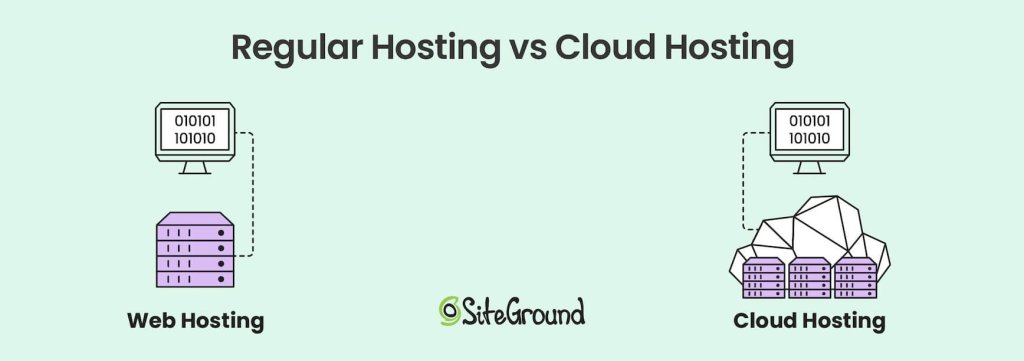
Comparison of web hosting and cloud hosting. Web hosting is depicted as a single server linked to a computer, while cloud hosting shows multiple interconnected servers forming a flexible, scalable cloud infrastructure.

The cloud hosting environment is a complex network of servers located in data centers across multiple locations. 

Both in shared and dedicated web hosting, a website relies on a single physical server. However, with cloud hosting, if one server fails, another server in the cloud network seamlessly takes over. 

This system provides high availability and minimal downtime for websites. 

1. The Role of the Hypervisor

The hypervisor is a type of software installed on physical servers that controls the creation of virtual machines and distributes resources to them. It connects physical servers, turning them into virtual resources that work as a single unit. 

The hypervisor is a critical component in virtualization and manages this setup. It ensures that each cloud server operates independently. 

This gives cloud hosting providers the ability to dynamically allocate computing resources, maximizing efficiency and performance. 
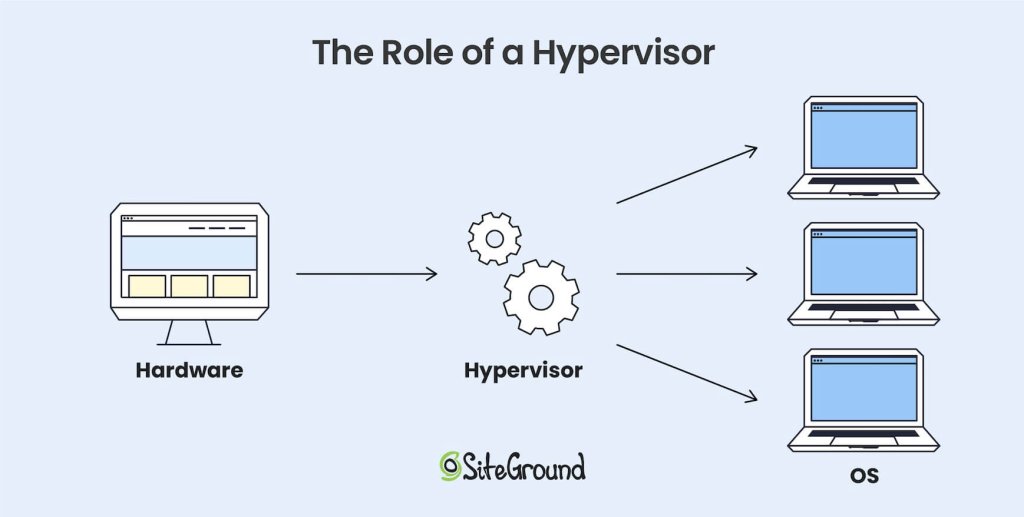
Diagram showing the role of a hypervisor in virtualization. Hardware connects to a hypervisor, which allocates resources to multiple operating systems running on separate virtual machines.

Benefits and Key Features of Cloud Hosting

1. Scalability and Flexibility

One of the biggest advantages of cloud hosting is that it offers scalable resources. With cloud hosting services, businesses can easily scale their resources up or down based on demand, without the limitations of a single server’s processing power. 

This makes cloud hosting a great choice for websites experiencing fluctuating traffic or seasonal spikes.

2. High Uptime and Reliability

Cloud hosting offers exceptional reliability because websites are hosted on multiple servers. When a server fails, the system automatically shifts the load to another server in the network, ensuring minimal downtime. 

Most cloud hosting providers guarantee uptime percentages of 99.9% or higher, which is particularly important for businesses where website availability is critical.

3. Cost-Effectiveness

With cloud hosting services, the need for costly hardware investments is eliminated. Instead, businesses can rely on a third-party provider that manages and maintains the physical infrastructure. 

The pay-as-you-go pricing model in cloud hosting is budget-friendly. It allows companies to avoid upfront expenses and scale their costs according to their actual usage.

This gives flexibility to managed hosting providers like SiteGround. We can dynamically scale resources to meet traffic demands and optimize costs. For end-users, this means SiteGround can offer scalable, high-performance plans with predictable monthly pricing.

4. Security and Compliance

Cloud hosting solutions often come with advanced security measures, including data encryption, firewalls, and strict access control policies. 

Leading providers like Google Cloud Platform (GCP) invest heavily in security, offering reliable protections for customer data stored in the cloud. While security risks exist in cloud hosting, reputable cloud providers take proactive steps to mitigate them. 

5. Global Accessibility

Cloud hosting enables businesses to reach a global audience, thanks to the widespread distribution of data centers. As such, leading providers offer cloud services through a network of data centers that spans multiple regions around the world. 
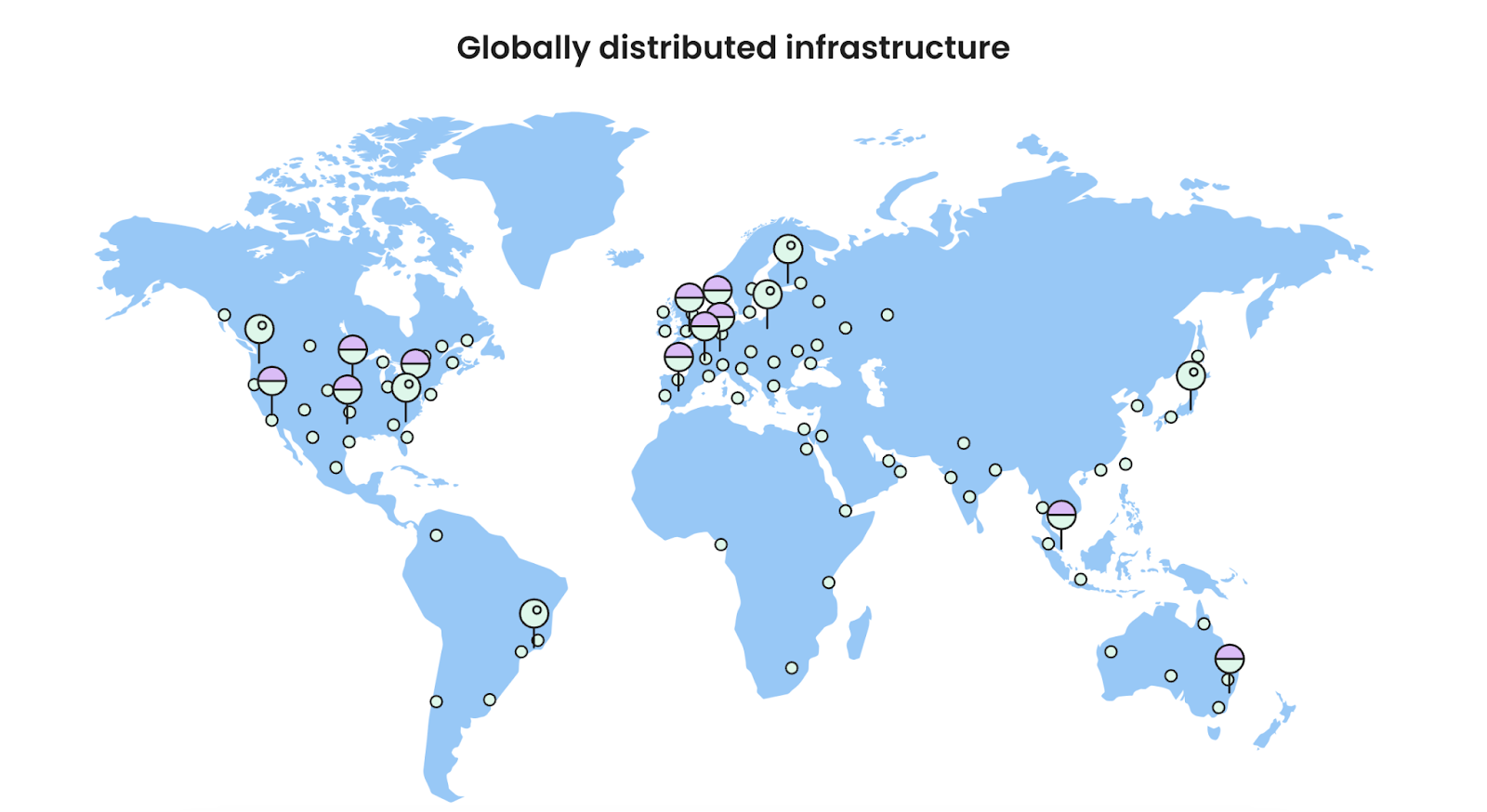
Image displaying a globally distributed infrastructure of servers on a world map.

Furthermore, cloud providers offer multiple data center locations, enabling companies to host data closer to their target audience for faster load times and optimized performance. 

We currently offer hosting services in 11 data centers on four continents, and also have an in-house built CDN system with close to 20 CDN locations and multiple CDN edges.

Who’s Cloud Hosting Best For?

Cloud hosting is versatile, so it’s suitable for various applications and businesses.

  • Small and Medium Businesses (SMBs): Cloud hosting’s scalability and cost-efficiency make it ideal for SMBs looking to grow without substantial upfront investments.
  • High-Traffic Websites and Ecommerce: Websites that need increased processing power, traffic capacity, and disk space benefit from cloud hosting’s resource flexibility and better performance.
  • Web Development Agencies: Agencies with multiple clients and projects can leverage cloud hosting to streamline management across different websites.
  • Enterprise Applications: Companies that need extensive computing resources for analytics, artificial intelligence, or large-scale applications can achieve this more affordably with cloud hosting solutions.

Types of Cloud Hosting

Cloud services can be categorized into four different types of hosting. Each type uses different technologies for backend management and resource allocation.

1. Public Cloud

In a public cloud setup, a third-party provider supplies all the servers, resources, and management. Businesses don’t need to own physical servers – they scale resources on demand, and develop custom features on top of the public cloud infrastructure.

Common examples of large-scale public cloud providers are the Google Cloud Platform (GCP), Amazon Web Services (AWS), and Microsoft Azure.

2. Private Cloud

A private cloud is managed and hosted by the business itself. All servers, storage, and resources are owned in-house, which gives full control, but requires managing the infrastructure. 

Financial institutions or government agencies may use a private cloud setup for compliance, enhanced security, and full control over sensitive data handling. 

3. Hybrid Cloud

Hybrid clouds combine private and public clouds, allowing businesses to store some data privately and use third-party resources for other needs. This approach supports flexible data and application handling.

4. Managed Cloud

A managed cloud is a public cloud where the provider takes care of operations, from monitoring to security and performance optimizations. This model is great for companies that want cloud power but prefer to focus on core business, not backend IT management. 

SiteGround offers managed cloud hosting plans that are built on top of GCP’s infrastructure. This means that while clients benefit from the scalability and reliability of Google Cloud Platform, they are also provided with additional support, custom features and management tools from SiteGround.

Choosing a Cloud Hosting Provider

Selecting the right cloud hosting provider is essential to get the most out of cloud hosting. Here are some key factors to consider:

  • Performance and Reliability: Look for providers with high uptime guarantees, efficient cloud infrastructure, and reputable data centers.
  • Scalability: Ensure the provider offers easy scaling options to support your business growth. 
  • Pricing Models: Compare pricing structures and choose a hosting plan that aligns with your budget and expected usage.
  • Security Measures: Evaluate the provider’s security offerings, such as encryption, firewalls, and compliance with industry standards.
  • Customer Support: Reliable, 24/7 customer support is critical, especially if you lack in-house technical expertise.

Many cloud hosting providers offer trial plans or flexible pricing options, which can help you test out their services before committing.

1. Why Choose a Managed Cloud Hosting Provider for Your Website?

Using a large-scale public cloud provider like GCP or AWS can be cumbersome from a technical standpoint. While it’s less involved than setting up a private cloud network, it still requires a lot of expertise to utilize public cloud services for website hosting.

For most users, a managed cloud hosting plan is the best choice. SiteGround has invested a lot of time and resources in optimizing their cloud servers, offering performance, security and management features that allow users to focus on their site and business.

The main benefits of SiteGround’s Managed Cloud Hosting are:

  • Expert Support and Maintenance: 24/7 support and proactive monitoring to keep your site running smoothly.
  • Enhanced Security: Built-in security features, regular updates, and compliance support.
  • Optimized Performance: Load balancing, autoscaling, and uptime guarantees for reliable site performance.
  • Cost Efficiency: Predictable pricing, optimized resource use, and no hardware costs.
  • Scalability: Seamlessly adjust resources to handle traffic growth or fluctuations.
  • Simplified Management: Focus on your business while we handle the technical backend.

Cloud Hosting vs Other Hosting Types

Cloud hosting can be distinguished from other hosting models, like shared hosting, VPS hosting, and dedicated hosting in a variety of ways – let’s explore how.

1. Cloud Hosting vs. Shared Hosting

Shared hosting is an entry-level hosting solution where multiple websites share resources on a single server. While cost-effective, it lacks the scalability and reliability of cloud hosting. 

Cloud hosting, on the other hand, allows websites to draw from a large pool of resources across multiple servers. 

For growing businesses, cloud hosting is preferable as it offers more computing resources and flexibility.

2. Cloud Hosting vs. VPS Hosting

Virtual Private Servers (VPS hosting) provide dedicated resources on a shared physical server. While it offers better performance than shared hosting, VPS is still limited to a single physical server. 

Cloud servers provide enhanced scalability and resilience, as they aren’t confined to a single server. Cloud hosting works by allowing resources to scale dynamically based on demand, whereas VPS has more rigid limitations.

3. Cloud Hosting vs. Dedicated Hosting

Dedicated hosting gives exclusive access to a dedicated server for a single customer. Although this offers the highest level of control, it comes at a higher cost and lacks the flexibility found in cloud hosting. 

For example, if you are on a dedicated server and need to upgrade your CPU or RAM memory, the process must be done manually by someone with the necessary expertise, and physical access to the machine. 

In contrast, cloud hosting providers deliver similar performance but with the added benefits of resource scalability, making it a more cost-effective solution for many businesses. 

Get Started with Cloud Hosting Today!

Cloud hosting provides a combination of scalability, performance, and security that’s hard to match with traditional web hosting models.

Whether you’re running a high-traffic website, managing multiple client projects, or looking for a way to grow your website, cloud hosting solutions can offer you the necessary tools and resources.

Using a managed cloud hosting service can take your website or online business to the next level. Reach out to our sales team if you wish to learn more! 

What is Shared Hosting & How Does It Work?

A header image showing a website page hosted on a web server.

Having a website is essential for businesses, bloggers, and anyone looking to establish an online presence. However, before you can create a website, you need a place to store your site’s files so that people can access them over the Internet. 

This is where web hosting comes in. One of the most popular and cost-effective hosting options available is shared hosting. 

In this article, we’ll explore what shared hosting is, how it works, and why it might be the right choice for your website.

What Is Shared Hosting?

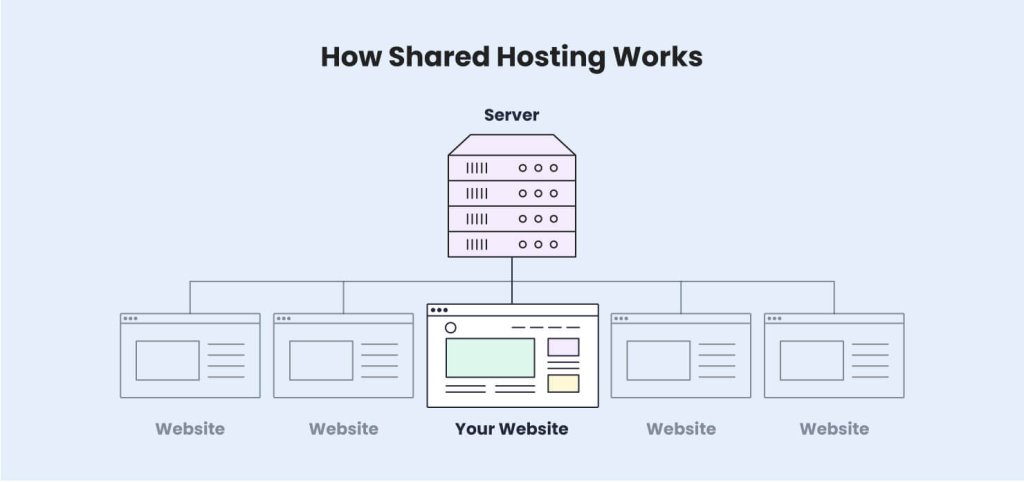
Shared hosting is a type of web hosting service where multiple websites are hosted on a single physical server. Each website shares the server’s resources (such as CPU, RAM, storage, and bandwidth), with other websites. 

With shared web hosting, the hosting provider takes care of server maintenance and security, so it is an ideal choice for beginners. A shared hosting service is often the best entry-level option for individuals (freelancers, bloggers, etc.) and small businesses. It offers an affordable way to get started online without the need for technical expertise or a complicated setup.  

How Does Shared Hosting Work?

In a shared hosting environment, a single physical server is partitioned into multiple spaces, and each of these spaces is allocated to different users. 

The hosting provider sets up a server and installs the necessary software, including an operating system, web server software, and a control panel. They divide the server’s resources into smaller units, which are shared by multiple users. 

Additionally, the web host manages the server, taking care of maintenance tasks such as software updates, security patches, and monitoring. This centralized management is one of the main reasons shared hosting is popular among beginners – it reduces the need for technical knowledge, as all of the backend work is handled by the provider. 

Since all websites are on the same server, they share the overall processing power and bandwidth. This is why hosting providers set per-user limits for CPU seconds usage, disk space, and memory. However, this should not worry you! Shared plans can handle tens or even hundreds of thousands of visits.  

These restrictions are there so that it’s not possible for one user to negatively impact the performance of the whole server and the other sites hosted on it.

Pros and Cons of Shared Hosting

Shared hosting is a great fit for many website owners. Naturally, the lower cost also comes with some downsides you should consider when evaluating different web hosting plans. We’ll take a closer look at the pros and cons of shared hosting providers below. 

1. Advantages of Shared Hosting

1.1. Cost-Effective

The main benefit of shared hosting services is the price – it is significantly less expensive than cloud hosting or a dedicated server. Since all users are sharing one high-powered server, they are also sharing the total cost of that machine. This allows web hosting companies to offer better prices, focus on server maintenance, and implement custom add-on features for users at a low cost.

1.2. Ease of Use

As opposed to VPS, cloud or dedicated hosting, where you are responsible for the technical setup of your server, shared hosting is usually fully managed by the hosting company. Most providers offer a control panel that allows you to easily upload files, manage FTP accounts, and add domain-related features like SSL certificates. This means you do not need to have any technical expertise to host a site, and you would never have to worry about system administration or command lines.

1.3. Maintenance-Free

Another benefit of shared hosting is that your web hosting company is responsible for the backend management of your server. This includes performance and security optimizations, and updates to application and database servers. This allows website owners to focus entirely on their business and website content. 

1.4. Scalability

Small businesses can easily scale their accounts by upgrading to a higher plan. Even though you are sharing a server with other users, most providers offer upgrade options so you can increase your resource allocation significantly.

Most top-level shared plans can handle up to several hundred thousand visitors per month. The exact capacity and limitations vary depending on how well a hosting provider has optimized their web servers. 

At SiteGround, we offer seamless upgrades between shared hosting packages. The process is fully automated, and does not involve any downtime or DNS changes for your domain name.

2. Limitations of Shared Hosting

2.1. Resources

This point is especially important for sites that are getting more than 500,000 visits per month. If your website’s audience is growing and you start getting more web traffic, you may hit some of the resource limitations of your shared plan. As a result, your websites could be suspended until the issue is addressed.  

As we mentioned, these limits are there to ensure the stability of the server, so this may be a sign that you need to either optimize your site, or upgrade to a higher plan with more capacity.   

2.2. Potential for Slower Speeds

While there are many technologies in place to prevent abuse, it is possible to experience poor performance if something goes wrong with the shared server. If another site overloads the whole server, it would affect the loading speed of your own website. This does not happen often but is possible given there are multiple users sharing the same server environment. 

If this is a concern, consider having your website on a different type of hosting plan, such as a cloud server. There, you have your own dedicated set of CPU, RAM memory, and disk space. This would give you the peace of mind that no other user can affect your site and resource usage. 

2.3. Less Customization

Using a managed shared hosting environment means you do not have root access to your server and cannot install server software on your own. 

Usually, it’s not possible to request such a customization from your provider, because any changes done for you by the web host would also affect other users sharing the same server.

This is more relevant for larger online businesses and complex website applications that require different layers of technology in order to function properly. In such cases, the owners employ technicians that are fully responsible for setting up, customizing, and maintaining dedicated servers.

2.4. Security Considerations

While hosting providers take measures to ensure security, the shared environment means that vulnerabilities on one website can potentially affect others on the same server. If one site gets hacked or infected with malware, there is a higher risk that other sites could be impacted as well. This is why it’s crucial to keep your website software up to date and to implement additional security measures.

Server-level security can vary significantly across different providers. At SiteGround, we offer 24/7 monitoring, advanced Firewall protection, and DDoS protection to make sure your site is well-protected.

Our Security Optimizer for WordPress sites is a great way to increase your application-level security and prevent any issues with malware.  

Who Should Use a Shared Hosting Server?

Shared hosting is an excellent choice for individuals, bloggers, and small businesses.

It is also a great solution for personal projects, portfolios, and smaller eCommerce stores that do not require large-scale operations or custom configurations. 

Since the hosting provider manages the technical setup, users with little to no technical experience can use shared hosting without any difficulties.  

In essence, it’s the best option for almost everyone, unless you’re running a highly customized site or have an exceptional amount of traffic. 

1. When to Consider Other Options

If your website has high traffic, includes complex applications, or requires specific server configurations, shared hosting may not be the best choice. 

In such cases, you might want to explore cloud hosting, or dedicated hosting options that provide more control and flexibility. These options are also better suited for larger businesses or ecommerce platforms with significant data and customer management needs. 

How to Choose the Right Shared Hosting Plan 

1. Performance and Reliability

When selecting a shared hosting plan, make sure to check the provider’s uptime guarantee and performance optimizations. A reliable hosting service should offer consistent server uptime (ideally 99.9% or higher) to ensure your website remains accessible to visitors. They should also offer other technologies to reduce server load and optimize performance. This includes caching, custom application layers, and optimized database servers.

SiteGround implements three levels of caching, an Ultrafast PHP version, and a custom MySQL setup in order to increase the performance and capacity of our servers.

2. Customer Support

Since shared hosting is mainly targeted at smaller websites and beginner users, it is highly important to choose a provider that has a strong customer service team and a good reputation for the support they offer. 

Make sure your hosting provider offers 24/7 support via chat, phone, or ticket so you can get assistance whenever you need it.

SiteGround offers support via chat, phone, and a ticketing system. There is also a rich Knowledge Base and an AI assistant to help you with any questions regarding your shared hosting package.

3. Scalability Options

Manual migrations to other platforms are a hassle that most people do not know how to deal with. 

No website owner wants to feel stuck with a limited provider so it’s essential to pick a web host that allows you to upgrade to a higher plan if your website starts growing. Check if the provider offers easy upgrades so you can smoothly scale your online presence as your business grows. 

4. Security Features

Security is crucial, especially on a shared server where multiple users are hosted together. Look for hosting providers that offer SSL certificates, firewalls, DDoS protection, and regular security patches. Some hosts also offer automated backups, which can be a lifesaver if something goes wrong. 

We offer free SSL certificates, 24/7 monitoring, an AI firewall, and daily backups for all plan tiers.

5. Price vs. Features

Evaluate the price of the hosting plan in comparison to the features offered. While shared hosting is generally affordable, some plans may have extra perks like one-click installations, built-in caching, and free domain registration. Ensure you’re getting the best value for your money by comparing features and customer reviews. 

Also, check if they offer a money-back guarantee, so you have enough time to get familiar with all the available tools and test the service.

Get Started with Shared Hosting Today!

Shared hosting is an accessible and affordable way to build your online presence, whether you’re launching a blog, setting up an online store, or starting a portfolio site. 

By choosing the right hosting provider, you can get your website up and running quickly without worrying about the technical aspects of server management. 

Take advantage of the features that shared hosting offers, and as your site grows, you’ll have options to scale up seamlessly. Ready to get started? Check out our recommended shared hosting plans and kickstart your online journey today!