

At some point, an app you built through vibe coding starts to matter. Customers sign up through it, payments run through it, or your team relies on it every day, whether you built it in a general AI tool or in an AI app builder such as Coderick AI. From then on, the next change feels risky, because something that already works could stop working.
AI-built app maintenance is keeping practical control of an app built with AI tools as it changes. It means knowing what exists, where important behavior lives, how to make a change and undo it, and what someone else would need to carry the work on if you stepped away.
Key takeaways:
- AI-built app maintenance starts when the app starts to matter (meaning when customers, revenue or a team depend on it), rather than when something breaks.
- Keeping control of your AI-built app has five parts: seeing what was built, mapping where key behavior lives, keeping changes small, being able to go back, and leaving context for others.
- Source code access to your app is the first step, but you also need to understand important behavior, check changes, and retain a way back.
- Early red flags, such as a fix breaking an unrelated feature or prompts overwriting manual edits, signal underlying issues you can resolve by refining your workflow.
When AI-built app maintenance starts to matter
Before an app matters, almost every change is safe. If a prompt breaks the layout, you simply try another one or click Restore on a previous version card. If the whole build goes off track, starting over only costs an afternoon. Nobody else is affected, so maintaining a vibe-coded app at this stage barely needs a plan.
That changes the moment people begin depending on what you built. An app crosses the line into high-stakes territory when:
- Users create accounts or book appointments through your interface.
- Real money moves through it (such as live Stripe transactions).
- Your team relies on it daily to manage internal workflows.
- It holds unrecoverable data, such as customer records or order histories.
From that point on, a single careless prompt or manual code edit can break a feature that was already working, and the cost of that mistake falls directly on your users.
Long-term AI app maintenance starts right at this tipping point, while everything is still working smoothly.
Why AI-built apps get harder to control as they grow
When you ask an AI to add one simple feature, like a discount box at checkout, it does a lot of unseen work behind the scenes.
It might update the screen, change how prices are calculated, create a new spot in your database to save discount codes, and edit the receipt page. The discount works on your screen, but you only see the surface result, not the four connected pieces the AI changed under the hood.
As you add more features over time, your app grows faster than your understanding of it. A working app makes everything look fine on the surface, hiding the fact that you no longer fully know how it works.
The AI also makes choices about how to organize your app without explaining why it made them. Even if you save every code file, the reasons behind those decisions get lost, and the app slowly becomes a black box that you can use but cannot see inside.
Software developers call this gap between how much code exists and how much of it you actually understand comprehension debt. A 2026 study by Anthropic Fellows showed how quickly this gap opens: people who simply let the AI write code without asking questions understood less than 40% of what was created. In contrast, people who asked the AI to explain the code it wrote understood over 65%.
You can do the same when vibe coding. Every time the AI builds a new feature, ask it to explain what it just did in plain language so your understanding keeps up with your app.
What it means to keep control of an AI-built app
Control over an AI-built app rests on five things you can check without reading code line by line. Together, they’re what AI app maintainability means for someone who isn’t a developer, and they answer how to maintain an AI-built app without learning to code.
1. Seeing what was built (visibility)
Visibility means the app’s code, files and data can be seen and kept. Source code lives in files, and an app of any size has dozens or hundreds of them. If you can’t open them, search them or keep a copy, every other part of control depends on the tool that built them.
For example, if you use an advanced AI app builder like Coderick AI, project code access shows every file behind a project. When you click on Code, you can browse the complete file tree, search file names and code text simultaneously, export individual files or the whole project as a .zip archive, and make quick manual tweaks directly in the editor without spending any credits.
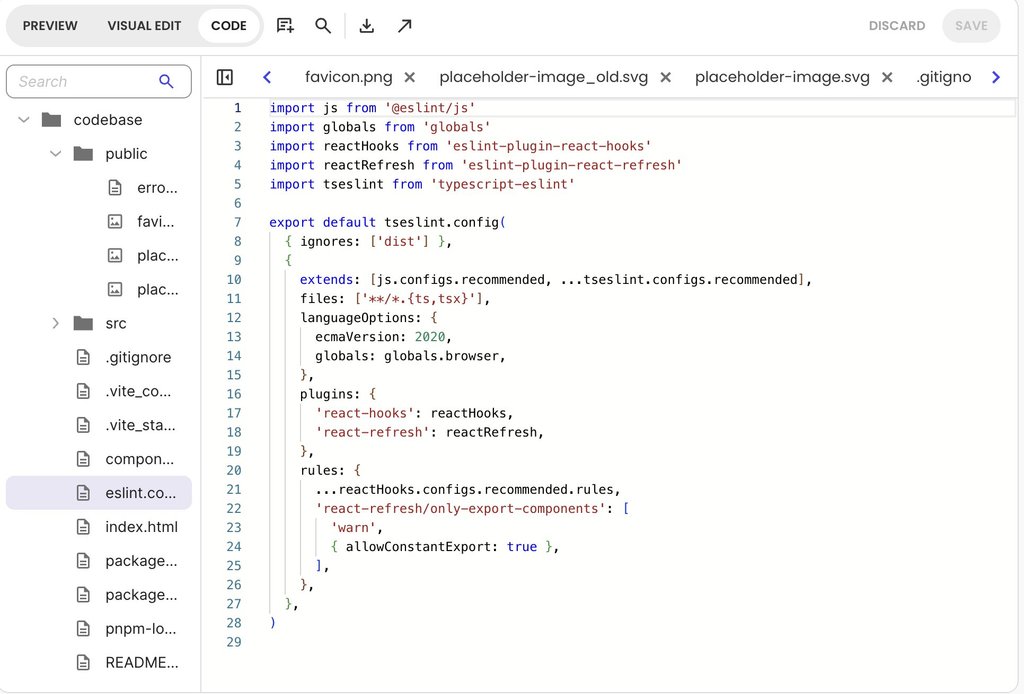
Having access to the code is the foundation of control, but seeing the files is only the first step.
2. Knowing where important behavior lives (your working map)
Controlling an app doesn’t require reading code line by line. What you need instead is a simple working map that answers four core questions:
- Which file handles user sign-ups?
- Which component processes payments?
- Which section triggers system and notification emails?
- Where is customer information saved in your database?
With a map in hand, you immediately know where a bug is likely sitting and which parts of your app a new change will affect.
The fastest way to build this map and keep it current is to ask the AI directly. Whenever a change goes in, ask the AI where the new code lives and why it was structured that way. Keeping these explanations builds the exact habit that helps you understand AI-generated code as your app changes.
To see how this works, here’s a simple prompt you can give to Coderick AI:
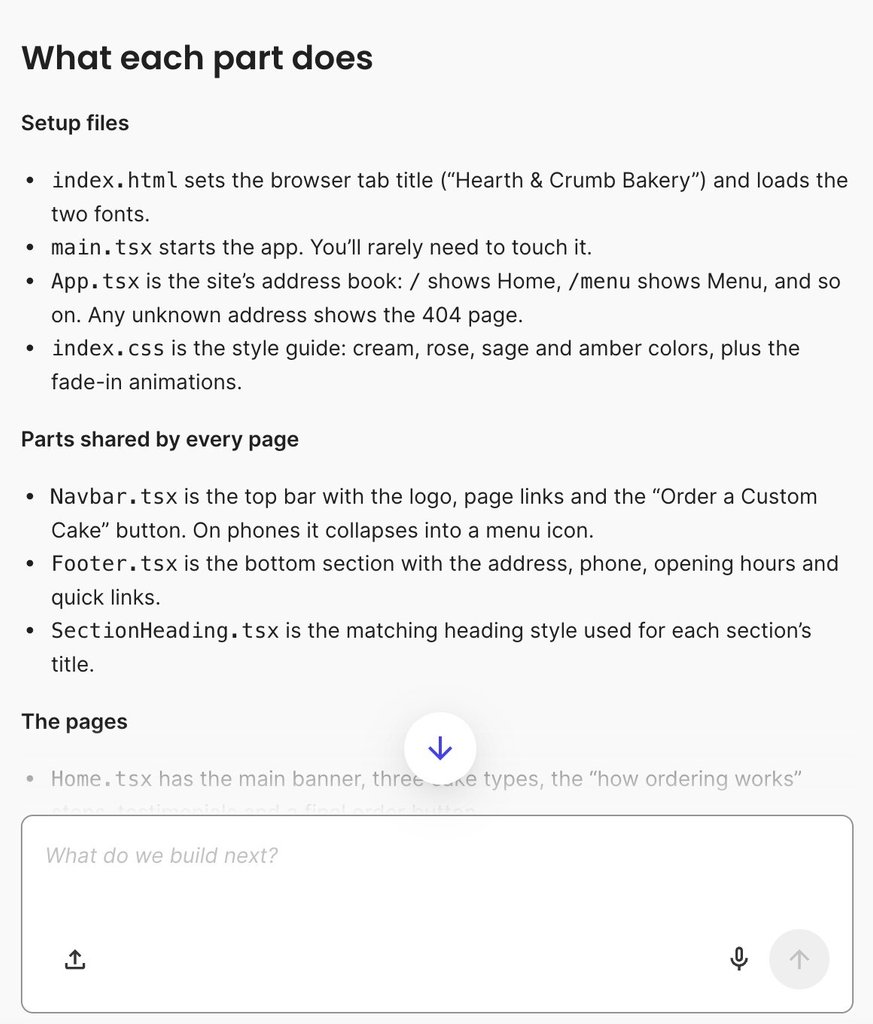
“Can you give me a simple map of my app? List the key files and explain what each part does in plain language.”
Coderick AI outlines your project’s overall structure, breaks down what each key file handles, and flags any temporary placeholder content or features that still need setup. It also highlights where common changes live, reminds you how to make edits using chat or visual tools, and suggests clear next steps so you always know where your project stands.
3. Keeping each change small enough to check
Each request should aim at one outcome. When a single prompt asks for a new feature, a redesign and a bug fix together, the result touches so many parts of the app that you can’t tell what changed, or which part caused a new problem. A change you can check is one where you can say afterward what it was meant to do, which parts it touched, and whether it did what you asked.
Check each change before you build the next one on top of it. Asking the AI what it changed, then trying the affected feature yourself, takes a few minutes and keeps problems from stacking up.
For instance, take a look at what Coderick AI does when you point a request at one file (Navbar.tsx, which, as Coderick explained, contains the top bar with the logo), so the change and the explanation of it stay focused on that part of the project:
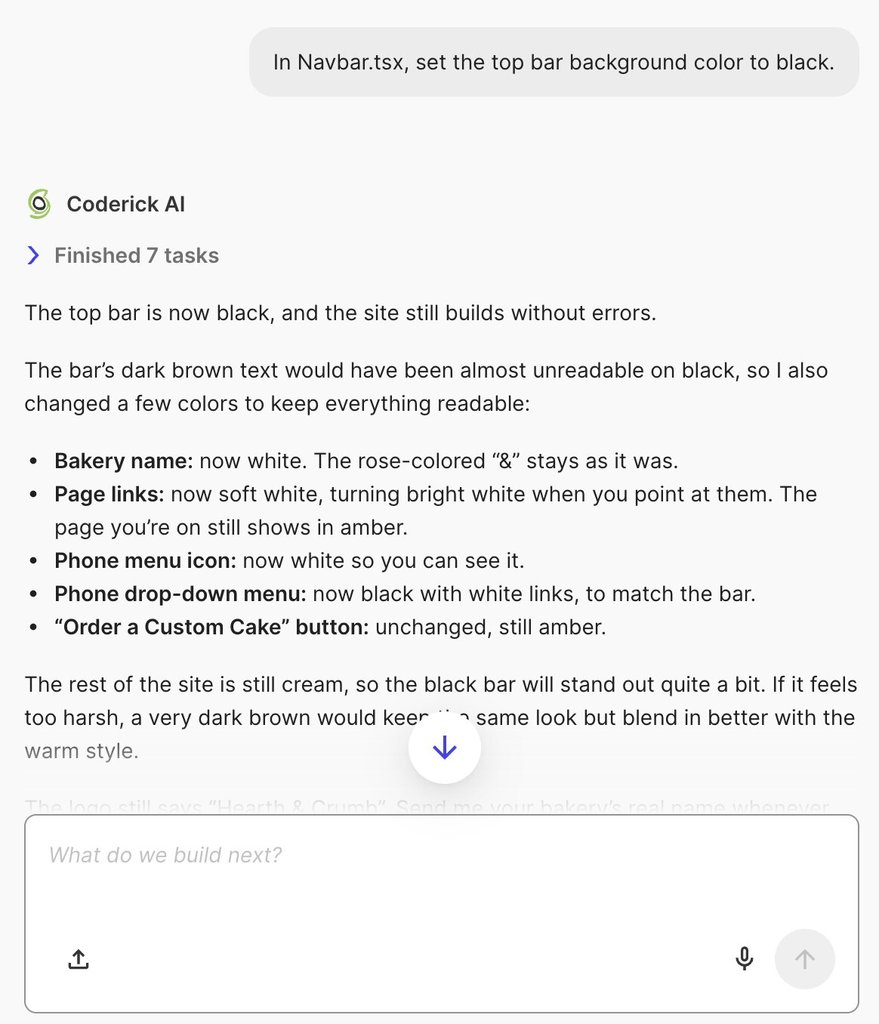
Good to remember: Specifying the exact file name in your prompt gives you three major advantages over a generic request. First, it isolates the AI’s work to one file, preventing unintended modifications to unrelated parts of your application. Second, it saves both time and account credits because the AI does not have to scan your entire codebase to figure out where the code lives. Third, it generates faster and more accurate updates, allowing the AI to deliver precise edits alongside a clear explanation of its work.
4. Being able to go back (recovery)
Recovery means having a known working version of your app (a saved checkpoint) and building the habit of using it.
When a prompt goes wrong, the natural reaction is to describe the error to the AI and ask it to fix it. However, asking for a fix on top of a broken build often adds new code on top of faulty code. After a few rounds of troubleshooting prompts, your app can end up much further from working than when the problem first started.
Restoring the last working version first, and then re-trying the change in a smaller, simpler form, keeps you on safe, familiar ground.
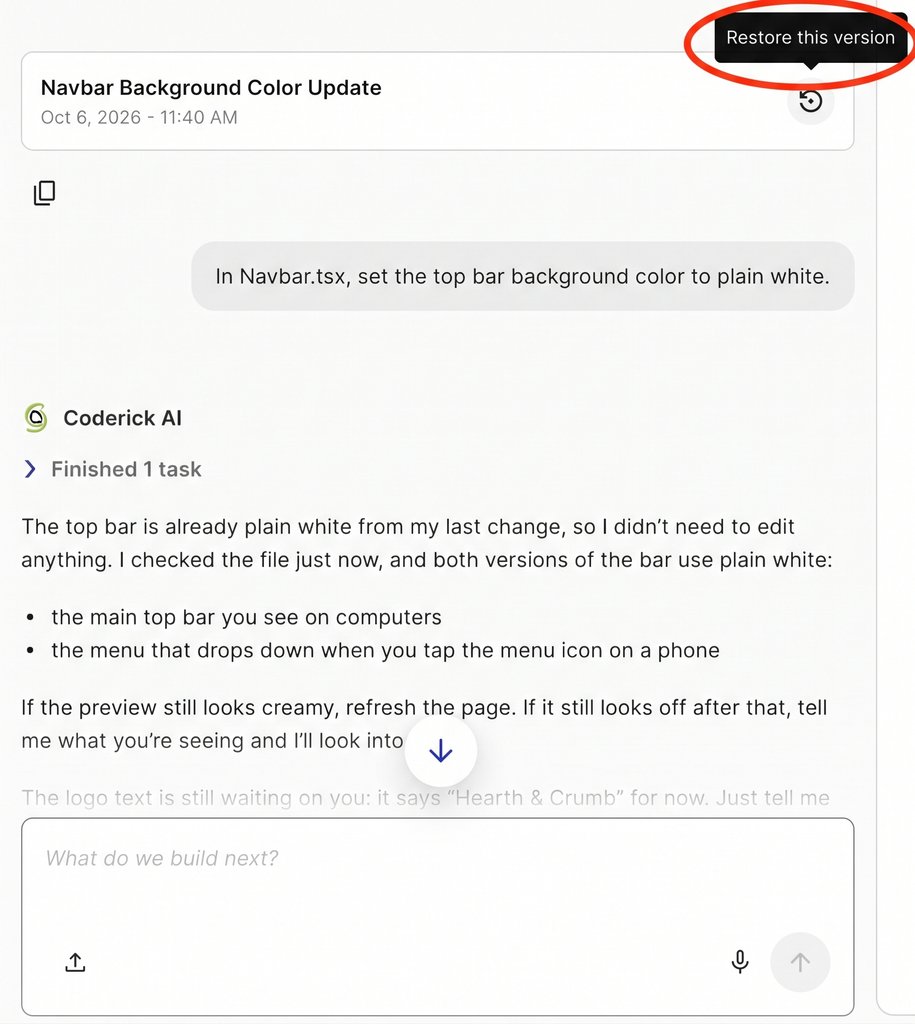
For example, in Coderick AI, version management and recovery are built directly into your chat workflow. Every completed request creates a timestamped version card, letting you roll back your project files with a single click if an update goes wrong. Plus, your private preview panel acts as a safe sandbox, so no changes affect live visitors until you explicitly click Publish or Update.
5. Leaving enough context for someone else (continuity)
Continuity means that someone else can step in and take over your app without friction: a colleague, a developer you hire, or even yourself returning after three months away. Your source code shows what the app does today, but it can’t explain why it was built that way, what features you tried and dropped, or which delicate sections you prefer nobody touches.
A short written record fills this gap without needing technical language. A simple page explaining what the app is for, who uses it, key design decisions, and past fixes gives anyone an instant starting point. Having this context also makes collaborating with a professional developer much smoother when the time comes to expand your app.
To help you keep track of this, AI app builders like Coderick AI automatically preserve your full chat history, displaying saved version cards directly alongside the exact prompts that generated them.
Warning signs that control is slipping
These warning signs usually appear long before an AI-built app becomes unmanageable. Catching them early tells you exactly which habit or tool to adjust.
| Sign | What it usually points to | Where to look next |
|---|---|---|
| You can’t say what the last change touched | Requests that are too large or complex to check | Keep your next prompt focused on a single outcome, and review the file summary. |
| A fix in one place breaks something elsewhere | Hidden dependencies across files you have not mapped. | Ask the AI for a simple map of your app to see how your files connect. |
| You keep re-prompting the same fix | The AI is missing context, or the problem sits in a part you haven’t pointed it to | Restore the last working version, then point the request at the part involved |
| You avoid touching part of the app | That feature has turned into an unreadable black box. | Ask the AI to explain what that section does in plain language, or consult a developer if it remains unclear. |
| Your manual edits disappear after a prompt | Conflicts between manual code edits and AI prompts. | Reference files in chat, or make manual edits after saving your AI version checkpoint. |
| The app slows down as its data grows | Performance problems that grow with your data. | Inspect your database collections, or consult a developer to optimize data loading. |
| You’re unsure what it does with customer data or logins | Unanswered security or data privacy questions. | Review how your database manages authentication rules, or ask a developer for a quick security check. |
| Only the AI could explain why something works | Architectural decisions made without a record. | Start a written record of decisions, beginning with that part. |
The first five warning signs can usually be resolved using the daily habits covered in this guide, such as restoring version checkpoints and referencing specific files in chat. Performance slowdowns and complex security questions are typically where app owners benefit from a developer’s expertise.
How to keep control of an AI-built app as it grows
You don’t need to audit the whole app to start. Apply the five steps covered here to your very next change, and the habit carries over to the one after it. This is how to keep an AI-built app maintainable without turning maintenance into a project of its own:
- Before the change, make sure there’s a working version you can return to, and decide which part of the app the change should touch.
- During the change, ask for one outcome, and ask the AI to explain what it did and why.
- After the change, try the affected feature yourself, check that nothing nearby broke, and add a line to your record saying what changed and why.
This routine works for vibe coding app maintenance in any AI platform. Your map and your record grow a little with each change, which is how you can maintain a vibe-coded app long term without depending on anyone’s memory of how it was built.
Keeping your understanding in step with your app
AI-built app maintenance comes down to one primary goal: keeping your understanding in step with your app. An AI builder will continue adding new code as fast as you can prompt it, but speed without comprehension quickly leads to debt.
The five pillars of control give you a simple framework to track what was added, know where it lives, and safely undo changes whenever necessary. As long as your understanding moves at the same speed as your codebase, you will remain in complete control of your app as it grows.
[96]
FAQs
AI-built app maintenance is keeping practical control of an app built with AI tools as it changes. It means knowing what exists, where important behavior lives, how to change it and undo changes safely, and what someone else would need to continue the work.
You maintain an AI-built app as it grows by keeping your understanding in step with each change. Keep changes small, keep a working version to return to, ask the AI to explain what it changed, and write down the reasons behind important decisions.
No. Access to the source code isn’t enough on its own to keep control of an AI-built app. It lets you see and keep what was built, while control also depends on knowing where important behavior lives, keeping changes checkable, being able to go back, and recording why things were built that way.
An AI-built app is maintainable when its owner can see what was built, find where key behavior lives, make small changes and check them, restore a working version, and hand the project on with its context.
Yes. Non-developers can maintain an AI-built app day to day by keeping changes small, keeping working versions to return to and recording decisions. Deeper problems, such as slowdowns or security questions, usually need a developer’s help.
You stop an AI-built app from becoming a black box by asking the AI to explain what it built and why, keeping a plain-language map of where important behavior lives, and writing down the decisions behind each significant change.