
Managing a WordPress site with AI may sound simple, but the experience depends entirely on where that AI lives and how deeply it reaches into your site. Evaluating AI Agent for WordPress vs Jetpack AI comes down to choosing between a dedicated WordPress management agent and Jetpack’s hybrid AI model.
SiteGround’s AI Agent for WordPress provides a ready-to-use WordPress management agent that handles content publishing, plugin maintenance, user roles, and full WooCommerce store operations. Automattic’s Jetpack AI takes a split approach: offering a writing assistant inside the standard block editor alongside an external connection that lets third-party apps like ChatGPT or Claude manage site tasks.
Key takeaways:
- AI Agent for WordPress vs Jetpack AI comes down to management model and workspace. The AI Agent for WordPress operates inside a native chat in your WordPress dashboard, whereas Jetpack AI manages site operations through connected assistants like ChatGPT or Claude.
- Both edit WooCommerce product copy, but the AI Agent for WordPress also handles core store operations such as orders, inventory stock, and sales reports.
- Jetpack AI requires a separate paid plan for every individual site, whereas the AI Agent for WordPress manages multiple connected sites under a single account token pool.
- Most websites only need one AI assistant, but you can keep core Jetpack security or backup modules running while using the AI Agent for WordPress for site management.
A dedicated WordPress agent vs Jetpack’s hybrid AI model
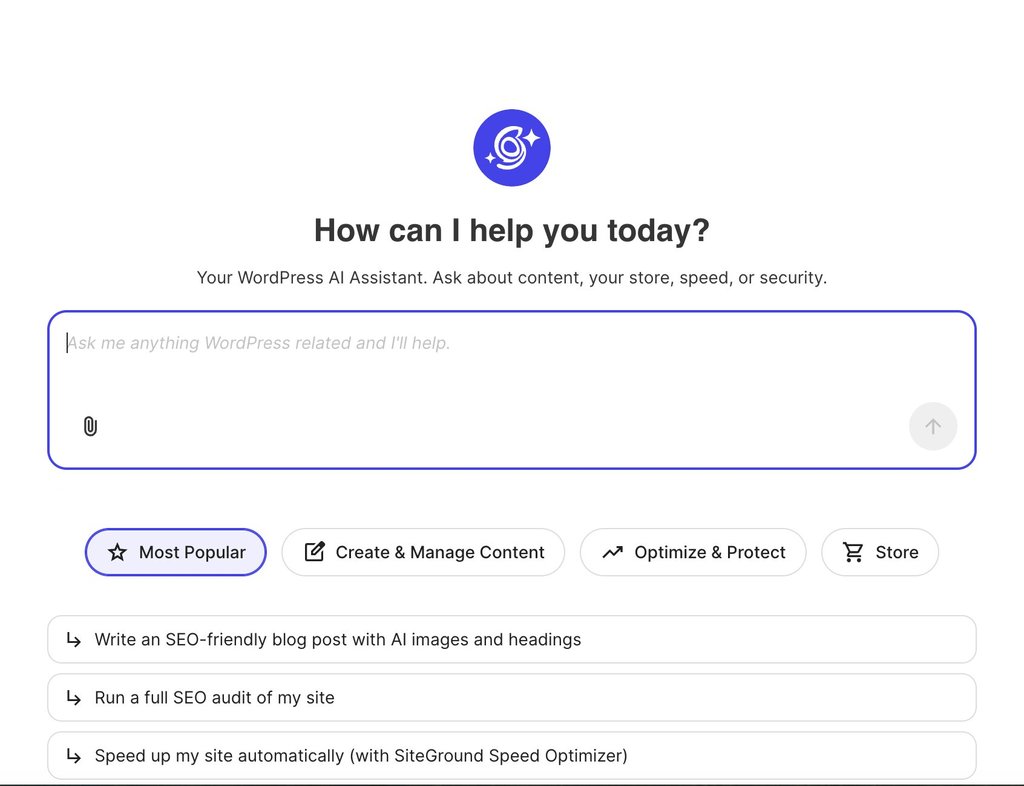
SiteGround’s AI Agent for WordPress provides a single, unified assistant accessible directly inside your WordPress admin dashboard. You describe what you need in plain language, and the agent executes WordPress management tasks by chat: from publishing posts and updating plugins to managing user roles, configuring site settings, and administering a WooCommerce store.
It comes pre-connected for SiteGround-hosted sites and connects to externally hosted websites via a lightweight plugin. And because the underlying AI models are supplied directly through SiteGround’s managed infrastructure, there are no third-party API keys to set up or pay for separately.
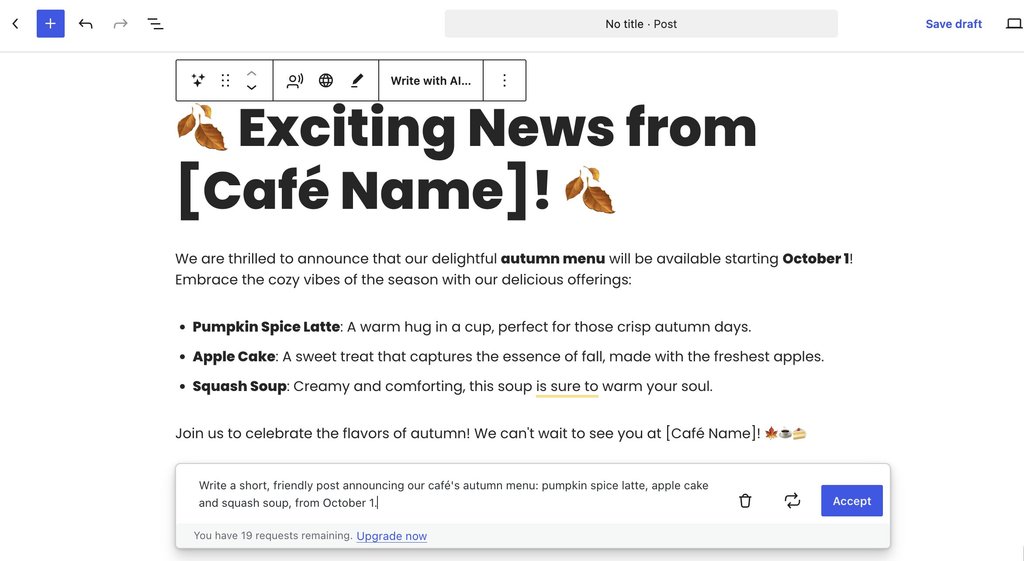
By contrast, Jetpack AI takes a hybrid, split-tool approach. You reach both by installing the Jetpack plugin and opening Jetpack → Jetpack AI in your WordPress dashboard, where you switch features on and connect an outside assistant. Inside the standard block editor, the Jetpack AI Assistant for WordPress drafts, rewrites, and translates text, generates images and alt text, and suggests post titles or excerpts.
However, for administrative management beyond the editor, Jetpack’s paid plan connects external assistants (such as ChatGPT or Claude) through MCP (Model Context Protocol, an open standard that lets AI assistants act on other software). You then manage the site from inside that assistant’s own app, and each change waits for your confirmation before it runs.
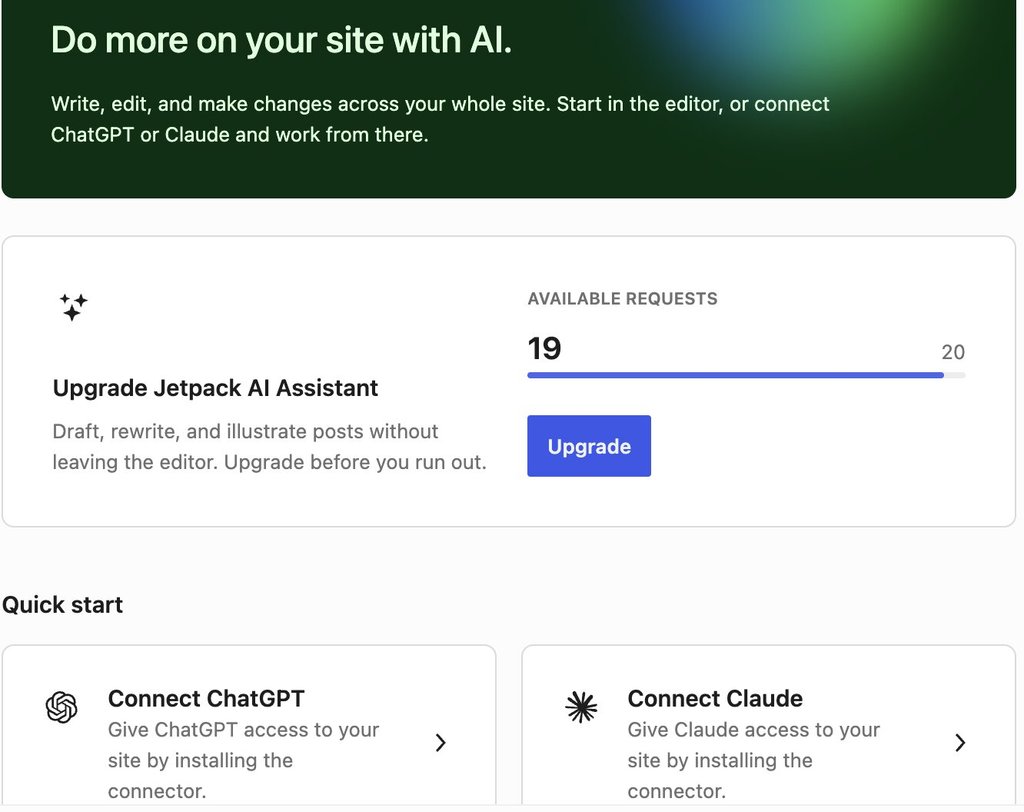
That connection runs through WordPress.com (Automattic’s own service for hosting WordPress sites) even when your site is hosted somewhere else. Jetpack AI needs a WordPress.com account, and on a site with several users, each person who uses the AI connects their own. A connected assistant reaches your site through WordPress.com’s own MCP connection and gets the same set of tools as a site hosted on WordPress.com.
Good to know: The assistant you connect is a second account to set up. In Claude, the connection is a WordPress.com connector you sign in to. On a Claude account run by a company, an administrator has to add that connector before anyone on the team can use it. Check too whether your ChatGPT or Claude plan supports connectors at all, since the assistant is billed separately from Jetpack.
AI Agent for WordPress vs Jetpack AI: how they compare
Jetpack AI’s two tools share one column below, and a row names the built-in assistant or the connected assistant where the two differ.
| Dimension | Jetpack AI | AI Agent for WordPress |
|---|---|---|
| Where you work | In the block editor for writing, and inside ChatGPT, Claude or another assistant for site management. | In a chat inside the WordPress admin, or from SiteGround AI Studio. |
| Who supplies the AI | The built-in assistant for writing. For site management, the assistant you connect, which has its own account. | Integrated out of the box via SiteGround’s managed infrastructure, no API keys needed. |
| Content and media | Posts, pages, media, comments and categories. | Posts, pages, media, comments and categories. |
| Site structure | Templates (the layouts WordPress uses for each type of page), navigation menus and global styles (site-wide colors and fonts). | Manages page hierarchies, navigation menus, and core site configurations. |
| Plugins | Search, install, update, activate and remove, one plugin per update request. | Search, install, update, activate and remove, individually or in bulk. |
| Users and settings | Settings can be read, and neither users nor settings appear among the areas a connected assistant can be given permission to change. | Manages user profiles, roles, and core WordPress settings safely behind Power Mode. |
| WooCommerce | Products as content: create, edit and describe them, and manage their categories and tags. Orders, customers, stock and sales reports aren’t among the connected assistant’s tools. | Executes bulk product/price updates, manages customer orders, updates inventory, and generates sales reports. |
| Several sites | One connection reaches every site where you’ve switched access on, with one plan per site. | Executes single administrative requests simultaneously across multiple connected sites on any host. |
| Safety | Off by default, with separate read and write permissions for each area, every change confirmed, new content saved as a draft, and an activity log of each action. | Power Mode off by default, gating deletions, bulk changes, user changes and order edits, with every high-impact action confirmed. |
| Cost | 20 one-time free requests. Jetpack AI costs $4.95 a month in the first year and $9.95 after, billed yearly, per site. The connected assistant may need its own paid plan. | 20,000 free AI tokens to start on any website, whoever hosts it, then top up or subscribe monthly. Included with SiteGround hosting plans, which add free monthly AI tokens. |
Executing a simple task with AI Agent for WordPress vs Jetpack AI
To see the differences in the two WordPress management approaches, consider a routine scenario: a café publishing a blog post to announce its new autumn menu and installing a plugin for table booking. The table below follows this workflow from first draft to plugin maintenance:
| Step | Jetpack AI: Built-in Assistant | Jetpack AI: Connected Assistant | AI Agent for WordPress (SiteGround) |
| Primary Workspace | Inside the Block Editor (one block at a time). | External ChatGPT or Claude apps (outside WordPress). | In a chat inside the WordPress admin. |
| Drafting Post & Setting Tone | Add the AI Assistant block and prompt it block-by-block (each prompt uses 1 request). | Prompt the assistant in the app; it creates and saves a draft to your site upon confirmation. | Describe the post in natural language; the agent creates the structured draft directly on your site. |
| Featured Image & Alt Text | Generated block-by-block via post settings (uses 1 request each). | Writes alt text and attaches media library files (image creation depends on whether the connected LLM supports it, like ChatGPT). | Generates the featured image and alt text simultaneously in the same chat thread. |
| SEO Title & Meta Description | Suggested via Jetpack SEO Tools (requires a plan that includes SEO extensions). | Writes SEO metadata directly to the post draft upon confirmation. | Generates and sets SEO titles and meta descriptions directly within the same chat conversation. |
| Publishing, Categories & Tags | Performed manually by the user within the editor sidebar. | Executed via chat commands with individual user confirmations (publishing is a separate step). | Executed entirely within chat, handling category tags and moving from draft to published status. |
| Updating Booking Form Plugin | Performed manually by the user on the WordPress Plugins screen. | Executes plugin updates one at a time via chat, requiring separate approval for each plugin. | Finds, installs and updates single or multiple repository plugins simultaneously in a single chat request. |
For a single blog post, all three approaches reach a published article: the difference lies in how many separate tools and tabs you must navigate. For example, the built-in Jetpack assistant speeds up writing inside the block editor but leaves publishing and plugin maintenance to manual admin clicks.
In the meantime, the AI Agent for WordPress completes the entire content-to-maintenance lifecycle in one continuous conversation inside WordPress, running full operational workflows from start to finish. For instance, you can give it a single multi-step prompt:
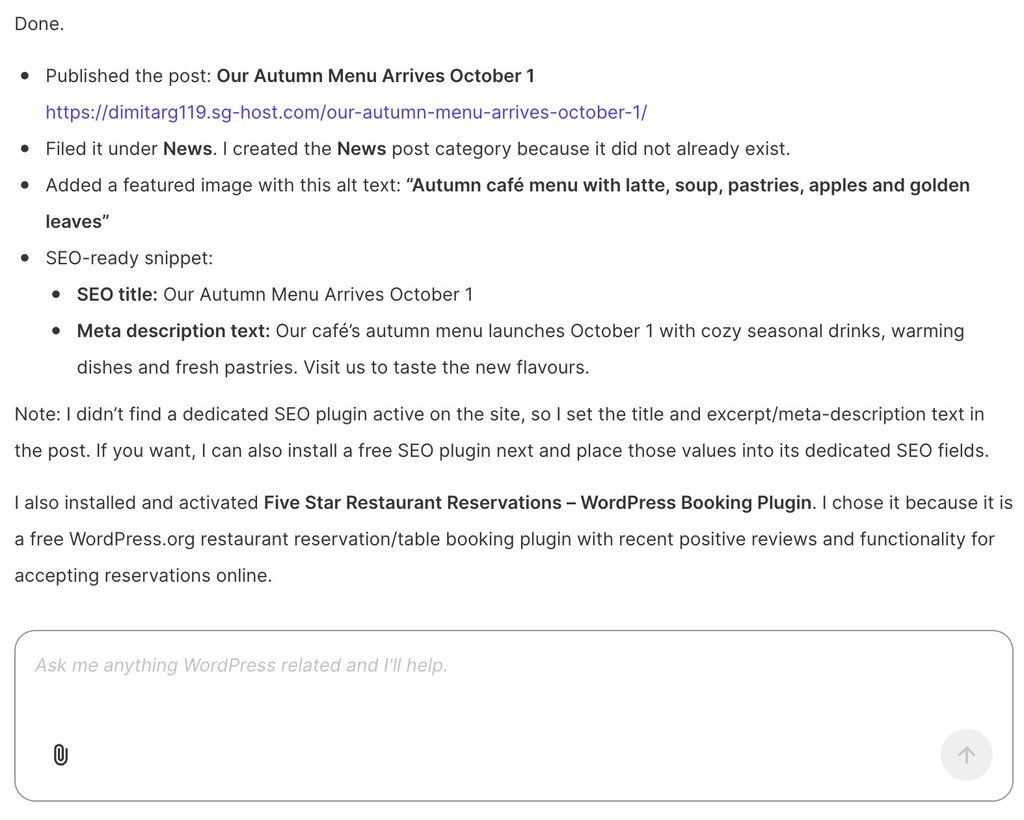
“Publish a short post announcing our café’s autumn menu, from October 1. Add a featured image, alt text, an SEO title and meta description, and file it under News. Install and activate a free, well-reviewed table booking plugin, and tell me which one you chose.”
The AI Agent for WordPress executes the entire workflow in one response. It drafts and publishes the post, automatically creates the missing “News” category, generates a featured image with detailed alt text, and sets the SEO metadata directly on the post. In the same turn, it searches the repository to find, install, and activate the Five Star Restaurant Reservations plugin, explaining its choice so the site owner completes both content publishing and site maintenance without ever leaving the chat.
Writing a product description versus running a catalog
Jetpack AI treats WooCommerce products primarily as individual content items rather than an active store inventory. While its connected assistant can draft product descriptions and organize categories or tags, new items are created as drafts, and Jetpack’s built-in writing assistant can’t function directly on WooCommerce’s standard product management screen (which relies on the classic editor layout).
Furthermore, core store operations, such as processing customer orders, adjusting stock levels, managing customer records, and generating sales reports, fall outside Jetpack AI’s toolset. While WooCommerce provides a separate, native connection for AI assistants to handle basic store actions, implementing it requires configuring and maintaining a second setup alongside Jetpack.
By contrast, SiteGround’s AI Agent for WordPress unifies store management with routine website administration inside a single chat window. Beyond writing individual product details, it handles full catalog management: importing and updating entire product batches from spreadsheets, executing bulk price adjustments across categories, translating product catalogs, managing customer orders, and generating sales reports, all without leaving your primary WordPress workspace.
How each manages multiple WordPress sites
Jetpack AI links each website individually through a single account connection, enabling a single conversation in external apps like ChatGPT or Claude to interact across your connected sites. Recurring administrative tasks can also be scheduled using those external assistants’ native automation features, though Automattic’s multi-site monitoring dashboard, Jetpack Manage, does not include integrated AI. Licensing is strictly per-site, requiring a separate Jetpack AI or Jetpack Complete plan for every domain.
Meanwhile, SiteGround’s AI Agent for WordPress orchestrates portfolio-wide changes simultaneously from a single chat request. Agencies and freelancers can manage client sites across different hosting providers from one workspace, connecting external domains using the SiteGround AI Studio plugin. Usage is managed under a single unified token pool rather than charging per domain.
Do you need AI Agent for WordPress if you already use Jetpack AI?
For most websites, running both assistants is unnecessary. Because a paid Jetpack AI plan and the AI Agent for WordPress overlap across standard site management tasks, paying for both means paying twice for the same administrative coverage.
The main exception is when a site relies on Jetpack’s core non-AI features, such as security scanning, automated backups, or site analytics. Because those core utilities function independently of Jetpack’s AI subscription, you can keep your existing Jetpack security or backup modules active while using the AI Agent for WordPress to handle site operations. This combination is especially practical for store owners, as the AI Agent manages the customer orders and inventory tracking that Jetpack AI can’t reach.
Which WordPress management approach should you choose?
Picking between AI Agent for WordPress vs Jetpack AI rests on two things: where you’d rather do your work, and whether your site runs a store.
When to choose Jetpack AI
Jetpack AI suits you when:
- You prefer to work in ChatGPT or Claude. Connecting that assistant lets it reach your sites from the app you use all day, including on a schedule for recurring jobs.
- You want to choose the AI. Claude, ChatGPT and other MCP-compatible assistants can all connect, so you can keep the one you prefer.
- Your site shows rather than sells. Posts, pages, media, menus and plugins are all within a connected assistant’s reach.
- You want Jetpack’s editor tools and security in one place. Jetpack Complete bundles Jetpack AI with backups, security scanning and the rest of the suite.
When to choose AI Agent for WordPress
The AI Agent for WordPress suits you when:
- You’d rather not set up a second assistant. The agent and its chat are part of WordPress, and on SiteGround hosting, it’s connected before you start.
- You run a WooCommerce store. Orders, stock, price changes across many products and sales reports sit alongside everything else it handles.
- You manage people and settings as well as content. Changing a team member’s role or a site setting is a prompt like any other.
- You look after several sites. One request reaches all of them, wherever each one is hosted.
The bottom line
Deciding between AI Agent for WordPress vs Jetpack AI comes down to where you want your AI assistant to live and how much of your site’s operational backend you need to manage.
If your focus is primarily on writing inside the editor or controlling site content through external apps like ChatGPT and Claude, Jetpack AI offers a flexible bridge.
However, if you run an active website or WooCommerce store and want a unified, native assistant that handles publishing, plugin upkeep, store orders, and multi-site administration safely from a single chat, SiteGround’s AI Agent for WordPress delivers complete, end-to-end management directly inside your dashboard.
FAQ
The difference between AI Agent for WordPress and Jetpack AI is who supplies the agent and how far it reaches. The AI Agent for WordPress includes its own agent and chat inside WordPress and runs WooCommerce store operations. Jetpack AI offers a writing assistant in the editor and, on its paid plan, lets you connect an assistant such as ChatGPT or Claude to manage your site.
Jetpack AI is both, through two separate tools. Its built-in assistant handles writing and images in the block editor, while an outside assistant you connect on the paid plan, such as Claude or ChatGPT, manages content, site structure and plugins.
The AI Agent for WordPress can manage WooCommerce orders, stock and sales reports, which aren’t among the tools a Jetpack-connected assistant can use. It also works as a WordPress management agent built into WordPress, so there’s no second assistant to connect or pay for.
You need the AI Agent for WordPress if you run a WooCommerce store and want AI help with orders and stock, or if you want an agent inside WordPress without connecting a separate assistant. If you only write in the editor, or you already manage your site from ChatGPT or Claude, Jetpack AI may cover what you need.
Use Jetpack AI if your work already happens in ChatGPT or Claude and your site publishes content rather than sells. Use the AI Agent for WordPress if you want the agent built into WordPress, run a WooCommerce store, or manage users and settings as well as content.
Yes. Jetpack AI can manage multiple WordPress sites through one connected assistant, which reaches every site on your WordPress.com account where you’ve switched access on. Each site needs its own Jetpack AI or Jetpack Complete plan.
Yes, but most sites need only one of them, since the paid Jetpack AI plan and the AI Agent for WordPress overlap on site management. A site that uses Jetpack for security, backups or stats can keep those tools and use the AI Agent for WordPress without the Jetpack AI plan.
The AI Agent for WordPress covers more of a store owner’s work. Jetpack AI’s connected assistant can create and edit products and their descriptions, while the AI Agent for WordPress also handles orders, stock, price changes across many products and sales reports.