
Managing a WordPress site often means losing hours to routine dashboard navigation and technical chores. Modern WordPress AI assistants solve this by turning plain-language prompts into instant actions directly inside your dashboard. Two prominent tools leading this space are SiteGround’s AI Agent for WordPress and Elementor’s WordPress AI agent, Angie, though each was built for a very different job.
AI Agent for WordPress vs Angie comes down to where they go beyond shared WordPress administration. Angie functions as an interactive design partner that generates page layouts and custom code on demand. By contrast, the AI Agent for WordPress acts as an operational manager, safely handling routine administrative chores, WooCommerce tasks, and multi-site maintenance.
Key takeaways:
- AI Agent for WordPress vs Angie comes down to operational management versus design. The AI Agent for WordPress handles recurring site administration and WooCommerce tasks, whereas Angie is more focused on layout, styling, and custom code.
- The AI Agent for WordPress is purpose-built for non-technical small business owners. Instead of generating custom code that requires technical expertise to audit, it manages site tasks through chat.
- Angie excels at visual page building: it builds complete, styled web page layouts directly from text descriptions or uploaded files, and generates custom Elementor widgets.
- The AI Agent for WordPress can manage multiple WordPress sites by applying a single request across an entire portfolio of connected, standalone websites simultaneously, whereas Angie operates on one site workspace at a time.
What each WordPress AI agent is built for
Both agents share a lot of everyday work, from editing posts to updating plugins, and each was built around a different job:
- Angie is built more like a design agent. It’s engineered by Elementor as a creation partner. Describe a page concept, and Angie generates the layout, picks matching brand colors and typography, writes the copy, and creates custom interactive features like calculators, quizzes, and Elementor widgets (including the code behind them).
- The AI Agent for WordPress is built more like an operations agent. It takes on the WordPress management tasks a site needs every week once it’s live. Rather than building page layouts or generating code, it manages your day-to-day operational workflows: publishing blog posts, managing media, updating repository plugins (free plugins from the official WordPress.org directory) and themes, administering WooCommerce products and orders, and executing bulk administrative changes across connected sites.
AI Agent for WordPress vs Angie: how they compare
Here’s how the two line up across the areas a site owner is most likely to weigh.
| Dimension | Angie (Elementor) | AI Agent for WordPress (SiteGround) |
|---|---|---|
| Everyday administration | Creates pages, drafts/formats posts, adjusts plugin settings, and audits site configurations. | Manages the full content lifecycle, media library, plugin/theme updates, user roles, site structure, and SEO metadata. |
| Design | Builds pages from a written description, creates design systems from a screenshot, and makes custom Elementor widgets (ready-made building blocks you drag onto a page), | Assembles pages using existing theme blocks and styling; executes bulk administrative changes and site restructuring. |
| Code | Writes CSS (code that controls how a page looks), JavaScript (code that makes a page respond to visitors, such as changing when you hover or click) and PHP (the programming language WordPress runs on) and previews it before it goes live. | Works through standard WordPress operations and established plugins, with no custom code to maintain |
| WooCommerce | Extends store design with custom code, layout adjustments, and product/price updates. | Updates products in bulk including from a spreadsheet, restructures categories, changes prices, and handles orders, reports and catalog translation. |
| Several sites | Works on one site at a time, with sections saved to the cloud for reuse elsewhere. | Applies single administrative commands simultaneously across multiple connected standalone sites on any web host. |
| Most powerful mode | Super Admin Mode: Runs PHP directly on the server; uses action previews and confirmation prompts for high-risk actions. | Power Mode: Off by default; acts as a circuit breaker to block high-risk commands (deletions, user edits, order modifications). |
| Safety | Super Admin Mode sits behind a risk warning, and each destructive action asks for confirmation. | Power Mode is off until you turn it on, and each high-impact action waits for your approval. |
| Cost | Free to install, with AI credits that reset daily and can’t be bought separately. Elementor One, $228 a year for one site, adds 25,000 monthly credits. | 20,000 free AI tokens to start on any website, whoever hosts it, then top up or subscribe monthly. Included with SiteGround hosting plans, which add free monthly AI tokens. |
The differences that decide it
Three things separate these agents once you set the shared work aside: how each handles a request for something new, whether either can change several sites at once, and how far each goes when you give it the most access.
Good to know: Hosting portability (whether an AI tool is locked to a specific web host or capable of running on any server) is not a deciding factor here. While portability is often the single biggest hurdle when evaluating host-locked solutions like GoDaddy Airo or Hostinger AI, both Angie and the AI Agent for WordPress install as standard plugins and offer full hosting portability regardless of where your site is hosted.
How far each one goes into design and development
Angie is strongest when you want something designed or built from scratch. It creates complete pages from a description, turns a screenshot of a site you like into matching colors, fonts and spacing, and writes the CSS, JavaScript and PHP (the code that controls how a page looks and behaves) for custom features.
Say you run a travel business and want a full-screen menu where the background changes to a photo of each destination as a visitor hovers over its name. A prompt for Angie could look like this:
“Create a custom Image Reveal Menu widget using a full-screen Elementor container with a vertical text menu on the left side (items: England, Brazil, France, Japan, Italy). Add custom CSS and JavaScript so that when I hover over each menu item, the parent container’s background image changes to a specific image for that country, and the text gets a bottom border (underline) on hover.”
Angie builds the widget, writes the code behind it, and publishes it when you ask. The widget now lives on your site as custom code, stored in Angie’s own Snippet Library.
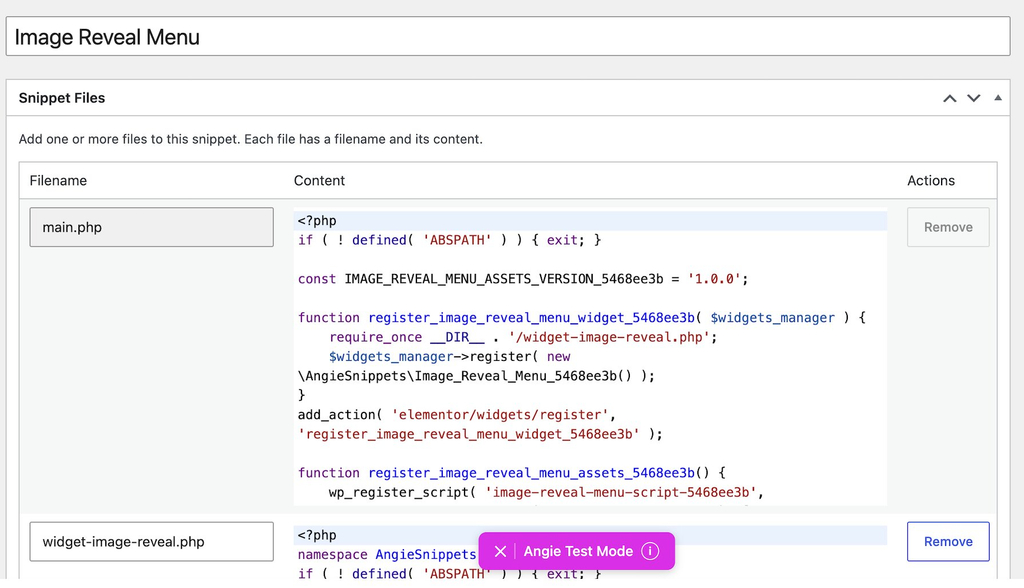
Any later change runs through Angie’s Test Mode first (a preview space where edits are tried before they reach your live site), and using the widget on another site means opening the snippet and saving it to Cloud Library from there.
From the prompt’s containers and hover effects to the snippet library the result is stored in, the whole workflow is built for someone who is comfortable with coding, which is the audience Angie serves best.
In contrast, the AI Agent for WordPress doesn’t build custom widgets or write code. It works with your theme and established plugins, so there’s no custom code on your site to keep track of if you’re not into coding or you don’t have the budget to hire a developer.
Multi-site management versus reusing assets across sites
Both agents offer something for people who look after more than one site, and the two offers solve different problems.
Angie’s Cloud Library lets you save something you’ve built, such as a widget or a code snippet, and deploy it to other sites connected to your Elementor account. That speeds up building similar sites. Everything else you ask Angie happens on the site you have open, so checking or changing something across several sites means opening Angie on each one in turn.
The AI Agent for WordPress runs one request across every site connected to it and reports back on each. For example, when WordPress 7.0.3 came out with fixes for several security vulnerabilities, we used it to check 22 WordPress sites at once. SiteGround’s automatic updates had already applied the release, but confirming that would have meant opening 22 WordPress dashboards. Instead, we asked the AI Agent for WordPress to do it:
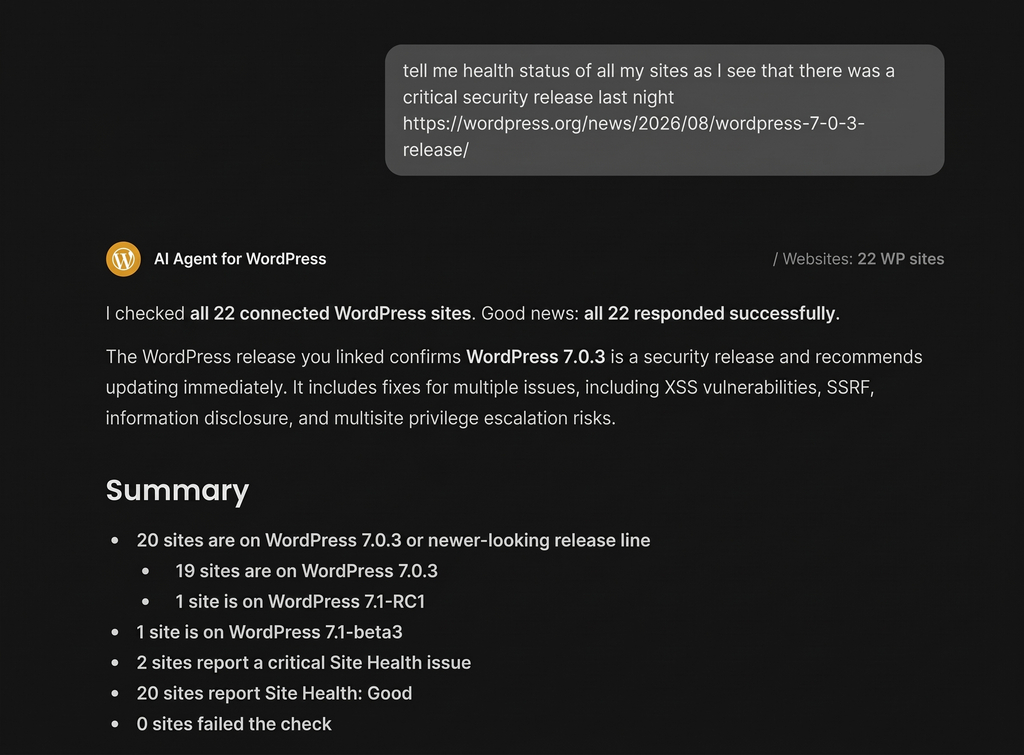
The same approach works for plugin updates, content changes and checks on who has administrator access, and you can manage several WordPress sites from one place even when each sits with a different hosting company.
SiteGround Power Mode vs Angie Super Admin Mode
Both agents keep their most powerful actions behind a setting you switch on yourself, and both ask for confirmation before each high-impact change. They differ in what that setting opens up.
| Angie Super Admin Mode | SiteGround Power Mode | |
|---|---|---|
| What it allows | Runs PHP directly on the live server, reads and edits files, queries the database (where WordPress stores your content and settings), reads logs, and handles tasks that would otherwise need server access. | Unlocks high-impact WordPress operations, including mass deletions, general site settings updates, user creation/updates, and WooCommerce order modifications. |
| How you turn it on | Choose it in the Angie sidebar, then accept a warning about the risks. | Disabled by default; turned on manually in settings or enabled right inside the chat when a specific task requires it. |
| Each action | Every destructive action shows what it will do and asks for confirmation. | The agent pauses, explains the exact impact of the requested change, and waits for your explicit approval before running. |
| Who it’s for | Agency developers, experienced freelancers, and people comfortable editing wp-config.php, the file holding a site’s core settings. | Business owners, site administrators, and non-technical managers running a live site. |
| How far it goes | Declines only requests outside WordPress, such as calling an outside service the server can’t reach, and attempts anything WordPress-related. | Standard WordPress and WooCommerce operations, no custom code is executed on the server. |
The execution ceiling of each mode determines what happens if something goes wrong during a task. Because Super Admin Mode executes code directly on your live server, an unhandled error can crash your site or produce a fatal error that requires manual FTP (a way to reach your site’s files directly on the server) or hosting control panel access to fix. For this reason, Elementor recommends creating a full site backup and testing actions on a staging environment (a private copy of your site hidden from visitors) before using Super Admin Mode.
By contrast, SiteGround’s Power Mode operates strictly within standard WordPress administrative workflows. If the agent deletes a post or a page, WordPress moves the item to the Trash by default, allowing you to easily restore it from your standard admin screen.
Keep in mind: An agent with an open-ended server ceiling (able to read and change your site’s files, database and code directly on the server), like Angie in Super Admin Mode, is better suited to a more technical person who can judge what a server-level change will do. For a busy small business owner, a bounded mode (one limited to standard WordPress actions) like the AI Agent for WordPress’ Power Mode keeps every change you approve within operations you’d recognize from your own dashboard.
Which WordPress AI agent should you choose?
The choice between AI Agent for WordPress vs Angie turns on whether your time goes mostly into building pages or into keeping a business site running.
When to choose Elementor Angie
Angie fits web creators, agencies, and designers who build and customize WordPress sites as their primary service. It makes the most sense when:
- You design sites for clients and want complete web pages, layouts, and brand styling generated directly from written descriptions or uploaded files.
- You need bespoke interactive features, such as calculators, quizzes, or custom Elementor widgets, that require generating custom CSS, JavaScript, or PHP code.
- You are comfortable auditing code, as its high-authority Super Admin Mode executes PHP directly on the live server.
When to choose AI Agent for WordPress
The AI Agent for WordPress fits business owners, store managers, and administrators who want to spend less time clicking through /wp-admin and more time growing their business. It operates directly within your existing theme and plugin stack without requiring structural site modifications.It makes the most sense when:
- Your site is live and you want to manage it, including its content, media libraries, plugins, themes, user roles, and SEO metadata simply by asking in plain language.
- You run a WooCommerce store and frequently update product listings, adjust prices, manage stock, or process customer orders.
- You manage a portfolio of sites, allowing you to execute single administrative commands across multiple connected websites regardless of where they are hosted.
- You prioritize pre-action safety, relying on Power Mode to block high-stakes or destructive changes until you explicitly grant permission.
Pick the agent that matches your week
AI Agent for WordPress vs Angie is ultimately settled by what fills your workday. While both tools comfortably handle routine administrative chores, the decision rests on what each assistant brings to the table beyond basic maintenance.
Angie expands into visual design and software creation, building complete page layouts from plain-language prompts, crafting custom widgets, and writing code that runs directly on your server.
By contrast, the AI Agent for WordPress focuses on site operations: configuring maintained repository plugins instead of generating custom code, coordinating tasks across multiple connected sites simultaneously. For a small business owner who wants a reliable website without having to become a web developer, that operational focus is what turns AI into real hours saved every single week.
FAQs
AI Agent for WordPress vs Angie depends on what you want help with. Both handle routine WordPress administration. The AI Agent for WordPress is better for keeping a business site running across one site or several, and Angie is better if you also design pages or build custom features.
The difference between AI Agent for WordPress and Angie is the kind of work each is built around. Angie concentrates on creating pages and features, including designing layouts and writing code. The AI Agent for WordPress concentrates on running a site once it exists, handling content, plugins, products and settings across one site or several.
Angie designs pages from a written description, creates design systems from a screenshot, builds custom Elementor widgets and front-end tools, and in Super Admin Mode runs PHP and works with files and the database. The AI Agent for WordPress uses your theme and established plugins instead.
The AI Agent for WordPress applies one request to several connected sites at once, on any host. Angie works on one site at a time and saves sections to the cloud so you can reuse them, which speeds up building rather than running many sites together.
Both are settings you switch on yourself, and both ask for confirmation before each high-impact action. Super Admin Mode lets Angie run PHP on the server and work with files and the database. Power Mode allows deletions, bulk changes, user changes and order edits within standard WordPress operations.
The AI Agent for WordPress is better for multiple WordPress sites, since it applies one request to every connected site regardless of host. Angie reuses saved sections across sites but works on each one separately.
Both handle bulk store work. Angie updates prices, stock and product details at scale and can extend WooCommerce with code. The AI Agent for WordPress updates products in bulk including from a spreadsheet, restructures categories, and handles orders, reports and catalog translation.
Agencies that build and customize sites get more from Angie’s design tools. Agencies maintaining client sites across different hosts get more from the AI Agent for WordPress, which makes the same change on all of them in one request.
No. Angie is a WordPress AI agent that works on WordPress sites generally, including ones built with WordPress’s own block editor. Its design tools are strongest inside Elementor, while its administration and code features work on any WordPress site.