
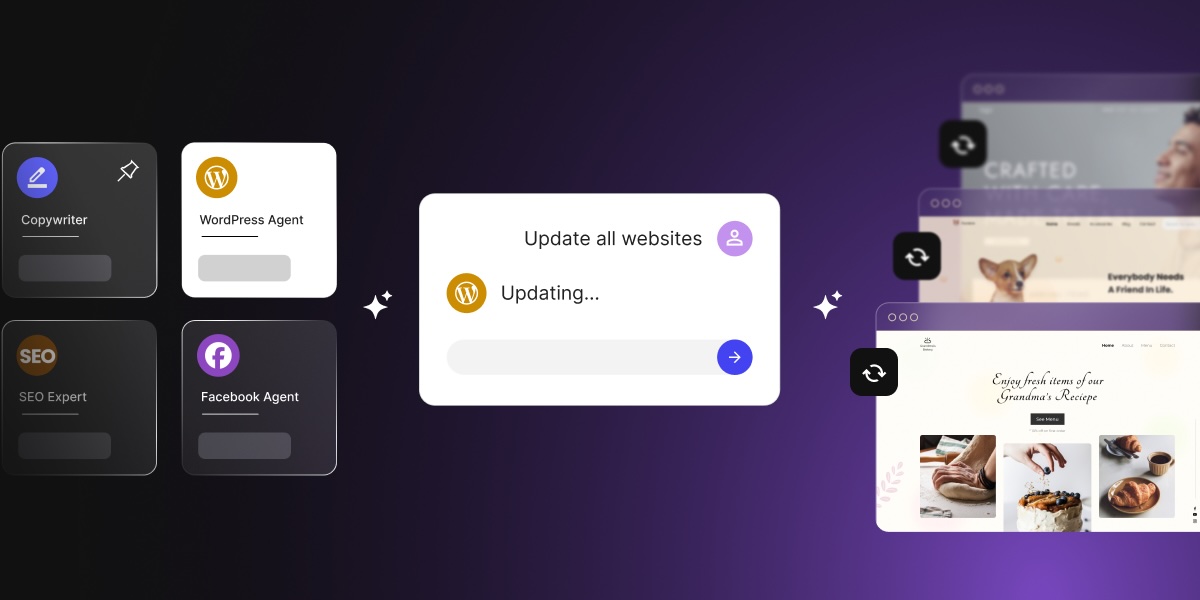
Managing 20 client WordPress sites the same way you managed five doesn’t scale. It breaks. The SiteGround AI Agent for WordPress gives agencies a way to run repeatable tasks across multiple client sites through natural language prompts, without logging into each one separately. Available inside SiteGround AI Studio, it covers updates, content changes, user management, and WooCommerce tasks across a connected client portfolio.
Key takeaways
- Agencies can manage more client sites without adding headcount by turning repeatable WordPress admin tasks into prompt-based workflows through SiteGround AI Agent for WordPress.
- SiteGround AI Agent for WordPress connects to WordPress installations and executes real changes, including plugin updates, content edits, user-role assignments, SEO metadata updates, and WooCommerce product adjustments.
- Traditional multi-site WordPress dashboards centralize visibility and reporting. SiteGround AI Agent for WordPress adds a conversational execution layer on top of that visibility.
- The AI Agent works best as a supervised operations assistant. Agency teams stay responsible for QA, client strategy, custom development, and risk review.
The multi-site operations problem agencies hit first
More clients usually means more logins, updates, and repeat admin work
The operations math is straightforward: every new client site adds another WordPress dashboard, another update cycle, another set of credentials, and another round of the same tasks you ran last month. Agencies on care plans can easily spend 30–40% of their maintenance hours on tasks that follow the exact same pattern every single time.
WordPress performance depends on consistent maintenance. The problem is that consistent maintenance, at scale, is expensive when done manually.
Repetitive WordPress tasks become unbillable agency overhead
Care plan clients pay for outcomes: a maintained, secure, well-performing WordPress site. They don’t pay line-by-line for every last plugin update or every taxonomy cleanup. That means the time your team spends logging into individual sites, running updates, checking results, and logging back out again is either absorbed into a flat-rate care fee or quietly written off.
At a small portfolio, that’s fine, but at a growing one, it’s very much a margin problem. A senior developer spending two hours per week across 20 sites on routine updates is a senior developer not doing development.
Scaling revenue and scaling workload don’t have to move together
Agencies scale revenue by adding clients. They also scale workload when every new client adds a proportional volume of manual work. The two move together until something breaks the link.
The break point is usually an operations layer that handles repetitive execution so the team can focus on the work that actually needs their judgment. And that’s where the SiteGround AI Agent for WordPress comes in: it’s designed to sit at that layer, handling the execution while agency teams stay on strategy, QA, client communication, and development.
What is a WordPress AI agent for multi-site operations?
How SiteGround’s AI Agent for WordPress differs from a chatbot
A chatbot answers questions. The SiteGround AI Agent for WordPress executes tasks.
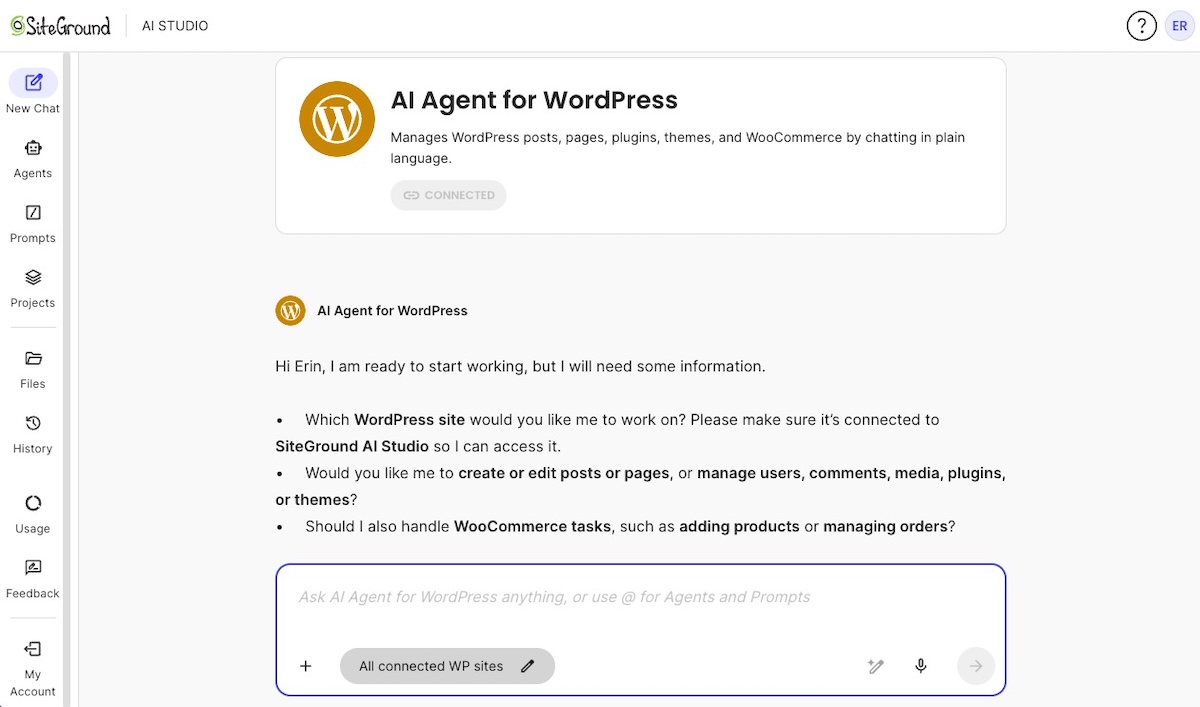
The distinction matters for agencies. When you ask the AI Agent to update all plugins across three connected client sites, it doesn’t explain how to do it. It actually does it. When you ask it to update the support email address in footer content across a set of sites, it makes the change.
That’s possible because SiteGround built a direct connection between AI Studio and your WordPress installations. Once the AI Agent by SiteGround plugin is installed on a client site, that site becomes available inside AI Studio and the agent can act on it directly. That’s what separates it from AI writing tools or dashboards that surface information without executing anything. For a broader explanation of the connection, supported tasks, and safety controls, see how the SiteGround AI Agent connects to and manages WordPress sites.
What multi-site operations means for an agency
Multi-site operations, in an agency context, means running the same class of tasks across a portfolio of independent WordPress installations. These are individual client sites that share a common maintenance pattern, and not a WordPress Multisite network.
Examples of multi-site operations tasks agencies run repeatedly:
- Plugin, theme, and WordPress core updates across all care-plan sites
- Footer and legal content updates when a client changes their business details
- User role reviews when a client’s team changes
- SEO metadata refreshes on recurring content
- WooCommerce product updates for ecommerce clients on retainer
The AI Agent for WordPress handles this class of work by letting you address multiple connected sites in a single prompt session, rather than opening each site’s wp-admin separately. For broader publishing, WooCommerce, maintenance, SEO, and troubleshooting examples, explore these real-world AI Agent workflows.
Why natural language execution matters
Using natural language to get tasks done unlocks speed and accessibility in ways not previously possible. A well-structured prompt can now replace a 15-step manual process spread across multiple wp-admin dashboards and browser tabs. These AI Agent for WordPress prompt examples show how to define the sites, tasks, constraints, and review conditions.
It also means non-developer team members can run standard maintenance tasks without touching wp-admin directly. For example, an account manager can trigger a content update across five client sites via SiteGround AI Studio, with the developer reviewing results afterward instead of doing the work from scratch.
Can SiteGround’s AI Agent manage multiple WordPress sites at once?
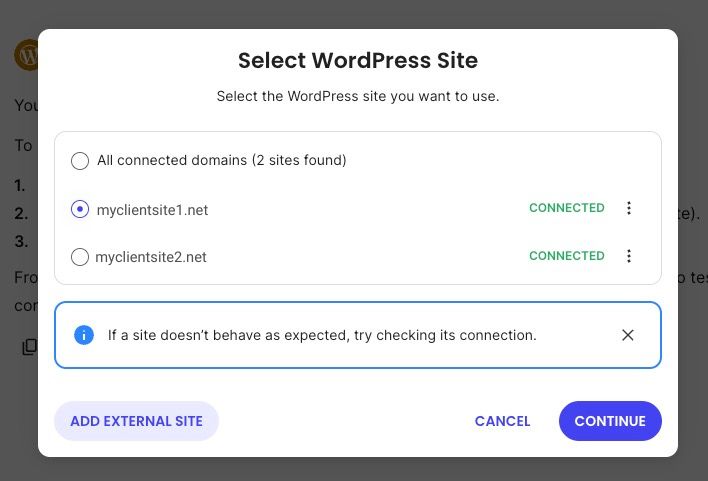
Yes, it sure can. The SiteGround AI Agent for WordPress can execute tasks across multiple connected WordPress installations in a single session. You select the sites you want to work on inside SiteGround AI Studio, and the agent applies your prompt to each one.
How connected sites are selected in SiteGround AI Studio
Site selection happens inside SiteGround AI Studio, where, within the AI Agent for WordPress, you choose which WordPress installations you want the agent to work on before starting your prompt session. You don’t need a separate multi-site setup or a network configuration. Each site just needs to be connected to your SiteGround account.
Examples of one-prompt, multi-site actions
Here’s what a single AI Agent prompt can do across multiple connected sites:
- Health report: “Generate a health report for each of these sites and summarize any issues.”
- Plugin updates: “Update all plugins on these five sites and report what changed.”
- Content changes: “Update the footer support email to support@agency.com on all selected sites.”
- User management: “Add [name] as an Editor to the following three client sites. Here is their email and password.”
- SEO metadata: “Update the meta description for the homepage on each of these sites to [description].”
- WooCommerce: “Set the sale price on product ID 847 to $29 on these two client sites.”
All five are bulk operations across multiple sites, which means Power Mode is required for each. Power Mode is SiteGround AI Studio’s confirmation layer that requires you to review and approve the agent’s plan before it executes. The agent drafts a plan first, confirms the details with you, and executes once Power Mode is active.
Where agencies still need review and approval
Not every action should run to completion without a human checkpoint. High-impact changes, WooCommerce order data, custom-code sites, and anything touching client-facing revenue flows should have a review step between the prompt and the final confirmation. For those actions, the agent requires Power Mode safety controls before it will execute. It detects the high-impact action, pauses, and won’t proceed until Power Mode is enabled and the plan is reviewed.
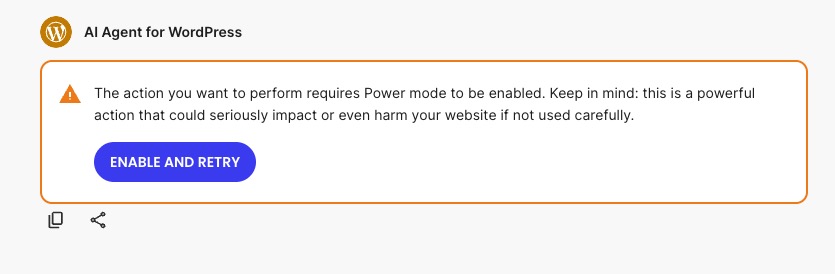
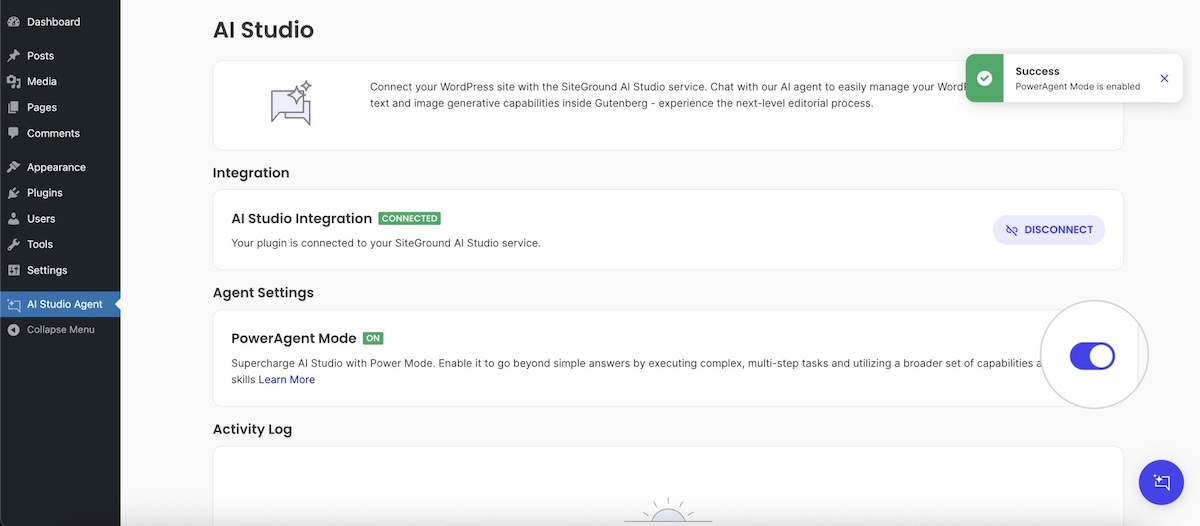
Note that Power Mode is disabled by default. You can enable Power Mode in two ways: through the AI Agent plugin in your WordPress admin, or directly inside a chat session (as shown above) when the agent detects a high-impact action and pauses to prompt you. Once enabled, it stays on until you turn it off via the plugin interface.
How agencies can use SiteGround AI Agent for bulk WordPress updates
Plugin, theme, and WordPress core updates
Bulk plugin and theme updates are the clearest use case for AI-assisted multi-site operations. The task is identical across every site: check for updates, apply them, verify the site still loads, report back. Running that loop manually across 20 sites takes hours. Running it through the AI Agent takes a prompt and a review cycle.
And it’s not a trivial task: WordPress security depends heavily on keeping plugins, themes, and core current, as outdated plugins are one of the most common attack vectors on WordPress sites. For agencies managing care plans, that makes plugin update cadence a direct client risk that goes beyond a simple maintenance chore.
Enter the AI Agent, which can run these kinds of update tasks across selected sites and return a summary of what changed, what succeeded, and what flagged an error. Your team reviews outcomes rather than running the process step by step.
Backup-first update workflows
The correct update sequence is: backup, update, verify, report. Before opening an AI Agent session, confirm that a recent backup exists for each site you’re updating — either through SiteGround’s backup system if the site is hosted with SiteGround, or through whatever backup solution is in place for that client.
Once that’s confirmed, a typical AI Agent prompt sequence looks like this:
- Run plugin updates across selected sites
- Check that each site’s REST API is responding correctly after updates
- Summarize update results and flag any errors
This is the execution work a developer would run manually, handled at portfolio scale.
Update confirmation and post-update checks
After bulk updates run, the AI Agent can check that each site is responding correctly and return a summary. This doesn’t replace a full QA review for complex or custom-code sites, but it does surface obvious failures quickly.
Agencies managing 20+ sites can use this summary as a first-pass filter: sites that pass the post-update check get cleared from the queue, and sites that return errors get escalated to a developer for manual review. That’s a significant time saving even before you account for the update execution itself.
Applying the same changes across WordPress client sites
Update footers, policies, business details, and disclaimers
This is the task that wastes the most agency time per change. A client changes their support email. Their privacy policy updates. Their business address changes. Their cookie disclaimer needs a new line. The change itself takes 30 seconds on one site. Across 20 client sites, that 30 seconds becomes a two-hour afternoon.
The SiteGround AI Agent for WordPress handles these changes in a flash. You write the prompt once: “Update the footer support email address from old@email.com to new@email.com across these sites.” The agent applies it across your selected installations and confirms what changed.
Legal content updates are particularly well-suited to this workflow because they’re genuinely identical across sites: the same text, the same placement, the same change. Prompt, review, done.
Standardize settings across a client portfolio
New clients often come with inconsistent WordPress configurations: different comment settings, different permalink structures, different media sizes, different user role setups. Bringing a new portfolio site into your agency’s standard configuration is a repetitive audit-and-fix task.
The AI Agent can apply a standard configuration checklist across a site through prompts, reducing the setup time for onboarding a new care-plan client. It’s also useful for quarterly configuration audits: checking that sites in your portfolio still match your agency’s baseline settings and flagging anything that’s drifted.
Manage users and roles across multiple sites
User management across a client portfolio is another class of work that compounds with scale. Maybe a client’s team changes, a new account manager needs access, a former employee needs to be removed, or a collaborator needs Editor access on three of your agency’s client sites. All tedious tasks, but by using the AI Agent, user-role management across connected sites becomes a single prompt operation.
Automating repetitive WordPress tasks that don’t justify billable time
SEO metadata, alt text, and internal linking cleanup
SEO cleanup tasks accumulate on every care-plan site. They’re too small to bill for, too important to skip, and too numerous to handle manually across a growing portfolio. The result is WordPress SEO that quietly slips on sites nobody has time to fix.
The AI Agent can run SEO cleanup tasks across content on connected sites, whether that’s updating missing meta descriptions, flagging empty alt text fields, or reviewing title tags for format consistency. The output is a task list and a set of changes, not a finished SEO strategy. But the time-consuming execution layer is tackled.
Taxonomy, category, and tag cleanup
Over time, WordPress sites accumulate taxonomic clutter such as duplicate tags, unused categories, inconsistent naming conventions, and orphaned terms with no posts attached. On a site that’s been running for two or three years, this cleanup is a true pain.
The AI Agent addresses this, running taxonomy audits and cleanup tasks across selected sites, identifying inconsistencies and applying fixes through natural language prompts. This is a good use case for account managers who aren’t developers: the task requires attention and consistency, not technical judgment.
WooCommerce product updates for agency clients
Agencies managing WooCommerce clients on retainer handle the same product updates on repeat: seasonal pricing changes, sale price toggles, inventory flags. Each one is a wp-admin task that requires logging into the store, finding the product, and making the change. Multiply that across a client portfolio and it adds up fast.
For simple products, the AI Agent handles these updates across connected WooCommerce stores through prompts. “Apply a 20% discount to all products in the [category] category” or “Set all out-of-stock items to hidden” are instructions, not afternoon projects.
Every WooCommerce update triggers a plan first. The agent identifies the target products, calculates the changes, and presents a summary for review before anything goes live. That’s the right sequence for live store data: prompt, review, confirm, execute.
Content refresh tasks across care-plan sites
Content maintenance is a core care-plan deliverable: updating outdated statistics, refreshing publication dates, updating author bios, replacing deprecated shortcodes. None of this requires creative judgment, but it does require precision and volume.
The AI Agent handles this class of work through surgical text replacement, finding specific strings across dozens of pages without touching surrounding content or block formatting. In practice that means:
- Swapping outdated statistics or dates across every post in a single prompt
- Updating author bios or team descriptions across the full site
- Replacing deprecated shortcodes with current versions across a multi-site portfolio
These tasks rarely justify senior developer time and don’t justify skipping either, because outdated content creates real SEO and credibility problems for clients. The AI Agent for WordPress handles the execution so the work gets done, and your team stays on the QA and strategy work that actually justifies the care-plan value.
How the AI Agent for WordPress fits into SiteGround’s agency ecosystem
SiteGround Client Area as the control layer
The SiteGround Client Area is where agencies manage hosting accounts, site connections, billing, collaborators, and access. It’s the organizational layer for your client portfolio, where sites live and accounts are structured.
For agencies, the Client Area also manages white-label hosting workflows: connecting client sites to your account, managing collaborator access so your team can work across sites without sharing primary credentials, and keeping your agency’s branding in front of clients throughout the hosting relationship.
SiteGround AI Studio as the prompt and execution layer
The SiteGround AI Studio is where AI Agent sessions happen. It’s separate from the Client Area and designed for prompt-based workflows: selecting sites, writing prompts, reviewing what the agent did, and managing token usage.
In practice that means selecting which client sites the agent works on, writing and refining prompts, reviewing the agent’s plan before it executes, and checking the summary afterward. The session history stays private to your agency account, which matters for keeping your workflows proprietary. Token usage is tracked inside AI Studio so you can monitor capacity across the month without logging into a separate dashboard.
Collaborators, client access, and white-label workflows
SiteGround’s collaborator system lets agencies give clients access to their own sites while keeping the agency in control of the WordPress hosting account. In practice that means:
- Clients log in with their own credentials and can access Site Tools for their specific site, but are completely walled off from other clients’ accounts, billing, and configurations
- AI Studio sessions, prompts, and chat histories are private to the agency’s account — clients see the outcome, not the execution behind it
- On GoGeek and Cloud plans, white-label hosting means clients see your agency’s branding throughout Site Tools, not SiteGround’s
SiteGround AI Agent for WordPress vs traditional multi-site WordPress dashboards
Most agencies already use a dashboard tool like ManageWP or MainWP to monitor their client portfolio. What those tools don’t do is take action on what they surface. That’s the gap the SiteGround AI Agent for WordPress fills.
Dashboards centralize visibility
Traditional multi-site dashboards aggregate information from across a portfolio and surface it in one place. You can see update status, backup status, security scan results, and uptime data without logging into each site. That’s truly useful for monitoring and client reporting.
What dashboards don’t do, by design, is take action based on natural language input. You click buttons, run batch update functions, and schedule tasks through the dashboard UI. The decision-making is yours; the dashboard executes what you tell it to click.
AI agents execute natural-language tasks
The SiteGround AI Agent for WordPress takes the input as a prompt and figures out the execution. “Update all plugins on these three sites, flag any errors, and give me a summary when done” is a complete instruction. The agent interprets it, runs the steps in order, and reports back.
That’s a fundamentally different interaction model. It’s faster for experienced users who know what they want, and it’s accessible to team members who aren’t WordPress developers. And because each connection to an individual WordPress site runs securely through SiteGround’s infrastructure, agencies can extend that access across an entire client portfolio without compromising site integrity.
When agencies may use both together
Many agencies will use a traditional monitoring dashboard alongside the SiteGround AI Agent for WordPress, not instead of it. The dashboard surfaces what needs attention; the AI Agent handles the execution once priorities are set.
A practical workflow: check the dashboard for update flags and security alerts each Monday, then open AI Studio and prompt the AI Agent to run updates, verify results, and prepare a client-ready summary. The dashboard provides the visibility; the agent does the work.
| Capability | Traditional dashboard tools | SiteGround AI Agent for WordPress |
| See multiple sites | Yes | Yes, through SiteGround-connected site selection |
| Run updates | Yes, through dashboard actions | Yes, via natural language prompts |
| Apply repeated content changes | Limited or manual | Strong use case for prompt-based execution |
| Manage users | Often supported | Supported as an AI Agent task category |
| Natural-language task execution | Not the core model | Core differentiator |
| Best fit | Monitoring, reporting, visibility | Execution, repeat tasks, agency workflows |
Example agency workflows for managing more client sites without hiring
New client onboarding workflow
When a new client site joins a care plan, the onboarding checklist is the same every time: confirm the site is connected, run a configuration audit against your agency baseline, set up the correct user roles, verify backup settings, and run a first-pass update cycle.
Prompt the AI Agent to walk through this checklist across the new site, report any configuration gaps, and apply standard settings. What used to take 45 minutes per new client can run in under 10.
Weekly care-plan maintenance workflow
Before starting, confirm that a recent backup exists for each site you’re updating — through SiteGround’s backup system if the site is hosted with SiteGround, or through whatever backup solution is in place for that client.
Once that’s confirmed, a weekly care-plan workflow through the AI Agent looks like this:
- Select all care-plan sites in AI Studio
- Run available plugin and theme updates across all sites
- Review the agent’s post-update health check, which flags any site that didn’t respond correctly after updating
- Generate a maintenance summary for client reporting
A typical summary breaks down like this: sites updated, plugins updated, errors flagged, and post-update health status for each site. The developer doesn’t touch the 18 sites that updated cleanly. They spend their time on the two that flagged an error.
That’s the rebalancing the workflow creates: execution handled by the agent, judgment reserved for the work that actually needs it.
Monthly SEO cleanup workflow
Monthly, select care-plan sites and prompt the AI Agent to audit meta descriptions for empty or duplicate values, check image alt text completion rates, and flag internal links pointing to 404 responses. The agent returns an SEO Health Report and Task List, allowing the team to focus on high-level content strategy while the Agent handles the bulk metadata and media updates.
WooCommerce client update workflow
For WooCommerce clients with recurring update needs, the AI Agent handles the maintenance tasks that keep a store current. Each month, use the agent to:
- Apply seasonal discounts or revert sale prices across specific product categories
- Flag out-of-stock or low-inventory items for client review
- Scan for simple products missing descriptions, images, or SEO metadata
Note that the agent is currently optimized for simple products. Variable products with size or color variants, and shipping class configurations, are outside what the agent can modify through the API at this point.
Because these actions have a direct financial impact, they run through Power Mode. Before anything goes live, the agent presents a detailed plan showing exactly which products will change and by how much. The agency reviews, confirms, and execution runs.
Emergency update workflow
When a critical plugin vulnerability is disclosed, you need to update the affected plugin across every client site the same day. The emergency workflow: confirm which connected sites are running the vulnerable plugin, back up all affected sites, run the update across all of them, verify post-update responses, and report. With the AI Agent, that’s a 20-minute session instead of a half-day of individual site visits.
What agencies should not automate completely
High-impact changes still need human review
The AI Agent is a supervised operations assistant, not an autonomous one. High-impact changes, including anything that touches revenue flows, authentication, client-facing content, or custom-code integrations, should have a human review step before they go live.
This isn’t a limitation of the technology. It’s a risk management position. An agency that lets AI-assisted updates run to completion on WooCommerce stores without review is accepting a risk that’s entirely avoidable with a 10-minute confirmation step.
When to use staging before production changes
For sites with custom plugins, custom themes, or non-standard configurations, run the AI Agent against a staging environment before applying changes to production. SiteGround’s staging tools let you create a copy of a client site, apply the AI-assisted changes there first, and verify results before pushing to live.
This is especially important for securing a website against update-related conflicts: a plugin update that breaks a custom integration is a client emergency on production, but a three-minute fix on staging.
How to keep QA inside the agency workflow
QA is the one thing the AI Agent explicitly doesn’t replace. The agent executes; your team validates.
Build QA into every AI-assisted workflow as a non-optional step:
- After bulk updates: human reviews the summary and spot-checks at least two or three sites
- After content changes: human confirms the change appears correctly on a live site
- After user management changes: human verifies the new user can access what they need and can’t access what they shouldn’t
- After WooCommerce changes: human checks the front-end product display before the session closes
Scale the work, not the headcount
SiteGround AI Agent for WordPress doesn’t change what agencies need to do, but rather it changes how long it takes. The update cycles still run. The content still gets refreshed. The user roles still get managed. The difference is that an experienced team member can prompt the agent to handle the execution layer across dozens of client sites, then spend their time reviewing outcomes and doing the work that actually requires their judgment.
For agencies building a practice around WordPress care plans, that’s not a minor efficiency gain. It’s the difference between a portfolio that grows your revenue and one that just grows your workload.
Start managing more client sites with SiteGround agency hosting and AI Studio
Frequently asked questions
A WordPress AI agent is an AI assistant that can perform WordPress management tasks through natural language prompts. Unlike a chatbot that only answers questions, SiteGround’s AI Agent for WordPress connects to WordPress installations and executes real changes such as content edits, plugin tasks, WooCommerce actions, and user management.
Agencies can use a WordPress AI agent for multi-site operations to run repeatable tasks across client sites, including plugin updates, content edits, SEO metadata changes, user-role updates, and WooCommerce product adjustments. The main value is reducing repetitive admin work while keeping human review for QA and client strategy.
Yes. SiteGround’s AI Agent for WordPress can manage several connected WordPress sites at once, including updates, content changes, and user-management tasks across multiple installations. Sites are selected inside SiteGround AI Studio before each session.
Yes. The AI Agent connects to WordPress installations regardless of where they’re hosted. Agencies managing a mixed portfolio (some sites on SiteGround, others on different hosts) can connect and manage all of them through SiteGround AI Studio.
SiteGround AI Agent for WordPress helps agencies manage more client sites by turning repeatable WordPress tasks into prompt-based workflows. Instead of logging into each site separately, an agency can select connected sites and ask the agent to perform updates, apply changes, or prepare summaries across the portfolio.
Yes, agencies can use AI-assisted workflows to update plugins across multiple connected WordPress sites. The recommended sequence is backup first, update second, verify third, and summarize last. Human review after high-impact changes is strongly recommended, especially for WooCommerce or custom-code sites.
Yes. SiteGround’s AI Studio Essential plan is included for free with all hosting plans. This includes 20,000 monthly tokens, access to leading AI models, and the AI Agent for WordPress. For agencies on our higher-tier plans, we provide a higher monthly token allowance to support multi-site management: GoGeek Plans include 40,000 monthly tokens, and Cloud Plans include 100,000 monthly tokens. For agencies managing large portfolios that require even higher volume, additional tokens can be added via the AI Studio Plus plan in the SiteGround Client Area.
No. An AI Agent for WordPress is an operations assistant that handles repeatable execution, not a replacement for an agency maintenance team. Human team members stay responsible for QA, client strategy, custom development, design decisions, client communication, and risk review.
Yes. SiteGround’s multi-site AI Agent workflow supports repeated content or user-management changes across connected WordPress installations. Practical agency examples include updating footer text, privacy policy links, support email addresses, user roles, and recurring maintenance content.