
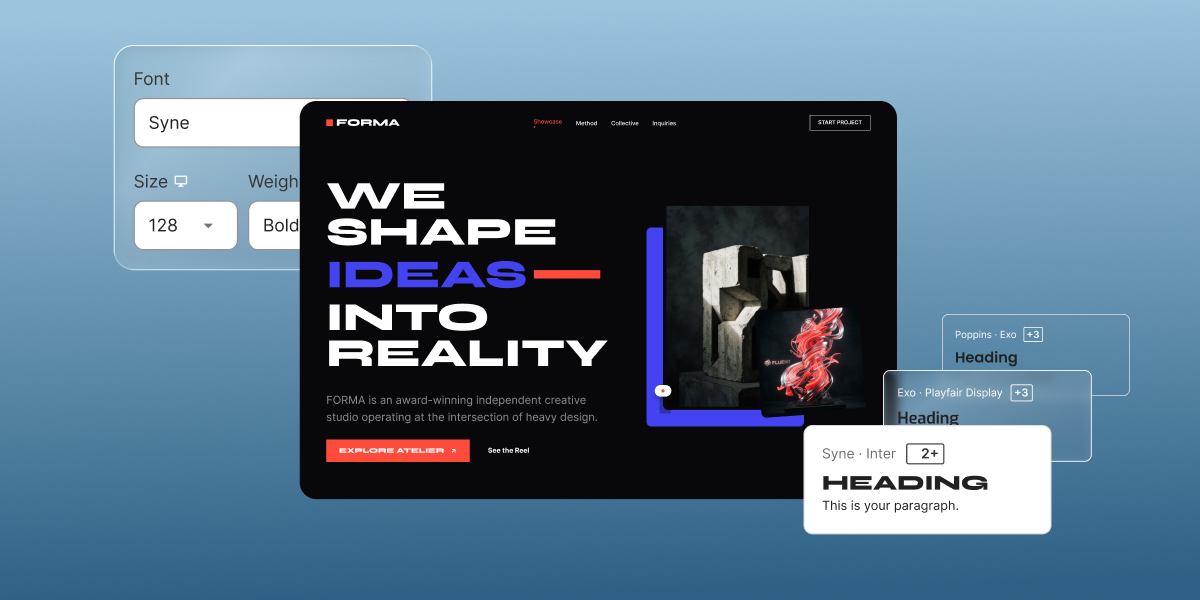
If you’re wondering why your site doesn’t look as professional as you’d like, there’s a good chance you can blame it on your font choices. Seven mistakes (from readability slips, to brand mismatches, and clashing pairs) can tank your credibility before anyone reads a word of what you have to offer. Here’s how to fix each one, plus a shortlist of fonts that already get it right.
Key takeaways:
- Font mistakes, not weak copy, are often what makes a small business site look amateur, and fixing them takes minutes, not a redesign.
- Body text needs to prioritize readability; headings can afford more personality.
- A brand’s fonts matter less for which ones they are than for how consistently they’re used, across web and print alike.
- Most sites need at least two font types working together, one for headings and one for body text, not a single font trying to do every job.
- A font pairing fails one of two ways: the fonts are too similar to create contrast, or too different in personality to feel like one brand.
- The best fonts for web design hold up at small sizes and on an actual phone screen, not just in a polished desktop mockup.
Good copy and sharp photos can only carry a website so far. Let’s jump into the seven mistakes that can make or break how your website comes across.
7 font mistakes that are hurting your website
Mistake 1: Choosing style over readability
This mistake happens when a font gets picked because it looks distinctive, trendy, or “on brand,” without anyone checking whether it actually holds up as body text. A decorative or ultra-thin typeface can look sharp in a headline and still be a strain to read once it’s running paragraphs of real content.
Headings can afford some personality. Body text can’t: it has to stay readable first, and only then get to be interesting. Three overlooked factors decide whether a body font clears that bar:
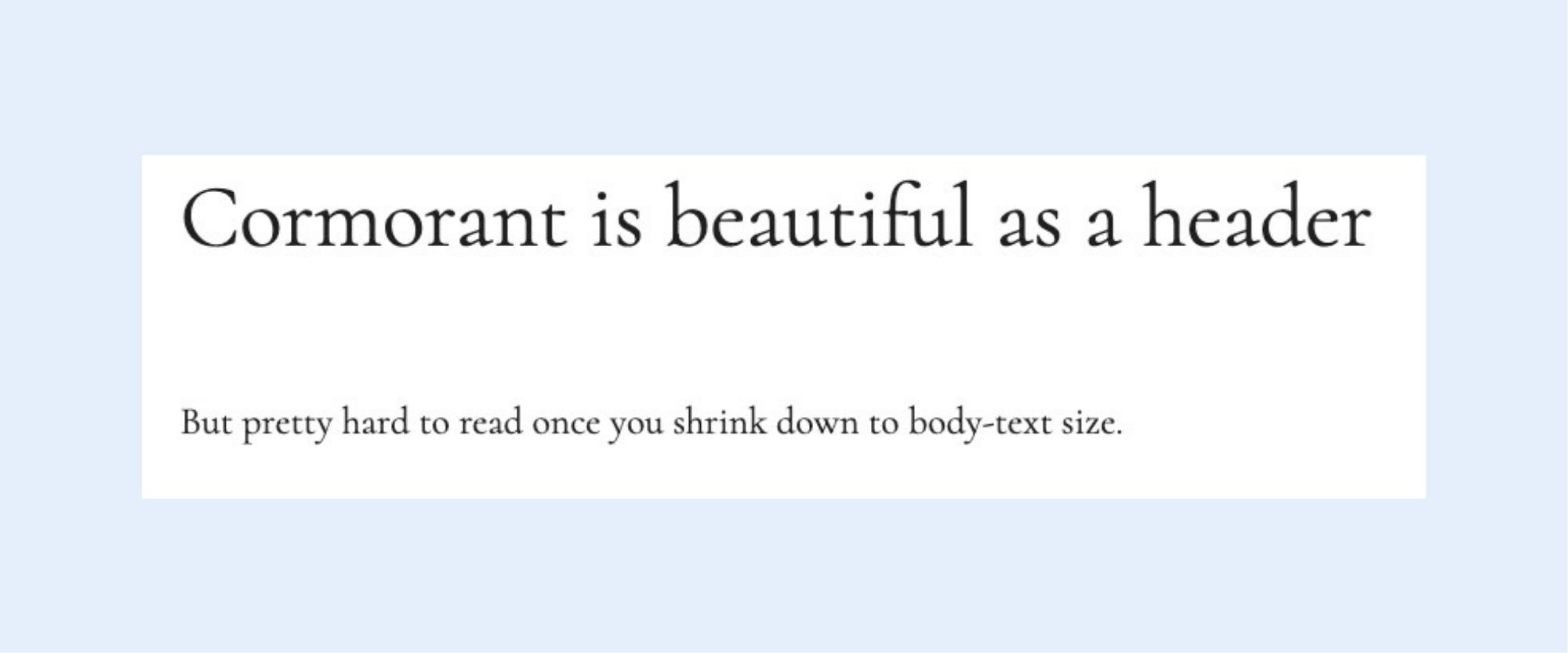
- X-height, or how tall lowercase letters look. Some fonts, like Cormorant, draw lowercase letters small relative to the overall font size. That’s barely noticeable in a big headline, but it makes body copy look cramped and squint-inducing once it’s running at normal reading size. Rule of thumb: if lowercase text looks small and tight at 16px, it’s not a body font.
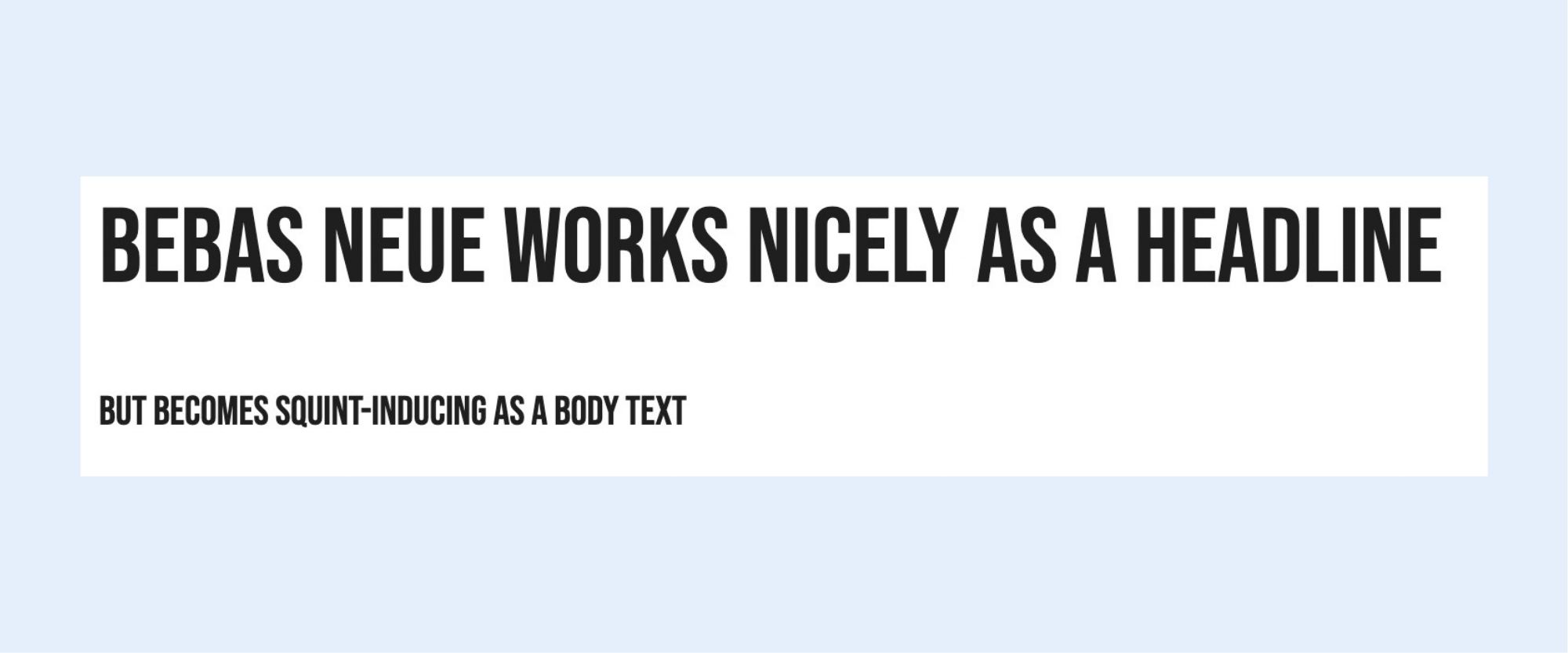
Letter spacing, or how close characters sit to each other. Fonts like Bebas Neue pack letters tightly, which can look sleek as a headline but makes a full paragraph blur together. Look for visible air between letters before using a font for running text.
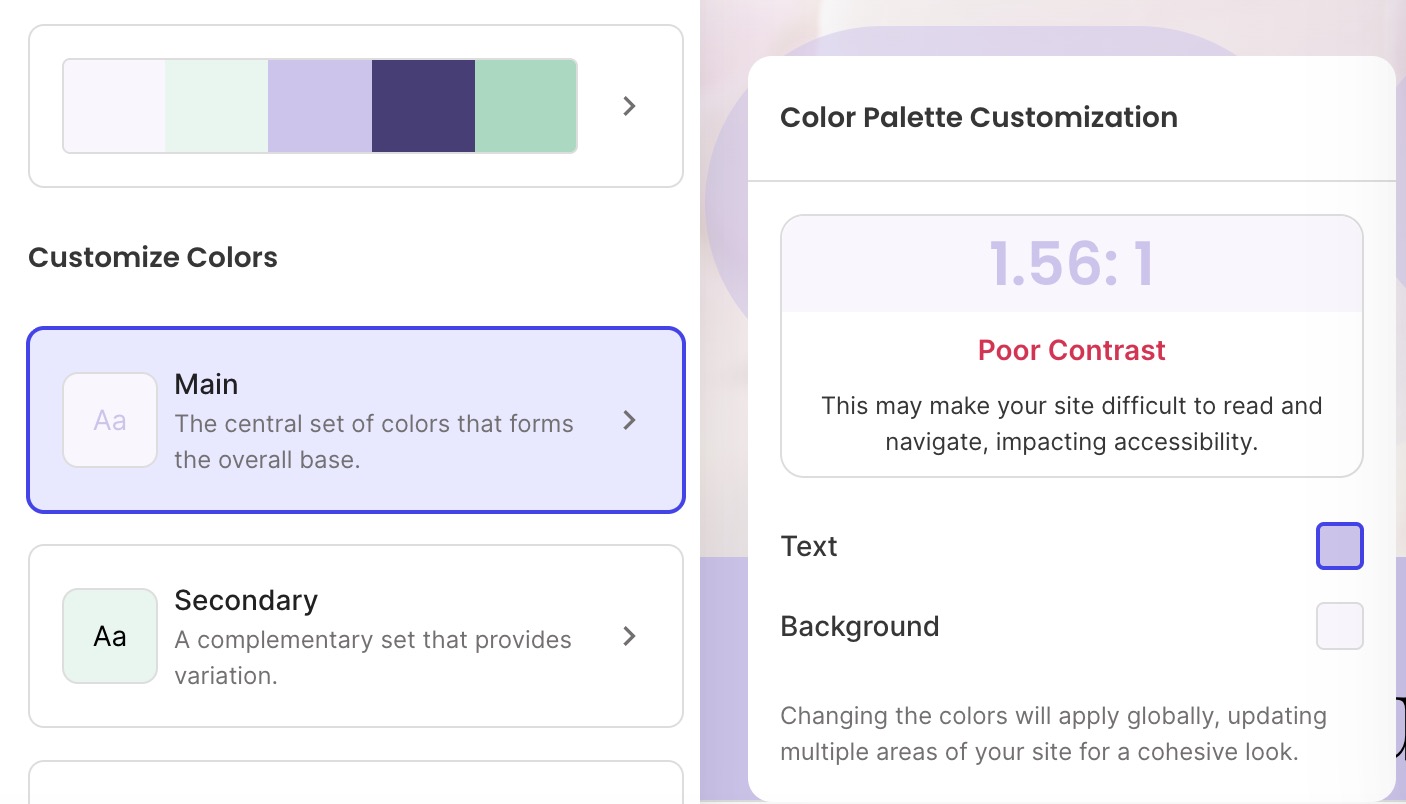
Contrast, or how much the text color stands out against its background. This is an important visual fix, especially because it matters when it comes to accessible web design. Indeed, the Web Content Accessibility Guidelines set 4.5:1 as the minimum contrast ratio between text and background for normal-size text. Below that, text starts to look faded or blurry. WebAIM’s Contrast Checker checks your exact colors in seconds; if you’re using the SiteGround Website Builder, its color palette tool flags low-contrast combinations as you pick them.
The fix: save the more distinctive choice for headings, keep body text on a font built for screens (most modern sans-serifs are) at 16px or larger, and confirm your contrast ratio before publishing.
Mistake 2: Ignoring your brand when picking a font
Choosing fonts that have nothing to do with your brand personality is the second-most common mistake. For example, a financial services site set in a bouncy, rounded display font undercuts the trust it’s trying to build before a visitor reads a word of copy.
The fix has two parts:
- Pick fonts, typically one for headings and one for body text, that match the tone set by your branding basics: serious and structured, or warm and approachable, for example. Mistakes 4 and 5 below cover how to make that pair work together.
- Stay consistent with that pairing everywhere your brand shows up: the website, the blog, and email, but also print, business cards, brochures, packaging, signage, anything with your name on it. A font that shifts between your homepage and your business card reads as two different brands, not one.
One exception: a logo is often set in its own font deliberately, since a logotype is meant to look distinctive rather than match body copy. That’s normal. The mistake is letting that logo font leak into headings, buttons, or body text elsewhere on the site.
Check out the use of fonts on SiteGround’s homepage: you can see one totally distinctive font for the logo, another for headers, and yet another for body copy — all applied consistently throughout the website.

Mistake 3: Using too many fonts
Stray fonts creeping into a site is the real problem, not simply having several: a logo font, a heading font, and a body font is a normal, deliberate system (see Mistake 2). What breaks it is drift: a random typeface from pasted-in Word content, a plugin’s default font, or a new page picking something different just this once. Once fonts outside your chosen set start showing up, the page stops feeling like one brand.
Notice how chaotic the copy below feels. There’s no consistency and your eye doesn’t know where to look. Overall, it looks sloppy and unprofessional.
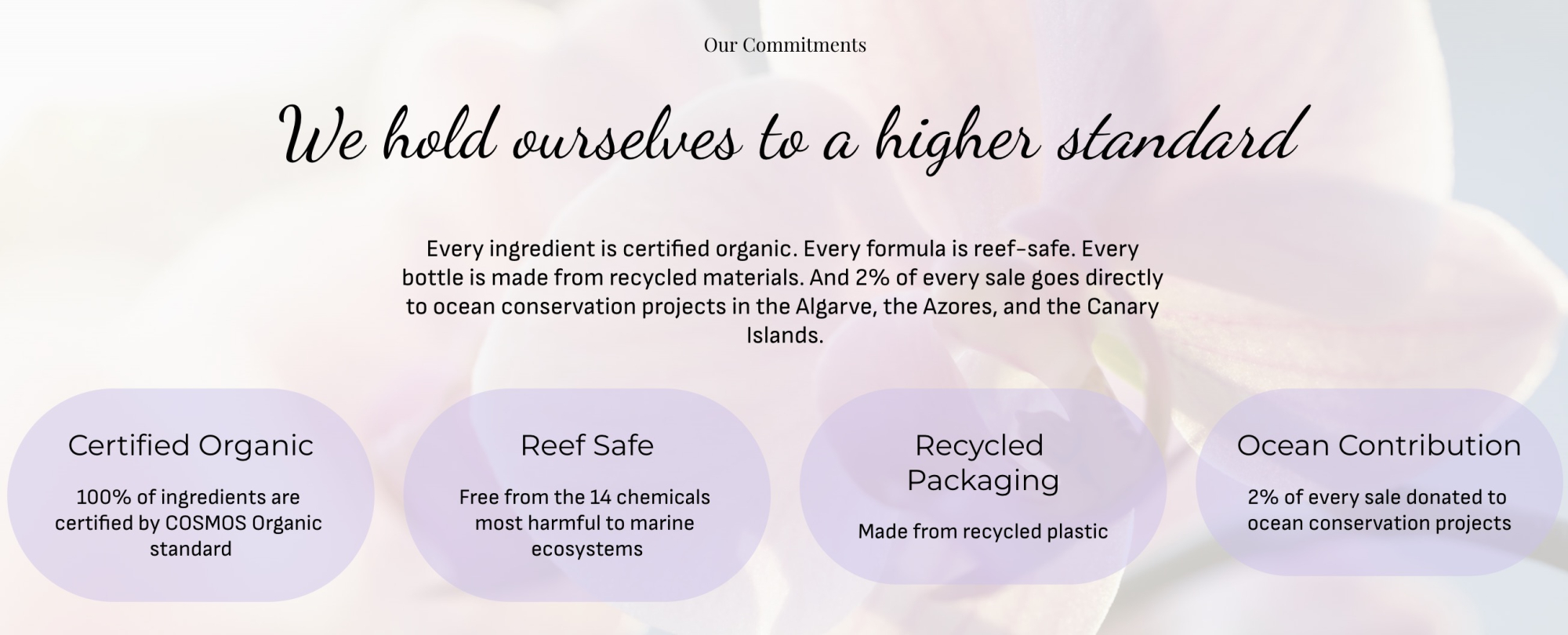
The fix: stick to the fonts you’ve already chosen, and only those. Before adding any new typeface, check whether it’s actually one of your existing brand fonts; if it isn’t, it doesn’t belong on the page.
Compare the below font usage with the above: it’s the same exact copy, but transmits something completely different. It feels intentional, thoughtfully designed, and enjoyable to look at.
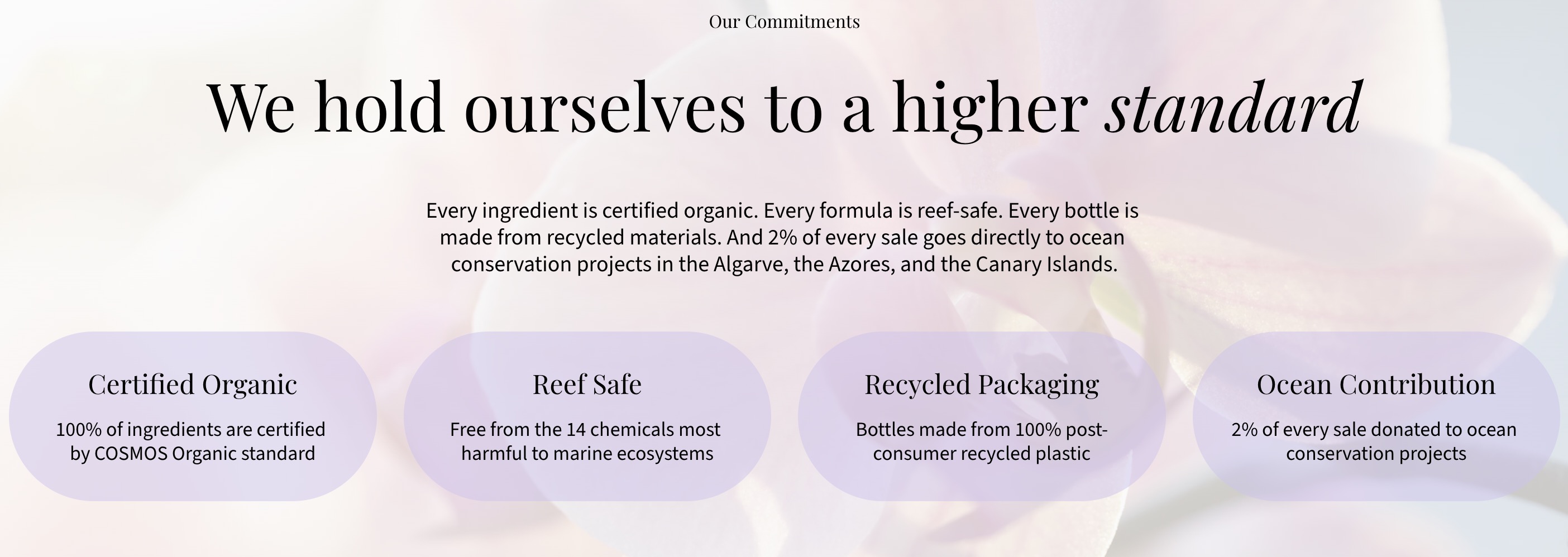
Mistake 4: Using the same font for headings and body text
Even sites that stick to their own chosen fonts can still make this mistake: using just one of them for everything, the logo, the headings, and the body text alike. A font chosen for how it looks as a bold logo mark or big headline rarely holds up as long-form body copy, and using it everywhere also flattens the page: headings and the logo stop standing out the way they should.
Observe how flat and unengaging the below text is, versus the fixed text further below. One feels like it came out of a plain text document; the other feels properly designed, with a visual hierarchy that draws the eye through the text.
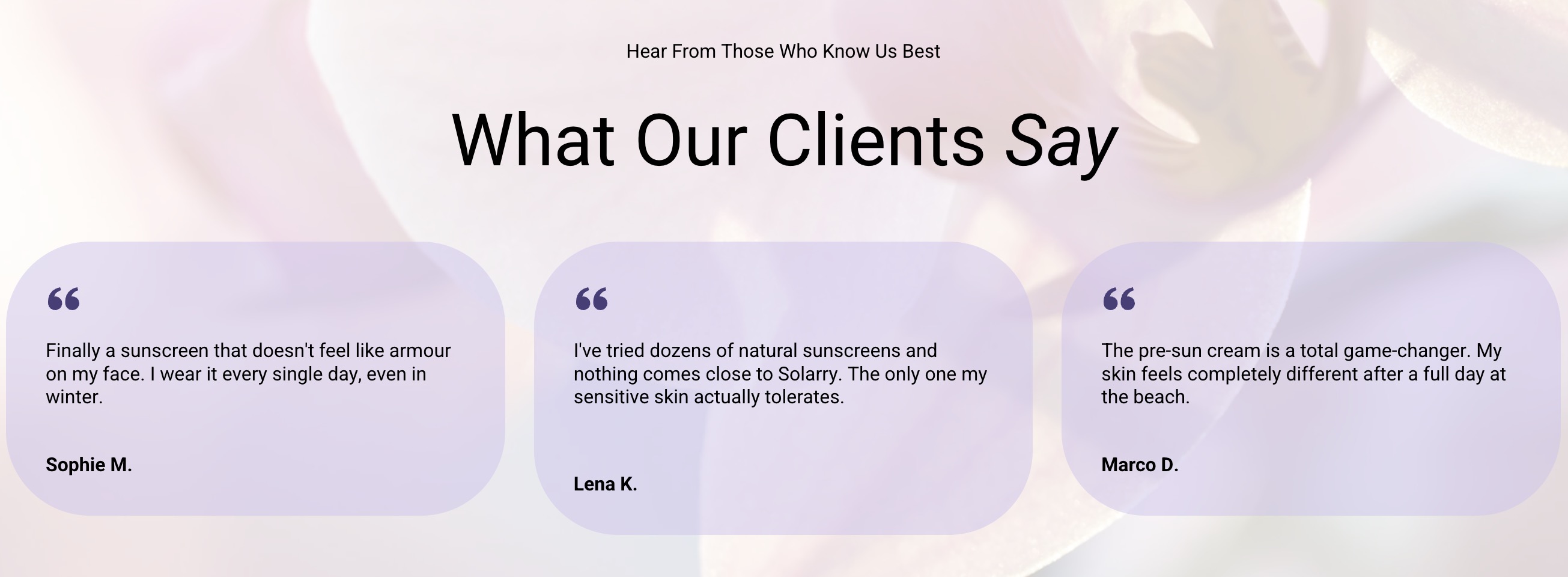
The fix: treat your brand fonts as at least two, not one: a heading font (which can also double as your logo font) and a dedicated body font built for readability at small sizes (see Mistake 1). If your brand currently has only one official font, that’s the gap to fix, and not a reason to keep using it for everything. Also consider playing with italics here and there to create movement and emphasis.
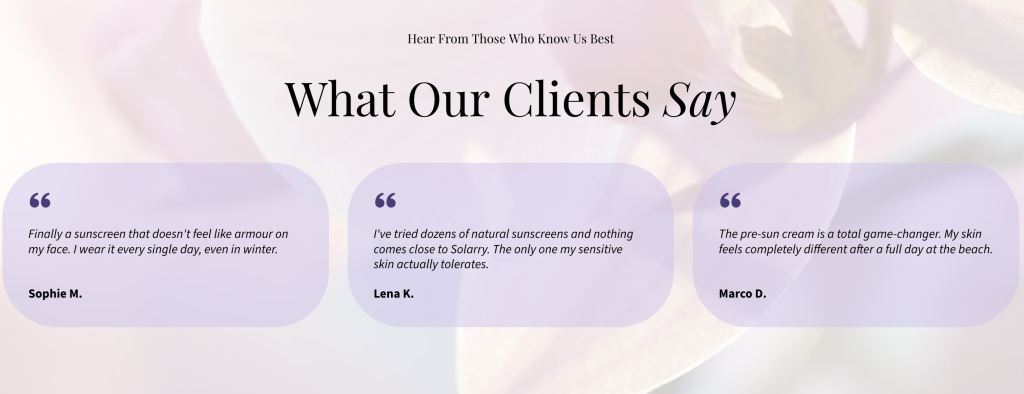
Worth noting: if you’re building in the SiteGround Website Builder, several of the above fixes are already handled for you. Font pairing recommendations come built in, so the combinations on offer were designed to work together, and the color palette tool flags low-contrast pairings before you publish. Prefer something of your own? Bring in a custom WOFF2 font instead, on top of the easy site-building, fast performance, and expert support the platform runs on.
Start building your website now>>
Mistake 5: Pairing fonts that clash
Font pairing goes wrong two ways. The more common: two fonts similar enough to blur together, like two sans-serifs with nearly identical letterforms.
The other: a vibe mismatch, where two fonts differ in shape but come from different personalities entirely, like a hand-drawn, whimsical heading font such as Amatic SC over a clean, buttoned-up body font like Nunito. The shapes contrast fine; the feel doesn’t, and the pairing reads like two different brands sharing a page.
The fix depends on which clash you’re dealing with:
- Shape clash. Use a serif headline over a sans-serif body (Playfair Display over Open Sans), or one family for both separated by weight: a bold 700 heading over a regular 400 body.
- Vibe clash. Shape contrast won’t fix this. Go back to the brand tone from Mistake 2 and pick two fonts that both belong to it.
Either way, the test is the same: does the pairing look like it was chosen on purpose?
Mistake 6: Uploading a font you don’t have web-embedding rights for
Downloading a free font from a random font site doesn’t automatically give you the right to embed it on a live website. Most free fonts are licensed for personal or desktop use only, and using one without a web-embedding license is a real legal risk that most upload tools won’t catch for you.
The fix: stick to fonts explicitly licensed for the web, such as those offered by your website building platform or any available via the full Google Fonts library, where the license already covers embedding at no extra cost.
Mistake 7: Never testing fonts on mobile
A web font that looks perfectly readable on a 27-inch monitor can turn into fine print on a 6-inch phone screen, and mobile already accounts for over half of global web traffic, per StatCounter. Three culprits cause most of the damage, all of which look fine on desktop but become hard to read on a phone:
- Light font weights. Thin strokes that read fine on a big monitor can turn faint or hard to see at phone scale.
- Tight letter spacing. The same tight spacing flagged in Mistake 1 gets worse on a narrower screen, with even less room for characters to breathe.
- Body text under 16px. The 16px minimum from Mistake 1 still applies, but layouts that scale text down for mobile can drop below it unnoticed.
Font legibility is one piece of mobile web design worth testing before launch, alongside layout and tap targets.
The fix: open your site on a computer screen as well as on your actual phone, not just a browser’s device-simulator view, before calling the font choice final.
The best fonts for web design to use instead
Now that the mistakes above are out of the way, here’s what to use instead. The picks below are screen-tested, load fast, and cover the range from clean sans-serifs to warmer serifs. Most are available free through Google Fonts, which now hosts more than 1,800 open-source font families, so cost is rarely a reason to settle for a generic default.
Best sans-serif fonts
Sans-serif web fonts are the safer default for body text on most small business sites, since their clean letterforms hold up at small sizes and across devices.
| Font | Best for |
| Montserrat | Bold, geometric headlines with wide language support; works as heading or body |
| Open Sans | High legibility body text across devices; works as heading or body |
| Source Sans 3 | Clean, neutral text for service and B2B sites; works as heading or body |
| Oswald | Condensed, high-impact headlines; heading use only |
Best serif fonts
Serif fonts bring warmth and a more editorial feel, and they pair well as headline fonts even on sites that use a sans-serif body font.
| Font | Best for |
| Lora | Warm, readable serif headlines for blogs and editorial sites; heading use only |
| Playfair Display | High-contrast display headlines for fashion and luxury brands; heading use only |
| PT Serif | A traditional serif that reads well as either a heading or body font |
Best free Google Fonts
Every font above, and thousands more, is available free through Google Fonts, under licenses that already cover web embedding, so there’s no separate rights check needed.
| Font | Best for |
| Roboto | A safe, neutral default for almost any small business site; heading or body |
| Nunito | Rounded, approachable text for friendly consumer brands; heading or body |
| Sofia Sans | Clean sans that scales from headline to body without switching families; heading or body |
| Exo | Geometric, techy headline font for startups and SaaS; heading use only |
Best font combinations
More pairings worth trying, drawn from the same set:
| Heading font | Body font | Why it works |
| Playfair Display | Open Sans | Classic serif-over-sans contrast, editorial and trustworthy |
| Oswald | Nunito | Condensed, high-impact heading against a rounded, friendly body |
| Montserrat | PT Serif | Geometric sans heading over a traditional serif body, confident but warm |
| Sofia Sans Condensed | Source Sans 3 | Condensed heading against a neutral, professional body |
Fonts are the easiest design mistake to undo
Compared to fixing broken navigation, rewriting weak copy, or redesigning a slow checkout flow, changing a font is a five-minute job with an outsized payoff. And none of the seven mistakes above require any sort of design training. Just swap a typeface, adjust a weight, or check a contrast ratio — all things a non-designer can do directly inside most website tools.
If you’re building your site in the SiteGround Website Builder, the best fonts for web design are already loaded and paired for you: every template ships with a tested combination, so getting fonts right the first time is the default. Want something more specific to your brand? Upload your own instead. Either way, one of your biggest design hurdles will be solved before you’ve written a single word of copy.
FAQs about the best fonts for web design
The 3-font rule says a website should use no more than three fonts total: usually one for headings, one for body text, and one accent font for buttons or callouts. Sticking to three or fewer keeps the visual hierarchy simple enough for most non-designers to maintain without a style guide.
There’s no single font that’s universally most pleasing; it’s context-dependent. What reads as elegant on a wedding invitation reads as illegible on a checkout button. For a website, the readability-first picks above are a safe bet.
The five main font styles are serif, sans-serif, slab serif, script, and monospace. Serif and sans-serif cover most body text and headings; slab, script, and monospace are typically used sparingly for accents, logos, or code blocks rather than running text.
If you want one safe answer, Open Sans or Source Sans 3 are the most versatile picks: free, fast-loading, and legible from a 4K monitor down to a phone screen. Either is a reasonable default until your brand calls for something more specific.